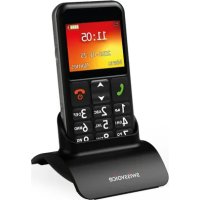
B24 - Mobile Phone SWISSVOICE - Free user manual and instructions
Find the device manual for free B24 SWISSVOICE in PDF.



| Product Type | 2G mobile phone |
| Brand | Swissvoice |
| Model | B24 |
| Dimensions | 119.5 x 58.5 x 13.1 mm |
| Display | 2.2-inch color screen |
| Talk time | Up to 5 hours |
| Standby time | Up to 7 days |
| Battery | Rechargeable, charging via micro USB or cradle |
| SIM card | Dual SIM (2G) |
| External memory | Micro SD up to 32 GB |
| Camera | Built-in, with LED flash |
| Connectivity | Bluetooth, 3.5mm jack, micro USB |
| Speaker | Built-in, hands-free |
| Talking keys | Yes, voice announcement of digits |
| SOS button | Yes, programmable |
| Photo directory | Up to 10 contacts with photo |
| Smart features | Smart ringtone, smart notifications, Smart Care |
| Flashlight | Built-in LED |
| Hearing aid compatibility | HAC (hearing aid compatible) |
| Security | Key lock, PIN/PUK code, password 1122 |
| Care | Clean with a dry, soft cloth; do not expose to moisture |
Frequently Asked Questions - B24 SWISSVOICE
User questions about B24 SWISSVOICE
0 question about this device. Answer the ones you know or ask your own.
Ask a new question about this device
Download the instructions for your Mobile Phone in PDF format for free! Find your manual B24 - SWISSVOICE and take your electronic device back in hand. On this page are published all the documents necessary for the use of your device. B24 by SWISSVOICE.
USER MANUAL B24 SWISSVOICE
Swissvoice B24 is a 2G mobile phone with 2.2 inches display.
B24 is a CARE PHONE with features :
- Loud speaker
- Talking dialing digits
- Easy charging base
- 10 Photo speed dial
- SOS button
- SwissVoice Care features
- Hearing Aid Compatible (M4/T4)
PHONE AND KEYS DESCRIPTION
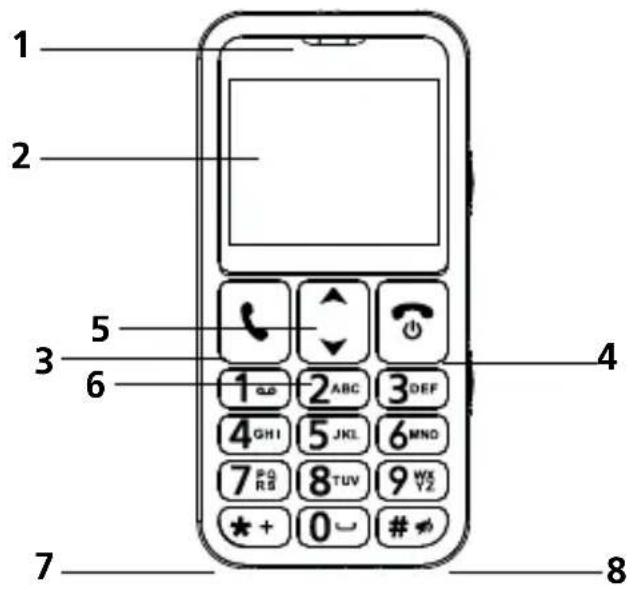
1-Earpiece
2 - Main display
3 - Answer / Call key
4 - End / Phonebook / Power key
5 - Shortcuts / Up key in menu / Volume Up
6 - Photo memory key / Volume Down
7 - Left selection key
8 - Right selection key /Silent On-Off
9 - Microphone
** The hot key for switching the keypad input between ABC, Abc, abc & 123. (Long Press # will activate / deactivate the Silent mode)
** 喜 + is the hot key for entering special symbol.
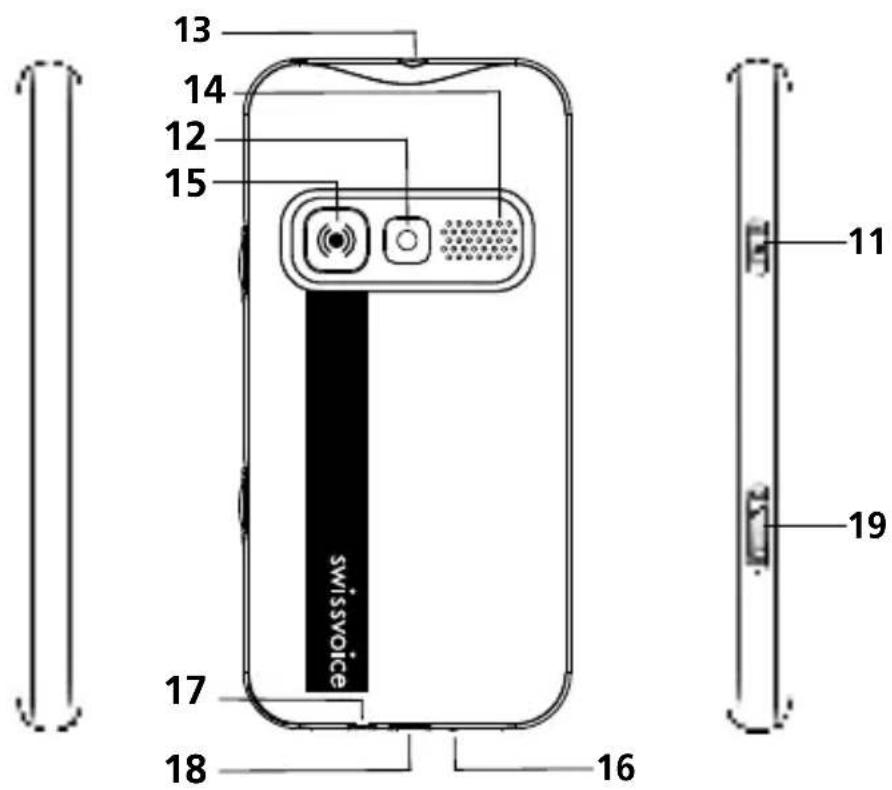
11 - Torch key
12 - Camera lens
13 - LED Flashlight
14 - Loudspeaker
15 - SOS key
16 - Charging contacts
17-Headset jack
18-Micro-USD socket
19 - Lock / Unlock slide key
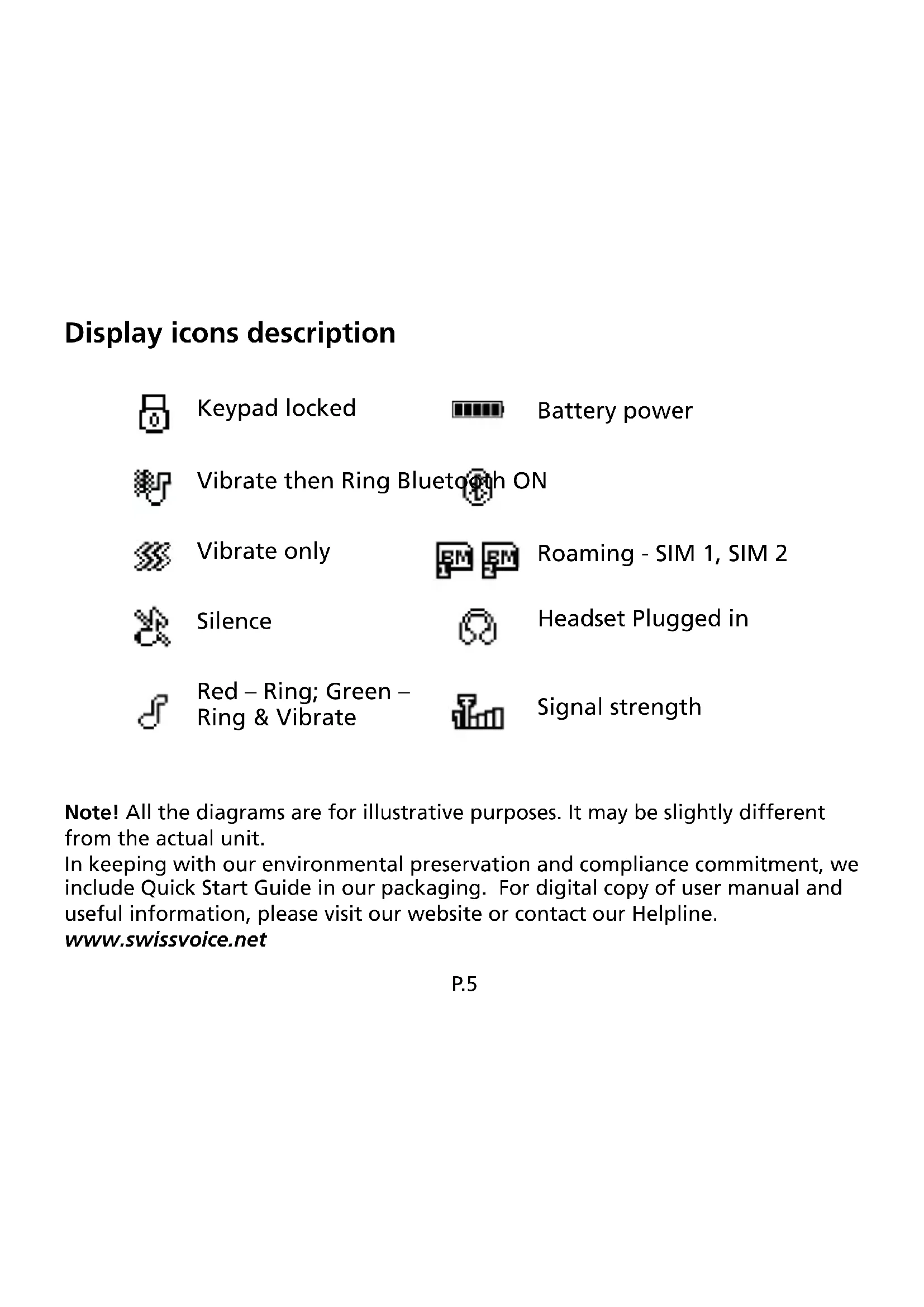
Display icons description

Keypad locked
Battery power

Vibrate then Ring Bluetooth ON

Vibrate only

Roaming - SIM 1, SIM 2

Silence

Headset Plugged in

Red - Ring; Green - Ring & Vibrate

Signal strength
Note! All the diagrams are for illustrative purposes. It may be slightly different from the actual unit.
In keeping with our environmental preservation and compliance commitment, we include Quick Start Guide in our packaging. For digital copy of user manual and useful information, please visit our website or contact our Helpline.
www.swissvoice.net
GET STARTED
Installing the SIM card, memory card and battery
ATTENTION:
- Risk of swallowing small objects! The SIM card & memory card can be removed. Small children can swallow them.
- Do not bend or scratch the SIM card. Prevent any contact with water, dirt or electrical charges.
-
Turn off the phone and disconnect the charger before removing the battery cover.
-
Remove the battery cover:
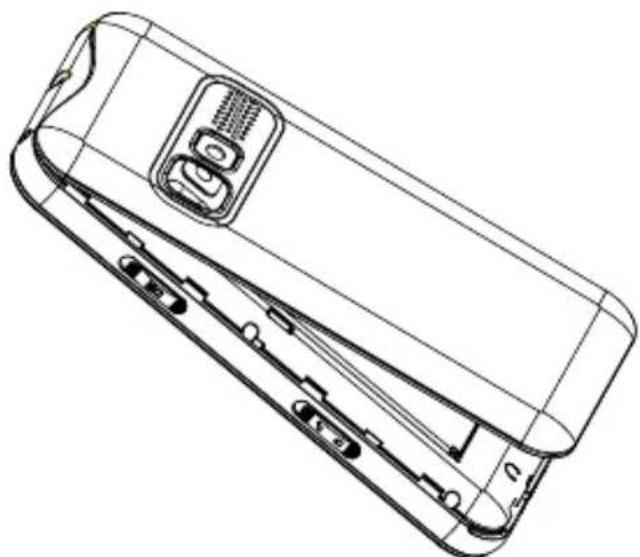
P.6
- Insert the SIM card (mandatory) and the microSD memory card (optional, not supplied):
Place the micro SIM card in the SIM card holder with the golden contacts facing down.
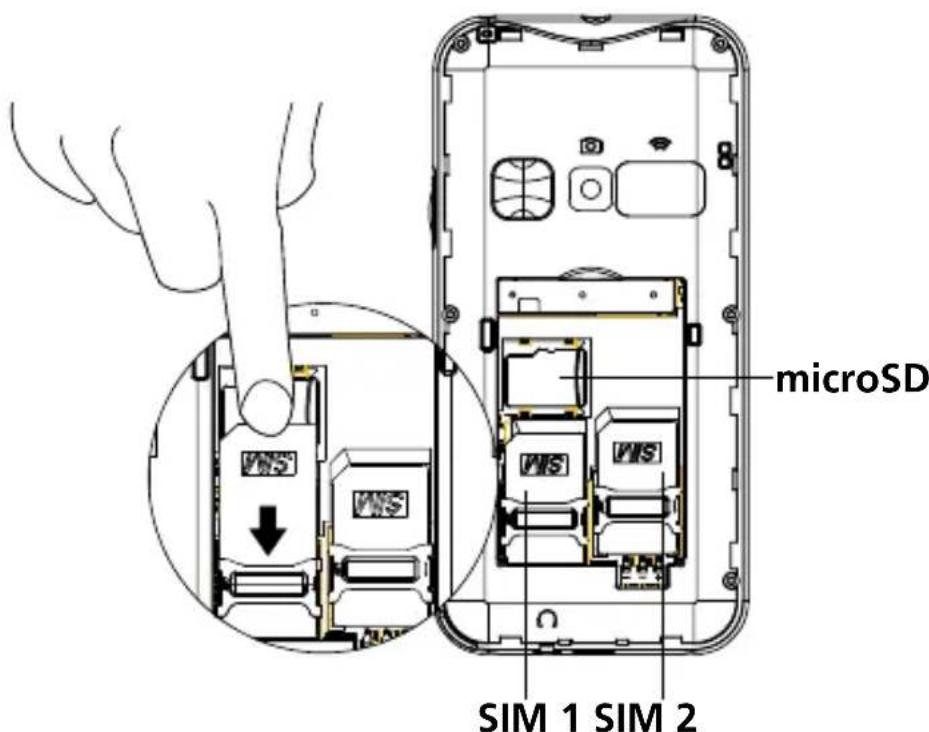
*To expand the internal storage memory, you can insert a microSD memory card (maximum capacity of 32 GB / not included).
- Insert the battery:
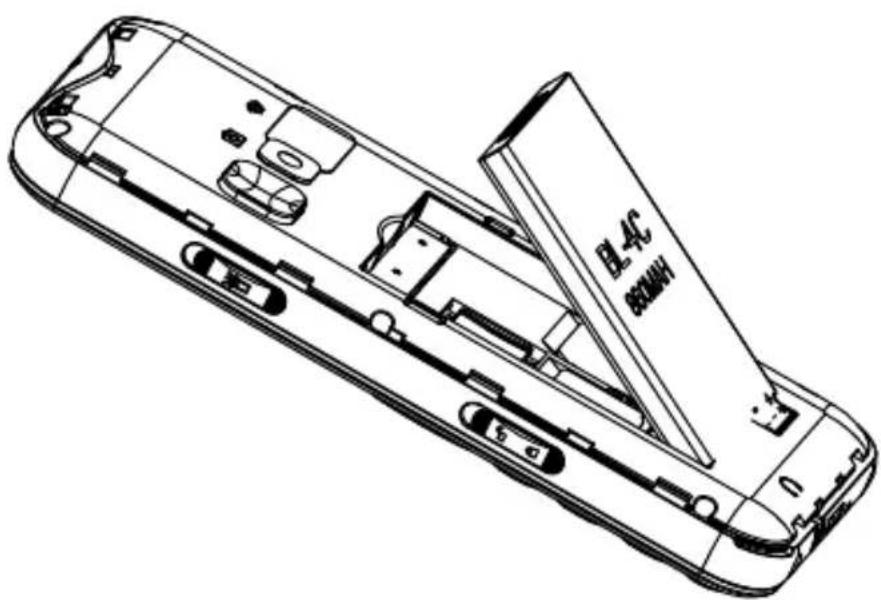
-
Insert the battery into battery compartment with golden contacts of the battery facing downwards to the right of the phone. Press lightly on the top end of the battery until it snaps into place.
-
Replace and secure the battery cover until it clicks all around into place.
Charge the phone
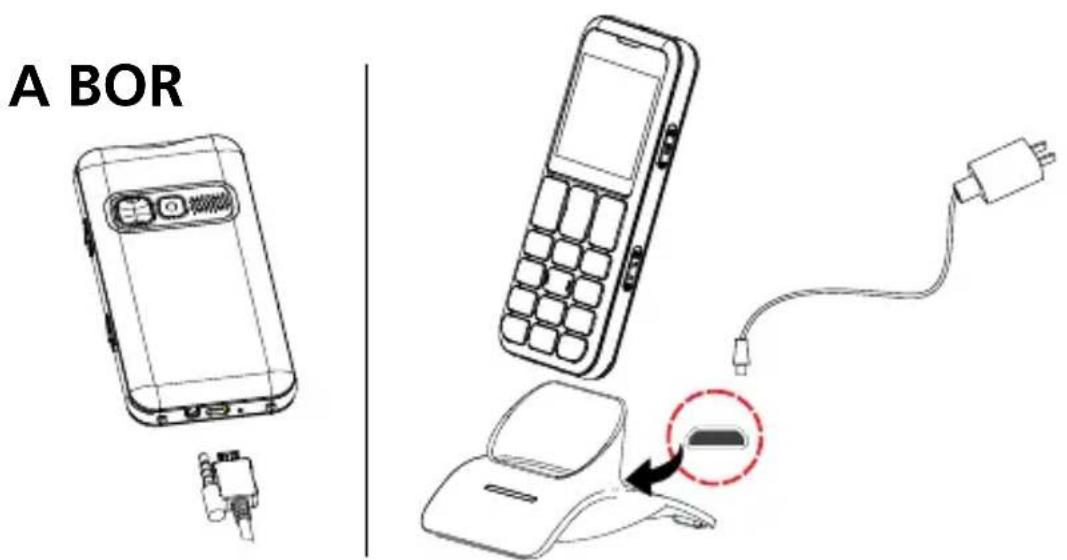
- Connect the USB plug of the adaptor to the charging socket (A) or place the device in the cradle (B).
ATTENTION:
- Only use battery, charger and accessories that have been approved for using with this particular model. Connecting other accessories may be dangerous and may invalidate the warranty.
- When charging the battery for the first time, it should be charged for at least 4 hours.
1st USE SETUP
- Long press to power up the phone
You may be requested to enter your Sim card PIN code (4 digits) provided by your operator.
-
to select the desired language >OK
-
Input HH:MM > > DD/MM/YYYY > Save
(Press Menu > △▽ > Settings > Phone settings > .... User can modify the detailed settings)
Make a Call
- Enter the number 0....9
- Press to dial
- Press to end the call
- To deactivate/activate the talking keypad: Menu / Settings /
Profiles / General / Customize / Keypad
Add Phonebook contact
First contact:
Press Names or Menu / Contacts / 2. Contacts / Options / Add new contact to SIM or phone / Name, input ABC .... / Number 012 ... / Options / Save
Call from phonebook
- Press > to select the 10 photo memories;
or
Press Names to select the number > press for Options - Press to end the call
Receive a Call
- Press to answer
- Press to end the call
Settings ( Ring tone & Volume )
Press Menu >Settings >Profiles >General >Customize......
User can select the Ring tone, Volume and others
- Security (password : 1122)
-Restore (password : 1122)
Call Logs
-
Press Menu > > Call Logs >......
-
Missed calls
- Dialled calls
- Received calls
-
Delete call history
-
Press to select the desired number
- Press to dial out and other options
Write/Send Messages (SMS)
Press Menu > △ > Messaging > Write message
- Input the text messages
*# is the hot key for switching the keypad input between ABC, Abc, abc & 123.
** 喜 + is the hot key for entering special symbol.
- Press Options > Send to > △ ▽ > Enter number or Add from Phonebook > enter the recipient phone number > OK > Options > Send
- Under the Messages menu, the following options can also be accessed
- Write message
- Inbox
- Drafts
4.Outbox - Sent messages
- Messages setting
Read new messages
- Press View > to select message
- Press View to read
- Press Options to Reply / Forward / Delete
Read old messages
- Press Menu
- Press OK
- Select Inbox
Take a Photo
- Press Menu > Multimedia > Camera > △▽ to take photo.... (Press Menu > △▽ > Multimedia > Images.... User can review the photos).
Multimedia
-
Press Menu > > Multimedia >....
-
Camera
- Images
- Music player
- Sound recorder
- FM radio
UNIQUE FEATURES HIGHLIGHT
SOS Assistance button
- Long press 3 seconds to dial out assistance number
-
Follow the voice message, the recipient of the assistance call can press 0 to accept the call. B24 will enter the handsfree mode automatically
-
If the call was not accepted, B24 will keep dialing out until the call is accepted
- To terminate, press and hold
SOS mode Setting :
-
Press Menu > > SOS Settings
-
SOS mode setting (activate/deactivate SOS button)
- SOS Number (5 Emergency numbers)
- SOS SMS content
-
SOS Alarm sound
-
Press OK to select
SOS number Setting :
- Press Menu > △▽ > SOS Settings > 2. SOS Number
- Select the numbers (5 Max)
ATTENTION:
- Remember to set the SOS numbers and inform all the recipients.
- To have SOS function working normally, the network service must be active.
Talking Dialing Digits
- While pressing the numeric buttons, B24 will announce the corresponding number.
(Press Menu > Settings > Profiles > General > Customize > Keypad.... User can select Talking dialing digits, Silence or Key tone.)
Photo Phonebook
- Press > to select the 10 photo memories ( maximum )
- Press for Options
Add Photo Phonebook contact
- Press > Edit...
SMART TOOLS
Intelligent Ringer
- In order not to miss a call, the ringer loudness will automatically set to maximum when the same phone number calls the second time within 3 minutes after the initial missed call.
- After the call is answered, the ringer loudness will be resumed to the user selected volume level.
(Press Menu > > i.Ringer..... User can switch this feature ON/OFF)
Smart Notification
SMS will be sent to the Helper ( Mobile phone number ) for MISSED CALL or BATTERY LOW of your phone.
- Helper mobile phone number can be set under the same Smart Tools menu.
(Press Menu >s.Notices.....)
Smart Care
- SMS will be sent to the Helper ( Mobile phone number ) for LACK of PHONE CALL ACTIVITIES or LACK of PHYSICAL ACTIVITIES ( key detect, charging detection ).
- Helper mobile phone number can be set under the same Smart Tools menu.
(Press Menu >Smart Care.....)
Helper
Remember to set Helper mobile phone number for SMS alert notification.
(Press Menu > SHelper.....)
Remark: Sending SMS may require additional cost!
Technical data of B24
Network bands (MHz) / Maximum power (dBm):
-
GSM 2G: 850/33, 900/33, 1800/30, 1900/30
-
Bluetooth: 2400 - 2480 / 10
SAR values: GSM 900 Head 0.097 W/kg / Body 0.425 W/kg
GSM 1800 Head 0.205 W/kg / Body 0.349 W/kg
Limb-Worn (max): 0.278 W/Kg
Battery Li-ion: 3.7V / 800mAh / 2.96Wh
Talk time: up to 5 hours
Standby time: up to 7 days
Dimensions: approx. 119.5 × 58.5 × 13.1 mm
USB connection: Micro USB, Headset connection: 3.5mm jack
PROBLEMS AND SOLUTIONS
| Problems Solutions | |
| The mobile phone cannot be switched on | No battery inserted; Battery is not charged. |
| The phone is requesting a PUK when I switch on the phone | If you do not have the PUK for your SIM card, please contact your service provider. |
| No signal quality is displayed No network | Network connection. The mobile phone is in a location where there is no network service, please move to a different location or contact your service provider |
| A message appears in the display for some functions, indicating execution/use is not possible | Some functions can only be used after the respective service has been applied for. Contact your service provider. |
| Screen frozen or no response when pressing keys | Remove the battery for 3 minutes and try again |
| No connection to the mobile telecommunication network | Contact your service provider |
| The battery cannot be charged or is empty within a short time | Battery is defective; Place the phone correctly in the charging unit or connect the charging unit properly; Clean the charging contact of the mobile phone and charging unit with a dry soft cloth; Charge the mobile phone for 4 hours. |
| The mobile phone has accidentally got wet | Switch off the phone immediately, remove the battery and allow the unit to dry completely before powering it on again. |
TIPS ON THE BATTERY
- Only use batteries, cables and charging unit approved by the manufacturer, otherwise the battery could be damaged.
- Do not short circuit the battery. Always leave the battery in the phone to avoid accidentally short circuiting the battery contacts.
- Keep the battery contacts clean and free of dirt.
- The battery can be charged/discharged hundreds of times but its service life is limited. Replace the battery when the battery power has decreased noticeably.
NETWORK SERVICES AND COSTS
B24 is designed for use when connected to a mobile phone network. Using network services and SMS may result in traffic costs.
AREA OF USE
- Do not use the phone in prohibited areas.
- Switch the phone off without affecting nearby medical equipment (e.g. in hospitals).
- Do not use the phone in petrol stations or near fuels and chemicals.
SAFETY
- Prevent exposure to smoke, dust, vibration, chemicals, moisture, heat and direct sunlight.
- The phone is not waterproof, please keep it dry.
- Only use original accessories and battery. Never attempt to connect other products.
- Never attempt to connect incompatible products.
- Repairs to this device must be completed by qualified service personnel.
- Keep the phone and accessories out of the reach of children.
- The SIM card can be removed. Caution! Small children can swallow them.
-
The ringing tone is issued via the loudspeaker. Take an incoming call first and then hold the phone to your ear. This prevents any possible hearing damage.
-
Use approved handsfree equipment and appropriate holder while driving. It is essential to observe the applicable national laws and regulations.
- Always maintain a distance of at least 15cm to implanted heart pacemakers to prevent interference. Do not carry the phone in a chest pocket when switched on. Always hold the phone to the ear furthest away from the pacemaker during calls. Switch the phone off immediately if you notice or suspect any adverse effects. Consult your doctor if you have any question.
- This phone is hearing aid compatible. If you wear a hearing aid, please contact your doctor or the hearing aid manufacturer to inquire about any possible impairments through mobile communication equipment.
- Do not rely on the mobile phone as a safeguard for emergencies. For a variety of technical reasons, it is not possible to guarantee a reliable connection under all circumstances.
- Ensure access to the power adapter plug is not obstructed by furniture or such.
ENVIRONMENT
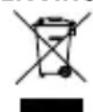
This symbol means that your inoperative electronic appliance must be collected separately and not mixed with the household waste. The European Union has implemented a specific collection and recycling system for which producers are responsible
Help us protect the environment in which we live!

DECLARATION OF CONFORMITY
Hereby, ATLINKS EUROPE declares that the radio equipment is in compliance with Directives 2014/53/EU. The full text of the EU declaration of conformity is available at the following internet address:
www.swissvoice.net
WARRANTY
Please read carefully the user guide included in this box. B24 is an approved equipment in accordance with the European regulations, attested by the CE marking. The product you just bought is a technological product, it must be handled with care.
Note: You have a legal warranty on this product in accordance with the regulations applicable to the sale of consumer goods in the country in which you made this purchase.
For any information regarding this legal warranty, please contact your dealer. Without prejudice to the legal guarantee of the products, ATLINKS guarantees that the product in this box conforms to its technical
specifications contained in the user guide included in the this box, and this during a warranty period, counted from the date of purchase of the new product, the date on your invoice or ticket checkout where is indicated the name of your reseller, and equal to: Twenty four (24) months for the telephone, excluding consumables, accessories and batteries. For any claim under this warranty during the warranty period, you must return the entire Product to your dealer, together with the proof of purchase, the invoice or receipt issued by your dealer, indicating the place of purchase and the serial number of the Product, following the appearance or discovery of the defect. ATLINKS undertakes to repair any defective item due to a defect in design, material or workmanship, at its expense, or to replace, at its expense, by an identical or at least equivalent element in terms of functionalities and performance. If the repair or replacement is impossible under normal commercial conditions, the Product will be refunded or replaced by a Product equivalent. Within the maximum limit allowed by the applicable law, the product or element replacement, which may be new or reconditioned, is warranted during a period of ninety (90) days from the date of repair or until the end date of the initial warranty period, whichever is the earlier greater than ninety (90) days, it being specified that any period of immobilization of the Product of at least seven (7) days will be added to the warranty period remaining to run. This warranty does not apply in the following cases:
- Installation or use not in accordance with the instructions in the guide of the user,
- Incorrect connection or abnormal use of the Product, especially with non-compatible accessories, as indicated in the user guide,
- Product opened, modified or replaced by means of non-approved parts, serial number deleted, illegible, damaged,
- Normal wear, including normal wear and tear on accessories, batteries and displays,
- Failure to comply with the technical and safety standards in force in the area geographical use,
- Product having suffered a shock or a fall,
- Product damaged by lightning, electrical surge, heat source or radiation, water damage, exposure to conditions of temperature, humidity or other excessive ambient conditions or any other cause external to the product,
- Negligence or faulty maintenance,
- An intervention, a modification or a repair carried out by a not authorized by ATLINKS. If the returned Product is not covered by the warranty, you will receive a quote from repair that will mention the cost of analysis and transportation costs that you will be charged if you want the Product returned to you. This guarantee is valid in the country in which you regularly purchased the Product, provided that the country is a member of the European Union. Subject to the legal provisions in force, all warranties other than described herein are expressly excluded.
TO THE MAXIMUM EXTENT PERMITTED BY APPLICABLE LAW,
A) THIS WARRANTY IS EXCLUSIVE TO ALL OTHER WARRANTYES EXPRESS OR IMPLIED, INCLUDING, BUT NOT LIMITED TO, WARRANTYES OF MERCHANTABILITY OR FITNESS FOR A PARTICULAR PURPOSE PARTICULAR; B) ATLINKS DISCLAIMS LIABILITY FOR LOSS OR DETERIORATION OF DATA, LOSS OF USE LOST TO WIN, LOSS OF CHANCE, DEREVENUES OR INCOME, LOSS OF OPERATION, DAMAGES INDIRECT, CONSEQUENTIAL, CONSEQUENTIAL OR INCIDENTAL;
(C)ATLINKS LIABILITY IS LIMITED TO THE VALUE OF PURCHASE OF PRODUCT EXCEPT HEAVIL OR
UNINTENTIONAL FAULT AND EXCEPT DAMAGE BODY
The Manufacturer reserves the right to modify the specifications of its products in order to make technical improvements or comply with new regulations.
FRANÇAIS
INTRODUCTION
- GSM 2G: 850/33, 900/33, 1800/30, 1900/30
-Bluetooth:2400-2483.5/2
Valeurs DAS - GSM 900 Mhz: Tête : 0,097 W/kg / Corps : 0,425 W/kg
DCS 1800: Tête: 0,205W/kg / Corps: 0,349 W/kg
Valeur Max. DAS membres: 0,278 W/Kg
Batterie - Li-Ion, 3,7 V, 800 mAh, 2.96 Wh
OU INTENTIONELLE, ET SAUF DOMMAGE CORPOREL.
GSM 2G: 850/33, 900/33, 1800/30, 1900/30
Bluetooth: 2400 - 2483.5 / 2
Valores SAR - GSM 900 Mhz -Cabeça: 0.097 W/kg - Corpo: 0.425 W/Kg,
GSM 1800 -Cabeça: 0.205W/Kg - Corpo: 0.349 W/kg
Membros (Max.):0.278 W/kg
GSM 2G: 850/33, 900/33, 1800/30, 1900/30
GSM 2G: 850/33, 900/33, 1800/30, 1900/30
© ATLINKS 2020 - Reproduction prohibited.
www.swissvoice.net
Swissvoice is a trademark of Swissvoice International SA.
© Copyright Swissvoice International SA 2020
Model:Swissvoice B24
A/W No.: 10002264 Rev.0
EN/FR/ES/PT/IT/DE/NL/PL
Printed in China





- PHONE AND KEYS DESCRIPTION
- DISPLAY ICONS DESCRIPTION
- GET STARTED
- ATTENTION
- CHARGE THE PHONE
- 1ST USE SETUP
- MAKE A CALL
- ADD PHONEBOOK CONTACT
- CALL FROM PHONEBOOK
- RECEIVE A CALL
- SETTINGS ( RING TONE & VOLUME )
- CALL LOGS
- WRITE/SEND MESSAGES (SMS)
- READ NEW MESSAGES
- READ OLD MESSAGES
- TAKE A PHOTO
- MULTIMEDIA
- UNIQUE FEATURES HIGHLIGHT
- SOS ASSISTANCE BUTTON
- SOS MODE SETTING
- SOS NUMBER SETTING
- TALKING DIALING DIGITS
- PHOTO PHONEBOOK
- ADD PHOTO PHONEBOOK CONTACT
- SMART TOOLS
- INTELLIGENT RINGER
- SMART NOTIFICATION
- SMART CARE
- HELPER
- TECHNICAL DATA OF B24
- TIPS ON THE BATTERY
- NETWORK SERVICES AND COSTS
- AREA OF USE
- SAFETY
- ENVIRONMENT
- DECLARATION OF CONFORMITY
- WARRANTY
- FRANÇAIS
- INTRODUCTION
Brand : SWISSVOICE
Model : B24
Category : Mobile Phone