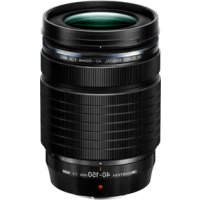
M.Zuiko Digital ED 40150mm F4.0 PRO - Lens OLYMPUS - Free user manual and instructions
Find the device manual for free M.Zuiko Digital ED 40150mm F4.0 PRO OLYMPUS in PDF.



| Product Type | Zoom Lens |
| Brand | Olympus |
| Model | M.Zuiko Digital ED 40-150mm F4.0 PRO |
| Category | Lens |
| Focal Length | 40 mm to 150 mm (35mm equivalent: 80 mm to 300 mm) |
| Maximum Aperture | F4.0 |
| Angle of View | 30° to 8.2° |
| Optical Configuration | 9 groups, 15 lenses |
| Focus Range | 0.7 m to ∞ (infinity) |
| Aperture Control | F4.0 to F22 |
| Focus Adjustment | AF/MF switch |
| Dimensions (Diameter × Length) | ∅ 68.9 mm × 99.4 mm |
| Weight | 382 g (without hood or cap) |
| Filter Size | ∅ 62 mm |
| Mount | Micro Four Thirds |
| Lens Hood | Bayonet (supplied) |
| Retraction | Yes, turn zoom ring to extend/retract |
| Care and Cleaning | Blower and lens cleaning paper |
| Safety | Do not look at the sun through the lens; do not leave without cap; do not point towards the sun |
| Spare Parts and Repairability | Contact Olympus authorized service center |
Frequently Asked Questions - M.Zuiko Digital ED 40150mm F4.0 PRO OLYMPUS
User questions about M.Zuiko Digital ED 40150mm F4.0 PRO OLYMPUS
0 question about this device. Answer the ones you know or ask your own.
Ask a new question about this device
Download the instructions for your Lens in PDF format for free! Find your manual M.Zuiko Digital ED 40150mm F4.0 PRO - OLYMPUS and take your electronic device back in hand. On this page are published all the documents necessary for the use of your device. M.Zuiko Digital ED 40150mm F4.0 PRO by OLYMPUS.
USER MANUAL M.Zuiko Digital ED 40150mm F4.0 PRO OLYMPUS
date of issue 2021.08
WD803800
© 2021 OM Digital Solutions Corporation
Printed in Vietnam
OM SYSTEM

MICRO FOURTHIRDS
M.ZUIKO DIGITAL
ED40-150mm F4.0 PRO
Model No.: IM029
04 - JP 取扱説明書
07 - EN INSTRUCTIONS
12 - FR MODE D'EMPLOI
15 - ES INSTRUCCIONES
18 - DE BEDIENUNGSANLEITUNG
21 - ВС ИНСТРУКЦИИ
24 - CSNÁVOD K POUŽITÍ
27 - DA BETJENINGSVEJLEDNING
30 - ELOAHΓIEΣ
33 - ET JUHISED
36 - FI KÄYTTÖOHJEET
39 - HRUPUTE
42 - HU HASZNÁLATI ÚTMUTATÓ
45 - ISTRUZIONI
48 - LT INSTRUKCIJA
51 - LV NORĂDĪJUMI
54 - NL AANWIJZINGEN
57 - NO INSTRUKSJONER
60 - PL INSTRUKCJA
63 - PT INSTRUÇÕES
66 - RO INSTRUCTIUNI
69 - RU ИНСТРУКЦИЯ
72 - SKNÁVOD NA POUŽITIE
75 - SL NAVODILA
78 - SV BRUKSANVISNING
81 - TRTALIMATLAR
84-CH 使用說明書
87-THค่าแนะนําการใช้งาน
JP 取扱説明書
The following importer description applies to products imported into
the EU directly by OM Digital Solutions GmbH only.
Delinstraße 10, Zürseis Hamburg, Germany
Manufactured by Oni Digital Solutions Corporation 49-3 Takakura-machi, Hachinji-shi, Tokyo 192-0033, Japan
The following importer description applies to products imported into
the UK directly by OMI Digital Solutions GmbH – UK Branch only
DM Digital Solutions GmbH – OK Branch
16 Upper Waburn Place, London, WC1H 04
主な仕様
マウント:マイクロフォーサーズマウント
https://cs.olympus-imaging.jp/en/support/img/digicamera/download/notice/notice.cfm
EN INSTRUCTIONS
Thank you for purchasing this product. To ensure your safety, please read this instruction manual before use, and keep it handy for future reference.
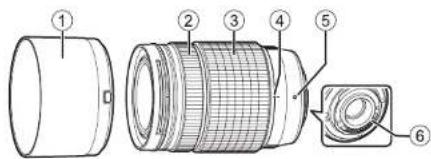
Name of parts
① Lens hood
④ Retraction index
② Focus ring
⑤ Mount index
③ Zoom ring
⑥ Electrical contacts
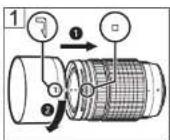
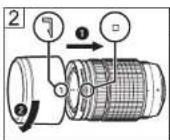
Attaching the hood (Fig. 1)/Storing the hood (Fig. 2)
To remove the hood, rotate it while pressing the release.
Notes on Shooting
- You cannot shoot when the lens is retracted. Before you start shooting, turn the zoom ring to extend the lens until the focal distance indicator shows a value between 40 mm and 150 mm.
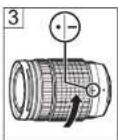
- To retract the lens, turn the zoom ring until the retraction index (④) is aligned with “-” (Fig. ③).
- Edges of pictures may be cut off if more than one filter is used or if a thick filter is used.
- When using a flash, flash light may be blocked by the lens body, lens hood, etc.
- Do not touch electric contacts on cameras.
Main Specifications
Mount : Micro Four Thirds mount
Focal distance : 40 mm – 150 mm (equivalent to 80 mm – 300 mm on a 35 mm camera)
Max. aperture : F4.0
Image angle : 30^ - 8.2^
Lens configuration : 9 groups, 15 lenses
Iris control : F4.0 to F22
Shooting range : 0.7 m (27.6 in.) to ∞ (infinite)
Focus adjustment : AF/MF switching
Dimensions : ∅ 68.9 mm/2.7 in.
(maximum diameter) ×
99.4 mm/3.9 in. (length)
Weight : 382 g (13.5 oz.)
(excluding hood and cap)
Filter size : ∅ 62 mm
Lenshood: Bayonet
* Specifications are subject to change without any notice or obligation on the part of the manufacturer.
Maintenance
Blow dust off the lens with a commercially available blower. For the lens, wipe gently with a lens cleaning paper.
Precautions: Be Sure to Read the Following

Warnings: Safety Precautions
- Do not view the sun through the lens. It may cause blindness or vision impairment.
- Do not leave the lens without the cap. If solar light is converged through the lens, a fire may result.
- Do not point the camera lens at the sun. Sunlight will converge in the lens and focus inside the camera, possibly causing a malfunction or fire.
Micro Four Thirds and the Micro Four Thirds logo are trademarks or registered trademarks of OM Digital Solutions Corporation.
FCC Notice
This equipment has been tested and found to comply with the limits for a Class B digital device, pursuant to part 15 of the FCC Rules. These limits are designed to provide reasonable protection against harmful interference in a residential installation. This equipment generates, uses and can radiate radio frequency energy and, if not installed and used in accordance with the instructions, may cause harmful interference to radio communications. However, there is no guarantee that interference will not occur in a particular installation. If this equipment does cause harmful interference to radio or television reception, which can be determined by turning the equipment off and on, the user is encouraged to try to correct the interference by one or more of the following measures:
- Reorient or relocate the receiving antenna.
- Increase the separation between the equipment and receiver.
- Connect the equipment into an outlet on a circuit different from that to which the receiver is connected.
- Consult the dealer or an experienced radio/TV technician for help.
- Only the USB cable supplied by the manufacturer should be used to connect the camera to USB enabled personal computers.
FCC Caution
Changes or modifications not expressly approved by the party responsible for
compliance could void the user's authority to operate the equipment.
For customers in North America, Central America, South America and the Caribbean
Declaration of Conformity
Model Number : IM029
Trade Name : OM Digital Solutions Corporation
Responsible Party : OM Digital Solutions Americas, Inc.
Address : 306 South new street, Suite 110 Bethlehem, PA 18015, USA
Telephone Number: 1-800-622-6372
Tested To Comply With FCC Standards
FOR HOME OR OFFICE USE
This device complies with part 15 of the FCC Rules. Operation is subject to the following two conditions:
(1) This device may not cause harmful interference, and
(2) this device must accept any interference received, including interference that may cause undesired operation.
CAN ICES-3(B)/NMB-3(B)
For customers in Europe (excluding England, Wales and Scotland)

This symbol [crossed-out wheeled bin WEEE Annex IV] indicates separate collection of waste electrical and electronic equipment in the EU countries.
Please do not throw the equipment into the domestic refuse.
Please use the return and collection systems available in your country for the disposal of this product.
The manufacturer will not be held liable for violations of local regulations arising from use of this product outside the country or region of purchase.
The software in this lens may include third party software. Any third party software is subject to the terms and conditions, imposed by the owners or licensors of that software, under which software is provided to you.
Those terms and other third party software notices, if any, may be found in the software notice PDF file stored at
https://cs.olympus-imaging.jp/en/support/img/digicamera/download/notice/notice.cfm
FR MODE D'EMPLOI
Monture : monture Micro Four Thirds
https://cs.olympus-imaging.jp/en/support/img/digicamera/download/notice/notice.cfm
ES INSTRUCCIONES
https://cs.olympus-imaging.jp/en/support/img/digicamera/download/notice/notice.cfm
Max. Blendenwert: F4,0
https://cs.olympus-imaging.jp/en/support/img/digicamera/download/notice/notice.cfm
CS NÁVOD K POUŽITÍ
https://cs.olympus-imaging.jp/en/support/img/digicamera/download/notice/notice.cfm
EL OΔΗΓΙΕΣ
https://cs.olympus-imaging.jp/en/support/img/digicamera/download/notice/notice.cfm
IT ISTRUZIONI
https://cs.olympus-imaging.jp/en/support/img/digicamera/download/notice/notice.cfm
SL NAVODILA
https://cs.olympus-imaging.jp/en/support/img/digicamera/download/notice/notice.cfm
TR TALİMATLAR
https://cs.olympus-imaging.jp/en/support/img/digicamera/download/notice/notice.cfm
MEMO
MEMO
MEMO