PMSUBmini2 - Subwoofer FOSTEX - Free user manual and instructions
Find the device manual for free PMSUBmini2 FOSTEX in PDF.



| Product type | Active subwoofer (subwoofer) with built-in amplifier |
| Brand and model | Fostex PM-SUBmini (PM-SUBmini2) |
| Speaker | 13 cm (5 inches) fiberglass cone, sealed type |
| Amplifier | Rated power 50 W, class unspecified |
| Impedance | 4 Ω |
| Audio inputs | 1 pair Cinch RCA (L/R) – line level |
| Frequency response | 40 Hz – 150 Hz |
| Adjustable crossover frequency | 60 Hz – 150 Hz (rotary knob) |
| Switched phase | 0° or 180° (switch) |
| Auto standby mode | Yes, switchable (ON/OFF); goes into standby after ~13 min without signal |
| Power supply | 100-240 V~, 50/60 Hz; power consumption 15 W (normal), <0.5 W (standby) |
| Dimensions (W x H x D) | 200 × 185 × 233 mm |
| Weight | Approximately 3.6 kg |
| Included accessories | Power cord (2 m), stereo RCA cable (1.5 m), instruction manual, safety information sheet |
| Maintenance and cleaning | Clean only with a dry cloth; do not use liquid products |
| Safety | Do not expose to rain or moisture; do not open the cabinet; disconnect during thunderstorms |
| Spare parts and repairability | No user-serviceable parts; refer all servicing to qualified personnel |
| General information | Indoor use, in an open space; compatible with Fostex PM0.3, PM0.1 and PC-1e speakers |
Frequently Asked Questions - PMSUBmini2 FOSTEX
User questions about PMSUBmini2 FOSTEX
0 question about this device. Answer the ones you know or ask your own.
Ask a new question about this device
Download the instructions for your Subwoofer in PDF format for free! Find your manual PMSUBmini2 - FOSTEX and take your electronic device back in hand. On this page are published all the documents necessary for the use of your device. PMSUBmini2 by FOSTEX.
USER MANUAL PMSUBmini2 FOSTEX
natural_image
Illustration of a black square Fostex audio speaker with concentric sound waves (no text or symbols on the device body)natural_image
Concentric circles diagram with numbered points (60, 150) and a central bar, no text or symbols present.FREQUENCY
PM0.1 と接続した場合
natural_image
Concentric circles diagram with radial lines and numbered segments (60, 150), no text or symbols present.FREQUENCY
This guarantee is valid only in Japan.
natural_image
Illustration of a black square Fostex audio speaker with concentric sound waves (no text or symbols on the device body)Thank you very much for purchasing a Fostex product. This manual provides instructions for basic use of the unit. Read this before using the unit for the first time.
WARNINGS and PRECAUTIONS
- CAUTION: TO PREVENT ELECTRIC SHOCK, MATCH WIDE BLADE OF PLUG TO WIDE SLOT, FULLY INSERT.
ATTENTION: POUR PREVENIR LES CHOCS ELECTRIQUES, APAR DE LA FENTE LARGE, FOND.
- WARNING: To reduce the risk of fire or electric shock, do not expose this apparatus to rain or moisture.
- CAUTION: Use of any controls or adjustments or performance of procedures other than those herein specified may result in hazardous radiation exposure.
- WARNING: Changes or modifications to this unit not expressly approved by the party responsible for compliance could void the user's authority to operate the equipment.
- WARNING: Do not place the unit on top of any soft, porous, or sensitive surfaces to avoid damaging the surface. Use a protective barrier between the unit and surface to protect the surface.
- WARNING: Use of this unit near fluorescent lighting may cause interference regarding use of the remote. If the unit is displaying erratic behavior move away from any fluorescent lighting, as it may be the cause.
- CAUTION: Danger of explosion if battery is incorrectly replaced. Replace only with the same or equivalent type.
- WARNING: Do not install this equipment in a confined space such as a book case or similar unit.
- WARNING: Mains plug is used as disconnect device and it should remain readily operable during intended use. In order to disconnect the apparatus from the mains completely, the mains plug should be disconnected from the mains socket outlet completely.
The lightning flash with arrowhead symbol, within an equilateral triangle, is intended to alert the user to the presence of uninsulated “dangerous voltage” within the product’s enclosure that may be of sufficient magnitude to constitute a risk of electric shock to persons.
IMPORTANT SAFETY INSTRUCTIONS
1) Read these instructions. Lisez ces instructions.
2) Keep these instructions. Conservez ces instructions.
3) Heed all warnings. Respectez tous les avertissements.
4) Follow all instructions. Suivez toutes les instructions.
8) Do not install near any heat sources such as radiators, heat registers, stoves, or other apparatus (including amplifiers) that produce heat.
9) Do not defeat the safety purpose of the polarized or grounding-type plug. A polarized plug has two blades with one wider than the other. A grounding type plug has two blades and a third grounding prong. The wide blade or the third prong are provided for your safety. If the provided plug does not fit into your outlet, consult an electrician for replacement of the obsolete outlet.
10) Protect the power cord from being walked on or pinched particularly at plugs, convenience receptacles, and the point where they exit from the apparatus.
11) Only use attachments/accessories specified by the manufacturer.
12) Use only with the cart, stand, tripod, bracket, or table specified by the manufacturer, or sold with the apparatus. When a cart is used, use caution when moving the cart/apparatus combination to avoid injury from tipover.

14) Refer all servicing to qualified service personnel. Servicing is required when the apparatus has been damaged in any way, such as power supply cord or plug is damaged, liquid has been spilled or objects have fallen into the apparatus, the apparatus has been exposed to rain or moisture, does not operate normally, or has been dropped.
17) Mains plug is used as disconnect device. It shall remain readily operable and should not be obstructed during intended use. To completely disconnect the apparatus from supply mains, the main plug of the apparatus shall be disconnected from the mains socket outlet completely.
This product, when installed as indicated in the instructions contained in this manual, meets FCC and ICES-003 requirements. Changes or modifications not expressly approved by Fostex Company for compliance could void the user's authority to operate the equipment. DO NOT MODIFY THIS PRODUCT. 2. IMPORTANT
In order to comply with FCC and ICES-003 requirements, use high quality shielded cables for connection to accessories and / or another products. If any cables are supplied with this product, they MUST be used. Follow all installation instructions. Failure to do so could void your FCC / ICES-003 authorization to use this product in the USA / Canada.
3. NOTE
This equipment has been tested and found to comply with the limits for a Class B digital device, pursuant to Part 15 of the FCC Rules. These limits are designed to provide reasonable protection against harmful interference in a residential installation. This equipment generates, uses and can radiate radio frequency energy and, if not installed and used in accordance with instructions, may cause harmful interference to radio communications. However, there is no guarantee that interference will not occur in a
particular installation. If this equipment does cause harmful interference to radio or television reception, which can be determined by turning the equipment off and on, the user is encouraged to correct the interference by one or more of the following measures:
- Reorient or relocate the receiving antenna.
- Increase the separation between the equipment and receiver.
- Connect the equipment into an outlet on a circuit different from that to which the receiver is connected.
-
Consult the dealer or an experienced radio/TV technician for help.
-
Compliance with Part 15 of FCC Rules and Canadian ICES-003.
This device complies with Part 15 of the FCC Rules.
Operation is subject to the following two conditions:
(1) This device may not cause harmful interference, and (2) this device must accept any interference received, including interference that many cause undesired operation.
This Class B digital apparatus complies with Canadian ICES-003.
WARNINGS and PRECAUTIONS 2
IMPORTANT SAFETY INSTRUCTIONS ....3
Introductions....5
Features of the PM-SUBmini....5
Accessories....5
Functions....6
Front 6
Back....7
Connections......8
Setting the sound to your taste 10
Setting flow....10
Adjust the volume balance ....11
Switch the phase....11
Adjust the crossover frequency....12
Setting examples when connecting to PM0.3 or PM0.1....13
Troubleshooting 14
Specifications 15

Introductions
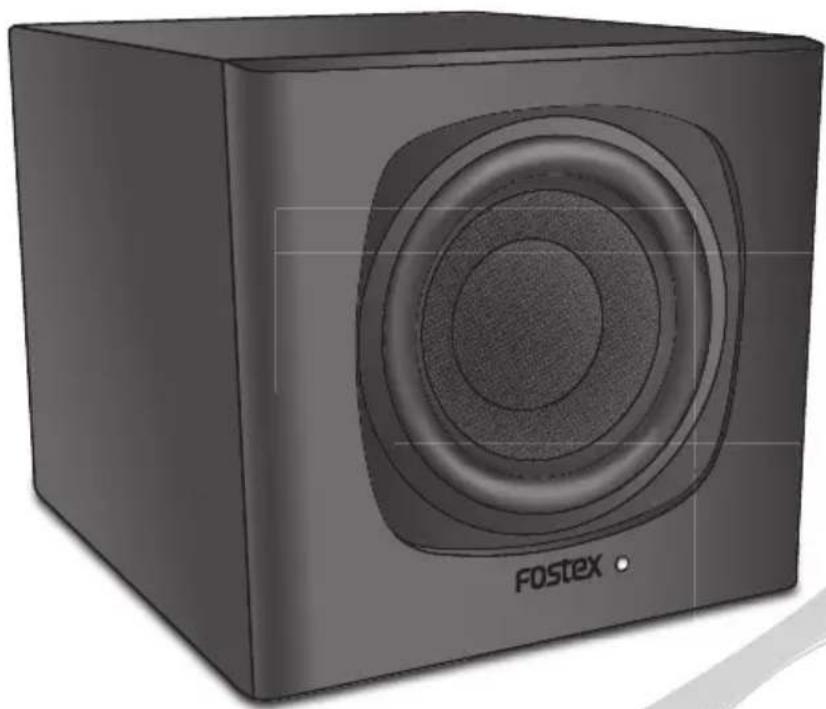
PM-SUBmini is an active subwoofer that allows you to enjoy a high-quality music environment in combination with Fostex active speaker systems such as PM0.3 or PM0.1.
■ Features of the PM-SUBmini
- 13 cm (5 inch) size woofer unit powered by a high-power amplifier (rated output: 50 W)
• Volume controller, cross over frequency adjuster (60 Hz to 150 Hz) and phase changer for tuning according to your environment - Stand-by function to reduce unnecessary power consumption (ON/OFF)
- Rigid and supple fiberglass diaphragm in the woofer unit
- Sealed type speaker to reproduce music sources faithfully and to reduce incidental sound
• Space-saving compact design
■ Accessories
Supplied accessories are listed below. Confirm that accessories are present after purchase.
• Power cord (2.0 m) × 1
• Stereo RCA pin cable (1.5 m) × 1
- Owner's Manual (this book) × 1
• Safety information sheet × 1
Front
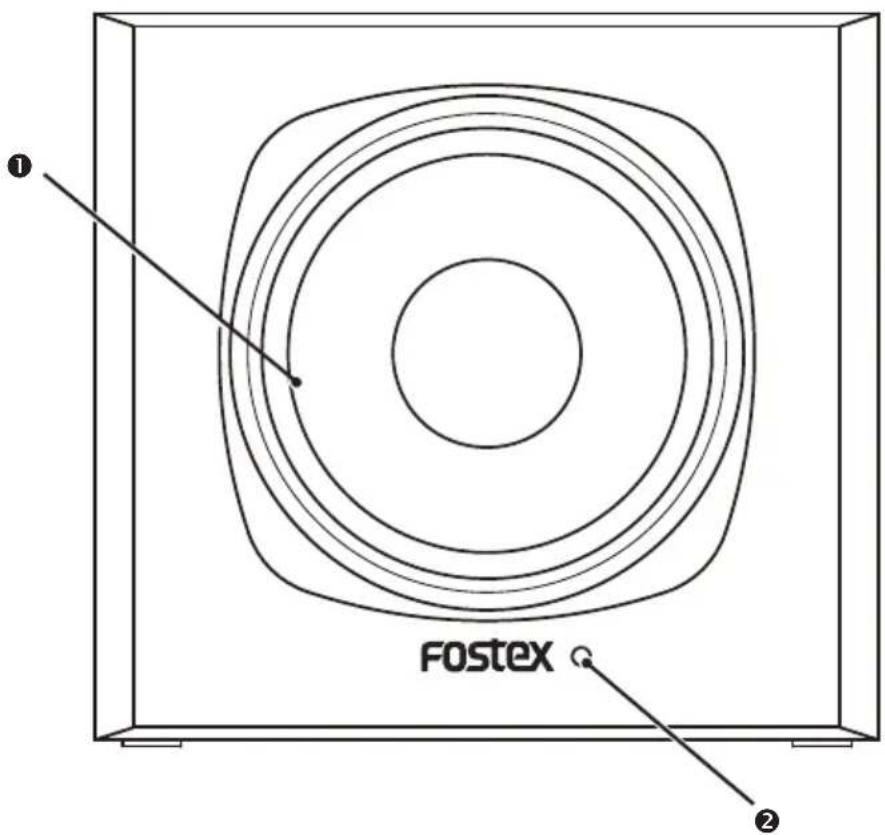
① Speaker
② Power indicator
Lights in blue when the power is on.
\* Auto standby function
If AUTO STANDBY MODE is on, the auto standby function is activated when input signal stops for about 13 minutes, and power consumption is reduced to below 0.5 W ( page 7). The power indicator lights in red while the function is working. The power indicator lights in blue and playback starts when the input signal is received again. Please be aware that the power indicator may remain lit for 5 to 6 seconds after the power is turned off. This is not a malfunction. This function may not work properly depending on the noise level of the input signal.
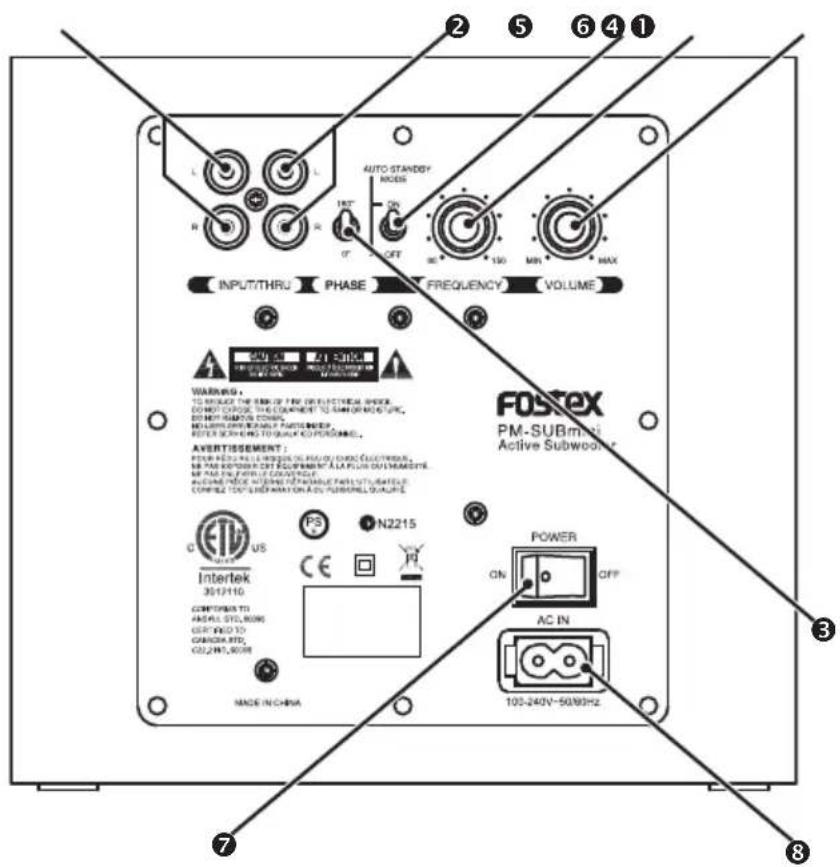
① [INPUT] terminal (L/R)
Connect to the analog output terminal of an audio player using an RCA pin cable.
② [THRU] terminal (L/R)
Connect to the analog input terminal of an active speaker using an RCA pin cable.
③ PHASE switch
Switches the subwoofer phase according to the setting environment. ( page 11)
④ AUTO STANDBY MODE switch
Switches the AUTO STANDBY MODE on/off. ON to activate the mode, OFF to deactivate the mode.
⑤ FREQUENCY knob
Adjusts the crossover frequency according to the connected speakers. (⇒ page 12)
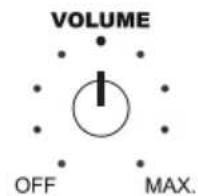
⑥ VOLUME knob
Adjusts the volume.
⑦ POWER switch
Switches the power on/off.
⑧ [AC IN] terminal
Connect the supplied power cable.
Connections
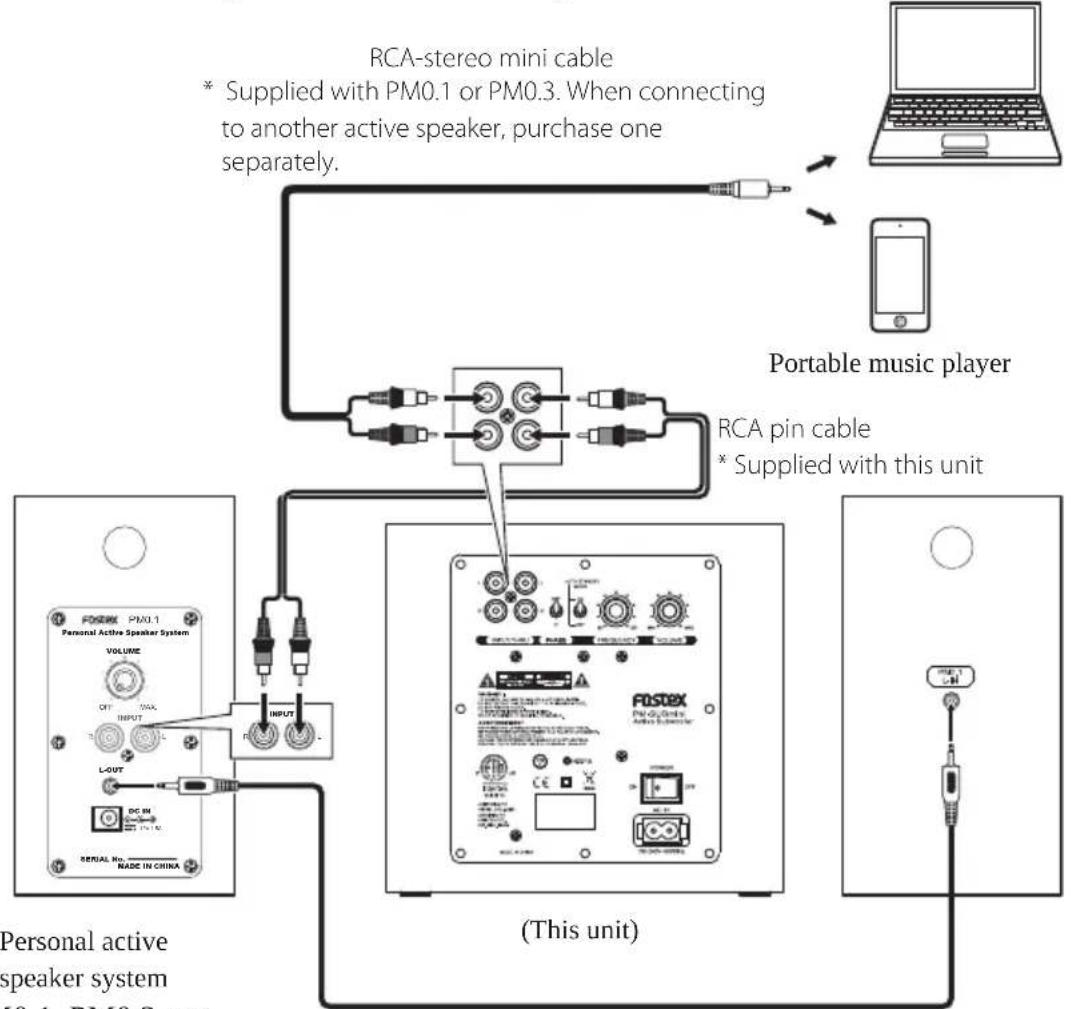
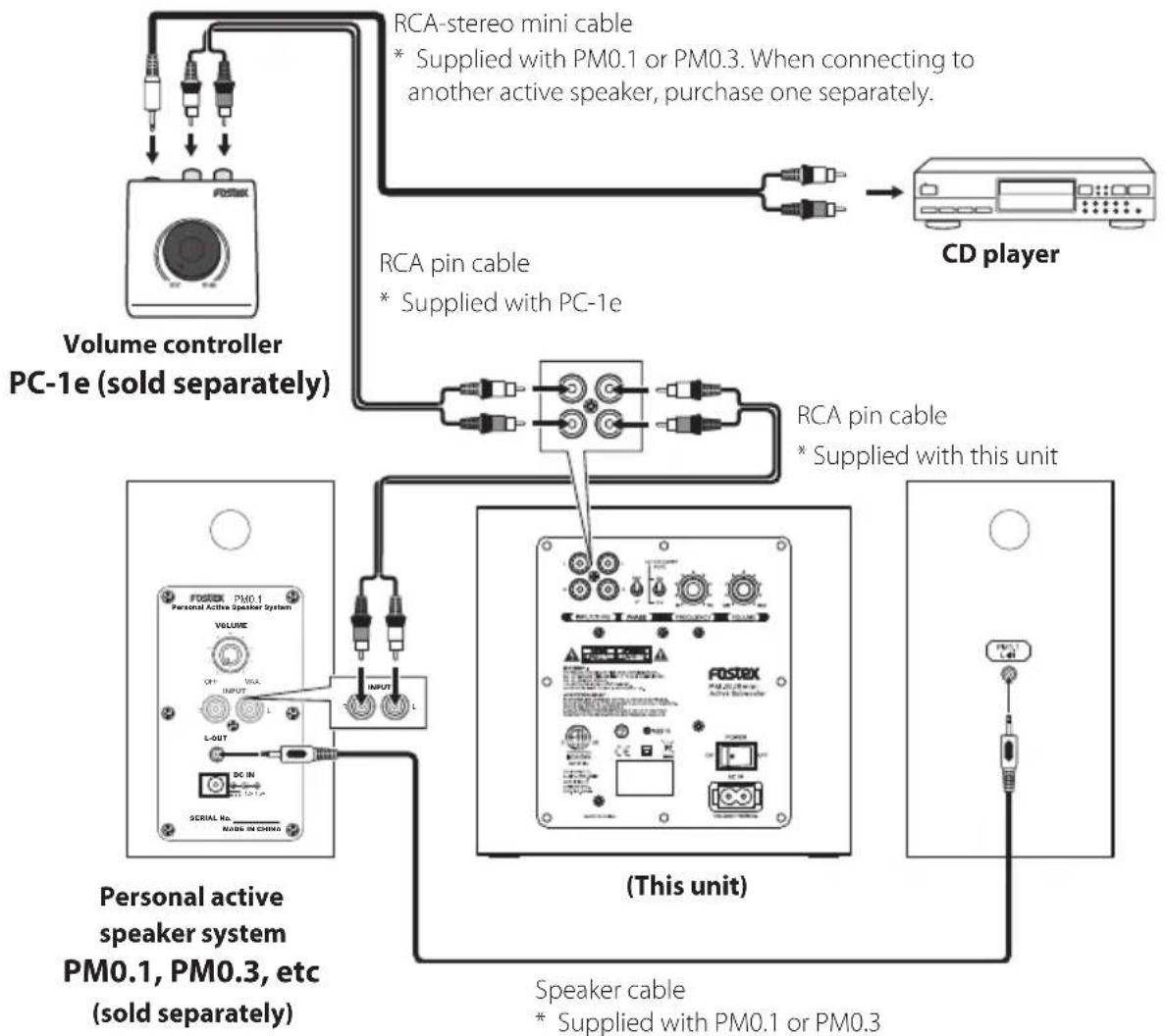
The unit achieves higher performance when connecting to Fostex personal active speaker system PM0.3, PM0.1 or hand operated volume controller PC-1e.
The following are the examples of the connections. Connect your products according to your environment.
Note
• The power must be off when you make connections.
• The volume of each product must be set to the minimum when powering on after the connection.
(Connection example)
When connecting the music source directly
flowchart
graph TD
    A["Personal active speaker system"] --> B["FORSTEX PM0.1"]
    B --> C["VOLUME"]
    C --> D["OUTPUT"]
    D --> E["L-OUT"]
    E --> F["DC IN"]
    F --> G["NOTED"]
    G --> H["SENIAL NO. MADE IN CHINA"]
    H --> I["INPUT"]
    I --> J["RCA stereo mini cable * Supplied with PM0.1 or PM0.3. When connecting to another active speaker, purchase one separately."]
    J --> K["RCA pin cable * Supplied with this unit"]
    K --> L["Portable music player"]
    L --> M["Laptop"]
Speaker cable
* Supplied with PM0.1 or PM0.3
(Connection example)
When using PC-1e
flowchart
graph TD
    A["Volume controller PC-1e (sold separately)"] --> B["RCA-stereo mini cable"]
    B --> C["CD player"]
    A --> D["RCA pin cable"]
    D --> E["Personal active speaker system PM0.1, PM0.3, etc (sold separately)"]
    A --> F["RCA pin cable"]
    F --> G["CD player"]
    A --> H["(This unit)"]
    H --> I["Speaker cable"]
    I --> J["CD player"]
Setting the sound to your taste
The performance of the audio system including this unit varies depending on the set up position (such as the relative distance, the height of each speaker, etc), circumstances (such as the intensity of reverberated sound, level of the sound insulation, etc.) or listening position.
Setting up each product appropriately gives you better environment.
Using the FREQUENCY knob and PHASE switch on the back of the unit, and the volume controller of each device, let's create your own music space just for your taste and favorite music genre!
Setting flow
Step 1
Adjust the volume balance
(⇒ page 11)


Step 2
Switch the phase
(⇒ page 11)


Step 3
Adjust the crossover frequency
(⇒ page 12)
Adjust the balance of the volume between the subwoofer and other speakers.
(this unit)
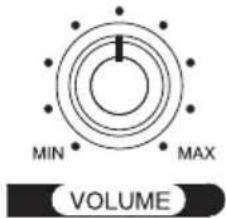
(PM0.3, 0.1, etc.)
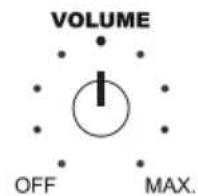
The sound of the subwoofer and other speakers may cancel each other out (reverse-phased).
Switch the phase and confirm the volume.
(the unit)

PHASE
Adjust the frequency range for the subwoofer.
(this unit)
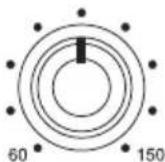
FREQUENCY
■ Adjust the volume balance
Adjust the volume balance between the speakers using the VOLUME knob on the back of the unit. If other speakers are equipped with a volume control function, utilise them together.
1 Lower the volume of the player (digital audio player, etc.)
The higher volume than you expect may be produced. Lower the volume in advance.
Note
- If your player is not equipped with a volume controller, lower the volume of the speakers.
2 Start playback of the player, and adjust the volume balance.
Adjust the volume so that the bass sound and treble sound are heard naturally.
■ Switch the phase
You can reverse the sound phase using the PHASE switch on the back of the unit.
When you use this unit with PM0.3 or PM0.1 (especially when installing them side by side), you can leave the PHASE switch at the 180^ position. However, depending on the set up position, the sound may be heard naturally when you change the switch to 0^ . Test both positions and select the better one.
■ Adjust the crossover frequency
You can adjust the intensity of the bass sound using the FREQUENCY knob on the back of the unit.
The graph below shows how the sound changes when you turn the knob right and left.
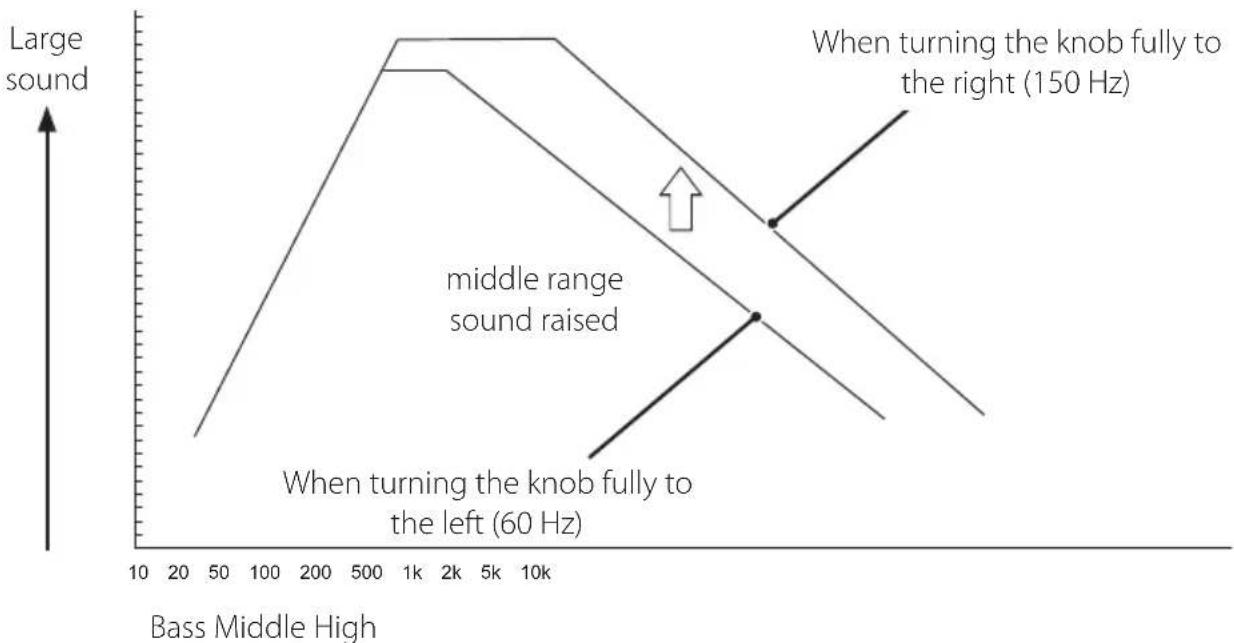
line
| Bass Middle High | Large sound | | ---------------- | ----------- | | 10 | Low | | 20 | Medium | | 50 | High | | 1k | Very High | | 2k | Very High | | 5k | Very High | | 10k | Very High | | 1k | Peak | | 2k | Peak | | 5k | Peak | | 10k | Peak | | 1k | Low | | 2k | Low | | 5k | Low | | 10k | Low |Crossover frequency and sound
Repeat steps 1 to 3 to gain the desirable playback sound.
■ Setting examples when connecting to PM0.3 or PM0.1
When you connect this unit to PM0.3 or PM0.1, we recommend to set the crossover frequency as follows before starting the detailed setting.
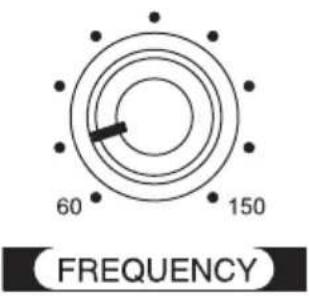
When connecting to PM0.3
Set the FREQUENCY knob on the back of the unit to the second mark from the left.
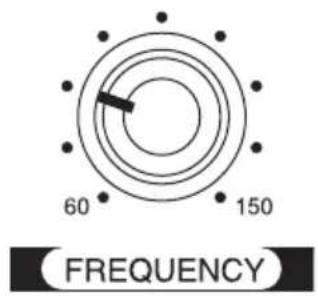
When connecting to PM0.1
Set the FREQUENCY knob on the back of the unit to the third mark from the left.
Also, we recommend to adjust the volume as follows.
(The setting that speakers are balanced when installed side by side in a silent room.)
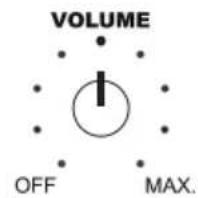
Set the VOLUME knob of PM0.3 or PM0.1 to the top mark.
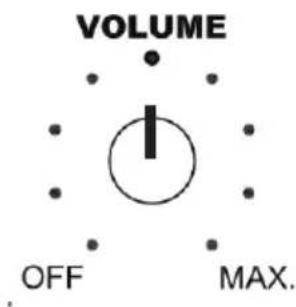
Set the VOLUME knob on the back of the unit to the forth mark from the left.
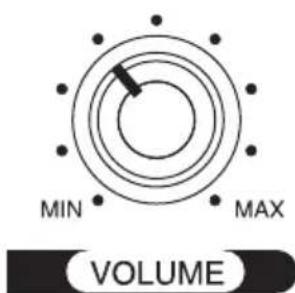
The settings above are for reference. Adjust each setting by your taste.
Troubleshooting
Common problems and solutions are listed below.
| ProblemSolutions | |
| There is no sound • Confirm that the product is connected properly. (⇒ page 8)• Confirm the volume settings of the player and the unit. (⇒ page 11) | |
| Bass sound is weak | • Confirm the volume settings of the player and the unit. (⇒ page 11)• Change the PHASE switch's position.(⇒ page 11) |
Specifications
| Speaker type Sealed type | |
| Impedance Woofer: 4 Ω | |
| Amplifier maximum output Woofer: 50 W | |
| Input RCA pin jack × 1 | Maximum input level: +15 dBVInput impedance: 10 kΩ |
| Crossover adjustment range 60 Hz to 150 Hz | |
| Frequency response 40 Hz to 150 Hz | |
| S/N ratio 80 dB | |
| External dimensions (mm) 200 (W) × 185 (H) × 233 (D) | |
| Weight about 3.6 kg | |
| Power consumption During normal use: about 15 WDuring standby mode: 0.5 W or less | |
Declaration of EC Directive
This equipment is compatible with the EMC Directive (2004/108/EC) - Directive on approximation of member nation's ordinance concerning the electromagnetic compatibility and with the Low Voltage Directive (73/23/EEC) - Directive on approximation of member nation's ordinance concerning electric equipment designed to be used within the specified voltage range.
The Affect of Immunity on This Equipment
The affect of the European Specification EN61000-6-1 (coexistence of electromagnetic waves - common immunity specification) on this equipment are as shown below.
In the electrical fast transient/burst requirements, surge, conducted disturbances by radio-frequency fields, power frequency magnetic field, radiate electromagnetic field requirements and static electricity discharging environment, this could be affected by generation of noise in some cases.
FOSTEX DISTRIBUTORS LIST IN EUROPE
* Including non-EU countries (as of Jan. 2014)
Austria
NAME: Mega Audio GmbH
ADD: Stromberger Str. 32, 55411 Bingen, Germany
TEL: (+49) 6721-94330, FAX: (+49) 6721-32046
Email: info@megaaudio.de
Web Site: http://www.meqaaudio.de
Belgium
NAME: XLR sprl/byba
ADD: Pierre Strauwenstraat 24, 1020 Brussels, Belgium
TEL: (+32) 2 520 0827, FAX: (+32) 2 521 1977
Email: info@xlrpro.be
Web Site: http://www.xlrpro.be
Czecho
NAME: Praha Music Center spol s.r.o.
ADD: Ocelarska 937/39, Praha 9, 190 00, Czecho
TEL: (+420) 226-011-111, FAX: (+420) 226-011-112
Email: info@pmc.cz
Web Site: http://www.pmc.cz
Denmark
NAME: SC Sound A/S
ADD: Dalgas Alle 15, DK-6600 Vejen, Denmark
TEL: (+45) 4399 8877, FAX: (+45) 4399 8077
Email: mail@sc-sound.dk
Web Site: http://www.sc-sound.dk
Finland
NAME: Noretron Oy Audio
ADD: Mankkaantie 32, FIN-02180 ESPOO, Finland
TEL: (+358) 10-525-8000, FAX: (+358) 10-525-8010
Web Site: http://www.noretron.fi
France
NAME: Sennheiser France
ADD: 128 bis, avenue Jean-Jaures, 94851 Ivry-sur-Seine Cedex, France
TEL: (+33) 1 4987 0300, FAX: (+33) 1 4987 0324
Web Site: http://www.sennheiser.fr
France
NAME: Selectronic (Speaker Components Only)
NAME: Hamy Sound (Headphones and USB DAC Only)
ADD: 28 Rue Edith Cavell, 92400 Courvevoie, France
TEL: (+33) 1 4788 4702, FAX: (+33) 1 4789 4872
Email: sav@hamysound.com
Web Site: http://www.hamysound.com
Germany
NAME: Mega Audio GmbH
ADD: Stromberger Str. 32, 55411 Bingen, Germany
TEL: (+49) 6721-94330, FAX: (+49) 6721-32046
Email: info@megaaudio.de
Web Site: http://www.megaaudio.de
Greece
NAME: Bon Studio S.A
ADD: 6 Zaimi Street, Exarchia, 106.83 Athens, Greece
TEL: (+30) 210-3809-605, 606, 607, 608
FAX: (+30) 210-3845-755, 210-3827-868
Email: bon@bonstudio.qr
Web Site: http://www.bonstudio.gr
Hungary
NAME: Mega Audio GmbH
ADD: Stromberger Str. 32, 55411 Bingen, Germany
TEL: (+49) 6721-94330, FAX: (+49) 6721-32046
Email: info@megaaudio.de
Web Site: http://www.megaaudio.de
Italy
NAME: Backline S.u.r.l.
Email: info@backline.it
Web Site: http://www.backline.it
Italy
NAME: Art of Music sas (Hi-Fi system & Speaker Components)
ADD: Via Dal Lino 23/2, 40134 Bologna, Italy
TEL: (+39) 347 2532215
Email: artofmusic@libero.it
Web Site: http://www.balloacoustics.it
The Netherlands
NAME: Iemke Roos Audio B.V.
ADD: Kuiperbergweg 20, 1101 AG Amsterdam, The Netherlands
TEL: (+31) 20-697-2121, FAX: (+31) 20-697-4201
Email: sales@iernkeroos.nl
Web Site: http://www.iemkeroos.nl
Norway
NAME: Siv. Ing. Benum AS
ADD: P. O. Box 145, Vinderen, 0319 Oslo, Norway
TEL: (+47) 2213 9900, FAX: (+47) 2214 8259
NAME: Mega Music Spolka z 0.0
ADD: Ul. Lesna 15, 81-876 Sopot, Poland
TEL: (+48) 58-551-18-82, FAX: (+48) 58-551-18-72
Email: pro@megamusic.pl
Web Site: http://pro.megamusic.pl
Portugal
NAME: Letusa (Pro Audio Products Only)
ADD: C/Laguna No.10, Poligono Industrial Urtinsa, 28923 Alcorcon,
Madrid, Spain
TEL: (+34) 91-4862800, FAX: (+34) 91-6414597
Email: info@letusa.es
Web Site: http://www.letusa.es
Russia
NAME: MS-MAX
ADD: Entrance 12B, Kutuzovsky prospekt, 30/32, 121165, Moscow,
Russia
TEL: (+7) 495-234-0006, FAX: (+7) 495-249-8034
Email: office@ms-max.ru
Web Site: http://www.ms-max.ru
Spain & Portugal
NAME: ATCONSUMER (Consumer, Hi-Fi system & Speaker Components)
ADD: PO BOX 15, 08340Vilassar de Mar, Barcelona, Spain
TEL: (+34) 609 288310
Email: info@atconsumer.es
Web Site: http://www.atconsumer.es
Spain
NAME: Letusa (Pro Audio Products Only)
ADD: C/Laquna No.10, Poligono Industrial Urtinsa, 28923 Alcorcon,
Madrid, Spain
TEL: (+34) 91-4862800, FAX: (+34) 91-6414597
Email: info@letusa.es
Web Site: http://www.letusa.es
Sweden
NAME: Benum Nordic AS
ADD: Aldermansvagen 17, 171 48 Solna, Sweden
TEL: (+46) 8 207710
Email: sweden@benum.com
Web Site: http://www.benum.se
Sweden, Norway, Finland & Denmark
NAME: Supersonic Svenska AB (Speaker Components Only)
ADD: PO BOX 42043, 126 12 Stockholm, Sweden
TEL: (+46) 8 744 4700
Email: johan@supersonic.se
Switzerland
NAME: Audio Bauer Pro AG
ADD: Bernerstrasse-Nord 182, CH-8064 Zurich, Switzerland
TEL: (+41) 44 432 3230, FAX: (+41) 44 432 6558
Email: info@audio-bauerpro.ch
Web Site: http://www.audio-bauerpro.ch
Turkey
NAME: Radikal Elektronik Ltd. Sti.
ADD: Ihlamur-Yildiz Cad, Kessaf Sok. 4/12 Besiktas, Istanbul 34353,
Turkey
TEL: (+90) (212) 259 7971, FAX: (+90) (212) 259 7993
Email: radikal@radikaltr.com
Web Site: http://www.radikaltr.com
UK
NAME: SCV London
ADD: Unit C1 Belcon Industrial Estate, Geddings Road, Hodesdon,
Hertfordshire, EN11 ONT, UK
TEL: (+44) 03 301 222500, FAX: (+44) 20-8418-0624
Email: fostex@scvlondon.co.uk
Web Site: http://www.scvlondon.co.uk
Ukraine
NAME: A & T Trade Petroshop
ADD: 29, Obolonskaya Str., Kiev, Ukraine 04071
TEL: (+380) 44-462-5358, FAX: (+380) 44-462-5092
Email: attrade@attrade.kiev.ua
Web Site: http://kiev.attrade.ru
natural_image
Black square Fostex audio speaker with concentric sound waves (no text or symbols on body)① Enceinte
② Prise [THRU] (L/R)
flowchart
graph TD
    A["FEDEX PM0.1 Personal Active Speaker System"] --> B["VOLUME"]
    B --> C["OUTPUT"]
    C --> D["L-OUT"]
    D --> E["DC IN"]
    E --> F["PROVATION"]
    F --> G["INPUT"]
    G --> H["FEDEX PM0.1"]
    H --> I["PROVATION"]
    I --> J["OUTPUT"]
    J --> K["FEDEX PM0.1"]
    K --> L["PROVATION"]
    L --> M["OUTPUT"]
    M --> N["FEDEX PM0.1"]
    N --> O["PROVATION"]
    O --> P["OUTPUT"]
    P --> Q["FEDEX PM0.1"]
    Q --> R["PROVATION"]
    R --> S["OUTPUT"]
    S --> T["FEDEX PM0.1"]
    T --> U["PROVATION"]
    U --> V["OUTPUT"]
    V --> W["FEDEX PM0.1"]
    W --> X["PROVATION"]
    X --> Y["OUTPUT"]
    Y --> Z["FEDEX PM0.1"]
    Z --> AA["PROVATION"]
    AA --> AB["OUTPUT"]
    AB --> AC["FEDEX PM0.1"]
    AC --> AD["PROVATION"]
    AD --> AE["OUTPUT"]
    AE --> AF["FEDEX PM0.1"]
    AF --> AG["PROVATION"]
    AG --> AH["OUTPUT"]
    AH --> AI["FEDEX PM0.1"]
    AI --> AJ["PROVATION"]
    AJ --> AK["OUTPUT"]
    AK --> AL["FEDEX PM0.1"]
    AL --> AM["PROVATION"]
    AM --> AN["OUTPUT"]
    AN --> AO["FEDEX PM0.1"]
    AO --> AP["PROVATION"]
    AP --> AQ["OUTPUT"]
    AQ --> AR["FEDEX PM0.1"]
    AR --> AS["PROVATION"]
    AS --> AT["OUTPUT"]
    AT --> AU["FEDEX PM0.1"]
    AU --> AV["PROVATION"]
    AV --> AW["OUTPUT"]
    AW --> AX["FEDEX PM0.1"]
    AX --> AY["PROVATION"]
    AY --> AZ["OUTPUT"]
    AZ --> BA["FEDEX PM0.1"]
    BA --> BB["PROVATION"]
    BB --> BC["OUTPUT"]
    BC --> BD["FEDEX PM0.1"]
    BD --> BE["PROVATION"]
    BE --> BF["OUTPUT"]
    BF --> BG["FEDEX PM0.1"]
    BG --> BH["PROVATION"]
    BH --> BI["OUTPUT"]
    BI --> BJ["FEDEX PM0.1"]
    BJ --> BK["PROVATION"]
    BK --> BL["OUTPUT"]
    BL --> BM["FEDEX PM0.1"]
    BM --> BN["PROVATION"]
    BN --> BO["OUTPUT"]
    BO --> BP["FEDEX PM0.1"]
    BP --> BQ["PROVATION"]
    BQ --> BR["OUTPUT"]
    BR --> BS["FEDEX PM0.1"]
    BS --> BT["PROVATION"]
    BT --> BU["OUTPUT"]
    BU --> BV["FEDEX PM0.1"]
    BV --> BW["PROVATION"]
    BW --> BX["OUTPUT"]
    BX --> BY["FEDEX PM0.1"]
    BY --> BZ["PROVATION"]
    BZ --> CA["OUTPUT"]
    CA --> CB["FEDEX PM0.1"]
    CB --> CC["PROVATION"]
    CC --> CD["OUTPUT"]
    CD --> CE["FEDEX PM0.1"]
    CE --> CF["PROVATION"]
    CF --> CG["OUTPUT"]
    CG --> CH["FEDEX PM0.1"]
(PM0.3, 0.1, etc.)
Email: info@megaaudio.de
Web Site: http://www.meqaaudio.de
Belgium
NAME: XLR sprl/bvba
ADD: Pierre Strauwenstraat 24, 1020 Brussels, Belgium
TEL: (+32) 2 520 0827, FAX: (+32) 2 521 1977
Email: info@xlrpro.be
Web Site: http://www.xlrpro.be
Czecho
NAME: Praha Music Center spol s.r.o.
ADD: Ocelarska 937/39, Praha 9, 190 00, Czecho
TEL: (+420) 226-011-111, FAX: (+420) 226-011-112
Email: info@pmc.cz
Web Site: http://www.pmc.cz
Denmark
NAME: SC Sound A/S
ADD: Dalgas Alle 15, DK-6600 Vejen, Denmark
TEL: (+45) 4399 8877, FAX: (+45) 4399 8077
Email: mail@sc-sound.dk
Web Site: http://www.sc-sound.dk
Finland
NAME: Noretron Oy Audio
ADD: Mankkaantie 32, FIN-02180 ESPOO, Finland
TEL: (+358) 10-525-8000, FAX: (+358) 10-525-8010
Web Site: http://www.noretron.fi
France
NAME: Sennheiser France
ADD: 128 bis, avenue Jean-Jaures, 94851 Ivry-sur-Seine Cedex, France
TEL: (+33) 149870300, FAX: (+33) 149870324
Web Site: http://www.sennheiser.fr
France
NAME: Selectronic (Speaker Components Only)
NAME: Hamy Sound (Headphones and USB DAC Only)
ADD: 28 Rue Edith Cavell, 92400 Courvevoie, France
TEL: (+33) 14788 4702, FAX: (+33) 14789 4872
Email: sav@hamysound.com
Web Site: http://www.hamysound.com
Germany
NAME: Mega Audio GmbH
ADD: Stromberger Str. 32, 55411 Bingen, Germany
TEL: (+49) 6721-94330, FAX: (+49) 6721-32046
Email: info@megaaudio.de
Web Site: http://www.megaaudio.de
Greece
NAME: Bon Studio S.A
ADD: 6 Zaimi Street, Exarchia, 106.83 Athens, Greece
TEL: (+30) 210-3809-605, 606, 607, 608
FAX: (+30) 210-3845-755, 210-3827-868
Email: bon@bonstudio.qr
Web Site: http://www.bonstudio.gr
Hungary
NAME: Mega Audio GmbH
ADD: Stromberger Str. 32, 55411 Bingen, Germany
TEL: (+49) 6721-94330, FAX: (+49) 6721-32046
Email: info@megaaudio.de
Web Site: http://www.megaaudio.de
Italy
NAME: Backline S.u.r.l.
Email: info@backline.it
Web Site: http://www.backline.it
Italy
NAME: Art of Music sas (Hi-Fi system & Speaker Components)
ADD: Via Dal Lino 23/2, 40134 Bologna, Italy
TEL: (+39) 347 2532215
Email: artofmusic@libero.it
Web Site: http://www.balloacoustics.it
The Netherlands
NAME: Iemke Roos Audio B.V.
ADD: Kuiperbergweg 20, 1101 AG Amsterdam, The Netherlands
TEL: (+31) 20-697-2121, FAX: (+31) 20-697-4201
Email: sales@iernkeroos.nl
Web Site: http://www.iemkeroos.nl
Norway
NAME: Siv. Ing. Benum AS
ADD: P. O. Box 145, Vinderen, 0319 Oslo, Norway
TEL: (+47) 2213 9900, FAX: (+47) 2214 8259
NAME: Mega Music Spolka z 0.0
ADD: Ul. Lesna 15, 81-876 Sopot, Poland
TEL: (+48) 58-551-18-82, FAX: (+48) 58-551-18-72
Email: pro@megamusic.pl
Web Site: http://pro.megamusic.pl
Portugal
NAME: Letusa (Pro Audio Products Only)
ADD: C/Laguna No.10, Poligono Industrial Urtinsa, 28923 Alcorcon,
Madrid, Spain
TEL: (+34) 91-4862800, FAX: (+34) 91-6414597
Email: info@letusa.es
Web Site: http://www.letusa.es
Russia
NAME: MS-MAX
ADD: Entrance 12B, Kutuzovsky prospekt, 30/32, 121165, Moscow,
Russia
TEL: (+7) 495-234-0006, FAX: (+7) 495-249-8034
Email: office@ms-max.ru
Web Site: http://www.ms-max.ru
Spain & Portugal
NAME: ATCONSUMER (Consumer, Hi-Fi system & Speaker Components)
ADD: PO BOX 15, 08340Vilassar de Mar, Barcelona, Spain
TEL: (+34) 609 288310
Email: info@atconsumer.es
Web Site: http://www.atconsumer.es
Spain
NAME: Letusa (Pro Audio Products Only)
ADD: C/Laquna No.10, Poligono Industrial Urtinsa, 28923 Alcorcon,
Madrid, Spain
TEL: (+34) 91-4862800, FAX: (+34) 91-6414597
Email: info@letusa.es
Web Site: http://www.letusa.es
Sweden
NAME: Benum Nordic AS
ADD: Aldermansvagen 17, 171 48 Solna, Sweden
TEL: (+46) 8 207710
Email: sweden@benum.com
Web Site: http://www.benum.se
Sweden, Norway, Finland & Denmark
NAME: Supersonic Svenska AB (Speaker Components Only)
ADD: PO BOX 42043, 126 12 Stockholm, Sweden
TEL: (+46) 8 744 4700
Email: johan@supersonic.se
Switzerland
NAME: Audio Bauer Pro AG
ADD: Bernerstrasse-Nord 182, CH-8064 Zurich, Switzerland
TEL: (+41) 44 432 3230, FAX: (+41) 44 432 6558
Email: info@audio-bauerpro.ch
Web Site: http://www.audio-bauerpro.ch
Turkey
NAME: Radikal Elektronik Ltd. Sti.
ADD: Ihlamur-Yildiz Cad, Kessaf Sok. 4/12 Besiktas, Istanbul 34353,
Turkey
TEL: (+90) (212) 259 7971, FAX: (+90) (212) 259 7993
Email: radikal@radikaltr.com
Web Site: http://www.radikaltr.com
UK
NAME: SCV London
ADD: Unit C1 Belcon Industrial Estate, Geddings Road, Hodesdon,
Hertfordshire, EN11 ONT, UK
TEL: (+44) 03 301 222500, FAX: (+44) 20-8418-0624
Email: fostex@scvlondon.co.uk
Web Site: http://www.scvlondon.co.uk
Ukraine
NAME: A & T Trade Petroshop
ADD: 29, Obolonskaya Str., Kiev, Ukraine 04071
TEL: (+380) 44-462-5358, FAX: (+380) 44-462-5092
Email:attrade@attrade.kiev.ua
Web Site: http://kiev.attrade.ru
Aktiv-Subwoofer
PM-SUBmini
natural_image
Black square Fostex audio speaker with concentric sound waves (no text or symbols on body)① Lautsprecher
② Netzanzeige
(PM0.3, 0.1, usw.)
line
| Tiefen Mitten Höhen | Groß Klang | | ------------------ | ---------- | | 10 | Low | | 20 | Medium | | 50 | High | | 100 | High | | 200 | High | | 500 | High | | 1k | High | | 2k | High | | 5k | Medium | | 10k | Low |Email: info@megaaudio.de
Web Site: http://www.meqaaudio.de
Belgium
NAME: XLR sprl/byba
ADD: Pierre Strauwenstraat 24, 1020 Brussels, Belgium
TEL: (+32) 2 520 0827, FAX: (+32) 2 521 1977
Email: info@xlrpro.be
Web Site: http://www.xlrpro.be
Czecho
NAME: Praha Music Center spol s.r.o.
ADD: Ocelarska 937/39, Praha 9, 190 00, Czecho
TEL: (+420) 226-011-111, FAX: (+420) 226-011-112
Email: info@pmc.cz
Web Site: http://www.pmc.cz
Denmark
NAME: SC Sound A/S
ADD: Dalgas Alle 15, DK-6600 Vejen, Denmark
TEL: (+45) 4399 8877, FAX: (+45) 4399 8077
Email: mail@sc-sound.dk
Web Site: http://www.sc-sound.dk
Finland
NAME: Noretron Oy Audio
ADD: Mankkaantie 32, FIN-02180 ESPOO, Finland
TEL: (+358) 10-525-8000, FAX: (+358) 10-525-8010
Web Site: http://www.noretron.fi
France
NAME: Sennheiser France
ADD: 128 bis, avenue Jean-Jaures, 94851 Ivry-sur-Seine Cedex, France
TEL: (+33) 1 4987 0300, FAX: (+33) 1 4987 0324
Web Site: http://www.sennheiser.fr
France
NAME: Selectronic (Speaker Components Only)
NAME: Hamy Sound (Headphones and USB DAC Only)
ADD: 28 Rue Edith Cavell, 92400 Courvevoie, France
TEL: (+33) 1 4788 4702, FAX: (+33) 1 4789 4872
Email: sav@hamysound.com
Web Site: http://www.hamysound.com
Germany
NAME: Mega Audio GmbH
ADD: Stromberger Str. 32, 55411 Bingen, Germany
TEL: (+49) 6721-94330, FAX: (+49) 6721-32046
Email: info@meqaaudio.de
Web Site: http://www.megaaudio.de
Greece
NAME: Bon Studio S.A
ADD: 6 Zaimi Street, Exarchia, 106.83 Athens, Greece
TEL: (+30) 210-3809-605, 606, 607, 608
FAX: (+30) 210-3845-755, 210-3827-868
Email: bon@bonstudio.qr
Web Site: http://www.bonstudio.gr
Hungary
NAME: Mega Audio GmbH
ADD: Stromberger Str. 32, 55411 Bingen, Germany
TEL: (+49) 6721-94330, FAX: (+49) 6721-32046
Email: info@megaaudio.de
Web Site: http://www.megaaudio.de
Italy
NAME: Backline S.u.r.l.
Email: info@backline.it
Web Site: http://www.backline.it
Italy
NAME: Art of Music sas (Hi-Fi system & Speaker Components)
ADD: Via Dal Lino 23/2, 40134 Bologna, Italy
TEL: (+39) 347 2532215
Email: artofmusic@libero.it
Web Site: http://www.balloacoustics.it
The Netherlands
NAME: lemke Roos Audio B.V.
ADD: Kuiperbergweg 20, 1101 AG Amsterdam, The Netherlands
TEL: (+31) 20-697-2121, FAX: (+31) 20-697-4201
Email: sales@iernkeroos.nl
Web Site: http://www.iemkeroos.nl
Norway
NAME: Siv. Ing. Benum AS
ADD: P. O. Box 145, Vinderen, 0319 Oslo, Norway
TEL: (+47) 2213 9900, FAX: (+47) 2214 8259
NAME: Mega Music Spolka z 0.0
ADD: Ul. Lesna 15, 81-876 Sopot, Poland
TEL: (+48) 58-551-18-82, FAX: (+48) 58-551-18-72
Email: pro@megamusic.pl
Web Site: http://pro.megamusic.pl
Portugal
NAME: Letusa (Pro Audio Products Only)
ADD: C/Laguna No.10, Poligono Industrial Urtinsa, 28923 Alcorcon,
Madrid, Spain
TEL: (+34) 91-4862800, FAX: (+34) 91-6414597
Email: info@letusa.es
Web Site: http://www.letusa.es
Russia
NAME: MS-MAX
ADD: Entrance 12B, Kutuzovsky prospekt, 30/32, 121165, Moscow,
Russia
TEL: (+7) 495-234-0006, FAX: (+7) 495-249-8034
Email: office@ms-max.ru
Web Site: http://www.ms-max.ru
Spain & Portugal
NAME: ATCONSUMER (Consumer, Hi-Fi system & Speaker Components)
ADD: PO BOX 15, 08340Vilassar de Mar, Barcelona, Spain
TEL: (+34) 609 288310
Email: info@atconsumer.es
Web Site: http://www.atconsumer.es
Spain
NAME: Letusa (Pro Audio Products Only)
ADD: C/Laguna No.10, Poligono Industrial Urtinsa, 28923 Alcorcon,
Madrid, Spain
TEL: (+34) 91-4862800, FAX: (+34) 91-6414597
Email: info@letusa.es
Web Site: http://www.letusa.es
Sweden
NAME: Benum Nordic AS
ADD: Aldermansvagen 17, 171 48 Solna, Sweden
TEL: (+46) 8 207710
Email: sweden@benum.com
Web Site: http://www.benum.se
Sweden, Norway, Finland & Denmark
NAME: Supersonic Svenska AB (Speaker Components Only)
ADD: PO BOX 42043, 126 12 Stockholm, Sweden
TEL:(+46)87444700
Email: johan@supersonic.se
Switzerland
NAME: Audio Bauer Pro AG
ADD: Bernerstrasse-Nord 182, CH-8064 Zurich, Switzerland
TEL: (+41) 44 432 3230, FAX: (+41) 44 432 6558
Email: info@audio-bauerpro.ch
Web Site: http://www.audio-bauerpro.ch
Turkey
NAME: Radikal Elektronik Ltd. Sti.
ADD: Ihlamur-Yildiz Cad, Kessaf Sok. 4/12 Besiktas, Istanbul 34353,
Turkey
TEL: (+90) (212) 259 7971, FAX: (+90) (212) 259 7993
Email: radikal@radikaltr.com
Web Site: http://www.radikaltr.com
UK
NAME: SCV London
ADD: Unit C1 Belcon Industrial Estate, Geddings Road, Hodesdon,
Hertfordshire, EN11 ONT, UK
TEL: (+44) 03 301 222500, FAX: (+44) 20-8418-0624
Email: fostex@scvlondon.co.uk
Web Site: http://www.scvlondon.co.uk
Ukraine
NAME: A & T Trade Petroshop
ADD: 29, Obolonskaya Str., Kiev, Ukraine 04071
TEL: (+380) 44-462-5358, FAX: (+380) 44-462-5092
Email:attrade@attrade.kiev.ua
Web Site: http://kiev.attrade.ru
FOSTEX®
FOSTEX CO.
1-1-109, Tsutsujigaoka, Akishima City, Tokyo, 196-8550, Japan


- PM0.1 と接続した場合
- WARNINGS and PRECAUTIONS
- IMPORTANT SAFETY INSTRUCTIONS
- NOTE
- Introductions
- ■ Features of the PM-SUBmini
- ■ Accessories
- Front
- ① Speaker
- ② Power indicator
- \* Auto standby function
- ① [INPUT] terminal (L/R)
- ② [THRU] terminal (L/R)
- ③ PHASE switch
- ④ AUTO STANDBY MODE switch
- ⑤ FREQUENCY knob
- ⑥ VOLUME knob
- ⑦ POWER switch
- ⑧ [AC IN] terminal
- Connections
- Note
- (Connection example)
- Setting the sound to your taste
- Setting flow
- Step 1
- Adjust the volume balance
- Step 2
- Switch the phase
- Step 3
- Adjust the crossover frequency
- PHASE
- FREQUENCY
- ■ Adjust the volume balance
- Lower the volume of the player (digital audio player, etc.)
- Start playback of the player, and adjust the volume balance.
- ■ Switch the phase
- ■ Adjust the crossover frequency
- ■ Setting examples when connecting to PM0.3 or PM0.1
- When connecting to PM0.3
- When connecting to PM0.1
- Troubleshooting
- Declaration of EC Directive
- The Affect of Immunity on This Equipment
- FOSTEX DISTRIBUTORS LIST IN EUROPE
- Austria
- Belgium
- Czecho
- Denmark
- Finland
- France
- Germany
- Greece
- Hungary
- Italy
- The Netherlands
- Norway
- Portugal
- Russia
- Spain & Portugal
- Spain
- Sweden
- Sweden, Norway, Finland & Denmark
- Switzerland
- Turkey
- UK
- Ukraine
- ① Enceinte
- ② Prise [THRU] (L/R)
- Aktiv-Subwoofer
- PM-SUBmini
- ① Lautsprecher
- ② Netzanzeige
Brand : FOSTEX
Model : PMSUBmini2
Category : Subwoofer