
PM0.3BD - Loudspeaker FOSTEX - Free user manual and instructions
Find the device manual for free PM0.3BD FOSTEX in PDF.


| Product Type | Active Studio Monitor |
| Brand | Fostex |
| Model | PM0.3BD |
| Woofer Size | 3.0 inches |
| Tweeter Size | 0.75 inches |
| Amplification Type | Bi-amplified |
| Power Output (RMS) | 15 W per channel |
| Frequency Response | 70 Hz - 35 kHz |
| Input Connectors | RCA (unbalanced) |
| Dimensions (W x H x D) | 120 x 200 x 140 mm |
| Weight | 2.2 kg per speaker |
| Cabinet Material | MDF |
| Magnetic Shielding | Yes |
| Auto Power Off | No |
| Volume Control | Front panel with rotary knob |
| Power Supply | AC 100-240 V, 50/60 Hz |
| Accessories Included | Power cord, user manual |
| Cleaning & Maintenance | Wipe with a dry, soft cloth. Do not use solvents or water. |
| Safety Warnings | Place on a stable surface; avoid exposure to liquids or extreme temperatures. |
| Spare Parts & Repairability | Contact Fostex authorized service centers for replacements. |
Frequently Asked Questions - PM0.3BD FOSTEX
User questions about PM0.3BD FOSTEX
0 question about this device. Answer the ones you know or ask your own.
Ask a new question about this device
Download the instructions for your Loudspeaker in PDF format for free! Find your manual PM0.3BD - FOSTEX and take your electronic device back in hand. On this page are published all the documents necessary for the use of your device. PM0.3BD by FOSTEX.
USER MANUAL PM0.3BD FOSTEX
*Bluetooth and the logo are registered trademarks of Bluetooth SIG, Inc. and are used under license.
This unit does not guarantee connectivity with all Bluetooth and USB audio devices. Specifications, and appearance are subject to change without notice for improvement
* A namenplate with ratings and other information is affixed to the bottom of the right side.
Names and Functions
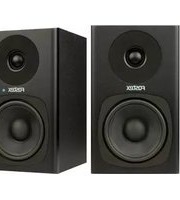
This product consists of an active speaker with stereo power amplifier installed
and a passive speaker.
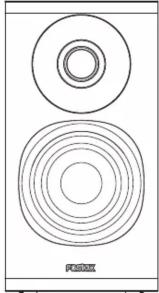
Active Speaker (R channel)
This is a speaker equipped with a stereo power amplifier that reproduces the right channel input signal.
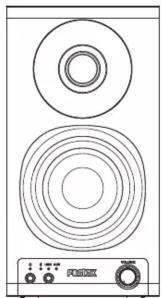
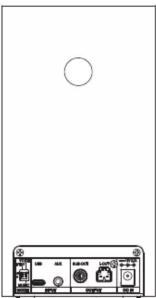
Passive Speaker (L channel)
This is an unamplified speaker that reproduces the left channel input signal, by connecting to the active speaker (R channel) with the one-touch speaker cable comes with this product.
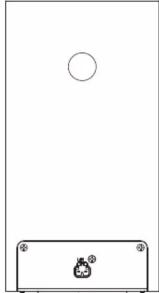
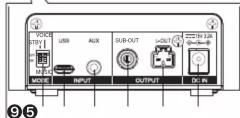
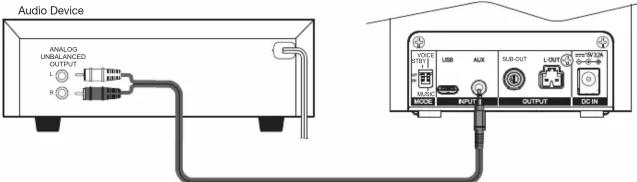
⑥ [AUX] input terminal
Connect a stereo sound source using a stereo mini cable.
⑦ [SUB-OUT] output terminal
This RCA pin jack outputs a line level signal to an external sub-woofer. The output is monoral summing the left and right channel signal.
⑧ [L-OUT] output terminal
Connect to the passive speaker (L channel) with the one-touch speaker cable comes with this product.
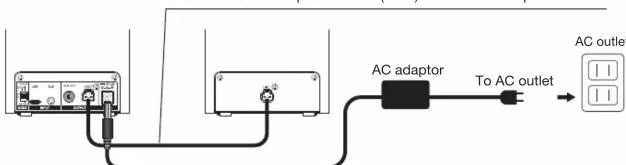
⑨ [DC IN] terminal
Connect the AC adapter comes with this product.
⑩ [L-IN] terminal
Left channel signal will be input by connecting [L-OUT] terminal with the one-touch speaker cable comes with this product.
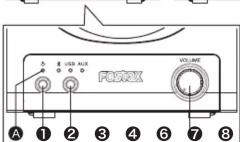
① [⏻] button
Switch the power of the unit between ON and STANDBY. When power is ON, the indicator A lights green. In standby mode, the indicator A lights red. (If the AC adapter is not connected, the indicator goes OFF.)
② [INPUT SELECTOR] button
Switches the input between *, USB, and AUX.
③ [VOLUME] knob
Adjust the volume level.
④ [MODE] setting switch
It changes the setting. Change the setting only when the power is OFF or STANDBY. (If changes are made while the power is ON, the settings may not be reflected correctly.)
⑤ [USB] input terminal
Connect to a personal computer using the supplied USB cable.
WARNINGS and PRECAUTIONS
CAUTION: TO PREVENT ELECTRIC SHOCK, MATCH WIDE BLADE OF PLUG TO WIDE SLOT, FULLY INSERT. ATTENTION: POUR PREVENIR LES CHOCS ELECTRIQUES, APAR DE LA FENTE LARGE, FOND.
- CAUTION: Use of any controls or adjustments or performance of procedures other than those herein specified may result in hazardous radiation exposure.
- WARNING: Changes or modifications to this unit not expressly approved by the party responsible for compliance could void the user's authority to operate the equipment.
- WARNING: Do not place the unit on top of any soft, porous, or sensitive surfaces to avoid damaging the surface. Use a protective barrier between the unit and surface to protect the surface.
- WARNING: Use of this unit near fluorescent lighting may cause interference regarding use of the remote. If the unit is displaying erratic behavior move away from any fluorescent lighting, as it may be the cause.
• CAUTION: Danger of explosion if battery is incorrectly replaced. Replace only with the same or equivalent type.
The lightning flash with arrowhead symbol, within an equilateral triangle, is intended to alert the user to the presence of uninsulated "dangerous voltage" within the product's enclosure that may be of sufficient magnitude to constitute a risk of electric shock to persons.
IMPORTANT SAFETY INSTRUCTIONS
12) Use only with the cart, stand, tripod, bracket, or table specified by the manufacturer, or sold with the apparatus. When a cart is used, use caution when moving the cart/apparatus combination to avoid injury from tip-over.
13) Unplug this apparatus during lightning storms or when unused for long periods of time.
14) Refer all servicing to qualified service personnel. Servicing is required when the apparatus has been damaged in any way, such as power-supply cord or plug is damaged, liquid has been spilled or objects have fallen into the apparatus, the apparatus has been exposed to rain or moisture, does not operate normally, or has been dropped.
15) The apparatus shall be used in an open area.
16) Apparatus shall not be exposed to dripping or splashing and that no objects filled with liquids, such as vases, shall be placed on anomalatus.
17) Mains plug is used as disconnect device. It shall remain readily operable and should not be obstructed during intended use. To completely disconnect the apparatus from supply mains, the main plug of the apparatus shall be disconnected from the mains socket outlet completely.
Power supply and speaker connection
Use the one-touch speaker cable (1.5m) comes with this product.
Setting change
[MODE] switch
Change the setting only when the power is OFF or STANDBY
(If changes are made while the power is ON, the settings may not be reflected correctly.)
[STANDBY] auto standby setting
OFF: Disabled
ON: Enabled
If the incoming audio signal from the selected input remains at no-signal or near no-signal level for 15 minutes, the unit will enter the standby ready status, the power indicator will flash in green. After 3 minutes passes with this status, the power indicator will light in red, the unit will enter the standby mode and the power consumption will reduce up to approx. 0.5W. Once the unit enters standby mode, it does not automatically return to normal mode even if the signal is input again. Operate the [Power] button to return the unit to its normal state.
While in standby mode, operating 1 or 2 switch makes the unit go back to normal mode and the power indicator A will light in green.
[VOICE/MUSIC] setting
OFF: VOICE (sound characteristic for playing of narrations, readings, etc.)
ON: MUSIC (sound characteristic for playing music source)
Connecting with AUX Connecting with other audio equipment
Using a stereo mini phone <-> RCA cable bundled with this product, connect to the AUX input of the unit from an external audio device.
Selecting AUX input
- Make sure the power of unit is ON.
- Repeat pushing the INPUT SELECTOR button until the AUX indicator lights up.
Connecting with Bluetooth
In order to receive wireless audio using the Bluetooth, first the pairing setting is needed between the unit and a Bluetooth compatible equipment.
-
Press [⏻] button to power ON.
-
Choose Bluetooth mode by pushing the INPUT SELECTOR button and keep holding it for approx. 2 seconds. The indicator will flash rapidly and the unit will enter pairing mode (searching for connected devices). *Release the button after the indicator becomes slowly blinking.
*If press and hold the button while the indicator is blinking, the pairing mode will be stopped.
- Set the Bluetooth function enabled with the device to be connected, such as smart phone.
[For Android]
[Setup] → [Wireless and network] → Tap [Bluetooth] → Bluetooth function enabled
[For iPhone]
[Setup] → Tap [Bluetooth] → Bluetooth function enabled
-
Select [Fostex PM0.3BD] appeared in the list of Bluetooth devices.
-
Once the pairing is completed, ✝ indicator will light solid. *This unit does not guarantee wireless connectivity with all Bluetooth devices.
Status display of *indicator
| Status | Indicator |
| Waiting for pairing | Flash rapidly |
| Waiting for connection | Slowly blinking |
| Connection completed | Light solid |
Memo
- To enter the pairing mode again, press [INPUT SELECTOR]button and keep holding it until the Bluetooth indicator flashes rapidly (waiting for pairing).
- While waiting for pairing, (the indicator slowly blinking), if the device is already connected to this unit in the past, it can start connecting by Bluetooth operation of the device or by briefly pressing the ⏻button of the unit
- While Bluetooth connection is completed, if the power of the unit is turned OFF, the Bluetooth connection will also be cancelled.
- Press and hold for over 5 seconds All the pairing info will be erased.
In this case, the ✗, USB and AUX indicators together will blink 3 times
- Even though the connection is made with a Bluetooth device, the paring with other device is possible. But the connection of former device will be cancelled.
- The unit can store connection history information (pairing information) with up to 8 external devices.
- If no connection is made for 5 minutes after entering pairing mode ( ✝ indicator : flashing fast), the unit returns to the connection waiting state ( ✝ indicator : blinking slowly).
- The volume can be controlled from the connected smartphone or music player, but the volume on the unit operates independently.
If the Bluetooth connection does not work
If pairing fails
- Turn OFF the Bluetooth communication of the smartphone, then turn it ON and pair it again.
- Press the [☐] button on the unit to put it in STANDBY, press it again to turn it ON, and press and hold the [INPUT SELECTOR] button until the ✗ indicator flashes rapidly. Then try pairing again while the indicator is flashing rapidly.
Already paired but cannot reconnect
- Turn OFF the Bluetooth communication of the smartphone, then turn it ON and reconnect again. - Press the [☐] button on the unit to put it in STANDBY, press it again to turn it ON, and press and hold the [INPUT SELECTOR] button until the ✗ indicator flashes rapidly. Then try pairing again while the indicator is flashing rapidly.
- Cencil the pairing on the smartphone, then try pairing it again.
5
Connecting with USB Setting up the personal computer
To use the unit to play audio, you need to designate the unit as the sound output destination on your computer.
Memo
To obtain the high quality sound, set the sound output level maximum on the computer.
PC requirement
The unit can connect to a PC equipped with a USB 2.0 compatible USB port.
We recommend the OS of Windows 10 or higher and MacOS 10 or higher.
Connection
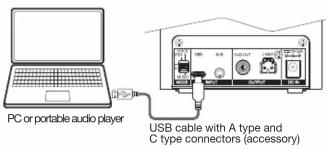
Connect the unit to your PC using the accessory USB cable. When powering the unit ON, the PC will recognize and register the unit as the sound output device.
Selecting the USB input
-
Make sure the unit is powered ON.
-
Repeat pushing the INPUT SECTOR button until the USB indicator light up.
Windows 10
- Click [Setting] on the start menu and then choose [Bluetooth and other devices].
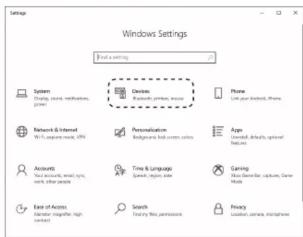
- Choose [Sound control panel] and then choose [Speaker Fostex PM0.3BD].
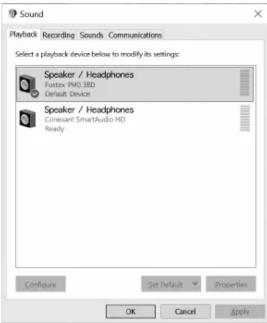
- Choose [Sound setting].
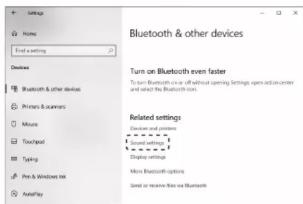
6
Windows 11
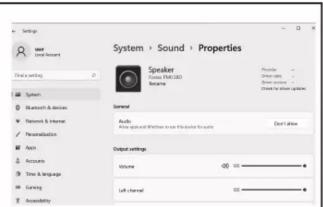
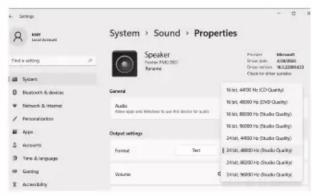
- Click [Setting] on the start menu and then choose [Sound].
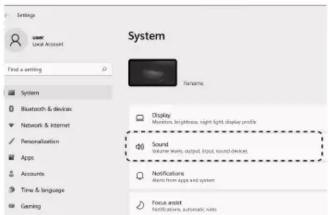
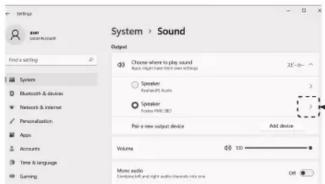
- Choose [Speaker], [Fostex PM0.3BD]. By pressing the right arrow, the right screen will appear and the sampling frequency and bit depth can be adjusted.
Mac OS Ventura
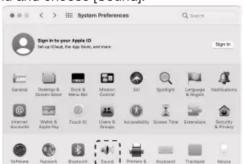
- Open [System environment setting] on the Apple menu and choose [Sound].
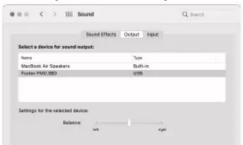
- Choose [Output] on the [Output and Input] item and choose [Fostex PM0.3BD] from the list.
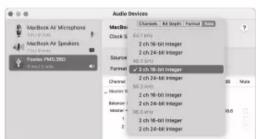
- Access [GO] -> [Utilities] -> [Audio MIDI Setup] and make sure that the [Output] format is set to one of the following settings.
2 ch 16-bit (44.1 kHz)
2 ch 16-bit (48.0 kHz)
2 ch 16-bit (88 2 kHz)
2 ch 16-bit (96.0 kHz)
2 ch 24-bit (44 1 kHz)
2 ch 24-bit (48.0 kHz)
2 ch 24-bit (88.2 kHz)
2 ch 24-bit (96.0 kHz)
2.1.2.3.4.5.6.7.8.9.
Specifications
General
• Enclosure system: 2-way bass reflex
• Built-in woofer: 75mm cone
• Built-in tweeter: 19mm soft dome
• Output: 15 W + 15 W
• Freq. Response: 100 Hz to 40 kHz
- Dimensions: 110 mm (W) x 212 mm (H) x 133 mm (D)
• Weight: 3.4 kg (TPAIR)
Bluetooth
• Transmission method: Bluetooth standard Ver. 5.0
• Output: Bluetooth standard Power Class 1
• Transmission distance: Approx. 10 m *with no obstacles
• Frequency band used: 2.4GHz
• Supported profiles: A2DP
• Supported codecs: SBC, AAC
• Supported content protection: SCMS-T system
• Transmission band: 20Hz-20kHz
USB
• Terminal: USB typeC
• Interface: USB2.0 High-speed
• Sampling frequency: 44.1/48.0/88.2/96.0 kHz
- Bit rate: 16/24bit
AUX
• Terminal: 3.5mm Stereo mini-jack
- Input sensitivity: 500mVrms
• Max. input level: 2 Vrms
Power/AC power adapter
• Input: AC100V-240V (50Hz/60Hz)
• Output: DC15V 3.2A
Accessories
• AC power adapter
- USB cable
• One-touch speaker cable
• φ3.5 stereo mini phone/RCA cable
Declaration of EC Directive
This equipment is compatible with the EMC Directive (2014/30/EU) - Directive on approximation of member nation's ordinance concerning the electromagnetic compatibility and with the Low Voltage Directive (2014/35/EU) - Directive on approximation of member nation's ordinance concerning electric equipment designed to be used within the specified voltage range.
This equipment is also compatible with the Ecodesign Directive (2009/125/EC) - Directive on approximation of member nation's ordinance concerning the ecodesign requirement for energy-using products and with EU RoHS 2 Directive (2011/65/EU) - Directive on approximation of member nation's ordinance concerning the restriction of the use of certain hazardous substances in electric equipment.
The Affect of Immunity on This Equipment
The affect of the European Specification EN61000-6-1 (coexistence of electromagnetic waves - common immunity specification) on this equipment are as shown below.
In the electrical fast transient/burst requirements, surge, conducted disturbances by radio-frequency fields, power frequency magnetic field, radiate electromagnetic field requirements and static electricity discharging environment, this could be affected by generation of noise in some cases.
FOSTEX DISTRIBUTORS LIST IN EUROPE
ng non-EU countries (as of Jan. 2023
Albania, Bosnia and Herzegovina, Croatia, Kosovo, North Macedonia, Montenegro.
KuSOKO, North Macedonia, Montenegro, Serbia & Slovenia NAME: Player Plus d.o.o. ADD: St. Sestara Strain 1/13, 11080 Belgrade, Serbia TEL: (+381) 11 377 4968. FAX: (+381) 11 377 4969 Email: info@player.rs Web Site: http://www.player.rs Austria, France, Germany & Hungary NAME: Mega Audio GmbH ADD: Feldborn 3, in 55444 Waldlaubersheim, Germany TEL: (+49) 6707 914 522, FAX: (+49) 6721-32046 Email: info@mepaudio.de
Web Site: http://www.megaaudio.de
Belgium
NAME: XLR spirovba ADD: Pierre Strauwenstraat 24, 1020 Brussels.
Belgium
TEL: (+32) 2 520 0827, FAX: (+32) 2 521 1977 Email: info@dxpro.be
Email: hlo/e/xlrpro.be Web Site: http://www.xlrpro.be
Czecho
NAME: Praha Music Center spols.r.o. ADD: Opiolarsko 067/30, Probe 0, 100.00, Czrasba
TEL: (+420) 226-011-111.
FAX: (+420) 226-011-11;
Denmark, Finland, Norway & Sweden
NAME: Nordic Pro Audio ApS
ADD: Hvidsvaermervej 143, DK-2610 Hodovre TEL: (+45) 31 30 70 31
TEL (443) 31 20/70/21 Email: ks@nordicproaud
Web Site: https://nordicproaudio.com/
Estonia, Latvia & Lithuania
NAME: Maldo BV ADD: Waq en Bos 2 2661 DH Bergschenhoek.
Nederland
TEL: (+31) (0)10-414 8426 FAX: (+31) (0)10-404 8863
TAX: (401) (5) 10-404 600 Email: info@malco.com
Web Site: http://www.mafico.com
Finland NAME:
NAML: Fillato (Speaker Componenia) ADD: Saltunkatu 3, 24100 Salo, Finland
TEL: (+358) 440 553 595
Email: info@hittalo.fi Web Site: http://www.hittalo.fi
France
NAME: H APP: 89
ADD: 28 Rue Edin Cavel, 92400 Cournevoie, Hand
TEL: (+33) 1 4/88 4/02, FAX: (+33) 1 4/89 48/72 Email: say@harmysound.com
Web Site: http://www.hamysound.com
France
NAME: TLHP SAS (Speaker Components) ADD: 2 Rue des Fermes Gaulnises
ZAC Bourgbarré Nord
NAME: Bon Studio S.A ADD: 6 Zaimi Street, Exarchia, 106/83 Athens, Greece
TEL: (+30) 210-3809-605, 606, 607, 608
FAX: (+30) 210-3845-755, 210-3827-86 Email: hsw@hexpb.afio.or
Email: bonr@bonstudio.gl Web Site: http://www.bonstudio.gl
Italy
Italy
NAME: Backline S.u.r.l (Pro-Audio) ADD: Via dell'Anna, 16 - 20158 Milano, Italy
ADD: Via Del Aprile, 10 - 20750 Milano, Italy TEL: (+39) 02 6801 5709.
FAX: (+39) 02 6901 5645
Email: Info@backline.it Web Site: http://www.backline.it
The Netherlands & Luxembu
NAME: Mafico BV
ADD: Weg en Bos 2 2661 DH Bergschenhoek Nederland
TEL: (+31) 10 414 8426, FAX: (+31) 10 404 8863
Email: info@mafico.com Web Site: www.mafoo.co
Web Site: www.malco.co Poland
POUND NAME:
ADD: Dziatdowska 12, Warsaw, Poland
TEL: (+48) 22 424 8254, FAX: (+48) 22 855 93 80 Email: biuro@mip.biz.pl
Web Site: http://www.mip.bz
Portugal & Spain
NAME: ATCONSUMER (Consumer/HiFi System Speaker Components)
ADD: Club Nautico Premiá. Local 3, 08330 Premiá.
de Mar, Spain TEL: 4-34 600 288310
TEL: (+34) 609 288310 Email: info@atconsumer.
Web Site: http://www.alconsumer.es
Russia
NAME: Audio Maria LLC (Speaker Components) ADD: 107023 Barabanniv Lane 4/4, Moscow Raza
TEL:+7 495 2680468
Email: info@audiomania.eu Web Site: http://www.euron
Web Site: http://www.abbomani.edu Russia
NAME:
ADD: 1st Krasnoselsky lane, 7/9A, bld. 11, 3rd floor
TEL:(+7)499 705 1562
Email: info@blade.ru
Web Site: http://www.blade.ru/
Slovakia
NAME: Rockcentrum ADD: Ambra Piotra 40.036.01 Martin, Slovakia
TEL: (+421) 43 41 3633
FAX: (+421) 43 41 3633
Email: rock-centrum@rock-centrum.sk Web Site: http://rock-centrum.sk
Switzerland
NAME: Audio Bauer Pro AG
ADD: Bernerstrasse-Nord 182, CH-8064 Zunch, Switzerland
TEL: (+41) 44 432 3230, FAX: (+41) 44 432 6558
Email: info@audio-bauerpro.c Web Site: http://www.audio.b
Web Site: http://www.abc Turkey
NAME:
ADD: Sheraton Istanbul Maslak Kat B2 Buykdere Cad
Nr233 Ucyi Mewii 34398 Masak Istanbul Turkey TEL: +90 444 3760. FAX: +90 212 285 0073
Email: bahadir@extreme-audio.com
Web Site: http://www.extreme-audio.com
UK NAME: St
NAME: 001 BISCONSOL ADD: Unit C1 Belcon Inc
Road Hodesdon, Hertfordshire, EN11 0NT, UK TEL: (+4) (0)2301 22 2600
TEL: (+44) (0)3301 22 2300, FAX: (+44) (0)1992 44 9171
Email: fostex@scvdistribution
Web Site: http://www.scvdistribution.co.uk/Uzqino
Ukraine NAME: E
ADD: 1 Maryenka Lane Kharkiv, Ukraine
TEL:(+38)0442211980 Email: salo@cm.in.ssr.com
Email: Sale@fera-in-ear.com Web Site: http://fera-in-ear.com
Fostex
FOSTEX CO.
1-1-109, Tsutsujigaoka, Akishima City, Tokyo, 196-8550, Japabn
© PRINTED IN Malaysia April 2023
- NAMES AND FUNCTIONS
- ACTIVE SPEAKER (R CHANNEL)
- PASSIVE SPEAKER (L CHANNEL)
- ⑥ [AUX] INPUT TERMINAL
- ⑦ [SUB-OUT] OUTPUT TERMINAL
- ⑧ [L-OUT] OUTPUT TERMINAL
- ⑨ [DC IN] TERMINAL
- ⑩ [L-IN] TERMINAL
- ① [⏻] BUTTON
- ② [INPUT SELECTOR] BUTTON
- ③ [VOLUME] KNOB
- ④ [MODE] SETTING SWITCH
- ⑤ [USB] INPUT TERMINAL
- WARNINGS AND PRECAUTIONS
- IMPORTANT SAFETY INSTRUCTIONS
- POWER SUPPLY AND SPEAKER CONNECTION
- SETTING CHANGE
- CONNECTING WITH AUX CONNECTING WITH OTHER AUDIO EQUIPMENT
- SELECTING AUX INPUT
- CONNECTING WITH BLUETOOTH
- MEMO
- IF THE BLUETOOTH CONNECTION DOES NOT WORK
- IF PAIRING FAILS
- ALREADY PAIRED BUT CANNOT RECONNECT
- CONNECTING WITH USB SETTING UP THE PERSONAL COMPUTER
- PC REQUIREMENT
- CONNECTION
- SELECTING THE USB INPUT
- WINDOWS 10
- WINDOWS 11
- MAC OS VENTURA
- SPECIFICATIONS
- GENERAL
- BLUETOOTH
- USB
- AUX
- ACCESSORIES
- DECLARATION OF EC DIRECTIVE
- THE AFFECT OF IMMUNITY ON THIS EQUIPMENT
- FOSTEX DISTRIBUTORS LIST IN EUROPE
- NG NON-EU COUNTRIES (AS OF JAN. 2023
Brand : FOSTEX
Model : PM0.3BD
Category : Loudspeaker