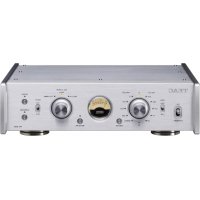
PE505 - Receiver TEAC - Free user manual and instructions
Find the device manual for free PE505 TEAC in PDF.



User questions about PE505 TEAC
0 question about this device. Answer the ones you know or ask your own.
Ask a new question about this device
Download the instructions for your Receiver in PDF format for free! Find your manual PE505 - TEAC and take your electronic device back in hand. On this page are published all the documents necessary for the use of your device. PE505 by TEAC.
USER MANUAL PE505 TEAC
The lightning flash with arrowhead symbol, within an equilateral triangle, is intended to alert the user to the presence of uninsulated "dangerous voltage" within the product's enclosure that may be of sufficient magnitude to constitute a risk of electric shock to persons.

The exclamation point within an equilateral triangle is intended to alert the user to the presence of important operating and maintenance (servicing) instructions in the literature accompanying the appliance.
WARNING: TO PREVENT FIRE OR SHOCK HAZARD, DO NOT EXPOSE THIS APPLIANCE TO RAIN OR MOISTURE.
CAUTION
DO NOT REMOVE THE EXTERNAL CASES OR CABINETS TO EXPOSE THE ELECTRONICS. NO USER SERVICEABLE PARTS ARE INSIDE.
- IF YOU ARE EXPERIENCING PROBLEMS WITH THIS PRODUCT, CONTACT THE STORE WHERE YOU PURCHASED THE UNIT FOR A SERVICE REFERRAL. DO NOT USE THE PRODUCT UNTIL IT HAS BEEN REPAIRED.
- USE OF CONTROLS OR ADJUSTMENTS OR PERFORMANCE OF PROCEDURES OTHER THAN THOSE SPECIFIED HEREIN MAY RESULT IN HAZARDOUS RADIATION EXPOSURE.
1) Read these instructions.
2) Keep these instructions.
3) Heed all warnings.
4) Follow all instructions.
5) Do not use this apparatus near water.
6) Clean only with dry cloth.
7) Do not block any ventilation openings. Install in accordance with the manufacturer's instructions.
8) Do not install near any heat sources such as radiators, heat registers, stoves, or other apparatus (including amplifiers) that produce heat.
9) Do not defeat the safety purpose of the polarized or grounding-type plug. A polarized plug has two blades with one wider than the other. A grounding type plug has two blades and a third grounding prong. The wide blade or the third prong are provided for your safety. If the provided plug does not fit into your outlet, consult an electrician for replacement of the obsolete outlet.
10) Protect the power cord from being walked on or pinched particularly at plugs, convenience receptacles, and the point where they exit from the apparatus.
11) Only use attachments/accessories specified by the manufacturer.
12) Use only with the cart, stand, tripod, bracket, or table specified by the manufacturer, or sold with the apparatus. When a cart is used, use caution when moving the cart/apparatus combination to avoid injury from tip-over.

13) Unplug this apparatus during lightning storms or when unused for long periods of time.
14) Refer all servicing to qualified service personnel. Servicing is required when the apparatus has been damaged in any way, such as power-supply cord or plug is damaged, liquid has been spilled or objects have fallen into the apparatus, the apparatus has been exposed to rain or moisture, does not operate normally, or has been dropped.
The apparatus draws nominal non-operating power from the AC outlet with its POWER or STANDBY/ON switch not in the ON position.
- The mains plug is used as the disconnect device; the disconnect device shall remain readily operable.
- Caution should be taken when using earphones or headphones with the product because excessive sound pressure (volume) from earphones or headphones can cause hearing loss.
CAUTION
- Do not expose this apparatus to drips or splashes.
- Do not place any objects filled with liquids, such as vases, on the apparatus.
-
Do not install this apparatus in a confined space such as a book case or similar unit.
-
The apparatus should be located close enough to the AC outlet so that you can easily reach the power cord plug at any time.
- If the product uses batteries (including a battery pack or installed batteries), they should not be exposed to sunshine, fire or excessive heat.
- CAUTION for products that use replaceable lithium batteries: there is danger of explosion if a battery is replaced with an incorrect type of battery. Replace only with the same or equivalent type.
WARNING
Products with Class I construction are equipped with a power supply cord that has a grounding plug. The cord of such a product must be plugged into an AC outlet that has a protective grounding connection.
IN USA/ CANADA, USE ONLY ON 120V SUPPLY.
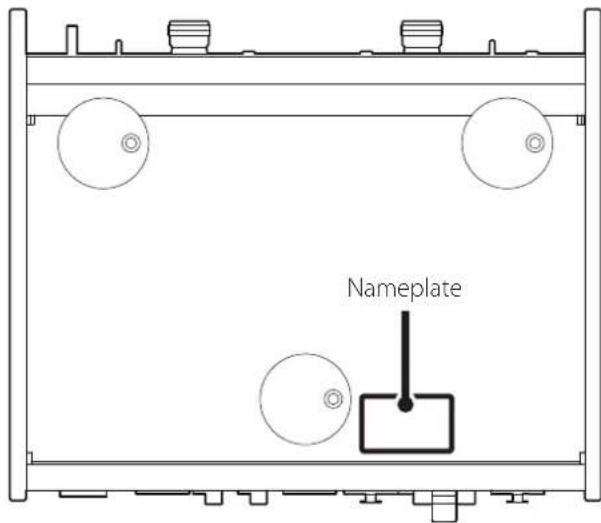
The nameplate is located on the bottom of the unit as shown below.
Front side
Model for USA
Supplier's Declaration of Conformity

Model number: PE-505
Trade name: TEAC
Responsible party: Pioneer & Onkyo U.S.A. Corporation
Address: 22828 Lockness Avenue, Torrance, CA 90501 U.S.A.
Telephone number: 1-201-785-2600
This device complies with Part.15 of FCC Rules. Operation is subject to the following two conditions: (1) this device may not cause harmful interference, and (2) this device must accept any interference received, including interference that may cause undesired operation.
Information
This equipment has been tested and found to comply with the limits for a Class B digital device, pursuant to Part 15 of the FCC Rules. These limits are designed to provide reasonable protection against harmful interference in a residential installation. This equipment generates, uses, and can radiate radio frequency energy and, if not installed and used in accordance with the instructions, may cause harmful interference to radio communications. However, there is no guarantee that interference will not occur in a particular installation. If this equipment does cause harmful interference to radio or television reception, which can be determined by turning the equipment off and on, the user is encouraged to try to correct the interference by one or more of the following measures:
- Reorient or relocate the equipment and/or the receiving antenna.
- Increase the separation between the equipment and receiver.
- Connect the equipment into an outlet on a circuit different from that to which the receiver is connected.
- Consult the dealer or an experienced radio/TV technician for help.
CAUTION
Changes or modifications not expressly approved by the party responsible for compliance could void the user's authority to operate the equipment.
Model for Canada
Industry Canada's Compliance Statement:
This Class B digital apparatus complies with Canadian ICES-003.
Model for Europe

This product complies with the European
Directives request, and the other Commission
Regulations.
For European Customers
Disposal of electrical and electronic equipment and batteries and/or accumulators
a) All electrical/electronic equipment and waste batteries/ accumulators should be disposed of separately from the municipal waste stream via collection facilities designated by the government or local authorities.
b) By disposing of electrical/electronic equipment and waste batteries/accumulators correctly, you will help save valuable resources and prevent any potential negative effects on human health and the environment.
c) Improper disposal of waste electrical/electronic equipment and batteries/accumulators can have serious effects on the environment and human health because of the presence of hazardous substances in the equipment.
d) The Waste Electrical and Electronic Equipment (WEEE) symbols, which show wheeled bins that have been crossed out, indicate that electrical/electronic equipment and batteries/accumulators must be collected and disposed of separately from household waste.
If a battery or accumulator contains more than the
specified values of lead (Pb), mercury (Hg), and/or cad
mium (Cd) as defined in the Battery Directive (2006/66/
EC, 2013/56/EU), then the chemical symbols for those
elements will be indicated beneath the WEEE symbol.
e) Return and collection systems are available to end users. For more detailed information about the disposal of old electrical/electronic equipment and waste batteries/accumulators, please contact your city office, waste disposal service or the shop where you purchased the equipment.

Pb,Hg,Cd
Contents
Thank you for choosing TEAC.
Read this manual carefully to get the best performance from this unit.
After reading it, keep it in a safe place for future reference.
EN
IMPORTANT SAFETY INSTRUCTIONS 2
Included accessories 6
Before use. 6
Note about pinpoint feet 7
Maintenance. 7
Using the TEAC Global Site. 7
Connections 8
Using an RCA-XLR conversion cable for balanced connection of an MC cartridge. 9
Front panel names and functions 10
Basic operation 11
Turning the power on 11
Putting the unit into standby 11
Setting the load impedance 11
MC cartridge impedance measurement 11
Using the easy demagnetization function 12
Automatic power saving function 12
Restoring default settings 12
Troubleshooting. 13
Specifications. 14
XLR cable connection diagrams. 15
Included accessories
Check to be sure the box contains all the included items shown below.
Please contact the store where you purchased this unit if any of these items are missing or have been damaged during transportation.
Power cord × 1
Rubber pads × 3
Owner's manual (this document, including warranty) × 1
- For information about the warranty, users living in the USA and Canada should see pages 44-45 and the back cover (warranty document). Users living in Europe and other regions should see page 45.
Before use
Placement precautions
-
Do not place anything on top of the unit.
-
Do not install this unit in a location that could become hot. This includes places that are exposed to direct sunlight or near a radiator, heater, stove or other heating equipment. Do not place the unit on top of an amplifier or other equipment that might generate heat that exceeds the operating temperature range of this unit. Doing so could cause discoloration, deformation or malfunction.
-
Place the unit in a stable location.
-
When installing this unit, leave a little space (at least 3cm or 1^ ) between it and walls and other devices in order to allow good heat dissipation. If you put it in a rack, for example, leave at least 5cm ( 2^ ) open above it and at least 10cm ( 4^ ) open behind it. Failure to provide these gaps could cause heat to build up inside and result in fire.
-
Do not move the unit during use.
-
Be careful to avoid injury when moving the unit due to its weight. Have someone help you move it if necessary.
The voltage supplied to the unit should match the voltage printed on the bottom of the unit. If you are in any doubt regarding this matter, consult an electrician.
-
Do not open the body of the unit as this might result in damage to the circuitry or cause electric shock. If a foreign object should get into the unit, contact your dealer.
-
When removing the power plug from the wall outlet, always pull directly on the plug; never yank on the cord.
Note about pinpoint feet
High-precision metal pinpoint feet are attached firmly to the bottom plate of this unit.
The stands for these feet are loose, but when the unit is placed in position, it is supported by these pinpoint feet, which will effectively disperse vibrations.
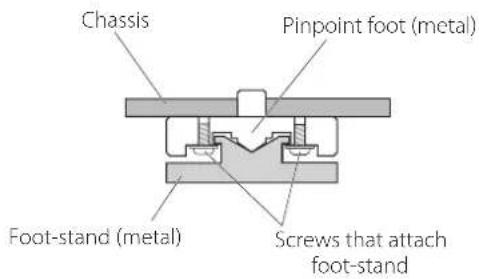
- The included rubber pads are intended to protect the surface where the unit is placed. Apply them to the bottoms of the foot-stands.
Maintenance
Wipe dirt from the top cover and other panel surfaces using a soft cloth that has been slightly dampened with a diluted neutral cleanser.
Do not wipe with chemical cleaning cloths, thinner or other chemical agents. Doing so could damage the surface.
Fol your safety, disconnect the power cord from the outlet before cleaning.
Using the TEAC Global Site
You can download updates for this unit from the TEAC Global Site:
https://teac-global.com
In the TEAC Downloads section, click the desired language to open the Downloads website page for that language.
Complete all other connections before turning the unit on.
- Carefully read the manuals of the devices that you are connecting and follow their instructions when making connections.
- Do not bundle connecting cables with power cords. Doing so could cause noise.
- Connect all plugs completely.
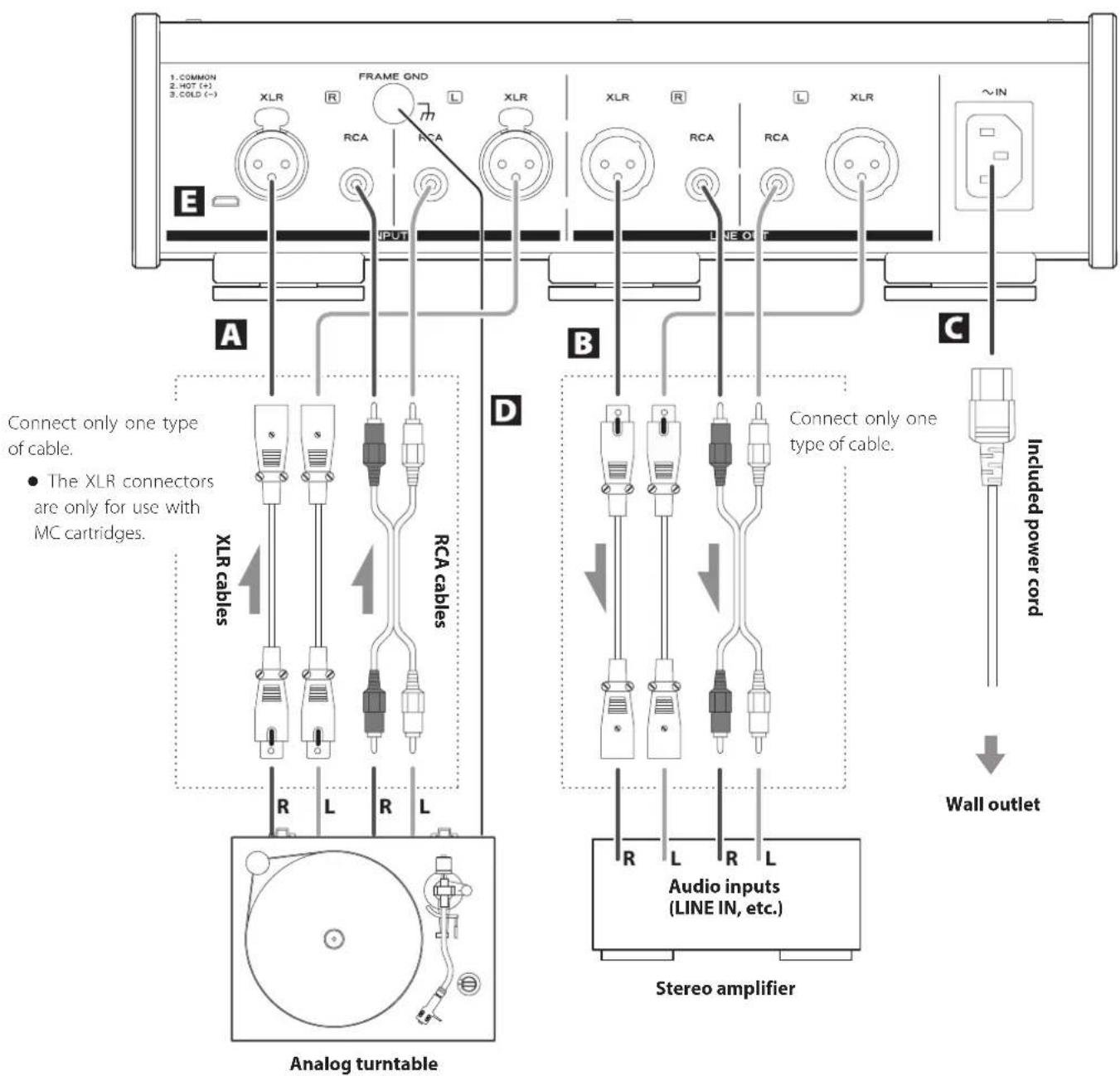
A Phono input connectors (INPUTS)
Connect the audio outputs of an analog turntable.
The XLR connectors are only for use with MC cartridges.
Use audio cables to connect the R and L connectors on an analog turntable to the corresponding R and L connectors on this unit.
Use the following types of commercially-available cables for connections.
XLR: XLR cables
RCA: RCA cables
B Analog audio output connectors (LINE OUT)
These connectors output audio.
Connect these to the audio input connectors (e.g. LINE IN) on an amplifier.
Use the following types of commercially-available cables for connections.
XLR: XLR cables
RCA: RCA cables
- Do not connect the analog audio output connectors on this unit to phono input connectors on an amplifier. Be sure to connect them to line input connectors.
C Power inlet (~IN)
Connect the supplied power cord here.
After all other connections are complete, connect the power cord's plug to a wall outlet.
D not use any power cord other than the one included with this unit. Use of other power cords could result in fire or electric shock.
Connect the power plug from the outlet if you will not use the unit for a long time.
Grounding terminal (FRAME GND)
Connect an audio output cable from an analog turntable to the grounding terminal.
Connecting the grounding terminal also to the amplifier might improve sound quality.
- Failure to connect the grounding terminal of an analog turntable might cause hum (a low continuous noise).
E Maintenance port
This is used for maintenance. Do not connect anything to this port unless instructed to do so by our service department.
Using an RCA-XLR conversion cable for balanced connection of an MC cartridge
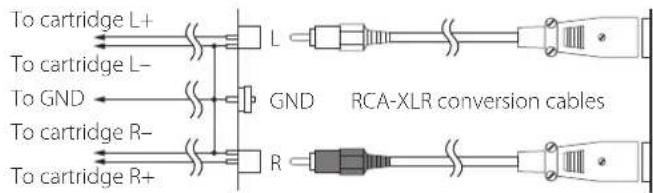
When using an RCA-XLR conversion cable for balanced connection of an MC cartridge, only the following types of analog turntables can be connected to this unit: turntables in which the cartridge - and the tone arm GND are not connected inside it, and turntables in which the L/R - are isolated.
OK
Analog Analog PE-505 Phono input turntable audio output connectors (XLR) connectors (RCA)
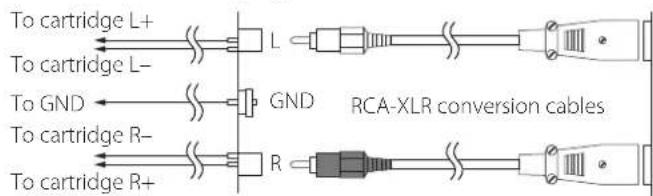
If the L/R - and tone arm GND are connected within the analog turntable, a humming sound might be heard.
Not good
Analog Analog PE-505 Phono input turntable audio output connectors (XLR) connectors (RCA)
-
When the L/R - and tone arm GND are connected within the analog turntable, using an RCA-XLR conversion cable might not reduce the humming sound.
-
When connected with an analog turntable that has a built-in phono equalizer amplifier, turn the phone equalizer amplifier output off during use.
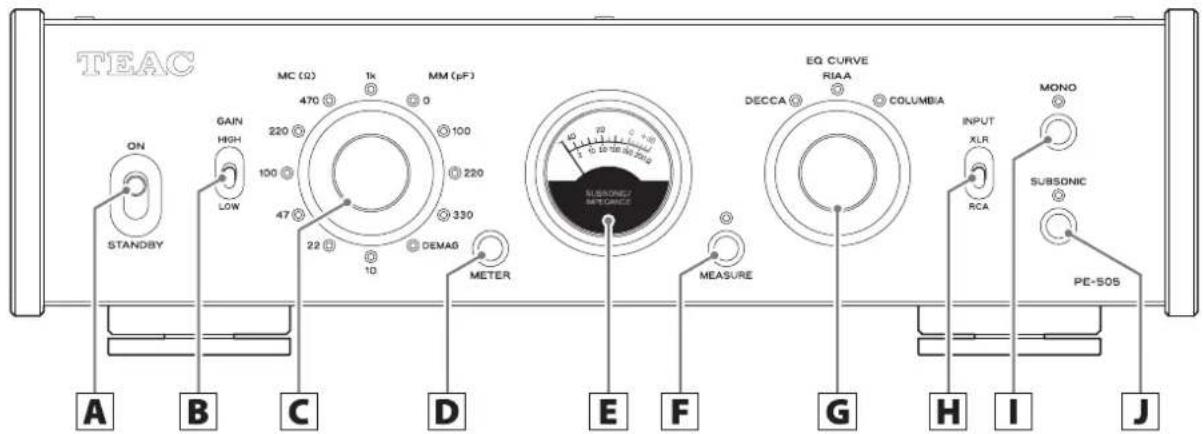
A STANDBY/ON switch
Use to put the unit into standby mode or turn it on.
B GAIN switch
Use this to change the amplifier gain.
First, set it to LOW and check the volume. If the volume is too low, set it to HIGH. HIGH outputs with gain that is 12 dB higher compared to LOW.
C Impedance selection knob
Set the load impedance setting according to the cartridge type (MC/MM) used by the connected analog turntable (page 11).
The indicator for the selected impedance lights.
- If the INPUT selection switch is set to XLR, MM cartridge settings cannot be selected. The XLR connectors are only for use with MC cartridges.
D METER button
Press this button to change the meter brightness in the following order.
Bright Normal Dim Unlit Unlit (meter off)

E Meter
This shows the volume of subsonic (6 Hz and below) frequencies. During measurement, it shows MC cartridge impedance (page 11).
F MEASURE button
Use this to measure MC cartridge impedance.
The indicator above the button lights during measurement.
- Playback sound is not output during impedance measurement.
EQ CURVE selection knob
Select the curve that sounds natural according to the record being played back. The options are RIAA (curve for stereo LP playback), DECCA (DECCA LP) and COLUMBIA (Columbia LP) (page 11).
H INPUT selection switch
Select which connectors are connected to the analog turntable.
IMONO button
Turn this on when using a mono cartridge.
The indicator above this button lights when it is on.
SUBSONIC filter button
When on, a filter is applied with a cutoff of 17Hz and a slope of -24dB / oct .
When playing a warped record, turning this on can reduce unnecessary woofer movement.
The indicator above this button lights when it is on.
Turning the power on
1 Minimize the volume of the amplifier.
If using a device that cannot have its volume adjusted when it is off, minimize the volume after turning it on.
2 Set the STANDBY/ON switch on the unit to ON.
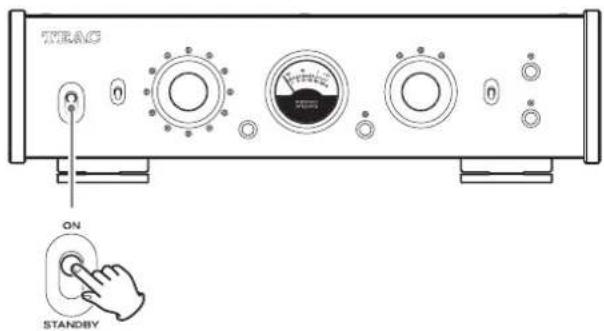
- If the indicator above the MEASURE button is lit, press the MEASURE button to turn it off.
3 Play a record and adjust the volume on the amplifier.
Use the EQ CURVE selection knob to select the curve that sounds natural depending on the record being played.
Putting the unit into standby
3 Set the STANDBY/ON switch on the unit to STANDBY.
If a record is being played, stop playback.
2 Minimize the volume of the amplifier.
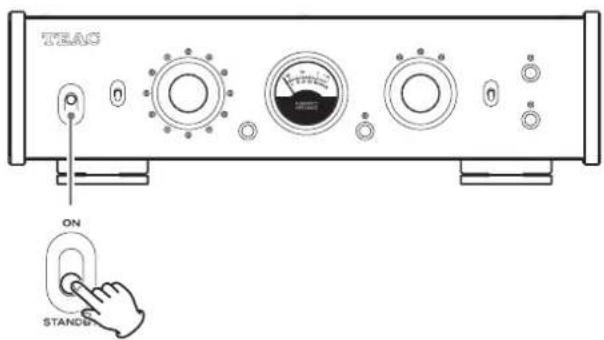
4 Turn the amplifier off.
Setting the load impedance
When using an MC cartridge
If the MC cartridge used has a recommended load resistance (load impedance), set it to a value near that value. If not specified, select the value that provides the best sound quality. The lower the load resistance is, the lower the volume will be. Higher load resistances will increase the volume.
A standard load resistance is 100
- This load resistance does not refer to the internal resistance of the cartridge (internal impedance, coil impedance).
- Select a load resistance that is high enough for the internal resistance of the cartridge being used.
- Selecting a load resistance that is not large enough relative to internal cartridge resistance will reduce sound volume and increase noise.
When using an MM cartridge
If the MM cartridge used has a recommended load capacity, try setting the knob to a position near that value. If not specified, select the value that provides the best sound quality.
MC cartridge impedance measurement
Use a 1kHz sine wave to measure the impedance of the entire path including the MC cartridge and the cable that connects the analog turntable and this device. Set the unit to receive a load impedance that is about twice the impedance determined from the measurement.
1 Move the analog turntable tone arm away from the record.
Press the MEASURE button and the indicator will light.
The meter will automatically switch to bright level.
3 Read the impedance from the lower indications on the meter.
ATTENTION
MM cartridge impedance and load capacity cannot be measured.
- Do not measure impedance during record playback.
- Playback sound is not output during impedance measurement.
Using the easy demagnetization function
Using the easy demagnetization function to demagnetize MC cartridges with iron cores and step-up transformers, for example, could improve the sound quality by making it clearer and giving it greater definition.
1 Set the impedance selection knob to DEMAG.
The load impedance is set to 0 and both ends of the cartridge are short-circuited.
2 Play a record.
The playback signal current goes through the cartridge and demagnetizes it.
- Demagnetization takes about 30 seconds. Keep the record playing for about 30 seconds.
- Playback sound is not output when the impedance selection knob is set to DEMAG.
3 Reset the impedance selection knob to its previous position.
Equalizer curve characteristics (time constant)
RIAA
3180 s / 318 s / 75 s
Decca (DECCA LP)
1590 s / 318 s / 60 s
Columbia (Columbia LP)
1590 s / 318 s / 100 s
- There are a variety of opinions about equalizer curves.
- Try a different curve if the sound seems unnatural when using the RIAA curve to play an old record, even a stereo LP.
Automatic power saving function
This unit has an automatic power saving function.
This is set to on when shipped new from the factory.
When the automatic power saving function is on
The unit will enter standby* if no operation occurs for about 30 minutes.
Operating the unit when in standby will disable the automatic power saving function and turn it on.
When the automatic power saving function is off
The unit will not enter standby automatically.
*Power consumption is 0.5 W or less when in standby.
Checking the setting
If automatic power saving is off, all the impedance indicators will light momentarily when the unit is turned on.
Setting the automatic power saving function
Use the following procedure to turn the automatic power saving function on and off.
While pressing the MEASURE button, set the STANDBY/ON switch to ON. Continue pressing the MEASURE button until all the indicators light (about three seconds).
Restoring default settings
While pressing the METER button, set the STANDBY/ON switch to ON. Continue pressing the METER button until all the indicators light (about three seconds).
If you experience a problem with this unit, please take a moment to review the following information before requesting service. If it still does not operate correctly, contact the retailer where you purchased the unit.
The unit does not turn on.
- Check that the power cord is completely plugged into the power outlet. If the outlet is switched, confirm that the switch is in the ON position.
Connect a different electrical device to the outlet to confirm that it is supplying power.
If the unit is in standby because of the automatic power saving function, set the STANDBY/ON switch to STANDBY once and then set it to ON again.
There is a humming noise.
If a connecting cable is near a power cord, fluorescent light or similar cause of interference, increase the distance between them as much as possible.
- Check the cable connecting the analog turntable to the grounding terminal (FRAME GND) on this unit.
Whether or not there is a grounded connection with the analog turntable can affect how noise is heard.
No sound is output.
If a stereo amplifier is connected to this unit, adjust the volume on the amplifier.
If the indicator above the MEASURE button is lit, press the MEASURE button to turn it off.
Check the load impedance setting (page 11).
Reconfirm the connections between equipment.
Sound is odd or breaks up.
- Check the connectors connected to the amplifier. Connect this unit to the LINE IN or other audio input connectors on the amplifier.
Check the load impedance setting (page 11).
Set the GAIN switch to LOW.
When connected to an analog turntable that has a built-in phono equalizer amplifier, turn off the output of the phono equalizer amplifier.
Volume is low.
Check the load impedance setting (page 11).
Set the GAIN switch to HIGH.
The white noise level is too high.
Check the audio cables connected to the analog turntable.
When using an MC cartridge, the load impedance setting can affect the noise sound.
Since this unit uses a microcontroller, external noise and other interference can cause the unit to malfunction. If this occurs, unplug the power cord, wait for a while, and then turn the unit on again and restart operations.
Inputs
RCA connectors. 1 pair (for MC/MM)
XLR connectors. 1 pair (for MC)
Input impedance
MC. 10Ω,22Ω,47Ω,100Ω,220Ω,470Ω,1kΩ
(switchable using setting knob)
MM 47 kΩ
Load capacity. 0 pF, 100 pF, 220 pF, 330 pF
(switchable using setting knob)
Outputs
RCA connectors 1 pair
XLR connectors. 1 pair
Output impedance
RCA connectors 630
XLR connectors. 126
Audio performance
Rated output voltage
RCA output 2Vrms
XLR output. 4Vrms
RIAA deviation (20 Hz - 20 kHz). ±0.05 dB
Total harmonic distortion
Rated output, 1 kHz, GAIN LOW
RCA input (MM) 0.002%
RCA input (MC) 0.02%
XLR input (MC) 0.02%
Residual noise voltage (input shorted, GAIN LOW, IHF-A)
RCA input (MM) 10 V
RCA input (MC) 65 V
XLR input (MC) 85 V
S/N ratio (input shorted, rated output, GAIN LOW, IHF-A)
RCA input (MM) 106 dB
XLR input (MC) 86 dB
Channel separation (MM, 10 kHz, GAIN LOW) .90 dB or higher
Gain
GAIN LOW
RCA input (MM) 34 dB
RCA input (MC) 54 dB
XLR input (MC) 54 dB
GAIN HIGH
RCA input (MM) 46 dB
RCA input (MC) 66 dB
XLR input (MC) 66 dB
Subsonic filter. 17 Hz, -24 dB/octave
Maximum permissible input voltage (distortion 0.1%, GAIN LOW)
RCA input (MM) 150 mV
RCA input (MC) 16 mV
XLR input (MC) 16 mV
General
Power supply
Model for Europe. AC 220-240V, 50/60 Hz
Model for USA/Canada AC 120 V,60 Hz
Power consumption 14W
External dimensions (W× H× D, including protrusions)
290 × 84.5 × 252.5 ~mm (111/2'' × 33/8'' × 10^)
Weight 4.5 kg (10 lb)
Included accessories
Power cord × 1
Rubber pads × 3
Owner's manual (this document, including warranty) × 1
-
For information about the warranty, users living in the USA and Canada should see pages 44-45 and the back cover (warranty document). Users living in Europe and other regions should see page 45.
-
Specifications and appearance are subject to change without notice.
Weight and dimensions are approximate.
- Illustrations in this owner's manual might differ slightly from production models.
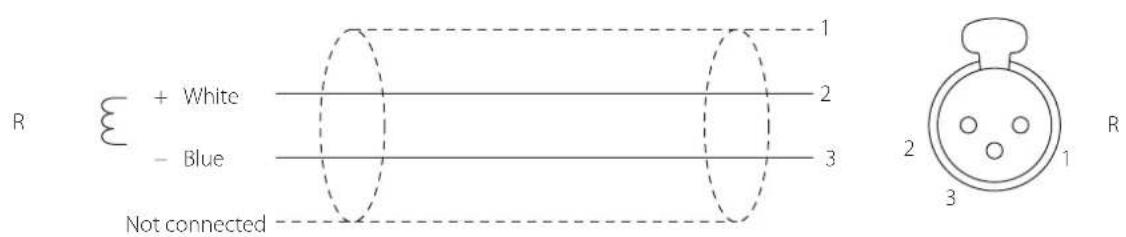
When using XLR cables with this unit, use one of the following types of connections.
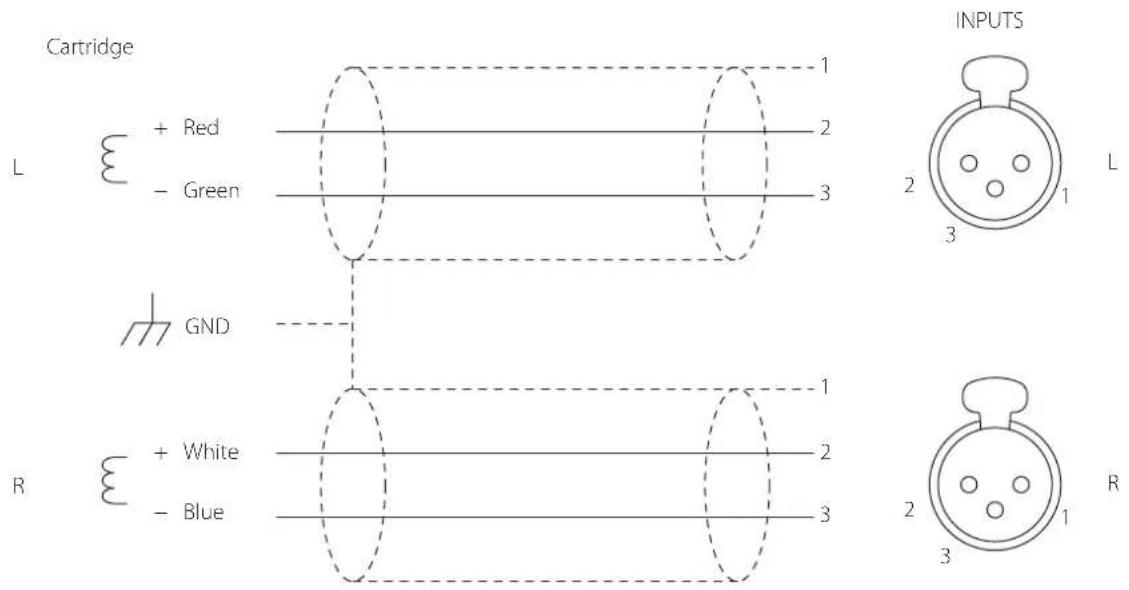
Type 1
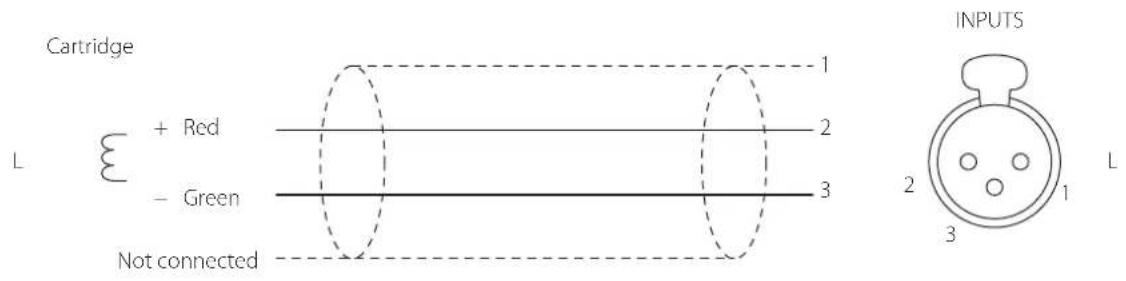
Type 2
CAUTION
RISK OF ELECTRIC SHOCK
DO NOT OPEN

ATTENTION:POUR REDUIRE LE RISQUE D'LECTROCUTION,NE RETIREZ PAS LE CAPOT (OU L'ARRIÈRE).AUCUNE PIECE INTERNE N'EST REPARABLE PAR L'UTILISATEUR. CONFIEZ TOUTE REPARATION A UN SERVICE APRES-VENTE QUALIFIÉ.

https://teac-global.com
Entree XLR (MC) 86 dB
Déparation des canaux (MM, 10 kHz, GAIN LOW) . . . . . . . . . . . . . . . . . . . . . . . . . . . . . . . . . . . . . . . . . Gain
GAIN LOW
Entree RCA (MM) 34 dB
Entree RCA (MC) 54 dB
Entree XLR (MC) 54 dB
GAIN HIGH
Entree RCA (MM) 46 dB
Entree RCA (MC) 66 dB
Entree XLR (MC) 66 dB
Filtresubsonique 17Hz-24dB/octave
Tension d'entree maximale admissible (distorsion 0,1%, GAIN LOW)
Entree RCA (MM) 150 mV
Entree RCA (MC). 16 mV
Entree XLR (MC). 16 mV
Générales
Alimentation electrique
https://teac-global.com
1590 μs/318 μs/100 μs
Warranty provisions (United States and Canada only)
Length of Warranty
The parts and labor warranty will be effective for one (1) year from the date of the original purchase for products not used for commercial purposes. For products used commercially, the warranty is ninety (90) days for magnetic heads and optical pickups, one (1) year for all other parts and ninety (90) days for labor.
Who Is Covered Under This Warranty
This warranty is valid only in the United States or Canada, dependent upon the country in which original purchase was made, and enforceable only by the original purchaser within the country in which the purchase was made.
This warranty is not valid if the product was purchased through an unauthorized dealer.
What Is Not Covered Under This Warranty
- Damage to or deterioration of the external cabinet.
-
Damage resulting from accident, misuse, abuse, or neglect.
-
Damage resulting from failure to follow instructions contained in the products owners' manual or otherwise provided with the product.
-
Damage occurring during shipment of the product (Claims must be presented to the carrier).
- Damage resulting from the repair or attempted repair by anyone other than TEAC or an authorized TEAC service station.
- Damage resulting from modification or attempted modification of product not authorized by TEAC.
- Damage resulting from causes other than product defects, including lack of technical skills, competence, or experience of the user.
- Damage to any unit that has been altered or which the serial number has been defaced, modified or removed.
What TEAC Will Pay For
TEAC will pay all labor and material expenses for items covered by the warranty. Payment of shipping charges is covered in the next section.
How To Obtain Warranty Service
Your unit must be serviced by an authorized TEAC service station within the country in which the product was purchased. If you are unable to locate an authorized service station in your area, please contact TEAC at the applicable address shown at the end of this warranty statement. PLEASE DO NOT RETURN YOUR UNIT TO TEAC WITHOUT OUR PRIOR AUTHORIZATION. You must pay shipping charges if it is necessary to ship the product for service. However, if the necessary repairs are covered by warranty, we will pay the return shipping charges to any destination within the country in which the product was purchased. Whenever warranty service is required, you must present the original dated sales receipt, or other proof indicating the purchase place and date, as proof of warranty coverage.
LIMITATION OF IMPLIED WARRANTYES
ALL IMPLIED WARRANTYES, INCLUDING WARRANTYES OF MERCHANTABILITY AND FITNESS FOR A PARTICULAR PURPOSE, ARE LIMITED IN DURATION TO THE LENGTH OF THIS WARRANTY.
EXCLUSION OF DAMAGES
TEAC'S LIABILITY FOR ANY DEFECTIVE PRODUCT IS LIMITED TO REPAIR OR REPLACEMENT OF THE PRODUCT, AT TEAC'S OPTION. TEAC SHALL NOT BE LIABLE FOR DAMAGE BASED UPON INCONVENIENCE, LOSS OF USE OF THE PRODUCT, INTERRUPTED OPERATION, COMMERCIAL LOSS OR LOST PROFITS, OR ANY OTHER DAMAGES, WHETHER INCIDENTAL, CONSEQUENTIAL, PUNITIVE OR OTHERWISE.
SOME STATES OR PROVINCES DO NOT ALLOW LIMITATIONS ON HOW LONG AN IMPLIED WARRANTY LASTS AND/OR DO NOT ALLOW THE EXCLUSION OR LIMITATION OF INCIDENTAL OR CONSEQUENTIAL DAMAGES, SO THE ABOVE LIMITATIONS AND EXCLUSIONS MAY NOT APPLY TO YOU.
THIS WARRANTY GIVES YOU SPECIFIC RIGHTS, AND MAY VARY FROM SOME OF THE RIGHTS PROVIDED BY LAW. THESE RIGHTS MAY VARY FROM STATE TO STATE OR PROVINCE TO PROVINCE.
This product is subject to the legal warranty regulations of the country of purchase. In case of a defect or a problem, please contact the dealer where you bought the product.
In countries/regions other than the USA, Canada and Europe
This warranty gives you specific legal rights, and you may also have other rights that vary by country, state or province.
If you have a warranty claim or request, please contact the dealer where you bought the product.