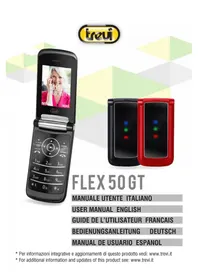
FLEX 50 GT - Smartphone Trevi - Free user manual and instructions
Find the device manual for free FLEX 50 GT Trevi in PDF.



User questions about FLEX 50 GT Trevi
0 question about this device. Answer the ones you know or ask your own.
Ask a new question about this device
Download the instructions for your Smartphone in PDF format for free! Find your manual FLEX 50 GT - Trevi and take your electronic device back in hand. On this page are published all the documents necessary for the use of your device. FLEX 50 GT by Trevi.
USER MANUAL FLEX 50 GT Trevi
natural_image
Two foldable smartphones, one black and one red, displaying colorful LED lights (no text or symbols visible)FLEX 50 GT
TO SET YOUR LANGUAGE DEVICE
- Select "MENU";
- Select the "IMPOSTAZ" icon;
- Select the number 1 function "CONFIGURAZIONE TELEFONO";
- Select the number 2 "IMPOSTAZIONI LINGUA";
- Select "LINGUA DEL DISPLAY" and find their own language from those available.
* For information and updates of this product: www.trevi.it
POUR CONFIGURER LANGUE DE VOTRE APPAREIL:
natural_image
Line drawing of a smartphone with a scroll wheel and an arrow pointing to the side panel (no text or symbols)natural_image
Line drawing of a smartphone showing internal components (no text or symbols)natural_image
Line drawing of a smartphone with a screen and an arrow pointing to it (no text or symbols)natural_image
Two identical geometric shapes with intersecting diagonal lines, no text or symbols presentnatural_image
Line drawing of a smartphone showing internal components (no text or symbols)Quick feature reference
Introduction
Thank you for choosing Trevi Flex 50 GT mobile phone. It is a flip phone. You can read the manual, a comprehensive understanding of the use of mobile phones and enjoy its perfect functionality and simple method of operation.
Safety guide
- If your mobile phone is lost or stolen, please contact the telecommunications authorities or a sales agent immediately to have a hold on the phone and the SIM card. This will prevent economic loss caused by unauthorized calls made from your mobile phone.
- When you contact the telecommunications authorities or a sales agent, they will need to know the IMEI number of our mobile phone (remove battery to expose number located on the label on back of phone). Please copy this number and keep in a safe place for future use.
- In order to avoid the misuse of your mobile phone take the following preventative measures:
- Set the PIN number of your mobile phone's SIM card and change this number immediately if it becomes known to a third party.
- Please keep the phone out of sight when leaving it in a vehicle. It is better to carry the phone with you, or lock it in the trunk.
- Set call barring.
Safety warnings and notices
Before using your mobile phone, read and understand the following notices carefully to ensure you will use it safely and properly.
General attention
- Only the battery and battery charger specified by our company should be used in your mobile phone. Other product might result in battery leakage, overheating, explosion or fire.
- To avoid your phone malfunctioning or catching fire, please do not violently impact, jolt or throw your phone.
- Please do not place the battery, phone or charger in a microwave oven or high-pressure equipment. Otherwise it could lead to unexpected accidents such as damage to circuit or fire hazard.
- Please do not use your phone near flammable or explosive gases, otherwise it could cause malfunction of your phone or fire hazard.
-
Please do not subject your phone to high temperatures, high humidity or dusty places; otherwise this may lead to the malfunction of your phone.
-
Keep your phone out of the reach of small children. Your phone is not a toy. Children could hurt themselves.
- To avoid your phone falling and malfunctioning or being damaged, please do not place it on uneven or unstable surfaces.
Notices when using your phone
- Turn off your mobile phone where the phone is not allowed, such as on the airport or in hospitals. Using the mobile phone in those places may impact the normal operation of electronic devices and medical instruments. Follow relevant regulations when using your mobile phone in those places. Your mobile phone has the auto turn-on feature. Check your alarm clock settings to confirm that your mobile phone will not be turned on automatically during flight.
- Please do not use your mobile phone near the weak signal or high precision electronic devices. RF interference might cause malfunctioning of such electronic devices and other problems. Special tips must be paid near the following equipment: hearing aids, pace makers and other medical electronic devices, fire detectors, automatic doors and other automatic control installations. To find out the effect of mobile phones on a pacemaker or other pieces of electronic medical equipment please contact the manufactures or local sales agents of the equipment.
- Please do not subject the LCD to impact or use the screen to strike things, as this will damage the LCD board and cause leakage of the liquid crystal. There is a risk of blindness if the liquid crystal substance gets into the eyes. If this occurs rinse eyes immediately with clear water (under no circumstances rub your eyes) and go immediately to a hospital for treatment.
- Do not dissemble or modify your mobile phone, as it will lead to damage to the phone such as battery leakage or circuitry failure.
- Under very rare circumstances using the mobile phone in certain model cars may negatively affect the internal electronic equipment. In order to assure your safety under such circumstances please do not use the mobile phone.
- In the event of antenna malfunction, do not use your phone as it could be harmful to human body.
- Avoid letting the phone come into close contact with magnetic objects such as magnetic cards as the radiation waves of the mobile phone may erase the information stored on floppy disks, pay cards and credit cards.
- Please keep small metal objects, such as thumbtacks far away from the receiver. When the receiver is in use it becomes magnetic and may attract these small metal objects and thus these may cause injury or damage the mobile phone.
- Avoid having the mobile phone come into contact with water or other liquids. If liquids enter the phone, this could cause a short circuit, battery leakage or other malfunction.
- Keep the manual.
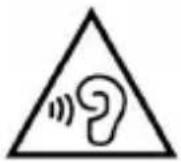
With earphone or headphones use:
To prevent possible hearing damage, limit the amount of time listening at high volumes.
Notices when using battery
- The battery has a limited service life. The remaining life gets shorter as the times of charging increase. If the battery becomes feeble even after the charging, this indicates the service life is over and you have to use a new specified battery.
- Do not dispose of old batteries with everything domestic garbage. Please dispose of old batteries at the directed places with specific rules for their disposal.
- Please do not throw batteries into a fire, as this will cause the battery to catch fire and explode.
- When installing the battery, do not use force or pressure, as this will cause the battery to leak, overheat, crack and catch fire.
- Please do not use wires, needles or other metal objects to short-circuit the battery. Also, do not put the battery near necklaces or other metal objects as this will cause the battery to leak, overheat, crack and catch fire.
- Please do not solder the contact points of the battery.
- If the liquid in the batteries goes into the eyes, there is a risk of blindness. It this occurs do not rub the eyes, but immediately rinse eyes with clear water and go to the hospital for treatment.
- Please do not disassemble or modify the battery, as this will cause the battery to leak, overheat, crack and catch fire.
- Please do not use or place the batteries near high temperature places such as near a fire or heating vessel as this will cause the battery to leak, overheat, crack and catch fire.
- If the battery overheats, changes color or becomes distorted during use, charging or storage, please stop using and replace it with a new battery.
- If the liquid from the battery comes in contact with skin or clothing this could cause burning of the skin. Immediately use clear water to rinse and seek medical tips if necessary.
- If the battery leaks or gives off a strange odor, please remove the battery from the vicinity of the open fire to avoid a fire or explosion.
- Please do not let the battery become wet as this will cause the battery to overheat, smoke and corrode.
- Please do not use or place batteries in places of high temperature such as in direct sunlight, as this will cause the battery to leak and overheat, lower performance and shorten the battery's life.
- Please do not continuously charge for more than 24 hours.
Cleaning and maintenance
- The mobile phone, battery and charger are not water resistant. Please do not use them in the bedroom or other excessively moist areas and likewise avoid allowing them to get wet in the rain.
- Use a soft, dry cloth to clean the mobile phone, battery and charger.
- Please do not use alcohol, thinner, benzene or other solvents to wipe the mobile phone.
- A dirty outlet will cause poor electrical contact, lose of power and even inability to recharge. Please clean regularly.
SIM card and battery installation
Installation
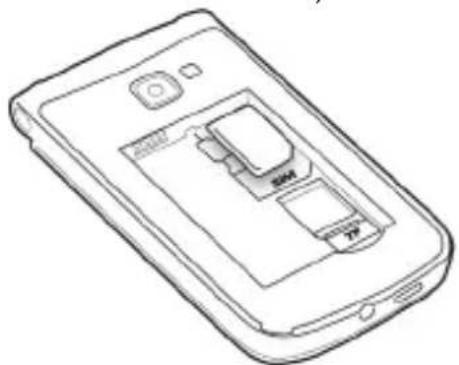
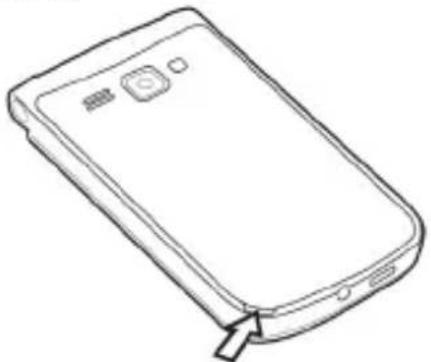
- Carefully remove the rear cover by levering the side of the rear furniture that has the opening, as shown below;
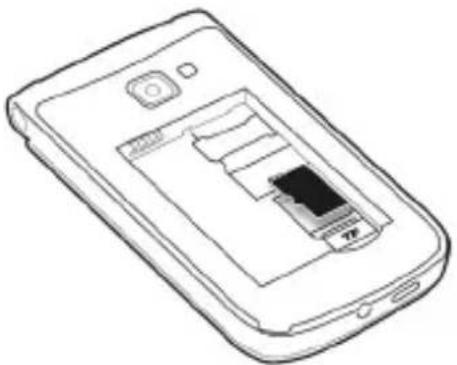
- Insert the SIM into the SLOT with the metal contacts facing down and taking care to respect the position of the cut corner of the SIM;
natural_image
Line drawing of a smartphone showing internal components (no text or symbols)- Insert the battery paying attention to the metal contacts;
- Reposition the rear cover carefully, taking care not to damage the plastic anchors;
- Before using the appliance for the first time, fully charge the battery, using the supplied USB cable and power supply.
Note regard Micro-SIM adapter used on Trevi phones
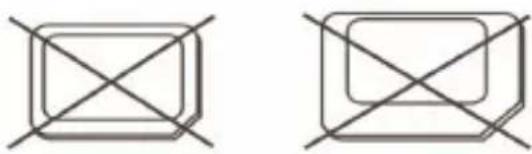
The slots for SIM cards are designed to accommodate only the consideration SIM format. The use of SIM (micro or nano) with its adapter and ‘not recommended as it can cause damage to the device and the micro/nano SIM itself.
Warning:
- TREVI not liable for damages caused by the use of adapters for micro/nano-SIM.
- TREVI reserves the right to refuse free assistance in warranty on defective products that have ‘caused by the use of the SIM adapters for micro/nano-SIM.
- Do not insert memory card into the SIM card slot.
natural_image
Two identical geometric shapes with diagonal cross lines, no text or symbols presentNano SIM card with adapter
Micro SD card installation
To store photos, videos, and music should insert a micro SD external memory.
- Carefully remove the back cover;
natural_image
Line drawing of a smartphone with a scroll wheel and a button, showing front panel and side buttons (no text or symbols)- Insert the micro SD card keeping the surface with the electrical contacts facing down (display side);
natural_image
Line drawing of a smartphone showing internal components (no text or symbols)- Replace the back cover.
Notes:
- Some card brands may not be compatible with the phone.
- The appliance only supports memory formatted in FAT. If you enter formatted cards differently the phone will ask you to reformat the memory card.
Battery recharge
CHARGING THROUGH POWER SUPPLY:
- With the device switched off, connect the Micro USB socket of the supplied power adapter to the Micro USB socket (4) of the phone (use the supplied power adapter, other power supplies could damage the device);
- Connect the power supply to a standard mains socket wall outlet;
-
The LED indicator (3) will light up with a flashing light;
-
When the battery is fully charged, the LED indicator (3) will have a steady red light. At this point, you can disconnect the power supply from the mains socket and then disconnect the Micro USB socket from the phone.
Notes:
- Only use the supplied power supply, different power supplies may damage the battery.
- You can use the device even when it is charging, but, for a longer battery life, it is not recommended for use; moreover, using the appliance, the times of charging are lengthened.
- During charging the appliance may increase in temperature, this does not affect the performance and life of the appliance.
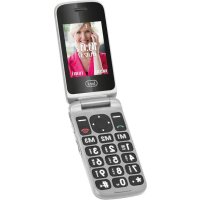
Keys Functions
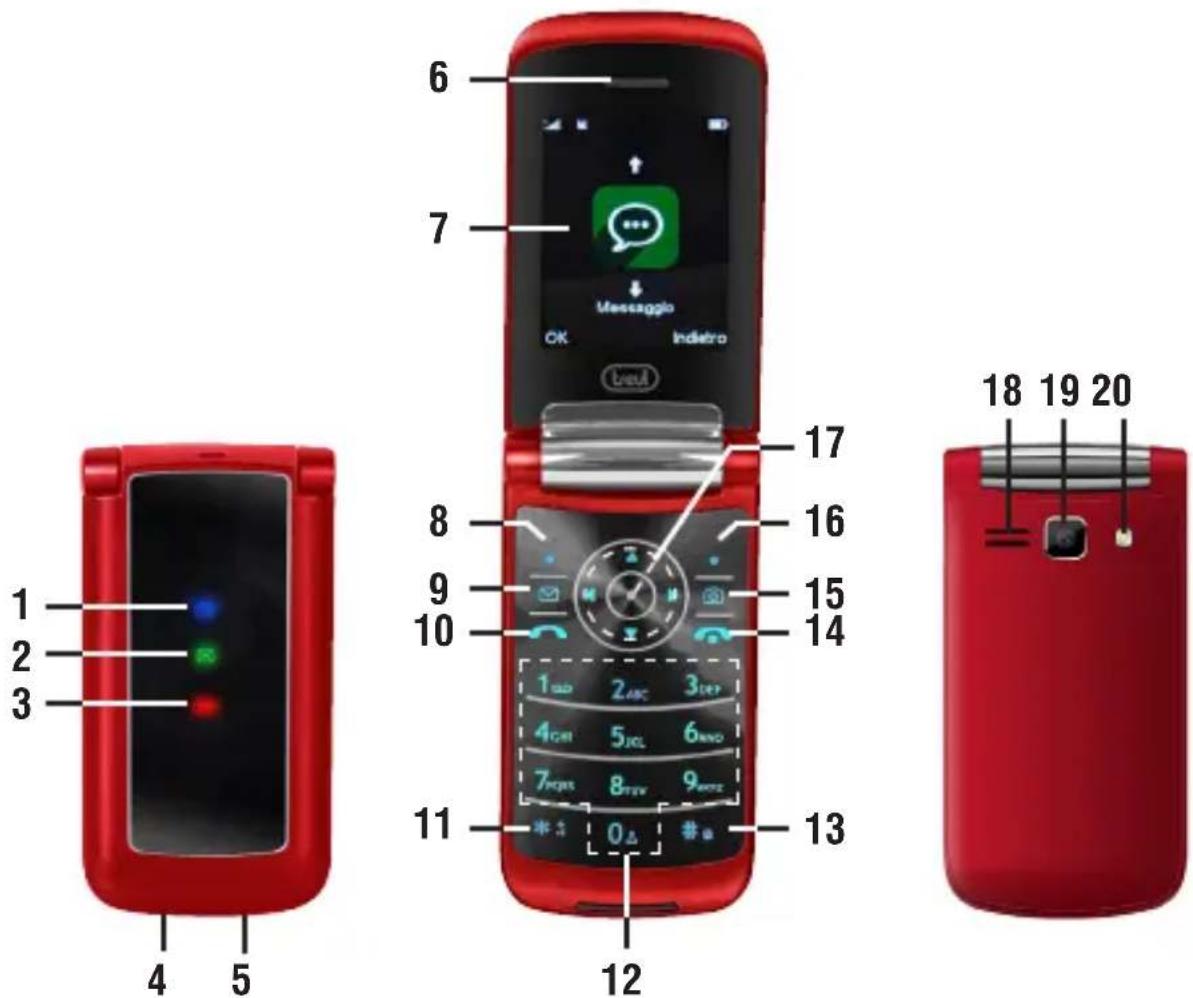
- Incoming/Missed call LED.
- SMS LED.
- Low battery LED
- Micro USB connector.
- 3.5mm audio jack.
- Headset.
-
Display.
-
Multifunction button, the display shows each time its function.
-
Message center.
-
Call/Answer/Call log.
- Key * (asterisk).
- Numeric/letters keys.
-
Key #.
-
End /Power.
-
Speaker.
-
Quick Start camera function.
-
Camera.
-
Multifunction button, the display shows each time its function.
-
Flash LED.
-
4-way navigation key + Menu & OK button.
Basic Functions
Changing the display language
Select Menu - Settings - Phone settings - Language settings and set your desired Display language and Writing language.
Placing a call
- Press the Call key and select one of your recent dialed numbers.
- Dial a valid phone number using the alphanumeric keypad and press the Call key.
- Select Menu - Contacts, go to the contact you want to call and press the Call key.
Answering a call
When the phone rings, press the Answer key to accept the call or the End key to reject the call.
Setting your audio profile
Select Menu - Settings - Profiles - Options - Settings.
Inputing text
- Press 2 to 9 to start entering a word. Press each key once for one letter. Press 0 to insert a space and enter the next word. Press * to insert special symbols. Press # to select the type of text and Writing language.
- ABC mode - Press the keys labelled with the letter you want once for the first letter, twice for the second letter and so on.
- Number mode - Press and hold the Alphanumeric key you need until the number appears on the screen.
Sending a SMS message
Select Menu - Messaging - Write message then dial the phone number for the recipient or select a contact from your Phonebook. After that you can input your message.
Listen to the FM radio
Select Menu - Multimedia - FM radio.
How to set the Alarm
Select Menu - Tools - Alarm.
How to add a New contact in your Phonebook
- Select Menu - Contacts - Options - New then select the place to store the new contact and fill in all the information for the new contact.
- Dial the phone number you want to save as a New contact in your Contacts. After you Dial the number press key (8) - Options - Add to contacts then select the place to store the new contact and fill in all the information for the new contact.
Restore factory settings
In this menu, enter the password, once determined, the phone automatically reboot the phone after the relevant parameters can be set to return to default settings. The default password is 1234.
Information on disposal of battery
Whatever type of battery used up, it should never be placed in household waste, fire or water. Each type of battery should be collected, recycled or disposed of at an appropriate dedicated collection points.
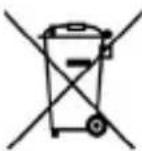
USERS INFORMATION
pursuant to Legislative Decree No. 49 of March 14, 2014
"Implementation of Directive 2012/19/EU on Waste Electrical and Electronic Equipment (RAEE)".
This wheeled bin symbol on the product indicates that at the end of its life must be collected separately from other waste. The user must, therefore, take the remote control integrates the essential components that got to its life to the appropriate differentiated collection centers for electronic and electro-technical waste, or return it to the dealer when purchasing a new appliance of equivalent type, in terms of one to one, or one to zero for equipment having longer side of less than 25cm. Appropriate separate collection for the decommissioned equipment for recycling, processing and environmentally compatible disposal helps prevent negative impact on the environment and human health and promotes recycling of the materials making up the product. Illegal dumping of the product by the user entails the application of administrative sanctions stated in Legislative Decree n. Legislative Decree No. 49 of March 14, 2014.
TREVI pursues a policy of continuous research and development, the products may have different features from those described.
Technical specifications
Standard: GSM
GSM frequencies: .... Quad Band 850/900/1800/1900MHz
Display: 2,4 Inch
Battery: rechargeable Li-ion 3,7V-800mAh
Autonomy (at full charge): ....Stand-by: 240 hours aprox.
continuous: 4 hours aprox.
Bluetooth:....V 2.0
Bluetooth transmission power: 2,5mW
Bluetooth band transmission:....2,4GHz
Dimensions: 52x101,8x14,8mm
Weight: 112gr (with battery)
FAQS and solutions
If you have any questions about the phone, please find the solutions from the table below.
| FAQs Causes Solutions | ||
| Poor reception When you use your phone | phone at poor reception areas, like near high rise buildings or base rooms, the radio wave cannot be transmitted. | Avoid this as far as you can. |
| When you use your phone at network traffic congestion, such as working time and off-duty time, the congestion can result in poor reception. | Avoid this as far as you can. | |
| This is related to the distance to base station in question. | You may to provide service coverage map. | |
| Echoes or noises The trunk line of network | network is in bad condition. It is a regional problem. | Hang off the call and dial again.Choose another better line. |
| In some areas, the call lines are in bad condition. | ||
| Shorter standby time The standby time | time is relevant to network settings. | In poor reception areas, turn off your phone temporarily. |
| Replace the batteries Change with a new battery. | ||
| When no signals are received, your phone will continue searching for base stations, thus consuming a large amount of battery power and reducing standby time. | Use your phone at strong signal areas or Turn off the phone temporarily. | |
| Failed to turn on your phone The battery power is used up. Check the battery power level or charge the battery. | ||
| SIM card error The SIM card is damaged. Contact your network service provider. | ||
| Failed to connect to the network The SIM card is invalid. Contact your network service provider. | ||
| Failed to make a call The call barring feature is used. Cancel the call barring settings. | ||
| The fixed dialing number feature is used. | Cancel the fixed dialing number settings. | |
| PIN code error Enter incorrect PIN codes for three times in succession. | Contact your network service provider. | |
| Failed to charge the battery The battery or the charger is damaged. | Change a new battery or charger. | |
| Change the battery when ambient temperature is lower than -10°C or above 55°C. | ||
| Poor connection. Check whether the plug is properly connected. | ||
| Failed to add contacts to phonebook | The storage space of phonebook is used up. Delete some contacts from the phonebook. | |
| Failed to set up some features Your network not provider the services. | Contact your network service provider. | |
Les Bases
Introduction
natural_image
Line drawing of a smartphone showing internal components (no text or symbols)natural_image
Line drawing of a smartphone with a cable or connector inserted (no text or symbols)natural_image
Line drawing of a smartphone showing internal components (no text or symbols)natural_image
Line drawing of a smartphone showing internal components (no text or symbols)natural_image
Line drawing of a smartphone with a button and cable (no text or symbols)natural_image
Line drawing of a smartphone showing internal components (no text or symbols)natural_image
Line drawing of a smartphone showing internal components (no text or symbols)natural_image
Two identical geometric shapes with diagonal cross lines, no text or symbols presentAdaptador Nano SIM
natural_image
Line drawing of a smartphone with a button and arrow pointing to the side (no text or symbols)natural_image
Line drawing of a smartphone showing internal components (no text or symbols)SIMPLIFIED EU DECLARATION OF CONFORMITY
Hereby TREVI S.p.a. declares that phone FLEX 50 GT is in compliance with directive 2014/53/EU.
The full text of the EU declaration of conformity is available at the following internet address https://www.trevi.it/dms/zidi/TREVI/DOCFLEX50GT.pdf
text_image
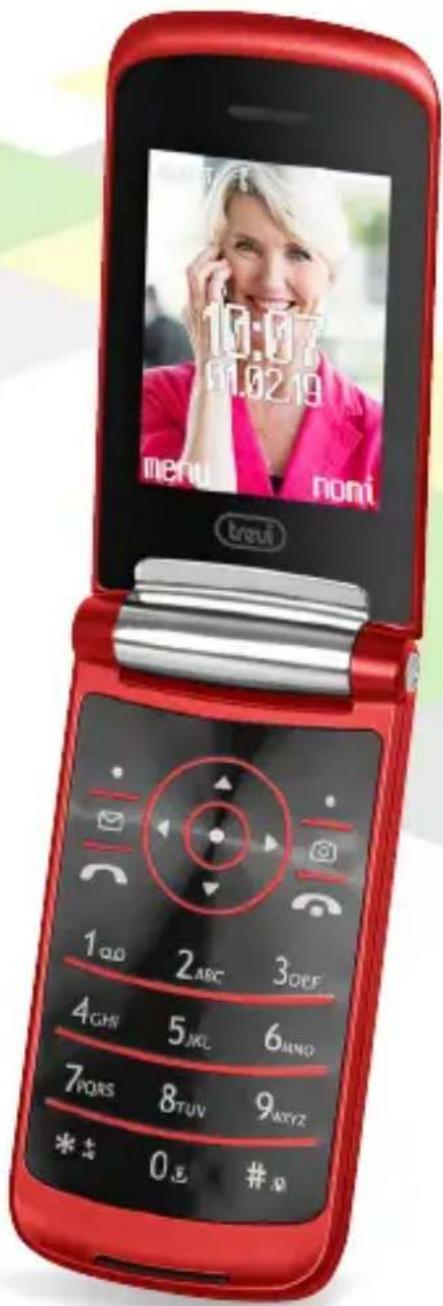
10:07 01.02.19 menu noni trevi 1QQ 2ABC 3OFF 4GHN 5KL 6MND 7PQRS 8TUV 9XYZ * * 0 # #FLEX 50 GT

natural_image
Two foldable smartphones with colorful display lights, one black and one red, against a white background (no text or symbols visible)
Trevi S.p.A.
Strada Consolare Rimini-San Marino, 62
47924 RIMINI (RN) Italy
Tel. 0541/756420 - Fax 0541/756430
www.trevi.it - E-mail: info@trevi.it