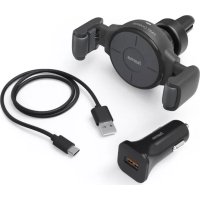
FC10 FlexSet - Car wireless charger HAMA - Free user manual and instructions
Find the device manual for free FC10 FlexSet HAMA in PDF.



| Product type | Wireless car charger |
| Brand | Hama |
| Model | FC10 FlexSet |
| Dimensions | Approx. 120 x 70 x 50 mm (estimate) |
| Weight | Approx. 80 g (estimate) |
| Input power | 5 V / 2.0 A or 9 V / 1.67 A (via cigarette lighter adapter) |
| Wireless output | Max. 10 W (depending on conditions) |
| Car adapter | Input 12 V / 24 V, output max. 5 V/3 A, 9 V/2.22 A or 12 V/1.67 A (20 W max.) |
| Included cable | USB-A to USB-C |
| Compatible smartphone width | 65 mm to 90 mm |
| Mounting | Vent mounting clip (included) |
| Adjustment | Adjustable jaws with release lever |
| LED indicator | Red (power/standby), green (charging complete), flashing (charging/error) |
| Main functions | Wireless inductive charging, automatic smartphone holding, easy adjustment |
| Maintenance and cleaning | Clean with a slightly damp, lint-free cloth, no harsh detergents |
| Safety | Metal object protection, automatic shutdown at end of charge, keep out of reach of children |
| Spare parts and repairability | No spare parts available, do not open the product |
| Warranty | Standard manufacturer warranty (see Hama terms) |
| General information | Suitable for 12 V and 24 V vehicle electrical systems |
Frequently Asked Questions - FC10 FlexSet HAMA
User questions about FC10 FlexSet HAMA
0 question about this device. Answer the ones you know or ask your own.
Ask a new question about this device
Download the instructions for your Car wireless charger in PDF format for free! Find your manual FC10 FlexSet - HAMA and take your electronic device back in hand. On this page are published all the documents necessary for the use of your device. FC10 FlexSet by HAMA.
USER MANUAL FC10 FlexSet HAMA
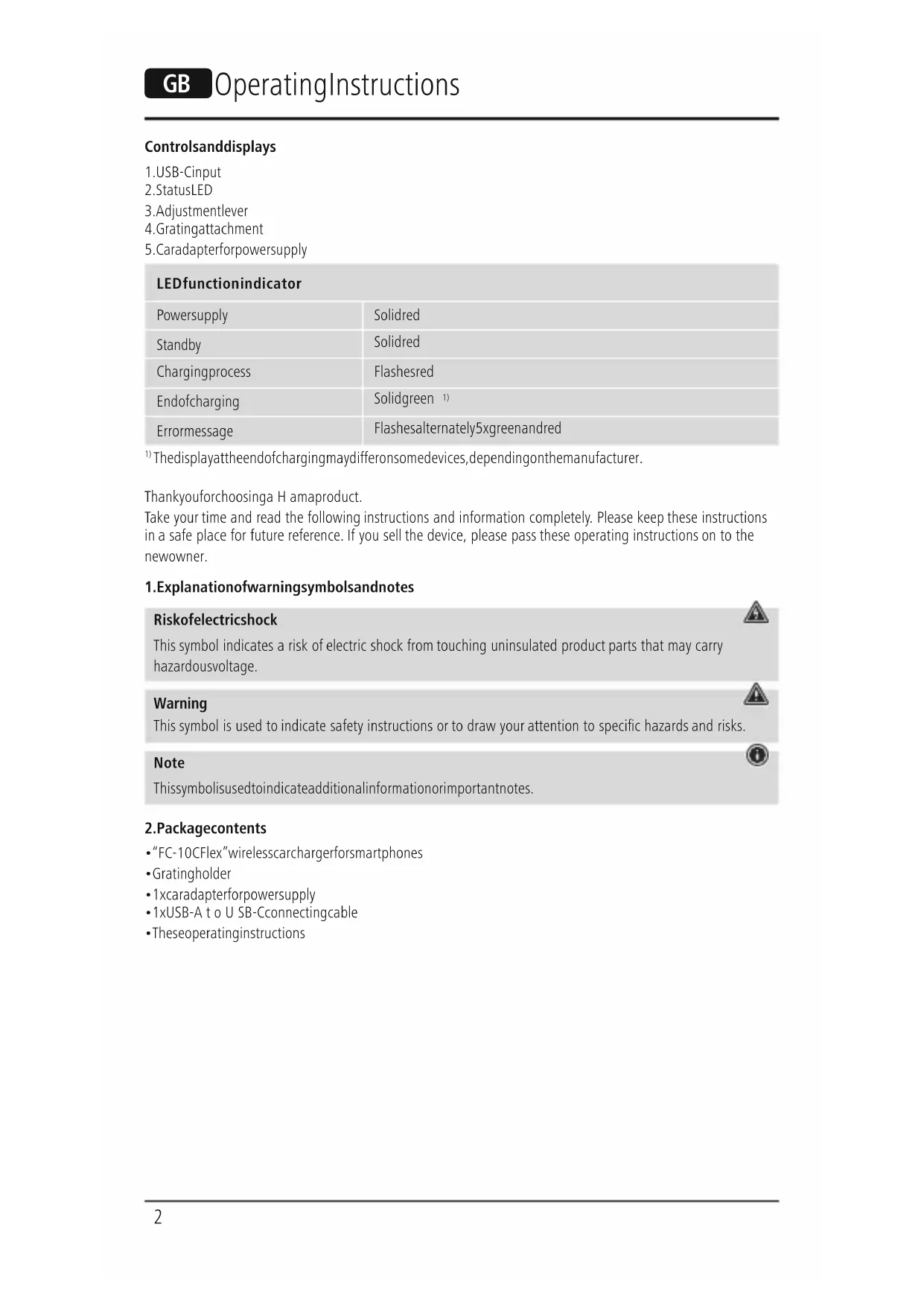
1.USB-Cinput
2.StatusLED
3. Adjustmentlever
4. Gratingattachment
5.Caradapterforpowersupply
LEDfunctionindicator
| Powersupply | Solidred |
| Standby | Solidred |
| Chargingprocess | Flashesred |
| Endofcharging | Solidgreen 1) |
| Errormessage | Flashesalternately5xgreenandred |
1) Thedisplayattheendofchargingmaydifferonsomedevices,dependingonthemanufacturer.
Thankyouforchoosinga H amaproduct.
Take your time and read the following instructions and information completely. Please keep these instructions in a safe place for future reference. If you sell the device, please pass these operating instructions on to the newowner.
1.Explanationofwarningsymbolsandnotes
Riskofelectricshock
This symbol indicates a risk of electric shock from touching uninsulated product parts that may carry hazardousvoltage.
Warning
This symbol is used to indicate safety instructions or to draw your attention to specific hazards and risks.
Note
Thissymbolisusedtoindicateadditionalinformationorimportantnotes.


2.Packagecontents
"FC-10CFlex"wirelessscarchargerforsmartphones
Gratingholder
- 1xcaradapterforpowersupply
- 1xUSB-A to U SB-Cconnectingcable
Theseoperatingsinstructions
3.Safetyinstructions
- Protect the product from dirt, moisture and overheating and use it in dry environments only.
- Donotdroptheproductanddonotexposeittoanymajorshocks.
- Do not operate the product outside the power limits given in the specifications.
- Do not use the product in areas in which electronic products are not permitted.
- Ensure that the product is not covered up by textiles, metal or other objects in order to avoid damage caused by overheating.
- Dispos of packaging material immediately in accordance with the locally applicable regulations.
- Do not modify the product in any way. Doing so voids the warranty.
- Donotcontinuetooperatetheproductifitisvisiblydamaged.
- Usetheproductonlyfortheintendedpurpose.
- Do not use the product in the immediate vicinity of heaters, other heat sources or in direct sunlight.
-Onlyusethearticleundermoderateclimaticconditions. - As with all electrical products, this device should be kept out of the reach of children.
- Do not use the product in a damp environment and avoid splashing water.
- Donotbendorcrushthecable.
- Neverapplyforcewhenusingtheproductorduringinstallation.
- When using this product, observe the applicable local traffic laws and regulations.
Take care that components such as airbags, safety areas, controls, instruments, etc. and visibility are not blockedorrestricted. - Ensure that the product is securely mounted before every journey.
- Do not allow yourself to be distracted by the product when driving a vehicle. Always pay attention to the surrounding traffic and your environment.
- Always pull directly on the plug when disconnection the cable, never on the cable itself.
Warning
Donotplaceanybankorsimilarcardswithmagneticstripsormagneticallysensitiveobjectsonthe product.Thedataonthecardscouldbedamagedorcompletelydeleted


Warning
Ensure that there are no metal parts (e.g. metal plate for magnetic holders) on the back of your device. Metal heats up significantly in the field of an induction charger and can damage your device and/or the charger.

Riskofelectricshock
- Donotopenthedevicorcontinuetooperateititifbecomesdamaged.
- Donotusetheproductifthechargingcable,adaptercableorpowercableisdamaged.
- Do not attempt to service or repair the product yourself. Leave any and all service work to qualified experts.
4.Start-upandoperation
Note

- To be able to charge your device via the wireless charger, it must be compatible with induction charging technology. Please refer to the operating instructions of your device for more information.
Note that mobile phone cases, covers, etc., and other materials between the wireless charger and the back of your device may interfere with or even prevent the charging process.
Note - 12V, 24V vehicle electrical systems

The charger is suitable for 12V and 24V vehicle electrical systems.
- Fasten the wireless car charger over the enclosed grating holder (4) to your vehicle's grating.
- Connect the enclosed USB-A to USB-C connector cable to the USB-C input (1) on the inductive charger andtheenclosedcaradapterforthepowersupply(5).
- Whenthepowersupplyisactive, thestatusLED(2)lightsupred.
- Use the adjustment lever (3) to set the holding jaws to the size of your smartphone. You can move the controllerslightly by pressing it to reset the locking mechanism.
- First place the holding jaws in the maximum opening position for setting them to the size of your smartphone.
- Then place the smartphone in the charger and, using the adjustment lever, slide the holding jaws together untilthesmartphonesitsfirmlyintheholder.
- Releasethelevertolocktheposition.
Thanks to the flexible holding arms, you can now easily fix your smartphone in the charger and remove it againatanytime. Theholdingarmsalwaysremaininthepositionyousettheminearlier.
Warning

-OnlyusesuitablechargingdevicesorUSBportstochargetheproduct.
- DonotusedefectivechargersorUSBportsanddonattempttorepairthem.
-
Nowplaceyourdevicewithitsrearonthewirelesscharger(B).
-
The charging process begins as soon as an effective induction field has been established. The status LED (2)startstoflashred.Thecurrentchargestatusisdisplayedonyourdevice.
- If no induction connection can be established, change the position of your device if necessary (B).
- The charging process ends automatically once your device's battery is fully charged. The status LED (2) lightsup solidgreen.
- Remove your device from the wireless charger and disconnect the wireless charger from the power supply.
If metallic or magnetic objects are on the charger, this is indicated by status LED (2) flashing green and red alternately. After flashing five times, the status LED (2) goes out.
Note- carbattery

Withsomevehicles, it can happen that power continues the event though the ignition has been switched off. You should therefore disconnect the product from the line connection when not in use to protect your car battery from being drained.
5.Careandmaintenance
Only clean this product using a lint-free, slightly damp cloth and do not use any harsh cleaners. Ensure that no waterisabletoentertheproduct.
Note
Disconnect the device from the mains before cleaning and during prolonged periods of non-use.
6.Warranty disclaimer
Hama GmbH & Co KG assumes no liability and provides no warranty for damage resulting from improper installation/mounting, improper use of the product or from failure to observe the operating instructions and/ or safetynotes.
7. Technical data
| Wireless c archarger | |
| Input | 5 V max.2.0A 9 V max.1.67A |
| Output(underoptimisedconditions)max.10W | |
| For smartphones with a width of 65 - 90 mm | |
| Car a adapter: | |
| Vehicleelectricalsystemvoltage12V24V | |
| Outputvoltage/ c currentmax. | 5 V 3.0A 9 V 2.22A 12V1.67A |
| Outputpowertotal20W m ax. | |
8.Declarationofconformity
Hama GmbH & Co KG hereby declares that the radio equipment type [00201677] is in compliance with Directive 2014/53/EU. The full text of the EU declaration of conformity is available at the following Internet address:
www.hama.com->00201677->Downloads.
| Frequencyband(s)120.99- 1 62.02kHz |
| Maximumradio-frequencypowertransmitted-11,14dBμA/mat3m |
He BCKpbBaIte n3dJIeN He IcNoJb3yIe ero npn HAnuHn NobpeKdeHn.
He nCnoB3yIe n3dEne, ecn nobpeXdeHb Ka6JIb dJa 3apAdkn, Ka6JIb aAnTepa nn Hyp nITaHn.
He nbTaTecb camOCToTeNbHO BbIOnHbTb TexHnueckoe 06CnyXnBaHne nI npemOHn3dJIy. PemOH pa3peShaTcnpOn3BOJNbToBkOKBaIIuNpUPOBaHHOMyepcoHaNy.
4. BbO B 3KcNJIyatauIIO npa60Ta
PpmeaHne
- 4T06bI 3apAINTb OKOHeuHoe yCTPOINCTBO C NOMOUIBIO 6ecnpoBOIDHO 3apAHNHO yCTPOINCTBA, OHO D0JXHO 6bITb COBMecIMMO C TexHOLOrne INHyKUHOHNOHON 3apAKN. CoJIIOJaTe COOTBeTCTByOUnye Ka3aHnpyKOBOIDCTBaNO3KcNlyaataunBaWseFOOKOHeuHOYOrOyCTPOINCTBA.
- Pπμmnte BO BHNMaHne,уTO qexnIЯ MO6nIbHbIX TeleΦoHOB,HaKnaIKN I NHBie MaTePnAJIbI, INcNoJIb3yEmbIe MEXdI yBeCnpOBOHbIM 3apRdHbIM yCTpOINCTBOM I O6paTHOIN CTOpOHIO BAWeERO OKOHeuHO yCTPOINCTBa MOrY BbI3BaTb HneOJaIKN B npoUecce 3apRdKn IIN NOMEaTb 3apRdKe.

Yka3aHne 6OpToBaCetb 12 B, 24B
3apnHoe yctpoCTBO npedHa3NaueHo nla 60pTOBcetn 12 B n 24 B.
- Ппкpenite 6ecnpobodhoe abTomobnibhoe 3apdHoe yctpoiCTBO K BeHTnlaOnHHoN peWetke abTomobnIc nOMOsbIO npnilaraemoro KpenneHna DnBa BeHTnlaOnHHoN peWetkn (4).
-Подклочпгпрлагаюшс coeHnHteьнй ka6elb USB-A/USB-Cko BXOy USB-C (1) INduknoHHoro 3apAHO yCTpoIcTba n K npilaraioeMyca aBtOMo6nIbHomy aanTepy dIra 3neKtponHTAHn(5). - PnAaTUBHOM 3JneKtpoNTAHIN CBETOAnOHDbIM INHdNkATOP COCTOHN (2) Ropnt KpaCHbIM.
C nomoubpo bpuara (3) oTpeyunpyte kpenexhble 3axmbi npa3mep cboero cmapfoha.PerynaytOp MOxHO HEMHOro nepemecntb nytem Haxatna Ha Hero, yTo6bl ocnaBt b Kcauio. - Chauana yctahOBIne KpeJenXhIbe 3axnMbI B MaKcImaJIbHOE OTKpbIToe NOJIOxHeHne.
3aTeMBIIOKHTe CMapTfoH B 3apAHOoe yCTPOINCTBO N C NOMOUBo pbUaRa CBOINTE KpeENXHbIE 3aXIMbl, NOKacMapTFOHNHe6yJeTnpOuHO3aKpeNJIeH. - Otnyctnte pbiur, yto6bl 3aФNKCuPOBaT noJIOxHeHne.
- 5JanaOdaapra rI6KIM KPOHHTeHnAM CMaprTO JERKO IN PpOCTO OHKCpyETcB 3aApAHOUM yCTpoiCTBe n I3BJIeKaETcRn3 Hero. PpN 3TOM KPOHHTeHbIOCTaHOTcB YcTaHOBJEHOM Bamn NIOJOKeHN.

PpeynpeKdHne
-
Pa3peuataeTcNcNoJIb3OBAbTdIa 3apJdKn TOnJIbKO COBMeCTmblte 3apJdHbIe yCTpoJICTBa n USB-pa3beMbI.
He nCnoJIb3yIte HeNCpABHbIe 3apAaHbIe yCTpoiCTBa IIN USB-pa3beMbI IN He nbITaTecbIX peMOHTnPOBaTb. -
Tenepb noIoxnTe oKoHeuHoe yCTpoiCTBO B 6ecnpoBODHoe 3apJdHoe yCTpoiCTBO (B) o6paTHoN CTOPOHoi.
- Ppoecc 3apnK NaHnaeTc TOrda, KOrda yctaHO aKTHBHe nHdyKUnOHHe NOJe.
CBeToMnOHyBmHnKaTOp (2) HauHnaet 6bICTpo MmraTb KpaChbIM. Tekuyn ypOBeHb 3apJa yKa3aHn HabawemOKoHeyHomyCTPOICTBE.
- Ecnn Hnykunohoe coeHHeHne He yctaHaBnBaetc, MoXHO n3MeHntb nOIOKeHne OKOHeHOrO yctpoCTBa(B).
- Ipouecc 3apAdkn ABToMaTuYeCKN 3aBepaTaTcK, KOrJa aKKyMyJATop OKOHeHOrO yCTpOHTBa NIOJIHOCTbIO 3apAKeH. CBeToDnOdHbI INHdNKaTOP COCToAHN (2) NOCToHHO TOpNT 3eJeHbIM.
- OToCoeDInHInTe OKoHeuHoe yCTpOInCTBO OT 6ecnpoBoDHorO 3apRdHorO yCTpOInCTBa,OTKJIIOHTe yCTpOInCTBOOTJNEKTPoPNTaHnI.
- Ecn Ha 3apA HOM yCTPOICTBe JexaT MetaJIuueCKne IIN MaHHTbIe npEIMTebl, CBeToNDnBn INDkATOP COCTOHN (2) nonepeMeHHo Muraet 3eJeHbIM n KpaCHbIM. NocIe nTnKpTHoro MURAHN CBToNDnOBHbINHdNKATOPCOCTOHN (2)norachET.

Yka3aHHe—ABTOMo6nIbHbIaKKyMylrTop
B HeKOTOpbIX aBTOMO6nIax POnaHa PInTaHna CoXpaHReTc HecMOTpHa BbIKJIOUeHHoe 3aKunraHne. Po3Tomu npnHeNCnOJIb3OBaHnOtKJIIOuaTeu3dJeNneOT6OpTOBOiCetu,HTo6blnPepoTbPaTtbpzpa3pykny aBTOMO6nIbHoROaKKyMylrTopa.
5.TexHnueckoeo6cnyxuBaHneu y xoJ
OuHsAaTe n3dEJIe TOJbKO C NOMoUbIO CJeRka BnaxHOB 6e3BOpCBOI cALΦeTKN; He nCNoJIb3yIte arpeccNBbIe YnCTaIIue cpeCTBa. CJeIte 3a TeM, UTo6bl B yCTpoIcTBO He IonaJaIa BOJa.
PpmeaHne
Ipeed ouhctkoi npu dInTeJbHom HeNCnOJb30BaHnn 6o3aTeJbHO OTKIOUaHTy UcTPOINCTBOOTcTN.
6.NCKJIIOUeHHeNEOTBETCTBEHHOCTN
Hama GmbH & Co. KG He HeceT OTBeTCTBHeHOctn 3a NOBpeJxHeN, BO3HKnUe B pe3yIbTaTe HeHaJIexJaue yCTaHOBKn, MOtTaKa n HeHaJIexKaUeTo NcIOJIb3OBAHn I3DeJIu Nm HecO6JIoDEHn Tpe6OBaHn pyKOBODCTBaNo3KcNlPyatauNN/nnNyKa3aHnNOTExHKe6e3OnaCHOCTn.
7.TexHnuecknExapakTepeNCTNKn
3.Yka3aHn83a6e30naCHOCT
- Pa3e Te npodykta OI 3ambpcbaHe, Bnara n npperpaBaHe I rO n3noJ3BaTe cMo B cyxa cpea.
He no3B0JIaIeHa npOyKta Da naJa Hr ro n3laIaIe Ha cnHn Bn6paun.
He n3noI3BaIte npOdykTa I3BbH HeROBIne rpaHnUHa MoUHOCHTa, NocOueHN B TexHnueCKIne daHHN.
He n3noI3BaIte npOdykTa B 30Hn, B KOnTO He ca pa3peSeHH eJeKtpoHNn npOdykTN.
BHHMaBaTe n3dJeHMeTo da He 6bJe NOKpmbaHO C TeKCTnI, MetaJIHN IIN dpyrN ppeMmTn, 3a Da 6bDaT n36ErHaTINOBpeDInOTnpERpaBaHe.
-ИЗХБВьрлеОпаКOBьЧИЯМATEРиАЛВeДнHаRacьглaСHоДeйСТВaПИTeHаMЯСТОпа3NopeД6и3a n3XБВьрлЕНaOТпaДьц.
He npabete npomehn B ypea. Taka 3ay6nte npabo H BCaKBN rapaHIOHN npTeHcM
He npoIbIJIaBAIte da n3nOJ3BaTe npOdykTA, aKO TOI mA OeBUNH NOBpeDN.
-Изпалзайтейрдундамаиpeдвideндацел.
He n3noI3BaIte npOdykTa B HenocpeICTBeHa 6IIN30CT DO OTONIITeHNyypei,dpYn I3TOHnCnHa TOIINHAnIHnHaInpEeKTHAcJIbHYeBaCBETIIHa.
-ИзпалзвайтейрдуктумоюнлиматунусLOBIA. - Pioo6Ho HA BCNUK eNEKTPnueckn npOyKTN, TO3N npOyKTH He 6bBa da nonaDa B pBcTe Ha deca!
He n3noJI3BaIte npOdykTa BbB BlaJHa cpea n 36raBaiTe BOHn npbCKN.
He npueynbae n He npntnckaTe kaeba. - Ppi pa60ta c npodykta n npu MOHTaX HnKora He npuiIaraiTe ycuiine uin roJama cnla.
- Pn ynoTpe6a Ha npOyKTA B DnBxKeHneTo No nbTnUaTa BaXaT pa3npoe6nte Ha 3akoHa 3a DnBxKeHneTo nonbTnUaTa.
BHHMaBaIe KOMNoHEHT NaTo ebp6er, npeJNa3Hn 30Hn, eJeMeHTn 3a 06CnyXbaHe, INCTpyMeHTn T. H. JINBUNIMOCCTTadaHe6bDaTnOKpNTnnlNOrpaHueHN.
-ПюворяВайТeпрдИСКУТБУВЕСИЗМОНТАХANРОДуктА. - Ppi nIbTyBaHe c MToTOpHNo ppeB03Ho cpeiCTBO He ce pa3ceBaiTe ype3 npOyKta i CJIeJeTe NbTHaTa o6ctaHOkAn O 6KpbXKeHneTO.
3a n3KJIIOUBaHe Ha Ka6eJa DbPnAte DnpeKTHO igeKepa HnKOra Ka6eJa.
PpeynpeKdHne


He 3apejdaite EC nIIN dpyrno noo6n Kaptn C mArHHTHa JeHTa, KaKTo N yBCTBnteJIHN Ha MaHHTHO deiCTBnepeMeTnBbpxynpOykTa. DaHHnteOTkapTaTAMORAATDa6bDaTNOBpeDeHHnnnNtPNTn
PpeynpeKdHne

Ybepete ce, ye no Tbp6a ha BaWeTo KpaHOb yctpoiCTBO HMa MeTaJIHn IpeIeMtN (HaIpIMep MetaJIHa IIoUa 3a MaHHTeH IbPxJa). MeTaNt Ce HaRpaBA MHOrO CINHO B NOJIeTO Ha yCTpoiCTBOTO 3a INdKyUOnHO 3apeXdaHe n Moxe da NobpeDi KpaHOTo Bn yCTpoiCTBO N/IIu YCTPOIcTBOTO 3a 3apeXdaHe.
OnachocOTtOKoByap

He oTbapnTe npOdykTa n npn noBpeHa He npoIbIxkaBaIte Da ro I3no3BaTe.
He n3no3BaIte npOyKta, aKO ca nobpeHn Ka6eJIbT 3a 3apeXdaHe, Ka6eJIbT Ha aanTepa nn MpeXOBnraTka6eJ.
He ce onntBaIte camn da o6cnykBaTe nIIN peMOHTnpaTe npOdykTa. OCTaBeTe BcKaKbA texHuecka noDpBxKHaHakOMnTeHTHnTEcneuaNtN.
4. Npckahe B deiCTBne n pa6oTa
Yka3aHne
3a da moxete da 3apeinte BaWeTo KpaHNO yCTpoiCTBO C 6e3xNHyTO yCTPOiCTBO 3a 3apeXdaHe, TO Tp8Ba Da 6bDe CbBMeCTnMo C TexHOJIOrnaT a NHNyKTINBHO 3apeXdaHe. 3a Ta3n cIe nCna3BaIte yKa3aHnraTOpbKOBoDcTBOTo3ayNotpe6aHaBaWeToKpaHouYCTPOiCTBO.
- 06bphete BHMaHne, Ye KaIbΦnte 3a TelefoHn, NOKpUtnraT a T.H. N DpyrMaTeepnaM MeXdY 6e3xNCHOTO yCTpoiCTBO 3a 3apeXdahe n rbp6a Ha BaWteo KpaHno yCTpoiCTBO HApUshaBt npouceA Ha3apexdaHEn dOpIMOratDaIarOpeIOTbPaTAT.
Yka3aHHe-6OpDObaMpeXa12V,24V
3apnHTo yCtpoCTBO e noxOa 3a 6opOba MpeXa c 12V n 24V.
3akpenete 6e3xuHTo 3apJnO yctPoIcTBO 3a ABTomO6NJ Upe3 npUHXeHNA BpKau 3a BEHTnlaunOHha peWEka (4) KbM BEHTnlaUNOHHaTa peWEtKa Ha ABTomO6nla Bu.
Cbbpke Te npiloXeHn Ka6en 3a Cbpb3BaHe oT USB-A KbM USB-C USB-C BxoJa (1) Ha yctpoiCTBOTo 3a HnykTBHO 3apeJdaHe n CpniloXeHn aBtOMo6uJeH aadantep KbM eJleKTPo3axpaHbaHeTo (5).
- PnAkTNBHO eJekTpO3aXpaHbAHe CBeToDIOBt 3a CTeTb U cepBeHo.
C nomouta Ha peryunpaunna loct (3) 3aIbpxaunte yeJIOCTn do pa3mepa Ha cmapTfoha Bn. MokeTe da npemectnte leko peryaIatopa kaTO ro HAtncHete, 3a da OCBO6OJnte 6JOKIpOBkata.
3a NaCTpoiKa Do pa3mepa Ha Baunr CMaprfoH nbpBO nocTaBeTe 3aIbpxaunr Te YelHO B MaKcIMaJIHO OTBopeHaTano3nua.
Cnei TOBa noCTabete CmapTFOHa B 3apAHHOTO yctpoINCTBO IN Cb6peTe 3aBbpxaunTE ueHOCn C nOMoUHa peryIinaJIOCT, DOKaTO CmapTFOHbT 3actane CTaBUNHO B Ibpxkaa.
-Пусhteялоста,задафксраратeозицята.
Cera moxete lecho da fukcapate n da n3BaXdaTe CmapToHa cn OT 3apnHOTO yctpoNCTBO NO BCAKO BpeMe6IarOaepHeHaBkABuTeiBpKaaunpaMeHa.IPnTOBaIbpxauntepaMeHaBnHaTNOCTaBA T hAcTpoEhataoBacno3nui.
PpeynpeKdHne
- 3a zapekndahe n3noJ3BaIte camo noXoJaIz 3apAIDn yctpoCTBa IIN USB n3BOI.
- Ito npnun He n3no3BaIte deΦekTHn 3apAaHn yctpoiCTba nn USB n3bOu n He ce onntBaIte da rnonpaBATE.
Cera noctabete BaeweTo KpaHNo yCTpoiCTBO c rbp6a HANOly B 6e3xNHyTO 3apAHO yCTpoiCTBO (B).
- Прочьн на зараздаме залочь, korato сбддени Иndукшонноile. CBetodnobt 3a ctaTyc (2) залочь на мига плсраши в червен. Aktyалниот стату на зараздаме споказы на Baшето краиhoctpoiCTBO.
Ako He Moke da 6bIe c63daJeHa INHyKcIOHHa Bpb3ka, pni Heo6xOIMOC T IpomeHeTe NOLOKeHneTo Ha BaWeToKpaHouCTpoICTBO(B).
- PpocebT Ha 3apeXdaHe npeKcbcBA bTOMaTHNO, KOraTo aKymlaTopHATA 6aTePnHa BaWteO KpaHOn yctpoiCTBO 6bJe HAnbJIHO 3apeDeHa. CBeToIONoBt 3a cTaTyc (2) CBETn NocToaHHo B 3eJIHo.
- I3BaIeTe KpaHTo Cn yCTpoiCTBO O T 6e3xNHyTO 3apJAnHO yCTPOiCTBO N rO paEiHHeTe OT eJIekTpo3axpAHBaHeTo.
AkoB6IIN3OCTo3aPAnHOTO yCTPOiCTBO CeHAMnPaT MeaHn HIN MaHHTN INpeMETN,TOBa CE CnHaJIIN3IPA Upe3 peyBaIO Ce MIRaHE B 3eJeHO u YepBeHO Ha CBETOINOda 3a CTATyc (2).CneI neTKpAtnHO npIMNRBaHe CBETOINOdbT 3a CTATyc (2) yracBa.
Yka3aHHe-ABTomO6nJIeHaKymyNaTOp
Pn HkON ABTomO6NJ3axpaHbAHeTO C TOK MOKe Da npOdbJxu BbnpKe N3KlUoyeHO noDaBaHe Ha KOHTa.3aTOb pa3eDInHe Te npOdykTa OT MpeXOBaTa Bpb3ka, KOrato Hma Da r O n3POn3BaTe, 3a da npedna3nteABTomO6NJHHNcNAcyMylatopOTpa3pejdaHe.


5.TexHnueckoo6cnyXbaHe n noDpxbkKa
NoCTBaTe To3n npOyKT cMo C JIeKO HABJaxHeHa KbpNa 6e3 BJIacNKn N He I3NOJ3BaTe aRpeCNBn NoCTBaU npenapatn. BHIMaBATE da He nonaDa BOda B npOyKTA.
Yka3aHne
HenpeMeHHo pa3eDInHeTe ypeTa ot MpeKaT a npei nouchTbaHeTo N KOraTo Hma Da ce I3noJI3Ba 3a IIO-DbIroBpeMe.

6.N3KJIIOUoyBaHeHaOTROBOPHOCT
Hama GmbH & Co KG He noema OTROBOPHOCT uIN rapaunua 3a nobpeu, KOINTO ca pezytAT OT Hnnpabunna Hnctana, MOHTAX uYnoTpe6a Ha npOyKTA uIN OT HeCnA3BaHe Ha pbKOBoCTBOTo 3a ekCnIooatauia N/ uINnayKa3AHnraTa3a6e3oNaCHOCT.
7.TexHnuecknDaHHN
- 1.EXPLANATIONOFWARNINGSYMBOLSANDNOTES
- RISKOFELECTRICSHOCK
- WARNING
- NOTE
- 2.PACKAGECONTENTS
- 3.SAFETYINSTRUCTIONS
- 4.START-UPANDOPERATION
- NOTE - 12V, 24V VEHICLE ELECTRICAL SYSTEMS
- NOTE- CARBATTERY
- 5.CAREANDMAINTENANCE
- 6.WARRANTY DISCLAIMER
- TECHNICAL DATA
- 8.DECLARATIONOFCONFORMITY
- BBO B 3KCNJIYATAUIIO NPA60TA
- PPMEAHNE
- YKA3AHNE 6OPTOBACETB 12 B, 24B
- PPEYNPEKDHNE
- YKA3AHHE—ABTOMO6NIBHBIAKKYMYLRTOP
- 5.TEXHNUECKOEO6CNYXUBAHNEU Y XOJ
- 6.NCKJIIOUEHHENEOTBETCTBEHHOCTN
- 7.TEXHNUECKNEXAPAKTEPENCTNKN
- 3.YKA3AHN83A6E30NACHOCT
- ONACHOCOTTOKOBYAP
- NPCKAHE B DEICTBNE N PA6OTA
- YKA3AHNE
- YKA3AHHE-6OPDOBAMPEXA12V,24V
- YKA3AHHE-ABTOMO6NJIEHAKYMYNATOP
- 5.TEXHNUECKOO6CNYXBAHE N NODPXBKKA
- 6.N3KJIIOUOYBAHEHAOTROBOPHOCT
- 7.TEXHNUECKNDAHHN
Brand : HAMA
Model : FC10 FlexSet
Category : Car wireless charger