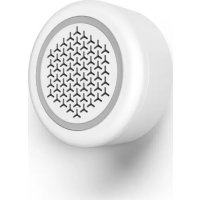
00176590 - Alarm system HAMA - Free user manual and instructions
Find the device manual for free 00176590 HAMA in PDF.


| Product type | Indoor Wi-Fi Siren |
| Brand | Hama |
| Model | 00176590 |
| Main power supply | 5V / 1A via mains adapter (included) or CR123A batteries (not included) |
| Compatible battery type | 1 x CR123A (for backup operation) |
| Operating frequency | 2.4 GHz (Wi-Fi) |
| Max. output power | < 100 mW |
| Max. sound pressure at 1 m | 97.4 dB |
| Connectivity | Wi-Fi 2.4 GHz |
| Required app | Hama Smart Solution (iOS / Android) |
| Main functions | Intrusion detection via sensors, sound alarm, push notifications |
| Package contents | Wi-Fi siren, USB cable, quick start guide |
| Dimensions (approximate) | Approx. 80 mm diameter, 30 mm height |
| Weight (approximate) | Approx. 100 grams |
| Intended use | Indoor, domestic |
| Installation | Wall mounting with screws or nails (not included) |
| Maintenance and cleaning | Unplug before cleaning; use a slightly damp cloth, no aggressive detergent |
| Safety | Risk of electric shock, hearing damage (loud alarm), keep batteries away from children |
| Operating temperature | Moderate indoor conditions |
| Warranty | Manufacturer's warranty subject to proper use |
| Repairability | Do not open or repair yourself; contact a qualified technician |
| Country of origin | Not specified (Germany for Hama brand) |
Frequently Asked Questions - 00176590 HAMA
User questions about 00176590 HAMA
0 question about this device. Answer the ones you know or ask your own.
Ask a new question about this device
Download the instructions for your Alarm system in PDF format for free! Find your manual 00176590 - HAMA and take your electronic device back in hand. On this page are published all the documents necessary for the use of your device. 00176590 by HAMA.
USER MANUAL 00176590 HAMA
"Google and Google Play are trademarks of Google LLC."
All listed brands are trademarks of the corresponding companies. Errors and omissions excepted, and subject to technical changes. Our general terms of delivery and payment are applied.
WiFi Siren
WiFi-Sirene
Operating Instructions
Bedienungsanleitung
Moded'emploi
Instruccionesdeuso
Gebruiksaanwijzing
Istruzioniperl'uso
Instrukcjaobslugi
Hasznalatiutmutató
Manualdeutilizare
Návodk p oužiti
Návodnapoužitie
Manualdeinstruções
Bruksanvisning
PykoBOIDCTBOIO3Kcnpyaatau
Pa6oTHaHHcTpyKcIy
O8nyiecxpno
Kullanmakilavuzu
Käyttoohje
LinktoApp

de.hama.com/smarthome#smart-solution
GB
D
F
E
NL
1
PL
H
RO
CZ
SK
P
S
RUS
BG
GR
TR
FIN
Importantnote- q uickguide:

- This is a quick guide to provide you with the mostimportantbasicinformation, such as safety warnings and how to get started using the product.
Thecompleteinstructionmanualis availableat:
www.hama.com->00176590-> Downloads
- Savetheinstructionmanual toyourcomputer's hard drive for future reference, or print it out if necessary.
1.ExplanationofWarningSymbolsandNotes
Riskofelectricshock

Thissymbolindicatesproductpartsenergized with a dangerousvoltageofsufficient magnitude toconstituteariskofelectricshock.
Warning

Thissymbolisusedtoindicatesafetyinstructions ortodrawyourattentionospecific h a z a r d s andrisks.
Note

Thissymbolisusedtoindicateadditional informationorimportantnotes.
2.PackageContents
-1 W iFisirenwithUSBcable
-1 q quickstartguide
3.SafetyNotes
The productis intended for private, non-commercial useonly.
- Use the product for its intended purpose only.
- Protect the product from dirt, moisture and overheating, and only use it in dry environment.
The product is intended for indoor use only.
- Usetheitemonlyinmoderateclimaticconditions.
- Keepthisproduct,asallelectricalproducts,outofthereachofchildren!
- Donotoperatetheproductoutsidethepower limitsgiveninthespecifications.
- Do not use the product in areas where the use of electronic devices is not permitted.
- Donotusetheproductinmoistenvinronmentsand avoidsplashes.
- Donotdroptheproductanddonotexposeitto anymajorshocks.
- Donotopenthedevicerecontinuetooperateitif itbecomesdamaged.
- Donotatempttoserviceorrepairtheproduct yourself. L eaveanyandallsserviceworkto qualifiedexperts.
-Layallcablessothattheydonotposea tri p ing hazard.
- Donotbendorcrushthecable.
- Always pull directly on the plug when disconnecting the cable, never on the cable itself.
- Do not modify the product in any way. Doing so voidsthewarranty.
- Keepthepackagingmaterialoutofthereachof childrenduetotheriskofsuffocation.
- Disposeofpackagingmaterialimmediately accordingtolocallyapplicableableregulations.
Warning-Batteries

- When inserting batteries, notethe correct polarity(+and- m arkings) and insert the batteries accordingly. Failure to do so could result in the batteries leaking or exploding.
Onlyusebatteries(orcechargeablebatteries) thatmatchthespecifiedtype. - Before you insert the batteries, clean the battery contactsandthepolarcontacts.
- Donotallowchildrentochangebatteries withoutsupervision.
- Donotmixoldandnewbatteriesorbatteries of a differenttypeormake.
- Removethebatteriesfromproductsthataben't beingusedforanextendedperiod(unlessthes are beingkeptreadyforanemergency).
- Donotshort-circuitbatteries.
- Donotchargebatteries.
- Donotthrowbatteriesinafire.
- Keepbatteriesoutofthereachofchildren.
- Neveropen, damageorswallowbatteriesor allowthemtoentertheenvironment. They cancontaintoxic, environmentallyharmful heavymetals.
- Immediatelyremoveanddisposefdead batteriesfromtheproduct.
- Avoidstoring, charging or using the device inextremetemperatures and extremely low atmospheric pressure (forexample, at high altitudes).
Warning-B buttoncells

- Donotingestbattery, r iskofburnsduetodangeroussubstances.
- Thisproductcontainsbuttoncells. If swallowed, the buttoncellcausesever i nternalburns withinjusttwohoursandleadtodeath.
- Keepnewandusedbatteriesoutofthereach ofchildren.
- If the battery compartment does not close securely, s topusing the product and keep it out of thereach of children.
- If you think that batteries were w a l l o w e d or are in a part of the body, seek medical assistance immediately.
Warning-D angerofhearingloss duetoalarm

- Loudvolumes, evenovershortperiods, can cause hearingloss.
- Please notethatwhenthealarmistriggered or whenyouare t estingthedevicetheemitted signaltonegenerateshighsoundpressure th a t canquicklycausehearingloss.
Make sure you are not in the immediate vicinity of the alarmspeakerformore than 3 minutes during a test when the alarmistrigered.
4. Getting started and operation It'ssosimple:
- DownloadtheHamaSmartSolutionappfrom theAppleAppStore or on GoglePlay.
- Open the Hama Smart Solution app.
If you're using it for the first time, you'll have to register and create a new account. If you already have an account, log in using your login details. - First you have to integrate the siren in the app. To do so, you connect the siren to the included USB cable and to a permitted powersupply unit. Please also refer to the operating instructions for the powersupply unit.
- Then connect the power supply unit to a properly installed s ocket.
- If you want to operate the siren using battery power, turn the bottom of the device clockwise and remove it. Now insert type CR123A batteries with the correct polarity. For standard mains operation, nobatteries are necessary.
- Wait until the LEDs begin to flash quickly.
- Click ^+ in the upper-right corner in the app and select the 'Sensors' category.
- Click 'OK' to confirm that the siren is flashing quickly.
- Then enter the name of your WiFi network and the password, and confirm.
- Once the connection has been established, the app confirms that the siren was connected. You can now give it an ame.
- Click 'Finish' to complete the process.
- You can now rename, set and configure your device.
Note-Pairingrestart

Firstremovethebottomofthedevicebyturning itclockwise.PressandholdtheResetbuttonon thebottomofthesirenforabout5 s eonsuntil thedeviceflashesquickly.
5.Installation
Warning-Installation

- Before mounting, check that thewally you have chosen issuablefortheweighttobemounted. Also make sure that there are no electric, water, gasotherlinesrunning throughthewallatthemountingsite.
- Donotmounttheproductabovelocations where personsmightlinger.
- Buyspecialorsuitableinstallationmaterial from a specialised dealerforwall-mounting.
- Neverapplyforceduringinstallation.
-
Ifindoubt, havethisproductmountedbya qualified technician - do not attempt to mount it yourself!
-
Givenbelowweightoftheproduct,itis sufficient to install a screw with anchor, or a nail, attherequiredinstallationlocation.
- Depending on the construction of the installation location (forexample, wood), you may be able to attach the product directly to a crewrail, for example, without pre-drilled holes.
- Before hanging the siren, make sure that the screwwornailisseurelyinstalled.
6.CareandMaintenance

Note
Disconnecttheproductfromthemainsbefore cleaningitorifitisnotgoingtobeseusedforalongperiodoftime.
- Only clean this product with a slightly damp, lint-freeclothhanddonotuseaggressivecleaning agents.
- Makes sure that water does not get into the product.
7.WarrantyDisclaimer
HamaGmbH& Co KGassumesnoliabilityand providesnowwarrantyfordamagersulingfrom improperinstallation/mounting,improperusef theproductorfromfailure to o observetheoperating instructionsand/orsafetynotes.
8. Recycling Information
Noteonenvironmentalprotection:
Aftertheimplementationofthe EuropeanDirective2012/19/EUand 2006/66/EUnthenationallegal system, the following applies: Electricandelectronicdevicesas
wellasbatteriesmustnotbedisposedofwith householdwaste.Consumersareobligebylaw toreturnelectrcalendecronicdevicessaswell asbatteriesattheendoftheirservicelivestothe publiccollectingpointssetupforthispurpose or point of sale. Details to this are defined by the nationallawoftherespectivecountry.T hissymbol ontheproduct,theinstructionmanualorthe package indicates that a product is subject to these regulations.Byrecycling,reusingthematerialsor otherformsofutilisingolddevices/Batteries,you are makinganimportantcontributiontoprotecting ourenvironment.
9.DeclarationofConformity

Hereby, H amaGmbH& Co K G declaresthattheradioequipment type[00176590]isincompliance withDirective2014/53/EU. T hefull
textoftheEUdeclarationofconformityisavailable atthefollowinginternetaddress:
www.hama.com->00176590->Downloads.
10. Technical Data
| Powersupply | 5 V / 1 A,orusing CR123Abatteries(not included) |
| Frequencyband/ frequencybands | 2,4GHz |
| Maximumemitted transmittingpower | < 1 0 0 m W |
| Maximumsound pressure | evelat1m distance | 97,4dB |
Baxhoeyka3aHHe KpaTkoepyKOBODCTBO:

B HaCTOaEM KpaTOMpyKOBOcTBe pINBOaTcA OCHOBbIe CBeJeHnNo TExHnke 6e3oNaCHOCTN I BBOyB3KcPnLyTaunIO yCTPOiCTBa.
C NOJIHbIM TEKCTOM pyKOBOIDCTBA MOXHO 03HaKOMMTbc3Ic6b:
www.hama.com->00176590->Downloads
CoxpaHnTe noJIHOe pyKOBoDCTBO nO 3KcIpyatauHa KOMbIOTepdIa CnpABOK N IO BO3MOXHOCTnPacneuataIteero.
1.IpeynpeintelhblienkTOrpaMMbIn HNCTpyKcnn

OnachoctbnopaXeHna 3JIeKtpueeCKmTOKOM
JaHHbIM3HaayKOMOTMeueHbInHCTpyKcnn, HecO6JIIOJeHne KOtOpbIX MOxET PnBcTeN K OnaCHOcTyaCnn.
