
3Chic Special - Baby accessory Foppapedretti - Free user manual and instructions
Find the device manual for free 3Chic Special Foppapedretti in PDF.



| Product Type | Car seat presence detection device (Babyguard) |
| Brand | Foppapedretti |
| Model | 3Chic Special |
| Power Supply | CR2430 button cell battery (non-replaceable); replacement sensor kit with battery sold separately |
| Communication Technology | Bluetooth Low Energy (BLE), 2.4-2.485 GHz band, power 2.51 mW |
| Smartphone Compatibility | Android 5.0+ / iOS 10.0+ |
| Battery Life | Approximately 2920 hours (about 4 years at 2 hours/day) |
| Operating Temperature | -20 °C to +60 °C |
| Package Contents | Babyguard, velcro strap, strap with rings, instruction manual |
| Main Functions | Child presence detection on car seat; audible alert and smartphone notification if parent walks away without child; emergency SMS with location (geolocation) |
| Maximum devices per smartphone | 4 |
| Maintenance and Cleaning | Removable and washable cover according to label; do not fold the device; do not use without cover |
| Safety | Do not leave child unattended; auxiliary device, does not replace parental vigilance; do not use if damaged; keep out of reach of children |
| Spare Parts and Repairability | Sensor kit with battery (optional); washable cover; contact service@foppapedretti.it for support |
| Warranty | 12-month conventional warranty against conformity defects, except normal wear or improper use |
| Mobile App | Babyguard available on App Store and Play Store |
Frequently Asked Questions - 3Chic Special Foppapedretti
User questions about 3Chic Special Foppapedretti
0 question about this device. Answer the ones you know or ask your own.
Ask a new question about this device
Download the instructions for your Baby accessory in PDF format for free! Find your manual 3Chic Special - Foppapedretti and take your electronic device back in hand. On this page are published all the documents necessary for the use of your device. 3Chic Special by Foppapedretti.
USER MANUAL 3Chic Special Foppapedretti
1.3. Technical characteristics PAGE 25
1.4 Battery Duration and Level Monitoring PAGE 26
1.5.Declaration of conformity PAGE 27
2. Installing the Babyguard on the car seat PAGE 28
3. Functions provided by the mobile app PAGE 33
3.1. Application download for Android/iOS PAGE 33
3.2. Registration procedure for the service PAGE 33
3.3. Pairing the Babyguard with your smartphone PAGE 33
3.4.Settings PAGE 37
- Product maintenance PAGE 38
- False readings PAGE 38
- Support PAGE 38
- Formal guarantee PAGE 39
WARNING
1. Product Information
- Babyguard is a device that helps parents/carers to check on children under 4 years of age.
- The Babyguard is placed on the car seat and can detect when your child is sitting in it by communicating with the special application.
- Babyguard is placed on the car seat and can detect the presence of the child on it. Thanks to the application available on the App Store and Play Store, the parent is alerted via an alarm notification if they move away from the car and leave the child sitting in the seat (first level alarm). Furthermore, if the parent does not intervene, an SMS alarm containing the car's position is forwarded to a predefined list of contacts (second level alarm) provided that the geolocation function is active on the smartphone connected to your Babyguard.
- Babyguard has been designed as a supervisory support device for parents and, as such, it is not intended to replace them.
- Never leave your child unattended in the vehicle.
- If the Babyguard is used outside of Italy, it is recommended to check the provisions of the laws in force in the destination countries.
- The Babyguard detection device is very sensitive, therefore, when the child is not placed in the car seat, do not leave objects on the mat, even if they are not very heavy, and do not place the car seat buckle and/or chest straps on the Babyguard to avoid false readings.
- The Babyguard cushion must be placed on the car seat by carefully following the steps shown in these instructions.
- We advise you to consult your doctor before using the Babyguard with children who have medical devices, as Babyguard is equipped with a Bluetooth® Low
Energy device. - IMPORTANT: emergency contact numbers must be mobile telephone numbers, not landline numbers or national emergency lines.
- IMPORTANT: always check that the emergency contact numbers are correct and working after entering them.
- IMPORTANT: if in the same car there are two or more smartphones previously paired with the Babyguard and with the App active, the Babyguard will only connect to one smartphone, based on the responsiveness of the Bluetooth® system on the individual smartphones. This situation cannot be changed until the Bluetooth® signal is lost.
- IMPORTANT: if the smartphone is off, the Babyguard device does not work.
- You can use the App to monitor the level of the battery inside the Babyguard device.
WARNING
Each time you use the Babyguard, check the following:
- that the Babyguard device is correctly placed on the car seat;
- that the connection between the Babyguard device and the smartphone is correct, when the child is placed in the car seat;
- that the smartphone is switched on and that the battery has sufficient life for the period of use with Babyguard;
- that the Bluetooth® is active;
- that "airplane" mode is deactivated;
- that the SIM in the smartphone has sufficient call and data (internet) credit;
- that the location services and GPS are active in order to send the correct geolocation coordinates;
- that the App is always active, at least in the background;
- that you always carry your smartphone connected to the Babyguard when you leave the vehicle.
- If there are two or more smartphones with the App installed, check which one is connected to the Babyguard in use on the car seat.
- If there is no available and active data network connection, the Babyguard App sends the first level alarm, but it is not able to send SMS to emergency contact numbers (second level alarm).
- Check that the Babyguard App is updated.
- Check that your smartphone's operating system is updated.
- Babyguard does not interfere with the normal operation of the Bluetooth® system that may be present in the vehicle.
- When not in use, the Babyguard must be kept in a safe place and away from children. The Babyguard must not be used as a toy! Do not allow your child to play with the device.
- After a period of inactivity, check that the device is working correctly before use.
- Do not use the Babyguard device if it is damaged or if parts are missing.
- Do not fold up the Babyguard as this may damage its circuits or internal mechanisms.
- If in doubt, contact the Dealer or the FOPPAPEDRETTI Customer Service team.
- Do not make any modifications to the Babyguard product.
- Compliance will be invalidated if modifications are made to the device.
- Do not remove the adhesive or sewn labels. Removing these labels may render the product non-compliant with the law.
- Do not use the Babyguard without the fabric lining as it is an integral part of the device and is essential for safety.
- Do not interact with the APP and the smartphone while driving. If necessary,
WARNING
stop in a safe place.
- Remember that if your smartphone is turned off, the BABYGUARD device does not work.
1.1. General warnings
- The packaging elements (plastic bags, cardboard boxes, etc.) must not be left within reach of children as they are potential sources of danger;
- Before using the device, check that the product and all of its components are not damaged. If this is not the case, do not use the device, and contact qualified personnel or the retailer;
- To avoid the risk of overheating, keep Babyguard away from heat sources, such as radiators, stoves, ovens, etc.;
- Do not short the supply terminals.
1.2. Package contents
- Babyguard unit.
- Velcro strap for use with a carrycot with lap belt.
- Belt with hoops for use with car seats which do not have a built-in belt with a harness.
- Instruction manual.
1.3. Technical characteristics
- System requirements for Android operating systems: compatible with operating systems 5.0 and above.
- System requirements for iOS operating systems: compatible with operating systems 10.0 and above.
- It is advisable to check beforehand the compatibility of the device used with the version of the App available.
- Communication Technology: Bluetooth® Low Energy.
- Frequency band: 2.4 - 2.485 GHz.
Transmission power: 2.51mW - Power supply: CR 2430 battery not replaceable; a KIT is available which is sold separately (OPTIONAL) for sensor replacement with the battery included.
- Operating temperature: -20^ to +60^ .
1.4 Battery Duration and Level Monitoring
- The battery has a duration of 2920 hours which is estimated to last 4 for years, considering an average use of 2 hours per day.
- The battery level of the Babyguard device can be viewed on the App's main screen, when the Babyguard is "connected with the child seated".
- In the event that the battery is low, the user will be notified by the application with an alarm message "WARNING Low battery level", the user will have to contact their dealer or the FOPPAPEDRETTI customer service team.
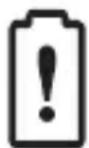
WARNING! Low battery level
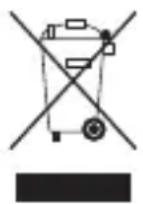
THIS PRODUCT COMPLIES WITH DIRECTIVE 2012/19/EU
The crossed bin symbol on the appliance indicates that the product must be disposed of separately from household waste. At the end of its useful life, it must be transferred to a separate collection centre for electrical and electronic equipment or returned to the retailer when new equivalent equipment is purchased.
The user is responsible for placing the appliance in the appropriate collection facilities at the end of its life. Appropriate separate collection for the subsequent dispatch of the appliance for recycling, handling and ecologically compatible disposal helps to avoid any negative effects on the environment and human health, and promotes the recycling of the materials that make up the product.
The illegal disposal of the product by the user involves administrative sanctions as per Italian Legislative Decree no. 22/1997 (art. 50 and following of the Legislative Decree 22/97).
For more detailed information regarding the collection systems available, contact the local waste disposal service, or the store where the device.
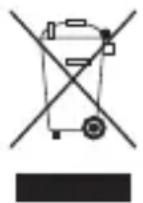
COMPLIANCE WITH EU DIRECTIVE 2006/66/EC AND SUBSEQUENT AMENDMENTS
The crossed bin symbol on the batteries or product packaging indicates that these must be disposed of separately from household waste. At the end of their useful life, they must not be disposed of as urban waste, but must be transferred to a separate collection centre or returned to the retailer at the time of purchasing new equivalent rechargeable and non-rechargeable batteries.
The chemical symbol Hg , Cd or Pb, placed under the crossed bin indicates the type of substance contained in the battery: Hg = Mercury, Cd = Cadmium, Pb = Lead. The user is responsible for placing the batteries in the appropriate collection facilities at the end of their life in order to make handling and recycling easier.
Appropriate separate collection for the subsequent recycling, handling and environmentally compatible disposal of the batteries helps to avoid possible negative effects on the environment and human health, and helps the substances of which the batteries are made to also be recycled.
Incorrect disposal of the product by the user will result in damage to the environment and to human health.
For more detailed information regarding the collection systems available, contact your local waste disposal service, or the store where you purchased the product
1.5. Declaration of conformity
FOPPAPEDRETTI hereby declares that Babyguard complies with the essential requirements and other relevant provisions established by the Directive 2014/53/EU. A copy of the complete declaration of conformity (DM n°122 - 02/10/2019) can be viewed at: www.foppapedretti.it
According to the decision of the European Commission N^ 2000/299/EC dated 06/04/2000, the frequency band used by this product is approved in all EU countries, therefore this is a class 1 product which can be freely used in all countries of the European Community. FOPPAPEDRETTI reserves the right to modify the information in this instruction manual at any time and without prior notice. The reproduction, transmission, transcription and translation of this manual into another language, even partially in any form, are strictly prohibited without prior written authorisation from FOPPAPEDRETTI.
INSTALLATION
2A. Installation of the Babyguard on the car seat with built-in belt with straps and harness
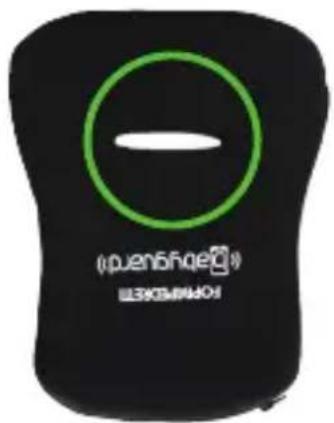
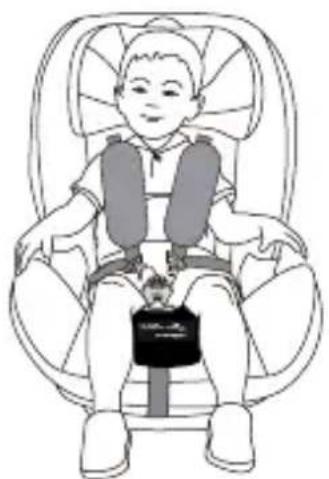
Install the Babyguard on the car seat (as shown in Figure 1) by passing the seat belt attachment (shown with a red circle) through the horizontal slot in the Babyguard (shown in Figure 2 with a green circle).
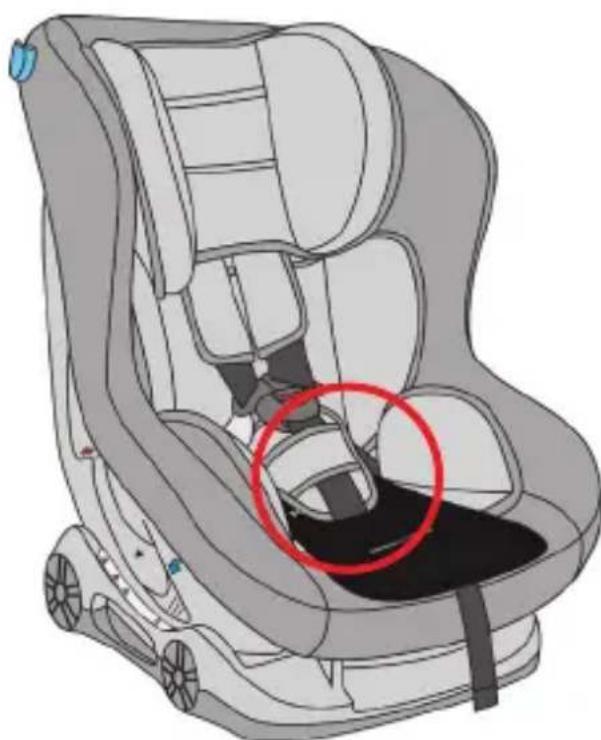
FIGURE 1. Correct installation of the Babyguard on the car seat.
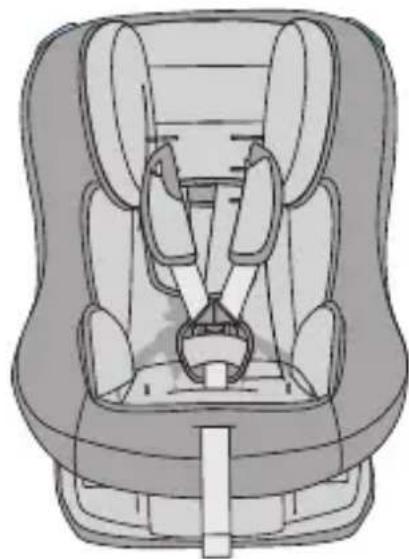
STEP1
INSTALLATION
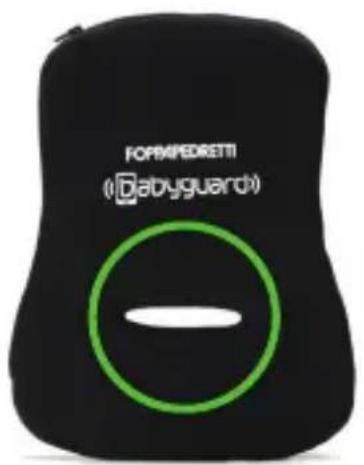
FIGURE 2. Horizontal slot in the Babyguard
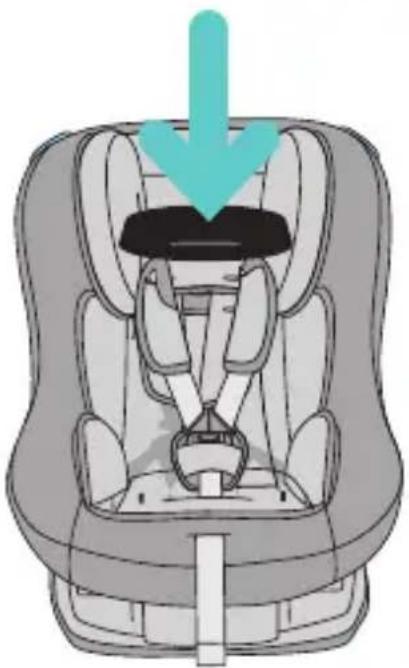
STEP2
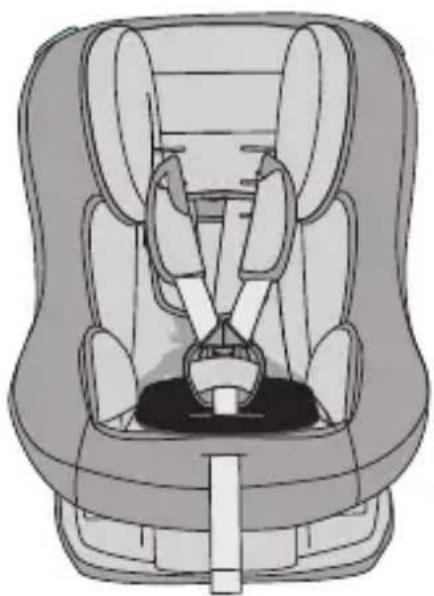
STEP3STEP4
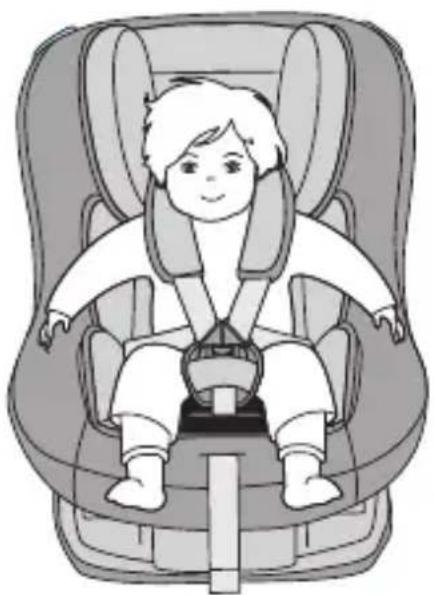
IMPORTANT: on the BIKINI PLUS car seat (type CS07), the Babyguard must be positioned on the car seat by passing the seat belt attachment through the horizontal slot of the Babyguard (figure 2). The reducer supplied with the car seat must be positioned on top of the Babyguard.
2A for car seat type ISOPLUS
Installation of the Babyguard on the car seat with built-in belt with straps and harness
Install the Babyguard on the car seat (as shown in Figure 1) by passing the seat belt attachment (shown with a red circle) through the horizontal slot in the Babyguard (shown in Figure 2 with a green circle).
FIGURE
- Correct installation of the Babyguard on the car seat.
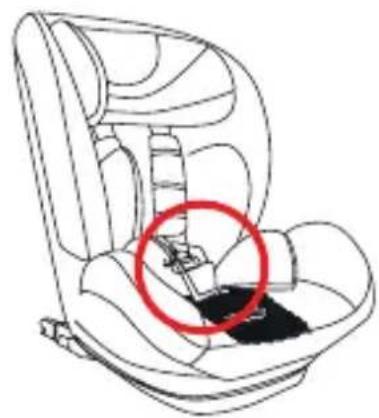
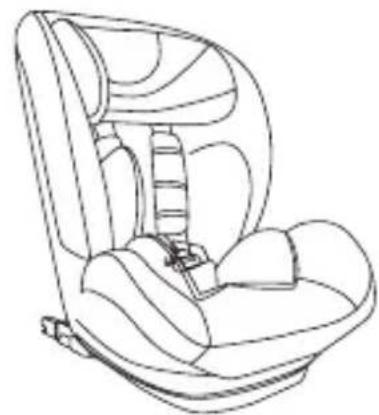
STEP1
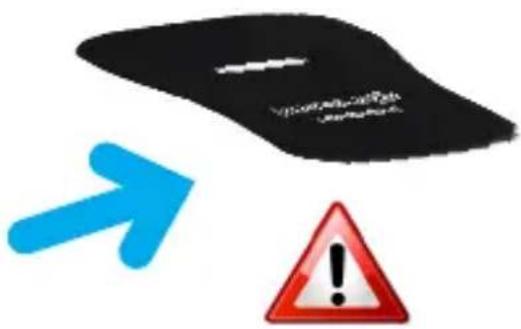
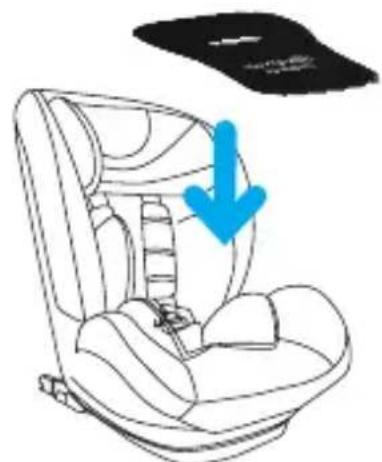
STEP2
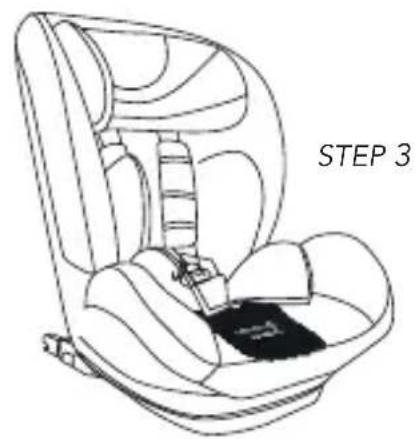
FIGURE 2. Horizontal slot in the Babyguard
STEP4
INSTALLATION
2B. Installation of the Babyguard on the car carrycot
- Insert the strap with velcro into the loop on the underneath of the monitoring device (fig. 1).
- Place the Babyguard on the upper side of the carrycot mattress (fig. 2).
- Thread the ends of the velcro straps through the slots on the mattress (as shown in the figure 3). Run the straps along the underneath of the mattress and attach the velcro to secure them.
- Place the mattress inside the carrycot (fig. 4), and follow the kit instructions in the "CAR APPROVED SET" code 9700372100 (sold separately) for the information regarding assembly of the car installation kit.
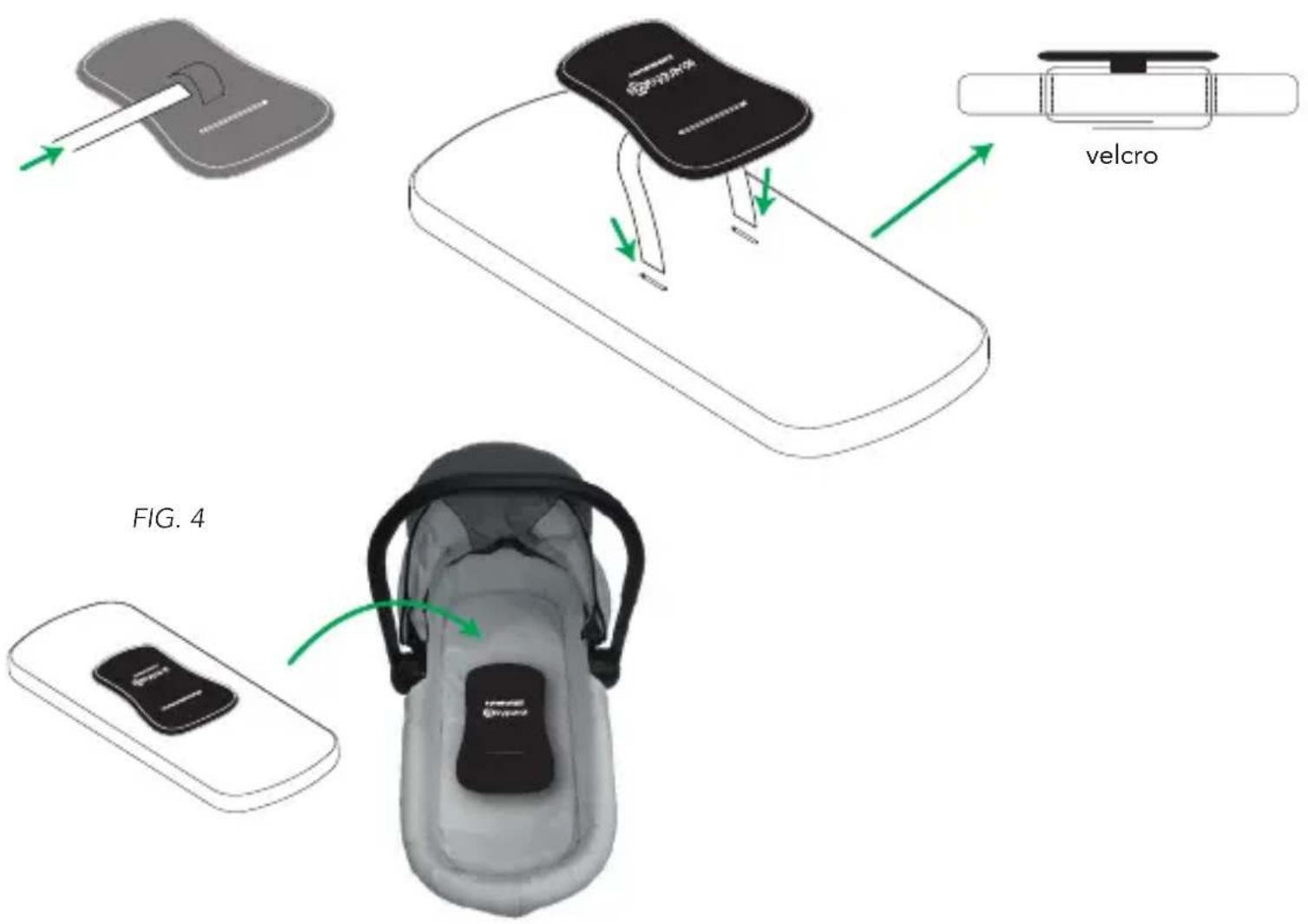
FIG. 1
INSTALLATION
2C. Installation of the Babyguard on the car seat without built-in belt with straps and harness
- Insert the strap with hoops into the loop on the underneath of the monitoring device (fig. 1).
- Install the Babyguard on the car seat (as shown in Figure 2) fitting the hoop on the right end of the strap on the right armrest and the hoop of the left end of the strap on the left armrest, as shown in the figure 3. Make sure that it is installed correctly.
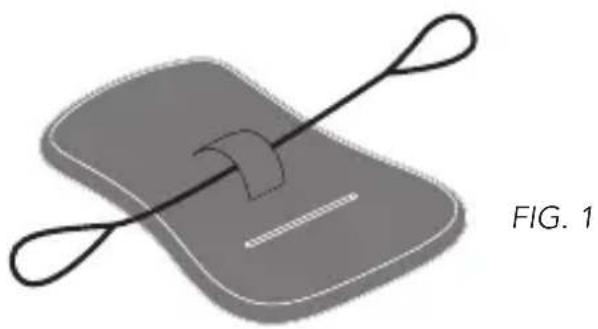
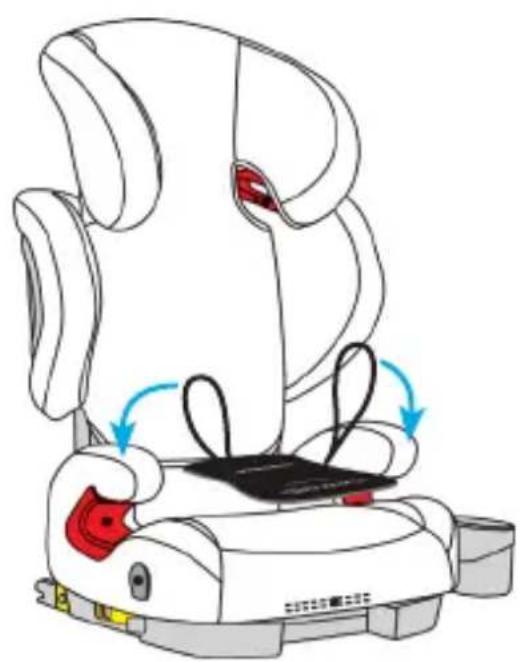
FIG. 2
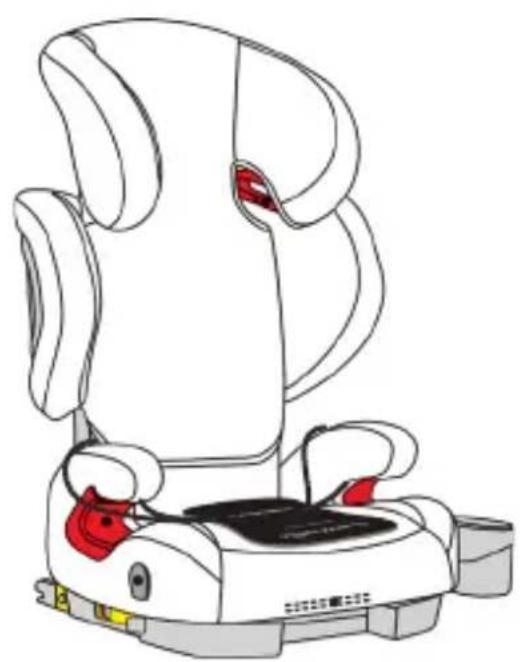
FIG. 3
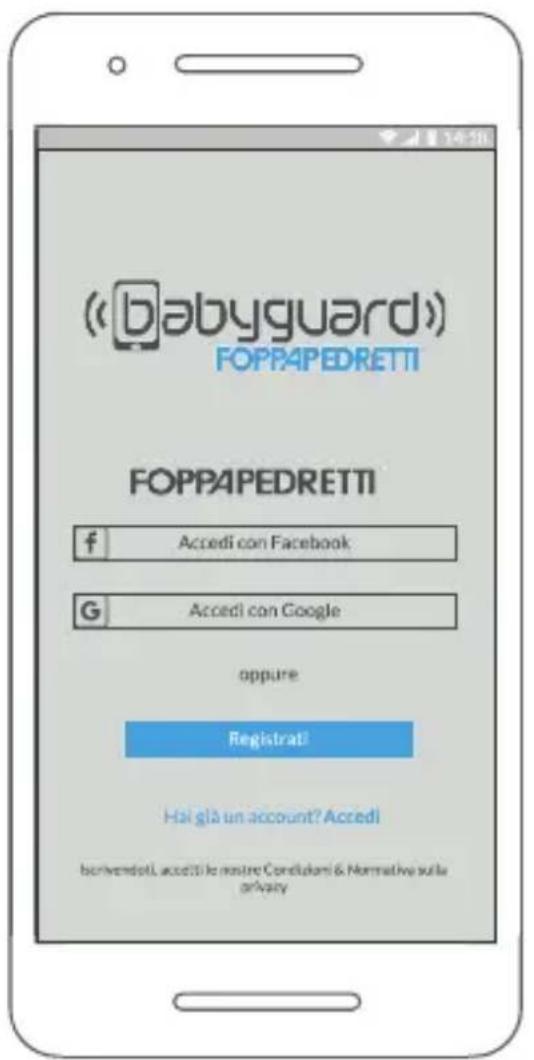
FIGURE 3
Registration for the service
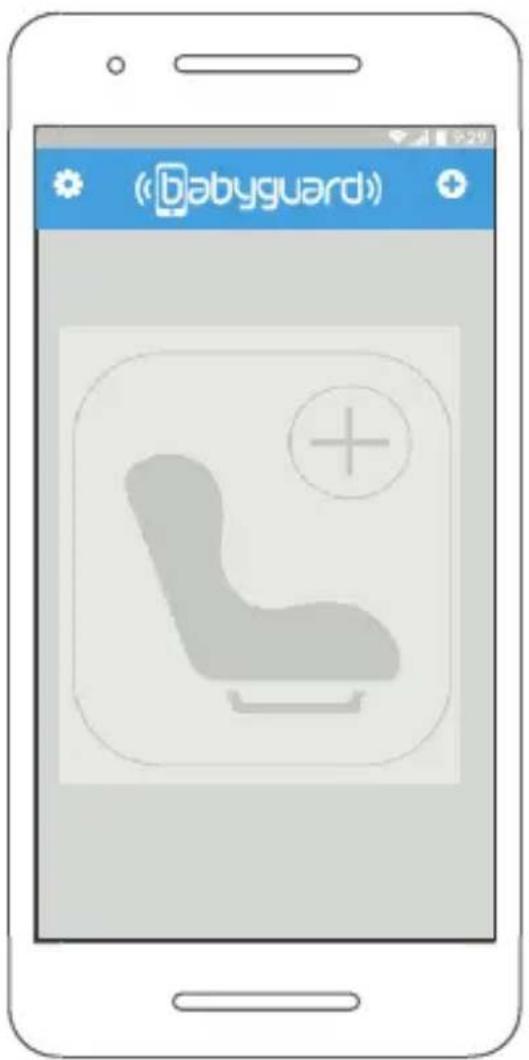
FIGURE 4
Initial screen
3. Functions provided by the mobile app
3.1. Application download for Android/iOS.
- Download the "Babyguard" app through the App Store or Play Store.
3.2. Registration procedure for the service
- Register for the service by clicking on "Register" or by carrying out
the login via a Facebook or Google account (Figure 3).
3.3. Pairing the Babyguard with your smartphone
- When opened, the application shows the initial screen (Figure 4). If the phone's Bluetooth is not active, the application prompts you to activate it. To pair the Babyguard with your smartphone, click on the (+) symbol.
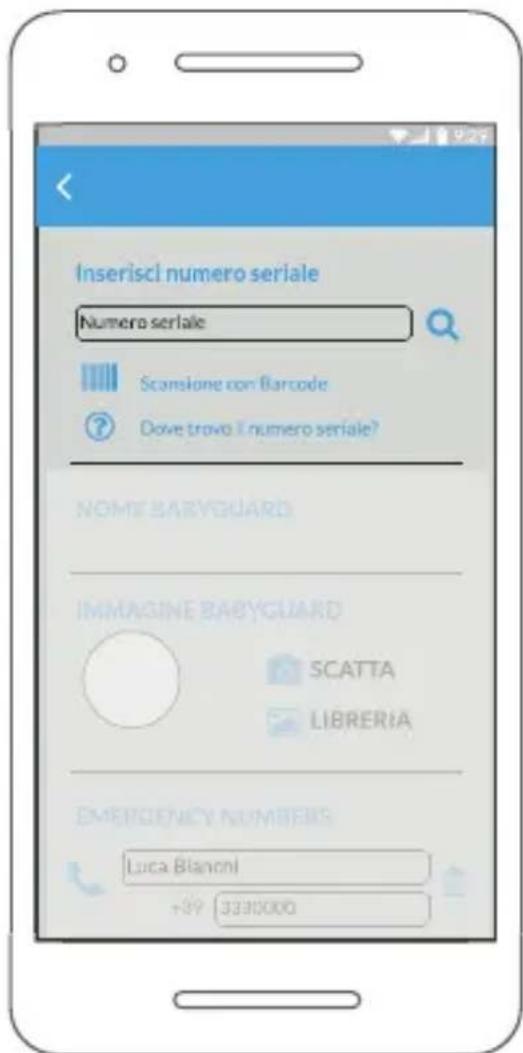
FIGURE 5 Pairing screen
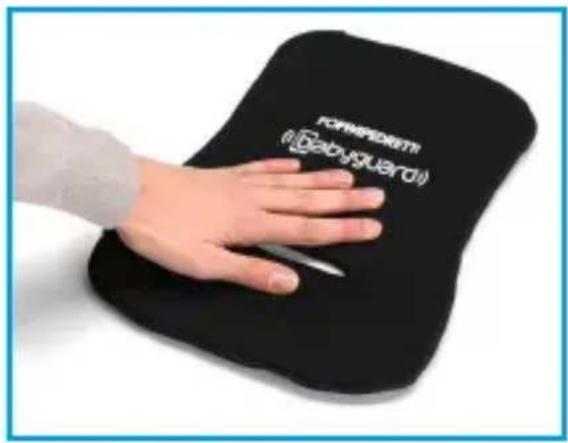
FIGURE6 Central part of the Babyguard
- Following the click on the symbol (+) the pairing screen will show (Figure 5).
After correctly installing the Babyguard on the car seat (as shown in the Paragraph "Installation of the Babyguard on the car seat"), press the central part of the Babyguard (Figure 6) and get closer to it with the smartphone
- After pressing the central part of the
Babyguard, enter the Serial Number by typing it or using the barcode reader and click on the symbol (O). You can find the barcode at the end of this manual or inside the Babyguard by opening the zip.
- Once the device has been paired with your smartphone, proceed by entering the name of the child occupying the seat and the emergency numbers to which the emergency SMS
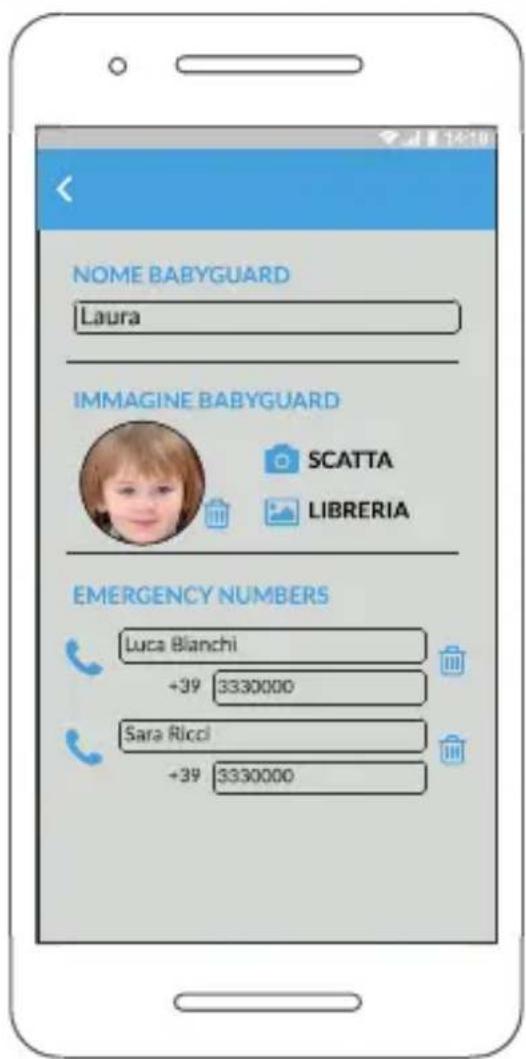
FIGURE 7
Pairing screen. Insertion of the profile data and emergency numbers
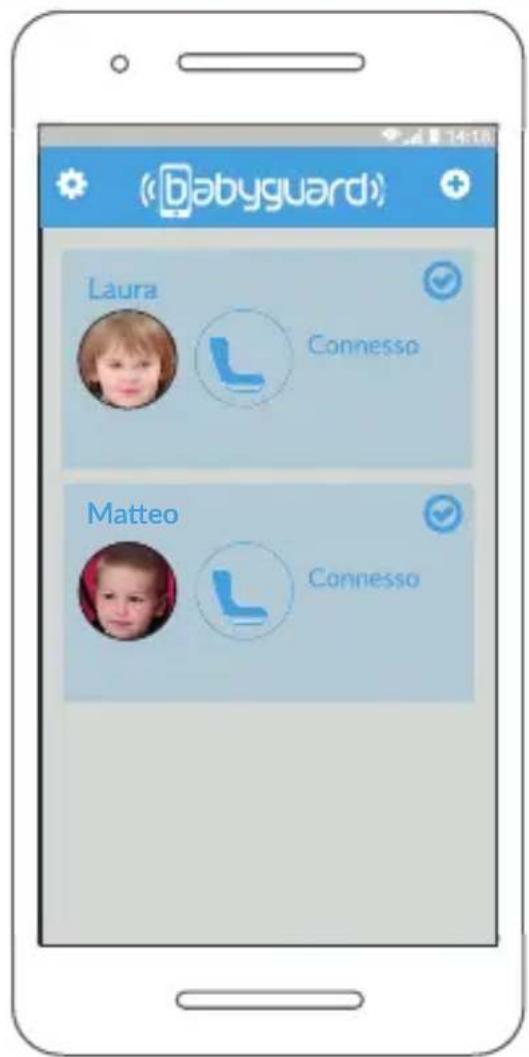
FIGURE 8
Initial screen after pairing two linked Babyguards
is forwarded (Figure 7). You need to insert different emergency numbers.
7. Save the data by clicking on "Save".
8. A maximum of 4 Babyguards can be paired with each smartphone.
9. Figure 8 shows the initial screen of the application after the pairing of two Babyguards. Figure 8. Initial screen after the Babyguards
Each Babyguard can take on four modes:
- "Disconnected": the parent moves away from the Babyguard and the child is not sitting on it.
- "Connected": on it. E.g.: The parent is in the car near the car seat, but the child is not sitting in it.
- "Connected with the child seated": the parent is close to the Babyguard and the child is sitting on it. E.g.: The parent is in the car near the car seat that appears to be occupied by the child.
- "Disconnected with the child seated": the parent is away from the Babyguard and the child is sitting on it. E.g.: The parent has moved away from the car, leaving the child in the car sitting in the car seat.
Once the Babyguard enters the "Disconnected with the child seated" state an alarm is sounded and a countdown of 40 seconds begins. During this time, the user is able to silence the alarm and prevent the SMS from being sent (Figure 9).

The generation of the alarm message and the consequent emergency SMS sending remain active even when the applications are in a background state.
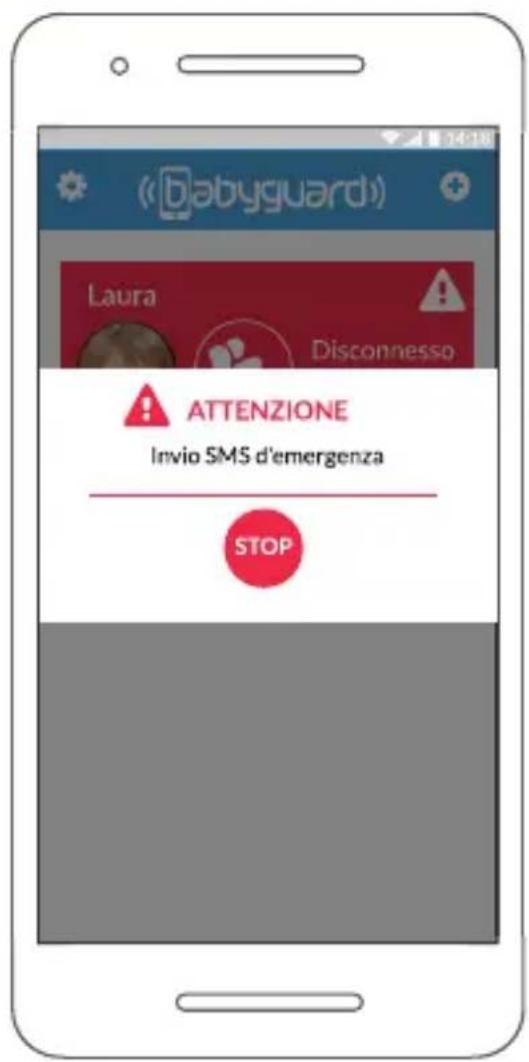
FIGURE 9 Alarm screen
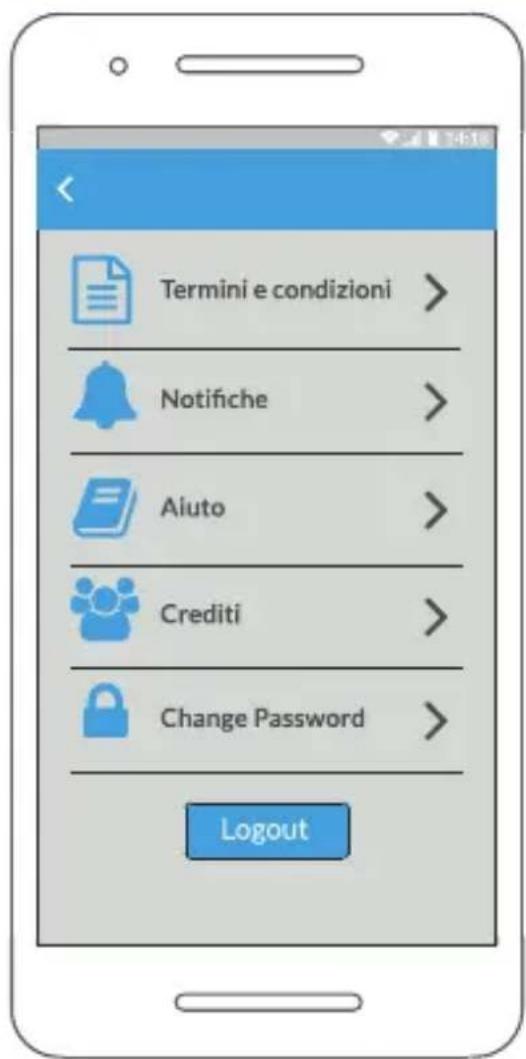
FIGURE 10 Settings screen
3.4. Settings
Click on the symbol on the initial screen (Figure 10) to access the application settings. In this section you can:
- Change the notification sound (click on "Notifications").
- Read the terms and conditions of use (click on "Terms and Conditions").
View an interactive guide to using the Babyguard (click on "Help"). - To exit the application permanently, click on "Logout". When the user clicks on "Logout" the application will stop working and it WILL NOT BE POSSIBLE TO DETECT THE PRESENCE OF THE CHILD IN THE SEAT. Log back in to the application if you want to use the Babyguard properly.
MAINTENANCE
4. Product maintenance
The external lining is removable and washable according to the instructions indicated on the inner label. Follow the instructions carefully to avoid damage:
- Open the zip and take out the interior, taking care to store it in a clean, dry place when it is without the lining.
- Insert the interior again after washing, placing the weight sensor facing the side of the lining with the word "Babyguard".
- Do not tamper with the inside or disassemble it, do not remove the weight sensor.
5. False readings
- The Babyguard detection device is very sensitive, therefore, when the child is not placed in the car seat, do not leave objects on the mat, even if they are not very heavy, and do not place the car seat buckle and/or chest straps on the mat to avoid false readings.
- The Babyguard cushion must be positioned on the car seat in contact with the child. If the car seat includes a reducer, the Babyguard cushion must be placed on top of it.
- Make sure that the Bluetooth function is activated on the device on which the APP is installed, and that the localization function is activated.
6. Support
For information and support please write to: servizio@foppapedretti.it
7. Warranty
This product is guaranteed against any lack of conformity under normal conditions of use according to the instructions. This warranty will not be applied, therefore, if there is any damage resulting from improper use, wear or accidents. For the duration of the warranty on conformity defects, please refer to the specific provisions of the national regulations applicable in the country of purchase, where required.
FORMAL GUARANTEE
The contents of this document as stated below will come into effect as from 01.01.2005 and replace, on every account and in full, any previous message referring to the guarantee provided by Foppa Pedretti S.p.A. FORMAL GUARANTEE
Foppa Pedretti S.p.A. the head office of which is located at n. 11 Via Volta, Grumello del Monte (Italy), guarantees directly to the Consumer that this brand new product is free of faults with regard to the materials, design and manufacture and that it complies with the characteristics as declared by the manufacturer.
This formal guarantee is valid in all Member Countries of the European Union and it neither excludes nor limits the Consumer's rights in accordance with mandatory measures provided for by the law with regard to the Retailer of the Product.
To take advantage of this formal guarantee, the Consumer must return the faulty product to the Retailer, presenting to the same the proof of purchase of the Product which must clearly show the Retailer's address, the date of purchase of the Product with the Retailer's stamp and signature and an indication of the Product itself or, alternatively, the receipt which must not have been altered and which must clearly show the same information as that referred to above.
The formal guarantee is valid for twelve (12) months from the date of purchase of the Product.
During this period, Foppa Pedretti S.p.A. will repair or replace the faulty product, at its own discretion. The formal guarantee is granted to the end buyer of the Product (Consumer) and it neither excludes nor limits the mandatory rights of the Consumer as provided for by the law and/or the rights that the Consumer may have with regard to the Dealer/Retailer of the Product.
EXCLUSIONS TO THE FORMAL GUARANTEE.
The formal guarantee is excluded in the case of damage caused to the Product for the following reasons: if the product is used in a way that does not comply with the information contained in the use and assembly instruction sheet, if the product is knocked or dropped, if the Product is exposed to humidity or extreme heat or environmental conditions, or to sudden changes in the same, corrosion, oxidization, unauthorized alterations or repairs to the Product, repairs using unauthorised spare parts, improper use, improper maintenance or failure to carry out the same, improper maintenance compared to the information given on the use and assembly instruction sheet, incorrect assembly, accidents, damage caused by food or drink, damage caused by chemical products, cases of force majeure.
In any case, Foppa Pedretti S.p.A. declines all responsibility for damage caused to persons or to property, other than the Product, when such damage is caused by a failure to comply with the instructions/advice/warnings cont a ined in the manua I or, alternatively, in the use and assembly instruction sheet provided with each Product for the owner/user. (Purely as an example, in the case of a cot : "Check your baby constantly. Make sure that the sheets and blankets do not cover the baby's head...").
to property when the breakage of its products is due to a deterioration in the components of the Product that are subject to wear. All the components of the Product made of plastic are considered to be components subject to wear.
EXCLUSIONS DE LA GARANTIE CONVENTIONNELLE.



- WARNING
- Product Information
- General warnings
- Package contents
- Technical characteristics
- Battery Duration and Level Monitoring
- WARNING! Low battery level
- THIS PRODUCT COMPLIES WITH DIRECTIVE 2012/19/EU
- COMPLIANCE WITH EU DIRECTIVE 2006/66/EC AND SUBSEQUENT AMENDMENTS
- Declaration of conformity
- INSTALLATION
- 2A. Installation of the Babyguard on the car seat with built-in belt with straps and harness
- 2A for car seat type ISOPLUS
- Installation of the Babyguard on the car seat with built-in belt with straps and harness
- FIGURE
- 2B. Installation of the Babyguard on the car carrycot
- 2C. Installation of the Babyguard on the car seat without built-in belt with straps and harness
- Functions provided by the mobile app
- Application download for Android/iOS.
- Registration procedure for the service
- Pairing the Babyguard with your smartphone
- Settings
- MAINTENANCE
- Product maintenance
- False readings
- Support
- Warranty
- FORMAL GUARANTEE
Brand : Foppapedretti
Model : 3Chic Special
Category : Baby accessory