BTwig 12 Pro - DJ Equipment ANT - Free user manual and instructions
Find the device manual for free BTwig 12 Pro ANT in PDF.


User questions about BTwig 12 Pro ANT
0 question about this device. Answer the ones you know or ask your own.
Ask a new question about this device
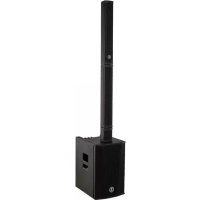
Download the instructions for your DJ Equipment in PDF format for free! Find your manual BTwig 12 Pro - ANT and take your electronic device back in hand. On this page are published all the documents necessary for the use of your device. BTwig 12 Pro by ANT.
USER MANUAL BTwig 12 Pro ANT
natural_image
Technical line drawing of a vertical cylindrical device with mounting flanges and a base panel (no text or symbols)
ES MANUAL DE USO | SECCIÓN 1
IT MANUALE D'USO | SEZIONE 1 DE BEDIENUNGSANLEITUNG | KAPITEL 1
FR NOTICE D'EMPLOI | SECTION 1
B-TWIG12PRO
POWERED COLUMN SYSTEM
SISTEMA ATTIVO A COLONNA
SYSTÈME ACTIF EN COLONNE
AKTIVES SÄULENSYSTEM
SISTEMA ACTIVO DE COLUMNNA
TABLE OF CONTENTS
| 1 | Introduction | 3 |
| 2 | Installation 4 | |
| 3 | Description | 5 |
| 3.1 | Inputs & controls 5 | |
| 3.2 | Connections | 9 |
| 3.3 | Power supply section 13 | |
| 3.4 | B-TWIG 12CS KIT | 14 |
| 4 | Instructions for system assembly and disassembly 15 | |
| 5 | Application configurations 18 | |
| 6 | Troubleshooting 20 | |
| 7 | Technical specifications 21 | |
| 8 | Notes | 23 |
PACKAGE CONTENT
• 1x B-TWIG 12S PRO active subwoofer, including:
n.1 support element
n.1 mains cord (VDE)
• 1x B-TWIG 12CS PRO kit, including:
n.2 passive column speakers
• 1x User manual - Section 1
• 1x User manual - Section 2
The warnings in this manual must be observed together with the "USER MANUAL - SECTION 2".
1 | INTRODUCTION
Thank you for choosing a A.N.T - Advanced Native Technologies - product!
In B-TWIG 12 PRO column system we have put our passion and our technological background gained over the years, to offer products that meet your needs, maintaining the quality over time.
Specifically designed for an immediate and user-friendly application, meeting the needs of those who are looking for an audio system delivering excellent performances, high connection versatility as well as the best value in its category.
Characterized by an elegant and contemporary profile, it optimally combines great quality professional features and exceptional value such as:
• Internal DSP with 4 equalization presets;
- Integrated DFX unit featuring 16 presets, with sends and return level included;
- 4CH mixer with multiple I/O combinations and Bluetooth ^® connection;
- Acoustic solutions optimized to guarantee excellent sound quality in a wide range of frequencies;
- Exclusive mechanism for 90 degrees rotation and orientation of the columns, which can be used to direct the acoustic coverage according to the needs of use and installation as well as system positioning
For a easier and more immediate use of the product, several optional accessories are available.
Please, dedicate some minutes to read this instruction manual in order to quickly achieve the best performances from this product.
For safety precautions, warranty and disposal, please refer to attached Section 2.
For further information about all A.N.T products catalog, please visit our website: www.ant-intomusic.com
2 | INSTALLATION
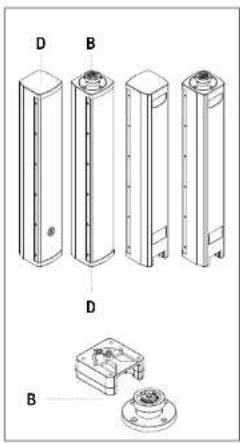
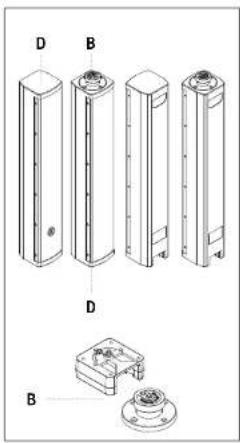
The system is composed by the active subwoofer B-TWIG 12S PRO,
plus B-TWIG 12CS PRO kit
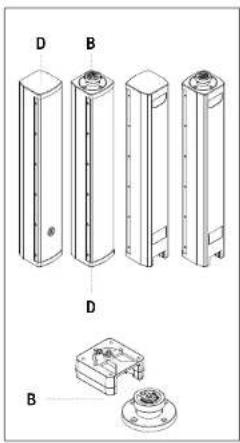
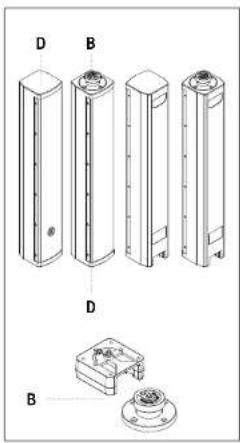
A | Side recessed handle.
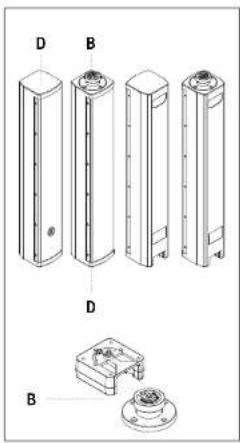
B | Pins system for elements quick lock and release.
C | Support element.
D | Passive array speakers, with rear recessed handles.
E | Anti-slip rubber feet.
3.1 | INPUTS & CONTROLS
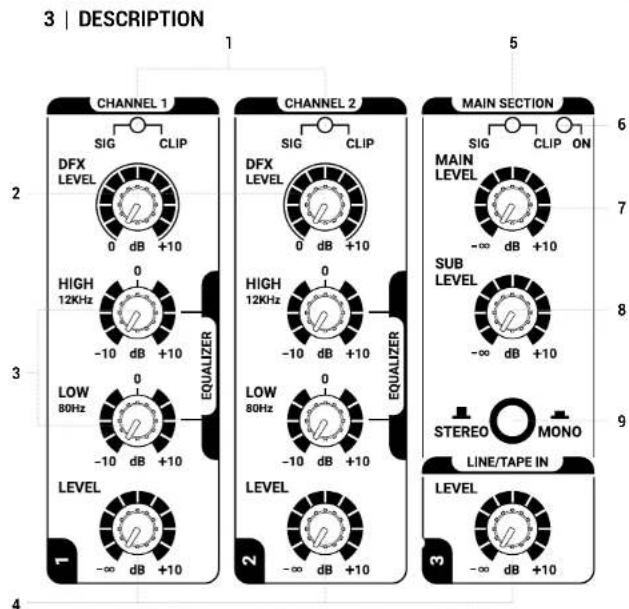
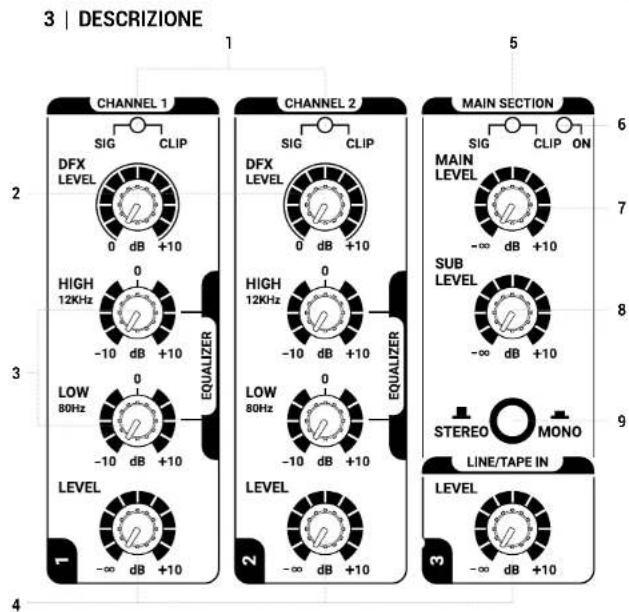
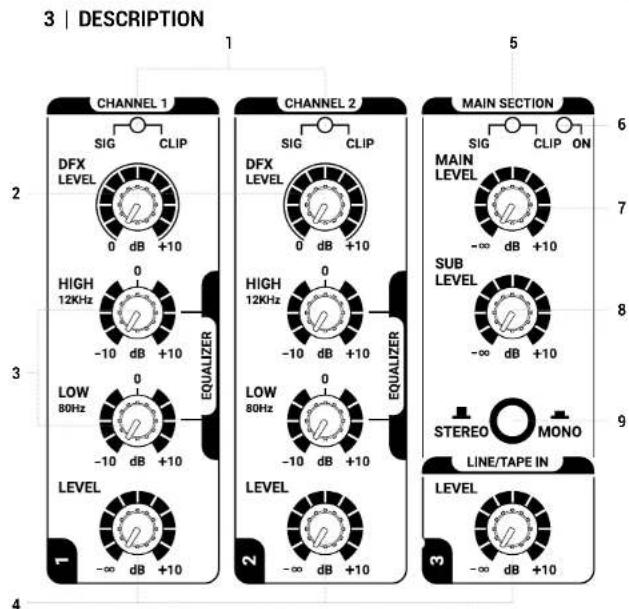
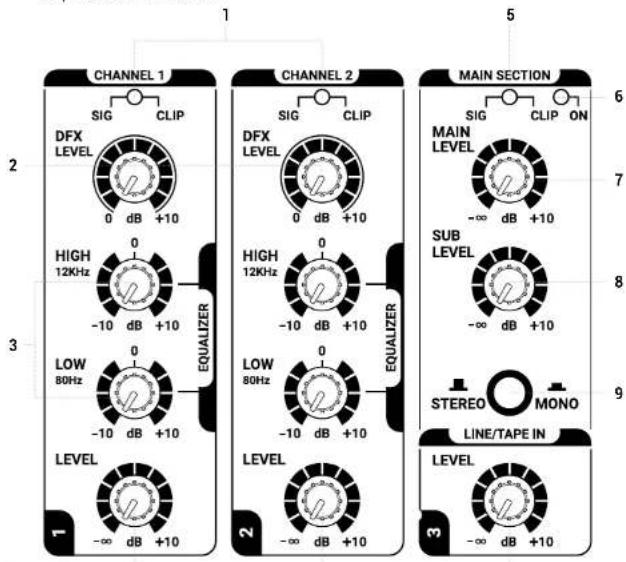
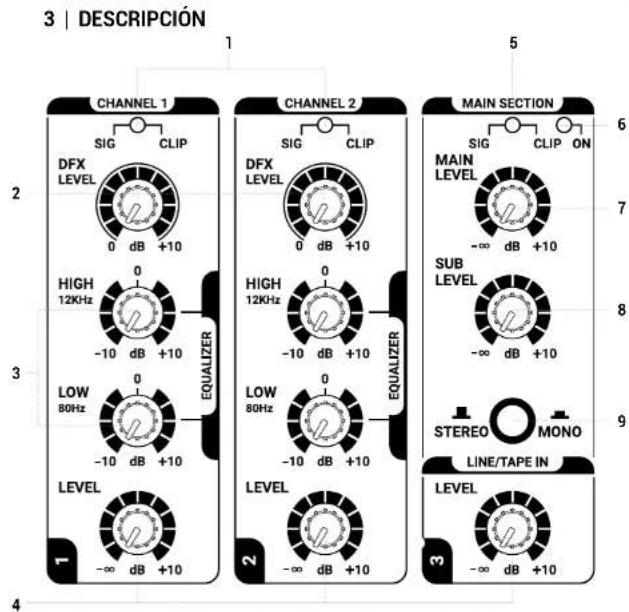
1 CH1 / CH2 - TWO-TONE SIG/CLIP LED
Green: The unit is plugged in and the power switch is turned ON.
Red: The input signal is very high and close to distortion.
If the LED is steadily lit, you need to reduce the input signal or adjust the channel EQ by reducing the boost introduced by the HIGH and LOW gains.
2 CH1 / CH2 - DFX LEVEL
This send, affected by the level control of each single channel, allows to adjust the signal sent to the DFX internal effects unit.
B-TWIG 12 PRO | User manual
3 CH1 / CH2 - EQUALIZER
This two-band equalizer allows you to boost or cut the high and/or low frequencies, to achieve the desired sound.
4 CH1 / CH2 / LINE/TAPE IN - LEVEL
These knobs adjust the volume of the corresponding channel, turn them to the right to raise the level, to the left to decrease it.
5 MAIN SECTION - TWO-TONE SIG/CLIP LED
Green: the signal is present in the MAIN channel.
Red: the input signal to the MAIN is very strong and is close to distortion.
If the LED is steadily lit, you must reduce the MAIN LEVEL level or adjust differently level of CH1 / CH2 / LINE/TAPE IN and AUX.
6 ON
The LED is lit when the unit is connected to the mains and the switch is set to ON.
7 MAIN LEVEL
This control adjusts the overall output volume of the system. Turn the knob clockwise to increase the volume or counter-clockwise to lower it.
8 SUB LEVEL
This control adjusts the output volume of the subwoofer and allows you to balance the level of lower frequencies, based on environment acoustic response. Turn the knob clockwise to increase the SUB volume or counterclockwise to lower it.
9 STEREO / MONO BUTTON
It allows to select the system listening configuration in two operating modes: STEREO or MONO.
- Set the button to MONO when using a single B-TWIG 12 PRO system; in this case all the stereo signals of the inputs are internally summed. You can connect an additional unit via the MIX OUT MONO (L/R) output, thus duplicating the sound front.
- Set the button to STEREO when using two B-TWIG 12 PRO systems; in this case all the stereo signals of the inputs are mixed in LEFT / RIGHT and simultaneously managed with the respective systems as follows:
the left channel (L) of all stereo inputs is reproduced by the main unit, while the right channel (R) of all stereo inputs is reproduced by the additional unit connected to the MIX OUT STEREO (R) output.
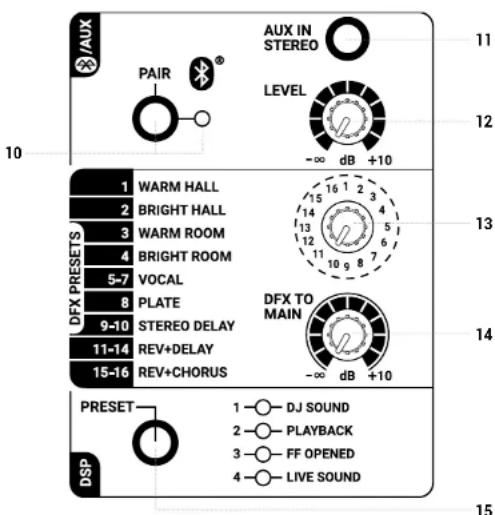
10 PAIR - BUTTON & LED
Use this button to synchronize the Bluetooth ^® device with the system applying the following procedure:
- press the PAIR button for about 3 seconds until when the LED rhythmically flashes; - to start synch, activate Bluetooth ^a from the user interface of your mobile device; - in your smartphone or tablet list of devices detected, select "B-TWIG 12 PRO" to synchronize your mobile device with the system.
At the end of the operation the LED is steadily lit and the tracks can be played back, as long as device maximum distance from the unit does not exceed 10 meters.
The Bluetooth® connection can be deactivated at any time by holding down the PAIR button for 3 seconds or by desyncing the B-TWIG 12 PRO unit from the mobile device. In both cases, the indicator light flashes slowly every 5 seconds, indicating that the connection has been deactivated.
11 AUX IN STEREO
This 3.5mm stereo input accepts the cable signal from external devices, such as a smartphone, tablet, PC or any other device with a stereo mini-jack output.
12 BLUETOOTH® / AUX - LEVEL
This knob adjusts the volume of AUX IN STEREO and BLUETOOTH ^® inputs, turn the knob to the right to raise the level, to the left to decrease it.
13 DFX PRESETS
This 16-position selector allows you to choose the desired type of effect.
For a quick reference, the list of effects is shown to the left of the selector.
The first 4 effects emulate different reverberations, characterized by reflections of the sound inside two different ambients, the following 4 (5-8) are suggested in particular for vocal or percussions, the stereo delays generate the classic delay effect of the main signal, finally there are the multi-effect combinations (11-16) ideal for vocal and most solo instruments.
14 DFX TO MAIN
This knob determines the overall signal level of the DFX effects unit for the main output. Use the knob to increase or decrease the amount of processed signals to be send to the MAIN LEVEL.
15 DSP - PRESET BUTTON AND LED
Press this button to select the equalization suitable for system use.
The lit LED shows the activated preset.
• DJ SOUND
Suitable for installations in disco club or a mobile DJ SET, applications where a punchy tone is required as well as a predominance of very deep and engaging bass frequencies.
• PLAYBACK
For listening and using reproduced music sources (CD players, MP3, etc.). Low and high frequencies are emphasized. Suitable for all those situations where the background music is spread out, even at low volume.
- FF OPENED
This preset optimizes speech intelligibility with an accurate and balanced dynamic response.
It's particularly suitable for spread of announcements, warnings and vocal messages, as well as for listening and use of playback music, with both columns set far from the main listening wavefront.
NOTE the FF OPENED preset does not supersede a correct arrangement of the speakers, nor it acts with different signal output delays on each individual speaker.
• LIVE SOUND
For system use in live performances. Characterized by a flat and realistic response, it is suitable for concerts in clubs, as well as for musicians and singers.
3.2 | CONNECTIONS
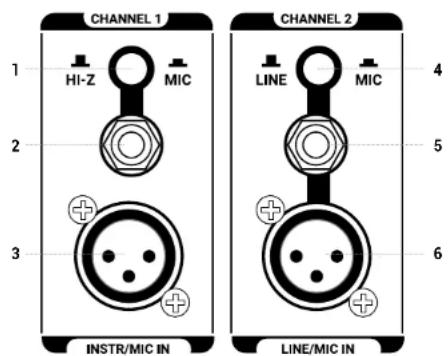
1 HI-Z / MIC - CH1 BUTTON
This button switches channel 1 input signal impedance. Set the button to MIC to connect a microphone or set the button to HI-Z when you need to connect an electro-acoustic guitar. The button only acts on the 6.35mm input jack.
2 HI-Z INPUT - CH1
Balanced input with 6.35mm (1/4") socket. An unbalanced cable can also be used.
3 MIC INPUT - CH1
Balanced microphone input with XLR-F socket.
4 LINE / MIC - CH2 BUTTON
Set the button to LINE to use a line-level source or set the button to MIC to use a microphone.
5 LINE INPUT - CH2
Balanced input with 6.35 mm jack. An unbalanced cable can also be used.
6 MIC INPUT - CH2
Balanced microphone input with XLR-F socket.
B-TWIG12PRO
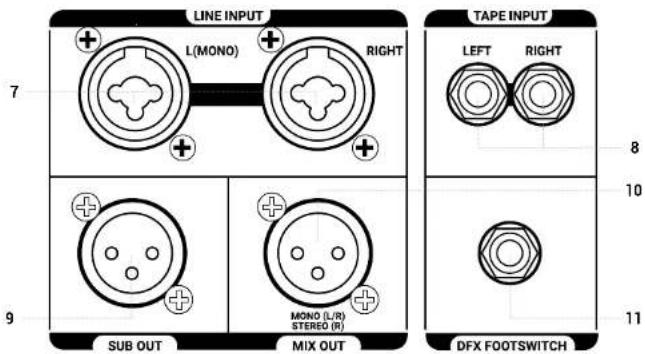
7 LINE INPUT L/R
Balanced line inputs with COMBO sockets (XLR-F + 6.35mm Jack); by connecting a single cable to the L (MONO) socket, the signal is internally processed as mono. The volume of these inputs is regulated by channel 3 knob.
8 TAPE INPUT L/R
Unbalanced line input with RCA L/R sockets. Connect to these sockets the output of a hi-fi device (CD) or other device with RCA L/R outputs. The volume of these inputs is controlled by channel 3 knob.
9 SUB OUT
Balanced XLR-M output to send the signal to another active subwoofer. The level is influenced by both SUB LEVEL and MAIN knobs.
10 MIX OUT L/R - R
Balanced XLR-M output for addressing the MAIN MIX signal to another B-TWIG 12 PRO system.
The output signal is influenced by the position of the STEREO / MONO button, as described in point 9, chapter 3.1.
Button pressed (MONO): all the signals present in input channels are internally summed and the MIX OUT provides the signal for an additional reinforcement system.
Button raised (STEREO): the signal present in the left channel (L) of all stereo inputs is summed and exclusively played back by the main system, while the signal in the right channel (R) of all stereo inputs is summed and exclusively played back from the additional system.
NOTE The signal of the Mono inputs CH1 and CH2 is reproduced equally on the left (main system) and on the right (additional system)
ATTENTION To achieve a balanced and homogeneous stereo sound front, when connecting two systems in a stereo configuration, set identically the additional system controls (R).
11 DFX FOOTSWITCH
Connect to this unbalanced jack an external footswitch for activating or bypassing internal effects. Press once to deactivate the effects and a second time to reactivate them.
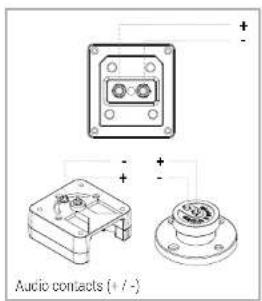
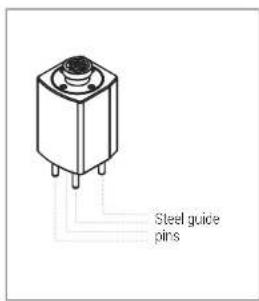
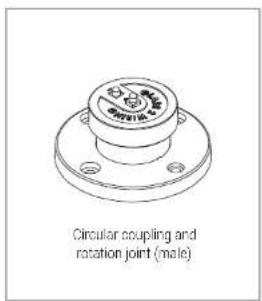
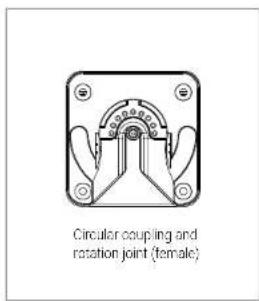
12 FAST ELEMENTS CONNECTION SYSTEM
This mechanism allows locking and release of the elements that make up the system, ensuring the perfect functionality in total safety.

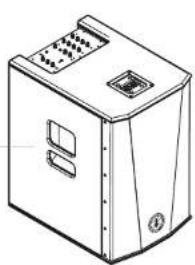
13 RECESSED SIDE HANDLES SUBWOOFER
Use these handles for transporting and positioning the subwoofer. Do not use them to fly the subwoofer or to lock it in any position.
13
natural_image
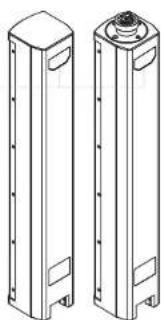
Line drawing of a computer tower case with ventilation slots and control panel (no text or symbols)14 RECESSED REAR HANDLES COLUMNS / SUPPORT ELEMENT
Use these handles for transporting and positioning the elements. Do not use them to fly the speakers on the wall, on the ceiling or to lock the columns in any position.
14
natural_image
Technical line drawing of two cylindrical electronic components with mounting holes (no text or symbols)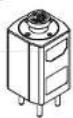
3.3 | POWER SUPPLY
3
POWER

ON OFF

C E EAC
MADE IN CHINA
1
2
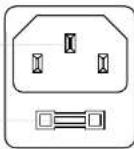
MAINS INPUT: 220-240V\~50-60Hz
FUSE: T4A L 250V\~
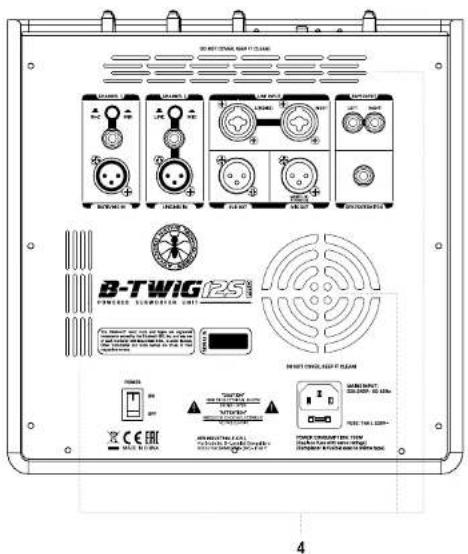
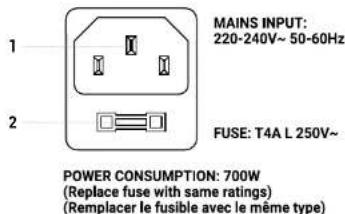
IEC mains socket with integrated EMI filter. Each package is supplied with the necessary power cord, specific for your area. Insert the mains cable into this socket, but make sure the system is switched off before connecting the cable to the mains. For your safety, never disconnect the ground lead.

WARNING!
Never remove the front protection grille of the cabinet. To prevent the risk of electric shock, in case of accidental damage or replacement of the protection grille (to be carried out by service centers only), immediately disconnect the power supply.

CAUTION: To reduce the risk of electric shock, never connect the power supply to the appliance while the grille is removed.
2FUSE
Protection fuse integrated in mains socket.

CAUTION: Replace the fuse only with one of the same type and with the same value. If the fuse blows repeatedly, contact an authorized service center.
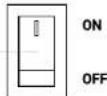
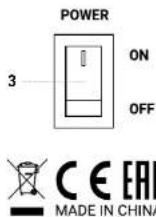
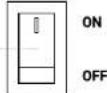
3 POWER ON/OFF
Use this switch to turn ON/OFF the system.
4 COOLING FAN AND VENTILATION SLOTS
The cooling process of the amplifier and temperature control within the limits are ensured by proper ventilation of the system, thus it's recommended to don't obstruct or cover in any way subwoofer rear cabinet ventilation slots.
3.4 | B-TWIG 12CS PRO KIT
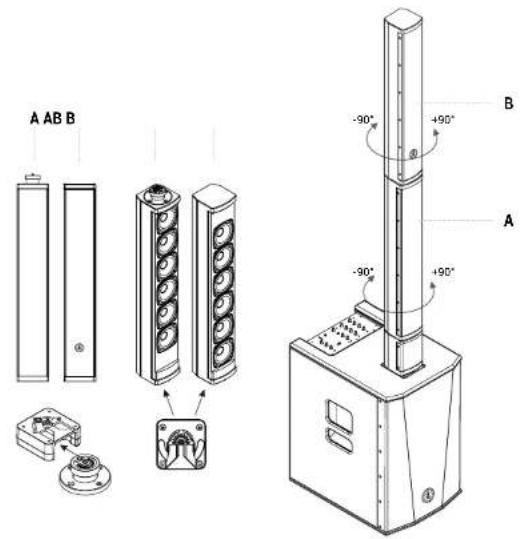
The kit consists of two identical column elements. Both are equipped with the interlocking fixing mechanism allowing the quick coupling and release of the elements that make up the system, ensuring perfect functionality in complete safety. In addition there is a rotation system that allows you to orient the speakers to 90 degrees to the right or left.
4 | INSTRUCTIONS FOR SYSTEM ASSEMBLY AND DISASSEMBLY
For system installation and to guarantee the correct operation, always carefully respect following instructions:
- Place the subwoofer in a vertical position on a flat and stable surface, making sure that all the rubber feet are perfectly adherent to the floor or to the supporting surface.
- Never install the system on mobile carts, chairs, tables or similar surfaces which are not stable and cannot bear the weight.
- To allow proper amplification heat dissipation, please leave the needed distance between the rear panel of the subwoofer and other objects such as walls, corners, curtains. Never place the unit near heat sources of any kind.
- Do not cover the ventilation slots located on subwoofer rear cabinet.
B-TWIG12PRO
ASSEMBLY:
- Place the subwoofer on a level surface with no drops. (Fig. 1)
- Fasten the support element to the subwoofer by inserting the four steel guiding pins and the two audio jacks into their respective sockets. (Fig. 2)
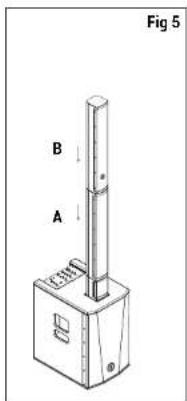
- Slide the lower part of the first column speaker (A) into the upper part of the support until it locks. (Fig. 3)
- Repeat the operation to fix the second column speaker (B) with the upper part of the first column speaker (A). (Fig. 4 - Fig. 5)
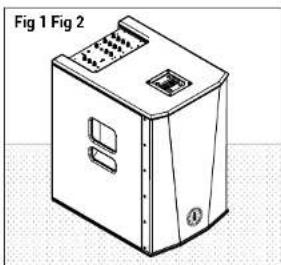
natural_image
Isometric line drawing of a device casing with ventilation slots and a vent, labeled Fig 1 and Fig 2 (no text or symbols on the diagram itself)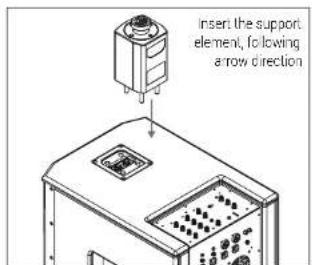
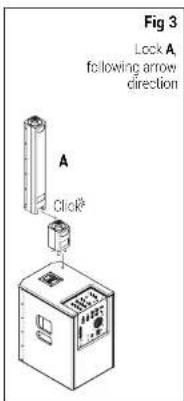
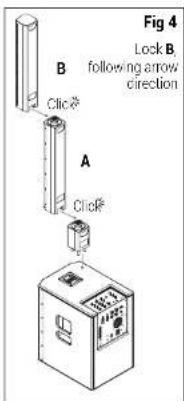
DISASSEMBLY:
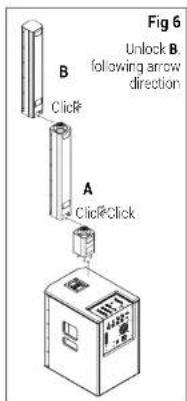
- Press the upper column speaker (B) from the back to release it from the lower column speaker (A). (Fig. 6)
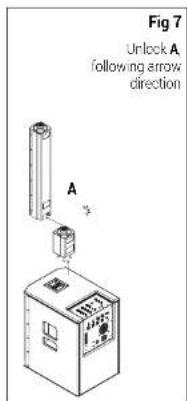
- Repeat the same operation between the lower column (A) and the support element. (Fig. 7)
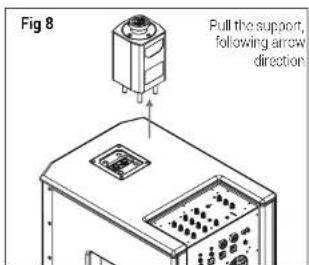
- Remove the support from the subwoofer and store all the elements. (Fig. 8)

5 | APPLICATION CONFIGURATIONS
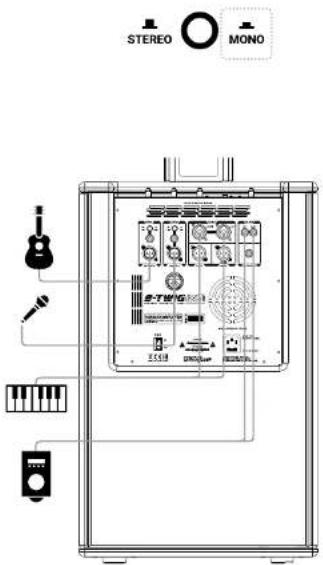
Use this MONO configuration as sound system for a small venue with one B-TWIG12 PRO system.
All the signals present on the input channels, CH1 - CH2 - CH3 - AUX / BT, are internally summed and reproduced in MONO.
APPLICATIONS
• Live Solo / Duo
- Piano Bar / Dj Set
• A/V Multi media, small dancing venues
• Cabaret / Corporate meetings
18 User manual | B-TWIG 12 PRO
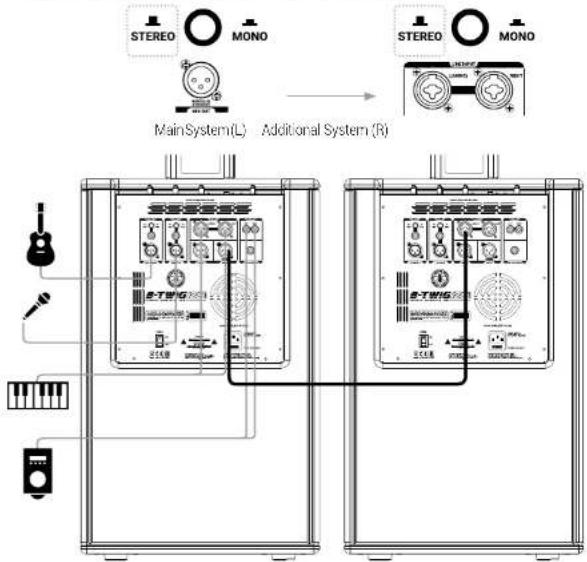
STEREO - 2x B-TWIG 12 PRO
Use this STEREO configuration to create a medium venue sound system, using two B-TWIG12 PRO systems. The signal present in the left channel (L) of all stereo inputs is summed and exclusively played back by the main system, while the signal in the right channel (R) of all stereo inputs is summed and exclusively played back from the additional system.
Adjust the MAIN LEVEL of each system in the same way.
NOTE: The signal of the Mono inputs CH1 and CH2 is reproduced equally on the left (main system) and on the right (additional system)
flowchart
graph TD
    A["Main System(L)"] --> B["Additional System (R)"]
    B --> C["Device Panel"]
    D["STEREO"] --> E["Main System(L)"]
    F["MONO"] --> G["Additional System (R)"]
    H["Handheld Device"] --> I["Control Panel"]
    J["Handheld Device"] --> K["Control Panel"]
APPLICATIONS
• Live band / Rehearsal rooms
- Piano Bar / Dj Set
• A/V Multi media, dancing venues
• Fixed installations / Theatre
B-TWIG 12 PRO | User manual

6 | TROUBLESHOOTING
| PROBLEM | LED | SOLUTION |
| No sound or very low sound level | Power LED turned off. | Make sure the system is properly connected to the mains outlet. |
| Power LED turned on, but low MAIN LEVEL | Raise MAIN LEVEL knob. | |
| Distortion | S/G/CLIP LED lit rod | Lower inputs and/or MAIN LEVEL knob. |
| ON/LIMIT LED lit green | Check the source levelCheck proper connection between subwoofer and A/B speaker elements | |
| Booming sound | Lower SUB level | |
| Harsh sound | Raise SUB levelLower MAIN LEVEL knob. | |
| Attenuation of some frequencies that are predominant, not very faithful signal, reverberating environment | Try choosing a different preset, mincing also the acoustic characteristics of the environment. |
7 | TECHNICAL SPECIFICATIONS
| System type Active column system | |
| Subwoofer (B-TWIC 12S PRO) | Vented enclosure1 x 12" Ferrite - 2.5" VC - custom speaker |
| Column speaker (B-TWIG 12CS PRO) | 12 x 3.5" - 1" VO - neodymium custom speakers |
| Average dispersion 120° | |
| Frequency response 45 lz - 20 kHz | |
| MAX SPL 126 dB | |
| Amplification Class D | |
| Peak power (LF + HF) 2800 W | |
| Crossover 24dB/Oct @ 200Hz | |
| DSP 56bit | |
| AD/DA conversion 24bit / 48kHz | |
| System EQ 4 presets | |
| I/O connectors | CH1 & CH2: 2 x XLR-F + 2 x 6,35mm(1/4") jackCH 3 I INF IN: 2 x combo I / RTAPE IN: RCA L/RAUX IN: 1 x 3.5mm mini-jackSUB OUT/MIX OUT: 2 x XLR-MDFX FOOTWSWITCH: 1 x 6,35mm (1/4")jack |
| BLUETOOTH® V4.0 | |
| Modulation | CFSK, n/4 DQPSK, BDPSK |
| Supported protocols | HFP V1.6, HSP V1.2, A2DP V1.2,AVRCP V1.4 DI V1.3 |
| Transmission power 5dBm | |
| Frequency band 2402 - 2480 MHz | |
| Operating temperature -40°C to -80°C |

| Power supply 220-240V~ 50-60Hz | ||
| Fuse T4A L 250V~ | ||
| Power consumption 700 W | ||
| Fastening mechanism | Connector with automatic coupling and circular connectionSpeaker rotation - 90 degrees left/right. | |
| Cabinets material:- Subwoofer- Column speakers / Support element | 15mm plywoodHigh density MDF | |
| Cabinet treatment Scratch-resistant coating with high mechanical resistance | ||
| Optional accessories Transport cover for subwoofer and column speakers kit | ||
| B-TWIG 12S PRO B-TWIG 12CS PRO | ||
| Dimensions (W x H x D) | Subwoofer:370 x 563 x 500mm14.6" x 23" x 19.7" (approx)Support element:105 x 230 x 107mm4.1" x 9" x 4.2" (approx) | Upper speaker A:105 x 680 x 107mm4.1" x 26.7" x 4.2" (approx)Lower speaker B:105 x 680 x 107mm4.1" x 26.7" x 4.2" (approx) |
| Weight | Subwoofer:20.2Kg44.6 lbs. (approx)Support element:300g0.6 lbs. (approx) | Upper speaker A:5.1Kg11.3 lbs. (approx)Lower speaker B:5.2Kg11.5 lbs. (approx) |
8 | NOTES
INDICE
3.1 | INGRESSI & CONTROLLI
1 CH1 / CH2 - INDICATORE BICOLORE SIG/CLIP
natural_image
Line drawing of a computer tower case with ventilation slots and control panel (no text or symbols)14 MANIGLIE POSTERIORI INCASSATE COLONNE / ELEMENTO DI SOSTEGNO
natural_image
Technical line drawing of two vertical cylindrical components with mounting flanges (no text or symbols)
3.3 | ALIMENTAZIONE
3
POWER

C E EAC
MADE IN CHINA
1
2
APPLICAZIONI
3.1 | ENTRÉES & CONTRÔLES
1 CH1 / CH2 - INDICATEUR BICOLORE SIG/CLIP
natural_image
Line drawing of a computer tower case with ventilation slots and control panel (no text or symbols)14 POIGNÉES ARRIÈRES ENCASTRÉES COLONNES / ÉLÊMENT DE SUPPORT
natural_image
Technical line drawing of two vertical cylindrical components with mounting flanges (no text or symbols)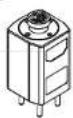
3.3 | ALIMENTATION
natural_image
Isometric line drawing of a device casing with ventilation slots and a vent, labeled Fig 1 and Fig 2 (no text or symbols on the diagram itself)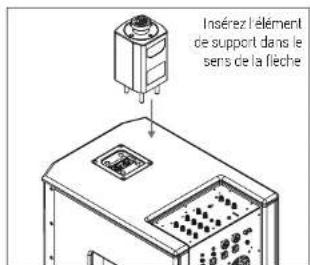
APPLICATIONS
3 | BESCHREIBUNG
4
3.1 | EINGÄNGE UND BEDIENELEMENTE
natural_image
Line drawing of a computer tower case with ventilation slots and control panel (no text or symbols)natural_image
Technical line drawing of two vertical cylindrical components with mounting flanges (no text or symbols)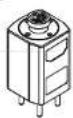
3.3 | STROMVERSORGUNG
:
POWER

C E EAC
MADE IN CHINA
1
2
natural_image
Isometric line drawing of a device casing with labeled parts (no text or symbols on the diagram itself)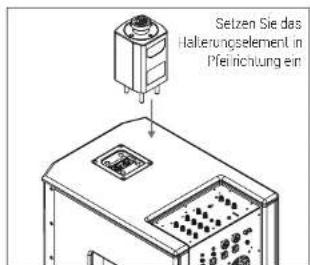
3.1 | ENTRADAS Y CONTROLES
1 CH1 / CH2 - LED BICOLOR SIG/CLIP
natural_image
Line drawing of a computer tower case with ventilation slots and control panel (no text or symbols)14 ASAS POSTERIORES EMBUTIDAS DIFUSORES / ELEMENTO DE SOPOR
natural_image
Technical line drawing of two vertical cylindrical components with mounting flanges (no text or symbols)
3.3 | ALIMENTACIÓN
3
POWER

C E EAC
MADE IN CHINA
1
2
natural_image
Isometric line drawing of a device casing with ventilation slots and a handle (no text or symbols)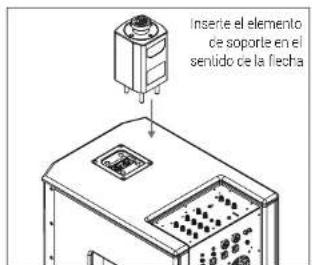
APLICACIONES
ENG The information contained in this manual have been carefully drawn up and checked. However no responsibility will be assumed for any noomestness. This manual cannot cover all the possible contingencies which may arise during the product installation and use. Should further information be desired please contact us or our local distributor, A.E.B. industry Sr. car no, be considered reasonable for damages which may be caused to people and things when using this product. Specifications and features are subject to change without prior notice.
ENG - Download this manual in other languages on www.ant-intomusic.com
The Bluetooth® word mark and logos are registered trademarks owned by the Bluetooth® SIG, Inc. and any use of such marks by AEB Industriale S.R.L. is under license. Other trademarks and trade names are those of their respective owners.
Made in China
Made in China
Prodotto in Cina
Fabriqué en Chine
Fabricado en China