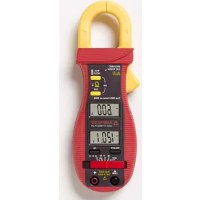
ACD14 TRMSPLUS - Multimeter Amprobe - Free user manual and instructions
Find the device manual for free ACD14 TRMSPLUS Amprobe in PDF.



| Product Type | Dual Display Digital Multimeter Clamp |
| Brand | Amprobe |
| Model | ACD14 TRMSPLUS |
| Dimensions | 190 x 63 x 32 mm (7.4 x 2.5 x 1.3 inches) |
| Weight | 207 g (0.5 lb) |
| Power Supply | 2 round 3V IEC-CR2032 batteries |
| Display | LCD 3-3/4 digits, 4000 counts |
| Main Functions | AC/DC Voltage, AC Current (clamp), Resistance, Frequency, Continuity, Diode, Capacitance, Temperature (type K), μA AC/DC |
| Safety Category | CAT III 600V |
| Jaw Opening | 26 mm max. |
| Auto Power Off | After 30 minutes of inactivity |
| Special Functions | Display Hold (HOLD), MAX (30 ms peak), simultaneous display A+V or A+Hz |
| Operating Temperature | 0°C to 40°C, <80% RH |
| Storage Temperature | -20°C to 60°C |
| Warranty | 1 year (excluding fuses, batteries, and abnormal use) |
| Maintenance | Clean with a damp cloth and mild detergent. Replace batteries as soon as the low battery indicator appears. |
| Included Accessories | Set of leads (red/black), 2 CR2032 batteries, type K temperature probe, carrying case |
| Repairability | Amprobe authorized service center. For warranty repairs, contact the distributor. |
Frequently Asked Questions - ACD14 TRMSPLUS Amprobe
User questions about ACD14 TRMSPLUS Amprobe
0 question about this device. Answer the ones you know or ask your own.
Ask a new question about this device
Download the instructions for your Multimeter in PDF format for free! Find your manual ACD14 TRMSPLUS - Amprobe and take your electronic device back in hand. On this page are published all the documents necessary for the use of your device. ACD14 TRMSPLUS by Amprobe.
USER MANUAL ACD14 TRMSPLUS Amprobe
Features of this instrument
1) Transformer Clamp Jaw for AC current magnetic field pick up
2) Hand/Finger Barrier to indicate the limits of safe access of the meter during measurement
3) Push-buttons for special functions & features. Also as power ON/OFF buttons for ACA function in Twin Display Models
4) Push-buttons for special functions & features on Slide-switch Selector functions
5) Input Jack for all functions EXCEPT non-invasive ACA current function
6) Common (Ground reference) Input Jack for all functions
7) Slide-switch Selector to turn the power ON/OFF and Select a function
8) 3-3/4 digits 4000 counts LCD display(s)
9) 3-3/4 digits display for ACA
10) Jaw trigger for opening the transformer clamp jaw
11) Jaw center Indicators, at where best ACA accuracy is specified
12) Jaw marking lines for ACA position error indication
Limited Warranty and Limitation of Liability
Your Amprobe product will be free from defects in material and workmanship for 1 year from the date of purchase. This warranty does not cover fuses, disposable batteries or damage from accident, neglect, misuse, alteration, contamination, or abnormal conditions of operation or handling. Resellers are not authorized to extend any other warranty on Amprobe's behalf. To obtain service during the warranty period, return the product with proof of purchase to an authorized Amprobe Test Tools Service Center or to an Amprobe dealer or distributor. See Repair Section for details. THIS WARRANTY IS YOUR ONLY REMEDY. ALL OTHER WARRANTIES - WHETHER EXPRESS, IMPLIED OR STAUTORY - INCLUDING IMPLIED WARRANTIES OF FITNESS FOR A PARTICULAR PURPOSE OR MERCHANTABILITY, ARE HEREBY DISCLAIMED. MANUFACTURER SHALL NOT BE LIABLE FOR ANY SPECIAL, INDIRECT, INCIDENTAL OR CONSEQUENTIAL DAMAGES OR LOSSES, ARISING FROM ANY CAUSE OR THEORY. Since some states or countries do not allow the exclusion or limitation of an implied warranty or of incidental or consequential damages, this limitation of liability may not apply to you.
Repair
All test tools returned for warranty or non-warranty repair or for calibration should be accompanied by the following: your name, company's name, address, telephone number, and proof of purchase. Additionally, please include a brief description of the problem or the service requested and include the test leads with the meter. Non-warranty repair or replacement charges should be remitted in the form of a check, a money order, credit card with expiration date, or a purchase order made payable to Amprobe® Test Tools.
In-Warranty Repairs and Replacement – All Countries
Please read the warranty statement and check your battery before requesting repair. During the warranty period any defective test tool can be returned to your Amprobe® Test Tools distributor for an exchange for the same or like product. Please check the "Where to Buy" section on www.Amprobe.com for a list of distributors near you. Additionally, in the United States and Canada In-Warranty repair and replacement units can also be sent to a Amprobe® Test Tools Service Center (see next page for address).
Non-Warranty Repairs and Replacement – US and Canada
Non-warranty repairs in the United States and Canada should be sent to a Amprobe® Test Tools Service Center. Call Amprobe® Test Tools or inquire at your point of purchase for current repair and replacement rates.
In USA In Canada
Amprobe Test Tools Amprobe Test Tools
Everett, WA 98203 Mississauga, ON L4Z 1X9
Tel: 877-AMPROBE (267-7623) Tel: 905-890-7600
Fax: 425-446-6390 Fax: 905-890-6866
Non-Warranty Repairs and Replacement – Europe
European non-warranty units can be replaced by your Amprobe® Test Tools distributor for a nominal charge. Please check the "Where to Buy" section on www.Amprobe.com for a list of distributors near you.
European Correspondence Address*
Amprobe® Test Tools Europe
In den Engematten 14
79286 Glottertal, Germany
Tel.: +49 (0) 7684 8009 - 0
*(Correspondence only – no repair or replacement available from this address. European customers please contact your distributor.)
ACD-14 PLUS & ACD-14 TRMS-PLUS
Clamp-on Multimeter With Dual Display
Contents
Instrument Familiarization .... 1
Warranty and Repair 2
Symbols....3
Introduction......4
Warnings and Precautions....4
Unpacking and Inspection....5
Operation 5
Maintenance and Troubleshooting....9
Battery Replacement.... 10
Specifications 10
Figures....15
SYMBOLS
 | Caution! Refer to the explanation in this Manual |
 | Earth (Ground) |
 | Double Insulation or Reinforced insulation |
 | AC--Alternating Current |
 | DC--Direct Current |
 | Conforms to relevant Australian standards |
 | Underwriters Laboratories Inc. [Note: Canadian and US.] |
 | Complies with European Directives |
 | Application around and removal from hazardous live conductors is permitted |
| [XOD5] | Do not dispose of this product as unsorted municipal waste |
Introduction
The ACD-14 PLUS and ACD-14 TRMS-PLUS are digital clampmeters that measure both AC and DC voltage, AC current, Resistance, Frequency, Continuity and Diode Test. Frequency can be measured in the voltage and current modes.
WARNINGS AND PRECAUTIONS
Safety Information
- The ACD-14 PLUS Series Digital Clampmeters conform to EN61010-1:2001; EN61010-2-032:2002; CAT III 600 V, class 2 and pollution deg.2
- This instrument is EN61010-1 certified for Installation Category III (600V). It is recommended for use in distribution level and fixed installations, as well as lesser installations, and not for primary supply lines, overhead lines and cable systems.
- Do not exceed the maximum overload limits per function (see specifications) nor the limits marked on the instrument itself. Never apply more than 600 Vdc/600 V ac rms between the test lead and earth ground.

WARNING
- Before and after hazardous voltage measurements, test the voltage function on a known source such as line voltage to determine proper meter functioning.
- Disconnect the test leads from the test points before changing meter functions.
- Inspect the Clampmeter, test leads and accessories before every use. Do not use any damaged part.
- Never ground yourself when taking measurements. Do not touch exposed circuit elements or test probe tips.
- Do not operate the instrument in an explosive atmosphere.
- To reduce the risk of fire or electric shock, do not expose this product to rain or moisture.
- The meter is intended only for indoor use. To avoid electrical shock hazard, observe the proper safety precautions when working with voltages above 60 VDC or 30 VAC rms. These voltage levels pose a potential shock hazard to the user.
- Before and after hazardous voltage measurements, test the voltage function on a known source such as line voltage to determine proper meter functioning.
- Keep your hands/fingers behind the hand/finger barriers (of the meter and the test leads) that indicate the limits of safe access of the hand-held part during measurement.
- Inspect test leads, connectors, and probes for damaged insulation or exposed metal before using the instrument. If any defects are found, replace them immediately.
- This Clamp-on meter is designed to apply around or remove from uninsulated hazardous live conductors. Individual protective equipment must be used if hazardous live parts of the installation could be accessible.
- Exercise extreme caution when: measuring voltage >20 V // current >10 mA // AC power line with inductive loads // AC power line during electrical storms // current,
when the fuse blows in a circuit with open circuit voltage >1000 V // servicing CRT equipment.
- Remove test leads before opening the case to change the battery.
- Disconnect circuit power and discharge all high-voltage capacitors before testing resistance, continuity, diodes, or capacitance.
- To avoid false readings, which could lead to possible electric shock or personal injury, replace the batteries as soon as the low battery indicator (+) appears.
Unpacking and Inspection
Your shipping carton should include:
1 Digital clamp meter
1 Carrying case
1 Test lead set (one black, one red)
1 Two coin cell batteries
1 Manual
If any of the items are damaged or missing, return the complete package to the place of purchase for an exchange.
OPERATION
CAUTION
The Hz button will alternate the display between the voltage function selected and frequency reading.
Measuring DC Voltage - See Figure 1
- Set the Function Switch to V=...
- Connect the test leads: Red to +, Black to COM.
- Connect the test probes to the circuit test points.
- Read the display, and if necessary, correct any overload (OL) conditions.
Measuring AC Voltage - See Figure 2
- Set the Function Switch to V\~.
- Connect the test leads: Red to +, Black to COM.
- Connect the test probes to the circuit test points.
- Read the display, and if necessary, correct any overload (OL) conditions.
Measuring AC Current - See Figure 3
- Set the Function Switch to A\~ position.
- Open spring-loaded clamp by pressing the lever on left side of meter.
- Position clamp around one wire or conductor and release the clamp lever. Make sure that the clamp is entirely closed. The clamp must be positioned around only one conductor. If it is placed around two or more current carrying conductors, the reading is FALSE.
- Read the displayed value, and if necessary, correct any overload (OL) conditions.
Measuring Frequency - See Figure 3
The Voltmeter detects the frequency of the voltage applied to the test leads.
- Set-up AC voltage measurement and press the Hz button.
- Read the frequency value on the display.
CAUTION
Using the Resistance, Continuity, Diode or Capacitance functions on a live circuit will produce false results and may damage the instrument. In many cases the suspected component must be disconnected from the circuit to obtain an accurate measurement reading.
Measuring Resistance - See Figure 4
- Set the Function Switch to .
- Connect the test leads: Red to +, Black to COM.
- Turn off power to the circuit being measured.
- Discharge any capacitors that may influence the reading.
- Connect the test probes across the resistance.
- Read the display. If OL appears on the highest range, the resistance is too large to be measured or the circuit is an open circuit.
Continuity Testing - See Figure 5
- Set the Function Switch to and press the SELECT button until ^(1) is displayed.
- Connect the test leads: Red to +, Black to COM.
- Turn off power to the circuit being measured.
- Discharge any capacitors that may influence the reading.
- Connect the test probes across the resistance or the two points of test.
- Listen for the tone that indicates continuity (>10 Ω and < 120 Ω).
Testing Diodes - See Figure 6
- Set the Function Switch to Ω and press the SELECT button until ➤ is displayed.
- Connect the test leads: Red to +, Black to COM.
- Turn off power to the circuit being measured.
- Free at least one end of the diode from the circuit.
- Connect the test probes across the diode noting polarity.
- Read the display. A good diode has a forward voltage drop of about 0.6 V. An open or reverse biased diode will read .0L.
Measuring Capacitance - See Figure 7
- Set the Function Switch to and press the SELECT button until is displayed.
- Connect the test leads: Red to +, Black to COM.
- Turn OFF power to the circuit being measured.
- Discharge the capacitor using a 100 kΩ resistor.
- Free at least one end of the capacitor from the circuit.
- Connect the test probes across the capacitor.
- Read the display.
- Relative zero mode can be used to zero out the parasitic capacitance of the leads and the internal protection circuitry of the meter when measuring low capacitance in the order of Pico Farad (pF).
Measuring Temperature - See Figure 8
- Set the Function Switch to °F / °C and press the SELECT button until correct temperature range is displayed.
- Connect the thermocouple to the input jacks: + to +, - to COM.
You can also use a plug adapter TA-1A (optional purchase) with banana pins to type-K socket to adapt other type-K standard mini plug temperature probes.
Measuring μA Current - See Figure 9
- Set the Function Switch to and press the SELECT button for AC or DC is displayed.
- Connect the test leads: Red to +, Black to COM.
- Turn OFF power to the circuit being measured and break the circuit for connecting test leads.
- Turn ON the circuit and read the display.
μA Current function
Application notes:
The DCμA function is designed especially for HVAC/R flame sensor applications. The 0.1μA resolution is useful for identifying the minute current changes in flame detector applications. Flame signal current check should indicate steady flame signal of at least 2μA for a rectification type, or 1.5μA for an ultraviolet type (8μA for self checking systems). If a flame signal current with inadequate strength or fluctuation beyond 10%, check the following to avoid the risk of unwanted flame relay dropout :
1-1) For gas or oil flames (Minipeeper):
- Low supply voltage
- Detector location
• Defective detector wiring - Dirty viewing windows
- Faulty Minipeeper
1-2) For oil flames (Photocell):
• Detector location & wiring
- Smoky flame or poorly adjusted air shutter
- Faulty Photocell
• Temperature over 165 °F (74 °C) at photocell
1-3) For gas flames (Flame Rod):
- Ignition interference (A flame signal current difference with the ignition both on and off greater than 0.5 A indicates the presence of ignition interference)
- Insufficient ground (must be at least 4 times the detector area)
- Flame lifting off burner head (ground), or not continuously in contact with the flamerod
- Temperature in excess of 600 °F (316 °C) at the flame electrode insulator causing short to ground.
FEATURES
HOLD H / MAX H
The HOLD feature freezes the display when the button is pressed. The MAX feature compares and displays the measured maximum value as fast as 30ms with auto-ranging capability.
HOLD
Press the HOLD button momentarily toggles to hold mode for the ACA function. To release the HOLD feature momentarily press the HOLD button.
MAX
Press the HOLD button for 1 second or more activates the MAX HOLD feature for the ACA function. To release the MAX HOLD feature press the HOLD button for 1 second or more.
Auto Power Off (APO)
When the meter is on, the Auto Power Off (APO) feature will switch the meter into a sleep mode automatically to extend battery life after approximately 30 minutes of no slide-switch nor push button operations. To wake up the meter from APO, press the buttons momentarily or set the slide-switch to the OFF position and then slide back on again. Always set the slide-switch to the OFF position manually when the meter is not in use.
MAINTENANCE
WARNING
To avoid electrical shock, disconnect the meter from circuit, remove the test leads from the input jacks and turn OFF the meter before opening the case. Do not operate the meter with open case.
Trouble Shooting
If the instrument fails to operate, check batteries and test leads etc., and replace as necessary. Double check operating procedure as described in this user's manual.
The voltage and resistance measurement circuits are protected by fusible resistors and a parallel high resistance path. If the instrument voltage-resistance input terminal has been subjected to high voltage transients (caused by lightning or switching surges in the system), the series fusible input resistors will open like fuses and the voltmeter will read approximately 85% of the actual value and cause the resistance range to not work. The meter voltage reading (approximately 15% low) will let the user know that the meter has been damaged, and the circuit under test is active.
Refer to the LIMITED WARRANTY section for obtaining warranty or service.
Cleaning and Storage
Periodically wipe the case with a damp cloth and mild detergent; do not use abrasives or solvents. If the meter is not to be used for periods of longer than 60 days, remove the battery and store separately.
Battery replacement
The meter uses two 3V IEC-CR2032 coin batteries. Remove the test leads and loosen the two screws from the case bottom and remove the bottom case. Slide the battery out the side of the holder and replace with a new battery (observe polarity). Replace the bottom case. Re-fasten the screws.
GENERAL SPECIFICATIONS
Display: 3-3/4 digits 4000 counts LCD display
Update Rate: 3 per second nominal
Polarity: Automatic
Operating Temperature: 0 °C to 40 °C; < 80% RH for temperature up to 31 °C decreasing linearly to 50% RH at 40 °C
Altitude: Operating below 2000m; Indoor use
Storage Temperature: -20 °C to 60 °C, < 80% RH (with battery removed)
Temperature Coefficient: nominal 0.15 x (specified accuracy)/°C @ (0 °C \~ 18 °C or 28 °C \~ 40 °C)
Low Battery: Below approx. 2.4V
Power Supply: 2 each 3V coin battery IEC-CR2032
Power Consumption: 2.8 mA typical except that 3.3 mA typical for ACA function
APO Timing: Idle for 30 minutes
APO Consumption: 5μA typical on all functions except that 40μA typical on voltage function
Dimension: 190 x 63 x 32 mm (7.4 x 2.5 x 1.3 in)
Weight: 207 gm (.5 lb.)
Jaw Opening & Conductor Diameter: max 26 mm (1")
Accessories: Test leads (pair), batteries, user's manual, soft carrying case, and banana plug type-K bead probe
Special Features: 30ms Max Hold; Data Hold; Simultaneous A+V, A+Hz
CE Safety : Meets EN61010-2-032, UL61010B-2-032, IEC61010-1 2nd Ed., EN61010-1 2nd Ed., UL61010-1 2nd Ed. CAT III-600 Volts AC & DC; Pollution degree : 2
EMC: Conforms to EN61326-1.
This product complies with requirements of the following European Community Directives: 89/336/EEC (Electromagnetic Compatibility) and 73/23/EEC (Low Voltage) as amended by 93/68/EEC (CE Marking). However, electrical noise or intense electromagnetic fields in the vicinity of the equipment may disturb the measurement circuit. Measuring instruments will also respond to unwanted signals that may be present within the measurement circuit. Users should exercise care and take appropriate precautions to avoid misleading results when making measurements in the presence of electronic interference.
ELECTRICAL SPECIFICATIONS
Accuracy at 23 °C ± 5 °C & < 75% R.H.
DC Voltage
| Range Accuracy | |
| 400.0 mV ±( 0.3% rdg + 4 digits) | |
| 4.000, 40.00, 400.0 V ±( 0.5% rdg + 3 digits) | |
| 600 V ±( 1.0% rdg + 4 digits) | |
| NMRR: >50 dB @ 50/60Hz | |
| CMRR: >120 dB @ DC, 50/60 Hz, Rs=1 kΩ | |
Input Impedance: 10 MΩ, 30 pF nominal (1000 MΩ for 400.0 mV range) Transient protection: 6.5 kV (1.2/50 μs surge)
AC Voltage (50Hz \~ 500Hz)
| Range Accuracy | |
| 4.000, 40.00, 400.0 V ±(1.5% rdg + 5 digits) | |
| 600 V ±(2.0% rdg + 5 digits) | |
| CMRR: >60dB @ DC to 60 Hz, Rs=1 kΩ | |
| Maximum Crest Factor: | < 1.75 : 1 at full scale & < 3.5 : 1 at half scale limited to fundamental and harmonics, that fall within the meter specified AC bandwidth for non-sinusoidal waveforms |
| Input Impedance: 10 MΩ, 30 pF nominal | |
| Transient protection: 6.5 kV (1.2/50μs surge) | |
| ACD-14 Plus: | Average Sensing |
| ACD-14 TRMS Plus: | True RMS sensing - 5% to100 % of range |
ACA Current (Clamp-on 50Hz / 60Hz)
| Range Accuracy | 1) 2) 3) |
| 40.00, 400.0, 600 A ±(1 | 5% rdg + 8 digits) |
| Overload Protections: ACA Clamp-on jaws: 600 A rms continuous | |
| ACD-14 Plus: Average Sensing | |
| ACD-14 TRMS Plus: True | RMS sensing - 10 % to 100 % of range |
1) Max Induced error from adjacent current carrying conductor: 0.05 A
2) Specified accuracy is from 1% rdg to 100% rdg of range and for measurements made at the jaw center. When the conductor is not positioned at the jaw center, position errors introduced are: Add 2% rdg to specified accuracy for measurements made BEYOND jaw marking lines (toward jaw opening)
3) Add 8 digits to specified accuracy @ reading < 10% rdg of range
Frequency
| Function Sensitivity (Sine RMS) Range Accuracy | |||
| 400.0 mVac 350mV | 10 Hz ~ 2 kHz ±(0.5% rdg + 4 digits) | ||
| 4.000 Vac 1V 5 Hz | ±(0.5% rdg + 4 digits) | ||
| 4.000, 40.00 Vac 32V | 5 Hz ~ 100 kHz ±(0.5% rdg + 4 digits) | ||
| 400.0 Vac 90V | 5 Hz ~ 10 kHz ±(0.5% rdg + 4 digits) | ||
| 600 Vac | 500V | 5 Hz ~ 5 kHz | ±(0.5% rdg + 4 digits) |
Display counts: 5000
Resolution: 0.001Hz
Transient protection : VAC input jacks : 6.5kV (1.2/50μs surge)
Ohms
| Range | Accuracy |
| 400.0 Ω | ±( 0.8% rdg + 8 digits) |
| 4.000, 40.00, 400.0 kΩ | ±( 0.6% rdg + 4 digits) |
| 4.000 MΩ | ±( 1.0% rdg + 4 digits) |
| 40.00 MΩ | ±( 2.0% rdg + 4 digits) |
Open Circuit Voltage : 0.4 VDC typical
Transient protection : 6.5 kV (1.2/50 s surge)
Capacitance
| Range1) Accuracy | 2) 3) |
| 500.0nF, 5.000μF, 50.00μF, 500.0μF, 3000μF | ±(3.5% rdg + 6 digits) |
1) Additional 50.00nF range accuracy is not specified
2) Accuracies with film capacitor or better
3) Specified with battery voltage above 2.8V (approximately half full battery).
Accuracy decreases gradually to 12% rdg at low battery warning voltage of approximately 2.4V
Transient protection: 6.5 kV (1.2/50 μs surge)
DC μA
| Range Accuracy Burden Voltage | |
| 400.0μA ±(2.0% rdg + 4 digits) 2.8mV/μA | |
| 2000μA ±(1.2% rdg + 3 digits) 2.8mV/μA |
Transient protection: 6.5 kV (1.2/50 μs surge)
AC μA (50Hz \~ 500Hz)
| Range Accuracy Burden Voltage | |
| 400.0μA ±(2 0% rdg + 5 digits) 2.8mV/μA | |
| 2000μA ±(1.2% rdg + 5 digits) 2.8mV/μA |
Transient protection: 6.5 kV (1.2/50 μs surge)
Type-K Temperature
| Range Accuracy | |
| -20 °C ~ 300 °C ±( 2% rdg + 3 °C) | |
| 301 °C ~ 537 °C ±( 3% rdg + 3 °C) | |
| -4 °F ~ 572 °F ±( 2% rdg + 6 °F) | |
| 573 °F ~ 999 °F ±( 3% rdg + 6 °F) | |
Type-K thermocouple range & accuracy not included
Audible Continuity Tester
Audible indication: between 10 Ω and 120 Ω.
Transient protection: 6.5 kV (1.2/50 s surge)
Diode Tester / Open Circuit Voltage Test Current
(Typical) < 1.6 VDC @ 0.25 mA
Transient protection: 6.5 kV (1.2/50 μs surge)
Max Hold\* (where applicable)
Specified accuracy ± 50 digits for changes > 25 ms in duration
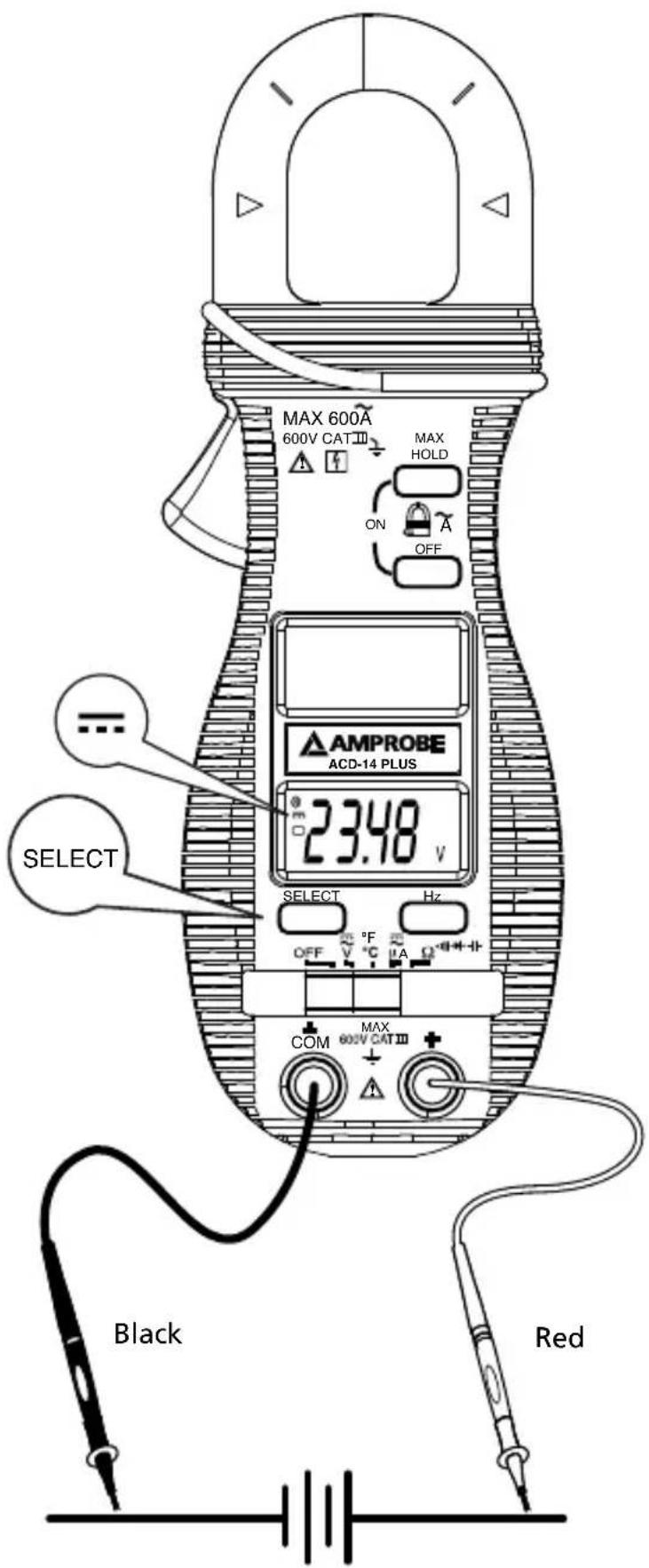
Measuring DC Voltage
Figure 1

Measuring AC Voltage
Figure 2
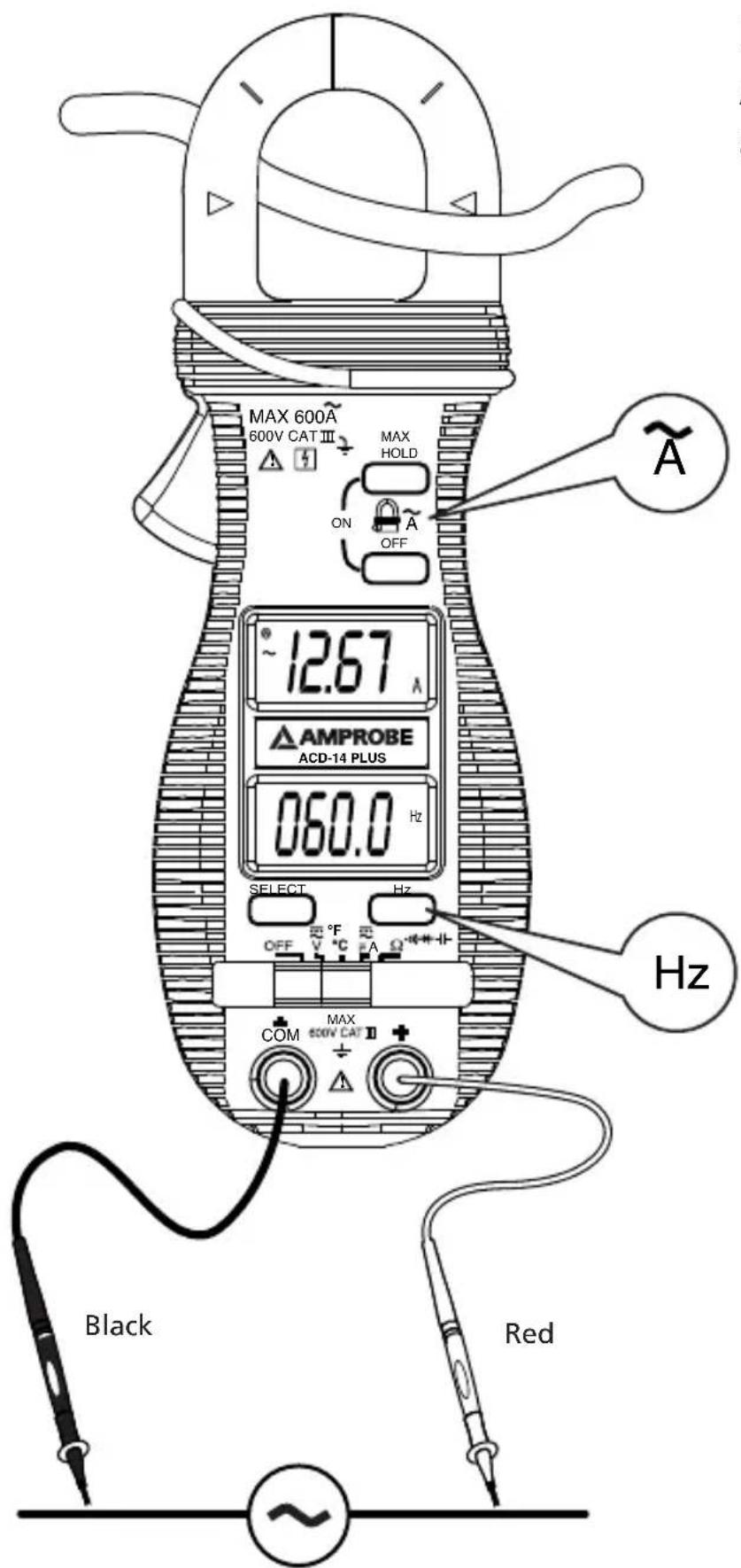
Measuring AC Current and Frequency
Figure 3
Measuring Resistance
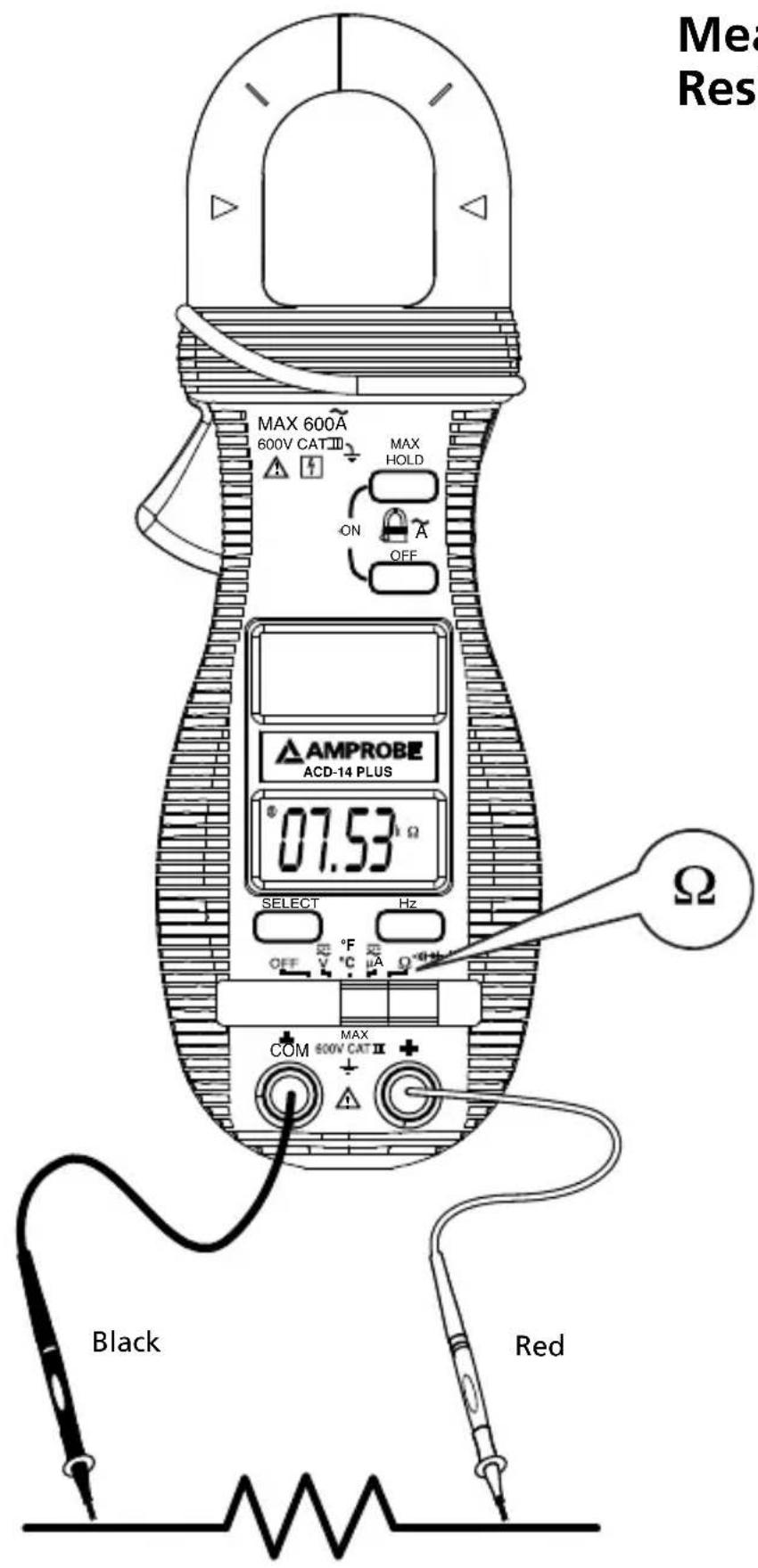
Figure 4
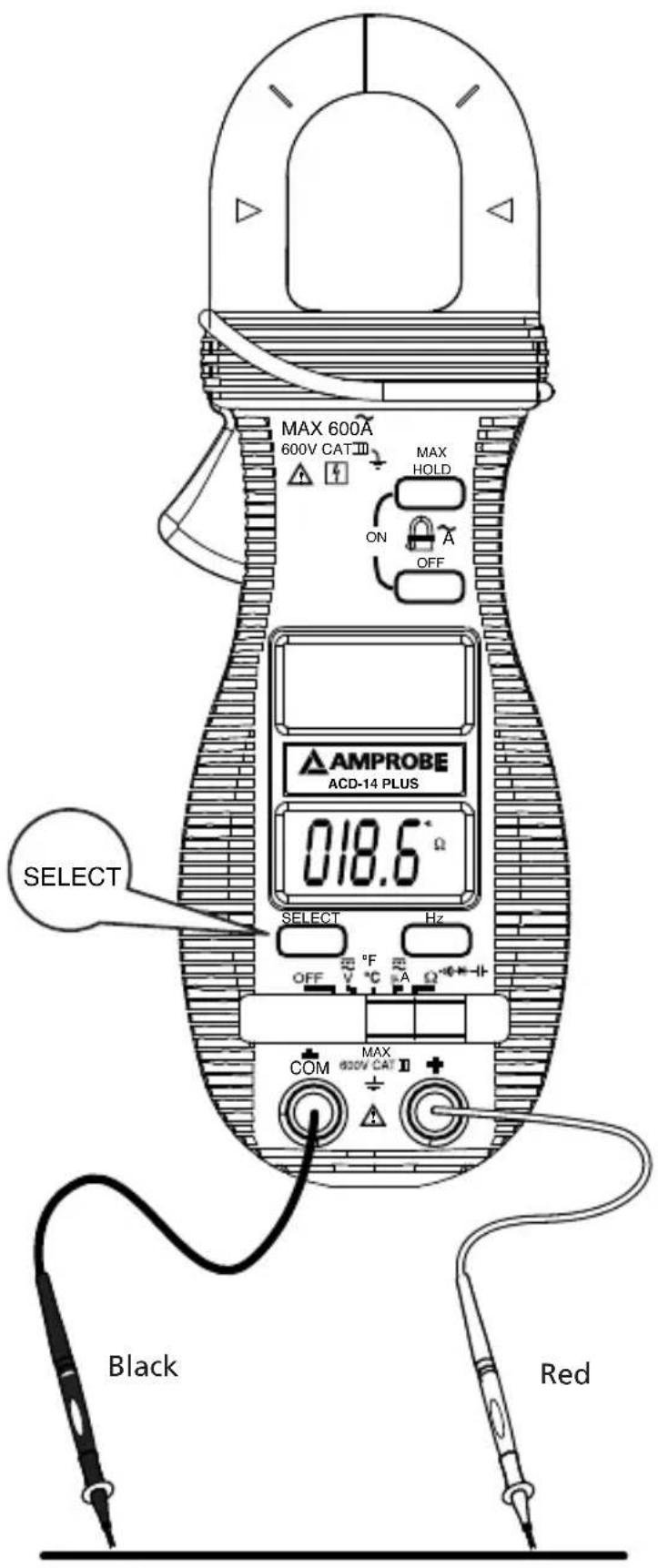
Continuity Testing
Figure 5
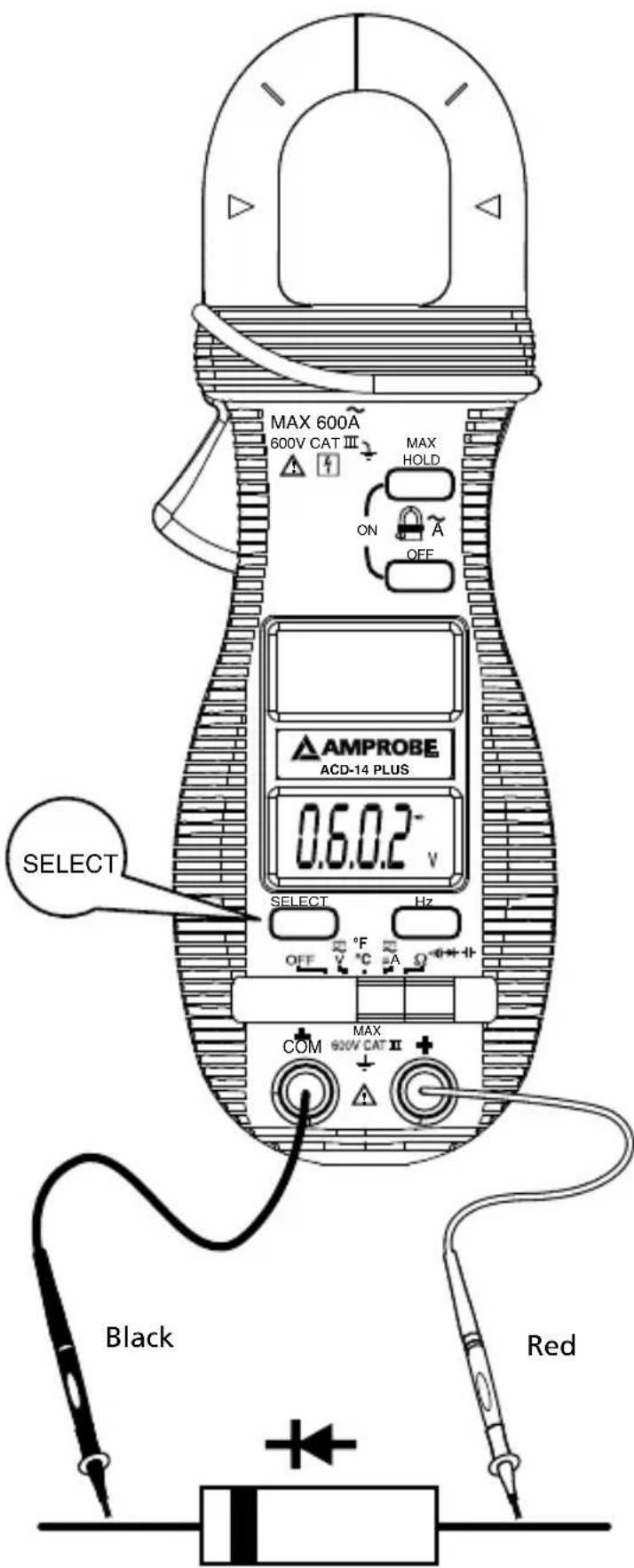
Testing Diodes
Figure 6
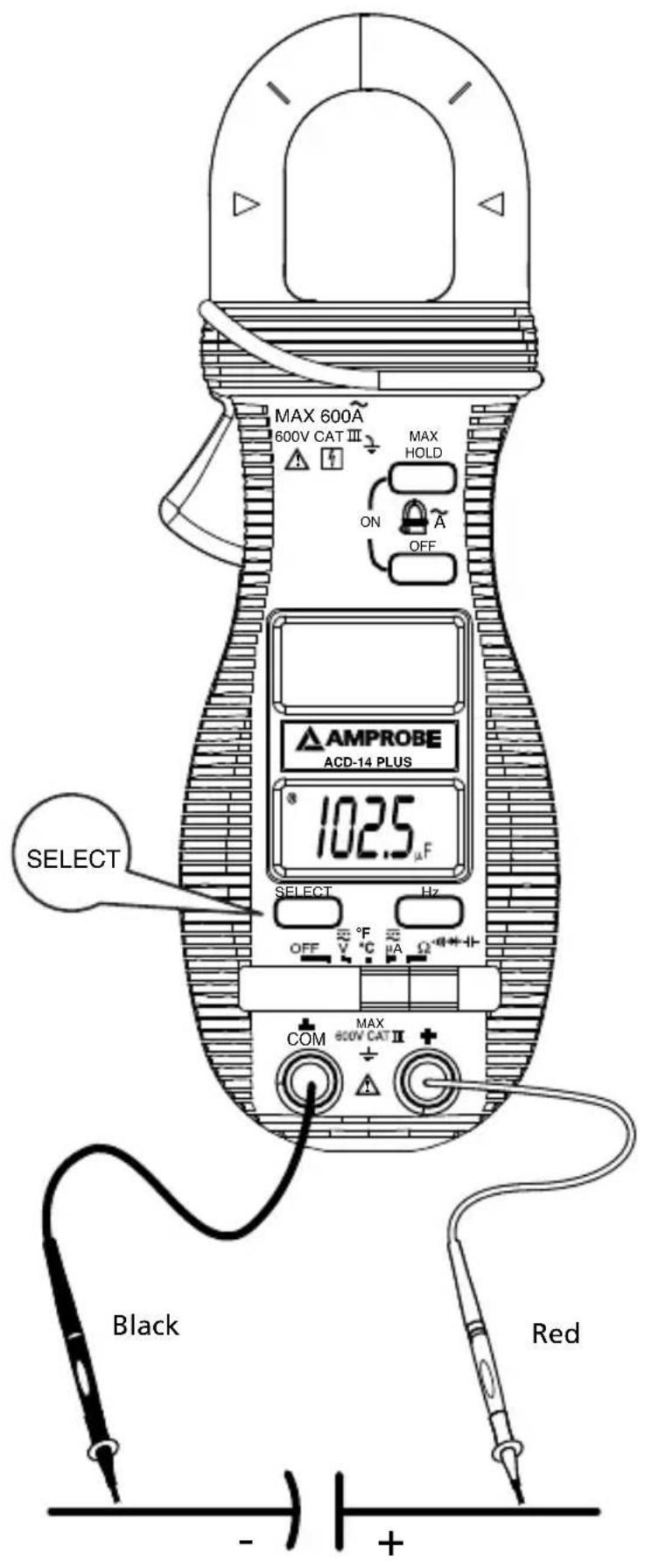
Measuring Capacitance
Figure 7
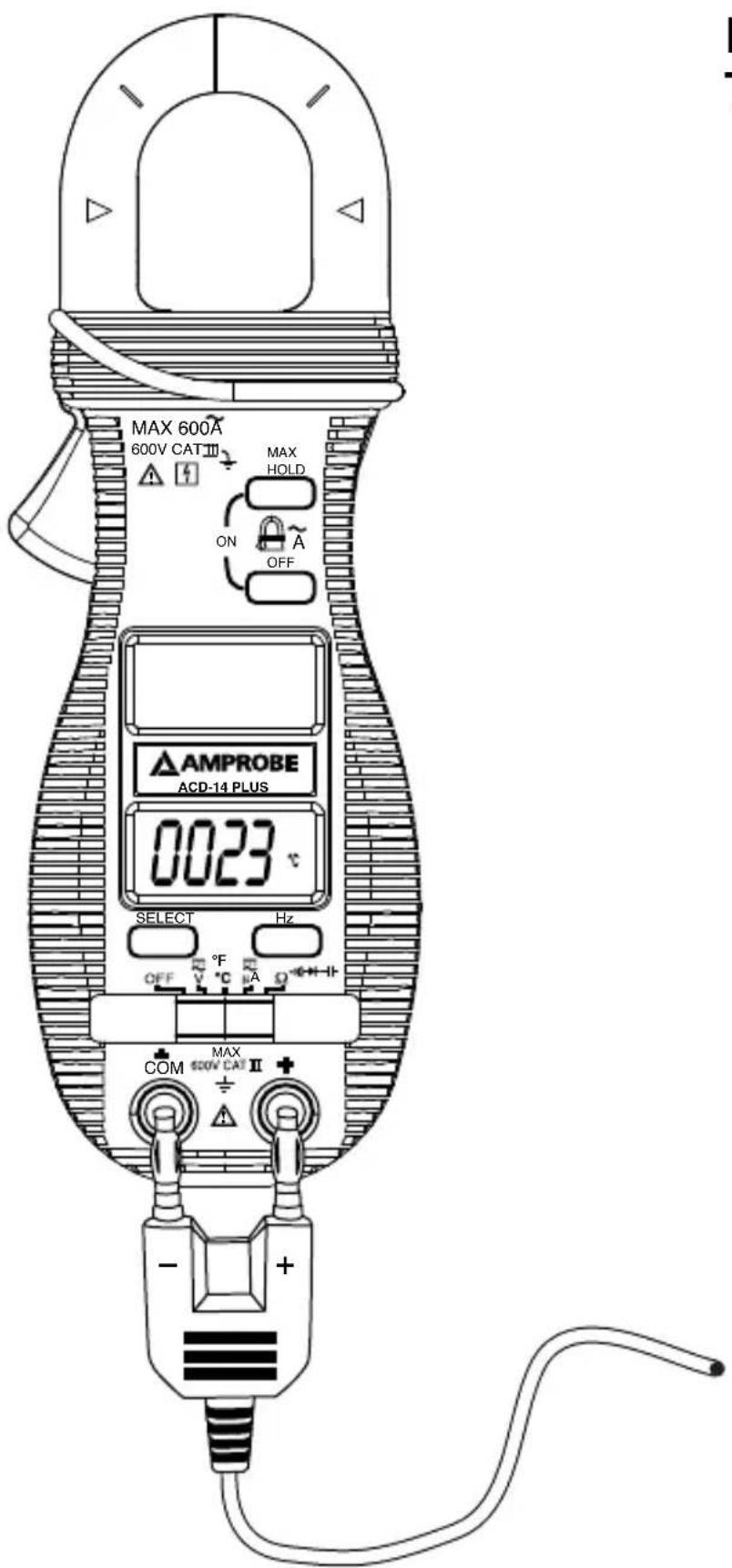
Measuring Temperature
Figure 8

Measuring μA Current
Figure 9
AMPROBE®
ACD-14 PLUS
ACD-14 TRMS-PLUS
Amprobe Test Tools Amprobe Test Tools
Everett, WA 98203 Mississauga, ON L4Z 1X9
Tel: 877-AMPROBE (267-7623) Tel: 905-890-7600
Fax: 425-446-6390 Fax: 905-890-6866
The HOLD feature freezes the display when the button is pressed. The MAX feature compares and displays the measured maximum value as fast as 30 ms with auto-ranging capability.
HOLD
Amprobe Test Tools Amprobe Test Tools
Everett, WA 98203 Mississauga, ON L4Z 1X9
Tel.: 877-AMPROBE (267-7623) Tel.: 905-890-7600
Fax: 425-446-6390 Fax: 905-890-6866
Measuring μA Current - See Figure 9
Amprobe Test Tools Amprobe Test Tools
Everett, WA 98203 Mississauga, ON L4Z 1X9
Tel.: 877-AMPROBE (267-7623) Tel.: 905-890-7600
Fax: 425-446-6390 Fax: 905-890-6866
Audible Continuity Tester
Amprobe Test Tools Amprobe Test Tools
Everett, WA 98203 Mississauga, ON L4Z 1X9
Tel: 877-AMPROBE (267-7623) Tel: 905-890-7600
Fax: 425-446-6390 Fax: 905-890-6866
European Correspondence Address*
Amprobe® Test Tools Europe
In den Engematten 14
79286 Glottertal, Germany
Tel.: +49 (0) 7684 8009 - 0
APO-timing: Vila i 30 minuter
Visit www.Amprobe.com for
- Catalog
- Application notes
• Product specifications - User manuals
- Features of this instrument
- Limited Warranty and Limitation of Liability
- Repair
- In-Warranty Repairs and Replacement – All Countries
- Non-Warranty Repairs and Replacement – US and Canada
- In USA In Canada
- Non-Warranty Repairs and Replacement – Europe
- ACD-14 PLUS & ACD-14 TRMS-PLUS
- Clamp-on Multimeter With Dual Display
- Contents
- Introduction
- WARNINGS AND PRECAUTIONS
- Safety Information
- WARNING
- Unpacking and Inspection
- OPERATION
- CAUTION
- Measuring DC Voltage - See Figure 1
- Measuring AC Voltage - See Figure 2
- Measuring AC Current - See Figure 3
- Measuring Frequency - See Figure 3
- Measuring Resistance - See Figure 4
- Continuity Testing - See Figure 5
- Testing Diodes - See Figure 6
- Measuring Capacitance - See Figure 7
- Measuring Temperature - See Figure 8
- Measuring μA Current - See Figure 9
- μA Current function
- Application notes:
- 1-1) For gas or oil flames (Minipeeper):
- 1-2) For oil flames (Photocell):
- 1-3) For gas flames (Flame Rod):
- FEATURES
- HOLD H / MAX H
- HOLD
- MAX
- Auto Power Off (APO)
- MAINTENANCE
- Trouble Shooting
- Cleaning and Storage
- Battery replacement
- GENERAL SPECIFICATIONS
- ELECTRICAL SPECIFICATIONS
- Audible Continuity Tester
- Diode Tester / Open Circuit Voltage Test Current
- Max Hold\* (where applicable)
- Measuring Resistance
- Continuity Testing
- AMPROBE®
- ACD-14 PLUS
- ACD-14 TRMS-PLUS
- Visit www.Amprobe.com for
Brand : Amprobe
Model : ACD14 TRMSPLUS
Category : Multimeter