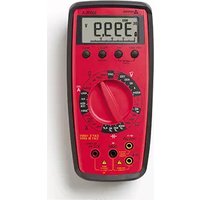
ACD-22SW - Multimeter Amprobe - Free user manual and instructions
Find the device manual for free ACD-22SW Amprobe in PDF.


Pick your language and provide your email: we'll send you a specifically translated version.
| Product Type | Clamp Meter (Multimeter) |
| Brand | Amprobe |
| Model | ACD-22SW |
| Category | Multimeter |
| AC Voltage Range | 0 to 600 V |
| DC Voltage Range | 0 to 600 V |
| AC Current (Clamp) Range | 0 to 600 A |
| Resistance Range | 0 to 40 MΩ |
| Capacitance Range | 0 to 1000 µF |
| Frequency Range | 0 to 10 MHz |
| Display | 4000 counts LCD with backlight |
| Safety Rating | CAT III 600 V |
| Power Supply | 2 x AAA batteries (1.5 V) |
| Battery Life | Approximately 200 hours |
| Dimensions | 200 x 68 x 38 mm (7.87 x 2.68 x 1.50 in) |
| Weight | 320 g (11.3 oz) including batteries |
| Clamp Jaw Opening | 30 mm (1.18 in) |
| Operating Temperature | 0°C to 40°C (32°F to 104°F) |
| Storage Temperature | -10°C to 60°C (14°F to 140°F) |
| Accessories Included | Test leads, carrying case, batteries, user manual |
| Warranty | 1 year limited warranty |
| Maintenance | Wipe with dry cloth; no lubrication needed |
| Repair Information | Contact Amprobe authorized service center for repairs |
Frequently Asked Questions - ACD-22SW Amprobe
What is the maximum AC current this clamp meter can measure?
The Amprobe ACD-22SW can measure AC current up to 600 A using its clamp.
Does the ACD-22SW measure DC current?
No, the ACD-22SW measures AC current only via the clamp. For DC current, you would need a different model.
How do I replace the batteries?
Turn off the meter and remove the battery compartment screw on the back. Replace the two AAA batteries with new ones, observing correct polarity.
What safety rating does the ACD-22SW have?
The meter is rated CAT III 600 V, suitable for measurements on distribution circuits.
Can I measure temperature with this meter?
Yes, the ACD-22SW includes a temperature measurement function (requires a type K thermocouple, not included).
How do I test continuity?
Turn the dial to the continuity/ diode position. Connect the test leads across the circuit. A beep indicates continuity (resistance < 50 Ω).
What is the resolution of the display?
The LCD has a 4000-count resolution with a backlight for easy reading in dim conditions.
Does the meter have an auto-ranging feature?
Yes, the ACD-22SW features auto-ranging for voltage, resistance, and capacitance measurements.
Can I measure capacitance with this meter?
Yes, it can measure capacitance up to 1000 µF.
What should I do if the display shows 'OL'?
'OL' stands for overload. The measured value exceeds the selected range. Switch to a higher range or ensure the input is within the meter's limits.
User questions about ACD-22SW Amprobe
0 question about this device. Answer the ones you know or ask your own.
Ask a new question about this device
No questions yet. Be the first to ask one.
Download the instructions for your Multimeter in PDF format for free! Find your manual ACD-22SW - Amprobe and take your electronic device back in hand. On this page are published all the documents necessary for the use of your device. ACD-22SW by Amprobe.
USER MANUAL ACD-22SW Amprobe
Manual assistant
Powered by Anthropic
Waiting for your message
Product information
Brand : Amprobe
Model : ACD-22SW
Category : Multimeter