ManualGo.com
XT 104 BT - Speaker Trevi - Free user manual and instructions
Find the device manual for free XT 104 BT Trevi in PDF.



Download the instructions for your Speaker in PDF format for free! Find your manual XT 104 BT - Trevi and take your electronic device back in hand. On this page are published all the documents necessary for the use of your device. XT 104 BT by Trevi.
USER MANUAL XT 104 BT Trevi
Connection and Operation Manual
WIRES CONNECTIONS TO A UK THREE-PIN PLUG The wires in this mains lead are coloured in accordance with the following wiring codes: Blue: ........................................ Neutral Brown: ..................................... Live The wires in this mains lead must be connected to the terminals in the plug as follows: Blue wire:.................................N or Black Brown wire: ............................. L or Red Neither wire is to be connected to the earth (E or W) terminal of three-pin plug. Should the fuse fail in the plug remove the plug form the wall socket and replace the fuse with a 3 Amp. ASTA approved BS 1362 fuse.4 XT 104 BT
This is a precision electronic appliance; avoid using it in the following cases:
- Place the device on a flat surface.
- Place the device so that its sides there is always enough space for air to circulate freely (at least 10 cm).
- Do not place anything on top of the unit.
- The apparatus shall not be exposed to dripping or splashing water. No objects filled with liquid, such as vases, should be placed on the unit.
- If liquids penetrate inside the device immediately disconnect the plug from the socket and take it to the nearest service center autorizato TREVI.
- No naked flame sources, such as lighted candles, should be placed on.
- Cables should be hidden and protected in order to avoid stumbling from someone and the consequent fall of the appliance.
- Keep the unit away from the following places: near magnetic fields; near heat sources (radiators, stoves, direct sunlight, etc...); near wetlands (bathrooms, swimming pools, etc...); dusty areas; areas subject to strong vibration.
- Disconnect the power cord during storms or for long periods of inoperation.
- Unplug the power cable during thunderstorms or long periods of inactivity.
- Instruct the proper use children and people with little knowledge of the product.
- Do not close the ear to the loudspeaker during step setting and volume adjustments, and in particular keep the volume at idle during power-up.
- Listen at high volume for a long time, can damage your hearing.
- Keep the following user manual.
CARE AND MAINTENANCE
Use a slightly damp soft cloth for cleaning. Do not use solvents and abrasive substances. IMPORTANT This appliance has been carefully built to ensure long-lasting perfect performance. However, should any inconvenience occur, please contact your local authorised TREVI Service Centre. TREVI follows a policy of ongoing research and development. Therefore products may have different features from those described. INSTALLATION
1. Rotate the tower and locate the holes (in the opposite side of the keyboard);
2. Fit the base with the body aligning the holes on the base with the holes on
3. Screws the base into the body;
4. Do not over tighten the screws to avoid damaging the cabinet;
5. Place the speaker standing on the floor and it's ready to use.
To prevent possible hearing damage, do not listen at high volumes levels for long periods.10 XT 104 BT
1. Support for external devices.
9 Skip to previous track.
: Skip to next track.
11. USB port for playback.
12. USB port for charging external mobile device.
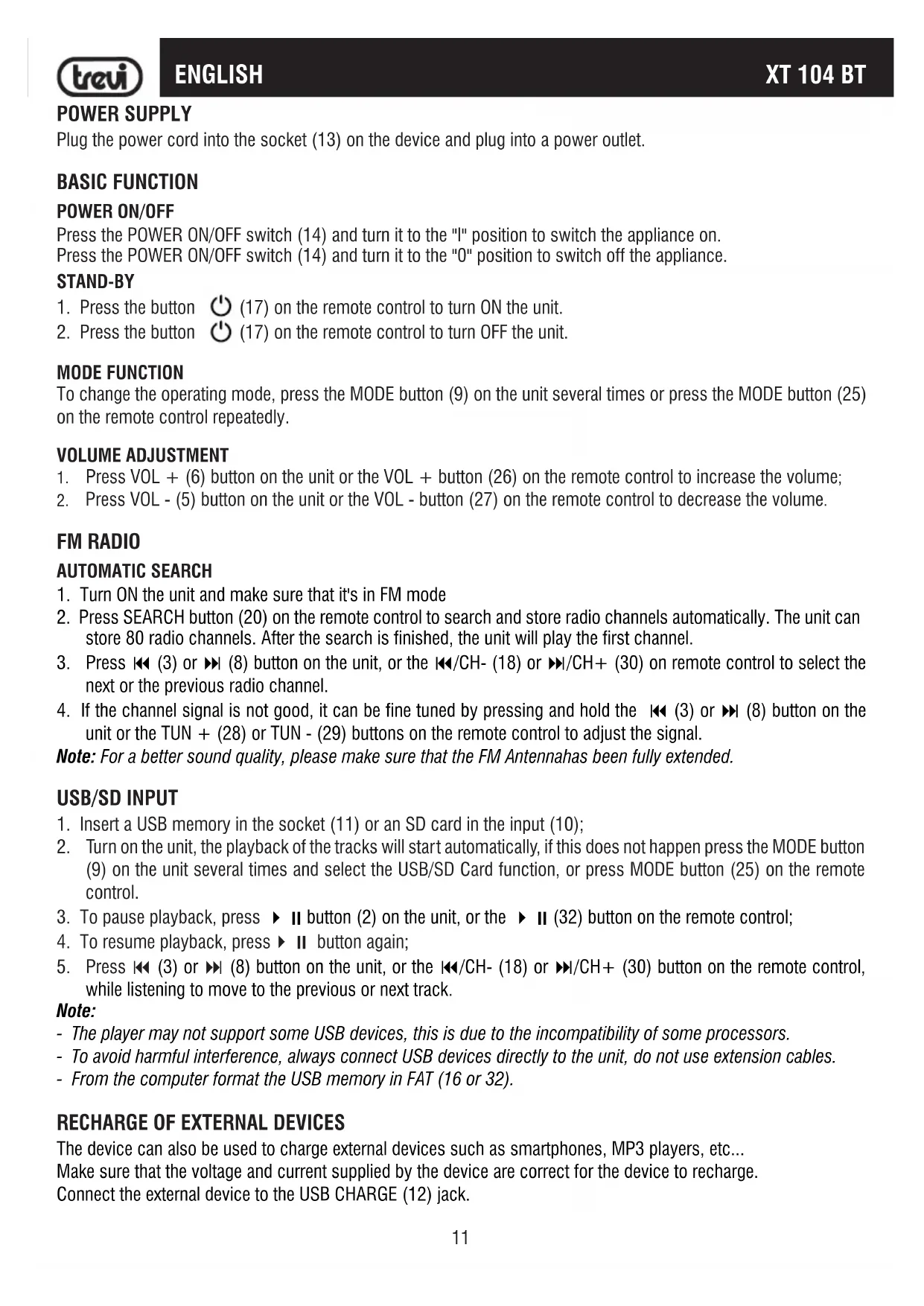
XT 104 BT POWER SUPPLY Plug the power cord into the socket (13) on the device and plug into a power outlet. BASIC FUNCTION
Press the POWER ON/OFF switch (14) and turn it to the "I" position to switch the appliance on. Press the POWER ON/OFF switch (14) and turn it to the "0" position to switch off the appliance. STAND-BY
(17) on the remote control to turn ON the unit.
(17) on the remote control to turn OFF the unit. MODE FUNCTION To change the operating mode, press the MODE button (9) on the unit several times or press the MODE button (25) on the remote control repeatedly. VOLUME ADJUSTMENT
1. Press VOL + (6) button on the unit or the VOL + button (26) on the remote control to increase the volume;
1. Turn ON the unit and make sure that it's in FM mode
2. Press SEARCH button (20) on the remote control to search and store radio channels automatically. The unit can
store 80 radio channels. After the search is finished, the unit will play the first channel.
9 (3) or : (8) button on the unit, or the 9/CH- (18) or :/CH+ (30) on remote control to select the next or the previous radio channel.
4. If the channel signal is not good, it can be fine tuned by pressing and hold the
9 (3) or : (8) button on the unit or the TUN + (28) or TUN - (29) buttons on the remote control to adjust the signal. Note: For a better sound quality, please make sure that the FM Antennahas been fully extended.
2. Turn on the unit, the playback of the tracks will start automatically, if this does not happen press the MODE button
(9) on the unit several times and select the USB/SD Card function, or press MODE button (25) on the remote control.
(32) button on the remote control;
9/CH- (18) or :/CH+ (30) button on the remote control, while listening to move to the previous or next track. Note: - The player may not support some USB devices, this is due to the incompatibility of some processors. - To avoid harmful interference, always connect USB devices directly to the unit, do not use extension cables. - From the computer format the USB memory in FAT (16 or 32).
RECHARGE OF EXTERNAL DEVICES
The device can also be used to charge external devices such as smartphones, MP3 players, etc... Make sure that the voltage and current supplied by the device are correct for the device to recharge. Connect the external device to the USB CHARGE (12) jack. ENGLISH12 XT 104 BTENGLISH BLUETOOTH
1. Turn on the unit and press the MODE button (9) on the unit repeatedly, or press the MODE button (25) on the
remote control and select the BLUETOOTH function;
2. The writing "bt" on the display will start to flash and the system will automatically search for external Bluetooth
devices to be paired
3. Activate the Bluetooth functionality on the external device to be paired and start searching for the devices. At the
end select the "XT 104 BT" device;
4. Enter the "0000" password if required;
5. Once paired, a short confirmation tone will sound and the "bt" symbol will remain fixed;
(2) button on unit, or the (32) button on the remote control to start playback; press it again to stop playback temporarily
9 (3) or : (8) button on the unit, or 9/CH- (18) or :/CH+ (30) button on the remote control, while listening to move to the previous or next track. AUX-IN INPUT - Use a 3.5mm Stereo jack cable or an RCA cable to connect the AUX-IN inputs (15 and 16), located behind the unit, to the audio output of the TV, DVD or another device/source;
1. Press the "Power" button to turn the speaker on;
2. Press the "MODE" button to switch to AUX-In mode:
3. Use the controls on the connected device to begin playing music.
TROUBLESHOOTING If the Soundbar does not work properly, check this short list before taking it to a TREVI authorised service centre. In any case, do not try to repair the device, this will void the warranty. Only TREVI authorised service centres are authorised to perform operations on this product. No Sound: Check if MUTE function on AUX mode, or PAUSE function on USB or Bluetooth mode, are enabled. Check that the correct input has been selected.13 XT 104 BTENGLISH Check and adjust the volume of the Soundbar and the TV (or the device connected). The unit does not turn on or turns off automatically: Check that you have properly connected the adapter jack. If unit does not receive any signal for some time it automatically turns to standby mode. Pairing problems with Bluetooth devices: If the audio quality is poor after pairing Bluetooth with an external device, bring the external device closer to the tower or remove any obstructions between them. If the connection between the tower and the device does not occur, check that the coupling function of the device is enabled; refer to the device manual to enable the function. If the coupling with the external device is activated and deactivated continuously, bring the external device closer to the tower or remove any obstacle between them. In some external devices, the Bluetooth pairing can be switched off automatically to safeguard the consumption of its battery, this is not a malfunction of the device. I can't find the Bluetooth name of this unit on my Bluetooth device for Bluetooth pairing: Ensure that the unit is switched on. Ensure that the Bluetooth function is activated on your Bluetooth device. The device does not react to any operation: Disconnect the power cable from the device for 30 seconds to reset it. TECHNICAL FEATURES Power source: ...............................................100-240V 50-60Hz Stand-by consumption: .................................<0,5W Output power: ...............................................50W (10W x2 + 30W Sub-woofer) Speaker drives: .............................................3x 3inch FM Radio band reception: .............................. 87,5MHz - 108MHz Bluetooth power transmission: ......................0,8mW Bluetooth transmission: .................................2,4GHz Unit size: .......................................................149x149x1000mm Base size: .....................................................178x178x12mm Weight: .........................................................5,6Kg14 XT 104 BT
SIMPLIFIED EU DECLARATION OF CONFORMITY
Hereby TREVI Spa declares that the radio equipment type XT 104 BT is in compliance with directive 2014/53/EU. The full text of the EU declaration of conformity is available at the following internet address: https://www.trevi.it/dms/zidi/TREVI/DOCXT104BT.pdf