
K 770 Rescue - Motorcycle HUSQVARNA - Free user manual and instructions
Find the device manual for free K 770 Rescue HUSQVARNA in PDF.



| Brand | Husqvarna |
| Model | K 770 Rescue |
| Product type | Handheld two-stroke engine cutter |
| Category | Motor |
| Displacement | 74 cm³ |
| Power | 3.7 kW (5 hp) at 9,000 rpm |
| Idle speed | 2,700 rpm |
| Full load speed | 9,300 rpm (+/- 150) |
| Fuel tank capacity | 0.9 L |
| Recommended water pressure | 0.5 - 10 bar |
| Weight (without fuel, 300 mm blade) | 10 kg |
| Weight (without fuel, 350 mm blade) | 10.8 kg |
| Recommended blade diameters | 300 mm and 350 mm |
| Max cutting depth (300 mm blade) | 100 mm |
| Max cutting depth (350 mm blade) | 125 mm |
| Max peripheral speed | 80 m/s (300 mm) / 100 m/s (350 mm) |
| Spark plug | NGK BPMR 7A |
| Electrode gap | 0.5 mm |
| Fuel mixture | Two-stroke oil-gasoline mixture 50:1 (2%) |
| Anti-vibration system | Yes |
| Reversible cutting head | Yes |
| Water supply | Yes, for dust reduction |
| Safety features | Trigger lock, blade guard, emergency stop |
| Intended use | Professional cutting of concrete, brick, stone, steel |
| Guaranteed sound power level | 115 dB(A) |
Frequently Asked Questions - K 770 Rescue HUSQVARNA
User questions about K 770 Rescue HUSQVARNA
0 question about this device. Answer the ones you know or ask your own.
Ask a new question about this device
Download the instructions for your Motorcycle in PDF format for free! Find your manual K 770 Rescue - HUSQVARNA and take your electronic device back in hand. On this page are published all the documents necessary for the use of your device. K 770 Rescue by HUSQVARNA.
USER MANUAL K 770 Rescue HUSQVARNA
K 770, K 770 OilGuard, K 770 Rescue, K 770 SmartGuard
EN Operator's manual 2-37
Transportation, storage and disposal.... 33
Technical data.... 34
Accessories.... 35
Declaration of Conformity.... 36
Introduction
Product description
These HUSQVARNA, K 770, K 770 OilGuard, K 770 Rescue and K 770 SmartGuard power cutters are portable handheld cut-off machines powered by 2-stroke combustion engines.
Intended use
The product is used to cut hard materials as concrete, masonry, stone and steel. Do not use the product for
other tasks. The product must only be used by professional operators with experience.
Work is constantly in progress to increase your safety and efficiency during operation. Speak to your servicing dealer for more information.
Note: National/Local regulations could restrict the use of this product.
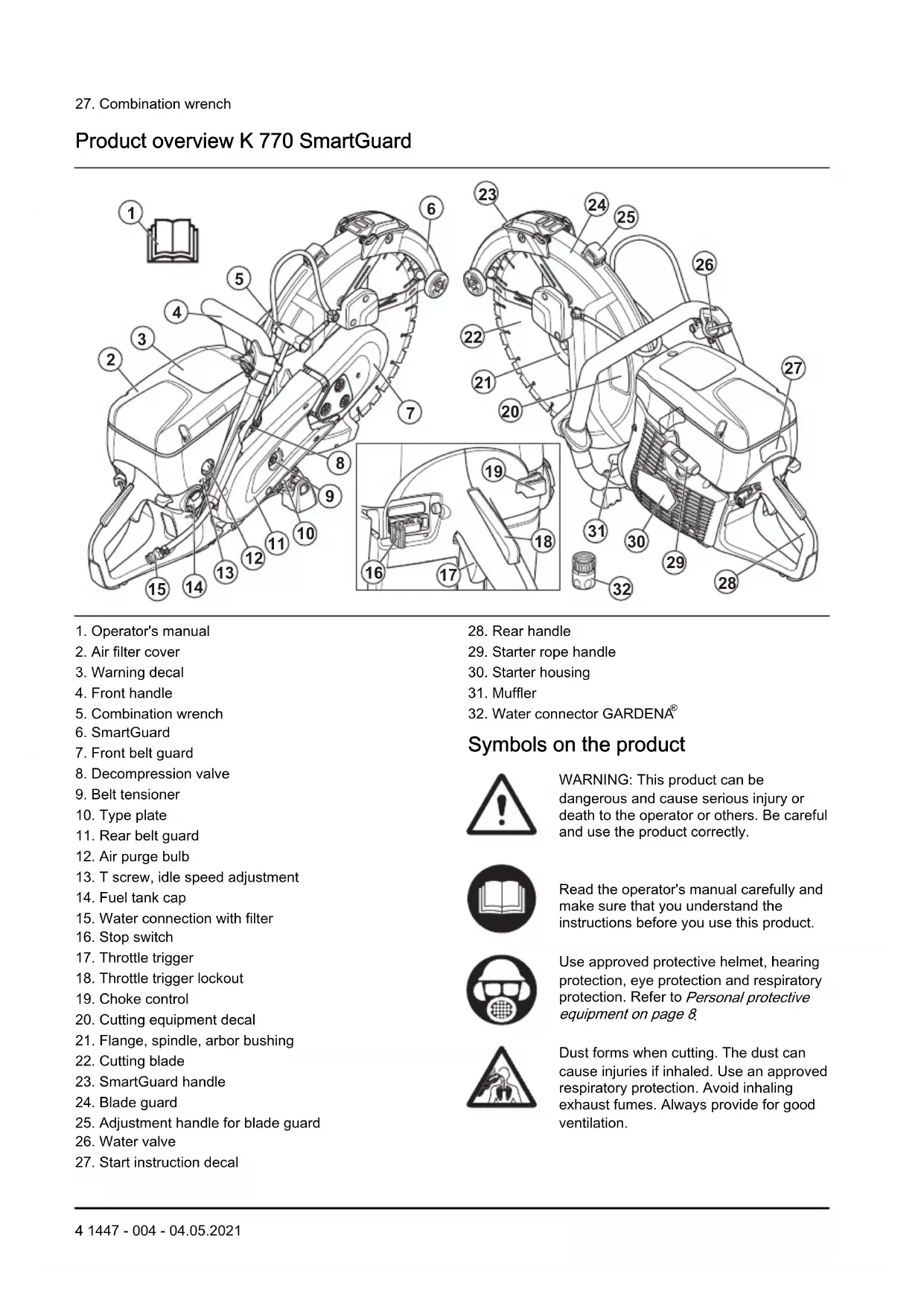
Product overview K 770, K 770 OilGuard
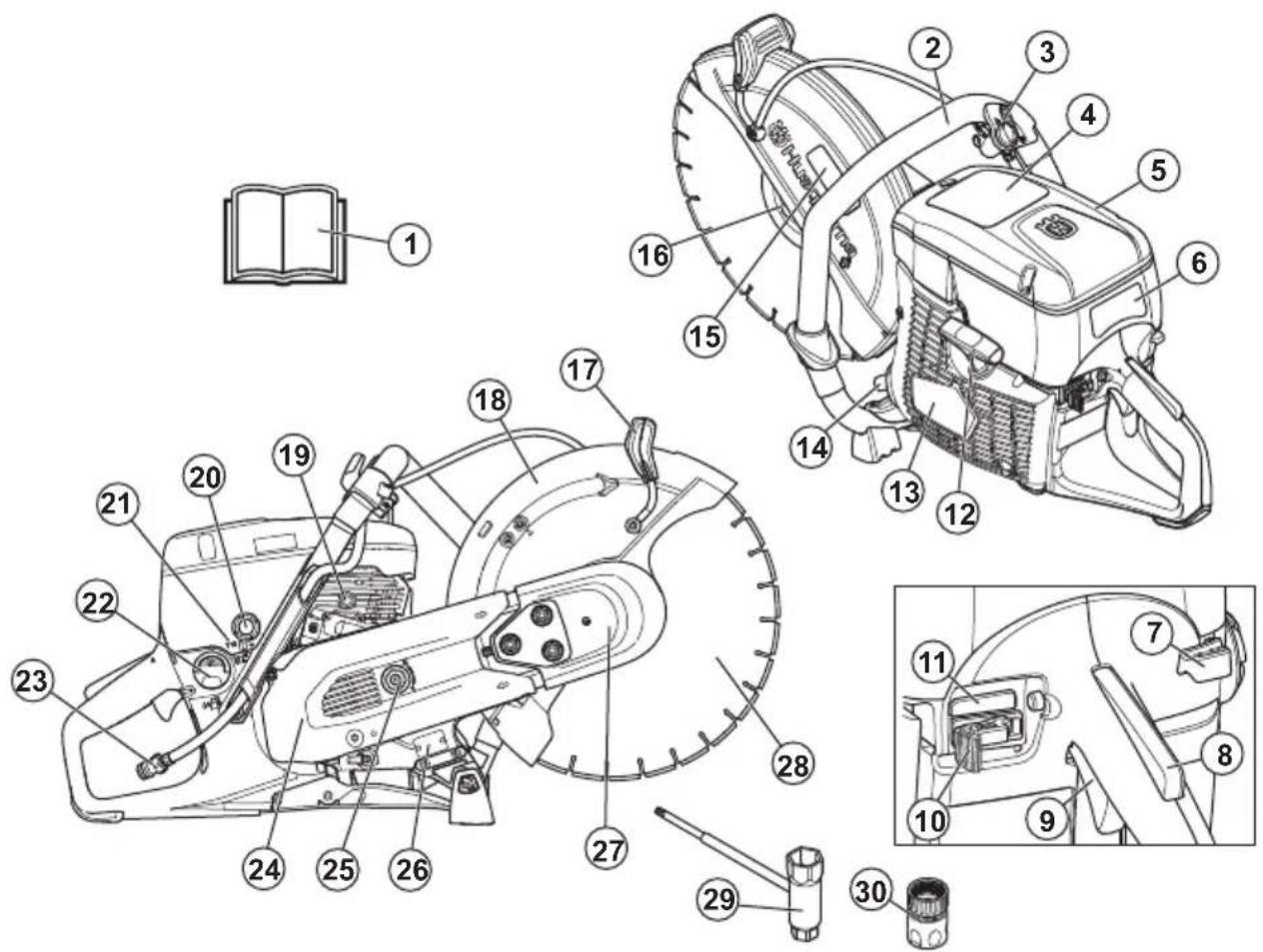
-
Operator's manual
-
Front handle
-
Water valve
-
Warning decal
-
Air filter cover
- Start instruction decal
- Choke control
- Throttle trigger lockout
- Throttle trigger
- Stop switch
- Engage/Disengage OilGuard (Only K 770 OilGuard)
- Starter rope handle
- Starter housing
- Muffler
- Cutting equipment decal
- Flange, spindle, arbor bushing
-
Adjustment handle for blade guard
-
Blade guard
- Decompression valve
- Air purge bulb
- T screw, idle speed adjustment
- Fuel tank cap
- Water connection with filter
- Rear belt guard
- Belt tensioner
- Type plate
- Front belt guard
- Cutting blade (not supplied)
- Combination wrench
- Water connector, GARDENA®
Product overview K 770 Rescue
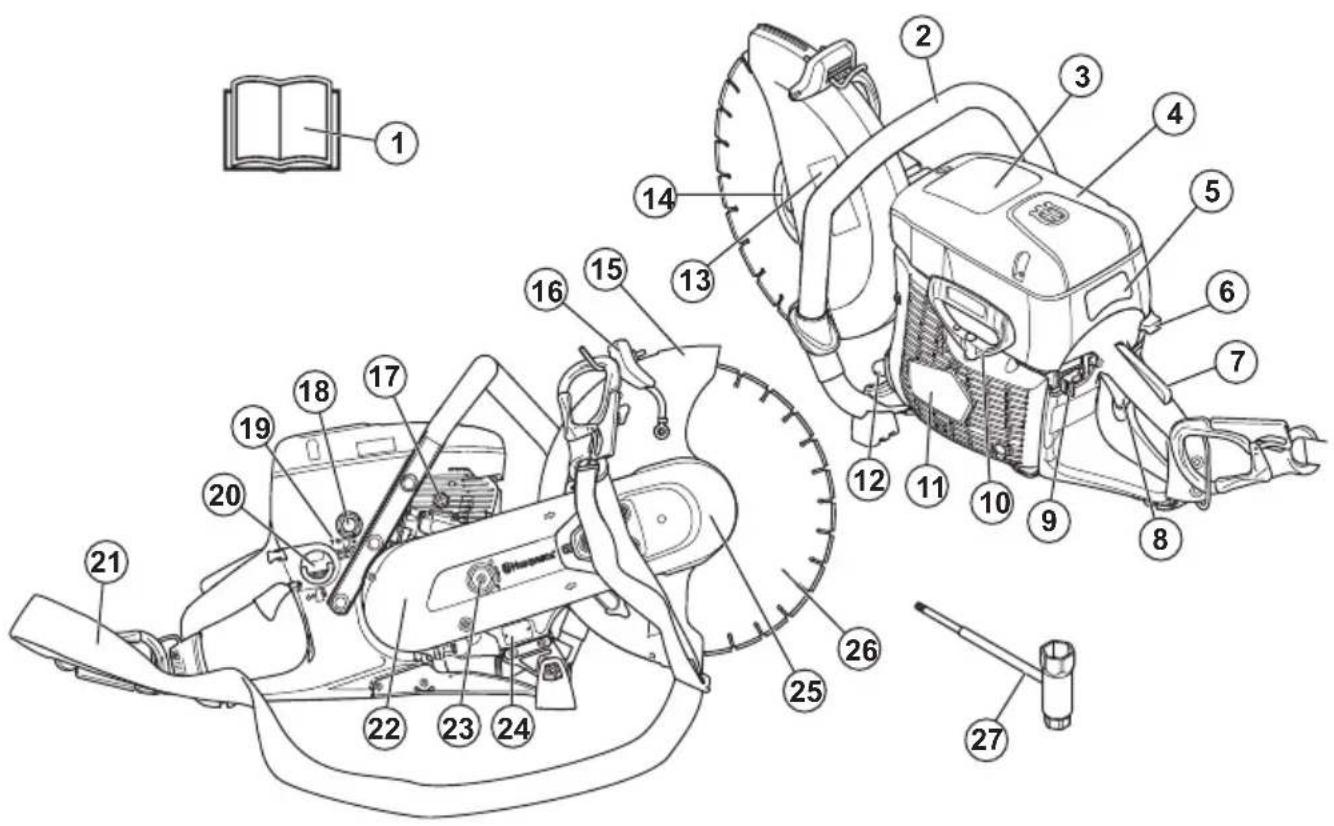
- Operator's manual
- Front handle
- Warning decal
- Air filter cover
- Start instruction decal
- Choke control
- Throttle trigger lockout
- Throttle trigger
- Stop switch
- Starter rope handle
- Starter housing
- Muffler
-
Cutting equipment decal
-
Flange, spindle, arbor bushing
- Blade guard
- Adjustment handle for blade guard
- Decompression valve
- Air purge bulb
- T screw, idle speed adjustment
- Fuel tank cap
- Shoulder strap
- Rear belt guard
- Belt tensioner
- Type plate
- Front belt guard
- Cutting blade (not supplied)
Product overview K 770 SmartGuard
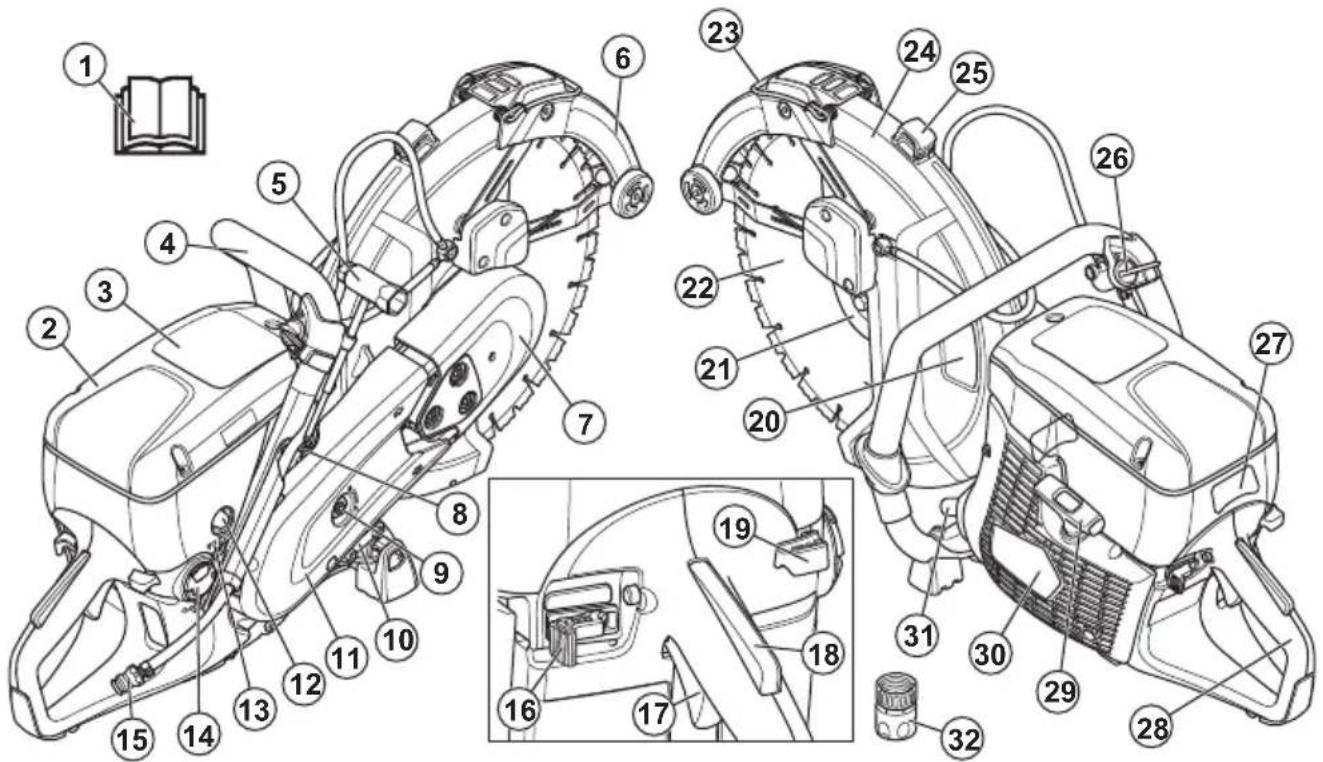
-
Operator's manual
-
Air filter cover
-
Warning decal
-
Front handle
-
Combination wrench
-
SmartGuard
-
Front belt guard
-
Decompression valve
-
Belt tensioner
-
Type plate
-
Rear belt guard
-
Air purge bulb
-
T screw, idle speed adjustment
-
Fuel tank cap
-
Water connection with filter
-
Stop switch
-
Throttle trigger
-
Throttle trigger lockout
-
Choke control
-
Cutting equipment decal
-
Flange, spindle, arbor bushing
-
Cutting blade
-
SmartGuard handle
-
Blade guard
-
Adjustment handle for blade guard
-
Water valve
-
Start instruction decal
-
Rear handle
- Starter rope handle
- Starter housing
- Muffler
- Water connector GARDENA®
Symbols on the product

WARNING: This product can be dangerous and cause serious injury or death to the operator or others. Be careful and use the product correctly.

Read the operator's manual carefully and make sure that you understand the instructions before you use this product.

Use approved protective helmet, hearing protection, eye protection and respiratory protection. Refer to Personal protective equipment on page 8.
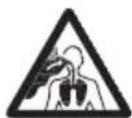
Dust forms when cutting. The dust can cause injuries if inhaled. Use an approved respiratory protection. Avoid inhaling exhaust fumes. Always provide for good ventilation.
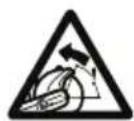
WARNING! Kickbacks can be sudden, rapid and violent and can cause life threatening injuries. Read and understand the instructions in the manual before using the product. Refer to Kickback on page 17.
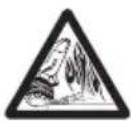
Sparks from the cutting blade can cause fire in fuel, wood, clothes, dry grass or other flammable materials.

Make sure that the cutting blade does not have cracks or other damages.

Do not use circular saw blades.
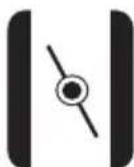
Choke
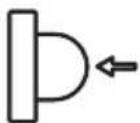
Air purge bulb
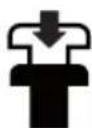
Decompression valve
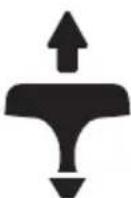
Starter rope handle
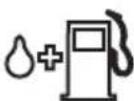
Use a fuel mixture of gasoline and oil.

This product complies with applicable EU Directives.
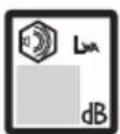
Noise emission to the environment complies with applicable EC Directives. The noise emission of the product is specified in Technical data on page 34 and on the label.
Note: Other symbols/decals on the product refer to special certification requirements for some markets.
Start instructions decal
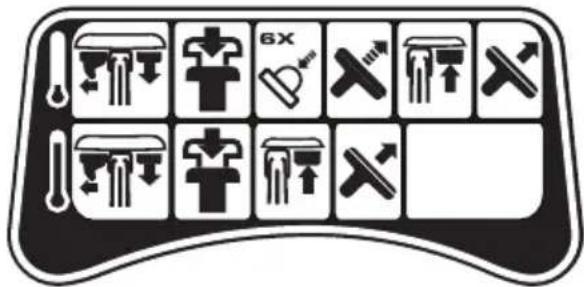
Refer to To start the product with a cold engine on page 23 and To start the product with a warm engine on page 24 for instructions.
Cutting equipment decal
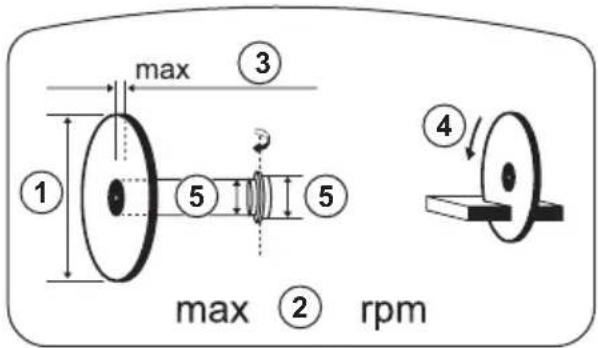
- Cutting blade diameter
- Max. speed of output shaft
- Max. blade thickness
- Direction of rotation
- Bushing dimension
Type plate
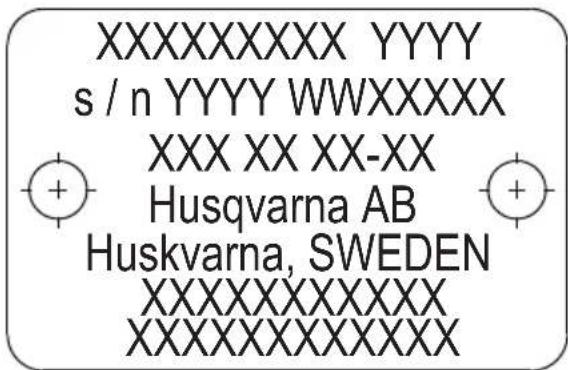
Row 1: Brand, Model (X, Y)
Row 2: Serial No. with manufacturing date (Y, W, X): Year, Week, Sequence No.
Row 3: Product No. (X)
Row 4: Manufacturer
Row 5: Manufacturer address
Rows 6–7: EU type approval or Chinese MEIN number
Euro V Emissions

WARNING: Tampering with the engine voids the EU type-approval of this product.
Product liability
As referred to in the product liability laws, we are not liable for damages that our product causes if:
• the product is incorrectly repaired.
- the product is repaired with parts that are not from the manufacturer or not approved by the manufacturer.
- the product has an accessory that is not from the manufacturer or not approved by the manufacturer.
- the product is not repaired at an approved service center or by an approved authority.
Safety
Safety definitions
Warnings, cautions and notes are used to point out specially important parts of the manual.

WARNING: Used if there is a risk of injury or death for the operator or bystanders if the instructions in the manual are not obeyed.

CAUTION: Used if there is a risk of damage to the product, other materials or the adjacent area if the instructions in the manual are not obeyed.
Note: Used to give more information that is necessary in a given situation.
General safety instructions

WARNING: Read the warning instructions that follow before you use the product.
- A power cutter is a dangerous tool if used carelessly or incorrectly and can cause serious injury or death. It is very important that you read and understand the contents of this operator's manual. It is also recommended that first time operators also obtain practical instruction before using the product.
- Do not do modifications to this product. Modifications that are not approved by the manufacturer, can cause serious injury or death.
- Do not operate the product if it is possible that other persons have done modifications to the product.
- Always use original accessories and spare parts. Accessories and spare parts that are not approved
by the manufacturer, can cause serious injury or death.
- Keep the product clean. Make sure that you can clearly read signs and decals.
- Never allow children or other persons not trained in the use of the product to use or service it.
- Do not let a person operate the product unless they read and understand the contents of the operator's manual.
- Only let approved persons operate the product.
- This product produces an electromagnetic field during operation. This field can under some circumstances interfere with active or passive medical implants. To decrease the risk of serious injury or death, we recommend persons with medical implants to speak to their physician and the medical implant manufacturer before operating this product.
- The information in this operator's manual is never a substitute for professional skills and experience. If you are in a situation where you feel unsafe, stop and get expert advice. Speak to your servicing dealer. Do not try any task that you feel unsure of.
Safety instructions for operation

WARNING: Read the warning instructions that follow before you use the product.
- Before you use a power cutter, you must understand the effects of kickback and how to prevent them. Refer to Kickback on page 17.
- Do the safety checks, maintenance and servicing as given in this operator's manual. Some maintenance and servicing must be done by an approved service center. Refer to Introduction on page 25.
- Do not use the product if it is defective.
- Do not use the product if you are tired, ill, or under the influence of alcohol, drugs or medicine. These
conditions can have an unwanted effect on your vision, alertness, coordination or judgment.
- Do not start the product without the belt and the belt guard installed. The clutch can become loose and cause injury.
- Sparks from the cutting blade can cause fire in flammable materials such as gasoline, gas, wood, clothes and dry grass.
- Do not cut asbestos material.
Work area safety

WARNING: Read the warning instructions that follow before you use the product.
- The safety distance for the power cutter is 15 m/50 ft. Make sure that animals and bystanders are not in the work area.
- Do not operate the product until the work area is clear and your feet and body are in a stable position.
- Look out for persons, objects and situations that can prevent safe operation of the product.
- Make sure that no persons or objects can come into contact with the cutting equipment or be hit by parts thrown by the blade.
- Do not use the product in fog, rain, strong winds, cold weather, risk of lightning or other bad weather conditions. To use the product in bad weather can have a negative effect on your alertness. Bad weather can cause dangerous work conditions, such as slippery surfaces.
- During operation of the product, make sure that no material can become loose and fall and cause injury to the operator.
- Be very careful when you operate the product on a slope.
- Keep the work area clean and bright.
- Before you operate the product, find out if there are hidden hazards such as electrical cables, water, and gas pipes and flammable substances in the work area. If the product hits a hidden object, stop the engine immediately and examine the product and the object. Do not start to operate the product again until you know that it is safe to continue.
- Before you cut into a drum, a pipe, or other container, make sure that it does not contain flammable or other material that can cause fire or explosion.
Vibration safety

WARNING: Read the warning instructions that follow before you use the product.
- During operation of the product, vibrations go from the product to the operator. Regular and frequent operation of the product can cause or increase the
degree of injuries to the operator. Injuries can occur in fingers, hands, wrists, arms, shoulders, and/or nerves and blood supply or other body parts. The injuries can be debilitating and/or permanent, and can increase gradually during weeks, months or years. Possible injuries include damage to the blood circulation system, the nervous system, joints, and other body structures.
- Symptoms can occur during operation of the product or at other times. If you have symptoms and continue to operate the product, the symptoms can increase or become permanent. If these or other symptoms occur, get medical aid:
- Numbness, loss of feeling, tingling, pricking, pain, burning, throbbing, stiffness, clumsiness, loss of strength, changes in skin color or condition.
- Symptoms can increase in cold temperatures. Use warm clothing and keep your hands warm and dry when you operate the product in cold environments.
- Do maintenance on and operate the product as given in the operator's manual, to keep a correct vibration level.
- The product has a vibration damping system that decreases the vibrations from the handles to the operator. Let the product do the work. Do not push the product with force. Hold the product at the handles lightly, but make sure that you control the product and operate it safely. Do not push the handles into the end stops more than necessary.
- Keep your hands on the handle or handles only. Keep all other body parts away from the product.
- Stop the product immediately if strong vibrations suddenly occurs. Do not continue the operation before the cause of the increased vibrations is removed.
- To cut granite or hard concrete causes more vibration in the product than if you cut soft concrete. Cutting equipment that is blunt, defective, of incorrect type or incorrectly sharpened, increases the vibration level
Exhaust fumes safety

WARNING: Read the warning instructions that follow before you use the product.
- The exhaust fumes from the engine contain carbon monoxide which is an odourless, poisonous and very dangerous gas. To breathe carbon monoxide can cause death. Because carbon monoxide is odourless and cannot be seen, it is not possible to sense it. A symptom of carbon monoxide poisoning is dizziness, but it is possible that a person becomes unconscious without warning if the quantity or concentration of carbon monoxide is sufficient.
-
Exhaust fumes also contain unburned hydrocarbons including benzene. Long-term inhalation can cause health problems.
-
Exhaust fumes that you can see or smell also contain carbon monoxide.
- Do not use a combustion engine product indoors or in areas that do not have sufficient airflow.
- Do not breathe the exhaust fumes.
- Make sure that the airflow in the work area is sufficient. This is very important when you operate the product in trenches or other small work areas where exhaust fumes can easily collect.
Dust safety

WARNING: Read the warning instructions that follow before you use the product.
- Operation of the product can cause dust in the air. Dust can cause serious injury and permanent health problems. Silica dust is regulated as harmful by several authorities. These are examples of such health problems:
• The fatal lung diseases chronic bronchitis, silicosis and pulmonary fibrosis
- Cancer
- Birth defects
- Skin inflammation
- Use correct equipment to decrease the quantity of dust and fumes in the air and to decrease dust on work equipment, surfaces, clothing and body parts. Examples of controls are dust collection systems and water sprays to bind dust. Decrease dust at the source where possible. Make sure that the equipment is correctly installed and used and that regular maintenance is done.
- Use approved respiratory protection. Make sure that the respiratory protection is applicable for the dangerous materials in the work area.
- Make sure that the airflow is sufficient in the work area.
- If it is possible, point the exhaust of the product where it cannot cause dust to go into the air.
Personal protective equipment

WARNING: Read the warning instructions that follow before you use the product.
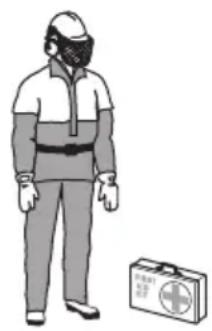
- Always use approved personal protective equipment during operation. Personal protective equipment cannot eliminate the risk of injury but it will reduce the degree of injury if an accident does happen. Ask your servicing dealer for help in choosing the right equipment.
- Use an approved protective helmet.
- Use approved hearing protection. Long-term exposure to noise can result in permanent hearing impairment. Be aware of warning signals or shouts when you are wearing hearing protection. Always
remove your hearing protection as soon as the engine stops.
- Use approved eye protection to decrease the risk of injury from thrown objects. If you use a face shield then you must also wear approved protective goggles. Approved protective goggles must comply with standard ANSI Z87.1 in the USA or EN 166 in EU countries. Visors must comply with standard EN 1731.
- Use heavy duty gloves.
- Use approved respiratory protection. The use of products such as cutters, grinders, drills, that sand or form material can generate dust and vapours which may contain hazardous chemicals. Check the nature of the material you intend to process and use appropriate breathing mask.
- Use tight-fitting, heavy-duty and comfortable clothing that permits full freedom of movement. Cutting generates sparks that can ignite clothing. HUSQVARNA recommends that you wear flame-retardant cotton or heavy denim. Do not wear clothing made of material such as nylon, polyester or rayon. If ignited such material can melt and cling to the skin. Do not wear shorts.
- Use boots with steel toe-cap and non-slip sole.
• Always keep a first aid kit near.
natural_image
Illustration of a person wearing full-body protective gear and a first aid kit (no text or symbols)- Sparks can come from the muffler or the cutting blade. Always have a fire extinguishing available.
Safety devices on the product

WARNING: Read the warning instructions that follow before you use the product.
- Do not use a product with defective safety devices.
- Do a check of the safety devices regularly. If the safety devices are defective, speak to your HUSQVARNA approved service agent.
- Do not change the safety devices.
- Do not use the product if protective plates, protective covers, safety switches or other protective devices are defective or not attached.
Throttle trigger lockout
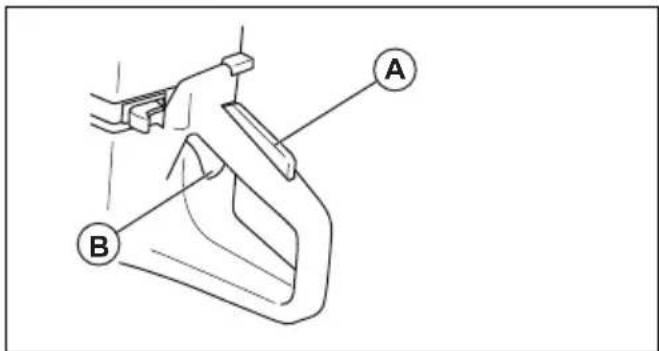
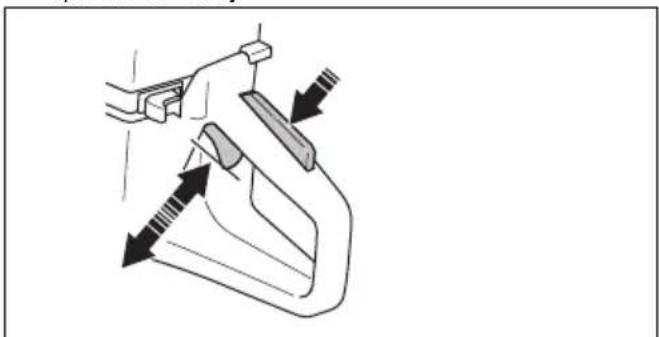
The throttle trigger lockout prevents accidental operation of the throttle trigger. If you put your hand around the
handle and push the throttle trigger lockout (A), it releases the throttle trigger (B). If you release the handle, the throttle trigger and the throttle trigger lockout move back to their initial positions. This function locks the throttle trigger at idle speed.
To do a check of the throttle trigger lockout
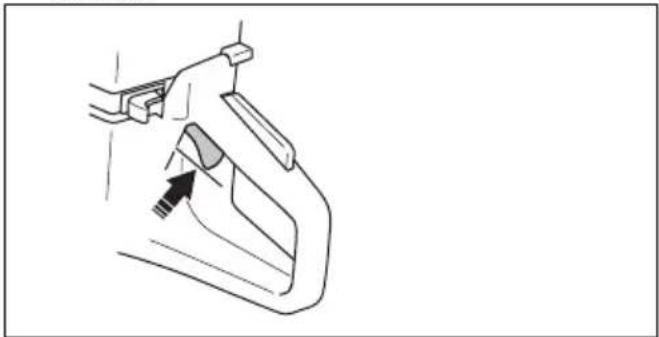
- Make sure that the throttle trigger is locked at the idle position when the throttle trigger lockout is released.
natural_image
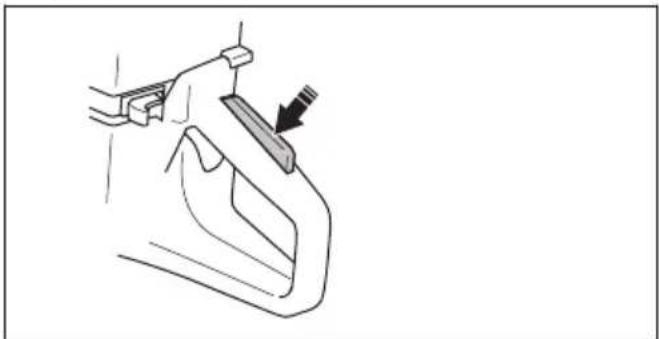
Line drawing of a hand holding a tool interacting with a car handle (no text or symbols)- Push the throttle trigger lockout and make sure that it goes back when you release it.
natural_image
Line drawing of a hand holding a tool with an arrow pointing to a component (no text or symbols)- Make sure that the throttle trigger and throttle trigger lockout move freely and that the return springs operate correctly.
natural_image
Diagram of a hand holding a tool with arrows indicating movement or force direction (no text or symbols)-
Start the product and apply full throttle.
-
Release the throttle control and make sure that the cutting blade stops and stays stationary.
-
If the cutting blade rotates at idle position, adjust the idle speed. Refer to To adjust the idle speed on page 30.
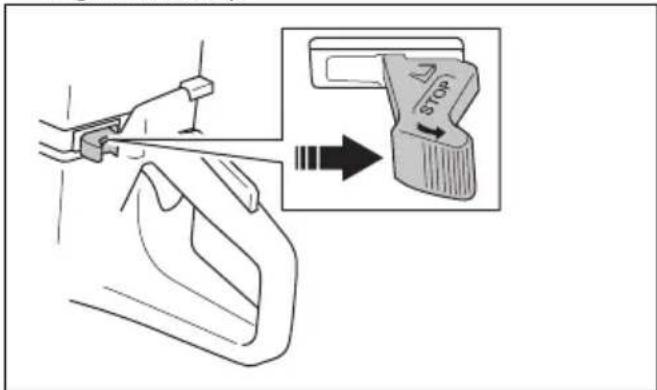
To do a check of the stop switch
-
Start the engine. Refer to cold engine on page 23 To start the product with a
-
Push the stop switch to the STOP position. The engine must stop.
Blade guard and SmartGuard (Optional)

WARNING: Make sure that the blade guard and SmartGuard are correctly attached before you start the product. Do not use the product if the blade guard or SmartGuard is missing, defective or has cracks.
The blade guard (A) and SmartGuard (B) are installed above the cutting blade (C). They prevent injury if pieces of the blade or cut material are thrown in the direction of the operator.
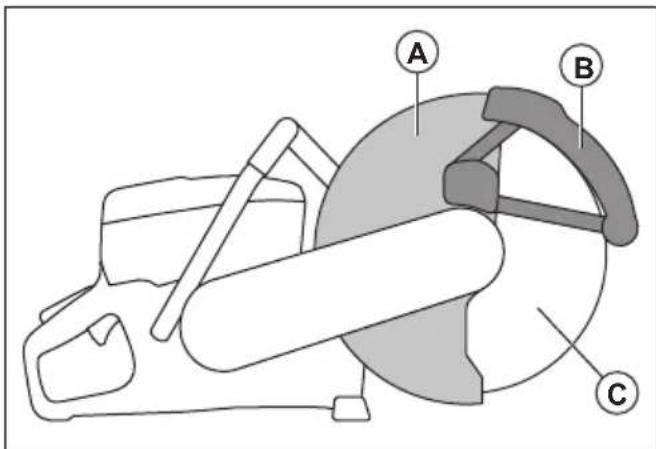
The SmartGuard is spring loaded and must always move freely and retract to its initial position by spring force.
To examine the blade and the blade guard
WARNING: A damaged cutting blade can cause injury.
- Make sure that the cutting blade is attached correctly and does not show signs of damage.
- Make sure that the blade guard has no cracks or is damaged.
- Replace the blade guard if it is damaged.
To do a check of the SmartGuard
WARNING: A damaged SmartGuard can cause injury.
CAUTION: The SmartGuard is a plastic guard and can become damaged by heat during intense dry cutting of metal with bonded abrasive blades. Do not do intense dry metal cutting and let the product become cool between the cuts. For intense metal cutting with SmartGuard, we recommend wet cutting together with vacuum brazed diamond blades, such as VARI-CUT FR3.
- Make sure that the SmartGuard has no cracks or damage.
-
Make sure that the SmartGuard moves freely without much play and retracts by spring force.
-
Clean or replace the SmartGuard if it does not retract immediately when pushed in, or is damaged.
Vibration damping system
Your product is equipped with a vibration damping system that is designed to minimize vibration and make operation easier. The product's vibration damping system reduces the transfer of vibration between the
engine unit/cutting equipment and the product's handle unit.
To do a check of the vibration damping system
WARNING: Make sure that the engine is off and that the stop switch is in STOP position.
- Make sure that there are no cracks or deformation on the vibration damping units. Replace the vibration damping units if they are damaged.
- Make sure that the vibration damping units are correctly attached to the engine unit and handle unit.
Muffler
The muffler keeps the noise levels to a minimum and sends the exhaust fumes away from the operator.
Do not use the product if the muffler is missing or defective. A defective muffler increases the noise level and the risk of fire.
WARNING: The muffler becomes very hot during and after use and when the engine operates at idle speed. Be careful near flammable materials and/or fumes to prevent fire.
To do a check of the muffler
- Examine the muffler regularly to make sure that it is attached correctly and not damaged.
Fuel safety
WARNING: Read the warning instructions that follow before you use the product.
- Fuel is flammable and the fumes are explosive. Be careful with fuel to prevent injury, fire and explosion.
- Only refuel the product outdoors, where the airflow is sufficient. Do not breathe in the fuel fumes. The fuel fumes are poisonous and can cause injury, fire and explosion.
- Do not remove the fuel tank cap or fill the fuel tank when the engine is on.
- Let the engine become cool before you refuel.
- Do not smoke near the fuel or the engine.
-
Do not put hot objects near the fuel or the engine.
-
Do not fill fuel near sparks or flames.
- Before you refuel, open the fuel tank cap slowly and release the pressure carefully.
- Fuel on your skin can cause injury. If you get fuel on your skin, use soap and water to remove the fuel.
- If you spill fuel on your clothing, change clothing immediately.
- Tighten the fuel tank cap fully. If the fuel tank cap is not correctly tightened, the vibrations in the product can loosen it and cause leakage of fuel and fuel fumes. Fuel and fuel fumes are a risk of fire.
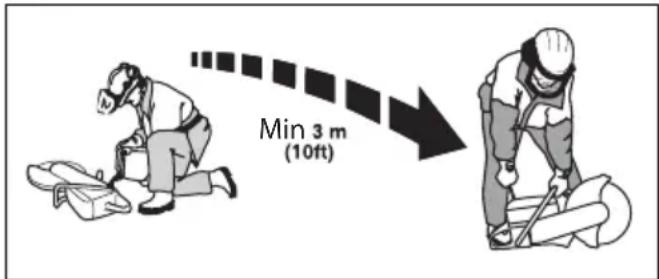
- Before you start the product, move the product to a minimum of 3m / 10 ft from where you refueled.
- Do not start the product if there is fuel or oil spilled on the product. Remove the unwanted fuel and oil and let the product dry before you start the engine.
-
Examine the engine for leaks regularly. If there are leaks in the fuel system, do not start the engine until the leaks are repaired.
-
Keep fuel in approved containers only.
- When the product and fuel is in storage, make sure that fuel and fuel fumes cannot cause damage, fire and explosion.
- Drain the fuel in an approved container outdoors and away from sparks and flames.
Safety instructions for maintenance

WARNING: Read the warning instructions that follow before you use the product.
- Make sure that the engine is off and that the stop switch is in STOP position.
- Use personal protective equipment. Refer to Personal protective equipment on page 8.
- If the maintenance is not done correctly and regularly, the risk of injury and damage to the product increases.
- Only do the maintenance as given in this operator's manual. Let an approved service center do all other servicing.
- Let an approved HUSQVARNA service agent do servicing on the product regularly.
- Replace damaged, worn or broken parts.
• Always use original accessories.
Assembly
Cutting blades

WARNING: Always use protective gloves when you assemble the product.

WARNING: A cutting blade can break and cause injury to the operator.

WARNING: Examine the cutting blade for cracks, lost segments distortion or unbalance prior to use and immediately after striking an unintended object. Do not use a damaged cutting blade. After inspecting and installing the cutting blade, position yourself and bystanders away from the plane of the rotating cutting blade and run the power tool at maximum no load speed for one minute.

WARNING: The cutting blade manufacturer gives warnings and recommendations for the operation and correct maintenance of the cutting blade. Those warnings are supplied with the cutting
blade. Read and obey the instructions that are supplied with the cutting blade.
Applicable cutting blades

WARNING: Only use diamond blades and abrasive blades for concrete and metal. Do not use blades with serrations such as circular wood cutting blades or blades with carbide tips. The risk of kickback is increased and carbide tips can come off and be thrown at high speed. This can result in injury or death.

WARNING: Never use a cutting blade for any other materials than what it was intended to cut.

WARNING: Use only cutting blades that comply with applicable national or regional standards, for example EN12413, EN13236 or ANSI B7.1.

WARNING: Do not use a cutting blade with a rated speed value lower than that of the product. The rated speed value of the cutting blade is marked on the cutting blade, and that of the product is marked on the blade guard.
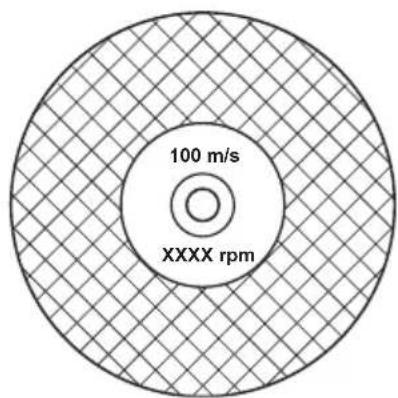
pie
| Category | Value | |---|---| | 100 m/s | 100 | | XXXX rpm | 100 |Note: Many cutting blades that can be attached to this product are made for stationary saws. The rated speed value of those cutting blades is too low for this product.

CAUTION: Do not use cutting blades with thickness exceeding maximum recommended thickness. Refer to Technical data on page 34.
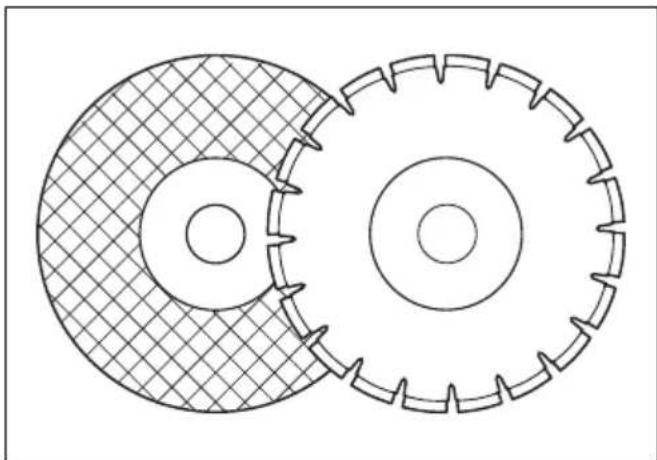
- Cutting blades applicable to this product are available in two basic models; bonded abrasive blades and diamond blades.
natural_image
Technical line drawing of two interlocking gears with no text or symbols• Make sure that the cutting blade has the correct center hole dimension for the installed arbor bushing.
Cutting blade vibration

CAUTION: If you use the product with too much force, the cutting blade can become too hot, bend and cause vibrations. Use the product with less force. If the
vibrations continue, replace the cutting blade.
Bonded abrasive cutting blades

WARNING: Do not use bonded abrasive cutting blades together with water. Moisture decreases the strength in the bonded abrasive cutting blade and the cutting blade can break and cause injury.
A bonded abrasive cutting blade is made of small abrasive grains joined with an organic or vitrified bond, molded with fabric reinforcements, which prevents the cutting blade from breaking during high speed operation.
Bonded abrasive cutting blades for different materials
Note: Make sure that you use the correct cutting blades for rail cutting.
| Blade type Material | |
| Concrete blade | Concrete, asphalt, stone masonry, cast iron, aluminum, copper, brass, cables, rubber and plastic. |
| Metal blade Steel | alloy steel and other hard metal. |
| Cutting blade for rail cutting | Rail |
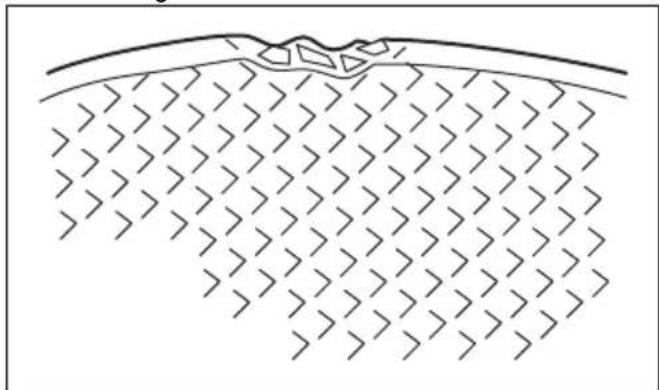
To examine a bonded abrasive cutting blade
• Make sure that there are no cracks or damages on the cutting blade.
natural_image
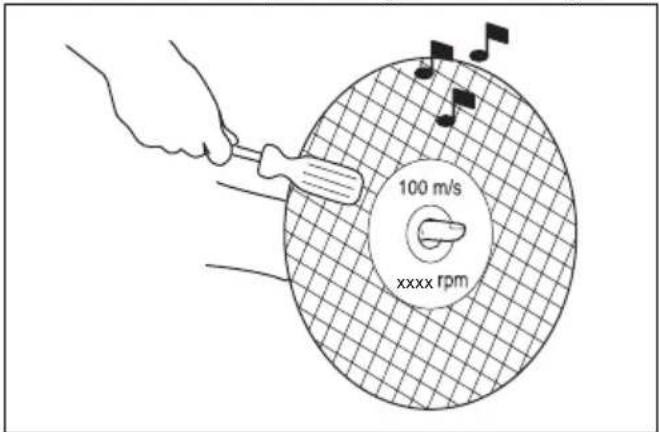
Diagram of a geological cross-section showing layered strata with no text or symbols- Hang the cutting blade on your finger and hit the cutting blade lightly with a screwdriver. If you do not hear a clear sound, the cutting blade is damaged.
Diamond blades

WARNING: Diamond blades become very hot when used. A diamond blade that is too hot gives bad performance, blade damage and is a safety risk.

WARNING: Do not use diamond blades to cut plastic material. The hot diamond blade can melt the plastic, which can cause a kickback.
- Diamond blades have a steel core with segments that are made of industrial diamonds.
- Diamond blades are used for masonry, reinforced concrete and stone.
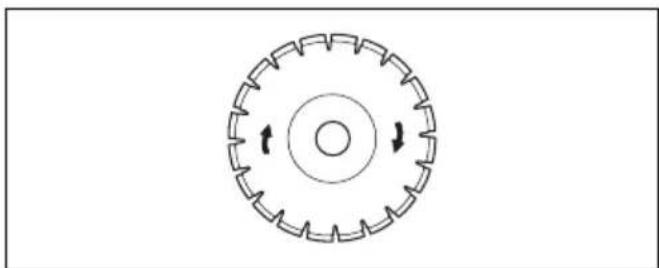
• Make sure that the diamond blade rotates in the direction of the arrows shown on the diamond blade.
natural_image
Circular mechanical component diagram with evenly spaced teeth and central bore (no text or symbols)• Always use a sharp diamond blade.
- Diamond blades can become blunt if you use an incorrect feeding pressure or when you cut materials such as hard reinforced concrete. If you use a blunt diamond blade it becomes too hot, which can cause the diamond segments to come loose.
To sharpen the cutting blade
Note: For the best cutting results, use a sharp cutting blade.
- To sharpen the cutting blade, cut into soft material, such as sandstone or brick.
Diamond blades for wet cutting
- Diamond blades for wet cutting must be used with water.
- Water decreases the temperature of the cutting blade, increases its service life and decreases dust during operation.
- When wet cutting, collect the waste water safely.
Diamond blades for dry cutting
- For diamond blades for dry cutting it is necessary to have a sufficient airflow around the cutting blade to decrease the temperature. Because of this, diamond blades for dry cutting are recommended only for intermittent operation. After some seconds of operation, it is necessary to let the diamond blade rotate freely, away from the cut. This lets the airflow around the blade decrease the temperature of the diamond blade.
Diamond blade - side clearance

WARNING: Certain cutting situations or poor blades can suffer excessive wear on the side of the segments. Make sure the diamond segment (A) is wider than the blade (B). This is to prevent pinching in the cutting slot and kickback. Refer to Kickback on page 17.
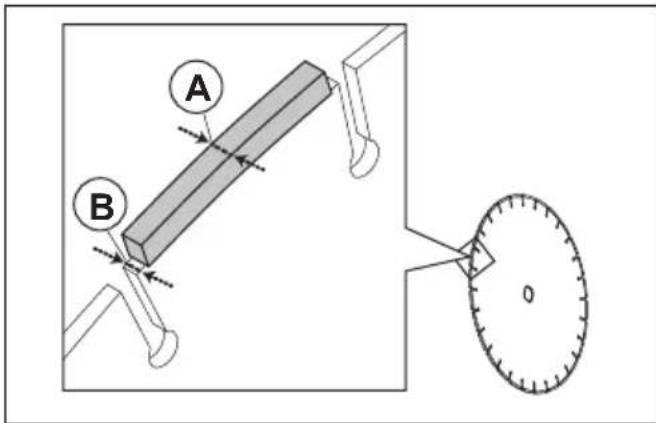

CAUTION: Some cutting situations and worn blades may cause increased wear on the side of the segments. Replace the blade before it is worn out.
Toothed blades

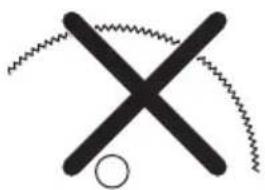
WARNING: Never use toothed blades such as wood cutting blades, circular toothed blades, carbide tipped blades, etc. The risk of kickback is significantly increased and tips can be torn off and thrown at high speed. Carelessness can result in serious personal injury or even death.

WARNING: Government regulation requires a different type of guarding for carbide tipped blades not available on power cutters – a 360 degree guard. Power Cutters (this saw) use diamond blades and have a different guarding system which does not provide protection against the dangers presented by wood cutting blades.
natural_image
Simple black cross symbol with a zigzag line above and a circle below, no text or symbols present.Use of this power cutter with a carbide tipped blade is a violation of work safety regulations.
Due to the hazardous nature and exigent circumstances involved with fire fighting and rescue operations conducted by the various highly trained public safety forces, safety professionals (fire departments), Husqvarna is aware that they may use this power cutter with carbide tipped blades in certain emergency situations due to the ability of carbide tipped blades to cut many different types of obstructions and materials in combination without having to take time to switch blades or machines. When using this power cutter be aware at all times that carbide tipped blades are more kickback prone than diamond blades if not used properly. Carbide tipped blades can also throw pieces of material away from the blade.
For these reasons, a power cutter equipped with a carbide tipped blade should never be used except by highly trained public safety professionals who are aware of the risks associated with its use and then only in those exigent circumstances when other tools are deemed inefficient and ineffective for fire or rescue operations. A power cutter equipped with a carbide tipped blade should never be used to cut wood in non-rescue operations.
To examine the spindle shaft and the flange washers

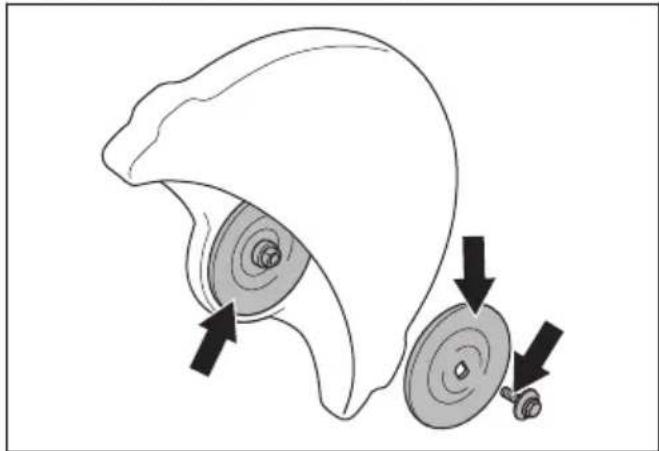
CAUTION: Use only HUSQVARNA flange washers with a minimum diameter of 105 mm/4.1 in.

WARNING: Do not use defective, worn or dirty flange washers. Use only flange washers of the same dimension. Incorrect flange washers can cause the cutting blade to become damaged or come loose.
Examine the spindle shaft and the flange washers when you replace the cutting blade.
- Make sure that the threads on the spindle shaft are not damaged. Replace damaged parts.
natural_image
Diagram of a helmet with two circular components and directional arrows indicating movement or force (no text or symbols)- Make sure that the areas of contact on the cutting blade and the flange washers are not damaged. Replace damaged parts.
- Make sure that the flange washers are clean and of the correct dimension.
- Make sure that the flange washers move freely on the spindle shaft.
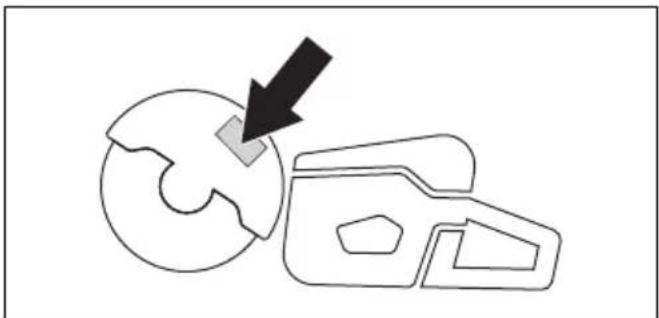
To do a check of the arbor bushing
The arbor bushings are used to attach the product to the center hole of the cutting blade. The product is supplied with one of these two types of arbor bushings:
- An arbor bushing that can be turned to the other side and be applicable for 20 mm/0.79 in. or 25.4 mm/1 in. center holes.
• A 25.4 mm/1 in. arbor bushing. - A decal on the blade guard shows installed arbor bushing and specification for applicable cutting blades.
natural_image
Simple line drawing of a gear and cam mechanism with a black arrow pointing to a specific component (no text or symbols)- Make sure that the dimension of the center hole of the cutting blade agrees with the installed arbor bushing. The diameter of the center hole is printed on the cutting blade.
• Use only HUSQVARNA arbor bushings.
To examine the direction of rotation of the cutting blade
- Find the arrows on the rear belt guard that show the direction of rotation of the spindle shaft.
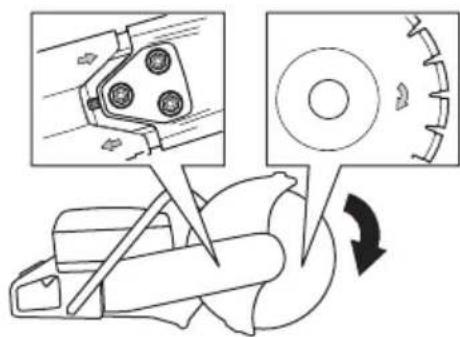
- Find the arrow on the cutting blade that shows the direction of rotation of the cutting blade.
- Make sure that the direction arrows of the cutting blade and the spindle shaft have the same direction.
To install the cutting blade

WARNING: Make sure that the engine is off and that the stop switch is in the STOP position.

WARNING: Always use protective gloves when you assemble the product.
- Examine the flange washers and the spindle shaft. Refer to To examine the spindle shaft and the flange washers on page 14.
- Push back and hold the SmartGuard in the retracted position.
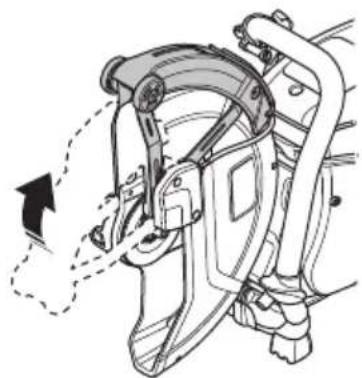
natural_image
Mechanical assembly diagram showing a lever mechanism with no visible text or symbolsNote: This step only applies to K 770 SmartGuard.
- Put the cutting blade on the arbor bushing (A) between the inner flange washer (B) and the flange washer (C). Turn the flange washer until it holds on to the shaft.
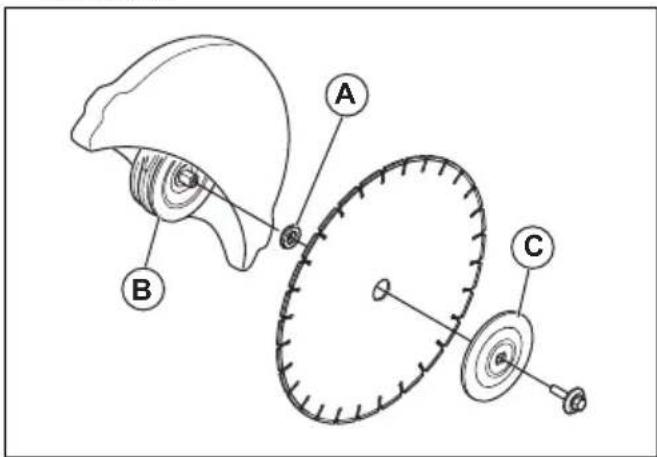
- Put a tool into the hole in the front belt guard and turn the cutting blade until the shaft is locked.
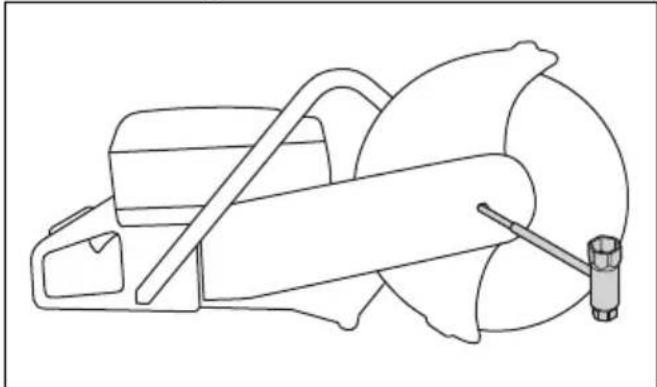
natural_image
Line drawing of a mechanical device with a tool and base (no text or symbols)- Tighten the cutting blade bolt to 25 Nm/18.5 ft-lb.
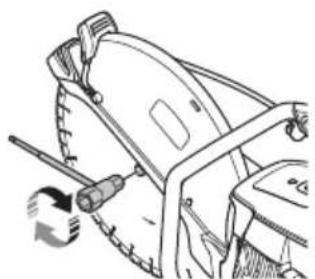
natural_image
Technical line drawing of a mechanical assembly with a tool and rotating component (no text or symbols)To reverse the cutting head (K 770, K 770 OilGuard, K 770 Rescue)

WARNING: Only cut with the cutting head reversed if a standard procedure is not possible.
The product has a reversible cutting head that lets you cut near a wall or at ground level. Only cut with the cutting head reversed if a standard procedure is not possible. If a kickback occurs, it is more difficult to control the product if the cutting head is reversed. The distance between the cutting blade and the center of the product is longer, which means that the handle and the cutting blade do not align. This has a negative effect on
the balance in the product and it is more difficult to hold the product if the cutting blade is pinched or stalled in the kickback zone. Refer to Kickback on page 17.

WARNING: Make sure that the engine is off and that the stop switch is in the STOP position.

WARNING: Always use protective gloves when you assemble the product.
-
Remove the cutting blade, the front belt cover and the cutting head. Refer to steps 1-5 in To replace the drive belt on page 27.
-
Remove the 2 screws and nuts that hold the spray nozzle.
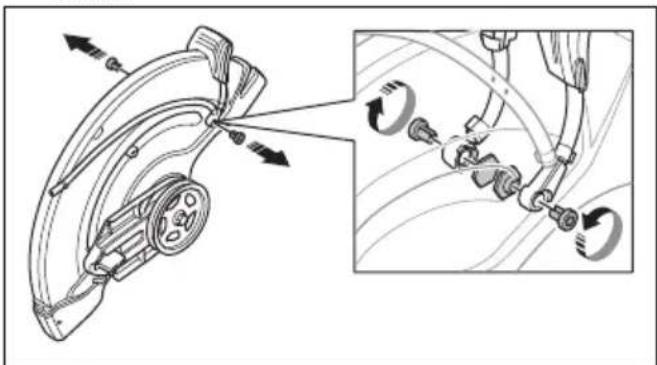
natural_image
Technical diagram of a mechanical assembly with directional arrows and inset showing internal components (no text or labels)- Remove the 2 screws from the adjustment handle for the blade guard.
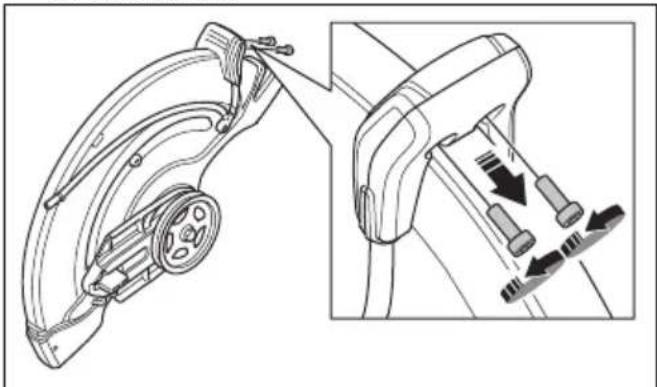
natural_image
Technical line drawing of a mechanical device with attached components and directional arrows indicating motion (no text or symbols)- Remove the adjustment handle for the blade guard
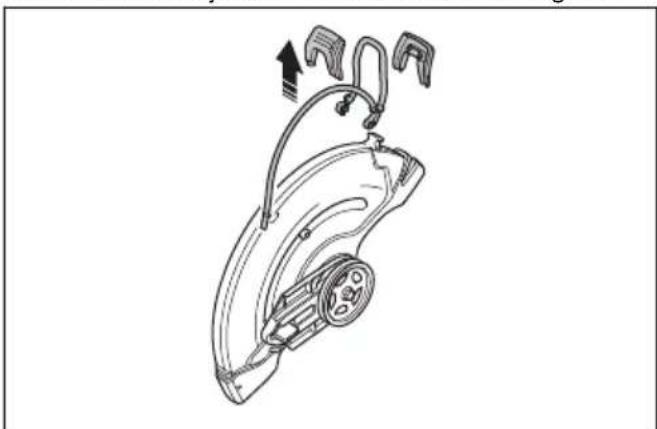
natural_image
Technical line drawing of a mechanical device with attached tubing and a central component (no text or symbols)- Remove the stop sleeve.
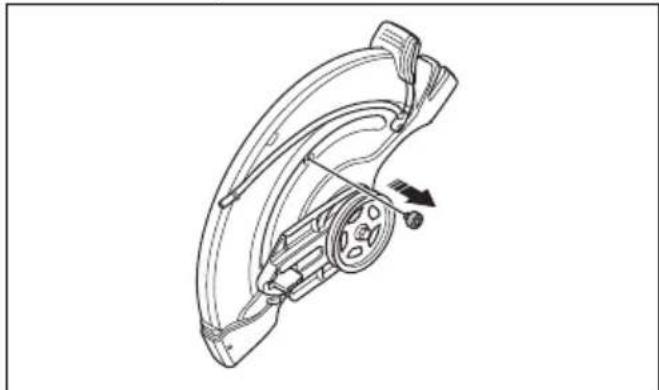
natural_image
Technical line drawing of a mechanical component with no visible text or symbols- Move the bearing housing and install the stop sleeve.
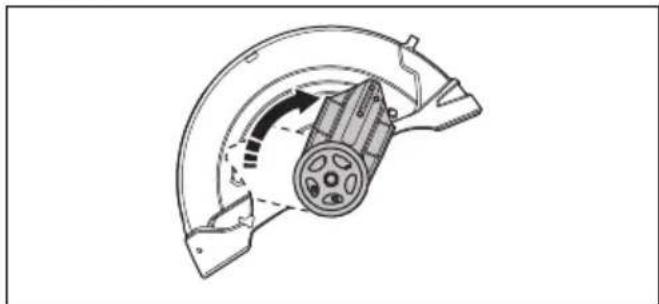
natural_image
Mechanical component diagram showing a motor and gear assembly (no text or labels)-
Install the stop sleeve.
-
Install the drive belt on the opposite side.
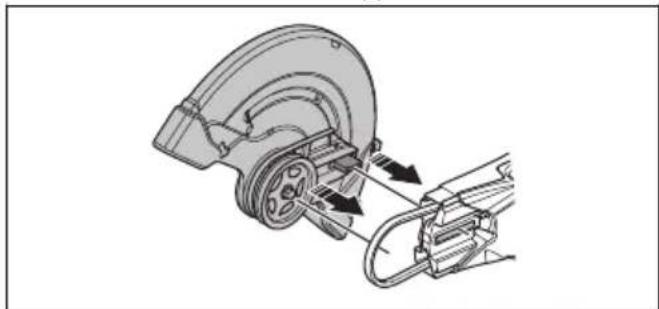
natural_image
Mechanical assembly diagram showing a wheel and bracket assembly with directional arrows (no text or labels)-
Install the cutting head and the drive belt cover, refer to To replace the drive belt on page 27.
-
Install the spray nozzle and the cutting blade in the opposite sequence to how they were removed.
Operation
Introduction

WARNING: Read and understand the safety chapter before you use the product.
Kickback

WARNING: Kickbacks are sudden and can be very violent. The power cutter can be thrown up and back towards the user in a rotating motion causing serious or even fatal injury. It is vital to understand what causes kickback and how to avoid it before using the product.
Kickback is the sudden upward motion that can occur if the blade is pinched or stalled in the kickback zone. Most kickbacks are small and pose little danger. However a kickback can also be very violent and throw the power cutter up and back towards the user in a rotating motion causing serious or even fatal injury.
Reactive force
A reactive force is always present when cutting. The force pulls the product in the opposite direction to the blade rotation. Most of the time this force is insignificant. If the blade is pinched or stalled, the reactive force will be strong and you might not be able to control the power cutter.
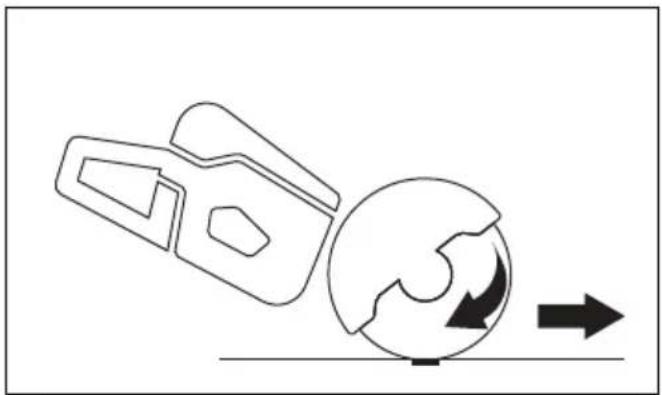
natural_image
Diagram showing a mechanical device interacting with a circular component, with directional arrows indicating motion (no text or symbols)Never move the product when the cutting equipment is rotating. Gyroscopic forces can obstruct the intended movement
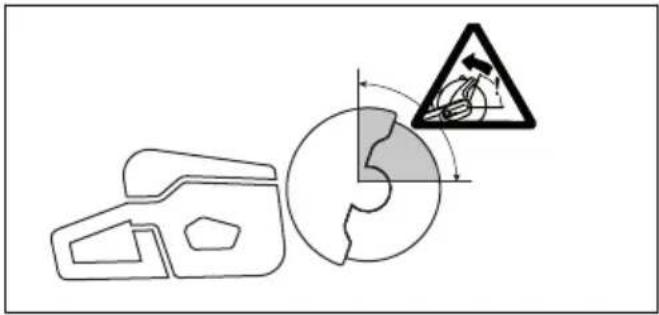
Kickback zone
Never use the kickback zone of the blade for cutting. If the blade is pinched or stalled in the kickback zone, the reactive force will push the power cutter up and back
towards the user in a rotating motion causing serious or even fatal injury.
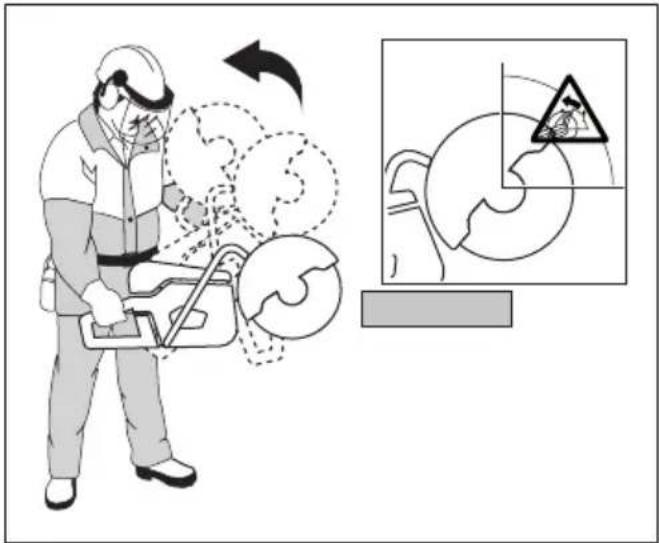
Rotational kickback
A rotational kickback occurs when the cutting blade does not move freely in the kickback zone.
Climbing kickback
If the kickback zone is used for cutting, the reactive force drives the blade to climb up in the cut. Do not use the kickback zone. Use the lower quadrant of the blade to avoid climbing kickback.
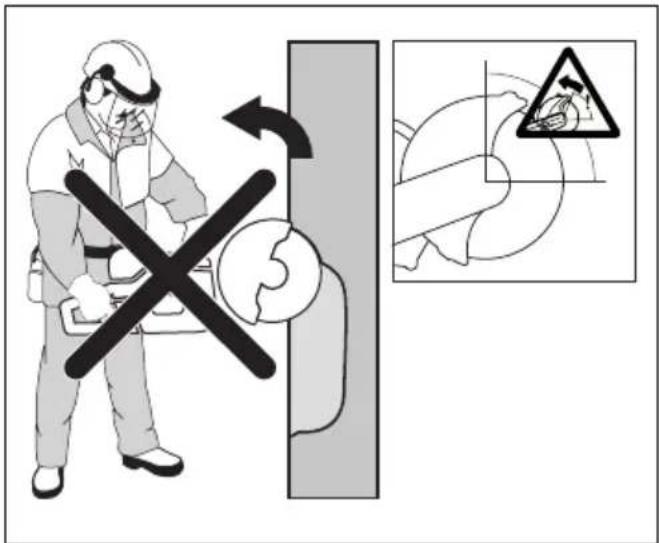
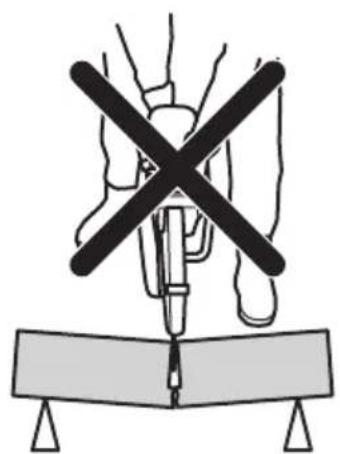
Pinching kickback
Pinching is when the cut closes and pinches the blade. If the blade is pinched or stalled the reactive force will be strong and you might not be able to control the power cutter.
natural_image
Diagram of a medical procedure with a surgical tool and X-shaped cross symbol (no text or labels)If the blade is pinched or stalled in the kickback zone, the reactive force will push the power cutter up and back towards the user in a rotating motion causing serious or even fatal injury. Be alert for potential movement of the work piece. If the work piece is not properly supported and shifts as you cut, it might pinch the blade and cause a kick back.
Pipe cutting
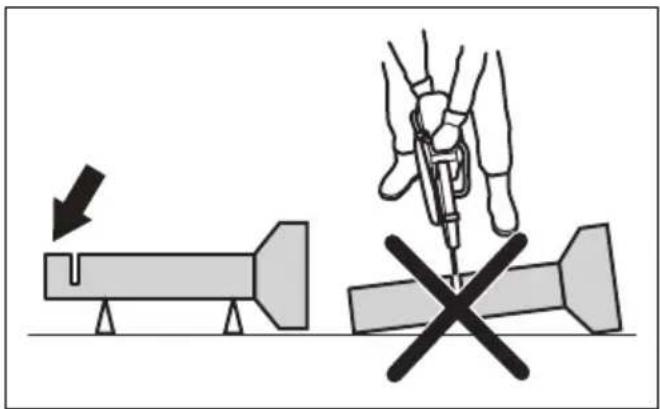
Special care should be taken when cutting in pipes. If the pipe is not properly supported and the cut kept open throughout the cutting, the blade might be pinched. Be especially alert when cutting a pipe with a belled end or a pipe in a trench that, if not properly supported, may sag and pinch the blade.
If the pipe is allowed to sag and close the cut, the blade will be pinched in the kick back zone and a severe kick back might develop. If the pipe is properly supported, the end of the pipe will move downward, the cut will open and no pinching will occur.
Secure the pipe so it does not move or roll during cutting. Make sure that the cut opens to avoid pinching the blade.
To cut in smaller pipes

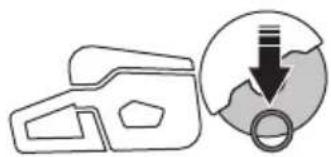
WARNING: If the blade is pinched in the kickback zone, it will cause a severe kickback.
If the pipe is smaller than the maximum cutting depth of the product, the cutting operation can be done in 1 step from top to bottom.
- Cut the pipe from top to bottom.
natural_image
Simple line drawing of a 3D object with a circular arrow and ring, no text or symbols present.To cut in larger pipes

WARNING: If the blade is pinched in the kickback zone it will cause a severe kickback.
If the pipe is larger than the maximum cutting depth of the product, and can not be rolled, the cutting operation needs to be divided in 5 steps.
- Divide the pipe into 5 sections. Do a mark of those sections and of a cutting line. Cut a shallow guide groove around the pipe.
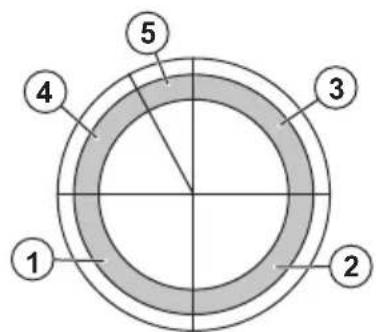
- Cut those sections in 5 steps with the cutting directions shown by the arrows in each step.
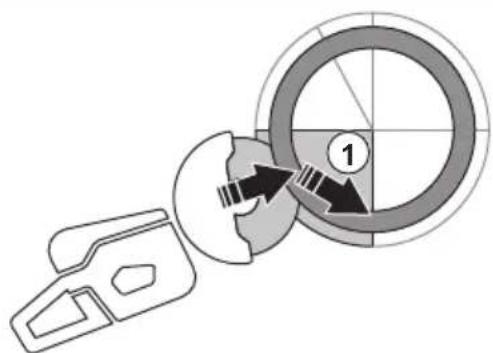
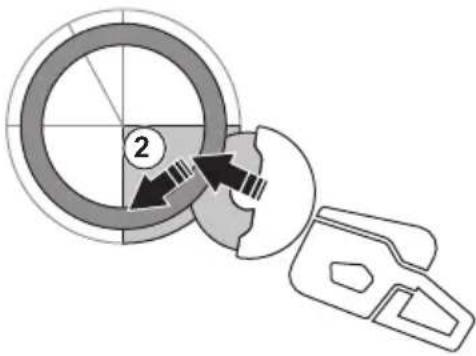
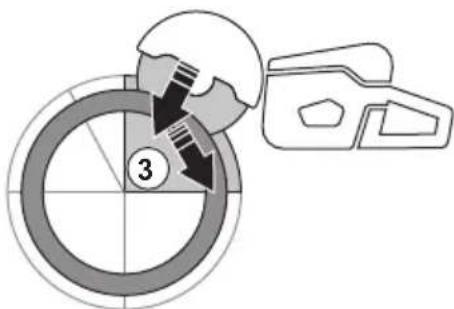
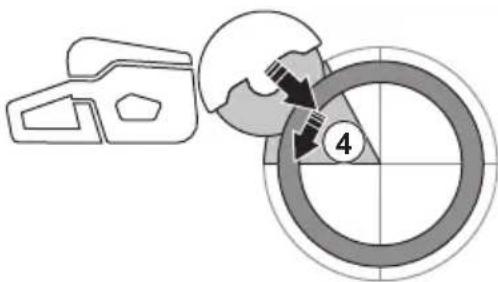
- Make the final separating cut from the top of the pipe pulling backwards, without involving the upper quadrant of the blade. Adjust the blade guard to full forward position for maximum protection.
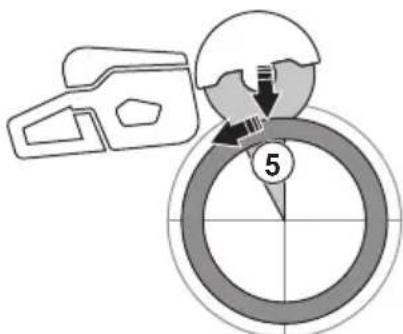

WARNING: If the pipe is properly supported, it should not pinch the blade when separated in section 5. However be alert if the blade is pinched during the final separation. If the blade is pinched in the lower section, the product may pull forward away from the operator, rather then resulting in a rotating kickback.
To prevent a kickback

WARNING: Avoid situations where there is a risk of kickback. Take care when using your power cutter and make sure that the blade is never pinched in the kickback zone.

WARNING: Be careful when you put the blade in an existing cut.

WARNING: Make sure that the work piece cannot move during a cutting operation.

WARNING: Only you and proper working technique can eliminate kickback and its dangers.
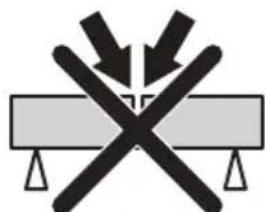
• Always support the work of piece so that the cut can keep open when cutting through. When the cut is open there is no kickback. If the cut is closed and pinches the blade, there is a risk of kickback.
natural_image
Symbolic illustration of crossed-out black-and-white lines crossing over a gray rectangular block, with no text or symbols present.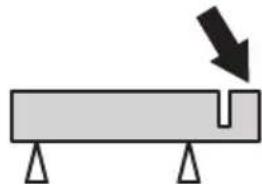
natural_image
Simple diagram of a beam with supports and a downward arrow indicating force or direction (no text or symbols)Basic working techniques

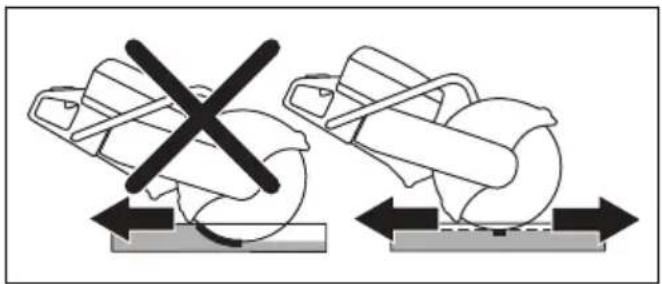
WARNING: Do not pull the product to one side. This can prevent the free movement of the cutting blade. The cutting blade can break and cause injury to the operator or bystanders.

WARNING: Do not grind with the side of the cutting blade. The cutting blade can break and cause injury to the operator or bystanders. Only use the cutting edge.

WARNING: Make sure that the cutting blade is installed correctly and does not show signs of damage.

WARNING: Before cutting in an existing cut made by a different blade, make a sure that the slot is not thinner than your blade as that can result in binding in the cutting slot and a kickback.

WARNING: Cutting metal generates sparks that can cause fire. Do not use the product near flammable material or gases.
- The product is made to cut with bonded abrasive cutting blades or diamond blades made for high speed handheld product. The product must not be used with other types of blade, or for other types of operation.
- Do a check that the correct cutting blade is used for the material to be cut. Refer to Applicable cutting blades on page 11 for instructions.
- Do not cut asbestos materials.
- Keep a safe distance from the cutting blade when the engine is on. Do not try to stop a rotating blade with a part of your body. To touch a rotating blade, although the engine is off, can result in serious injury or death.
- The cutting blade continues to rotate for a while after the throttle trigger is released. Make sure that the cutting blade has stopped before the product is moved or put down. If it is necessary to stop the cutting blade quickly, let the cutting blade lightly touch a hard surface.
- Do not move the product with the engine on.
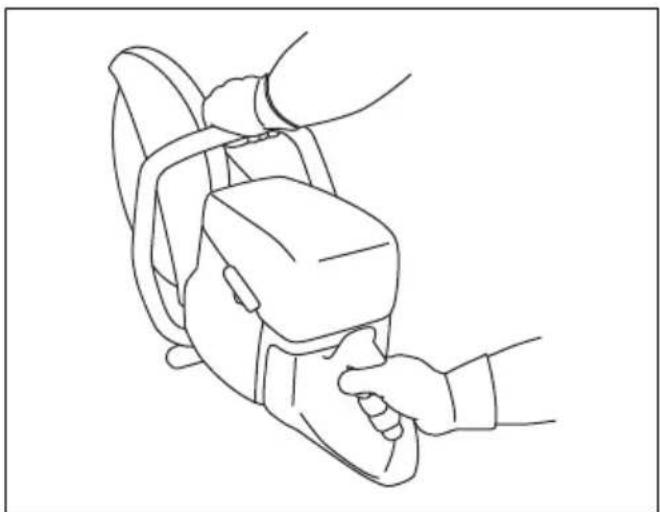
- Hold the product with 2 hands. Hold the product tightly with thumbs and fingers fully around the plastic handles with insulation. The right hand must be on the rear handle and the left hand on the front handle. All operators must use this hold. Do not operate a power cutter with only 1 hand.
natural_image
Line drawing of a person using a handheld device to interact with another person (no text or symbols present)- Stand parallel to the cutting blade. Avoid standing straight behind. If a kickback occur, the saw will move in the plane of the cutting blade.
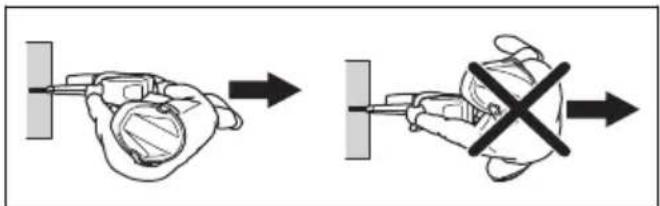
- Do not go away from the product with the engine on. Before you go away from the product, stop the
engine and make sure that there is no risk of accidental start.
- Use the adjustment handle of the blade guard to adjust the rear section of the guard flush with the work piece. Spatter and sparks from the cut material are then collected up by the guard and led away from the operator. The guards for the cutting equipment must always be installed when the product is on.
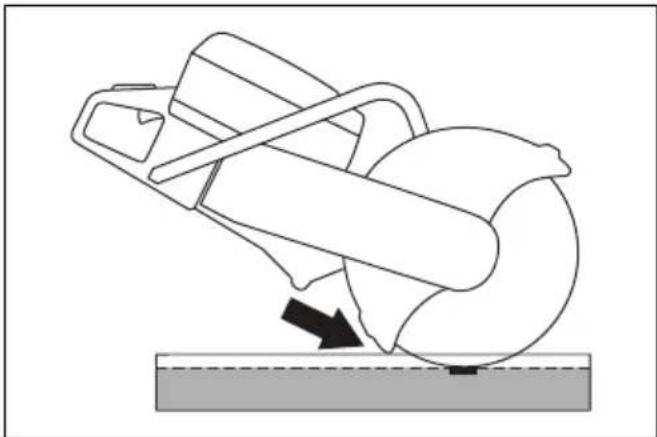
natural_image
Diagram of a mechanical device with a curved handle and arrow indicating motion, resting on a surface (no text or symbols)- Do not use the kickback zone of the blade for cutting. Refer to Kickback zone on page 17 for instructions.
- Do not operate the product before the work area is clear and your feet and body are in a stable position.
- Do not cut above shoulder height.
- Do not cut from a ladder. Use a platform or scaffold if the cut is above shoulder height. Do not overreach.
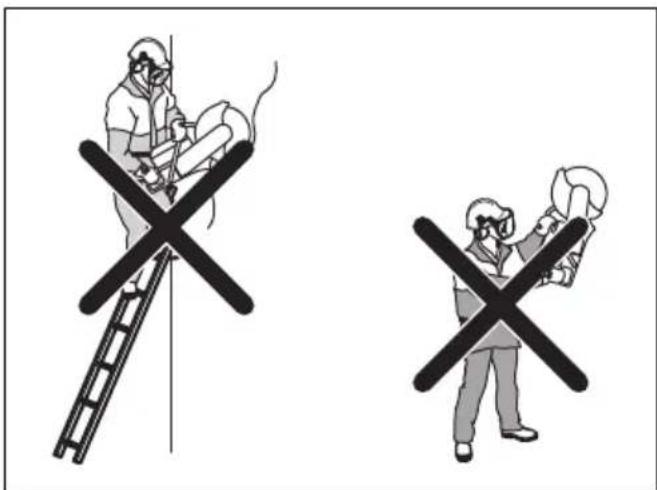
- Stay at a comfortable distance from the work piece.
- Make sure that the cutting blade can move freely when the engine is started.
- Apply the cutting blade carefully with high rotating speed (full throttle). Keep full speed until cutting is complete.
- Let the product do the work. Do not push the cutting blade.
- Feed the product down in line with the blade. Pressure from the side can cause damage to the blade and is very dangerous.
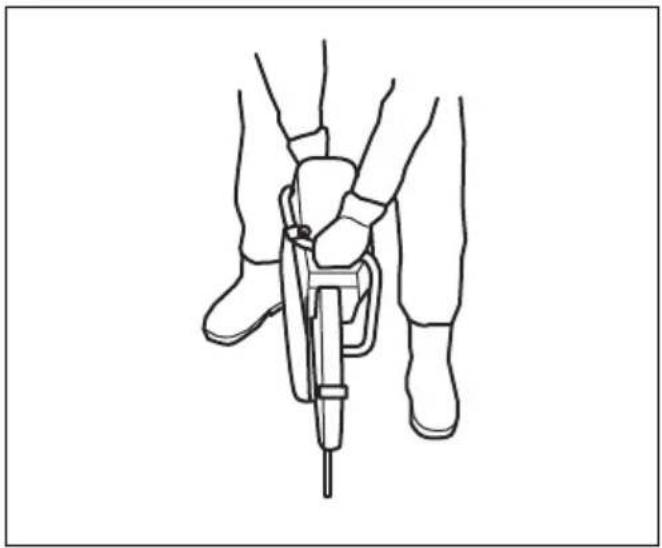
natural_image
Line drawing of a person using a handheld device to lift or lift an object, no text or symbols present- Move the blade slowly forward and rearward to get a small contact area between the blade and the material to be cut. This decreases the temperature of the blade and is an effective way to cut.
natural_image
Diagram showing two mechanical components with a crossed-out black X mark, each mounted on a base with directional arrows (no text or symbols)Basic working techniques with K 770 SmartGuard

WARNING: The SmartGuard function is disengaged if the SmartGuard is manually retracted. Only retract the SmartGuard manually if you must and there are no risks of kickback.
SmartGuard gives more coverage of the blade. This decreases the risk that you touch the blade if a kickback occurs.
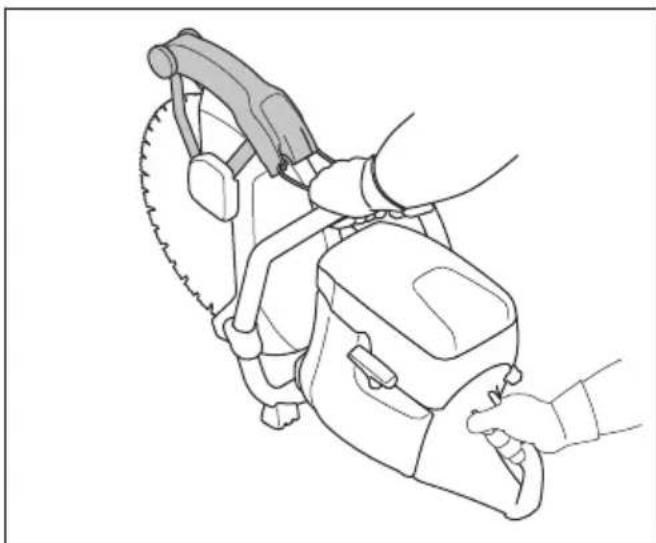
- You can retract the SmartGuard manually with the SmartGuard handle.
- Hold the SmartGuard handle with a left hand finger while the remaining fingers hold the front handle at the same time.
natural_image
Line drawing of a person using a power saw to cut a saw (no text or symbols present)To decrease dust during operation
The product has a wet cutting kit to decrease harmful dust in the air during operation. The wet cutting kit has low water consumption.
- When possible, use wet cutting blades with water cooling. Refer to Cutting blades on page 11.
- Adjust the water flow with the valve. The correct flow is different for different types of tasks.
- Make sure that the water pressure is correct. Refer to Technical data on page 34. If the water hose comes off at the supply source, the supplied water pressure can be too high.
Fuel
This product has a two-stroke engine.

CAUTION: Incorrect type of fuel can result in engine damage. Use a mixture of gasoline and two-stroke oil.
Two-stroke oil
- For best results and performance use HUSQVARNA two-stroke oil.
- If HUSQVARNA two-stroke oil is not available, use a two-stroke oil of good quality for air-cooled engines. Speak to your servicing dealer to select the correct oil.

CAUTION: Do not use two-stroke oil for water-cooled outboard engines, also referred to as outboard oil. Do not use oil for four-stroke engines.
Premixed fuel
- Use HUSQVARNA premixed alkylate fuel for best performance and extension of the engine life. This fuel contains less harmful chemicals compared to regular fuel, which decreases harmful exhaust fumes. The quantity of remains after combustion is
lower with this fuel, which keeps the components of the engine more clean.
To mix gasoline and two-stroke oil
| Gasoline, liter Two-stroke oil, | liter |
| 2% (50:1) | |
| 5 0.10 | |
| 10 0.20 | |
| 15 0.30 | |
| 20 0.40 | |
| US gallon US fl. oz. | |
| 1 2 12 | |
| 2 1/2 6 12 | |
| 5 12 78 |

CAUTION: Small errors can influence the ratio of the mixture drastically when you mix small quantities of fuel. Measure the quantity of oil carefully and make sure that you get the correct mixture.
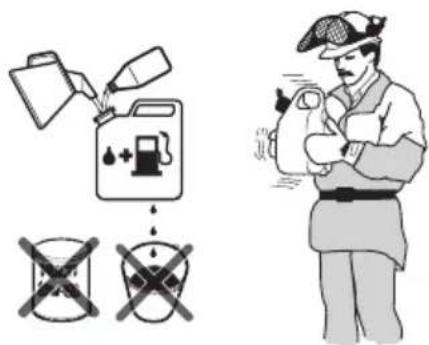
- Fill half the quantity of gasoline in a clean container for fuel.
- Add the full quantity of oil.
- Shake the fuel mixture.
- Add the remaining quantity of gasoline to the container.
- Carefully shake the fuel mixture.

CAUTION: Do not mix fuel for more than 1 month at a time.
OilGuard
Note: Applicable only to K 770 installed with OilGuard (optional) and filled with a mixture of gasoline and HUSQVARNA two-stroke oil.
- OilGuard is a built-in system that senses an incorrect fuel mixture.
- When the product operates, a detector reads the fuel mixture during 10 seconds. If the correct mixture is used, the product operates at the correct speed. If the incorrect mixture is used, the product decreases the engine speed to 3800~rpm to prevent engine failure.
- To make the product operate at the correct speed, drain the incorrect fuel mixture. See To mix gasoline and two-stroke oil on page 22. Fill the product with the correct fuel mixture.
OilGuard oil
Use HUSQVARNA OilGuard oil when you use the OilGuard system. OilGuard oil has a special color that is necessary for the OilGuard system to work correctly.
To disengage the OilGuard
Note: A broken indicator pin shows that the OilGuard system is disengaged. You cannot use a broken indicator pin again to engage the OilGuard system.
The OilGuard plug (A) and a blue indicator pin (B) are factory installed in the tank. The OilGuard lid (C) comes as a spare part. If you do not have access to the OilGuard oil, disengage the OilGuard system.
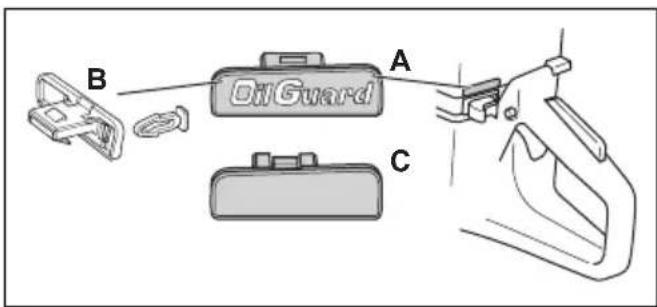
- Remove the OilGuard plug (A) with a screwdriver.
- Remove the blue indicator pin (B).
- Install the OilGuard lid (C) in the tank.
To engage the OilGuard system
Note: You cannot use a broken indicator pin to engage the OilGuard system again. You can get a new indicator pin as a spare part. The spare part of the indicator pin is grey to show that the OilGuard system has been disengaged after the product left the factory.
-
Remove the OilGuard lid from the tank. Refer to To disengage the OilGuard on page 22
-
Attach a grey indicator pin to the OilGuard plug.
- Install the OilGuard plug in the tank.
To fill fuel

CAUTION: Do not use gasoline with an octane number less than 90 RON (87 AKI). It causes damage to the product.

CAUTION: Do not use gasoline with more than 10% ethanol concentration (E10). It causes damage to the product.
Note: Carburetor adjustment is in some conditions necessary when you change the type of fuel.
- Use gasoline with a higher octane number if you frequently use the product at continuously high engine speed.
- Open the fuel tank cap slowly to release the pressure.
- Fill slowly with a fuel can. If you spill fuel, remove it with a cloth and let the remaining fuel dry off.
- Clean the area around the fuel tank cap.
- Tighten the fuel tank cap fully. If the fuel tank cap is not tightened, there is a risk of fire.
- Move the product a minimum of 3 m (10 ft) from the position where you filled the tank before a start.
To start the product with a cold engine

WARNING: Make sure that the cutting blade can rotate freely. It starts to rotate when the engine starts.
- Make sure that the STOP switch is in the left position.
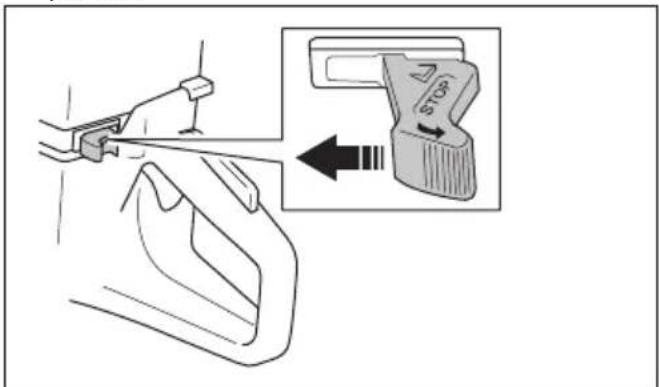
- Pull the choke control fully to get the start throttle position.
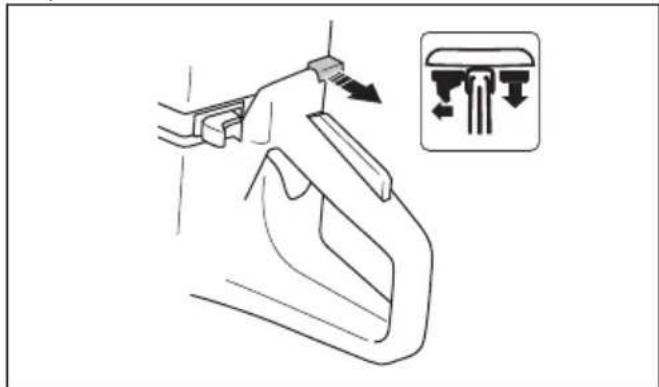
natural_image
Line drawing of a hand holding a car handle with an inset showing a lever mechanism (no text or symbols)- Push the decompression valve to decrease the pressure in the cylinder. The decompression valve goes back to its initial position when the product starts.
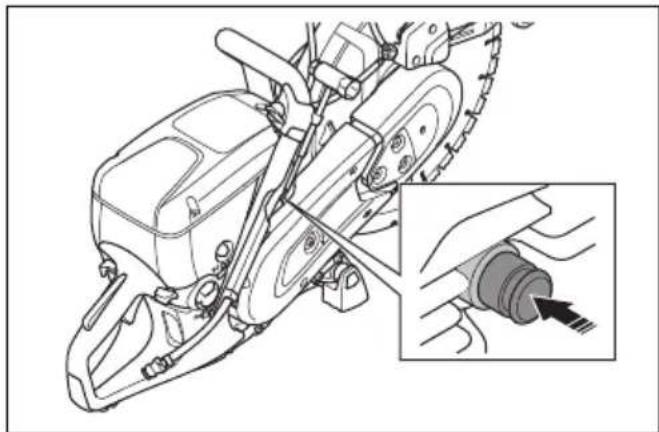
natural_image
Technical line drawing of a mechanical device with an inset showing a close-up of a cable being inserted (no text or symbols present)- Push the air purge bulb 6 times until it is fully filled with fuel.
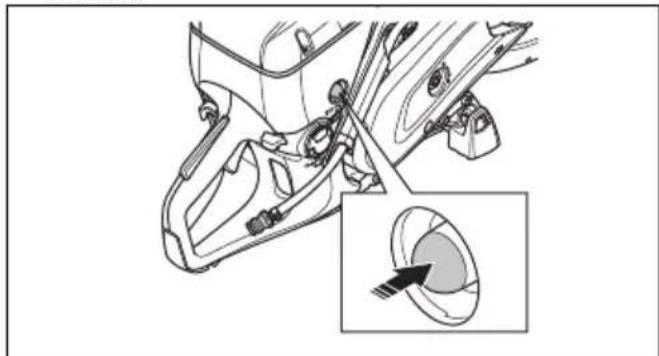
natural_image
Technical diagram of a car interior showing engine components and a magnified view of the wheel (no text or labels)- Hold the front handle with your left hand.
- Put your right foot on the lower section of the rear handle to push the product against the ground.

WARNING: Do not wind the starter rope around your hand.
- Pull the starter rope slowly with your right hand until you feel a resistance as the starter pawls engage. Then pull continuously and quickly.

natural_image
Illustration of a worker in safety gear operating a large cylindrical device (no text or symbols visible)
CAUTION: Do not pull the starter rope fully and do not let go of the starter rope handle when the starter rope is extended. This can cause damage to the product.
- Push the choke control when the engine starts. If the choke is pulled out, the engine will stop after some seconds. If the engine stops, pull the starter rope handle again.
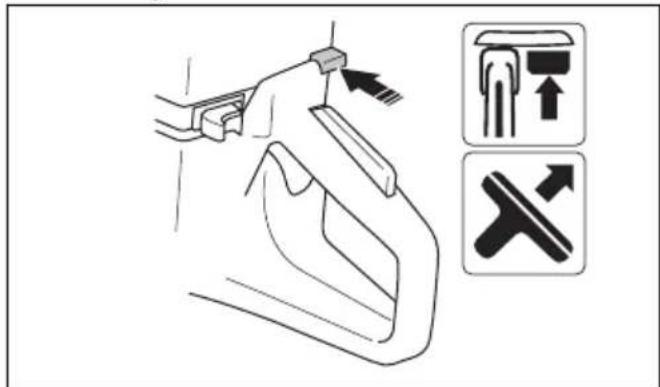
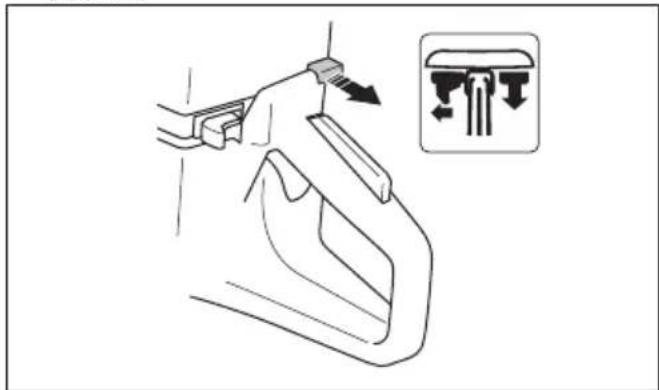
- Push the throttle trigger to disengage the start throttle and set the product at idle speed.
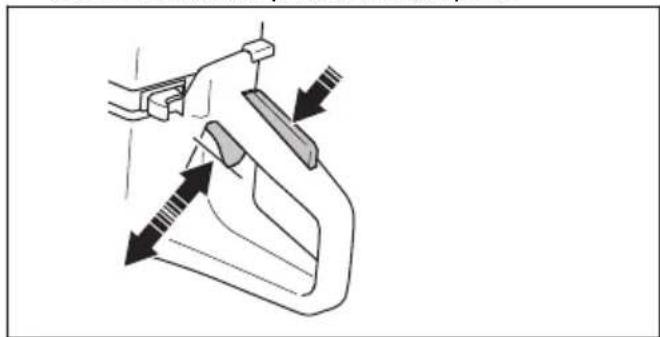
natural_image
Diagram of a hand holding a tool with directional arrows indicating movement or force (no text or symbols present)To start the product with a warm engine

WARNING: Make sure that the cutting blade can rotate freely. It starts to rotate when the engine starts.
- Make sure that the STOP switch is in the left position.
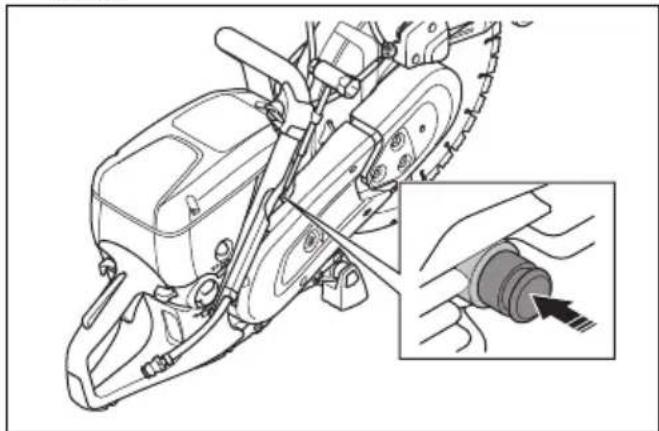
- Pull the choke control fully to get the start throttle position.
natural_image
Line drawing of a hand holding a tool with an inset showing a mechanical component (no text or symbols)- Push the decompression valve to decrease the pressure in the cylinder. The decompression valve goes back to its initial position when the product starts.
natural_image
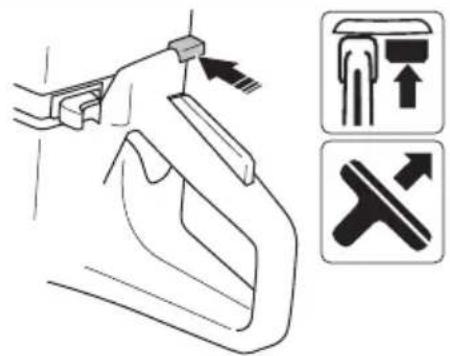
Technical line drawing of a mechanical device with an inset showing a cable being inserted (no text or symbols present)- Push the choke control to disable the choke. The start throttle stays in position.
-
Hold the front handle with your left hand.
-
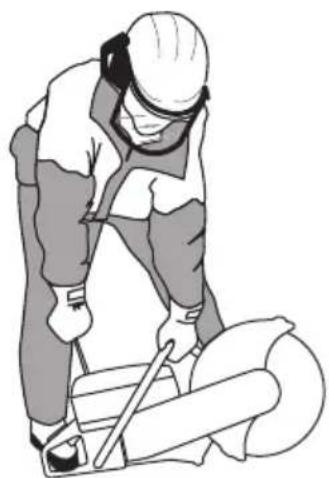
Put your right foot on the lower section of the rear handle to push the product against the ground.

WARNING: Do not wind the starter rope around your hand.
- Pull the starter rope slowly until you feel a resistance as the starter pawls engage. Then pull continuously and quickly.
natural_image
Illustration of a worker in safety gear using a cutting tool on a large cylindrical object (no text or symbols)
CAUTION: Do not pull the starter rope fully and do not let go of the starter
rope handle when the starter rope is extended. This can cause damage to the product.
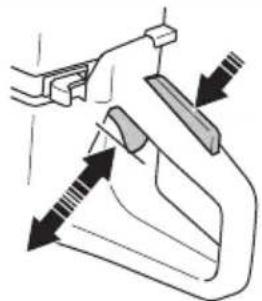
- Push the throttle trigger to disengage the start throttle and set the product at idle speed.
natural_image
Diagram of a hand holding a tool with arrows indicating movement or force direction (no text or symbols)To stop the product

WARNING: The cutting blade continues to rotate for a while after the engine stops. Make sure that the cutting blade can rotate freely until it fully stops. If it is necessary to stop the cutting blade quickly, let the cutting blade lightly touch a hard surface. Risk of serious injury.
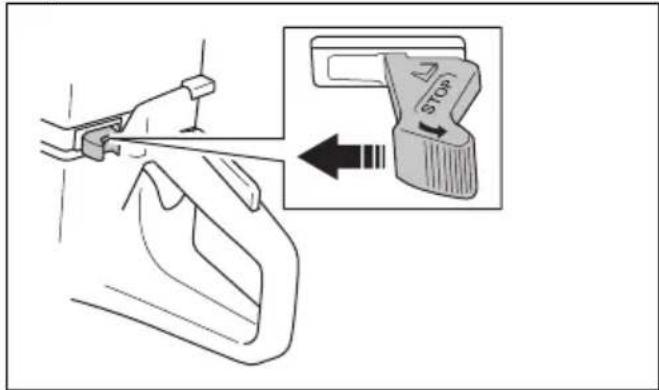
- Move the STOP switch to the right to stop the engine.
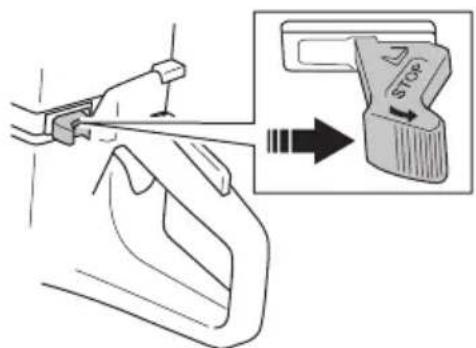
Maintenance
Introduction

WARNING: Read and understand the safety chapter before you do maintenance on the product.
For all servicing and repair work on the product, special training is necessary. We guarantee that professional repairs and servicing is available. If your dealer is not a
service agent, speak to them for information about the nearest service agent.
For spare parts, speak to your HUSQVARNA dealer or service agent.
Maintenance schedule
The maintenance schedule shows the necessary maintenance of the product. The intervals are calculated on daily use of the product.
| Daily Weekly Monthly Yearly | ||||
| Clean External cleaning | Spark plug | |||
| Cold air intake Fuel tank | ||||
| Function inspection | General inspection Vibration damping system* Fuel system | |||
| Fuel leaks Muffler* Air filter | ||||
| Water delivery system Drive belt Clutch | ||||
| Throttle lockout* Carburetor | ||||
| Stop switch* Starter housing | ||||
| Blade guard and SmartGuard* | ||||
| Cutting blade** | ||||
| Replace Fuel filter | ||||
| * Refer to Safety devices on the product on page 8. ** Refer to Cutting blades on page 11. | ||||
To clean externally
- Flush the product externally with clean water after each day of operation. If it is necessary, use a brush.
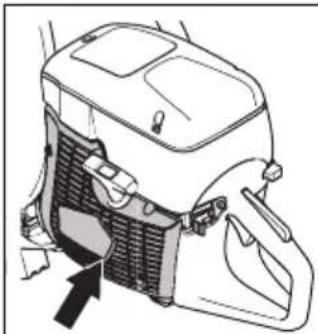
To clean the air intake

CAUTION: A dirty or blocked air intake makes the product too hot. This can cause damage to the piston and cylinder.
- Clean the air intake if it is necessary.
natural_image
Diagram of a car air conditioner unit with cooling fan and exhaust cover (no text or labels)- Remove blockage, dirt and dust with a brush.
To do a check of the spark plug

CAUTION: Always use the recommended spark plug type. Use of the incorrect spark plug can cause damage to the piston and cylinder. For recommended spark plug refer to Technical data on page 34.
Examine the spark plug if the product is low on power, does not start easily or if it operates unsatisfactorily at idle speed.
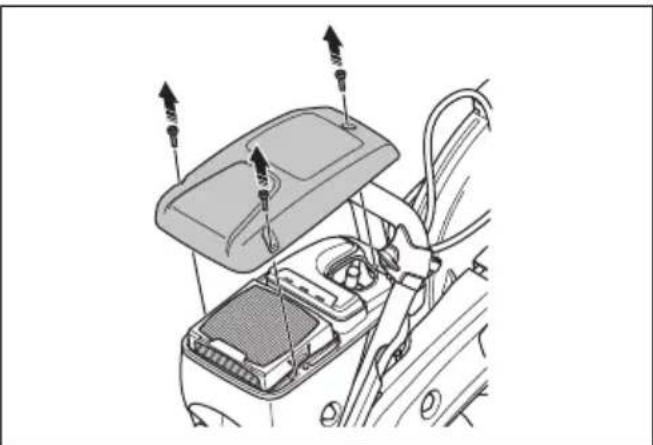
- Loosen the 3 screws on the air filter cover and remove the air filter cover.
natural_image
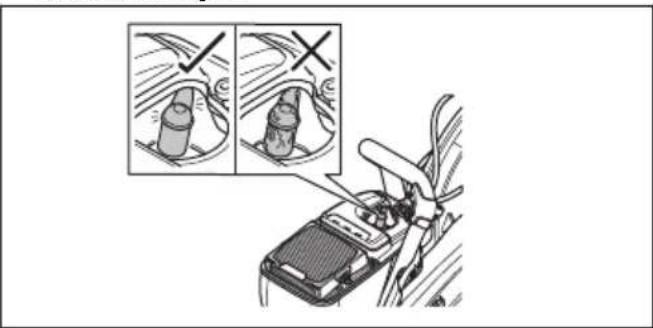
Diagram of a car interior showing the hood, seatbelt, and cable connections (no text or symbols)- Make sure that the spark plug cap and ignition cable are not damaged.
natural_image
Illustration of a mechanical device with two zoomed-in insets showing internal components (no text or symbols)
WARNING: A damaged spark plug cap and ignition cable can cause electrical shock.
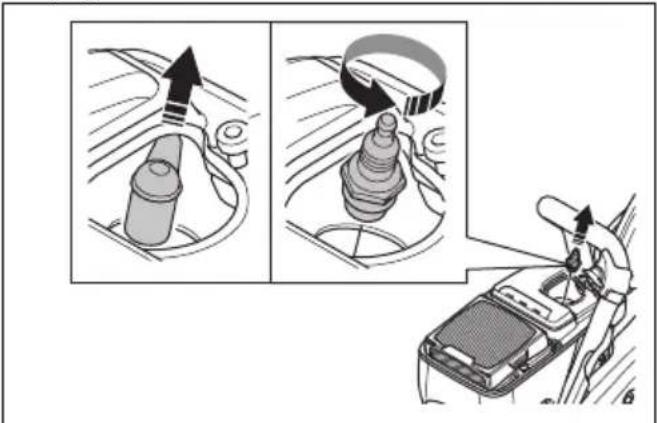
- Clean the spark plug if it is dirty.
- Disconnect the spark plug cap and remove the spark plug.
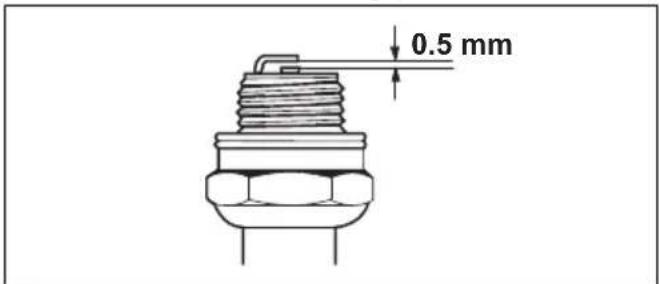
- Make sure that the electrode gap is 0.5 mm.
- If it is necessary, replace the spark plug.
To do a general inspection
• Make sure that all nuts and screws on the product are tightened correctly.
To replace the drive belt

WARNING: Do not start the product without all guards and covers installed.
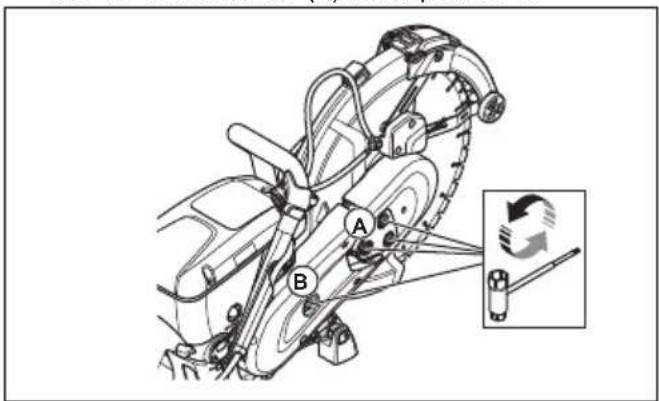
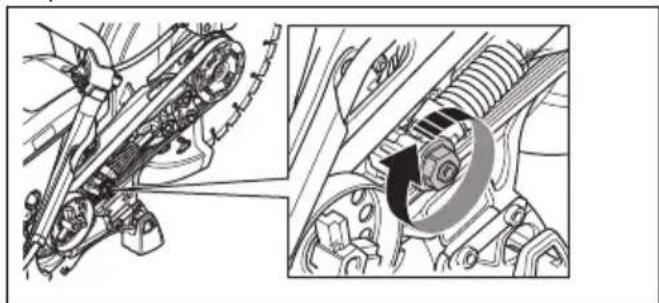
- Loosen the 3 nuts on the front belt guard (A) and turn the belt tensioner (B) to the position 0.
-
Remove the front belt guard.
-
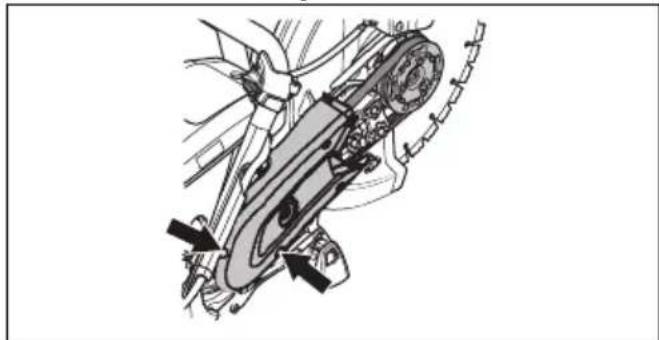
Remove the 2 screws on the rear belt guard. Remove the rear belt guard.
natural_image
Mechanical assembly diagram showing a cam mechanism with no visible text or symbols- Replace the drive belt. Turn the belt tensioner to the position 1.
natural_image
Mechanical assembly diagram showing gear and motor components with no visible text or symbols- Install the 2 belt guards in opposite sequence.
- Adjust the tension on the drive belt. Refer to To adjust the tension of the drive belt on page 27.
To adjust the tension of the drive belt
Note: Adjust the tension of a new drive belt after you use 1 or 2 fuel tanks.
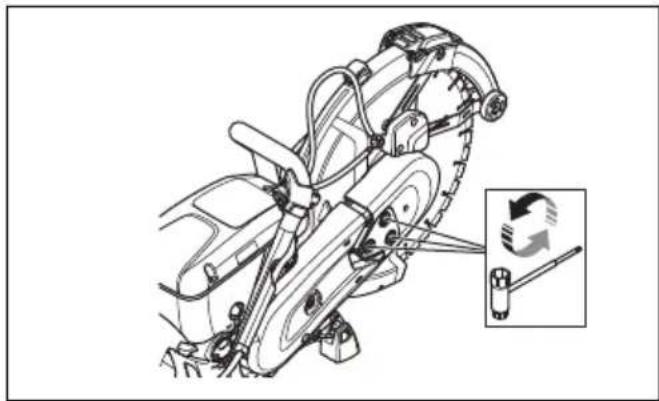
- Loosen the 3 nuts.
natural_image
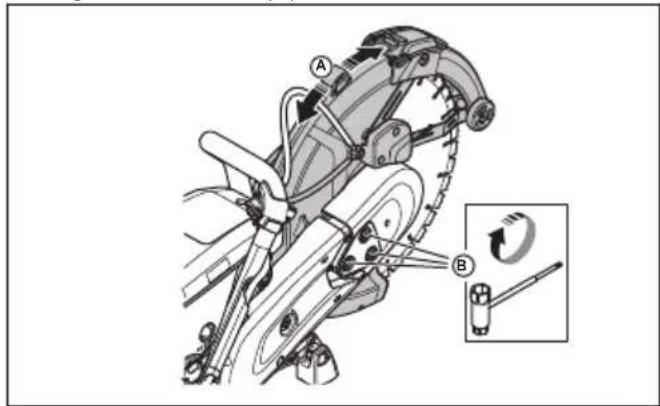
Technical line drawing of a mechanical assembly with a close-up inset showing a tool interacting with a component (no text or symbols present)- Move the blade guard (A) up and down 3–5 times. Tighten the 3 nuts (B).
Starter housing

WARNING: Always be careful and always use eye protection when you replace the recoil spring or the starter rope. There is tension in the recoil spring when it is wound in the starter housing. The recoil spring can eject and cause injury.
To remove the starter housing
- Loosen the 4 screws on the starter housing.
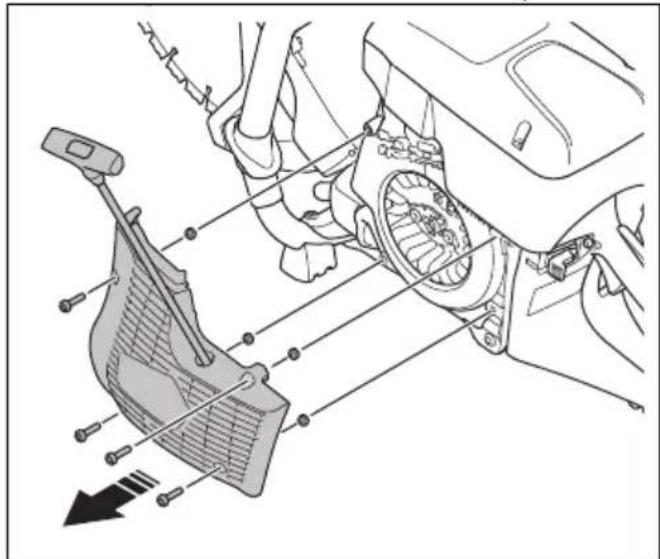
- Remove the starter housing.
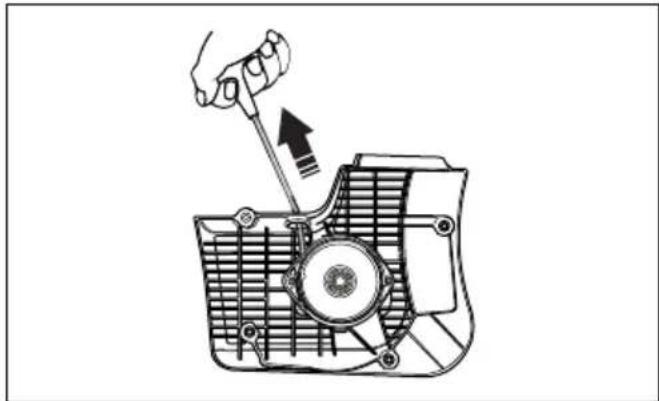
To replace a damaged starter rope
- Pull out the starter rope approximately 30 cm.
natural_image
Technical line drawing of a mechanical component with a hand operating a tool (no text or symbols)- Hold the starter rope pulley (A) with your thumb.
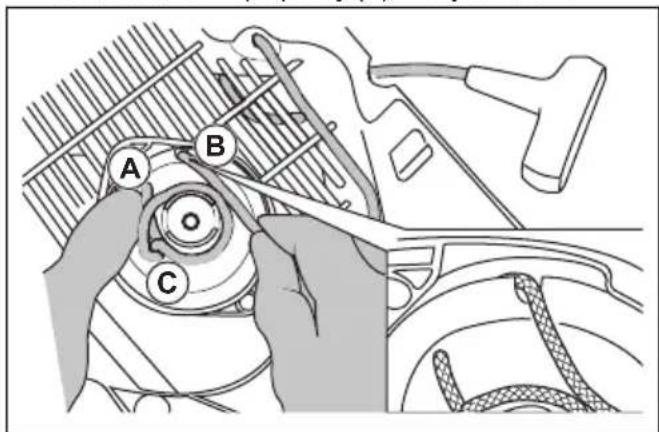
- Put the starter rope in the notch (B) in the starter pulley.
- Put the starter rope around the metal sleeve (C).
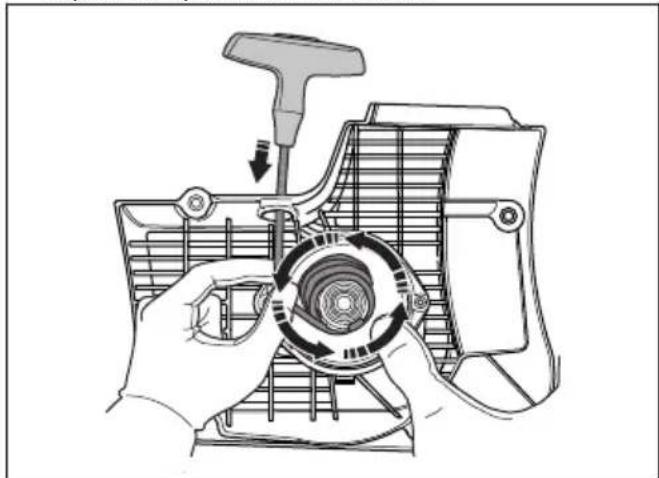
- Let the starter pulley rotate slowly and the starter rope wind up on the metal sleeve.
natural_image
Illustration of hands assembling a mechanical component with a tool and circular component (no text or symbols)-
Remove the starter rope from the metal sleeve.
-
Remove the cover on the starter rope handle (A).
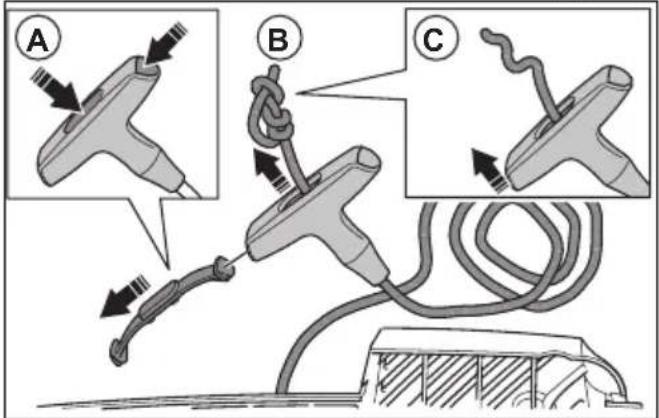
- Pull the starter rope up through the handle (B).
- Release the knot (C).
- Remove the starter rope.
- Make sure that the recoil spring is clean and not damaged.
- Put a new starter rope (A) in the hole in the starter housing.
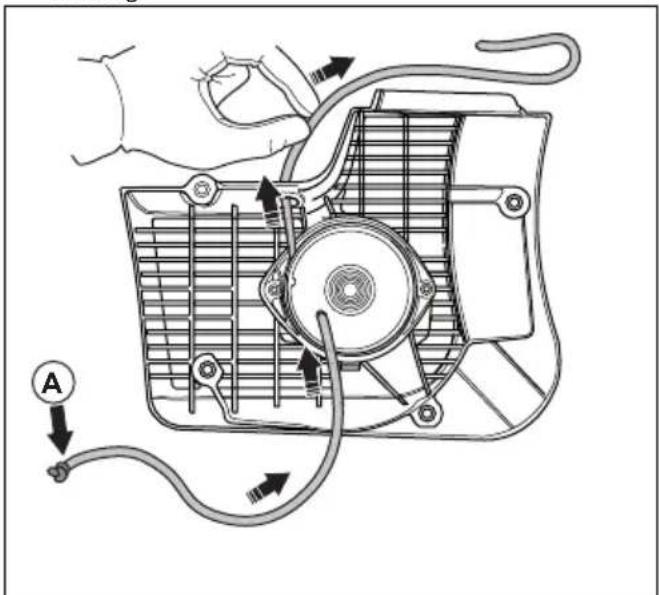
- Pull the starter rope through the starter rope handle and make a knot at the end of the starter rope (A).
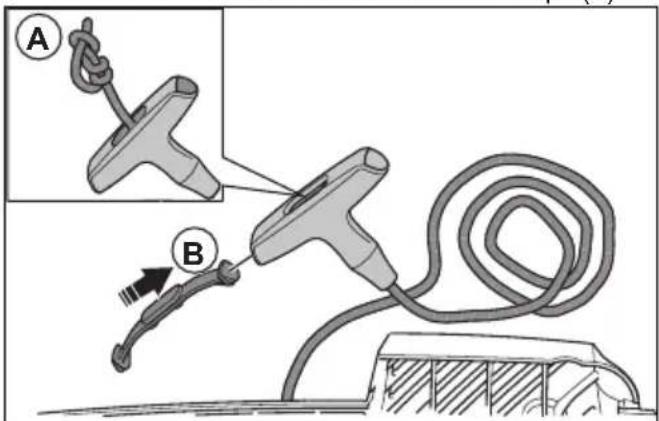
- Attach the cover on the starter rope handle (B).
- Adjust the tension of the recoil spring. Refer to To adjust the tension of the recoil spring on page 29.
To adjust the tension of the recoil spring
- Pull out the starter rope.
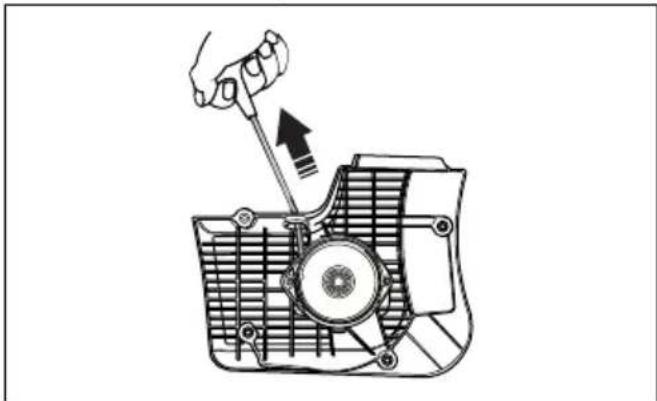
natural_image
Technical line drawing of a mechanical component with a hand operating a tool (no text or symbols)- Hold the starter rope pulley (A) with your thumb.
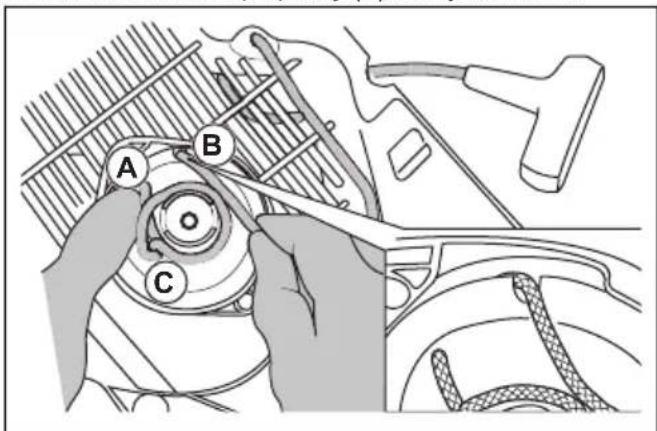
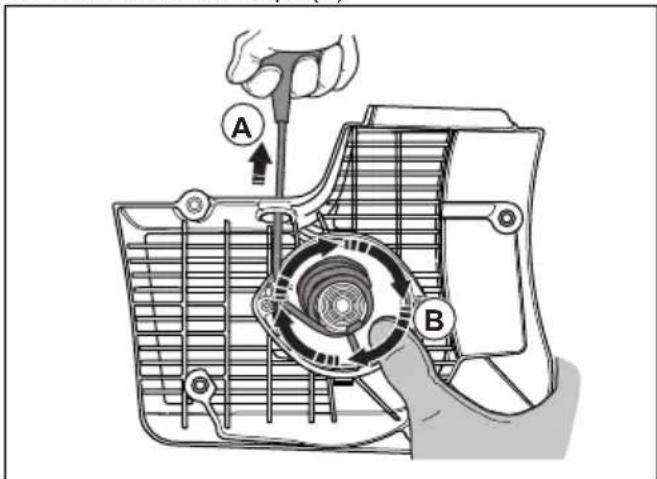
-
Put the starter rope in the notch (B) and wind it up around the metal sleeve (C).
-
Pull out the starter rope (A).
-
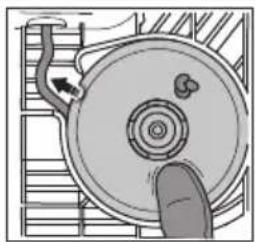
Put your thumb on the starter pulley (B) to keep the starter rope pulled out.
-
Release the starter rope from the notch.
natural_image
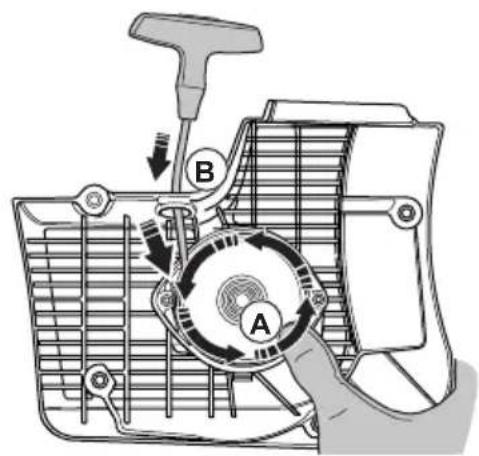
Diagram of a mechanical component with a finger pressing a circular feature, no text or symbols present- Remove your thumb to release the starter pulley (A) and let the starter rope (B) wind up on the pulley.
- Pull out the starter rope fully to do a check that the recoil spring is not at its end position. Make sure that the starter pulley can be turned half a turn or more before the recoil spring stops the movements.
To remove the spring assembly

WARNING: Always use eye protection when you remove the spring assembly. There is a risk for eye injury, especially if a spring is broken.
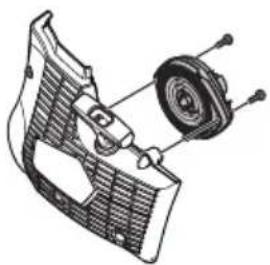
- Remove the 2 screws on the spring assembly.
natural_image
Technical illustration of a mechanical assembly with a gear and housing (no text or symbols)- Push the 2 brackets on the snap locks with a screwdriver.
To clean the spring assembly

CAUTION: Do not remove the spring from the assembly.
-
Blow the spring with compressed air until it is clean.
-
Apply a light oil to the spring.
To attach the spring assembly
- Assemble in the opposite sequence of To remove the spring assembly on page 30.
To install the starter housing

CAUTION: The starter pawls must come into the correct position against the starter pulley sleeve.
- Put the starter housing against the product.
- Pull out and release the starter rope slowly until the starter pulley engages with the starter pawls.

natural_image
Line drawing of a hand using a power saw to cut a blade (no text or symbols present)- Tighten the 4 screws on the starter housing.
To examine the carburetor
Note: The carburetor has rigid needles to make sure that the product always receives the correct mixture of fuel and air.
- Examine the air filter. Refer to To examine the air filter on page 31
- If it is necessary, replace the air filter.
- If the engine continues to decrease in power or speed, speak to your HUSQVARNA servicing dealer.
To examine the fuel system
- Make sure that the fuel tank cap and its seal are not damaged.
- Examine the fuel hose. Replace the fuel hose if it is damaged.
To adjust the idle speed

WARNING: If the cutting blade rotates at idle speed, speak to your servicing dealer. Do not use the product until the idle speed is correctly adjusted or repaired.
Note: For recommended idle speed refer to Technical data on page 34.
-
Start the engine.
-
Examine the idle speed. When the carburetor is correctly adjusted, the cutting blade stops when the engine is at idle speed.
- Use the T screw to adjust the idle speed.
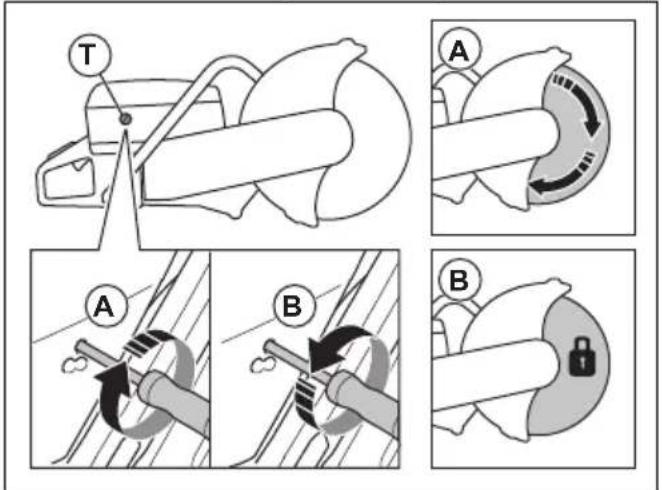
a) Turn the screw clockwise until the blade starts to rotate (A).
b) Turn the screw counterclockwise until the blade stops to rotate (B).
Fuel filter
The fuel filter is installed in the fuel tank. The fuel filter prevents contamination of the fuel tank when the fuel tank is filled. The fuel filter must be replaced yearly or more frequently if it is clogged.

CAUTION: Do not clean the fuel filter.
To examine the air filter
Note: Examine the air filter only if the engine power decreases.

CAUTION: Be careful when you remove the air filter. Particles that fall into the carburetor inlet can cause damage.

WARNING: Use approved respiratory protection when you replace the air filter. The dust in the air filter is dangerous to your health. Discard used air filters correctly.
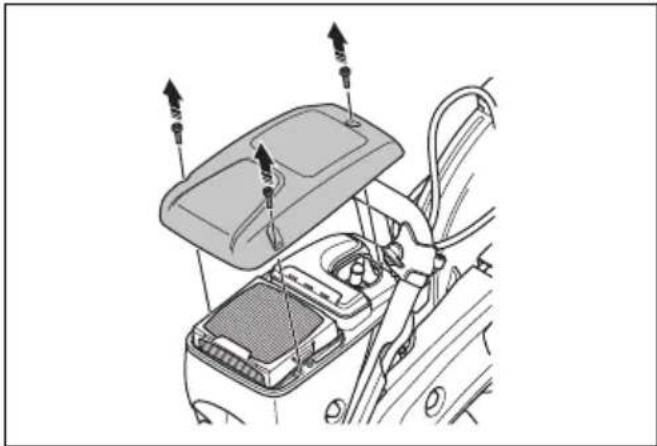
- Loosen the 3 screws on the air filter cover.
natural_image
Diagram of a car interior showing dashboard, steering wheel, and sensors (no text or labels)- Remove the air filter cover.
- Examine the air filter and replace it if it is necessary.
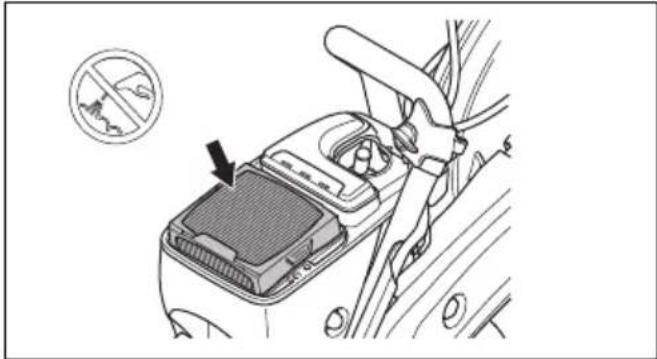

CAUTION: Do not clean the air filter or blow compressed air on it. This will do damage to the air filter.
- Replace the air filter if it is necessary.
a) Remove the air filter.
natural_image
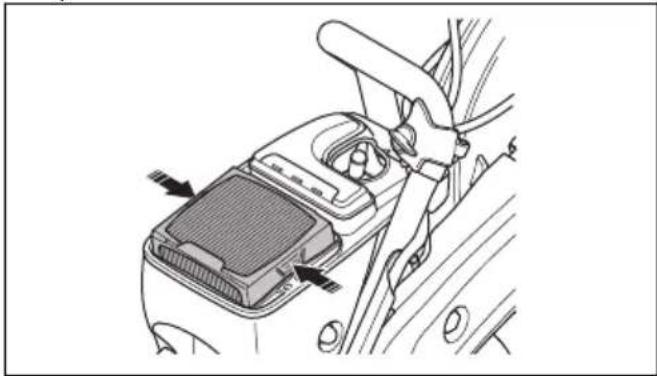
Diagram of a car's seatbelt mechanism showing hand placement and mounting points (no text or symbols)b) Install the new air filter.
- Attach the air filter cover and tighten the 3 screws.
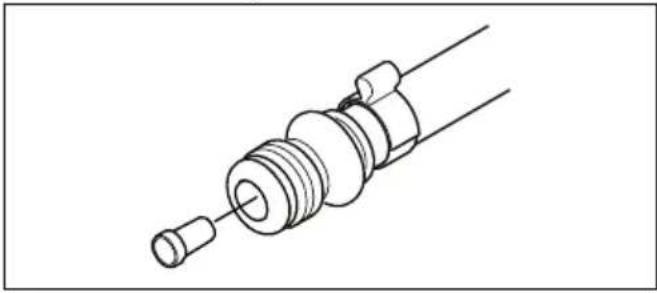
To do a check of the water supply system
- Examine the nozzles on the blade guard and make sure that they are not clogged.
- Clean as necessary.
-
Examine the filter on the water connector. Make sure that it is not clogged.
-
Clean as necessary. 5. Examine the hoses and make sure that they are not
natural_image
Technical line drawing of a mechanical component with threaded end and flange (no text or symbols)damaged.
Troubleshooting
| Problem Cause Possible solutions | ||
| The product does not start. | The start procedure is done incorrectly. | Refer to To start the product with a cold engine on page 23 and To start the product with a warm engine on page 24. |
| The stop switch in the right (STOP) position. | Make sure that the stop switch (STOP) is in the left position. | |
| There is no fuel in the fuel tank. Fill with fuel. | ||
| The spark plug is defective. Replace the spark plug. | ||
| The clutch is defective. Speak to your service agent. | ||
| The cutting blade rotates at idle speed. | The idle speed is too high. Adjust the idle speed. | |
| The clutch is defective. Speak to your service agent. | ||
| The cutting blade does not rotate when the operator throttles up. | The belt is too loose or defective. | Tighten the belt or replace the belt with a new one. |
| The clutch is defective. Speak to your service agent. | ||
| The cutting blade is installed incorrectly. | Make sure that the cutting blade is correctly installed. | |
| The product has no power when the operator tries to throttle up. | The air filter is clogged. | Examine the air filter. If it is necessary, replace it. |
| The fuel filter is clogged. Replace the fuel filter. | ||
| The fuel tank flow is blocked. Speak to your service agent. | ||
| The vibration levels are too high. | The cutting blade is installed incorrectly. | Make sure that the cutting blade is correctly installed and that it is not damaged. Refer to To install the cutting blade on page 15. |
| The cutting blade is defective. | Replace the cutting blade and make sure that it is not damaged. | |
| A vibration damping unit is defective. | Speak to your service agent. | |
| The temperature of the product is too high. | The air intake or the cylinder flanges are blocked. | Clean the air intake and the cylinder flanges. |
| The drive belt tension is not sufficient. | Examine the belt. Adjust the tension. | |
| The clutch is defective. | Always cut at full throttle. | |
| Examine the clutch. Speak to your service agent. | ||
| The engine decreases in power or in speed. | The air filter is clogged. Examine the air filter. Refer to the air filter on page 31. | |
| There is much dust during operation. You can see dust in the air. | The water supply or water pressure is not sufficient. | Do a check of the water supply to the product. |
| Refer to To do a check of the water supply system on page 31. | ||
| The SmartGuard does not move freely.The SmartGuard does not retract when the product is removed away from the work piece. | The moving parts of the SmartGuard are clogged. | Clean the moving parts. |
| The springs of the SmartGuard does not operate correctly. | Do a check of the springs. Clean the springs. | |
Transportation, storage and disposal
Transportation and storage
- Safely attach the product during transportation to prevent damage and accidents.
- Remove the cutting blade before transportation or storage of the product.
- Keep the product in a locked area to prevent access for children or persons that are not approved.
- Keep the cutting blades in dry, frost free conditions.
- Examine all new and used blades for transport and storage damage before assembly.
- Clean and maintain the product before storage. Refer to Maintenance on page 25.
- Remove the fuel from the fuel tank before long-term storage.
Disposal
- Obey the local recycling requirements and applicable regulations.
- Discard all chemicals, such as oil or fuel, at a service center or at an applicable disposal location.
- When the product is no longer in use, send it to a HUSQVARNA dealer or discard it at a recycling location.
Technical data
Technical data
| K 770, K 770 OilGuard, K 770 Rescue K | 770 SmartGuard | |
| Cylinder displacement, cm3/cu.in. 74/4.5 74/4.5 | ||
| Cylinder bore, mm/in. 51/2 51/2 | ||
| Travel length, mm/in. 36/1.4 36/1.4 | ||
| Idle speed, rpm 2700 2700 | ||
| Fully opened throttle, no load, rpm 9300 (+/- 150) 9300 (+/- 150) | ||
| Power, kW/hp @rpm 3.7 /5 @9000 3.7 /5 @9000 | ||
| Spark plug NGK BPMR 7A NGK BPMR 7A | ||
| Electrode gap, mm/in. 0.5/0.02 0.5/0.02 | ||
| Fuel tank capacity, liters/US fl oz 0.9/30 0.9/30 | ||
| Recommended water pressure, bar/PSI | 0.5-10/7-150 | 0.5-10/7-150 |
| Weight | ||
| Power cutter without fuel and cutting blade 300mm (12in.), kg/lb* | 10/22 | 10.8/23.8 |
| *Rescue shoulder strap, additional 0.4kg/0.9lb. | ||
| Power cutter without fuel and cutting blade 350mm (14in.) kg/lb | 10.1/22.3 | 11.1/24.5 |
| Spindle, output shaft | ||
| Max. spindle speed with cutting blade 300mm (12in.), rpm | 4700 4700 | |
| Max. spindle speed with cutting blade 350mm (14in.), rpm | 4700 4700 | |
| Max. peripheral speed, m/s or ft/min (300mm/12in.) | 80 or 16000 | 80 or 16000 |
| Max. peripheral speed, m/s or ft/min (350mm/14in.) | 90 or 18000 | 90 or 18000 |
| Noise emissions | ||
| Sound power level, measured dB (A) | 113 | 113 |
| Sound power level, guaranteed LWA dB (A)1 | 115 | 115 |
| Equivalent sound pressure level at the ear of the operator, dB (A)2 | 101 | 101 |
| Equivalent vibration levels, a_hveq^3 | ||
| Front/rear handle 300mm (12in.), m/s ^2 | 2.1/2.3 2.4/2.2 | |
| Front/rear handle 350mm (14in.), m/s ^2 | 2.0/2.3 2.2/2.1 | |
Recommended cutting blade dimensions
| Cutting blade diameter, mm/in. | Max. cutting depth, mm/in. | Blade speed rat-ing, rpm | Blade speed rat-ing, m/s or ft/min | Blade center hole diameter, mm/in. | Max. blade thickness, mm/in. |
| 300/12 100/4 5100 | 80 or 16000 25.4/1 | or 20/0.79 5/0.2 | |||
| 350/14 125/5 5500 | 100 or 19600 25.4/1 | or 20/0.79 5/0.2 |
Noise and vibration declaration statement
These declared values were obtained by laboratory type testing in accordance with the stated directive or standards and are suitable for comparison with the declared values of other products tested in accordance with the same directive or standards. These declared
values are not suitable for use in risk assessments and values measured in individual work places may be higher. The actual exposure values and risk of harm experienced by an individual user are unique and depend upon the way the user works, in what material the product is used, as well as upon the exposure time and the physical condition of the user, and the condition of the product.
Accessories
Sensor for Husqvarna Fleet Services™
This product is compatible with the Husqvarna Fleet machine sensor. The product can then be connected to Husqvarna Fleet Services ^™ , which is a cloud solution that gives the commercial fleet manager an overview of all products. For more information about Husqvarna Fleet Services ^™ , refer to www.husqvarna.com.
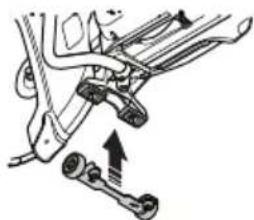
Wheel kit
The wheel kit is attached at the bottom of the product.
natural_image
Mechanical assembly diagram showing linkage components with an upward arrow indicating motion (no text or labels)connections make it easy to install the product on the cutting trolley.
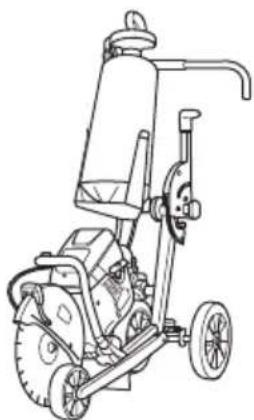
natural_image
Line drawing of a mechanical power tool with wheels and a cylindrical component (no text or symbols)Cutting trolley
A cutting trolley makes it easier to cut in floors and roads, especially long cuts at a set depth. Quick
Declaration of Conformity
EU Declaration of Conformity
We, Husqvarna AB, SE-561 82 Huskvarna, Sweden, tel: +46-36-146500, declare on our sole responsibility that the product:
| Description Portable cut-off machine | |
| Brand HUSQVARNA | |
| Type/Model K 770, K 770 OilGuard, K 770 Rescue, K 770 SmartGuard | |
| Identification Serial numbers dating from 2021 and onwards |
complies fully with the following EU directives and regulations:
| Directive/Regulation Description | |
| 2006/42/EC "relating to machinery" | |
| 2000/14/EC "relating to outdoor noise" | |
| 2014/30/EU "relating to electromagnetic compatibility" | |
| 2011/65/EU "relating to restrictions of hazardous substances" |
and that the following harmonized standards and/or technical specifications are applied;
EN ISO 12100:2010, EN ISO 19432-1:2020, EN 55012:2008+A1:2009, EN ISO 14982:2009, EN IEC 63000:2018.
2000/14/EC, conformity assessment procedure: Annex V. For information relating to noise emissions, refer to Technical data on page 34.
Partille, 2021-04-29
Erik Silfverberg
R&D Director, Concrete Sawing & Drilling Equipment
Husqvarna AB, Construction Division
Responsible for technical documentation

UK Declaration of Conformity
We, Husqvarna AB, SE-561 82 Huskvarna, Sweden, tel:
+46-36-146500, declare on our sole responsibility that
the product:
| Description Portable cut-off machine | |
| Brand HUSQVARNA | |
| Type/Model K 770, K 770 OilGuard, K 770 Rescue, K 770 SmartGuard | |
| Identification Serial numbers dating from 2021 and onwards |
complies fully with the following UK directives and regulations:
| Regulation Description | |
| S.I. 2008/1597 The Supply of Machinery (Safety) Regulations 2008 | |
| S.I. 2016/1091 Electromagnetic Compatibility Regulations 2016 | |
| S.I. 2001/1701 The Noise Emission in the Environment by Equipment for use Outdoors Regulations 2001 | |
| S.I. 2012/3032 The Restriction of the Use of Certain Hazardous Substances in Electrical and Electronic Equipment Regulations 2012 | |
and that the following harmonized standards and/or technical specifications are applied;
EN ISO 12100:2010, EN ISO 19432-1:2020, EN
55012:2008+A1:2009, EN ISO 14982:2009, EN IEC 63000:2018.
Conformity assessment procedure acc S.I. 2001/1701:
Schedule 8. For information relating to noise emissions, refer to Technical data on page 34.
Partille, 2021-04-29
UK Importer:
Husqvarna UK Limited
Preston Road, Aycliffe
Business Park Newton
Aycliffe, County Durham
UK DL5 6UP
Erik Silfverberg
R&D Director, Concrete Sawing & Drilling Equipment
Husqvarna AB, Construction Division
Responsible for technical documentation

Inhalt
natural_image
Illustration of a person wearing full-body protective gear and a first aid kit (no text or symbols)natural_image
Diagram of a hand holding a tool with an arrow pointing to a curved mechanical component (no text or symbols present)natural_image
Line drawing of a car interior showing a hand holding a tool with an arrow pointing to the handle (no text or symbols)natural_image
Diagram of a hand holding a tool with arrows indicating movement or force direction (no text or symbols)natural_image
Diagram of a car steering wheel and dashboard with directional arrows indicating rotation (no text or symbols)natural_image
Three identical mechanical screw components shown in isometric view, no text or symbols presentnatural_image
Technical line drawing of two interlocking gears with no text or symbolsnatural_image
Diagram of a geological cross-section showing layered strata with no text or symbolsnatural_image
Circular mechanical gear diagram with evenly spaced teeth and central bore (no text or symbols)natural_image
Abstract black X-shaped line drawing with a zigzag arc above and a small circle below (no text or symbols)natural_image
Diagram of a mechanical component with two circular parts and directional arrows indicating motion (no text or symbols)natural_image
Diagram showing a gear mechanism with a black arrow pointing to a specific component (no text or symbols present)natural_image
Mechanical assembly diagram showing a bracket with a dashed arrow indicating motion direction (no text or symbols)natural_image
Line drawing of a mechanical device with a handle and lever (no text or symbols)natural_image
Technical line drawing of a mechanical assembly with a tool and component (no text or symbols)natural_image
Technical diagram showing mechanical assembly with directional arrows and a magnified inset of a hand holding a cable (no text or symbols)natural_image
Technical line drawing of a mechanical device with attached components and a close-up inset showing internal components (no text or symbols)natural_image
Technical line drawing of a mechanical device with attached clamps and a central component (no text or symbols)natural_image
Technical line drawing of a mechanical component with no visible text or symbolsnatural_image
Technical diagram of a mechanical device with directional arrows indicating motion (no text or labels)natural_image
Mechanical assembly diagram showing a wheel and bracket assembly with directional arrows (no text or labels)natural_image
Diagram showing a mechanical component interacting with a circular object, with directional arrows indicating motion (no text or symbols)Blockierung
natural_image
Diagram of a medical procedure with a surgical tool and X-shaped cross symbol (no text or labels)natural_image
Simple line drawing of a car and a magnifying glass with a downward arrow (no text or symbols)natural_image
Diagram showing a mechanical component with a circular target and directional arrows, no text or symbols present.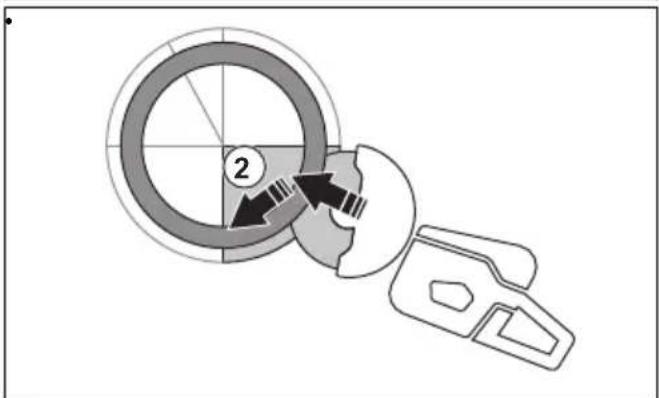
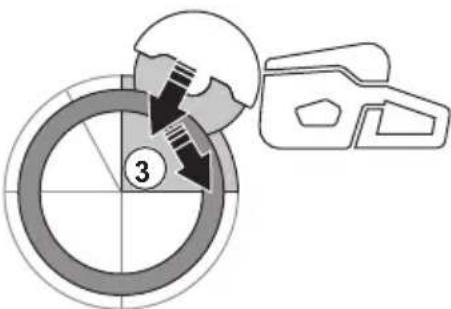
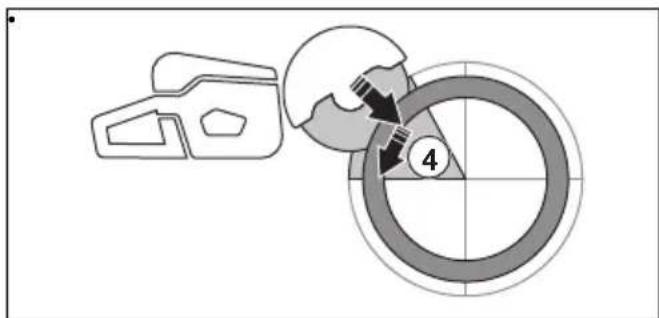
natural_image
Line drawing of a hand holding a backpack, no text or symbols presentnatural_image
Diagram of a mechanical device with a rotating shaft and base, showing motion direction (no text or symbols)natural_image
Line drawing of a person using a tool on a foot (no text or symbols)natural_image
Diagram showing two mechanical components with a cross mark, one with a plus sign and the other with a curved arrow (no text or symbols)natural_image
Line drawing of a person using a cutting tool to cut a saw (no text or symbols present)natural_image
Line drawing of a hand holding a tool with an inset showing a mechanical component (no text or symbols)natural_image
Technical line drawing of a mechanical device with an inset showing a close-up of a component (no text or symbols present)natural_image
Technical diagram of a mechanical assembly with an inset showing a circular component (no text or symbols present)natural_image
Illustration of a worker in safety gear operating a large tool (no text or symbols visible)
natural_image
Diagram of a mechanical component with directional arrows indicating movement or force (no text or symbols)natural_image
Line drawing of a hand holding a car handle with a bracket, showing a lever mechanism and a close-up inset of the lever handle (no text or symbols)natural_image
Technical line drawing of a mechanical tool with an inset showing a close-up of a component (no text or symbols present)natural_image
Illustration of a worker in safety gear using a cutting tool (no text or symbols)
natural_image
Diagram of a hand holding a tool with arrows indicating force or movement (no text or symbols)Wartung
Einleitung

natural_image
Line drawing of a car interior showing the hood and seat area with an arrow indicating a component (no text or symbols present)natural_image
Diagram of a car interior showing a battery cover, switch, and wiring (no text or labels)
natural_image
Mechanical assembly diagram showing a motor or gear mechanism with no visible text or symbolsnatural_image
Mechanical assembly diagram showing gear and motor components (no text or labels)natural_image
Technical line drawing of a mechanical device with a close-up inset showing a lever mechanism (no text or symbols)natural_image
Technical diagram of a mechanical assembly with labeled parts, showing a lever and gear mechanism (no text or symbols present)natural_image
Technical line drawing of a mechanical component with a hand operating a tool (no text or symbols)natural_image
Illustration of hands operating a mechanical device with a rotary knob and handle (no text or symbols)natural_image
Technical line drawing of a mechanical component with a hand operating a tool (no text or symbols)natural_image
Diagram of a circular mechanical component with internal flow arrows, no text or symbols presentnatural_image
Technical illustration of a mechanical device with internal components and mounting holes (no text or symbols)natural_image
Line drawing of a hand using a cutting tool on a saw (no text or symbols)natural_image
Diagram of a mechanical or electrical component with circular arrows indicating motion, no visible text or symbols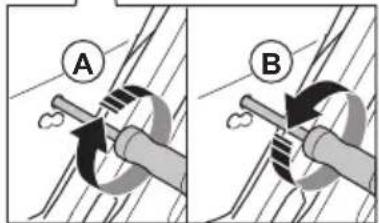
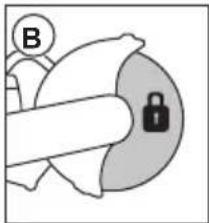
natural_image
Simple line drawing of a hand holding a lock and a circular icon with letter B (no text or symbols)natural_image
Diagram of a car interior showing a lid, seatbelt, and steering wheel (no text or symbols)natural_image
Diagram of a car interior showing hand positioning and a circular inset with a crosshair symbol (no text or labels)
natural_image
Diagram of a car's rearview seat assembly showing hand placement and mounting bracket (no text or labels)natural_image
Line drawing of a mechanical component with threaded body and connector (no text or symbols)natural_image
Mechanical assembly diagram showing a lever mechanism with two springs and a shaft (no text or labels)Führungswagen
natural_image
Line drawing of a mechanical power tool with wheels and a cylindrical component (no text or symbols)Husqvarna AB, Construction Division
Précautions relatives aux vibrations

natural_image
Illustration of a person in full protective gear standing next to a first aid kit (no text or symbols visible)natural_image
Line drawing of a hand holding a tool interacting with a car handle (no text or symbols)natural_image
Line drawing of a hand holding a car handle with a tool, showing a black arrow pointing to the handle (no text or symbols present)natural_image
Diagram of a hand holding a tool with arrows indicating movement or force direction (no text or symbols)natural_image
Diagram of a car steering wheel and dashboard with motion arrows indicating rotation (no text or symbols)natural_image
Three types of threaded mechanical components shown in line drawings (no text or symbols)natural_image
Technical line drawing of two interlocking gears with no text or symbolsnatural_image
Diagram of a geological cross-section showing layered strata with no text or symbolsnatural_image
Circular mechanical gear diagram with evenly spaced teeth and central bore (no text or symbols)natural_image
Simple black cross symbol with a zigzag line above and a circle below, no text or symbols present.natural_image
Diagram of a medical device with two circular components and directional arrows indicating movement or force (no text or symbols)natural_image
Abstract diagram with a globe and stylized shapes, no text or symbols presentnatural_image
Mechanical assembly diagram showing a lever mechanism with no visible text or symbolsnatural_image
Line drawing of a mechanical device with a handle and lever (no text or symbols)natural_image
Technical line drawing of a mechanical tool interacting with a cutting tool (no text or symbols present)natural_image
Technical diagram showing mechanical assembly with directional arrows and a magnified inset of a hand holding a device (no text or symbols present)natural_image
Technical line drawing of a bicycle steering wheel assembly with mounting bracket (no text or symbols)natural_image
Technical line drawing of a mechanical device with attached clips and a handle (no text or symbols)natural_image
Technical line drawing of a mechanical component with no visible text or symbolsnatural_image
Technical diagram of a mechanical component with directional arrows indicating motion (no text or labels)natural_image
Mechanical assembly diagram showing a wheel and bracket assembly with directional arrows (no text or labels)natural_image
Diagram showing a mechanical component and a circular object with directional arrows, no text or symbols present.Rebond rotationnel
Rebond de grimpée
Rebond de pincement
natural_image
Diagram of a medical procedure with a surgical tool and X-shaped cross symbol above a table (no text or labels)natural_image
Simple line drawing of a 3D object with a magnifying glass icon showing a download arrow (no text or symbols)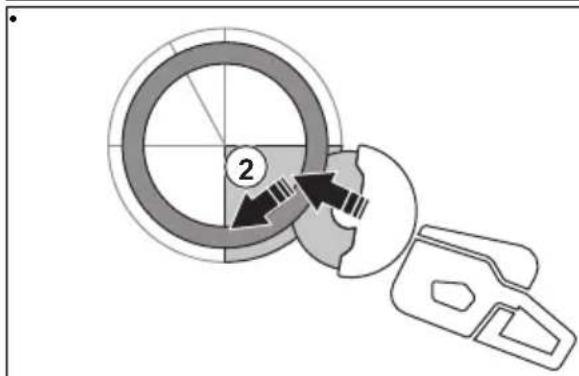
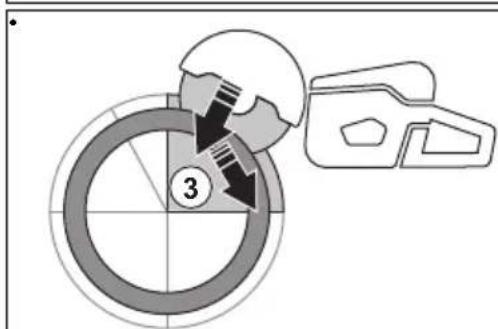
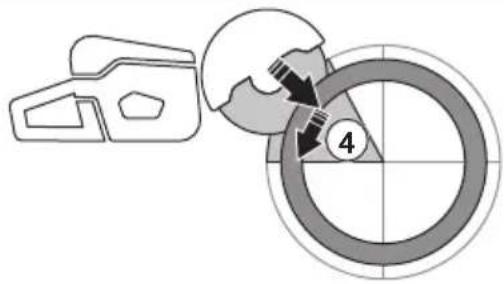
natural_image
Symbolic illustration of crossed-out black arrows over a gray rectangular block, with no text or labels present.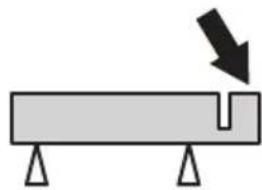
natural_image
Simple diagram of a beam with supports and a downward arrow indicating force or direction (no text or symbols)natural_image
Line drawing of a hand holding a car seatbelt, no text or symbols presentnatural_image
Diagram of a mechanical device with a rotating shaft and base, showing motion direction (no text or symbols)natural_image
Line drawing of a person using a handheld device to lift or lift an object, no text or symbols presentnatural_image
Diagram showing two mechanical components with a crossed-out black X mark, no text or symbols presentnatural_image
Line drawing of a person using a cutting tool to cut a saw (no text or symbols present)natural_image
Line drawing of a hand holding a tool with an arrow pointing to a component, accompanied by a small inset showing directional arrows (no text or symbols)natural_image
Technical line drawing of a mechanical tool with an inset showing a close-up of a component (no text or symbols present)natural_image
Technical diagram of a car's wheel assembly with an inset showing the wheel rim detail (no text or symbols present)natural_image
Illustration of a worker in safety gear using a tool on a large cylindrical object (no text or symbols)
natural_image
Diagram of a hand holding a tool with arrows indicating movement or force direction (no text or symbols)natural_image
Illustration of a hand holding a car handle with a directional arrow and a small inset showing a vehicle seatbelt (no text or symbols)natural_image
Technical line drawing of a mechanical device with a close-up inset showing a hand holding a cylindrical component (no text or symbols present)natural_image
Illustration of a worker in safety gear using a cutting tool (no text or symbols)
natural_image
Diagram of a hand holding a tool with arrows indicating movement or force direction (no text or symbols)natural_image
Diagram showing a hand holding a tool interacting with a car, with an inset illustrating the process of adding a component (no text or symbols present)Entretien
Introduction

natural_image
Diagram of a car air conditioner unit with cooling fan and exhaust manifold (no text or labels)natural_image
Diagram of a car interior showing a lid, seatbelt, and hand positioning tools (no text or symbols)
natural_image
Mechanical assembly diagram showing a cam mechanism with no visible text or symbolsnatural_image
Mechanical assembly diagram showing gear and motor components with no visible text or symbolsnatural_image
Technical line drawing of a mechanical assembly with a close-up inset showing a tool interacting with a component (no text or symbols present)Corps du lanceur

natural_image
Technical line drawing of a mechanical fan or impeller assembly with a hand operating the blade (no text or symbols present)natural_image
Illustration of hands assembling a mechanical component with a tool and circular assembly (no text or symbols)natural_image
Diagram of a hand operating a mechanical fan or impeller device with a tool, showing no text or symbols.natural_image
Diagram of a mechanical component with a circular housing and directional arrows, no visible text or symbolsnatural_image
Technical illustration of a mechanical component with a coiled spring and housing (no text or symbols)natural_image
Line drawing of a hand using a saw on a cutting board (no text or symbols)natural_image
Diagram of a car interior showing dashboard, steering wheel, and battery compartment (no text or labels)
natural_image
Diagram of a car's seatbelt mechanism with arrows indicating force or movement (no text or symbols)natural_image
Technical line drawing of a mechanical component with threaded shaft and mounting bracket (no text or symbols)Dépannage
natural_image
Mechanical assembly diagram showing linkage components with an upward arrow indicating motion (no text or labels)Chariot de découpe
natural_image
Line drawing of a manual lawn mower with wheels and handle (no text or symbols)Husqvarna AB, division Construction
Responsable de la documentation technique

Inhoud
Inleiding.... 117
Veiligheid.... 121
Montage....127
Werking....133
Onderhoud....142
Probleemoplossing.... 149
Sticker snijuitrusting
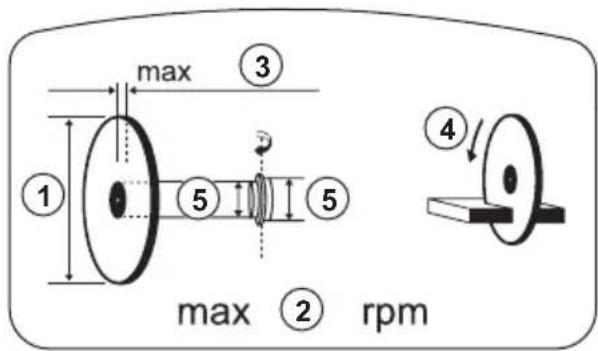
natural_image
Illustration of a person in full safety gear standing next to a first aid kit (no text or symbols visible)Gashendelvergrendeling controleren
- Controleer of de gashendel vergrendeld is in de stationaire stand wanneer de gashendelvergrendeling wordt losgelaten.
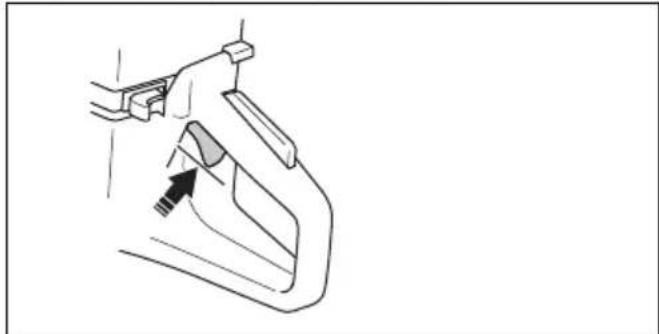
natural_image
Line drawing of a hand holding a tool with an arrow pointing to a component (no text or symbols)natural_image
Line drawing of a hand holding a tool with an arrow pointing to a component (no text or symbols)natural_image
Diagram of a mechanical component with directional arrows indicating movement or force (no text or symbols)Bladbeschermkap en SmartGuard (optioneel)

natural_image
Diagram of a car's steering wheel and dashboard with directional arrows indicating rotation (no text or symbols)natural_image
Three types of threaded mechanical components shown in line drawings (no text or symbols)Trillingsdempingssysteem controleren

natural_image
Technical line drawing of two interlocking gears with no text or symbolsnatural_image
Diagram of a geological cross-section showing layered strata with no text or symbolsnatural_image
Circular mechanical gear diagram with evenly spaced teeth and central bore (no text or symbols)natural_image
Simple black cross symbol with a zigzag line above and a circle below, no text or symbols present.natural_image
Diagram of a helmet with two circular components and directional arrows indicating movement or force (no text or symbols)natural_image
Simple line drawing of a globe and a stylized object with a black arrow pointing to it (no text or symbols)natural_image
Mechanical assembly diagram showing a bracket with a dashed arrow indicating motion direction (no text or symbols)natural_image
Line drawing of a mechanical device with a handle and lever (no text or symbols)natural_image
Technical line drawing of a mechanical component with a tool and gear (no text or symbols)De zaagkop omkeren (K 770, K 770 OilGuard, K 770 Rescue)

natural_image
Mechanical assembly diagram showing a component with directional arrows and a close-up of its internal components (no text or labels)natural_image
Technical line drawing of a mechanical device with attached components and a close-up inset showing internal fasteners (no text or symbols)natural_image
Technical line drawing of a mechanical device with attached tubing and a central component (no text or symbols)natural_image
Technical line drawing of a mechanical component with no visible text or symbolsnatural_image
Technical diagram of a mechanical component with curved and linear features, no visible text or symbolsnatural_image
Mechanical assembly diagram showing a wheel and bracket assembly with directional arrows (no text or labels)natural_image
Diagram showing a mechanical device interacting with a circular component, with directional arrows indicating motion (no text or symbols)Roterende terugslag
natural_image
Diagram of a medical device with a cross symbol crossed over a table, no text or labels presentnatural_image
Simple line drawing of a device with a magnifying glass highlighting a circular object (no text or symbols)natural_image
Diagram showing a mechanical component with a circular target and directional arrows, no text or symbols present.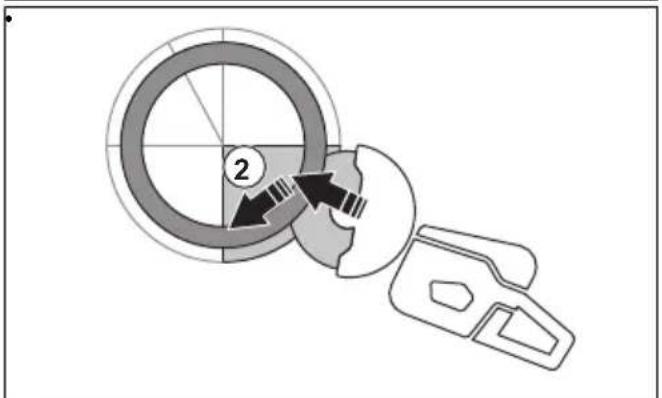
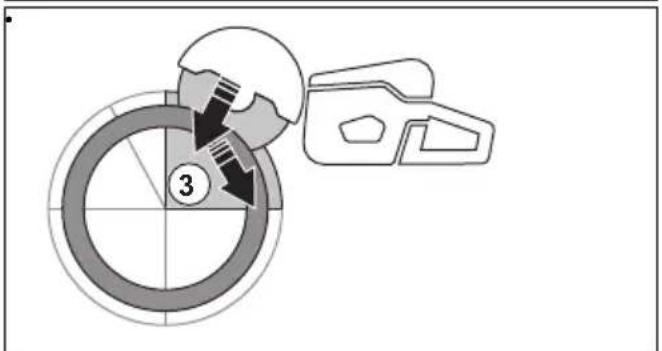
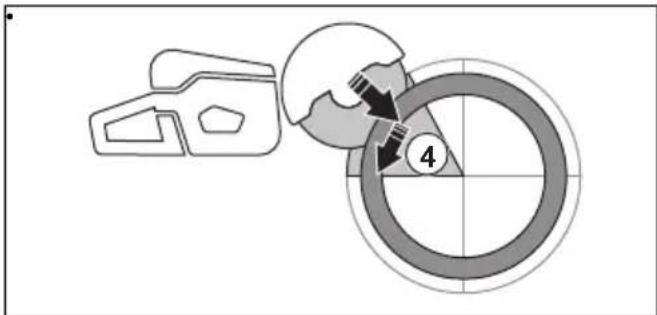
natural_image
Two schematic diagrams showing a beam with cross-shaped load and a U-shaped component under compression, both without any text or symbols.Basistechniek

WAARSCHUWING: Trek de
natural_image
Line drawing of a person using a handheld device to interact with another person (no text or symbols present)natural_image
Diagram of a mechanical device with a rotating shaft and base, showing motion direction (no text or symbols)natural_image
Line drawing of a person using a tool on a foot (no text or symbols)natural_image
Two mechanical components with a cross symbol, shown in side-by-side illustrations (no text or labels)natural_image
Line drawing of a person using a chain-linking power tool to cut a saw (no text or symbols present)natural_image
Technical line drawing of a mechanical clamp or chain drive with an inset showing a close-up of the component (no text or symbols present)natural_image
Technical diagram of a mechanical assembly with an inset showing a circular component (no text or symbols present)natural_image
Illustration of a worker in safety gear using a tool on a cylindrical object (no text or symbols)
natural_image
Diagram of a mechanical component with directional arrows indicating movement or force (no text or symbols)natural_image
Technical line drawing of a mechanical device with an inset showing a close-up of a cable being inserted (no text or symbols present)natural_image
Illustration of a worker in safety gear operating a large tool (no text or symbols visible)
natural_image
Diagram of a hand holding a tool with arrows indicating movement or force direction (no text or symbols)Product stoppen

natural_image
Technical line drawing of a car air conditioner unit with no visible text or symbolsnatural_image
Diagram of a car interior showing dashboard, steering wheel, and dashboard lift (no text or labels)
natural_image
Mechanical assembly diagram showing a motor and gear mechanism (no text or labels)natural_image
Mechanical assembly diagram showing gear and rotor components (no text or labels)natural_image
Technical line drawing of a mechanical device with a close-up inset showing a cable or connector (no text or symbols present)Starterhuis

natural_image
Technical line drawing of a mechanical component with a hand operating a tool (no text or symbols)natural_image
Illustration of hands operating a mechanical device with a rotary knob and lever (no text or symbols)natural_image
Diagram of a hand using a tool to adjust or install a mechanical component, showing fan and blades (no text or symbols)natural_image
Diagram of a mechanical component with a circular housing and internal structure, showing airflow or fluid flow direction (no text or symbols)natural_image
Technical illustration of a mechanical assembly with gears and components (no text or symbols)natural_image
Line drawing of a hand using a power saw to cut a blade (no text or symbols present)natural_image
Diagram of a car interior showing a roof cover, dashboard, and steering wheel (no text or symbols)natural_image
Interior view of a car's seatbelt with hand扶rest and no visible text or symbols
natural_image
Diagram of a car's seatbelt mechanism showing hand placement and adjustment arrows (no text or symbols)natural_image
Technical line drawing of a mechanical component with threaded end and connector (no text or symbols)beschadigd zijn.
Probleemoplossing
natural_image
Mechanical assembly diagram showing linkage components with an upward arrow indicating motion (no text or labels)Zaagwagen
natural_image
Line drawing of a mechanical power tool with wheels and a cylindrical component (no text or symbols)Original instructions
Originalanweisungen