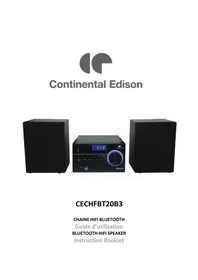
CECHFBT20B3 - Speaker CONTINENTAL EDISON - Free user manual and instructions
Find the device manual for free CECHFBT20B3 CONTINENTAL EDISON in PDF.


| Product Type | Hi-fi system with built-in speakers |
| Brand | Continental Edison |
| Model | CECHFBT20B3 (M038) |
| Dimensions (W x H x D) | 180 x 106 x 195 mm |
| Net Weight | 1 kg |
| Power Supply | AC 100-240 V ~ 50/60 Hz |
| Power Consumption | 28 W (max), 0.2 W in standby |
| Output Power | 2 x 5 W RMS |
| Bluetooth | Version 2.1, class II, range up to 10 m |
| FM Radio | 87.5 – 108 MHz, 30 presets |
| CD Player | CD-R, CD-RW, audio CD |
| USB Port | 1 x USB (charging and MP3 playback) |
| Auxiliary Input | 1 x 3.5 mm AUX jack |
| Speakers | Impedance 6 Ω, response 50 Hz – 17 kHz |
| Equalizer | Presets ROCK, POP, JAZZ, CLASSIC |
| Bass Boost | X-BASS enable/disable |
| Timer | Sleep timer (up to 90 min) and programmable timer |
| Remote Control | Infrared, CR2025 battery included, range 6 m |
| Backup Batteries | 2 x 1.5 V LR03/AAA (not supplied) |
| Maintenance | Clean with a soft, dry cloth. Do not use harsh chemicals. |
| Safety | Protection class II, automatic shutdown after 15 min of inactivity |
Frequently Asked Questions - CECHFBT20B3 CONTINENTAL EDISON
User questions about CECHFBT20B3 CONTINENTAL EDISON
0 question about this device. Answer the ones you know or ask your own.
Ask a new question about this device
Download the instructions for your Speaker in PDF format for free! Find your manual CECHFBT20B3 - CONTINENTAL EDISON and take your electronic device back in hand. On this page are published all the documents necessary for the use of your device. CECHFBT20B3 by CONTINENTAL EDISON.
USER MANUAL CECHFBT20B3 CONTINENTAL EDISON
-
FR (version originale)
-
EN (translated from the original)
Please read through this user manual thoroughly, its detailed instructions, warnings and safety precautions to ensure you get the most out of your product.
Keep this manual for future reference.
SAFETYWARNINGS
WARNING
RISK OF ELECTRIC SHOCK. DO NOT OPEN.

CAUTION: TO PREVENT SHOCK HAZARDS, DO NOT OPEN THE UNIT. DO NOT REMOVE THE HOUSING (OR THE BACK). THIS HIFI SPEAKER DOES NOT CONTAIN ANY SPARE PARTS THAT CAN BE REPAIRED OR REPLACED BY THE END USER. ONLY A QUALIFIED TECHICIAN SHOULD SERIVCE THIS PRODUCT. ANY DISASSEMBLY OF THE APPLIANCE WILL VOID THE WARRANTY.

The lightning symbol in an equilateral triangle draws the user's attention to the presence, in the case of the HIFI speaker, of a high voltage, not isolated, the amplitude of which could be sufficient to constitute a risk. of electric shock to people.

The exclamation mark written in an equilateral triangle draws the user's attention to the presence of important operating or maintenance safety instructions (routine maintenance) in the instructions accompanying the HIFI speaker.
Warning: This product contains a HIFI speake emitting a low-power category 1 laser. Invisible laser radiation can escape when the HIFI speaker is dismantled and the safety HIFI speakers are deactivated. Avoid exposing yourself to the beams.

This marking indicates that the external power supply has an electrical insulation of type class II.
READ CAREFULLY THE INSTRUCTIONS BEFORE INSTALLING AND USING THIS APPLIANCE. IN THE CASE YOU RESELL THIS APPLIANCE, PLEASE MAKE SURE TO PROVIDE THIS INSTRUCTION MANUAL TO YOUR BUYER.
WARNING! To prevent any fire or electrical hazards:
- The apparatus shall not be exposed to dripping or splashing.
- No objects filled with liquids, such as vases, shall be placed on the apparatus.
- Minimum distance around the apparatus for sufficient ventilation is 10cm .
- The ventilation should not be impeded by covering the ventilation openings with items, such as newspapers, tablecloths, curtains, etc....
- No naked flame sources, such as lighted candles, should be placed on the apparatus.
- The apparatus shall be used in moderate climates only.
- The plug shall remain readily operable.
- If the supply cord is damaged, it must be replaced by the manufacturer, its service agent or similarly qualified persons in order to avoid a hazard.
Risk of hearing damage due to high sound pressure: In order to avoid possible hearing damage, do not listen at high volume levels for prolonged periods of time.
General precautions
-
The appliance is not intended for use by persons (including children) with restricted physical, sensory or mental capacities or without the required experience and / or knowledge unless they are supervised by a person responsible for their safety or receive from the latter information relating to the operation of the HIFI speaker. Children should be kept under supervision to ensure that they do not play with the appliance.
-
Keep the appliance and its accessories out of the reach of children. Do not leave the appliance on a child without supervision.
- Cleaning and maintenance of the appliance by the user must not be carried out by children.
- Do not introduce any foreign body into the openings of the CD player. The HIFI speaker may be damaged. Always insert CDs, label side up, into the tray. Never use force when loading a disc, or connecting an external HIFI speaker. If you feel resistance, try another way or with another medium.
Do not let children play with this unit and its accessories alone without adult supervision. - Do not hit or slam this product. Don't walk on the unit. Don't let the unit fall.
- Keep the HIFI speaker away from liquids, humid and dusty environment; put it away from excessive hot or cold temperature. It's recommended to use the HIFI speaker only with temperature indicated on the technical specification. This HIFI speaker is not adapted to a tropical climate.
- Keep the HIFI speaker away from all metallic objects (coins, keys...). Don't let it close to magnetic field which could damage the HIFI speaker.
- Do not block the area above the speaker mesh
- This HIFI speaker is intended for domestic use and should not be used for any purpose or any other application.
- Respect the instruction of use of external HIFI speakers that you connect to the tower (USB charging port connection and USB playing port connection)
Avoid electric shock, fire and explosions
- Do not use any damage power cords and cables or loose electrical outlets.
- Place cable in such a manner that it cannot be walked on, especially the ends connected to the HIFI speaker and the AC adapter.
- Do not twist or bend the power cord.
-
Do not pull the power cord when removing it from the outlet
-
Do not operate this appliance with wet hand, especially during charging.
-
Do not touch the cord or plug if your hands are wet.
-
Do not cover or block any ventilation openings.
-
Do not overload the electrical outlet. Plug the product into a proper power source as described on the operating instructions.
-
In order to prevent any overheating, when the HIFI speaker is on, do not let it in a place without ventilation like a bag for example.
-
Do not short circuit in any way.
-
Do not drop the appliance and avoid jolting shocks.
-
Unplug this apparatus during lightning storms or when unused for long periods of time.
-
To ensure normal operation of the equipment and your personal safety, we recommend you to choose a power adapter whose characteristics correspond to those provided by the manufacturer (see technical specification). Make sure that the adapter receives C€ certification, as this could result in overheating and cause a fire, endangering your own life. Charging can cause interference that will disappear immediately after you have disconnected the HIFI speaker.
-
The unit must not be installed at sites with gas / flammable sources or explosives (in a petrol station for example).
- Protect the unit from rain and excessive moisture. If water (or any liquids) is introduced into the apparatus, it must be turned off immediately and wipe it.
- Avoid exposing the HIFI speaker to high external pressure, which can lead to an internal short circuit and overheating
- Never put the HIFI speaker in or close to heating appliances such as microwave ovens, stoves, cooking tables, heaters or other (including audio amplifiers).
- Install away from electric or magnetic fields.
Protect the appliance from any damage.
-
Do not use harsh chemicals, cleaning solvents or strong detergents to clean the unit otherwise promote corrosion. Clean it with soft and dry tissue.
-
Never use any charger that is damaged.
-
Never dispose the HIFI speaker in fire.

AND HANDLING OF BATTERIES:
WARNING: Danger of explosion if the batteries are not inserted correctly or if they are replaced by non-like or no similar model. Replaced the batteries only by same type of batteries or equivalent. Batteries must not be exposed to excessive heat like sun or fire. Never throw batteries into fire or expose them to sources of heat. Different types of batteries, or new and used batteries must not be mixed.
Batteries have to be inserted with the correct polarity like indicated on the remote control.
Exhausted batteries have to be removed from the remote control. Only dispose of batteries in specific collection containers (contact your retailer for more information) in order to protect the environment.
Don't ingest the battery, danger of chemical burn
Keep news and used batteries out of reach of children.
If the battery is swallowed, it can cause serious intern burn in 2 hours only and cause the death.
If the battery compartment doesn't close properly, stop using the product and keep away from children.
In case of doubt concerning that the batteries may have been swallowed or introduced into any part of the body, call immediately a doctor.
For installation, handling, cleaning, and disposal of the HIFI speaker, refer to the following chapters of the User's Guide.
This instruction manual can be modified without prior notice.
Information on the marking of the Conformity Compliance.
The marking indicates that this product meets the quality requirements set by the European Directives 2014/53/UE (RED), 2014/35/EU (Low voltage), 2014/30/EU (Electromagnetic Compatibility CEM), 2011/65/UE (restriction of the use of certain hazardous substances in electrical and electronic equipment RoHS).
TABLE OF CONTENTS
SAFETYWARNINGS 29
I.DESCRIPTION 35
1.FRONT 35
2. BACK 36
3. REMOTE CONTROL DESCRIPTION 37
4. DISPLAY 38
II. TECHNICAL INFORMATION 39
III. SET UP AND USE 40
- BEFORE FIRST USE 40
- REMOTE CONTROL SET UP 40
- INSERTING AND REPLACING BACKUP BATTERIES 41
- FREE STANDING INSTALLATION 41
- CABLES CONNECTIONS 41
- USE THE HIFI SPEAKER 42
6.AUTOMATIC STANDBY MODE 47
IV. CLEANING AND MAINTENANCE 48
V. TROUBLESHOOTING 48
VI. ENVIRONMENT: RECYCLING 50
VII. WARRANTY 50
I. DESCRIPTION
1. Front
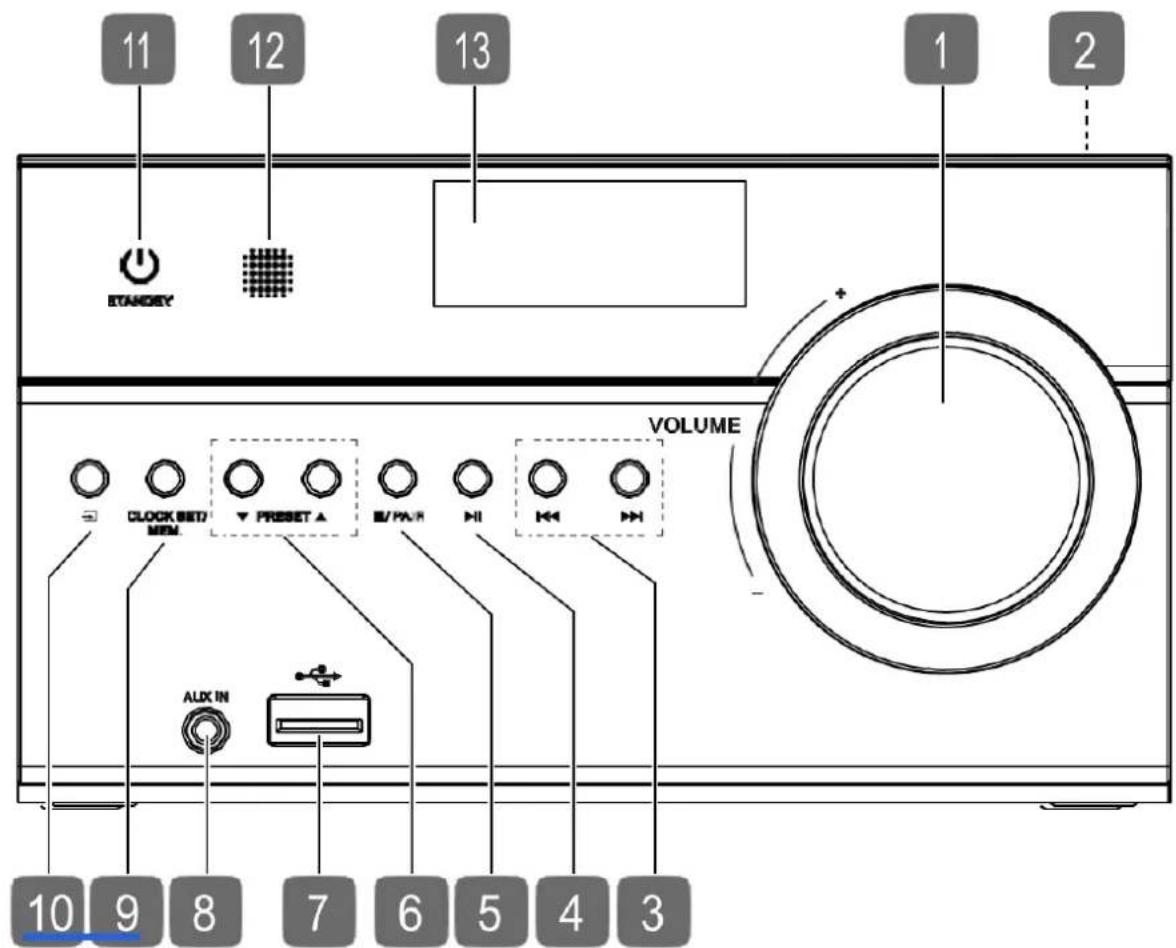
1) Sound volume knob
2) CD slot / ▲- open / close CD compartment (top)
3) / Set previous title / next title / time
4) - Start / stop automatic station playback / storage
5) / PAIR- Stop playback / pair the Bluetooth HIFI speaker
6) PRESET / - Select a stored radio station
7) USB memory port
8) AUX IN - Port for external HIFI speaker
9) CLOCK SET / MEM - Display / set the time / store button
10) - Selecting the operating mode
11) - Switching the HIFI speaker on / standby mode
12) Infrared receiver for the remote control
13) Display
2. Back
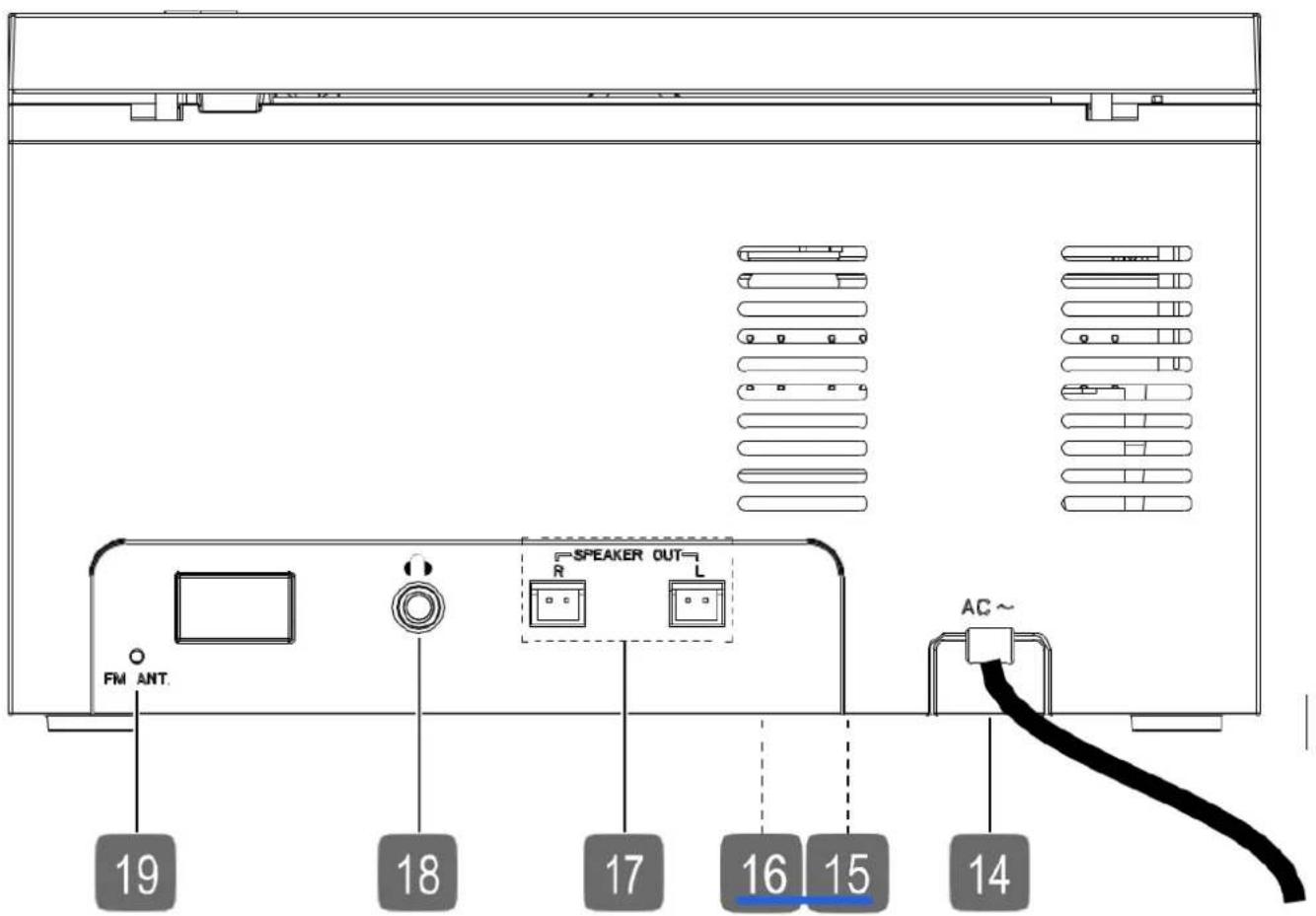
14) AC - Power cable
15) Battery compartment (on the bottom)
16) Rating label location
17) SPEAKER OUT L/R - Speaker ports
18) Headphone jack
19) FM ANT. - FM wire antenna
3. Remote control description
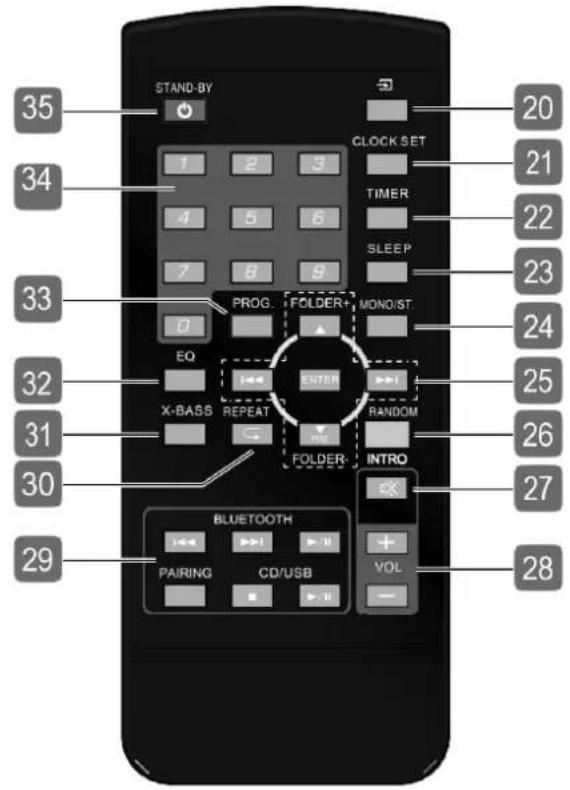
-
- Selecting the operating mode
- CLOCK/SET - Time display / setting
- TIMER - Setting the ignition timer (in standby mode)
- SLEEP - Sleep mode setting
-
MONO/ST. - Mono / stereo alternation (radio mode)
-
Fast search backward /
forward / previous / next track / time setting
PRE -Selection of stored radio stations -
FOLDER-/+ - Go back / forward a file folder in USB / MP3-CD mode
ENTER - Start / stop playback / confirm selection -
RANDOM - Random play
- INTRO/ Play titles / mute
- VOL-/+ - Volume decrease / increase
Bluetooth
-
Fast search back / forward / previous / next title
-
Start / stop playback
-
PAIR - Bluetooth HIFI speaker pairing CD/USB
-
Stop playback
-
Start / stop playback / store automatically the FM channel
-
REPEAT - Select repeat mode
- X-BASS - Enabling / disabling bass boost
- EQ - Selecting the equalizer mode
- PROG - Programming function
- 0-9 - Numeric keys
- STANDBY - Switching the HIFI speaker on / standby mode
4. Display

36) REPEAT 1 ALL - Display of Repeat mode
37) Display of time / radio frequency / track number / elapsed time
38) SLEEP - Sleep mode on
39) PROG - Programming function activated
40) RAND - Random play enabled
41) INTRO - Track playback enabled
42) - The title is read
43) BT-Bluetooth mode
44) Alarm enabled
45) BUZZER - Alarm Buzzer enabled
46) CD - CD mode enabled
47) RADIO - Radio mode enable
48) AUX-AUX Mode
49) MP3 - CD / MP3 key inserted)
50) USB - USB mode
51) Sound model of the equalizer
52) ST-Stereo radio station display
II. TECHNICAL INFORMATION
| Brand | Continental Edison | |
| Reference | CECHFBT20B3 (Model M038) | |
| Product information | Electrical parameters | AC 100-240V~50-60Hz |
| Power consumption | 28W | |
| RMS consumption in standby mode | 0.2W | |
| Standby max power consumption | 1W | |
| Protection class | Class II | |
| Laser class | Class I | |
| Supported formats | CD-R, CD-RW, CD audio | |
| Number of title memory | 20 CD titles | |
| Connection port | 1 × USB port 1 × jack input Ø 3.5mm AUX | |
| Operating temperature | In operation: +10 °C ~ +40 °C Out of operation (in packaging): -10 °C ~ +60 °C | |
| Humidity (non-condensing) | In operation: < 75% Out of operation (in packaging): < 90% | |
| Backup batteries | 2x 1,5 V R03/LR03/AAA | |
| Dimension (LxPxH) | 180 x 106 x 195 mm | |
| Net weight | 1 kg | |
| Bluetooth | Bluetooth version | Version 2.1 |
| Protocole | A2DP 1.2; AVRCP 1.2, 1.4; Class II | |
| Transmission range | Up to 10m | |
| Maximum emitted power | 5.07 dBm | |
| Frequency band | 2402-2480 MHz | |
| Radio | FM radio frequency range: | 87.5 – 108 MHz |
| Memory for channel | 30 | |
| Speakers | Impedance | 6Ω |
| Max output power | 5W x 2 | |
| Frequency in response | 50Hz-17KHz | |
| Remote control | Power supply | 1 pile x 3V CR2025 (supplied) |
| Transmission range | Up to 6m (Angle ≤30°) | |
III. SET UP AND USE
1. Before first use
Unpacking the appliance and disposing of the packaging elements:

Remove all packing materials that is protecting the appliance and the protective elements inside the appliance compartments.
-
The packing box and the papers sheets are recyclable. They must be thrown in the collection bins provided for this purpose.
-
The materials bearing the symbol are recyclable:
PE < = polyethylene; >PS < = polystyrene; >PP < = polypropylene
This means that they can be recycled by depositors in appropriate collection containers.
- The other packaging elements (adhesive, fasteners ...) must be thrown away with household waste.
To know further: www.quefairodemesdechets.fr
2. Remote control set up

Keep batteries, new or used, out of the reach of children. Take care not to swallow the batteries, otherwise there is a risk of chemical burns.
If you do not plan to use your HIFI speaker for a long time, remove the batteries from the remote control.
Make sure there are no obstacles between the unit's remote control sensor and the remote control.
Do not expose the infrared remote control sensor to direct sunlight or other strong light.
Risk of explosion if the battery is replaced incorrectly.
Replacement only with a battery of the same or equivalent type.
A CR2025 3 V lithium battery is already inserted in the remote control.
When using the remote control for the first time, remove the transparent film marked "Remove before use" without opening the battery compartment.
If the HIFI speaker does not respond or reacts badly to the remote control, the battery should be replaced.
Proceed as below
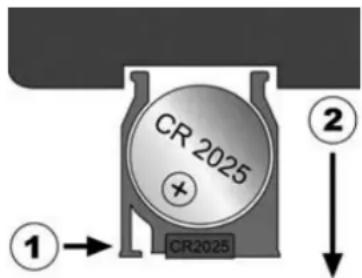
Press the locking lever (1) and remove the battery holder with the battery (2) from the remote control. Recycle the used battery in accordance with current legislation. Insert a new 3V CR2025 battery into the holder. When inserting the battery, be sure to observe the correct polarity. Fully insert the holder with the battery into the remote control.
The performance of the remote control is optimal at an angle of 30^ and up to a distance of 6m from the remote control sensor. If the operating range is reduced, the battery may need to be replaced.
3. Inserting and replacing backup batteries
To keep the clock running in the background and to keep your settings when you unplug the HIFI speaker, insert two new, high-quality LR03 / R03 / AAA batteries (not supplied) into the HIFI speaker. Replace the batteries after two years maximum.
- Open the cover of the battery compartment on the bottom of the HIFI speaker.
- Insert the batteries as shown in the battery compartment.
- Now close the battery compartment cover.
Remove the batteries from the HIFI speaker if you are not going to use the HIFI speaker for a long time.
4. Free standing installation
Place the unit and the speakers on a stable, level surface. Some aggressive furniture paints can attack the rubber feet of the HIFI speaker. In this case, place the HIFI speaker on a support.
5. Cables connections

Before making any connections, make sure that the HIFI speaker is disconnected from any electrical supply.
During use, if cables or wires must be reconnected, first disconnect the power cable or the HIFI speaker may be damaged.
Speaker connection
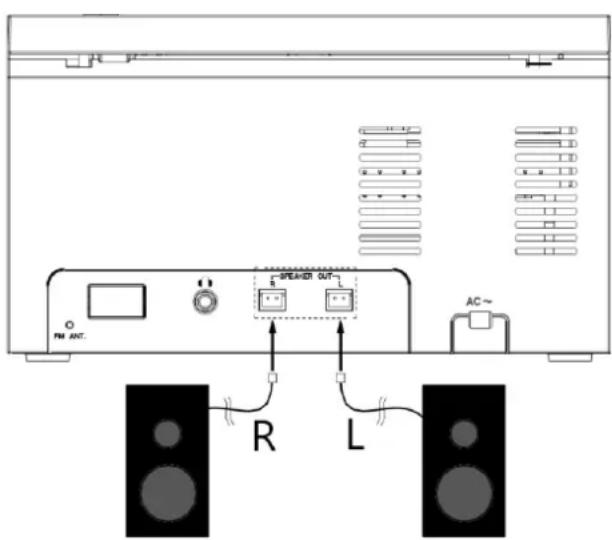
Connect the speaker cable plugs to the L and R speaker sockets on the back of the unit. The items marked with a right (R) correspond to the pair of cables for the right speaker. Items marked with an L (left) correspond to the pair of cables for the left speaker.
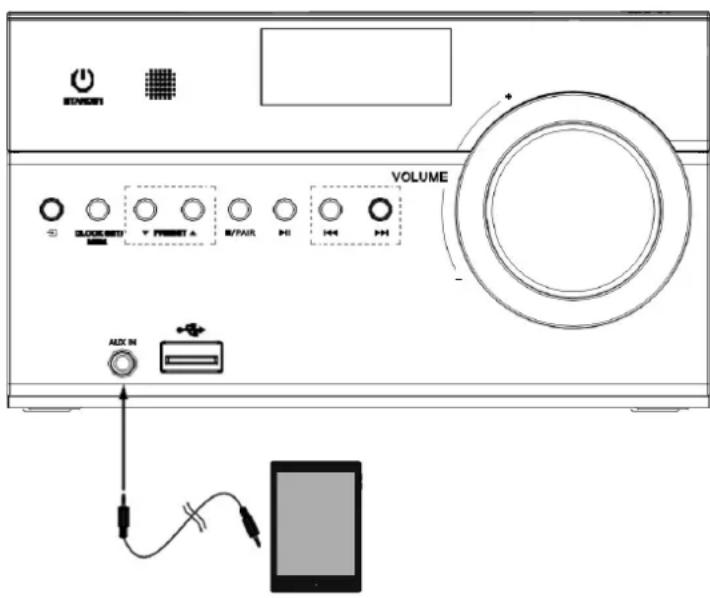
You can also connect an external audio HIFI speaker to the HIFI speaker using the AUX jack.
This analog socket is used for the audio connection of all types of sources (smartphone, tablet, CD player or MP3 player, game console, television ...). Use a 3.5mm jack / 3.5mm jack cable to connect the headphone jack of your audio source to the AUX jack on the HIFI speaker.
Connection to mains socket
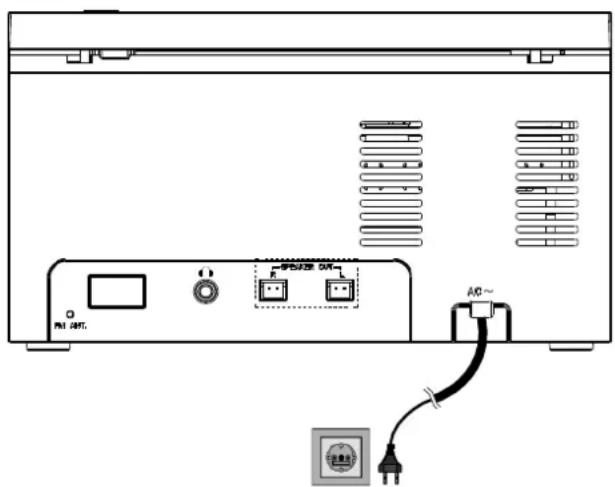
After making the connections to your source cables, proceed to the electrical connection of the HIFI speaker.
For this, connect the plug of the AC power cord to a statutory grounding outlet of 100V-240V 50 / 60Hz , which must be accessible at all times.
6. Use the HIFI speaker
You can activate the essential playback functions of your HIFI speaker using its buttons. The remote control offers, in addition to these basic functions, numerous additional controls ensuring the full functionality of your HIFI speaker.
In this user manual, we refer to the buttons on the remote control. A special note accompanies any indication relating to the keys of the HIFI speaker.
Switch on the HIFI speaker
Press on the button switch on the HIFI speaker.
Press again the button to return the HIFI speaker to standby mode. Time will display.
Mode selection
Press the button one or more times to switch from one reading mode to another.
The selected operating mode is displayed on the screen:
RADIO - Radio mode
CD - CD mode
USB - USB mode
AUX - AUX mode
BT-Bluetooth mode
Sound function
Volume / mute
- Adjust the volume using the buttons VOL- and VOL+ of the remote control or the knob VOLUME of the HIFI speaker.
Press on the button to mute. V00 will be displayed on the screen. Press the same button again to turn on the sound. V00 will switch off.
Bass equalizer / boost
Press the button one or more times EQ to listen to different sound effects: ROCK, POP, JAZZ, CLASSIC.
Press on the button X-BASS to enable the bass boost. BON appears briefly on the screen. Press the button again to deactivate the function. The screen briefly displays BOF.
Clock function
Time setting
Hold the button CLOCK SET until 24H flashes on the screen.
Press the button or , set the display format to 12 hours or 24 hours.
Confirm with the button CLOCK/SET.
The hour display flashes. Set the hours using the buttons and
Confirm with the button CLOCK/SET.
The minutes display flashes. Set the hours using the buttons and
Confirm with the button CLOCK/SET.
Time display
When the HIFI speaker is on, press the button CLOCK/SET. The time is displayed for a few seconds.
The time is permanently displayed on the screen in standby mode. By pressing CLOCK/SET you can turn on the screen backlight for a while.
« Sleep » timer
With the sleep timer, the HIFI speaker automatically switches off after a defined period of 90 minutes max.
Press the SLEEP button one or several times and select the duration of the sleep timer in 10 minutes increments.
The appliance will then switch off after the set time has elapsed.
If a sleep timer is activated, you can display the remaining time at any time:
Press on SLEEP. The remaining time is displayed.
To deactivate the sleep timer, do the following:
To deactivate the sleep timer, press on SLEEP until the screen displays OFF.
Setting / Stopping the timer
You can set a time when the HIFI speaker turns on and off automatically every day.
Press the button STANDBY to put the HIFI speaker in standby mode.
Hold the TIMER button on the remote control until the screen displays and ON. The start time flashes.
Select the desired start time using the keys and
First select the time, then confirm your choice by pressing TI-MER.
- Then set the minutes using the keys and , then confirm again your choice by pressing TIMER.
OFF appears on the screen, followed by the stop time. The stop time then flashes. Select the desired stop time using the keys and. First select the time, then confirm your choice by pressing TI- MER.
- Then set the minutes using the keys and , then confirm again your choice by pressing TIMER.
- Select the starting mode when the HIFI speaker switches on by pressing the buttons and : CD, USB, BU (Buzzer), TU (Tuner) confirm your choice by pressing TIMER.
- Adjust your desired volume by pressing the keys and , then confirm again your choice by pressing TIMER.
The settings are complete. The symbol appears on the screen when the timer is activated. Proceed as follows to turn off the timer:
- Briefly press on the button TIMER on standby mode. The icon s'eteint à switch off.
- You can activate the timer at any time by briefly pressing TIMER again with the previous settings.
Radio function
Channels setting
Press briefly or to set a specific frequency.
Press or until the search begins to automatically search for the next station.
Save the channel
- Specify a radio station to save.
Press on the button PROG. P until it appears on the screen and the number of the memory location where the station is to be saved flashes.
Press or , to select the programming location for this station.
Press PROG to save the channel.
Automatic channel saving
Press and hold the button in the CD/USB area or until the channel search starts automatically. All the channels found are then automatically saved in succession. Press the button again to deactivate the automatic recording.
Display of programmed channels
Press the PRE button of the remote control or the PRESET button of the HIFI speaker to display the channels saved one after the other.
Alternating mono / stereo modes
The MONO/ST. button allows you to switch between mono and stereo modes for a station. When a stereo signal is present, the indication ST appears on the screen.
CD and USB media playback
Pay attention to the following points:
Due to the many file systems and formats, the operation of connected media cannot be guaranteed.
Depending on the size of the data medium, the system may take more or less time to recognize it.
Supported file systems are FAT16 and FAT32; the supported file format is MP3.
Depending on the media inserted, several functions may not be supported: Thus, for audio CDs, it is impossible to select a folder or display the titles.
External hard drives are not supported.
Inserting a CD
Make sure to leave at least 15cm free above the unit so that the CD compartment cover can open without hindrance.
Press on the OPEN button of the CD compartment to open. OP is display on the screen.
- Place a CD with the printed side up on the support, ensuring that it is correctly positioned.
- Close the CD compartment by pressing on the cover until it clicks into place. --- appears on the screen during playback. The first title will then start playing automatically.
If there is no disc or the disc is not playable, NO will appear on the screen.
Inserting a USB HIFI speaker
You can connect USB sticks to the USB port. It is thus possible to play music titles from a USB key. The USB port does not support video playback.
Start / stop playback
Press the button in the CD / USB area on the remote control or with on the HIFI speaker to start the playback. To stop playback, press the button again. Then press the button again to resume playback.
Press the button in the CD / USB area on the remote control or with PAIR on the HIFI speaker to stOP the playback.
Title selection, fast reverse / fast forward
Press the button to return to the beginning of a track being played. Press the button again to go to the previous title. Press the button to move to the next title.
Press and hold to fast rewind within a title. Conversely, stands for fast forward.
File selection
For playback, MP3 files can be saved to different folders to give you a better overview.
To change the folder with an MP3 data carrier, press the button FOLDER - or FOLDER+.
Reading order programming
With the schedule function, you can compile your own playlist by selecting only certain titles. You can determine the reading order of the titles yourself. Proceed as follows:
- Stop the playback by pressing the button.
Press the PROG key. Memory location P01 flashes on the screen.
Now use the or button to select a title.
Confirm with the PROG button and record other titles in the same way.
Once all the titles have been added, start the programmed playback with II.
Repeat
- Press the REPEAT button one or more times to enter repeat mode. Two modes are supported:
Individual track repeat (REPEAT 1 shows on the screen),
Repeat all tracks (REP ALL shows on the screen).
Press the REPEAT button again to deactivate the repeat function.
Shuffle / intro
Press the RANDOM / INTRO button to activate / deactivate the shuffle function.
Press the RANDOM / INTRO button to play the titles one after another for a few seconds.
Press the button again to return to normal playback.
Bluetooth connection
You can also connect an external audio HIFI speaker to the HIFI speaker using Bluetooth wireless mode. This audio connection lets you listen to music stored on your HIFI speaker without using a cable.
- Press on the unit button or press on the remote control the Bluetooth button until the screen displays the function.
- Then please refer to the instruction manual of your Bluetooth audio HIFI speaker for pairing with the HIFI speaker. This is called CECHFBT20B3 in the list of detected Bluetooth HIFI speakers.
- Enter the code "0000" if your Bluetooth audio HIFI speaker prompts you, then confirm.
Pairing is successful when you hear a beep. The blue indicator light becomes steady.
4. Start playback on your audio HIFI speaker. Sound is played through the speakers in the HIFI speaker. To cancel the pairing in progress, press and hold the button on the remote control of the HIFI speaker.
Notes:
- This HIFI speaker can be paired with all HIFI speakers equipped with Bluetooth wireless technology.
- After pairing, your audio source and the HIFI speaker will reconnect automatically as soon as the Bluetooth source is selected.
- The HIFI speaker can only be paired with one Bluetooth HIFI speaker at a time. To pair with another HIFI speaker, cancel the Bluetooth pairing of your HIFI speaker then repeat steps 1 to 4 above with the new HIFI speaker.
- For optimal transmission quality, make sure that the HIFI speaker and your Bluetooth HIFI speaker are within 10 meters of each other and that no wall or electronic HIFI speakers are interfering with the transmission.
USB mode
The USB port allows you to read the content of a removable USB medium, but also to charge your smartphone or any HIFI speaker with a USB port (MP3 / MP4, GPS, iPod * / iPhone *, digital camera, etc.).
- Insert your removable USB media into the USB port on the HIFI speaker.
- Press on the unit button or press on the remote control button until the light indicator turns yellow.
- Start playback on your external audio source. Sound is played through the speakers in the HIFI speaker. Use the remote control of HIFI speaker to adjust the volume.
6. Automatic standby mode

Your HIFI speaker complies with the standards in force in European legislation regarding the deadlines for automatic standby imposed by the ERP (Energy Related Products) directive.
If the HIFI speaker remains idle (no signal input) for about 15 min, it will shut down automatically. Press on the switch on the HIFI speaker.
During normal use of the HIFI speaker, make sure to set the amount of volume from HIFI speaker and external HIFI speakers (such as DVD, TV, or mobile phone) at normal volume, if the volumes in HIFI speaker or external HIFI speakers are indeed low, the HIFI speaker may not detect the input signal and it will power off the HIFI speaker automatically
IV. CLEANING AND MAINTENANCE
- At the end of your use, turn off your HIFI speaker by unplugging the power cable from the power outlet.

AWARNING! Always make sure to unplug the appliance before cleaning. Do not immerse the HIFI speaker in water.
Do not use sharp, toxic and aggressive products such as methylated spirits, industrial strippers, solvents to clean your HIFI speaker because they may damage it.
Cleaning the body of the HIFI speaker:
Use a soft cloth to clean the surface of the HIFI speaker.
V. TROUBLESHOOTING
| Anomalies | Causes | Solutions |
| No power supply | The HIFI speaker is not plugged in. | Plug in the HIFI speaker. |
| The HIFI speaker is not switched on. | Press on the button Ⓞ | |
| The HIFI speaker does not emit sound. | The volume is set to minimum or is disabled. | Adjust the volume. Press on the remote control button ✦ to reactivate the sound. |
| The connections are not correctly made. | Connect an audio cable between your audio HIFI speaker and the HIFI speaker. | |
| La source sélectionnée n'est pas correcte. | Select the appropriate audio source using the button ✦ the unit or the buttons on the remote control. | |
| The remote control does not work. | The distance between the remote control and the HIFI speaker is too large. | Bring the remote control closer to the HIFI speaker. |
| The batteries are discharged. | Change the batteries. | |
| There is an obstacle between the remote control and the HIFI speaker. | Remove any obstacle between the two elements. | |
| LED/screen off. Keys do not work. | The control panel is damaged. | Contact the After-Sales Service. |
| No light indicator or screen off. | The HIFI speaker is not plugged in. | Plug in the HIFI speaker. |
| The control panel is damaged. | Contact the After-Sales Service. | |
| Dysfonctionnement. | The HIFI speaker works abnormally, or makes an unusual sound. | Unplug the appliance for 30 minutes. After 30 minutes, turn on the HIFI speaker again. |
| Bluetooth connection cannot be established. | Your audio source is not in pairing mode. | Refer to the user manual of your audio source for more details. |
| Your HIFI speaker is already paired with an audio source. | Cancel the pairing in progress, press. Then redo the pairing with the new HIFI speaker. | |
| The distance between the Bluetooth HIFI speaker and the HIFI speaker is too large. | Make sure the Bluetooth HIFI speaker is less than 10m from the HIFI speaker. | |
| The CD is not read | Condensation has formed. | Unplug the AC adapter from the power outlet and wait until the unit and the CD have adjusted to the ambient conditions. |
| Wrong CD format. | The HIFI speaker is only compatible with the CD formats indicated in the technical specifications. | |
| The CD is dirty or not placed correctly. | Clean the CD and insert it as described in the CD compartment. | |
| Alarm clock does not turn on. | Alarm clock is not set correctly | Check if the correct time the alarm is set. Check if the alarm is activated. |
For any problem occurring on your HIFI speaker: contact the After-Sales Service.
VI. ENVIRONMENT: RECYCLING
The European Directive on Waste Electrical and Electronic Equipment (WEEE)
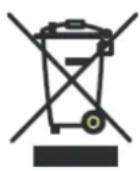
requires that old household electrical appliances must not be disposed of in the normal unsorted municipal waste stream. Old appliances must be collected separately in order to optimize the recovery and recycling of the materials they contain, and reduce the impact on human health and the environment.
The crossed out "wheeled bin" symbol on the product reminds you of your obligation, that when you dispose of the appliance, it must be separately collected.
Consumers should contact their local authority or retailer for information concerning the correct disposal of their old appliance.
VII. WARRANTY
The warranty does not cover the wear parts of the product, nor the problems or damage resulting from:
- superficial deterioration due to normal wear of the product;
- defects or deterioration caused by the product coming into contact with liquids and corrosion caused by rust;
- any incident, misuse, misuse, alteration, disassembly or unauthorized repair;
- Any unsuitable maintenance, use not in accordance with product instructions or incorrect voltage connection;
- any use of accessories not supplied or not approved by the manufacturer.

The warranty will be void if the rating label and / or serial number of the product is removed.

CONSIGNEPOUVANTVARIERLOCALEMENT>WWW.CONSIGNESDETRILFR
Continental Edison - 120-126 Quai de Bacalan - CS 11584 - 33000 Bordeaux
Satisfait (satisfont) aux dispositions de la (des) directive(s) Communautaire(s): Complies (comply) to the essential provisions of the EC directive(s)
| Directive basse tension Low voltage directive | 2014/35/EU | × |
| Directive CEM EMC directive | 2014/30/EU | × |
| RED Directive | 2014/53/EU | × |
| RoHS | 2011/65/EU | × |
Function Commercial Position Kevin Elbaz

Continental Edison

- SAFETYWARNINGS
- WARNING
- READ CAREFULLY THE INSTRUCTIONS BEFORE INSTALLING AND USING THIS APPLIANCE. IN THE CASE YOU RESELL THIS APPLIANCE, PLEASE MAKE SURE TO PROVIDE THIS INSTRUCTION MANUAL TO YOUR BUYER.
- WARNING! To prevent any fire or electrical hazards:
- General precautions
- Avoid electric shock, fire and explosions
- Protect the appliance from any damage.
- AND HANDLING OF BATTERIES:
- TABLE OF CONTENTS
- SAFETYWARNINGS 29
- I.DESCRIPTION 35
- TECHNICAL INFORMATION 39
- SET UP AND USE 40
- CLEANING AND MAINTENANCE 48
- TROUBLESHOOTING 48
- ENVIRONMENT: RECYCLING 50
- WARRANTY 50
- DESCRIPTION
- Front
- Back
- Remote control description
- Bluetooth
- Display
- TECHNICAL INFORMATION
- SET UP AND USE
- Before first use
- Remote control set up
- Inserting and replacing backup batteries
- Free standing installation
- Cables connections
- Speaker connection
- Connection to mains socket
- Use the HIFI speaker
- Switch on the HIFI speaker
- Mode selection
- Sound function
- Volume / mute
- Bass equalizer / boost
- Clock function
- Time setting
- Time display
- « Sleep » timer
- Setting / Stopping the timer
- Radio function
- Channels setting
- Save the channel
- Automatic channel saving
- Display of programmed channels
- Alternating mono / stereo modes
- CD and USB media playback
- Inserting a CD
- Start / stop playback
- File selection
- Reading order programming
- Repeat
- Shuffle / intro
- Bluetooth connection
- Notes:
- USB mode
- Automatic standby mode
- CLEANING AND MAINTENANCE
- TROUBLESHOOTING
- ENVIRONMENT: RECYCLING
- WARRANTY
- Continental Edison
Brand : CONTINENTAL EDISON
Model : CECHFBT20B3
Category : Speaker