CM4192ACUU - Built-in coffee machine Atag - Free user manual and instructions
Find the device manual for free CM4192ACUU Atag in PDF.



| Product type | Integrated coffee machine |
| Brand | Atag |
| Model | CM4192ACUU |
| Supply voltage | 230 V ~ |
| Minimum nominal current | 10 A |
| Main functions | Coffee beans, ground coffee, cappuccino, hot milk, hot water |
| Coffee strength setting | 5 levels: extra light, light, normal, strong, extra strong |
| Coffee temperature setting | 3 levels: low, medium, high |
| Cup sizes | 5: espresso, small, medium, large, mug |
| Water hardness setting | 4 levels |
| Automatic shut-off | Adjustable 1h, 2h, 3h |
| Water tank capacity | Approximately 1.5 L |
| Bean container capacity | Approximately 250 g |
| Brewing unit | Removable for cleaning |
| Drip tray | With level indicator |
| Coffee grounds container | To be emptied every 14 coffees |
| Milk container | Max capacity 1 L, adjustable foam (CAFFELATTE/CAPPUCCINO) |
| Descaling function | Automatic program |
| Cleaning | Do not put in dishwasher, hand wash only |
| Usage | Household only, max 3000 cups/year |
| Safety | Automatic shut-off, main switch |
| Spare parts and repairability | Spare parts available via after-sales service, repair by authorized center |
Frequently Asked Questions - CM4192ACUU Atag
User questions about CM4192ACUU Atag
0 question about this device. Answer the ones you know or ask your own.
Ask a new question about this device
Download the instructions for your Built-in coffee machine in PDF format for free! Find your manual CM4192ACUU - Atag and take your electronic device back in hand. On this page are published all the documents necessary for the use of your device. CM4192ACUU by Atag.
USER MANUAL CM4192ACUU Atag
The appliance identification card is located on the side of the appliance.
When contacting the service department, have the production code (PCODE) and complete item number (ITEMNR) to hand.
Hav produktionskodcn (PCODE) og dct fulstendige varcuminner (ITEMNR) parat, nar Dkontaktor servicafdclingen.
Instructions for use 3-34
Installation guide 35-38
DK
Brugsanvisning 3-34
Installationsforskrifter 35-38
5.2.9 Cappuccino make
- Taste "1 Tasse Kafcc" fur cin Tasse Kafcc
-Im MenuModus dientthese Taste fur das Blattern (<)
- Taste "2 Tassen Kaffic" fur zwi Tassen Kaffic
5.1 Preparation 8
5.2 Operation 10
6 Maintenance
6.1 Cleaning and maintenance 21
6.2 Changing and setting the menu parameters 24
7 Messages
What to do if... 30
8 Faults
Problems that can be resolved before calling the service centre 32
9 Installation instructions
9.1 Important matters 35
9.2 Building-in 36
10 Appendices
10.1 Disposal of appliance and packaging 38
10.2 Technical information 38
This coffee machine will make delicious cups of coffee, espresso and cappuccino. You can customise the settings of the machine to suit your personal preferences and tastes.
This manual describes how to make optimum use of the coffee machine. Besides information on how to operate the machine, you will also find background information that may come in handy when using this appliance.
Coff cc has been used in the factory to test the appliance and it is therefore completely normal that there are traces of coff ee in the mill. This appliance is however guaranteed to be new.
Store the user manual in a safe place. This will ensure that any subsequent users also benefit from it.
Enjoy your coff ee machine!
Pictograms used

Important information

Tip
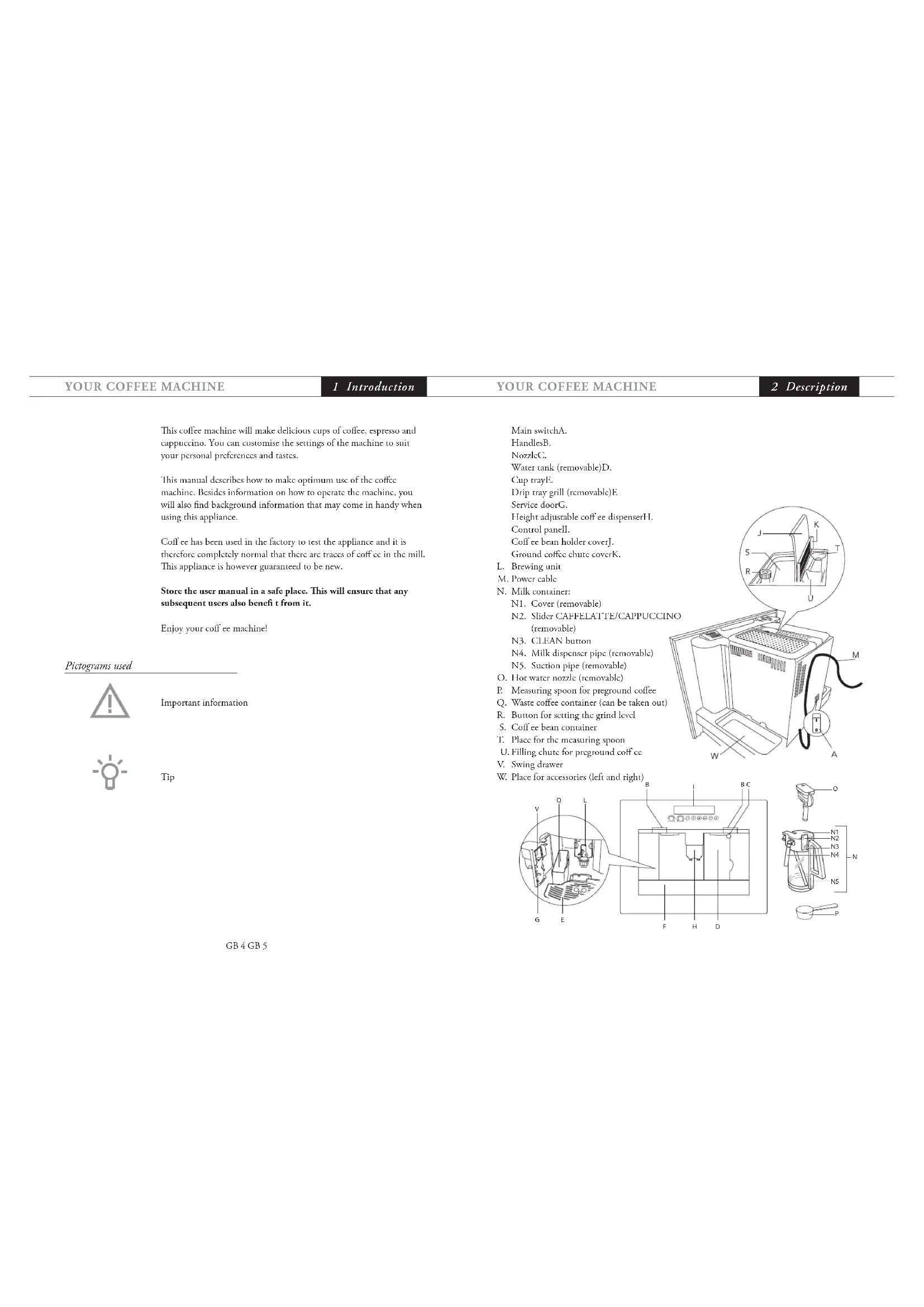
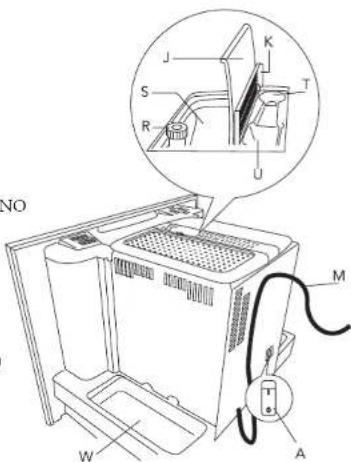
Main switchA.
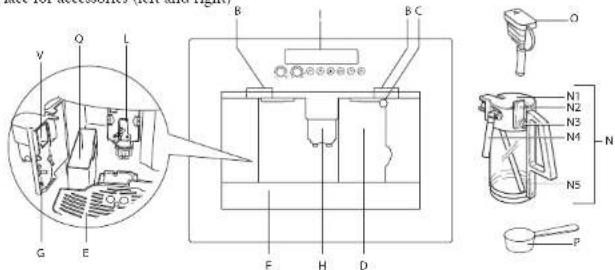
HandlescsB.
NozzleC.
Water tank (removable)D.
Cup trayE.
Drip tray grill (removable)E
Service doorG.
1Height adjustable coff ce dispenser11.
Control panel
Coffcebean holder coverI.
Ground coffee chute coverK.
L. Browning uni
M. Power cable
N. Milk container:
N1. Cover (removable)
N2. Slider CAFFELATTE/CAPPUCCINO (removable)
N3. CLEAN button
N4. Milk dispenser pipe (removable)
N5. Suction pipe (removable)
O. Hot water nozzle (removable)
P. Measuring spoon for preground coffee
Q. Waste coffee container (can be taken our)
R. Burton for serring the grind level
S. Coffce bean container
T. Place for the measuring spoon
U. Filling chute for preground coffe
V. Swing drawer
W. Place for accessories (left and right)
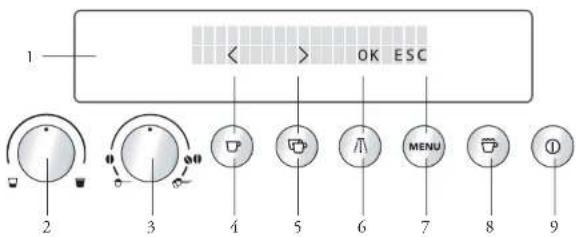
- Display
- "Cup size" knob
- Espanso cup
- Small cup
Medium cup
Large cup
-Mug - "Coffce strength/preground coffe" knob
-Pre-ground 1 cup
-Extra-mild taste
Mild taste - Normal taste
-Strong taste
Extra strong taste - Pre-ground 2 cups
- "1 cup of coll" button
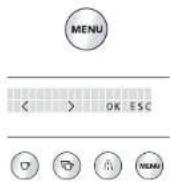
In menu mode this button is used for "scrolling" (<) - "2 cups of coffce" button
- In menu mode this button is used for "scrolling" (>
- "Hot water" button
- In menu mode this button confi rms the menu option (OK)
7.“MENU”button - In menu mode this button returns to the last level without making changes (FSC)
- "Cappuccino" button
- "On/Off" button
Important matters
As with any appliance, there are a number of matters that you should pay attention to.
This appliance is intended for domestic use only (around 3000 cups a year). Any other use is considered improper and in that case no guarantee will be given.
Th is appliance is designed to "make espresso coffee" and "heat drinks". Use it with care to avoid scalds from the water and steam jets or through incorrect use.
Do nor put frozen or caramelised coffe beans into the bean container, only roasted coffe beans! Remove foreign bodics from the coffe beans. Otherwise no guarantee can be given.
Do nor lean or hang on the machine when it has come out of the cabinet and do not place heavy or unstable objects on the machine.
The manufacturer is not liable for damage caused by improper, incorrect or unreasonable use of the appliance.
When using the appliance, do not touch the hot surfaces. Use the knobs or handles.
Persons (including children) with reduced physical, sensory or mental capabilities, or lack of experience and knowledge, should be supervised when they use the appliance.
Never let children play with the appliance.
In the event of failure or malfunction, unplug the appliance from the mains or switch the main switch on the back of the appliance to 0. If it requires repair, contact an authorised service centre.
- Only ask for original spare parts to be used. Failure to respect the above could reduce the safety of the appliance.
Do not put objects containing liquids, infamable or corrosive materials on the machine.
- Use the accessories holder to contain coff ee accessories (for example coff cc beans).
- th e parts which could come into contact with coffe or milk conform to the provisions of the FEC directive 1935/2004 relating to materials suitable for contact with foodstuff s.
- 1h is appliance is marked according to the European directive 2004/108/EC on Waste Electrical and Electronic Equipment (WEEE).
5.1 Preparation

The first time you switch on the appliance and every time that it is plugged in, the appliance makes a SF.I.F.-DIAGNOSIS operation when you press the main ON/OFF switch (see A on pagc 5). The switch on the appliance switches off.
To turn it on, press the on/off button on the control panel.
- The first time you use the appliance, select the language. Press the main ON/OFF switch on the back of the appliance (see A on page 5); the lights 6Rthe front side and the display go on. Wait for the appliance to display PRESS MENU FOR ENGLISH. Press the menu button for at least 3 seconds until the appliance displays ENGLISH. The appliance then displays the setting message in English.
- After a few seconds, the appliance displays FILL TANK To fill it, remove the tank (fi g. 1), rinse and fill with fresh water. Never exceed the MAX line. Put the tank back and push it as far as it will go.
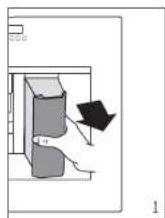

Only fi ll the water tank with cold water. Never fi ll it with other liquids such as mineral water or milk.
To ensur good, aromatic coff cc at all times, you should:
- change the water in the water tank every day;
clean the water tank with normal water for rinsing (not in the dishwasher) at least once a week. 'He en rinse off with fresh water.
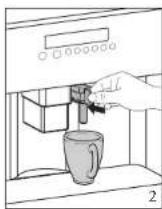
- The display now shows INSERT WATER SPOUT! Insert the hot water spout and place a cup undermcath. (f.g. 2).
The display shows 4. PRESS MENU. Press the MENU button. After a few seconds some water comes out of the hot water spout. When the cup is filled with about 30ml of water, the progress bar is completed. - The display now shows TURING OFR... PLEASE WAIT... Thc appliance switches off.
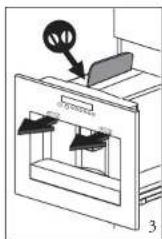
Extract the appliance by pulling it outwards taking care to use the 6. special handls. Open the lid and fill the container with coffe beans (fi g.3).Th en close the lid and push inwards the appliance.


To prevent malfunctions, never fill with ground coffe, frozen or caramelised coffe beans or anything else that could damage the appliance.
Press the on/off button on the control panel. The display shows HEATING UP... PLEASE WAIT... The appliance is heating up.
8. When the appliance has finished heating up it displays: RINSING. The appliance performs an automatic rinse cycle (a little hot water comes out of the coff cc dispenser and is caught in the drip tray).
If you want to make a short coffe ee (less than 60 cc), to make it hotter, fill the cup with this hot rinsing water first. You can also use the menu setting RINSING (see 6.2.6 on page 28).
9. The appliance now displays the basic settings, i.e. the cup size on the top line of the display and the coffe ee strength on the bottom line, e.g.: MEDIUM CUP NORMAL TASTE.

When using the appliance for the first time, 4-5 cups of coffee need to be made before the appliance starts to give satisfying results.
5.2 Operation
5.2.1 Preparing coffce (using coff cebcans)
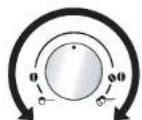
The appliance is preset to make coffee with a normal taste. You can also choose coffe with an extra-mild, mild, strong or extra-strong taste. With the "coffice strength" knob you can choose the required taste 0-00: the selected coffe strength is displayed.
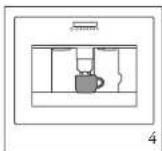
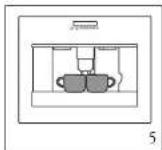
Put one or two cups underneath the coffe dispenser (fi g. 4 1. and 5).
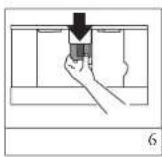
By moving the dispenser up or down (fig. 6), you can adjust the height of the dispenser to suit the height of your cup so as to reduce heat loss and coffee splashes.
- For a creamier coffee, lower the spouts to bring them as close to the cups as possible (f g. 6).
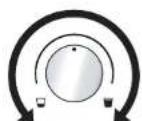
- Select the desired cup size with the "cup size" knob. The selected cup size is displayed. 1h en press the "1 cup of coffe" button or the "2 cup of coffee" button to make one or two cups of coffe.


To change the quantity of coffee delivered automatically into the cup, follow the instructions at paragraph 5.2.3 on page 13.
The appliance now grinds the beans and starts running off the coffe into the cup. Once the desired quantity has been reached, the appliance automatically stops delivering the coffe and ejects the grounds into the special container.
After a few seconds the appliance is ready for use again. The display shows the last selected coff ee setting.
To turn the appliance off, press the on/off button. Before going off, the appliance performs an automatic rinse cycle (a little hot water comes out of the coffce dispenser and is caught in the drip tray). Take care to avoid scalds.
Once switched off, the lights don't shut off immediately and the cooling span motor operates to avoid condensation into the housing. After about 10 minutes, the appliance switches completely off.
5.2.2 Notes
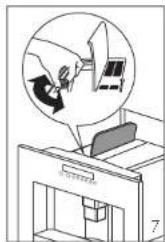
If the coff ee only comes our in drips or not at all, the knob for setting the grind level (fi g. 7) must be turned by one position clockwise (fi rst see 5.2.4 on page 14, 'Setting the grind level'). Turn one click at a time until the coff ee is delivered satisfactorily. If the coff cc comies out too fast and the crima does not meet your taste, turn the knob by one position anticlockwise (fi rst see 5.2.4 on page 14, 'Setting the grind level'). Make sure that you do not turn the knob for setting the grind level too far, as otherwise coff ee may come out in drips when dispensing 2 cups. Tips to make hotter coff cc
If 2/3 minutes have passed, since you last made coff cc, before making coff ee again you can preheat the brewing unit by using the menu setting RINSING (see 6.2.6 on page 28). Run off the water into the underlying drip tray or alternatively use this water to fill (and then empty) the cup to be used for the coff ee, so as to preheat it.
Unless preheated, do not use cups that are too thick, as they will absorb too much heat.
You can stop the coffe from dispensing at any time by pressing the previously selected "1 cup" button or "2 cups" button again, or by turning the "cup size" knob anti-clockwise towards "espresso cup".
As soon as the coff ee has finished dispensing, you can increase the amount of coff ee by pressing and holding the "1 cup" button until the desired amount of coff ee is reached (the button must be pressed as soon as the progress bar reaches 100% ).
- When the display shows the message FILL TANK! you must fill the tank, otherwise the appliance cannot make any coffce (it is normal that there is some water left in the water tank when the message is displayed).
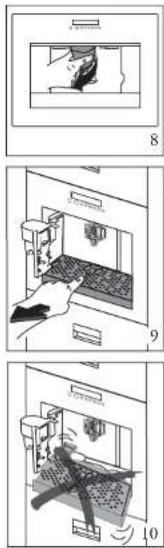
The appliance counts the number of coffees made. Every 14 single coffe ccs (or 7 doubles) the appliance displays EMPTY WASTE COFFEE CONTAINER. This means that the waste coffe container is full and must be emptied and cleaned. As long as the waste coffe container is not cleaned, this message remains in place and the coffe machine cannot make any coffe. To clean open the service door at the front by pulling the coffe spout (fig.8), remove the drip tray (fig.9), empty it and clean it.
When proceeding, always completely extract the drip tray, to avoid that it falls when removing the grounds container (fig. 10). Empty the grounds container and clean thoroughly, making sure all residues deposited on the bottom are removed.
Important! Every time you pull the drip tray out, the waste coffe container must also be emptied, even if it is not completely full. If this process is not carried out, it is possible for the waste coffe container to overfl when coffe is made later and for the excess coffe to block the machine.


While the appliance is running off coff cc, never remove the water tank. If it is removed, the appliance will not be able to make the coff cc. If the appliance malfunctions, do not contact the service centre straight away. The problem can almost always be resolved by following the instructions indicated on pages 30 until 33. If this is not the case, or for further explanations, contact the customer service.
5.2.3 Changing the quantity of coffee in the cup
The c appliance is factory preset to automatically deliver the following quantities of coffee:
-cspccso cup;
- small cup;
-medium cup;
-large cup;
- mug.
To change these quantities, proceed as follows:
Press the MENU button and press the scrolling buttons < or > until the menu option COFFEE PROGRAM appears. Confirm the menu option with the OK button.
Select the cup size you want to change with the scrolling buttons 2. < or >. When the desired cup size is displayed, confi rm it with the OK button.
A bar appears on the display, which can be made bigger or smaller; 3. this represents the cup filling quantity. A different filling quantity can be selected using the scrolling buttons < or > in 10 steps. When the bar is completely full, this represents the max. cup f lling quantity of about 220~ml . Select the desired cup f lling quantity and confirm it with the 4. OK button. This is filling quantity is now programmed in. (If OK is not pressed, the appliance automatically returns to the coffe mode after about 120 seconds without saving the entries).
After programming the display automatically jumps back to the menu option for setting the filling quantity, e.g. ESPRESSO CUP. To go back to the coffe mode immediately, press the MENU button twice or wait about 120 seconds until the appliance automatically jumps back to coffe mode.
5.2.4 Setting the grind level
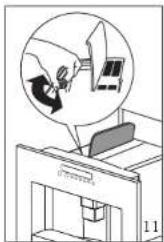
If coff ce is dispensed too quickly or too slowly (in drips), you can change the grind level during the milling process. (f i g. 11).

The grind level can only be changed during the milling process. Changing the settings when the mill mechanism is at rest can damage the coffe machine.
Turning it 1 click (1 number) clockwise, it speeds up the coffe delivery (without drips). Turning it 1 click anticlockwise, it slows down the delivery (giving a creamier appearance to the coffe). The adjustments will only be evident after at least 2 cups of coffe have been run off.
Turn anticlockwise to obtain finer ground coffe, slower delivery and a creamier appearance.
- Turn clockwise for coarser ground coffe and faster delivery (not a drop at a time).
5.2.5 Preparing espresso coffee using ground coffe (instead of beans)
- Turn the "coff cc strength/groundcoffcc" knob completely to the left (for 1 cup) or completely to the right (for 2 cups), to select the function for foreground coffee. This puts the coff cc grinding mill out of action. The appliance shows ESPRESSO CUP PRE-GROUND 1 CUP/2 CUPS.
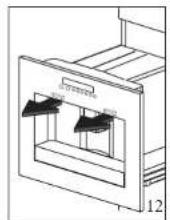
Extract the appliance by pulling it using the special handles 2. (fg, 12).
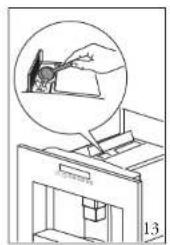
Lift the central lid, place one or two level measures of ground 3. coff cc in the funnel (see fig. 13). Close the lid, push the appliance to replace it and proceed as described in paragraph 5.2.1. on page 10 (Preparing coff cc).

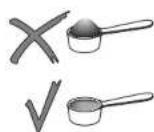
5.2.6 Notes
Never add the ground coffce when the appliance is off to avoid it - being dispersed inside the appliance.
Never put in more than 2 level measuring spoonfuls, otherwise the appliance cither makes no coff cc, the ground coff cc goes all round the appliance and contaminates it, or the coff cc comes out in drips and the message GROUND TOO FINE ADJUST MILL
+ PRESS HOT WATER KEY is displayed.
When dosing the quantity of coffe to be added, use the - measuring spoon supplicd only.
Use ground coffee for espresso coffe makers only. Do not use coffee beans, freeze-dried coffee or other materials that could damage the appliance.
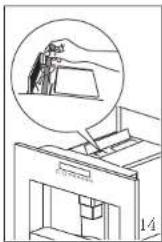
If the filling chute is blocked (due to damp in the appliance or because more than 2 measuring spoons have been inserted), use a knife or spoon handle to push the ground coff cc down (fi g.14). Next remove the brewing unit and clean it together with the coff cc machine as described in 6.1.1 and 6.1.2 on page 21, 22 and 23.
To return to the mode for coffe beans after making the coffe, turn the "coff e strength/preground coffe" knob to any coffe strength setting (the coffe grinding mill is re-enabled).
5.2.7 Preparing hot water
Hot water can be used to warm up cups and to make hot drinks, such as tea or packet soups.
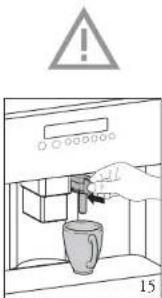
Warning! Risk of scalding when the hot water nozzle is activated! Escaping hot water can lead to scalds. Only activate the hot water nozzle when there is a receptacle under the hot water nozzle.
Put the hot water nozzle in place (fig. 15).
Place a container underneath the hot water nozzle (fig. 15).2. Press the "hot water" button 3. IHot water is dispensed; the display shows HOT WATER. Once the programmed amount of hot water has been dispensed, dispensing stops automatically.
For a few seconds the display shows PLEASE WAIT... After that the appliance is ready to make coff ce again and the last selected coff ce setting appears on the display.
5.2.8 Making cappuccino or hot milk (coff ee and milk froth)
You can use this function to cither make hot, frothy milk or cappucino. To do this, use the special milk container. Rinse the container under the tap when you are about to use it for the first time.
Unfasten the lid of the milk container with a slight clockwise turn 1, and remove it.
Fill the container with sufficient milk (preferably skimmed or 2. semi-skimmed milk at fridge temperature (about 5^ ) should be used). Do not go over the MAX line engraved on the container handle (comes to about 1000 ml).
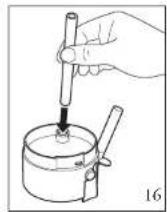
Make sure that the suction pipe is correctly inserted (fig. 16); next 3, place the lid back on the milk container and fasten it with a slight anti-clockwise turn.
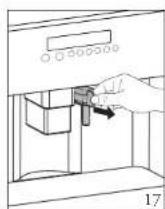
Pull the hot water nozzle off (fi g. 17).4.
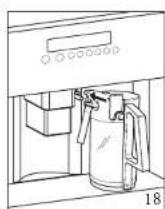
Bring the milk container up to the nozzle (fi g. 18).5.
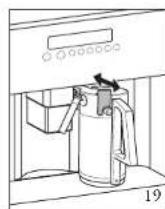
You can set the amount of froth on the milk to any level using the 6. slider on the lid (fig. 19): 'CAPPUCCINO' or 'CAFFELATTE'. - CAPPUCCINO: very frothy milk.
- CAFFELATTE: not so frothy milk. Once the milk container is put in place, the appliance suggests the 7. next step on the display: PRESS KEY X1 FOR CAPPUCCINO, X2 FOR MILK ONLY.
()


In the next two paragraphs you will find the steps for preparing cappuccino and subsequently frothing and heating milk.
5.2.9 Making cappuccino
First follow the steps described in 5.2.8 on page 16 and 17!1.
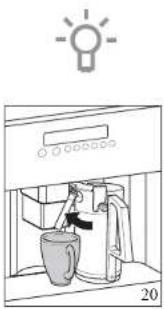
- Swing the milk dispenser pipe out and place a sufficiently big cup underneath the cof ee dispenser and the milk dispenser pipe (f g. 20).
Select the desired coffee strength for the cappuccino with the 3. "coffce strength" knob (sec 5.2.1 on page 10). The cup size on the top line (e.g. ESPRESSO CUP) has no meaning here, as the amount of coffce made is fixed in the CAPPUCCINO PROGRAM menu.
Press once on the "cappuccino" button. Hot and frothy milk, then cool, are dispensed into the cup. The top line of the display shows CAPPUCCINO and on the bottom line a progress bar and percentage are displayed, which shows the progress of the cappuccino being made.
1th amount of milk and coff ee is preset to normal quantities. You can change and save these to suit your taste, see 5.2.12 on page 20. After a few seconds the appliance is ready for use again. 1th display shows the last selected coff ee setting.
5.2.10 Frothing/heating up milk
First follow the steps described in 5.2.8 on page 16 and 17!1.
- Swing the milk dispenser pipe out and place a sufficiently big cup underneath the coffe dispenser and the milk dispenser pipe (fig. 20).
Press twice on the "cappuccino" button (within 2 seconds of each other). Hot and frothy milk is dispensed into the cup. In the top line of the display shows MILK FROTHING and on the bottom line a progress bar and percentage are displayed, which shows the progress of the milk frothing process.
'Ih e amount of milk is preset to normal quantities. You can change and save these to suit your taste, see 5.2.12 on page 20. After a few seconds the appliance is ready for use again. The display shows the last selected colf cc setting.
5 Use
YOUR COFFEE MACHINE
5 Use
5.2.11 Cleaning the nozzles
Every time after heating milk or making cappuccino, the nozzles on the milk container have to be cleaned as follows, otherwise remains of milk can set hard.
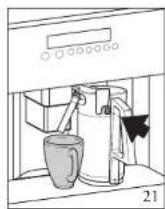
Place a container under the milk dispenser pipe and press on the 1. CLEAN button on the milk container for at least 5 seconds (f.g. 2). 1h e display shows CLEANING!

Warning! Risk of scalding from steam and hot water escaping from the milk dispenser pipe.
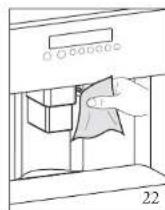
Now remove the milk container and clean the nozzles on the 2. appliance with a damp cloth (fig. 22).
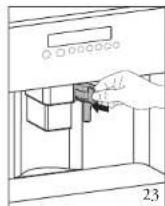
Put the hot water nozzle back in (fig. 23).3.

When you have finished cleaning, take the milk container off and place it in the fridge. If milk should not stay out of the fridge for longer than 15 minutes. See 6.1.3 on page 23 for information on cleaning the milk container.
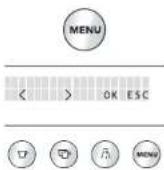
5.2.12 Setting the cappuccino programme
The quantities of milk and coffee required to make a cappuccino are preset to normal levels at the factory. You can adjust and change these to suit your taste.
Press the MENU button and press the scrolling buttons < or ≥ until the menu option CAPPUCCINO PROGRAM appears. Confirrm the menu option with the OK button.
2. The display shows MILK VOLUME. If you want to change and save the milk quantity used to make a cappuccino, confirm the menu option with the OK button.
3. A bar appears on the display; this represents the milk quantity used to make a cappuccino. If necessary a diffrent filling quantity can be selected using the scrolling buttons < or > in 10 steps. When the bar is completely filled, this represents the max. milk quantity for the cappuccino programmc of about 120-180 ml (depending on the set amount of froth).
4. When the desired filling quantity is displayed, confirm it with the OK button. This filling quantity is now programmed in. (If OK is not pressed, the appliance automatically returns to the coffe mode after about 120 seconds without saving the entries). The display automatically jumps back to the menu option MIL VOLUME after programming.
5. If you want to change and save the coffe quantity used to make a cappuccino, press the scrolling buttons < or > until the menu option COFFEE FOR CAPPUCC, appears. Confrm the menu option with the OK button.
6. A bar appears on the display; this represents the coffee quantity used to make a cappuccino. If necessary a diffrent filling quantity can be selected using the scrolling buttons < or > in 10 steps. When the bar is completely full, this represents the max. coffc quantity for the cappuccino programinc of about 220~ml .
7. When the desired fi Iing quantity is displayed, confirm it with the OK button. This filling quantity is now programmed in. (IFOK is not pressed, the appliance automatically returns to the coff ee mode after about 120 seconds without saving the entries). The display automatically jumps back to the menu option COFFEE FOR CAPPUCC, after programming.

To go back to the coffe mode, press the MENU button twice or wait about 120 seconds until the appliance automatically jumps back to coffe mode.
6.1 Cleaning and maintenance

Before performing any cleaning operations, turn the appliance off by pressing the on/off button and leave the appliance to cool down. Never immerse the pressor maker in water. It is an electrical appliance. Do not use solvents or abrasive cleaning products to clean the appliance. A soft damp cloth will suffice. Never wash any of the components of the appliance in a dishwasher.
6.1.1 Cleaning the coff cc machine
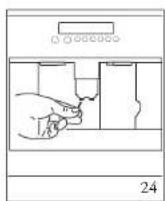
Clean the waste coffe container (as described on page 12) whenever it requires emplying. The water tank should also be cleaned regularly. The drip tray is fitted with a level indicator (red) showing the level of water it contains. When the indicator starts to become visible (a few millimeters under the drip tray), the drip tray must be emptied and cleaned. Check that the holes in the coffe spout are not blocked. To unlock them, scrape the dry coffe residues away with a needle (fig. 24).

6.1.2 Cleaning the brewing unit
'th e brewing unit must be cleaned regularly to avoid the build-up of coffe encrustations which could cause malfunction. Proceed as follows:
Turn the appliance off by pressing the on/off button on the control panel (do not switch off the main switch or unplug) and wait for the display to go off.
Open the service door (see fig. 8 on page 12).2.
Remove the drip tray and the waste coff cc container (scc fi g, 9 on 3. page 12) and clean.
Press the two red release buttons on the brewing unit sideways and 4. towards the centre (fg.25) and pull it out.
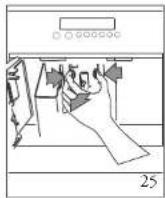
The brewing unit can only be taken out when the appliance is switched off (by pressing the on/off button on the control panel). If you try to take out the brewing unit whilst the coffe machine is switched on, it could be seriously damaged.
Clean the brewing unit under running tap water without using detergent. Never clean the brewing unit in the dishwasher.
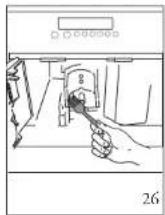
- Carefully clean the inside of the machine. Scrape off the encrusted coffe in the coffe machine using a wooden or plastic fork or something similar that will not scratch the finish (f g. 26).
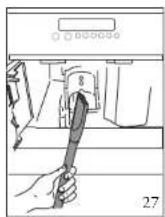
- Remove all the remains with a vacuum cleaner (fig. 27).
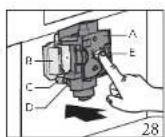
- Replace the brewing unit (A) by pushing it into the holder (B) and the pin (C). 'Ih e pin must be introduced into the tube (D) at the bottom of the brewing unit. Now push firmly where it says PUSH (E) until the brewing unit is heard fastening into place (fig. 28).
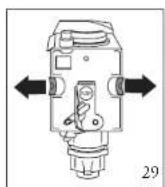
- Once you have heard the unit clicking into position, make sure that the red buttons have snapped back out, otherwise the service door cannot be closed. The two red buttons are correctly snapped out (fig. 29).
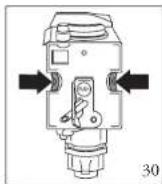
The two red buttons are not snapped out (fig. 30).
Notes
If the brewing unit is not put in place correctly, i.e. if it can be heard clicking into position and the red buttons are not properly snapped back out, the service door cannot be closed.
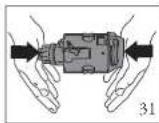
If the brewing unit can only be put into place with diffi cully, it must be made into the right height (before inserting) by pressing the brewing unit fi rmly together from top and bottom (fig. 31).
If it is still difficult to insert the brewing unit:
Leave it out of the appliance, place the drip tray, close the "service door, switch the main switch on the back of the appliance to 0 and then to I again.
Wait for all the lights to go off, then open the door, remove "the drip tray and replace the brewing unit.
Replace the drip tray, complete with the grounds container.
Close the service door.
6.1.3 Cleaning the nozzles and the milk container
Every time after heating milk or making cappuccino, the nozzles on the milk container have to be cleaned (see 5.2.11 on page 19). Also the milk container has to be cleaned regularly.
- Unfasten the lid of the milk container with a slight clockwise turn and remove it.
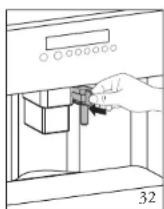
- Pull off the suction pipe (fig. 32).
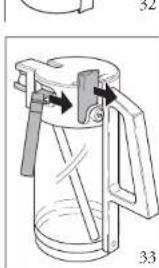
- Pull off the milk dispenser pipe and the slider on the lid (fig. 33).
- Carefully clean all the parts with hot water and detergent.
The parts of the milk container must not be cleaned in the dishwasher!
6.2 Setting and changing the menu options
Below you will find a summary of the menu options, which are used to change and save the appliance's factory settings, as well as to start programmes and look up information. You will find detailed information about this in this instruction manual.
Language (see 6.2.1 on page 24)
Water hardness (see 6.2.2 on page 24)
Temperature (see 6.2.3 on page 25)
Auto shut off time (see 6.2.4 on page 26)
Coffce program (see 5.2.3 on page 13)
Cappuccino program (scc 5.2.12 on page 20)
Hot water (see 5.2.7 on page 16)
- Descale (see 6.2.5 on page 26)
Rinsing (scc 6.2.6 on page 28)
Statistics (sec 6.2.7 on page 28
- Reset to default (see 6.2.8 on page 28)


If OK is not pressed after you have changed a setting, the appliance automatically returns to the coffe mode after about 120 seconds without saving the entries.
To go back to the coff mode, press the MENU button wice.
6.2.1 Setting the language
You can choose between several languages. A different language can be selected as follows:
Press the MENU button and press the scrolling buttons < or ≥ until the menu option CHOOSE LANGUAGE appears. Confirm the menu option with the OK button.
- The language set appears on the display. Press the scrolling buttons < or > until the desired language appears. When the desired language is displayed, confi rm with the OK button.
6.2.2 Water hardness
A PLEASE DESCALE! message is displayed after the appliance has been operated for a factory set period of time, calculated on the basis of the maximum quantity of lime scale which may be contained in the water used. If necessary, this period of operation can be extended, making dcscaling less frequent, by programming the appliance based on the actual lime content in the water used. Proceed as follows:


Remove the "Total Hardness Test" strip (in front of your manual). 1. Th cn dip it fully in the water for a few seconds. Remove it and wait around 30 seconds until it changes colour and a number of red dots are formed. For example, if there are 3 red squares on the test strip, you must set the water hardness level to 3.
If you no longer have a water hardness test, you can find the data in the table below.
Prcess the MENU button and press the scrolling burroas < or > until the menu option WATER HARDNESS appears. Confirm the menu option with the OK burron.
Th c display shows the current scorting. Next press the scrolling 3. buttons < or > until the established hardness level is displayed. Confi rm the selection with the OK button. The appliance is now programmed to provide the descending warning when necessary, based on the actual hardness of the water.
Information on the hardness of the water in your area can be obtained from the local water board. In the table below you can find the water hardness setting your machine requires.
| German hardness F | French hardness Water | hardness machine |
| 0-6 dH 0-11 | fH 1 | |
| 7-13 dH 12-17 | fH 2 | |
| 14-20 dH | 18-36 fH | 3 |
| >21 dH | >37 fH | 4 |
6.2.3 Setting the coff ee temperature
You can choose between three temperature levels. The coffee temperature levels are defined as follows:
TEMPERATURE LOW
TEMPERATURE MEDIUM
TEMPERATURE HIGH
The factory setting is TEMPERATURE HIGH. You can change this as follows:
Press the MENU button and press the scrolling buttons < or > until the menu option TEMPERATURE appears. Confirm the menu option with the OK button.
2. 'The display shows the current setting. If necessary, select another temperature with the scrolling buttons < or > . When the desired temperature is displayed, confirm it with the OK button.
6.2.4 Setting the switch-off time
If the appliance is not used for a while it switches itself off automatically for safety and energy saving reasons. You can choose between 3 switch-off times:
AUTO SHUTOFF TIME 1 H
AUTO SHUTOFF TIME 2 H
AUTO SHUTOFF TIME 3 H
You can change this as follows:
Press the MENU button and press the scrolling buttons < or > until the menu option AUTO SHUTOFF TIME appears. Confirrm the menu option with the OK button.
2. If necessary, select another switch-off time with the scrolling buttons < or > . When the desired switch-off time is displayed, confi rm it with the OK button.
6.2.5 Carrying out the descending programme
The e descending programme enables your appliance to be simply and effectively descended. When advised to do so by the display PLEASE DESCALCE, the appliance must be descended.
- Insert the hot water nozzle (fi g, 32). Press the MENU button and press the scrolling buttons < or until the menu option DESCALE appears. Confirrm the menu option with the OK button.
- The display shows DESCALE NO. Press the scrolling button < , and the display shows DESCALE YES. Confirrm with the OK button. Th e descending programme starts.
- The top line of the display alternates between ADD DESCALER and PRESS MENU KEY.
- Empty the water tank and pour in the contents of the bottle of descaler supplied with the machine and fill with fresh water up to the MAX level. For subsequent descaling operations, descaling solution can be purchased from authorised technical service centres.


Make sure that any splashes from the descending agent do not come into contact with surfaces that are sensitive to acids, such as marble, limestone and ceramic.
Put a container with a capacity of at least 1.5 liters undircnath the 6. hot water nozzle (see fig.2 on page 9).
Press the MENU button. 'Th e display shows DESCALING.
The descending liquid runs out of the hot water nozzle.8.
The e descending programme automatically goes through a series of 9. rinses and pauses to remove limescale dcposits from the inside of the coffe machine.
After about 30 minutes the water tank is empty and the top line 10. of the display alternates between DESCALE COMPLETE and
PRESS MENU KEY.
Prcss the MENU button:1Th e display shows RINSING, FILL TANK!
The appliance is now ready for a rinsing process with clean water. 12. Empty the container under the hot water nozzle and put it back under the hot water nozzle.
Take out the water tank and fill it with clean water.13.
- Put the water tank back in place. The display shows: RINSING, PRESS MENU KEY.
Press the MENU burton DSA rinsing process takes place with clean water and the rinsing water runs out of the hot water nozzle. - After a few minutes the water tank is empty and the display shows RINSING COMPLETE, PRESS MENU KEY.
Press the MENU button. Th e display shows FILL TANK! - Take out the water tank, fill it with clean water and put it back in place.
- The appliance is now ready for use again and is back to the last coffcc modc selected.
If the descascaling cycle is interrupted before completion, the appliance continues to display the descale message and the programme must be started again from the beginning.
Failure to descale the appliance regularly invalidates the guarantee.
6.2.6 Rinsing
If 2/3 minutes have passed, since you last made coff cc, you should fi rst rinse the system to preheat the brewing unit. Select the rinsing function from the appropriate menu. Let the water run into the drip tray undrncath. You can also use this water to warm up the cup that you are using for the coff ee. In this case simply let the hot water run into the cup (and then empty it).
Press the MENU button and press the scrolling buttons < or > until the menu option RINSING appears. Confim the menu option with the OK button.
The appliance performs an automatic rinse cycle (a little hot water 2 runs out of the spouts and is collected in the drip tray beneath).
6.2.7 Statistics
The appliance allows the following values to be looked up: the total number of coff es made with the appliance up to that. point;
the number of descending procedures carried out;
the number of cappuccinos made.
If 2 cups of coffe are dispensed at the same time then these are counted as 2 cups.
Proceed as follows to look up the values:
Press the MENU button and press the scrolling burrows < or > until the menu option STATISTICS appears. Confim the menu option with the OK button.
- Th en number of cups dispensed until that time appears on the display, e.g. TOI: COFFEEES 135 for 135 coffees dispensed.
- Rcpcatcdly prccs the scrolling button > to show the number of dscaling procedures carried out, e.g. TOT. DESCALES 5 and the number of cappuccino's, e.g. TOT. CAPPUCCINO 135.
6.2.8 Resetting the appliance to factory settings
Th is function resets previously changed values to the factory settings.
1h e following settings or saved data are affected:
water hardness;
- cup flling quantities;
- coll'ee temperature;
- switch-off time.
Thefactory default values can be reset as follows: Press the MENU button and press the scrolling buttons < or > until the menu option RESET TO DEFAULT appears. Confirm the menu option with the OK button. The display shows 2. RESET TO DEFAULT NO.
3. Process the scrolling button < until RESET TO DEFAULT YES appears on the display. Confirm the menu option with the OK button.
What to do if...
| MESSAGE MEANING WHA | ATTO DO | |
| FILL TANK! 'th e water tank | is empty or not properly in place. | Fill the water tank and insert it according to instructions, page 8 (fl g. 1). |
| 'Th e water tank is dirty or limescale deposits have built up inside it. | Rinse out or descale the water tank. | |
| GROUND TOO FINE ADJUST MILL + PRESS HOT WATER KEY | Coff ee comes out too slowly. | Turn the knob for the grind level setting clockwise by one position (see 5.2.4 on page 14). |
| 'If th e coff ee machine cannot make any coff ee. | Place a container underneath the hot water nozzle and press the "hot water" button (3) | |
| EMPTY WASTE COFFEE CONTAINER | 'If th e waste coff ee container is full. | Empty, clean and replace the waste coff ee container as described on page 12. |
| INSERT WASTE COFFEE CONTAINER | 'If th e waste coff ee container was not replaced after cleaning. | Open the service door and insert the waste coff cc container. |
| ADD PRE-GROUND COFFEE | No ground coff cc was put into the fi lling chute after selecting the preground coff ee function. | Add ground coff cc as described in 5.2.5 on page 14 and 15. |
| FILL BEAN CONTAINER | If CRC are no more coff cc beans in the coff ee bean container. | Fill the coff cc bean container.. Consult customer services. |
| If the mill mechanism starts sounding very loud, this can mean that a small stone from the coff cc beans has blocked the mill mechanism. |
| MESSAGE MEANING WHA | ATTO DO | |
| PLEASE DESCALVE! Shows | that the coff ee machine is encrusted with limescale. | ‘Th e descalng programme must be carried out as soon as possible (see 6.2.5 on page 26 and 27). |
| CLOSE DOOR 'th e service | door is open. Close the service door. If the service door cannot be closed, make sure that the brewing unit is correctly inscrcted (see 6.1.2 on page 21, 22 and 23). | |
| INSERT BREWING UNIT! | Someone probably forgot to put the brewing unit back in the coff ee machine after cleaning it. | Insert the brewing unit. (see 6.1.2 on page 21, 22 and 23). |
| GENERAL ALARM! 'th e ir | side of the machine is very dirty. | Carefully clean the inside of the machine (see 6.1.1 on page 21). If the coff ee machine still shows this message once it has been cleaned, please consult customer services. |
Problems that can be resolved
If the coff cc machine does not work, you can easily find out the cause of the problem and fix it by turning to the advice in chapter 7. If, on the other hand, the coff cc machine displays no message, please carry our the following checks before consulting customer services.
| PROBLEM CAUSE SOLUTION | |
| Coffe ee is not hot. 'Th e cups were not preheated. Th e brewing unit is too cold. | Preheat the cups by rinsing them out with warm water (sec 5.2.2 on page 11 and 12: 'Tips to make hotter coff ee'). Warm up the brewing unit with the rinsing programme before making coff cc (sec 6.2.6 on page 28). |
| 'Th e coff ee does not have enough crema. 'Th e coff ee is too coarsely ground. 'Th e coff ee blend is not suitable. | Turn the knob for the grind level setting one position anti-clockwise (see 5.2.4 on page 14). Use a coff ee blend suited to fully automated coff cc machines. |
| Coffee comes out too slowly. The coffee is ground too fine. | Turn the knob for the grind level setting one position clockwise (sec 5.2.4 on page 14). |
| Coffe e comes out too quickly. 'Th e coff ee is too coarsely ground. | Turn the knob for the grind level setting one position anti-clockwise (see 5.2.4 on page 14). |
| Coffe e only comes out of one of the spouts on the coff cc dispenser. 'Th e holes on the spouts are blocked. | Remove the dry coff ee residues with a needle (see 6.1.1 on page 21, fi g. 24). |
| PROBLEM CAUSE SOLUTION | |
| When the "coff cc strength/ preground coff ee" knob is turned completely to the left or right water comes out of the machine instead of coff ee. | The ground coff cc could have got stuck in the fi lling chute. Remove the ground coff cc with the help of a knife (see page 16, fi g 14). The en clean the brewing unit and the inside of the machine (see 6.1.2 on page 21, 22 and 23). |
| 'Th e machine does not switch on when the on/off button \( {}^{\circledR } \) is pressed. | The main switch on the back of the appliance is not switched on or the mains plug is not plugged in. Check that the main switch is in the I position and that the power lead is plugged in the socket properly. |
| The c brewinging unit cannot be taken out for cleaning. | The coff ee machine is switched on. The c brewinging unit can only be removed when the machine is switched off . Switch the appliance off and remove the brewing unit (sec 6.1.2 on page 21, fi g. 25). IMPORANT: Th e brewing unit can only be taken out when the appliance is switched off . If you try to take out the brewing unit whilst the coff ee machine is switched on, this could be seriously damaged. |
| Ground coff cc was used (instead of coff ee beans) and the machine will not dispense any coff cc. | Too much preground coff cc was inserted. Remove the brewing unit and carefully clean the insided of the machine (sec 6.1.1 and 6.1.2 on page 21, 22 and 23). Repeat the process using a maximum of 2 level measuring spoons of ground coff ee. |
| PROBLEM | CAUSE | SOLUTION |
| Ground coff cc was used (instead of coff ee beans) and the machine will not dispense any coff ee. | ‘Th e “coff cc strength/ preground coff ee” knob is not turned completely to the left or right’ and the appliance used both preground coff ee and coff ee ground by the mill mechanism.Preground coff ee was inserted whilst the machine was switched off . | Carefully clean the inside of the machine (see page 12). Repecat the process, but fi rst turn the “coff ee strength/ preground coff ee” knob completely to the left or right (see 5.2.5 on page 14).Remove the brewing unit and carefully clean the insided of the machine (see 6.1.1 and 6.1.2 on page 21, 22 and 23). Repeat the process with the machine switched on. |
| Coff ee does not come out of the spouts on the coff ee dispenser but out of the service door at the side. | ‘Th e holes on the coff cc dispenser are blocked with dried on coff ee.’‘Th e swing drawer on the inside of the service hatch is blocked and will not move. | Remove the dried on coff cc with a needle (see 6.1.1 on page 21, fi g. 24). Carefully clean the swing drawer, particular in the area around the hinges so that these continue to move. |
| Milk is frothed up too much or too little. | Wrong setting of the slider on the lid of the milk container.If the milk is not frothy enough, the milk container may not be correctly in place. | You can set the amount of froth on the milk to any level using the slider on the lid (fi g. 19 on page 17): ‘CAPPUCCINO’ (very frothy milk) or ‘CAFFELATTE’ (not so frothy milk).Put the milk container correctly in place. (fi g. 18 on page 17). |
9.1 Important matters
After removing the packaging, make sure the product is complete and undamaged. If in doubt, do not use the appliance and contact a qualified professional.
Installation must be carried out by a qualified technician and in compliance with current regulations.
Packing elements (plastic bags, polystyrene etc.) must not be left within reach of children as they may represent a hazard.
Never install the appliance in environments where the temperature may reach 0^ or lower (the appliance may be damaged if the water freezes).
Make sure the mains voltage corresponds to the voltage indicated on the appliance rating plate. Connect the appliance to an ciffcintly carthed socket with a minimum current rating of 10A only. The manufacturer may not be considered liable for possible incidents caused by the failure to adequately earth the mains. If such a service fault does not control the appliance, use the appliance
If the power socket does not match the plug on the appliance, have the socket replaced with a suitable type by a qualified professional.
The power socke has to remain visible after installation. Do not use multiple plug adapters or extension leads.
- The power cable on this appliance must not be replaced by the user as this operation requires the use of special tools. If the cable is damaged or requires replacing, contact an authorised service centre only to avoid all risks.
For the electrical connection use a HO5 VV-F type cable as indicated in the table below:
| Conductors | Amount x size |
| 230 V~4 | 3 x 1.0 mm2 |
- You should personalise water hardness as soon as possible following the instructions in 6.2.2 on page 24 and 25.
9.2 Building-in
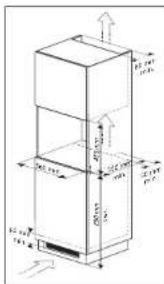
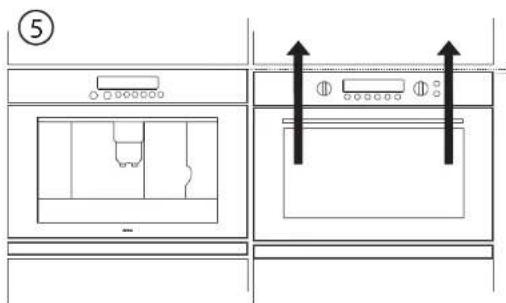
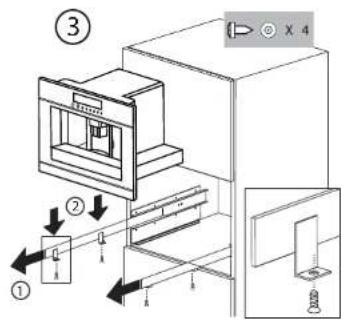
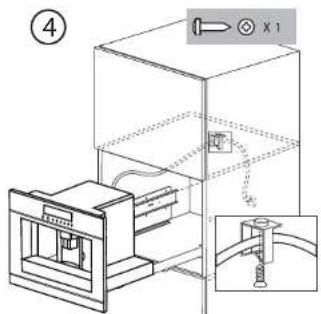
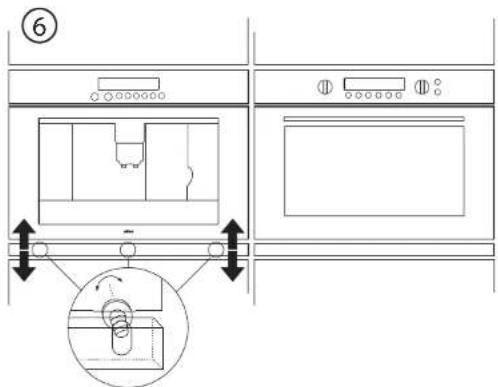
Please check the minimum measures necessary to the proper installation of the appliance. The coffee maker must be installed in a column unit, which must in turn be fixed to the wall.
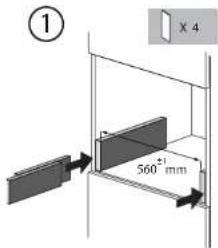
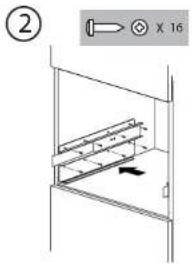
GB36
GB37
10.1 Disposal of appliance and packaging
By ensuring this product is disposed of correctly, you will help prevent potential negative consequences for the environment and human health, which could otherwise be caused by inappropriate waste handling of this product. In e local authorities can provide you with the relevant information.
The packaging of this appliance is recyclable. It could have been made from:
cardboard;
polythcne foil (PE);
CFK-free polystyrene (PS-hard foam).
You need to dispose of these materials responsibly in accordance with official regulations.
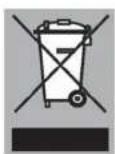
To draw attention to the fact that the segregated processing of electric household appliances is compulsory, this appliance carries the symbol of a crossed-out dustbin. This means that at the end of its working life, you may not dispose of the appliance as household refuse. Instead, you should hand it in at a special refuse collection centre run by the local authority or at a dealer's providing this service.
Segregated processing of household appliances such as this expresso maker, avoids any negative effects on the environment and public health that might otherwise occur. It enables the recovery of the materials used in the production of this appliance, thus realising considerable savings in terms of raw materials and energy.
10.2 Technical information
'th e data plate on the side of the appliance states the total load when connected, the required voltage and frequency.
1 Indledning 4
2 Beskrivelse 5
3 Betjeningspanel 6
4 Sikkerkedsforskrifter
5.2.9 Sadan laves cappuccino
Folg forst bskrivelsen i 5.2.8 pa sidc 16 og 17!1.
Drcj malkcuudlobrct lidt lid sdc og seti tilstraktckeligt stort 2. krus under malkeudlobet og kaff eudibot (fi g. 20).
Valg den onsckde aroma til cappuccino vcd at drejc pa 3. indstellingsknappen til kaf estyrke (se 5.2.1 pa side 10). Den i displayt viste mangele kaf e (f.ecks. EPRESSION) er her unden berdyning. Maangden er i dette rilfelde fastlagt i CAPPUCCINOPROGRAMMET.
Tryk en gang pa tasten for automatisk cappuccino. Der leber varin, opskummt maelk og direftcr kafc i krusct. I displayct star der CAPPUCINO og linicn med blokkc viscr, hvordan processen skrider frem.
I displayet vises 2. NULSTIL, NEJ
- Cappuccino make
- Pictograms used
- Important matters
- Preparation
- Only fi ll the water tank with cold water. Never fi ll it with other liquids such as mineral water or milk.
- Operation
- Preparing coffce (using coff cebcans)
- Notes
- Changing the quantity of coffee in the cup
- Preparing espresso coffee using ground coffe (instead of beans)
- Notes
- Preparing hot water
- Making cappuccino or hot milk (coff ee and milk froth)
- Making cappuccino
- Frothing/heating up milk
- Cleaning the nozzles
- Warning! Risk of scalding from steam and hot water escaping from the milk dispenser pipe.
- Setting the cappuccino programme
- Cleaning and maintenance
- Cleaning the coff cc machine
- Cleaning the brewing unit
- Notes
- Cleaning the nozzles and the milk container
- Setting and changing the menu options
- Setting the language
- Water hardness
- Setting the coff ee temperature
- Setting the switch-off time
- Carrying out the descending programme
- PRESS MENU KEY.
- Rinsing
- Statistics
- Resetting the appliance to factory settings
- Problems that can be resolved
- Important matters
- Building-in
- Disposal of appliance and packaging
- Technical information
- Sadan laves cappuccino
Brand : Atag
Model : CM4192ACUU
Category : Built-in coffee machine