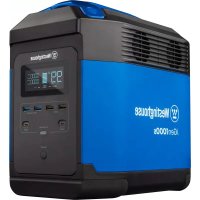
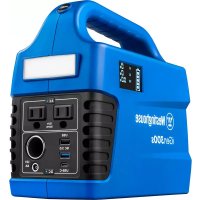
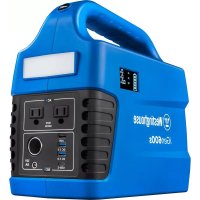
iGen1000s - Portable generator WESTINGHOUSE - Free user manual and instructions
Find the device manual for free iGen1000s WESTINGHOUSE in PDF.


| Brand | Westinghouse |
| Model | iGen1000s |
| Product Type | Portable Power Station |
| Battery Chemistry | Lithium-ion NMC |
| Battery Capacity | 1008 Wh (50.4 V, 20 Ah) |
| Continuous Power | 1500 W |
| Peak Power | 3000 W |
| AC Output Voltage | 120 V |
| Frequency | 60 Hz |
| Wave Type | Pure Sine Wave |
| Cycle Life | 800 cycles at 60% capacity |
| Charging Time (0-80%) | 2 hours |
| Charging Time (0-100%) | 3 hours |
| Charging Temperature Range | 0°C to 45°C (32°F to 113°F) |
| Operating Temperature Range | -20°C to 45°C (-4°F to 113°F) |
| Series Connection Capability | Yes (up to 2 units) |
| Certifications | FCC, RoHS, UN38.3, BC |
| Output Outlets | 6 AC 120V outlets, USB-A, USB-C ports, car outlet |
| Charging Input | AC 120V, solar (MC4, max 400W), car (max 8A) |
| Display | LCD screen with status indicators |
| Built-in Protections | Overload, overheat, low temperature, short circuit |
| Cleaning | Dry, non-abrasive cloth; vacuum the fan vents |
| Recommended Storage | Discharge to 30%, recharge to 85% every 3 months |
Frequently Asked Questions - iGen1000s WESTINGHOUSE
User questions about iGen1000s WESTINGHOUSE
0 question about this device. Answer the ones you know or ask your own.
Ask a new question about this device
Download the instructions for your Portable generator in PDF format for free! Find your manual iGen1000s - WESTINGHOUSE and take your electronic device back in hand. On this page are published all the documents necessary for the use of your device. iGen1000s by WESTINGHOUSE.
USER MANUAL iGen1000s WESTINGHOUSE
iGen1000s
Portable Power Station 1500 Running Watts | 3000 Peak Watts
DO NOT RETURN THIS PRODUCT TO THE STORE
If you have questions or need assistance, please call customer service at 855-944-3571.
TABLE OF CONTENTS
FCC STATEMENT....4
FCC RADIATION EXPOSURE STATEMENT ....4
SPECIFICATIONS....6
WHAT'S IN THE BOX? 6
REGISTERING YOUR PRODUCT ....6
CONTROLS AND OUTLETS ....7
DC OVERLOAD PROTECTION ....8
AC OVERLOAD PROTECTION....8
LCD DISPLAY 9
OPERATION....10
HOW TO POWER AC DEVICES ....10
HOW TO POWER DC DEVICES ....10
COLD WEATHER USE....10
POWER STATION OUTPUT CAPACITY 10
SERIES OPERATION 11
UPS OPERATION....11
CHARGING....12
CLEANING....14
TRANSPORTATION AND STORAGE....14
RECYCLING 15
NOTIFICATION ICONS....15

WARNING: Lithium-ion batteries and products that contain lithium-ion batteries expose you to chemicals including cobaltium nickel oxide, and nickel, which are known to the State of California to cause cancer and birth defects or other reproductive risk. For more information go to www.xwarnings.ca.gov.
DISCLAIMERS
All information, illustrations, and specifications in this manual were in effect at the time of publishing. The illustrations used in this manual are intended as representative reference views only. We reserve the right to make any specification or design change without notice.
ALL RIGHTS RESERVED
All rights reserved. No reproduction allowed in any form without written permission from Westinghouse Outdoor Power LLC.
DANGER

Read this manual before using this product. Failure to follow the instructions and safety precautions in this manual can result in damage to the product or personal property, or serious injury or death. DO NOT use the product with incompatible components or alter the product in any way.
SAVE THESE INSTRUCTIONS
The following terms are used in this document to indicate various levels of potential harm that may be caused by improper operation.
DANGER
Indicates a hazardous situation which, if not avoided, will result in death or serious injury.
WARNING
Indicates a hazardous situation which, if not avoided, could result in death or serious injury.
CAUTION
Indicates a hazardous situation which, if not avoided, could result in minor or moderate injury.
NOTICE
Indicates a situation which can cause damage to the power station, personal property, and/or the environment, or cause the equipment to operate improperly.
FCC STATEMENT
This device complies with Part 15 of the FCC Rules. Operation is subject to the following two conditions:
(1) This device may not cause harmful interference, and (2) This device must accept any interference received, including interference that may cause undesired operation.
FCC RADIATION EXPOSURE STATEMENT
This equipment complies with FCC radiation exposure limits set forth for an uncontrolled environment. This equipment should be installed and operated with minimum distance of 8 inches (20cm) between the radiator & your body. Changes or modifications not expressly approved by the party responsible for compliance could void the user's authority to operate the equipment.
NOTICE
The equipment has been tested and meets the restrictions of Category B digital equipment in Part 15 of FCC Rules.
These restrictions are designed to provide reasonable protection against harmful interference in housing installation.
This equipment will generate, use and radiate radio frequency energy. If it is not installed and used according to the instructions, it may cause harmful interference to radio communication.
However, there is no guarantee that interference will not occur in a particular installation.
If the device does cause harmful interference to radio or television reception (which can be determined by switching off and switching on devices), users are advised to attempt to correct the interference by one or more of the following measures:
- Re-adjusting or placing the receiving antenna.
- Increase the distance between the device and the receiver.
SAFETY
WARNING
Improper use may result in fire, property damage, or personal injury. Make sure to use the product according to the following safety rules and guidelines.
WARNING
Do not expose the iGen1000s to any liquid or submerge in water. If the battery comes into contact with water, it may cause chemical decomposition of the battery. This may cause the battery to catch fire or explode.
GENERAL SAFETY RULES
- If the unit falls into the water during use, take it out immediately and put it in a safe and open area. Keep a safe distance from it until it is completely dry. Never use it again and dispose of it properly as described in the Battery Disposal section below.
- Never disassemble, puncture, shock, or incinerate the unit or the accessories.
- Never use or charge swollen, leaky, or damaged unit. If your battery is abnormal, contact Westinghouse customer service or a Westinghouse authorized dealer for further assistance.
- DO NOT use the batteries in strong electrostatic or electromagnetic environments. Otherwise, the battery control board may malfunction and cause a serious accident during use.
- DO NOT drop the unit. Do not use the unit if it was dropped or in a vehicle during an accident.
• DO NOT place heavy objects on the machine -
If the unit catches fire, use fire extinguishing equipment in the following order: water or water mist, sand, fire blanket, dry powder, carbon dioxide fire extinguisher.
-
DO NOT expose the unit to microwave energy or a pressurized container.
- DO NOT allow pins, wires or other metal pieces to be inserted into the device case, outlets, or controls. Metal pieces may short circuit the product.
- DO NOT disassemble, repair or modify the unit or the battery.
- DO NOT place the unit close to or in a fire or expose it to heat. Keep out of direct sunlight.
- DO NOT charge, use or store the unit in a bathroom or in an area exposed to rain or moisture.
- Only use the outlets to power external devices. Never connect the outlets to main building power under any circumstances.
- DO NOT touch the unit or the plug-in points if your hands are wet.
- DO NOT connect any metallic objects to the AC input or output.
- DO NOT rub your eyes if fluid from inside the unit gets on your hands.
- DO NOT dispose the unit together with household waste.
- DO NOT use any inappropriate or damaged power cords.
- DO NOT operate the unit above the specified input voltage.
- DO NOT use the unit if it is not functioning correctly.
- DO NOT move the unit if it is recharging or in use.
- DO NOT leave unit outside in rain or snow.
- Use and store the unit only in a clean and dry environment. DO NOT use and store in dusty or wet environment.
- Check the unit prior to every use. DO NOT use the unit if it is damaged or broken.
- DO NOT use the unit if the power cord is damaged or broken.
-
Keep the unit away from children. DO NOT let children use the Power Station.
-
Keep this product away from pets.
- DO NOT use or store the unit in an area or environment with high temperature.
- Should fluid from inside of the unit come in contact with your skin or clothing, wash the affected areas with tap water.
- In a storm, unplug the power cord from the socket.
- DO NOT charge the unit via power supply systems that operate outside of 120V range.
- DO NOT place the unit on its side or upside down while in use or storage.
- If rust, peculiar odors, overheating or other abnormal circumstances are observed, stop using the unit immediately and contact customer service.
- Make sure that the unit is properly secured when transporting it in a motor vehicle.
- Only charge, use and store the unit within an ambient temperature of 32^ - 113^ (0^ - 45^) .
- Turn the unit off immediately if it has accidentally fallen, was dropped or was exposed to vibrations.
- Carefully read the instructions for the electric devices that you intend to connect.
- Make sure that the device you are connecting is switched off before you connect it.
- DO NOT use the product with incompatible components or alter the product in any way.
SPECIFICATIONS
| Model Name: iGen1000s | |
| Battery Cell Chemistry: Lithium Ion (Li-ion) NMC | |
| Capacity: 1008Wh (50.4V, 20Ah) | |
| Running Watts: 1500W | |
| Peak Watts: 3000W | |
| Total Power: 1800W (1500AC / 300DC) | |
| AC Output Voltage: 120V | |
| Frequency: 60Hz | |
| Sine Waves Type: Pure | |
| Life Cycle: 800 Cycles to 60% Capacity | |
| Charge Time with AC Charger: | 0-80% charge 2 hours0-100% charge 3 hours |
| Charging Temperature Range: | 32° – 113°F (0° – 45°C) |
| Operational Temperature Range: | -4° – 113°F (-20° – 45°C) |
| Series Capable: Yes | |
| Certifications: FCC, RoHS, UN38.3, BC | |
INTENDED USE
The iGen1000s Power Station is intended as a power supply for electronic devices with a maximum power consumption of 1500W. Our product is not suitable to be used with equipment that relates to one's own personal safety and relies heavily on electricity, such as medical devices, equipment for nuclear facilities, the manufacture of air and spacecraft, etc. We therefore assume no liability for accidents involving personal safety, fires, or machine failures caused by using our product with the aforementioned devices.
WHAT'S IN THE BOX?
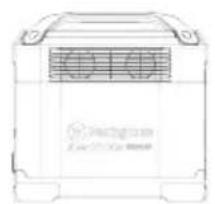
natural_image
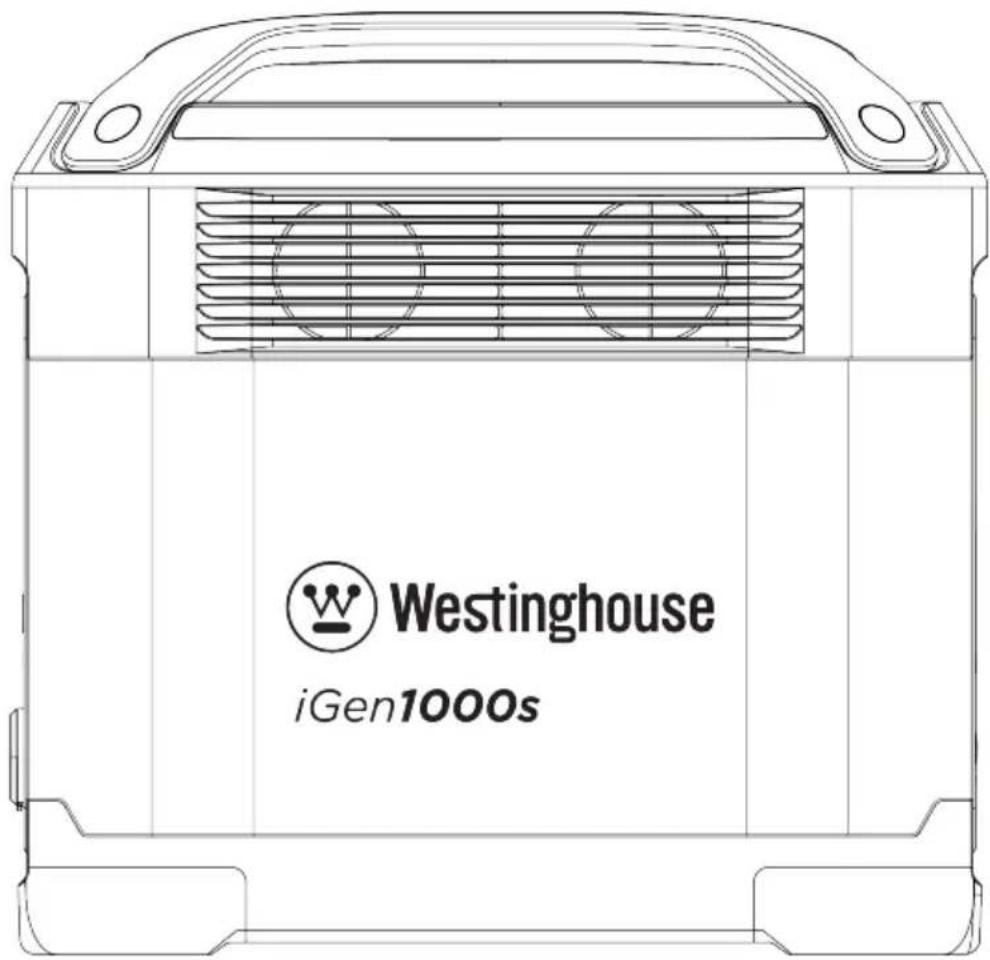
Line drawing of a portable air conditioner unit (no text or symbols)iGen1000s
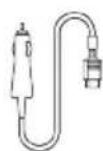
1.5m Car Charge Cable
(Input)
Part# PS100003
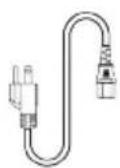
1.5m AC Cable (Input)
Part# PS100001
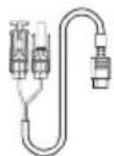
3.5m Solar Charge Cable (MC4 to XT60 Input) Part# PS100002
User Manual
REGISTERING YOUR PRODUCT
Register your product online at wpowereq.com/register. To register you will need the serial number on the Power Station which is located on the bottom of the unit.
CONTROLS AND OUTLETS
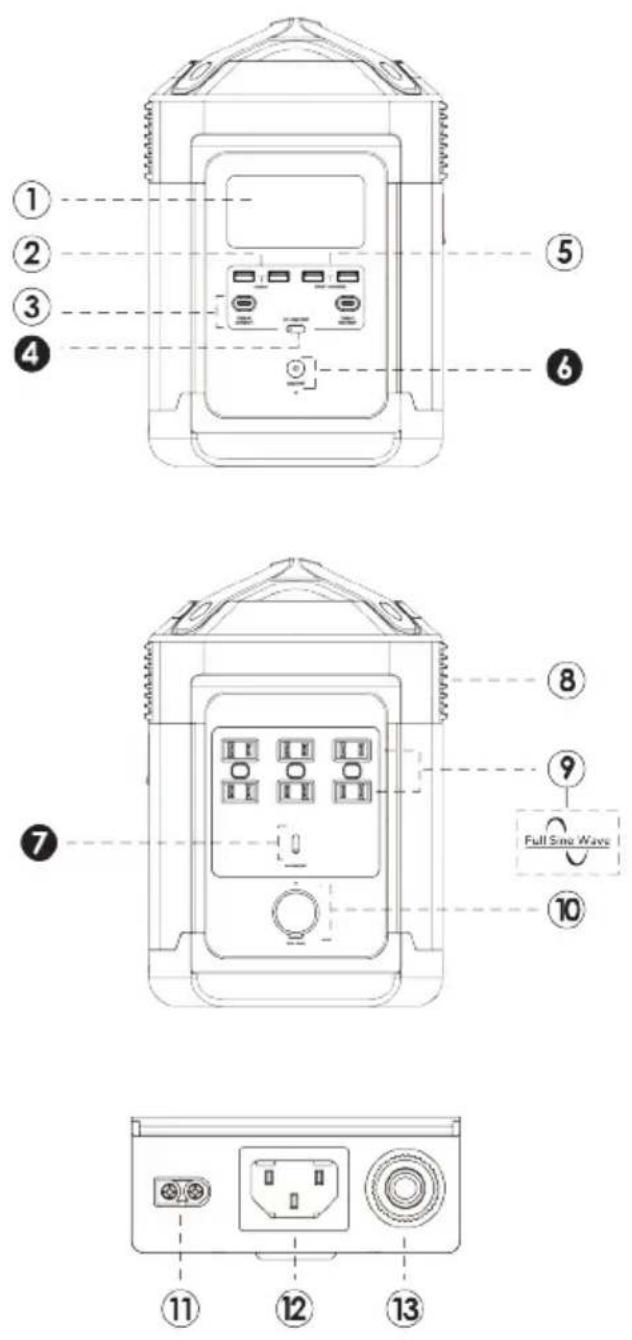
| # Description | |
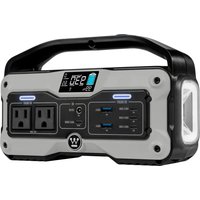
| 1. LCD display: Display turns off after five minutes. Quickly push the ON/OFF button to turn ON or OFF the display. | |
| 2. 2 | USB-A output ports: Charge devices such as an iPhone, tablet, GoPro, speakers, etc. The USB-A Output indicator light will illuminate when a USB-A port is in use or turned ON. |
| # Description |
| 3. 2 USB-C output ports: Devices that charge through a USB-C port, such as a MacBook Pro, Android phone, or other devices can be charged by the iGen1000s USB-C port. The USB-C Output icon will appear on LCD Display when a USB port is in use. |
| 4. DC ON/OFF button: Push and hold to turn ON/OFF DC power. The DC Output indicator light will illuminate when in use or turned ON. Turning the DC ON/OFF button to the ON position will keep the DC power ON for 24 hours to charge low-power devices, such as earphones, which will not automatically turn DC power ON. |
| 5. 2 fast charge USB-A output ports:The USB-A Output indicator light will illuminate when a USB-A port is in use or turned ON. Fast charge-enabled devices can be charged at a maximum speed of 28W. If your device does not support fast charging, the device will charge at regular speed. |
| 6. Main power ON/OFF button: Push and hold the power button to turn the unit ON or OFF. Quickly push the Main Power ON/OFF button to turn the LCD Display Screen ON or OFF while in operation. The Power indicator light will illuminate solid when any of the output ports is in use. The Power Indicator Light will flash when none of the output ports are in use, signifying that the unit is in an Idle State. After five minutes in the Idle State, the LCD Display Screen will enter sleep mode (the battery will still be in operation). After 30 minutes in Idle State, the unit will automatically shut down unless the DC ON/OFF button is turned ON. |
| 7. AC ON/OFF button: The AC power needs to be turned ON manually. Push and hold to turn AC power ON/OFF. The indicator light will illuminate when main power is ON. Turn OFF when AC power is not in use to conserve battery life. Unplug all power cord from the AC ports when not in use. If the AC power is not used for more than 12 hours, the unit will turn off automatically. |
| 8. Ventilation fans: The fans prevent the unit from overheating. Never block or obstruct the ventilation vents. |
| 9. 6 AC outlets (120V / 60Hz): Used to charge devices that require 120V AC such as laptops, TVs, mini refrigerators, vacuums, etc. |
| 10. Car outlet: Used to charge devices that require a car outlet to be charged, such as drone batteries. The Car Outlet indicator light will illuminate when the car outlet is in use. |
| 11. Solar / Car charging input port: Supports a maximum of three 110W solar panels to be connected in series. Do not put more than two solar panels in parallel connection. OnanS1000 has a limit input of 400W. Supports car charge with a maximum input of 8A. |
| 12. AC charging input: Plug in the supplied AC cord into the port and connect the three-pin plug into a 120V/60Hz AC power source. |
| 13. Overload protection switch, 20A: If the input current exceeds 20A during charging, the AC charging port will trigger the overload protection (See Notification Icons section). When the overload indicator has turned off, push the Overload Protection button to reset and continue charging. |
DC OVERLOAD PROTECTION
When any DC port is powering devices that exceed maximum current limit, or the output power of the AC jack exceeds the maximum AC power output, the overload icon will be shown on the display and the corresponding interface indicator will flash simultaneously for 15 seconds. The output of the affected port will be automatically turned off. Other ports will continue to operate.
Remove the devices connected to the DC ports. Make sure the Power Station can supply enough continuous (running) and peak (starting) watts for the items you will power at the same time before reconnecting devices.
AC OVERLOAD PROTECTION
When the power output exceeds the battery maximum power output, the overload icon will be shown on the display and the corresponding port indicator will flash simultaneously for 15 seconds. The unit will automatically shut down. After an overload occurs, remove the connected devices. Make sure the Power Station can supply enough continuous (running) and peak (starting) watts for the items you will power at the same time before reconnecting devices.
LCD DISPLAY
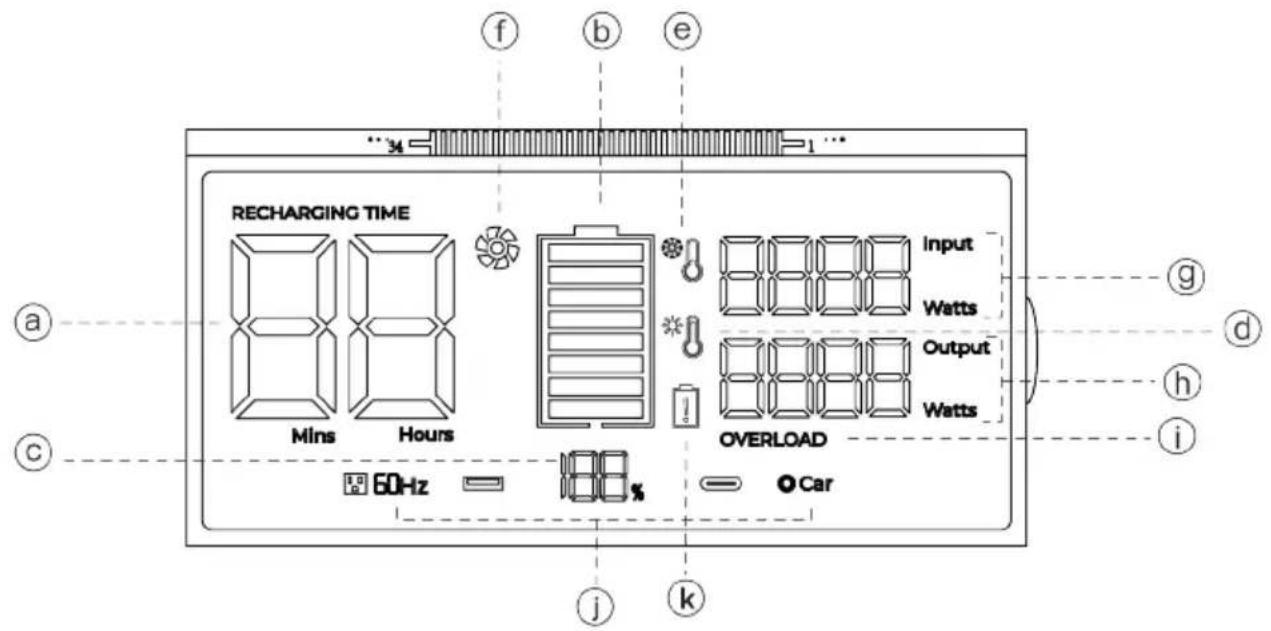
| a. | Remaining charge/discharge time in minutes or hours | g. | Current input power in Watts |
| b. | Battery level indicator. If the battery indicator is flashing, contact customer support. | h. | Current output power in Watts |
| c. | Battery percentage of power remaining i. Overload warning | ||
| d. | High temperature indicator. Allow the unit to cool before use. | j. | Indicates the use status of each port |
| e. | Low temperature indicator. Move the unit to a warmer location. | k. | Notification icons |
| f. | Fan indicator. Shows automatic cooling fan is in operation | ||
OPERATION
Only operate the Power Station within the recommended temperature range (-4° – 113°F (-20° – 45°C)). Do not move the unit if it is charging or in use.
HOW TO POWER AC DEVICES
- Make sure the devices you are plugging in are turned off.
- Connect the power cable plug of the electrical device into an AC outlet on the Power Station.
- Push the AC ON/OFF button to turn on AC power. The button will illuminate when it is turned on.
- Turn ON the AC device.
- The LED Display will show the real-time wattage use of the device.
- When finished, turn off all attached devices, remove the power cable, then push the AC ON/OFF button to turn OFF AC power. (If you leave the AC ON/OFF button ON it will deplete the battery.)
NOTICE: If the total output exceeds 1500W, the power station will automatically shut off. Make sure the Power Station can supply enough continuous (running) and peak (starting) watts for the items you will power at the same time.
WARNING
The AC outlets, AC voltage, and frequency differ by country; carefully check whether the Power Station specifications are consistent with the device specifications before use, otherwise, it can lead to dangerous situations.
HOW TO POWER DC DEVICES
- Connect the power cable plug of the electrical device to a USB outlet.
- Push the DC ON/OFF button to turn on. The button will illuminate when it is on.
- The LED Display will display real-time wattage of the device.
- When finished, push the DC ON/OFF button to turn off DC power.
NOTICE
If the total output exceeds the wattage output of the DC outlet, the power station will automatically shut off. Ensure the power consumption is less than what the ports are rated before connecting them to the Power Station.
COLD WEATHER USE
Cold temperatures (below freezing) can affect the unit's battery capacity due to chemical characteristics of the battery. Keep the Power Station within operational temperature range to prolong battery life (-4°–113°F (-20°–45°C), and 32°–113°F (-0°–45°C) while charging).
POWER STATION OUTPUT CAPACITY
NOTICE
Do not overload the iGen1000s. Exceeding the wattage/amperage capacity can damage the Power Station and/or electrical devices connected to it.
Make sure the iGen1000s can supply enough continuous (running) and peak (starting) watts for the items you will power at the same time.
The total power requirements (Volts x Amps = Watts) of all devices connected must be considered. Device manufacturers usually list rating information near the model or serial number.
To determine power requirements:
- Select the items you will power at the same time.
- Total the continuous (running) watts of these items. This is the amount of power the Power Station must produce to keep the items running.
- Estimate how many peak (starting) watts you will need. Peak wattage is the short burst of power needed to start electric motor-driven tools or appliances such as a refrigerator. Because not all motors start at the same time, total peak watts can be estimated by adding only the item(s) with the highest additional peak watts to the total rated watts from step 2.
Example:
| Tool or Appliance | Running Watts* | Peak (Starting) Watts* |
| TV (Tube Type) 300 0 | ||
| RV Refrigerator 180 600 | ||
| Radio 200 0 | ||
| Light (75 Watts) 300 0 | ||
| Coffee Maker 600 0 | ||
| 1580 Total Running Watts* | 600 Highest Peak (Starting) Watts* | |
| Total Running Watts 1580 | ||
| Highest Peak (Starting) Watts + 600 | ||
| Total Watts Needed 2180 | ||
*Wattages listed are approximate. Verify actual wattage.
SERIES OPERATION
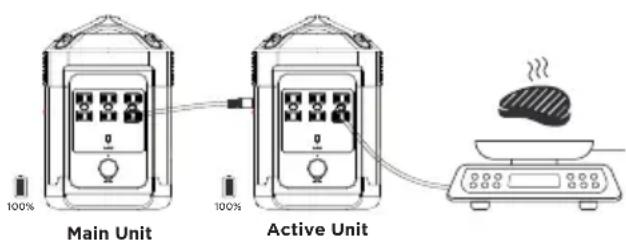
Two iGen1000s Power Stations can be connected to provide continuous power with twice the battery capacity.
Note: During series operation, do not connect either of the Power Stations to the power grid with an AC charging cable to prevent activating the over-current protection.
- Charge both Power Stations to 100%.
Note: Do not charge more than two Power Stations at the same time to prevent an excessive load on your home power grid. - Connect an AC cable to any AC outlets on the Master unit and the other side of the cable to the AC charging input port of the Active unit as shown.
-
Power both units ON, then push the AC ON/OFF button on both units to turn AC power ON.
-
Connect devices to the AC outlets on the Active unit and enjoy twice the battery life.
Note: Do not connect any electrical devices to the primary unit while in series operation.
UPS OPERATION
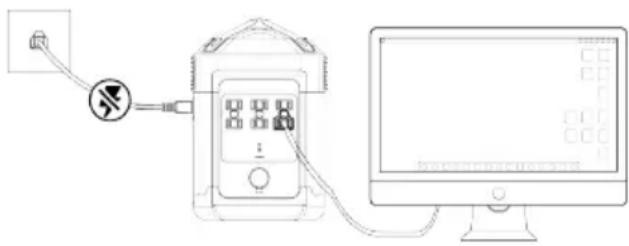
The iGen1000s can be used as a temporary Uninterruptible Power Supply (UPS) to provide continuous power in case of a power outage.
You can use the iGen1000s AC outlets while the Power Station is connected to a wall socket with the AC power supply (the AC power comes from the power grid, not the battery). When the power grid suddenly loses power, the connected device can automatically switch to iGen1000s battery power in approximately 30ms to ensure your work is not interrupted.
Note: Do not connect devices with high uninterrupted power supply requirements. Please perform multiple tests to confirm compatibility before connecting devices, such as data servers and workstations to the iGen1000s.
NOTICE
Because the AC outlets of the iGen1000s are in a double blade, ungrounded configuration, it is recommended to use the UPS function of iGen1000s for temporary emergency use only.
WARNING
DO NOT use electric devices with bare metal when charging to avoid the risk of electric shock.
CHARGING
Only charge the Power Station within the safe charging temperature range (32°–113°F (0°–45°C)). You can power devices when charging. Do not connect an electrical device which requires over 800 Watts of power when charging due to the current capacity of the wall outlet.
WARNING
DO NOT use electric devices with bare metal when charging to avoid the risk of electric shock.
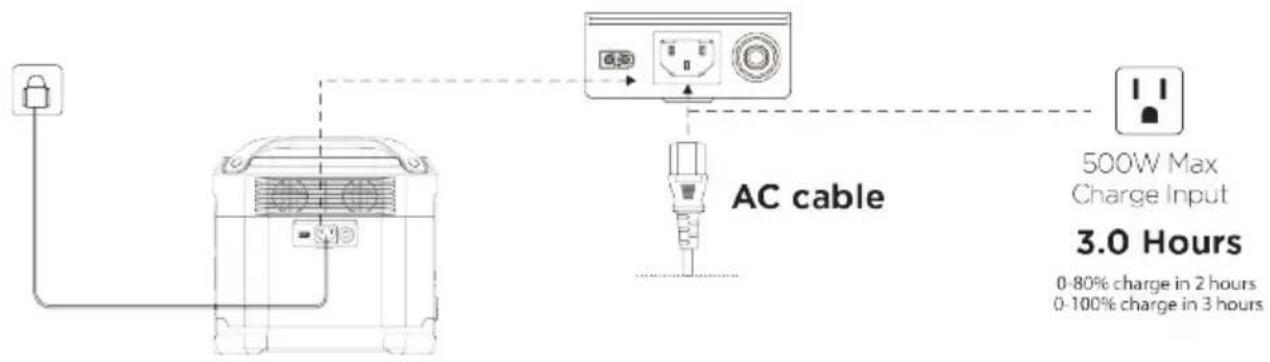
AC CHARGING
WARNING
Do not charge the Power Station immediately after it is fully discharged. For safety, wait 2 to 3 hours for the product to cool down before charging. If you attempt to charge iGen1000s immediately after a full discharge, the iGen1000s will display as an overheating protection reminder.
Connect the unit to a 120V/60Hz power supply as shown.
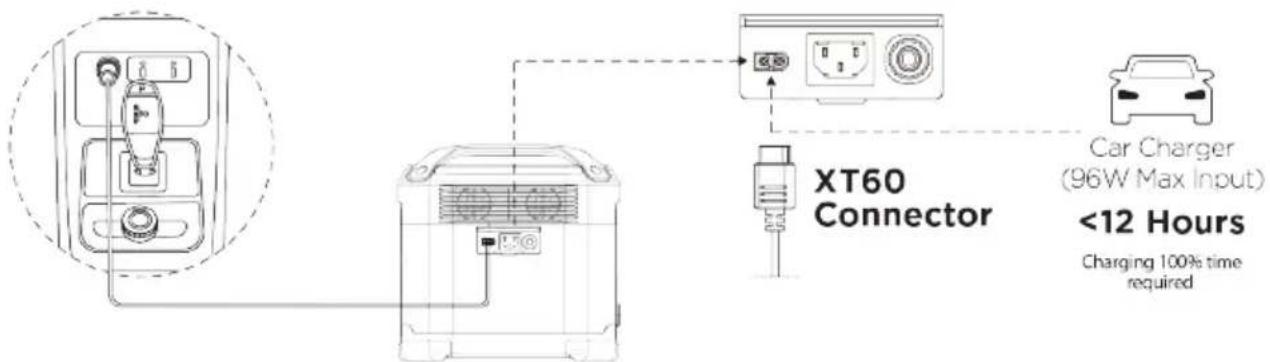
VEHICLE CHARGING
Connect the unit to a 12V automotive charger as shown. Start the vehicle before charging.
SOLAR CHARGING
The iGen1000s can be charged with universal solar panels (10-65V DC, 8A max) with a MC4 connector. When the input exceeds 65V, iGen1000s overload protection will be triggered. Excessive voltage can damage the iGen1000s.
Note: Westinghouse will not provide repair services for any damage to the unit caused by the poor quality or improper operation of the third-party solar panels, including during the warranty period.
Connect a solar panel (not included) equipped with a MC4 connection to the supplied MC4 to XT60 conversion cable. Plug the XT60 cable into the unit as shown.
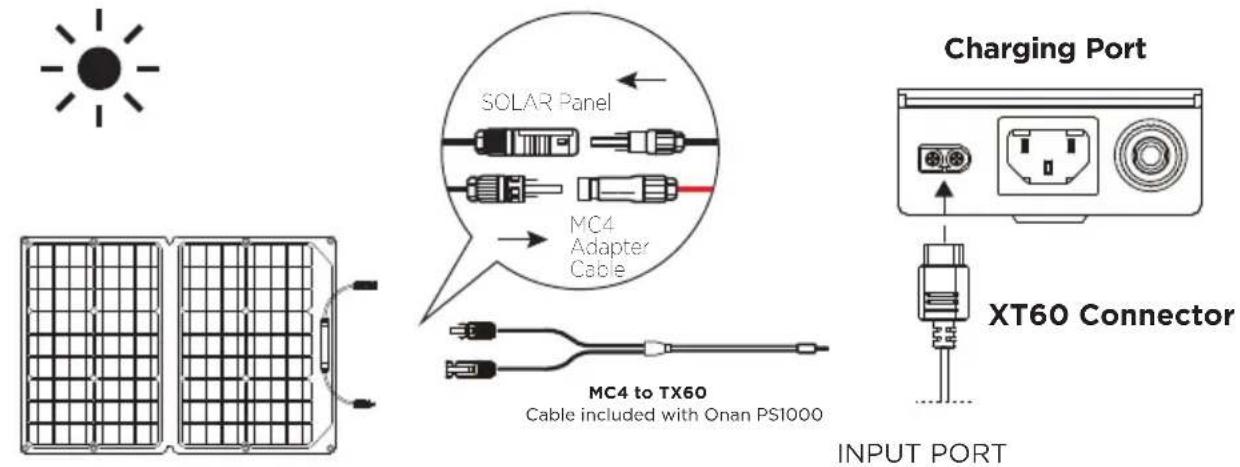
SOLAR PANEL
SOLAR SERIAL CHARGING
Connect 1 to 3 solar panels (do not connect more than 3) in series as shown to the MC4 port as shown. Then, connect to the MC4 to XT60 conversion cable.
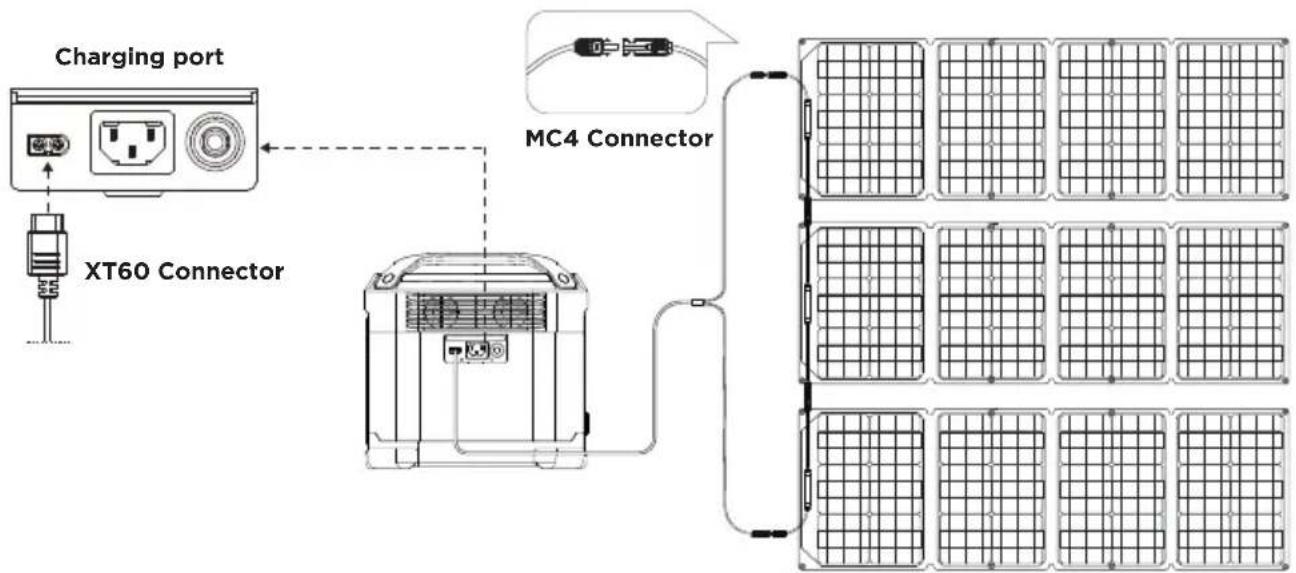
flowchart
graph TD
    A["Charging port"] --> B["XT60 Connector"]
    B --> C["MC4 Connector"]
    C --> D["Grid of Solar Panels"]
    style A fill:#f9f,stroke:#333
    style B fill:#ccf,stroke:#333
    style C fill:#cfc,stroke:#333
    style D fill:#fcc,stroke:#333
PANEL SOLAR -21.6V X3
SOLAR SERIAL AND PARALLEL CHARGING
Connect up to two sets of solar panels in parallel to the MC4 port as shown. If you want to connect six solar panels, put them into two sets of three solar panels connected in series, then connect the two sets of solar panels in parallel (parallel cable sold separately). Connect the panels to the MC4 to XT60 conversion cable. Plug the XT60 cable into the unit as shown.
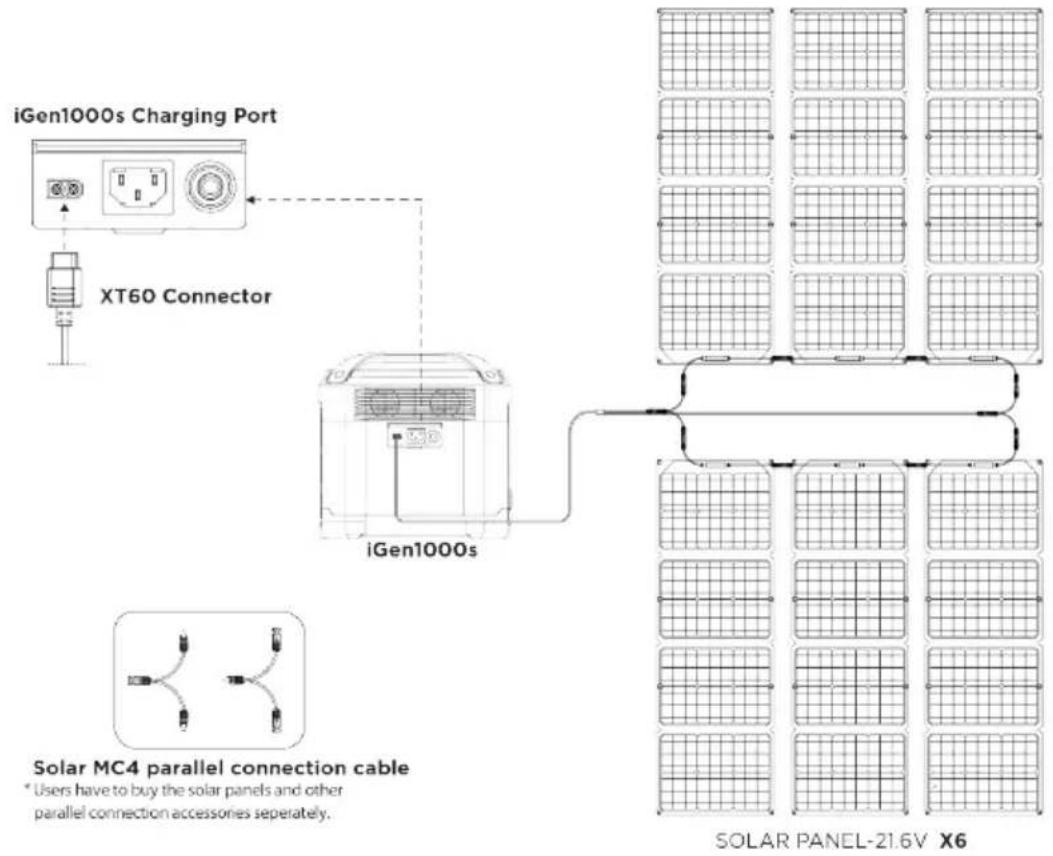
CLEANING
Only clean the surface of the unit using a dry, non-abrasive cloth. You can use cleaners designed for mobile phones or computer screens. To ensure adequate cooling, vacuum the fan vents to remove dust and debris.
TRANSPORTATION AND STORAGE
- Battery life may be reduced if not used for an extended period of time. Discharge the Power Station to 30% battery life, then charge to 85% every 3 month to prolong battery life.
- DO NOT place the product near a heat source, such as a car in direct sunlight, a fire source, or a heating stove.
- Store the product in a dry environment. DO NOT place the product where it may contact water or high humidity.
- Make sure no small metal objects can fall on or around the product while in storage.
- Never transport a product with a battery power level higher than 30%.
- Never store the product in environments below -4^ (-20°C) or above 113^ (45°C).
RECYCLING
Dispose of the unit in hazardous material-specific recycling locations only after a complete discharge (if possible). Batteries are hazardous chemicals. Strictly follow your local regulations regarding battery disposal and recycling. Dispose of the unit immediately if it cannot be powered on after over-discharging.
Always return your used electronic products, batteries, and packaging materials to dedicated collection points to prevent uncontrolled waste disposal and promote the recycling of materials.
NOTIFICATION ICONS
The display screen uses the following icons and combined icons to indicate overload and temperature conditions.
| Icon Description | |
 OVERLOADUSB-A Overload Protection OVERLOADUSB-A Overload Protection | USB-A and OVERLOAD icons flash together.Disconnect all electrical devices and wait 10 seconds before reconnecting. |
  USB-C High Temperature Protection USB-C High Temperature Protection | USB-C and High-Temperature icons flash together.Let unit cool before reconnecting. |
| OVERLOADProduct Overload | Overload icon flashes. Unplug all the electrical devices and restart the unit. |
  High Temperature Discharge-protection High Temperature Discharge-protection | RECHARGING TIME, Exclamation and High-temperature icons flash together. Occurs after heavy battery use. Let the unit cool down before recharging. |
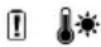 High Temperature Recharge-protection High Temperature Recharge-protection | Exclamation and High-temperature icons flash together. Charging can be resumed after the battery has cooled. |
  Low Temperature Recharging-protection Low Temperature Recharging-protection | RECHARGING TIME, Exclamation and Low-temperature icons flash together. Place the unit in a warmer location and wait for it to return to the charging temperature range before recharging. |
 Low Temperature Discharge-protection Low Temperature Discharge-protection | Exclamation and Low-Temperature icons flash together. Place the unit in a warmer location and wait for it to return to the charging temperature range before recharging. |
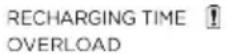 Overload Recharging-protection Overload Recharging-protection | RECHARGING TIME, Exclamation and OVERLOAD icons flash together. Unplug charging cable, restart the unit, then reattach charging cable. If light keeps flashing, contact Westinghouse customer service toll-free at 1 (855) 944-3571. |
 Overload Discharging-protection Overload Discharging-protection | Exclamation and OVERLOAD icons flash together.Disconnect all devices, restart the unit. Make sure the Power Station can supply enough continuous (running) and peak (starting) watts for the items you will power at the same time. |
| Communication Failure between Main Board and BMS | Only the Exclamation icon is flashing. Restart unit. If the light keeps flashing, contact Westinghouse customer service toll-free at 1 (855) 944-3571. |
| Battery Cells Failure | The Exclamation icon is on. Try to restart the unit. If the light keeps flashing, contact Westinghouse customer service toll-free at 1 (855) 944-3571. |
| Communication Failure between Main Board and AC | AC icon flashes. Restart the unit. If the icon keeps flashing, contact Westinghouse customer service toll-free at 1 (855) 944-3571. |
| Inverter Output Overload | AC and OVERLOAD icons flash together. Wait 10 seconds, turn AC Power ON/OFF. Make sure the Power Station can supply enough continuous (running) and peak (starting) watts for the items you will power at the same time. |
| Inverter High Temperature Protection | AC and High-temperature icons flash together. Let the unit cool down. |
| Inverter Low Temperature Protection | The AC and Low-Temperature icons flash together. Place the unit in a warmer location and wait for it to return to operational temperature range. |
| Fan Blockage | AC and Fan icon flashes. Turn off the unit and carefully clean and vacuum around vents on both sides. Turn power ON. If icon keeps flashing, contact Westinghouse customer service toll-free at 1 (855) 944-3571. |
| Car Charger Overload | Car and OVERLOAD icons flash together. Restart the unit. |
| Car Charger High Temperature Protection | Car and High-temperature icons flash together. Occurs when temperature/XT60 Interface is recharging in a High Temperatures. Wait for unit to cool down. |
| Communication Failure | Car icon flashes. Restart the unit. If the icon keeps flashing, contact Westinghouse customer service toll-free at 1 (855) 944-3571. |
iGen1000s
natural_image
Line drawing of a portable electronic device labeled 'Westinghouse AGen19000s' (no additional text or symbols)iGen1000s
AVISO
Panel Solar-21.6V X3
CARGA SOLAR EN SERIE Y EN PARALELO
iGen1000s
NE RETOURNEZ PAS CE PRODUIT AU MAGASIN
QU'Y A-T-IL DANS LA BOITE?
natural_image
Line drawing of a portable electronic device with ventilation grille and brand logo (no readable text or symbols beyond branding)NETTOYAGE
natural_image
White crown icon on a solid blue background, enclosed in a circle (no text or symbols)WestinghousePortablePower.com
Service Hotline: (855) 944-3571
777 Manor Park Drive
Columbus, OH 43228
TM & © Westinghouse Electric Corporation
©2022 Westinghouse Outdoor Power Equipment LLC. All Rights Reserved All Rights Reserved.
iGen1000s Rev01
PS-iGen1000s-M Rev02 02/2022
- iGen1000s
- DO NOT RETURN THIS PRODUCT TO THE STORE
- TABLE OF CONTENTS
- DISCLAIMERS
- ALL RIGHTS RESERVED
- DANGER
- SAVE THESE INSTRUCTIONS
- WARNING
- CAUTION
- NOTICE
- FCC STATEMENT
- FCC RADIATION EXPOSURE STATEMENT
- SAFETY
- GENERAL SAFETY RULES
- SPECIFICATIONS
- INTENDED USE
- WHAT'S IN THE BOX?
- REGISTERING YOUR PRODUCT
- DC OVERLOAD PROTECTION
- AC OVERLOAD PROTECTION
- OPERATION
- HOW TO POWER AC DEVICES
- HOW TO POWER DC DEVICES
- COLD WEATHER USE
- POWER STATION OUTPUT CAPACITY
- To determine power requirements:
- SERIES OPERATION
- UPS OPERATION
- CHARGING
- AC CHARGING
- VEHICLE CHARGING
- SOLAR CHARGING
- SOLAR SERIAL CHARGING
- SOLAR SERIAL AND PARALLEL CHARGING
- CLEANING
- TRANSPORTATION AND STORAGE
- RECYCLING
- NOTIFICATION ICONS
- AVISO
- CARGA SOLAR EN SERIE Y EN PARALELO
- NE RETOURNEZ PAS CE PRODUIT AU MAGASIN
- QU'Y A-T-IL DANS LA BOITE?
- NETTOYAGE
- WestinghousePortablePower.com
- Service Hotline: (855) 944-3571
Brand : WESTINGHOUSE
Model : iGen1000s
Category : Portable generator