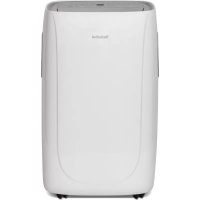
Technipolar 1 - Air Conditioning TECHNISAT - Free user manual and instructions
Find the device manual for free Technipolar 1 TECHNISAT in PDF.



| Product type | Reversible mobile air conditioner (cool, heat, ventilate, dehumidify) |
| Brand | TechniSat |
| Model | Technipolar 1 |
| Dimensions (W x H x D) | 445 x 720 x 375 mm |
| Weight | 31 kg |
| Power supply | AC 220-240 V, 50 Hz, rated power 1640 W |
| Cooling capacity | 11000 BTU/h (3.2 kW) |
| Heating capacity | 10000 BTU/h (2.9 kW) |
| Recommended area | 25 - 35 m² |
| Dehumidification | 36 L/24h |
| Airflow | 250 - 300 m³/h |
| Noise level | 53 - 65 dB |
| Refrigerant | R290 (propane), 260 g |
| Cooling energy class | A |
| Heating energy class | A+ |
| Exhaust hose length | 1.5 m max. |
| Main functions | Cool, heat, ventilate, dehumidify, timer, night mode, remote control |
| Maintenance and cleaning | Removable washable filter, clean with soft damp cloth, empty condensation tank regularly |
| Safety | Grounding required, automatic shut-off when tank full, surge protection |
| Package contents | Air conditioner, remote control, exhaust hose, window kit, user manual |
| Warranty | 24 months (statutory) |
Frequently Asked Questions - Technipolar 1 TECHNISAT
User questions about Technipolar 1 TECHNISAT
0 question about this device. Answer the ones you know or ask your own.
Ask a new question about this device
Download the instructions for your Air Conditioning in PDF format for free! Find your manual Technipolar 1 - TECHNISAT and take your electronic device back in hand. On this page are published all the documents necessary for the use of your device. Technipolar 1 by TECHNISAT.
USER MANUAL Technipolar 1 TECHNISAT
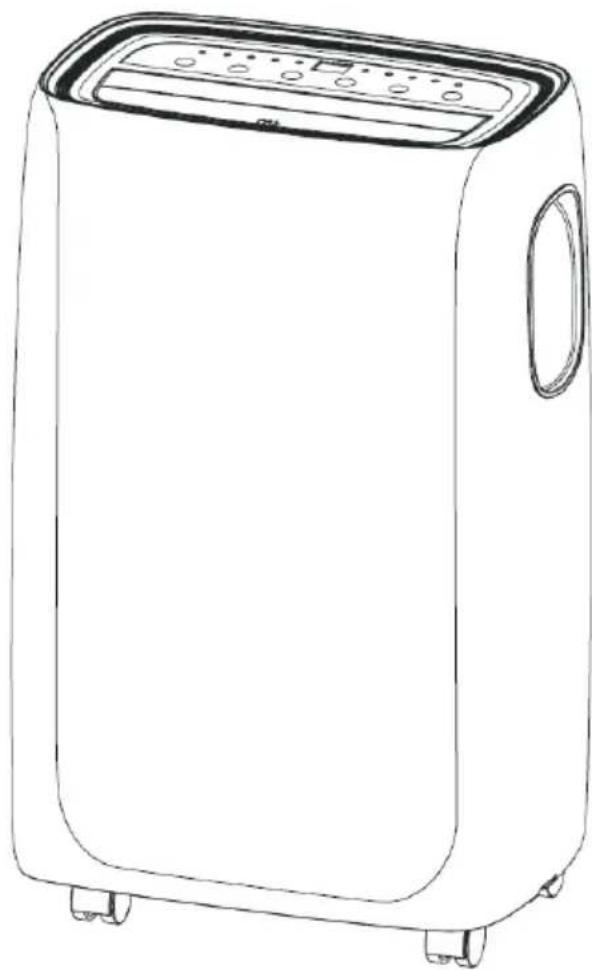
Mobile air conditioner for cooling and heating, with fan and dehumidifier function.
TechniSat
1 Contents
1 Contents 30
2 Preface 31
3 Safety instructions 32
3.1 Signs and symbols used 32
3.2 Intended use 33
3.3 Safe use of air conditioners 33
3.4 Disposal instructions 35
4 Illustrations 36
5 Installation instructions 37
5.1 Exhaust air discharge 37
5.2 Installing the window kit 38
5.3 Site of installation 39
6 Operation 40
6.1 Control panel 40
6.2 Switch On/Off 40
6.3 Cooling mode 41
6.4 Heat mode 41
6.5 Dehumidifier mode 42
6.6 Fan mode. 43
6.7 Automatic mode 43
7 Timer mode 43
7.1 Programming the timer 43
8 Using the remote control. 44
8.1 Inserting the batteries 44
8.2 Overview 45
8.3 Activating special functions with the remote control 46
8.3.1 Ventilation outlet 46
8.3.2 Changing the temperature unit 46
8.3.3 Night mode 46
9 Servicing and maintenance. 47
9.1 Draining the condensation water 47
9.2 Cleaning 48
9.3 ACTIVITIES AT THE START / END OF THE SEASON 48
10 Troubleshooting 49
11 Technical data 51
12 Legal notices 52
12.1 Service instructions 52
13 Notes 53
30
2 Preface
Dear Customer,
Thank you for choosing this air conditioner from TechniSat.
This instruction manual is intended to help you get to know the extensive functions that your new unit offers and to make the best use of them. It will help you to use the product as intended and safely. It is intended for anyone who is installing, operating, cleaning or disposing of the unit.
Store the instruction manual in a safe place for later use.
A current version of the instruction manual can be found in the download area of your product on the TechniSat website at www.technisat.de.
We hope you enjoy using your
TechniSat product!
Your
TechniSat Team
3.1 Signs and symbols used
In this instruction manual:

Indicates a safety instruction which can lead to serious injuries or death if not observed. Note the following signal words:
DANGER - Serious / fatal injury
WARNING - Serious injury, possibly fatal
CAUTION - Injury

This identifies information that must always be observed to prevent defects, data loss/misuse and undesired operation. It also describes other functions of your unit.

Beware of electrical voltage. Follow all safety instructions to avoid electric shock. Do not open the unit under any circumstances.
On the unit:

Danger from hazardous substances. Follow all safety instructions. Carelessness in proximity to flammable substances can lead to fire.

Observe all information and safety instructions in the instruction manual.

Indoor use - devices with this symbol are only suitable for indoor use.

Protection class II - Electrical devices in protection class II are electrical devices with continuous double and/or reinforced insulation and having no connection options for a protective conductor. The casing of an electrical device of protection class II, which is enclosed in an insulating material, can form part or all of the additional or reinforced insulation.

Your device bears the CE symbol and complies with all requisite EU standards.

Electronic devices do not belong in the household waste and must be disposed of properly in accordance with Directive 2002/96/EC of the European Parliament and of the Council dated January 27, 2003 concerning waste electrical and electronic equipment. Please return this unit to the designated public collection point for disposal at the end of its service life.
3.2 Intended use
The TechniSat TECHNIPOLAR 1 air conditioner is for cooling or heating living spaces measuring between 13m^2 and 35m^2 .
3.3 Safe use of air conditioners
Please take note of the following information to minimise safety risks, to prevent damage to the unit and to make a contribution to environmental protection. Please read all the safety information carefully and keep it for future reference. Always heed all the warnings and instructions in this instruction manual and on the rear of the unit.

WARNING!
Flammable substances. The unit is filled with R290 propane gas. It is essential to observe the manufacturer's guidelines for repair or service work. Servicing may only be carried out by trained specialist personnel.

WARNING!
Never open the unit!
Touching live parts poses a danger to life!

Observe all of the following instructions for the intended use of the unit and to prevent damage to the unit and injury to persons.
The unit is not intended to be used by people (including children) with limited physical, sensory or mental capacities or a lack of experience and/or knowledge, unless they are supervised by a person responsible for their safety, or if they have been instructed by them as to how to use the unit.
Children must be supervised to ensure that they do not play with the unit.
Do not use this unit for functions other than those described in this instruction manual.
If the power cord is worn or damaged, it must only be replaced by a qualified service technician using genuine spare parts.
The plug must be firmly and completely inserted into the socket. There is a risk of electric shock or fire.
Do not connect other devices to the same outlet, there is a risk of electric shock.
Neither the air conditioner nor the power cord must be disassembled or modified, otherwise there is a risk of electric shock or fire. All other work on the unit must be carried out by a qualified technician.Do not place the power cord or air conditioner near a heater, radiator, or other heat source. There is a risk of electric shock or fire.
The unit is equipped with a cable with a grounded conductor, which is connected to an earthing pin or tab. The plug must be plugged into a properly installed and grounded electrical outlet. Under no circumstances should the earthing pin or tab be cut off or removed from the plug.
The unit must be used or stored in such a way that it is protected from moisture, such as condensed water, splashed water, and the like.
Transport your air conditioner in a vertical position and place it on a stable, flat surface while in use. If the unit is transported lying on its side, it should stand upright for 6 hours and only then be connected to the power supply.
Switch off the unit or the remote control using the switch on the control panel. Do not start or stop operation by plugging in or unplugging the power cord. There is a risk of causing electric shock.
Do not press the buttons on the control panel with wet or damp hands.
Do not use hazardous chemicals to clean the unit and keep them away from the unit. To avoid damaging the surface, only clean the air conditioner with a soft cloth. Do not use wax, thinners or strong cleaning agents. Do not use the unit in the presence of flammable substances or vapours such as alcohol, insecticides, petrol, and the like.
If the air conditioner makes unusual noises or emits smoke or an unusual smell, pull the plug out of the socket immediately.
Do not clean the unit with water. Water can enter the unit and damage the insulation, creating the risk of electric shock. If water has entered the unit, immediately pull the power plug out and contact customer service.
The unit should be lifted and installed by at least two people.
Make sure that all accessories are removed from the packaging before use.
When removing and installing the filter, do not touch the metal parts of the air conditioner to avoid cuts. There is a risk of personal injury.
Do not block the air inlet or outlet vents on the air conditioner. A reduced air flow leads to poor performance and can damage the unit.Always grip the plug when plugging in or unplugging the air conditioner. Never pull the plug out of the socket by pulling on the cable. Otherwise there is a risk of electric shock and damage.
Place the air conditioner on a stable, level surface that can support a load of up to 50 kg. Installation on a non-solid or uneven surface can lead to damage and personal injury.
For the most efficient operation, close all doors and windows in the room. Make sure that the exhaust hose is routed outside to ensure efficient operation.
IMPORTANT - EARTHING METHOD
This product is factory-fitted with a power cord that has a three-pin grounded plug. It must only be connected to an electrical outlet that is equipped in accordance with the National Electrical Code and applicable local codes and regulations for earthing. If the circuit does not have a grounded outlet, it is the responsibility and obligation of the customer to replace the existing outlet in accordance with the National Electrical Code and applicable local codes and regulations. The third earthing contact must never be cut off or removed. Never use the cable, plug or unit if any of them are damaged. Only use the unit with an extension cable if it has been checked and tested by a qualified electrician. If the earthed plug is incorrectly connected, there is a risk of fire, electric shock and / or injury to persons in connection with the unit. Contact a qualified service technician if you have any doubts as to whether the unit is properly earthed.
ELECTRICAL CONNECTIONS
Before plugging the unit into the wall socket, check the following:
The mains voltage corresponds to the value specified on the type plate on the back of the unit.
The socket and circuit are suitable for the unit.
The mains socket matches the plug. If this is not the case, have the plug replaced.
The mains socket is adequately earthed. Failure to observe these important safety instructions releases the manufacturer from any liability.
3.4 Disposal instructions
Important information for the proper disposal of the product in accordance with EC Directive 2012119/EC.
At the end of its service life, the product must not be disposed of as municipal waste. It must be taken to a special municipal collection point or to a retailer who offers this service.
The separate disposal of household appliances avoids possible negative effects on the environment and the health of persons resulting from improper disposal. It also enables components to be reused, resulting in significant energy and resource savings. As a reminder of the need to dispose of household appliances separately the product is marked with a crossed out wheelie bin.
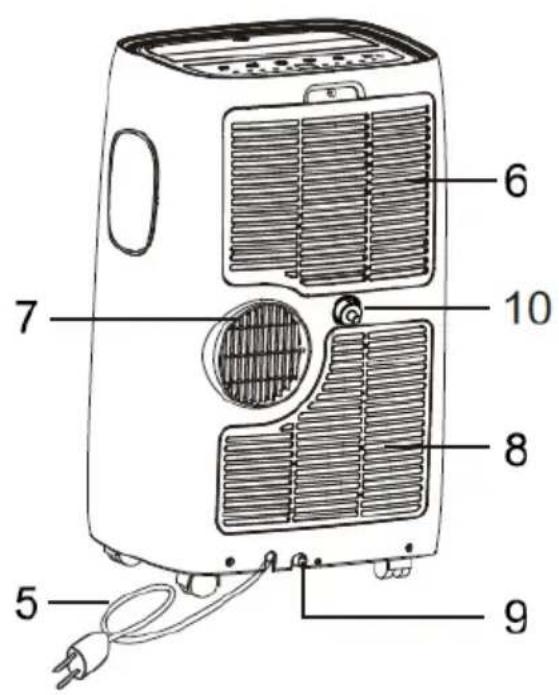
4 Illustrations
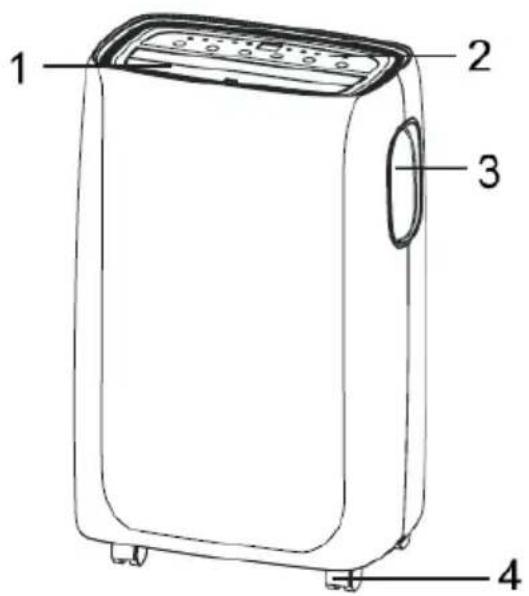
1 Air vent
2 Control panel
3 Handles (both sides)
4 Wheels
5 Power cord
6 Filter inlet
7 Exhaust air connection
8 Air inlet
9 Lower condensate drain
10 Upper condensate drain
5 Installation instructions
5.1 Exhaust air discharge
In cooling or heating mode, the unit must be installed near a window or opening so that the warm or cold exhaust air can be discharged outside.
Place the unit on a level floor and ensure that there is a minimum distance of 30 cm around the unit and that it is close to an earthed socket.
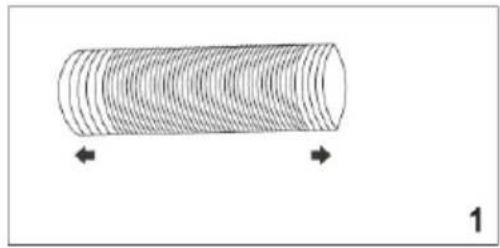
- Extend the hose to the desired length by unravelling it (Fig. 1)
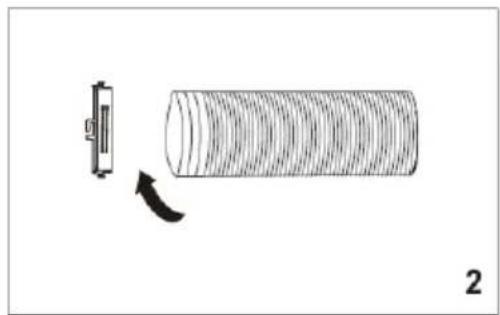
- Screw it onto the hose inlet (Fig. 2).
-
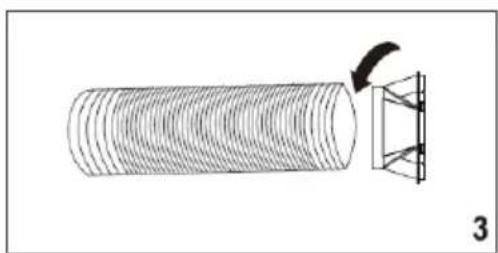
Screw the hose outlet onto the other end of the hose (Fig. 3).
-
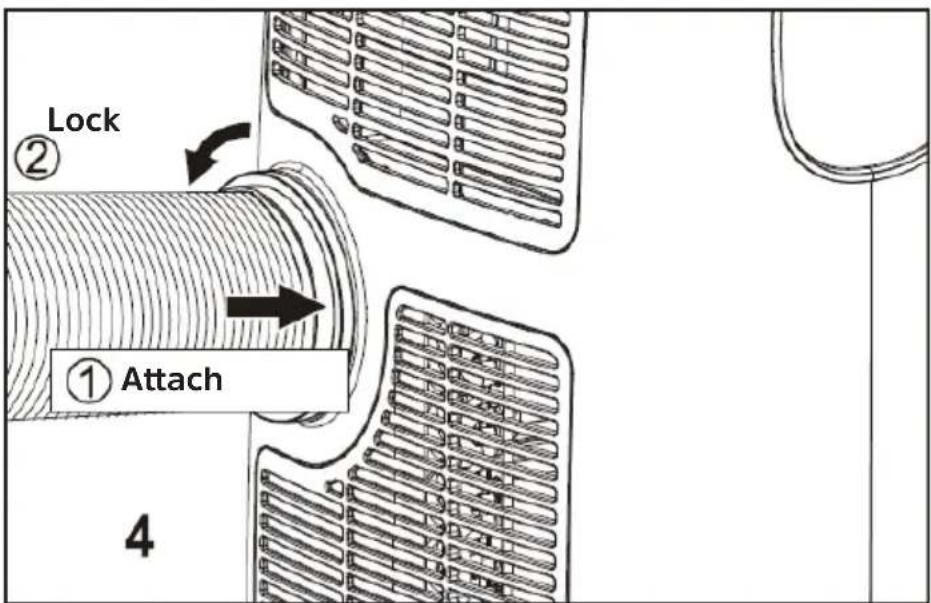
Mount the hose inlet onto the exhaust air connection (7) (Fig. 4).
- Attach the hose outlet to the window kit (see "5.2 Fenster-Kit installieren").
5.2 Installing the window kit
The window kit is designed to seal tilt windows. To install proceed as follows:
Fig. 5
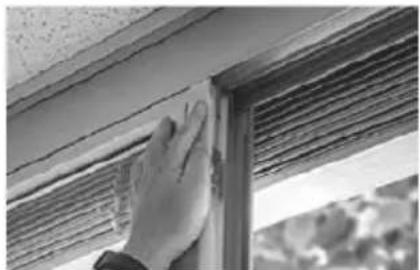
Glue the Velcro tape to the window frame.
Fig. 6
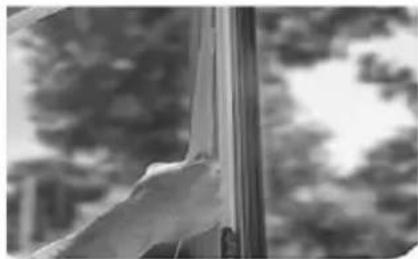
Glue the Velcro tape to the frame of the window.
Fig. 7
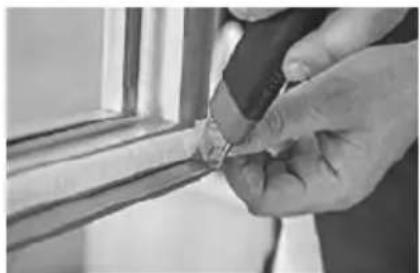
Shorten the Velcro tape at the corners.
Fig. 8
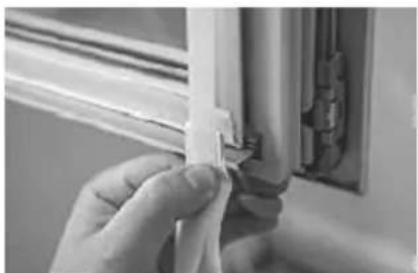
Make sure that the corners are flush.
Fig.9
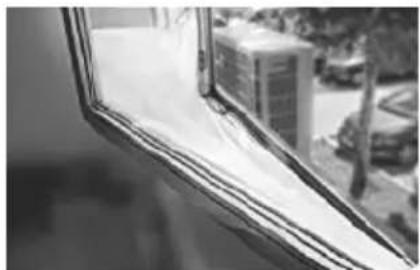
Attach the window seal.
Fig. 10
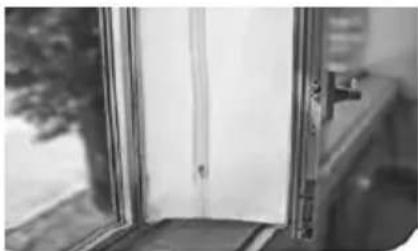
Make sure that both halves are aligned with each other.
Fig. 11
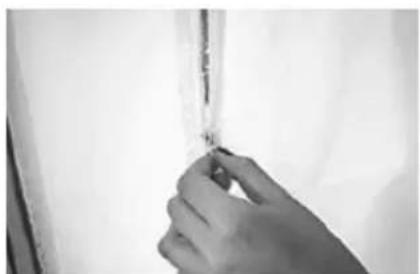
Open the zipper at the side.
Fig. 12
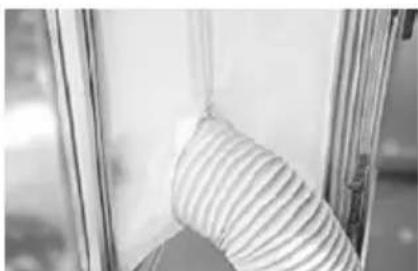
Insert the exhaust hose into the opening and close the zipper.
5.3 Site of installation
The unit should be set up on a solid surface to minimise noise and vibration. To ensure a stable and secure state, place the unit on a smooth, level floor that is solid enough to support the weight of the unit.
The unit is equipped with wheels to make installation easier. However, it should only be wheeled on smooth, flat surfaces. Be careful when wheeling it on carpets. Be careful and protect the floors when you roll the unit over wooden floors. Do not try to roll the unit over objects.
The unit must be installed within the reach of a properly dimensioned earthed wall outlet.
Never place any obstacles around the air inlet or outlet vents on the unit.
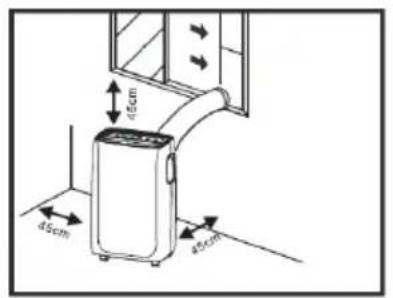
Leave a distance of at least 45~cm from the wall to achieve efficient air conditioning.
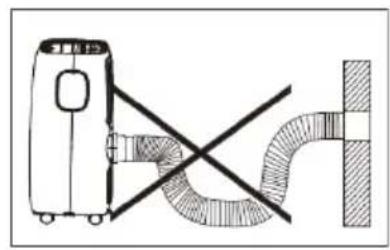
The hose can be extended, but should be kept as short as possible. Also make sure that the hose has no kinks and does not sag.
6 Operation
The control panel is located on the top of the unit. However, you need to use the remote control in order to utilise the full potential of the unit.
6.1 Control panel
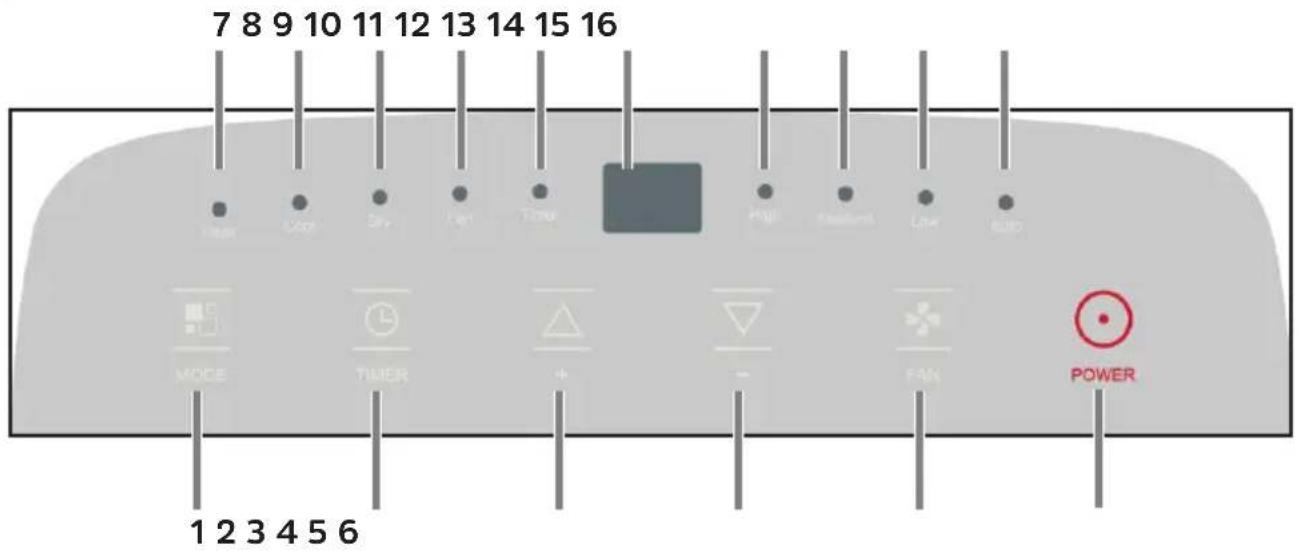
1 Switching operating modes
2 Timer
3 Temperature selection (warmer)
4 Temperature selection (cooler)
5 Fan level
6 On/Off switch
7 Heating function on
8 Cooling function on
9 Dehumidifier on
10 Fan on
11 Timer on
12 Display
13 Fan level high
14 Fan level medium
15 Fan level low
16 Automatic temperature regulator on
6.2 Switch On/Off
Insert the plug into the wall outlet. "- - " appears on the display.
Press the POWER button (6) once to switch on the unit.
Press the POWER button again to switch the unit off.

Never turn off the air conditioner by pulling out the power plug. Always switch the air conditioner off by pressing the POWER button and waiting a few minutes before pulling the plug. This allows the unit to perform a check cycle and shutdown properly.

Do not switch the air conditioner back on immediately after switching it off - wait a few minutes.
6.3 Cooling mode
The unit is ideal for hot, humid weather when it comes to cooling and dehumidifying the room at the same time.
Press the MODE button (1) several times until "Cool" (8) lights up.
Select the target temperature (18 °C to 32 °C) by pressing the Temperature selection warmer / cooler (3, 4) button until the corresponding value is shown on the display.

After switching on the unit and activating the cooling function, it may take a moment for the compressor to start and the unit to start to cool.
Press the FAN button (5) several times to select the desired fan speed, whereby High, Medium, Low and Auto (automatic control) can be selected. Depending on the fan speed selected, the noise level of the air conditioning unit while in operation will also change. If you prefer the unit to operate more quietly, select Low.

If you turn on the cooling mode immediately after the heating mode has been active, it can take up to 5 minutes before the unit starts to cool.

The most suitable temperature for the room during the summer is between 24^ and 27^ . However, it is recommended not to set a temperature that is far below the temperature outside.

Both drain caps (9, 10) should be closed in this mode to allow efficient cooling.
6.4 Heat mode
If you want to heat up a room, most probably in the cooler months, select heat mode.
Press the MODE button (1) several times until "Heat" (7) lights up.
Select the target temperature (13 °C to 27 °C) by pressing the Temperature selection warmer / cooler (3, 4) button until the corresponding value is shown on the display.
Press the FAN button (5) several times to select the desired fan speed, whereby High, Medium, Low and Auto (automatic control) can be selected. Depending on the fan speed selected, the noise level of the air conditioning unit while in operation will also change. If you prefer the unit to operate more quietly, select Low.

If you turn on the heating mode immediately after the cooling mode has been active, it can take up to 5 minutes before the unit starts to heat.

Water is extracted from the air and collected in the tank. When the tank is full, the unit switches off and the display shows Ft (full tank).
The lower drain cap (9) must then be removed and the tank emptied. Let all of the water drain into a collection vessel. When all the water has drained out of the unit, put the cap back on. After emptying the tank, the unit will start up again.

When operating the unit in very cold rooms, the unit is automatically defrosted, which temporarily interrupts normal operation. Lt appears on the display. During this process, it is normal for the sound coming from the unit to change.
In this mode, you may have to wait a few minutes before the unit begins to emit hot air.
In this mode, the fan may continue to work briefly, even though the set temperature has already been reached.
6.5 Dehumidifier mode
The unit is ideal for reducing the room humidity (in spring and autumn, damp rooms, rainy periods, etc.).

Note that in dehumidifier mode the moisture in the air is reduced. The condensed water is discharged to the outside via the upper drain (10). Direct the water into a suitable container and empty it regularly, depending on the size of the container.
Remove the upper drain cap (1.).
Connect the supplied hose or a suitable hose to the connection (2) and direct it into a suitable container.
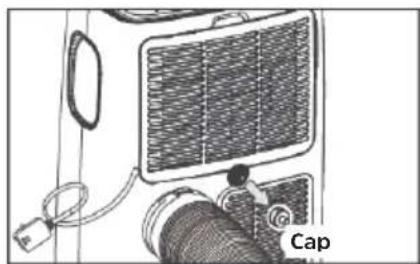
1.
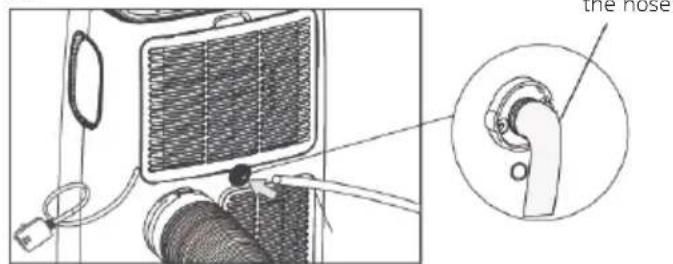
2.
Press the MODE button (1) repeatedly until Dry (9) lights up and, at the same time, the symbol for the automatic fan Auto (16) lights up.

In this mode, the fan speed is selected automatically by the unit and cannot be set manually.

Be careful not to kink the condensate hose.
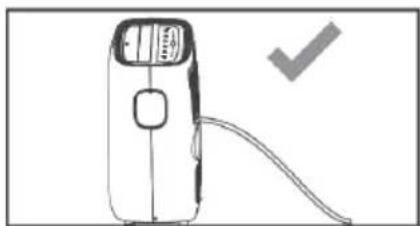
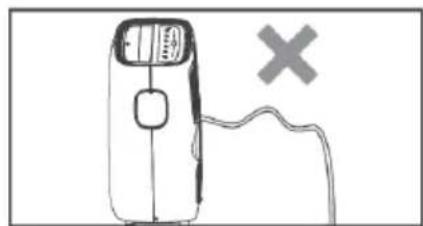
6.6 Fan mode
If you use the unit in this mode, the exhaust hose does not need to be connected.
Press the MODE button (1) several times until Fan (10) lights up. Press the FAN button (5) several times to select the desired fan speed, where High, Medium, or Low can be selected.

Automatic control is not available in this mode.
6.7 Automatic mode
In automatic mode, the unit independently decides which mode to use based on the current room temperature:
- Up to 20°C room temperature = heat mode
- Between 20^ C and 23^ C = fan mode
- Above 23^ C room temperature = cool mode
Press the MODE button (1) several times until all mode LEDs are switched off and a rotating bar appears on the display.
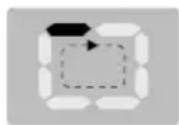
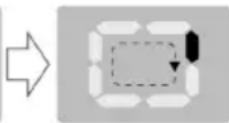

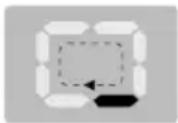

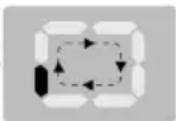
Press the FAN button (5) several times to select the desired fan speed, where High, Medium, or Low can be selected.
7 Timer mode
The timer can be used to automate switching the unit on or off.
Efficient use of the timer mode saves electricity, since the unit is only in operation at the set times.
7.1 Programming the timer
Delayed switching on
First select the mode and the desired settings (fan speed, temperature) while the unit is in operation. Then switch off the unit.
When the unit is switched off, press the TIMER button (2). The timer LED (11) and the number of hours flash on the display.
Press the TIMER button again several times within 5 seconds to set the hours by which the unit should be switched on after a delay.

The timer can be set in 1 hour intervals from 1 hour to 24 hours.
Approximately 5 seconds after the time is selected, the setting is saved, the timer LED lights up and the display indicates that the unit is in standby mode (--)
After the set time has elapsed, the unit will start up in the last set operating mode.

To delete the setting, press the timer button again. The timer display will turn off.
Delayed turning off
When the unit is switched on, press the TIMER button (2). The timer LED (11) and the number of hours flash on the display.
Press the TIMER button again several times within 5 seconds to set the hours by which the unit should be switched off after a delay.

The timer can be set in 1 hour intervals from 1 hour to 24 hours.
Approximately 5 seconds after the time selection, the setting is saved and the timer LED lights up.
After the set time has elapsed, the unit switches to standby mode.

To delete the setting, press the timer button again. The timer display will turn off.
8 Using the remote control
8.1 Inserting the batteries
Open the cover on the battery compartment at the rear of the remote control by pressing gently at the point indicated and sliding open the cover.
Insert the batteries (LRO3, AAA, 1.5 V), ensuring that the terminals are the right way round (indicator visible in battery compartment).
Close the battery compartment again.

Important information for the disposal of batteries: Batteries may contain poisonous substances that harm the environment. Therefore, it is imperative to dispose of batteries according to the legal provisions in force. Never dispose of batteries with normal domestic waste. Used batteries can be disposed of at your specialist retailer or at special disposal sites free of charge.

Ensure that the batteries are kept out of the reach of children. Children could put the batteries into their mouths and swallow them. This could lead to serious injuries. Seek medical advice immediately if this occurs! Therefore ensure that the batteries are out of reach of young children.
i Only operate the unit using the batteries approved for this unit.
i Normal batteries must not be charged. Batteries must not be reactivated using other means, disassembled, heated or disposed of in an open fire (explosion hazard!).
Clean the battery contacts and the unit contacts before inserting. There is an explosion hazard if a battery is inserted incorrectly!
8.2 Overview
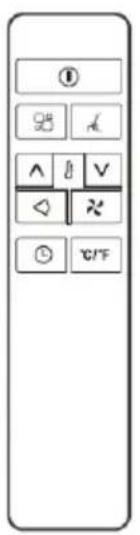
| ① | Turn On/Off | × | Fan mode |
| ∧ | Temperature higher | □ | Operating mode |
| ∨ | Temperature lower | ◇ | Air outlet |
| ⊕ | Timer mode | # | Night mode |
| °C/°F | Selecting temperature unit |
Basic operation using the remote control is as described in chapter "6 Bedienung". Press the correspondingly labelled button, analogous to the top of the unit.
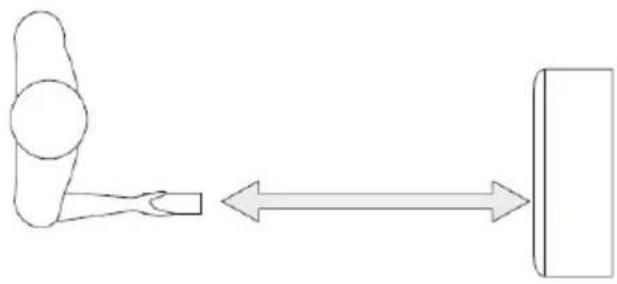
Point the remote control at the top of the air conditioner. Observe the maximum distance of 7 metres.
8.3 Activating special functions with the remote control
8.3.1 Ventilation outlet
The upper ventilation outlet opens and closes slightly in a constant rhythm. If you want to lock the ventilation outlet in one position, press the Air outlet button on the remote control.
Press the button again to automatically adjust the panning.
8.3.2 Changing the temperature unit
Press the Temperature unit button to switch the temperature unit shown on the display between degrees Celsius and Fahrenheit.
8.3.3 Night mode
In night mode, the display and the LED on the top of the unit are dimmed.
Select heat, cool or automatic mode.
Press the Night mode button on your remote control.

The displays are now dimmed and the fan runs at the lowest speed.

In cool mode, the temperature setting is gradually increased to 1^ above the original target temperature for each of the first 2 hours. The unit then maintains the same temperature for 6 hours and then switches to standby mode.
In heat mode, the temperature setting is gradually lowered to 1^ below the original target temperature for each of the first 3 hours. The unit then maintains the same temperature for 5 hours and then switches to standby mode.
9.1 Draining the condensation water
Over time, condensation will collect in the air conditioning unit's tank. If the tank is full, the unit stops and Ft (= full tank) appears on the display.
Draining the condensation water manually:
Remove the plug of the air conditioning unit from the wall socket.
Place a suitable container under the lower condensate drain (9, page 8).
Remove the drain cap and let all the water drain into the collection vessel.
When the water has drained, put the cap back on the condensate drain.
You can then put the air conditioner back into operation.
Automatically drain the condensed water continuously:
In dehumidifier mode, the condensed water must be continuously drained to the outside. The upper condensate drain (10, page 8) is provided for this purpose.
Remove the plug of the air conditioning unit from the wall socket.
Place a suitable container under the upper condensate drain (10, page 8).
Remove the drain cap and attach a suitable hose to the drain connection.
The hose should now be directed straight down into the collection vessel. Be careful not to kink the hose.
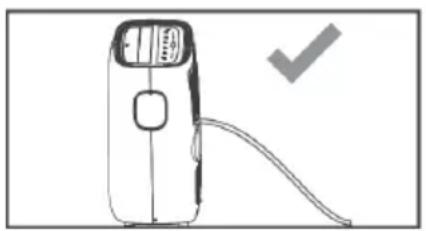
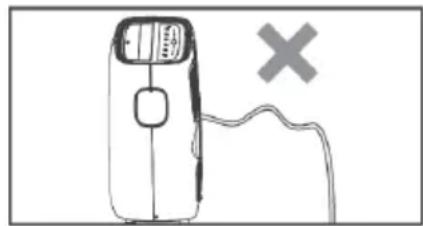
Put the air conditioner back into operation and activate the dehumidifier mode.

In cool mode, the upper condensate drain must be closed to ensure efficient operation.
9.2 Cleaning

Switch off the unit before cleaning or performing maintenance by pressing the POWER button on the control panel or remote control. Wait a few minutes and then pull the plug out of the wall outlet.
CLEANING THE UNIT
Clean the unit with a slightly damp cloth and then dry it completely with a dry cloth.

Never clean the air conditioner with water. Never use petrol, alcohol or solvents to clean the unit. Never spray insecticides or the like onto the unit.
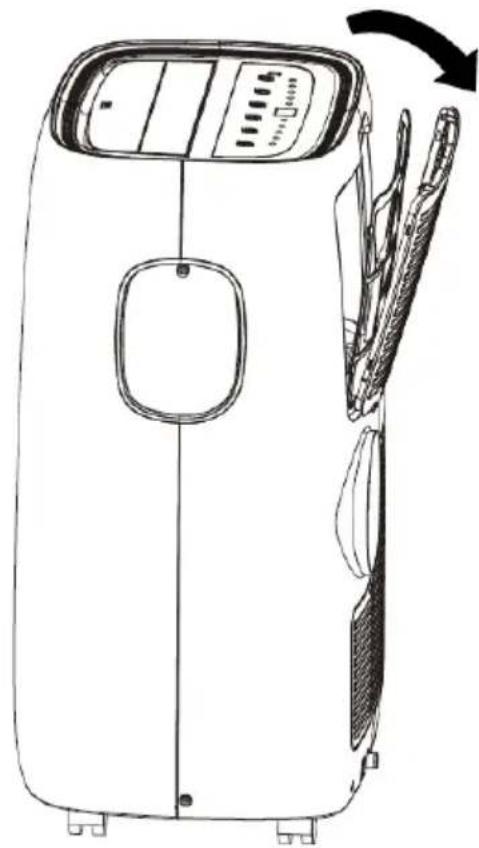
CLEANING THE FILTER

To ensure that your air conditioning system works efficiently, you should clean the filter every week of operation.
The filter can be removed as shown in the figure on the right.
Remove dust accumulation on the filter with a vacuum cleaner.
If the filter is very dirty, immerse it in warm water and rinse several times. The water should be lukewarm.
After washing, let the filter dry completely and then put it back in place.

Never use a filter that is still wet. Doing so can damage the unit.

WARNING!
When the filter housing is open, do not touch the cooling fins inside the unit. These are sharp and can cause cuts.
9.3 ACTIVITIES AT THE START / END OF THE SEASON
Start of the season:
Check the power cord and plug for damage. Check the basic installation of the unit and the location according to these instructions.
End of the season:
If the air conditioner is not going to be used for an extended period:
Empty the condensation water container completely and leave the lower drain cap open until the residual water has drained away. As soon as the tank is completely empty and no more water drains out, replace the rubber stopper.
Remove and clean the filter, let it dry completely, and then reinsert it.
Remove the batteries from the remote control.
Store the air conditioner in a cool, dry place, away from direct sunlight, extreme temperatures and excessive dust.
10 Troubleshooting
| Problem Cause Solution | ||
| The air conditioner does not start / does not switch on. | No power. Check the electrical supply. | |
| Power cord not plugged in. | Plug the power cord into a wall outlet. | |
| Protection circuit activated. | Wait 30 minutes and then try again. If the error persists, contact our service department. | |
| The air conditioner only runs for a short time. | The exhaust hose is kinked or incorrectly connected. | Follow the steps in the operating instructions for connecting the exhaust hose |
| The air outlet / exhaust hose is blocked. | Check the air outlet / exhaust hose for possible dirt contamination. | |
| The air conditioner works but does not cool. | Windows / curtains / drapes are open. | Protect the room from sunlight and close all windows. |
| Other devices in the room are causing heat (e.g. television, stoves, hair dryer). | Switch off all additional devices in the room. | |
| The exhaust hose was not installed or was not directed outside. | Install the exhaust hose correctly. | |
| The cooling capacity is not suitable for the room in which the air conditioner is being operated. | Pay attention to the technical data of the air conditioner. | |
| The unit emits an unpleasant odour while in operation. | Air filter is blocked or dirty. | Remove the air filter and clean it as per the instructions. |
| After a restart, it takes 3 minutes for the unit to start working again. | The protective circuit of the compressor prevents an immediate start after the unit has been switched off and on again. | Wait 3 minutes. The unit will then work as usual again. |
| The following error messages appear on the display: Lt PF Ft | The self-diagnosis function has detected an error. | Lt - temperature in the room is too low. The de-frost function starts. PF - sensor error. Notify our service department Ft - condensed water tank is full. Empty the tank as described in these instructions. |
11 Technical data
| Cooling performance 11000 BTU/h / 3.2 | kW |
| Heating output 10000 BTU/h / 2.9 kW | |
| Modes Cooling, heating, fan, dehumidifier, timer | |
| Temperature range: 18 - 27 °C | |
| Room size 25 - 35 m² | |
| Dehumidification output 36 litres per 24h | our |
| Air circulation 250 - 300 m³/h | |
| Noise emission 53 - 65 dB | |
| Coolant R290 (260g) | |
| GWP coolant 3 | |
| Power consumption - cooling 1.23 kW/h | |
| ERR 2.62 (refrigeration coefficient) | |
| Energy efficiency class - cooling A | |
| Power consumption - heating 1.04 kW/h | |
| COP | 2.8 (heat output coefficient) |
| Energy efficiency class - heating | A+ |
| Intake pressure | 1.2 MPa |
| Outlet pressure | 2.3 MPa |
| Exhaust hose length | 1.5 m (max.) |
| Exhaust hose diameter | 13 cm |
| CO2 equivalent | 0.0008 t |
| Compressor LRA | 23.5 A |
| Protection class | IPX0 |
| Display | Type: 7-segment, 2-digit |
| Dimensions (WxHxD) | 445 x 720 x 375 mm |
| Weight | 31,00 kg |
| Power supply | Mains adapter: internalRated power: 1,640 WFrequency: 50 HzNominal voltage: AC 220 - 240 V |
| Scope of delivery | Mobile air conditioner unit. Instruction manual, remote control, Exhaust hose and condensate hose, window seal |
12 Legal notices

TechniSat accepts no liability for product damage as a result of external influences, wear or improper handling, unauthorised repairs, modifications or accidents.

Changes and printing errors reserved. Version 02/20. Copying and reproduction are subject to the publisher's consent. The relevant current version of the manual can be obtained in PDF format from the download area of the TechniSat homepage at www.technisat.de.

TechniSat and TECHNIPOLAR 1 are registered trademarks of:
The names of the companies, institutions or brands referred to are trademarks or registered trademarks of the respective owners.
12.1 Service instructions

This product is quality-tested and provided with the legally-specified warranty period of 24 months from the date of purchase. Please keep your receipt as proof of purchase. In the event of warranty claims please contact the product dealer.

Note!
Should you experience a problem with this unit, or for queries and information, our Technical Hotline is available:
Mon. - Fri. 8:00 am - 6:00 pm on:
+49 (0) 3925 9220 1800.

Repair orders can also be placed directly online at www.technisat.de/reparatur.
If the unit needs to be returned, please use the following address only:
39418 Stassfurt, Germany
Mode d'emploi
TECHNIPOLAR 1
APPARAAT SCHOONMAKEN
- Contents
- Preface
- Dear Customer,
- Signs and symbols used
- In this instruction manual:
- On the unit:
- Intended use
- Safe use of air conditioners
- WARNING!
- IMPORTANT - EARTHING METHOD
- ELECTRICAL CONNECTIONS
- Disposal instructions
- Illustrations
- Installation instructions
- Exhaust air discharge
- Installing the window kit
- Site of installation
- Operation
- Control panel
- Switch On/Off
- Cooling mode
- Heat mode
- Dehumidifier mode
- Fan mode
- Automatic mode
- Timer mode
- Programming the timer
- Delayed switching on
- Delayed turning off
- Using the remote control
- Inserting the batteries
- Overview
- Activating special functions with the remote control
- Ventilation outlet
- Changing the temperature unit
- Night mode
- Draining the condensation water
- Draining the condensation water manually:
- Automatically drain the condensed water continuously:
- Cleaning
- CLEANING THE UNIT
- CLEANING THE FILTER
- ACTIVITIES AT THE START / END OF THE SEASON
- Start of the season:
- End of the season:
- Troubleshooting
- Legal notices
- Service instructions
- Mode d'emploi
- TECHNIPOLAR 1
- APPARAAT SCHOONMAKEN
Brand : TECHNISAT
Model : Technipolar 1
Category : Air Conditioning