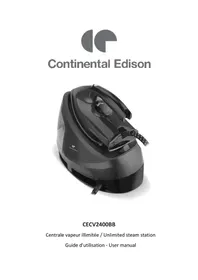
CECV2400BB - Steam cleaner CONTINENTAL EDISON - Free user manual and instructions
Find the device manual for free CECV2400BB CONTINENTAL EDISON in PDF.


| Product type | Steam generator (iron with base) |
| Brand | Continental Edison |
| Model | CECV2400BB |
| Power supply | 220-240 V ~ 50-60 Hz |
| Nominal power | 2000-2400 W |
| Water tank capacity | 1.2 L |
| Steam flow rate | 100 g/min |
| Temperature setting | Thermostat with positions: Silk (70-120°C), Wool (100-160°C), Cotton (140-210°C), Linen (170-230°C) |
| Ironing functions | Dry ironing, steam ironing |
| Steam shot function | Yes, by double pressing the trigger |
| Self-cleaning function | Yes, with orange indicator and manual activation (press 2 seconds) |
| Temperature indicator | Blue light: solid on when heating, off when temperature reached |
| Soleplate type | Not specified in the manual |
| Removable water tank | Yes, horizontal removal by the handle |
| Iron rest support | Integrated into the base, with thermal insulation |
| Cord storage | Yes, cable tie and steam hose holder |
| Body material | Not specified |
| Dimensions (L x W x H) | Not specified in the manual |
| Weight | Not specified in the manual |
| Warranty | Standard (not specified in the manual) |
Frequently Asked Questions - CECV2400BB CONTINENTAL EDISON
User questions about CECV2400BB CONTINENTAL EDISON
0 question about this device. Answer the ones you know or ask your own.
Ask a new question about this device
Download the instructions for your Steam cleaner in PDF format for free! Find your manual CECV2400BB - CONTINENTAL EDISON and take your electronic device back in hand. On this page are published all the documents necessary for the use of your device. CECV2400BB by CONTINENTAL EDISON.
USER MANUAL CECV2400BB CONTINENTAL EDISON
- FR (version originale)
- EN (translated from the original)
We encourage you to read this user guide carefully and completely before installing and using your device.
It is important that this user guide is kept with the device for any new consultation. If this unit is to be transferred to another person, make sure that the user guide follows the unit so that the new user can be informed of the operation of the unit.
In this user guide, the following symbols are used:
| Important information about your personal safety and how to avoid damage to the device | |
| General information and advice | |
| Risk of electric shock | |
| Hot surfaces | |
| Do not cover the device |

Safety instructions :
- Please read these instructions for use carefully before using your steam generator.
- This appliance is designed exclusively for indoor use in a domestic environment.
- Do not put the device in water or any other liquid.
- Before plugging in the appliance, make sure that the current of the outlet used corresponds to that recommended for the appliance and that the outlet is properly grounded.
- Switch off the device before plugging or unplugging it.
- Do not allow the cable to come in contact with a hot surface.
-
Unplug the appliance when you are finished using it.
-
The iron should not be used if it has been dropped, if there are visible signs of damage or if it is leaking.
- Do not attempt to disassemble the device yourself if it is damaged or faulty. Please contact the after-sales service, a qualified electrician or a similarly qualified person.
- Never leave the appliance unattended when it is plugged in.
- The iron should be used and rested on a flat, stable surface.
- Always place the iron on its base and take care that the cable never comes into contact with hot surfaces.
- Do not touch metal parts, boiling water or steam in use.
- Never direct the steam directly to you.
- Do not twist the power cable.
- Do not leave the device unattended when plugged in.
- Let the appliance cool for a few minutes before refilling the water
tank if the iron is hot. The socket- outlet must be removed from the socket- outlet before filling the water tank.
-
When the iron is returned to its base, make sure that the surface supporting the base is flat and stable.
-
This device may be used by children of at least 8 years of age and by persons with reduced physical, sensory or mental capacities or without experience or knowledge, if they (if they) are properly supervised (e). s or if they have been given instructions relating to the safe use of the device and if the risks involved have been understood. The children must not play with the appliance. Cleaning and user maintenance shall not be made by children without supervision.
-
Keep the iron and its cord out of the reach of children under 8 years of age when it is being powered on or
cooling.
- If the power cable is damaged, it must be replaced by the manufacturer, its after-sales service or similarly qualified persons in order to avoid any danger.
- Never touch the hot soleplate until the iron has completely cooled and is unplugged.
- The use of accessories not recommended by the manufacturer may cause injury or damage the device.
IMPORTANT
It is absolutely forbidden to replace the power cable yourself. If this is damaged, it must be replaced by the after-sales service of your dealer, the manufacturer, its after-sales service or a person of similar qualification in order to avoid any danger.
If your device is dropped, have it professionally examined before turning it on again. Internal damage can represent a risk of accident.
For any problem or repair, please contact the after-sales service of your retailer, the manufacturer, its after-sales service or a similarly qualified person in order to avoid any danger.
For installation, handling, cleaning and disposal of the device, refer to the following chapters of the User's guide.
Information on the meaning of the conformity mark

The marking CC indicates that the product meets the main requirements of the European Directives: 2014/35/EU (Low Voltage), 2014/30/EU (Electromagnetic Compatibility), 2011/65/EU (Restriction of use of certain substances in equipment electronic)
SUMMARY
IMPORTANT SAFETY WARNINGS AND 2 ADVICE
I.DESCRIPTION OF THE APPLIANCE 10
II. TECHNICAL CHARACTERISTICS 11
III. BEFORE FIRST USE 12
A. UNPACKING THE APPLIANCE AND 12 DISPOSING OF THE PACKAGING ITEMS
B. FILLING THE TANK 12
IV. INSTRUCTION TO USE 13
A.THERMOSTAT BUTTON 13
B. USING YOUR STEAM STATION 16
C. IRONING TIPS 18
V.CLEANING AND MAINTENANCE 19
VI.GUARANTEE 20
VII. DISPOSAL 21
This user guide is available in the following languages:
- FR (original version)
- EN (translated from the original)
Any other translation would be a translation of the original version.
This user guide, its possible modifications or any new version, is available on our website www.continentaledison.fr.
I. DESCRIPTION OF THE DEVICE
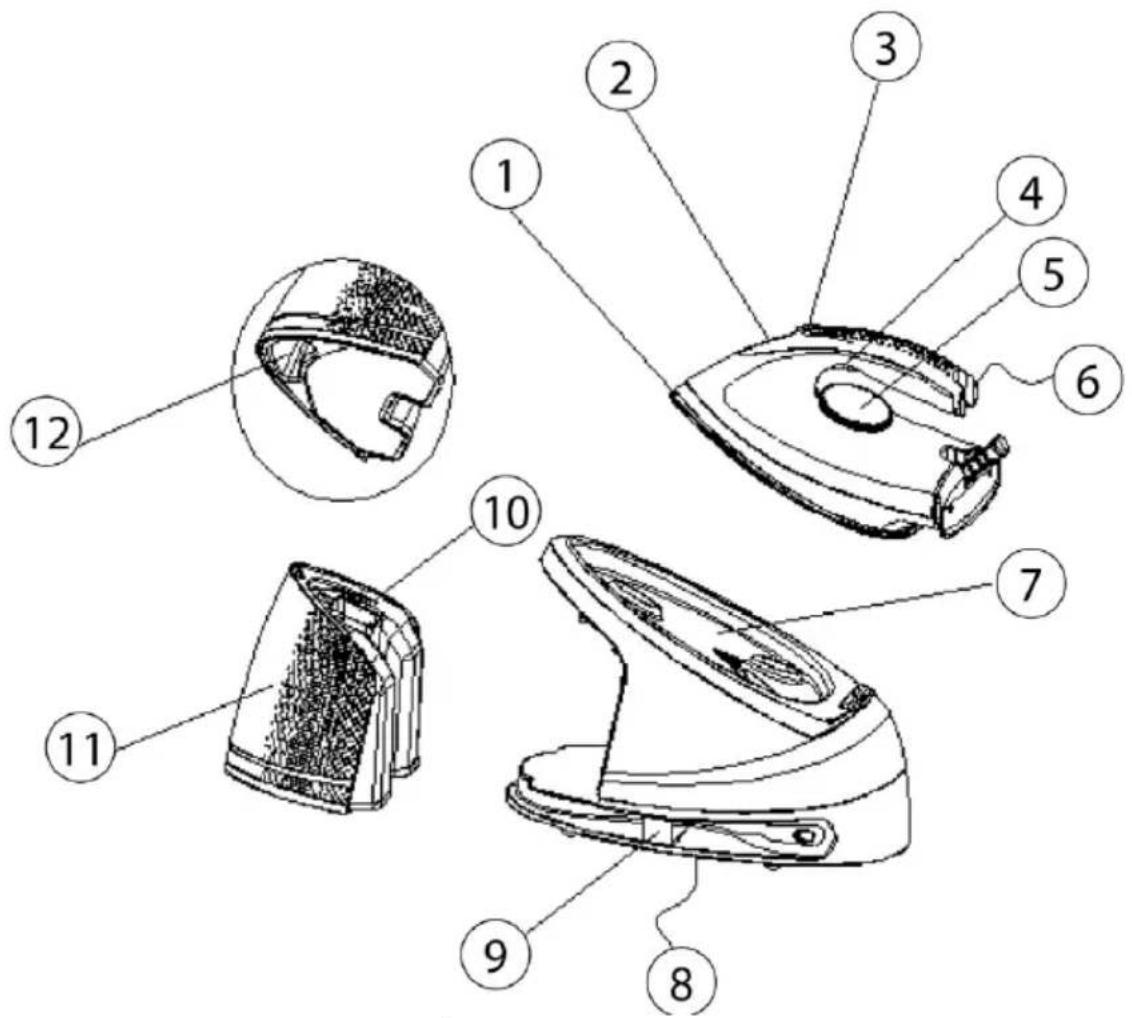
- Iron sole
- Temperature indicator (blue light)
- Auto clean button (orange light)
- Steam trigger
- Adjustable thermostat
- Open iron handle
- Iron rest support
- Base of the device
- Cord Attachment
- Tank filler opening
- Detachable water tank
- Water Tank Handle
II. TECHNICALCHARACTERISTICS
Technical data :
| Brand | Continental Edison |
| Reference | CECV2400BB |
| Model | EC9003A-GS |
| Voltage | 220-240 V ~ 50-60 Hz |
| Rated input power | 2000-2400 W |
| Tank capacity: | 1.2 liters |
| Steam flow: | 100 g / min |
A. UNPACKING THE APPLIANCE AND DISPOSING OF THE PACKAGING ITEMS

-
Remove all packing material from around the device, as well as any protective material inside the device compartments.
-
The cardboard packaging and sheets of paper are recyclable. They must be disposed of in the collection bins provided for this purpose.
- Materials bearing the symbol arerecyclable:
PE <= polyethylene; > PP <= polypropylene
This means that they can be recycled by depositing
them in appropriate collection containers.
- The other packaging elements (adhesive, fasteners, etc.) must be disposed of with household waste.
To know more : www.quefairedemesdechets.fr
B. FILLING THE TANK

Unplug the unit from the electrical outlet before filling the water tank.
(1) Remove any labels or protective films from the sole.
(2) Fill the tank with water and heat the iron to maximum temperature, then run the iron over a damp cloth for several minutes to remove residue on the soleplate according to "Steam ironing".
NOTE :
- It is normal for a strange smell to be generated by the appliance when using it for the first time. This phenomenon after a few uses.
- Particles may escape from the sole when you use the iron for the firsttime. This is normal, the particles are harmless and stop escaping from the iron shortly after.
IV. INSTRUCTIONS TOUSE
A. Thermostat button
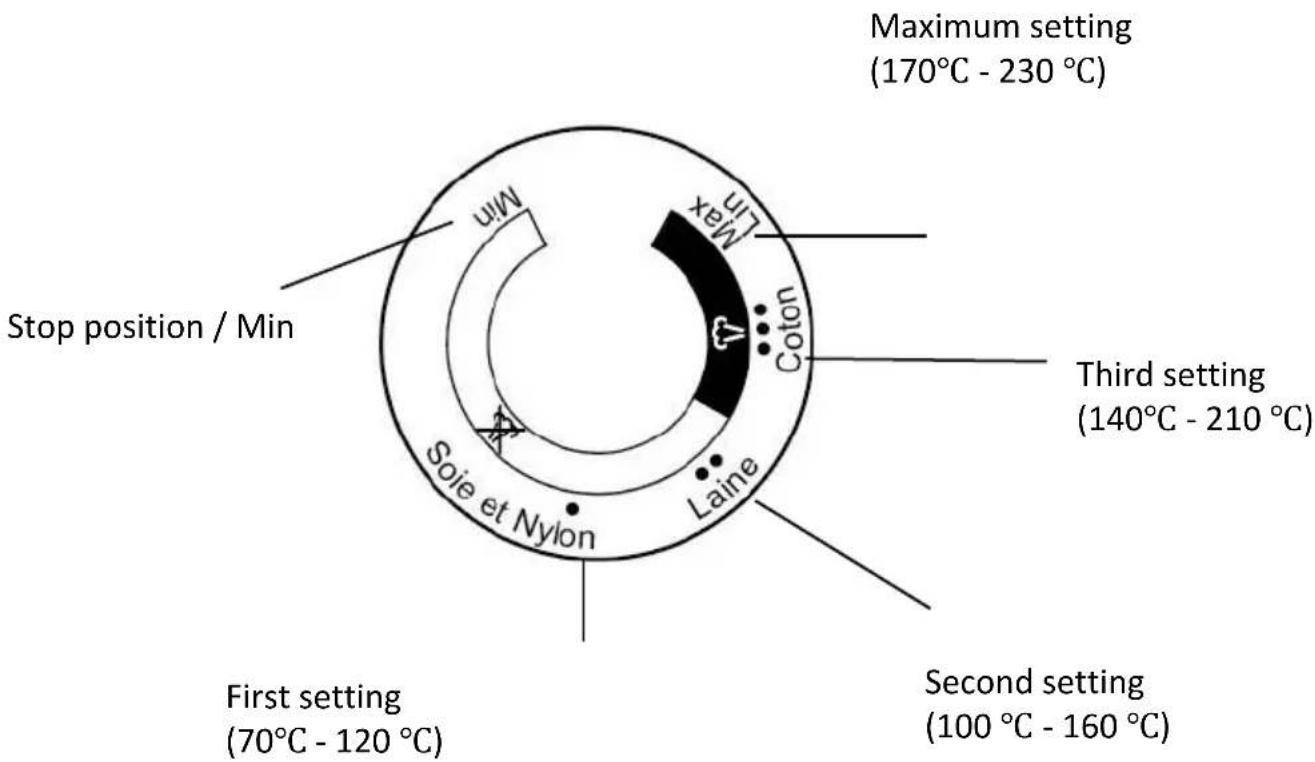
| Setting | Temperature (℃) | Tissue |
| First setting | 70 - 120 | Silk & Nylon |
| Second setting | 100 - 160 | Wool |
| Third setting | 140 - 210 | Cotton |
| Maximum setting | 170 - 230 | Linen |
Product Description
Filling port
Fill the water tank through the filler opening. Make sure that the water does not exceed the maximum level of the water tank.
> Stop/Min position
When the knob is in the off/min position, the thermostat will not be triggered. The appliance is off.
Thermostat button
Turn the thermostat knob to set the ironing temperature according to the item of clothing to be ironed.
Refer to the wash labels on the garments to check the recommended ironing temperature.
Temperature indicator
When the iron heats up, the blue indicator light will come on permanently.
As soon as the iron reaches the selected temperature, the indicator light goes out.
Steam trigger
As soon as the appliance reaches the selected temperature and the blue indicator light goes out, lightly press the trigger, the steam is then sprayed from the soleplate. When the trigger is released, the appliance can only be used for dry ironing without steam.
Auto cleaning button (Orange indicator light)
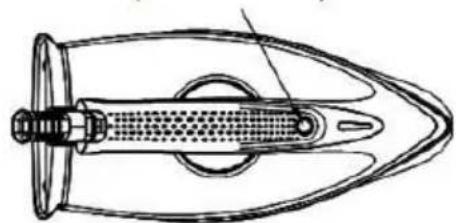
- The unit must be cleaned when the orange indicator light is permanently on. Before cleaning, prepare a container with a capacity of more than 300ml to collect the wastewater and place the unit on top of the container, making sure that it is stable.
- Press and hold down the "Auto cleaning" button for 2 seconds. When the buzzer sounds, the operator should move away from the unit to avoid being burned by high temperature steam. temperature during the cleaning process. The unit switches to cleaning mode and the orange LED flashes. After approx. 3 minutes, the cleaning is finished and the unit is ready for use again.
CAUTION: RISK OF BURNS!
NOTE :
- For best cleaning performance, make sure that the thermostat knob is turned to the "MAX" setting before activating the "MAX" function.
"Self-cleaning". Cleaning may not be performed if the thermostat knob is turned to other temperature settings than "MAX".
Steam burst
The steam jet can be activated after pressing the steam trigger twice continuously. An interval of at least 10 seconds must be maintained between two continuous cycles.
Cord attachment
When the appliance is not in use, the electrical cord can be tied with a cable tie and the steam supply hose can be stored at the cord clips (see Fig. 1 and Fig. 2).
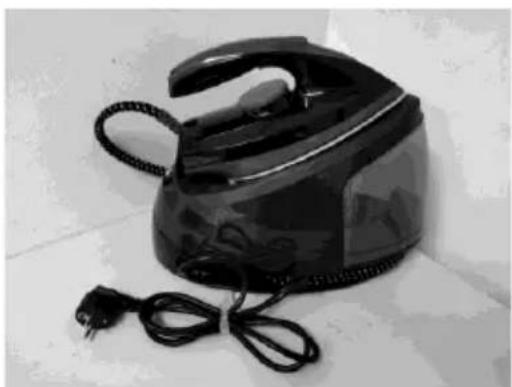
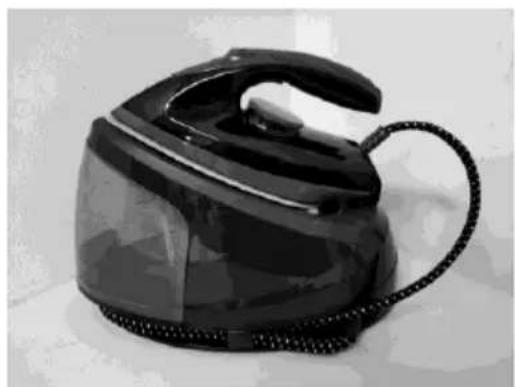
Fig. 1 Fig. 2
Correct positioning of the iron on the iron rest support
When the iron is placed on the support or its base, it must be placed on it correctly. (see Fig. 3).
Poor positioning
POSITIONING CORRECT
Poor positioning
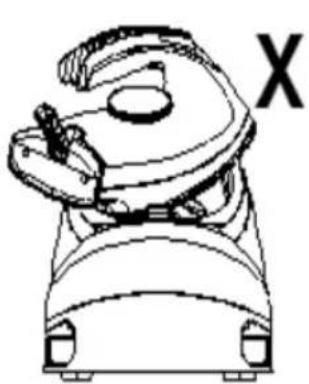
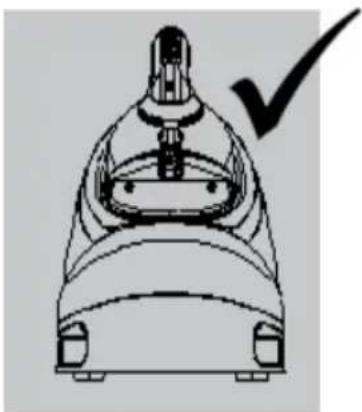
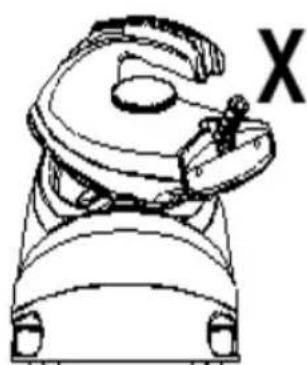
Fig. 3
B. Using your steam station
The appliance offers two ironing modes. You can use dry ironing or steam ironing. For more details, see the following.
Dry ironing
1) Place the base of the device on a stable, level surface.
2) Correctly place the iron on the thermal insulation bracket on the base of the appliance (see Fig. 3).
3) Plug the plug into an electrical outlet, then turn the thermostat knob to select the desired temperature setting, which depends on the fabric of the garment. See "IRONING TIPS" and "ADDITIONAL CHART" below when selecting temperature.
4) The temperature indicator lights up and the iron begins to heatup.
5) When the soleplate temperature reaches the selected temperature, the temperature indicator will turn off and you can start ironing.
WARNING : Never touch the hot sole before it has cooled!
CAUTION: RISK OF BURNS!
Steam ironing
1) Place the base of the device on a stable & flatsurface.
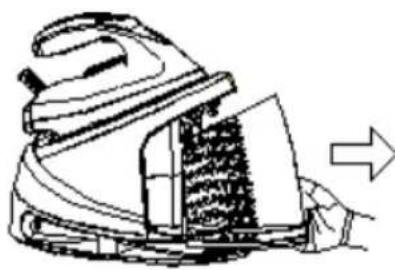
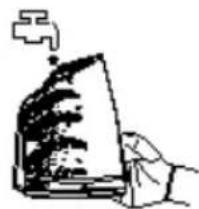
2) Grasp the handle of the water tank and pull out the water tank horizontally, fill the water tank through the filling hole and then put the water tank back in place (see Fig. 4). Make sure that the water tank is removed horizontally by removing it. Fill the water tank before each use. Filling can also be carried out during ironing if necessary.
Grasp the handle of the water tank
Remove the water tank horizontally
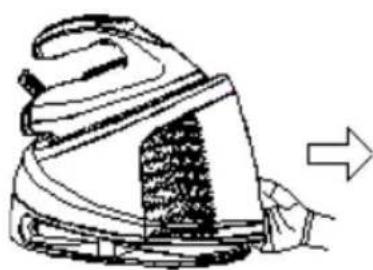
Fill the water tank
Replace the watertank
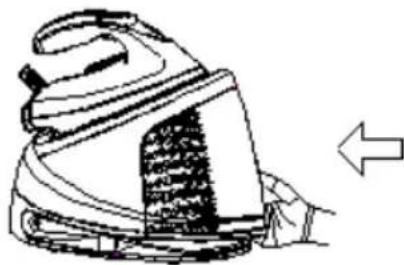
Fig. 4
3) Correctly place the iron on the thermal insulation bracket on the base of the appliance (see Fig. 3).
4) Plug the plug into an electrical outlet, then turn the thermostat knob to select the desired temperature setting, which depends on the fabric of the garment. See "Ironing tips" on page 18.
5) The temperature indicator lights up and the iron begins to heatup.
6) After a few minutes, the indicator light will go out, indicating that the soleplate temperature has reached the selected temperature. You can now start steam ironing.
7) Lightly press the steam trigger, steam is then sprayed continuously from the soleplate. You can then steam iron the garment.
NOTE : Water may drip out during steam spraying when the temperature is lower than the second setting. This phenomenon is normal.
If you want to activate the "Steam burst" function to remove a hard crease, press the steam trigger twice continuously to produce a burst of steam.
WARNING :
~ Do not touch the hot sole until it has cooled!
~ Never direct the steam towards people!
~ Do not activate the steam function when the iron is placed on the base of the appliance to avoid scalding by the steam.
8) After ironing, remove the plug from the electrical outlet and the appliance will switch off. Since the soleplate is always hot, never touch it with your hands, place it correctly on the thermal insulation support until it has cooled completely.
C. Ironing tips
- Always check first if a label with ironing instructions is present on the item. Follow these ironing instructions in all cases.
- Iron heats up faster than it cools. Therefore, you should start by ironing items that require the lowest temperature, such as those made from synthetic fibers.
- If the fabric is made of different types of fibers, you should always select the lowest ironing temperature to iron the composition of thesefibers.
- Synthetic fiber and silk fabrics should be passed on their inner side to avoid making them shiny.
- Velvet and other textures that quickly become shiny should be ironed in one direction only, applying light pressure. Always keep the iron moving at all times.
- Pure wool fabrics (100% wool) can be ironed with the steam iron. Use a dry cloth as a backing and select the setting that matches the fabric for ironing.
- Never run the iron over zippers and rivets on a garment. This will damage the sole. Iron around these objects.
NOTE : When ironing woolen fabrics, the fabric can become shiny. It is advisable to turn the item over and iron the reverse side.
V. CLEANING AND MAINTENANCE

Before cleaning, first unplug the electrical outlet and allow the appliance to cool down.
(1) Wipe off residue and other deposits from the sole with a damp cloth or non-abrasive (liquid) cleaner.
NOTE : Do not use chemical, steel, wood or abrasive cleaners to scrape the sole.
(2) Clean the top of the iron with a soft, damp cloth. Wipe off any water drops on the base of the device and the thermal insulation stand with a dry cloth.
(3) Clean the inside of the device by following the procedure in the section "Self-cleaning button (Orange indicator light)"
NOTES:
If the clean indicator keeps to blinking and the appliance does not perform cleaning after the clean function is activated, please check and ensure that the temperature dial be turn to MAX position.
The unit continues to clean when the thermostat knob is turned to the "MAX" setting. After approx. 3 minutes, the cleaning is finished and the unit is ready for use again.
(4) If the appliance will not be used for an extended period of time, empty the water tank, turn the thermostat knob to the minimum setting and store the steam supply hose and the electrical cord at the level of the cord fasteners, then put the appliance in a place out of the reach of children.
VI. GUARANTEE
Warranty does not cover product wear parts, problems or loads
- superficial damage to the normal wear and tear of theproduct;
- defects or deterioration due to product contact with liquids and corrosion caused by rust or the presence of insects;
- any incident, misuse, misuse, alteration, disassembly or unauthorized repair;
- any maintenance not in accordance with the instructions for the product or connection to incorrect voltage;
- any use of accessories not supplied or not approved by the manufacturer.

The warranty will be void in the absence of the nameplate and / or serial number of the product.
VII. DISPOSAL
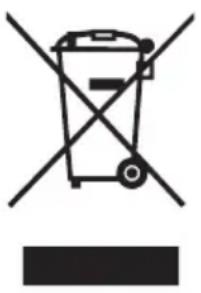
This logo affixed to the product means that it is a device whose treatment as waste falls within the framework of the directive 2012/19 / EU of July 4th, 2012, relative to the waste of electrical and electronic equipment (WEEE). This means that this product must be supported by a selective collection system in accordance with the European directive mentioned above in order to be either recycled or dismantled in order to reduce any impact on the environment.
Hazardous substances in electrical and electronic equipment can have potentially harmful effects on the environment and human health.
Thus, at the end of the life of this appliance, it must not be disposed of with unsorted municipal waste. Recovery and collection systems are made available to you by local authorities (waste disposal centers) and distributors.
This device must not be thrown on public roads. You have the obligation to use the selective collection systems available to you.
Continental Edison - 120-126 Quai de Bacalan - CS 11584 - 33000 Bordeaux
Imported by SCHNEIDER CONSUMER GROUP 12 rue Jules Ferry, 93110 Rosny sous-Bois, France

Continental Edison
www.continentaledison.fr