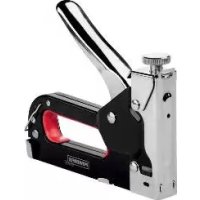
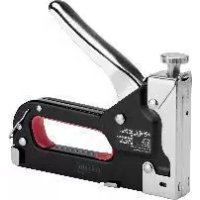
PHTS 14 A1 - Manual stapler POWERFIX - Free user manual and instructions
Find the device manual for free PHTS 14 A1 POWERFIX in PDF.



| Product type | Manual stapler |
| Brand | Powerfix |
| Model | PHTS 14 A1 |
| Intended use | Stapling of cardboard, insulating materials, leather, textile onto hardwood, softwood, particle board or plywood. Not intended for professional use. |
| Compatible staples | Flat staples: 4–14 mm long, 1.2–1.5 mm wide, 1.1–1.3 mm thick; U-shaped staples: 10–12 mm long, 6.2–6.5 mm wide, 1.1–1.3 mm thick; T-nails: 10–14 mm long, 1.6–2 mm wide, 1.1–1.3 mm thick |
| Package contents | 1 manual stapler, 500 staples 8 mm, 500 U-shaped staples 12 mm, 500 T-nails 10 mm, 1 instruction manual |
| Loading type | Bottom loading |
| Strike force adjustment | Adjustment screw to increase or decrease power |
| Safety mechanism | Do not place hands near or in front of the ejection opening. Wear safety goggles. Store out of reach of children. |
| Maintenance and cleaning | Clean with a slightly damp, lint-free cloth. Keep clean and free of oil/grease. |
| Packaging materials | Recyclable materials |
| Repairability | In case of serious malfunction (damaged housing, etc.), have it repaired by a qualified technician using original parts. |
Frequently Asked Questions - PHTS 14 A1 POWERFIX
User questions about PHTS 14 A1 POWERFIX
0 question about this device. Answer the ones you know or ask your own.
Ask a new question about this device
Download the instructions for your Manual stapler in PDF format for free! Find your manual PHTS 14 A1 - POWERFIX and take your electronic device back in hand. On this page are published all the documents necessary for the use of your device. PHTS 14 A1 by POWERFIX.
USER MANUAL PHTS 14 A1 POWERFIX
HAND-HELD STAPLER SET
GB IE
HAND-HELD STAPLER SET
Operation and safety notes
DK
HAFTEPISTOL
HAND-HELD STAPLER SET
- Proper Use
The stapler gun is intended exclusively for stapling cardboard, leather, cloth (textile or natural fibres) or similar lightweight materials on to hardwood, softwood, chipboard or similar plywood-type materials. The product is not intended for commercial use.
Description of parts
1 Operating handle
2 Staple pusher
3 Hook
4 Magazine
5 Side wing
6 Staple eject opening
7 Adjusting screw
- Included items
1 x Stapler gun
500× Flat crown staples (8mm)
500 × Round crown staples (12 mm)
500× T-nails (10mm)
1 x Operating instructions
Staples/nails
Note: The precision components of the device are designed to use the following standard, widely available staples and nails:
| Type | A(mm) | B(mm) | C(mm) |
| Flat crownstaples | 4-14 | 1.2-11.5 1.1 | -1.3 |
| Type | A(mm) | B(mm) | C(mm) |
| Round crownstaples | 10-12 | 6.2-6.5 1.1-1.3 | |
| T-nails | 10-14 | 1.6-2 1.1-1.3 |

Safety advice
KEEP ALL THE SAFETY ADVICE AND INSTRUCTIONS IN A SAFE PLACE FOR FUTURE REFERENCE!
Always keep the product out of reach of children. Children often underestimate danger. Store the device indoors in an enclosed, dry place where it cannot be reached by children.
Ensure that staples and nails cannot under any circumstances strike people or animals. Failure to observe this advice may lead to injury.
Wear personal protective equipment and always wear safety glasses. This also applies to people who may be helping with the work by supporting or holding the workpiece.
CAUTION! Do not support yourself with your hands under any circumstances near or in front the stapler gun or on the surface being tacked. One slip may result in injury.
Every time before you use the device, check that it is in perfect condition. Damage to any of its components may lead to injury.
Before moving or putting away the stapler gun, check that there are no staples or nails still in the device.
Operation
- Filling with staples/nails
CAUTION! Use only the staples and nails described in these operating instructions (see "Staples / nails"). Failure to observe this advice may result in damage to the device.
Follow these steps:
-
Press in the staple pusher 2 slightly and then pull it downwards. Then pull the staple pusher 2 completely out of the magazine 4 (see Fig. A).
-
Push the staples or the T-nails into the magazine 4.
CAUTION! Ensure that the staples or T-nails are correctly inserted (see Figs. B, C, D).
- Push the staple pusher 2 back into the magazine 4. Press in the staple pusher 2 slightly and then pull it slightly upwards to fix it in place.
- Setting the impact force
CAUTION! Never screw the adjusting screw completely out of the stapler gun. This could result in damage to the device.
Screw out the adjusting screw reduce the impact force.
Screw in the adjusting screw 70 increase the impact force.
- Stapling
CAUTION! Never support yourself by placing your hands near or in front of the stapler gun or the workpiece surface. A slip can result in injury.
Follow these steps:
- Press the staple eject opening 6 on the spot where you wish to staple.
- Adjust the impact force to suit the materials, staples or nails.
- Press the operating lever 1 down firmly.
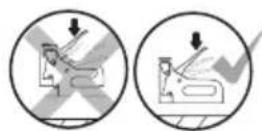
Note: Only trigger the device whilst firmly positioned in the area you wish to work on.
Examples of use:
The stapler gun is suitable for the following purposes:
- Attaching coverings to the seating surface of chairs.
- Attaching a skirting at the joint between wall and floor coverings.
- Stretching and stapling canvasses to frames.
- Attaching protective films to insulation materials when installing thermal insulation.
- Attaching decorative materials.
- Removing staples
To avoid the risk of injury!
Ensure that the operating handle 1 will not be pressed
Push the hook 3 under the staple or nail head (see Fig. F).
Pull the rear part of the stapler gun upwards to draw out the staple or nail from the workpiece.
- Removing jammed staples from the stapler gun
Staples or nails may become jammed in the stapler gun during operation. Remove jammed staples as follows:
- Press in the staple pusher 2 slightly and then pull it downwards. Then pull the staple pusher 2 completely out of the magazine 4.
- Turn the stapler gun over so that the magazine 4 is pointing upwards.
- Press the magazine 4 at the side wings 5 backwards and pull the magazine 4 upwards (see Fig. E).
- Now remove the jammed staples from the magazine 4.
- Press the magazine 4 at the side wings 5 backwards and press it downwards until it engages to fix the magazine 4 back in place.
Note: Do not use the stapler gun if it shows more serious defects (damage to body etc.). If necessary have your stapler repaired by a qualified specialist. Take note that the manufacturer's original spare parts only should be used in any repair.
- Cleaning and care
The product must be kept clean, dry and free of oil or lubricants at all times.
Clean the product with a slightly dampened, non-flushing cloth.
Disposal

The packaging is made entirely of recyclable materials, which you may dispose of at local recycling facilities.
Contact your local refuse disposal authority for more details of how to dispose of your worn-out product.
HAFTEPISTOL
- Formälsbestemt anvendelse

- HAND-HELD STAPLER SET
- HAFTEPISTOL
- PROPER USE
- DESCRIPTION OF PARTS
- INCLUDED ITEMS
- STAPLES/NAILS
- SAFETY ADVICE
- OPERATION
- FILLING WITH STAPLES/NAILS
- FOLLOW THESE STEPS
- SETTING THE IMPACT FORCE
- STAPLING
- EXAMPLES OF USE
- REMOVING STAPLES
- TO AVOID THE RISK OF INJURY
- REMOVING JAMMED STAPLES FROM THE STAPLER GUN
- CLEANING AND CARE
- DISPOSAL
- FORMÄLSBESTEMT ANVENDELSE
Brand : POWERFIX
Model : PHTS 14 A1
Category : Manual stapler