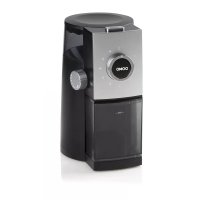
DO42440KM - Coffee grinder DOMO - Free user manual and instructions
Find the device manual for free DO42440KM DOMO in PDF.



| Product type | Coffee grinder |
| Brand | DOMO |
| Model | DO42440KM |
| Power supply | 220-240 V, 50/60 Hz |
| Number of grind settings | 15 different grind settings (from finest to coarsest) |
| Cup selector | Adjustable for desired number of cups, indicator for reference |
| Capacity of ground coffee container | With 'MAX' fill line, do not exceed |
| Removable upper burr | Yes, for cleaning |
| Safety | Resettable thermal fuse, safety switches on bean hopper lid, ground coffee container and its lid |
| Cleaning | With brush, do not use water, do not put in dishwasher |
| Maintenance | Clean after each use to prevent buildup |
| Recommended use | Coffee beans only, avoid flavored or oily beans |
| Maximum suggested grinding time | 70 seconds at a time, then let cool for 10 minutes |
| Cooling after overheating | Approximately 30 minutes if thermostat activates |
| Correct positioning required | Bean hopper lid, ground coffee container and its lid must be properly in place |
Frequently Asked Questions - DO42440KM DOMO
User questions about DO42440KM DOMO
0 question about this device. Answer the ones you know or ask your own.
Ask a new question about this device
Download the instructions for your Coffee grinder in PDF format for free! Find your manual DO42440KM - DOMO and take your electronic device back in hand. On this page are published all the documents necessary for the use of your device. DO42440KM by DOMO.
USER MANUAL DO42440KM DOMO
natural_image
Exterior view of a black and silver motor grater with control knob (no text or symbols visible)Návod k použití
Návod na použitie Instruction booklet Gebrauchsanweisung Gebruiksaanwijzing Mode d'emploi Használati útmutató
ZÁRUKA
This appliance has a two year warranty period. During this period the manufacturer is responsible for any failures which are the direct result of construction failure. When these failures occur the appliance will be repaired or replaced if necessary. The warranty will not be valid when the damage to the appliance is caused by wrong use, not following the instructions or repairs executed by a third party. The warranty will only be valid if the warranty application has been completed by the dealer at the time of purchase. All parts, which are subject to wear, are excluded from the warranty.
LINEA 2000 - Dompel 9 2200 Herentals Belgium - Tel 014/21.71.91 - Fax : 014/21.54.63
GARANTIE
Adres/Address/Adresa
Aankoopdatum/Kaufdatum/Datum prodeje ....
RECYCLING INFORMATION
This symbol on the product or on its packaging indicates that this product may not be treated as household waste. Instead it must be brought to the applicable collection point for recycling of electrical and electronic equipment.
By ensuring this product is disposed of correctly, you will help prevent potential negative consequences for the environment and human health, which could otherwise be caused by inappropriate waste handling of this product. For more detailed information about recycling of this product, please contact your local city office, your household waste disposal service or the shop where you purchased the product.
The packaging is recyclable. Please treat package ecologically.

RECYCLING INFORMATIONEN
natural_image
Black industrial blender with control knob and glass door (no visible text or symbols)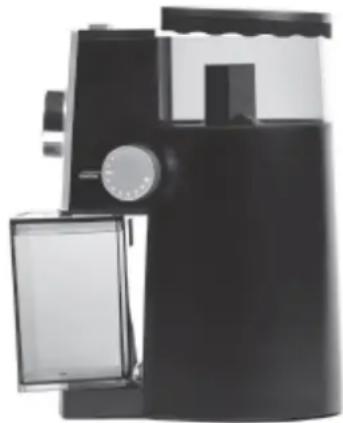
natural_image
Black and white photo of a modern kitchen grater with a side panel open, no visible text or symbolsTIPY A RADY
text_image
Exploded view diagram of a microwave oven with numbered parts for identificationPRED PRVÝM POUŽITÍM
natural_image
Black industrial machine with control knob and side panel (no visible text or symbols)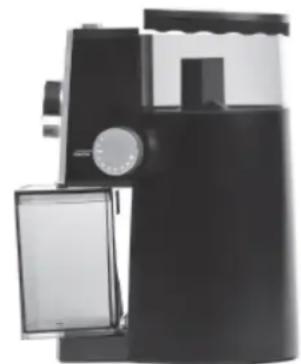
natural_image
Black and white photo of a modern kitchen grater with a side panel open, no visible text or symbols.TIPY A RADY
•Hrubšie
- The following basic precautions should always be followed when using electrical appliance:
- Read all instructions before using.
- This appliance may be used by children from the age of 16 and up, and also by persons with a physical or sensory limitation, as well as mentally limited persons or persons with a lack of experience and knowledge. But only on the condition that these persons have received the necessary instructions on how to use this appliance in a safe way and know the dangers that can occur by using this appliance.
- Cleaning and user maintenance shall not be made by children without supervision.
- Children cannot be allowed to play with the appliance. Maintenance and cleaning of the appliance may not be done by children, unless they are older than 8 years old and are under supervision. Keep the appliance out of reach of children younger than 8 years old.
- This appliance is suitable to be used in a household environment and in similar surroundings such as:
- Kitchen for personnel of shops, offices or other similar professional surroundings
- Farms
- Hotel or motel rooms and other surroundings with a residential character
- Guest rooms or similar
- Caution: This appliance cannot be used with an external timer or a separate remote control.
- The device and electric cord keep out of the reach of children.
- Make sure the voltage in your living area corresponding to the one shown on the rating label of the appliance. And the wall socket is properly grounded.
- Do not allow the cord to hang over the edge of a table or on a hot surface.
- The appliance must be disconnected from its power source when not in use, during service and when replacing parts. Allow to cool before putting on or taking off parts, and before cleaning the appliance.
- If the supply cord is damaged, it must be replaced by the manufacturer, its service agent or similarly qualified persons in order to avoid a hazard.
- CAUTION: In order to avoid a hazard this appliance must not be supplied through an external switching device, such as a timer, or connected to a circuit that is regularly switched on and off by the utility.
- Do not use or store this appliance outdoors.
- Do not use this appliance for other than intended use.
- Check carefully that the voltage and frequency of the power net match the indications on the rating label of the appliance. The plug must be plugged into an appropriate outlet that is installed and grounded in accordance with all local standards and requirements.
- Only use the utensils delivered with the appliance.
- Do not operate this appliance with a damaged cord or plug or in the event the appliance malfunctions or has been damaged in any manner. Return the appliance to the DOMO Service Department or its service agent for examination, repair, or electrical or mechanical adjustment. Do not try to repair the appliance yourself.
- To protect against electrical shock or burns, do not immerse unit, cord, or plug in water or other liquid. Do not operate the appliance with wet hands.
- A short power supply cord is provided to reduce the risk of becoming entangled in or tripping over a longer cord. DO NOT USE WITH AN EXTENSION CORD.
- Unwrap the cord completely to prevent overheating of the cord.
- Do not let the power supply cord hang over the edge of a counter, or touch hot surfaces.
- Do not allow the power cord supply to run underneath or around the unit.
- Do not use the appliance without ingredients.
- Failure to maintain this appliance in a clean condition could adversely affect the life of the appliance and possibly result in a hazardous situation.
- Any injury or damage caused by failure to comply with these rules are at your own risk. Neither the manufacturer, importer, or the supplier may be held liable.
- Never place this appliance on or near a gas stove or electrical stove or in a place where it may come into contact with a warm appliance. I ways use the appliance on a steady, dry, level surface.
SAVE THESE INSTRUCTIONS FOR FUTURE REFERENCE
PARTS
- Coffee bean container lid
- Upper burr (removable)
- On/Off button
- Bean container
- Cup selector dial
- Fineness selector
- Grinder chute
- Base
- Ground coffee container lid
- Ground coffee container
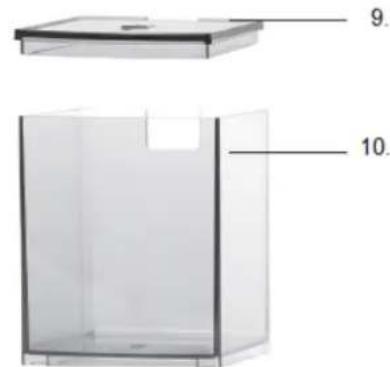
text_image
9. 10.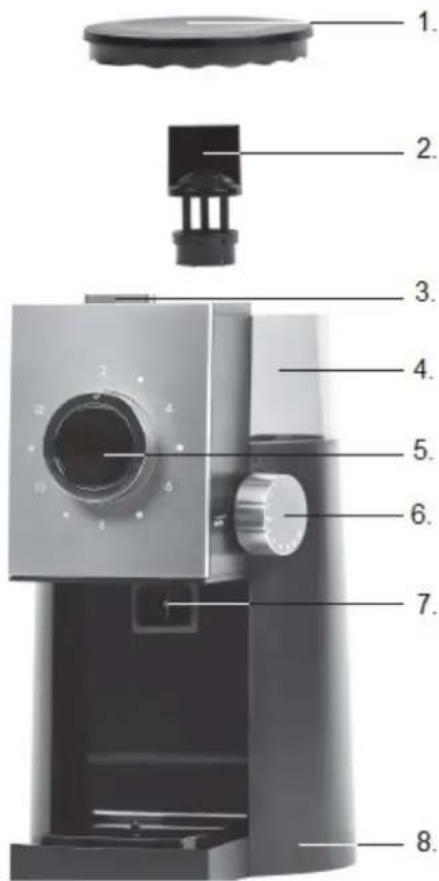
text_image
Exploded view diagram of a microwave oven with numbered parts for identificationBEFORE THE FIRST USE
- Remove all packaging materials and any promotional stickers before using for the first time.
- Clean the coffee grinder before use. See ‘Cleaning and maintenance’ section.
- IMPORTANT: Grinder was tested with beans during assembly. Despite cleaning, traces of ground coffee may be found in a new machine.
USE - ASSEMBLY
-
Place the device on a firm, dry, even surface.
-
Ensure all parts are locked into place. There is safety switch what doesn't allow to switch grinder on when parts are not properly in place.
Note: Never use wet accessories.
- Open the lid and fill the bean container with coffee beans and replace the lid.
Note: There is the safety fuse what doesn't allow to switch grinder on without lid.
Note: Never fill water or any other liquid into the bean container.
-
Plug the grinder into an outlet.
-
Set the fineness selector to the desired setting. The fineness selector knob has 15 different settings to control the size of the ground coffee. The smallest dot corresponds to the finest setting and the largest dot corresponds to the coarsest setting. Never change the fineness selector setting while grinding!
-
Set the cup selector dial to the number of cups of coffee you want to grind by turning the dial to the number of cups you will brew.
Note: These numbers are to be used as a guide. The amount of ground coffee varies quite a bit depending on how coarse or fine you grind and whether you use light, dry beans or dark, oily beans. After grinding a few times, you will find the correct grind amount position for the amount of coffee you want to grind.
- Push the On/Off button down to start your grinder. The grinder will begin grinding the whole bean
coffee directly into the ground coffee container. It will stop automatically.
Note: Beans may stick to the wall of the bean container, preventing them from falling into the burrs. You will hear a high-pitched noise from the motor when this happens. Gently shake the grinder s that the beans slide down into the burrs.
Note: If you need to turn the grinder off before the grinding cycle is finished, simply push the On/Off button.
-
Never grind more coffee then indicated by the “MAX” fill line of the ground coffee container. Over filling the ground coffee container can cause clogging in the grinder chute, and can damage the machine.
-
Be sure to unplug the appliance after every use. When you don't use the appliance longer time, clean it and store in dry place.
Important information
The appliance is equipped with sensitive temperature sufe – this fuse is resetable. The fuse protects agains overheat the motor. When you gring longer time without pause, it may cause the appliance will stop work. Keep the appliance cool down (10 min) and try to again switch on.
Important information
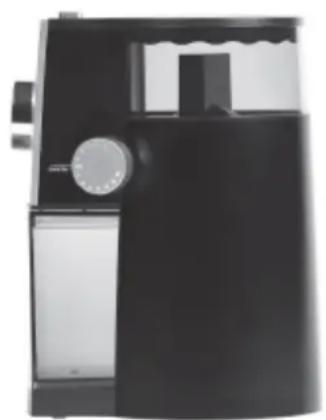
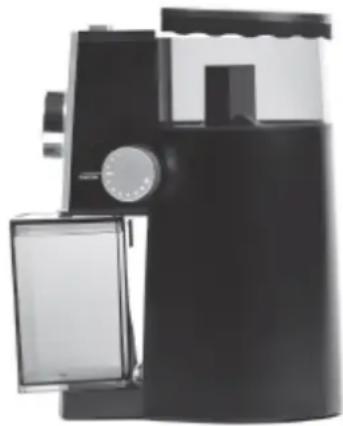
The appliance will not operate if the coffee bean container lid, ground coffeecontainer or ground coffee container lid are not properly in place.
Proper placement of parts
natural_image
Black industrial blender with control knob and side panel (no visible text or symbols)Parts not in fine place
natural_image
Black and white photo of a modern kitchen grater with a side panel open (no visible text or symbols)TIPS
- Coarsely ground coffee can be used for percolators, medium coarseness is suitable for coffee machines, and finely ground coffee is best used for espresso machines.
- For the most delicious coffee, it is best to grind only the amount of coffee you wish to use. That's how you get freshly ground beans every time.
- You can store coffee beans in a vacuum pack for 2 months in the freezer.
- Do not grind for more than 70 seconds at a time. Let machine cool down for 10 minutes before grinding again.
- Before remove ground coffee gently shake the grinder so that ground coffee slide down into the
- container..
- Clean the device after each use. Ground coffee that is left behind can affect the taste.
- It is recommended to use the machine for grinding coffee beans only. Other ingredients may damage the appliance or leave an unpleasant odour or taste behind.
CLEANING AND MAINTENANCE
- Always pull the plug out of the socket before cleaning the appliance. Do not clean the appliance under running water. Never immerse the base and reservoir in water.
- Wipe the housing down with a damp cloth and dry the appliance. Nothing from the appliance don't wash in dishwasher.
- Not regular and correct maintenance of the appliance can cause worse grinding results or can cause even damage of the grinder.
- Remove excess ground coffee from the grinder chute with a small brush.
- Coffee beans are oil. Clean all containers only with dry paper towel.
- Don't clean with abrasive cleaner.
Cleaningthe upper burr disk
- Set the fineness selector dial to the finest grind setting.
- Grasp the top of the upper burr disk, turn clockwise until loose and then pull upward vertically to remove it from the bean container.
- Lift the upper burr disk out of the grinder.
Note: Do not unscrew the upper burr from its housing! -
Clean both the removable upper burr disk, and the permanent lower burr disk with a brush. Note: Never use water to clean the burr disks!
-
To reinsert the upper burr disk, set the fineness selector dial to the coarse grind setting. Insert the upper burr and turn counterclockwise until it is locked into place.
Note: Be careful not to tear the upper part of the grinding unit when loosening it.
! Warning: never clean the grinding unit with water and do not wash in the dishwasher!
Poblems and solutions
-
The grinder does not work when On/Off button is pushed
-
Make sure that the plug is inserted correctly into a working outlet.
- Ensure the lid of the bean container is properly placed onto the housing.
-
Check that the ground coffee container and its lid are placed correctly into the base.
-
The grinder stops during operation
-
The grinder is overheated. The resettable thermostat of the motor was activated. To reset the thermostat, allow the appliance to cool down for approximately 30 minutes. To avoid overheating, do not exceed the MAX indications of the ground coffee container.
-
A removable part has become dislodged. Check that the coffee bean container lid and the ground coffee container and its lid are correctly placed into the housing of the machine.
-
Grinder clogs easily
- Unplug the unit and ensure the grinder chute is clear of any clogs. Clean the grinder chute often.
- Try a new type of coffee bean. Do not use flavored or coated beans.
- If you are using oily beans, try a coarser grind setting.
- The fineness selector does not work
- Check if the upper burr disk is correctly positioned in the bean container (see chapter “Cleaning/Removing the Upper Burr Disk”
Technical data:
•Rated voltage: 220-240 V\~ 50-60 Hz
●Power consumption: 130 W
•Protection class: II
SICHERHEITSHINWEISE
natural_image
Two transparent containers with labeled parts, one open and one closed, shown without any text or symbols.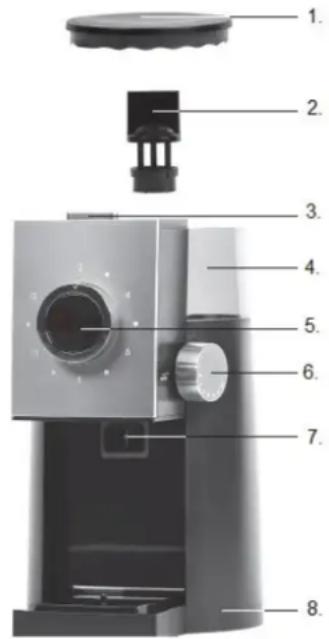
text_image
Exploded view diagram of a mechanical device with numbered parts for identificationnatural_image
Black industrial machine component with control knob and side panel (no visible text or symbols)natural_image
Black and white photo of a modern kitchen grater with a dial indicator (no visible text or symbols)TIPPS
text_image
Exploded view diagram of a microwave oven with numbered parts for identificationnatural_image
Black and white photo of a kitchen or oven appliance with a control knob (no visible text or symbols)natural_image
Black and white photo of a vintage-style coffee maker with a side panel open, no visible text or symbols.TIPS
text_image
Exploded view diagram of a coffee maker with numbered parts for identificationAVANT LA PREMIÈRE UTILISATION
natural_image
Black industrial machine with control panel and side door (no visible text or symbols)natural_image
Black and white photo of a modern kitchen grater with a side panel open, no visible text or symbols.CONSEILS
text_image
Exploded view diagram of a mechanical device with numbered parts for identificationELSÖ HASZNÁLAT ELÖTT
natural_image
Black industrial machine with control knob and side panel (no visible text or symbols)