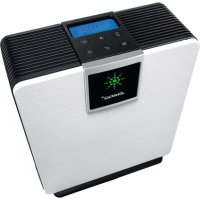
AW 210 Pure - Air purifier STEBA - Free user manual and instructions
Find the device manual for free AW 210 Pure STEBA in PDF.



User questions about AW 210 Pure STEBA
0 question about this device. Answer the ones you know or ask your own.
Ask a new question about this device
Download the instructions for your Air purifier in PDF format for free! Find your manual AW 210 Pure - STEBA and take your electronic device back in hand. On this page are published all the documents necessary for the use of your device. AW 210 Pure by STEBA.
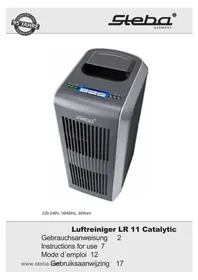
USER MANUAL AW 210 Pure STEBA
natural_image
Exterior view of a modern electric water heater with digital display and control panel (no visible text or symbols)220-240V, 50Hz, 320Watt
Instructions for use 10
Mode d'emploi 18
This appliance is only for purifying indoor air and must not be used commercially. Please read the instruction manual carefully and keep it at a safe place. When the appliance is given to another person the instruction manual should be passed to that person, too. Only use the appliance as described in the instruction manual and pay attention to the safety information. No liability for damages or accidents will be accepted, which are caused by not paying attention to the instruction manual.
System
The device purifies and humidifies the air
- The air is passed through rotating water-rinsed discs. The dust is rinsed off.
• The purified and humid air will be blown back into the room.
- In winter, the ambient air is dry. The mucous membranes, the skin, furniture and parquet floors dehydrate.
- Purified and moistened air helps to solve this problem.
Safety information
- The appliance must be used and plugged in only according the requirements shown on the rating label.
- Use the appliance only if the cord shows no damages. Check this before every use!
- Do not touch the power plug with wet hands.
- Connect the power plug to a properly installed and easily accessible socket only.
- To unplug the power plug, always pull the plug – not the cable.
- Plug off the appliance after each use or in case of failure.
- Do not pull at the cord. Don't pull it over edges and don't bend it too much.
- Keep the cord away from hot parts.
The appliance can be used by children aged 8 and above and persons with limited physical, sensory or mental capa-
bilities or lack of experience/knowledge, provided that are supervised or have been provided with instruction in the safe use of the appliance and have understood the resulting dangers. Children must not use the packaging as a toy. Cleaning and user maintenance must not be carried out by children unless they are 8 years or older and are supervised.
- Children under the age of 8 must be kept away from the appliance and the connecting cable.
- Children should be supervised to ensure that they do not play with the appliance or packaging material (e.g. Plastic Bags).
- The appliance must not be operated using a timer or a separate remote system!
- When using a powercord extension it is important that children are not pulling at it or a trip hazard occurs.
- The appliance must always be unplugged in case of no supervision, prior to assembly, the dismantling or cleaning.
- Do not use in humid rooms.
• The device is for use in the home only
- The device is only to be connected to the mains with a voltage that corresponds to the information on the label
- Switch off and unplug the device before cleaning and maintenance of any kind
- Always remove the plug by pulling on the plug and not on the cable
- Do not touch the connection cable with wet hands
- Do not put the ground device under running water or dip it into water
- Never leave the device unattended.
- Check the supply from time to time for damage. In order to avoid risks, damaged supply leads should only be changed by qualified personnel.
- Remove the plug when not in use
- The device is only intended for the use described here. If the device is used for purposes for which it was not intended, or used incorrectly, no responsibility for any damage will be taken
- Never use the device on or near to hot surfaces
- Place the device on a firm even surface. Ensure that there is sufficient space around the device to guarantee correct ventilation.
Do not cover with a blanket or other things.
- Do not place sharp metal objects or fingers in the air outlet
- Do not use the device in the bathroom or a room with a high level of air humidity
-
Only operate the device if the parts is correctly inserted and the backside is closed.
-
Do not use next to open flames to avoid fire
- Do not spray anything into the device
- Do not direct the air outlet to veneer etc.
Cleaning
- Do not immerse the appliance into water.
-
Unplug the device before every cleaning.
-
For hygienic reasons, the device should be cleaned every 14 days.
-
If the device shouldn't be used for more than 3 days, the water in the water tank has to be replaced.
-
Push the tank cover to the right.
- Remove the tank, open the tank cap and remove the water.
- Then, remove the water tray with the humid disc pack.
- Clean the disc pack with warm soapy water.
- Depending on the water hardness, the limescale must be removed from the tray and the disc pack. Depending on the scale you can use water added with vinegar or decalcifier. Do not use aggressive detergents.
- The assembly is as followed: Place the gear wheel of the disc pack into the gap of the water tray. Insert the water tray with the disc pack. Then, insert the water-filled water tank and close the lid.
- Depending on the dust, the foam material filter has to be washed.
Usage

text_image
88% 88hr LOW -1 HIGH 导 AUTO OK BONLOCK WARM TIMER WIND HUMBER POWERON/Off

Humidity

Ventilation

Time

Water preheating

Ionisation / child lock
Getting started
- Unpack the device, remove all transport packaging and transparencies.
- Check for damage and completeness.
- Open the water tank cover on the right.
- Remove the tank.
- Open the tank cap and fill the tank with cold water.
- Close the tank securely and place it in the appliance.
• Do not damage the tank valve in the tank cap.

Display
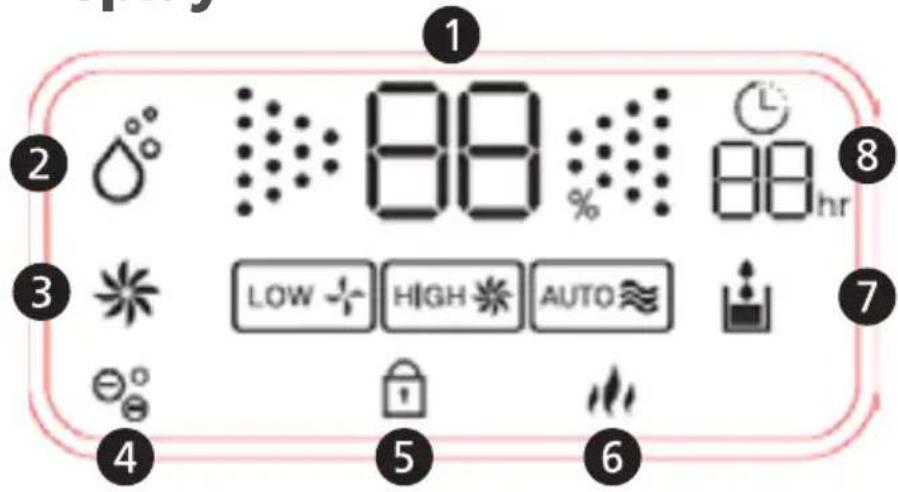
text_image
1 2 3 4 5 6 7 8 9 10:00:00 88% 88hr LOW HIGH AUTO1) ambient humidity
2) humidity level
3) ventilation
4) ionisation
5) child lock
6) water preheating
7) water level
8) remaining time
ON/OFF
- Press this button, a sound beep and the display shows the current humidity. The device starts in the standard mode (air moistening – high ventilation for 1 minute – ionisation).
- After 1 minute, the device turn to the automatic program and the symbol + blinks.
- If the humidity is higher than 60%, the device turns off automatically.
- If the humidity is between 45% and 59%, the device works with low ventilation speed.
- If the humidity is below 45%, the device works with high ventilation speed.
- By pressing the On/Off button again, the device turns off. The ventilation keeps running for 30 seconds.
Humidity

The relative humidity in a room at 20°C should be:
• bedroom or living room: 45-60% RH
- sickroom: 40-50% RH
- library:
40-50% RH
- By pressing the button, the humidity can be set in steps of 40% - 50% - 60% - 70%.
- If the ambient humidity is above the set humidity, the air moistening stops and the display shows
- If the humidity is 1% - 14% below the set humidity, the ventilation works at low speed.
-
If the humidity is more than 15% below the set humidity, the ventilation works at high speed.
The colour of the display changes depending on the humidity: -
Red: < 40% RH
• Green: 40 – 59% RH - Blue: > 60% RH
- The colour change of the display can be turned off by pressing the On/Off button longer than 3 seconds.
Timer
- By pressing the button you can set the timer in steps of 1 – 3 – 5 – 8 – 10 hours.
- The remaining time is shown in the display.
- The setting of the time is independent of other functions. If the timer runs out the device turns off, regardless of the other settings.
- In order to turn off the timer, press the button Ⓤ until the symbol in the display disappears.
Ventilation +
- By pressing this button you can set the speed of the ventilation.
- If the device is started with the on/off button it starts in the standard mode with high ventilation speed. The mode is deleted by changing the ventilation speed.
- Low: low speed. The humidity is shown in the display.
- High: high speed. The humidity is shown in the display.
Water preheating
- The water preheating is always turned on in the standard mode.
- To turn on/off the water preheating, press this button.
Ionisation

By pressing the button you can turn on the ionisation.
The purified air will be enriched with negative ions. This creates an effect like after a summer thunderstorm.
Child lock

Press the button longer than 3 seconds. All buttons, except the on/off button, are locked. To deactivate the child lock, press this button again for longer than 3 seconds.
Water level
- The device beeps and the symbol blinks in the display if the water level is too low.
- After the \$ beep, the water preheating turns off and the ventilation stops after 30 seconds.
- To continue the program, refill the water tank and press the on/off button.
Memory
- If the device is started with the on/off button, it starts with the last used settings.
- If the device is unplugged, it starts with the standard mode.
Remote control
You can us the device with the remote control out of a distance of about 2,5 meters.
Notes on batteries
- The device can only be operated with a lithium button cell type 2032, 3 volt (not included).
- Open the battery door.
- When inserting the batteries, pay attention that the “+/-” marking and insert the battery accordingly.
- Close the battery compartment and make sure that the compartment is locked.
- Batteries can be swallowed.
Never let children work or play with it!
- Clean the battery contacts and the unit before using the batteries with a dry cloth.
- Remove empty batteries immediately.
- Dispose of the batteries according to local regulations.
- If the unit is not to be used for an extended period of time, remove the batteries to prevent damage from possible leakage.
Environmental information
The batteries - also free of heavy metals - must not be disposed of in household refuse. Used batteries must be disposed at collection points of the trade and public disposal authorities.
Correct Disposal of this product
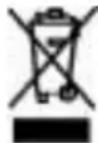
This marking indicates that this product should not be disposed with other household wastes throughout the EU. To prevent possible harm to the environment or human health from uncontrolled waste disposal, recycle it responsibly to promote the sustainable reuse of material resources. To return your used device, please use the return and collection systems or contact the retailer where the product was purchased. They can take this product for environmental safe recycling.
Packaging disposal: Do not throw away the package materials. Please put it in the recycling bin.
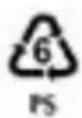
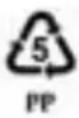
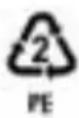
Gift box: Paper, should be put to the old paper collection point. Plastic packaging material and foils should be collected in the special collection containers.
Service and Repair:
If the appliance must be repaired, please get in touch with your trader or with the manufacturer: