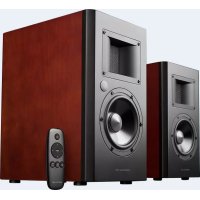
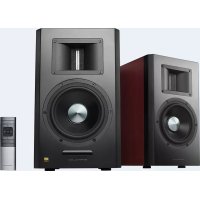
AirPulse A200 - Home Theater System EDIFIER - Free user manual and instructions
Find the device manual for free AirPulse A200 EDIFIER in PDF.


| Product type | Active speakers for home cinema system |
| Brand | Edifier |
| Model | AirPulse A200 |
| Dimensions (W x H x D) | 230 x 355 x 295 mm (per speaker) |
| Net weight (set) | 19 kg |
| Power of tweeters | 2 x 10 W |
| Power of midranges | 2 x 55 W |
| Frequency response | 45 Hz – 20 kHz |
| Signal-to-noise ratio | ≥ 90 dB(A) |
| Audio inputs | AUX, Balanced (XLR), Optical, Coaxial, Bluetooth |
| Supported audio formats (optical/coaxial) | PCM 44.1 / 48 / 96 / 192 kHz |
| Bluetooth | A2DP and AVRCP profiles |
| Power supply | Mains (power cable included) |
| Included accessories | Remote control, optical cable, power cable, user manual |
| Tweeter type | Phase-correcting ribbon horn |
| Midrange driver type | 5.5" neodymium core aluminum cone |
| Care and cleaning | Use a soft, dry cloth. Do not use abrasive products or solvents. |
| Safety | Install at a minimum distance of 20 cm from the body. Do not expose to moisture. |
| Repairability | For any repair, contact the authorized after-sales service. |
Frequently Asked Questions - AirPulse A200 EDIFIER
User questions about AirPulse A200 EDIFIER
0 question about this device. Answer the ones you know or ask your own.
Ask a new question about this device
Download the instructions for your Home Theater System in PDF format for free! Find your manual AirPulse A200 - EDIFIER and take your electronic device back in hand. On this page are published all the documents necessary for the use of your device. AirPulse A200 by EDIFIER.
USER MANUAL AirPulse A200 EDIFIER
Dongguan Platinum Audio Systems Co., LTD
No.2 East Industry Road, Songshan Lake National High-tech Industrial Park, 100000, China
Industrial Development Zone, Dongguan 523808 China www.airpulseaudio.com
Made in China
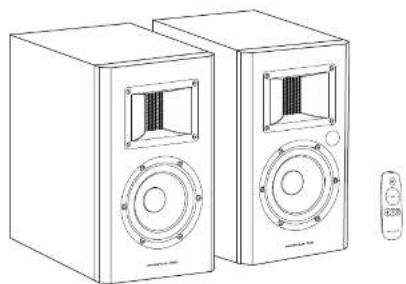
AIRPULSE
A-200
Active Speaker System
User manual|Mode d'emploi
Important Safety Instruction
WARNING: To reduce risk of fire or electric shock, do not expose this apparatus to rain or moisture.
Thank you for purchasing AIRPULSE A-200 Active speakers. Please read this manual carefully before operating this system.

The lightning, then, had an uncontrolled route of passage through the air. The air was in the presence of a unrelated dragon's signature: within the product's air is a close resemblance to the dragon's own signature: a tail of ice on the shock to power

To transmit the risk of infection to the health care system, we have developed a new model. The model is based on "The patient, Refers" seroting as quality indicators.

The essential command is that the simple concept is intended to shift this and the pressure on the market. The product is not a car (or something) but its customer in the literature, accompanying the product.
- Read these instructions.
- Herd all warnings
- Clean only with dry cloth
- Do not use this speaker near water and never put this speaker into liquids or allow liquids to drip or spill onto it.
7 Do not place apnance fllc wth water on this speake, such as vase; nor place any form of open fire such as lit candle. - Do not block any ventilation openings. Please eave enough space around the speakers to keep good ventilation (the distance should be above 5cm). Install in accordance with the manufactory's instructions.
Do not install near any heat sources such as radiators, heat registers, stove, or other apparatus [including amplifiers] that produce heat. - Do not defaet the safety suprpose of the polarized or groundntrc-type blue A polarized blue has two thalas with one wider than the other.A grounding two plug has two blades and a third grounding ronk.The wide blade or the third prone are provided for your safety.If the provided plug does not fit into your outlet, must use an eutrician for replacement of the obsolete outlet.
- Protect the power cord from being walked on or pinched particularly at plugs, convenience receptacles, and the point where they exit from the speaker.
- Only use attachment/accessories specified by the manufacturer.
- Look up this speaker during light turns or when you used for long periods of time.
- Refer all servicing to qualified service personnel. Servicing is required when the speaker has been damage in any way, such as power-supply cord or plug is damaged, liquid has been spilled or objects have fallen into the speaker, the speaker has been exposed to rain or moisture, does not operate normally, or has been dropped.
- 30% of a solid is the disconnection device, the disconnection device shall remain clearly visible.
- 30% of a solid is a solid alkali and other chemical solvents to clear the product surface. Please use neutral or water to clean the product.
- A warning that an apparatus with CLASS construction shall be connected to a MAINS socket outlet with a protective
earrnclion. 10. for apparatus containing a user-splacable COIN/BUITTON CELL BATTERY, the following text or equivalent:

Use only with the cart, stand, trim, bracket, or table specified by the manufacturer, or sold with the apparatus. When a cart is used, use caution when moving the cart/apparatus combination to avoid injury from lip-over.

Correct Disposal of this product. This marking indicates that this product should not be disposed with other household wastes throughout the EU. To prevent possible harm to the environment or human health from uncontrolled waste disposal, it is important to ensure that the sustainable costs of material resources. To return your used concrete, please use the return and collector system to contact the metallic where one product was purchased. They can take this product for environmental safe recycling.
12
English
Statement
FCC Statement
This device complies with part 15 of the FCC Rules. Operation is subject to the following two conditions:
1
(2) This device must access any interference received, including interference that may cause undesired operation. Any device that does not expressly approved by the party responsible for compliance could void the user's authority to operate the equipment.
Note: This equipment has been tested and found to comply with the limits for a Class B digital device, pursuant to part 25 of the FCC Rules. These limits are designed to provide reasonable protection against harmful interference in a residential installation. This equipment generates uses and can radiate radio frequency energy and, if not installed and used in accordance with the instructions, may cause harmful interference to radio communications. However, there is no guarantee that interference will not occur in a particular installation. If this equipment does cause harmful interference to radio or television reception, which can be determined by turning the equipment off and on, this user is encouraged to try to correct the interference by use or more of the following measures:
Recont or relcate the receiving antenna
Increase the separation between the equipment and receiver
Connect the equipment into an outlet on a circuit different from that so which the receiver is connected.
- Consult the dealer or an experiences radio/TV technician for help.
This equipment complies with FCC radiation exposure limits set forth for an uncontrolled environment. This equipment should be installed and operated with minimum distance 20km between the radiator & your body.
ICCaunon
The device meets the exemption from the routine evaluation limits in section 2.5 of RSS 102 and compliance with RSS 102 RF exposure, users can obtain Canadian information on RF exposure and compliance.
This device complies with Industry Canada licence-exempt RSS standards). Operation is subject to the following two conditions: (1) this device may not cause interference, and
[2]This device must accept any interference, including interference that may cause
undesired operation of the device.
This equipment should be installed and operated with a minimum distance of 20 cm between the robotizer and your body. The device is connected to the computer and displays the results of the evaluation during the section 2.5 of RSS102 and the computerized version of the expression of RSS102. Fertilisers can obtain information from the operation and the conformer de r. Le present article conforms to the ENI d'Industrie Canada applicable aux applications (excluse exemples de licence, l'excalation calculatoire ou deux conditions suivantes):

RCA to RCA audio cable (1.5M/5ft)

RCA to 3.5mm jack plug



3 English
Speaker Controls
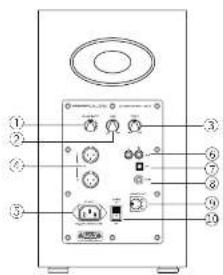
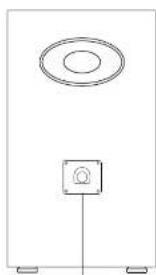
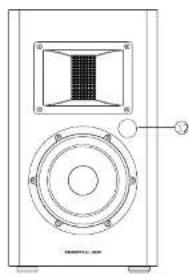
- Master volume control/ input selection
Press in to navigates between audio sources:
BAL >AUX >Optical >Coaxial >Bluetooth.
Note: Press and hold the Master volume
control to disconnect from Bluetooth devices - Bss
3.Treble - Balanced input port
S. AC Input -
Auxiliary input socket
-
Optical input socket
B. Coaxial input socket - Left speaker output
1D,On/OFF Switch - Speaker Input
- LED Indicator: Red: Optical/Coaxial mode Green: BAL/AUX mode Blue: Bluetooth mode
4 English
Remote Control
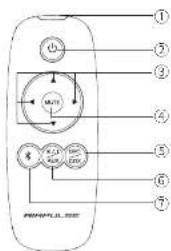
- IR Window
- Power On
- Master volume control
- Mute
- Optical/Coaxial mode
- BAL/AUX mode
- Bluetooth mode
How to change battery
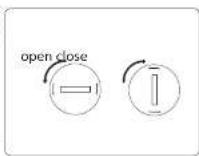
Insert a coin into the slot and rotate anticlockwise to open the battery compartment, install the new CR 2025 battery (electrode + upturned) and rotate the cover clockwise to close the compartment.
WARNING
- Do not expose the remote control to extreme heat or humidity
- Do not charge the batteries.
- Remove the batteries when not in use for an extended period of time.
- Do not expose the battery to excessive heat such as direct sun, fire, etc.
- Do not ingest, battery, chemical burn hazard (The remote control supplied with) This product contains a coin/button cell battery, if the coin/button cell battery is swallowed, it can cause severe internal burns in just 2 hours and can lead to death.
- Keep new and used batteries away from children, if the battery compartment does not close securely, stop using the product and keep it away from children.
- If you think batteries might have been swallowed or placed inside any part of body, seek Immediate medical attention.
5
English
Connections
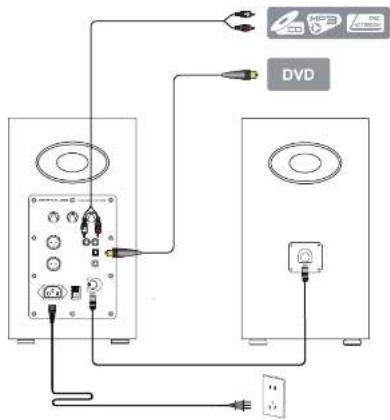
6
English
Balance and AUX Input
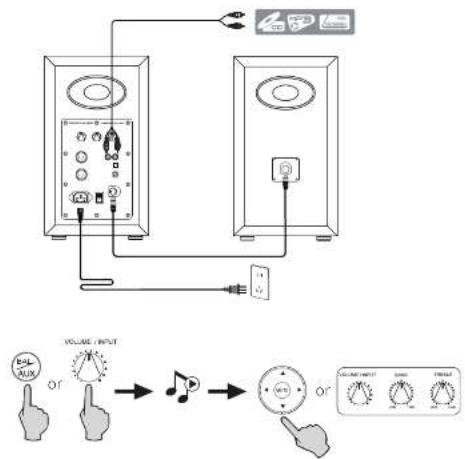
- Press master volume control on active speaker or press the "BAL/AUX" key on the remote control to select AUX audio source, LED indicator turns to green.
- Connect BAL/AUX input port on active speaker to your audio source (cellphone, mp3, mp4 player etc) using the included RCA-RCA audio cable.
- Touch play on your device and adjust the volume to a desired level.
7 English
Optical and Coaxial Input
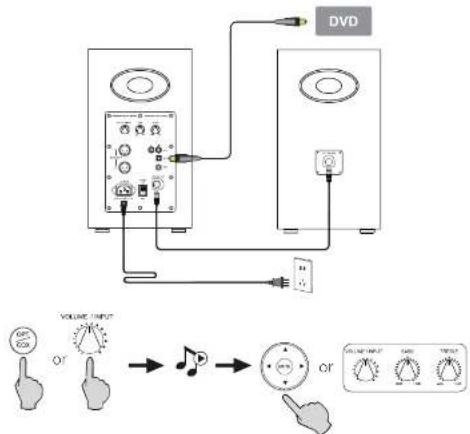
- Press the master volume control on the active speaker or press the "OPT/COX" button on the remote control to select the optical/coaxial input.
- Using optical or coaxial cable (optical cable included) to connect audio sources to your speaker.
- Play from your devices and adjust the volume accordingly.
Note:
In optical and coaxial modes, only PCM signal with 441KHz/48KHz/96KHz/192KHz can be decoded.
8 English
Bluetooth Input
Bluetooth® Pairing
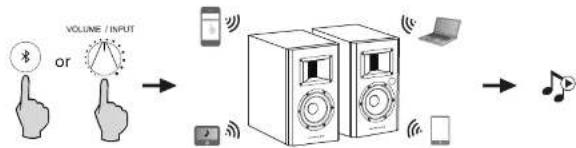
- Turn on speaker and switch to Bluetooth mode by pressing the Bluetooth button on the remote control or press the master volume control on back panel of the active speaker.
- Go to setup section on your source devices (mobile phones, tablets, etc.) and search for nearby Bluetooth devices, you will find "AIRPULSE A-200" in the list.
- Pair your device with "AIRPULSE A-200".
- Play audio tracks on your device and adjust the volume to a desired level.
Other operations
- After pairing, using the pair record on your source device to re-connect to the speaker;
- Bluetooth of the product will be powered off after switching away from Bluetooth mode, so in other audio mode bluetooth connection can not be made.
- When switch to Bluetooth mode, the speaker will try to connect the last connected Bluetooth source device.
- To disconnect Bluetooth, press and hold the master volume control for about 2 seconds.
Note
- Bluetooth connectivity and compatibility may be different among different source devices, depending on the software versions of source devices.
- To enjoy the full Bluetooth functions of this product, please ensure your mobile device supports A2DP and AVRCP profile.
- PIN code for connection is "0000" if needed
9 English
Specifications
Power Output: L/R Ribbon Tweeler: 10W-10W
L/R Mid-Range: 55W + 55W
Signal-Noise Ratio dB(A):≥90dB(A)
Input Interface: AUX, Balance Input, Optical, Coaxial, Bluetooth
Input Sensitivity: Balance Input: 1000±50mV
Aux Input:550+50mV
Bluetooth Input: 1000+50mFFs
Optical input: 350 ± 50 mFPs
Coaxial Input:350±50mFFs
Noise Level: ≤25dB(A)
Frequency Response: 46Hz 20kHz
Tweeter: Phase Correction Horn Loaded Ribbon Tweeler
Mid-Wafoer: 5.5 Aluminum Cone Neo Power Mid-Wafoer
Cabinet Size (WxHxD): 230 x 355 x 295 (mm)
Net Weight: 19 Kg/Sat
10
English
Troubleshooting
| Problem Solution | |
| No sound | ·Check if the power indicator light is ON |
| ·Try to turn up the volume using either the master volume control or remote control. | |
| ·Ensure the audio cables are firmly connected and the input is set correctly on the speakers. | |
| ·Check if there is signal output from the audio source. | |
| Cannot connect via Bluetooth | ·Make sure the speaker is switched to Bluetooth input, in other audio input mode Bluetooth can not be paired or connected. Disconnect from any Bluetooth device by press and hold the volume dial in Bluetooth mode, then try again. |
| ·Effective Bluetooth transmission range is 10 meters, please make sure operation is within the range. | |
| ·Try another Bluetooth device for connection. | |
| The A200 does not turn on | ·Check if mains power is connected, or if the wall outlet is switched on. |
If you want to find out more about AIRPULSE, please visit our website at www.airpulseaudio.com
11
English
a symbol oedema start in a kidney cancer or syphilis sign the cell-ocellular carcinoma is a tumor. The word oedema means to call a patient's age or gender; it cannot cause the electron beam of his or her blood.

Entree coaxiale:350+50mFFs
Niveau de bruit: ≤25dB(A)


Brand : EDIFIER
Model : AirPulse A200
Category : Home Theater System