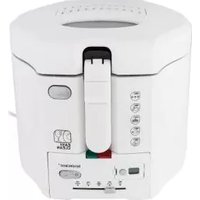
SHF 1400 A1 - Deep fryer SILVERCREST - Free user manual and instructions
Find the device manual for free SHF 1400 A1 SILVERCREST in PDF.


| Product type | Air fryer |
| Brand | SilverCrest |
| Model | SHF 1400 A1 |
| Power | 1400 W |
| Mains voltage | 220 – 240 V ~ 50 Hz |
| Basket capacity (max) | 2.3 litres (approx. 900 g of fries) |
| Temperature range | 80 – 200 °C (adjustable in 5 °C increments) |
| Timer | 1 – 60 minutes |
| Preset programs | 9 programs (frozen fries, bacon, poultry, shrimp, steaks, muffins, vegetables, fish) |
| Display | Touch screen with digital display |
| Body material | Plastic and metal |
| Included accessories | Basket, frying pan, filter insert |
| Basket maintenance | Dishwasher safe or hand wash |
| Frying pan maintenance | Hand wash with warm water |
| Body maintenance | Wipe with a damp cloth and mild detergent |
| Safety | Automatic shutdown when basket is removed, overheat protection |
| Protection class | I |
| Warranty | 3 years |
| Use | Indoor household use only |
| Weight (approx.) | Approximately 4.5 kg |
Frequently Asked Questions - SHF 1400 A1 SILVERCREST
User questions about SHF 1400 A1 SILVERCREST
0 question about this device. Answer the ones you know or ask your own.
Ask a new question about this device
Download the instructions for your Deep fryer in PDF format for free! Find your manual SHF 1400 A1 - SILVERCREST and take your electronic device back in hand. On this page are published all the documents necessary for the use of your device. SHF 1400 A1 by SILVERCREST.
USER MANUAL SHF 1400 A1 SILVERCREST
GB IE NI Operating instructions
DIGITAL AIR FRYER
FR)BE Mode d'emploi
FRITEUSE NUMÉRIQUE À AIR CHAUD
- Overview 3
- Intended purpose 4
- Safety information 4
- Items supplied 7
5.How to use 8 - The touch display at a glance 9
- The programs at a glance 10
- The basics of frying 11
- Operation 12
9.1 Power connection 12
9.2 The touch display 12
9.3 Switching on/off 12
9.4 Manual settings 13
9.5 Using Programs 13
9.6 Interrupting the cooking process 14
9.7 End of the cooking process 14
-
Cleaning 15
-
Storage 15
- Disposal 15
13.Trouble-shooting 16 - Technical specifications 16
15.Warranty of the HOYER Handel GmbH 17
1. Overview
1 Housing
2 Heating element (at the top of the interior)
3 Touch display with indications and sensor buttons
4 MAX Marking for the maximum filling level of the frying basket (maximum filling level is 2.3 litres, this corresponds to approx. 900g of French fries)
5 Frying basket
6 Screen assembly
7 Safety catch
8 Button for unlocking the frying basket
9 Handle of the frying basket
10 Pan; the liquid from cooking collects here
11 Power cable with mains plug
12 Spacer with cable spool
13 Air outlet
Thank you for your trust!
Congratulations on your new hot air fryer.
For safe handling of the product and in order to get to know the entire range of features:
- Read these user instructions thoroughly prior to initial use.
- Above all, observe the safety information!
- The device should only be used as described in this copy of the user instructions.
- Keep this copy of the user instructions for information purposes.
- If you pass the device on to someone else, please include this copy of the user instructions. The user instructions are a part of the product.
We hope you enjoy using your new hot air fryer!
Symbols on the device

This symbol warns you against touching the hot surface.

The food-safe material of devices with this symbol will not change the taste or smell of food.
2. Intended purpose
The hot air fryer is intended for the cooking of food in hot air at a temperature of up to max. 200^
The hot air fryer is designed for private, domestic use. The hot air fryer must only be used indoors.
This device must not be used for commercial purposes.
Foreseeable misuse
The hot air fryer is not suitable for heating liquids.
3. Safety information
Warnings
If necessary, the following warnings are used in this copy of the user instructions:

DANGER! High risk: failure to observe this warning may result in injury to life and limb.
WARNING! Moderate risk: failure to observe this warning may result in injury or serious material damage.
CAUTION: low risk; failure to observe this warning may result in minor injury or material damage.
NOTE: circumstances and specifics that must be observed when handling the device.
Instructions for safe operation
- This device can be used by children from the age of 8 and people with restricted physical, sensory or intellectual abilities or people without adequate experience and/or understanding, if they are supervised or instructed on how to use this device safely and if they are aware of the resulting dangers. Children must not play with the device. Cleaning and user maintenance must not be performed by children unless they are older than 8 years and supervised.
Children under the age of 8 must be kept away from the device and the power cable.

- Do not touch any hot parts of the device such as the air outlet on the back. The frying basket should only be touched at the handle.
During frying, hot steam escapes from the air outlet. Be careful not to put your hands into the steam.
- If the mains power cable of this device should become damaged, it must be replaced by the manufacturer, the manufacturer's customer service department or a similarly qualified specialist, in order to avoid any hazards.
- This device is not intended to be operated using an external timer or a separate remote control system.
- Please take note of the chapter on cleaning (see "Cleaning" on page 15).

DANGER for children
- Please make sure that the hot air fryer can never be pulled down (e.g. with the power cable) by children. In cases of scalding there is danger to life!
- Packing materials are not children's toys. Children should not be allowed to play with the plastic bags. There is a risk of suffocation.

DANGER to and from pets and livestock
- Electrical devices can represent a danger to pets and livestock. In addition, animals can also cause damage to the device.
- For this reason you should keep animals away from electrical devices at all times.

DANGER for birds
Birds breathe faster, distribute the air differently in their bodies and are significantly smaller than humans. For this reason, it may be dangerous for birds to inhale even the smallest smoke quantities, which develop while this device is in operation. When using this device, birds should be relocated into a different room.

DANGER! Risk of electric shock due to moisture
- Protect the device from moisture, water drops and water splashes.
The device, the power cable and the mains plug must not be immersed in water or any other liquids. - If liquid gets into the device, disconnect the mains plug immediately. Have the device checked before reusing.
- If the device has fallen into water, pull out the mains plug immediately, and only then remove the device from the water. Do not use the device again, and have it checked by a specialist workshop.
- Never touch the device with wet hands.

DANGER! Risk of electric shock
Do not use the device if the device or the power cable has any visible damage, or if the device has previously been dropped.
- If you use an extension cable, it must be sufficient for the technical data of this device.
Do not connect the device by using a multiple socket. By doing so the socket might be overloaded.
Lay the power cable such that no one can step on it, get caught on it, or trip over it.
- Connect the mains plug only to a correctly installed, easily accessible earthed wall socket with voltage corresponding to the rating plate. The wall socket must still be easily accessible after connection.
Ensure that the power cable cannot be damaged by sharp edges or hot spots. Do not wrap the power cable around the device.
- When setting up the device, make sure that the power cable is not trapped or crushed.
- Even after it has been switched off, the device is not completely disconnected from the mains. In order to fully disconnect it, pull out the mains plug.
To pull the mains plug out of the wall socket, always pull on the mains plug, and never on the power cable.
- Disconnect the mains plug from the wall socket ...
... after every use,
... if there is a fault,
... when you are not using the device,
... before you clean the device and
... during thunderstorms.
To avoid any risk, do not make modifications to the product. Repairs must be carried out by a specialist workshop or the Service Centre.

DANGER - Fire hazard
- Never leave the device unattended while it is plugged in.
- Never leave the hot air fryer unattended during operation. You will thus be able to detect possible problems early on due to unusual smells or noises.
- Never cover the device or place it on soft objects (e.g. towels).
Make sure that there is free space on all sides and above the device.
Do not use the hot air fryer directly under wall units or wall sockets and not near to any curtains, paper or any similar flammable objects.
The hot air fryer should only be operated on a stable, flat, non-slip, dry and non-flammable work surface, in order to prevent it from tipping over or slipping away.

DANGER! Risk of injury through burning
Do not touch the hot surfaces of the device or the interior. Use oven gloves or potholders.
- Allow the device to cool down completely before you clean it or put it away.
Do not move or transport the hot air fryer while it is switched on.
WARNING! Risk of material damage
Only use original accessories.
- Never place the device on hot surfaces (e.g. hot plates) or near to heat sources or open fire.
- Make sure that the surface under the device is dry.
Make sure that the food will not touch the hot heating element at the top of the interior and become stuck there.
- Do not clean using sharp objects or abrasive cleaning agents.
The device is fitted with non-slip plastic feet. As furniture is coated with a variety of different varnishes and acrylics, and treated with different cleaning agents, it cannot be completely ruled out that components are contained in some of these substances that could damage and soften the plastic feet. If necessary, place a non-slip mat under the device.
4. Items supplied
lhotair fryer
1 pan 10
1 frying basket 5
1 copy of the user instructions
5. How to use
- Remove all packing material. The interior in particular must be completely free of packaging remains such as polystyrene particles.

DANGER - fire hazard!
On the back of the device you will find the air outlet 13. Hot air escapes from the air outlet during operation.
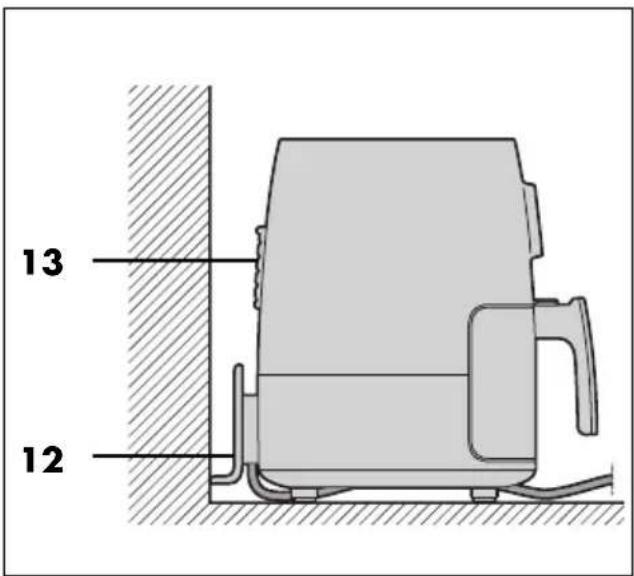
Never cover the air outlet 13.
- Do not use the hot air fryer directly under wall units or wall sockets and not near to any curtains, paper or any similar flammable objects.
- Make sure that there is free space on all sides and above the device.
- Remove the cardboard between frying basket 5 and pan 10.
- Remove the sticker from the screen assembly 6.
NOTE: when in operation for the first time, some smoke and odour may be generated by the device. This is due to the assembly materials used for the heating element and is not a fault in the product. Ensure adequate ventilation.
- Remove protective films and adhesive strips from the device, but do not remove the rating plate on the underside of the device.
- Check that all accessories are present and undamaged.
Clean the device and all accessories before using for the first time (see "Cleaning" on page 15). - Place the device on a dry, level, non-slip, heat-resistant surface.
- Insert the mains plug 11 into a wall socket corresponding to the specifications of the rating plate. The wall socket must also be easy to reach after switching on the device.
6. The touch display at a glance
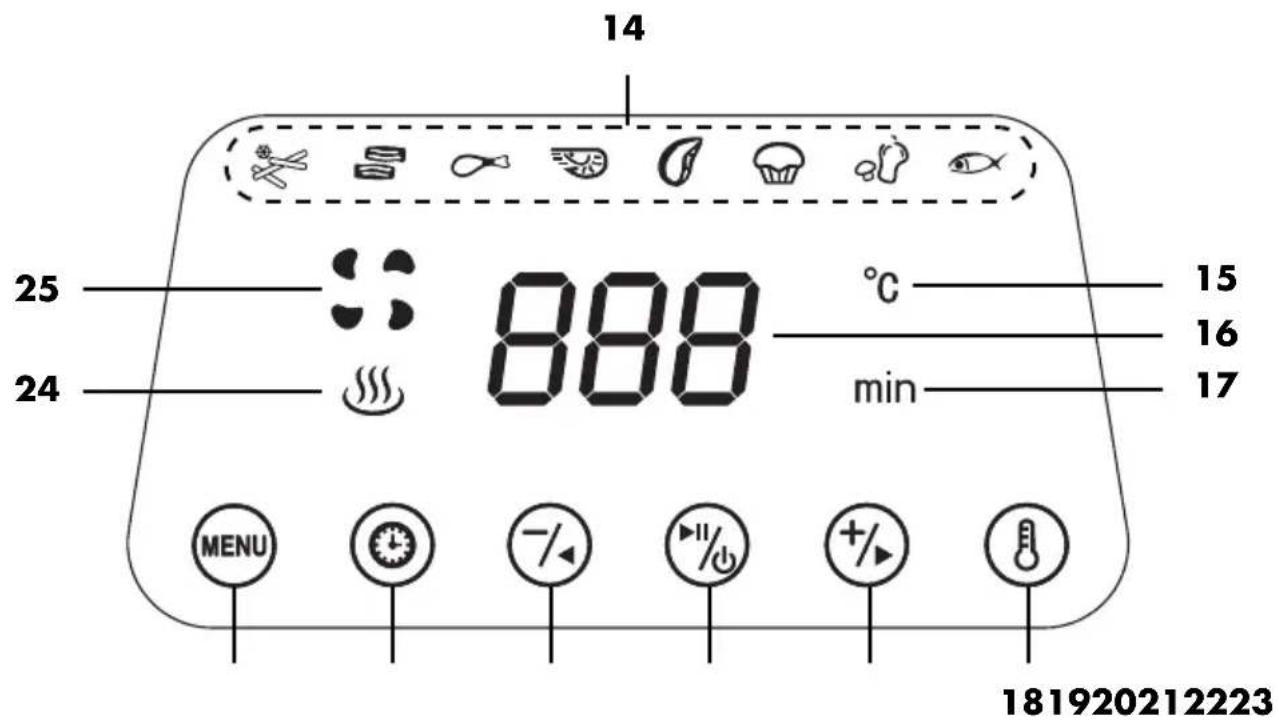
14 Program symbols (see "The programs at a glance" on page 10)
15 °C Temperature unit
16 Numbers display (e.g. temperature, cooking time)
17 min Cooking time unit
18 Button: display cooking temperature
19 Button: increase temperature / extend cooking time
20 Button: switching on/off / program Start/Stop
21 Button: reduce temperature / shorten cooking time
22 Bation: display cooking time
23 Button: press repeatedly to select a program
24 Heating symbol: is lit when the device is heating
25 Fan symbol: flashes when the fan is in operation
7. The programs at a glance
| Symbol in the touch display | Program/use | preset temperature (adjustable range) | preset time (adjustable range) |
| Frozen French fries1 (optional quantity approx. 500 g) | 200 °C (80 – 200 °C) | 20 min. (1 – 60 min.) | |
| Bacon | 180 °C (80 – 200 °C) | 10 min. (1 – 60 min.) | |
| Poultry in pieces, e.g. legs2 (optional quantity 4 pieces) | 180 °C (80 – 200 °C) | 22 min. (1 – 60 min.) | |
| Shrimps | 180 °C (80 – 200 °C) | 12 min. (1 – 60 min.) | |
| Steaks, chops | 200 °C (80 – 200 °C) | 15 min. (1 – 60 min.) | |
| Muffins, cakes and baked goods | 160 °C (80 – 200 °C) | 15 min. (1 – 60 min.) | |
| Vegetables2 (optional quantity approx. 750 g) | 170 °C (80 – 180 °C) | 22 min. (1 – 60 min.) | |
| Fish | 180 °C (80 – 200 °C) | 14 min. (1 – 60 min.) |
The superscript numbers ^1,2 have the following meaning:
1: Shake or turn after one third and two thirds of the cooking time.
2: Shake or turn halfway through the cooking time.
NOTE: between 80 - 200^ the temperature can be set in 5^ steps.
8. The basics of frying
Preparation of the food
- All food must be as dry as possible when used for frying. Dry the food to be fried and remove any ice from frozen food.
- When using deep-frozen food, remove as much water and ice as possible before you put the food into the hot air fryer.
- In case of breaded food, please make sure that the breading sticks as tightly as possible to the food to be fried.
Frying time and frying temperature
- For a tasty and healthy result, the information on the packaging should be observed very carefully when selecting the temperature and the frying time.
- Only small quantities should be fried at a time.
- The frying basket 5 must not be filled more than the MAX 4 marking.
- Acrylamide may be carcinogenic. In order to reduce the formation of acrylamide as much as possible, browning the food too much should be avoided.
For an even browning 12
1: Shake or turn after one third and two thirds of the cooking time.
2: Shake or turn halfway through the cooking time.
If the food (e.g. French fries or chicken nuggets) requires an even browning, give it 1-2 shakes during the frying process.
- Use the handle 9 to pull the pan 10 together with the frying basket 5 out of the housing 1 and shake the contents. While shaking make sure that the French fries are being thoroughly mixed and that the still rawer ones at the basket centre will get to the outside. When the pan 10
with the frying basket 5 is taken out, the device is automatically switched off.
- Reinsert the pan 10 with the frying basket 5 into the device. The device switches on again automatically until the cooking time has expired.
Baking
Dough may never be filled directly into the frying basket 5. After preparing the dough put it into a baking tin or another heat-resistant pan (e.g. muffin liners). Then put the container holding the dough into the frying basket 5.
Package instructions
If on a package of deep-frozen food you don't find information regarding the cooking times for hot air fryers, observe the times given for convection ovens.
9. Operation

DANGER of burns!
During operation, the surfaces of the device may become hot. Do not touch any hot parts of the device such as the air outlet 13 on the back.
Use oven gloves or potholders to touch the pan 10 and frying basket 5.
During frying, hot steam escapes from the air outlet 13. Be careful not to put your hands into the steam.
Do not move or transport the hot air fryer while it is switched on.
WARNING! Risk of material damage!
The device must not be operated under any circumstances without the frying basket 5!
9.1 Power connection
-
When the device is set up, plug the mains plug 11 into an earthed wall socket that corresponds to the specifications on the rating plate. The wall socket must also be easy to reach after switching on the device.
-
All indications in the touch display 3 light up briefly.
-
A double acoustic signal is triggered.
-
The symbol for the Start/Stop button 20 is lit. The device is in standby mode.
9.2 The touch display
On the touch display 3 there are symbols that only display certain functions, e.g. the heating symbol 24.
Other symbols (also) represent a button, e.g. the Start/Stop button 20. The term 'buttons' is used in this instructions for buttons and keys to make the text easier to read.
9.3 Switching on/off
- Press the Start/Stop button 20 to switch on the device from standby mode.
- The display 3 shows the program symbols 14 and the lower bar with the buttons 18 - 23.
- The set temperature and cooking time are displayed alternately.
NOTE: if you switch off the device with the Start/Stop button 20 immediately after switching on, the fan is switched on. It runs for approx. 1 minute, until the device is switched to standby mode.
- Press the Menu button (M) 23 repeatedly to select the desired program.
- Press the Start/Stop button 20 again in order to start the device with the selected settings or the selected program.
The heating symbol 24 is displayed.
- The fan symbol 25 flashes.
- The set temperature and cooking time are displayed alternately.
- The cooking time is counted down.
- The selected program symbol 14 flashes.
-
While the device is running, press and hold the Start/Stop 20 button to stop the process.
-
An acoustic signal sounds.
- The fan continues to run and the fan symbol : 25 flashes.
- After approx. 1 minute the fan stops. The device is in standby mode. Only the symbol 念 20 can be seen in the display 3.
9.4 Manual settings
While the device is switched on, the display 3 shows the lower bar with the buttons 18 - 23. You can use these to change the settings for temperature and cooking time whenever you like, e.g. even if a program is already running.
Use the temperature button 18 and the setting buttons 19/21 to set the temperature between 80^ and 200^
- Press the temperature button ⑥ 18.
- Quickly press the setting buttons 19 / 7 21 for 5^ steps. Keep pressed for fast forward/reverse.
Use the cooking time button 22 and the setting buttons 19 / 7 21 to set the cooking time between 1 and 60 minutes:
- Press the cooking time button 22.
- Quickly press the setting buttons 19/21 for 1-minute steps.
Keep pressed for fast forward/reverse.
9.5 Using Programs
NOTE: make sure that the food will not touch the hot heating element 2 at the top of the interior and become stuck there.
The device has preset programs for many foods and types of preparation. When you select a program, you can also carry out the following settings at any time:
-
T e m p e r a t u r e
-
Cooking time
-
Prepare the foods and place them in the frying basket 5.
- Place the frying basket 5 in the pan 10.
- Slide the pan 10 into the housing 1.
- Select the desired program (see "The programs at a glance" on page 10).
- Switch on the device with the Start/Stop button 20.
- Press the Menu button 23 repeatedly to select the desired program. The corresponding symbol flashes.
- If necessary, make manual adjustments to the temperature and cooking time.
-
Start the cooking process with the Start/ Stop button 20.
-
The program symbol flashes. The other program symbols are hidden.
- The fan symbol 25 flashes.
- The heating symbol 24 is lit.
- The 18, 22, 19, and 21 buttons are lit to enable you to change the preset values for cooking temperature and cooking time.
9.6 Interrupting the cooking process
NOTE: to stop the cooking process completely, e.g. in order to return to the basic setting, press and hold the Start/Stop button 20.
You can interrupt the cooking process at any time, e.g. to check the degree of browning.
- Briefly press the Start/Stop ⑥ 20 button to interrupt the cooking process.
- The button symbol 念 20 flashes.
- The heating symbol 山山 24 is no longer displayed.
-A signal sounds. - Temperature and cooking time are displayed alternately for approx. 1 minute.
- When the frying basket 5 is removed, the fan stops until the frying basket is pushed back in.
- Press the Start/Stop button 20 again to continue the cooking process.
9.7 End of the cooking process
- An audio signal sounds when the program has finished. The fan continues to run for approx 1 minute before the device is switched to standby.
- You need a heat-resistant surface and a plate or bowl (pre-heated if necessary).
-
To disconnect the device from the mains pull the mains plug 11 after use.
-
Use the handle 9 to pull the pan 10 out of the housing 1. Place the pan 10 on the heat-resistant surface.
- Figure A: slide the safety catch 7 in the direction of the arrow.
- Press the button for unlocking the frying basket 8 and lift the frying basket 5 upwards out of the pan 10.
- Place the frying basket 5 on the heat-resistant surface. Place the food on the prepared plate / in the prepared bowl.
- Allow the device and accessories to cool down before cleaning them.
NOTE: if, for example, the degree of browning does not yet meet your requirements, you can adapt the cooking process manually (see "Manual settings" on page 13). Slide the pan 10 with the filled frying basket 5 back into the housing 1 and restart the cooking process. Check the level of browning after a few minutes (see "Interrupting the cooking process" on page 14).
10. Cleaning

DANGER of burns!
- Let the device cool down before moving or cleaning it.

DANGER! Risk of electric shock!
Pull out the mains plug 11 from the wall socket before cleaning the hot air fryer.
The hot air fryer must not be immersed in water.
WARNING! Risk of material damage!
Do not clean using sharp objects or abrasive cleaning agents.
Accessories
- Remove coarse food residues.
- Frying basket 5 and screen assembly 6 can be cleaned in the dishwasher.
NOTE: you can also clean these parts by hand with warm water and detergent. Then rinse thoroughly with clean water.
- Soak burnt-in food leftovers beforehand.
Clean the pan 10 by hand with warm water and detergent. Then rinse thoroughly with clean water. - Let all parts dry completely before you put them away or use the device again.
Housing
- Wipe the housing 1 from the outside with a damp cloth and a little mild detergent.
- Dry with a tea towel.
Interior
- Clean the interior with a soft sponge, a little water and mild detergent.
- Wipe several times with a damp microfibre cloth which you should wash and wring out in between.
- Dry with a tea towel.
11. Storage
Before putting the hot air fryer away, make sure that ...
... the mains plug 11 has been pulled out,
... the device has cooled down and ... all parts are completely dry again
- Wrap the power cable 11 around the spacer with cable spool 12.
12. Disposal
This product is subject to the provisions of European Directive 2012/19/EC. The symbol showing a wheelie bin crossed through indicates that the product requires sep

arate refuse collection in the European Union. This applies to the product and all accessories marked with this symbol. Products identified with this symbol may not be discarded with normal household waste, but must be taken to a collection point for recycling electric and electronic appliances.
This recycling symbol marks e.g. an object or parts of the material as valuable for recycling. Recycling helps to reduce the consumption of raw

materials and protect the environment.
Packaging
When disposing of the packaging, make sure you comply with the environmental regulations applicable in your country.
13. Trouble-shooting
If your device fails to function as required, please try this checklist first. Perhaps there is only a minor problem, and you can solve it yourself.

DANGER! Risk of electric shock!
Do not attempt to repair the device yourself under any circumstances.
| Fault | Possible causes /Actions |
| No function | • Has the device been connected to the power supply? • Check the connection. |
| Food not yet ready after the recommended time | • Was the quantity too large or the pieces too thick? • Was the temperature or cooking time set too low? |
| Formation of thick smoke and strong smell | • Are there food residues on the heating element 2 that can burn during heating? The frying basket 5 must not be filled more than the MAX 4 marking. |
14. Technical specifications
| Model: SHF 1400 | A1 |
| Mains voltage: 220 - 240 V ~ 50 Hz | |
| Protection class: I | |
| Power rating: 1,400 W | |
Symbols used
| GS | Geprüfte Sicherheit (certified safety). Devices must comply with the generally acknowledged rules of technology and the German Product Safety Act (Produkt-sicherheitsgesetz - ProdSG). (Not for UK.) |
| CE | With the CE marking, HOYER Handel GmbH declares the conformity with EU guidelines. |
| PAP | This symbol reminds you to dispose of the packaging in an environmentally friendly manner. Recyclable materials: cardboard (except corrugated cardboard) |
| ~ | AC voltage |
| The symbol identifies parts that can be cleaned in the dishwasher. |
Subject to technical modifications.
15. Warranty of the HOYER Handel GmbH
Dear Customer,
your device is provided with a 3 year warranty starting with the purchase date. In the event of product defects, you are entitled to statutory rights against the vendor. These statutory rights are not restricted by our warranty presented in the following.
Warranty conditions
The warranty period starts with the purchase date. Please keep the original purchase receipt in a safe place. This document is required to verify the purchase.
If within three years from the purchase date of this product a material or factory defect occurs, the product will be repaired or replaced by us - at our discretion - free of charge to you, or the purchase price will be refunded. This warranty implies that within the period of three years the defective device and the purchase receipt are presented, including a brief written description of the defect and the time it occurred.
If the defect is covered by our warranty, the repaired or a new product will be returned to you. No new warranty period starts with a repair or replacement of the product.
Warranty period and statutory claims for defects
The warranty period is not extended when the warranty has been claimed. This also applies to replaced and repaired parts. Any damages and defects already existing at the time of purchase must be reported immediately upon unpacking. Repairs arising after the expiration of the warranty period are subject to a charge.
Warranty coverage
The device was produced carefully according to strict quality guidelines and tested diligently prior to delivery.
The warranty applies to material or factory defects.
Excluded from the warranty are wear parts subject to normal wear and damages to fragile parts, e.g. switches, batteries, lamps or other parts manufactured from glass.
This warranty expires if the product is damaged, not used as intended or not serviced. For the proper operation of the product, all instructions listed in the operating instructions must be observed carefully. Any form of use and handling that is advised against in the operating instructions or warned against must always be avoided.
The product is only intended for private and not for commercial use. In the case of incorrect and improper treatment, use of force and interventions not performed by our authorised Service Centre, the warranty shall cease.
Handling in case of a warranty claim
In order to ensure prompt processing of your matter, please observe the following notes:
- Please keep the article number
IAN: 334460_1910 and the purchase receipt as a purchase verification for all inquiries.
- The article number can be found on the rating plate, an engraving, the title page of your instructions (in the bottom left), or as a label on the rear or underside of the device.
- If faulty operation or other defects occur, first contact the Service Centre listed in the following by telephone or email.
- Then, you are able to send a product reported as defective free of charge to the service address specified to you, including the purchase receipt and the information on the defect and when it occurred.
At www.lidl-service.com you can download this and many other manuals, product videos and installation software.

This QR code takes you directly to the Lidl Service website (www.lidl-service.com), where you can enter the article number (IAN)
334460_1910 to open your user instructions.

Service Centre
GB Service Great Britain
Tel.: 0800 404 7657
E-Mail: hoyer@lidl.co.uk
IE Service Ireland
Tel.: 1890 930 034
(0,08 EUR/Min., (peak))
(0,06 EUR/Min., (off peak))
E-Mail: hoyer@lidl.ie
MT Service Malta
Tel.: 80062230
E-Mail: hoyer@lidl.com.mt
CY Service Cyprus
Tel.: 80094409
E-Mail: hoyer@lidl.com.cy
IAN: 334460_1910
Supplier
Please note that the following address is no service address. First contact the aforementioned Service Centre.
HOYER Handel GmbH
TaskoprustraBe 3
DE-22761 Hamburg
GERMANY
Sommaire


- Overview
- Thank you for your trust!
- Symbols on the device
- Intended purpose
- Foreseeable misuse
- Safety information
- Warnings
- Instructions for safe operation
- DANGER for children
- DANGER to and from pets and livestock
- DANGER for birds
- DANGER! Risk of electric shock due to moisture
- DANGER! Risk of electric shock
- DANGER - Fire hazard
- DANGER! Risk of injury through burning
- WARNING! Risk of material damage
- Items supplied
- How to use
- DANGER - fire hazard!
- The touch display at a glance
- The programs at a glance
- The basics of frying
- Preparation of the food
- Frying time and frying temperature
- For an even browning 12
- Baking
- Package instructions
- Operation
- DANGER of burns!
- WARNING! Risk of material damage!
- Power connection
- The touch display
- Switching on/off
- Manual settings
- Using Programs
- Interrupting the cooking process
- End of the cooking process
- Cleaning
- DANGER! Risk of electric shock!
- Accessories
- Housing
- Interior
- Storage
- Disposal
- Packaging
- Trouble-shooting
- Technical specifications
- Symbols used
- Warranty of the HOYER Handel GmbH
- Warranty conditions
- Warranty period and statutory claims for defects
- Warranty coverage
- Excluded from the warranty are wear parts subject to normal wear and damages to fragile parts, e.g. switches, batteries, lamps or other parts manufactured from glass.
- Handling in case of a warranty claim
- Service Centre
- Supplier
- Sommaire
Brand : SILVERCREST
Model : SHF 1400 A1
Category : Deep fryer