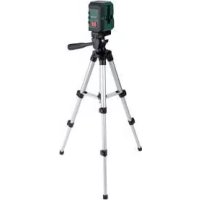
PKLL 8 A3 - Laser level PARKSIDE - Free user manual and instructions
Find the device manual for free PKLL 8 A3 PARKSIDE in PDF.


| Product type | Cross-line laser level |
| Brand | Parkside |
| Model | PKLL 8 A3 |
| Operating voltage | 3 V (DC) |
| Working range (min.) | 8 m |
| Leveling accuracy | ± 0.5 mm/m |
| Self-leveling range | ± 4° |
| Typical leveling time | Approx. 4 seconds |
| Laser class | 2 |
| Wavelength | 635 nm |
| Max. power | 1 mW |
| Power supply | 2 AA 1.5 V batteries |
| Product weight (without batteries) | 310 g |
| Tripod weight | 330 g |
| Product dimensions | Approx. 70 × 61 × 90 mm |
| Tripod height | 65 cm |
| Tripod thread | 1/4 inch |
| Operating temperature | +5°C to 35°C |
| Max. relative humidity | ≤ 90% |
| Package contents | Cross-line laser, tripod, 2 AA batteries, instruction manual |
| Maintenance | Clean with a dry cloth; laser opening with gentle air stream |
| Safety | Do not look into the laser beam; class 2 |
| Warranty | 3 years |
| After-sales service France | Tel. 0800 919270, owim@lidl.fr |
Frequently Asked Questions - PKLL 8 A3 PARKSIDE
User questions about PKLL 8 A3 PARKSIDE
0 question about this device. Answer the ones you know or ask your own.
Ask a new question about this device
Download the instructions for your Laser level in PDF format for free! Find your manual PKLL 8 A3 - PARKSIDE and take your electronic device back in hand. On this page are published all the documents necessary for the use of your device. PKLL 8 A3 by PARKSIDE.
USER MANUAL PKLL 8 A3 PARKSIDE
SELF-LEVELING CROSS LINE LASER LEVEL PKLL 8 A3
GB IE N!
SELF-LEVELLINGCROSS LINE LASER LEVEL
Translation of the original instructions
FR BE
NIVEAU LASER EN CROIX
GB/IE/NI Translation of the original
instructions
List of pictograms used
Introduction
Intended use.. 6
Description of parts.. 7
Scope of delivery.. 7
Technical data.. 7
Safety notes.. 8
Safety instructions for batteries/rechargeable batteries ....... Page 9
Initial use
Inserting/Changing batteries.. Page 10
Switching on/off.. Page 11
Use automatic levelling system.. Page 11
Using individual lines and crossed lines.. Page 11
Working without the automatic levelling system.. Page 12
Practical guidance Page 12
Working with the tripod.. 12
Maintenance and cleaning.. Page 13
Storage
Disposal
Warranty
Warranty claim procedure.. Page 15
Service Page 16
| List of pictograms used | |
| Please read the instructions for use. | |
| Danger of explosion! | |
| Wear safety gloves! | |
| Attention! | |
| Protect yourself from laser radiation! | |
| Do not stare into the laser beam! | |
Self-levelling cross line laser level PKLL 8 A3
Introduction

We congratulate you on the purchase of your new product. You have chosen a high quality product. The instructions for use are part of the product. They contain important information
concerning safety, use and disposal. Before using the product, please familiarise yourself with all of the safety information and instructions for use. Only use the product as described and for the specified applications. If you pass the product on to anyone else, please ensure that you also pass on all the documentation with it.
- Intended use
The product is suitable for the determination and verification of horizontal and vertical lines. The product is exclusively suitable for use in enclosed operating sites. Any other use or modification of the product shall be considered improper use and may result in serious accidents. The manufacturer assumes no liability for damages due to improper use. Not intended for commercial purposes.
Description of parts
H-button to switch on/off horizontal line
2 LED indicator (red: levelling off, green levelling on)
3 V-button to switch on / off vertical line
4 LOCK switch
5 Battery compartment
5a Battery compartment cover
6 Tipod thread (underneath)
7 Laser beam opening
8 1/2crew (to align with triad thread of cross line laser)
9 Metal key (to adjust 1/2crew on the quick shoe)
10 Locking screw (to adjust the angle of tripod flat head to up to 90 degree)
11 Bubble level
11a Lever (to fix the quick shoe)
12 Long Handle
13 Locking screw (to rotate the tripod flat head up to 360 degree horizontally)
Locking screw (to adjust the height of the centre column)
15 Plastic ring
16 Blocking lever (to adjust the height of the legs)
17 Legs of the tripod
[18] Tripod flat head
19 Quick shoe
- Scope of delivery
1 Self-levelling cross line laser level
1 Tripod
2 1.5 V-Batteries, Type AA
1 Set of instructions for use
Technical data
Operating voltage: 3 V (direct-current)
Working area at least 1: 8 m
Levelling accuracy: + / - 0.5mm / m
Typical self-levelling range: ± 4^
Typical levelling time: approx. 4 seconds
Operating temperature: +5^ - 35^
Max. relative humidity: ≤ 90%
Laser class: 2
Wave length () .. 635~nm
Maximum performance
P max: 1 mW
Tripod mount:
14
Batteries: 2 × 1.5 V-Batteries, Type AA
Product weight: 310g (without batteries)
Tripod weight: 330 g
Product dimensions: approx. 70 × 61 × 90 mm
Tripod dimensions: 65 cm
1) The operating range can be reduced by unfavourable environmental conditions (e.g. direct sunlight).

Safety notes
DANGER OF SUFFOCATION! Packaging materials (e.g. films or polystyrene) can not be used as toys. Always keep children away from the packaging material. The packaging material is not a toy.
Do not work with the measuring tool in an environment where there is a danger of explosion, where there are flammable liquids, gasses or dusts. Sparks can be created in the product, which could ignite dust or fumes.
This product may be used by children from the age of 8, by persons of reduced physical, sensory or mental abilities or a lack of experience and / or knowledge if they are supervised or instructed with regard to the safe use of the product and have understood the risks resulting from use. Do not allow children to play with the product. Cleaning and user maintenance may not be carried out by children unless they are supervised.
Do not leave the switched-on product unattended and switch the product off after use. Others could be blinded by the laser beam. Risk of eye injury.
Do not expose the product to moisture or direct sunlight.
Do not expose the product to extremely high temperatures or temperature fluctuations. For example, do not leave it in your car for a long time. In the case of large temperature fluctuations, let the product acclimatise before using it. In extreme temperatures or temperature fluctuations, the precision of the product can be impaired.
Avoid strong impacts against the measuring tool. Damage to the measuring tool can impair its accuracy. After a strong impact compare the laser line with a known vertical or horizontal reference line to check it.
Turn the measuring tool off when you transport it. When it is switched off the pendulum unit is locked, which otherwise can be damaged in strong movements.
- Do not bring the measuring tool near to heart pacemakers. The magnet inside the measuring tool creates a field that can impair the function of pacemakers.
- Keep the measuring tool away from magnetic data carriers and devices that are sensitive to magnetic influences. The effects of the magnet can lead to irreversible data losses.
Protect yourself:WARNING!ation!
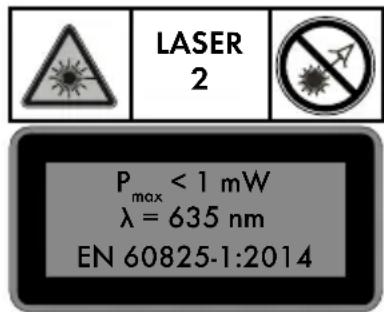
Do not look directly into the laser beam or the laser beam opening
WARNING! Viewing the laser beam with optical instruments (e.g. loupe, magnifying glass etc.) is associated with risk injury to the eyes.
CAUTION! If operating or adjusting devices than other than those described here are used or other procedures are carried out, this can lead to dangerous radiation effects.
Never direct the laser beam at people, animals or reflective surfaces. Even looking briefly into the laser beam can cause damage to the eyes.

Safety instructions for batteries / rechargeable batteries
DANGER TO LIFE! Keep batteries / rechargeable batteries out of reach of children. If accidentally swallowed seek immediate medical attention.

DANGER OF EXPLOSION! Never recharge non-rechargeable batteries. Do not short-circuit batteries / rechargeable batteries and / or open them. Overheating, fire or bursting can be the result.
- Never throw batteries / rechargeable batteries into fire or water.
- Do not exert mechanical loads to batteries / rechargeable batteries.
Risk of leakage of batteries / rechargeable batteries
- Avoid extreme environmental conditions and temperatures, which could affect batteries / rechargeable batteries, e.g. radiators / direct sunlight.
If batteries / rechargeable batteries have leaked, avoid contact with skin, eyes and mucous membranes with the chemicals! Flush immediately the affected areas with fresh water and seek medical attention!
Wear PROTECTIVE GLOVES! Leaked or damaged batteries / rechargeable batteries can cause burns on contact with the skin. Wear suitable protective gloves at all times if such an event occurs.
In the event of a leakage of batteries / rechargeable batteries, immediately remove them from the product to prevent damage.
Only use the same type of batteries / rechargeable batteries. Do not mix used and new batteries / rechargeable batteries.
Remove batteries / rechargeable batteries if the product will not be used for a longer period.
Risk of damage of the product
Only use the specified type of battery / rechargeable battery!
Insert batteries / rechargeable batteries according to polarity marks (+) and (-) on the battery / rechargeable battery and the product.
Clean the contacts on the battery / rechargeable battery and in the battery compartment before inserting!
Remove exhausted batteries / rechargeable batteries from the product immediately.
- Initial use
Check that the delivery is complete and that there is no visible damage.
Remove the packaging material from the product.
- Inserting / Changing batteries
Open the battery compartment cov (see fig. B).
Insert batteries into the battery compartment (see fig. C). Make sure that the batteries are inserted in a correct polarity (see fig. C) before closing back the battery compartment cover 5a
Note: When the battery is low, the LED indicates blinks red. Always replace all batteries at the same time. Only use batteries from the same manufacturer and with the same capacity.
Remove the batteries from the product if it will not be in use for a prolonged period of time. In long periods of storage the batteries can corrode and can run themselves down.
- Switching on/off
To switch the product on, push the LOCK switch to the position. Immediately after being switched on, the product releases two laser lines from the laser beam opening 7
To switch the product off, push the LOCK switch to the position. When switched off, the pendulum unit is locked.
Use automatic levelling system
To work with automatic levelling, place the product on a level, firm surface, or fasten it with the 14 -tripod thread to the tripod.
When it is switched on, the automatic levelling system automatically corrects irregularities of ± 4^ within the self levelling area. The levelling is concluded when the laser lines stop moving and the LED indicator goes green.
If automatic levelling is not possible, e.g. because the base of the measuring tool deviates by more than 4^ from the horizontal or because the product is being freely hand-held, the LED indicator 2 will go red and the horizontal and vertical laser lines will be switched off.
Note: operation without automatic levelling will always be indicated via the red LED indicator 2
Note: if the product is agitated or its position is changed during operation, the product will automatically re-level. After re-levelling check the positions of the horizontal and vertical laser lines against reference points to avoid errors.
Using individual lines and crossed lines
When the product is performing automatic levelling and the base of the measurement device deviates from the horizontal by less than 4^ (green LED on), carefully press the H-button to turn the horizontal line on or off.
Or correspondingly press the V-butt to turn the vertical line on or off.
Crossed lines can be locked with this product:
When the product is performing automatic levelling and the base of the measurement device deviates from the horizontal by less than 4^ (green LED on) hold down the H-button 1 until the LED indicator 2 goes red. Now automatic levelling is switched off and the crossed lines are permanently switched on - even if the base of the measurement device deviates from the horizontal by more than 4^ .
You can turn this mode off again by pressing and holding down the H-button 1 until the LED indicator 2 goes green again. The automatic levelling system has been switched on again.
The crossed lines are turned off as soon as the base of the measuring tool deviates from the horizontal by more than 4^ , and the LED indicator 2 will turn red again.
- Working without the automatic levelling system
Put the LOCK switch into the position
Hold down the H-button until the red LED indicator 2 comes on. Now the product will release two laser lines from the laser beam opening 7 that are not levelled. Operation without automatic levelling will always be indicated via the red LED indicator 2
Practical guidance
Always use only the middle of the laser line for markings. The width of the line depends on the distance.
- Working with the tripod
Setup and alignment
- Pull all the three legs [17] of the tripod apart. The plastic ring [15] which is connecting all the three cross hinges will be moved to the end of the middle column.
- Release the blocking levers [16] and extend the legs until you get your desired height.
- Then, fold-back all those blocking levers 16
-
Check the straight positioning by using the bubble level [11]. If the tripod is straight, the air bubble will be positioned in the centre of the circle. If necessary, readjust the length of the legs [17]
-
If additional height is necessary, loosen the locking screw [14] and extend the centre column to desired height. Once reached the desired height, tighten the locking screw [14].
- For a horizontal alignment of the tripod flat head [18] loosen the long handle [12] by turning anti-clockwise and move the handle up or down as desired. If the air bubble of the spirit level [11] is located exactly in the middle of the circle, the tripod flat head is aligned horizontally. Then, tighten the long handle [12] by turning it clockwise.
- If necessary, loosen the locking screw 13 to rotate the tripod flat head 18 up to 360 degree horizontally to get desired side. Once reached the desired side, tighten the locking screw 13
- If necessary, loosen the locking screw to adjust the angle of the tripod flat head up to 90 degree vertically to get desired angle. Once reached the desired angle, tighten the locking screw
Securing the Cross Line Laser
Align 14 -thread 6 of cross line laser with the 12 screw 8 of the quick shoe and make sure to tighten the screw well by screwing the metal key 9 clockwise. The metal key 9 is on the bottom side of the quick shoe 19 .
Removing quick shoe from tripod:
User can just remove the cross line laser together with quick shoe from tripod by following below steps:
- Pull the lever 11a on the tripod flat head 18 along the side.
- Remove the quick shoe 19
- If want to put back the cross line laser on the tripod again, pull the lever 11a on the tripod flat head 18 and place the quick shoe 19 back firmly on the tripod flat head 18. Then, release the lever 11a to bring back to original position and to firmly hold the quick shoe 19 (see fig. A).
- Check the tight fitting of the quick shoe 19 within the tripod flat head 18.
- Maintenance and cleaning
The product requires no maintenance.
■ ATTENTION! Never submerge the product in water or other liquids. Do not allow water to enter into the product during cleaning.
Keep the product clean to ensure good, secure work.
Use a dry cloth to clean the outside.
Clean the laser beam opening with a soft air jet. In cases of heavy contamination, remove the dirt with a slightly damp Q-tip. Do not exert any strong pressure!
WARNING! For repair purposes the product may only be opened by a professional.
Have the measuring tool repaired by qualified professionals and only with original replacement parts. This ensures that the safety of the measuring tool is maintained.
Storage
If you will not be using the product for a prolonged period of time, remove the batteries and store it in a clean, dry place that is not exposed to direct sunlight.
Disposal
The packaging is made entirely of recyclable materials, which you may dispose of at local recycling facilities.

Observe the marking of the packaging materials for waste separation, which are marked with abbreviations (a) and numbers (b) with following meaning: 1-7: plastics / 20-22: paper and fibreboard / 80-98: composite materials.

The product and packaging materials are recyclable, dispose of it separately for better waste treatment. The Triman logo is valid in France only.

Contact your local refuse disposal authority for more details of how to dispose of your worn-out product.

To help protect the environment, please dispose of the product properly when it has reached the end of its useful life and not in the household waste. Information on collection points and their opening hours can be obtained from your local authority.
Faulty or used batteries / rechargeable batteries must be recycled in accordance with Directive 2006/66/EC and its amendments. Please return the batteries / rechargeable batteries and / or the product to the available collection points.

Environmental damage through incorrect disposal of the batteries / rechargeable batteries!
Batteries / rechargeable batteries may not be disposed of with the usual domestic waste. They may contain toxic heavy metals and are subject to hazardous waste treatment rules and regulations. The chemical symbols for heavy metals are as follows: Cd = cadmium, Hg = mercury, Pb = lead. That is why you should dispose of used batteries / rechargeable batteries at a local collection point.
Warranty
The product has been manufactured to strict quality guidelines and meticulously examined before delivery. In the event of product defects you have legal rights against the retailer of this product. Your legal rights are not limited in any way by our warranty detailed below.
The warranty for this product is 3 years from the date of purchase. Should this product show any fault in materials or manufacture within 3 years from the date of purchase, we will repair or replace it - at our choice - free of charge to you.
The warranty period begins on the date of purchase. Please keep the original sales receipt in a safe location. This document is required as your proof of purchase. This warranty becomes void if the product has been damaged, or used or maintained improperly.
The warranty applies to defects in material or manufacture. This warranty does not cover product parts subject to normal wear, thus possibly considered consumables (e.g. batteries) or for damage to fragile parts, e.g. switches, rechargeable batteries or glass parts.
Warranty claim procedure
To ensure quick processing of your case, please observe the following instructions:
Please have the till receipt and the item number (e.g. IAN 123456_7890) available as proof of purchase.
You will find the item number on the type plate, an engraving on the front page of the instructions (bottom left), or as a sticker on the rear or bottom of the appliance.
If functional or other defects occur, please contact the service department listed either by telephone or by e-mail.
You can return a defective product to us free of charge to the service address that will be provided to you. Ensure that you enclose the proof of purchase (till receipt) and information about what the defect is and when it occurred.
Service
GB Service Great Britain
Tel.: 0800 404 7657
E-Mail: owim@lidl.co.uk
IE Service Ireland
Service Northern Ireland
Tel.: 1890 930 034
(0,08 EUR / Min., (peak)) (0,06 EUR / Min., (off peak))
E-Mail: owim@lidl.ie
C
Taending/slukning. Side 22
Anvende nivelleringsautomatik .Side 23
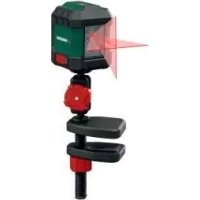
- SELF-LEVELING CROSS LINE LASER LEVEL PKLL 8 A3
- SELF-LEVELLINGCROSS LINE LASER LEVEL
- NIVEAU LASER EN CROIX
- List of pictograms used
- Introduction
- Safety notes.. 8
- Initial use
- Maintenance and cleaning.. Page 13
- Storage
- Disposal
- Warranty
- Self-levelling cross line laser level PKLL 8 A3
- - Intended use
- Description of parts
- - Scope of delivery
- Technical data
- Safety notes
- Safety instructions for batteries / rechargeable batteries
- Risk of leakage of batteries / rechargeable batteries
- Risk of damage of the product
- - Initial use
- - Inserting / Changing batteries
- - Switching on/off
- Use automatic levelling system
- Using individual lines and crossed lines
- Crossed lines can be locked with this product:
- - Working without the automatic levelling system
- Practical guidance
- - Working with the tripod
- Setup and alignment
- Securing the Cross Line Laser
- Removing quick shoe from tripod:
- - Maintenance and cleaning
- Environmental damage through incorrect disposal of the batteries / rechargeable batteries!
- Warranty claim procedure
- Service
- GB Service Great Britain
- IE Service Ireland
- Service Northern Ireland
- C
Brand : PARKSIDE
Model : PKLL 8 A3
Category : Laser level