HSM13E1 - Steam cleaner BLACK & DECKER - Free user manual and instructions
Find the device manual for free HSM13E1 BLACK & DECKER in PDF.



| Product Type | Floor Steam Cleaner |
| Brand | Black & Decker |
| Model | HSM13E1 |
| Intended Use | Cleaning and disinfecting sealed floors (hardwood, laminate, linoleum, vinyl, tile, stone, marble) |
| Water Tank Capacity | 380 ml |
| Heat-Up Time | Approximately 30 seconds |
| Nominal Power | 1500 W (estimated) |
| Supply Voltage | 120 V~ (60 Hz) |
| Weight | 2.5 kg (estimated) |
| Dimensions (height) | Approximately 110 cm (assembled) |
| Pad Material | Microfiber |
| Main Features | Continuous steam, 99.9% germ disinfection, automatic steam shut-off |
| Safety | Polarized plug, thermal cut-off, overheat protection |
| Maintenance | Empty tank after each use; wash pads in machine at 60 °C without bleach or fabric softener |
| Available Spare Parts | Replacement cleaning pads (ref. M20), steam head, water tank |
| Warranty | 2-year limited warranty for domestic use |
Frequently Asked Questions - HSM13E1 BLACK & DECKER
User questions about HSM13E1 BLACK & DECKER
0 question about this device. Answer the ones you know or ask your own.
Ask a new question about this device
Download the instructions for your Steam cleaner in PDF format for free! Find your manual HSM13E1 - BLACK & DECKER and take your electronic device back in hand. On this page are published all the documents necessary for the use of your device. HSM13E1 by BLACK & DECKER.
USER MANUAL HSM13E1 BLACK & DECKER
Please read before returning this product for any reason.
If you have a question or experience a problem with your BLACK+DECKER purchase, go to: http://www.blackanddecker.com/ instantanswers
If you can't find the answer or do not have access to the Internet, call 1-800-544-6986 from 8 a.m. to 5 p.m. EST Mon. - Fri. to speak with an agent. Please have the CATALOG NUMBER available when you call.
To register your new product, visit www.BlackandDecker.com/NewOwner
Definitions: Safety Alert Symbols and Words
This instruction manual uses the following safety alert symbols and words to alert you to hazardous situations and your risk of personal injury or property damage.
D. IGER: Indicates an imminently hazardous situation which, if not avoided, will result in death or serious injury.
WIPINING: Indicates a potentially hazardous situation which, if not avoided, could result in death or serious injury.
CAITION: Indicates a potentially hazardous situation which, if not avoided, may result in minor or moderate injury.
(Without word) Indicates a safety related message.
NOTICE: Indicates a practice not related to personal injury which, if not avoided, may result in property damage.
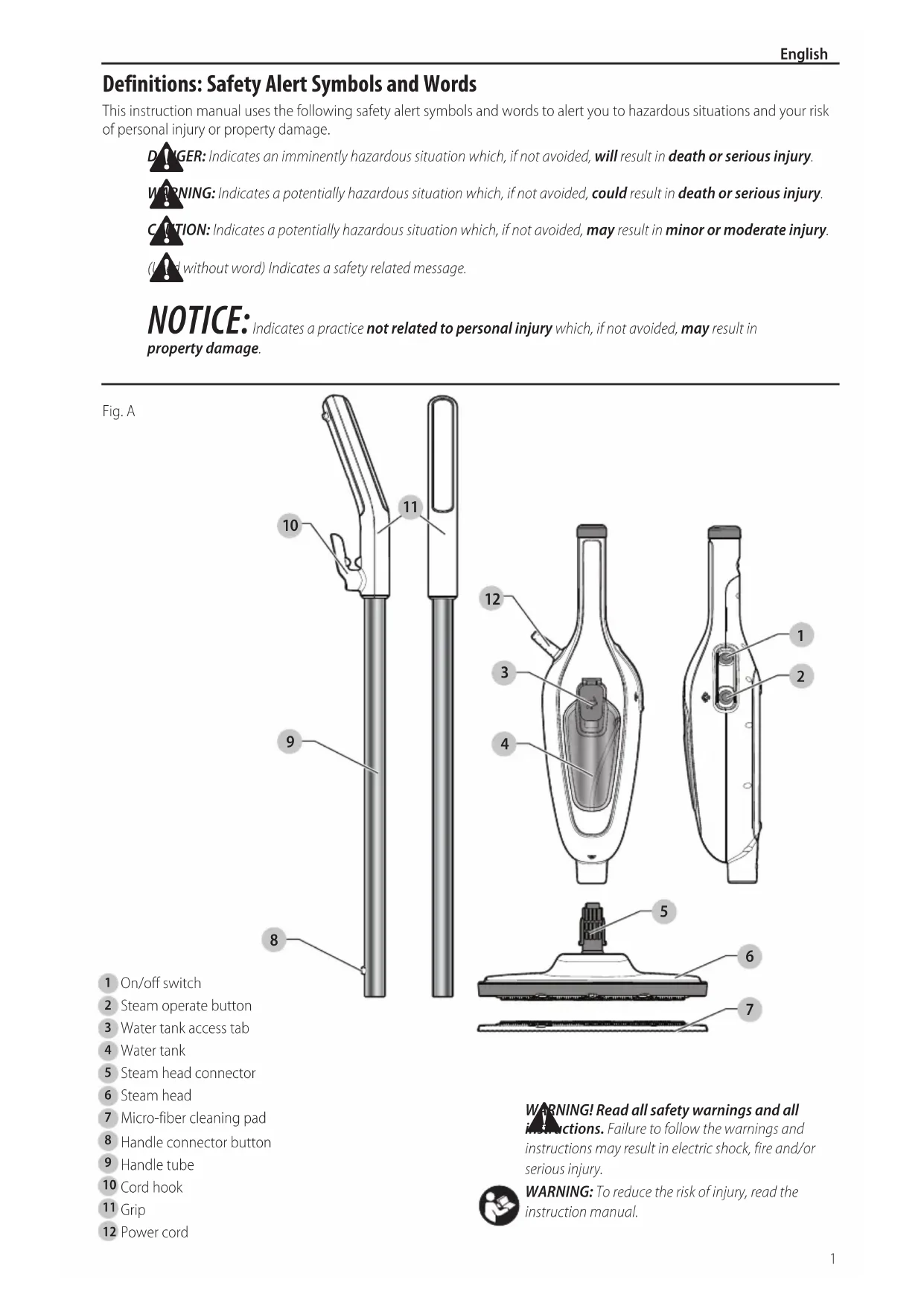
Fig.A
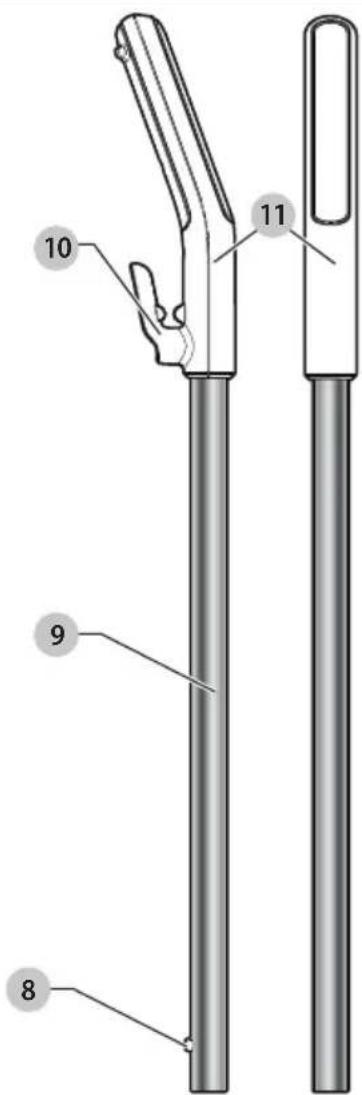
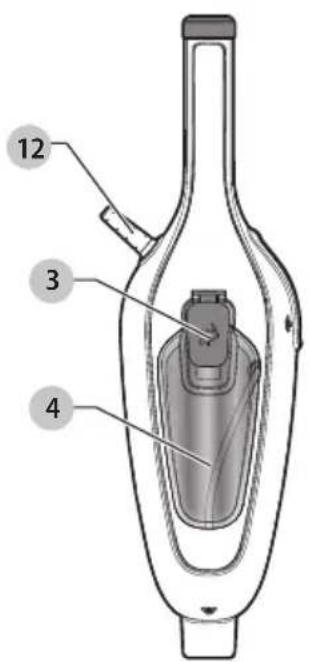
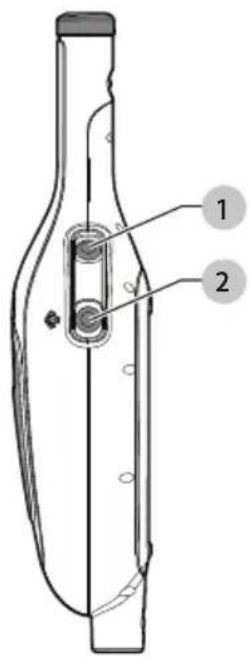

1 On/off switch
2 Steam operate button
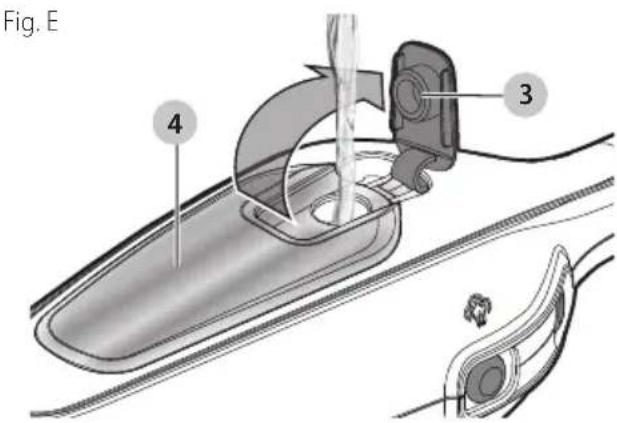
3 Water tank access tab
4 Water tank
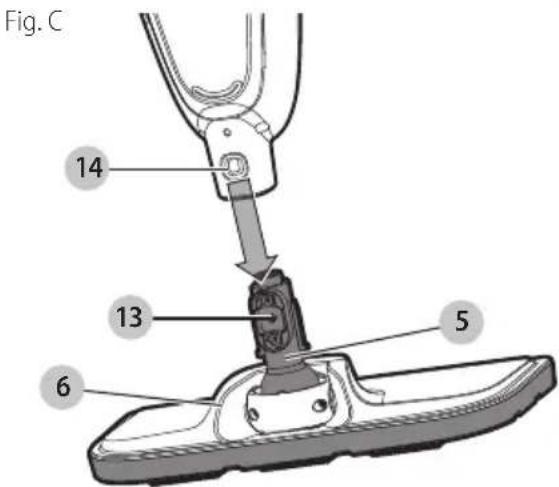
5 Steam head connector
6 Steam head
7 Micro-fiber cleaning pad
8 Handle connector button
9 Handle tube
10 Cord hook
11 Grip
12 Power cord
WARNING! Read all safety warnings and all instructions. Failure to follow the warnings and instructions may result in electric shock, fire and serious injury.

WARNING: To reduce the risk of injury, read the instruction manual.
IMPORTANT SAFETY INSTRUCTIONS
When using your appliance, basic precautions should always be followed, including the following:
- Read all instructions.
- To reduce the risk of contact with hot water emitting from steam vents, check appliance before each use by holding it away from body and operating steam button.
- Use appliance only for its intended use.
- To reduce the risk of electric shock, do not immerse the appliance in water or other liquids.
- Never yank cord to disconnect from outlet; instead, grasp plug and pull to disconnect.
- Do not allow cord to touch hot surfaces. Let appliance cool completely before putting away. Loop cord loosely around appliance when storing.
- Always disconnect appliance from electrical outlet when filling with water or emptying, and when not in use.
- Do not operate appliance with a damaged cord, or if the appliance has been dropped or damaged. To reduce the risk of electric shock, do not disassemble or attempt to repair the appliance, take it to a qualified service person for examination and repair. Incorrect reassembly or repair could cause a risk of fire, electric shock, or injury to persons when the appliance is used.
- Close supervision is necessary for any appliance being used by or near children. Do not leave appliance unattended while connected.
- Burns could occur from touching hot metal parts, hot water, or steam. Use care when you turn a steam appliance upside down - there may be hot water in the reservoir.
SAVE THESE INSTRUCTIONS
- To reduce the likelihood of circuit overload, do not operate another high wattage appliance on the same circuit.
- If an extension cord is absolutely necessary, a (ampere rating of the appliance) ampere rated cord should be used. Cords rated for less amperage may overheat. Care should be taken to arrange the cord so that the cord cannot be pulled or tripped over.
WARNING: Read all safety warnings and all instructions. Failure to follow the warnings and instructions listed below may result in electric shock, fire and/or serious injury.
WARNING: When using electrical appliances, basic safety precautions, including the following, should always be followed to reduce the risk of fire, electric shock, personal injury and material damage.
READ AND FOLLOW ALL INSTRUCTIONS
SAFETY WARNINGS AND INSTRUCTIONS: POLARIZED PLUGS
To reduce the risk of electric shock, this equipment has a polarized plug (one blade is wider than the other). This equipment must be used with a suitable polarized 2 wire or 3 wire extension cord. Polarized connections will fit together only one way. Make sure that the receptacle end of the extension cord has large and small blade slot widths. If the plug does not fit fully into the extension cord, reverse the plug. If it still does not fit, obtain a suitable extension cord. If the extension cord does not fit fully into the outlet, contact a qualified electrician to install the proper outlet. Do not change the tool plug or extension cord in any way.
Minimum Gauge for Cord Sets
| Volts | Total Length of Cord in Feet (meters) | ||||
| 120 V 25 (7.6) | 50 (15.2) 100 (30.5) 150 (45.7) | ||||
| 240 V 50 (15.2) | 100 (30.5) | 200 (61.0) | 300 (91.4) | ||
| Ampere Rating | American Wire Gauge | ||||
| More Than | Not More Than | ||||
| 0618 | 161614 | ||||
| 61018 | 161412 | ||||
| 1012 | 16161412 | ||||
| 1216 | 1412Not Recommended | ||||
- Read all of this manual carefully before using the appliance.
- The intended use is described in this manual. The use of any accessory or attachment or the performance of any operation with this appliance other than those recommended in this instruction manual may present a risk of personal injury.
- Retain this manual for future reference.
USING YOUR APPLIANCE
- Do not direct steam at people, animals, electrical appliances or electrical outlets.
- Do not expose to rain.
- Do not immerse the appliance in water.
- Do not leave the appliance unattended. Keep children away from unit while in use.
- Do not leave the appliance connected to an electrical outlet when not in use.
- Never pull the power cord to disconnect the appliance from the socket. Keep the appliance cord away from heat, oil and sharp edges.
- Do not handle steam cleaner with wet hands.
- Do not pull or carry by cord, use cord as a handle, close door on cord, pull cord around sharp corners or expose cord to heated surfaces.
- Do not use appliance in an enclosed space filled with vapor given off by oil-based paint thinner, some moth
proofing substances, flammable dust, or other explosive or toxic vapors.
- Do not use on leather, wax polished furniture or floors, synthetic fabrics, velvet or other delicate, steam-sensitive materials.
- Do not use on any unsealed hard surfaces or painted surfaces. Additionally, on surfaces that have been treated with wax or some no-wax floors, the sheen may be removed by the heat and steam action. It is always recommended to test an isolated area of the surface to be cleaned before proceeding. We also recommend that you check the use and care instructions from the floor manufacturer.
- Never put de-scaling, aromatic, alcoholic or detergent products into the steam cleaner, as this may damage it or make it unsafe for use.
- If the circuit breaker activates while using the steam function, discontinue product use immediately and contact the customer support center. (Beware of the risk of electrical shock.)
- The appliance emits very hot steam to sanitize the area of use. This means that the steam floor head and cleaning pads get very hot during use.
- Always wear suitable shoes when using your steam cleaner and when changing the accessories on your steam cleaner. Do not wear slippers or open-toed footwear.
- Steam may escape from the appliance during use.
- Care should be taken when using this appliance. DO NOT touch any parts which may become hot during use.
AFTER USE
- Unplug the appliance and allow to cool.
- When not in use, the appliance should be stored in a dry place.
Children should not have access to stored appliances.
INSPECTION AND REPAIRS
- Unplug the appliance and allow to cool down before performing any maintenance or repairs.
- Before use, check the appliance for damaged or defective parts. Check for breakage of parts, damage to switches and any other conditions that may affect its operation.
Regularly check the power cord for damage. - Do not use the appliance if any part is damaged or defective.
- Have any damaged or defective parts repaired or replaced by an authorized repair agent.
- Never attempt to remove or replace any parts other than those specified in this manual.
SAFETY OF OTHERS
- This appliance is not intended for use by persons (including children) with reduced physical, sensory or mental capabilities, or lack of experience and knowledge, unless they have been given supervision or instruction concerning the use of the appliance by a person responsible for their safety.
- Children should be supervised to ensure that they do not play with the appliance.
Residual risks
Additional residual risks may arise when using the tool which may not be included in the enclosed safety warnings. These risks can arise from misuse, prolonged use, etc.
Even with the application of the relevant safety regulations and the implementation of safety devices, certain residual risks can not be avoided. These include:
- Injuries caused by touching any moving parts.
Injuries caused by touching any hot parts.
Injuries caused when changing any parts or accessories. - Injuries caused by prolonged use of the appliance. When using any appliance for prolonged periods ensure you take regular breaks.
INTENDED USE
Your BLACK+DECKER steam cleaner has been designed for sanitizing and cleaning the following SEALED floors: hardwood, laminate, linoleum, vinyl, ceramic tile, stone, and marble. Use upright for floor use only. This appliance is intended for indoor household use only.
ASSEMBLY
WARNING:
Do not attempt to modify or
repair the appliance.
Intended use
Your BLACK+DECKERTM HSM13E1 steam mop has been designed for sanitizing and cleaning the following SEALED floors: hardwood, laminate, linoleum, vinyl, ceramic tile, stone and marble floors. This appliance is intended for indoor household use only.
nOTiCE: Each steam mop is 100% tested in the factory to ensure product performance and safety. When assembling your new steam mop for the first time you may notice water residue inside of the unit.
WARNING: Before attempting any of the following operations, make sure that the appliance is switched off and unplugged and that the appliance is cold and contains minimal or no water.
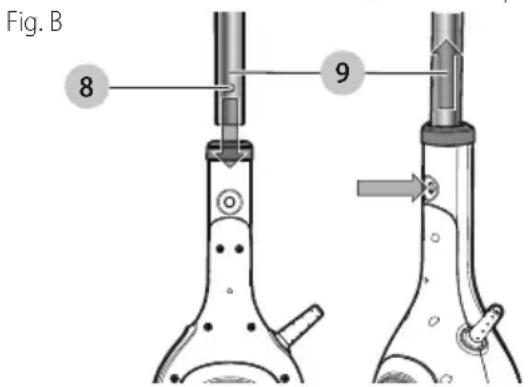
Attaching the handle (Fig. B)
- Slide the bottom end of the handle tube 9 into the top end of the steam mop body until it is firmly seated and the handle connector button 8 clicks into place.
English
Attaching the steam head (Fig. C)
- Connect the steam mop body to the steam head 6 via the steam head connector 5, ensuring the connection button 13 clicks into place in the opening 14 .
Attaching a cleaning pad - Fig. D
Replacement cleaning pads are available from your BLACK+DECKER dealer (cat. no. SMP20).
- Place a micro-fiber cleaning pad 7 on the floor with the 'loop' side facing up.
- Press steam mop down onto the cleaning pad. You are now ready to steam clean and sanitize your floor.
nOTiCe: Do not store with a wet pad as this can damage your floor. Always place the steam mop with the handle tube 9 in the upright position when stationary and make sure the steam mop is turned off and unplugged when not in use. Fig.D
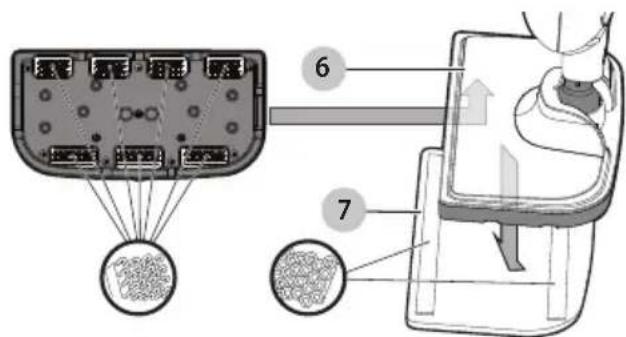
Removing a cleaning pad
CAUTION: Always wear suitable shoes when cleaning the cleaning pad on your steam mop. Do not wear slippers or open toed footwear.
- Return the handle tube 9 to the upright position and turn the steam mop 'OFF'.
- Wait until the steam mop cools down (approximately 5 minutes).
- With suitable shoes on, step on the edge of the cleaning pad and lift the steam mop away from the cleaning pad freeing it from the 'hook & loop' fastening.
CAUTION: Always place your steam mop with the funnel tube 9 supported in the upright position when stationary and make sure the steam mop is turned off when not in use.
Filling the water tank (Fig. E)
WARNING: Do not over fill the tank.
NOTE: Do not use chemical cleaners with your steam mop water tank.
NOTE: Fill the water tank with clean tap water.
NOTE: In areas of hard water, the use of distilled water is recommended.
- Make sure the steam mop is turned Off and unplugged.
- Open the water tank access tab 3.
- Fill the water tank 4 with water.
- Replace the water tank access tab.
NOTE: Ensure the water tank access tab is firmly secured.
NOTICE: Always empty the water tank after use.
NOTICE: Fill the water tank with clean tap water (Do not use any additives or chemicals).
WING: Your water tank has a 380ml capacity. Do not over fill the tank.
OPERATION
CAUTION: Never use the steam mop without first cleaning a cleaning pad.
IMPORTAnT: This unit will kill 99.9% of germs when used in accordance with the instructions in this manual and with the micro-fiber pad fitted and a continuous run time of 90 seconds.
nOTiCE: Never leave the steam mop in one spot on any surface for any period of time. Do not store with a wet pad as this can damage your floor. Always place the steam mop with the handle tube 9 in the upright position when stationary and make sure the steam mop is turned off and unplugged when not in use.
NOTICE: Always empty the water tank after use.
Switching On and Off
NOTICE: It takes approximately 30 seconds for the steam mop to heat up.
- To switch the appliance On, press the On/Off button 1.
- Press the steam operation button 2. This will operate the pump and the unit will begin to produce steam.
- To stop steam generation, turn the steam operation button 2 to Off. This will maintain power to the boiler for quicker start up.
- To switch the appliance Off, press the On/Off button 1.
CAUTION: Never leave the steam mop in one spot on any surface for any period of time. Always place the steam mop with the handle tube 9 supported in the upright position when stationary and make sure the steam mop is turned off when not in use.
CAUTION: Always empty the steam mop after use.
NOTE: When first filled or after running dry, it can take up to 45 seconds for steam to be produced.
Hints for optimum use
WARNING: It is important to monitor the water level in the water tank. To refill the water tank and continue to sanitize/ clean, see Filling the Water Tank section.
nOTiCE: Never leave the steam mop in one spot on any surface for any period of time. Do not store with a wet pad as this can damage your floor. Always place the steam mop with the handle tube 9 in the upright position when stationary and make sure the steam mop is turned off when not in use.
Always vacuum or sweep the floor before using the steam mop.
The easiest way to use the steam mop is to tilt the handle to a 45^ angle and clean slowly, covering a small area at a time.
- Do not use chemical cleaners with your steam mop. To remove stubborn stains from vinyl or linoleum floors, you can pre-treat them with a mild detergent and some water before using the steam mop.
Steam Cleaning
- Place a cleaning pad 7 on the floor with the 'loop' side facing up.
- Lightly press the steam mop down onto the cleaning pad 7.
- Plug the steam mop into a wall outlet.
- Press the ON/OFF button 1. It takes approximately 15-30 seconds for the steam mop to heat up.
- Press the steam operate button 2. After a few seconds, steam will start to come out of the steam head.
nOTiCE: If the system has been run dry it may take up to 45 seconds to prime the system on first use.
- It takes a few seconds for steam to enter the cleaning pad. The steam mop will now glide easily over the surface to be sanitized/cleaned.
- Push and pull the steam mop slowly across the surface to thoroughly steam clean each section.
- When you have finished using the steam mop, return the handle tube 9 to the upright position, making sure that it is supported and turn it 'OFF'. Wait until the steam mop cools down (approximately five minutes).
CAUTION: It is important to monitor the water level in the water tank 4. To refill the water tank and continue to sanitize/clean stand the mop upright making sure that the handle is supported and turn the steam mop 'OFF'. Unplug the unit from the electrical wall outlet, refill the water tank 4.
CAUTION: Never leave the steam mop in one spot on any surface for any period of time. Always place the steam mop with the handle tube 9 supported in the upright position when stationary and make sure the steam mop is turned off when not in use.
After use (Fig. F)
- Turn the steam operate button 2 to Off and then press the ON/OFF button 1.
- Wait until the steam mop cools down.
- Unplug the steam mop from the electrical wall outlet.
- Empty the water tank.
- Remove the cleaning pad 7 and wash it so that it will be ready for the next use. NOTE: Follow cleaning instructions located on the pad
- Wrap the power cord so that it loosely hangs from the cord hook 10.
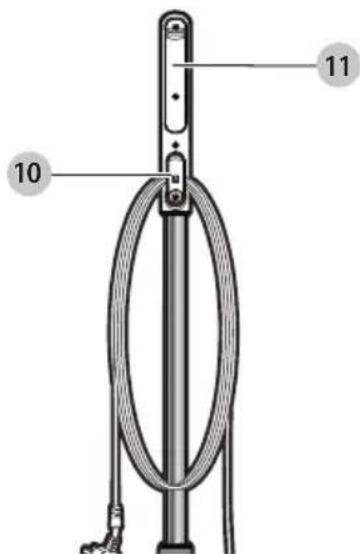
Fig. F
MAINTENANCE AND CLEANING
Your BLACK+DECKER corded appliance has been designed to operate over a long period of time with a minimum of maintenance. Continuous satisfactory operation depends upon proper appliance care and regular cleaning.
WARNING: Before performing any maintenance or cleaning on corded appliances switch off and unplugging the appliance.
- Clean your appliance using a soft damp cloth. Never let any liquid get inside the appliance; never immerse any part of the appliance into a liquid. IMPORTANT: To assure product SAFETY and RELIABILITY, repairs, maintenance and adjustment should be performed by authorized service centers or other qualified service organizations, always using identical replacement parts.
- For stubborn marks you can use a mild solution of soap and water to dampen your cloth.
Care of the cleaning pads
nOTiCe: Follow the cleaning instructions printed on the label of your cleaning pad.
ENGLISH
Wash care instructions - Machine wash warm 140^ (60^) - No bleach - No fabric softener - Air dry only - Allow to dry fully before re-use.
ACCESSIONS
Recommended accessories for use with your appliance are available from your local dealer or authorized service center. If you need assistance regarding accessories, please call: 1-800-544-6986.
WARNING: The use of any accessory not recommended
for use with this appliance could be hazardous.
SERVICE INFORMATION
All BLACK+DECKER Service Centers are staffed with trained personnel to provide customers with efficient and reliable power tool service. Whether you need technical advice, repair, or genuine factory replacement parts, contact the BLACK+DECKER location nearest you. To find your local service location, call: 1-800-544-6986 or visit www.blackanddecker.com
TWO-YEAR LIMITED WARRANTY
Black & Decker (U.S.) Inc. warranties this product to be free from defects in material or workmanship for a period of two (2) years following the date of purchase, provided that the product is used in a home environment. This limited warranty does not cover failures due to abuse, accidental damage or when repairs have been made or attempted by anyone other than BLACK+DECKER and its Authorized Service Centers. A defective product meeting the warranty conditions set forth herein will be replaced or repaired at no charge in either of two ways: The first, which will result in exchanges only, is to return the product to the retailer from whom it was purchased (provided that the store is a participating retailer). Returns should be made within the time period of the retailer's policy for exchanges. Proof of purchase may be required. Please check with the retailer for its specific return policy regarding time limits for returns or exchanges. The second option is to take or send the product (prepaid) to a BLACK+DECKER owned or authorized Service Center for repair or replacement at BLACK+DECKER's option. Proof of purchase may be required. BLACK+DECKER owned and authorized service centers are listed online at www.blackanddecker.com. This warranty does not apply to accessories. This warranty gives you specific legal rights and you may have other rights which vary from state to state. Should you have any questions, contact the manager of your nearest BLACK+DECKER Service Center. This product is not intended for commercial use, and accordingly, such commercial use of this product will void this warranty. All other guarantees, express or implied, are hereby disclaimed.
LATIN AMERICA: This warranty does not apply to products
sold in Latin America. For products sold in Latin America, check country specific warranty information contained in the packaging, call the local company or see the website for such information.
Imported by Black & Decker (U.S.) Inc.,
701 E. Joppa Rd.
Towson, MD 21286

BlackandDecker.com
1-800-544-6986
Troubleshooting
For assistance with your product, visit our website www.blackanddecker.com for the location of the service center nearest you or call the Black+Decker help line at 1-800-544-6986.
| Problem Step Possible | solution | |
| The steam mop is not turning on | 1. | Check the unit is plugged in at the wall socket. |
| 2. | Check the unit is switched on using the ON/OFF switch 1 | |
| The steam mop is not producing steam | 1. | Check the water tank 4 is full. NOTE: When first filled or after running dry it can take up to 45 seconds for steam to be produced. |
| 2. | Check the steam operate button is in the ON position 2 . | |
| 3. | The steam mop is equipped with a thermostat and a thermal cut-out. If for any reason the steam mop overheats it will switch off. If this happens turn off and unplug the steam mop, allow to cool for 2 to 4 hours and re-try. | |
| Where can I get further information/ accessories for my steam mop | 1. | Refer to the assembly chapter of the manual for correct fitting of parts and accessories. Call 1-800-544-6986. |
Imported by Black & Decker (U.S.) Inc.,
701 E. Joppa Rd.
Towson, MD 21286


BlackandDecker.com
1-800-544-6986
Dépannage
Col. Americana, S. Juarez
Guadalajara, Jalisco
Tel. 01 33 38 25 69 78
Col. Fracc. Universidad
Chihuahua, Chihuahua
Tel. 01 614 413 64 04
Fernando González Armenta
Bolivia No. 605
Col. Felipe Carrillo Puerto
Cd. Madero, Tamaulipas
Tel. 01 833 221 34 50
Black & Decker (U.S.) Inc.
701 East Joppa Road, Towson, MD 21286
Part No. N616426
HSM13E1
JULY 2018