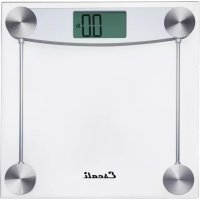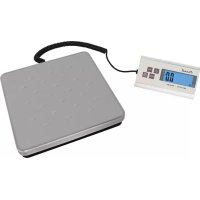
Granda 120S - Scale Escali - Free user manual and instructions
Find the device manual for free Granda 120S Escali in PDF.


| Brand | Escali |
| Model | Granda 120S |
| Product Type | Digital Scale |
| Maximum Capacity | 120 kg / 264 lb |
| Graduations | 0.02 kg / 0.05 lb |
| Platform Dimensions | 27 x 27 x 4.1 cm (10.63 x 10.63 x 1.63 inches) |
| Dimensions of Manual Transmitter | 17.1 x 8.9 x 3.8 cm (6.75 x 3.5 x 1.5 inches) |
| Power Source | 9V battery (included) or 9V wall adapter (included) |
| Auto Off | 2 minutes |
| Main Functions | Weighing, taring, piece counting, auto-backlight |
| Display | LCD digital screen |
| Measurement Units | kg and lb |
| Counting Mode | Sample sizes: 25, 50, 75, 100 pieces |
| Wall Mount | Included for mounting the remote unit |
| Warranty | 2-year professional warranty |
| Care and Cleaning | Clean with a damp cloth and mild soap. Do not immerse. |
| Safety | Do not disassemble, do not expose to shocks, avoid electromagnetic interference |
| Battery Recycling | Recycle or dispose according to local regulations |
Frequently Asked Questions - Granda 120S Escali
User questions about Granda 120S Escali
0 question about this device. Answer the ones you know or ask your own.
Ask a new question about this device
Download the instructions for your Scale in PDF format for free! Find your manual Granda 120S - Escali and take your electronic device back in hand. On this page are published all the documents necessary for the use of your device. Granda 120S by Escali.
USER MANUAL Granda 120S Escali
Shipping & Receiving Scale
Model # 120S

Thank you for purchasing an Escali digital scale. Please read the following operation information to ensure the proper function of your new scale.
BATTERY INSTALLATION
- Turn the entire scale upside down and set it securely on a firm, flat surface.
- Remove the battery cover from the base plate.
- Install one 9V battery into the battery compartment, ensuring that the positive/negative side is in the direction as shown in the cabinet.
- Place the battery cover back onto the base plate.
HOW TO WEIGH
- Press the key to power the scale on.
- Press the MODE key to select a measuring unit (kg or lb).
- Place item slowly on the platform.
HOW TO USE THE TARE FEATURE
This feature allows you to obtain the exact weight of an item in a container, by subtracting the weight of the container.
- Place the container without the item onto the platform.
- Press the TARE/ZERO key to zero out the display.
- Slowly add the item to the container. The display will show the weight of the item only.
COUNTING MODE
- Power the scale on
- Press and hold the PCS key while in weighing mode for about 3 seconds to start selecting your sample size.
- Press MODE to select your sample size in the sequence of: 25 50 75 100 .
- Once you have determined your sample size, place the exact amount of pieces onto the platform to match the sample size on your display.
- Press the PCS key to confirm.
- You can now add or subtract pieces from the platform. Press MODE to return to weighing mode.
NOTE: Once the scale is powered off and restarted, the counting mode will recall the last sample size used by pressing the PCS key.
INSTALLATION OF MOUNT BRACKET AND REMOTE UNIT
- Place the mount bracket on the wall and use a pencil/pen to mark the holes position.
- Drill a 4 mm hole on the marked position. Put the plastic socket on the wall.
- Fasten the mount bracket on the wall with the screws.
- Slide the remote unit onto the mounted bracket.
BACK LIGHT
The back light of the scale will automatically power on when weight is placed on the platform of the scale. If no weight is on the platform, the back light will automatically power off.
PROPER USE & CARE
Use and stow the scale at room temperature.
Use on a flat, level, and stable surface.
- The scale is an instrument of precision. Do not submit the scale to shaking, excessive vibration or other rough treatment.
- The display may be affected by electromagnetic disturbances such as radios, microwaves, or cell phones. If such disturbances occur, remove the source of the disturbance, and restart the scale.
- Disassembling or tampering with the scale voids the warranty.
Clean the scale with dish soap, and a damp cloth.
- Do not submerge in liquid; the scale is not waterproof.
- For best results, use alkaline batteries.
Install only new batteries of the same type in your product.
- Failure to insert batteries in the correct polarity, as indicated in the battery compartment, may shorten the life of the batteries or cause batteries to leak.
- Do not mix old and new batteries.
- Do not mix Alkaline, Standard (Carbon-Zinc) or Rechargeable (Nickel Cadmium) or (Nickel Metal Hydride) batteries.
- Do not dispose of batteries in fire.
- Batteries should be recycled or disposed of as per state and local guidelines.
WARNING MESSAGES
0-Ld Overload warning
Lo Low battery indicator
PRODUCT SPECIFICATIONS
Model: 120S
Capacity: 264 lb / 120 kg
Increments: 0.05lb / 0.02kg
Platform Dimensions: 10.63'' × 10.63'' × 1.63''
Remote Dimensions: 6.75'' × 3.5'' × 1.5''
Power Source: 9-volt battery (included), 9-volt wall adapter (included)
Automatic shut-off: 2 minutes
ESCALI CORPORATION
3203 Corporate Center Drive, Suite 150
Burnsville, MN 55306
USA
PRODUCT SUPPORT
24/7 Online support: https://escali.zendesk.com
Email support: feedback@escali.com
Phone support: 1-800-467-6408

2 YEAR PROFESSIONAL GUARantee
This scale is guaranteed to be free of defects in materials and workmanship. For more details visit: www.escali.com/warranties
Escali's liability is limited to two (2) times the cost of the product.
© Escali Corp., Minneapolis, MN, USA. All rights reserved. Escali, the Escali logo and other Escali marks are owned by Escali Corp. and may be registered.
Granda
3203 Corporate Center Drive, Suite 150
Burnsville, MN 55306
EE.UU.
SOPORTE DEL PRODUCTO
Sopportenlnea 24/7:https://escali.zendesk.com
Soporte por correo electrono: feedback@escali.com
3203 Corporate Center Drive, Suite 150
Burnsville, MN 55306
États-Unis
ASSISTANCE TECHNIQUE
Support en ligne 24/7: https://escali.zendesk.com