USHM180S - Scale Escali - Free user manual and instructions
Find the device manual for free USHM180S Escali in PDF.


| Product Type | Digital Kitchen Scale |
| Brand | Escali |
| Model | USHM180S |
| Dimensions (approx.) | 20 × 15 × 2 cm |
| Weight of Scale | 0.3 kg |
| Platform Material | Stainless Steel |
| Maximum Capacity | 5 kg (11 lb) |
| Accuracy | 1 g (0.1 oz) |
| Units of Measurement | g, kg, oz, lb:oz, ml (water), fl.oz (water) |
| Power Source | 2 × AAA batteries (included) |
| Auto-Off | After 2 minutes of inactivity |
| Tare Function | Yes |
| Display Type | LCD with backlight |
| Low Battery Indicator | Yes |
| Overload Indicator | Yes |
| Cleaning Instructions | Wipe with a damp cloth; do not immerse |
| Safety Precautions | Do not overload; keep away from water; use on flat surface |
| Included Accessories | Batteries, user manual |
| Warranty | 1 year limited warranty |
| Repair / Spare Parts | Contact Escali customer service; batteries are user-replaceable |
Frequently Asked Questions - USHM180S Escali
User questions about USHM180S Escali
0 question about this device. Answer the ones you know or ask your own.
Ask a new question about this device
Download the instructions for your Scale in PDF format for free! Find your manual USHM180S - Escali and take your electronic device back in hand. On this page are published all the documents necessary for the use of your device. USHM180S by Escali.
USER MANUAL USHM180S Escali
MeasuringWhat'sNext™
Model: USHM180S
User's Guide
Ultra Slim
Health Monitor Scale
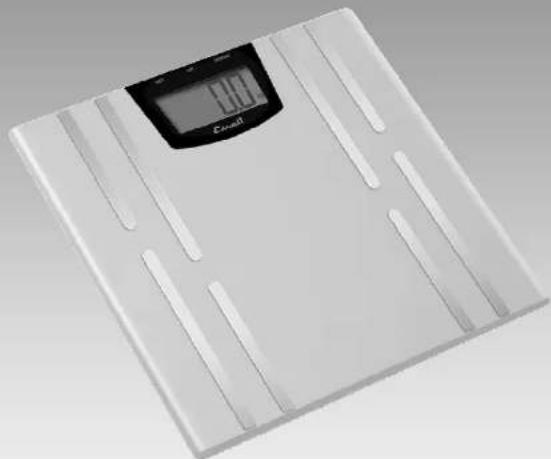
natural_image
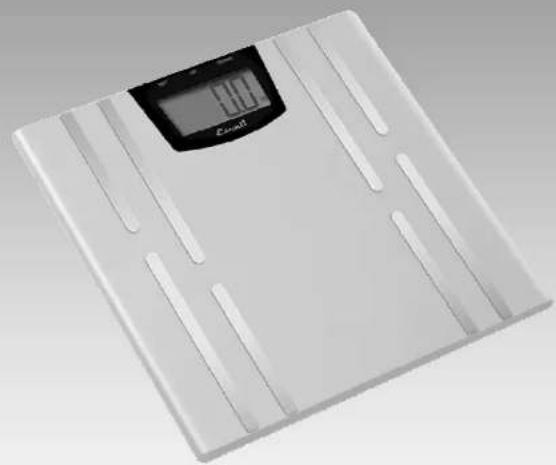
White digital balance scale with a digital display showing 1.00 mm (no text or symbols on the device itself)www.escali.com
Thank you for choosing the Escali Ultra Thin Health Monitor Scale. This precision state-of-the-art measuring instrument is most accurate when weighing on a flat hard surface. This scale will not function correctly on carpet. As the electronic sensors are sensitive, avoid dropping or jarring the scale and store where it will be protected from impact.

Warning! Do not use this product if you have a pacemaker or other internal electronic medical device.
Initial Setup and Entering Personal Data Into Memory
- Place two AAA batteries (total 4) into each of the two battery compartments on the base of the scale. Ensure the +/- terminals are correctly placed as indicated by the diagram within the battery compartment.
- Select your desired mode of display by pressing the kg/st/lb button on the base of the scale.
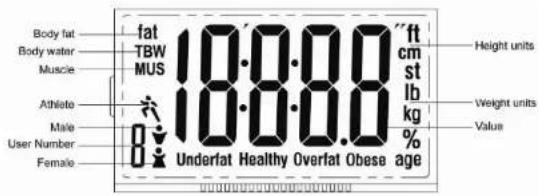
- This smart scale can remember up to four users. To begin using, simply stand on the scale with clean dry bare feet or press SET to enter set-up mode..
- After the scale provides an initial weighing, it will select an open User Number. Press
SET to confirm this selection or press UP and DOWN to chose another User Number. Press SET to confirm.
- Select gender using the UP and DOWN buttons. Four options are available: Male, Female, Male Athlete, Female Athlete. Press SET to confirm.
- Select height using the UP and DOWN buttons. Press SET to confirm.
- Select age using the UP and DOWN buttons. Press SET to confirm.
- To program other users repeat steps 3 through 7.
Para pesar y medir
To Weigh and Measure
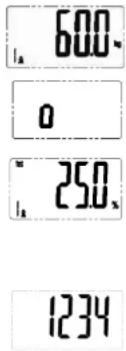
- To begin use, simply stand directly onto the scale platform with clean dry bare feet. After a few seconds your weight will be shown.
- The scale will then begin a body analysis displaying a moving "o".
- When measurement is completed, if a user number has not been selected, the scale will select the User Number automatically. The scale will then display the current weight, body fat, total body water, and muscle mass data three times.
- If the scale can not select the user automatically it will display "1234". The user can select the right number by pressing the UP and DOWN keys. Press SET to confirm. The scale will then display the results.
- The scale turns off automatically if no further operation.
Recall Personal Data from Memory
With the scale off or when the display is 0.0, press the UP or DOWN buttons to show the data and results for the selected User Number.
Error
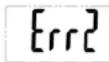
If there is an error in measurement the scale will display Err2. Step off and allow the scale to reset. Try again.
How does the scale work?
This scale uses BIA (Bioelectrical Impedance Analysis) to measure the body fat, body water, and muscle. In this technique, a safe, low-level electrical signal is passed through the body. The scale measures the speed of the current which is affected by water, muscle, bone, and fat. Using this data, the scale estimates the percentage of body fat, body water, and muscle mass.
Using the Analysis
Hydration levels fluctuate throughout the day and are affected by exercise, eating and drinking. As a result, for maximum accuracy and repeatability, it is recommended that this function be used about the same time of day under the same conditions to establish a personal average. These readings are a close indication, and not an exact value. Please consult your doctor for more information.
WeightLoss
During weight loss, the percentage of body fat may not change as expected since the reading is a percentage of body weight and both will be changing at the same time. To minimize the loss of lean body tissue be sure to include exercise in your weight loss plan.
BodyFat5%-80%
| Age | FemaleMale | |||||||
| UnderfatHealthyOverfatObeseUnderfatHealthyOverfatOb | ||||||||
| <39 | <21 | 21-33 | 33-39 | >39 | <8 | 8-19 | 19-25 | >25 |
| 40-59 | <23 | 23-35 | 35-40 | >40 | <11 | 11-22 | 22-28 | >28 |
| >59 | <24 | 24-36 | 36-42 | >42 | <13 | 13-25 | 25-30 | >30 |
BodyWater10%-80%
| Age | Female | Male | ||||
| Low | Normal | High | Low | Normal | High | |
| 10-15 | <57 | 57-67 | >67 | <58 | 58-72 | >72 |
| 16-30 | <47 | 47-57 | >57 | <53 | 53-67 | >67 |
| 31-60 | <42 | 42-52 | >52 | <47 | 47-61 | >62 |
| 61-80 | <37 | 37-47 | >42 | <42 | 42-56 | >56 |
Muscle
Female: >34%; Male: >40% under normal instance.
AdditionalInformation
- Make sure your scale is at room temperature, and on a stable horizontal surface free of vibration.
- This scale is not w aterproof.Do not expose to moisture.
- As this scale is a precision instrument, it must be handled with extreme care. Avoid rough treatment, shaking and vibration.
- Do not disassemble this scale or the warranty will be void.
- The display value may be affected by electromagnetic disturbances such as operating near a radio. If this occurs, move the device that is causing the disturbance and turn the scale off and restart.
ProductGuarantee
Your Escali scale is guaranteed to be free of defects in materials and workmanship for a lifetime. For full details of this guarantee please visit our website at:
www.escali.com
Escali ^®
MeasuringWhat'sNext™
Modelo: USHM180S
Manual del Usuario
BásculaMonitordeSalud Ultra Delgada
natural_image
White digital balance scale with black LCD screen showing 100% weight (no text or symbols on the device itself)www.escali.com