
ActivScan 9 BUA 7200 - Heart Rate Monitor BRAUN - Free user manual and instructions
Find the device manual for free ActivScan 9 BUA 7200 BRAUN in PDF.
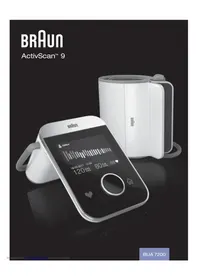


| Product type | Automatic arm blood pressure monitor |
| Brand | Braun |
| Model | ActivScan 9 BUA 7200 |
| Measurement method | Oscillometric |
| Measurement range (blood pressure) | 40 – 255 mmHg |
| Measurement range (pulse) | 40 – 199 beats/min |
| Accuracy (blood pressure) | ± 3 mmHg |
| Accuracy (heart rate) | ± 4% of value |
| Inflation / deflation | Automatic |
| Cuff size | Universal 22 – 42 cm arm circumference |
| Display | Color dot matrix TFT screen |
| Memory capacity | Up to 200 results per user (max. 2 users) |
| Power supply | 4 AA alkaline batteries (LR6) 1.5 V |
| Battery life | Approx. 350 measurements |
| Automatic shut-off | Approx. 60 seconds |
| Connectivity | Bluetooth Smart (2.4 GHz ISM band) |
| Weight (without batteries) | 610 g |
| Operating temperature | +10 °C to +40 °C, humidity < 85% RH non-condensing |
| Storage temperature | -20 °C to +55 °C, humidity < 85% RH non-condensing |
| Warranty | 2 years |
| Main functions | Measurement, graphical history, calendar view, average reports (7/14/30 days), multiple users, animated instructions, WHO color code, Bluetooth sync with Braun Healthy Heart app |
| Maintenance and cleaning | Wipe the housing with a damp cloth and mild detergent; do not use harsh cleaning agents |
| Repairability | Do not open the device; contact customer service for any repairs |
Frequently Asked Questions - ActivScan 9 BUA 7200 BRAUN
User questions about ActivScan 9 BUA 7200 BRAUN
0 question about this device. Answer the ones you know or ask your own.
Ask a new question about this device
Download the instructions for your Heart Rate Monitor in PDF format for free! Find your manual ActivScan 9 BUA 7200 - BRAUN and take your electronic device back in hand. On this page are published all the documents necessary for the use of your device. ActivScan 9 BUA 7200 by BRAUN.
USER MANUAL ActivScan 9 BUA 7200 BRAUN
Upper arm blood pressure monitor
GB English. 2 DE Deutsch. 14 ES Espanol. 26 FR Français 38 Italiano 50 NL Netherlands 62 PT Português. 74
www.hot-europe.com
This product is manufactured under a licence to the Braun' trademark. Braun' is a registered trademark of Braun GmbH, Kronberg, Germany.
The Bluetooth® word mark and logos are registered trademarks owned by Bluetooth SIG, Inc., and any use of such marks is under licence.
App Store is a service mark of Apple Inc., registered in the U.S. and other countries.
Google Play and the Google Play logo are trademarks of Google Inc.

Kaz Europe Sarl Place Chauderon 18 CH-1003 Lausanne Switzerland


© 2017, All rights reserved
BUA7200WE P/N A000496R0 12SEP17
Product description Printed in China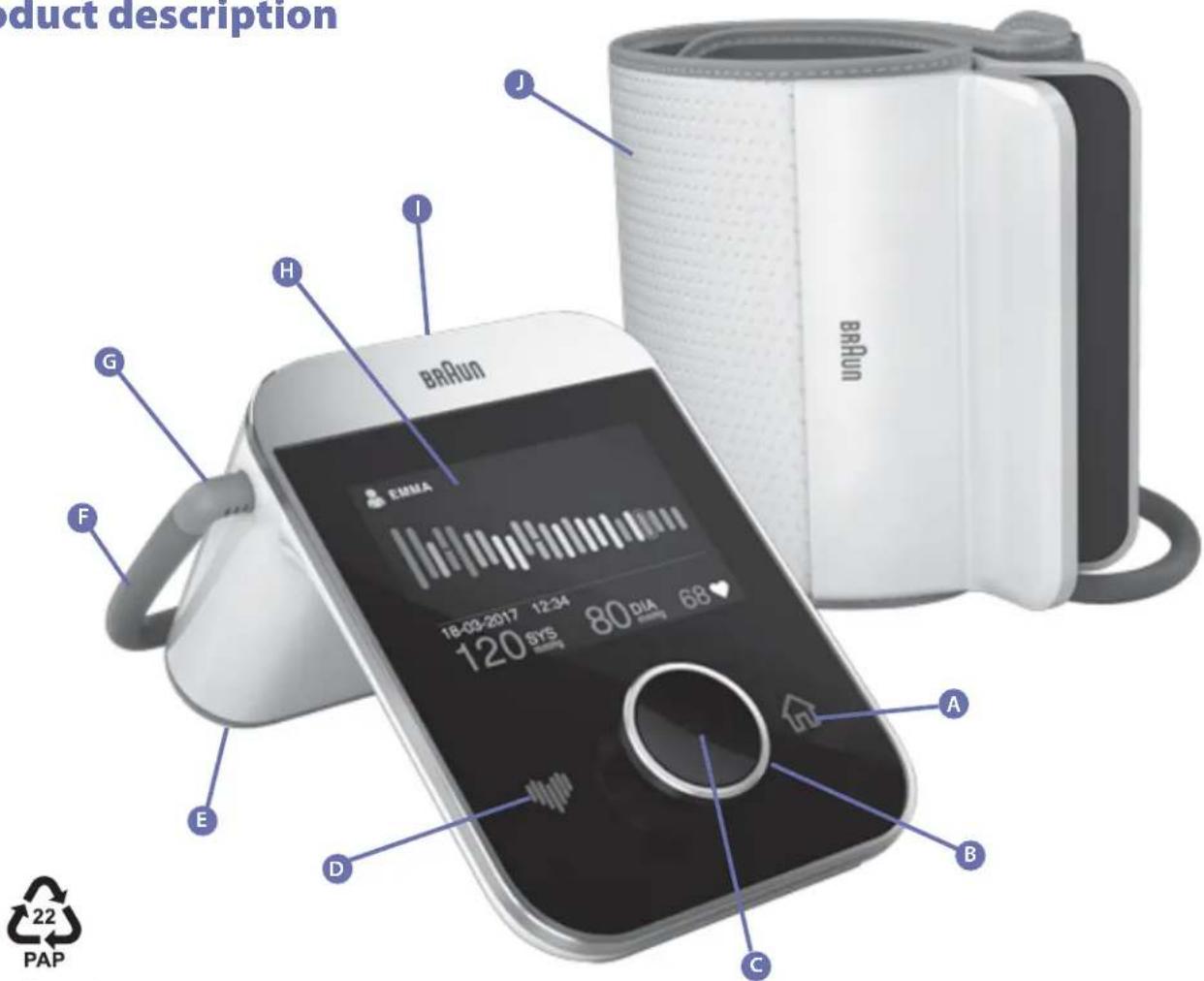
Intended use of the Braun ActivScan™ 9
ActivScan™ 9 is a blood pressure monitor that has been developed for accurate, comfortable and intuitive blood pressure measurements from the upper arm.
What you should know about blood pressure
Blood pressure constantly changes throughout the day. It rises sharply in the early morning and declines during the late morning. Blood pressure rises again in the afternoon and finally drops to a low level at night. It may also vary over a short period of time. Therefore readings from successive measurements may fluctuate.
This device will display your blood pressure reading referring to two values: systolic and diastolic. The systolic blood pressure (the upper number) indicates how much pressure your blood is exerting against your artery walls when the heart beats. The diastolic blood pressure (the lower number) indicates how much pressure your blood is exerting against your artery walls while the heart is resting between beats. The pulse value is also displayed after each measurement.
The ESH (European Society of Hypertension) and WHO (World Health Organisation) have set up the following standard blood pressure values when measured with a resting pulse at home:
| Blood pressure (mmHg) | Too low | Normal values | Grade 1 mild hypertension | Grade 2 moderate hypertension | Grade 3 severe hypertension |
| SYS = systole (upper value) | below 100 up to 134 135-159 160-179 ≥180 | ||||
| DIA = diastole (lower value) | below 60 up to 84 85-99 100-109 ≥110 | ||||
For every measurement displayed on the screen, the associated colour (from green to red) will indicate the corresponding blood pressure level. You can use this classification daily to help you understand your blood pressure. If you are really concerned by the classification, you should consult your doctor.
The guidance levels set by the World Health Organisation are also available directly on the ActivScanTM 9 blood pressure monitor. If you wish to consult the colour-coded chart on your device, select the Information tab
| SYS (mmHg) | DIA (mmHg) | ||
| Green > | < 135 | and | < 85 |
| Yellow > | 135-159 | or | 85-99 |
| Orange > | 160-179 | 100-109 | |
| Red > | 180+ | 110+ or | |


Safety information and important precautions
To ensure accurate measuring results, read the complete instructions for use carefully.
People suffering from cardiac arrhythmia, vascular constriction, arteriosclerosis in the extremities, diabetes or users of cardiac pacemakers should consult their doctor before measuring their blood pressure themselves. Deviations in blood pressure values may occur in such cases.
If you are under medical treatment or taking any medication, please consult your doctor first. The use of this blood pressure monitor is not intended as a substitute for a consultation with your doctor.
Key rules for accurate blood pressure measurement
Always take readings at the same time of day, under the same conditions.
Do not take a measurement within 30 minutes of smoking, drinking coffee or tea or any form of exertion. These factors will influence the measurement.
Always measure on the same arm. The left arm is recommended.
Place the cuff in direct contact with the skin. Do not wrap the cuff over a jacket, sweater or shirt. If you want to take multiple measurements, wait approximately 3 minutes before repeating a measurement.
Product description (see Page 1)
A Home button (touch-sensitive) Navigation dial Enter button (centre of navigation dial) Heart measurement button (touch-sensitive) E Battery compartment cover Air hose G Connector H Display On/Off button Cuff
Inserting/replacing batteries
- Remove the battery compartment cover by sliding it horizontally to the left. Insert the four batteries supplied with this product, with polarity as indicated in the battery compartment. When replacing batteries, use alkaline batteries exclusively, type AA/LR6, 1.5V.
- New batteries will provide approximately 350 measurements.
- When replacing batteries, all readings saved in memory are preserved but date and time must be set again.
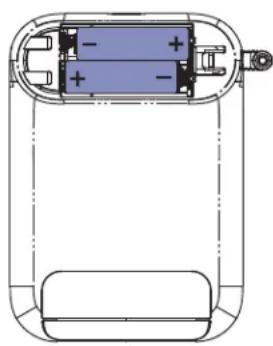
The basics
On/Off button: located at the top of the device.
Home button: When home is available this icon will be lit. Simply touch or tap this button takes you back to the home screen menu.
Navigation dial: turn this control to the left or right to go through the different functions of your device and press in the centre (Enter button) to select or confirm a choice.
Heart measurement button: When lit, touch or tap this button will start a measurement.
Menu icons
| Take a measurement | Select this function and press enter to take a measurement. This function is the same as the Heart measurement button (D) |
| History | Select this function to view the history and the trend of your blood pressure readings in a coloured chart |
| Calendar View | Select this function to view your blood pressure readings in a month by month calendar view with coloured daily averages |
| Reports Select this function to see your 7/14/30 day blood pressure averages | |
| Users Select this function to select, add, edit or delete a user | |
| Date and time setting Select this function to set the date and time on your device | |
| Settings | Select this function to enable/disable the guided animations when taking a reading or enable/disable the user selection when turning on |
| Bluetooth® pairing Select this function to pair your device with the Braun Healthy Heart app | |
| Information | Select this function to obtain more information about the blood pressure colour chart and how to take a blood pressure reading correctly |
Setting the date and time
The date and time need to be set before a measurement can be taken.
It is important to set the date and time correctly to ensure that the readings are displayed correctly on this device and in the Braun Healthy Heart app.
This screen will be shown automatically when the device is first used or after inserting a new set of batteries.
If you need to adjust the date and time at a later date (for example when advancing the clock by one hour in the summer), then you can access this screen from the main menu by selecting the date and time icon.
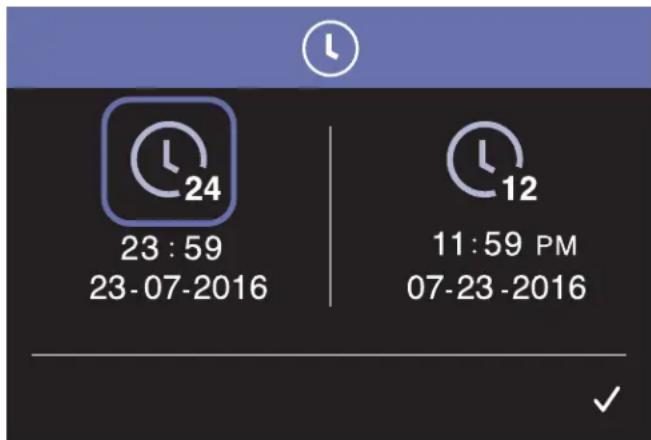
Choose the format (EU or US), then set the date and time by turning the navigation dial. Press the Enter button to activate the field. When the field flashes, you can adjust the numbers. Press the Enter button to confirm the number entered, and the cursor will jump to the next field. Repeat the process. When completed, confirm by selecting the 'Save' icon.
Setting a username
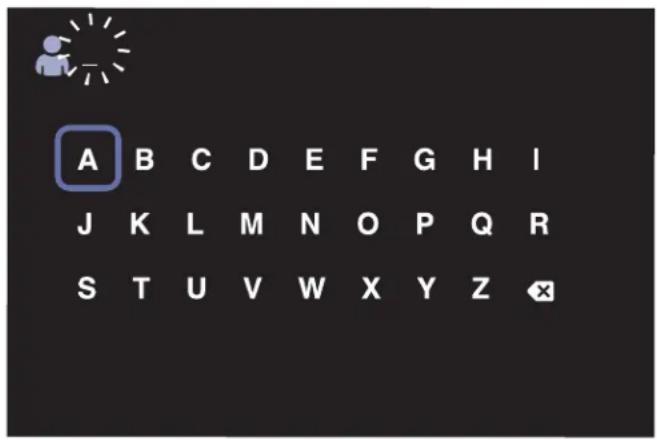
From the main menu, select User and press Enter. Now select the letters by turning the navigation dial, and confirm each letter by pressing the Enter button. When complete, select the Save icon and press Enter.
Names can be changed at any time by choosing the User icon from the main menu.
The user name will not be lost if the batteries are removed or replaced.
Correct posture and cuff positioning
Correct posture during measurement is important to obtain accurate readings.
For greater accuracy, we recommend using the left arm because it's closer to your heart.
The correct position of the cuff should be 2-3 cm above the elbow, with the tube outlet facing in the direction of your hand and running along the centre of the inside of your elbow. Close the cuff with the Velcro fastener so it fits tightly but comfortably on your arm. There should not be a space between the cuff and your arm.
The ActivScan™ 9 provides on-screen animations to help you achieve the correct posture and fit the cuff properly. This assisted
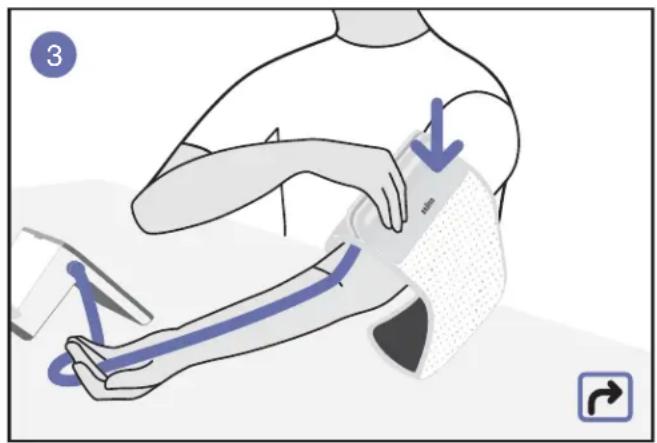
reading function will be displayed automatically when the device is first used and then can be displayed optionally before each reading by selecting the Settings icon
The on-screen animation guide can also be viewed at any time by choosing the Information icon from the main menu.
Taking a blood pressure reading
- Sit down, relax, keep still (especially the arm being used for the measurement), do not move or speak.
- Fit the cuff 2-3 cm above the elbow, with the tube outlet facing in the direction of your hand and running along the centre of the inside of your elbow.
- Touch the heart measurement icon located to the left of the dial to start a measurement, or select the heart button in the main menu. The measurement starts after a 3-second on-screen countdown animation. You can cancel the measurement at any time by touching the Home button or the Enter button.
Understanding your reading
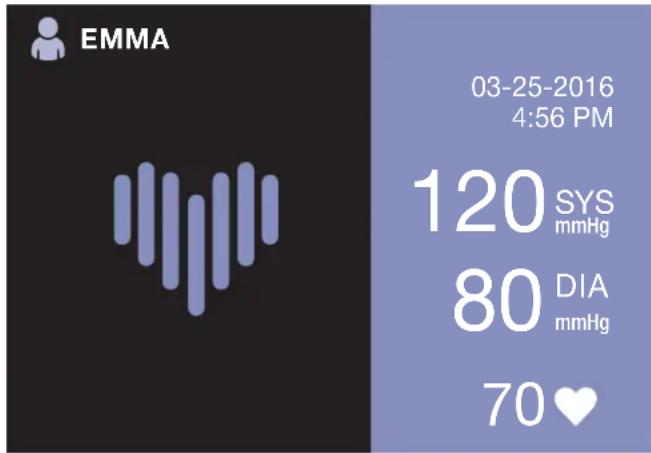
When a measurement is complete, the readings are displayed on the screen along with a coloured heart logo. The heart logo and the background colour indicate the level of hypertension for the reading. Please refer to the WHO colour-coded chart (on Page 2) to understand this interpretation.
SYS: shows the reading for the systolic blood pressure
DIA: shows the reading for the diastolic blood pressure

Shows the pulse (heart rate)

This icon appears if there is an irregular heartbeat. An irregular heartbeat can be
caused by simply talking, moving, or shaking during a measurement.
Normally this is not cause for concern. However, if the symbol appears frequently, and these guidelines are strictly followed, you should seek medical advice.
Memory function
Your ActivScan™ 9 stores up to 200 readings for each user. Readings are stored automatically when the measurement is complete. When the 200 readings are reached, the new readings automatically replace the oldest ones. We suggest you regularly transfer your stored readings onto the Braun Healthy Heart app on your Smartphone in order to follow the evolution of your blood pressure easily over a long period of time.
The memory is non-volatile. Stored readings will not be lost when batteries are replaced.
Consult the average of your readings
Access the averages of your readings as a report by selecting the Report icon in the menu. This function gives the averages for the last 7, 14, or 30 days from the readings taken for the morning (left), evening (middle), and the whole day (right).
The total number of readings taken during the time period is displayed at the bottom and is shown as 14.
Consulting the average of your readings will give you a blood pressure value which is more representative of your overall cardiovascular health.
Make sure you regularly take your blood pressure so the average numbers will more accurately show your overall cardiovascular health.
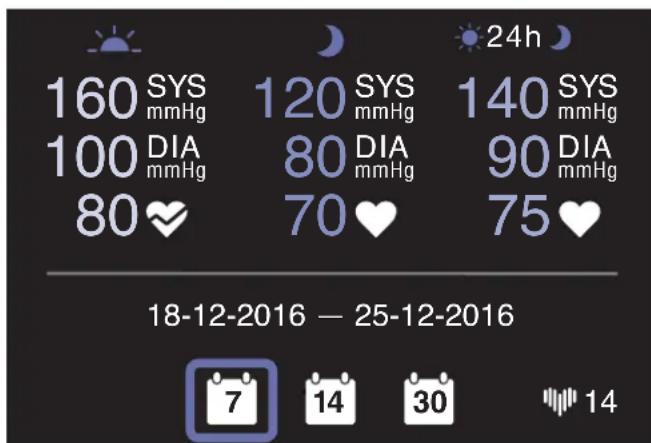

Refers to measurements taken in the morning, between 04:00 and 09:59
Refers to measurements taken in the evening between 19:00 and 01:59 (on the next day)

Refers to all measurements taken during the day, between 00:00 to 23:59
Tracking the evolution of your blood pressure
Selecting the History icon in the menu will give you access to an overview of your blood pressure data in the form of a bar chart.
Each coloured bar represents a single reading. Select a coloured bar by moving the blue highlight box with the navigation dial. The details of the selected reading will be displayed at the bottom of the bar chart. Each bar colour follows the WHO guidelines as shown on Page 2.
This icon indicates the pulse reading. This icon appears if an irregular heartbeat has been detected for this selected reading.
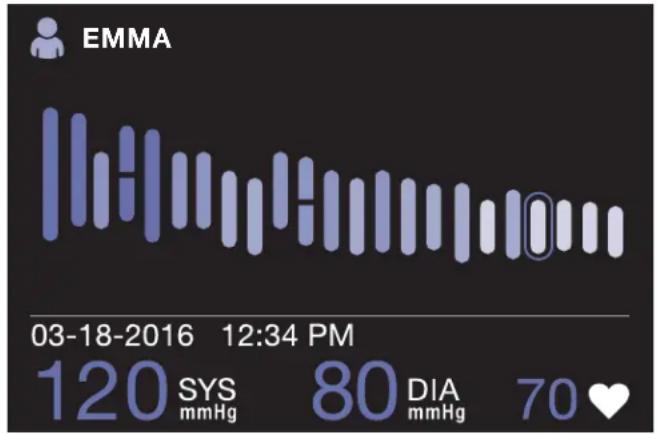
The irregular heartbeat will also be shown on the bar chart for the corresponding reading with an interrupted coloured bar
Deleting a reading
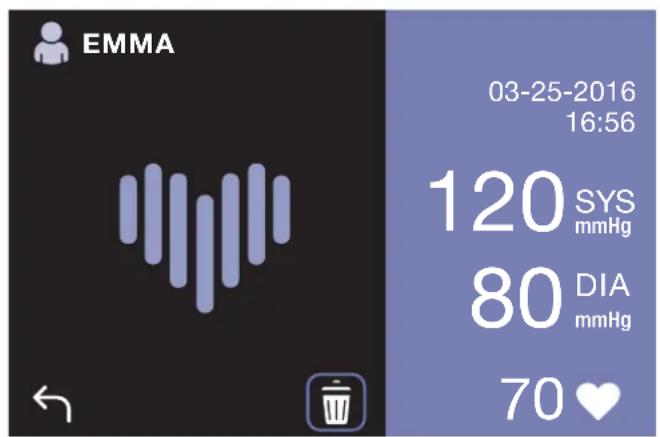
It is possible to selectively delete a reading from the history view. That reading will also be deleted from all other views and will not be transferred at next connection with your Braun Healthy Heart App.
Select one reading in the bar chart, and then press on the Enter button: this will show a screen with the details of the reading and a small icon at the bottom for deleting that reading.
To delete the reading, select the dustbin symbol then press on Enter button. To abort, select the back symbol and press on Enter button.
Calendar view
Selecting the Calendar icon in the menu will show your daily average month by month.
Month and year are shown at the top of the screen.
The week starts with Monday to the left; Saturday and Sunday are to the right of the grey line.
Days with readings are highlighted in the colour of the daily average (refer to the WHO chart on Page 2) and details of a particular day's average reading are shown on the right hand side.
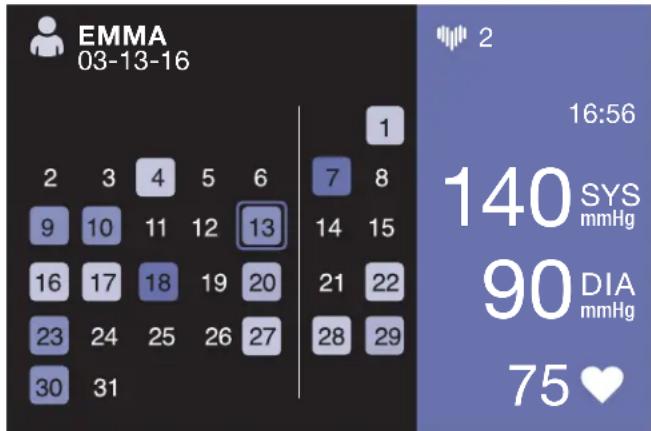
Navigate through the days of the month using
the navigation dial. You can quickly navigate through the months by going to the first (last) day of the month, and then you will jump to the previous (next) month and so on.
On top of the screen, the small heart icon followed by a number 2 refers to the number of readings that were taken on the selected day.
You can see all measurements for a selected day by clicking on the Enter button. The small heart icon at the top will indicate the measurement numbers 1/2 . Clicking on the Enter button will move to the next measurement.
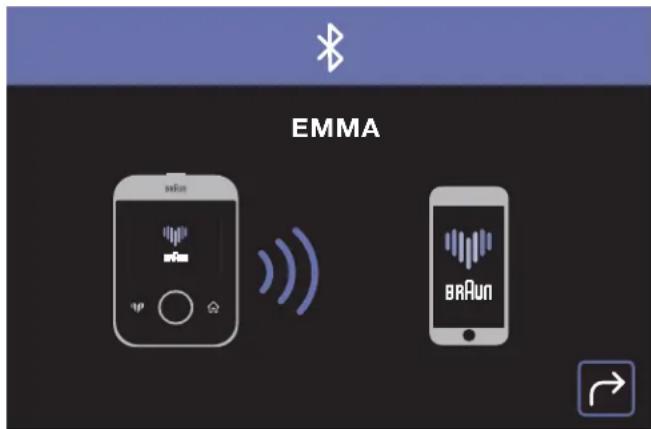
Bluetooth pairing
ActivScan™ 9 is compatible with the Braun Healthy Heart app.
Make sure the Braun Healthy Heart app has been downloaded onto your Smartphone and your app is open.

Download on the App Store

GET IT ON Google Play
To pair your device with the Braun Healthy Heart app on your Smartphone, select the Bluetooth icon in the menu of your ActivScan™ 9.
Switch on the Bluetooth function on your phone. At first time use of the Braun Healthy Heart app, follow the on-screen instructions to pair your device. Both app and device will show that the connection is in progress.
When your ActivScan™ 9 is successfully paired, the screen will display a green tick mark.
If you want to pair another device with your smartphone, go to the 'Connect device' section of the app and follow the instructions.

Adding, editing and deleting users
Adding a second user is necessary if you want to share this blood pressure monitor with another person. Each user will have his/her own saved memories and averages.
To add a second user, select the Users icon in the menu and then select the Add User icon.
If two users are already created, select a user by choosing the corresponding orange or blue icon; the user's name is displayed below the icon.
Once selected, confirm the user with check mark. You can edit the user's name or delete that user using the small icons at the bottom of the screen.
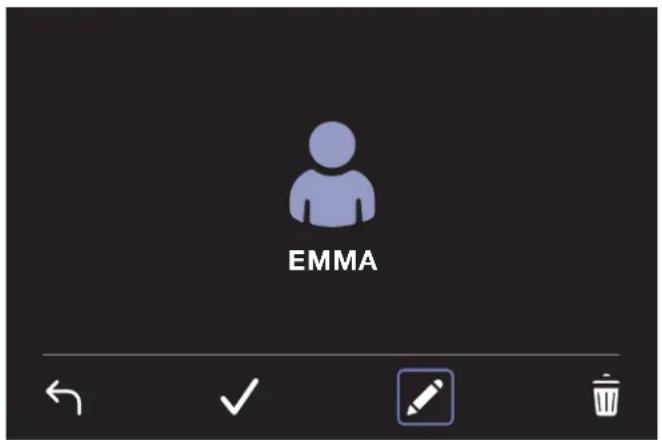
Warning: deleting a user deletes all blood pressure readings and averages for that user as well as deleting the user name.
Settings
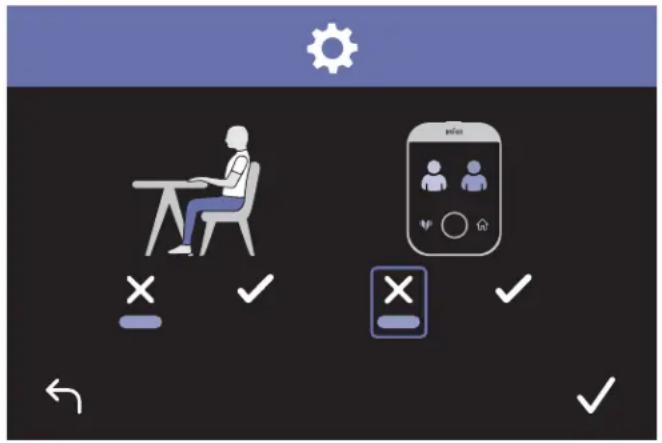
Your ActivScan™ 9 can be customized to your preferences. The first option enables or disables the animated instructions which are shown before taking a blood pressure measurement.
The second option enables or disables the user selection at power-on. Note that this option has only an effect when two users are active on the device.
Select the check mark to enable the option; select the cross to disable the option and validate option with Enter button.
Save your settings by selecting the big checkmark sign and press Enter button.
Information
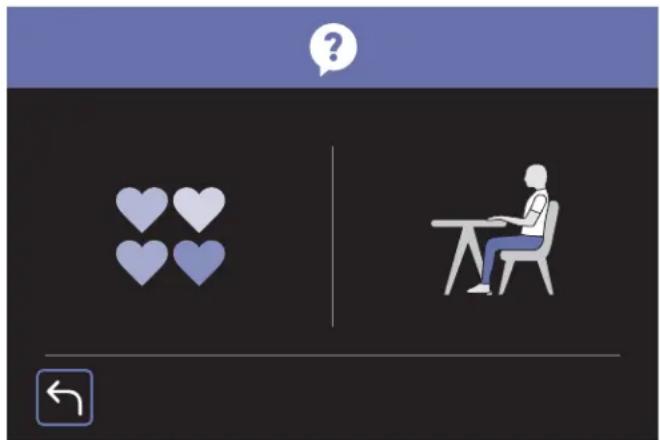
Get information about the color coding used for displaying measurement results. This color coding follows the World Health Organisation guidelines.
You can also see here the animated instructions on how to take accurate blood pressure measurement.
Battery life indicator
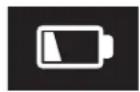
Batteries are low
When the batteries are approximately 80% discharged, the low battery symbol will show at power-up for about 6 seconds. A small low battery symbol will then show on the upper right corner of the screen. Your ActivScan® 9 device will continue to measure reliably, but new batteries should be obtained.

Batteries are empty — replacements required
When the batteries are fully discharged, the empty battery symbol will show at power-up for about 6 seconds and then device will automatically shut off. You cannot take any readings and must replace the batteries.
Storage and cleaning
- Do not place/leave the item in direct sunlight, at high temperatures or in damp and dusty places.
- Do not store at extremely low (less than -20°C) or high (more than 55°C) temperatures.
- Use a damp cloth or a mild cleansing agent to clean the case and then use a dry cloth to wipe it dry.
- Do not use any strong cleansers to clean it.
- When the unit is not going to be used for a long time, remove the batteries. (Batteries may leak or cause damage).
- Do not modify the device. NEVER open the device! This will void the manufacturers warranty.
Calibration
This device was calibrated at the time of manufacture. If used according to the instructions for use, periodic recalibration is not required.
Guarantee
Please read all instructions before attempting to use this device. Please retain the receipt as proof of and date of purchase. The receipt must be presented when making any claim within the relevant guarantee period. Any claim under the guarantee will not be valid without a proof of purchase.
Your device is guaranteed for Two Years (2 Years) from date of purchase.
This guarantee covers defects in materials or workmanship that occur under normal use; defective devices meeting these criteria will be replaced free of charge.
The guarantee DOES NOT cover defects or damage resulting from abuse or failure to follow the user instructions. The guarantee becomes void if the device is opened, tampered with, or used with non-Braun branded parts or accessories, or if repairs are undertaken by unauthorised persons.
Accessories and consumables are excluded from any warranty.
For support requests, please visit www.hot-europe.com/support or find service contact information at the end of this owner's manual.
This Guarantee is applicable to Europe, Russia, Middle East and Africa only.
UK Only: This does not affect your consumer statutory rights.
The LOT and SN of your device are printed on the rating label on the back of the product.
Troubleshooting
| Problem Reason Solution | ||
| Low battery warning | Batteries are low. Be ready to replace batteries with new ones soon. | |
| Empty battery warning | Indicates that batteries are completely discharged. Insert new batteries or check that batteries are correctly inserted. | |
| Device does not turn on, screen is black | Problem with batteries | Change batteries for new ones and make sure to insert them correctly. If problem persists, contact consumer support. |
| ERROR BLUETOOTH | Cannot connect to Smartphone | Stay away from radio interference like microwave ovens, WiFi routers, laptop computers, etc... Make sure Bluetooth is enabled on your Smartphone before starting the pairing sequence. Follow the instructions for Bluetooth pairing in the Braun APP and re-initiate the Bluetooth pairing sequence using the Braun APP. |
| ERROR 0 | Measuring error | The pulse signals on the cuff are too weak. Re-position the cuff and repeat the measurement. |
| ERROR 1 | Pumping error | The cuff is not fastened properly. Re-position the cuff and repeat the measurement. |
| ERROR 2 | Out of Range Results Error | Relax for a while and repeat the measurement. Make sure the cuff is correctly positioned on your arm. |
| ERROR 3 | Pump time error | The cuff is not fastened properly. Re-fit the cuff, and take a measurement again. |
| ERROR 254 | Device internal error | Remove and then reinsert the batteries. If the problem persists, contact customer support. |
| ERROR 255 | Calibration error | Remove and then reinsert the batteries. If the problem persists, contact customer support. |
| ERROR FIRMWARE | An error occurred during the Bluetooth Firmware update | Device will automatically restart using the original Bluetooth firmware. Re-initiate the firmware download process or follow the on-screen instruction from Braun APP. |
Specifications
Model number BUA7200
Method of measurement Oscillometric
Blood pressure measurement range 40-255 mmHg
Pulse measurement range 40 199 beats/minute
Calibration accuracy Blood pressure: + / - 3mmHg
Pulse rate: 4% of reading
Inflation/Deflation
Automatic
Display Color TFT dot matrix display
Sets of memory Up to 200 readings per user
Cuff size Universal cuff: 22-42 cm (9-17 inch) min/max arm
circumference
Operating temperature +10°C +40°C , less than 85% R.H. non-condensing
Storage temperature -20°C +55°C , less than 85% R.H. non-condensing
Unit weight 610g (excluding batteries)
Power source Alkaline battery: 4 × AA (LR6) 1.5V
Auto power off Approx. 60 seconds
Service life 5 years
Wireless communication
Bluetooth® Smart
Frequency Range: 2.4GHz ISM Band (2400 - 2483.5 MHz)
Modulation: GFSK
Effective radiated power: < 20 dBm

Important

Read the operating instructions.
If the device is not used within the specified temperature, humidity and atmospheric pressure ranges, the technical accuracy of the measurement cannot be guaranteed.
Classification:

Internally powered equipment
Type BF applied parts
IP22 Protected against solid foreign objects of 12.5 mm diameter and larger.
Protected against water drops falling vertically when the device is tilted up to 15°
Not suitable for use in the presence of flammable anaesthetic mixtures with air, oxygen or nitrous oxide.
Continuous operation with short-time loading.
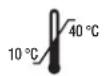
Operating temperature
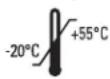
Storage temperature

Storage humidity
Subject to change without notice.
This device conforms to the following standards:
EN 60601-1:2006/A1:2013: - General requirements for basic safety and essential performance.
EN 60601-1-2:2015 - Medical Electrical Equipment - Electromagnetic compatibility - Requirements and tests.
EN 60601-1-11:2010 - Medical Electrical Equipment - Requirements for medical electrical equipment and medical electrical systems used in the home healthcare environment.
EN 1060-3:1997 + A2:2009 - Non-invasive sphygmomanometers - Supplementary requirements for electromechanical blood pressure measuring systems.
EN 1060-4:2004 - Non-invasive sphygmomanometers - Test procedures to determine the overall system accuracy of automated non-invasive sphygmomanometers.
This product conforms to the provisions of the EC Directive 93/42/EEC (Medical Device Directive).
This product carries the CE mark and is manufactured in conformity with the RoHS Directive 2011/65/EU.
MEDICAL ELECTRICAL EQUIPMENT needs special precautions regarding EMC.
For a detailed description of EMC requirements please contact an authorised local Service Centre (see guarantee) or visit www.hot-europe.com/support.
Portable and mobile RF communications equipment can affect medical electrical equipment.
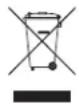
This product contains batteries and recyclable electronic waste. To protect the environment, do not dispose of it in household waste, but take it to an appropriate local collection center.
Download on the App Store

GET IT ON Google Play
Download on the App Store
Download on the App Store

GET IT ON Google Play
Insert/replace the batteries
Download on the App Store

GET IT ON Google Play
To pair the device with the Braun Healthy Heart app on your smartphone, select the Bluetooth icon in the ActivScanTM 9 menu.
Support contact numbers
Austria
+43 (0)1 360 277 1225
Bahrain
+97317582250
Belgium/Luxemburg
+32(0)26200101
Bosnia
+387 (33) 636 285
Bulgaria
+359(2)4024600
Croatia
+385 (01) 3444 856
Cyprus
+35722575016
Cyprus Northern region
+0392 22 72 367
Czech Republic
+420(0)225439769
Denmark
+4535158040
Finland
+358(0)981710014
France
+33 (0) 185 148095
Germany
Western Region - Jeddah
+966 (0) 22565555
Central Region - Riyadh
+966 (0) 12886808
Eastern Region - Al-Khobar
+966 (0) 38940555
South Region - Abha
+966 (0) 72376062
Slovakia
+421250112115
Slovenia
+386 (01) 888 86 74
South Africa
+27 (0) 11 089 1200
Spain
+34913754176
Sweden
+46 (0)851993097
Switzerland
+41 (0) 225675200
Tunisia
+21671716880
Turkey
+902163372255
UAE
+97143534506
United Kingdom/Ireland
+44 (0) 115 965 7449
- WWW.HOT-EUROPE.COM
- INTENDED USE OF THE BRAUN ACTIVSCAN™
- WHAT YOU SHOULD KNOW ABOUT BLOOD PRESSURE
- SAFETY INFORMATION AND IMPORTANT PRECAUTIONS
- KEY RULES FOR ACCURATE BLOOD PRESSURE MEASUREMENT
- PRODUCT DESCRIPTION (SEE PAGE 1)
- INSERTING/REPLACING BATTERIES
- THE BASICS
- SETTING THE DATE AND TIME
- SETTING A USERNAME
- CORRECT POSTURE AND CUFF POSITIONING
- TAKING A BLOOD PRESSURE READING
- UNDERSTANDING YOUR READING
- MEMORY FUNCTION
- CONSULT THE AVERAGE OF YOUR READINGS
- TRACKING THE EVOLUTION OF YOUR BLOOD PRESSURE
- DELETING A READING
- CALENDAR VIEW
- BLUETOOTH PAIRING
- ADDING, EDITING AND DELETING USERS
- SETTINGS
- INFORMATION
- BATTERY LIFE INDICATOR
- BATTERIES ARE LOW
- BATTERIES ARE EMPTY — REPLACEMENTS REQUIRED
- STORAGE AND CLEANING
- CALIBRATION
- GUARANTEE
- TROUBLESHOOTING
- SPECIFICATIONS
- IMPORTANT
- CLASSIFICATION
- INSERT/REPLACE THE BATTERIES
- SUPPORT CONTACT NUMBERS
- AUSTRIA
- BAHRAIN
- BELGIUM/LUXEMBURG
- BOSNIA
- BULGARIA
- CROATIA
- CYPRUS
- CYPRUS NORTHERN REGION
- CZECH REPUBLIC
- DENMARK
- FINLAND
- FRANCE
- GERMANY
- SLOVAKIA
- SLOVENIA
- SOUTH AFRICA
- SPAIN
- SWEDEN
- SWITZERLAND
- TUNISIA
- TURKEY
- UAE
- UNITED KINGDOM/IRELAND
Brand : BRAUN
Model : ActivScan 9 BUA 7200
Category : Heart Rate Monitor