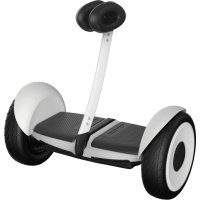
SPlus - Self-balancing scooter SEGWAY - Free user manual and instructions
Find the device manual for free SPlus SEGWAY in PDF.



| Product Type | Self-balancing scooter |
| Brand | Segway |
| Model | SPlus |
| Dimensions (L × W × H) | 577 × 280 × 620 mm |
| Net Weight | 16.3 kg |
| Battery | Lithium-ion 329 Wh, 51 V nominal |
| Range | 35 km (max) |
| Maximum Speed | 20 km/h |
| Maximum Incline | 15° |
| Charging Time | 4 hours |
| Tire Pressure | 45–50 psi |
| User Weight | 25–100 kg |
| User Height | 130–200 cm |
| Recommended Age | 15–60 years |
| Operating Temperature | -10 to 40 °C |
| Protection Rating | IP X4 (splash resistant) |
| Connectivity | Bluetooth 4.0 or higher |
| Mobile App | iOS 8.0+ / Android 4.3+ |
| Remote Control Included | Yes, Li-ion battery 680 mAh |
| Camera Accessory | Sold separately, 3-axis gimbal |
| Maintenance | Soft damp cloth; no solvents |
| Safety | Helmet mandatory; do not drive under influence |
| Repairability | Original Segway parts; contact customer service |
Frequently Asked Questions - SPlus SEGWAY
User questions about SPlus SEGWAY
0 question about this device. Answer the ones you know or ask your own.
Ask a new question about this device
Download the instructions for your Self-balancing scooter in PDF format for free! Find your manual SPlus - SEGWAY and take your electronic device back in hand. On this page are published all the documents necessary for the use of your device. SPlus by SEGWAY.
USER MANUAL SPlus SEGWAY
Original Instructions
- Riding Safety 02
2 Packing List 04
3 Diagram 05
4 Assembling Your Segway S-PLUS 07 - First Ride 08
- Charging 09
- Storage Compartment 09
- Learning to Ride 10
- Warning 12
- Features 14
- Maintenance 16
- Specifications 17
- Certifications 18
- Trademark and Legal Statement 20
- Contact 21
Appendix 1: Using the Camera (sold separately) 22
Appendix 2: Using Your Segway S-PLUS - Camera 23
Thanks for choosing Segway S-PLUS
Thanks for choosing the Sagway 5-PLUS. Your Sagway 5-PLUS is both a powerful, remote controlled, electric balancing device and also a personal recreational vehicle.
Enjoy the many features of your Segway S-PLUS, powered by our innovative RF locating technology and the remote control. Your Segway S-PLUS is easy and safe to control. Have fun with it!
You can also buy a gimba carrier to equip your Segway S PLUS for stunning photos and videos.
Enjoy your ride!
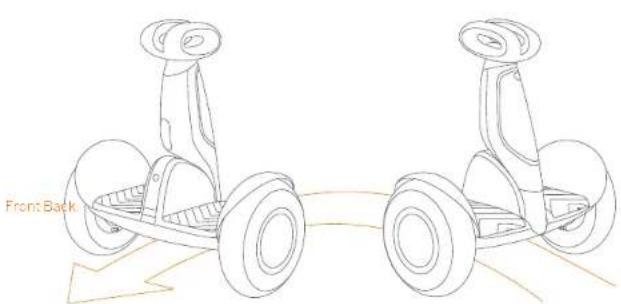
▲WARNING! Always step on/off from the back of the Sogway S-PL US. Otherwise you risk falls and/or collisions because the steering direction is reversed
1 Riding Safety
- The Segway S-PLUS is a recreational product. Before mastering riding skills, you need to practice. Neither N-hobot Inc nor Segway Inc. is responsible for any injuries or damage caused by a rider's inexperience or failure to follow the instructions in this document.
- Please understand that you can reduce the risk by following all the instructions and warnings in this manual, but you cannot eliminate all the risks. Remember that whenever you ride the Sagway St. F. US your risk injury or death from loss of control, collisions, and falls. When entering into public spaces a ways compy with the local laws and regulations. As with other vehicles as faster speeds require longer braking distance. Sudden braking on smooth surfaces could load to wheel slip, loss of balance, or falls. Be cautious and always keep a safe distance between you and other people or with cases when riding. Do alert and slow down when entering unfamiliar areas.
- Always wear a helmet when riding. Use an approved bicycle or skateboard helmet that fits properly with the chest strap in place, and provides protection for the back of your head.
- Do not attempt your first ride in any area where you might encounter children, pedestrians, pets, vehicles, bicycles, or other obstacles and potential hazards.
- Record pedestrians by always yielding the right of way. Pass on the left whenever possible. When approaching a pedestrian from the front, stay to one right and slow down. Avoid startling pedestrians. When approaching from behind, announce yourself and slow down to walking speed when passing. Please obey local traffic laws and regulations if situation is different:
- In places without laws and regulations governing self-balancing electric vehicles, comply with the safety guidelines outlined in this manual. No other Nnebot Inc. nor Segway Inc. is responsible for any property damage, personal injury/death accidents or legal disputes caused by violations of the safety instructions.
- De not allow anyone to nice your Segway S-PL US on his/her own unless they have carefully read this manual, watch the safety video, and followed the New Rider Tutorial or the App. The safety of new riders is your responsibility. Assist new riders until they are comfortable with the basic operation of the Segway S-PL US. Make sure each new rider wears a helmet and other protective gear.
- Before each nice check for those fasteners damaged components, and low tre pressure. If the Segway S-PLUS makes abnormal sounds or signals an alarm, immediately stop riding. Diagnose your Segway S-PLUS via the Appi and call your dealer/costauror for service.
-
Be alert: Scan both far ahead and in front of your Sogway S PLUS — your eyes are your best look for safely avoiding obstacles and low face on surfaces (including, but not limited to wet ground, loose sand, loose grove, and ice).
-
To reduce risk of injury, you must read and follow a "CAUTION" and "WARNING" notices in this document. Do not ride at an unsaid speed. Under no circumstance should you ride on roads with motor vehicles. The manufacturer recommends riders be between the ages of 16-60 years old. Always follow these safety instructions:
A. People who should not ride the Segway 5 PLUS include:
-
Anyone under the influence of alcohol or drugs
ii. Anyone who suffers from disease that puts them at risk if they engage in strenuous physical activity.
iii. Anyone who has problems with balance or with motor skills that would interfere with their ability to maintain balance.
iv. Anyone whose height or weight is outside the stated limits (see Specifications). -
Program, Women.
B. Riders under the age of 18 years old should ride under adult supervision.
C. Comply with local laws and regulations when riding this product. Do not ride where prohibited by local laws.
D. To nice safely, you must be able to clearly see what is in front of you and you must be clearly visible to others
Do not ride in the snow, in the rain, or on roads which are wet, muddy, icy, or that are slippery for any reason. Do no ride over obstacles (sand, loose gravel, or slicks). Doing so could result in a loss of balance or traction and could cause a fall.
F. Do not accelerate or decelerate suddenly. Do not accelerate when the Segway S-PI US tilts back or sounds an alarm. Do not attempt to over-de the speed limit.
-
Do not alter to change your Sogway 5-PLUS II, the charger, or the power outlet is well.
-
As with any electronic device, Use a surge protector when charging to help protect your Segway S. PLUS from damage due to power surges and voltage spikes. Only use the Segway supplied charger. Do not use a charger from any other product.
-
Use only Nincbel or Sogway approved parts and accessories. Do not modify your Sogway S-PLUS. Modifications to your Sogway S-PLUS could interfere with the operation of the Sogway S-PLUS, could result in serious injury and/or damage, and could void the limited Warranty.
-
Do not sit on the steering bar. Done so could result in serious injury and/or damage to your Sogway S-PLUS.
2 Packing List
Steering Bar (RF locating system integrated)
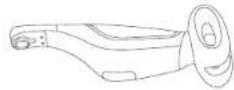
Mainframe
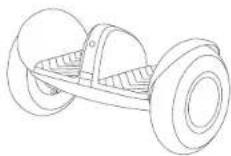
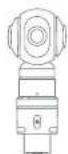
Camera
Your personal photographer!
Camera sold separately.
User Materials
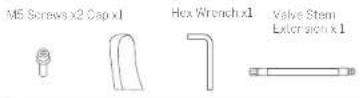
Accessories Box
Accessories in the Box
Remote Control x 1
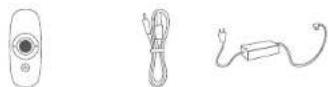
When unpacking your Segway S-PLUS, please verify that the above items are included in the package. If you are missing any components, please contact your dealer/distributor or nearest service center (see contacts in the user manual). After viewing that all components are present and a good condition, you can assemble your new Segway S-PLUS.
Please retain the box and packaging materials in case you need to ship your Segway S-PI US in the future.
Always power off your Segway S-FLUB and unplug the charge cable before assembling, mounting accessories, or cleaning.
3 Diagram
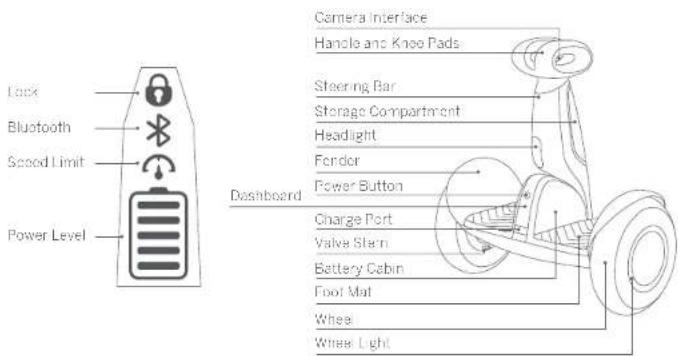

Power Button PATT-EN/OP - The Segway 31-203 mill automatics / power off - when rate for 20 minutes, or when laid down (horizonable) for over 30 seconds.
| Enable Lock Video via the App. The Segway 5-PLUS and app will vibrate and sound an alarm if anyone moves it. The remote control will also alarm if it is powerco on and within range (63 ft, 120mors) of the Segway 5-PLUS. | |
| When the App is connected to the Segway 5-PLUS, this icon will glow steady. When Bluetooth is enabled—but not connected to a small phone—this can still blink. | |
| Enable and adjust Speed Limit Mode via the App. When the icon is illuminated. Speed Limit Mode is on. This speed limit can be adjusted in the App. As you approach the speed limit, the Segway 5-PLUS bits back. When you reach the speed limit, the Segway 5-PLUS bops. | |
| Indica as the remaining battery life. Each block activates to approximate 20% power level. When the battery is ready to apply this con blinks and the Segway 5-IF. US bops, indicating that you need to charge your Segway 5-PLUS. Your Segway 5-PLUS will gradually reduce the max speed limit as the power level gradually decreases. When less than 10% the speed will be limited to 6.2 mph (10km/h). Use the App to view the remaining power and estimates remaining range. |
Remote Control
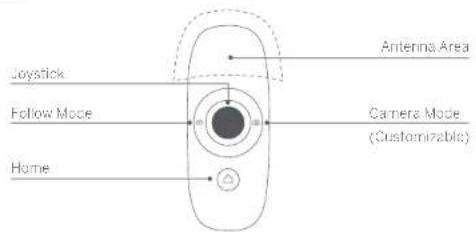

Home
1). Power switch. Short press the Home button to power on the remote control. Long press to turn it off. The remote control will turn off when idle for two minutes.
2) Home mode. Short press the Home button to tell your Segway S. PI US to hold position.
3) Remote control battery indicator light.
20% power Blue Charging Red Breathing
< 20% power Red Fully Charged Blue
<10% power Red, Blinking
< 5% power. The remote control powers off automatically.

Joystick
1) Move the joystick to turn on Remote Control Mode. Use the App to adjust the maximum vehicle speed

Follow
1) Short press the Follow Mode button to enable/disable Follow Mode. Use the App to adjust the following speed and distance (from vehicle to controller).
2) Long orces (1 sec) the Hollow Mode Button to use the joystick to control the pitch and yaw position of the attached camera.

Camera
1) With the Apo, you can customize what this button does. By default, tenables/disables Lock More.
2) When a camera is detected, short press the Camera Mode button to take a photo. Long press (1 sec) to start recording video, and then short press to stop recording. The button binds blue while recording.
Refer to the camera instructions for more information.
When using the remote control, do not shield the antenna area, do not cover the antenna area with any part of your body. Turn off the remote control and stay in the storage compartment when not in use. Please note that the remote control cannot control the movement of your Segway S-PLUS when in Riding Mode.
▲WARNING
- The remote control contains a Li-ion battery. Follow all instructions in this document and on the device label. Otherwise you risk personal injury or property damage due to fire, explosion, electric shock, and other dangers.
● Not user serviceable. To replace the battery, contact Segway (page 21). - Only use a Ninebot or Sagway approved charge cable. Please use it properly with the rated range.
● Always use a power supply that meets SELV and IEC6095C-Limited Power Source requirements.
4 Assembling Your Segway S-PLUS
- Slide the steering bar onto to the mounting bracket. Route the cable through the hole.
- Align the lab on one connector with the notch on the other. Connect the cables.
- install the two M5 screws. Tighten securely with the included hex wrench.
- Power on the unit for self-check to ensure the cables are connected properly. The Segway S-PLUS beeps if the cable is not installed correctly. Press the cap onto the steering bar until it snaps in place.
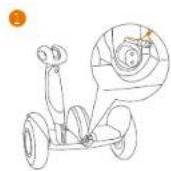
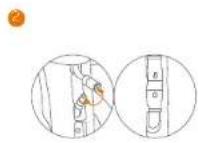
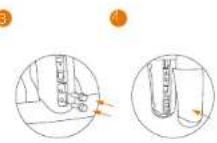
Ensure the cables are firmly connected.
5 First Ride

There are safety risks when learning to ride the Segway S-PLUS. You must read the Safety Instructions and follow the New Rider Tutorial in the App before your first ride.
For your safety, your Segway S-PLUS is not activated at this time and will beep occasionally after Power ON.
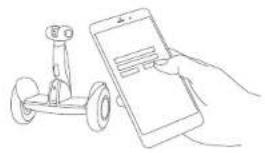
Unt I activated, the Segway S-PLUS maintains a very low riding speed and steering sensitivity, and should not be ridden. Install the Asp on your mobile device (with Bluetooth 4.0 or above), connect to the Segway S-PLUS with Bluetooth, and follow the App instructions to activate your Segway S-PLUS and follow the training procedures.
Scan the QR code to download the App (iOS 8.0 or above, Android™ 4.5 or above).
Install the App and register/login. Power ON the Seg
/S-PLUS. The
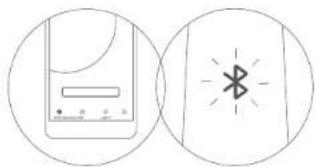
Bluetooth icon blinking indicates the Segway S PLUS is waiting for a connection
natural_image
Line drawing of a hand holding a smartphone next to a small robot (no text or symbols)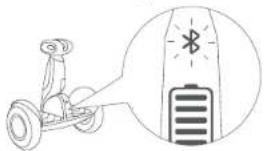
natural_image
Illustration of a person using a Go to interact with a battery, showing no text or symbols.3 Click "Vehicle" >"Search device" to connect to your Segway S-PLUS. The Segway S-PLUS will beep when the connection is successful. The Bluetooth icon will stop blinking and remain illuminated
▲ If your Segway S-PLUS intermittently sounds an alarm, stop riding and check the App (if connected) for details.
[Unreadable]
6 Charging
Do not connect the charger if the charge port or charge cable is well
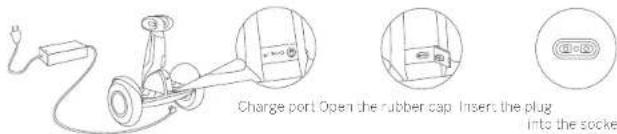
Your Segway S. PLUS is fully charged when the LED on the charger changes from red (charging) to green (trickle charge).
7 Storage Compartment
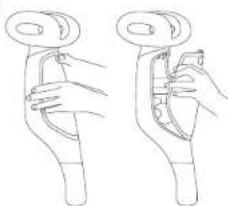
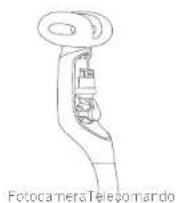
- Opening and Closing: to open, first press the button, then pull off the cover; to close, insert the bottom of the cover first, then press closed until it clicks.
-
Using: stow the remote control or camera inside the storage compartment, as shown. Use the retaining strap to hold the item securely.
-
natural_image
Line drawing of two hands holding a curved object, possibly a tool or device (no text or symbols present)The image is too blurry to recognize any text content.
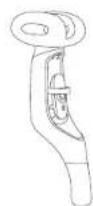
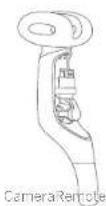
The storage compartment is water resistant, but not waterproof. It cannot prevent extensive rain or water from entering.
8 Learning to Ride
WARNING
Rider must weigh 55-220 lbs (25-100 kg) and must be 4'3'-6'8" (130-200 cm) tall.
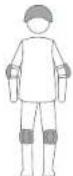
Wear an approved helmet and other protective gear to minimize any possible injury.
After activat on, the App will load you through the New Rider Tutorial. Please follow the instructions in the App and in this manual.
NOTE
You must first download the App on your mobile device. The App will load you through the New Rider Tutorial.
For your safety, the Segway S-PLUS will limit the max speed to 2.0 mph (4 km/h) until you complete the New Rider Tutorial. For the first 0.6 miles (1 km) after completing the New Rider Tutorial, the max speed will be limited to 5.2 mph (10 km/h), after which you can do able the speed limitor via the App and reach a maximum speed of Segway S-PLUS (see specifications).
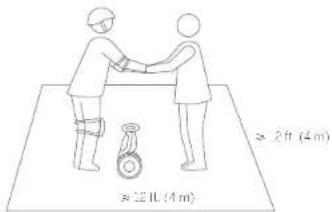
1 Go to a large open area and ask a friend to assist you on your first ride.
WARNING
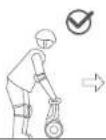
Always step on/off from the back of the Segway S-PLUS.
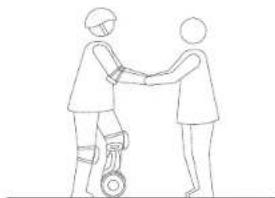
natural_image
Line drawing of two figures shaking hands, one using a wheeled device (no text or symbols)2 Lightly place one foot on the foot mat, while keeping your other foot on the ground holding your weight. Do not press the steering car with your leg.
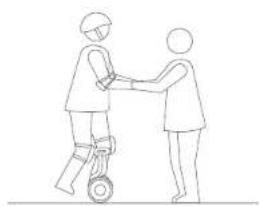
natural_image
Line drawing of two people shaking hands on a wheeled cart (no text or symbols)- Slowly transfer your weight onto the Segway S-PLUS. Too unit will beop, indicating it is now in Balance Mode. Slowly step on with your other foot.
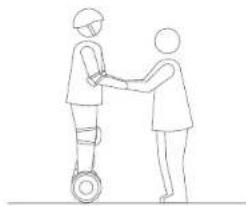
natural_image
Line drawing of two people shaking hands on a wheeled platform (no text or symbols)4 Stand with your weight evenly distributed on both feet and relax, looking straight ahead.
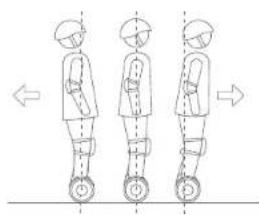
natural_image
Three sequential illustrations of a person standing on wheels, showing motion directions (no text or symbols)- Gently lean your body forward and backward to control your movement.
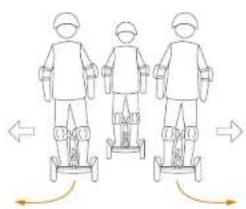
natural_image
Three identical line drawings of a person standing on a wheeled cart, with arrows indicating motion direction (no text or symbols)- To turn gently lean left or right against the steering bar.
9 Warning

You must read and understand the Warnings and Safe Fiding instructions in this manual before attempting to risk the Sogway S-PLoS. Failure to follow these warnings could result in death or serious injury due to loss of balance, traction, and/or control; collisions; and falls.
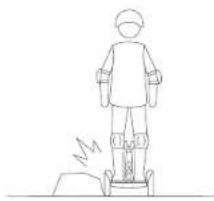
natural_image
Line drawing of a person standing on a wheeled platform with motion lines indicating movement (no text or symbols)
Avoid contacting obstacles with the tire/wheel.
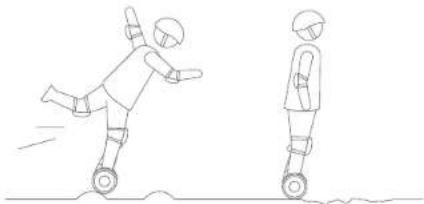
natural_image
Line drawing of two figures in motion, one kicking a ball and the other standing on a wheeled platform (no text or symbols)
When traversing small bumps or uneven terrain, maintain a moderate speed of 2-6 mph (3-10 km/h) and keeps your knees bent. Do not go too slow or too fast; otherwise you may lose control and fall.
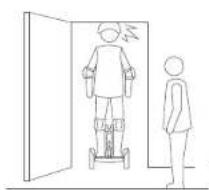
natural_image
Simple line drawing of a person standing next to a door with a person standing beside it (no text or symbols)
Watch your head when passing through doorways.
natural_image
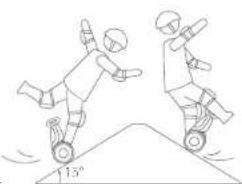
Illustration of two figures performing a high kick on a ramp, one rolling and the other standing (no text or symbols)
Avoid slices steeper than 15°.

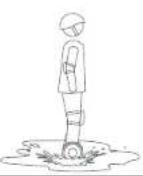
use through puddles or other bodies of water. Do not gel wet
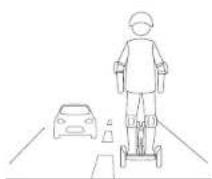

Do not ride on public roads, motorways highways, or streets.
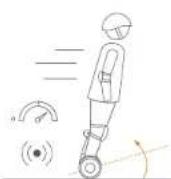

Do not accelerate when the Segway S-PLUS tilts back or sounds an alarm (speed limiter). Do not attempt to override the speed limiter.
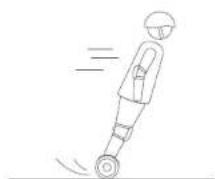

Do not accelerate or decelerate abruptly. Do not lean more than 5° or accelerate/decelerate faster than 2.5 mph/s (4 km/h/s).
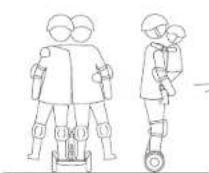

The Segway S-PLUS is for one rider only. Do not ride double or carry any passengers. Do not carry a child.
natural_image
Line drawing of two figures in a dynamic action pose, one jumping over the other on a ramp (no text or symbols)
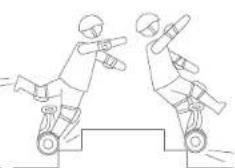
Do not ride over holes, curbs, steps, or other obstacles.
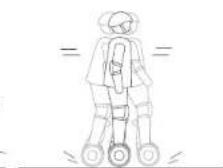

Do not rock back and forth or shift your weight abruptly.
Warning
You must react and understand the Warmings and Safe B ding instructions in this manual before attempting to ride the Segway S-PLUS. Failure to low these warnings could result in death or serious injury due to loss of balance, traction one/or control collisions and falls.
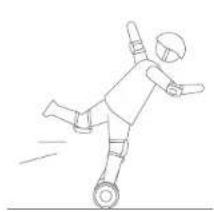
natural_image
Line drawing of a person kicking a soccer ball (no text or symbols)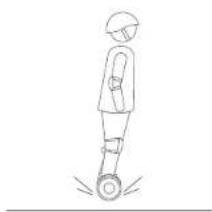
natural_image
Line drawing of a person standing on a circular object with motion arrows indicating rotation (no text or symbols)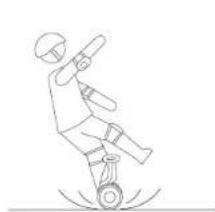
natural_image
Line drawing of a person performing a high kick on a seesaw (no text or symbols)Do not attempt stunts of any kind. Always keep both feet on the foot mats.
Maintain contact with the ground at all times. Do not jump or attempt stunts.
Do not ride on low traction surfaces (including, but not limited to, wet ground, loose sand, loose gravel and ice).
10 Features
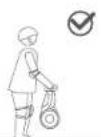
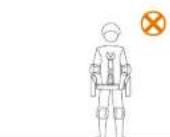
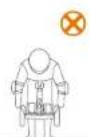
For your safety, motor power is cut off when the Segway S-PLUS is lifted off the ground in Balance Mode. When the Segway S-PLUS is put back down it will begin balancing again. Do not lift the Segway S-PLUS by the fenders or main hands, you take stretching or injuring your fingers/hands. Please lift via the slooming bar as shown above.
Power Assist Mode
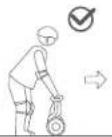
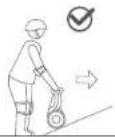
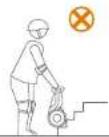
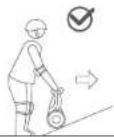
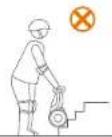
When your Segway S-PLUS is powered on, but no rider is standing on it. It is in Power Assist Mode. Steer the Segway S-PLUS across smooth surfaces using the steering bar. Do not guide it up stairs, across oatoles, over large crooked/unopen surfaces, or over other obstacles, guide your Segway S-PLUS around the obstacle or carry cover the obstacle as shown above.
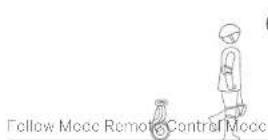
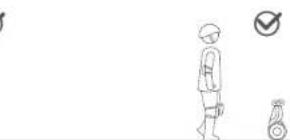
natural_image
Simple line drawing of a person standing next to a small object with a checkmark (no text or symbols)When you don't want to ride, use Follow Mode to bring your Segway 3-PI US with you. Press the Follow button on the remote control to enable or disable Follow Mode
You don't need to bend down awkwardly to steer your Segway S-PLUS around obstacles. Move the joystick on the remote control to drive your Segway S-PLUS around
WARNING
- If your mobile device or remote controls goes outside of range, the Segway S-PLUS will stop moving. However, use caution: If the Segway S-PLUS is on any type of slope, it may continue to move or even lose control and cause serious personal injury or property damage.
- Do not use Follow Mode or Remote Control Mode in crowded areas or where there is a potential risk of endangering people or property. In addition, always keep the unit in a gift while in Remote Control Mode.
• Do not use your Soigway S-PLUS to chase people, animals, cars, or anything else in Remote Control Mode.
NOTE
In Remote Control Mode: the delay, Lmax, mum speed is 3 mph (5 km/h); however you may change the max speed in the App.
11 Maintenance
Cleaning and Storing Your Segway S-F, US
Use a soft, wet cloth to wipe the mainframe can. Hard to remove dirt can be scrubbed with a toothbrush and toothpaste, then cleaned with a soft wet cloth. Scratches on plastic parts can be polished with extra fine in abrasive paper.
NOTE
Do not wash your Segway S-PLUS with alcohol, gasoline, acetone, or other corrosive/volatile solvents. These substances may damage the appearance and internal structure of your Segway S-PLUS. Do not wash your Segway S-PLUS with a power washer or high pressure hose.
WARNING
Make sure the Segway-S-PLUS is powered OFF, the charging cable is unp-jagged, and the rubber cap on the charge port is tightly scaled to closing up otherwise you may expose yourself to electric shock or damage the electronic components. Store your Segway-S-PLUS in a cool, dry plane. Do not store it outdoors for extended periods of time. Exposure to sunlight and temperature extremes (both hot and cold) will accelerate the aging process of the plastic components and may reduce battery life.
Inflation tires to 45-50 ps. Inflation both tires equally.
Battery Pack Maintenance
Do not sure or charge the battery at temperatures outside the stated limits (see Specifications). Do not discard or destroy the battery. Refer to your local laws and regulations regarding battery recycling and/or disposal.
A well maintained battery can perform well even after many miles of riding. Charge the battery after each rice and avoid cleaning the battery completely. When used at room temperature (70°F, 120°C) the battery range and performance is best, whereas using its temperatures below 32°F (37°C) can decrease range and performance. Typically, at -4°F (-20°C) range can be half that of the same battery at 70°F (29°C). Battery range will recover when temperature rises. More details are available in the top.
NOT
Typically, a fully charged battery should retain charge for 120-180 days in Standby Mode. Remember to charge the battery after each use. Completely draining the battery may cause permanent damage to the battery. Electronics inside the battery record the charge-discharge condition of the battery damage caused by over-discharge or under-discharge will not be covered by the Limited Warranty.
WARNING
Do not attempt to disassemble the battery. Risk of fire. No user serviceable parts.
WARNING
Do not rice when the ambient temperature is outside the machine operation temperature (see Specifications) because low/high temperature will limit the maximum power/torque. Doing so could cause personal injury or property damage due to slips or falls.
12 Specifications
| Item NIM350 Parameters | ||
| Dimensions | Unit | 72.7×1.0×24.4 in (577×780×620 mm) |
| Package | 23.4×19 1×13.2 in (595×760×335 mm) | |
| Weight | Payload | 55-720 lbs (25-100 kg) |
| Net | 35.9 lbs (16.3 kg) | |
| Rider | Recommended Age | 16-50 years |
| Required Jupril | 43°-6'6" (130-200 cm) | |
| Machine Parameters | Max. Speed | 12.5 mph (20 km/h) |
| Typical RangeTM | 72 miles (35 km) | |
| Max. Slope | 15" | |
| Traversole Terrain | Paventum, packed d.mL slopes < 15° obstacle < 0.4 m (2 cm) gaps < 1.2 in (3.5") | |
| Operating Temperature | 14-104°F (-10-60°C) | |
| Storage Temperature | -4-122° (-20-50°C) | |
| IP Rating | IP-54 | |
| Charge Time | 4 hours | |
| Battery | Nominal Voltage | 51 VDC |
| Max. Charging Voltage | 58.8 VDC | |
| Charging Temperature | 32-104°F (0-60°C) | |
| Nominal Capacity | 379 Wh | |
| Continuous Discharge PowerTM | 1630 W | |
| Battery Management System | Over-up tape under-voltage, short circuit, and over-heating protection, Auto-sleep and auto-wave. | |
| Motors | Nominal Power | 400×2 W |
| Max. Power | 800×2 W |
[1] Typical Range, leased while being under full power: 154 lbs (70 kg) loss: 77° (25°C), 9.3 mpa (15 km/²) average speed in power level. [2] Continuous Discharge Power, leased while under full power at 77° (25°C). The value changes with temperature and remaining battery capacity. For example, the continuous discharge power drops to \~80% of the maximum value at 10% remaining battery capacity, and the continuous discharge power drops to \~70% of the maximum value at 30° (0°C).
| Charger | Model Number | HT-A10-120W-58.8V |
| Manufacturer | ChingM(Deiling)Technology Co.,Ltd | |
| Supplier | ChingM(Deiling)Technology Co.,Ltd | |
| Nominal Power | 100 W | |
| Input Voltage | 100-240 VAC | |
| Output Voltage | 68.8 VDC | |
| Output Current | 2 A | |
| Charging Temperature | 32-104°F (0-42°C) | |
| Compliance | CF, RoHS, RFACH, UL, FCC, IC, SOC, RC | |
| Remote Control | Model Number | NMM268 |
| Rated Voltage | 3.7 VDC | |
| Input Voltage & VDC | ||
| Operating Temperature | 14-122°F (-10°C-50°C) | |
| Storage Temperature | 14-113°F (-10°C-45°C) | |
| Battery Capacity | 680 mAh |
13 Certifications
This product has been tested and passed ANSI/CAN/U_22/2.
The battery complies with UN/DOT 38.3
Federal Communications Commission (FCC) Compliance Statement for USA
This device complies with ten, 15 of the FCS rules. Operation is subject to the following two concisions: (1) this device may not cause harmful interference, and (2) this device must accept any interference received, including interference that may cause undesired operation.
NULL
This equipment has been tested and found to comply with the limits for a Class B digital device, pursuant to part 15 of the FCC Rules. These limits are designed to provide reasonable protection against the mfu interference in a residential installation. This equipment generally uses and can radiate radio frequency energy end. If not installed and used in accordance with the instructions, may cause harmful interference to radio communications. However, there is no guarantee that interference will not occur in a particular installation. If this equipment does cause harmful interference to radio or be evision reception, which can be determined by turning the equipment off and on, the user is encouraged to try to correct the interference by one or more of the following measures:
-Reorient or relocate the receiving antenna.
—Increase the separation between the equipment and receiver
Connect the equipment into an outlet on a circuit different from that to which the receiver is connected.
—Consult the dealer or an experienced radio/TV technician or help.
This equipment complies with FCC radiation exposure limits set forth for an uncontrolled environment.
Industry Canada (IC) Compliance Statement for Canada
This device complies with Industry Canada license-exemptRSS standard (s). Operation is subject to the following two conditions: (1) this device may not cause interference, and (2) this device must accept any interference, including interference that may cause undesired operation of the device.
CAN ICES-3 (2)/NMB-3(2)
Neither Segway Inc. nor Ninebot is responsible for any changes or modifications, not expressly approved by Segway Inc. or Ninebot. Such modifications could void the user's authority to operate the equipment
Scenay S-PL-US (mode N4M350) Remote Central (model N4M268)
FCC ID: 2ALS8-NOS213 FCC ID: 2ALS8-NOPLUS
IC:22636 NE5213 IC:22636 NEFLUS
Important WEEE information

WEEE Disposal and Recycling Information Correct Disposal of this product. This marking indicates that this product should not be disposal with other household wastes through out the FU.
To prevent, possible harm to the environment or human free from uncontrolled waste disposal, recycle is responsible to promote the sustainable reuse of materials resources. To return your use device, please use the return and collection systems or contact the retailer where the product was purchased. They can take this product for a environment to sale recycling.
Battery recycling information for the European Union

Batteries or packaging for batteries are labeled in accordance with European Directive 2006/96/FC and amendment 2013/56/FU concerning batteries and recyclators and waste batteries and accumulators. The Directive determines the frameworks for the return and recycling of used batteries and accumulators as applicable throughout the European Union. This label is applied to various batteries to indicate that the battery is not to be thrown away, but rather reclaimed upon end of life per this Directive.
In accordance with the European Directive 2005/65/EQ and a amendment 2013/56/EU, batteries and accumulators are labeled to indicate that they are to be collected separately and recycled at end of life. The label on the battery may also
include a chemical symbol for the metal concerned in the battery (Pb forced, Hip ion mercury, and Cd for cadmium). Users of batteries and accumulators must not dispose of batteries and accumulators as unported municipal waste, but use the collection of networks available to customers for the return, recycling, and treatment of batteries and accumulators. Customer participation is important to minimize any potential effects of batteries and accumulators on the environment and human results due to the potential presence of hazardous substances.
Before placing electrical and electronic equipment (ECC) in the waste collection stream or in waste collection facilities, the end user of equipment containing batteries and/or accumulators must remove those batteries and accumulators for separate collection.
Restriction of Hazardous Substances (RoHS) Directive
This N rebel (Changzhou) Tech Co., Ltd. product, with included parts (cables, cords, and so on) meets the requirements of Directive 2017/65/LU on the restriction of the use of certain hazardous substances in electrical and electronic equipment ("Roll IS "reast" or "Roll IS 2")
Radio Equipment Directive

Soyway Europe BV, Hong Kong B 1101 OC Amsterdam. The Nether ands. Horeby, N robot (Changzhou) Tech Co., Ltd. declares that the wireless equipment, listed in this section are in compliance with the essential requirements and other relevant provisions of Directive 2014/53/FU.
| Bluetooth | Frequency Bands(s) | 2.400C 2.483GHz |
| Max. RF Power | 100mW | |
| UWB | Frequency Bands(s) | 6.25 6.76Hz |
| Max. RF Power | 0.001mW in 500MHz |
14 Trademark and Legal Statement
Segway and the Rider Design are trademarks of Segway Inc., registered in the U.S. and other countries: Ninsbol is a trademark or Ninsbol (Hanjin), tech Co., Ltd., registered in the U.S. and other countries. Android, Google Play and the Google Play logo are trademarks of Google Inc., Apple and the Apple logo are trademarks of Apple Inc., registered in the U.S. and other countries. App Store is a service mark of App Inc., registered in the U.S. and other countries. The respective owners reserve the rights of the trademarks referred to in this manual.
The Segway S-F_US is covered by relevant patents. For patent information go to http://www.sogway.com
We have attempted to include descriptions and instructions for all the functions of the Sojour S-PLUS at the time of printing. However, due to constant improvement of product features and changes or design, your Sojour S-PLUS may differ slightly from the one shown in this document. Visit the Apple App Store (CS) or the Google Play Store (Android) to download and install the Apps.
Please note that there are multiple Segway and Ninebot models with different functions, and some of the functions mentioned herein may not be applicable to your unit. The manufacturer reserves the right to change the design and functionality of the Segway S-PLUS product and documentation without prior notice.
© 2019 Ninebot (Beijing) Tech Co. Ltd. All rights reserved
15 Contact
Contact us: If you experience issues relating to riding maintenance and safety, or errors/faults with your Segway S-PLUS.
Americas:
Segway Inc.
4 Technology Drive: Bedford, MI 3510, USA
Te:15032226000
Fax:1-603-222-5001
Full Free:1-366-473-4929
F mail Sales: customeroperation@segway.com
E-mail Service: technicalsupport@segway.com
Website: www.segway.com
Europe, Middle East and Africa:
Segway Europe B.V.
Hugh, Page 8, 1101CC. Amsterdam, The Netherlands
Email: service.service@segway.eu.com
Website: www.segway.com
APAC:
Ninebot Inc.
F mail Sales: segwayaoc@segway.com
E-mail:Service:segwayas@segway.com-service@rebc.com
Website: www.segway.com www.nebeol.com
Have your Sogway S-PLUS's series number on hand when contacting Sogway.
You can find your serial number on the said plate on the endorsement of your Scenario S-PLUS
or in the App under More Settings -> Basic Information
Appendix 1: Using the Camera (sold separately)
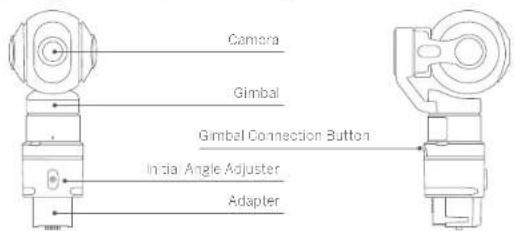

Camera
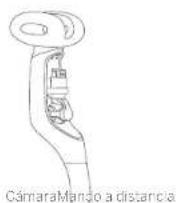
Take pictures and record video; wide angle images; remote control, real-time preview and transmiss on with Apo; high quality video at 1920/1080/60fps compatible with TFlash (Micro SD) care.

Gimbal
High accuracy three-axis stabilization

Adapter
Mount the camera on your Sogway S-PLUS and adjust the initial angle.
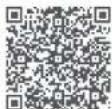
Scan QR code for
Together with the camera, your Segway S-PLUS can take photographs and videos. Use your Segway S-PLUS like a drone camera close to the ground to take engaging, active photos and videos.
In the default mode, use the remote control to drive your Segway S PLUS take photos and record video. You can also have the camera follow the remote control intelligently, or fix the camera in a specific direction while your Segway S PLUS moves around.
There is more fun to explore Go get your personal photographed
Appendix 2: Using Your Segway S PLUS + Camera
natural_image
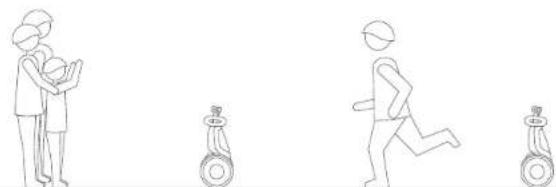
Line drawing of four stick figures in various poses: standing, running, and holding a child (no text or symbols)- Drive your Segway S-PLUS in Remote Control Mode for real-time photos and videos, or let you. Segway S-PLUS drive itself in Fo low Mode.
natural_image
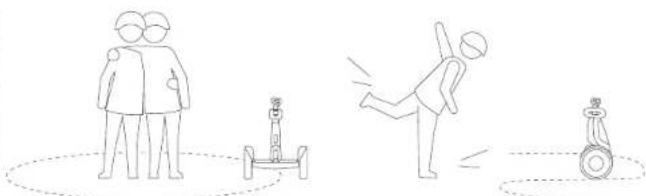
Three stick figures demonstrating different physical poses: standing, swinging a cart, and rolling a dog (no text or symbols)2 Path shooting using the Aop's advanced functions, the user can manually set a path or automatically by record a path by riding the Segway S PLUS or using the remote control to drive the Segway S PLUS. Then simply replay the path and record amazing video
SEGWAY S-PLUS
MODE D'EMPLOI
The manufacturer reserves the right to make changes to the Segway S-PLUS, release firmware updates, and update this manual at any time. Visit www.segway.com to download the latest user materials. You must install App to follow the New Jersey Tutorial, allows your Segway S-PLUS, and collect the latest updates and safety instructions.
www.segway.com
natural_image
Line drawing of two wheeled electric scooters with wheels and a labeled component (no text or symbols on the diagram itself)AVERTISSEMENT!
natural_image
Line drawing of a hand holding a smartphone next to a small wheeled vehicle (no text or symbols)natural_image
Illustration of a wheeled robot with a close-up of its head and battery, no text or symbols present.natural_image
Line drawing of two hands holding a curved object, possibly a tool or device (no text or symbols present)?
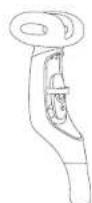
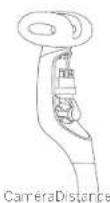
natural_image
Line drawing of two people shaking hands, one wearing a helmet and the other with a wheelchair (no text or symbols)natural_image
Line drawing of two people shaking hands with a wheeled device (no text or symbols)natural_image
Three identical line drawings of human figures standing on wheels, with arrows indicating motion direction (no text or symbols)natural_image
Line drawing of two people shaking hands on a wheeled platform (no text or symbols)natural_image
Three identical line drawings of a person standing on a wheeled cart, with arrows indicating motion direction (no text or symbols)natural_image
Simple line drawing of a person standing on a platform with a lightning bolt symbol (no text or labels)natural_image
Line drawing of two figures: one kicking a high kick, the other standing on a high kick (no text or symbols)natural_image
Two figures in action poses on a slope, one jumping to reach the ground and the other standing (no text or symbols)natural_image
Line drawing of two figures in dynamic motion, one jumping on a ramp and the other on a block (no text or symbols)natural_image
Line drawing of a person kicking a ball with motion lines (no text or symbols)14 Technology Drive, Bedford, NH 03110, Frats. Unis
Té: 1 503 222 6000
Fax 1-503-222-6301
Numero vert. 1-866-473-4929
E-mail:ventes:customeroperation@segway.com
E-mail:entretien.technicalsupport@segway.com
Site Web: www.segway.com
natural_image
Line drawing of four human figures in different poses: standing, running, and two using a go往 (no text or symbols)natural_image
Three line drawings showing human figures in various positions: standing, a small robot, and a person throwing a ball (no text or symbols)<15% closing price, break
The author of the Author has been held. The above stock was held by the AUM and the
natural_image
Line drawing of a hand holding a smartphone next to a small robot (no text or symbols)natural_image
Illustration of a motor with a battery icon and magnified view of its charging cable (no text or symbols)natural_image
Line drawing of a car with a plug and wheels, no text or symbols presentnatural_image
Line drawing of two hands holding a circular object, possibly a device or tool (no text or symbols present)The image is too blurry to recognize any text content.
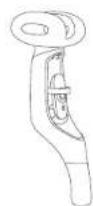
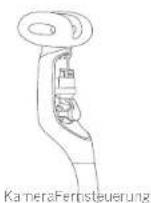
natural_image
Three sequential illustrations of a person standing on wheels, showing motion direction (no text or symbols)natural_image
Three identical line drawings of a humanoid robot with wheels, showing motion direction arrows (no text or symbols)natural_image
Line drawing of a person standing on a robot with motion lines indicating speed (no text or symbols)natural_image
Line drawing of two figures in motion, one kicking a high kick and the other standing on a low kick (no text or symbols)natural_image
Illustration of two people skating on a slope, one rolling down the ground and the other standing upright (no text or symbols)natural_image
Two figures in dynamic poses on a platform, one climbing and the other holding a stick (no text or symbols)natural_image
Line drawing of a person kicking a ball with motion lines (no text or symbols)natural_image
Simple line drawing of a person standing next to a checkmark and a small object (no text or symbols)E Mail Service: technicalsupport@segway.com
Website: www.segway.com
natural_image
Line drawing of four human figures in different poses: standing, running, sitting on a seesaw, and walking (no text or symbols)natural_image
Line drawings of four different physical poses: standing human, swing stick, falling figure, and standing balance beam (no text or symbols)ATTENZIONE!
2) Bland's home. Petreel reversaled all publican or per informarei Segway 5-7 USdernandnerelacosticans.
natural_image
Line drawing of a hand holding a smartphone next to a small wheeled robot (no text or symbols)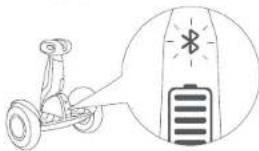
natural_image
Line drawing of two hands performing a manual task on a curved object, no text or symbols present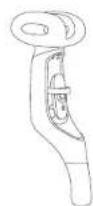
natural_image
Line drawing of two people shaking hands, one wearing a wristband and the other in casual attire (no text or symbols)natural_image
Line drawing of two people interacting, one holding a small object on a wheeled platform (no text or symbols)natural_image
Line drawing of two people shaking hands on a wheeled platform (no text or symbols)natural_image
Three identical line drawings of human figures standing on wheels, with arrows indicating motion direction (no text or symbols)natural_image
Three identical line drawings of a person standing on a wheeled cart, each with directional arrows indicating motion (no text or symbols)natural_image
Line drawing of a person standing on a mobility device with motion lines indicating speed (no text or symbols)natural_image
Line drawing of two figures in motion, one kicking a high kick and the other standing on a seesaw (no text or symbols)natural_image
Illustration of two people skating on a track with one rolling down the angle (no text or symbols)natural_image
Line drawing of a person kicking a ball with motion lines (no text or symbols)Mccalita Power Assist
14 Technology Drive, Bedford, NH 03110, USA
Tel:1 603 222 6000
Fax:16032226001
Numero gratuito: 1-865-473-4929
F-mail: Verdite: customeroperation@segway.com
E-mail Manipenzione:technicalsupport@segway.com
Silo Web: www.scsway.com
Europa, Medio oriente e Africa:
Segway Europe B.V.
Hogchilway 8, 20100, Amsterdam. The Netherlands
F-mail Service:service@segway.eu.com
Sito Web: www.segway.com
APAC:
Ninebot Inc.
F-mail Verdite: segwayspec@segway.com
natural_image
Line drawing of four human figures in different poses: standing, holding a child, walking, and running with no visible text or symbols.natural_image
Illustration of three different physical activities: standing human, falling object, and standing motor (no text or symbols)natural_image
Line drawing of a hand holding a smartphone next to a small robot (no text or symbols)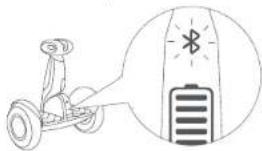
natural_image
Illustration of a person using a Goerobike with a battery icon showing an LED (no text or symbols present)natural_image
Line drawing of two hands holding circular objects, one with a handle and the other with a handle (no text or symbols)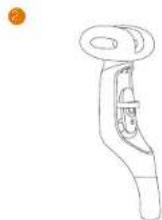
natural_image
Three sequential line drawings of a person in standing pose with wheels, no text or symbols presentnatural_image
Three identical line drawings of a person standing on a scooter, with arrows indicating motion direction (no text or symbols)natural_image
Line drawing of a person standing on a wheeled platform with a lightning bolt symbol nearby (no text or labels)
natural_image
Line drawing of two figures in motion, one kicking a baton and the other standing on a wheeled platform (no text or symbols)
natural_image
Two figures in action poses on a platform, one jumping to reach the ground and the other standing (no text or symbols)
natural_image
Line drawing of two figures in dynamic motion, possibly a robot or mechanical device, on a platform (no text or symbols)
natural_image
Line drawing of a person kicking a ball with motion lines indicating speed (no text or symbols)
natural_image
Line drawing of four sequential human figure poses with standing, running, and walking positions (no text or symbols)natural_image
Three stick figures in different poses: standing, using a robot, and throwing a ball (no text or symbols)natural_image
Line drawing of a two-wheeled robotic vehicle with wheels and head-mounted sensors (no text or symbols)▲경고!
natural_image
Line drawing of a hand holding a smartphone next to a small wheeled robot (no text or symbols)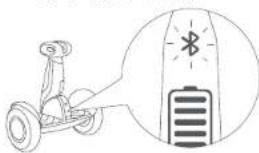
natural_image
Line drawing of two figures shaking hands, one wearing a helmet and the other with a wristband (no text or symbols)natural_image
Line drawing of two people shaking hands on a wheeled cart (no text or symbols)natural_image
Line drawing of two people shaking hands on a wheeled platform (no text or symbols)natural_image
Three identical line drawings of human figures standing upright, each with a dashed vertical axis and directional arrows (no text or symbols)natural_image
Three identical line drawings of a person standing on a scooter, each with directional arrows indicating motion (no text or symbols)natural_image
Simple line drawing of a person standing on a platform with a lightning bolt symbol indicating sound (no text or labels)natural_image
Line drawing of two figures in motion, one kicking a ball and the other standing on a wheeled platform (no text or symbols)natural_image
Two cartoon figures performing a high kick on a slope, one jumping to reach the ground and the other rolling down (no text or symbols)natural_image
Two figures in dynamic poses on a platform, one jumping and the other holding a tool (no text or symbols)natural_image
Line drawing of a person kicking a ball with motion lines (no text or symbols)14 technology Drive, Bedford, NH 0311D, USA
natural_image
Line drawing of four human figures in different poses: standing, running, and standing with a child, with no text or symbols present.natural_image
Line drawings of three different physical poses: standing, a mobility device, and a person kicking a ball (no text or symbols)natural_image
Line drawing of a hand holding a smartphone next to a small robot (no text or symbols)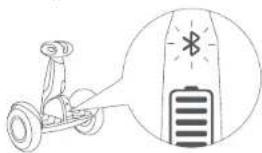
natural_image
Line drawing of two people shaking hands, one wearing a cap and the other with a bandaged leg (no text or symbols)natural_image
Line drawing of two people shaking hands with a wheeled device (no text or symbols)natural_image
Line drawing of two people shaking hands on a wheeled platform (no text or symbols)natural_image
Three identical line drawings of a person standing upright in a row, with arrows indicating left and right motion directions (no text or symbols)natural_image
Three identical line drawings of a person standing on a wheeled platform with directional arrows indicating motion (no text or symbols)natural_image
Simple line drawing of a person standing on a wheeled platform with motion lines indicating speed (no text or symbols)
natural_image
Line drawing of two figures in motion, one standing and one standing on a platform (no text or symbols)
natural_image
Simple line drawing of a person standing next to a door with a person standing beside it, showing no text or symbols.
natural_image
Illustration of two people skating on a ramp, one rolling down the incline and the other standing upright (no text or symbols)
natural_image
Line drawing of a person kicking a ball with a stick (no text or symbols)natural_image
Line drawing of four stick figures in various poses: standing, running, and standing with a child (no text or symbols)natural_image
Line drawing showing three stick figures: standing, using a scooter, and swinging a ball (no text or symbols)
- Thanks for choosing Segway S-PLUS
- Riding Safety
- Packing List
- Diagram
- ▲WARNING
- Assembling Your Segway S-PLUS
- First Ride
- Install the App and register/login. Power ON the Seg
- Charging
- Storage Compartment
- Learning to Ride
- WARNING
- NOTE
- Warning
- Features
- Maintenance
- Certifications
- Federal Communications Commission (FCC) Compliance Statement for USA
- Industry Canada (IC) Compliance Statement for Canada
- Important WEEE information
- Battery recycling information for the European Union
- Restriction of Hazardous Substances (RoHS) Directive
- Radio Equipment Directive
- Trademark and Legal Statement
- Contact
- Americas:
- Segway Inc.
- Europe, Middle East and Africa:
- Segway Europe B.V.
- APAC:
- Ninebot Inc.
- SEGWAY S-PLUS
- MODE D'EMPLOI
- Mccalita Power Assist
- Europa, Medio oriente e Africa:
Brand : SEGWAY
Model : SPlus
Category : Self-balancing scooter