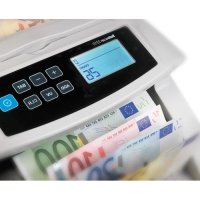
2210 - Coin and bill counter Safescan - Free user manual and instructions
Find the device manual for free 2210 Safescan in PDF.



| Product Type | Coin and Banknote Counter |
| Brand | Safescan |
| Model | 2210 |
| Counting Speed | 1000 banknotes/minute |
| Power Supply | 230 V, 50 Hz |
| Power Consumption | max. 70 W |
| Fuse | 2 A slow-blow, 250 V |
| Banknote Size (min) | 50 x 100 mm |
| Banknote Size (max) | 90 x 190 mm |
| Batch Range | 1 to 100 banknotes |
| Main Functions | Counting, UV detection, IR detection, banknote size detection, Add function (ADD), Batch function (BATCH), sorting |
| Counting Modes | Automatic and manual |
| Display | Main LCD screen (counting) and secondary screen (verification) |
| Security | Counterfeit detection (UV, IR, size), double banknote detection |
| Maintenance | Regular cleaning with brush or soft cloth; dusting of sensors; cleaning UV system with cotton swab and alcohol |
| Available Settings | UV sensitivity, IR sensitivity, size detection; hopper position; factory reset |
| Error Codes | EA0–EA5 (jam), EA6 (control panel), A (UV), B (MG – model 2250), C (IR), D (size), E (length) |
| Warranty | Contact Safescan (www.safescan.com) |
| Box Contents | Unit, power cable (EUR/UK/SWITZERLAND), dust cover, cleaning kit, user manual |
Frequently Asked Questions - 2210 Safescan
User questions about 2210 Safescan
0 question about this device. Answer the ones you know or ask your own.
Ask a new question about this device
Download the instructions for your Coin and bill counter in PDF format for free! Find your manual 2210 - Safescan and take your electronic device back in hand. On this page are published all the documents necessary for the use of your device. 2210 by Safescan.
USER MANUAL 2210 Safescan
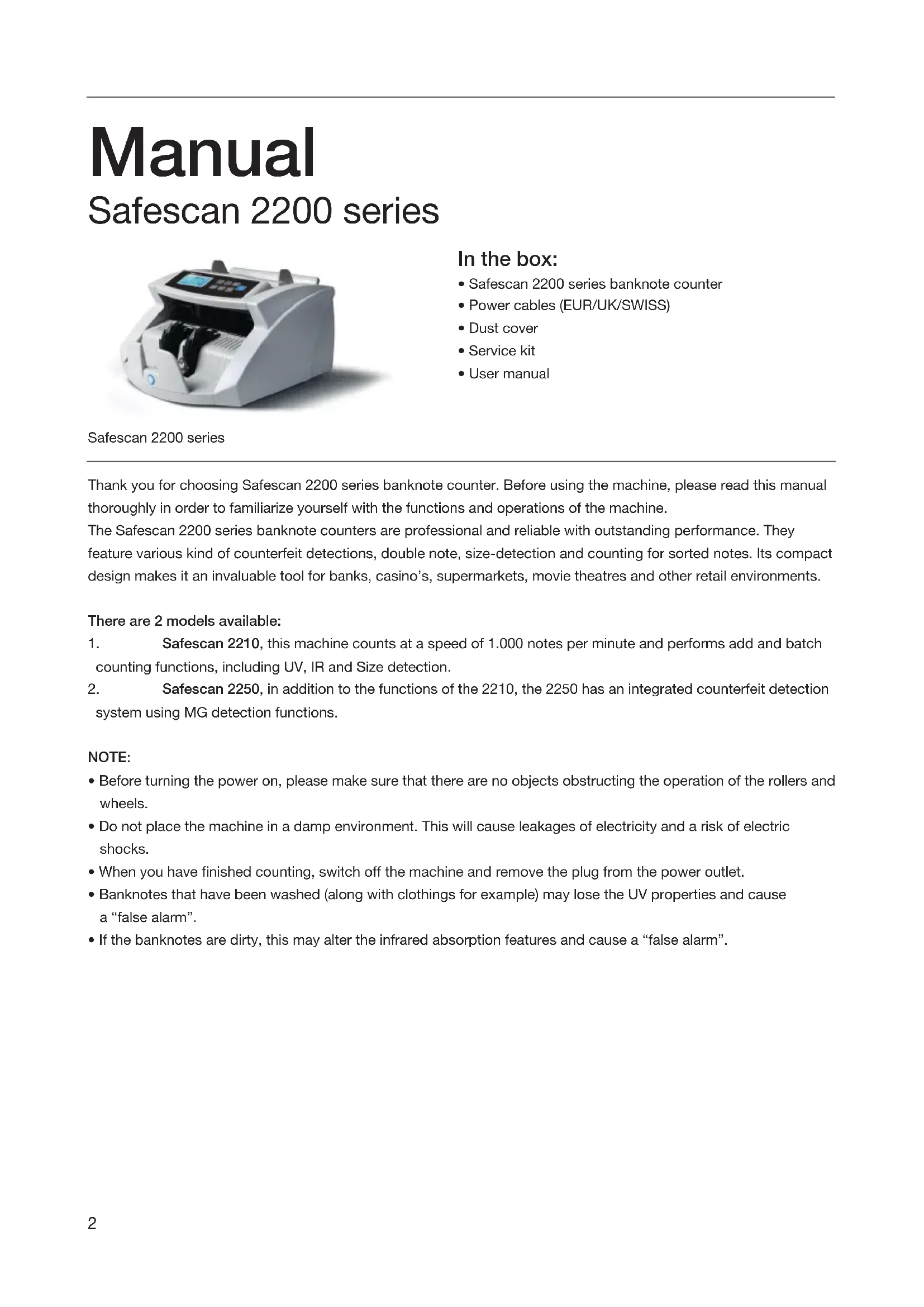
Manual Safescan 2200 series
natural_image
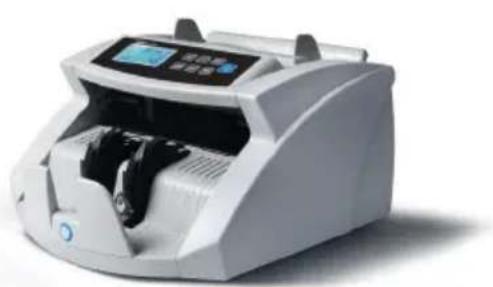
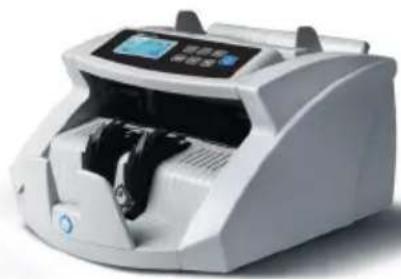
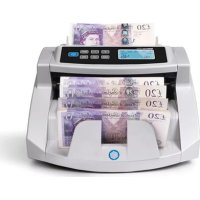
White digital currency counter with digital display and control buttons (no visible text or symbols)Safescan 2200 series
In the box:
• Safescan 2200 series banknote counter
• Power cables (EUR/UK/SWISS)
- Dust cover
- Service kit
- User manual
Thank you for choosing Safescan 2200 series banknote counter. Before using the machine, please read this manual thoroughly in order to familiarize yourself with the functions and operations of the machine.
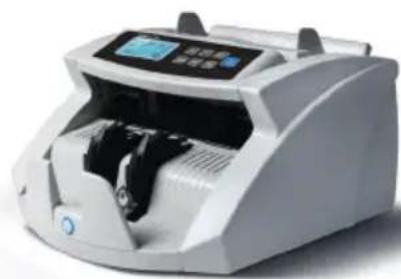
The Safescan 2200 series banknote counters are professional and reliable with outstanding performance. They feature various kind of counterfeit detections, double note, size-detection and counting for sorted notes. Its compact design makes it an invaluable tool for banks, casino's, supermarkets, movie theatres and other retail environments.
There are 2 models available:
- Safescan 2210, this machine counts at a speed of 1.000 notes per minute and performs add and batch counting functions, including UV, IR and Size detection.
- Safescan 2250, in addition to the functions of the 2210, the 2250 has an integrated counterfeit detection system using MG detection functions.
NOTE:
- Before turning the power on, please make sure that there are no objects obstructing the operation of the rollers and wheels.
- Do not place the machine in a damp environment. This will cause leakages of electricity and a risk of electric shocks.
- When you have finished counting, switch off the machine and remove the plug from the power outlet.
- Banknotes that have been washed (along with clothings for example) may lose the UV properties and cause a "false alarm".
- If the banknotes are dirty, this may alter the infrared absorption features and cause a "false alarm".
1.0 GENERAL PARTS & CONTROLS
1.1 Parts of the machine
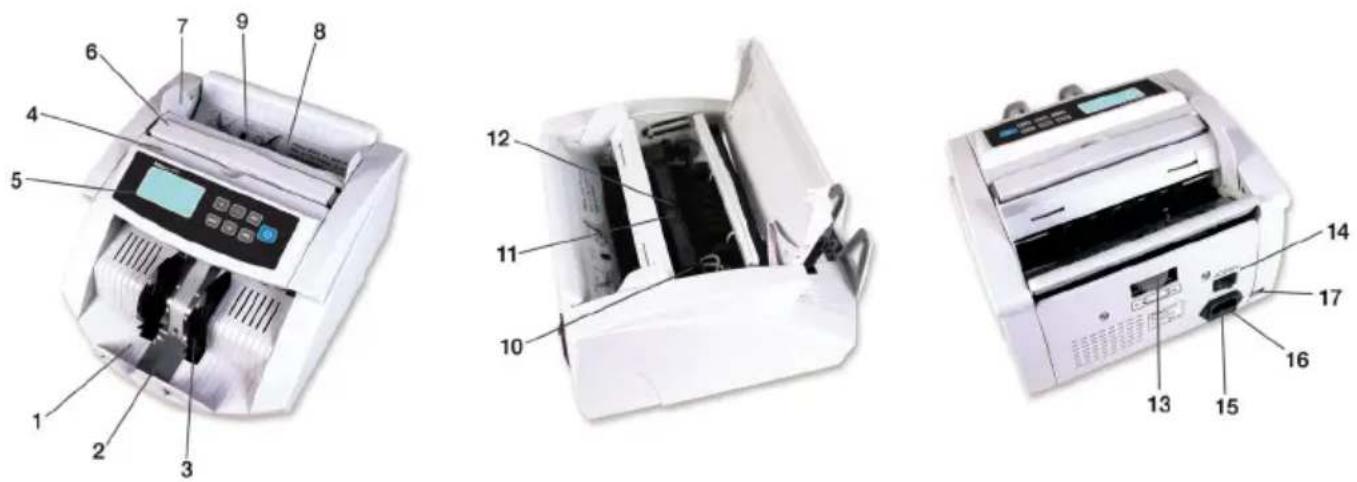
- Stacker
- Stacker sensors
- Stacker wheels
- Top cover
- Control panel
-
Handle
-
Banknote guides
- Hopper
- Hopper sensor
- UV LCD light holder
- UV LCD lights
-
UV sensor
-
Banknote thickness adjustment wheel
- Power switch
- Power cable inlet
- Fuse
- External display connector
1.2 Control panels

General items
- LCD screen
- [START] button: Press to start counting and clear previous counting results. Press and hold for 3 seconds to (in)activate the automatic start stop function.
- [BAT] button. Press to activate batch function.
a. 1st press = Set batch quantity to 100 banknotes
b. 2st press = Set batch quantity to 50 banknotes
c. 3st press = Set batch quantity to 20 banknotes
d. 4st press = Set batch quantity to 10 banknotes
e. 5st press = Set batch quantity to 0 banknotes, this inactivates the batch function
Press and hold for 3 seconds to set the sensitivity of the banknote size detection.
- [+] button. Press to adjust the batch number. Press and hold till a beep sounds to return to default factory settings.
-
[-] button. Press to adjust the batch number. Press and hold for 3 seconds to (in)activate adding counting results of suspected banknotes to the count total.
-
[ADD] button. Press to activate the ADD function. Press and hold for 3 seconds to set the IR detection sensitivity level.
- [UV] button. Press to (in)activate UV (ultra violet) counterfeit detection. Press and hold for 3 seconds to set the UV detection sensitivity level.
Product specific items
2210
- [CLEAR] button. Press to clear count results & Batch settings.
2250
-
[START] button. Press to clear previous counting result.
-
[MG] button. Press to (in)activate MG (magnetic features) counterfeit detection. Press and hold for 3 seconds to set the MG detection sensitivity level.
1.3 LCD screen

| 10. | UV detection indication | ||
| 11. | MG | detection | indication |
| 12. | ADD | (cumulative | counting) |
| 13. | Batch | counting | indication |
| 14. | Batch | count | number |
| 15. | Previous | count | number |
| 16. | Current | counting | results |
2.0 OPERATION
Connect the power cord (enclosed) with the machine, then connect the power cable to a power socket and switch. On the machine.
When powered On, the machine will start making a self-test to check if all functions are working well. During this self-test the machine will beep, all indication lights will light up and the LCD screens are displaying the model number.
After 3 seconds the screens will display '0' and all active function indicators will light up.
The machine is now ready for usage.
Note: The default settings of the machines are:
2210
Add & Batch function: Off, UV detection: On, Counting mode: automatic
2250
Add & Batch function: Off, UV + MG detection: On, Counting mode: automatic
If the machine found a problem during the self-test, an error code will be shown on the main LCD screen. Please refer to chapter 7.0 for troubleshooting and solve the problem.
3.0 COUNTING
3.1 Counting modes
This machine has two counting modes: automatic and manual.
3.1.1 Automatic (default)
Press and hold the [START] button until [COUNT] screen displays "YES", indicating that the machine is now in automatic counting mode. Press [START] again to confirm the selection.
Directly after placing banknotes on the hopper the machine will start counting automatically.
3.1.2 Manual
Press and hold the [START] button until the [COUNT] screen displays "NO", indicating that the machine is now in manual counting mode. Press [START] again to confirm the selection.
When in manual mode, the machine will start counting after pressing the [START] button.
Note: next time you power on the machine, it will be set in the counting mode you have last chosen.
3.2 Correct method for inserting a stack of banknotes
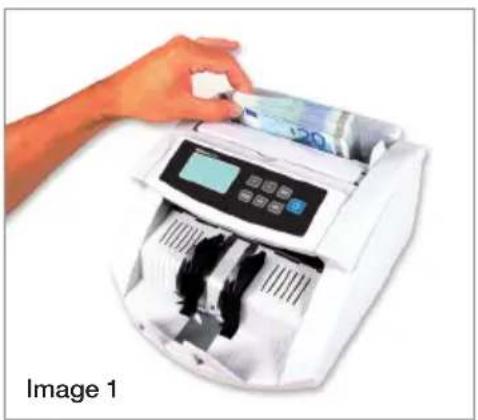
Place a stack of banknotes in the center of the hopper and start counting. Place the banknotes between the banknote guides as shown in (Image 1) below. Then, swiftly, push the banknotes backward on the hopper plate (Image 2).
natural_image
Hand inserting a card into a digital counting machine (no visible text or symbols)
natural_image
Hand using a digital currency counter to add 20 euro banknotes (no text or symbols visible on the device)3.3 Counting results
The [COUNT] screen will display the number of banknotes counted. When your first count is completed, remove the counted notes from the stacker and begin a second count. The quantity of notes already counted, will shift from the [COUNT] screen to the [CHECK] screen and the [COUNT] screen will now display the quantity of the second count. This enables the user to check whether the machine is counting accurately.
4.0 ADD AND BATCH FUNCTIONS
4.1 ADD-function
The Add-function is for adding counting results. Using the Add-function, you can add new counting results to previously made counting results. This function is useful if you need to count more banknotes then the capacity of the hopper allows. The counting results will be displayed on the main digital screen.
If you press the [ADD] button once, the machine 'beeps' and the Add-indicator will light up, indicating the adding function is activated. Press [ADD] again to switch Off the Add-function. The Add-indicator will switch Off.
Note: after power off, the machine will start up with the Add-function: Off
4.2 BATCH-function
With the Batch-function you can pre-set the machine to count the exact quantity of notes that you require.
Press [BAT] to pre-set the batch number (100, 50, 20, 10 sheets). The batch indicator will light up, indicating the batch-function is active.
Press the [+] or [-] button to modify the batch number with 1 sheet. Hold the [+] or [-] button to modify the batch number per 5 sheets.
After you have finished the pre-setting procedure, put the banknotes into the hopper. The unit will count the banknotes until it reaches the quantity you have pre-set.
If the last stack of banknotes contains less sheets than the pre-set batch number, the [COUNT] screen will flash continuously when the machine has finished counting.
Note: after power off, the machine will start up with the Batch-function: Off
4.3 Using the Add- & Batch-function together
It is possible to count banknotes with both Add- & Batch-functions active. To use these functions together, activate the Add-function by pressing the [ADD] button and then pre-set the desired batch quantity.
During the counting process, the [COUNT] screen will show the total counted quantity. Every time the pre-set batch quantity is reached, the machine will stop counting. After removing the banknotes from the stacker, the machine will continue the counting.
The [COUNT] screen will flash continuously if the end result of the count is not a multiplied number of the pre-set batch quantity. When new banknotes are added to the hopper, the machine will continue counting to reach the pre-set batch quantity.
4.4 Sort count function
The 2200 series banknote counters are equipped with a size detection function. This function can help to prevent wrong counting results in case of one or more different banknotes which were mixed in the sorted banknotes by mistake. The machine will alarm if a banknote with a different size than the first counted banknote is detected.
Following the alarm, on the [CHECK] screen "D" will be blinking. The machine will automatically stop counting. The banknote of the different denomination will be the last counted banknote in the stacker.
5.0 COUNTERFEIT DETECTION
5.1 Detection methods
A. UV detection
If the machine detects a banknote with suspected UV properties, an alarm will sound and the [CHECK] screen will blink 'A'. Counterfeit notes reflect UV light, making the surface of the note shine very bright. Genuine banknotes absorb ultraviolet light.
B. MG detection (only available for 2250 model)
If the machine detects a banknote with suspected MG properties, an alarm will sound and the [CHECK] screen will blink 'B'. Most genuine banknotes are printed using magnetic ink. If the machine detects a note without magnetic ink, it will consider it as counterfeit.
C. IR detection
Using this detection system, an alarm will sound and the [CHECK] screen will blink 'C' if counterfeit or folded notes appear.
5.2 Adjusting the sensitivity of the counterfeit detection
The Safescan 2200 series are equipped with adjustable sensors. This makes it possible to fine-tune the sensors sensitivity to make the machine ready for every currency or banknote conditions.
Note: fine tuning the sensitivity is only needed when false counterfeit alarms occur. Before changing the sensitivity levels, please first check chapter 7.0.
5.2.1 Adjusting the UV sensitivity
Press and hold the [UV] button until the [CHECK] screen will display "Axx", which means that the UV system is ready for adjustment. You can now increase or reduce the sensitivity by pressing the [+] or [-] button. Press the [START] button to confirm the adjustment made.
5.2.2. Adjusting the MG sensitivity (only available for 2250 model)
Press and hold the [MG] button until the secondary LCD screen will display "Bxx", which means that the MG system is ready for adjustment. You can now increase or reduce the sensitivity by pressing the [+] or [-] button. Press the [START] button to confirm the adjustment made.
5.2.3 How to adjust the IR sensitivity
Press and hold the [ADD] button until the secondary LCD screen will display "Cxx", which means that the IR system is ready for adjustment. You can now increase or reduce the sensitivity by pressing the [+] or [-] button. Press the [START] button to confirm the adjustment made.
Note: it is possible to pre-set the machine to add suspect notes to the count results.
To switch between the 2 options: Press and hold the [-] button until the [COUNT] screen displays: U00 or U01.
Press the [START] button to confirm your selection.
U00= No adding of suspected banknotes to the count total
U01= Add suspected notes to the count total
5.3 Adjusting the sensitivity of the Size detection
Press and hold the [BAT] button until the [COUNT] screen displays [d00X]. You can now increase or reduce the sensitivity by pressing the [+] or [-] button. Press the [START] button to confirm the adjustment made.
6.0 RETURN TO THE FACTORY DEFAULT SETTINGS
Press and hold the [+] button until you hear a 'beep' indicating the settings are restored. The machine is now returned to the default settings.
7.0 ERROR MESSAGES AND SOLUTIONS
7.1 Messages displayed on the [CHECK] screen
A. UV detection error
-
Remove the banknote from the stacker and press [START] to continue your count.
-
Try to count the suspected banknote again. Ensure that the unit is removed from any strong light source
-
If the machine gives an alarm signal when it should not, lower the sensitivity level (for details see chapter 5.2.1).
-
If step 3 does not solve the problem it can be possible the UV sensors needs to be cleaned from dust (for details see chapter 8.3).
Note: banknotes that have been washed may lose their UV properties and cause a “false alarm”.
B. MG detection error
- Remove the banknote from the stacker and press [START] to continue your count.
- Try to count the suspected banknote again.
- If the machine emits an alarm signal when it should not, lower the sensitivity level (for details see chapter 5.2.2).
C. IR detection error
- Remove the banknote from the stacker and press [START] to continue your count.
- Check to see if the banknote is folded or if 2 banknotes are stuck together.
- Ensure that the unit is removed from any strong light source.
- Try to count the suspected banknote again.
- If the machine gives an alarm signal when it should not, lower the sensitivity level (for details see chapter 5.2.3).
- If the machine continues to emits an alarm signal when it should not, it can be necessary to adjust the hopper position (for details see chapter 7.3).
D. Size detection error
- Remove the banknote from the stacker and press [START] to continue your count.
- If the banknote is not from a different denomination, check if the banknotes are folded or damaged causing the size detection alarm.
- If the machine gives an alarm signal when it should not, lower the sensitivity level (for details see chapter 5.3).
E. Banknote length error
- Remove the banknote from the stacker and press [START] to continue your count.
- Check to see if the banknote has entered the machine non-horizontally or not in the centre.
- Check to see if the banknote is damaged.
- Try to count the suspected banknote again, make sure to insert the banknote centred in the middle using the banknote guides.
7.2 Messages displayed on the [COUNT] screen
EA0 - EA5
- Power Off the machine and disconnect the power cable from the power socket.
- Remove all banknotes. Check if there are any obstructions in the machine.
- Clean the machine using a dry brush and/or and an air duster to remove dust from the sensors (see chapter 8.0 for details).
EA6 Error in the control panel
Contact Safescan for assistance: www.safescan.com.
7.3 Adjusting the hopper position
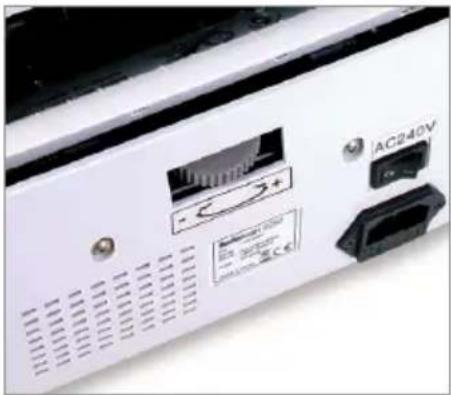
The position of the hopper adjusting wheel has already been set in optimal position in the factory. When unnecessary counting errors occur (i.e. C or F), it can be needed to adjust the hopper position with the banknote thickness adjustment wheel to optimize the banknote transport (for details see chapter 1.1).
Adjust the hopper position:
- If notes cannot be counted smoothly, increase the distance. Turn the wheel clockwise (-) to increase the distance.
- If the machine stops and displays the error codes C or F, decrease the distance. Turn the wheel counter clockwise (+) to decrease the note thickness distance.
natural_image
Close-up of a white electronic device with AC240V label and ports (no readable text or symbols beyond labels)Please note:
The adjustment screw is very sensitive, make only minor adjustments.
8.0 MAINTENANCE
8.1 Clean the machine periodically with a brush or soft cloth
- Power off the machine and disconnect the power cable from the power socket and lift the top cover (where the handle lays) to gain access to the interior.
- Additionally, clean all dust from the machine and the sensors in the unit using a dry brush and/or and an air duster to avoid paper particles or dust from sticking to the sensors.
- The glass surface of the sensors may also be wiped with a soft cloth or cotton tip with some alcohol.
8.2 How to adjust the position of the hopper
If the settings of the hopper are wrong, the machine will not count accurately or will give counting errors. You can correct this by adjusting the hopper adjustment screw (for details see chapter 7.3).
8.3 Cleaning the UV detection system
- Power Off the machine and disconnect the power cable from the power socket and lift the top cover (where the handle lays) to gain access to the interior.
- Flip open the top cover of the machine.
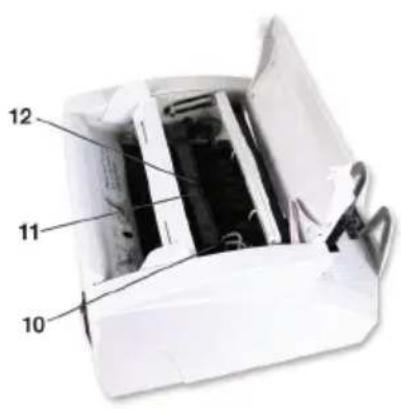
- Turn out the UV sensor holder. This is possible by pulling the holder out the click connection, then gently guide the holder upward.
- The UV sensor is positioned in the middle of the UV sensor holder. Remove all dust from the UV sensors and UV LEDs.
- Turn the holder inward and click it back in place.
- Close the top cover.

natural_image
Hand opening a white portable radio into a slot (no text or symbols visible)
natural_image
Hand inserting a black plastic component into a white air conditioner unit (no text or symbols visible)
natural_image
Close-up of hands operating a printer with a yellow tool inserted (no visible text or symbols)9. TECHNICAL SPECIFICATION
Dimension (l x w x h) : 292 x 246 x 178 mm
Weight : 5.7 kg
Power : 230V, 50 Hz
Fuse : 2A slow, 250V
Power consumption : max. 70 Watt
Banknote size : min. 50 x 100 mm
: max. 90 x 190 mm
Batch range : 1–999
10. WARRANTY
Warranty procedure
Contact Safescan for assistance: www.safescan.com

This product is in compliance with the essential requirements and other relevant provisions of the applicable European directives. The Declaration of Conformity (DoC) is available at www.safescan.com

If possible, bring the machine to a recycling centre after usage. Do not throw away the product with the household waste.
Handleiding
Safescan 2200 series

natural_image
White digital currency counter with digital display and control buttons (no visible text or symbols)In de verpakking:
- Safescan 2200
• EU, Zwitserse en UK stroomkabel - Dust cover
• Service kit - Handleiding
Safescan 2200 series

natural_image
Close-up of a white electronic device with AC240V power supply and ports (no readable text or symbols)Opgelet:
natural_image
Hand opening a white paper heater into a black tray (no text or symbols visible)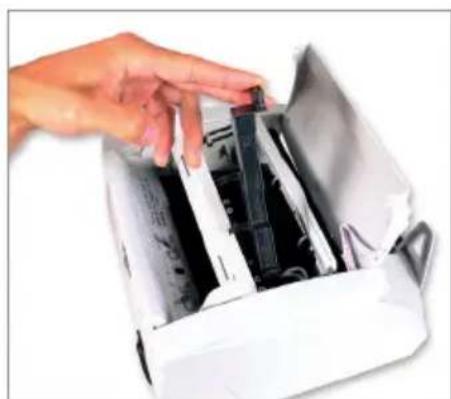
natural_image
Hand inserting a card into a white paper printer case (no text or symbols visible)
natural_image
Close-up of hands operating a printer with a yellow tool, no visible text or symbolsSafescan 2200 series
natural_image
White digital currency counter with digital display and control buttons (no visible text or symbols)In the box:
Safescan 2200 series


natural_image
Hand inserting a card into a digital counting machine (no visible text or symbols)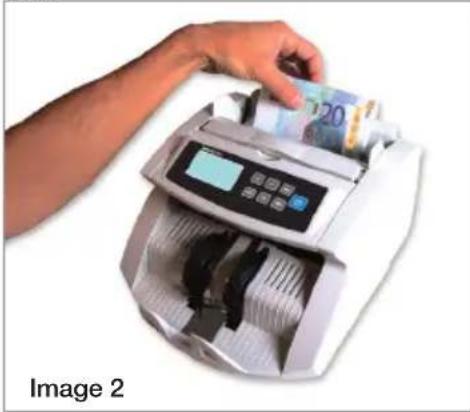
natural_image
Hand using a digital bank counter to add 20 euro banknotes (no text or symbols visible on the device)3.3 Zählergebnisse
natural_image
Close-up of a white electronic device with ventilation grilles and a display, showing no visible text or symbols.Beachten
Sie
bitte:
natural_image
Hand placing a white paper into a white rectangular device with internal compartments (no text or symbols visible)
natural_image
Hand inserting a card into a white electronic device (no text or symbols visible)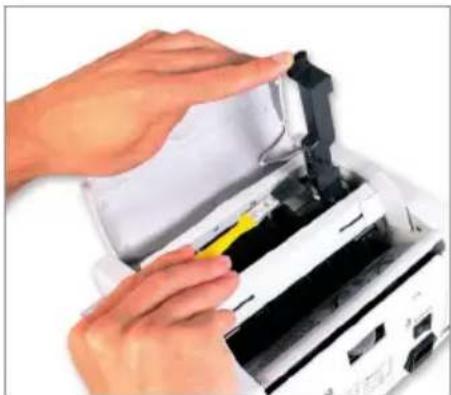
natural_image
Close-up of hands operating a printer with a yellow tool inserted (no visible text or symbols)Safescan 2200 series

natural_image
White digital currency counter with digital display and control buttons (no visible text or symbols)Safescan 2200 series


natural_image
Hand inserting a bank into a digital counting machine (no visible text or symbols)
natural_image
Hand inserting a 20 euro banknotes into a digital counting machine (no text or symbols visible)natural_image
Close-up of a white electronic device with AC240V indicator and ports (no readable text or symbols beyond labels)Remarque :
natural_image
Hand opening a white paper filter into a black-out rack (no text or symbols visible)
natural_image
Hand inserting a small electronic device into a white paper container (no visible text or symbols)
natural_image
Close-up of hands operating a printer with a yellow clip, no visible text or symbols9. SPÉCIFICATIONS TECHNIQUES
Dimension (L x l x h) : 292 x 246 x 178 mm
Poids : 5,7 kg
Manual Safescan 2200 series

natural_image
White digital currency counter with digital display and control buttons (no visible text or symbols)Safescan 2200 series
En la caja:


natural_image
Hand placing a small card into a digital counting machine (no visible text or symbols on the machine itself)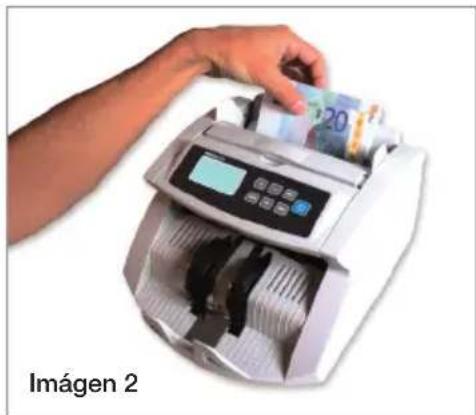
natural_image
Hand inserting a 20 euro banknotes into a digital counting machine (no text or symbols visible)natural_image
Close-up of a white electronic device casing with ventilation grilles and a display unit, no visible text or symbolsnatural_image
Hand opening a white paper filter into a multi-chamber device (no text or symbols visible)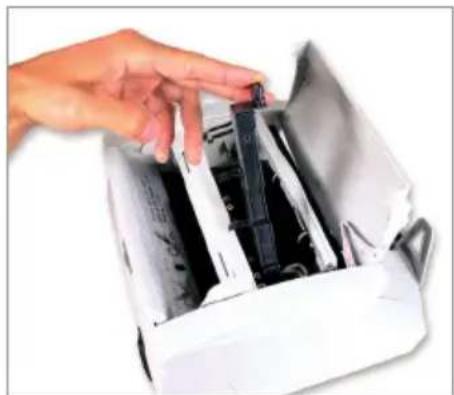
natural_image
Hand inserting a small electronic device into a white paper container (no visible text or symbols)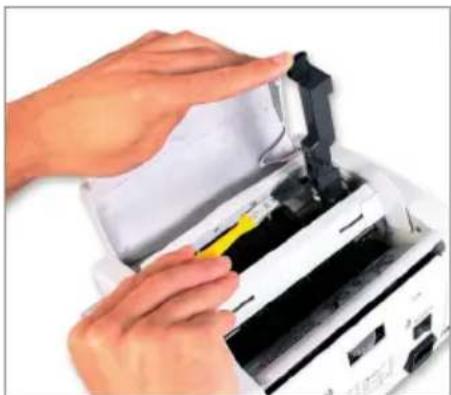
natural_image
Close-up of hands operating a printer with a yellow tool inserted (no visible text or symbols)Safescan 2200 series

natural_image
White digital currency counter with digital display and serial number (no visible text or symbols)Safescan 2200 series
natural_image
Hand inserting a bank into a digital counting machine (no text or symbols visible)
natural_image
Hand inserting a 20 euro banknotes into a digital counting machine (no text or symbols visible)natural_image
Close-up of a white electronic device with AC240V indicator and ports (no readable text or symbols beyond labels)Nota:
natural_image
Hand opening a white 3D printer into a black rack (no text or symbols visible)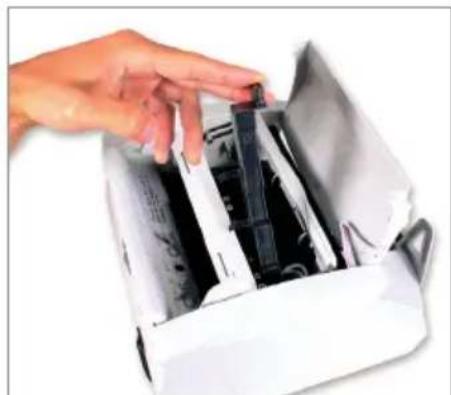
natural_image
Hand inserting a black plastic component into a white paper container (no text or symbols visible)
natural_image
Close-up of hands operating a printer with a yellow tool inserted (no visible text or symbols)Manual Safescan 2200 series
natural_image
White digital cash counting machine with control panel and buttons (no visible text or symbols)Safescan 2200 series
Material fornecido:
natural_image
Hand inserting a bank into a digital counting machine (no text or symbols visible)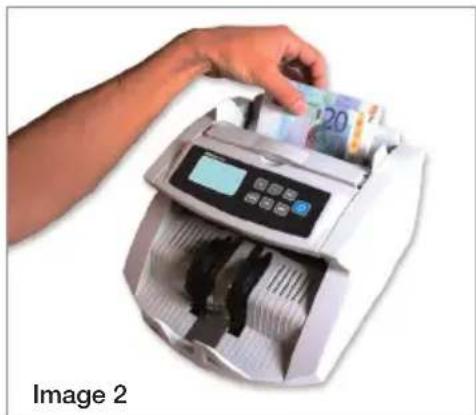
natural_image
Hand using a digital bank counter to add Chinese yuan bills (no text or symbols visible on the machine or background)natural_image
Close-up of a white electronic device with ventilation grilles and a power adapter labeled 'AC240V' (no readable text beyond label)natural_image
Hand opening a white 3D printer into a slot (no text or symbols visible)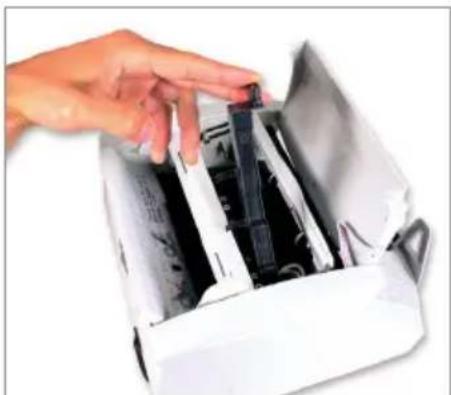
natural_image
Hand inserting a card into a printer case (no visible text or symbols)
natural_image
Close-up of hands operating a printer with a yellow tool, no visible text or symbols9. ESPECIFICAÇÕES TÉCNICAS
E. info@safescan.com


- Manual Safescan 2200 series
- In the box:
- There are 2 models available:
- NOTE:
- GENERAL PARTS & CONTROLS
- Parts of the machine
- Control panels
- General items
- LCD screen
- OPERATION
- COUNTING
- Counting modes
- Automatic (default)
- Manual
- Correct method for inserting a stack of banknotes
- Counting results
- ADD AND BATCH FUNCTIONS
- ADD-function
- BATCH-function
- Using the Add- & Batch-function together
- Sort count function
- COUNTERFEIT DETECTION
- Detection methods
- MG detection (only available for 2250 model)
- IR detection
- Adjusting the sensitivity of the counterfeit detection
- Adjusting the UV sensitivity
- Adjusting the MG sensitivity (only available for 2250 model)
- How to adjust the IR sensitivity
- Adjusting the sensitivity of the Size detection
- RETURN TO THE FACTORY DEFAULT SETTINGS
- ERROR MESSAGES AND SOLUTIONS
- Messages displayed on the [CHECK] screen
- UV detection error
- MG detection error
- IR detection error
- Size detection error
- Banknote length error
- Messages displayed on the [COUNT] screen
- EA0 - EA5
- EA6 Error in the control panel
- Adjusting the hopper position
- MAINTENANCE
- Clean the machine periodically with a brush or soft cloth
- How to adjust the position of the hopper
- Cleaning the UV detection system
- TECHNICAL SPECIFICATION
- WARRANTY
- Handleiding
- Safescan 2200 series
- In de verpakking:
- Zählergebnisse
- SPÉCIFICATIONS TECHNIQUES
- En la caja:
- Material fornecido:
- ESPECIFICAÇÕES TÉCNICAS
Brand : Safescan
Model : 2210
Category : Coin and bill counter