1450 - Coin and bill counter Safescan - Free user manual and instructions
Find the device manual for free 1450 Safescan in PDF.


Pick your language and provide your email: we'll send you a specifically translated version.
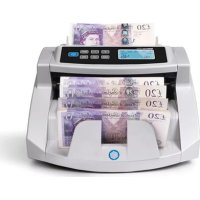
| Product Type | Coin and Bill Counter |
| Brand | Safescan |
| Model | 1450 |
| Dimensions (L x W x H) | Approx. 30 x 25 x 15 cm |
| Weight | Approx. 2.5 kg |
| Power Supply | AC adapter (100-240V, 50/60 Hz) |
| Power Consumption | 15 W max |
| Counting Speed (Coins) | Up to 300 coins/min |
| Counting Speed (Bills) | Up to 600 bills/min |
| Hopper Capacity | Coins: 200 coins; Bills: 100 bills |
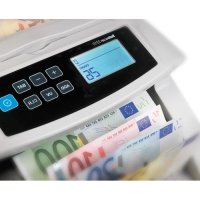
| Display Type | LCD screen with count and value display |
| Supported Currencies | Multiple (user-selectable via menu) |
| Sorting Functions | Coin sorting by denomination; bill value detection |
| Batch Function | Yes, programmable batch stop |
| Memory | Stores last 100 counts with date/time |
| Maintenance | Cleaning brush included; wipe exterior with dry cloth |
| Security | Anti-counterfeit detection (UV, MG, IR for bills) |
| Spare Parts & Repairability | Replacement rollers and sensors available; service centers |
| Included Accessories | AC adapter, cleaning brush, user manual |
| Warranty | 1 year limited warranty |
Frequently Asked Questions - 1450 Safescan
How do I clean the Safescan 1450?
Use the included cleaning brush to remove dust from sensors and rollers. Wipe the exterior with a dry, lint-free cloth. Do not use liquids or solvents.
What should I do if a bill gets jammed?
Turn off the machine and open the top cover. Gently remove the jammed bill. Check for any debris and close the cover before restarting.
Can I count mixed denominations?
Yes, the Safescan 1450 can detect and count mixed denominations automatically for supported currencies. Select the correct currency mode from the menu.
Does the Safescan 1450 have a battery?
No, it requires an AC adapter. It does not have a built-in battery for portable use.
How do I set the batch function?
Press the BATCH button, enter the desired number (e.g., 20), and the machine will stop after counting that amount. Clear batch by pressing and holding the BATCH button.
What currencies are supported?
The Safescan 1450 supports multiple currencies including EUR, USD, GBP, and others. You can switch via the menu. Not all currencies may have full counterfeit detection.
How does the counterfeit detection work?
It uses UV (ultraviolet), MG (magnetic), and IR (infrared) sensors to check security features on banknotes. For coins, it detects size and metal composition.
What is the maximum counting speed?
Up to 300 coins per minute and up to 600 bills per minute, depending on the condition of the currency.
Where can I find replacement parts?
Contact Safescan customer support or visit authorized service centers. Common parts like rollers and sensors are available.
My display shows 'Error'. What does it mean?
The error code indicates a specific issue (e.g., sensor blockage or motor problem). Refer to the user manual for error codes and troubleshooting steps.
User questions about 1450 Safescan
0 question about this device. Answer the ones you know or ask your own.
Ask a new question about this device
No questions yet. Be the first to ask one.
Download the instructions for your Coin and bill counter in PDF format for free! Find your manual 1450 - Safescan and take your electronic device back in hand. On this page are published all the documents necessary for the use of your device. 1450 by Safescan.
USER MANUAL 1450 Safescan
Manual assistant
Powered by Anthropic
Waiting for your message
Product information
Brand : Safescan
Model : 1450
Category : Coin and bill counter