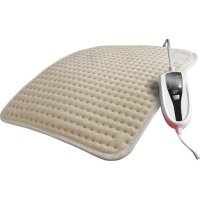
E2 - Heated blanket/cushion Daga - Free user manual and instructions
Find the device manual for free E2 Daga in PDF.



| Product Type | Heating blanket/cushion |
| Brand | Daga |
| Model | E2 (Textile Class) |
| Main functions | 4 temperature levels, automatic reduction after 2 hours at high temperature, automatic shut-off after 8 hours |
| Technology | Flexy Heat (very low electromagnetic field) |
| Material | Textile (machine-washable cover at 50°C max) |
| Power supply | See label (standard mains) |
| Power | Not specified |
| Dimensions | Not specified |
| Weight | Not specified |
| Care and cleaning | Removable cover machine washable at 50°C. Do not wash the inner part. Clean plastic finish with a damp cloth. |
| Safety | Automatic shut-off, automatic temperature reduction, overheat protection. Do not use folded, wet, or with metal objects. |
| Warranty | 3 years (legal compliance) |
| Recommended use | Quick heating: level 4 for 20 min, then reduce. Continuous use: level 1 for sleep. |
| Certifications | Compliant with standard UNE-EN 60335-2-17 |
Frequently Asked Questions - E2 Daga
User questions about E2 Daga
0 question about this device. Answer the ones you know or ask your own.
Ask a new question about this device
Download the instructions for your Heated blanket/cushion in PDF format for free! Find your manual E2 - Daga and take your electronic device back in hand. On this page are published all the documents necessary for the use of your device. E2 by Daga.
USER MANUAL E2 Daga
Carefully read the instructions for use. Keep them in a safe place for future reference.
Before turning on your heating pad, check that the voltage of your electric supply is the same as that indicated on the label or on the plastic printing attached to the heating pad. In those that incorporate a power supply or network adaptor, check that the voltage of your electric supply corresponds to that indicated on the adaptor label. With these heating pads, only use adaptor supplied, avoiding exchange with other devices.
In the case of heating pads with disconnectable controller, only use the controller that comes with the heating pad. Do not exchange with other devices.
For the correct use of the heating pad, do not fold it and avoid the molding and creases. Do not stick the heating pad with pins, needles or other sharp metal objects. Do not cover it with objects or place things on top of it during storage.
Do not use the heating pad if it is moist or wet. Do not place it under water. For cleaning, read the maintenance section of this manual.
Invalid, handicapped and people insensitive to heat as well as children should not use the heating pad without direct supervision. It should also not be used under the effects of alcohol, sleeping pills, sedatives or drugs. Do not use the heating pad to warm animals. If you have a pacemaker or other cardiovascular devices, even though the electromagnetic field generated by this heating pad is very low, we recommend that you check with your doctor before using the product.
The prolonged use of the heating pad at maximum level is susceptible to provoking skin burns. When the heating pad is used for long periods of time – for example, to sleep with – the controls should be adjusted as recommended in the manual for continuous use (heat setting 1).
This device was not conceived for medical use in hospitals.
It is important that the power cord is not wound up or touching the heating pad during use. To unplug the pad, do not pull on the cord or use it as a strap.

natural_image
Color palette bar with grayscale shades and a central crosshair (no text or symbols)ENGLISH
Examine the heating pad frequently, including the controller and the flexible cord, to detect possible signs of wear or damage. If there is damage, do not use the product and contact an authorized technical service center.
Incorrect use or manipulation of the heating pad will not be covered by the warranty; for repair, use an authorized technical service center.
Especialidades Eléctricas Daga, S.A. declines all responsibility for damage that could occur to people, animals or objects, for not abiding these warnings.
TRADITIONAL HEATING PAD LINE
The reference of the heating pad model you have acquired is located on the original packaging and in the textile label, or on the plastic printing attached to the product.

TExTIL CLASS - E and E2
BASIC CLASS - EP and E2P

CONTROLLER
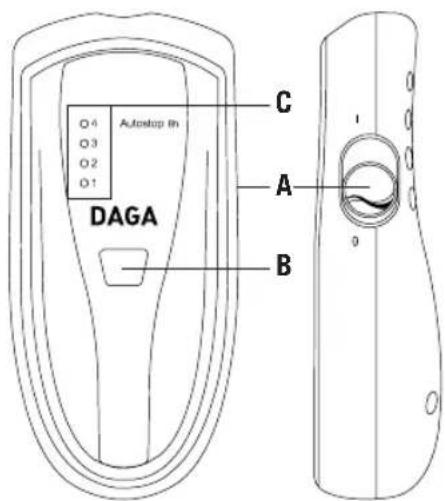
A. On/off switch.
Control key
B. Key to select heat setting.
Control panel
C. Red lights: indicate the selected heat setting.
BASIC CHARACTERISTICS OF THE CONTROLLER:
Various additional functions have been incorporated in this new generation of controllers exclusive to the new and innovative line of DA-GA heating pads.
WORK MODE
The heating pad will start when you press the ON/OFF key (A). By default, the regulator will set to the minimum temperature (position 1).
AUTOMATIC HEAT DECREASE
This function allows the controller to regulate the heating pad's temperature and time parameters, controlling them gradually and automatically.
After approximately 2h of continuous operation at a high heat setting, the system will activate that automatically and gradually lowers the temperature below 50°.
This function is very useful, for example, in preventing possible burns if the user were to fall asleep while using the product.
AUTOMATIC SAFETY AUTOSTOP
To avoid possible risks due to accidentally leaving the heating pad on for a prolonged amount of time, a safety automatic Autostop standard feature has been incorporated into all the regulator models, that automatically activates after 8h of non-stop operation, without the user having to touch the controller. After activating this safety Autostop, the heating pad will disconnect from the power supply and the controller will indicate this circumstance by lighting up the red light corresponding to setting 1.
To leave the Autostop mode, just press any key on the controller. The regulator will move the default mode (heat setting 1).
USAGE MODE
1) Connect the heating pad to the correct power supply.
2) To turn it on, use the controller and turn the side On/Off switch to the "I" position.
Immediately, the electronic controller will do a quick check to detect possible anomalies indicated on the panel through a light scan. Then, the default work mode will be configured: Light 1 on (minimum heat setting).
ENGLISH
3) From this point, the work mode is the following:
Next, adjust the heat setting using one of the 4 possible levels, repeatedly pressing the temperature selection key 🔒. A light will appear on the controller screen that indicates the selected heat setting.
4) To turn off the heating pad, turn the side On/Off switch to the "O" position.
To the start using your heating pad, we recommend that you put the regulator at the maximum position (heat setting 4) for 20 minutes for quick heating. Then, lower to desired temperature. It is advisable that the maximum heat setting (level 4) be used only during the first 20 min of operation in order to quickly heat the heating pad; however, if you do not follow this instruction, and as a safety measure, the heating pad will automatically lower its temperature after approximately 2h of non-stop operation.
On this point, we remind you that the beneficial effects of heat supplied by the heating pad do not need high temperatures and continuous skin exposure to heat could cause burns. The highest heat settings should only be used for the time necessary to reach a comfortable temperature. It should then be turned gradually down.
As previously indicated, after prolonged use of the heating pad at the 3 and 4 heat settings, if you feel the temperature decreasing, it is not a failure; but rather the activation of the automatic elevated temperature time control system, incorporated in the Daga heating pads, to avoid excessive application of heat to the skin.
When storing the heating pad, let it cool off before putting away and do not place objects on top of it.


SAFETY AUTOSTOP TIMES, OPERATION TIMES AND COMFORT PROGRAM PER MODEL
| Comfort program | |||||||
| Models | Available operation times (min) | Tempera-ture Decrease (min) | Safety Autostop | Number of phases | Time per phase (min) | Program total time (h) | Tempera-tures sequence (setting) |
| E, E2, EP,E2P --- | 90 8h --- | --- --- | |||||
TROUBLESHOOTING GUIDE
| PROBLEM SOLUTION | |
| The controller does not turn on when I move the side On/Off switch. | Make sure the power supply is working and that the heating pad is correctly plugged in.For heating pads with incorporated adaptors, also check the connection between the adaptor and the heating pad.Also, make sure that the side On/Off switch is in the “I” position. |
| The heating pad doesn’t warm up. | The preselected operation time stop or safety Autostop could have activated itself. Verify that the heating pad is working by checking that some of the red lights are turned on. In case of doubt, press any of the keys to return to the Free mode or turn the heating pad off and on again. |
| After turning it on, the control panel does not configure the Free mode, heat setting 1, and the heating pad does not heat up. | The controller could have found an anomaly in the start-up and blocked the heating pad’s operation for safety purposes.Turn the controller off and on again. If this incidence persists, please contact our authorized technical service center. |
ENGLISH
| PROBLEM SOLUTION | |
| After the turning the pad on, the controller correctly configures the Free mode, heat setting 1, but the heating pad doesn't heat up. | If you do not feel heat, cover it with a blanket, towel or thick cloth, place the regulator at the maximum position and wait 45 minutes. If this does not work, contact our authorized technical service center. Tests done with the heating pad uncovered or outdoors are not reliable because they can give erroneous heat evaluations. |
| The heating pad doesn't heat up enough. | If the heat is not sufficient at its maximum position, we recommend you place it directly on the skin, covering the other side with a towel or similar item, this way impeding that the heat is released into the air. |
| The control panel shows incomprehensible information. The lights don't stop flashing. | The controller could have found an anomaly in the start-up and blocked the heating pad's operation for safety purposes. Turn the controller off and on again. If the anomaly persists, please contact our authorized technical service center. |


The heating pads reach temperatures between 65° and 75°C at their maximum position. This data should serve as a guideline. Monitoring is carried out in laboratories, according to the procedure in the UNE-EN 60335-2-17 directive.

BENEFITS OF FLEXIBLE HEAT
The electric heating pads provide soft flexible heat letting the user take advantage of its two basic and complementary properties.
First, flexible heat mitigates the effects of the cold and humidity, offering personal comfort.
Also, heat is very efficient in therapeutic pain treatments to alleviate muscular and articular discomfort. However, we recommend that you do not apply the heating pad to areas of the body that are swollen, injured or bloated without first consulting your doctor.
The plastic models and the L and L2 models have an extra plastic cover to make the application of lotions and special ointments easier and help heat penetration to local areas.
The cloth models give smooth heat that transpires and their fluffy and soft cloth give a sensation of comfort.
Flexible heat is a dry heat that creates a calming effect, stimulates the circulation and reduces muscles tension. For these reasons, it is recommended in pain treatments such as arthrosis, arthritis and rheumatism, among others, in the soft parts of the body.
For specific localized treatments, we recommend the use of ergonomic heating pads designed especially to adapt to specific body parts. For more information, consult the attached Daga catalogue.


Values of Daga Quality
The Daga Flexy Heat technology guarantees that the product you have acquired has been designed, manufactured and verified using the latest technology and in compliance with the highest quality standards.
The heating pads are manufactured using only carefully chosen and tested material and components to offer the ideal direct-application, long-life and defect-free product.
The precision of the electronic control circuit ensures intelligent heat regulation while it supervises correct product operation, preventing any risk of failure or wrongful use.
Thanks to the special design, all the products made with Daga Flexy Heat technology generate a very low electromagnetic field (EMF). This way, the user is not exposed to radiation while using the product.
ENGLISH
MAINTENANCE AND DISPOSAL
To increase the life of your heating pad, unplug it when not in use. Keep it in its original packaging in a dry place, with the least number of folds possible and do not smooth out the creases.
In the cloth models, do not wash the inside of the heating pad, not even with dry cleaning. In the plastic models, use a damp cloth for cleaning.
If there are signs of dampness, dry the pad before plugging it in.
To clean the cover, remove it from the heating pad. It can be machine washed at a temperatures under 50^ C.
When throwing away your heating pad, please bring it to your nearest recycling center in accordance with the European directive for Waste Electrical and Electronic Equipment 2002/96/EC, to help preserve the environment.
We hope that you like and are satisfied with this product.


AVISO IMPORTANTE
Please read the instructions of use carefully.
Do not use folded or creased.
Do not insert pins, needles or any other pointed metallic object.
Never dispose of this product in the bin. Take it to the green collection point nearest to your home.
Do not wet the product.
ESPECIALIDADES ELECTRICAS DAGA, S.A. guarantees the conformity of this product for its intended use, for a period of 3 years and in all the Spanish territory. During the validity period and during the breakdown, the user has the right to the repair or replacement of the product, free of charge, except in the case that one of these options is not possible or disproportionate, then he may opt to a reduction in the price or cancellation of the sale, having to address in this case the vendor establishment; it also covers the replacement of spare parts whenever, in both cases, the product was used in accordance to the recommendations specified in this handbook, and it was not handled improperly by third parties not authorised by DAGA S.A.
This warranty does not affect the consumer rights in accordance to that provided in Law 23/2003, of 10th of July 2003 on guarantees in the sale of consumption goods in Spain.
USE OF THE WARRANTY
For the repair of the product, the consumer must address the Technical Service authorised by DAGA, S.A. as any inappropriate handling of such by personnel non-authorised by Daga, or any bad or inappropriate use, will oblige us to cancel this warranty. For the efficient exercise of the rights of this warranty it must be duly filled-in and with the invoice, purchase bill or delivery note.
In order to claim the compliance of the provisions in the warranty will prescribe after 3 years from the delivery of the product; the consumer having to inform the vendor of the non-conformity, whenever this claim is carried out within the legal period of the warranty. This warranty must remain in the power of the user, as well as the invoice, the purchase bill or delivery note to facilitate the exercise of these rights. For Technical Service and After sales attention outside the Spanish territory, please refer to the dealer where you purchased the product or contact directly with DAGA S.A.

BOLETIM DE GARANTIA
Technical Assistance Service (TAS)
J. M. BARANDIARAN, 2
944332651
48011 BILBAO
R.E. ABAD
GREGORIO DE LA REVILLA, 34
944215271
20600 EIBAR
EIBAR SAT
IFAR KALE, 8
943206717
01400 LLODIO
TELETRON
GOIENURI, 17
946724988
20001 SAN SEBASTIÁN
ELOY TEJEDOR
GLORIA, 4 (GROS)
943287193
20002 SAN SEBASTIÁN
GROSTON, S.L
USANDIZAGA, 29
943272736
48980 SANTURCE
JULEN - SAT
LAS VINAS, 20
944617193
01001 VITORIA
AREA GLOBAL
OLAGIBEL, 48
945128200
EXTREMADURA
06002 BADAJOZ
ELECTRONICA MIRANDA, S.L.
RAMON ALBARRAN, 17
924207428
10002 CÁCERES
TALLERES MONTERO
C.B. PLAZA MARRÓN, 15
927226556
06800 MERIDA
POLY-ELECTRICIDAD
SAN SALVADOR, 28
924319106
GALICIA
15402 EL FERROL
SAT GREMAR, S.L.
ESPANOLETO, 21-23
981323256
15006 LA CORUÑA
EUGENIO SUAREZ SERRANTES
CARRIL DE LAS FLORES, 34-B
982242015
27003 LUGO
D. ALONSO - TALLER ALMAR
OTERO PEDRAYO,42 - 3° 1"
619837814
32002 ORENSE
ELECTRO COUTO, S.L
MELCHOR DE VELASCO, 17
988235115
36004 PONTEVEDRA
IMASON
LOUREIRO CRESPO, 43
986841636
15703 SANTIAGO DE COMPOSTELA
CANCELA, S.L.
BONAVAL, 29 - BJS.
981564016
36211 VIGO
ELECTROSAT
LOPEZ MORA, 63
986290607
LA RIOJA
26004 LOGROÑO
ASOC. IND. RIOJANA. S.L.U.
JOSE MANUEL PEDREGAL, 14
985569792
33209 GIJON



- Carefully read the instructions for use. Keep them in a safe place for future reference.
- ENGLISH
- TRADITIONAL HEATING PAD LINE
- BASIC CHARACTERISTICS OF THE CONTROLLER:
- WORK MODE
- AUTOMATIC HEAT DECREASE
- AUTOMATIC SAFETY AUTOSTOP
- USAGE MODE
- BENEFITS OF FLEXIBLE HEAT
- Values of Daga Quality
- MAINTENANCE AND DISPOSAL
- AVISO IMPORTANTE
- USE OF THE WARRANTY
- BOLETIM DE GARANTIA
- BILBAO
- EIBAR
- LLODIO
- SAN SEBASTIÁN
- SAN SEBASTIÁN
- SANTURCE
- VITORIA
- EXTREMADURA
- BADAJOZ
- CÁCERES
- MERIDA
- GALICIA
- EL FERROL
- LA CORUÑA
- LUGO
- ORENSE
- PONTEVEDRA
- SANTIAGO DE COMPOSTELA
- VIGO
- LA RIOJA
- LOGROÑO
- GIJON
Brand : Daga
Model : E2
Category : Heated blanket/cushion