705 - Docking station BRAVEN - Free user manual and instructions
Find the device manual for free 705 BRAVEN in PDF.



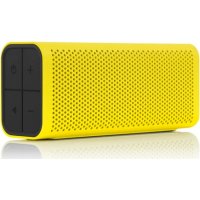
| Product type | Portable Bluetooth docking station |
| Brand | BRAVEN |
| Model | 705 |
| Water resistance | IPX5 (resistant to water jets, do not immerse) |
| Bluetooth | Yes, memorizes up to 8 devices |
| Wireless stereo pairing | TrueWireless with a second compatible speaker (705, 710, 770, LUX) |
| Speakerphone function | Yes, with noise cancellation |
| Bluetooth receiver mode | Yes, via 3.5mm AUX input (IN) and OUT output for wired speakers |
| Battery | Rechargeable lithium-ion, 5 LED indicators |
| Charging time | 2 to 3 hours |
| Charging external devices | Yes, USB port, compatible 0.3 A to 1 A (phones, MP3 players) |
| Auto power off | After 30 minutes without active Bluetooth connection |
| Power supply | Micro-USB (power adapter not included) |
| AUX input | Yes, 3.5mm (Audio IN) |
| AUX output | Yes, 3.5mm (OUT) for receiver mode |
| Power button | Long press 2-3s to turn on/off |
| Maintenance and cleaning | Close the waterproof cap tightly after wet use; do not immerse |
| Safety | Do not use if the water cap is not properly closed; do not expose to water beyond IPX5 |
Frequently Asked Questions - 705 BRAVEN
User questions about 705 BRAVEN
0 question about this device. Answer the ones you know or ask your own.
Ask a new question about this device
Download the instructions for your Docking station in PDF format for free! Find your manual 705 - BRAVEN and take your electronic device back in hand. On this page are published all the documents necessary for the use of your device. 705 by BRAVEN.
USER MANUAL 705 BRAVEN
text_image
BATTERY CHECK BUTTON 3.5 MM AUDIO-IN JACK 3.5 MM AUDIO-OUT JACK (DAISY-CHAIN) EXTERNAL USB CHARGING PORT BRAVEN CHARGING PORT BATTERY INDICATOR LIGHTS •20% •40% •60% •80% •100%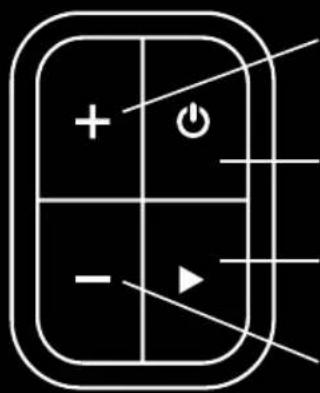
text_image
Diagram of a control panel with plus, minus, and power button symbols arranged in a grid layoutVOLUME UP /
SKIP TRACK (PRESS AND HOLD)
POWER BUTTON
PAIRING / ANSWER-END CALL / PAUSE-RESUME MUSIC
VOLUME DOWN / SKIP BACK (PRESS AND HOLD)
+ROCK
① TURN ON & PAIR VIA BLUETOOTH®
2 PAIR TWO SPEAKERS TOGETHER FOR LEFT & RIGHT STEREO SOUND
③ USE AS A BLUETOOTH® RECEIVER
4 WATER-RESISTANT EXTERIOR
SEE MORE ONLINE YOUTUBE.COM/BRAVENPRODUCTS

TURN ON & PAIR VIA BLUETOOTH®
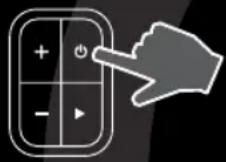
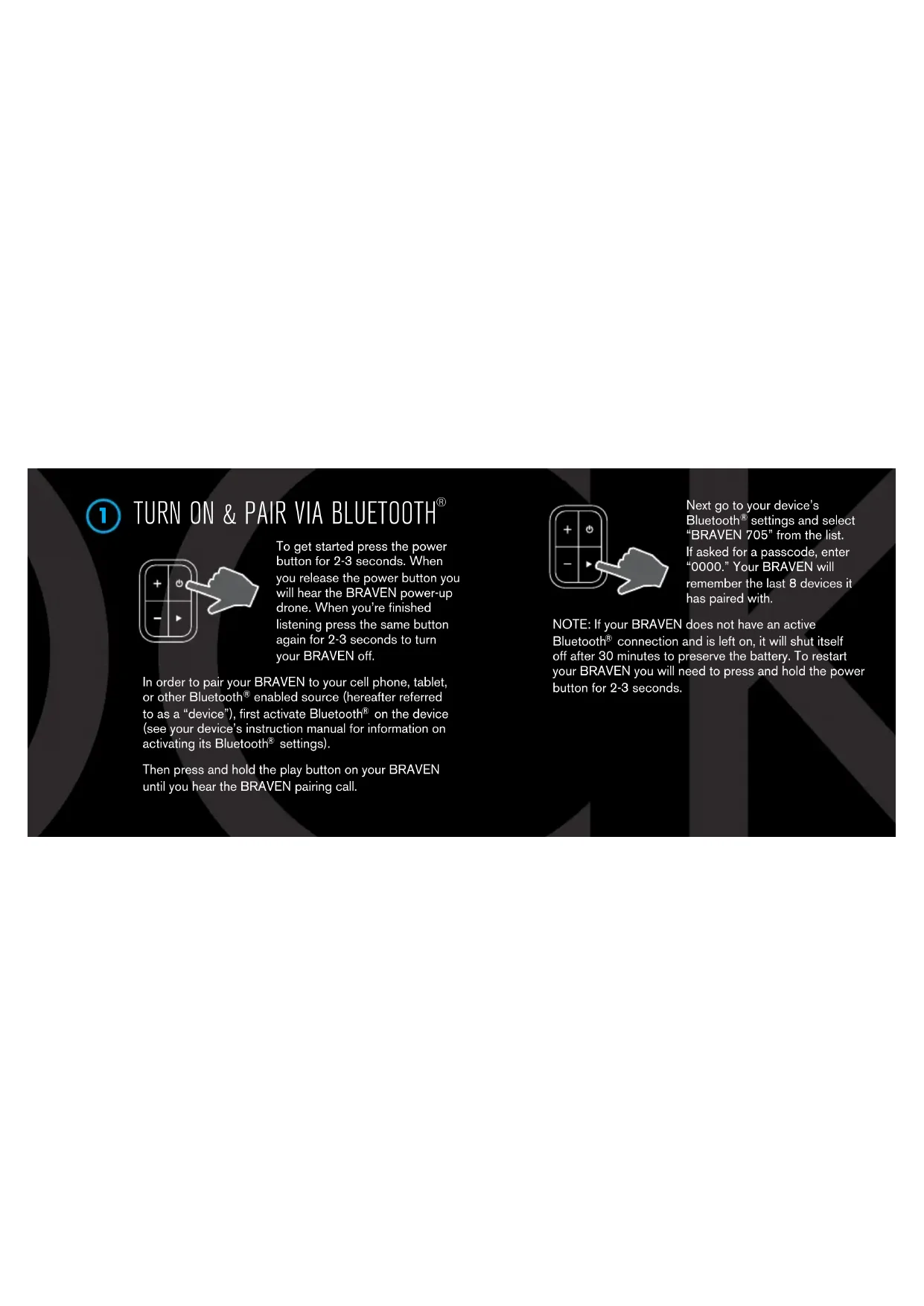
To get started press the power button for 2-3 seconds. When you release the power button you will hear the BRAVEN power-up drone. When you're finished listening press the same button again for 2-3 seconds to turn your BRAVEN off.
In order to pair your BRAVEN to your cell phone, tablet, or other Bluetooth ^® enabled source (hereafter referred to as a “device”), first activate Bluetooth ^® on the device (see your device’s instruction manual for information on activating its Bluetooth ^® settings).
Then press and hold the play button on your BRAVEN until you hear the BRAVEN pairing call.
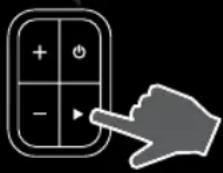
Next go to your device's Bluetooth® settings and select "BRAVEN 705" from the list. If asked for a passcode, enter "0000." Your BRAVEN will remember the last 8 devices it has paired with.
NOTE: If your BRAVEN does not have an active Bluetooth® connection and is left on, it will shut itself off after 30 minutes to preserve the battery. To restart your BRAVEN you will need to press and hold the power button for 2-3 seconds.

PAIR TWO SPEAKERS TOGETHER FOR LEFT & RIGHT STEREO SOUND
Want even bigger sound? If you have two Braven speakers (Braven 705, Braven 710, Braven 770, Braven LUX), you can pair them together for left and right stereo using TrueWireless™ Technology. Here's how you do it:
First be sure to disconnect all Bluetooth® connections (if any) on your device and remove any previously paired BRAVEN speakers from your device.
Next, press and hold the battery check button on both BRAVEN speakers for 5 seconds until you hear a sonar sound from each speaker. Within 30 seconds, a second beep will indicate a Bluetooth ^® connection between the BRAVEN speakers.
Now that the speakers are talking to one another, you
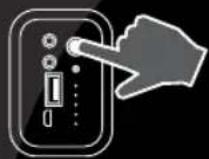
need to get them talking to your device. Follow the steps in section one to pair your device with one (not both) of your BRAVEN speakers.
When you turn off either of the BRAVEN speakers while connected, both speakers will turn off. When you're ready to rock
again in TrueWireless™ Technology, press the power button on both BRAVEN speakers within 5 seconds of each other. Wait approximately 15 seconds. The BRAVEN speakers will automatically reconnect to each other and to the previously connected device. You will hear two beeps indicating Bluetooth® is reestablished.
Note: TrueWireless™ Technology only supports one active Bluetooth® connection to your device at the same time. If any other Bluetooth® device (other than the paired BRAVEN 705 speakers) is simultaneously connected to your device, the BRAVEN 705 audio will distort. If distortion occurs, power down all other Bluetooth® devices in range of your phone/tablet, other than the Braven 705. Refresh the Bluetooth® connections on your phone/tablet by turning Bluetooth® off and then back on. TrueWireless™ Technology is now reestablished.
For troubleshooting and tutorial videos, please go to www.BRAVEN.com/TrueWireless

USE AS A BLUETOOTH® RECEIVER
The BRAVEN 705 has the unique ability to act as a Bluetooth ^® Receiver for other home or audio speaker systems that are not natively equipped for Bluetooth ^® connectivity.
Simply connect one end of a 3.5mm/aux cable to the AUDIO IN port of your home or audio speaker system, and plug the other end of the cable into the 3.5mm OUT port on the BRAVEN 705 speaker. Then pair your BRAVEN 705 speaker to your phone or tablet via Bluetooth ^® .
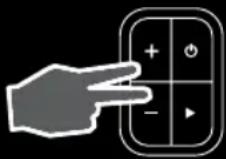
The audio will play over both the BRAVEN 705 and your home or audio speaker system. If you only want the audio to play over your other speakers (not through the BRAVEN 705), press and hold the BRAVEN 705 volume up (+) and volume down (-) buttons simultaneously while
the audio is playing, until the Braven 705 audio stops.

WATER-RESISTANT FEATURES
The BRAVEN 705 is IPX5 water-resistant. BRAVEN 705 speakers are not intended to be submerged in water, but are resistant to rainfall, water jets, and water splashing.
IMPORTANT - To ensure your BRAVEN 705 speaker is prepared for use in a wet environment, remove all cable connections and tightly close the end water cap. If the
water cap is not properly closed, the BRAVEN 705 will not be water-resistant.
+ TALK

USING AS A SPEAKERPHONE

SEE MORE ONLINE YOUTUBE.COM/BRAVENPRODUCTS

USING AS A SPEAKERPHONE
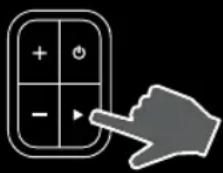
To use your BRAVEN as a noise cancelling speakerphone, all you have to do is press the answer-end button on the BRAVEN when you have an incoming phone call. When you're done, simply press the answer-end button again to end the call.
+CHARGE

TRUEWIRELESS™ PAIRING

BLUETOOTH® RECIEVER

SEE MORE ONLINE YOUTUBE.COM/BRAVENPRODUCTS

natural_image
Diagram showing a device connected to two power outlets (no text or symbols present)Before using your BRAVEN for the first time, charge the unit until all 5 battery capacity
lights are solid (not flashing), indicating a full charge (typically 2 to 3 hours).
When juice is running low, all you need to do is plug the included USB-to-Micro-USB cable into a wall power adapter (not included) or into a powered USB port on a computer. Plug the Micro-USB connector end of the cable into the BRAVEN charging port. Soon you'll be ready to rock on.

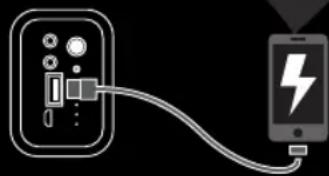
CHARGING EXTERNAL DEVICES
natural_image
Diagram showing a device connected to a smartphone with a lightning bolt symbol (no text or labels)BRAVEN is designed to keep the party going. Your BRAVEN serves as a portable power bank allowing you to charge USB devices that draw from
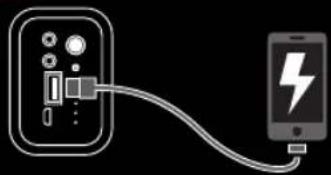
0.3A - 1A (most cell phones & mp3 players; tablets and other 2A devices cannot be charged by your BRAVEN 705 speaker). Here's how to charge an external device:
Make sure your BRAVEN is on. Plug the USB power cable that came with your phone, mp3 player, or other mobile device into the USB port on your BRAVEN speaker.
Plug the other end of the cable into your mobile device, and charging will commence.
FRA
① MISE SOUS TENSION & APPARIEMENT BLUETOOTH®
natural_image
Diagram showing a device connected to an electrical outlet with two power plugs (no text or symbols present)YOUTUBE.COM/BRAVENPRODUCTS
FRA

natural_image
Simple line drawing of a device connected to a smartphone with a lightning bolt symbol (no text or labels)YOUTUBE.COM/BRAVENPRODUCTS
ESP

YOUTUBE.COM/BRAVENPRODUCTS
ESP

CARGA DE SU BRAVEN
natural_image
Simple line drawing of a connected device with two power outlets (no text or symbols)
CARGA DE DISPOSITIVOS EXTERNOS
natural_image
Diagram showing a device connected to a smartphone with a lightning bolt symbol (no text or labels)YOUTUBE.COM/BRAVENPRODUCTS
DEU

EINSCHALTEN & BLUETOOTH®-KOPPELN

natural_image
Simple line drawing of a device connected to an electrical outlet (no text or symbols)
YOUTUBE.COM/BRAVENPRODUCTS
DEU

EXTERNE GERÄTE AUFLADEN
natural_image
Simple line drawing of a device connected to a smartphone with a lightning bolt symbol (no text or labels)YOUTUBE.COM/BRAVENPRODUCTS
ITA

ACCENSIONE E ACCOPPIAMENTO BLUETOOTH®
natural_image
Simple line drawing of a device connected to an electrical outlet (no text or symbols)YOUTUBE.COM/BRAVENPRODUCTS
ITA

RICARICA DI DISPOSITIVI ESTERNI
natural_image
Diagram showing a device connected to a smartphone with a lightning bolt symbol (no text or labels)YOUTUBE.COM/BRAVENPRODUCTS
POR

ACTIVAR E EMPARELHAR DISPOSITIVO COM BLUETOOTH®
natural_image
Simple line drawing of a device connected to a wall via cable (no text or symbols)
CARREGAR O SEU BRAVEN
YOUTUBE.COM/BRAVENPRODUCTS
POR

natural_image
Diagram showing a device connected to a smartphone with a lightning bolt (no text or symbols present)POR

YOUTUBE.COM/BRAVENPRODUCTS
简体中文
natural_image
Pure diagram of a cable connecting two electrical outlets (no text or symbols)
YOUTUBE.COM/BRAVENPRODUCTS
简体中文
⑦ 为外部设备充电
natural_image
Simple line drawing of a device connected to a smartphone showing a lightning bolt (no text or symbols)简体中文

YOUTUBE.COM/BRAVENPRODUCTS
日本語

電源/BLUETOOTH®ベアリング
natural_image
Icon showing a hand pointing at a keypad with plus, minus, and control buttons (no text or symbols)natural_image
Pure electrical connection diagram showing a device connected to an output terminal (no text or symbols)natural_image
Diagram showing a device connected to a smartphone with a lightning bolt symbol (no text or labels)YOUTUBE.COM/BRAVENPRODUCTS
한국어

natural_image
Icon showing a hand pointing at a keypad with plus, minus, and control buttons (no text or symbols)natural_image
Simple line drawing of a device connected to an electrical outlet (no text or symbols)
BRAVEN 충전
YOUTUBE.COM/BRAVENPRODUCTS
한국어

주변 장치 충전
natural_image
Diagram showing a device connected to a smartphone with a lightning bolt symbol (no text or labels)한국어

YOUTUBE.COM/BRAVENPRODUCTS