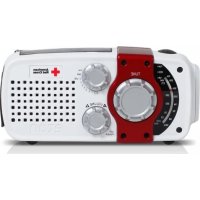
USER MANUAL FR170 ETON
Self-Powered AM/FM/NOAA Weather Radio with USB Cell Phone Charger
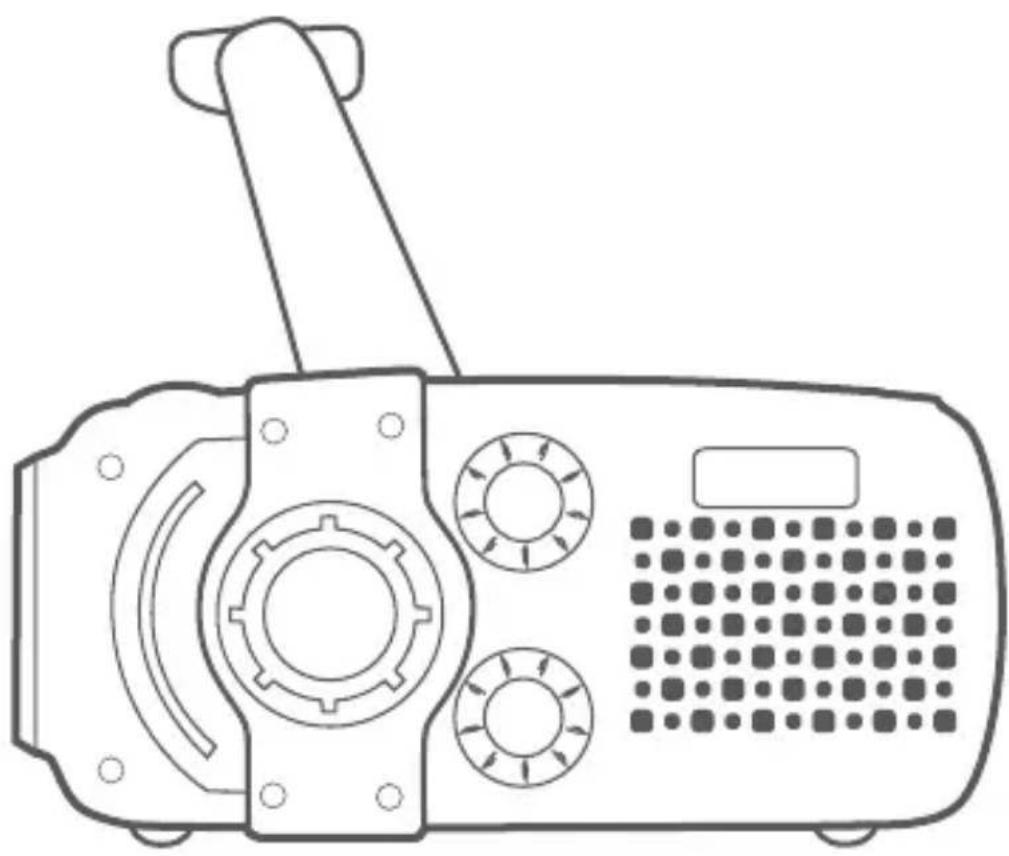
natural_image
Line drawing of a portable radio device with control knobs and a keypad (no text or symbols)
Etón Corporation, 1015 Corporation Way, Palo Alto, CA 94303, USA. 1-800-872-2228 (U.S.); 1-800-637-1648
(Canada); 650-903-3866 (worldwide); M-F, 8:00-4:30,
Pacific Standard Time; www.etoncorp.com.
WARNING
- Do not expose this appliance to rain or moisture.
- Do not submerge or expose for extended period to water.
- Protect from high humidity and rain.
- Only operate within specified temperature range (0 °C to 40 °C).
- Unplug immediately if liquid has been spilled or any object has fallen into the apparatus
- Clean only with a dry cloth. Do not use detergents or chemical solvents as this might damage the finish.
- Unplug and disconnect external antennas during lightning storms.
- Do not remove cover [or back].
• Refer servicing to qualified service personnel.
ENVIRONMENT
Disposal
According to the European Directive 2002/96/EC all electrical and electronic products must be collected separately by a local collection system.
Please act according to your local rules and do not dispose of your old products with your normal household waste.
Please dispose of all types of batteries per your Government, State or Local rules and/or regulations. If you are unsure, please call the appropriate local authority to find out how to dispose of them safely and help protect the environment.
Etón
FR170
Specification
- Frequency Range
FM 88 - 108 MHz
MW 530 - 1710 Khz
WB(MHz)
CH1 162.400 CH5 162.500
CH2 162.425 CH6 162.525
CH3 162.450 CH7 162.550
CH4 162.475
- Noise Limit Sensitivity
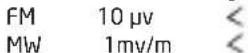
- Ni-MH Batteries 3.6V
DC 5.0V
-
Speaker D40mm
-
Earphone D3.5mm
-
Dimension: 5.375"x2.5"x2.25" (WxHxD)
136.5x63.5x57mm (WxHxD)
- Weight: 8.6 oz. (244 g)
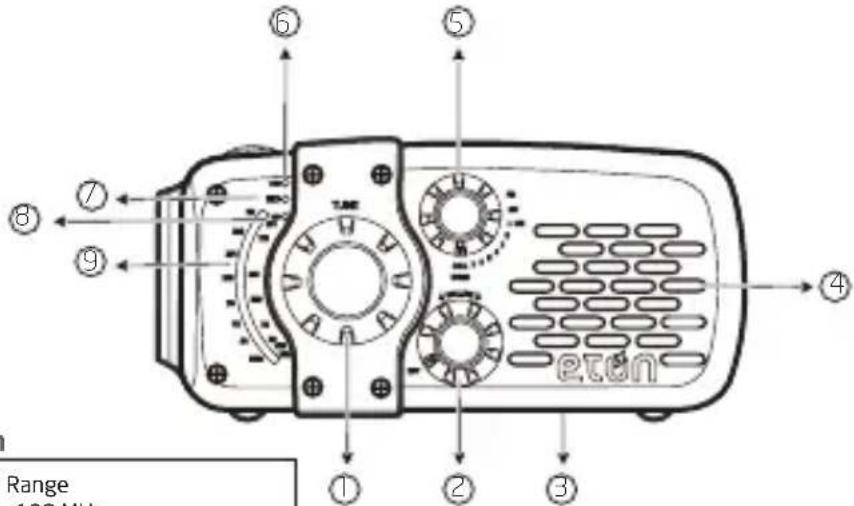
① Tune Knob
② Power/Volume Knob
③ Battery Compartment
④ Speaker
⑤ FM/AM/WB Select Knob
⑥ Tuning Indicator
⑦ Charging Indicator
⑧ WB Indicator
⑨ Frequency Window
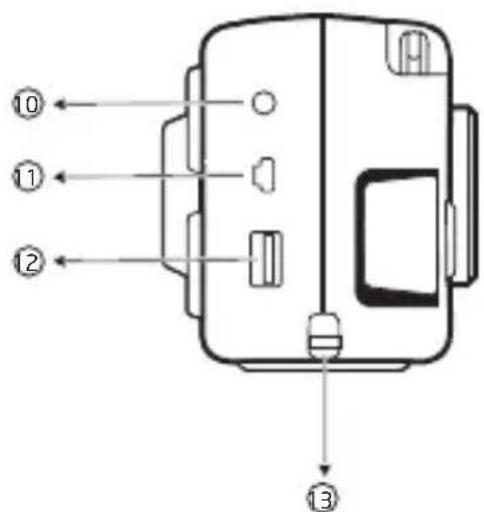
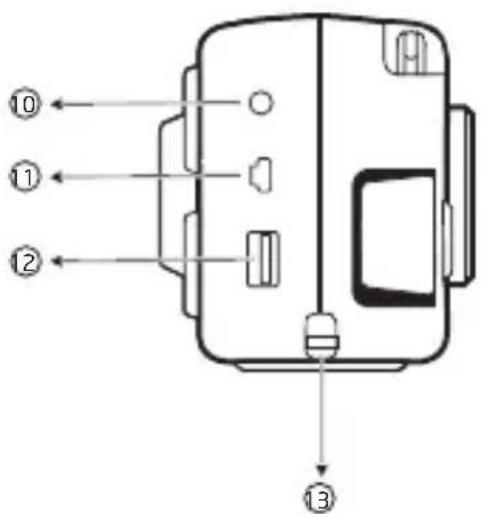
10 Earphone Jack
⑪ Mini USB Jack (DC-in 5v)
12 USB Cell Phone Charger
13 Strap Hole
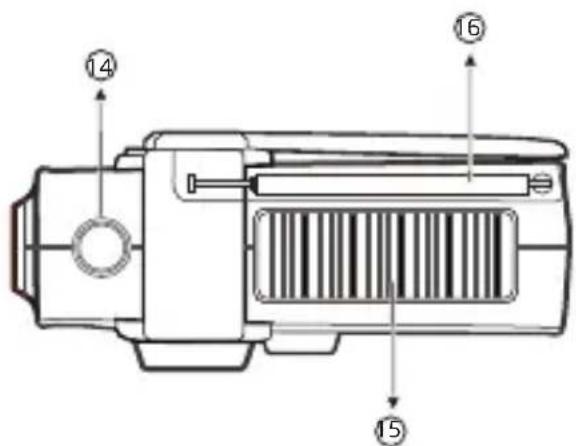
14 FlashLight Button
15 Solar Panel
16 Antenna
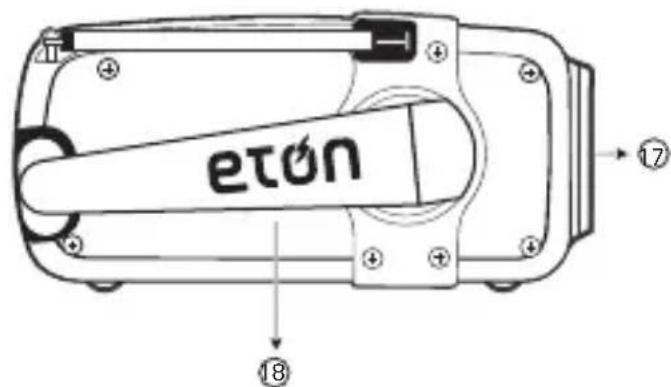
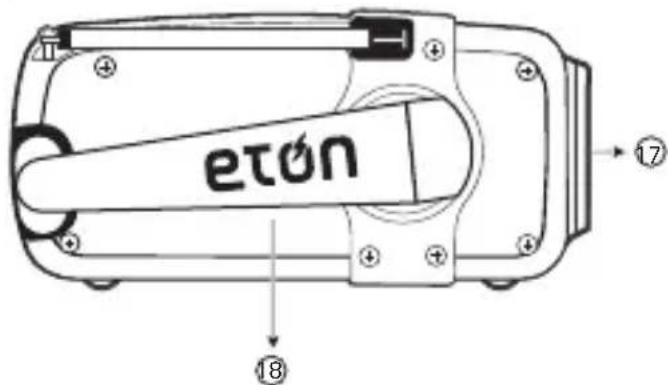
17 LED Flashlight
18 Hand Crank
POWER SOURCES
- Rechargeable battery pack (included).
- Solar panel
- Direct AC
- Built-in dynamo
CHARGING THE BATTERY PACK
Solar Charging
- Put the radio in strong sunlight, the solar panel will store the solar energy in to the rechargeable battery pack automatically.
- When charging, the charging indicator "will be on."
NOTE: 10-12 hours in the sun will allow about 3-5 hours of play depending on volume levels.
Crank Charging
- Pull out the crank in the back of the unit, then turn the crank. The built-in dynamo will generate electricity and the unit will store the electric energy into the battery pack automatically.
- When charging, the charging indicator "will be on."
NOTE: 90 seconds of cranking will result in 5-7 minutes of low volume play.
Adaptor Charging
- Open the rubber cover on the side of the unit. Plug one end of the matching adaptor cable (not included) into the AC electronic socket, plug the other end of the adaptor cable into the < mini USB jack >, the electric energy will store into the battery pack automatically.
- When charging, the charging indicator # will be on. The battery will be full in about 3\~4 hours.
USB Charging
- Plug a USB cable into the < mini USB jack > of the unit and plug the other end into a computer. The electric energy will store into the battery automatically.
- When charging, the charging indicator "will be on. The battery will be full in about 3\~4 hours.
CELL PHONE DUMP CHARGING
Because cell phone batteries vary in their current ratings, we cannot guarantee charging capabilities or usage time.
- Set POWER/VOLUME control to OFF position.
- Plug one port of the USB into your cell phone and the other port into of the unit..
- Set < FM/AM/WB Select Knob> to CELL position.
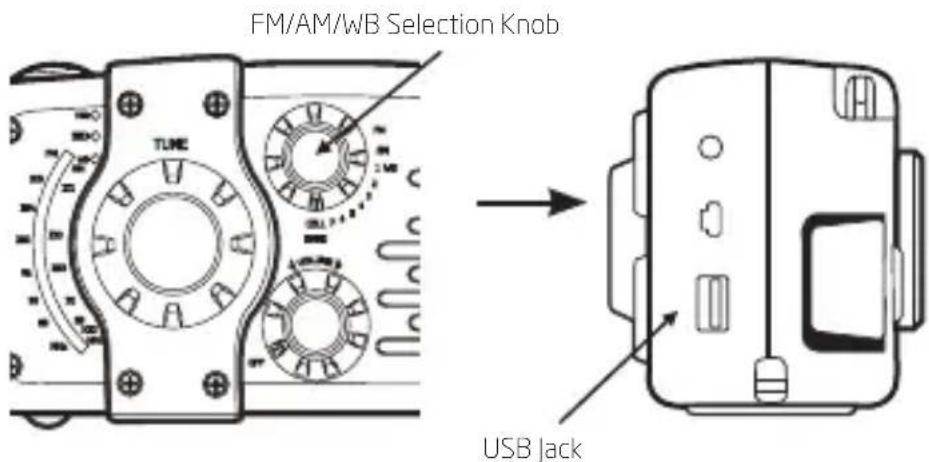
NOTE: For crank-to-cell phone usage estimate, 10 to 15 minutes of cranking may result in 1 or more minutes of talk-time. It is important to turn the crank at least 2 revolutions per second, or until you see the green LED above the crank handle turn on. This is an indication that the phone is receiving enough power from the radio. Continue to crank at this rate until you are satisfied that an appropriate level of charge has been received by your cell phone. If you decide to stop cranking for whatever reason, please wait at least 5 seconds before beginning to crank again. Not following these instructions may cause damage to your cell phone for which Eton disclaims any liability and will not be held liable for any actual or consequential damages related to this matter.
Using The Light
Press the button (on the top of the unit) and the light will be on. Press the button again to turn off the light.
TURNING THE RADIO ON AND OFF
Turn it on with the OFF/VOLUME control.
To turn it off, set the OFF/VOLUME control to OFF.
ADJUSTING THE VOLUME
Set VOLUME control to the desired level.
TUNING IN STATIONS
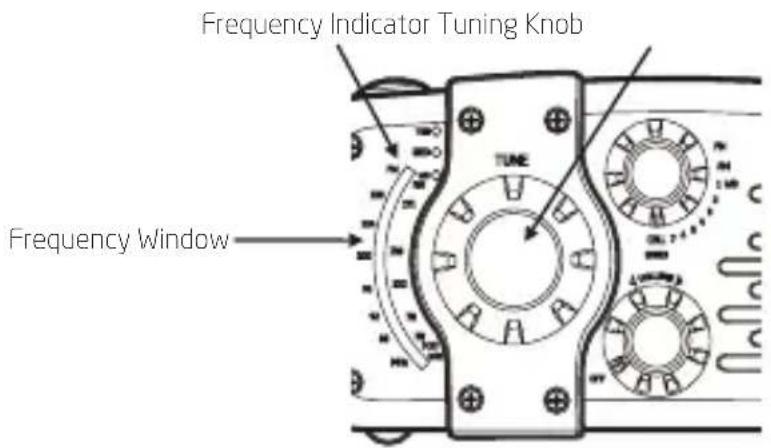
- Select your desired band, and then rotate the < Frequency Knob >. The tuning indicator will be on when the antenna receives a strong signal.
EARPHONE JACK
Plug in earphones (not included). Sound is heard from both sides in monaural.
WARRANTY REGISTRATION
To ensure full warranty coverage or product updates, registration of your product should be completed as soon as possible after purchase or receipt. You may use one of the following options to register your product:
- By visiting our website at http://www.etoncorp.com.
- Mail in enclosed warranty card.
- Mail your registration card or information to the following address; Include your name, full mailing address, phone number, model purchased, date purchased, retail vendor name and product serial number (typically located in or near the battery compartment):
Etón Corporation
1015 Corporation Way
Palo Alto, CA 94303
LIMITED WARRANTY
Retain the warranty information from your warranty card with your proof of purchase or the Limited Warranty information can also be viewed at www.etoncorp.com.
SERVICE FOR YOUR PRODUCT
To obtain service for your product, we recommend first contacting an Etón service representative at 800-872-2228 US, 800-637-1648 Canada or (650) 903-3866 for problem determination and trouble-shooting. If further service is required, the technical staff will instruct how to proceed based on whether the radio is still under warranty or needs non-warranty service.
WARRANTY – If your product is still in warranty and the Etón service representative determines that warranty service is needed, a return authorization will be issued and instructions for shipment to an authorized warranty repair facility. Do Not ship your radio back without obtaining the return authorization number.
NON-WARRANTY – If your product is no longer under warranty and requires service our technical staff will refer you to the nearest repair facility that will be able to best handle the repair.
For service outside of North America, please refer to the distributor information included at time of purchase/receipt.
Etón Corporation, 1015 Corporation Way, Palo Alto, CA 94303, USA. 1-800-872-2228 (U.S.); 1-800-637-1648
(Canada); 650-903-3866 (worldwide); M-F, 8:00-4:30,
Pacific Standard Time; www.etoncorp.com.
AVERTISSEMENT
136,5x63,5x57mm (LxHxP)
- Poids: 244 g (8,6 oz.)
ALIMENTATIONS
Corporate Headquarters
1015 Corporation Way
Palo Alto, California 94303 USA
tel +1 650-903-3866
tel +1 800-872-2228
fax +1 650-903-3867
Etón Canada
1 Yonge Street, Suite 1801
Toronto, Ontario M5E 1W7 Canada
tel +1 416-214-6885