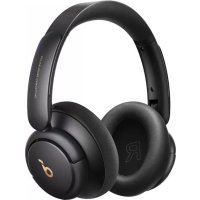
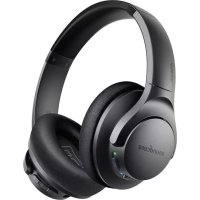
Life Q30 - Headphones soundcore - Free user manual and instructions
Find the device manual for free Life Q30 soundcore in PDF.



| Product Type | Wireless active noise cancelling headphones |
| Brand | Soundcore |
| Model | Life Q30 |
| Connection technology | Bluetooth (range 15 m) |
| Speaker size | 40 mm x 2 |
| Active noise cancellation (ANC) | Yes, modes Transport, Outdoor, Indoor |
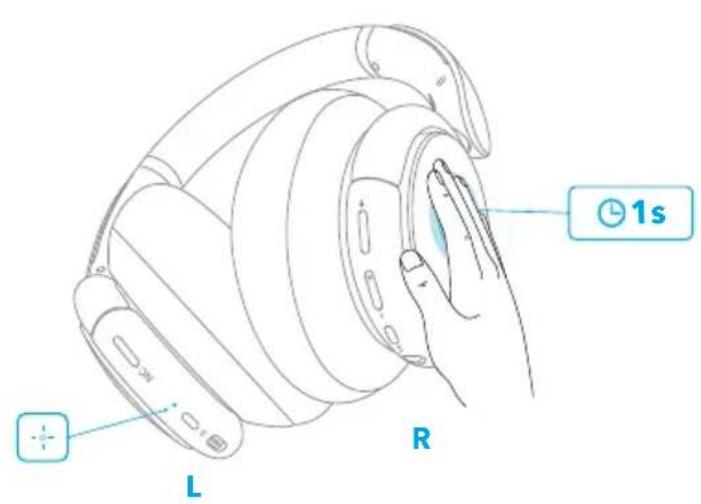
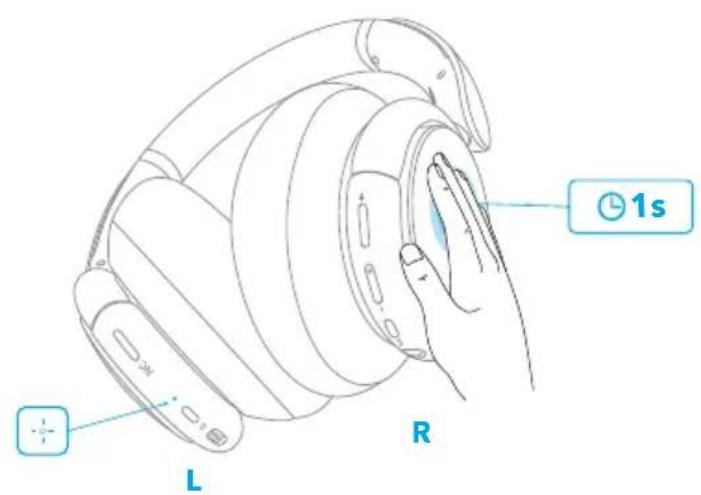
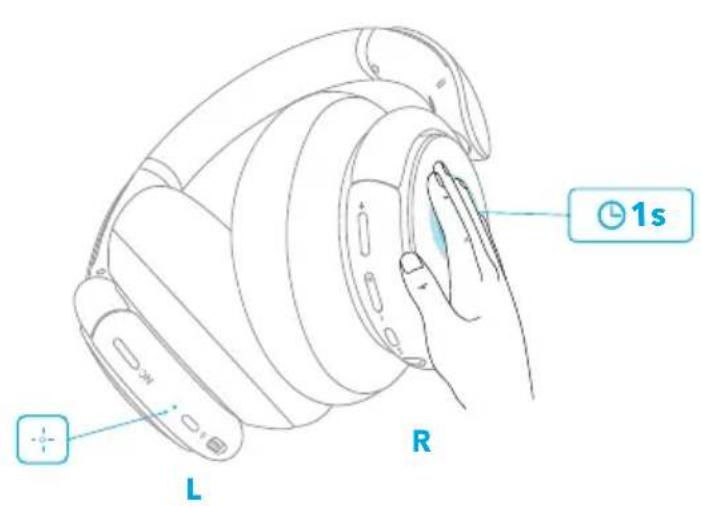
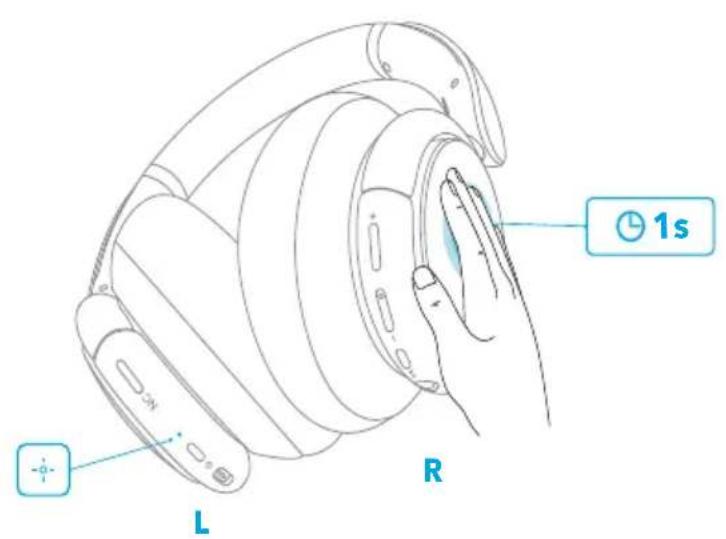
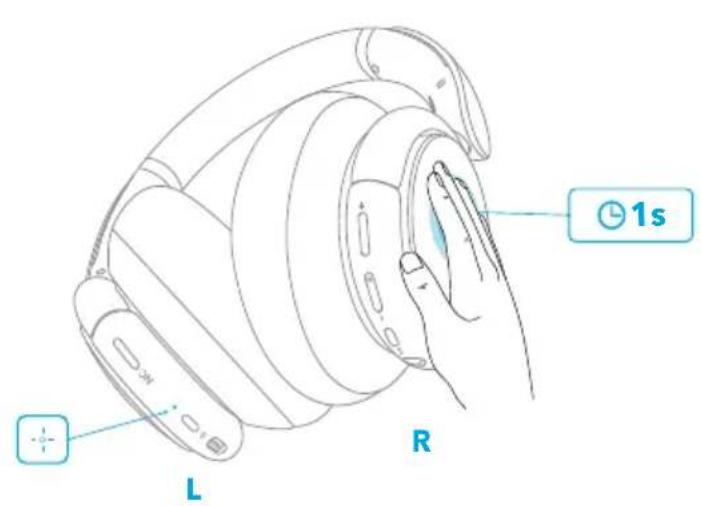
| Transparency mode | Yes, activate by pressing right panel button for 1 second |
| Battery life (ANC on) | 40 hours |
| Battery life (ANC off) | 60 hours |
| Charging time | 2 hours |
| Power input | 5 V ⎓ 0.65 A (USB-C) |
| Controls | Physical buttons (power, volume, track, NC) and touch panel (transparency, answer/calls) |
| Companion app | Soundcore (equalizer, ANC modes, firmware update, soundscapes) |
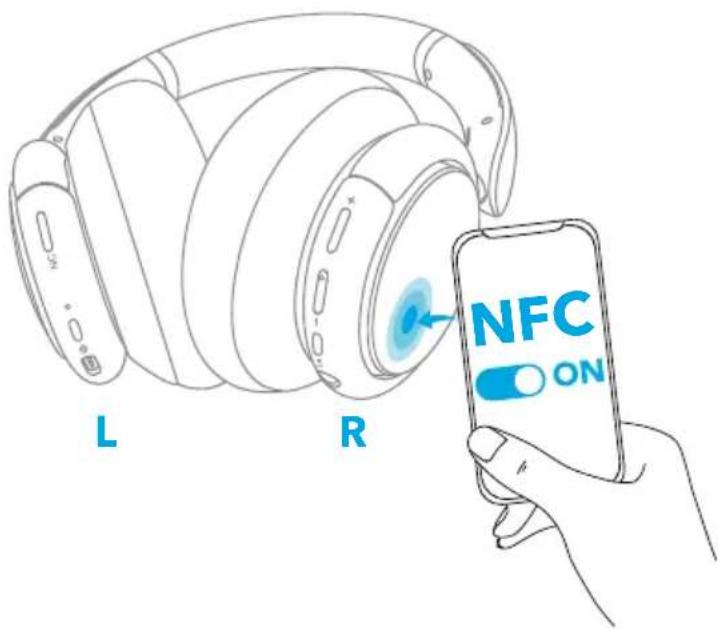
| NFC | Yes, for fast pairing (except iOS) |
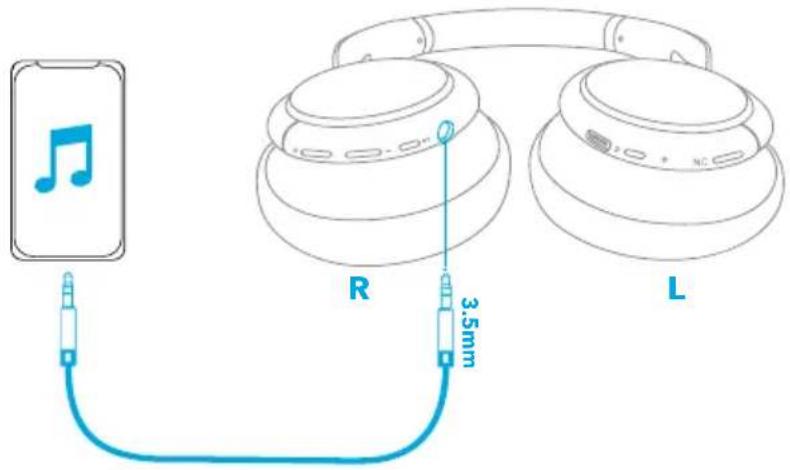
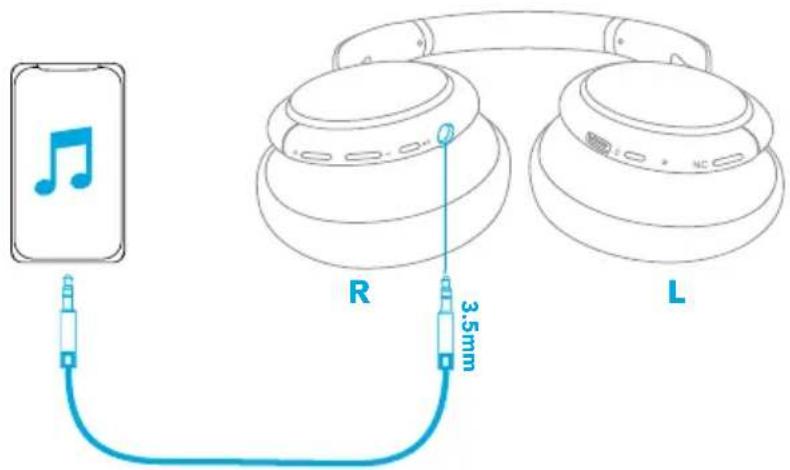
| Auxiliary input | 3.5 mm jack (AUX mode disables Bluetooth and ANC) |
Frequently Asked Questions - Life Q30 soundcore
User questions about Life Q30 soundcore
0 question about this device. Answer the ones you know or ask your own.
Ask a new question about this device
Download the instructions for your Headphones in PDF format for free! Find your manual Life Q30 - soundcore and take your electronic device back in hand. On this page are published all the documents necessary for the use of your device. Life Q30 by soundcore.
USER MANUAL Life Q30 soundcore
natural_image
Line drawing of a pair of black-and-white headphones (no text or symbols)Soundcore Life Q30
USER MANUAL
| English 01 | Português 92 | ||
| Čeština 08 | Portugues do Brasil 99 | ||
| Dansk 15 | Русский | 106 | |
| Deutsch 22 | Slovenský Jazyk 113 | ||
| ελληνικά | 29 | Slovenski Jezik 120 | |
| Español 36 | Svenska | 127 | |
| Suomi 43 | Türkçe | 134 | |
| Français 50 | 141 | ||
| Magyar 57 | 148 | ||
| Italiano 64 | 155 | ||
| Nederlands 71 | 162 | ||
| Norsk 78 | لعربيya | 169 | |
| Język polski 85 | لالالا | 176 |
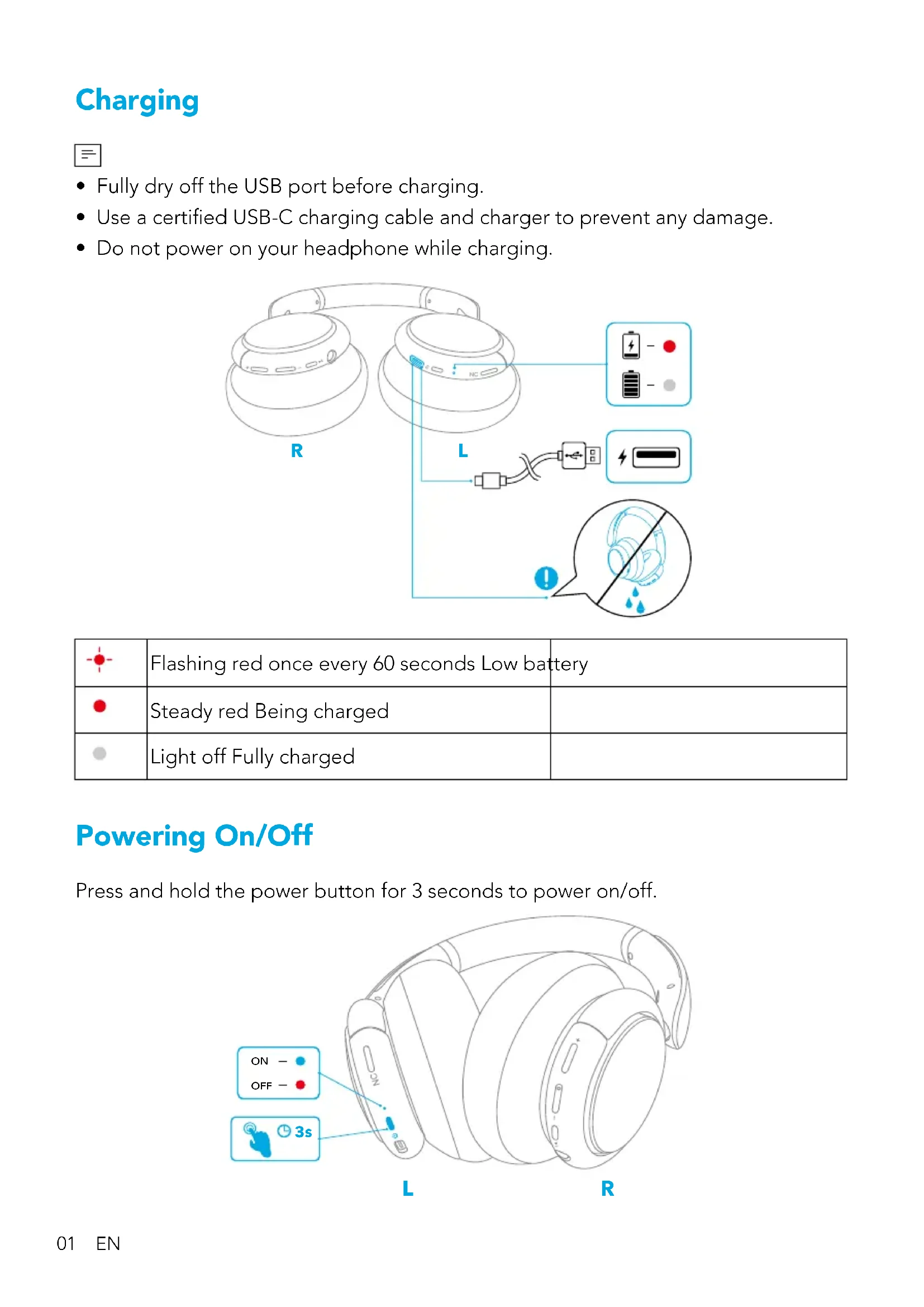
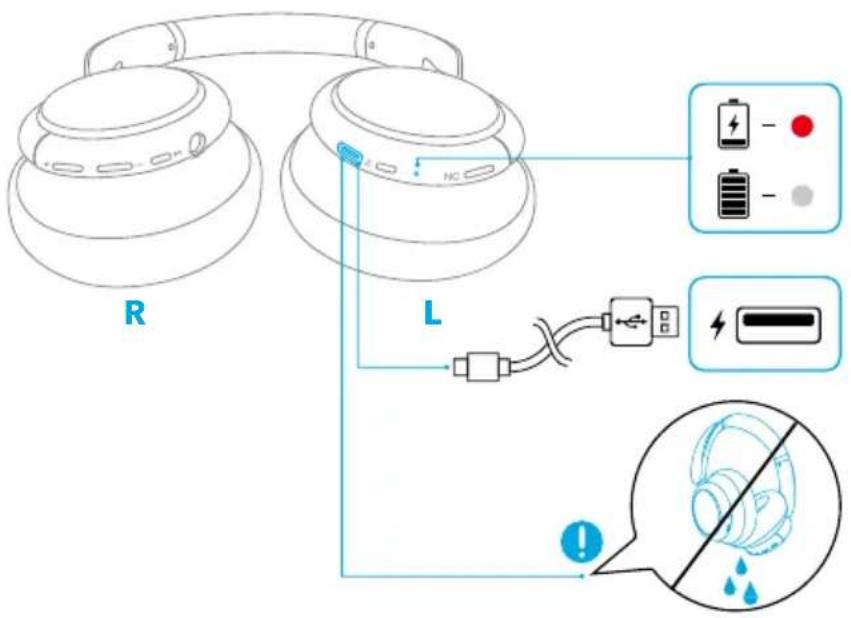
Charging

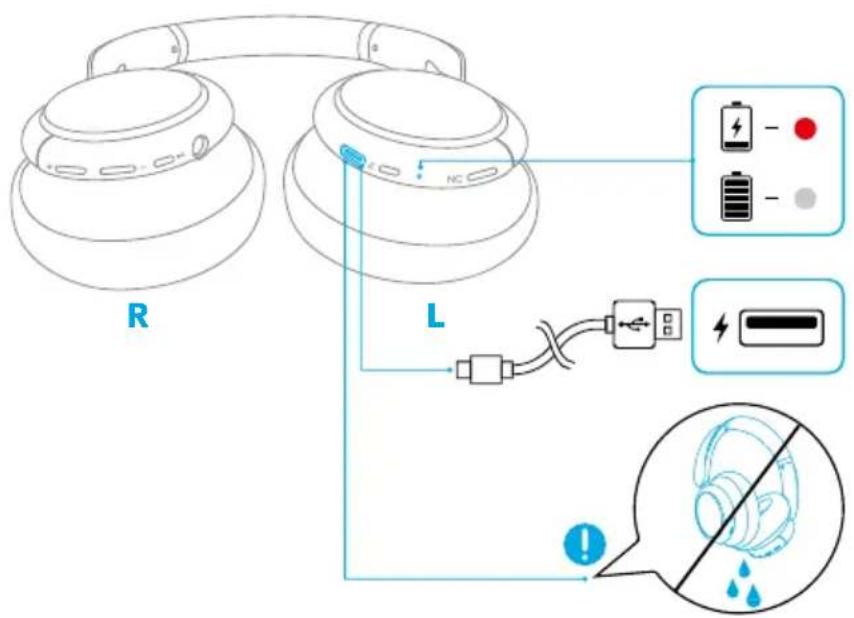
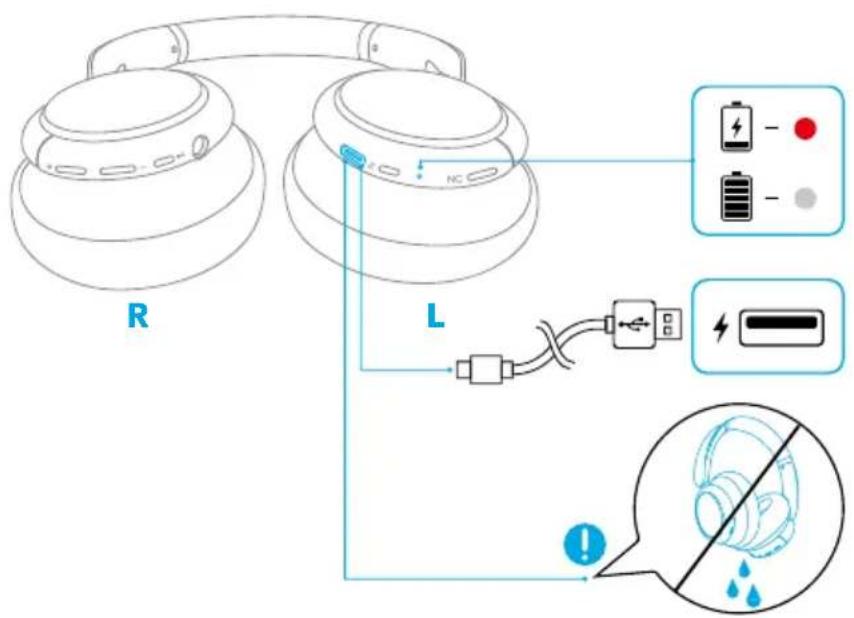
- Fully dry off the USB port before charging.
- Use a certified USB-C charging cable and charger to prevent any damage.
- Do not power on your headphone while charging.
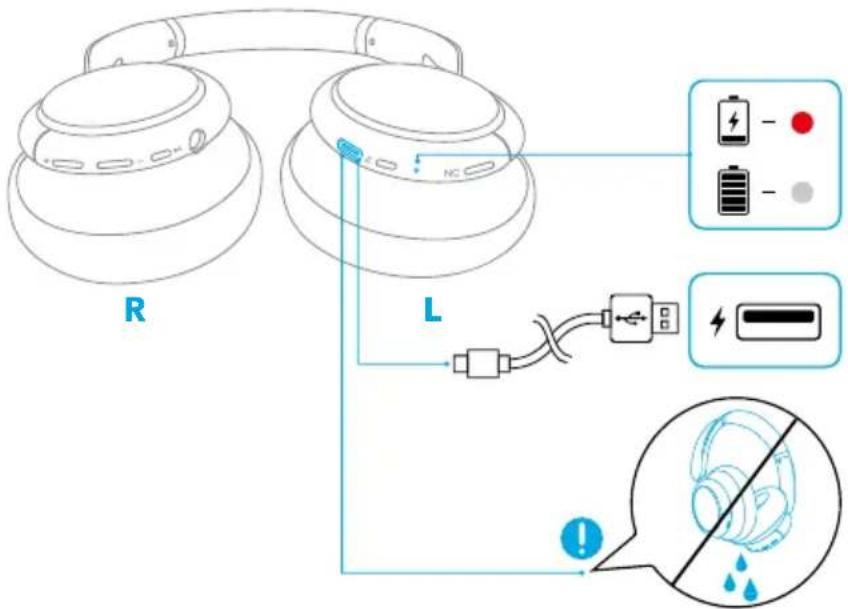
| Flashing red once every 60 seconds Low battery | ||
| Steady red Being charged | ||
| Light off Fully charged |
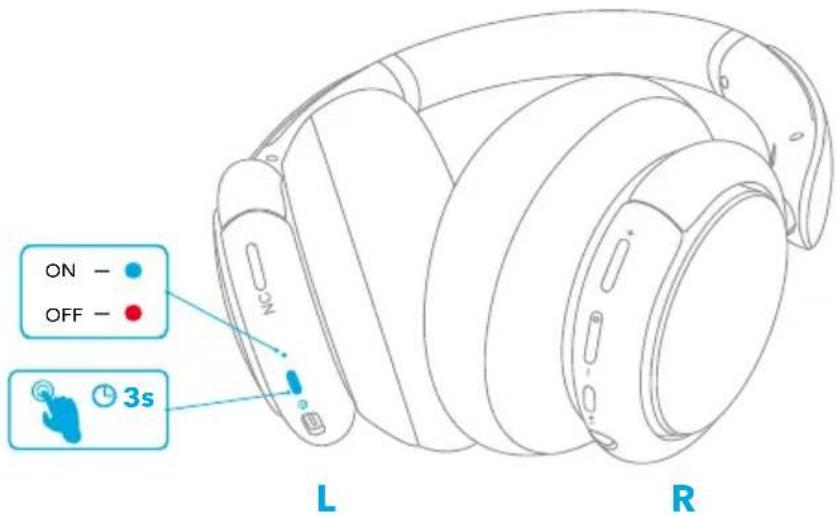
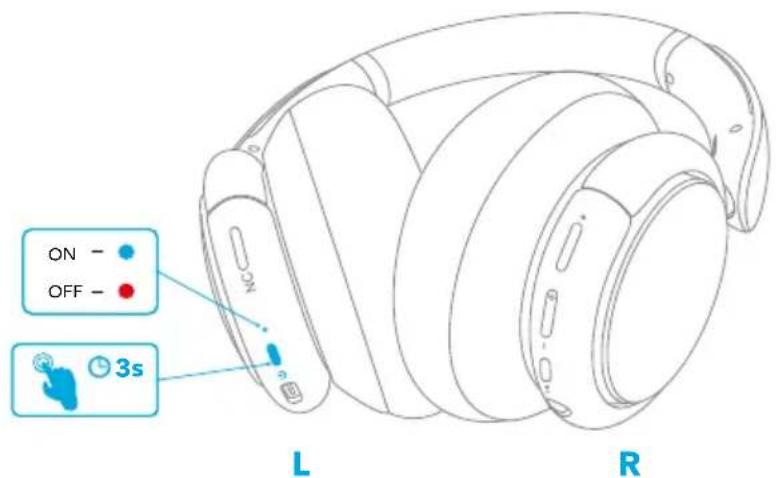
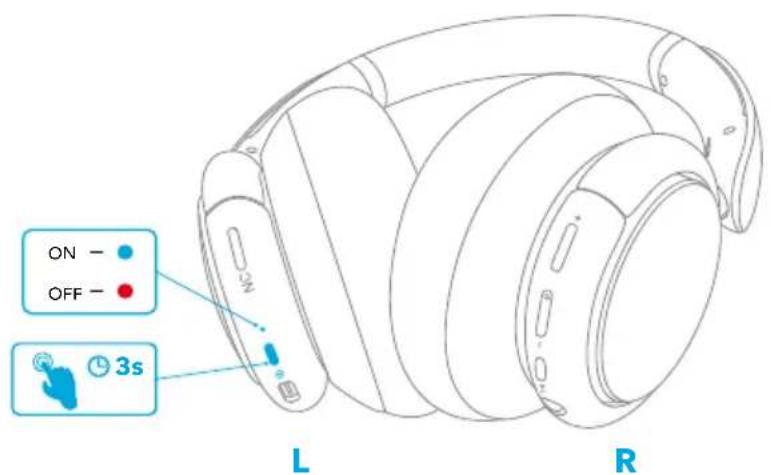
Powering On/Off
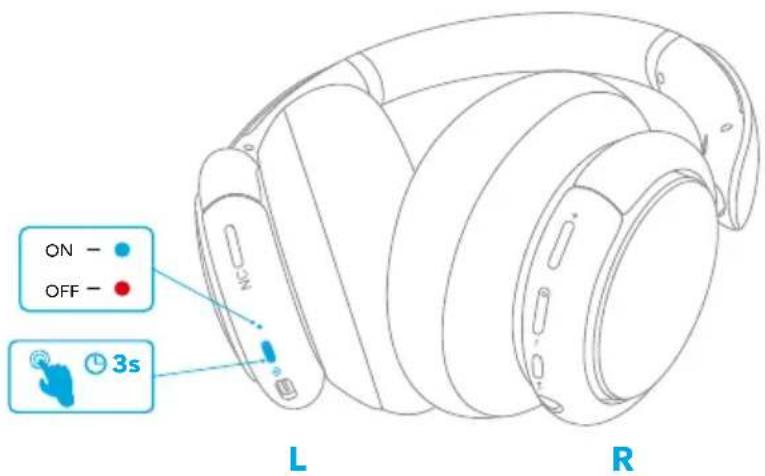
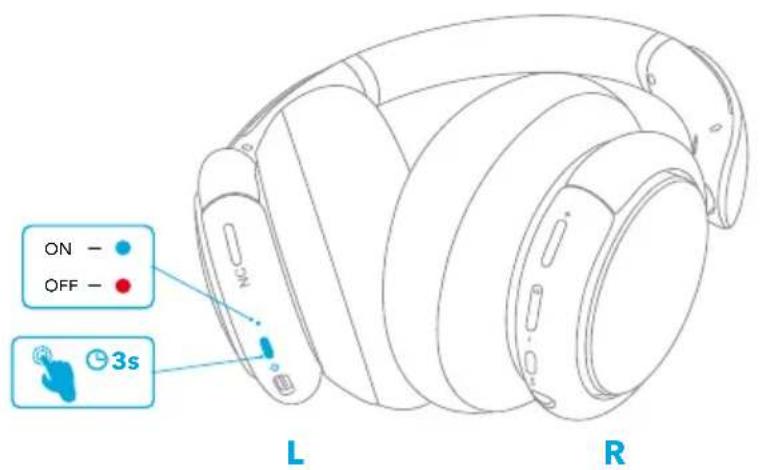
Press and hold the power button for 3 seconds to power on/off.
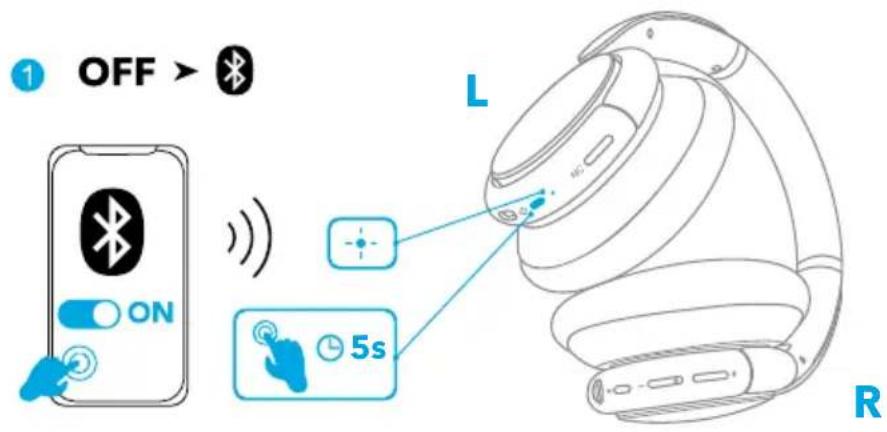
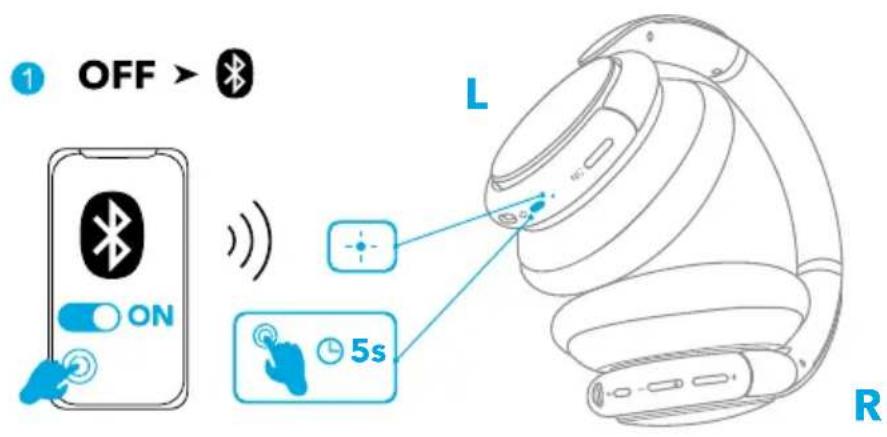
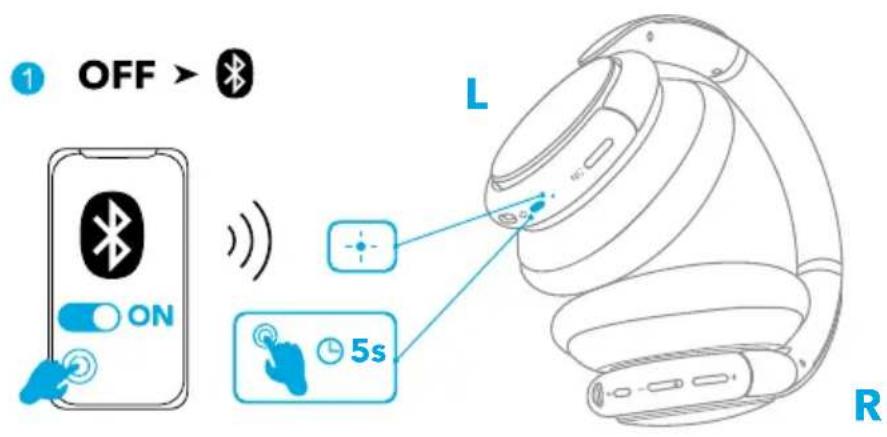
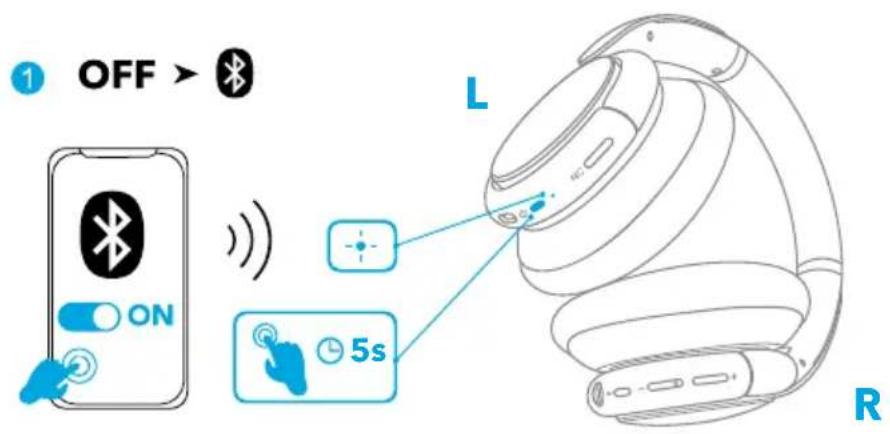
Bluetooth Pairing
-
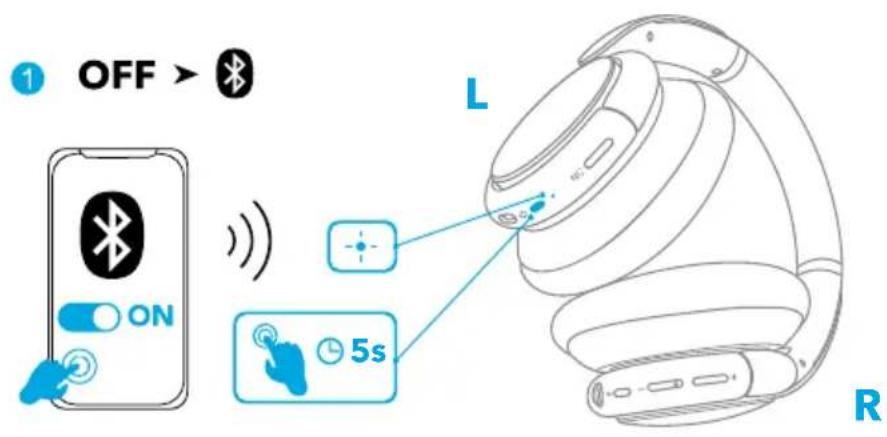
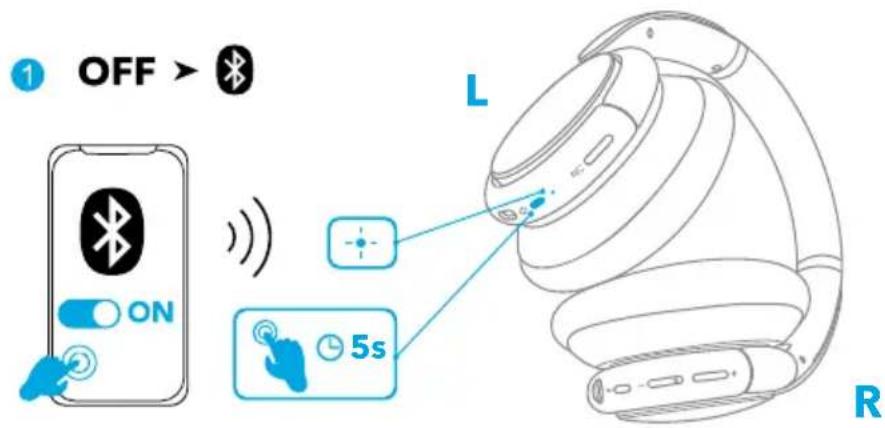
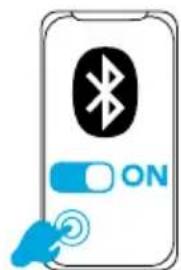
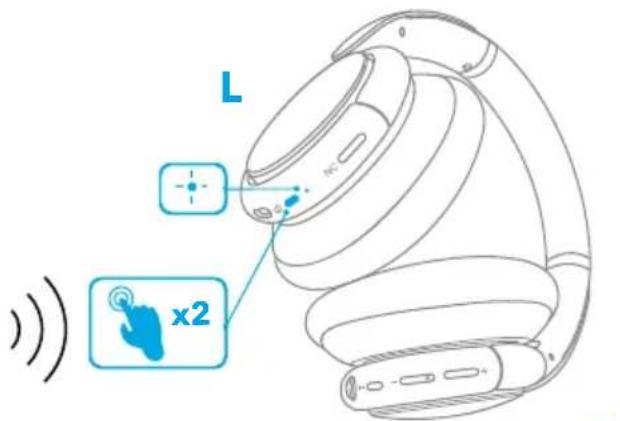
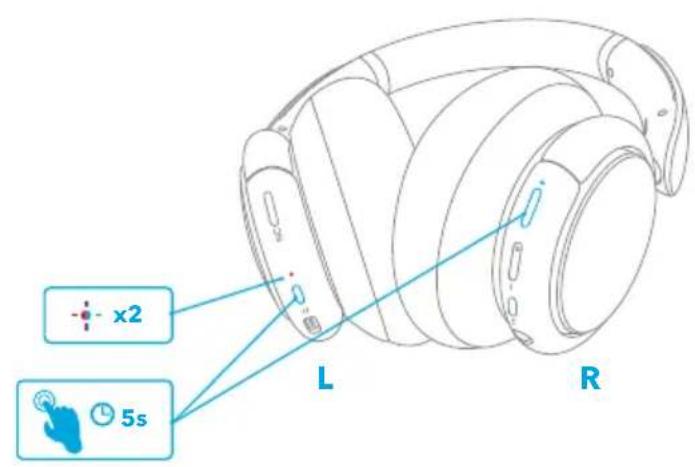
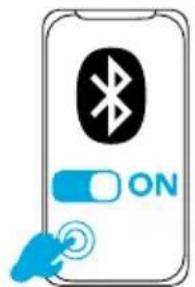
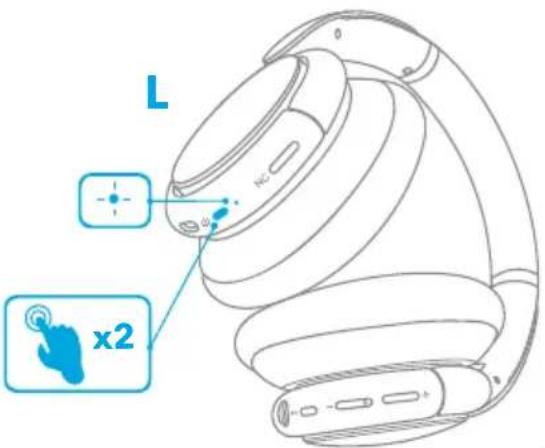
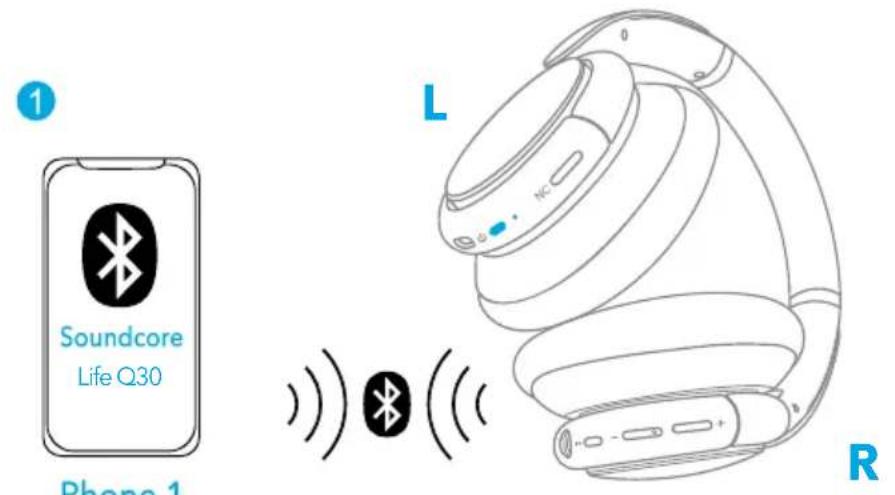
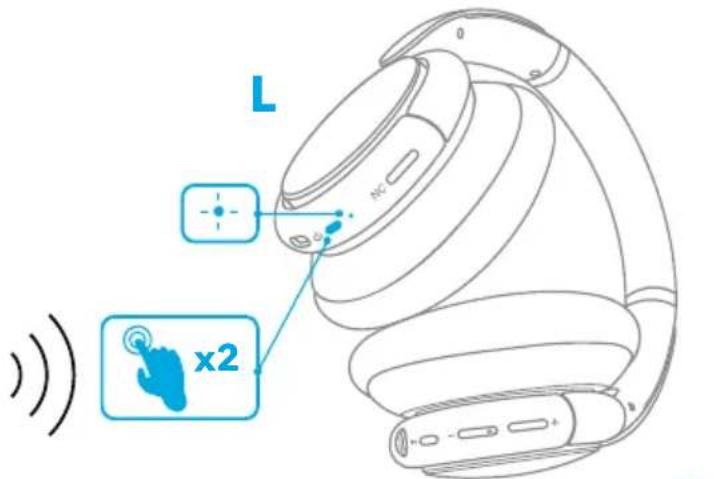
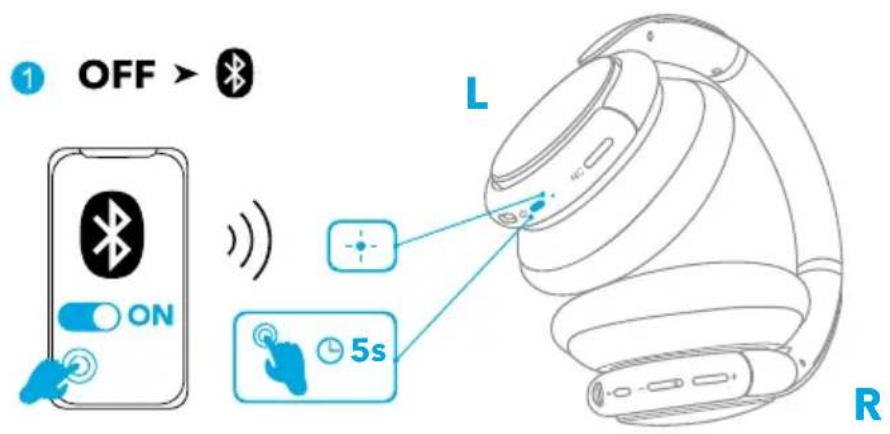
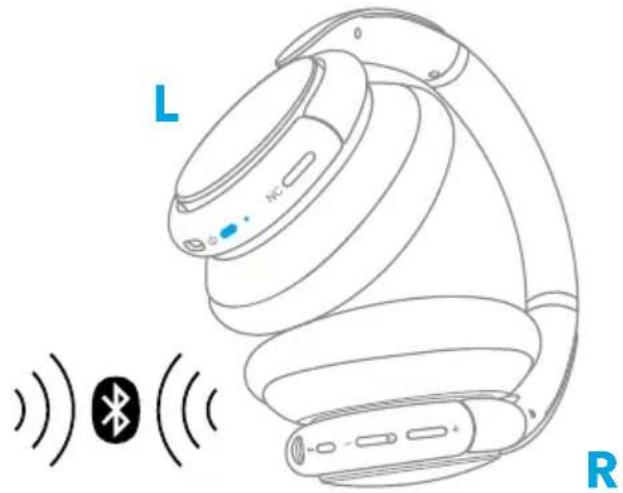
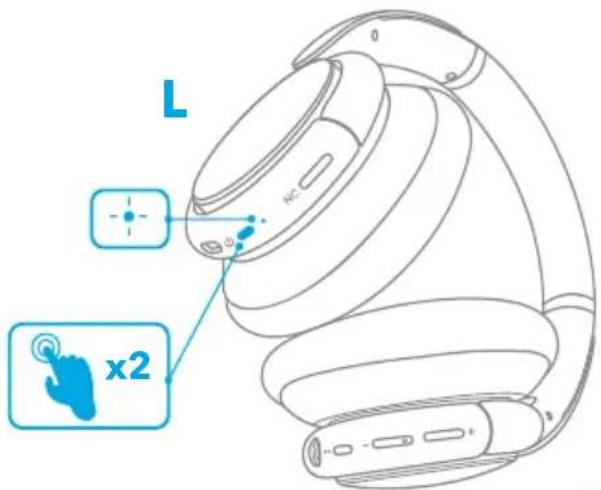
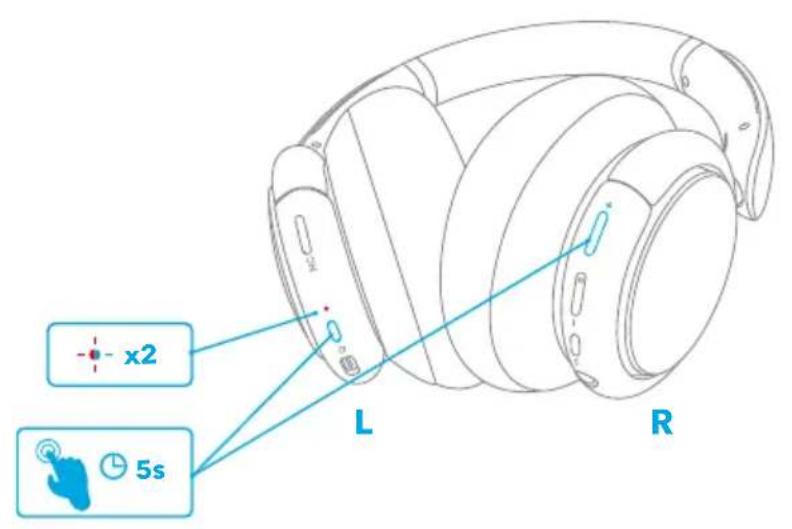
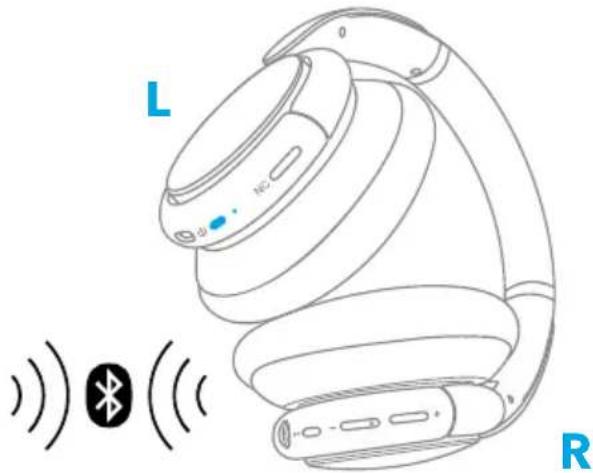
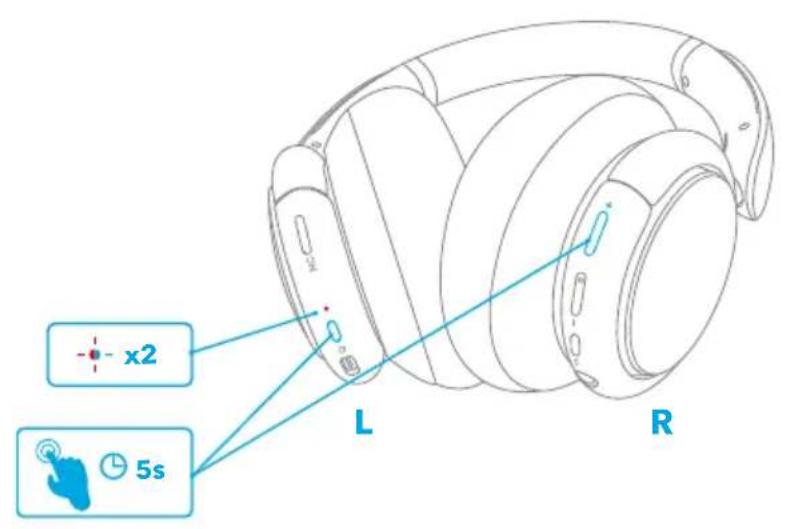
When powered off, press and hold the power button for 5 seconds until the LED flashes blue to enter the Bluetooth pairing mode.
-
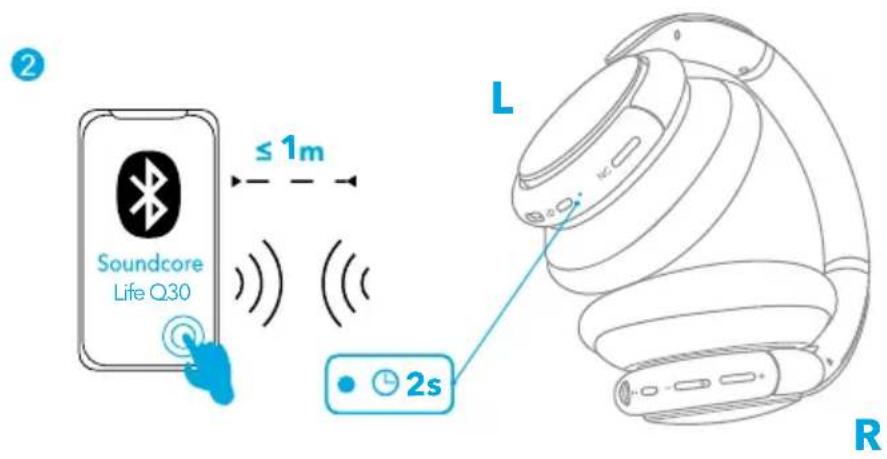
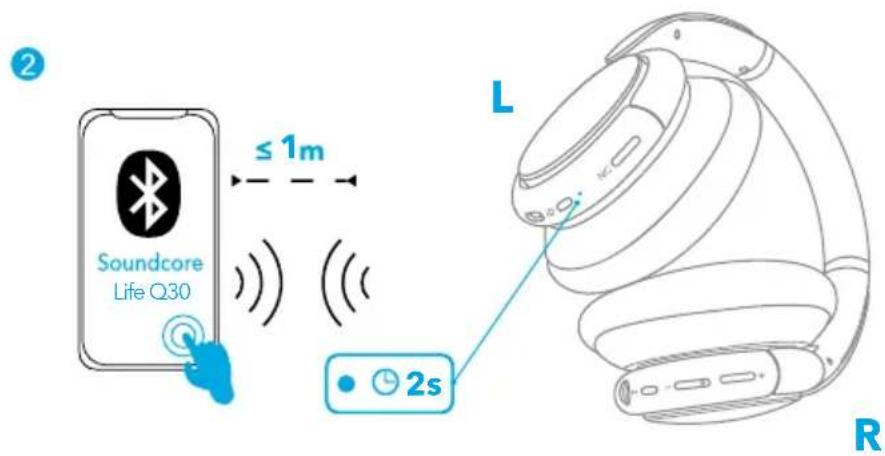
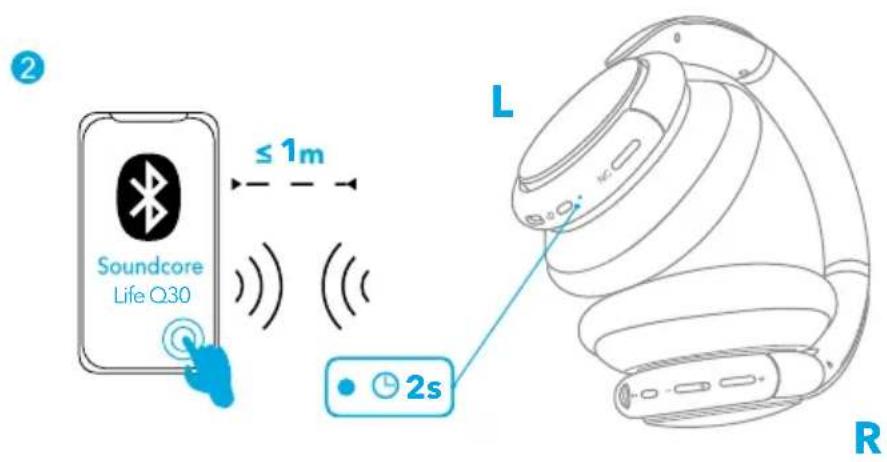
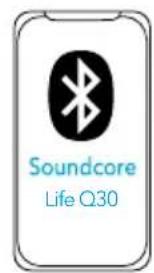
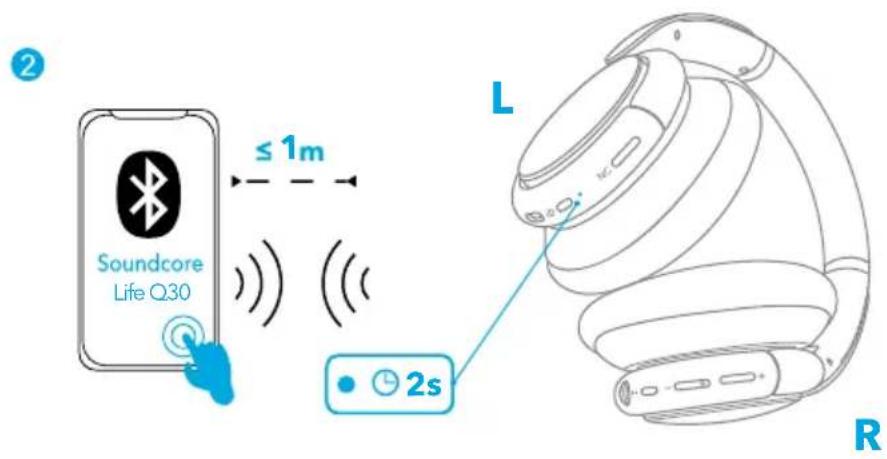
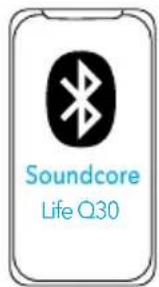
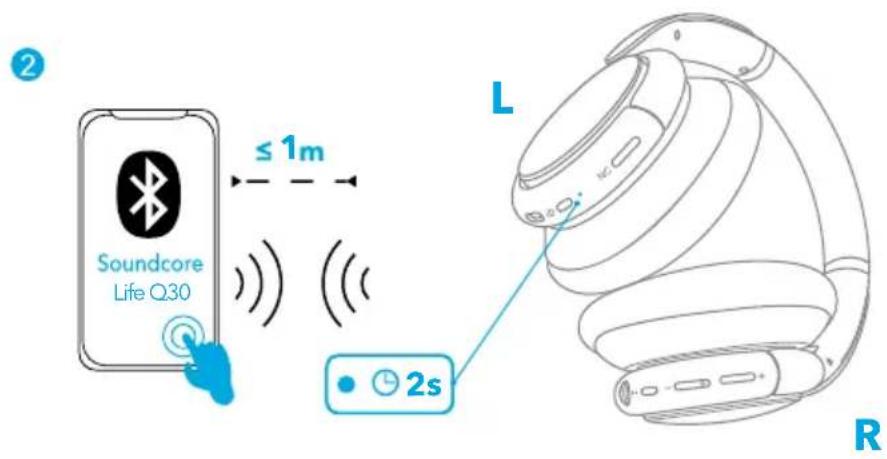
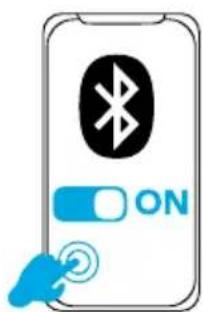
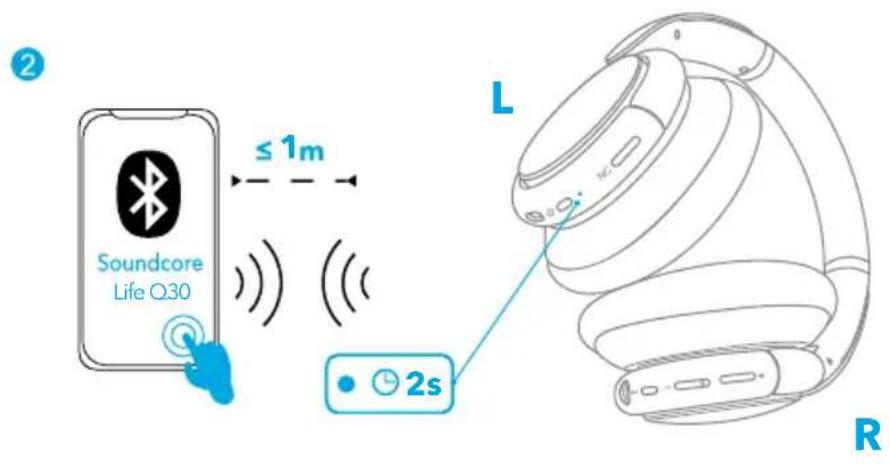
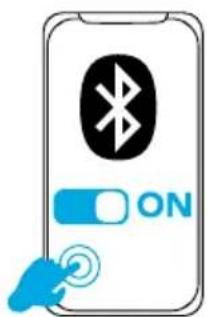
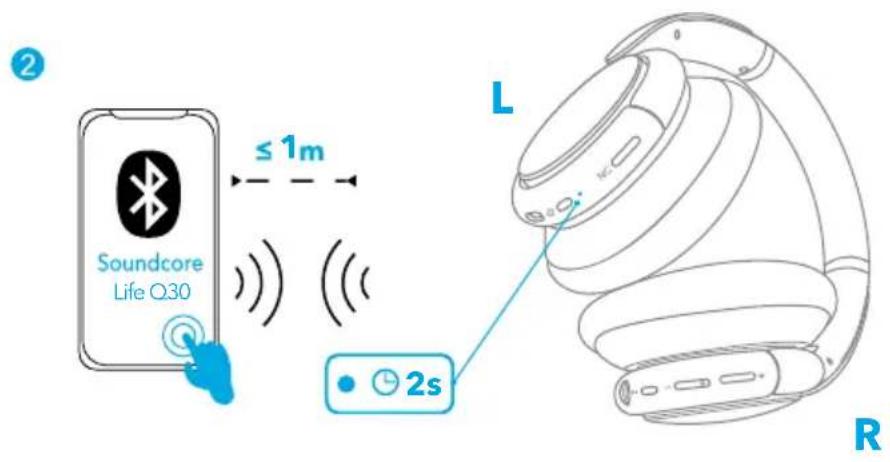
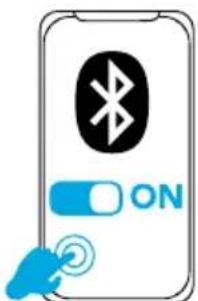
Select "Soundcore Life Q30" on your device's Bluetooth list to connect.
| Flashing blue Bluetooth pairing | ||
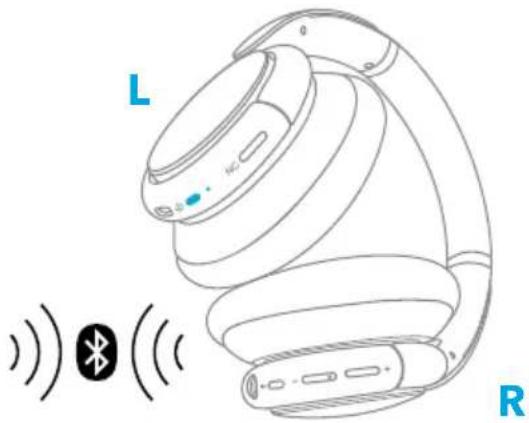
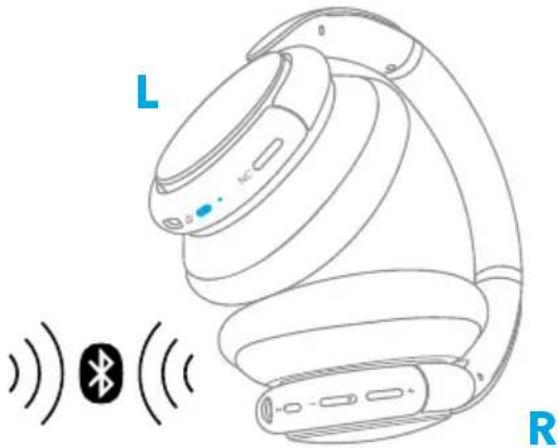
| Steady blue (for 2 seconds) Bluetooth connected |
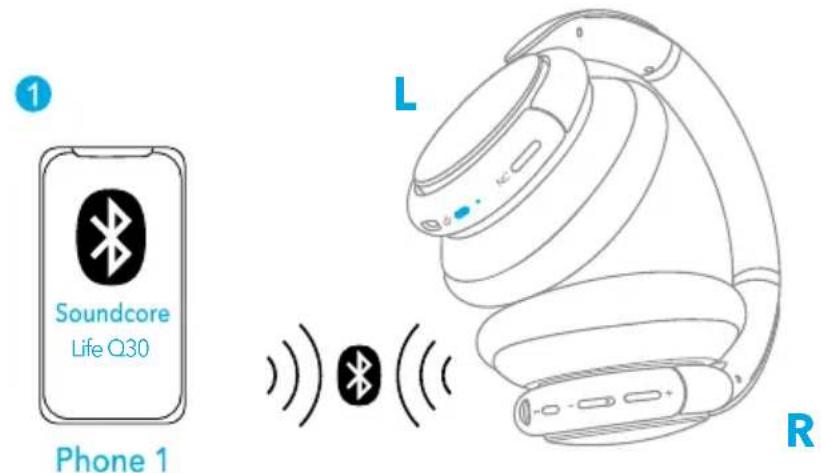
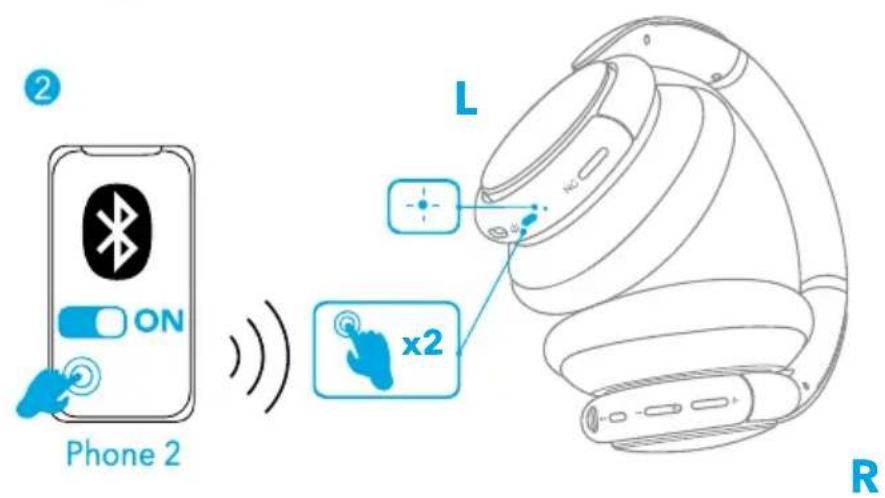
Pairing with another device
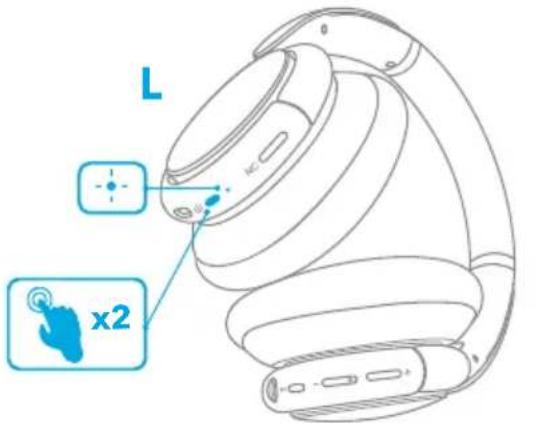
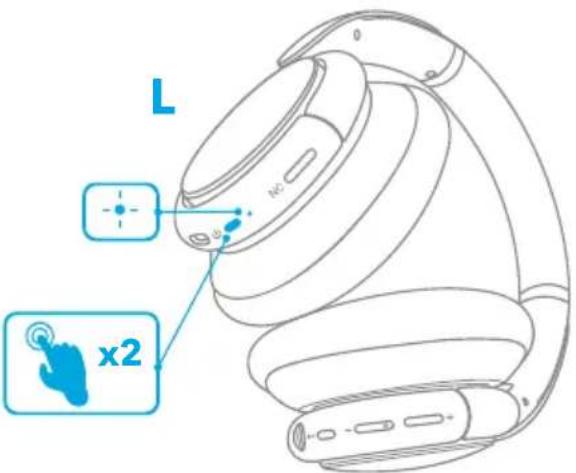
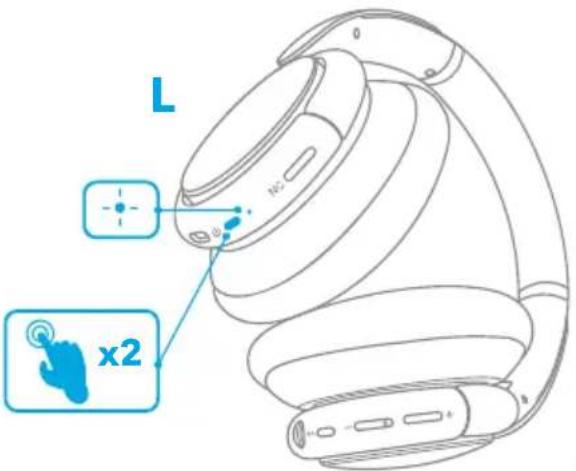
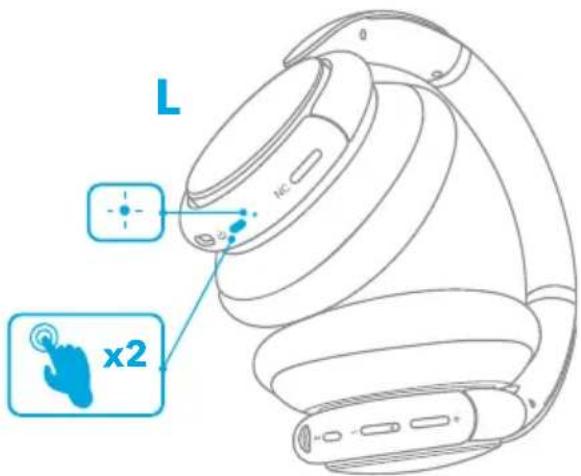
When successfully connected with the first device, press twice the power button to pair up with another device.
三
- Your Soundcore headphone can only play music on one mobile device at a time. To play from another connected device, pause the device that's currently active first.
• Each time you power on your Soundcore headphone, it will automatically connect to your last successfully connected device if available within the Bluetooth range.
Button Controls
| Play/Pause Press | ▶|| | |
| Next track | + | Press and hold for 1 second |
| Previous track | - | Press and hold for 1 second |
| Volume up/down | +/- | Press |
| Answer/End a call | ▶II | Press |
| Put the current call on hold and answer a new incoming call | ||
| Reject a call | ▶II | Press and hold for 1 second |
| Switch between held call and active call | ||
| Activate Siri or other voice assistant software Press and hold for 1 second |
NFC Mode
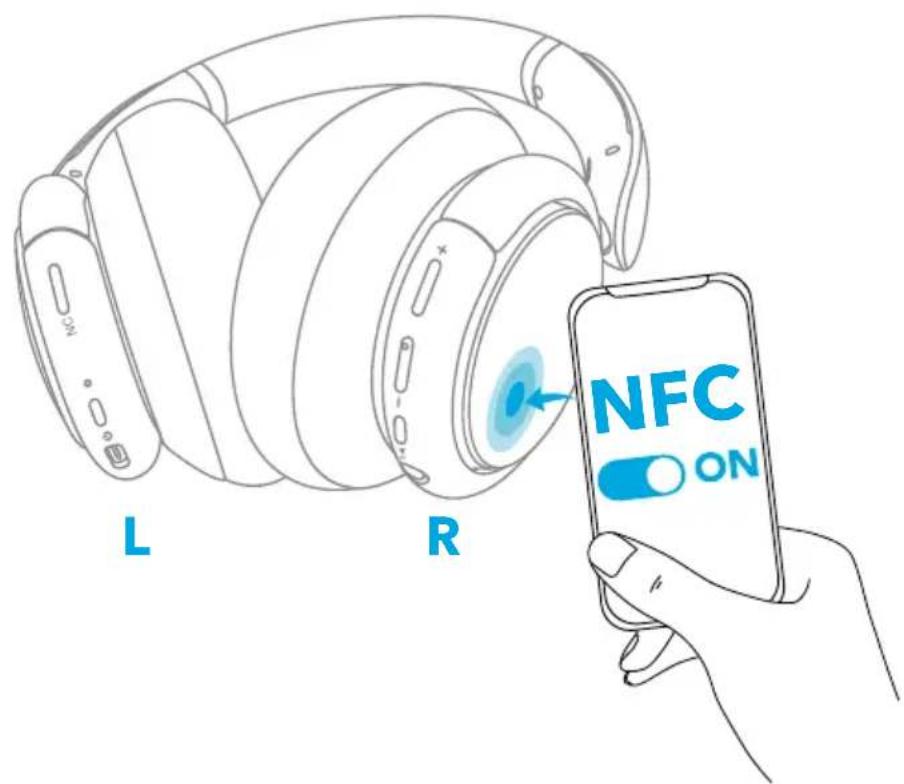
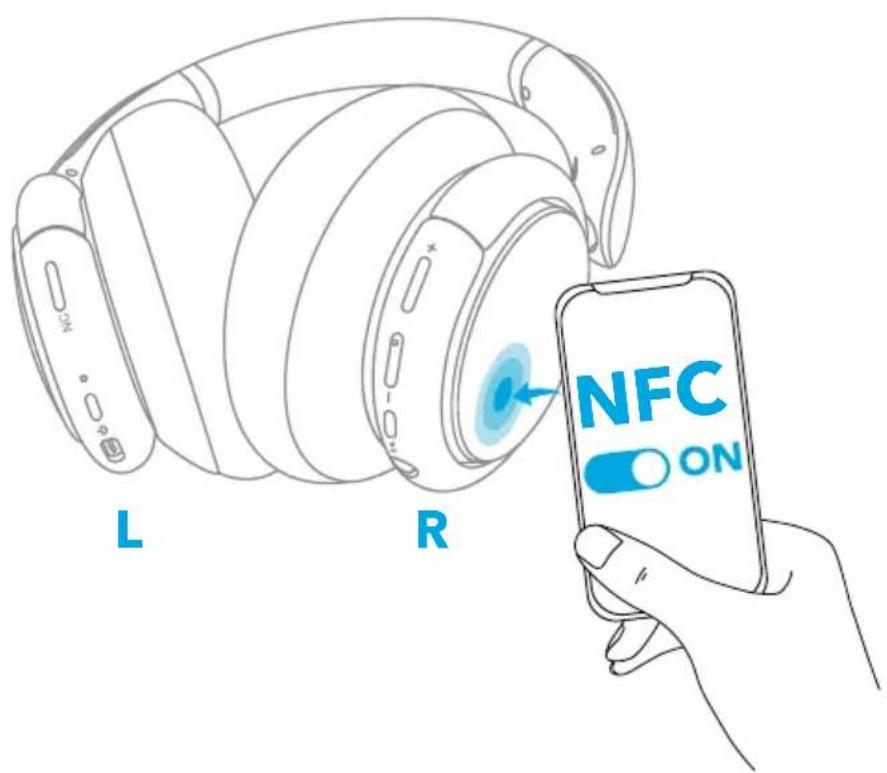
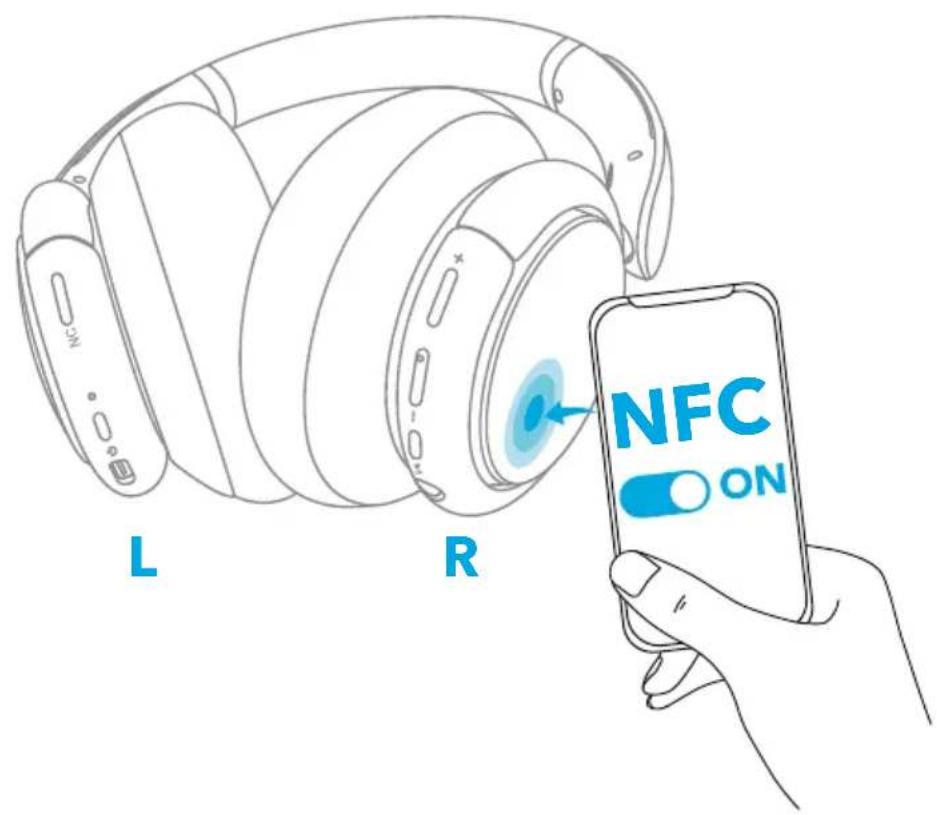
Near Field Communication (NFC) is a technology that enables short-range wireless communication between various NFC compatible devices, such as mobile phones and IC tags. If your Bluetooth device supports NFC, you can connect it with your headphone easily.
- Enable the NFC feature on your Bluetooth device (iOS devices excluded).
- Tap the right panel of your headphones with the back of your Bluetooth device.
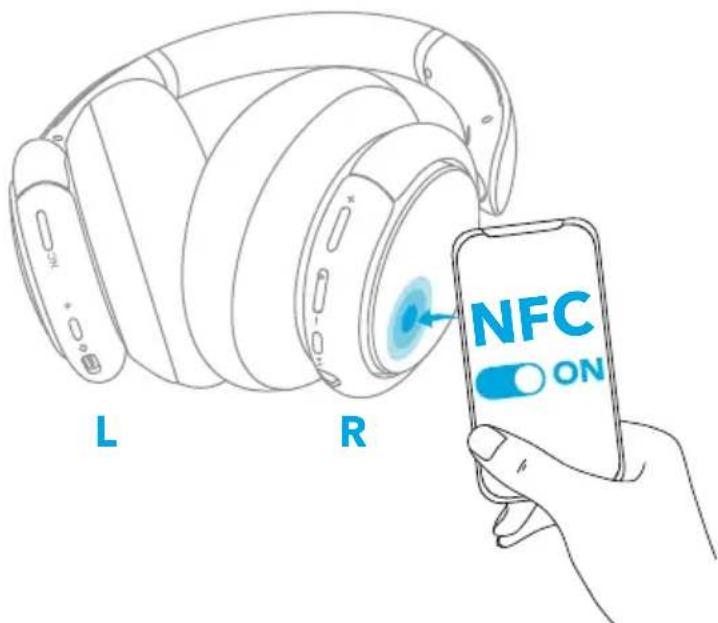
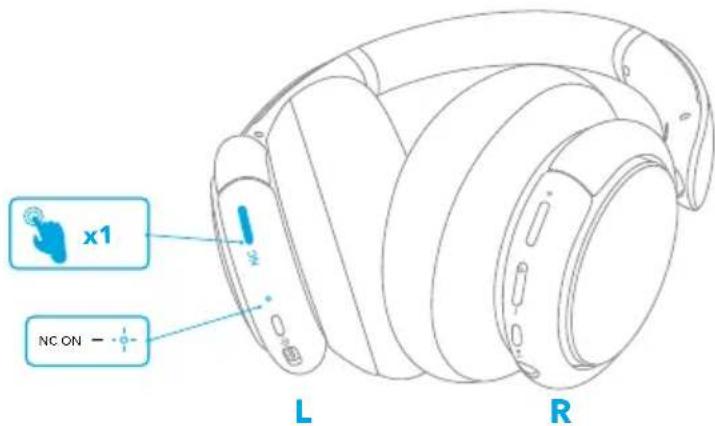
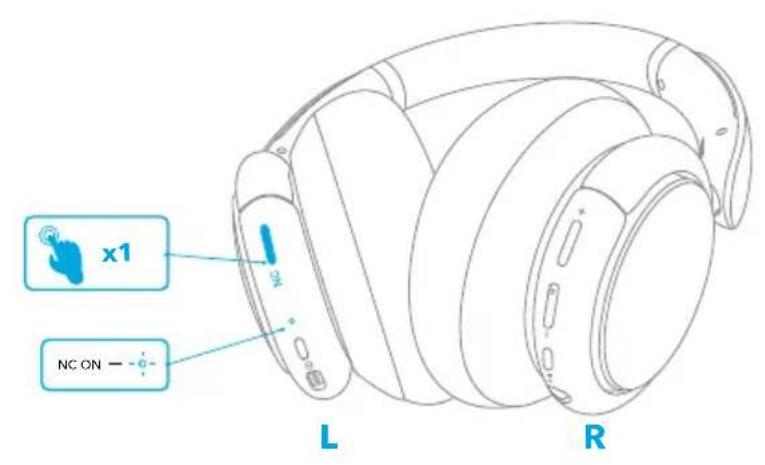
Noise Cancellation Mode
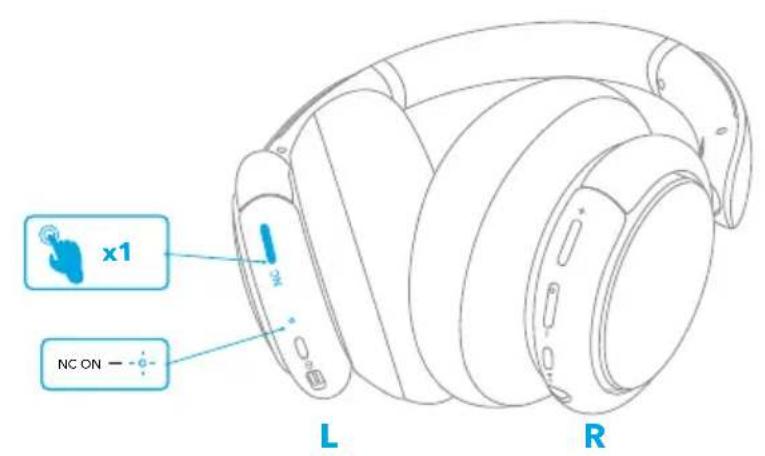
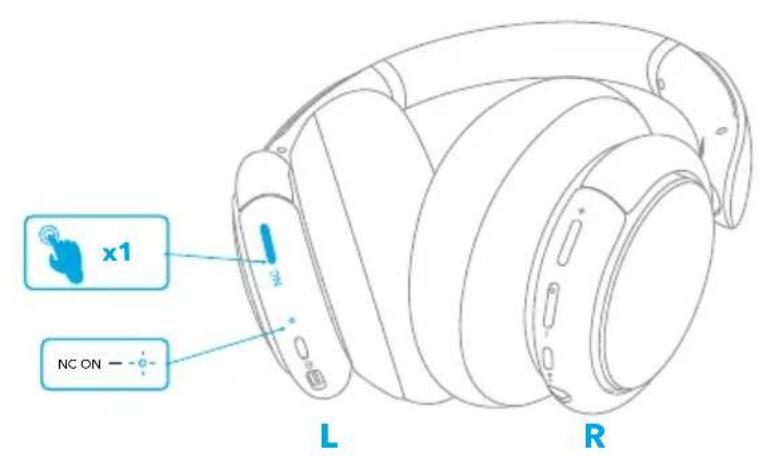
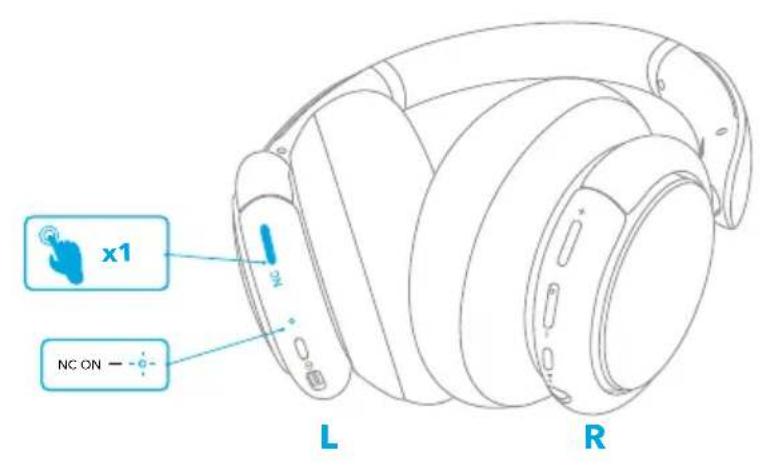
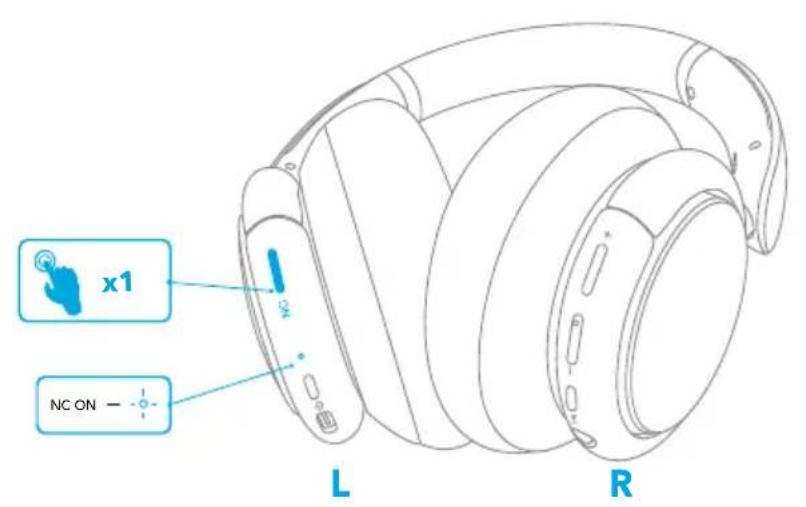
To reduce ambient noise, turn on the active noise cancellation mode by pressing the NC button. Press the NC button again to turn off.
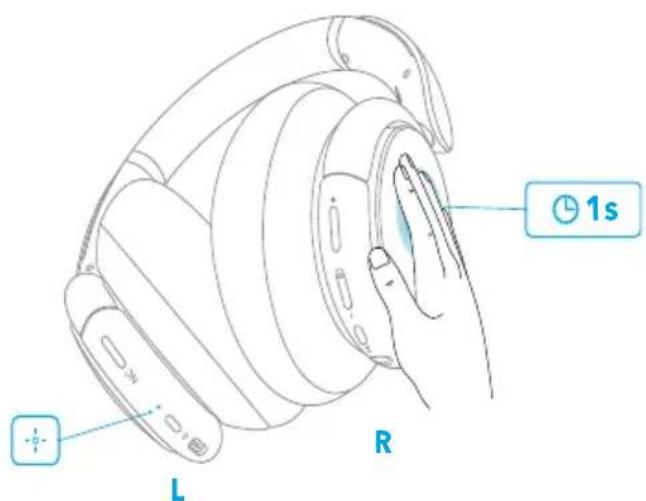
Transparency Mode
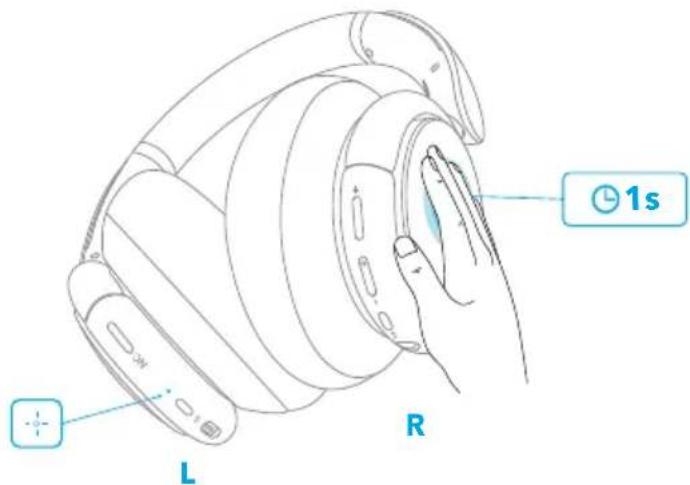
To stay aware of your surroundings by allowing ambient sounds in, touch the right panel for 1 second to activate the transparency mode.
AUX Mode
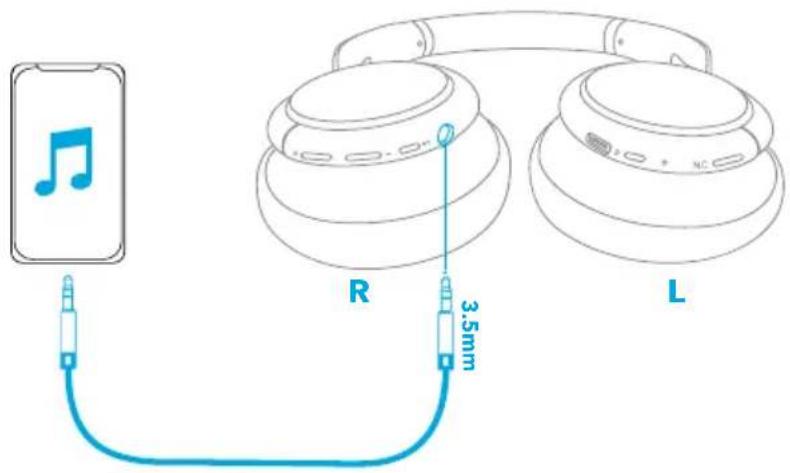
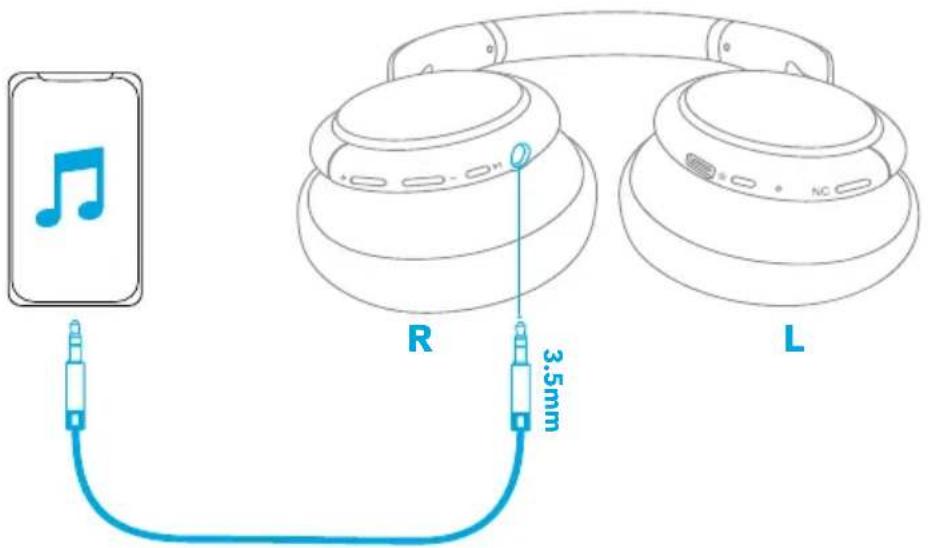
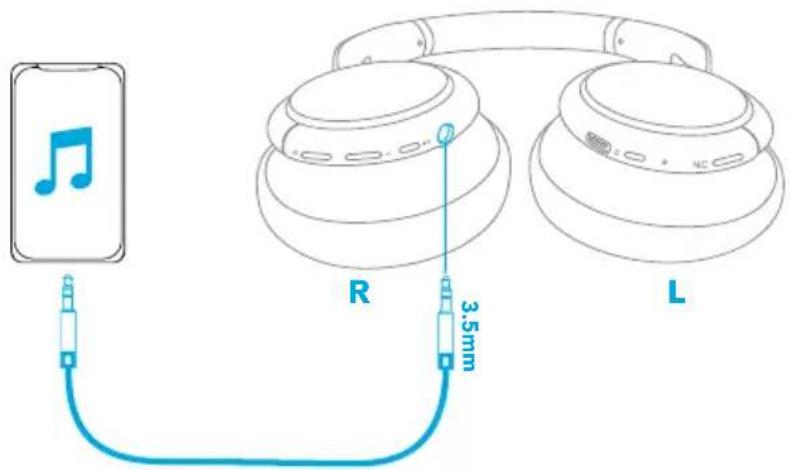
Play audio on an external device by plugging in a 3.5mm AUX cable.
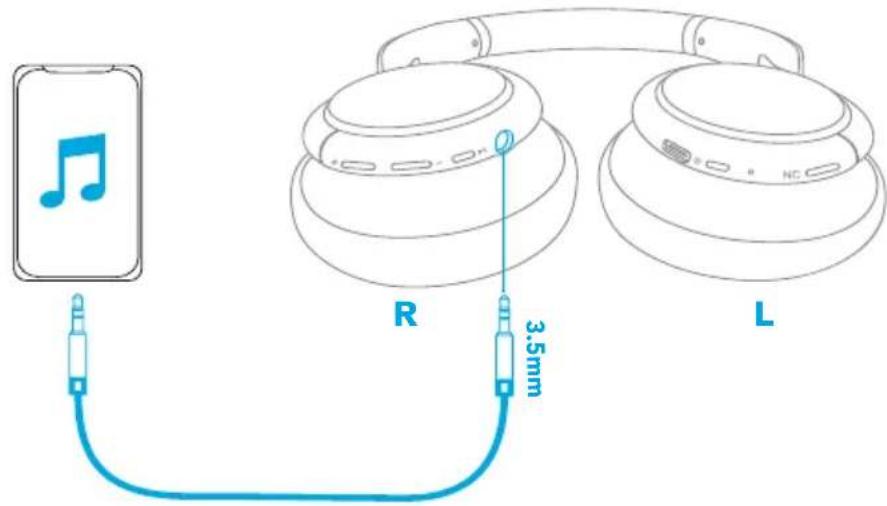

- Plugging in an audio cable will automatically switch to AUX mode, and Bluetooth mode and ANC will turn off.
Soundcore App
Download the Soundcore app to enhance your experience.
EQ settings: There are more than 20 EQ settings you can choose from in the app to optimize your experience while enjoying different music genres.
Noise cancellation: Choose an active noise cancellation mode to reduce ambient noise according to your surroundings.
- Transport: Targets low-end frequencies like engine and road noise for peaceful journeys and commutes.
• Outdoor: Reduces ambient sounds in cities for less distractions. - Indoor: Reduces voices and mid-frequency noise from coffee shops and other inside spaces.
Transparency: Stay aware of your surroundings by allowing ambient sounds in.
White noise soundscape: Tailor your own white noise soundscape when you need to rest.
Firmware update: You will be informed once the new version of firmware is detected when you connect the headphones with the app.


Google Play and the Google Play logo are trademarks of Google Inc.

Apple and the Apple logo are trademarks of Apple Inc.
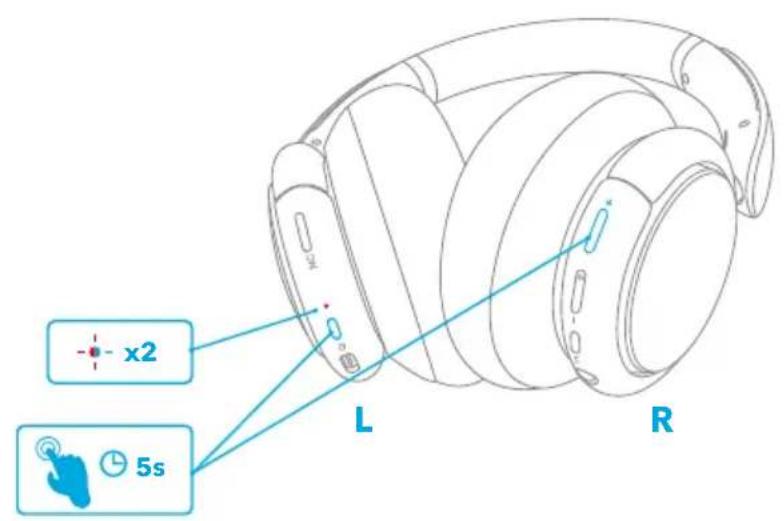
Reset
You might need to reset your headphone if you experience any connectivity problems or function issues.
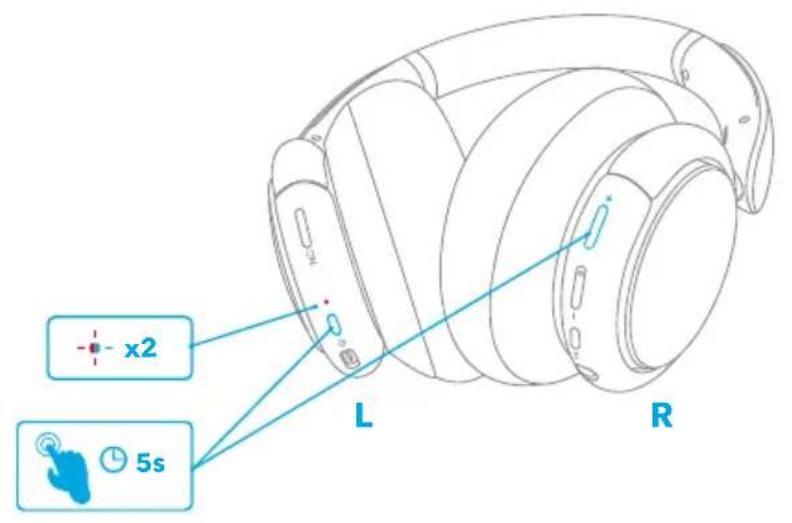
Press and hold the power button and volume up button simultaneously for 5 seconds until the LED indicator flashes blue and red alternately twice.
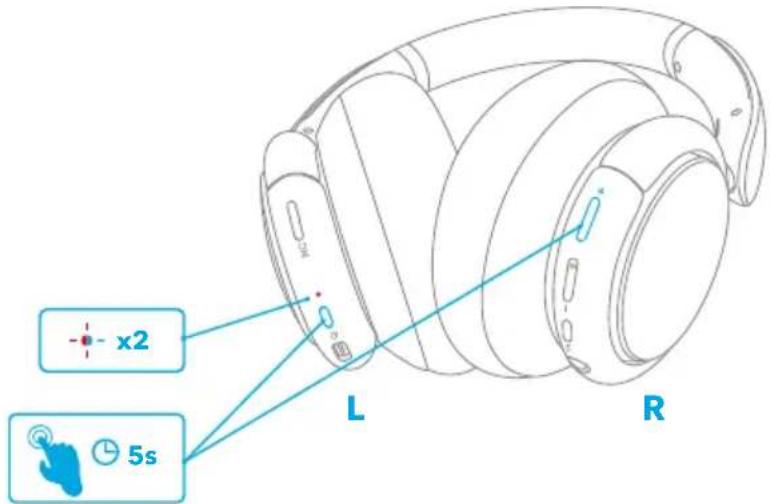
Specifications
Specifications are subject to change without notice.
Input 5 V 0.65 A
三
Charging time 2 hours
Playtime (with ANC mode turned on) 40 hours
Playtime (with ANC mode turned off) 60 hours
Driver size 40 mm × 2
Frequency response
20 Hz-20 kHz (Bluetooth)
16 Hz-40 kHz (AUX)
Impedance 16 Ω
Bluetooth version V5.0
Bluetooth range 15 m / 49.5 ft
Nabíjení

Párování Bluetooth

Transparentní režim

Google Play and the Google Play logo are trademarks of Google Inc.

Apple and the Apple logo are trademarks of Apple Inc.
Resetování
Specifikace
20 Hz-20 kHz (Bluetooth)
16 Hz-40 kHz (AUX)
Impedance 16 Ω
Bluetooth version V5.0
Bluetooth-parring
-
Når der er slukket, tryk og hold på strømknappen i 5 sekunder, indtil LED'en blinker blåt for at gå til Bluetooth-parringstilstand.
-
Vælg "Soundcore Life Q30" i din enheds Bluetooth-liste for at oprette forbindelse.
| Blinker blåt Bluetooth-parring | ||
| Lyser blåt (i 2 sekunder) Bluetooth tilsluttet |
三
Transparenstilstand
三
Google Play and the Google Play logo are trademarks of Google Inc.


Apple and the Apple logo are trademarks of Apple Inc.
Nulstil
Specifikationer
20 Hz-20 kHz (Bluetooth)
16 Hz-40 kHz (AUX)
Impedans 16 Ω
Bluetooth-version V5.0
Bluetooth-dækning 15 m / 49,5 ft
Ladevorgang

Bluetooth-Kopplung

Transparenzmodus

Google Play and the Google Play logo are trademarks of Google Inc.

Apple and the Apple logo are trademarks of Apple Inc.
Zurücksetzen
Technische Daten
20 Hz-20 kHz (Bluetooth)
16 Hz-40 kHz (AUX)
Impedanz 16 Ω
Bluetooth-Version V5.0


Google Play and the Google Play logo are trademarks of Google Inc.

Apple and the Apple logo are trademarks of Apple Inc.
Επαναφορά
Προδιαγραφές
三

Google Play and the Google Play logo are trademarks of Google Inc.
Apple and the Apple logo are trademarks of Apple Inc.
Restablecer
Especificaciones
Bluetooth-pariliitos
三
Vastamelutila
Läpinäkyvyystila

Google Play and the Google Play logo are trademarks of Google Inc.


Apple and the Apple logo are trademarks of Apple Inc.
Nollaaminen
Tekniset tiedot
20 Hz-20 kHz (Bluetooth)
16 Hz-40 kHz (AUX)
Impedanssi 16 Ω
Bluetooth-versio V5.0
Bluetoothin kantomatka 15 m / 49,5 ft
Chargement de

Couplage Bluetooth
三
Mode transparence

Google Play and the Google Play logo are trademarks of Google Inc.
Apple and the Apple logo are trademarks of Apple Inc.
Réinitialisation
Spécifications
20 Hz-20 kHz (Bluetooth) 16 Hz-40 kHz (AUX)
Impédance 16 Ω
Version Bluetooth V5.0
Bluetooth-párosítás
三
Zajszúró mód
Áthallhatósági mód

Google Play and the Google Play logo are trademarks of Google Inc.

Apple and the Apple logo are trademarks of Apple Inc.
Visszaállítás
Specifikációk
三

Google Play and the Google Play logo are trademarks of Google Inc.

Apple and the Apple logo are trademarks of Apple Inc.
Reset
Specifiche
Dimensioni driver 40 mm × 2
20 Hz-20 kHz (Bluetooth)
16 Hz-40 kHz (AUX)
Impedenza 16 Ω
Versione Bluetooth V5.0
Raggio Bluetooth 15 m
Opladen

Koppelen via Bluetooth
三
Transparantiemodus

Google Play and the Google Play logo are trademarks of Google Inc.

Apple and the Apple logo are trademarks of Apple Inc.
Resetten
Specifications
20 Hz-20 kHz (Bluetooth)
16 Hz-40 kHz (AUX)
Impedantie 16 Ω
Bluetooth-versie V5.0
Bluetooth-bereik 15 m
Lader

Bluetooth-paring
三
Transparentmodus

Google Play and the Google Play logo are trademarks of Google Inc.

Apple and the Apple logo are trademarks of Apple Inc.
Tilbakestill
Du må kanskje tilbakestille hodetelefonene hvis du opplever tilkoblingsproblemer eller funksjonsproblemer.
Spesifikasjoner
20 Hz-20 kHz (Bluetooth)
16 Hz-40 kHz (AUX)
Impedans 16 Ω
Parowanie Bluetooth
natural_image
Line drawing of a wireless earbuds with Bluetooth signal icons (no text or symbols)R
三

Google Play and the Google Play logo are trademarks of Google Inc.
Apple and the Apple logo are trademarks of Apple Inc.
Resetowanie
Dane techniczne
20 Hz-20 kHz (Bluetooth)
16 Hz-40 kHz (AUX)
Impedancja 16 Ω

Google Play and the Google Play logo are trademarks of Google Inc.


Apple and the Apple logo are trademarks of Apple Inc.
Repor
Especificações
Tamanho do driver 40 mm × 2
20 Hz-20 kHz (Bluetooth) 16 Hz-40 kHz (AUX)
Impedância 16 Ω
Emparelhamento Bluetooth
Phone 2
R



Google Play and the Google Play logo are trademarks of Google Inc.
Apple and the Apple logo are trademarks of Apple Inc.
Reiniciar
Especificações
20 Hz-20 kHz (Bluetooth)
16 Hz-40 kHz (AUX)
Impedância 16 Ω
1
Phone 1
2
Phone 2
R


Google Play and the Google Play logo are trademarks of Google Inc.
Apple and the Apple logo are trademarks of Apple Inc.
一
Nabíjanie

| Bliknutie načerveno každých 60 sekúnd Slabá | batéria | |
| Trvalo rozsvietená červená Nabíja sa | ||
| Nesvieti Plne nabité |
Zapnutie/vypnutie
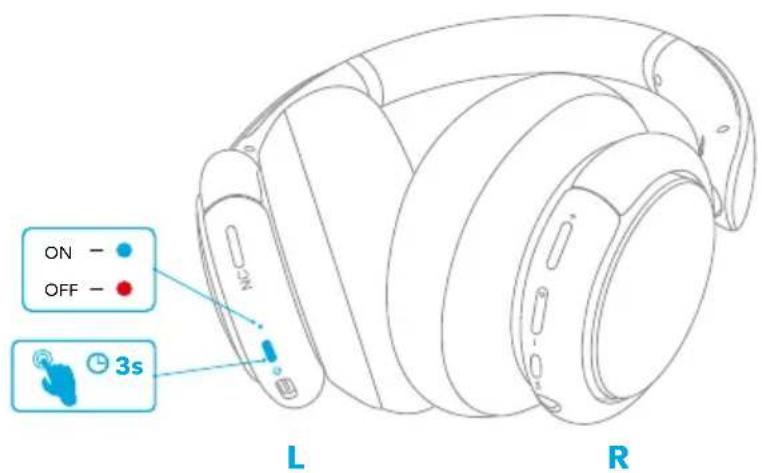
Ak chcete funkciu zapnút/vypnút, stlačte tlačidlo napájania a podržte ho 3 sekundy.

Režim redukcie hluku
Režim bez redukcie hluku

Google Play and the Google Play logo are trademarks of Google Inc.

Apple and the Apple logo are trademarks of Apple Inc.
Resetovanie
Technické údaje
20 Hz-20 kHz (Bluetooth)
16 Hz-40 kHz (AUX)
Impedancia 16 Ω
Verzia Bluetooth V5.0
Dosah Bluetooth 15 m/49,5 stopy
Polnjenje


Način prosojnosti
Če želite ostati pozorni na svojo okolico, tako da dovolite zvoke iz okolice, se za 1 sekundo dotaknite desne plošče, da aktivirate način prosojnosti.

Google Play and the Google Play logo are trademarks of Google Inc.

Apple and the Apple logo are trademarks of Apple Inc.
Ponastavi
20 Hz-20 kHz (Bluetooth)
16 Hz-40 kHz (AUX)
Impedanca 16 Ω
Bluetooth-parkoppling

Brusreduceringsläge
Transparensläge

Google Play and the Google Play logo are trademarks of Google Inc.

Apple and the Apple logo are trademarks of Apple Inc.
Återställning
Specifikationer
20 Hz-20 kHz (Bluetooth)
16 Hz-40 kHz (AUX)
Impedans 16 Ω
Bluetooth-version V5.0

Gürültü Önleme Modu
Geçirgenlik Modu

Google Play and the Google Play logo are trademarks of Google Inc.

Apple and the Apple logo are trademarks of Apple Inc.
Sifirlama
Teknik Özellikler
20 Hz-20 kHz (Bluetooth)
16 Hz-40 kHz (AUX)
Empedans 16 Ω
1
Phone 1
2
Phone 2

R

| ▶|| | ||
| + | ||
| - | ||
| +/- | ||
| ▶II | ||

Soundcore



Google Play and the Google Play logo are trademarks of Google Inc.
Apple and the Apple logo are trademarks of Apple Inc.
一

Phone 1
2
Phone 2
R

| ▶|| | ||
| + | ||
| - | ||
| +/- | ||
| ▶II | ||

一

1
Phone 1
2
Phone 2
R

| ▶|| | ||
| + | ||
| - | ||
| +/- | ||
| ▶II | ||

Google Play and the Google Play logo are trademarks of Google Inc.
Apple and the Apple logo are trademarks of Apple Inc.
-

1
Phone 1
2
Phone 2
R

| ▶|| | ||
| + | ||
| - | ||
| +/- | ||
| ▶II | ||


Google Play and the Google Play logo are trademarks of Google Inc.

Apple and the Apple logo are trademarks of Apple Inc.
-
Phone 2
R

• مرة.
وضع الشفقافية

Google Play and the Google Play logo are trademarks of Google Inc.


Apple and the Apple logo are trademarks of Apple Inc.
إعادة酔回ين
المواصفات
Bluetooth
Phone 2
R
תְקַרָה בְּרָה

•.תְבָר
Soundcore meni

Google Play and the Google Play logo are trademarks of Google Inc.
Apple and the Apple logo are trademarks of Apple Inc.
בְרַע אִי בְאָה
(Bluetooth) 20 -20 (Aux) 16
הכלה Ω 16
Bluetooth 5.0
Bluetooth 15

- Charging
- Powering On/Off
- Bluetooth Pairing
- Pairing with another device
- 三
- NFC Mode
- Noise Cancellation Mode
- Transparency Mode
- AUX Mode
- Soundcore App
- Reset
- Specifications
- Nabíjení
- Párování Bluetooth
- Transparentní režim
- Resetování
- Specifikace
- Bluetooth-parring
- Transparenstilstand
- Nulstil
- Specifikationer
- Ladevorgang
- Bluetooth-Kopplung
- Transparenzmodus
- Zurücksetzen
- Technische Daten
- Επαναφορά
- Προδιαγραφές
- Restablecer
- Especificaciones
- Bluetooth-pariliitos
- Vastamelutila
- Läpinäkyvyystila
- Nollaaminen
- Tekniset tiedot
- Chargement de
- Couplage Bluetooth
- Mode transparence
- Réinitialisation
- Spécifications
- Bluetooth-párosítás
- Zajszúró mód
- Áthallhatósági mód
- Visszaállítás
- Specifikációk
- Specifiche
- Opladen
- Koppelen via Bluetooth
- Transparantiemodus
- Resetten
- Lader
- Bluetooth-paring
- Transparentmodus
- Tilbakestill
- Spesifikasjoner
- Parowanie Bluetooth
- Resetowanie
- Dane techniczne
- Repor
- Especificações
- Emparelhamento Bluetooth
- Reiniciar
- Nabíjanie
- Zapnutie/vypnutie
- Režim redukcie hluku
- Režim bez redukcie hluku
- Resetovanie
- Technické údaje
- Polnjenje
- Način prosojnosti
- Ponastavi
- Bluetooth-parkoppling
- Brusreduceringsläge
- Transparensläge
- Återställning
- Gürültü Önleme Modu
- Geçirgenlik Modu
- Sifirlama
- Teknik Özellikler
- Soundcore
- Bluetooth
- Soundcore meni
Brand : soundcore
Model : Life Q30
Category : Headphones