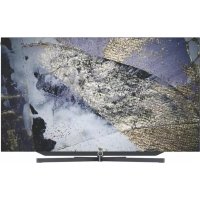
Bild s.77 - Television LOEWE - Free user manual and instructions
Find the device manual for free Bild s.77 LOEWE in PDF.



| Product Type | OLED TV |
| Brand | LOEWE |
| Model | Bild s.77 |
| Screen Diagonal | 195 cm (77 inches) |
| Resolution | Ultra HD 3840 x 2160 px (16:9) |
| Screen Technology | OLED (WRGB Pixel) |
| Dimensions (without stand) | 173.1 x 102.3 x 7.3 cm |
| Weight (without stand) | 37.0 kg |
| Power Supply | 220-240 V ~ 50/60 Hz |
| Power Consumption (max.) | 550 W |
| Power Consumption (standby) | 0.36 W |
| Power Consumption (quick start) | 60.0 W |
| Audio Power (sine/music) | 2 x 30 W / 2 x 60 W |
| Speaker System | Integrated soundbar |
| Tuners | DVB-T/T2, DVB-C, DVB-S/S2 |
| Network Connectivity | WiFi 802.11a/b/g/n/ac, Bluetooth, LAN Ethernet |
| Main Connections | 4x HDMI (incl. 1 ARC), 2x USB 3.0, 2x USB 2.0, optical audio output (TOSLINK), headphone jack, RS-232C, 2x CI, antenna/satellite input |
| Features | Motorized stand (kinematic element), auto-off, OTA update |
| TV Standards | SECAM, PAL, NTSC |
| Supported Audio Formats | MP3, AAC, FLAC, Dolby Digital, Dolby Digital Plus, Dolby TrueHD, etc. |
| Supported Video Formats | H.264, H.265/HEVC, VP9, AVI, MKV, MP4, etc. |
| Ambient Temperature | 5°C to 35°C |
| Maintenance | Soft, damp cloth without harsh chemicals |
| Included Accessories | Remote control, power cord, wall mount guide, documentation |
Frequently Asked Questions - Bild s.77 LOEWE
User questions about Bild s.77 LOEWE
0 question about this device. Answer the ones you know or ask your own.
Ask a new question about this device
Download the instructions for your Television in PDF format for free! Find your manual Bild s.77 - LOEWE and take your electronic device back in hand. On this page are published all the documents necessary for the use of your device. Bild s.77 by LOEWE.
USER MANUAL Bild s.77 LOEWE
natural_image
Modern minimalist living room interior with orange armchair, large TV, and ambient lighting (no text or symbols visible)bild s.77
Betriebsanleitung 2
Operating manual 2
Mode d'emploi 2
Manuale d'uso 2
natural_image
Two identical diagrams of a monitor with bidirectional arrows indicating measurement or orientation (no text or symbols)Fremdkörper

Dolby, Dolby Audio. Dolby Vision and the double-D symbol are trademarks of Dolby Laboratories Licensing Corporation. Manufactured under license from Dolby Laboratories. Confidential unpublished works.
Copyright © 2003-2015 Dolby Laboratories. All rights reserved
Position of the rating plate
Introduction
Many thanks for choosing Loewe and placing your trust in us.
By opting for Loewe, you have not only chosen a modern and technically innovative television, but also gone for timeless design. razor-sharp
picture quality, brilliant sound for film and music enjoyment as well as intuitive operation with the Loewe remote control, smart phone or tablet.
In short: Loewe stands for optimal home entertainment.
We wish you much pleasure with Premium Home Entertainment from Loewe and we are glad to have you as a customer.
With the aim of a safe and long-term fault-free use of the set, before putting the TV set into operation, please read the chapter Safety/
Warning on the next page.
Table of contents
Introduction....10
Delivery specification 10
Documentation....10
Position of the rating plate 10
Safety/Warning....11
Remote control button mapping .....13
Connections....14
Technical data 15
Environment....16
Disposal....16
Licences 16
Technical information 17
Possible installation options....17
Conformity/Manufacturer's declaration ...17
Imprint 17
Delivery specification
TV set
■ Instruction manual 1
■ Wall mounting Loewe wall mount WM7
■ Welcome Box:
■ Remote control assist with two alkaline batteries type AAA
- Mains cable
- Operating instructions 2 (these instructions)
■ Installation instructions wall mount WM7
Documentation
This part of the operating manual contains essential basic information. The device is commissioned and set up by means of the intuitive operation guide after the device has been switched on for the first time.
A detailed user handbook describing the functions and features of your new Loewe set can be downloaded in electronic form from the Loewe website.
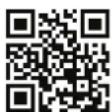
The user handbook is updated regularly.
Please find a detailed user handbook here:
https://my.loewe.tv/manuals/bild
Visit our homepage under:
www.loewe-friends.de
Position of the rating plate
Labels with model number and operating voltage can be found on the back of the TV set.
Safety/Warning
For your safety, and to avoid unnecessary damage to your unit, please read and follow the safety instructions below.
Key

This symbol indicates risks caused by high voltages.

This symbol is to alert the user to other, more specific risks.

This symbol indicates dangers caused by the development of fire.

This symbol indicates dangers caused by sharp edges.
Do not remove set rear panel
Warning: When opening or removing the rear panel, there is the danger of electric shock and the risk of serious injury from high voltages.
ATTENTION ELECTRIC SHOCK DANGER - DO NOT OPEN

Never open the rear panel yourself. Leave repairs and servicing work on your TV set to qualified, authorised television technicians.
Please contact your dealer or our customer service.
Intended use and environmental conditions

This TV set is intended exclusively for the reception and playback of picture and sound signals.

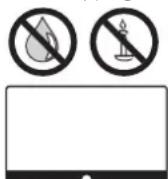
The TV set is designed for dry rooms (living rooms and office spaces). It must not be used in rooms with a high level of humidity (e.g. bathroom, sauna), outdoors, in mobile homes or boats.
When using the set, make sure that it is protected from moisture (dripping and splashing water or condensation).
High humidity and dust concentrations lead to power leaks in the set. This can lead to danger of injury and damage to the set by electric tensions or a fire.
If you've brought the set from the cold into a warm environment, leave it off for around an hour due to the formation of condensation.
Do not place objects filled with liquid over the set. Protect the set from dripping and
splashing water.
Candles and other open flames must be kept away from the set at all times to prevent the fire from spreading.
The materials we used in this device comply with all regulatory requirements. However, the migration of substances cannot be ruled out. We therefore
suggest you avoid permanent contact between food and the TV set.
Transport

Improper handling during transportation can lead to damage to the display and risks of injury.

The screen consists of glass or plastic and can break if handled improperly.
At least two people are required to transport the set. Only transport the set in a vertical position.
No pressure should be applied to the glass or the plastic during transport.
The correct unpacking of the set is shown in the operating manual 1.
To avoid damaging the mechanical structure of the TV set and the floor stand, remove the TV set from its base and move the two parts separately. When the TV set is set up in its new location, at least 2 people are required to reassemble it.
Transport lock

Before you start the first installation, remove the transport safety screw be too guarantee the function of the kinematics!
Please refer the operating manual 1.
To avoid damaging the TV set during transportation, transport safety screw must be screwed back before moving the TV. Remove the transport safety screw before using the TV again!
Mains cable/power supply

Unplug the power cord immediately from the mains socket if you notice something unusual, or the unit shows recurring malfunctions.
Incorrect voltages can damage the set.
This set may only be connected to a mains power supply with the voltage and frequency indicated on the rating plate using the enclosed mains cable.
The mains power plug of the TV set must be easily accessible so that the set can be disconnected from the mains at any time.
When pulling the mains power plug out, do not pull the cable but the plug housing. The cables in the mains power plug could be damaged and cause a short circuit when plugged in again.
A mains power cable with a damaged insulation can lead to electric shock and presents a fire hazard. Never use a damaged mains cable.
Lay the mains cables so that they cannot be damaged. Do not tread on the mains cable.
The mains cable must not be kinked or laid over sharp edges.
If you use a portable multiple socket to connect the TV set, do not cascade several multiple sockets consecutively.
Air circulation and high temperatures

Like any electronic device, your TV set requires air for cooling. If air circulation is impeded, it may result in a fire.
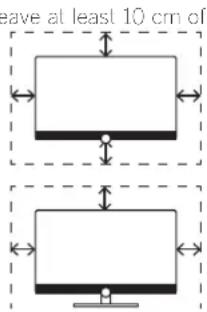
The ventilation slots on the rear panel of the set must therefore remain free. Please do not cover the set.
Wall mounting: I space all around the set at the side, above and below.
Table / stand foot: Leave at least 10 cm clear space around the set at the side and at the top.
Foreign objects

Foreign objects inside of the set can lead to short circuits and fires.
Danger of injury and damage exists.
Therefore avoid metal parts, needles, paper clips, liquids, wax or similar passing through the ventilation slits of the rear panel into the interior of the set.
Should something get into the interior of the appliance, immediately pull out the mains power plug of the set and inform the customer service department for checking.
Installation

Opting for an incorrect or wrongly mounted installation can lead to accidents. Rolling or falling sets can cause injuries or damage.
Loewe TV sets are specified for Loewe accessories. We strongly recommend the use of original Loewe installation options. Do not use any installation options that are not approved for your TV set!
Note the instructions regarding the mounting for the different possible installation options! A corresponding documentation is included with every Loewe product.
Check before the installation of the set, whether the final location with regard to the surface (pressure sensitivity) and stability (static) is designed for the load from the set! This applies in particular to high-gloss lacquered surfaces and surfaces made of real wood, real wood veneer and plastic surfaces.
Only place the TV set on a level, stable, horizontal base with table or stand foot!
The set should especially not protrude at the front when installing it in or on furniture.
Do not place the television set on cloth or other materials that may be located between television set and supporting furniture. Educate children about dangers of climbing on furniture to reach the television set or its controls.
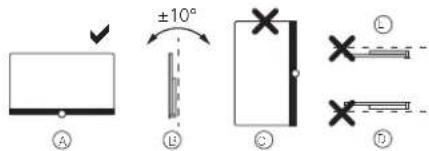
The usual usage position of the TV set should be followed. The TV set can only be operated horizontally upright A. The inclination can amount to a maximum of 10 degrees for wall mounting B. The TV set must never be operated in portrait orientation, C, horizontal D or overhead on the ceiling E.
Position the set so that it is not exposed to direct sunlight and additional heating from radiators!
Do not place the TV in a location where vibrations can arise! This can lead to damage.
In the case of installation options for third-party manufacturers with a motor drive, it is to be ensured that the adjustment of the TV set does not occur manually. It is generally not advisable to use the installation options of other manufacturers with locking devices in certain positions.
When using accessories from third-party manufacturers, please ensure that you can adjust the TV set easily to the respective installation option.
When adjusting the TV set, ensure that the pressure applied to the set frame is
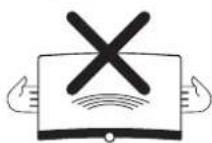
not too great. Especially in large format displays, there is the danger of damaging the display.
The mounting of a TV set on a holder according to the VESA standard requires mandatory use of the VESA adapter bolts. Otherwise, damage to the TV may result.
The Vesa adapter bolts must be attached to the TV set with a torque of circa 4 Nm. You can obtain these from your Loewe dealer (you can find further information found in the online user handbook).
Make sure that after unpacking and selling up the TV set the packaging material does not fall carelessly into the hands of children.
Please also note the disposal instructi
ons for packaging and carton (see chapter Environment/Disposal/Licences).
Supervision

Do not let unsupervised children handle the TV set nor let them play in the immediate vicinity of the TV set!
The set could be knocked over, moved or pulled down from the stand surface and injure people.
Do not leave the TV set unattended when switched on!
Volume

Loud music can lead to hearing damage. Avoid extreme sound volume, especially over extended periods of time and when using headphones!
Thunderstorms

During thunderstorms, pull out the mains power plug and all connected antenna cables from the TV sell!
If you have connected a network cable to the LAN port, remove this as well!
Electrical surges due to lightning strike can damage the set both via the antenna system and via the mains power supply.
Even in the case of prolonged absence, the mains power plug and all connected antenna cables should be disconnected from the TV set.
Cleaning and care/chemicals

Before cleaning, switch the TV set off using the mains power switch!
Damages caused by chemicals can lead to adverse effects and development of fire.

Never expose the set or accessories to aggressive (e.g. corrosive) chemicals such as alkalis or acids!
Only clean the TV set, the front screen and the remote control with a damp, soft, clean and colour neutral cloth, without any aggressive or scouring cleaning agents!
The loudspeaker panel of your TV set is textile-covered. I loover the surface regularly with a soft brush attachment!
For contaminations or stains:
Moisten a soft, colour neutral cloth with detergent solution or commercially available stain remove and rub the stain gently away! You can also treat the stain directly with a commercial dry stain remover spray (hoover up the dust).
Do not moisten the covering fabric directly with detergent solution or stain remover (risk of slain circle formation)! Do not use solvents to clean the fabric!
Note the usage instructions of the manufacturer when using stain remover!
When cleaning loudspeaker panels which have been exposed to nicotine, there is an increased risk of stain circle formation.
Remote control button mapping
Depending on the application (TV / video / audio / photo / apps) and function (for example, DR +, EPG, PIP, Teletext, HbbTV etc.), the key assignment can deviate from the assignment described here (see corresponding chapter of the on-line user handbook).
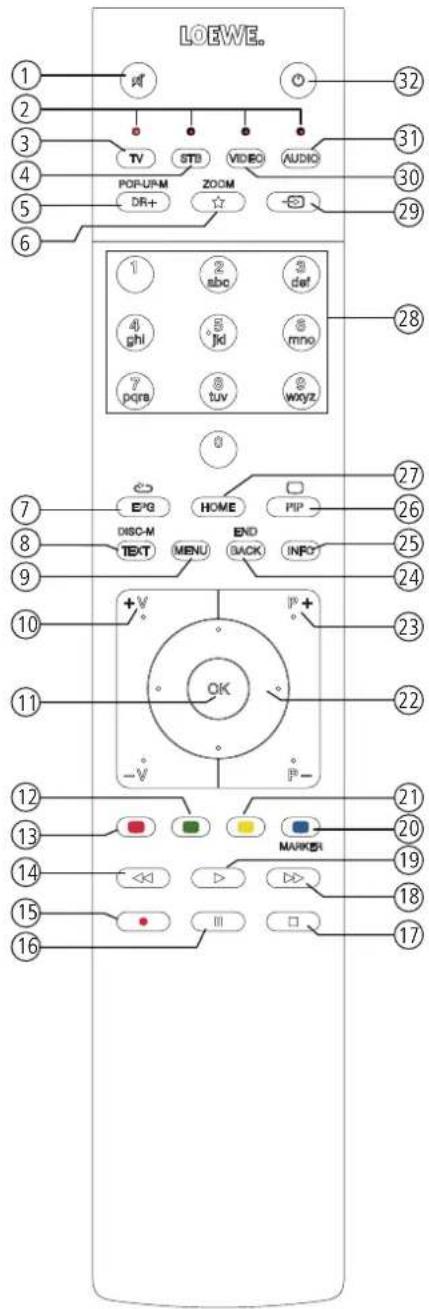
① Sound mute/on.
② LED display for currently operated device.
③ Call the TV mode.
④ Reassign remote control to SetTop-Box (presetting: Apple TV).
⑤ Pressing briefly: Open the DR+ archive. Pressing longer: Call timer.
⑥ Pressing briefly: Add current object to Home favourites. Pressing longer: Call up App Gallery or Mimi Defined
⑦ EPG (Electronic Programme Guide) on/off.
⑧ Teletext/MediaTex ^2 on/off.
⑨ Pressing briefly: Call menu options for the active operating mode. Pressing longer: Call System settings.
⑩ V+/V- increase/reduce volume.
⑪ Pressing briefly: Call channel list.
Pressing longer: Call expanded channel list.
In the menu: confirm/call up.
⑫ Green coloured key: screen on/off in Audio/Radio mode.
⑬ Red coloured key: call preferred value added network service, if available.
⑭ Pressing briefly: skip backwards.
Pressing longer: winding backwards.
⑮ Pressing briefly: direct recording (with determination of recording duration). Pressing longer: One Touch Recording.
⑯ Pause / Start/pause the timeshift television.
⑰ Stop / End timeshift (return to live image).
⑱ Pressing briefly: skip forwards. Pressing longer: winding forwards.
⑲ Play / Start/continue timeshift television.
20 Blue coloured key: call channel menu options (selection of language/sound, subtitles or channel/video track).
21 Pressing briefly: Yellow coloured key: call history. Pressing longer: Yellow coloured key: call last channel.
22 ▲▼◀▶ Navigation on the user interface, select objects. In the menu / lists: select/set.
②3 P+/P- next/previous channel.
24 Pressing briefly: step / level back. Pressing long: close all displays.
25 Press briefly during an on-screen display: info display. Info text appropriate to the content that can assist you further, should you have any questions about your TV set.
Press briefly, without on-screen display: access status display. With status display open and repeatedly pressing the key call the detailed information on the broadcast.
Press longer: show key explanation.
26 PIP (picture in picture) on/off.
27 Call up the Home view.
⑳ Select channels with numeric buttons directly. In the menu: enter numbers or letters.
29 Call Sources.
30 Reassign remote control to video device ^1 (presetting: BluTech Vision 3D).
31 Call radio mode (standard assignment) ^4
32 Switches the TV set on (mains switch must be turned on) or switches to standby mode. Press briefly while TV set is switched on: TV set and all CEC-enabled devices connected to the HDMI ports will be switched off to standby (System Standby).
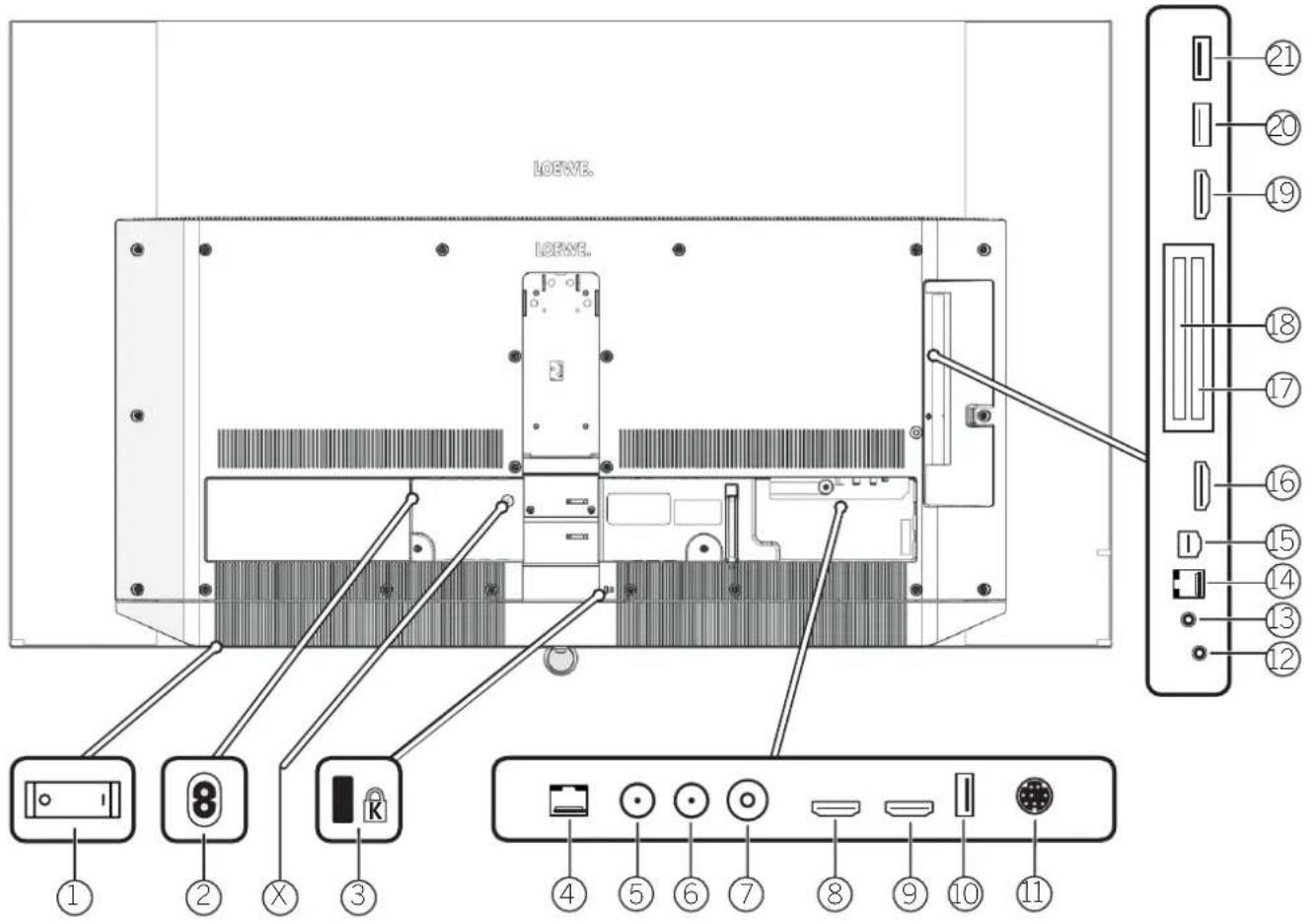
Position and function of the connections (bild s.77)
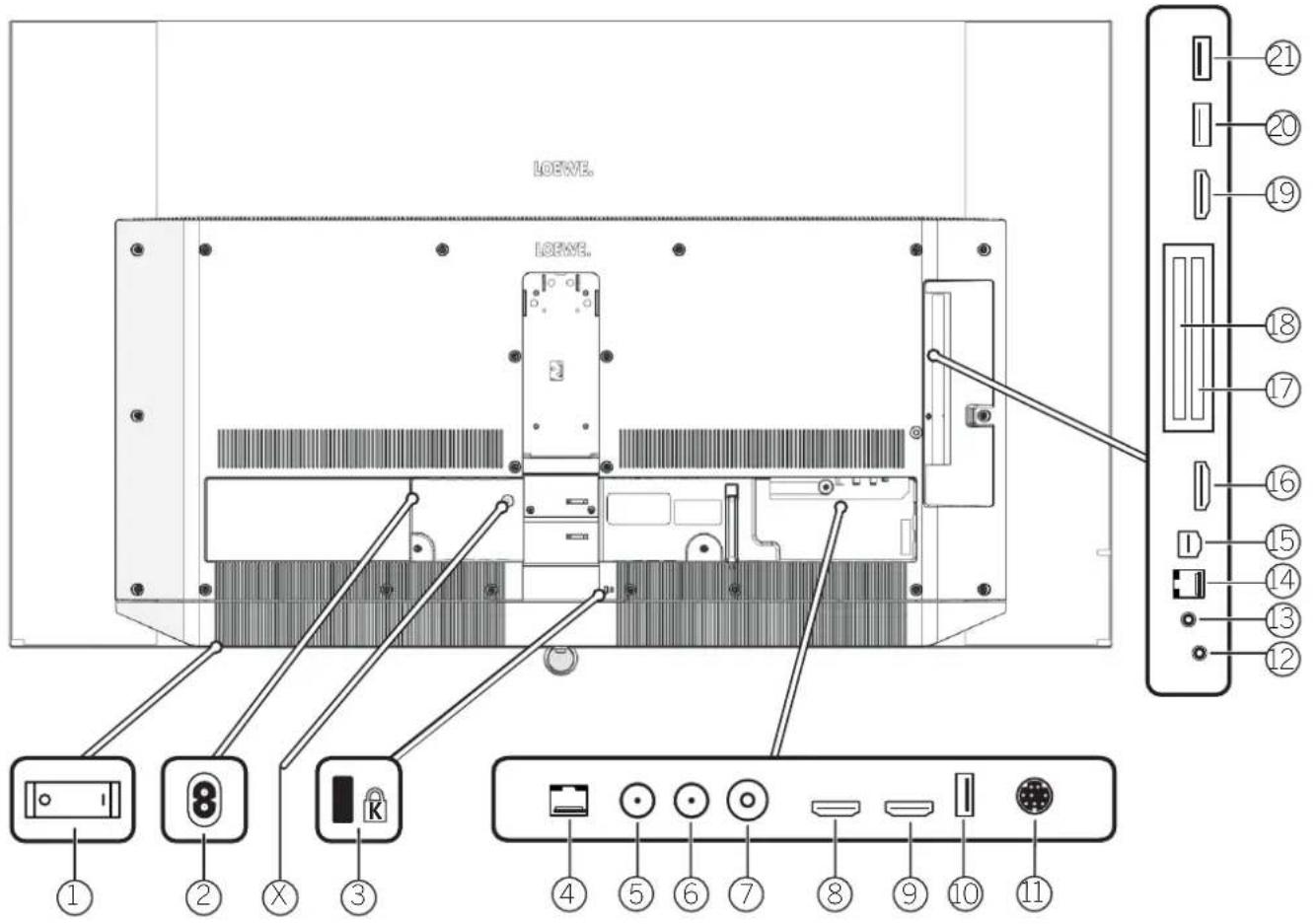
① Mains switch
② AC IN - Mains connection
Mains socket - 220-240 V \~ 50 / 60 Hz
☒ Transport lock for kinematics (please remove screw)
③ Kensington lock slot
④ LAN - Network connection
RJ-45 - Ethernet / Fast Ethernet
⑤ ANT SAT 1 - Satellite antenna (Sal luner 1) DVB-S/S2 F socket - 75 Ohm / 13/18 V / 500mA
⑥ ANT SAT 2 -Satellite antenna (Sat tuner 2) DVB-S/S2 F socket -75 Ohm /13/18 V /500mA
⑦ ANT TV - Antenna/cable analogue / DVB-T/T2/DVB-C
IEC socket - 75 Ohm / 5 V / 80mA
⑧ HDMI 1 - HDMI input 1 ^rd (with Audio Return Channel)
HDMI - Digital Video IN/Audio IN/OUT
⑨ HDMI 2 - HDMI input 2 ^d HDMI - Digital Video IN/Audio IN
⑩ USB 3.0 - USB connection
USB type A - USB 3.0 (max. 2A)
⑪ MOTOR UNIT
- rotating stand control
⑫ AUDIO OUT/TOSLINK - Audio output (analogue/digital) ^43 Jack 3.5 mm (analogue) L/R
Mini Toslink (digital)
⑬ HEADPHONE - Headphone connection
Jack 3.5 mm - Headphones 32-200 Ohm
⑭ RS-232C - Serial interface ^4 - (RJ12)
⑮ AV - Center IN ^4 Micro AV socket
⑯ HDMI 3 - HDMI input 3 ^1 HDMI - Digital Video IN/Audio IN
⑰ COMMON INTERFACE -CI slot 1
(standard V1.4)
⑱ COMMON INTERFACE -CI slot 2
(standard V1.4)
⑲ HDMI 4 - HDMI input 4 ^0 HDMI - Digital Video IN/Audio IN
20 USB 2.0 - USB connection
USB type A - USB 2.0 (max. 2A)
21 USB 3.0 - USB connection
USB type A - USB 3.0 (max. 2A)
Changes of technical data and design of the equipment reserved.
| Loewe device type: bild s.77 | ||
| Part number: 60420D50 | ||
| EU energy efficiency class: see enclosed energy label or under www.loewe.tv/int/support | ||
| Screen diagonal: 195 cm/77 inch | ||
| Power consumption On-Mode (max) (Audio output 1/8 of the maximum value): | 550 W | |
| Power consumption On-Mode (home): Energy consumption: | see enclosed energy label or under www.loewe.tv/int/support | |
| Power consumption quick start mode: 60.0 W | ||
| Power consumption Standby Mode/ network standby mode: when set is switched off: | 0,36 W / 1 Wc0 W | |
| Picture format / Resolution: Ultra HD 3840 x 2160 px / 16 | 9 | |
| Display technology: | OLED (WRGB Pixel) | |
| Device dimensions without stand (WF x H x D): | 173.1 x 102.3 x 7.3 cm | |
| Weight without stand (approximate): 37.0 kg | ||
| Ambient temperature: 5°C - 35°C | ||
| Relative humidity (non-condensing): 20 - 80% | ||
| Air pressure: 800 - 1114 hPa (0 - 2000 m uber NN) | ||
| Chassis designation: | SL512 | |
| Power supply: | 220 V - 240 V / 50 - 60 Hz | |
| Tuner: terr./cable: Satcllite: | VHF/Hyperband/UHF4 levels: 13/18V/22kHz / 16 levels: DistqC 1.0 / single-cable system: EN 50494 | |
| Bereich: terr./cable: Satcllite: | Terr./Kabel: 45 MHz up to 860 MHzSatcllllc: 950 MHz up to 2150 MHz | |
| Channel storage locations incl. AV and radio: | 6000 | |
| TV standards: analogue: digital: | B/G, I, L, D/K, M, NDVB-T/T2, DVB-C, DVB-S/S2 (UID via DVB to max. 60 Hz) | |
| Colour standards: | SFCAM, PAL, NTSC, NTSC-V, PAL-V (60 Hz) | |
| Sound formats: analogue (FM): analoguo (NICAM): digital (MPEG): | Mono, Stereo, Dual channelMono, Stereo, Dual channelMono, Stereo, Dual channel, PCM, Dolby Digital, Dolby Digital Plus, Dolby Digital Pulse, Dolby Virtual Speaker, Dolby Logic II, Dolby TrueHD, Dolby MS11 | |
| Audio output power (sine / music): | 2 x 30W / 2 x 60W | |
| Acoustic speaker concept: Soundbar with 10 drivers (active and passive) | ||
| Telelex: | TOP / FLOF / HiText (Level 2.5) | |
| Page memory: | 2000 | |
| LAN: Standards supported: | 10 Mbit/sec Ethernet (10Base T)/100 Mbit/sec Fast Ethernet (100Base T) | |
| WLAN: Standards supported: Power/Frequency range: Types of encoding that are supported: | IEEE 802.11a/b/g/n, 802.11acMaximum power <100 mW at 2400-2483.5 MHz and 5150-5725 MHzWEP 64 and 128 Bit (ASCII and HEX), WPA PSK, WPA2 AES | |
| Bluetooth: Power/Frequency range: Bluetooth protocols: | Maximum power <10 mW at 2.4 GHzA2DP SRC, A2DP SNK, HID | |
| Home networking standard: Universal Plug and Play Audio / Video (UPnP AV) | ||
| Formats supported: Bilder: Audio: Video: | JPEG, JPEG progressive (max. resolution 3840x2160), PNGMP3, M4A (AAC LC), WMA (ohne lossless), FLAC, WAV (PCM), Ogg VorbisAVI (MPEG-1/2, XviD, Dolby Digital, MP3), WMV (WMV9, VC-I, WMA9, WMA Pro)MP4 (XviD, H.264/MPEG 4 AVC, AAC LC), MOV (H.264/MPEG 4 AVC, AAC LO),MKV (H.265/HFVC, H.264/MPEG-4 AVC, Dolby Digital), FLV (H.264/MPEG-4 AVC, H.263, MI3, AAC LO), MPG (MPEG-1, MPEG Audio), TS/PS (MPEG-2, H.264/MPEG-4 AVC, MPEG2 Audio/Dolby Digital), VOB (MPEG-2, MPEG2 Audio, Dolby Digital),H.264/MPEG-4 AVC up to Profi High (Level 4.2)H.264/H.265 compatible with Dolby Vision/HDR10/HLG | |
(Wol/NoWLANmax).
The width of the IV set can be increased by up to 9.0 mm depending on the type of IV set in the area of the side mounted Loewe brand label.
^1 For the playability of the new dual formats no guarantee can be given.
Environment
Power consumption
Your TV set is equipped with an eco-standby power supply. In the standby mode, the power consumption drops to low power (see chapter
Technical data). If you want to save even more energy then switch the device off with the mains switch. Please also note that the EPG data (Electronic Programme Guide) is lost and possibly programmed timer recordings cannot be carried out by the TV set.
The TV set will be completely separated from mains only when you unplug the mains cable.
The power consumed by the TV set during operation depends on the energy efficiency preset in the initial installation or on the setting in the system settings. To achieve the values specified in the technical data, it is necessary to deactivate the settings "Wake-on-LAN", "Mobile Recording" and "Quick Start". If you activate these comfort functions, the annual energy consumption will not increase by more than 20%.
If you activate the automatic dimming, your TV picture will adapt to the ambient brightness. This reduces the power consumption of the TV set.
Automatic shutdown
If the TV is not operated for 4 hours (adjustment of volume, programme change, etc.) the TV will automatically switch to stand-by mode to save energy. A prompt to terminate this shutdown process appears one minute before the 4 hours expire.
By default, the automatic shut-off is active in the energy efficiency mode Home-Mode/Personal-Mode. Premium-Mode.
Automatic shutdown does not occur when using the radio without screen display (screen off).
Disposal
You have chosen a very high-value and durable product.
Packaging and cardboard
The disposal of the packaging will be gladly handled for you by your specialist dealer. If you dispose of the packaging yourself, dispose of the packaging in sorted waste disposal and according to the local disposal regulations. Place cardboard and paper in the waste paper, foils and polystyrene in the recyclable waste collection.
The set
Your Loewe product is made with quality materials and components that are recyclable and reusable.
This symbol means that electrical and electronic equipment incl. cables must be disposed of separately from household waste at the end of their service life.
You can return your old set for free at designated recycling centres, or at your dealer, if you buy a similar new device.
Additional details about returns (even for non-EU countries) are also available from your local government. They make an important contribution to the protection of our environment.
The Batteries
The original equipment batteries do not contain harmful substances such as cadmium, lead or mercury.
Used batteries should not be disposed of in household waste. Dispose of used batteries free of charge in the collection containers set up at the dealer or at the public collection points.
Licenses
Dolby, Dolby Audio, Dolby Vision and the double-D symbol are trademarks of Dolby Laboratories Licensing Corporation. Manufactured under license from Dolby Laboratories. Confidential unpublished works.
Copyright © 2003-2015 Dolby Laboratories. All rights reserved.
This set contains a software which is partly based on the work of the Independent JPEG Group.
This product includes software developed by the OpenSSL Project for use in the OpenSSL Toolkit (http://www.openssl.org/).
This software is provided by the OpenSSL project "as is" and any expressed or implied warranties, including, but not limited to, the implied warranties of merchantability and fitness for a particular purpose are disclaimed. In no event shall the OpenSSL project or its contributors be liable for any direct, indirect, incidental, special, exemplary, or consequential damages (including, but not limited to, procurement of substitute goods or services: loss of use, data, or profits; or business interruption) however caused and on any theory of liability, whether in contract, strict liability, or tort (including negligence or otherwise) arising in any way out of the use of this software, even if advised of the possibility of such damage.
This product includes cryptographic software written by Eric Young (eay@cryptsoft.com).
This product includes software written by Tim Hudson (tjh@cryptsoft.com).
This product contains software which was developed by third parties and / or software which is subject to GNU General Public License (GPL) and/or GNU Lesser General Public License (LGPL). You can pass on and modify them in accordance with Version 2 of the GNU General Public License or optionally every later version which is published by the Free Software Foundation.
The publication of this programme by Loewe is carried out WITHOUT ANY GUARANTEE OR SUPPORT, particularly without an implicit guarantee concerning MARKET MATURITY or the USABILITY FOR A SPECIFIC PURPOSE. Details can be found in the GNU General Public License. You can obtain in the software via the Loewe customer service department. The GNU General Public License can be downloaded from:
http://www.gnu.org/licenses/.
Technical information
About the OLED screen
The TV set with OLED screen you have purchased satisfies the most rigorous quality requirements and has been inspected with respect to pixel errors.
Despite of thorough care when manufacturing the display, it cannot be 100% guaranteed that no subpixel defects will occur due to technical reasons.
Please understand that these types of effects, as long as they are within the limits specified in the standard (ISO 9241-307, fault class II), cannot be considered as a device defect in terms of the guarantee.
Organic Light Emitting Diodes are an image technology based on self-luminous pixels that offer clear benefits in terms of image quality and performance.
Under certain conditions, persistent, one-sided loads on the OLED material can result in persistence image faults which are irreversible. Residual image issues can arise by using static image content over a longer period, such as static images, subtitles or ticker displays, looping dia-shows or video sequences, static displays serving as presentation monitors or with video games, black bars in some screen formats.
These residual image issues are not defects within the meaning of the warranty.
To minimise such issues, Loewe has developed a special algorithm for detecting image content. If static images are displayed for too long, the TV set automatically switches to a screen-friendly contrast mode. After a new user operation, the device immediately returns to its normal state. In addition, menu insertions are gradually reduced or displayed transparently after one minute.
Under normal viewing conditions, such residual image issues do not arise.
Information about connected USB hard drives
Switching off the TV set with the mains switch during operation or an inadvertent disruption to the power supply (e.g., power failure) can cause damage to the hard disk file system and hence loss of the recorded broadcasts.
Never ever disconnect the USB storage device from the TV set during a copy process. Before switching off the set with the mains switch, we recommend you to switch it to standby mode. If, contrary to expectation, you are still experiencing problems with the operation of the hard drive, you can first carry out a test. In addition, a formatting of the hard disk can be remedy. In the process, however, all content on the hard disk is deleted. You can find the corresponding menu items under System settings - Control - more ... - Hard disks.
Loewe are not liable for the loss of data on the integrated hard disk of your TV set. To avoid data loss, we recommend copying important recordings to an external storage medium.
Software-Update
It is possible to update the software on your Loewe TV set. In the software update (package update) all the software releases in the TV set are scanned and updated as required.
Current software versions can be downloaded from the Loewe Internet site (see below) and installed on your TV set using a USB stick.
If your TV set is connected to the Internet, the TV set can be updated directly via the Internet.
For more information on the software update, please refer to the user handbook which can be downloaded from the Loewe Internet site.
Notes on Kinematics
The Loewo TV set is equipped with a kinematics that moves the TV set upwards or downwards when switching it on and off, whereby the speaker cover is visible or is hidden.
Please make sure that there is no externally applied force opposing the movement. You have the option to fix the position of the kinematics from the menu, or disable the function.
Possible installation options
You can use the following Loewe installation options listed for your TV set.
Do not use any installation options that are not approved for your TV set.
Item number Name of the installation option 72730001 Loewe wall mount WM7 60805D00 Loewe table stand motor s.77 60804D00 Loewe floor stand motor s.77
Conformity / Manufacturer's declaration

Loewe Technology hereby declares that this product meets the essential requirements and other relevant provisions of Directive 2014/53/EU and all applicable EU directives.
In the frequency range 5150 to 5350 MHz, this TV set is restricted to indoor use in the following countries: Belgium, Bulgaria, Denmark, Germany, Estonia, Finland, France, Greece, Ireland, Italy, Croatia, Latvia, Lithuania, Luxembourg, Malta, Netherlands, Austria, Poland, Portugal, Romania, Sweden, Slovakia, Slovenia, Spain, Czech Republic, Hungary, United Kingdom, Cyprus.
You can find the complete declaration of conformity in the product selection at:
www.loewe.tv/en/support
Imprint
The information in this document is subject to change without notice and does not constitute any obligation on the part of Loewe Technology GmbH.
All rights including translation, technical modifications and errors reserved.
Intended use and environmental conditions

natural_image
Two identical diagrams showing a monitor with horizontal arrows indicating measurement or alignment, enclosed in dashed rectangular boundaries (no text or symbols)Corps étrangers

Dolby, Dolby Audio, Dolby Vision and the double-D symbol are trademarks of Dolby Laboratories Licensing Corporation. Manufactured under license from Dolby Laboratories. Confidential unpublished works.
Copyright © 2003-2015 Dolby Laboratories. All rights reserved
Locwe are not liable for the loss of data on the integrated hard disk of your TV set. To avoid data loss, we recommend copying important recordings to an external storage medium.
www.loewe.tv/it/support
natural_image
Two identical rectangular diagrams with bidirectional arrows, no text or symbols presentCorpi estranei

Position and function of the connections (bild s.77)
Dolby, Dolby Audio, Dolby Vision and the double-D symbol are trademarks of Dolby Laboratories Licensing Corporation. Manufactured under license from Dolby Laboratories. Confidential unpublished works.
Copyright © 2003-2015 Dolby Laboratories. All Rights Reserved.
www.loewe.tv/it/support
Informazioni legali
natural_image
Two identical diagrams showing a computer monitor with bidirectional arrows indicating alignment or movement (no text or symbols)Cuerpos extraños

Dolby, Dolby Audio. Dolby Vision and the double-D symbol are trademarks of Dolby Laboratories Licensing Corporation. Manufactured under license from Dolby Laboratories. Confidential unpublished works.
Copyright © 2003-2015 Dolby Laboratories. All rights reserved Este aparalo contiene software basado parcialmente en el trabajo de Independent JPEG Group.
natural_image
Two identical diagrams of a monitor with horizontal arrows indicating measurement or alignment, enclosed in dashed boxes (no text or symbols)Vreemde voorwerpen

Dolby, Dolby Audio, Dolby Vision and the double-D symbol are trademarks of Dolby Laboratories Licensing Corporation. Manufactured under license from Dolby Laboratories. Confidential unpublished works.
Copyright © 2003-2015 Dolby Laboratories. All rights reserved
natural_image
Two identical rectangular diagrams with arrows indicating direction, enclosed in a dashed border (no text or symbols)Fremmedlegemer

Fremmedlegemer inden i apparatet kan medføre kortslutninger og brande.
Dolby, Dolby Audio, Dolby Vision and the double-D symbol are trademarks of Dolby Laboratories Licensing Corporation. Manufactured under license from Dolby Laboratories. Confidential unpublished works.
Copyright © 2003-2015 Dolby Laboratories. All rights reserved
www.loewe.tv/se/support
natural_image
Two identical diagrams of a monitor with horizontal arrows indicating measurement or orientation, no text or symbols present.Frammande element

Dolby, Dolby Audio. Dolby Vision and the double-D symbol are trademarks of Dolby Laboratories Licensing Corporation. Manufactured under license from Dolby Laboratories. Confidential unpublished works.
Copyright © 2003 2015 Dolby Laboratories. All rights reserved
www.loewe.tv/se/support
Forlaget
natural_image
Two identical rectangular diagrams with horizontal arrows indicating dimensions, no text or symbols present.Vierasesineet

Dolby. Dolby Audio, Dolby Vision and the double-D symbol are trademarks of Dolby Laboratories Licensing Corporation. Manufactured under license from Dolby Laboratories.
Confidential unpublished works.
Copyright © 2003-2015 Dolby Laboratories. All rights reserved
natural_image
Two identical rectangular diagrams with horizontal arrows indicating dimensions, no text or symbols present.Fremmedlegemer

Fremmedlogemor i apparatets indre kan føre til korlslutninger og brann.
Plasser apparatet på en slik måte at det ikke ulset les for direkte sollys eller ekstra oppvarming fra varmeelementer.
27 Apne displayet Home.
Dolby, Dolby Audio, Dolby Vision and the double D symbol are trademarks of Dolby Laboratories Licensing Corporation. Manufactured under license from Dolby Laboratories. Confidential unpublished works.
Copyright © 2003-2015 Dolby Laboratories. All rights reserved
natural_image
Two identical diagrams of a computer monitor with side indicators, no text or symbols present.Инородные тела

natural_image
Two identical rectangular screens with horizontal arrows indicating measurement or alignment, enclosed in a dashed border (no text or symbols)Сторонні тіла

Customer Care Center
Industriestraße 1
96317 Kronach
Germany
Te +49 9261 99-500
Luxe Genesis Pvt I to
552,1st Main, 1st Cross, 8th block
Koramangala
560095 Bangalore
India
Tel+91845145123
E-Mail: luxegenesis@gmail.com
P
Gaplasa S.A.
Parque Suécia
Avda. do Forte, 3
geral.loewe@mayro.pt
PL
AVcraft sp. zo.o. sp. k. ul.
Marcika 14a
30-443 Kraków
Poland
Te +48 - 12 376 95 66
www.avspot.pl
Customer Care Center
Industriestraße 11
Subject to modifications


- Fremdkörper
- Introduction
- Table of contents
- Delivery specification
- Documentation
- https://my.loewe.tv/manuals/bild
- Position of the rating plate
- Safety/Warning
- Key
- Do not remove set rear panel
- Intended use and environmental conditions
- Transport
- Transport lock
- Mains cable/power supply
- Air circulation and high temperatures
- Foreign objects
- Installation
- Supervision
- Volume
- Thunderstorms
- Cleaning and care/chemicals
- Remote control button mapping
- Environment
- Power consumption
- Automatic shutdown
- By default, the automatic shut-off is active in the energy efficiency mode Home-Mode/Personal-Mode. Premium-Mode.
- Disposal
- Packaging and cardboard
- The set
- The Batteries
- Licenses
- Technical information
- About the OLED screen
- Information about connected USB hard drives
- Software-Update
- Notes on Kinematics
- Possible installation options
- Conformity / Manufacturer's declaration
- Imprint
- Corps étrangers
- www.loewe.tv/it/support
- Corpi estranei
- Informazioni legali
- Cuerpos extraños
- Vreemde voorwerpen
- Fremmedlegemer
- www.loewe.tv/se/support
- Frammande element
- Forlaget
- Vierasesineet
- Инородные тела
- Сторонні тіла
- 552,1st Main, 1st Cross, 8th block
- P
- PL
Brand : LOEWE
Model : Bild s.77
Category : Television