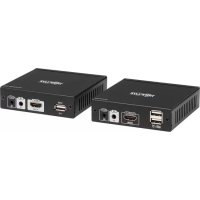
B013HU4K - HDMI Extender Tripp Lite - Free user manual and instructions
Find the device manual for free B013HU4K Tripp Lite in PDF.


| Product Type | HDMI HDBaseT Extender |
| Brand | Tripp Lite |
| Model | B013-HU-4K |
| Power Supply | 12 V DC 1 A (x2, one per unit) |
| Power Consumption | 8 W |
| Dimensions (H x W x D) | 25.7 x 99.45 x 94.5 mm |
| Weight (transmitter) | 220 g |
| Weight (receiver) | 230 g |
| Maximum Resolution | 4K x 2K @ 30 Hz |
| Max Distance (4K on Cat6) | 40 m |
| Max Distance (1080p on Cat6) | 70 m |
| Connectivity | HDMI (input/output), USB 2.0 Type A, RJ45 (HDBaseT), IR (input/output) |
| USB Hub | 2 ports (keyboard/mouse) on receiver |
| Supported Audio | LPCM, DTS-HD, Dolby TrueHD |
| Bandwidth | 10.2 Gbit/s |
| CEC Compatibility | Yes |
| Bidirectional IR | Yes, frequency 20-60 kHz |
| Material | Aluminum and iron alloy |
| Color | Black |
| Operating Temperature | 0 to 50 °C |
| Operating Humidity | 0 to 90% (non-condensing) |
| Warranty | 3 years |
| Package Contents | Transmitter, receiver, IR cables, USB 2.0 A/A cable, 2 power supplies with adapters, manual |
| Cleaning | Use a soft, dry cloth |
| Safety | Use only the supplied power supplies; do not expose to moisture |
Frequently Asked Questions - B013HU4K Tripp Lite
User questions about B013HU4K Tripp Lite
0 question about this device. Answer the ones you know or ask your own.
Ask a new question about this device
Download the instructions for your HDMI Extender in PDF format for free! Find your manual B013HU4K - Tripp Lite and take your electronic device back in hand. On this page are published all the documents necessary for the use of your device. B013HU4K by Tripp Lite.
USER MANUAL B013HU4K Tripp Lite
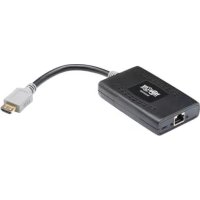
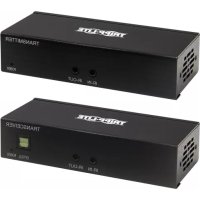
HDBaseT HDMI over Cat5e/6 Extender with 2-Port USB Hub
TRIPP LITE SERIES
Model:
B013-HU-4K
Español 9
Français 17
Deutsch 25
Italiano 33
Product Features
- Extend a 4K @ 30 Hz signal up to 130 ft. (40 m) or a 1080p signal up to 230 ft. (70 m) between the source and its console over Cat6 cable
- Deliver uncompressed UHD video and audio without any signal loss or added latency
- Provides a low-cost, reliable solution for distributing HDMI over long distances
• Full bi-directional IR extension optimizes control
Package Includes
• B013-HU-4K HDBaseT HDMI Extender
• (x1) IR-Out Cable
• (x1) IR-IN Cable
• (x1) USB 2.0 A to A (M/M) Cable
• (x2) International Power Supply w/ North America, Europe, U.K and Australia Adapters (Input: 100-240V)
- Owner's Manual
Optional Accessories
• N202-Series Cat6 24 AWG Solid-Wire UTP Patch Cables
• N002-Series Cat5e UTP Patch Cables
• P569-XXX-CERT or P568-XXX-2A Series High-Speed HDMI 2.0 Cables
Feature Identification
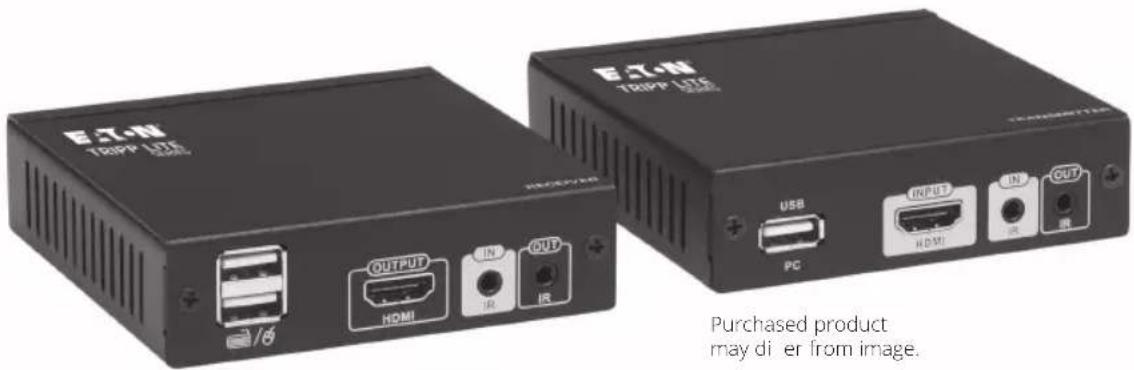
HDBaseT Transmitter (TX) Unit

① PC USB: Use the included USB 2.0 A (M/M) cable to connect your computer to the transmitter (TX) unit
② HDMI INPUT: HDMI signal input (connects to your HDMI source device)
③ IR IN: IR signal input
4 IR OUT: IR signal output
5 12V 1A: Power input
6 Transmission Signal LEDs:
LED 1 - Power LED
On: Power is being supplied
Off: Power is not being supplied
LED 2 - TX & RX Connection Status LED
On: Connection link is established between TX & RX units
Flashing: No connection link is detected between TX & RX units
LED 3 - HDMI Output LED
On: HDMI output port is connected to a display
Off: HDMI output port is not connected to display
⑦ HDBT OUT: HDBaseT signal output
8 Keyboard Status LED:
On: Keyboard is connected
Flashing: Keyboard is in use
Off: Keyboard is not connected
9 Mouse Status LED:
On: Mouse is connected
Flashing: Mouse is in use
Off: Mouse is not connected
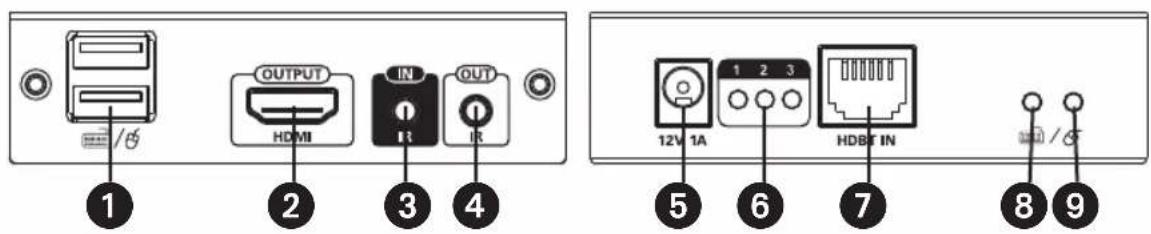
Feature Identification
HDBaseT Receiver (RX) Unit
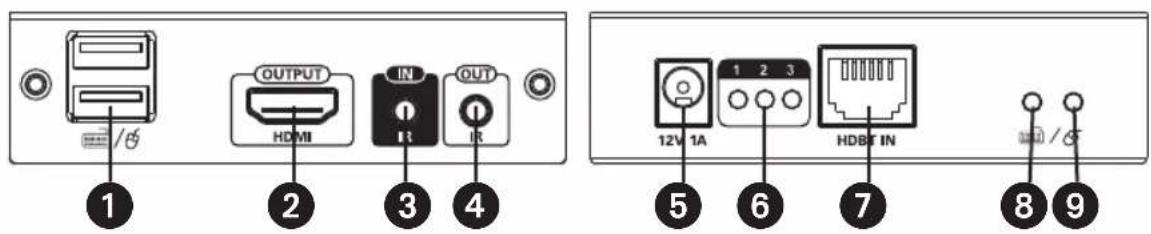
1 2-Port USB Hub: Keyboard/mouse connection
② HDMI Output: HDMI signal output (connects to your HDMI display)
③ IR IN: IR signal input
4 IR OUT: IR signal output
5 12V 1A: Power input
6 Transmission Signal LEDs:
LED 1 - Power LED
On: Power is being supplied
Off: Power is not being supplied
LED 2 - TX & RX Connection Status LED
On: Connection link is established between TX & RX units
Flashing: No connection link is detected between TX & RX units
LED 3 - HDMI Output LED
On: HDMI output port is connected to a display
Off: HDMI output port is not connected to display
⑦ HDBT IN: HDBaseT signal input
⑧ Keyboard Status LED:
On: Keyboard is connected
Flashing: Keyboard is in use
Off: Keyboard is not connected
9 Mouse Status LED:
On: Mouse is connected
Flashing: Mouse is in use
Off: Mouse is not connected
Installation
Notes:
- Prior to pulling cables through ceilings/walls, first test to ensure the entire installation works properly.
- To achieve maximum distance and performance, use 24 AWG Solid-Wire UTP Cat6 cable (such as N202-Series cable). Using stranded-wire Cat6 cable or cable with a gauge (AWG) higher than 24 AWG will result in a shorter extension distance. Higher gauge cabling (such as 26 AWG) has a more limited transmission capability than lower gauge cabling.
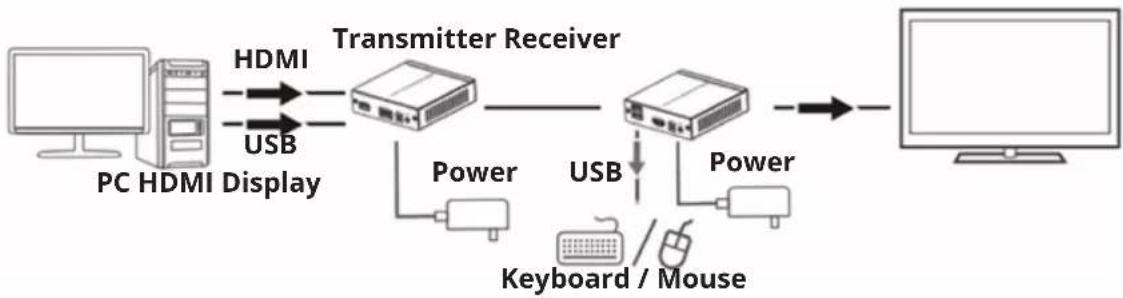
- Make sure all equipment in the installation is powered off.
-
Using the included USB 2.0 A (M/M) cable, connect the PC USB port on the transmitter to an available USB-A port on your source.
-
Using an HDMI cable (such as P569-XXX-CERT or P568-XXX-2A Series cables), connect the transmitter's HDMI INPUT port to an available HDMI port on your source.
-
(For bi-directional IR functionality - Optional) Connect the included IR-IN or IR-OUT cable to the transmitter unit.
-
Using a user-supplied Cat5e (such as the N002-Series) or Cat6 (N202-Series) cable, connect one end of the cable to the HDBT OUT port on the transmitter unit. Below is a table of the maximum distances that can be extended with Cat5e and Cat6 cables.
| Category Cable Max Cable Length Max Resolution Supported | ||
| Cat5e | 115 ft. (35 m) 4K x 2K @ | 30 Hz |
| 197 ft. (60 m) 1920 x 10 | 80 @ 60 Hz (1080p) | |
| Cat6 | 130 ft. (40 m) 4K x 2K @ | 30 Hz |
| 230 ft. (70 m) 1920 x 10 | 80 @ 60 Hz (1080p) | |
-
Connect the other end of the Cat5e/Cat6 cable to the HDBT IN port on the receiver unit.
-
Connect your keyboard and mouse to the USB ports labeled Keyboard/Mouse on the receiver unit.
Installation
- Using an HDMI cable (such as the P569-XXX-CERT or P568-XXX-2A Series cables), connect the receiver's HDMI OUTPUT port to a display (TV/monitor).
- (For bi-directional IR functionality - Optional) Connect the included IR-IN or IR-OUT cable to the receiver unit.
- Connect the included power supplies to the transmitter and receiver units, then to an available wall outlet.
- Turn on the power to your HDMI source and remote display.
Specifications
| Power Supply | Voltage/Current DC 12V 1A | |
| Power Consumption 8W | ||
| HDMI | HDMI Compliance 1.4 | |
| HDCP Compliance 1.4 | ||
| Maximum Resolution 4K x 2K @ | 30 Hz | |
| Supported Audio LPCM, DTS-HD ^TM , Dolby ^® TrueHD | ||
| Maximum Bandwidth 10.2 Gbps | ||
| CEC Support Yes | ||
| Environmental | Operating Temperature Range 3° to 122°F / 0° to 50°C | |
| Storage Temperature Range 14° to 158°F / -10° to 70°C | ||
| Relative Humidity 0% to 90%, Non-Condensing | ||
| IR | IR Passback Yes, Bi-Directional | |
| IR Frequency 20-60 KHz | ||
| Mechanical | Material of Construction Aluminum and Iron Alloy | |
| Color Black | ||
| Dimensions (H x W x D) | 1 x 3.9 x 3.7 in. / 25.7 x 99.45 x 94.5 mm | |
| Weight | TX: 0.49 lb. / 220 gRX: 0.5 lb. / 230 g | |
Warranty
3-Year Limited Warranty
We warrant our products to be free from defects in materials and workmanship for a period of three (3) years from the date of initial purchase. Our obligation under this warranty is limited to repairing or replacing (at its sole option) any such defective products. Visit Tripplite.
Eaton.com/support/product-returns before sending any equipment back for repair. This warranty does not apply to equipment which has been damaged by accident, negligence or misapplication or has been altered or modified in any way.
EXCEPT AS PROVIDED HEREIN, WE MAKE NO WARRANTIES, EXPRESS OR IMPLIED, INCLUDING WARRANTIES OF MERCHANTABILITY AND FITNESS FOR A PARTICULAR PURPOSE. Some states do not permit limitation or exclusion of implied warranties; therefore, the aforesaid limitation(s) or exclusion(s) may not apply to the purchaser.
EXCEPT AS PROVIDED ABOVE, IN NO EVENT WILL EATON BE LIABLE FOR DIRECT, INDIRECT, SPECIAL, INCIDENTAL OR CONSEQUENTIAL DAMAGES ARISING OUT OF THE USE OF THIS PRODUCT, EVEN IF ADVISED OF THE POSSIBILITY OF SUCH DAMAGE. Specifically, we are not liable for any costs, such as lost profits or revenue, loss of equipment, loss of use of equipment, loss of software, loss of data, costs of substitutes, claims by third parties, or otherwise.
WEEE Compliance Information for Customers and Recyclers (European Union)

Under the Waste Electrical and Electronic Equipment (WEEE) Directive and implementing regulations, when customers buy new electrical and electronic equipment from Eaton they are entitled to:
- Send old equipment for recycling on a one-for-one, like-for-like basis (this varies depending on the country)
- Send the new equipment back for recycling when this ultimately becomes waste
Use of this equipment in life support applications where failure of this equipment can reasonably be expected to cause the failure of the life support equipment or to significantly affect its safety or effectiveness is not recommended.
Eaton has a policy of continuous improvement. Specifications are subject to change without notice.
HDBaseT Receiver (RX) Unit
- HDBaseT HDMI over Cat5e/6 Extender with 2-Port USB Hub
- TRIPP LITE SERIES
- Product Features
- Package Includes
- Optional Accessories
- Feature Identification
- HDBaseT Transmitter (TX) Unit
- HDBaseT Receiver (RX) Unit
- Installation
- Notes:
- Specifications
- Warranty
- 3-Year Limited Warranty
- WEEE Compliance Information for Customers and Recyclers (European Union)
Brand : Tripp Lite
Model : B013HU4K
Category : HDMI Extender