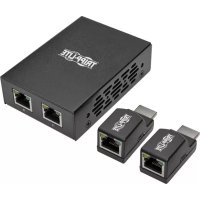
B1262P2MPOC - Hi-fi system Tripp Lite - Free user manual and instructions
Find the device manual for free B1262P2MPOC Tripp Lite in PDF.




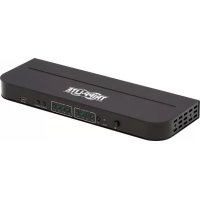
| Product Type | HDMI Extender over Cat5 Cable |
| Brand | Tripp Lite |
| Model | B126-2P2M-POC |
| Technology | Integrated Power over Cable (PoC) |
| Number of Receiver Ports | 2 |
| Maximum Resolution | 1080p (60 Hz) up to 15.24 m; 1080i (60 Hz) up to 30.48 m |
| Compatibility | 3D, HDCP |
| Audio | 7.1 channel audio support |
| External Power Supply | Input 100-240 V, 50/60 Hz, 0.5 A; Output 5 V, 2 A |
| Integrated HDMI Cable | Yes (on transmitter) |
| Dimensions (transmitter, approx.) | 10 x 7 x 2.5 cm |
| Weight (approx.) | 200 g |
| Operating Temperature | 0°C to 40°C |
| Operating Humidity | 10-85% RH |
| Warranty | One year limited warranty |
| Package Contents | Transmitter, 2 receivers, 2 USB-A to Micro-B cables (0.30 m), power adapter, mounting hardware, manual |
| Optional Accessories | Cat6 cables N202 series, high-speed HDMI cables P568, P569-XXX-LOCK with locking |
| Mounting | Wall, 19" rack, pole |
| Maintenance | Clean with a soft, dry cloth. Do not use chemicals. |
| Safety | Use in a well-ventilated area. Do not expose to moisture or extreme temperatures. |
| Repairability | Not user-serviceable. Contact Tripp Lite support. |
Frequently Asked Questions - B1262P2MPOC Tripp Lite
User questions about B1262P2MPOC Tripp Lite
0 question about this device. Answer the ones you know or ask your own.
Ask a new question about this device
Download the instructions for your Hi-fi system in PDF format for free! Find your manual B1262P2MPOC - Tripp Lite and take your electronic device back in hand. On this page are published all the documents necessary for the use of your device. B1262P2MPOC by Tripp Lite.
USER MANUAL B1262P2MPOC Tripp Lite
2-Port HDMI over Cat5 Extender Kit with Power over Cable (PoC)
Model: B126-2P2M-POC
Espanol 10 • Français 19 • Pycckn 28
PROTECT YOUR INVESTMENT!
Register your product for quicker service and ultimate peace of mind. You could also win an ISOBAR6ULTRA surge protector—a $100 value!
www.triplite.com/warranty


Manufacturing Excellence.
1111 W. 35th Street, Chicago, IL 60609 USA • www.triplite.com/support
Copyright © 2017 Tripp Lite. All rights reserved.
Product Features
- Splits and extends an HDMI signal to two HDMI displays
- Extends a 1080i signal up to 100 ft. from the source, or a 1080p (60 Hz) signal up to 50 ft. from the source
- Built-in Power-over-Cable (PoC) technology powers the receiver units over Cat5e/6/6a cable
- Built-in HDMI cable connects directly to the HDMI source
- Ultra low-profile receiver units with built-in HDMI connector directly connects to HDMI displays for discreet placement
HDCP and 3D compliant
Supports up to 7.1 channel surround sound (multi-channel or PCM) audio - Plug-and-play; no software or drivers required
Package Contents
Transmitter Unit
- Receiver Unit (x2)
- USB-A to USB Micro-B Cable - 1 ft. (x2)
- External Power Supply (Input: 100-240V, 50/60 Hz, 0.5A; Output: 5V, 2A)
- Mounting Hardware
- Owner's Manual
Optional Accessories
N202-Series Cat6 24 AWG Solid Wire Patch Cables
P568-Series High-Speed HDMI Cables
- P569-XXX-LOCK* High-Speed HDMI Cables with Ethernet and Locking Connectors
*Available in lengths up to 15 ft. XXX refers to length (e.g. 006 = 6 ft., 015 = 15 ft., etc.)
Mounting Instructions
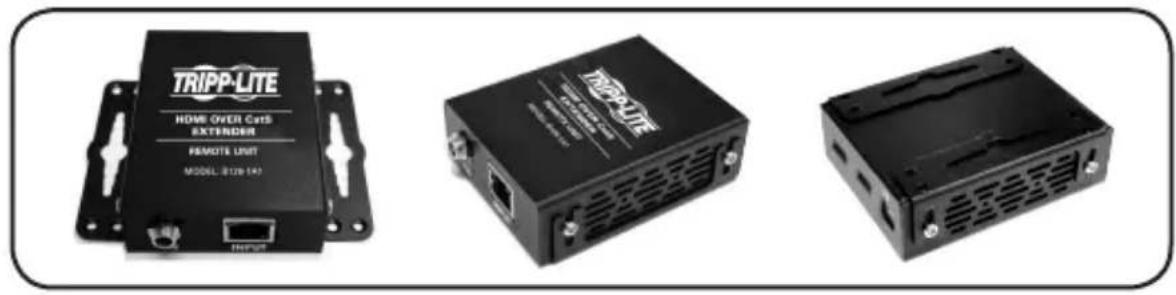
The B126-2P2M-POC includes mounting hardware that allows the transmitter unit to be mounted in a variety of ways. The following images demonstrate these mounting methods.
Note: Model B126-1A1 is shown for illustrative purposes; installation of the B126-2P2M-POC is the same.
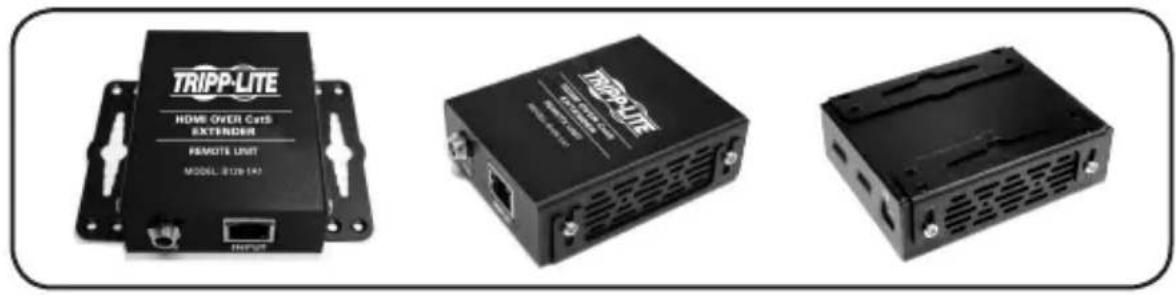
Wall-Mount
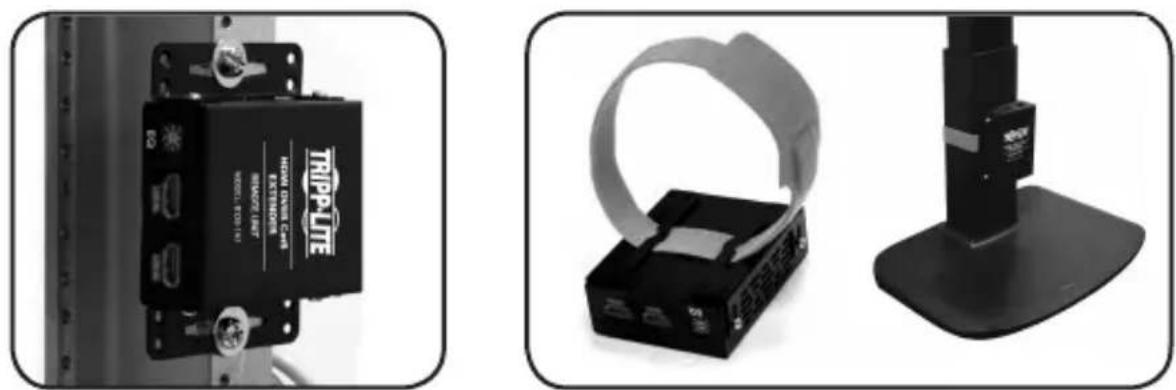
19-Inch Rack-Mount Pole-Mount
Extender Kit Installation
Notes:
- Test to make sure the entire installation works properly before pulling cables through ceilings/walls.
- To achieve maximum distance and performance, use 24 AWG solid wire Cat5e/6/6a cable. Using stranded wire Cat5e/6 cable, or cable with a gauge (AWG) size higher than 24 AWG, will result in shorter extension distance. Higher gauge cabling, such as 26 AWG, has a more limited transmission capability than lower gauge cabling. All Tripp Lite N202-Series Cat6 cables are made of 24 AWG solid wire cabling.
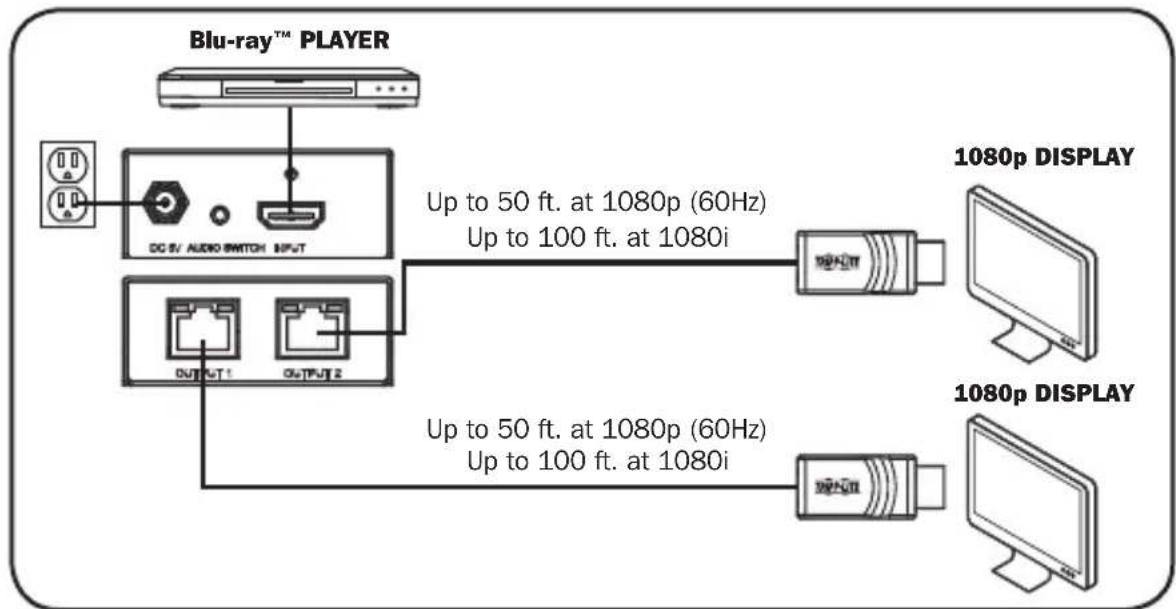
- Make sure the HDMI source is powered OFF.
- Using a Tripp Lite P568-Series HDMI cable, connect the HDMI source to the transmitter unit's INPUT port.
- Connect the external power supply to the transmitter unit and plug it into a Tripp Lite Surge Protector, Power Distribution Unit or Uninterruptible Power Supply. The green RJ45 LEDs will illuminate to indicate power is being received from the external power supply.
Extender Kit Installation
- Using a Cat5e/6/6a cable, connect the OUTPUT 1 port on the transmitter unit to the RJ45 port on a receiver unit. The green RJ45 LED on the receiver unit will illuminate to indicate the unit is receiving power. The orange RJ45 LED will also illuminate to indicate the unit is connected to a powered-on transmitter.
- Repeat step 4 to connect the transmitter unit's OUTPUT 2 port to the additional receiver unit.
- Connect the receiver unit's HDMI connector to the monitor's HDMI port.
- Repeat step 6 to connect the additional remote unit to an additional HDMI monitor.
- Turn on the power to the HDMI source. The orange RJ45 LEDs on the transmitter unit will illuminate to indicate a signal is being received from the source. The source image should now display on the connected monitors.
Note: The transmitter unit's external power supply provides sufficient power for most displays. However, in the event additional power is needed, a USB Micro-B port is provided on the Receiver units. If no image displays after following the installation instructions, use the included USB Micro-B cables to connect the receivers to the monitor's USB port or a USB wall charger.
Troubleshooting
If you are unable to get an acceptable image after following the installation instructions, try these troubleshooting tips.
- Is the unit's external power supply connected and plugged into a working power source? For the product to function properly, it must be connected to and receiving power from the external power supply.
- No image displays after following the installation instructions. The transmitter unit's external power supply provides sufficient power for most displays. However, in the event additional power is needed, a USB Micro-B port is provided on the Receiver units. If no image displays after following the installation instructions, use the included USB Micro-B cables to connect the receivers to the monitor's USB port or a USB wall charger.
- Was the power to the HDMI source turned off prior to installation? If not, restart it.
- What resolution are you trying to attain? See the Product Features and Extender Kit Installation sections in this manual for details on maximum distance and resolution. The shorter the extension distance, the higher the resolution you will be able to obtain. If you are not able to receive an acceptable image, try lowering the computer's video resolution or adjusting the refresh rate.
- What type of cabling are you using? Inferior cabling can result in poor performance. It is important the cables used can support the video resolution you are trying to attain. To achieve maximum distance and resolution, 24 AWG solid wire UTP cable (such as Tripp Lite's N202-Series cables) must be used.
- Test your cables to ensure they are working properly. For example, connect your Cat5e/6/6a cable between a computer and a network to verify it establishes a network connection.
Troubleshooting
- Are any patch panels or other devices installed between the transmitter and receiver units? Tripp Lite's HDMI over Cat5 Extender Kit was designed to be connected directly from the transmitter to the receivers via UTP cable. The more connection points between the source and the remote monitors, the more likely signal degradation will occur, causing poor performance. If a patch panel or other device is between the transmitter and receiver units, it should be removed from the installation.
- Is a splitter, switch or other device installed between the video source and transmitter, or between the receivers and displays? Tripp Lite's HDMI over Cat5 Extender Kit was designed for the transmitter to connect directly with the video source and for the receivers to connect directly to the displays. If a splitter, switch, or other device is between the video source and transmitter or between the receivers and the displays, it should be removed from the installation.
- Check your cabling for any damage that may have occurred during installation. If a cable connector is loosened from pulling through ceilings/walls or if the cable jacket is damaged, causing the wiring to be exposed, you will not be able to achieve maximum performance.
- Are the transmitter and/or receiver units located in an area that exposes them to elevated temperatures? If the product is overheating, it will not function properly.
Warranty & Product Registration
1-Year Limited Warranty
TRIPP LITE warrants its products to be free from defects in materials and workmanship for a period of one (1) year from the date of initial purchase. TRIPP LITE's obligation under this warranty is limited to repairing or replacing (at its sole option) any such defective products. To obtain service under this warranty, you must obtain a Returned Material Authorization (RMA) number from TRIPP LITE or an authorized TRIPP LITE service center. Products must be returned to TRIPP LITE or an authorized TRIPP LITE service center with transportation charges prepaid and must be accompanied by a brief description of the problem encountered and proof of date and place of purchase. This warranty does not apply to equipment, which has been damaged by accident, negligence or misapplication or has been altered or modified in any way.
EXCEPT AS PROVIDED HEREIN, TRIPP LITE MAKES NO WARRANTYES, EXPRESS OR IMPLIED, INCLUDING WARRANTYES OF MERCHANTABILITY AND FITNESS FOR A PARTICULAR PURPOSE. Some states do not permit limitation or exclusion of implied warranties; therefore, the aforesaid limitation(s) or exclusion(s) may not apply to the purchaser.
EXCEPT AS PROVIDED ABOVE, IN NO EVENT WILL TRIPP LITE BE LIABLE FOR DIRECT, INDIRECT, SPECIAL, INCIDENTAL OR CONSEQUENTIAL DAMAGES ARISING OUT OF THE USE OF THIS PRODUCT, EVEN IF ADVISED OF THE POSSIBILITY OF SUCH DAMAGE. Specifically, TRIPP LITE is not liable for any costs, such as lost profits or revenue, loss of equipment, loss of use of equipment, loss of software, loss of data, costs of substitutes, claims by third parties, or otherwise.
Product Registration
Visit www.triplite.com/warranty today to register your new Tripp Lite product. You'll be automatically entered into a drawing for a chance to win a FREE Tripp Lite product!*
- No purchase necessary. Void where prohibited. Some restrictions apply. See website for details.
FCC Notice, Class B
This device complies with part 15 of the FCC Rules. Operation is subject to the following two conditions: (1) This device may not cause harmful interference, and (2) this device must accept any interference received, including interference that may cause undesired operation.
Note: This equipment has been tested and found to comply with the limits for a Class B digital device, pursuant to part 15 of the FCC Rules. These limits are designed to provide reasonable protection against harmful interference in a residential installation. This equipment generates, uses and can radiate radio frequency energy and, if not installed and used in accordance with the instructions, may cause harmful interference to radio communications. However, there is no guarantee that interference will not occur in a particular installation. If this equipment does cause harmful interference to radio or television reception, which can be determined by turning the equipment off and on, the user is encouraged to try to correct the interference by one or more of the following measures:
- Reorient or relocate the receiving antenna.
- Increase the separation between the equipment and receiver.
- Connect the equipment into an outlet on a circuit different from that to which the receiver is connected.
- Consult the dealer or an experienced radio/TV technician for help.
Any changes or modifications to this equipment not expressly approved by Tripp Lite could void the user's authority to operate this equipment.
Warranty & Product Registration
WEEE Compliance Information for Tripp Lite Customers and Recyclers (European Union)
Under the Waste Electrical and Electronic Equipment (WEEE) Directive and implementing regulations, when customers buy new electrical and electronic equipment from Tripp Lite they are entitled to:
- Send old equipment for recycling on a one-for-one, like-for-like basis (this varies depending on the country)
- Send the new equipment back for recycling when this ultimately becomes waste
Use of this equipment in life support applications where failure of this equipment can reasonably be expected to cause the failure of the life support equipment or to significantly affect its safety or effectiveness is not recommended.
Tripp Lite has a policy of continuous improvement. Specifications are subject to change without notice.


Manufacturing
Excellence
1111 W. 35th Street, Chicago, IL 60609 USA • www.tripplite.com/support
Manufacturing Excellence.
1111 W. 35th Street, Chicago, IL 60609 USA • www.triplite.com/support
1111 W. 35th Street, Chicago, IL 60609 USA • www.tripplite.com/support
PykoBODCTBO N0Ib30BaTeЯ
KoMpIeKT 2-nOpTOBbIX peTpahCJIaTOpOB HDMI-cuRHaJa chepe3 Ka6eJb Cat5 c nItaHneM no Ka6eJIO (PoC)
Modélb: B126-2P2M-POC
English 1 · Espanol 10 · Français 19


Manufacturing Excellence.
1111 W. 35th Street, Chicago, IL 60609 USA - www.triplite.com/support
OxpaHareTc aBTopcKm npaBOM © 2017 Tripp Lite. NepeneaTk3 anpeetaetc.
XapakTepeNCTnKn npOdykTa
- 06ecneuBaet pa3deneHne n peTpaHcIaIIO HDMI-cmHaHa Na IBa yctpoiCTBa oTo6paXeHn cTaHApTa HDMI
- PetpaHcInpyet cnHan cTaNdapTa 1080i Ha pacCTOHaHne do 30 M ot NCTOHyKa nn CnHan cTaNdapTa 1080p (60 T) Ha pacCTOHaHne do 15 M ot NCTOHyKa
BCTPOeHHaTExHONorna Power-over-Cable (PoC) o6ecneuBaet nItaHne npMeMbix yCTpoiCTB no Ka6eIIO Cat5e/6/6a
BMOHTINPOBAHbI HDMI-ka6eIb NIOKJIIOyaeTcHENOCpeCTBeHNO K ICTOUYHKy HDMI-CunHaJia
Cbepxn3knpoHnbIe npmHbIe moynco BCTpoehbIM pa3bemOM HDMIOKIOUaOTc HnocpeCTBeHHO K yCTpoIcTBam OTo6paXeHnHDMl-CnHaIOB,TO IO3BOJrE To6ceNeuBaTb ONTMajbHOe pa3MeueHHe - COOTBETCTBNE Tpe6oBaHnM HDCP n 3D
-Подэржkaaydnooctemoобемног�вуаня(MHOROKaHaJIbHbIXIIMK) - Повлочене поTekhoноPlug-and-play6e3 Heo6xOДMocTN nCNoIb3OBaHnKaKOro-ln60 nporpaMMHoro 06ecneueHnIu IpaIbepOB
CopexHmoe ynaKOBKn
- IpepeaiozniMoodyb
- Pnpemhmy Moynb (2 wt.)
Ka6enbcpa3beMaMu USB-A u USB Micro-B, dInHa 0,3 M (2 wt.)
BHeuHn6JIOK nITaHnA (BxoD:100-240 B;50/60 Tc;0,5A BbIXoD:5B,2A) - MohtaxKhble npncnocO6neHna
PykoBOCTBO Nolb30BaTeTn
OnuohbHbIe KOMnKeKtUoUne
CoeunHntbHbIe Ka6en Cat6 cepuN N202 cOHOxKbHbIMn npoBoaMn Ka1n6pa 24 AWG
- BbICOKoCKOpocThbIe HDMI-ka6eJIncepn P568
- BbICOKocOpocThbIe HDMI-ka6eIIN P569-XXX-LOCK* cpa3beMaMn Ethernet n FmKcnpyUoMmBnHTaMn
*IINHa 4,5 M. XXX COOTBeTCTByeT IINHe (HAnpIMep,006=6ΦT.,015=15ΦT.IN.T.I.)
yka3aHnno MoHTaXy
KomnneKT B126-2P2M-POC Bknoaet B ce6a MoHTaXHyO ochKy, no3BOJHOuO KpeNtB nepeDaTuk pa3nHbIM cNoC06am. 3Tu MeToDbI KpeJIeHn IpeCTabHeHb Hxke Ha pncyHKax.
IpmeHne.Ha nIOCTpaunx noka3Ha Moenb B126-1A1; yctahOBKa moen B126-2P2M-POC ocyuectBnertca HAnOHTyHbIM 06pa3OM.
HaTeHHbMoHTaX
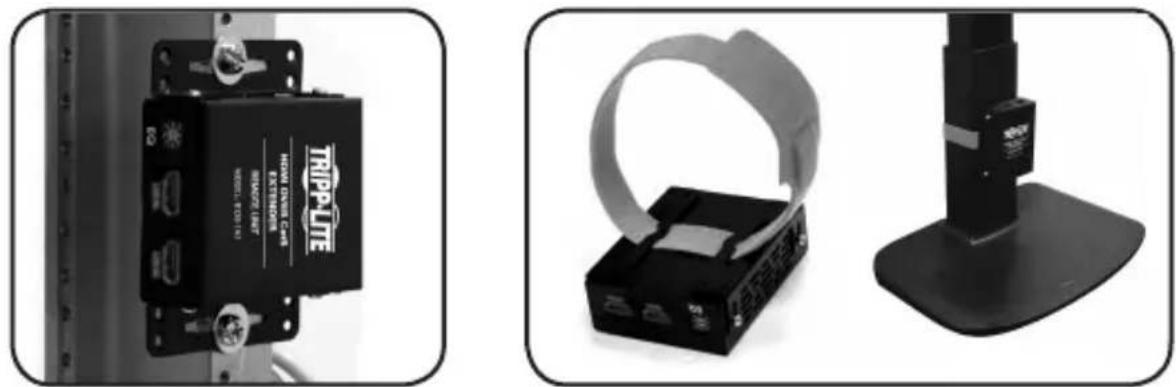
MOHTAKB 19-Дюймов CTоиke MoHTaX Ha MaYTe
yctahOBka peTpaHcIaTopa
Приимechanical:
- Ipeep npotraBaanem Ka6e ne uee3 cTeHbI/IOToJKN Heo6xOIMo npOBepntb npaBnIbHOCTb fyHKUHOPOBaHNA BcEY UCTaHOBKn.
2.ДЯdoctxkeHMaKcMmaJIbHoI nIpOn3BoUteJeBHOCTn Heo6xoJIMo HcNoIb3OBA Tb Ka6eIb Cat5e/6/6a c OndoxNlbHbIM npOBdAMn KaIbpa 24 AWG.NcNoIb3ObaHne Ka6eIaCat5e/6c MHOroXuNbHbIMnpOBdAmn IIN Ka6eIa C npOBdAMn KaIbpa Bblwe 24 AWG npBBeTeK cokpaueHIO dINHb peTpaHcIaMn.Ka6eNb 60ee BbcOKnx KaIbpoB (HaPmep,26 AWG) mEOT 60nee orpaHnueHHyIO nepeDaIOuyIO cnoC6HOCTb noCpaBHeHIO cKa6eIaMn 60ee Hn3KxK KaIbpoB.Bce Ka6eN Cat6 cepnn N202 MapKn Tripp Lite n3rotabnBaHTcaCnOInb3OBAHMe OndoxNlbHbIX npOBdOB KaIbpa 24 AWG.
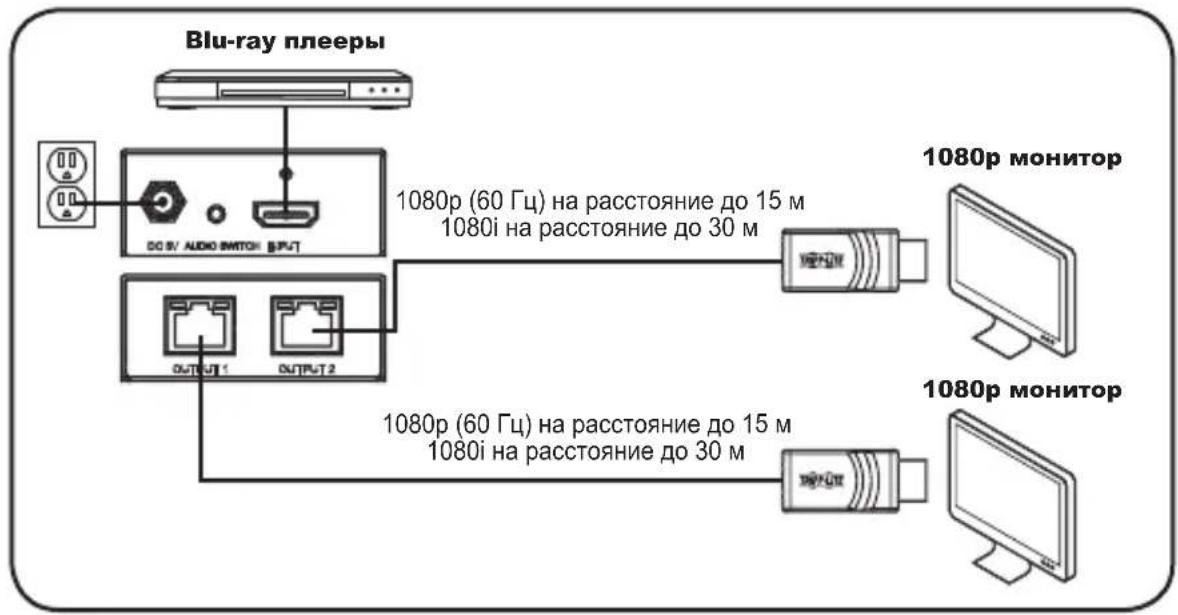
- y6eIntecb TOM, yTO nITaHne nCTOuHnka HDMI-crHana OTKJIouyeHo.
- Пдклочи мсточин HDI-cirhana ko BXoHomy nopTy (INPUT) nepedaIoJero moDyra nOMOsbIO HDMI-ka6eJa Tripp Lite cepnn P568).
3.Поdkнioчite BHeHn 6IOK nHTaHn K nepedaIoUeMy MOnyIIO N BkInOuHte erO B po3eKу ceTeBOro ΦIbTpa, 6Ioka paCnpedeHnna PHTaHn (PDU) mnn nCTouHnka 6ecnepe6oHoro nHTaHn (NbI) Tripp Lite. nTaHne OT BHeHero nCTouHnKa OTo6paXaETcra CBeToMDnDhIMM INdNKaTopamRJ45 3eJeHoro HBeTa.
yctahOBka peTpaHcIaTopa
- CoeHnHte nopT OUTPUT 1 nepeaiooero moyra c npToM RJ45 npneMHoro moyra c nmoouk Ka6ena Cat5e/6/6a. Hanuue nitaHna npemHoro moyra oTO6paXaetc CBeOnIOHbIM HndkaTopom RJ45 3eJeHoro zBeta. POKJIouHe Me MOyra K 3aIITAHHomy nepeDaTuKky OTO6paXaETcCBToOnIOHbIM HndkaTopom RJ45 opAnKeBOrO zBeta.
- Повторешагдя подкюецни пораз OUTPUT 2 nepeдаюцero мodyня К дононтьному npиемному мodyлio
- CoeHHte pa3bem HDMI npnemHoro moyra c HDMI-noptom moHntopa.
- Повторе Ша 6 дя подклоченя дононтelenь Horo 6Loka ductaHcnoHHoro ynpabneHnKdoнонтelenbHomy HDMI-MOHHTopy.
- BkIouHte nHTaHne nCTOuHnka HDMl-crHana. NonyeHne cHnala ot nCToHnka nepeaIOIM MoJyEm oTo6paXaetc CBTeODnOHBIMn INDnKaTOpamRJ45 opaHKeBOrO CBeta. Tenepb I3O6paXeHne, NOlyuaemoe OT nCTOuHnka, IDONKHO BbIBODNTbc Ha NOdkJIooYeHHbIe MOHTOpbl.
PpmeHne. BHeHn 6nK nHaHnpepaUe moyn oecneuBaet doCTaOHToe 3KeKTPoNTAHne dIg 60nbHnHCTBa yctpoJcTB OTo6paXeHn. Ondako Ha cnuyaanotpe6HOCTN B DOONHtEnbHom nTaHn npMeHbIe Moyn ochaauOTcnpTOM USB Micro-B. B cnuyae oTCyTCTBna I3o6paXeHn noCte BblOnHeHn yKa3AHn no yctahOBke npKnIOHTe npemHnK n USB-npOty MOHTopa nn po3eK e USB npn nmoOn Ka6eNe c pa3bemaM N USB Micro-B, BXoJauxx B KOMnJIeKT.
BbIaBJIeHne n yCTpaHHeHne HeNCpPaBHOCTeI
EcnBbIOnHeHne yka3aHn no yCTaHOBKe He n03BOJAE TocTnB npneMnEMoro KaueCTBa n3o6paJxHn, nonpo6yTe BOCNoJIb3OBAtbcra npuBeJeHHbIMn Hxke peKOMeHdaZmaMn IO BbIaBHeHIO uYcTaPHeHIO HeNCpPaBHoCTe.
1.ПоdkлюченлВHEшн6LOKПNTAHNMAOункработаошемуИСТОHNYПNTAHN?ДЯндпекацeroФункционрованяДaHHOrOиЗделгОнOHOДOLЖHOПОКЛIOчATbCЯВHESHMeY 6LOKy ПNTAHNИЗANITbIBaTbCЯOTHERO.
2. Посл e Вынолненя указани no yctahOBke n3o6paxeHne oTyTcByeT. Bheшни 6nok nHTAHNЯ nepedaIoUero moDyIЯ obecneuBaet doCTaTOHoe 3NeKTPoNTaHne Iry 6OJIbShnHCTBa yctpoiCTB OTo6paxeHnra. Ondako Na cnuyaŋ notpe6hocTN BdoONHITeNbHom nHTAHNI npMeMHbIe moDyIIN ocHaauOTc npToM USB Micro-B. B cnuyae oTCyTCTBnI N3o6paxeHnna nOcSe BvInonHeHnRA yka3aHNI no yctahOBKe nOdklnouHTe npMeMHNKn K USB-nOpTu MoHITopa II IN po3eTke USB npn nomOuNi Ka6elen c pa3bemamn USB Micro-B, BXODaIux B KOMnIeKT.
3.БылnotКючedoNTaHne nCToHnka HDMI-curhana neped hauanom yctahobkn? EcnHET, BbINOHNTE erO nepezanyck.
4. Kakoro pa3peweHnBbIbITaeTcBIO6ntbC? POpO6Hee O MaKcMmaIbHbIX 3HaueHnx IInCTaHcN IN pa3peweHnCM. B pa3deJax OYHKUHOHbHbIe BO3MOXHOCTN 3DeJIIN YCTAHOBKa KOMIIeKTA petpaHcJIaTOPOB. Yem MeHbIe dLIHa peTpacHcJIaUN, Tem BblSe pa3peweHne, KOtOpoe Bbl cMOxTe NOLyHTb. B clyuae HeBO3MOxHOCTN IO6NTbC npneMlEmoR OkaeeCTBa I3O6paXeHnNONpO6yIte UMeHbWHTb BUnDeopa3peWeHne KOMNbIOTePa IIIN OTpeYIpOBAbT YaCTOTy 06HOBNeHn.
5. Kaokon Ka6ene Bbl nCnoB3yeTe? NcnoB3OBAHne HeHaJnEkaux KabeNe MoKet npNBecTN K yxydWeHIO pa6oHx xapaKtepncTik. Heo6xoJIMo NcnoB3OBaTB Ka6enn, noDepXnBaOuIe TOT ypoBeHb BnDeopa3peSeHna, KOtOpbI Bbl nbITaeTecb nonyUHTb.ДЯ DoCTNXeHMaKcMmaNbHO BO3MOXhBX 3NaueHm DnCTaHcNn n pa3peSeHn Heo6xoJIMo NcnoB3OBaTB Ka6enb TnPa UTP c OndHoxKnBbIMn npoBoaMn KaJIb6pa 24 AWG (HaNPmep, npednarAemble KomnaHne Tripp Lite Ka6enn cepnn N202).
6. Поберын сплььемы кабел Ha педmet nx habлесашиу phнкуншовая. Hanример, подковуту комьютет К сети рпс пошу кабел Cat5e/6/6a c сцью пobерки Того, обес Neuвael и OH сеево сединене.
BbIaBJIeHne n yCTpaHHeHne HeNCpPaBHOCTeI
- UCTaHOBJIeHbI Nn KaKHe IIN60 KOMMyTaUHOHHbI NaHEn NII DpyrNe yCTpoiCTBa MeKdny nepedaIOUHM n npHemHbIM MoDyJamN? BblNyckaEMbIe KOMpaHnei Tripp Lite peTpaHcIaTOpbI CnHana HDMl no Ka6eJAM Cat5 paccHTaHbI Ha npAme coeHNHeHne nepedaIOUero N npHemHoro MOdyJe upe3 He3KpaHnpoBaHbI Ka6eB TnPa "BVtA npa" (UTP). Yem 6OJIbWe TOueK CoeINHeHna MeJy IVCTOuHNIkOM N ydaJIeHHbIM MoHITOpaMn, Tem BblSe BepoTHOCTb CHIXKeHNA KaYeCTBa CnHana, Bbl3bBAIOUeO yXyDuHEHne pa6OuNX xapaKTepuCTNK. Ppi HAIuNN KOMMyTaUHOHHo NaHEn NII DpyrO OCTPOIcTB MaKdY npEpaIOUIm N npHemHbIM MoDyJamM INx Heo6XoIMMO NCKLIQUHTb IN3 COCTaBA UCTaHOBKn.
- ImeetcI npa3BeTbntelb, KOMMyTaTOp nII KaKoe-1n6o Dpyroe yctpoiCTBO MEXdy NCTOCHNKOM BnDEOCrHana n NepeDaTChkOM nII MEXdy pNEmHHKAMn uYCTPOICTBAMn OTO6paXeHn? Bblnyckaemble KOMnAHne Tripp Lite petpncIaTOpbl cHnHa HDMl no Ka6eJAm Cat5 paccuHTaHbI Ha npAme NOkJIIOUeHne nepeDaIOUe RO MOyJN K NCTOCHKU BnDEOCrHana n npAme NOkJIIOUeHne npNEMHKOB K yCTPOIcTBAM OTO6paXeHn. Ppi HAIChn pa3BeTbNTeJI, KOMMyTaTopa nII KaKOrO-1n6o DpyrOTo yCTPOIcTBOM MEXdy NCTOCHNKOM BnDEOCrHana n NepeDaTCHKOM nII MEXdy pNEmHHKAMn UyCTPOIcTBAMn OTO6paXeHn INx Heo6xoDmO NCKLIQUHTb n3 COCTaBA yCTaHOBKn.
- Пюверы Кабени на пеимет наличая порждени, кOTOPьМORПИ npOH30IbВnpOecce yCTaHOBKN.В сlyаe pa36aNTbIBAHNY Ka6eNBHO ra3beMa npI npOTaRnBaHNY Ka6eЯ che3 CTeHb/NoTOLKn nII N NOpEckDeHry Ka6eNBHO 6oJIoUcKn, Bbl3bIBaIOJIeO orOJIeHne npOBODB,doCTnxKeHne MaKcIMaJIbHbIX pa6OuNX xapaKTepNCTNK He npeDCTaBJIeTcB 03MOxHbIM.
- He noDBepraOTcI Nn nepeaIoUm n/IIu npHeMhBIM MoyIn B03DeiCTBIO NOBbIeHHbIX TemnepaTpy B Tex MeCTax, rJe OHN yCTaHOBneHb? B cnyae neperpeBa u3dJIne He moKeT fYHKUOHIPOBaTb HaJIeKAsMM o6pa3OM.
TapaHTnHbIe 06a3aTeNbCTBa
OrpaHnueHHa rapaHTna 1 roD
KOMnHnTRIPP LITE rapaHTpyet OTCYCTBnE deEeKTOB MaTePnaIOB n3rOToBHeHn B TeueHne OJHO (1) Toda C MoneHa nepBOHaJIbHoN NOKynKn. 06a3aTeNbCTBa KOMnHn TRIPP LITE no HAcTOnIe rapaHTn OrpaHnBaIOTc peMOHTom nn 3aMeHo (no ee EINHOuHOMy yCMoTpeHIO) IIObIX TaKnx DeEeKTHbIX n3DeIIN. DnA NOUYeHn ycnyr no DaHNHO rapaHTn Heo6xOIMo NOUYtB HomeR eTuRtned Material Authorization (RMA - pa3peHne Ha Bo3BpAT MaepNaIOB) ot KOMnHn TRIPP LITE nn ee ABTopn3OBaHHo cEBuCnHOI cHTpa. N3dENr DOJXHb 6bITb BO3BpaSeHb B KOMnHn TRIPP LITE nn ABTopn3OBaHHb CEbpCNbI cyHTr TRIPP LITE c PpeDOnlato TpaHCnpTHbIX paXoIOB IN CoPBOXJaTbCk KaTKM ONCAHm BO3NHKeJe PpOBeMbl NOKyMeHM, NOITBePjDaIOUM dAty IN MeTO erO npNo6peHn. DeiCTBn HAcTOnIe rapaHTn He paCnpocTpaHReTc Ha O6OpyOBaHHe, NOBpeJHHe B Pe3yNBate abAPIn, He6peKHOro o6paHHe IN IN HcpabINbHOr NCNOb3OBaHHa, a TAKKe BINOONMeHEHHe KAKM 6bl To HbIIO Obpa3OM.
3A NCKIIOUCHENEM IPEYCMOTPEHHbIX 3DECb CNYAEB KOMNAHRA TRIPP LITE HE I PEPIOCTABJAE T KAKX-JINBO RHBx INI IPOPA3YMBAEMbIX IAPAHTM, BKIOUAYI IAPAHTM KOMMEPUECKO IPINFOHOCTN INI PIPNOHOCTN INIAKOKI-NIMBO KOHKPETOH UJI. B HeKOTopbIX Wtatax/rocuapctbax orpaHueHne INI NCKIOUChEne NOpa3yMaebmIx rapaHTM He donyckaetc; cJeDobateNbHo, Bbiweyka3ahHoe(-bie) ORpaHueHne(-n INI NCKIOUChEne(-n) Moryt He paocpoCTpaHrTaBcHa NOKyNaTeTn.
3A NCKIIOUCHHEIM PTEUYCMOTEHbIX BIIIE CNYAEB KOMTAHNTRIPP LITE HN IPIKAKNX OBCOTAREBCTBAX HE HECET OTBETCTBEHHOCTN 3A IPRMbie, KOCBEHHbIE, CNYAAYHbIE INI NIOOHTbYbBITKN INBOYbITKN, ONPEDEJIEMBIE OCOBIMN OBCTORTEJIbCTBAMN, BO3HNIKAHOUIE B CB3N C NCIIOJIb3OBAHmE DAHHO IN3DEJIN, DAAKE B CNYAAE EE INHOPMIPOBAHnO BO3MOXHOCTN HACTUYIIENHMA TAKIX YbBITOK. B ChactHOCTN, KOMNAHn TRIPP LITE He Hecet OTBETCTBEHHOCTN 3a KaKne-1n6o IN3depKKn, TaKe KaK ynuIeHNbIe pIn6bln INI DoXObl, NoTeP rOBOpDyOBAHn, NoTeP Bo3MOXHOCTN INCNOBtOBAHnO oOpDyOBAHn, NoTeP npOrpaMMHOr o6ecneHHe, NoTeP daHHbIX, paCXObl Ha 3aMeHNTeY, ypeYIpnoPBAnHe nPeTeH3N TpeTBx INu np.
TapaHTnHbIe 06a3aTeJIbCTBa
Hhopmaunna JnKneHTOB KOMNAHN Tripp Lite o co6nOeHN Tpe6oBaHnn dIpeKTNBbE EC 06 OTxOaX 3NeKtpueckoro n3NeKtpoHHOro 6OpuyoBaHn (WEEE)
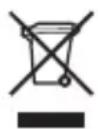
Corgnacno dupeKTHBE EC 06 OTxOax 3neKtpueckoro n 3neKtpoHoro 06OpydoBaHna (WEEE) npmehmblm HopMaB cnuyaX, KOrDa nokpataen npno6peTaoT HOBoe 3neKtpueckoe n 3neKtpoHoe 06OpydoBaHne KompaHm Tripp Lite, OHn Imeot npaboHa cIeDyoUee:
0Tnpabky cnaporo 6bpyoobHn, KOTOpoe ABAeTcKBBaBHeTHbIM NOKJIueCTBy INeHTNHyBIM NOnyehHomy HOBOMy 6bopyoBaHIO,HaYtUNI3auIIO (3TO YCLOBIE MOKeT OTUCAbTB C 3aBNCUMOCTN OT CTpaHbl)
- Otnpabky HOBORO 6obpyoBaHnI 6bpaTHO HA yTuIN3aUHIO, KOr Da OHO B KOHeYHOM ITORE cTaHOBITc N3HOWeHHbIM
He peKoMeHnyeTcNcNoJIb3OBAHnE daHnHO o6OpyIobAHnB cNCTeMaX JxN3HeOBeCnepeHn, rIe erO bByxoI N3 CTPOJpeIIOJIOKeITeHbMOKeT npUBeCTn K nepe6oAM B pa6oTe o6OpyIobAHn JxN3HeOBeCnepeHn IIN B 3NaHTeHbHO Mepe CHN3uTb erO 6e30NaCHOCTb IIN 3ΦΦeKTHBHOCTb.
KOMnHn TrippLite noCToHNO COBepueHeCTByeT CBOIO npOdykuuHO. B CBA3N C 3TMM BO3MOxHO N3MeHeHne TexHmecKnx XapakTepcntNK 6e3 npedbapntbHorO yBeDommeHnR.


Manufacturing
Excellence.
1111 W. 35th Street, Chicago, IL 60609 USA · www.triplite.com/support
17-01-159 93-36A2 revA
- 2-Port HDMI over Cat5 Extender Kit with Power over Cable (PoC)
- PROTECT YOUR INVESTMENT!
- Product Features
- Package Contents
- Optional Accessories
- Mounting Instructions
- Extender Kit Installation
- Notes:
- Troubleshooting
- Warranty & Product Registration
- 1-Year Limited Warranty
- Product Registration
- FCC Notice, Class B
- WEEE Compliance Information for Tripp Lite Customers and Recyclers (European Union)
- PykoBODCTBO N0Ib30BaTeЯ
- KoMpIeKT 2-nOpTOBbIX peTpahCJIaTOpOB HDMI-cuRHaJa chepe3 Ka6eJb Cat5 c nItaHneM no Ka6eJIO (PoC)
- XapakTepeNCTnKn npOdykTa
- CopexHmoe ynaKOBKn
- OnuohbHbIe KOMnKeKtUoUne
- yka3aHnno MoHTaXy
- yctahOBka peTpaHcIaTopa
- Приимechanical:
- BbIaBJIeHne n yCTpaHHeHne HeNCpPaBHOCTeI
- TapaHTnHbIe 06a3aTeNbCTBa
- OrpaHnueHHa rapaHTna 1 roD
- TapaHTnHbIe 06a3aTeJIbCTBa
Brand : Tripp Lite
Model : B1262P2MPOC
Category : Hi-fi system