H-PS-45175E - Camera lens PANASONIC - Free user manual and instructions
Find the device manual for free H-PS-45175E PANASONIC in PDF.


| Product Type | Photo Lens |
| Brand | Panasonic |
| Model | H-PS-45175E (LUMIX G X VARIO PZ 45-175 mm) |
| Mount | Micro Four Thirds |
| Focal Length | 45 mm to 175 mm (35 mm equivalent: 90 mm to 350 mm) |
| Maximum Aperture | F4.0 (wide-angle) to F5.6 (telephoto) |
| Minimum Aperture | F22 |
| Optical Construction | 14 elements in 10 groups (2 aspherical lenses, 2 ED lenses) |
| Nano Coating | Yes |
| Optical Stabilization | Yes (Power O.I.S.) |
| Minimum Focus Distance | 0.9 m |
| Maximum Magnification | 0.2× (35 mm equivalent: 0.4×) |
| Filter Diameter | 46 mm |
| Maximum Diameter | Approx. 61.6 mm |
| Overall Length | Approx. 90.0 mm |
| Weight | Approx. 210 g |
| Included Accessories | Lens cap, rear cap, lens hood, storage bag |
| Maintenance | Wipe with a soft, dry cloth; avoid chemicals |
| Precautions | Avoid magnetic fields, condensation, shocks |
Frequently Asked Questions - H-PS-45175E PANASONIC
User questions about H-PS-45175E PANASONIC
0 question about this device. Answer the ones you know or ask your own.
Ask a new question about this device
Download the instructions for your Camera lens in PDF format for free! Find your manual H-PS-45175E - PANASONIC and take your electronic device back in hand. On this page are published all the documents necessary for the use of your device. H-PS-45175E by PANASONIC.
USER MANUAL H-PS-45175E PANASONIC
Operating Instructions
INTERCHANGEABLE LENS FOR DIGITAL CAMERA
Model No. H-PS45175
LUMIX
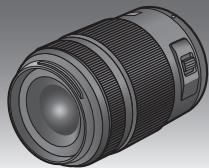
Before use, please read these instructions completely.

LENS

LUMIXTM

POWER
MICRO
FOURTHIRDS
0.I.S.
HD


Contents
Information for Your Safety. 2
Precautions 4
Supplied Accessories 5
Attaching/Detaching the Lens 5
Names and Functions of Components 7
Cautions for Use 9
Troubleshooting 10
Specifications. 11
Information for Your Safety
Keep the unit as far away as possible from electromagnetic equipment (such as microwave ovens, TVs, video games, radio transmitters, high-voltage lines etc.).
- Do not use the camera near cell phones because doing so may result in noise adversely affecting the pictures and sound.
- If the camera is adversely affected by electromagnetic equipment and stops functioning properly, turn the camera off and remove the battery and/or the connected AC adaptor. Then reinsert the battery and/or reconnect the AC adaptor and turn the camera on.
The lens can be used with a digital camera compatible with the lens mount standard for the "Micro Four Thirds™ System".
- It cannot be mounted on the Four Thirds™ mount specification camera.
- The digital camera illustrations in these operating instructions show DMC-G3 as an example.
- The appearance and specifications of products described in this manual may differ from the actual products you have purchased due to later enhancements.
- Micro Four Thirds™ and Micro Four Thirds Logomarks are trademarks or registered trademarks of Olympus Imaging Corporation, in Japan, the United States, the European Union and other countries.
- Four Thirds™ and Four Thirds Logo marks are trademarks or registered trademarks of Olympus Imaging Corporation, in Japan, the United States, the European Union and other countries.
- G MICRO SYSTEM is a lens exchange type digital camera system of LUMIX based on a Micro Four Thirds System standard.
- Other names of systems and products mentioned in these instructions are usually the registered trademarks or trademarks of the manufacturers who developed the system or product concerned.
Information on Disposal for Users of Waste Electrical & Electronic Equipment (private households)


This symbol on the products and/or accompanying documents means that used electrical and electronic products should not be mixed with general household waste.
For proper treatment, recovery and recycling, please take these products to designated collection points, where they will be accepted on a free of charge basis.
Alternatively, in some countries you may be able to return your products to your local retailer upon the purchase of an equivalent new product.
Disposing of this product correctly will help to save valuable resources and prevent any potential negative effects on human health and the environment which could otherwise arise from inappropriate waste handling. Please contact your local authority for further details of your nearest designated collection point.
Penalties may be applicable for incorrect disposal of this waste, in accordance with national legislation.
For business users in the European Union
If you wish to discard electrical and electronic equipment, please contact your dealer or supplier for further information.
Information on Disposal in other Countries outside the European Union
This symbol is only valid in the European Union.
If you wish to discard this product, please contact your local authorities or dealer and ask for the correct method of disposal.
Precautions
Lens Care
- Sand and dust can damage the lens. Make sure that no sand or dust gets inside the lens or the terminals when using the lens on a beach, etc.
- This lens is not waterproof. If drops of water get onto the lens, wipe the lens with a dry cloth.
- Do not press the lens with excessive force.
- When there is dirt (water, oil, and fingerprints, etc.) on the surface of the lens, the picture may be affected. Lightly wipe the surface of the lens with a soft, dry cloth before and after taking pictures.
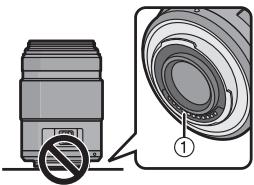
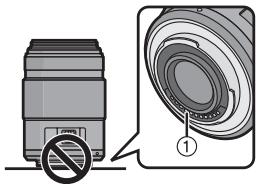
- Do not place the lens mount facing downwards.
Do not allow the lens contact points ① to become dirty.
About Condensation (Fogging of the Lens)
-
Condensation occurs when there are differences in temperature and humidity as described below. Condensation can cause the lens to become dirty and lead to mold and malfunctioning, so exercise caution in the following situations:
-
When the camera is brought indoors from outside during cold weather
- When the camera is brought into an air-conditioned car
- When cold air from an air conditioner is directly blown onto the lens
-In humid places - Put the camera into a plastic bag to allow it to acclimatize to the surrounding temperature in order to prevent condensation. If condensation occurs, turn the power off and leave it for about two hours. Once the camera acclimatizes to the surrounding temperature the condensation will go away naturally.
Supplied Accessories
[Inspection to be performed when you unpack the unit]
When removing the unit from its packing box, check that the main unit and the supplied accessories are there and also check their external appearance and functions to verify that they have not sustained any damage during distribution and transportation.
If you discover any trouble, contact your vendor before using the product.
Product numbers correct as of August 2011. These may be subject to change.
![PANASONIC H-PS-45175E - [Inspection to be performed when you unpack the unit] - 1](/content/2019/09/53385/images/a031b523f8081f839884e5251a6c7592b40e1050bb620da60950f8e035544624.jpg)
1 Lens Storage Bag
2 Lens Hood
3 Lens Cap
4 Lens Rear Cap (The lens rear cap and lens cap are attached to the interchangeable lens at the time of purchase.)
Attaching/Detaching the Lens
Refer also to the camera's operating instructions for attaching and detaching the lens.
■ Attaching the Lens
- Check that the camera is turned off.
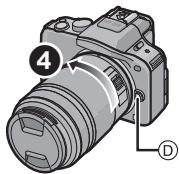
1 Turn the lens rear cap to detach it.
A: Lens Rear Cap
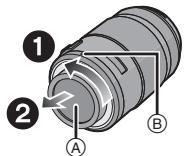
2 Align the lens fitting marks (red marks) on the camera body and the lens and then rotate the lens in the direction of the arrow until it clicks.
- Do not press the lens release button ⑥ when you attach a lens.
- Do not try to attach the lens when holding it at an angle to the camera body as the lens mount may get scratched.
- Check that the lens is attached correctly.
Detaching the Lens
- Check that the camera is turned off.
While pressing on the lens release button ① , rotate the lens toward the arrow until it stops and then remove.
- Attach the lens rear cap so that the lens contact point does not get scratched.
- Attach the body cap to the camera so no dirt or dust will get inside the main unit.
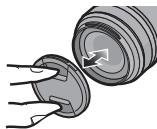
■ Attaching and Detaching the Lens Cap
Pinch the lens cap as shown in the figure to attach or detach.
- Be careful not to lose the lens cap.
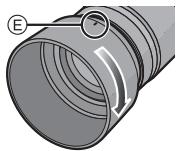
■ Attaching the Lens Hood (Supplied Accessory)
Insert the lens hood into the lens, and turn in the direction of the arrow until it stops.
E: Fit to the mark
■ Temporarily Storing the Lens Hood
1 Turn the lens hood in the direction of the arrow to detach it.
2 Reverse the lens hood and then attach it in the same way as shown previously.
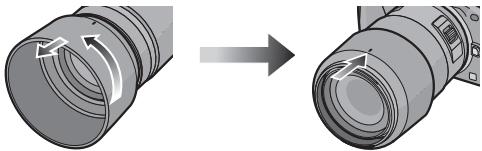
- When taking pictures with the flash with the lens hood attached, the lower portion of the screen may turn dark (vignetting effect) and the control of the flash may be disabled because the photo flash may be obscured by the lens hood. We recommend detaching the lens hood.
- When using the AF assist lamp in the dark, detach the lens hood.
■ Attaching Filters
- Vignetting may occur if using 2 or more MC protectors (optional: DMW-LMC46), PL filters (optional: DMW-LPL46) or ND filters (optional: DMW-LND46), or if using thick protectors and/or filters.
- The filter may become impossible to remove if excessively tightened, so please refrain from tightening it too strongly.
- It is possible to attach the lens cap with the filter already attached.
- You cannot attach a conversion lens or adaptor to this lens. A filter may be used, but attaching any other element may cause damage to the lens.
Names and Functions of Components
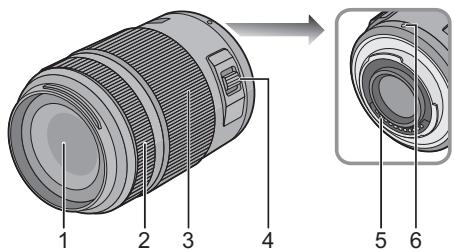
1 Lens surface
2 Focus ring Rotate to focus when taking pictures with manual focus.
3 Zoom ring
Rotate the zoom ring to the [T] (Tele side) or W (Wide side).
[T]: To make subjects appear closer use (Tele)
W: To make subjects appear further away use (Wide)
- The zoom speed varies depending on the speed to rotate the ring.

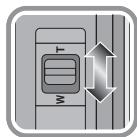
4 Zoom lever
Move the zoom lever to the [T] (Tele side) or W (Wide side).
[T]: To make subjects appear closer use (Tele)
W: To make subjects appear further away use (Wide)
- The zoom speed varies depending on the range over which the zoom lever is moved.
- If you take your finger off the zoom lever during zoom operation while recording a motion picture, the operation sound may be recorded. When returning the zoom lever to the original position, move it quietly.
5 Contact points
6 Lens fitting mark
8

Note
- Zoom speed will be slower than normal when recording a motion picture.
- When flash recording with a close subject, the light of the flash will be blocked by the lens and part of the picture may be dark. Check the distance from the subject when recording.
- There is no indication of focal length on the lens. The focal length is displayed on the screen of the digital camera when attached to the compatible digital camera. Focal length is not displayed on the digital camera that is not compatible. For details on the digital camera used, refer to the website.
http://panasonic.jp/support/global/cs/dsc/ (This Site is English only.)
Cautions for Use
Take care not to drop or knock the lens. Also take care not to put a lot of pressure on the lens.
- Take care not to drop the bag that you inserted the lens in as it may strongly shock the lens. The camera may stop operating normally and pictures may no longer be recorded. Also, the lens may be damaged.
When using pesticides and other volatile substances around the camera make sure that they do not get onto the lens.
- If such substances get onto the lens they can damage the exterior case or cause the paint to peel.
Do not carry the unit when it is still attached to the camera body.
-
Under no circumstances should the unit be stored in any of the following locations since doing so may cause problems in operation or malfunctioning.
-
In direct sunlight or on a beach in summer
- In locations with high temperatures and humidity levels or where the changes in temperature and humidity are acute
-In locations with high concentrations of sand, dust or dirt
-Where there is fire
- Near heaters, air conditioners or humidifiers
-Where water may make the unit wet
-Where there is vibration
- Inside a vehicle
Refer also to the operating instructions of the digital camera.
- When the unit is not going to be used for a prolonged period, we recommend storing with a desiccant (silica gel). Failure to do so may result in performance failure caused by mold, etc. It is recommended that you check the unit's operation prior to use.
- Do not leave the lens in contact with rubber or plastic products for extended periods of time.
- Do not touch the lens contact point. Doing so can cause failure of the unit.
- Do not disassemble or alter the unit.
Do not use benzine, thinner, alcohol or other similar cleaning agents to clean the lens glass or exterior cabinet.
- Using solvents can damage the lens or cause the paint to peel.
- Wipe off any dust or fingerprints with a soft, dry cloth.
- Use a dry, dust cloth to remove dirt and dust on the zoom ring and the focus ring.
- Do not use a household detergent or a chemically treated cloth.
Troubleshooting
A sound is heard when the camera is turned on or off.
- This is the sound of lens or aperture movement and is not a malfunction.
When this lens is attached to digital camera, stabilizer function cannot be turned off or stabilizer function does not work.
- The Optical Image Stabilizer function of this lens only works correctly with supported cameras. When older Panasonic digital cameras (DMC-GF1, DMC-GH1, DMC-G1) are used, [STABILIZER] in the [REC] mode menu cannot be set to [OFF]. It is recommended to update the firmware of the digital camera at the following website. http://panasonic.jp/support/global/cs/dsc/download/
When using this lens with another make of digital cameras, the Optical Image Stabilizer function will not work. (As of August 2011) For details, contact the respective company.
INTERCHANGEABLE LENS FOR DIGITAL CAMERA
"LUMIX G X VARIO PZ 45-175 mm/F4.0-5.6 ASPH./POWER O.I.S."
| Focal length | f=45 mm to 175 mm (35 mm film camera equivalent: 90 mm to 350 mm) |
| Aperture type | 7 diaphragm blades/circular aperture diaphragm |
| Aperture range | F4.0 (Wide) to F5.6 (Tele) |
| Minimum aperture value | F22 |
| Lens construction | 14 elements in 10 groups (2 aspherical lenses, 2 ED Lens) |
| Nano surface coating | Yes |
| In focus distance | 0.9 m to ∞ (from the focus distance reference line) |
| Maximum image magnification | 0.2× (35 mm film camera equivalent: 0.4×) |
| Optical image stabilizer | Available |
| [O.I.S.] switch | None (Setting of the [STABILIZER] is done in [REC] mode menu by LUMIX digital cameras.) |
| Mount | “Micro Four Thirds Mount” |
| Angle of view | 27° (Wide) to 7.1° (Tele) |
| Filter diameter | 46 mm |
| Max. diameter | Approx. 61.6 mm |
| Overall length | Approx. 90.0 mm (from the tip of the lens to the base side of the lens mount) |
| Mass | Approx. 210 g |
Inhalt
PpHaIeKHOCTN, BxOaIe N B KOMJIeKT 64
UctaHObKa/ChrTne oBekTnBa 64
Ha3BaHnI nФункUm COCTaBbIX YacTei 66
Ppeoctopoxhoctn npn nCnoB3ObaHm
ΦOTOKaMepbl 68
UcTpaHHeHHeuCnPaBHOCTe 69
Texnueckx xapaKepncTnkn 70
-EcnnBblyBvndteTaKoI cMBOJ
HOpMaunno o6paueHnO cOTXoamn dnn CTpaH,He BXoJaunx B Ebponeckn Co03


ДeиctBVE 3TOrO CnmbOna
pacnpoctpaHReTcra TOnbKO Ha
Ebponeckn Co03.
EcIn Bbl c6bnpaTeCb
Bbl6pocntb DaHHbI npOdyKT,
y3HaHTe B MeCThIx OprAhX
Bnactn nIu y dIJIepa, KaK
CneJyET NoCTynaTb C
OTXoamn TaKOrO Tnna.
HΦopMaçnЯДЯ BaшeN 6e3OpaCHOCTN
XpaHnTe np6op BdAIN OT NCTOHNKOB 3NeKTpOMaHTHO rN3nyeHn (HaNPmep, MKNKPOBONHbIX neey, TeneBn3OpOB, O6OpYoBaHnIg IaNDeOnrP, paNOnpePaTNUKOB, BBICOKOBJbTHbIX INHmN T.D.).
He NpIb3yITeCb pOToKAmepoB B6n3n COTOBbIX TepeOOHOB, TAK KcTpeOHObl MOrY Bbl3BaTb NOMEXN, OTPuCaTeNbHc Ka3bBaHOUneCea Ha KaueCTBe CHIMKOB 3Byka.
- Ecni KaMepa noDbepraeTcH HeaTINB HOMy BJIYHnIO 3JNEKTPOMAHHTHO N3IyueHnIA IN nepeCTaET pa6oTaTB HopMaJIbHO, BblKnHouTe KaMepy, n3BLeKnTe 6aTapeo n/nni NOdkNlueyHHb CEteBOA aadntep NpeMeHHORTo KA. 3aTeM CHOBA BCTabBe 6aTapeo n/nni CHOBA noDKNluHTe CeTEBOA aadntep NpeMeHHORTO TOKa n BkLIOHTe KaMepy.
ObekTMB MoKET NcNIOb3OBAbCc CnΦpOBoKamepo, COBMeCTmOo Co CTaHdApTOM KpeJIeHnaObekTtBOB "Micro Four ThirdsTM System".
He npedymotpeha erocytaHObkaHa FOtOKaMEpbIcCneuKauNei KpEnJIeHn Four ThirdsTM
Ha nIIOCTpaunixu znpboBoKaMepbB DaHbIX HnCTpykuxno 3KcnpyaTaunu BKaueCTBe npimepa nokaazd MDC-G3.
BHeuHn BnD n CneunnKaun npOyKTOB, OINCAHbIe B DaHHOM pyKOBOCTBE, MOrYT OTInuATBCr Of kaTNUeCKNX npNo6peTeHNbIX npOyKTOB BnD y Boone No3DNx uynuWeHn.
- Micro Four Thirds™ and 3Hakn Jorotuna Micro Four Thirds ABJYOTCA TOBAPHBIMN 3HakAMN INI3aerEICPTPUPOBAHbIMN TOBAPHBIMN 3HakAMN Olympus Imaging Corporation B JnoHm, CoedinHeHHbx Wtatax, Ebponeckom CoO3e n dpynx cTpaHax.
Four Thirds™иЗнадуллорOTINA Four ThirdsЯгляюТСТOBAPHBIM3HAKAMИИЗЗерпсрпobAOHbIMTOBAPHBIM3HAKAMI Olympus Imaging Corporation BЯнои,CoedmHeHbIXUITatax,EbponeeckOMCoho3eI npyInx cTpaHax.
G MICROSYSTEMAIBIaTeCnCTeMoI ObSeKTHOB CMeHHO TnIa DnIuΦPobBIX Kamep LUMIX,pa3paOtaHNOHaOCHObe cTaNdapTa Micro Four Thirds System.
Дугпе Ha3BaHЯ СИСТЕМ И ПОДУКТOB, yONOMYHbIe B DAHNH O HCTPyKUm N O 3KcPnLyATAuIM, O6bIHyO YBnIaTcR 3aERiNCTpIPOBAHbIMTOBAPbIMI 3HaKaMIM IIM TOBAPbHMI 3HaKaMIM pOnI3BOJntEn, KOTOpIbe pa3paBoTaIIy yONOMHYTuO CnCTeMу IIN PpOdyKT.
Ppabuna ekcnnyataun
UxoJ3a 06bEKeTnBOM
- Pecok n nbInb Moryt npBecTu K NOBpeKdeHIO obBeTNa. PnU nCNoIb3OBAHNu ObBeTNaHa nJaKe n T.n. y6eIntecb, yTO BHyTpnu ObBeTNa n IHe3d Het necka n nbJIN.
- DAnHbI OObEketNB He AByrIeTcB BOHOHePOnHuaeMbI.M.ECnHa OObEketNB nonaJI KAnN BDoBI, BbITpntE ObEketNB CyXOHTKaHbIO.
HeNb3a CNbHO HaxmAtb Ha 06beKtNB.
B Cnyae nonaHa Ha nobepxHocb obBeKtBa rpa3n (BObl, Macna, OTneAATKO nAeb N T. d) KaeeCTBO CHIMKa MoKet yUxyuunTbc. CneyET octopoxKHO BItpeTeB nobepxHocb obBeKtBa MmKo cyXoTKaHbNo nepc cEmKO. - He CTaBbTe OBeKtNB MOThaXHoN IOBepXHOCTbIO BnH3. He dOnyckaIte IonoJaHne 3aRpa3HeHn Ha MOThaXHbIe NOBepXHOCTn ① ObEkeTbBa.
O KOHdEHCaUNn (3anoteBaHHn 06bekTnBa)
KoHdEHCaUg PpOcXoDnT PpP a3Hnue B TeMnepaType n BnAoxHOCTn, KAK OINCAHO HnKe. KoHdEHCaUg MOeT npBecTN K 3aqrpa3HeHIO o6bekTnBa, NOBLeHNO pIeCEHN HeICnPABHOCTe, N03tOMy HeoOxOIMO co6JIIODaTb OCToPoXHOCTb B CneJyouXs CInTyauJnx:
-πρι BνεçēHην KαΜερβι B ΠΟΜΕζηνε C yγικυιν Xολούнуν nοτόγ
-ПИВHHeCENKaMepbI B CaNoH aBToMo6nIЯ,гe pa60TaET KOHdNcNoHep
-eCJIIN NOTOK XOJIOHO HOBOZyxa I3 KOHNIZHOpHePA HAnpaBLeH npRAMo HA ObEeKTHB
-BO BnaKhbIX MecTaX
Дпя п体现在 Врашени Кондэнcaиnomecтnte KaempeВ пастковьн napket,чTOБы eeТемпература сравнлесьс TempepaTypoi OKужанцero BO3duxa.Пи ВОЗнknHOBeHIN KOндэнcaи ВьКLOЧиTe Kaempeи OCTabte ee npimepno нада уaca.Korda TempepaTya Kaempebсравнетсс TempepaTypoi OKужанцero BO3duxa,зANOTeBaHne ИчesHTe ECTeCTBENHBIM O6pa30M.
[T]:IcnoJIb3yIeTeIJIaCbeMKU O6bekTOB KpynHbIM IJIaHOM (TepejexIM)
6 MoHTaXHaI NOBepxHOCTb
Прумechанisme
-
Ckopoocb MacuTaBupOBaHnI npN 3aINcN BInDeo 6yDet HIXe O6bUHoi.
-
Пис cbeMe co BCbIbIKo 6bn3ko pacnoJoxeHnO o6BeKta CBET BCbIbIKo MoKeT 6knOpOBaTbC8 O6BeKtBOM, И actb ChIMKa MOKeT 6blTb3aTeMHeHa. Провету pacctOAHne Do o6BeKta npn cbeMe.
-
Ha obbektne Het obo3haeHn foKycchoro pacctOraHn. FoKycchoe pacctOraHne otobpaactcHa 3kpahe npu ycNoBn npncoeHHeHn K COBmecTImoI uΦpOBoi kamepe. Ha 3kpahe HecOBmecTImoI uΦpOBoi kamepbI FOKycchoe pacctOraHne He otobpaactc. INfopMaunio No nCNOJb3yEmblM uΦpOBiM kamepam npvBeJeHa Be6-caIte. http://panasonic.jp/support/global/cs/dsc/ (3TOT caIT TOJbKO aHrJIOa3bUHbI.)
Ipeoctopoxhoctn npn HcnoJIb3OBAHn foToKaMepbl
CTapaTecb He poHrB n He yIapraTb 06BeKTHB. TaKke CTapaTecb He noDbepraTb 06BeKTHB qpe3MepHomy daBHeHIO.
CneiTe 3a Tem, YTObI He yPOHnTB CymKy, B KOTOpYIO Bbl NIOXINN OObEKTNB, NOCOJIbKY 3TO MOKeT IpnBecTN K NOBpeKDeHNO OObEKTNbA. KaMepa MOKeT nepeCTaTB HOpMaIbHO pa60TaTb, IN DaJIbHeIsha 3aIncb CHIMKO B MOKeT OKa3aTbCRA HeBO3MOJHOI.
Pn nCnoB3OBAHnn neCTnUdoB n dpyrnx JeTyuX BSeIeCTB B6JIIN KamepbI y6eInTeCb, YTO OHn He nonaHOT Ha oBeKTHB.
- Пи пonaдани на обьektов takne вescetba MOrTyпobpeintb обьektub ИИnpuBecTu K OТсланваню Кpackи.
He hocnte yctpoiCTBO npncoeHHbIM K Kopnyc foTOkamepbI.
Katoeropnueckn 3anpeaetcra nonb3oBaTbcra FOToBcblkOnI npxHnTbe E CNeDyHOuXUCOBnX, TAK KAK 3TO MOKET PnIBECTN K C6OAM B pa60te nn HnPaBnHoh pa60te.
-ПОД BOЗДЕСТВИЕМ ПЯМБIX COЛHEЧБIX ЛУЧЕ NЛИ НА ПЛЯЖЕ ЛETOM
- B MECTHOCTX C BVICOKO BYAIXHOCTbIO BO3dYxa I BvICOKMn TEMnepaTypMaN, INNc Pce3KmN nepenadaMn TEMnpaTpyb N BPAxHCOHTn
-B MeCTHOCTX C BbICOKIMN KOHcEHTpaCUNMNECKA, Nblnn nnrpn3n
-ПрсрабаТыВаHи BCпьшКИ
-Bo3ne o6oRpeBaTeIeN, KOHnIcNoHepOB IyBnaxKnHTeNei
-ΓДe BO3MOxHOb HAMOKaHne yCTpoIcTbA
-ΓДe npucytCTByET Bn6paunr
-BaBToM06nJIe
Cm. TaKKe INHCTpyKcNn IIO 3KcNJIyataCuN cIuΦpOBoK KamepbI.
- EcIIN kAMepa He 6yIet NcONJb3OBAbTcB TceHne DnITeNBHO BPEMeHN, peKOMeHNyETcX paHNTbe BmCTe C BnAorONrOTnTeNem (CNIHKaREm). HEBblOnHHeNe DaHHo peKOMeHNdaun MOKeT npIBeCTN K HApUSeHNIO TexHnuecknx XapakTePncTnBnDy Obpa3OBaHn IJIpeCNH N.Д. PpEKeDE YEM NcONJb3OBAbTb, peKOMeHNyETcN pOBeRPTb paBOToCnOCo6HoCTb yCTPOJCTBa NOcNE TaKOrO DnITeNBHO XpaHEnH.
He octabIyTe ObekTnB KoTKaTe C pe3HOBbIMn INI pNactKOBbIM IpOdyKTAMn Ha npOdoJnxTEnbHn NePmoD BpeMeH.
He npnkaTecb K 3JIeKTPnueckm KOHTaKtam yctpoiCTBa. 3TO MOKeT BbI3BaT b c0B bero pa6ote.
- 3aPpeaaeTcra pa3bnpaTb NIN BHOCNTb N3MeHeHn B aIcapaT.
He nCnoJIb3yIte 6eH3nH, pactBOpntJIb, cInrt I dpyrIne noIO6HbIe MOIOuIe CpeDCTBa dIra OUcNTKn annapaTa.
- IcnoIb3OBAHne pactBOpnteNe MoKet NOBpeINt b ObBeKTnB INI npNBecTn K OTCnAaBaHIO KpaKn.
- BbItupaaTe nbIb n CneIbI naIbueB MraKoI cyXOJ TkaHbHO.
BbItpaTe rpa3b n PbIb c KoJIbca TpaHcfoKaTopa n KOnbua foKocuropOBKn cyxOJ TkaHbIO dny ydaJIeHn PbIIN. - 3anpeaetaCnOJb3OBaTb MoIOuIe cpeDCTBaHIN XmMueckn ObaToaHHy ToKaHb.
UctpaHHeH HeNCnPaBHOCTe
Korda daHbI O6BeKTNB npncoeHHe H K UΦpOBoi KaMepe, yHKuIO CTa6nIn3aTopa HeJb3r OTKnIOHTb, nINyHKuIN CTa6nIn3aTopa He 6yDet pa6oTaTb.
ΦyHKUONOTMueCKOROCTaBUN3aTopa n06paKeHn DaHHOro OObBeKtNbApabuNbHO paBoTaetToBkoCNoDepKbBAeMbIMKaMepaMn.
→Пи ИСпОЛьЗВОВАнN CTарБИ XUФРОВБИ KAMeP Panasonic (DMC-GF1,DMC-GH1,DMC-G1) [CTAБИПИЗ.3]ВMeHо рЕЖИМa [3AП.] HeIb3Я уctановы Na [OFF].РЕКOMЕнДуETсЯ OБНOBИТь пошИВКУ xUФРОВУ KAMeры Na Be6-caIte http://panasonic.jp/support/global/cs/dsc/download/
→Пи ИСПОЛБЗОВАнИДАНHOrO OБьЕКТИВа CДPy罗МарКоI ΙЦФОВБIx KAMeR ФУнKlИЯ ONTNYeCKOTOCTaБИN3aTOpA ИЗБрЖЕнЯ pa6OТaTb He 6уДTe.(По соТоянIHNo ha ABYcT 2011 r.)ДЯ NOПУЧЕНNO NOДРОБнOH INHΦOPMaцINOBpaAsaJIteCb B COOTBETCTByUOyU KOMNaHIO.
CMEHHbI OObEKTINB IJIY LUNΦPOBOH ΦOTOKAMEPbI "LUMIX G X VARIO PZ 45-175 MM/F4.0-5.6 ASPH./POWER O.I.S."
Pursuant to at the directive 2004/108/EC, article 9(2)
Panasonic Testing Centre
Panasonic Marketing Europe GmbH
Winsberging 15, 22525 Hamburg, Germany

VQT3R90
F0811YS0