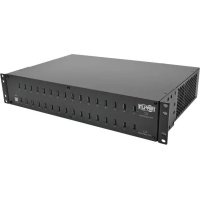
U280032RMINT - USB Hub Tripp Lite - Free user manual and instructions
Find the device manual for free U280032RMINT Tripp Lite in PDF.


| Product Type | USB 2.0 Hub with Charger, Rack-Mountable 2U |
| Brand | Tripp Lite |
| Model | U280-032-RMINT |
| Number of USB Ports | 32 USB 2.0 Type A Ports (Front) |
| Sync Port | 1 x USB 2.0 Type B (Rear) |
| Firmware Upgrade Port | 2 x USB 2.0 Mini-B 5-Pin |
| Charging Current per Port | Up to 2.4 A (max) |
| Max Transfer Speed | 480 Mbps (USB 2.0) |
| Input Power | 230 V, 5/2.5 A, 50/60 Hz |
| Output Power | 5.0 V, 2.4 A max per USB Port |
| Dimensions (H x W x D) | 8.6 x 44.5 x 30.5 cm |
| Rack Height Units | 2U |
| Housing Material | Metal |
| Operating Temperature | 0° to 40°C |
| Operating Humidity | 5 to 95% RH, non-condensing |
| Weight (estimated) | Approximately 4.5 kg (manufacturer data not provided, estimated) |
| Compatibility | iPad, iPhone, iPod, Android, and other USB devices |
| Main Functions | Simultaneous charging and syncing of up to 32 devices |
| Warranty | 2-year limited |
| Standards | IEC 60950, RoHS |
| Package Contents | Hub, USB A/B cable, power cords (BS 1363 and Schuko), mounting hardware, 4 rubber feet, manual |
| Maintenance and Cleaning | Unplug before cleaning; use a dry cloth |
| Safety | Do not use in the presence of flammable anesthetic mixtures |
| Repairability | Spare parts: contact Tripp Lite. No user-serviceable parts. |
Frequently Asked Questions - U280032RMINT Tripp Lite
User questions about U280032RMINT Tripp Lite
0 question about this device. Answer the ones you know or ask your own.
Ask a new question about this device
Download the instructions for your USB Hub in PDF format for free! Find your manual U280032RMINT - Tripp Lite and take your electronic device back in hand. On this page are published all the documents necessary for the use of your device. U280032RMINT by Tripp Lite.
USER MANUAL U280032RMINT Tripp Lite
2U Rack Mountable 16/32 Port USB Charger/Hub
Models: U280-016-RMINT, U280-032-RMINT (Series Number: AG-01EE)
Safety Instructions 2
Package Contents 2
Product Description 2
Features 3
Mounting and Installation 4
Powering the Hub 4
Operation 5
Connecting Devices 5
Connecting a Computer 5
Specifications 5
Warranty 6
Español 7
Français 13
Русский 19

text_image
TRIPP·LITE
Manufacturing Excellence.
1111 W. 35th Street, Chicago, IL 60609 USA • www.tripplite.com/support
Copyright © 2016 Tripp Lite. All rights reserved. All trademarks are the property of their respective owners.
Safety Instructions
• Always read the safety instructions carefully.
- Keep this Owner's Manual for future reference.
- To remove the USB charger/hub from the supply mains, the appliance inlet serves as a disconnect device.
- If any of the following situations arise, schedule an appointment to have your equipment inspected by a service technician:
• The equipment has been exposed to moisture
• The equipment has been dropped and damaged
• The equipment shows obvious signs of breakage
- The equipment is not functioning properly or is not functioning according to the Owner's Manual instructions
- Use of this equipment in life support applications where failure of this equipment can reasonably be expected to cause the failure of the life support equipment or to significantly affect its safety or effectiveness is not recommended. Do not use this equipment in the presence of a flammable anesthetic mixture with air, oxygen or nitrous oxide.
Package Contents
• U280-016-RMINT 16-Port or U280-032-RMINT 32-Port 2U USB Hub
- USB 2.0 A/B Cable
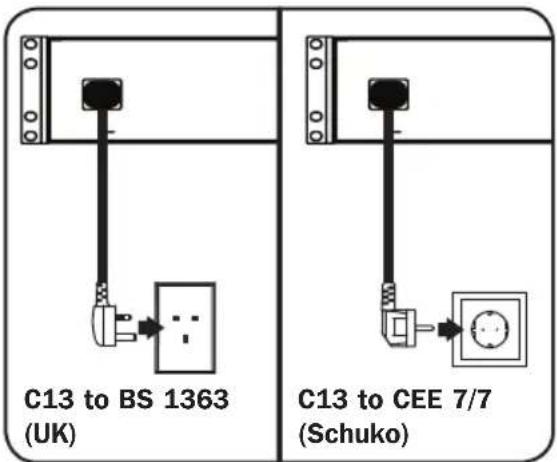
• C13 to BS 1363 (UK) Power Cord
C13 to CEE 7/7 (Schuko) Power Cord
- Mounting Hardware
- 4 Rubber Feet
- Owner's Manual
Product Description
Your 2U, rack-mountable USB charger with integrated hub supports charging and syncing of up to 16 devices (U280-016-RMINT) or 32 devices (U280-032-RMINT). With a maximum charger output of 2.4 amps per USB port, the U280-016-RMINT/U280-032-RMINT is ideal for charging tablets and other battery-intensive personal electronic devices. It supports USB 2.0 transfer speeds up to 480 Mbps and is backward compatible with earlier USB standards. A Mini-USB port conveniently located on the front of the unit supports future firmware upgrades.
Features
- Professional-grade USB charger/hub charges and syncs up to 16 USB devices (U280-016-RMINT) or 32 USB devices (U280-032-RMINT), including the iPad®, iPod®, iPhone®, and as well as Android™ tablets and smartphones.
- Provides each USB port with an optimum charge level for a particular device (up to 2.4 amps).
- Allows syncing to be performed with any device designed for USB data communications, per compatible file management software.
- Syncs Apple® devices via iTunes® software or Apple Configurator.
- Mini-USB Firmware Upgrade Port enables future software upgrades to support newer devices.
- 2U, rack-mountable housing can be configured for professional, educational or personal installations.
- IEC C14 inlet makes power connections easy, regardless of region or voltage requirement.
U280-016-RMINT
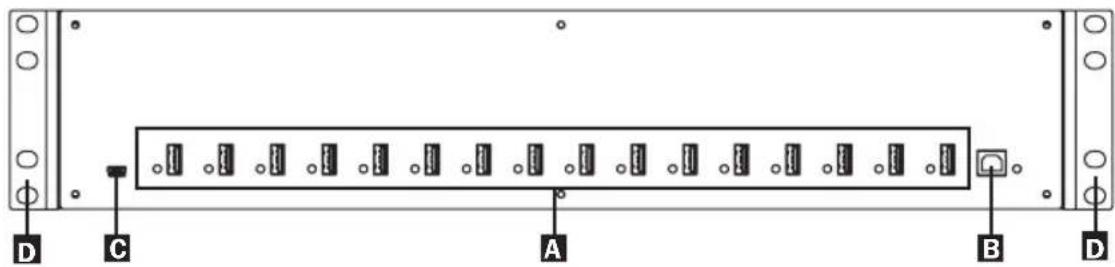
text_image
D C A B DU280-032-RMINT
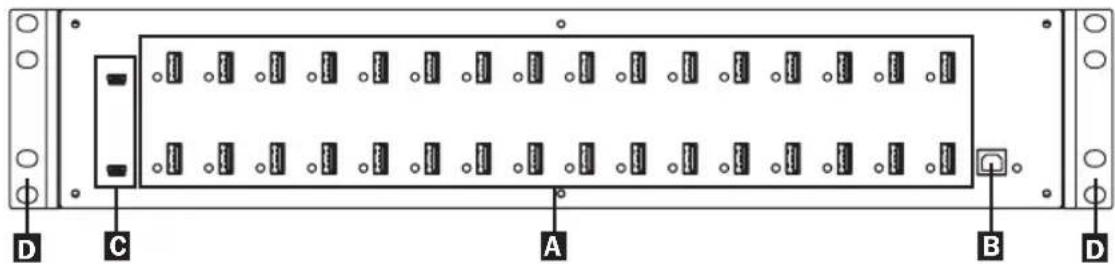
text_image
D C A B DA 2.4A USB Device Ports with LED Indicator Lights
B Computer Sync Port
C Firmware Upgrade Port(s)
D Mounting Ears (Optional, Ship Detached)
Mounting and Installation
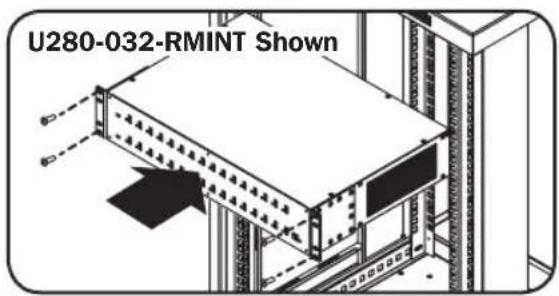
The U280-016-RMINT/U280-032-RMINT can be mounted with any 2- or 4-post rack with an available 2U space or placed on any flat surface. Mounting hardware and four rubber feet are included for easy mounting or placement.
Rack Installation
Secure the mounting ears to the unit using the included hardware. Then attach the USB charger/hub to the rack by inserting four user-supplied screws through the mounting brackets and into the mounting holes of the rack rail.
text_image
U280-032-RMINT ShownStandalone Installation
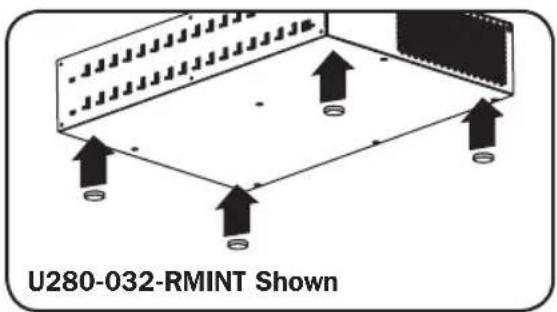
The USB charger/hub can be placed on any level surface that can safely support its weight plus the weight of the attached cables. When installing on a desktop or other flat surface, remove the backing material from the rubber feet and affix them to the bottom panel at the corners.
text_image
U280-032-RMINT ShownPowering the Hub
Insert the included power cord into the C14 inlet on the rear of the unit, then plug into a power outlet.
text_image
C13 to BS 1363 (UK) C13 to CEE 7/7 (Schuko)Operation
Connecting Devices
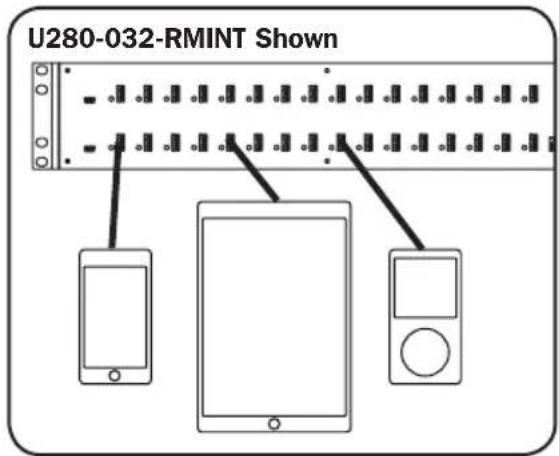
Using a user-supplied or device manufacturer's shielded USB cable, insert the USB A connector into any of the USB charger/hub's ports. Additional premium-quality USB cables in various lengths and connector types are available at www.tripplite.com.
Note: Both charge-only and charge/sync USB are supported.
Note: A computer connection is not required when only using the charging function.
text_image
U280-032-RMINT ShownConnecting a Computer
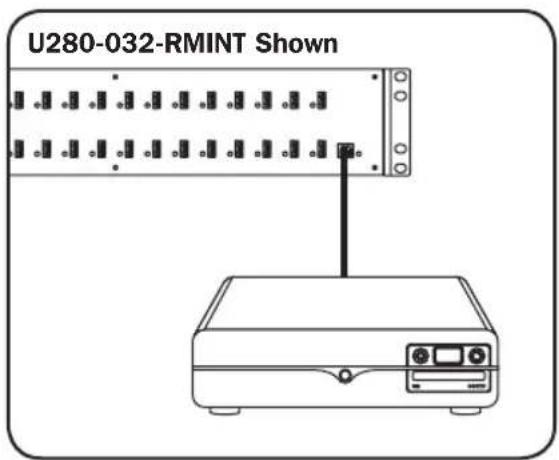
In addition to device charging, the USB charger/hub is equipped with a hub function that syncs devices and their respective software applications via a connected computer. To enable the hub function, use the included USB cable to connect the USB B connector into USB charger/hub's Computer Sync Port and the USB A connector into a computer's USB port.
Note: When a computer connection is established and multiple devices are connected to the USB charger/hub, the charge rate will reduce during syncing and resume to the normal charge rate upon completion.
text_image
U280-032-RMINT ShownNote: The Firmware Upgrade Port requires a mini-USB connection (cable not included). To download the most recent firmware updates, go to www.triplite.com/support.
Specifications
| U280-016-RMINT U280-032-RMINT | ||
| Ports 16 x USB 2.0 Type A | 1 x USB 2.0 Type B1 x USB 2.0 5-Pin Mini-B | 32 x USB 2.0 Type A1 x USB 2.0 Type B2 x USB 2.0 5-Pin Mini-B |
| Transmission Speed Up to 480 Mbps | ||
| Power Requirement Input: 230V 5A/2.5A, 50/60 HzOutput: 5.0V, 2.4A Max (per USB port) | ||
| Operating Temperature 0° to 40°C | ||
| Operating Humidity 5 to 95% RH, Non-Condensing | ||
| Dimensions (HxWxD) 8.7 (2U) x 44 x 30.5 cm | ||
| Enclosure Material Metal | ||
| Standards Tested to IEC | 60950 and RoHS | |
Specification is subject to change without further notice.
Warranty
2-YEAR LIMITED WARRANTY
Seller warrants this product, if used in accordance with all applicable instructions, to be free from original defects in material and workmanship for a period of 2 years from the date of initial purchase. If the product should prove defective in material or workmanship within that period, Seller will repair or replace the product, in its sole discretion. Service under this Warranty can only be obtained by your delivering or shipping the product (with all shipping or delivery charges prepaid) to: Tripp Lite, 1111 W. 35th Street, Chicago, IL 60609 USA. Seller will pay return shipping charges. Visit www.tripplite.com/support before sending any equipment back for repair.
THIS WARRANTY DOES NOT APPLY TO NORMAL WEAR OR TO DAMAGE RESULTING FROM ACCIDENT, MISUSE, ABUSE OR NEGLECT. SELLER MAKES NO EXPRESS WARRANTIES OTHER THAN THE WARRANTY EXPRESSLY SET FORTH HEREIN. EXCEPT TO THE EXTENT PROHIBITED BY APPLICABLE LAW, ALL IMPLIED WARRANTIES, INCLUDING ALL WARRANTIES OF MERCHANTABILITY OR FITNESS, ARE LIMITED IN DURATION TO THE WARRANTY PERIOD SET FORTH ABOVE; AND THIS WARRANTY EXPRESSLY EXCLUDES ALL INCIDENTAL AND CONSEQUENTIAL DAMAGES. (Some states do not allow limitations on how long an implied warranty lasts, and some states do not allow the exclusion or limitation of incidental or consequential damages, so the above limitations or exclusions may not apply to you. This Warranty gives you specific legal rights, and you may have other rights which vary from jurisdiction to jurisdiction).
WARNING: The individual user should take care to determine prior to use whether this device is suitable, adequate or safe for the use intended. Since individual applications are subject to great variation, the manufacturer makes no representation or warranty as to the suitability or fitness of these devices for any specific application.
Regulatory Compliance Identification Numbers
For the purpose of regulatory compliance certifications and identification, your Tripp Lite product has been assigned a unique series number. The series number can be found on the product nameplate label, along with all required approval markings and information. When requesting compliance information for this product, always refer to the series number. The series number should not be confused with the marketing name or model number of the product.
WEEE Compliance Information for Tripp Lite Customers and Recyclers (European Union)
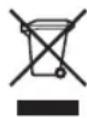
Under the Waste Electrical and Electronic Equipment (WEEE) Directive and implementing regulations, when customers buy new electrical and electronic equipment from Tripp Lite they are entitled to:
- Send old equipment for recycling on a one-for-one, like-for-like basis (this varies depending on the country)
- Send the new equipment back for recycling when this ultimately becomes waste
Tripp Lite has a policy of continuous improvement. Product specifications are subject to change without notice.

text_image
TRIPP·LITE
1111 W. 35th Street, Chicago, IL 60609 USA • www.tripplite.com/support
1111 W. 35th Street, Chicago, IL 60609 USA • www.tripplite.com/support
1111 W. 35th Street, Chicago, IL 60609 USA • www.tripplite.com/support

Manufacturing Excellence.
1111 W. 35th Street, Chicago, IL 60609 USA • www.tripplite.com/support
1111 W. 35th Street, Chicago, IL 60609 USA • www.tripplite.com/support
1111 W. 35th Street, Chicago, IL 60609 USA • www.tripplite.com/support

Manufacturing Excellence.
1111 W. 35th Street, Chicago, IL 60609 USA • www.tripplite.com/support
16-02-306 93-35A1_RevA