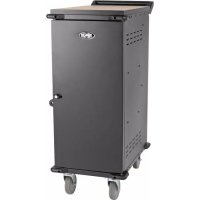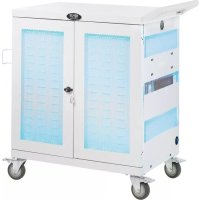
CSC32USBWHG - Phone charger Tripp Lite - Free user manual and instructions
Find the device manual for free CSC32USBWHG Tripp Lite in PDF.


| Product Type | UV Charging and Disinfection Station for Mobile Devices (up to 32 devices) |
| Brand | Tripp Lite |
| Model | CSC32USBWHG |
| Dimensions (H x W x D) | 917 x 884 x 513 mm (36.1 x 34.8 x 20.2 in) |
| Weight | 59 kg (130.7 lb) |
| Load Capacity | 90 kg (200 lb) stationary or on casters |
| Power | Input: 100-240 V, 2.5 A, 50/60 Hz; Output: 5 V, 2.4 A max per USB port |
| Number of USB Ports | 32 USB 2.0 A (female), 1 USB 2.0 B (female), 2 USB 2.0 Mini (female) |
| Transmission Speed | Up to 480 Mbps |
| UV Disinfection | Integrated UV lamps with 10-minute cycle; automatic shutoff if door opened |
| Antimicrobial Coating | EPA-registered silver ion antimicrobial coating, 99.9% effective (JIS Z 2801:2000 standard) |
| Mobility | 4 swivel/locking casters, reversible handle included |
| Safety | Two-part lockable doors, LED indicators, UV shutoff if door opened, handle for moving |
| Housing Material | Metal |
| Operating Temperature | 0 to 40 °C (32 to 104 °F) |
| Operating Humidity | 5 to 95% RH, non-condensing |
| Maintenance | Clean UV lamps every 6 months; clean cabinet with a damp, lint-free cloth, no solvents |
| Spare Parts | Tripp Lite approved replacement UVC lamps; optional USB cables (see manual) |
| Warranty | 2-year limited warranty |
| Repairability | UV lamp replacement by qualified personnel only |
| General Information | Approved for hospitals; WEEE compliant; indoor use only |
Frequently Asked Questions - CSC32USBWHG Tripp Lite
User questions about CSC32USBWHG Tripp Lite
0 question about this device. Answer the ones you know or ask your own.
Ask a new question about this device
Download the instructions for your Phone charger in PDF format for free! Find your manual CSC32USBWHG - Tripp Lite and take your electronic device back in hand. On this page are published all the documents necessary for the use of your device. CSC32USBWHG by Tripp Lite.
USER MANUAL CSC32USBWHG Tripp Lite
Hospital-Grade USB Charging Station Cart with Anti-Microbial Coating and UV Light
Model: CSC32USBWHG
Table of Contents
- Important Safety Instructions 2
- Overview 3
- Feature Identification 3
- Setup 4
4.1 Installing the Handle Bracket 4 and Power Cord Manager
4.2 Adjusting Storage Shelf Dividers 4
4.3 Powering the USB Charger/Hub Unit 4
4.4 Door Locks 4
- 32-Port USB Charger/Hub 5
5.1 USB Charger/Hub Features 5
5.2 Connecting Devices to the USB Charger/Hub 5
5.3 Connecting a Computer to the USB Charger/Hub 6
- Ultraviolet Light Operation 6
- Specifications 7
- Storage, Service and Cleaning 7
- Warranty and Product Registration 8
Español 9
Français 17
WARRANTY REGISTRATION
Register your product today and be automatically entered to win an ISOBAR ^® surge protector in our monthly drawing!
tripplite.com/warranty


Manufacturing Excellence.
SAVE THESE INSTRUCTIONS
This manual contains instructions and warnings that must be followed during the installation and operation of the product described in this manual.
Failure to comply may invalidate the warranty and cause property damage or personal injury.

WARNING!
- The charging station is intended to sanitize mobile devices and non-critical medical devices. The subsequent use of the devices disinfected by the charging station is the sole responsibility of the user.
• Non-protected eyes or skin should never be exposed directly to the ultraviolet light. - Ultraviolet (UVC) bulbs contain mercury and must be properly recycled or disposed of as hazardous waste in accordance with local, state and federal regulations.
- Only Tripp Lite-approved replacement UVC bulbs should be used in the device.
- Only qualified personnel should perform UVC bulb replacement. Take precautions with broken UVC bulbs to avoid inhalation, ingestion or contact with eyes or skin. Refer to your local codes for disposal requirements.
- Do not bypass any of the safety precautions built into the device. Failure to comply may result in exposing skin to the UV light. Prolonged skin exposure may generate redness and a sunburn-like condition.
- The charging station should not be operated by children.
- Do not remove any warnings, cautions or descriptive labeling from the charging station.
USB Charger/Hub Unit:
- To remove the USB Charger/Hub from the supply mains, the power cord serves as a disconnect device.
- If any of the following situations arise, schedule an appointment with a service technician to have your equipment inspected:
- The equipment has been exposed to moisture
• The equipment has been dropped and damaged
• The equipment shows obvious signs of breakage
- The equipment is not functioning properly or is not functioning according to the instructions described in this Owner's Manual
- Use of this equipment in life support applications where failure of this equipment can reasonably be expected to cause the failure of the life support equipment or to significantly affect its safety or effectiveness is not recommended.
Charging Station Cabinet:
- Keep the charging station in a controlled indoor environment away from moisture, temperature extremes, flammable liquids and gasses, conductive contaminants, dust and direct sunlight.
- Leave adequate space around the charging station for proper ventilation. Do not block, cover or insert objects into the charging station's external ventilation openings.
- The charging station is extremely heavy. Use caution when handling the charging station. Do not attempt to unpack it unassisted. Use a mechanical device such as a forklift or pallet jack to move the charging station in the shipping container.
- Do not place containers of liquid or stack items on the cabinet.
- Inspect the shipping container and the charging station for shipping damage. Do not use the charging station if it is damaged.
- Use caution when cutting packing materials. The charging station could be scratched, causing damage not covered by the warranty.
- Save all packing materials for later use. Repacking and shipping the charging station cabinet or equipment without the original packing materials may cause product damage that will void the warranty.
For Mobile Applications:
- The charging station comes with four pre-installed locking/swivel casters.
- Always use the included handle when moving the charging station (see section 4.1: Installing the Handle Bracket and Power Cord Manager for more information).
- When moving the charging station cabinet, always push it from behind; never pull it toward you.
- A rolling charging station can cause personal injury and property damage if not properly supervised. If rolling the charging station down a ramp is required, use extreme caution. Do not attempt to use ramps that have a slope grade greater than 12% .
2. Overview
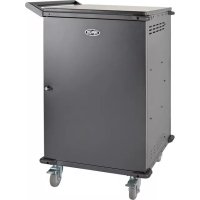
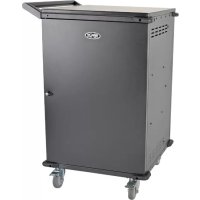
The hospital-grade charging station is an all-in-one solution for sanitizing, storing and charging for up to 32 devices.
The unit's built-in ultraviolet lights help disinfect electronic devices at the touch of a button. The UV lights destroy most microbes on the devices without the use of damaging heat, liquids or chemicals.
The surface of the charging station is protected by a patented antimicrobial coating with EPA-registered and FDA-compliant silver ionic technology. The antimicrobial protection is 99.9% effective in inhibiting bacteria and viruses, such as C. diff and MRSA. The coating meets the requirements of JIS Z 2801:2000, an international standard for evaluating efficacy in antimicrobial products.
With four pre-installed locking/swivel casters and an attachable, reversible handle accessory, the charging station is ideal for mobile applications. To prevent theft and device tampering, your charging station enclosure comes equipped with locking steel doors.
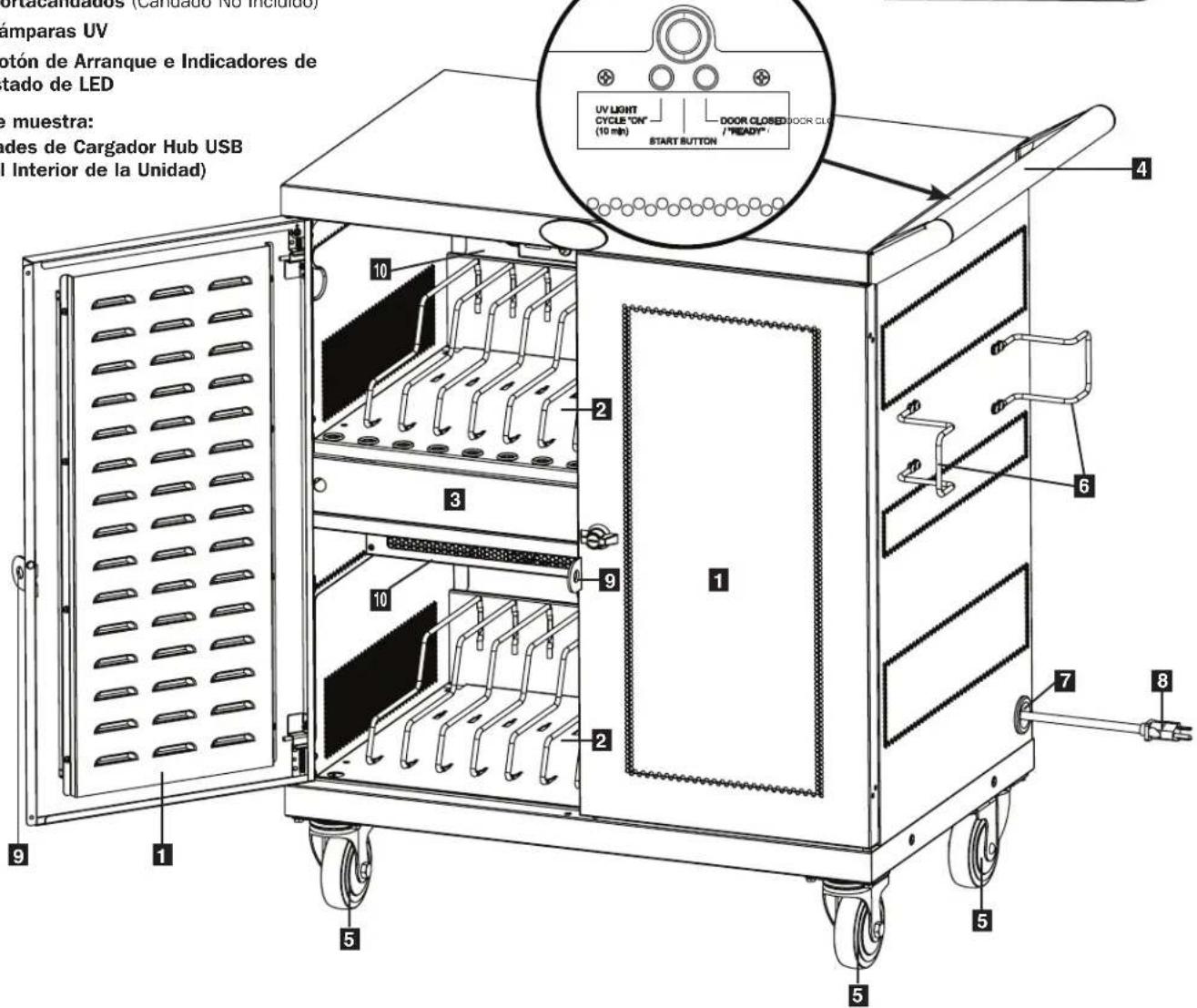
3. Feature Identification
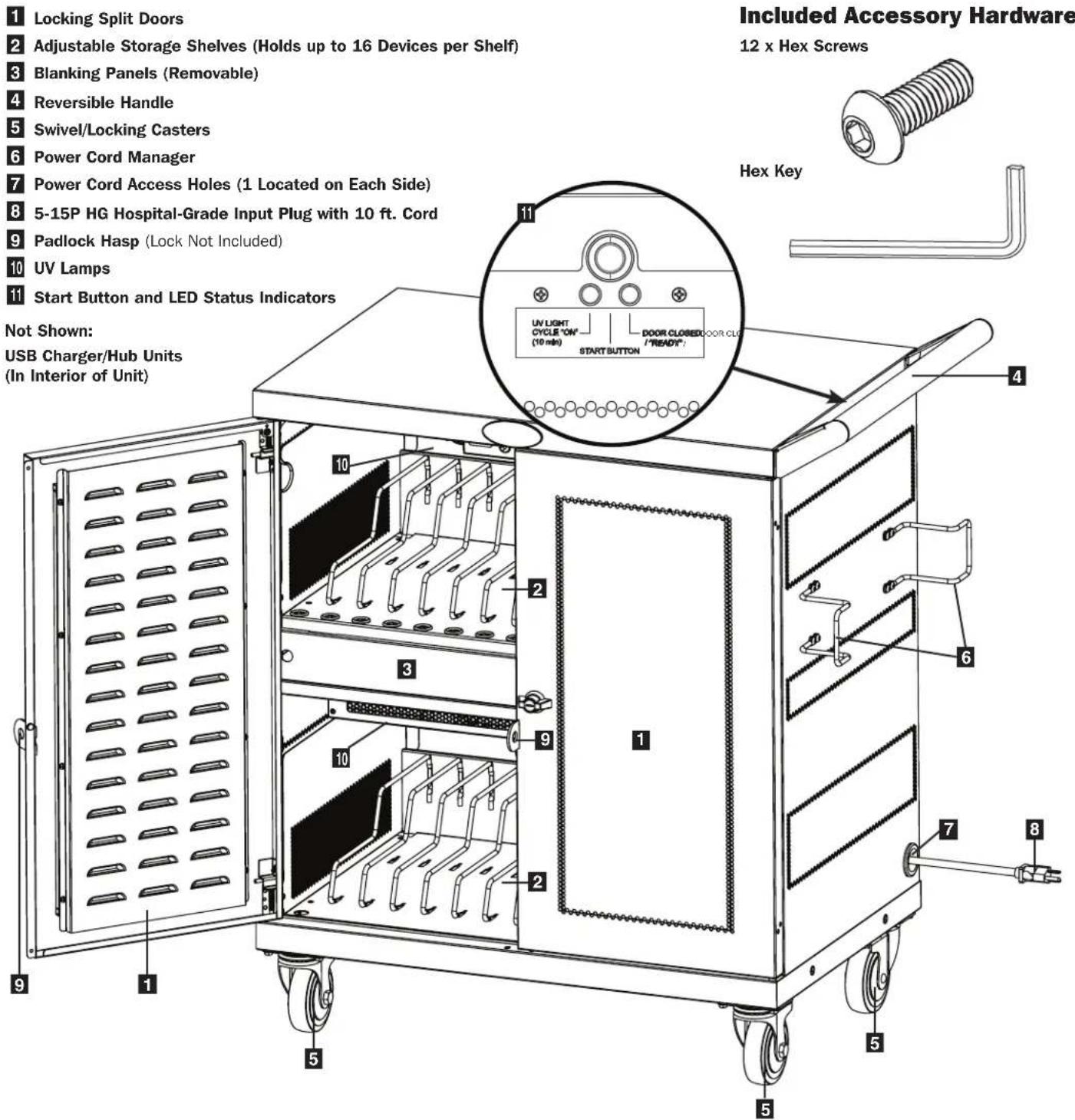
4. Setup

Caution! Read All Instructions and Warnings Before Installation!

Warning: Charging stations can be extremely heavy. Do not attempt to unpack the charging station without assistance. Follow the unpacking instructions document that shipped with this product before proceeding with setup. Use extreme caution when handling the charging station and be sure to follow all handling and installation instructions. Do not attempt to install equipment without first stabilizing the charging station.
4.1 Installing the Handle Bracket and Power Cord Manager
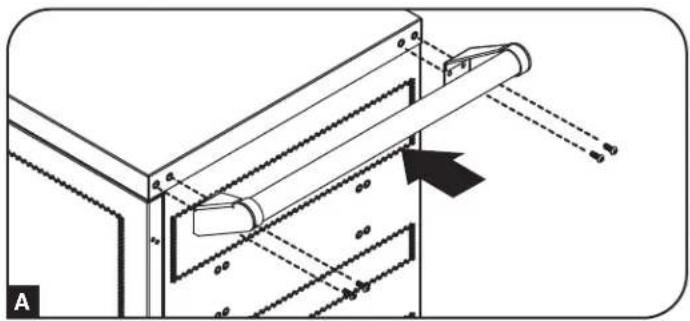
To install the handle bracket, use the included hex key tool to attach four (4) hex screws to the charging station cabinet A. To install the cord manager, use the same hex key tool to secure the eight (8) hex screws that attach the cord manager brackets (four per bracket) to the charging station cabinet B.
natural_image
Technical diagram of a mechanical assembly with diagonal braces and a roller, showing alignment lines and components (no text or symbols)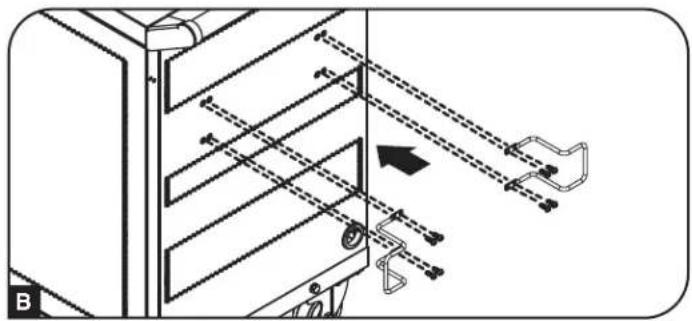
natural_image
Technical diagram of a mechanical device with labeled components and motion arrows (no readable text or symbols)4.2 Adjusting Storage Shelf Dividers
Your charging station comes with two storage shelves with adjustable dividers that can each accommodate up to 16 personal electronic devices.
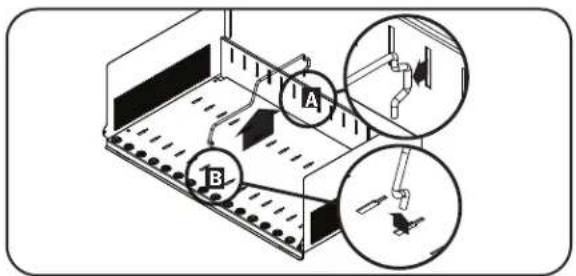
Remove any personal electronic devices stored on the shelf tray. Then remove the blanking panel. To remove the shelf tray from the cabinet, push the shelf tray forward to disengage from the mounting hook, then pull the tray up and out. Once the shelf is removed, remove or rearrange a spring-wire divider by first pulling it gently forward to disengage it from the rear end A, then pull it up from the front of the tray B. Repeat as necessary for additional shelf dividers.
4.3 Powering the USB Charger/Hub Unit
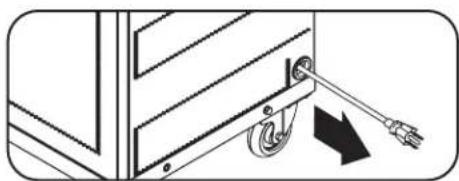
With the bottom blanking panel removed, find the USB Charger/Hub unit's input plug and cable located in the charging station's bottom compartment, then push the input plug through one of the cable access hole grommets located on either side of the charging station cabinet (using the cable access hole on the same side as the power cord manager is recommended). Plug the power cord into the nearest 3-prong, grounded wall outlet and reattach the blanking panel to the unit.
natural_image
Diagram of a mechanical device with a spring and cable, showing motion direction (no text or symbols)4.4 Door Locks
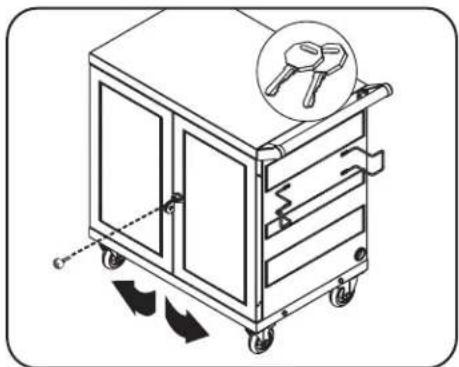
The split doors contain a lock that is accessible with the included keys.
natural_image
Illustration of a mechanical cart with arrows indicating motion, no text or symbols present5. 32-Port USB Charger/Hub
5.1 USB Charger/Hub Features
- Professional-grade USB charger/hub charges and syncs up to 32 USB devices, including iPad ^ , iPod ^ , iPhone ^ , and Android ^TM tablets and smartphones.
- Provides each USB port with an optimum charge level for a particular device (up to 2.4 amps).
- Allows syncing to be performed with any device designed for USB data communications, per compatible file management software.
- Syncs Apple ^ devices via iTunes ^ software or Apple Configurator.
- Mini-USB Firmware Upgrade Port enables future software upgrades to support newer devices.
• 1U housing can be configured for professional, educational or personal installations. - IEC C14 inlet makes power connections easy, using the dedicated region power supply cords (included).
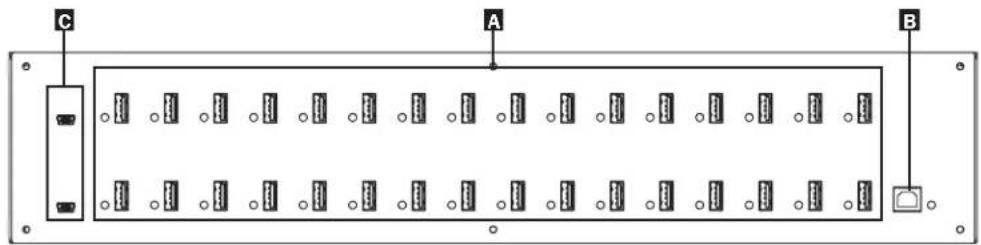
A 2.4A USB Device Ports with LED Indicator Lights (32 total)
B Computer Sync Port
C Firmware Upgrade Ports
5.2 Connecting Devices to the USB Charger/Hub
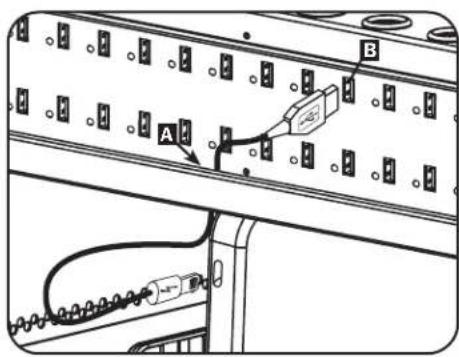
Each storage shelf features 16 strain relief bushings that prevent the USB cable's device connectors from slipping through the bushing A. Using a user-supplied or device manufacturer's shielded USB cable, connect the USB cable to the device to be charged. Then pass the cable end through the strain relief bushing on the storage shelf and connect the USB connector to a USB charging port B. Repeat for all devices.
Tripp Lite offers individual and 10-pack cables for Apple ^® devices using USB to 30-Pin or USB to Lightning ^™ cables, as well as individual and 10-pack cables for USB 3.0 or 2.0 devices using USB A (male) to 5-Pin Micro B (male) cables.
| Cable Type | Individual Cable Model Number | 10-Pack Cable Model Number |
| Apple USB to 30-Pin Connector, 10 in. M110-10N-BK M110-10N-BK-10 | ||
| Apple USB to 30-Pin Connector, 3 ft. M110-003-WH — | ||
| Apple USB to 8-Pin Lightning Connector, 10 in. M100-10N-BKM100-10N-BK-10 | ||
| Apple USB to 8-Pin Lightning Connector, 3 ft. M100-003-BKM100-003-WH | — | |
| Apple USB to 8-Pin Lightning Connector, 6 ft. M100-006-BKM100-006-WH | — | |
| Apple USB to 8-Pin Lightning Connector, 10 ft. M100-010-BKM100-010-WH | — | |
| USB 3.0 SuperSpeed A (Male) to 5-Pin Micro-B (Male), 1 ft. U326-001-BK U326-001-BK-10 | ||
| USB 3.0 SuperSpeed A (Male) to 5-Pin Micro-B (Male), 3 ft. U326-003U326-003-BK | — | |
| USB 3.0 SuperSpeed A (Male) to 5-Pin Micro-B (Male), 10 ft. U326-010 — | ||
| USB 2.0 Reversible A (Male) to 5-Pin Micro-B (Male), 1 ft. UR050-001* UR050-001-10* | ||
| USB 2.0 Reversible A (Male) to 5-Pin Micro-B (Male), 3 ft. UR050-003*UR050-003-WH* | — | |
| USB 2.0 Reversible A (Male) to 5-Pin Micro-B (Male), 6 ft. UR050-006*UR050-006-SLIM* | — | |
| USB 2.0 Reversible A (Male) to 5-Pin Micro-B (Male), 10 ft. UR050-010* | — | |
* Features a reversible USB-A (male) connector for simplified installations.
Visit tripplite.com for more information on our selection of premium USB cables.
5. 32-Port USB Charger/Hub
5.3 Connecting a Computer to the USB Charger/Hub
In addition to device charging, the USB Charger/Hub is equipped with a hub function that syncs devices and their respective software applications via a connected computer. To enable the hub function, use the included USB cable to connect the USB-B connector to the unit's Computer Sync Port and the USB-A connector to a computer's USB port.
Note: When a computer connection is established and multiple devices are connected to the USB Charger/Hub, the charge rate will reduce during syncing and resume to the normal charge rate upon completion.
Note: The Firmware Upgrade Port requires a mini-USB connection (cable not included).
6. UV Light Operation
Overview
This product is designed to help disinfect the surfaces of hand-held devices, such as tablets and other shareable systems. Bacteria and viruses transmitted via the hands of multiple individuals sharing the stored devices will be reduced. The result is an improved level of shared-system hygiene. The ultraviolet lamps within this unit emit UV light at a frequency proven effective in arresting microorganisms such as viruses, bacteria, yeast and molds. This process either destroys the microorganism or neutralizes its ability to reproduce. The unit features a 10-minute sanitizing cycle.
Usage
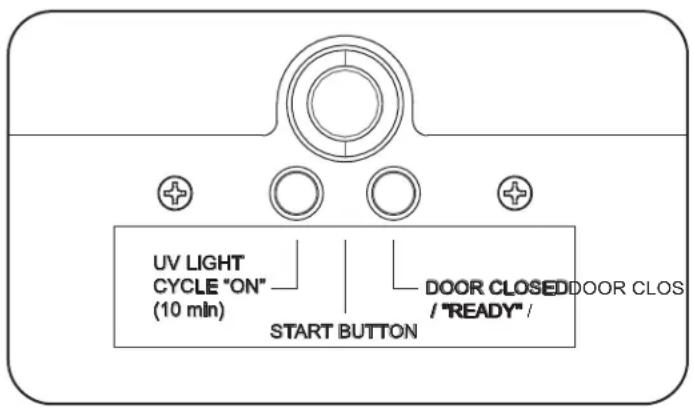
Once the user opens and closes the doors on the unit, the internal timer resets. The timer cycles for 10 minutes when the "START" button is pressed.
- Open the door of the CSC32USBWHG Charging Station.
- Insert devices and ensure the unit is plugged in.
- Close the door. The "DOOR CLOSED / READY" LED will illuminate. Press the "START" button and the UV lights will turn on automatically.
- If the door is opened before the timer finishes its 10-minute cycle, the lights will turn off and the timer will be reset for the next sanitizing cycle.
Note: Both charging station doors must be closed before the start button is pressed. The UV lights will not turn on if either door is open. This helps ensure non-protected eyes or skin are never exposed directly to UV light.
Maintenance and Troubleshooting
- Check that the lamp connector is securely attached to lamp.
- Check that the fuse is in good working order. Replace if necessary.
- Check that proper power is being supplied to the device and that the switch lights when turned on.
- Lamps should be cleaned every six months to remove any dust accumulation on the bulbs that might reduce the effectiveness of the UVC light.
- Check if switch is working properly by opening and closing the cabinet doors and see the light turning off/on. The timer should operate for 10 minutes before shutting off.
Warnings and Safety
- A broken UV lamp is extremely unlikely to have any negative impact on your health. If a lamp breaks, ventilate the room for 30 minutes and remove the parts while wearing gloves. Put the parts in a sealed plastic bag and take it to your local waste facility for recycling. Do not use a vacuum cleaner.
- CAUTION! The lamps are a Risk Group 3 Ultra Violet product. These lamps emit high-power UV radiation that can cause severe injury to the skin and eyes. Avoid skin and eye exposure to unshielded product. Use only in an enclosed environment that shields users from radiation.
Dimensional Drawing
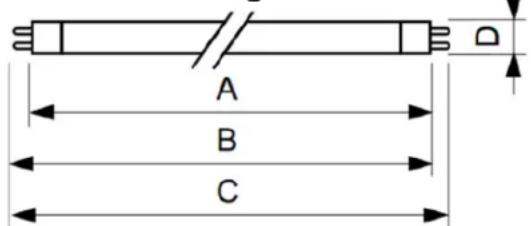
| Product A (max.) | B (max.) | B (min.) | C (max.) | D (max.) | ||
| TUV 8WFAM/10X25BOX | 288.3 mm | 295.4 mm | 293 mm | 302.5 mm | 16 mm |
7. Specifications
| Model CSC32USBWHG | |
| Dimensions (H x W x D) 36.1 x 34.8 x 20.2 in. / 917 x 884 x | 513 mm |
| Unit Weight 130.7 lb. / 59 kg | |
| Load Capacity 200 lb. / 90 kg Stationary or Rolling | |
| Charger/Hub Ports 32 x USB 2.0 A (Female) | 1 x USB 2.0 B (Female)2 x USB 2.0 Mini (Female) |
| Transmission Speed Up to 480 Mbps | |
| Power Requirement Input: 100-240V, 2.5A, 50/60 Hz | Output: 5.0V, 2.4A Max (per USB port) |
| Operating Temperature 32^ to 104^ F / 0^ to 40^ C | |
| Operating Humidity 5 to 95% RH, Non-Condensing | |
| Number of Charger/Hub Units 2 | |
| Charger/Hub Dimensions per Unit (H x W x D) 1.75 x 17.5 x 9.5 in. / 45 x 445 x 240 mm | |
| Enclosure Material Metal |
Specifications may be subject to change without further notice.
8. Storage, Service and Cleaning
Storage
The enclosure should be stored in a controlled indoor environment away from moisture, temperature extremes, flammable liquids and gasses, conductive contaminants, dust and direct sunlight. Store the enclosure in its original shipping container if possible.
Service
The enclosure is covered by the limited warranty described in this manual. For more information, visit tripplite.com/support.
Cleaning
Before cleaning, always power off the charging station by unplugging it from its AC source. Dampen a clean, lint-free cloth with water and wipe down the unit, as necessary. Allow the surface area to dry before plugging in the unit.
Note: Avoid using abrasive cloths, solvents or aerosol sprays to clean the charging station; doing so can damage the unit.
9. Warranty and Product Registration
2-Year Limited Warranty
Seller warrants this product, if used in accordance with all applicable instructions, to be free from original defects in material and workmanship for a period of 2 years from the date of initial purchase. If the product should prove defective in material or workmanship within that period, Seller will repair or replace the product, at its sole discretion.
THIS WARRANTY DOES NOT APPLY TO NORMAL WEAR OR TO DAMAGE RESULTING FROM ACCIDENT, MISUSE, ABUSE OR NEGLECT. SELLER MAKES NO EXPRESS WARRANTIES OTHER THAN THE WARRANTY EXPRESSLY SET FORTH HEREIN. EXCEPT TO THE EXTENT PROHIBITED BY APPLICABLE LAW, ALL IMPLIED WARRANTIES, INCLUDING ALL WARRANTIES OF MERCHANTABILITY OR FITNESS, ARE LIMITED IN DURATION TO THE WARRANTY PERIOD SET FORTH ABOVE; AND THIS WARRANTY EXPRESSLY EXCLUDES ALL INCIDENTAL AND CONSEQUENTIAL DAMAGES. (Some states do not allow limitations on how long an implied warranty lasts, and some states do not allow the exclusion or limitation of incidental or consequential damages, so the above limitations or exclusions may not apply to you. This warranty gives you specific legal rights, and you may have other rights which vary from jurisdiction to jurisdiction).
WARNING: The individual user should take care to determine prior to use whether this device is suitable, adequate or safe for the use intended. Since individual applications are subject to great variation, the manufacturer makes no representation or warranty as to the suitability or fitness of these devices for any specific application.
Product Registration
Visit tripplite.com/warranty today to register your new Tripp Lite product. You'll be automatically entered into a drawing for a chance to win a FREE Tripp Lite product!*
* No purchase necessary. Void where prohibited. Some restrictions apply. See website for details.
Regulatory Compliance Identification Numbers
For the purpose of regulatory compliance certifications and identification, your Tripp Lite product has been assigned a unique series number. The series number can be found on the product nameplate label, along with all required approval markings and information. When requesting compliance information for this product, always refer to the series number. The series number should not be confused with the marketing name or model number of the product.
FCC Notice, Class B
This device complies with part 15 of the FCC Rules. Operation is subject to the following two conditions: (1) This device may not cause harmful interference, and (2) this device must accept any interference received, including interference that may cause undesired operation.
Note: This equipment has been tested and found to comply with the limits for a Class B digital device, pursuant to part 15 of the FCC Rules. These limits are designed to provide reasonable protection against harmful interference in a residential installation. This equipment generates, uses and can radiate radio frequency energy and, if not installed and used in accordance with the instructions, may cause harmful interference to radio communications. However, there is no guarantee that interference will not occur in a particular installation. If this equipment does cause harmful interference to radio or television reception, which can be determined by turning the equipment off and on, the user is encouraged to try to correct the interference by one or more of the following measures:
- Reorient or relocate the receiving antenna.
- Increase the separation between the equipment and receiver.
- Connect the equipment into an outlet on a circuit different from that to which the receiver is connected.
- Consult the dealer or an experienced radio/TV technician for help.
Any changes or modifications to this equipment not expressly approved by Tripp Lite could void the user's authority to operate this equipment.
WEEE Compliance Information for Tripp Lite Customers and Recyclers (European Union)

Under the Waste Electrical and Electronic Equipment (WEEE) Directive and implementing regulations, when customers buy new electrical and electronic equipment from Tripp Lite they are entitled to:
- Send old equipment for recycling on a one-for-one, like-for-like basis (this varies depending on the country)
- Send the new equipment back for recycling when this ultimately becomes waste
Tripp Lite has a policy of continuous improvement. Specifications are subject to change without notice. Photos and illustrations may differ slightly from actual products.


1111 W. 35th Street, Chicago, IL 60609 USA • tripplite.com/support
1111 W. 35th Street, Chicago, IL 60609 EE UU • tripplite.com/support
natural_image
Technical diagram of a mechanical assembly with diagonal braces and a roller, showing alignment lines and components (no text or symbols)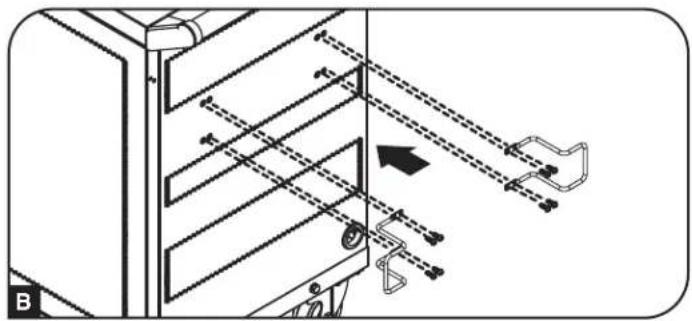
natural_image
Technical diagram of a mechanical device with labeled components and motion arrows (no readable text or symbols)natural_image
Diagram of a mechanical device with a spring and lever, showing motion direction (no text or symbols)natural_image
Illustration of a mechanical cart with arrows indicating motion, no text or symbols present1111 W. 35th Street, Chicago, IL 60609 USA • tripplite.com/support
natural_image
Simple line drawing of an L-shaped pipe or tube with no text or symbols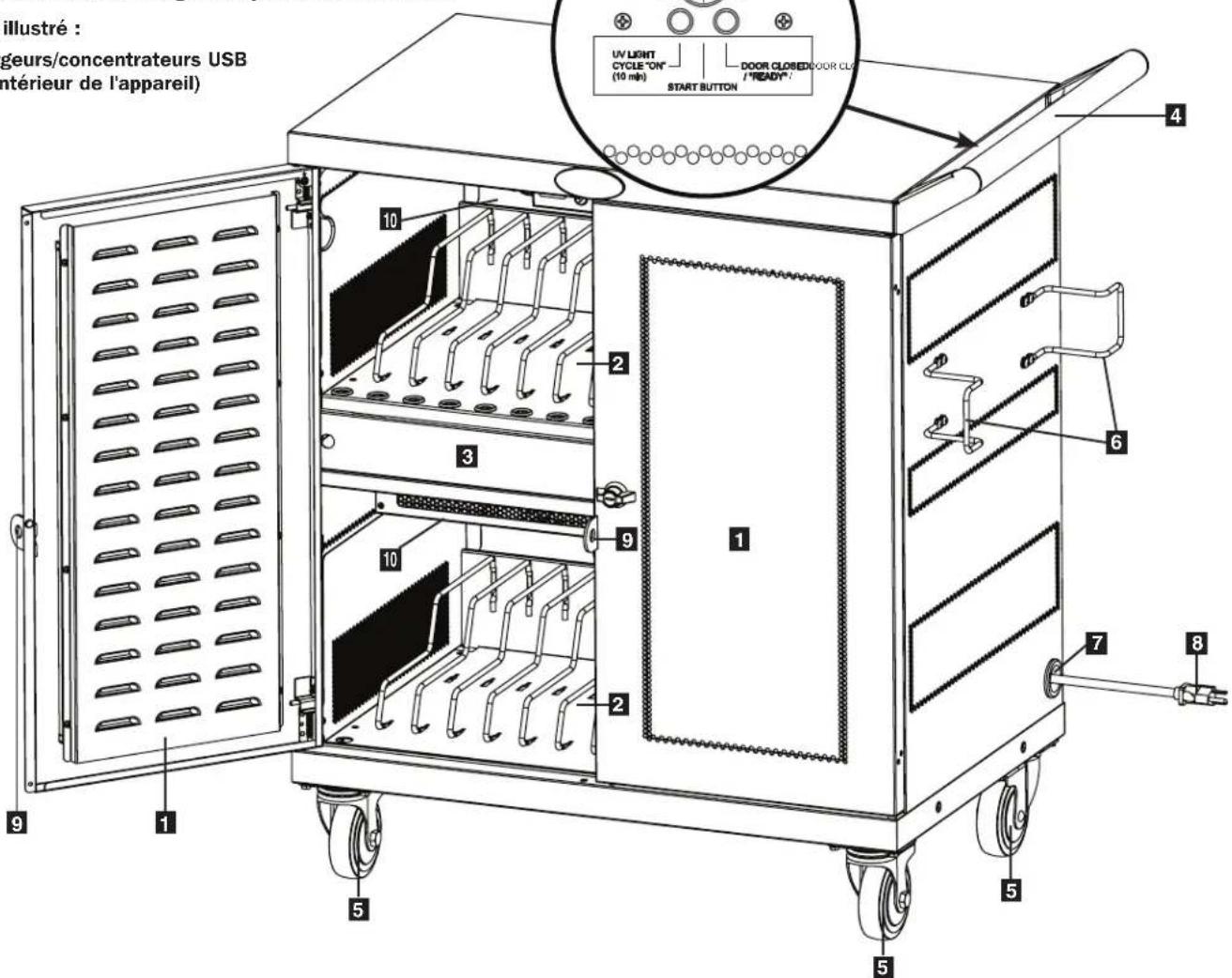
natural_image
Technical diagram of a mechanical assembly with labeled components and motion indicators (no readable text or symbols)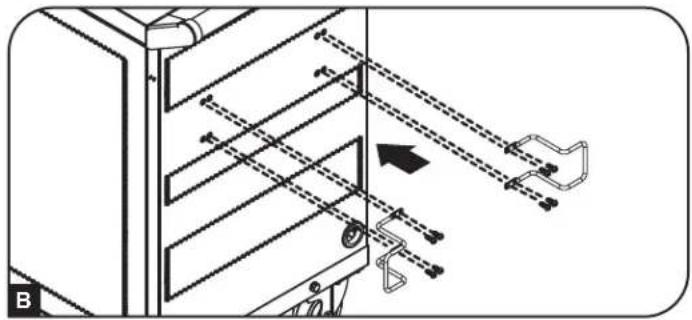
natural_image
Technical line drawing of a mechanical device with internal components and motion arrows (no text or symbols)natural_image
Diagram of a mechanical device with a spring and lever mechanism (no text or symbols)natural_image
Illustration of a mechanical cart with arrows indicating motion, no text or symbols present1111 W. 35th Street, Chicago, IL 60609 USA • tripplite.com/support