B1261A1WHD1 - Receiver Tripp Lite - Free user manual and instructions
Find the device manual for free B1261A1WHD1 Tripp Lite in PDF.


User questions about B1261A1WHD1 Tripp Lite
0 question about this device. Answer the ones you know or ask your own.
Ask a new question about this device
Download the instructions for your Receiver in PDF format for free! Find your manual B1261A1WHD1 - Tripp Lite and take your electronic device back in hand. On this page are published all the documents necessary for the use of your device. B1261A1WHD1 by Tripp Lite.
USER MANUAL B1261A1WHD1 Tripp Lite
Models: B126-1A1-WHD1 (165 ft./50 m), B126-1A1-WHD2 (650 ft./200 m)
Espanol 8 • Français 15 • Pycckn 22
PROTECT YOUR INVESTMENT!
Register your product for quicker service and ultimate peace of mind.
You could also win an ISOBAR6ULTRA surge protector—a $100 value!

www.triplite.com/warranty


Manufacturing Excellence.
1111 W. 35th Street, Chicago, IL 60609 USA • www.triplite.com/support
Copyright © 2018 Tripp Lite. All rights reserved.
Product Features
- Wirelessly extend a 1080p (60Hz) signal up to 165 ft./50 m (B126-1A1-WHD1) or 650 ft./200 m (B126-1A1-WHD2) from the source
- Connect a second receiver unit up to 85 ft./25 m (B126-1A-1-WHD1) or 320 ft./100 m (B126-1A1-WHD2) from the source
- IR control functionality lets you control your HDMI source device remotely
- All-in-one wireless solution; no cabling infrastructure needed
Transmits High Definition video and stereo audio - Protects your transmissions with AES 128 encryption
HDMI 1.3 and HDCP 1.2 compatible
Supports up to 24-bit Deep Color (8-bits per channel)
Supports 300 MHz/3.4 Gbps per channel bandwidth (10.2 Gbps total) - Plug-and-play; no software or drivers required
- External power supplies feature US, UK, EU and Australian plug adapters
Package Contents
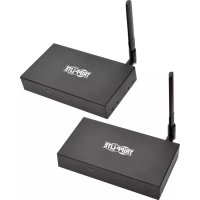
Transmitter and Receiver Units
- IR-IN (Rx) Cable
- IR-OUT (Tx) Cable
- (x2) External Power Supplies (Input: 100-240V, 50/60 Hz, 0.6A; Output: 5V 3A)
- Mounting Hardware
- Owner's Manual
Include NEMA 5-15P (North America), CEE 7/16 Schuko (Europe), BS 1363 (UK) and AS/NZS 3112 (Australia) plug adapters.
Optional Accessories
P568-Series High Speed HDMI Cables
System Requirements
- HDMI source device, such as a Blu-ray™ player
- HDMI display device, such as a television or projector
Indicators and Connections
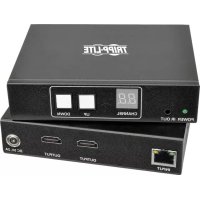
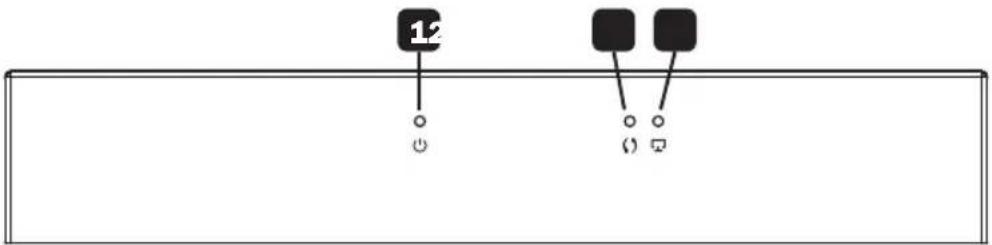
HDMI Receiver (Rx) and Transmitter (Tx) Front Panel
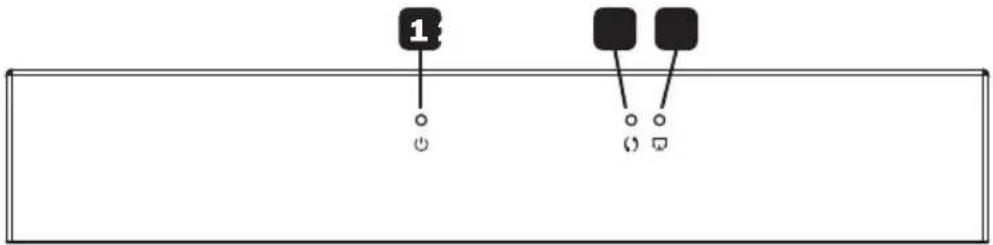
1 Power LED: This LED illuminates solid blue when the unit is receiving power.
2 Data Transmission LED: This LED illuminates orange and blinks slowly while a connection is being established. It blinks quickly when the unit is successfully connected and transmitting data.
3 Connection LED: This LED illuminates solid green when a wireless signal is connected.
HDMI Tx Back Panel
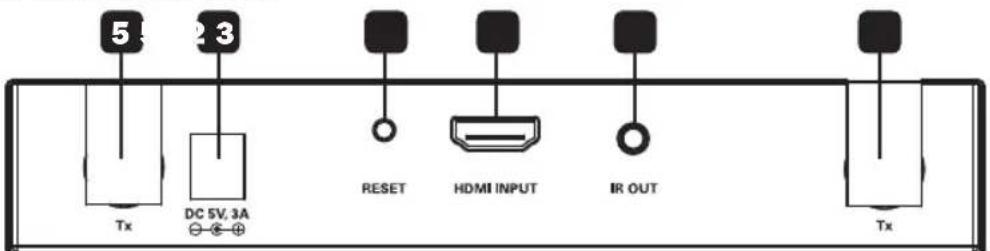
1 Power Input: Connect included external power supply.
2 Reset Button: Press this button to restart the device.
3 HDMI Input: Connect to HDMI source with an HDMI cable.
4 IR-OUT (Tx) Port: Connect included IR-OUT (Tx) cable.
Note: Ensure the source device has a clear line of sight to the IR transmitter.
5 Antenna Connections: Connect both included antennas.
HDMI Rx Back Panel
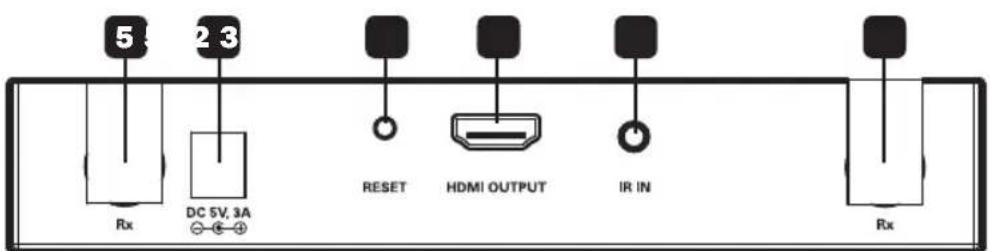
1 Power Input: Connect included external power supply.
2 Reset Button: Press this button to restart the device.
3 HDMI Output: Connect to HDMI display with an HDMI cable.
4 IR-IN (Rx) Port: Connect included IR-IN (Rx) cable.
Note: Ensure the source remote control has a clear line of sight to the IR receiver.
5 Antenna Connections: Connect both included antennas.
Installation
Notes:
- Ensure all equipment being connected is powered off prior to installation.
- For best results, position the IR transmitter near the HDMI source and the IR receiver near the display.
- If the wireless signal is obstructed by walls (especially brick or glass) or other obstacles, the quality and distance of the signal will likely be reduced.
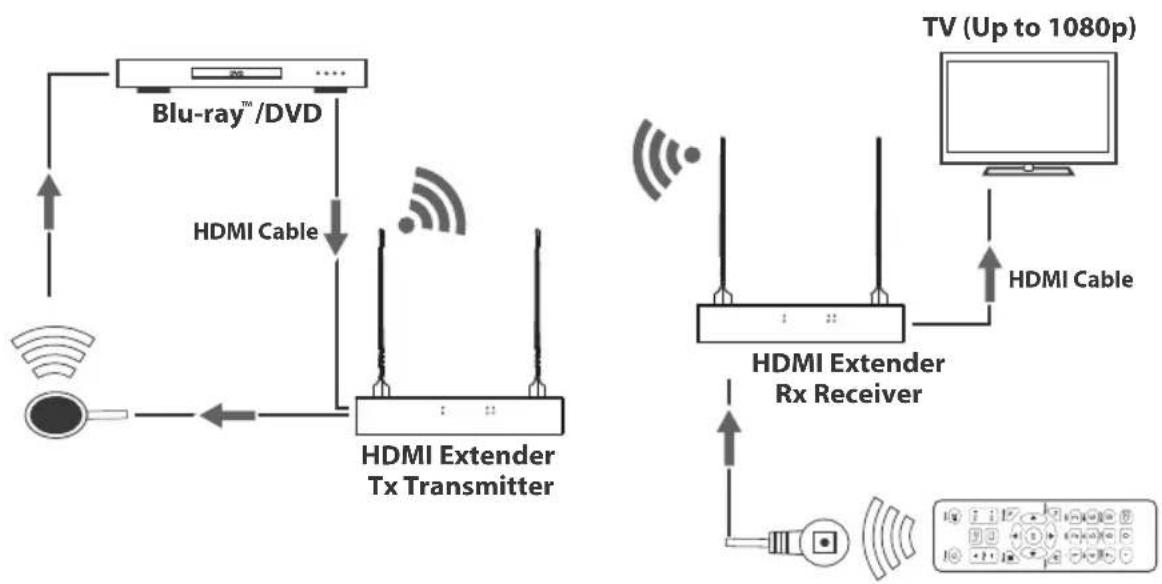
- Optional: Attach the included mounting hardware to the transmitter and receiver units, then mount them to a desired location.
- Connect the HDMI source device to the HDMI Input port on the transmitter unit using an HDMI cable, such as Tripp Lite's P568-Series High Speed HDMI Cables.
- Connect the IR-OUT (Tx) cable to the IR-OUT port on the transmitter unit.
Note: IR-OUT (Tx) cable has IR-OUT marked on the bottom of the IR bulb. Place the bulb of the IR-OUT (Tx) cable in an area with a direct line of sight to the HDMI source device (e.g. Blu-ray player).
- Connect the external power supply to the transmitter unit and plug it into a Tripp Lite Surge Protector, Uninterruptible Power Supply (UPS) or Power Distribution Unit (PDU).
- Connect the HDMI display to the HDMI Output port on the receiver unit using a P568-Series High Speed HDMI Cable.
- Connect the IR-IN (Rx) extension cable to the IR-IN port on the receiver unit.
Note: IR-IN (Rx) cable has IR-IN marked on the bottom of the IR bulb. Place the bulb of the IR receiver cable in the general area you will be using the source device's remote control.
- Connect the external power supply to the receiver unit, and plug it into a Tripp Lite Surge Protector, UPS or PDU.
- Turn on power to the connected equipment.
If using two receivers, repeat steps 5-8 for the second unit.
Troubleshooting
If you are unable to get an acceptable image after following the installation instructions, try the troubleshooting tips below.
- Are the external power supplies that came with the product connected and plugged into a working power source? For the product to function properly, the transmitter and receiver must be connected to and receiving power from an external power supply.
- Was the power to the HDMI source turned off prior to installation? If not, restart.
- What resolution are you trying to reach? See the Product Features and Installation sections in this manual for details on max distance and resolution. If you are not able to get an acceptable image, try lowering your computer's video resolution or adjusting the refresh rate.
- Does your HDMI display show a message saying "Waiting for Connection"? If so, ensure the power supply adapters are properly connected and the power indicator LEDs are illuminated solid blue.
- Does your HDMI display show a message saying "Please Check the TX Input Signal"? Ensure the HDMI signal connection LED on the transmitter unit is illuminated solid green. If the LED is not solid, connect the source device directly to the display device to see if the issue is with the source, display or HDMI cable you are using.
- Is the HDMI display transmitting a choppy picture? If so, ensure the position of the transmitter and receiver units are in the required range, then press the reset button on the RX back panel to reconnect. If this does not work, check for other signal disturbances between the transmitter and receiver.
- Test your cables to ensure they are working properly.
- Are the transmitter and/or receiver units located in an area that exposes them to elevated temperatures? If the product is overheating, it will not function properly.
- Is the image not displaying correctly when using two receivers? Make sure receivers are within the adjusted range of the transmitter.
Specifications
| Input Port HDMI Female; 3.5 m | mm Female |
| Output Port HDMI Female; 3.5 | mm Female |
| IR Frequency Range 20-60 Hz | |
| Transmission Distance with 1 Receiver | 165 ft./50 m (B126-1A1-WHD1) or 650 ft./200 m (B126-1A1-WHD2) |
| Transmission Distance with 2 Receivers | 82 ft./25 m (B126-1A1-WHD1) or 328 ft./100 m (B126-1A1-WHD2) |
| External Power 5V 3A | |
| Power Consumption Tx: 8.5W; Rx: 6W | |
| HDMI Version 1.3 | |
| HDCP Version 1.2 | |
| Max Video Resolutions 1920 x | 1080/1080p @ 60 Hz |
| Mean Time Before Failure >30 | 000 hours |
| Operating Temperature 32° to 104°F (0° to 40°C) | |
| Storage Temperature -4° to 158°F (-20° to 70°C) | |
| Humidity 0 to 95% RH, Non-Condensing | |
| Unit Dimension (H x W x D) 7.69 x 5.41 x 1.21 in. / 195.4 x 137.5 x 30.8 mm | |
| Unit Weight Tx: 1.17 lb. / 531 g; Rx: 1.16 lb. / 528 g | |
Warranty and Product Registration
1-Year Limited Warranty
TRIPP LITE warrants its products to be free from defects in materials and workmanship for a period of one (1) year from the date of initial purchase. TRIPP LITE's obligation under this warranty is limited to repairing or replacing (at its sole option) any such defective products. To obtain service under this warranty, you must obtain a Returned Material Authorization (RMA) number from TRIPP LITE or an authorized TRIPP LITE service center. Products must be returned to TRIPP LITE or an authorized TRIPP LITE service center with transportation charges prepaid and must be accompanied by a brief description of the problem encountered and proof of date and place of purchase. This warranty does not apply to equipment, which has been damaged by accident, negligence or misapplication or has been altered or modified in any way.
EXCEPT AS PROVIDED HEREIN, TRIPP LITE MAKES NO WARRANTYES, EXPRESS OR IMPLIED, INCLUDING WARRANTYES OF MERCHANTABILITY AND FITNESS FOR A PARTICULAR PURPOSE.
Some states do not permit limitation or exclusion of implied warranties; therefore, the aforesaid limitation(s) or exclusion(s) may not apply to the purchaser.
EXCEPT AS PROVIDED ABOVE, IN NO EVENT WILL TRIPP LITE BE LIABLE FOR DIRECT, INDIRECT, SPECIAL, INCIDENTAL OR CONSEQUENTIAL DAMAGES ARISING OUT OF THE USE OF THIS PRODUCT, EVEN IF ADVISED OF THE POSSIBILITY OF SUCH DAMAGE. Specifically, TRIPP LITE is not liable for any costs, such as lost profits or revenue, loss of equipment, loss of use of equipment, loss of software, loss of data, costs of substitutes, claims by third parties, or otherwise.
Product Registration
Visit www.triplite.com/warranty today to register your new Tripp Lite product. You'll be automatically entered into a drawing for a chance to win a FREE Tripp Lite product!*
- No purchase necessary. Void where prohibited. Some restrictions apply. See website for details.
FCC Notice, Class B
This device complies with part 15 of the FCC Rules. Operation is subject to the following two conditions: (1) This device may not cause harmful interference, and (2) this device must accept any interference received, including interference that may cause undesired operation.
Note: This equipment has been tested and found to comply with the limits for a Class B digital device, pursuant to part 15 of the FCC Rules. These limits are designed to provide reasonable protection against harmful interference in a residential installation. This equipment generates, uses and can radiate radio frequency energy and, if not installed and used in accordance with the instructions, may cause harmful interference to radio communications. However, there is no guarantee that interference will not occur in a particular installation. If this equipment does cause harmful interference to radio or television reception, which can be determined by turning the equipment off and on, the user is encouraged to try to correct the interference by one or more of the following measures:
Reorient or relocate the receiving antenna.
- Increase the separation between the equipment and receiver.
- Connect the equipment into an outlet on a circuit different from that to which the receiver is connected.
- Consult the dealer or an experienced radio/TV technician for help.
Any changes or modifications to this equipment not expressly approved by Tripp Lite could void the user's authority to operate this equipment.
WEEE Compliance Information for Tripp Lite Customers and Recyclers (European Union)

Under the Waste Electrical and Electronic Equipment (WEEE) Directive and implementing regulations, when customers buy new electrical and electronic equipment from Tripp Lite they are entitled to:
- Send old equipment for recycling on a one-for-one, like-for-like basis (this varies depending on the country)
- Send the new equipment back for recycling when this ultimately becomes waste
Use of this equipment in life support applications where failure of this equipment can reasonably be expected to cause the failure of the life support equipment or to significantly affect its safety or effectiveness is not recommended.
Tripp Lite has a policy of continuous improvement. Specifications are subject to change without notice.


Manufacturing Excellence.
1111 W. 35th Street, Chicago, IL 60609 USA • www.triplite.com/support
Modelos: B126-1A1-WHD1 (50 m [165 pies]), B126-1A1-WHD2 (198 m [650 pies])
English 1 • Français 15 • Pycckn 22


1111 W. 35th Street, Chicago, IL 60609 EE. UU. www.triplite.com/support
1111 W. 35th Street, Chicago, IL 60609 USA • www.triplite.com/support
1111 W. 35th Street, Chicago, IL 60609 USA • www.triplite.com/support
PyKOBODCTBO N0JIb30BaTeJIa
KoMpIeKT 6ecnpoBODhblX HDMI-peTpapanctopob
Mодenv: B126-1A1-WHD1 (50 m), B126-1A1-WHD2 (200 m)
English 1 • Espanol 8 • Français 15


1111 W. 35th Street, Chicago, IL 60609 USA · www.triplite.com/support
OxpaHaeTcA ABTopcKIM npaBOM © 2018 Tripp Lite. IpepeuatKa 3aIpeuaeTcA.
XapaKTepeNCTnKn npOdykTa
- 06ecneuBaHOT 6ecnpoBOnHyO petpaHcIaIeIO CmHaNoB cTaNdApTa 1080p (60 T) Ha paCtToHme do 50 M (MoD. B126-1A1-WHD1) mnn 200 M (MoD. B126-1A1-WHD2) ot nCTouHnka
- PioKIOHHTe BTOPOI pnpemHK Ha pacctOAHn Do 25 M (dIy MoD. B126-1A-1-WHD1) nn 100 M (dIy MoD. B126-1A1-WHD2) ot nCTOCHNka
-Функионлн НОсно鹿ИК-илуевпьобсесчьаET BO3MOXHOCThДИСТАПСИОНHRO ynpaBHeHЯ NCTOЧИКOM HDMI-CINHana - YHnBepcaIbHoe 6ecnpoBodHoe peSeHne, NCKIIouaIOUee noTpe6HOCTb Ka6eNbHO INHpaCTpyKType
-Пелердаа Видевогнанов Вьсокоуткови Стешео3ыka
3aunTa nepeadaeMoH INHOpMaunn npn nmooun anlropntma uHpObaHnAES cncnoB3oBaHnem 128-6ntHOrKIOuca
Cobmectmoctb co tHaapTaHn HDM1.3 u HDCP 1.2
-Подержka 24-6нтовoro Кодиробаяцета (no 8бнту канал) - PóIDepKka pONocbI npOnyckAnHJ 300 Mf/3,4Γ6nt/cHa KaHAn (10,2Γ6nt/cHa Bce KaHAbI)
-Подклоченno TeXHOrnPlug-and-play 6e3 Heo6xOIMocTn IcNoIb30BaHnKaKoro-ni6o nporpaMMHOro oecneHEnn nnn dpaBepOB
Ochauene Bheunix 6IOKOB nITAHnIpeXoHNkAMn IINI NOKJIHOeHnK P03eTKaM 3JIeKTpuecknx CeTei ceBepoAmePKaHCKoro, 6PntAHCKoro, EBponeNCKoro N ABCTpaNNCKoro CTaNdapTOB
CopexHmoe ynaKOBKN
- Pēpeáhoùn n npniemhbl moyn
- Ka6eJIb IR-IN (ДлЯnpиемно мodyнэ)
- Ka6eBb IR-OUT (Для поедаюгу мodyнэ)
BHeHHe nCTouHnKn nHTaHnA* (Bxo:d: 100-240 B; 50/60 Tg; 0,6 A BbIXo:d: 5 B,3 A) —— 2 wT. - MoHTaxKHeI npCnOc6NeHn
PykoBOdCTBO noJIb3ObaTeNa - Komπηκτηγειση περεχούνικαμι ένη ραλβεθόνι Μιήνη NEMA 5-15P (Cebepна Amepик), CEE 7/16 Schuko (Ebpona), BS 1363 (Веников�патань) и AS/NZS 3112 (Астрали).
OnuohbHbIe KOMnEKTyoune
- BbICOKOcKOpocThbIe HDMI-Ka6eHn cepnn P568
CnCTeMHbIe Tpe6oBaHnA
- YCTPOINCTBO, BbCTyNAIOOee B KauceCTBe NcTOHnKa HDMI-CnHana (HanpIMep, npOnrPbBaTeBb Blu-rayTM)
- UCTPOICTBO OTO6paXeHn HDMI-cnHaNoB (HAnpImeP, TeneBn3Op nIn npoeKToP)
HdNkatoBpu npa3beMbl
Ipeednnaheb: npneemnk (Rx) n peepaTuK (Tx) HDMl-cnrhanob
1 CND "PntanHe": 3OT CBToDnOdbHbI INDnKaTOp HnpepbIBHO rOpNT CnHM npHaNCHn HnpanKeHn, nTaiooero MoynB.
2 CND "Pepea a daHbix": 3OT CBETODIOHBI INHdkATOP rOHT OPAHKeBIM MMRaET CMAno YactOTOn npu yCTaHOBHeHN CoedHHeHn. Pocle ycneSHoro IOKNUOeHn MoDyJI Na HauJa Npepaun DaHHbx YaCTOa ero MMraHn yDbAunBaTc.
3 CND "PoioknoyeHne": 3OT CBETOIOIDHy INHINKA TOP HENpepbIBHO TOpNT 3eJIeHbIM Ipi HAINCIN CINHAI NO KaHany 6ecnpoBODHO CBJ3N.
3aHnaHnIb: nepeaTuk HDMI-cnrHaIOB

1 Bxodno pa3bem nHTaHn: npedha3NaeH dIy noKIOueHn BHeHrero 6noka nTahn, NOCTBnREMO B KOMnKeTe.
2 Khonka nepe3anycka: nCIOBb3yETc DnI nepe3anycka yCTpoiCTBa.
3 BxodHDMI:noqKIOUaETcKa NIOCTOuHNky HDMI-cunHauepe3HDMI-Ka6eB.
4 IopT IR-OUT (nepeaiouymoynb): nCIOB3yETcIgNoKJIoueHnBbIXOHOrO NK-Ka6e (nepeaiooMoyn) N3 KOMNtKeTA.
PnmeaHne. YcTPOCTBO, nCIOB3yEmoe B KaeeCTBe HcTOOHnka, dONXHO haoOnITbcB nPeDexax npMmBuIMMOCTn oOTHOHeHIO NK-nepeaTuKy.
5 AHTeHHbIe pa3beMbI: IIOKJIIOUHTe o6e aHTeHHbI, BXOJIAuE B KOMIIneKT.
3aHnaHnB: npneMHNK HDMI-cuHaJIOB
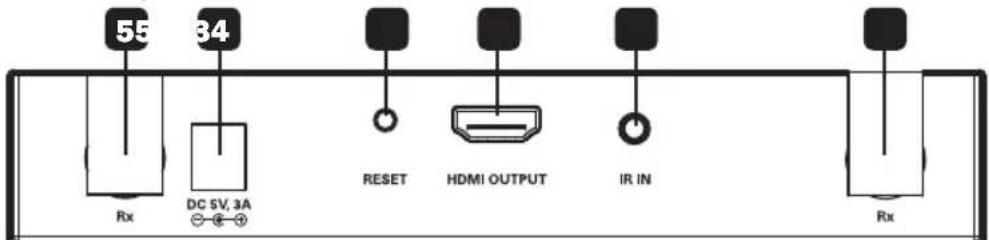
1 Bxodno pa3bem nHTaHn: noKnIOuHTe K HeMy BHeUHm 6NOK NHTAHn, NOCTaBnEMyB KOMIneKTE.
2 Khonka nepezanycka: HauKMITE Ha 3Tu KhoNkIy dIy nepezaycKa yctpoiCTBa.
3 BbIXoH HDMI: noKJIIOaEcT K yCTpoiCTBy oTO6paXeHnia HDMI-cuHana uepe3 HDMI-ka6eb.
4 Iopr IR-IN (npneHbI Moynb): nCnoB3yETcIa INa noKlnOeHn BxOHoro IK-Ka6eIa (npneHoro Moynla) n3 KOMJIeKTA.
PnmeHne. YCTPOICTBO DNTAHUMHHTO ynpabNEHn ITOUHKOM DOJNKHO HAXODITCB A PpeDEna npmao BmIMOCTHn OTOHHeHIO KIK-ppMeHHky.
5 ANTeHHbIe pa3beMbI: IopKIOUHTe 06e aHTeHHbI, BXOJIaUNe B KOMJIneKT.
yctahOBka
Птумейанн:
1.Пелед наалом установки Сп полкунчение obopyюваиму должно 6ытб осяточно.
2.ДЯ obecneueHna Hauynuuxpe3ynbTaTOB NK-nepeaTuK cneIyET pacnooxntb B6n3n nctouHnka HDMi-cnHa, a NK-npmeHnK B6n3n yCTPOJcTBa OTO6paXeHnA.
3. PnHaHnCtH (oc6eHHo KpHmHbIX nI IN CTKJIHHbIX) INI DpyHX INpeYrTCTBn HA Nytu pacnpoctpaehnna CnHana, nepeDaBaEMO 6ecnpoBDhIM cno60M, NOBbIaTeCB BepoTHOCb yxUdWeHNs KaeeCTBa CNHana IcOKpaueHNn PpeOdoNEBaEMOrn IM paccToHnA.
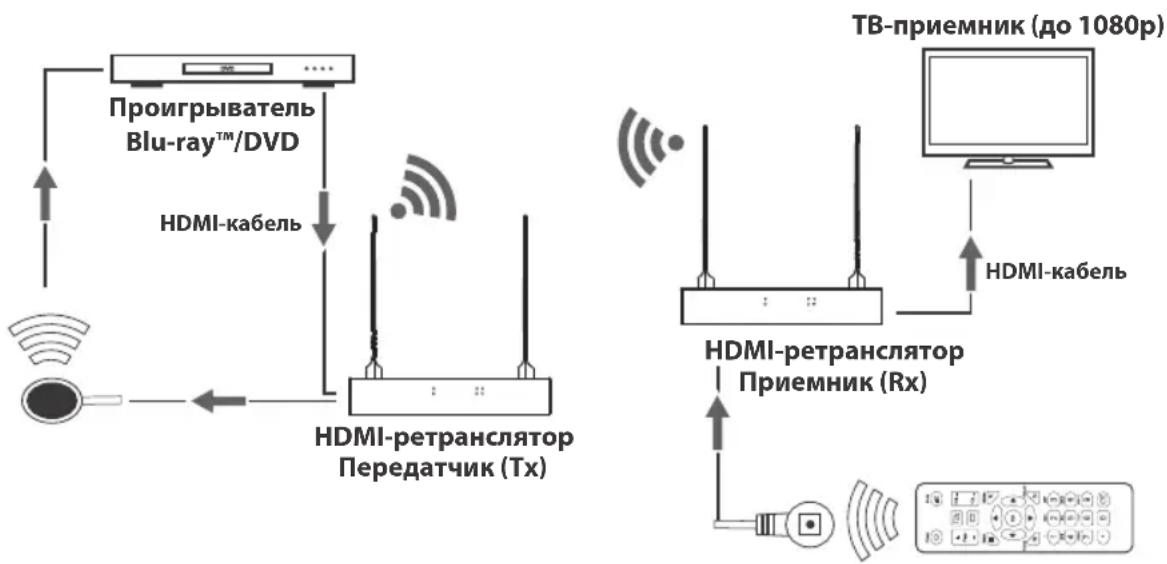
- OnuohalbHo: npKpeHnTe nOCTaBmEble B KOMPJIeKTe MOHTaXHbIe npncnoc6neHnK nepeHaUeMy n pniemHomy MOnyIM uYCTaHOBnTE INB XeJeaEMOM MeCTe.
- Пдкшчte nctouнн HDMI-cirha Na Ko BxodHomу nopTu HDMI nepeaioe moyn c noMoBHy HDMI-Kabena (Hanpimep, n3 npednaraembIX komnaHmey Tripp Lite bblcokocopocThbIX HDMI-Kabeen cepnn P568).
3.BctabBe Ka6eBbIXoHoi IK-Ka6eB (pepeaiooMoyn) B npT IR-OUT pepeaioofo myna.
PnmeaHne. BixoHoi NK-ka6enb (nepeaioofo moyn) nMeet MapKIOBky IR-OUT ha HxKHei NobepXocTN Uk-nambl. Iomectte naMny BixoHoro NK-ka6en (nepeaioofo moyn) B npdeanpmao BuIMOCn OTHOCTBO yctpoIcBA, nCnoJIb3yEmO ka KTOuyHK HDMI-curhana (hanpImep, nponrpmbateaBlu-ray).
- IopKIOUHTe BHeHm 6Iok NITAHN K nepeaIoEmy MoyIIO IN BKIOHTe erO B po3ETky cTeBOrO fNtBtpa, 6Ioka pacnpedeneHH NITAHN (PDU) mI nctouHnka 6ecnepe6oHoro NITAHN (NbI) Tripp Lite.
- Пдкочуоctво отбрахеня HDMI-cnнала K bixoHomy HDMI-nopTu npneMHoro moyra c noMooub BbICOKocopocthoro HDMI-ka6eЯ cepm P568.
- Podknoute ydnnntelbni Ka6ebn IR-IN (npneemhoro moyn) KnopTy IR-IN npneemhoro moyn.
PpmeaHne. BxOIOHO NK-Ka6eIb (pnpemHoro MOyIa) IMeET MapKnOpBky IR-IN Ha HnKHe NIOBepXHOCTN IK-NaMnbl. PaCIOJNOJKe NaMny Ka6eIg NK-tpnEMHHKa B O6uE MeCe, rJe 6yEt NCNoB30BaTbc4 6nOK DnCTaHcHOro ynpabEnHa yCTpoiCTBOM, CnykaUIM B KauCTBe ICTOCHKA.
- Пдкючite BHeHn 6Iok nITaHnK npHemHomy MOny IN BKIOHTe ero B po3eTKy cTeBOrO fNtpa, PDU nnn NbT Tripp Lite.
- Падайта питане на подклюецнообopyдоване.
PnMCIOb3OBAHmDByx npemHKnOB IOBToPiTe 5-8IaI BTOPOI npemHnKa.
BbIaBHeHne uYcTpaHHe HEnCnpaBHOCTe
EcnBbINONHeHnYka3aHnNo yCTaHOBKe He No3BOJareT DoCTNpIeMNeMoTo KaueCTBa N3O6paXeHnna, nonpo6ynt BocnoB3oBaTbcnPbBeDHHbIMn Hxke peKOMeHdaunm N BoBbJIeHNIO uCTpaHEHNIO HeNCnPabHOcTe.
- Покльецьл постаьемbleВ komпгкTe BHeшнe 6нokи пntаньК pa6oTaIoшeMy nctouHky nHTAHn?Дя habджkaшero ФункцИОнpoBaHЯ Дадного Идени OHO DoJxHo POKKIOUaTbCЯ K BHeшeMy 6IOKy PNTAHNИ 3aIIITbIBaTbCЯ OT Hero.
2.БыллглOTKLOUHcHNoIITaHHeNCTOuHnKaHDMl-CurHanaNepeHaJOMyctaHOBKn?EcHn HET,ByInOnJIHTe eronepe3aIyck. - KaKoro pa3peweHn Bbl nbIaTeecb do6ntbc? Iopnp6Hee o MaKcImaJIbHbIX 3HaueHnx IInCTaHcN IN pa3peweHn CM.Bpa3deJax OYHKUHOHaJIbHbIe BO3MOXHOCTn N3dEHN IN YCTAHOBKa. B cnyae HeBO3MOXHOCTn IO6NTCBn npMeMNeMoR KoceTb N3O6paXeHn nonpo6yTe yMeHbIMTB BuDeopa3peWeHne CBOero KOMlbIOTepa Nm OTpeYIpopoBaT YaCTOTy 6HOBJeHn.
- BbIOHTcHnHa HcNoIb3yEmoe yCTpoCTBO OTO6paKeHnHDMi-CnrHana KaKoe-Ni6o CoO6uHHe Tnna "OxuaetcnoKluoyehne"? Ecnn Da, y6eNTecb B npaBnIbHOCTn IooKluoyehn NepExoHNKOB 6IoKa NtAHn HnpepbIBHom rOpEHn CBToIOndhIX INHmKATOpOB NITAHN CINHM CBeTOM.
- BbIOHCTa Hn Ha 3KpaH yCTpoCTBa OTO6paXeHn HDMI-CrHana KaOe-1n6o coo6ueHne Tnna "PpOBepbTe HAnuHne CmHana Ha BXoJe npEmHnka"? Y6eINTecb B TOM, qTO CBeTOnHOh b INHnKaTOp CBa3n PO KaHany HDMHa nepeAdIoUeM moyIe HenpepbBHO ropnt 3eJIeHbIM. Ppi OTCyTCTBm HENpepbIBHO rOpeHHa DaHORo CNDa NOdkJIouHTe NcTOUHNK HEnocpeCDtBeHHO K UcToiCTBy OTO6paXeHn C eJIbO ONpeDeNtB, KaOK JIeMeHT CnCTeMbI - nctOuHNK, yCTpoCTBO OTO6paXeHn IIN NcNoJb3yeMbl Ka6JIb HDMl — co3daet daHHyo npO6Iemy.
- PnncyTCTByeT n p86b Ha KapTHHe, TpaHcHpyEmoY uCPOCTBOM OTO6paXeHna? EcnI Da, paNoJoxKnte nepeDaIOUm I npMeHMbI MoUIn Ha DOnyCTMOM ydaJeHHa, a 3aTeM HaxMMte Ha KhoNky nepe3anycka Ha 3aHneI NaHeIN IpneMHoro MOyIg NIOBtOPHO rOyCTAOHOBNeHHa CoEiHHeHH. EcnI peuNTb IpO6JImy TaKM M o6pa30M He ydaIOcb, IpOBepbTe, Het IIN KaKHX-Im6 DpyRnx IpeneTCTBm Ha NyTu CnIHala MeKdy nepeDaTCHKOM I npMeMHIKOM.
- PpOepeBte nCnoJIb3yEmble Ka6eHn Ha npEaMeTnx HApIeXaJcero yHKUOnHPOBaHn.
- He noDBepraOTcI IIN nepeaIOUH N/IIIN npHEMbIM MOyN B03dEChTBIO NOBbIweHHbIX TEMnepaTpy B Tex MeCTax, rIe OHN yCTaHOBHeHb? B cnyae neperpeBa n3dJIne He MoKet fYHKUHOHPOBaT b HAnJExKaUIM 06pa3OM.
- He ydaetc nonyuHb KoppeKTHoe 306paXeHne npn HcnoB3oBaHHn DByx npemMHKnOB?y6eNTecb B TOM, YTO pnpemMHKNi HaxOaTcB B IpeDenax yCTaHOBHeHNo DaIbHoCTN DeIcTBn NepeDaTuHaKa.
TexHnueckneXapakTepncTNKn

PpOpyuHm HnHnHnHnHnHnHnHnHnHnHnHnHnHnHnHnHnHnHnHnHnHnHnHnHnHnHnHnHnHnHnHnHnHnHnHnHnHnHnHnHnHnHnHnHnHnHnHnHnHnHn
1111 W. 35th Street, Chicago, IL 60609 USA - www.triplite.com/support