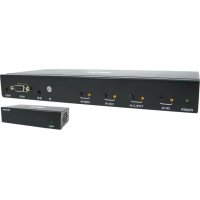
B3204X1MHEK - Receiver Tripp Lite - Free user manual and instructions
Find the device manual for free B3204X1MHEK Tripp Lite in PDF.



| Product Type | Multiformat presentation switcher with remote receiver (HDMI over Cat6) |
| Model | B320-4X1-MHE-K |
| Brand | Tripp Lite |
| Power | Transmitter: power adapter 100-240 V AC, output 24 V 1 A; Receiver: Power over Cable (PoC) via Cat6 |
| Input Ports (Transmitter) | 1 x HDMI, 1 x DisplayPort, 1 x VGA + 3.5 mm audio input, 2 x USB-C (1 with PD 3.0) |
| Output Ports | Transmitter: 1 x RJ45; Receiver: 1 x HDMI |
| Maximum Distance (Cat6 Cable) | 38.1 m (125 ft) |
| Maximum Supported Resolution | HDMI/DisplayPort/USB-C: 3840 x 2160 @ 60 Hz (4:4:4); VGA: 1920 x 1080 @ 60 Hz |
| HDMI / HDCP Compatibility | HDMI 2.0, HDCP 2.2 |
| USB-C Power Delivery (PD) 3.0 | Up to 100 W (20 V 5 A) input, provides up to 90 W to connected USB-C source |
| Switching Modes | Front panel push buttons, IR remote control (IR receiver cable included), RS-232 commands (DB9 port) |
| Special Functions | Built-in equalizer on receiver, automatic EDID adjustment, front button lock |
| Operating Temperature | 0 to 40 °C (32 to 104 °F) |
| Storage Temperature | -15 to 50 °C (5 to 122 °F) |
| Warranty | 1 year limited warranty |
| Package Contents | Switcher (transmitter), receiver, IR remote control, 1.5 m IR receiver cable, power adapter with 4 international plugs, mounting hardware, manual |
| Care and Cleaning | Clean with a soft dry cloth. Do not use abrasive products or solvents. |
| Safety | Use only the supplied power adapter. Do not expose to moisture. Installation to be carried out by qualified personnel. |
| Spare Parts and Repairability | No spare parts available. Contact Tripp Lite support for repairs. |
Frequently Asked Questions - B3204X1MHEK Tripp Lite
User questions about B3204X1MHEK Tripp Lite
0 question about this device. Answer the ones you know or ask your own.
Ask a new question about this device
Download the instructions for your Receiver in PDF format for free! Find your manual B3204X1MHEK - Tripp Lite and take your electronic device back in hand. On this page are published all the documents necessary for the use of your device. B3204X1MHEK by Tripp Lite.
USER MANUAL B3204X1MHEK Tripp Lite
4-Port Presentation Switch
Model: B320-4X1-HH-K1, B320-4X1-HH-K2, B320-4X1-MH, B320-4X1-MHB-K, B320-4X1-MHE-K
Espanol 19·Français 37·Pycckn 55
WARRANTY REGISTRATION
Register your product today and be automatically entered to win an ISOBAR® surge protector in our monthly drawing!

triplite.com/warranty


Manufacturing Excellence.
1111 W. 35th Street, Chicago, IL 60609 USA · triplite.com/support
Copyright © 2020 Tripp Lite. All rights reserved.
Package Contents
B320-4X1-Series Presentation Switch
- IR Remote Control
- IR Receiver Cable, 5 ft.
International Power Supply (Input: 100-240V; Output: 24V 1A)
(x4) International Plug Adapters (North America, U.K., Europe, Australia)
- Mounting Hardware
Owner's Manual
Optional Accessories
N202-Series Cat6 24 AWG Solid-Wire Patch Cables
P569-XXX-CERT Series High-Speed HDMI 2.0 Cables
P580-Series DisplayPort Cables with Latches
P502-XXX-SM 15-Pin Low-Profile VGA Coaxial Cables
U420-Series USB-C 3.1 Gen 1/2 Cables
P312-Series 3.5 mm Audio Cables
Product Features
B320-4X1-HH-K1
4-Port 4K @ 60 Hz HDMI over Cat6 PoC Presentation Switch/Extender Kit, 50 ft.
- Connects up to 4 HDMI sources to a single HDMI display up to 50 ft. away via Cat6 cabling.
- Switches between 4 sources using the front-panel pushbuttons, IR remote control or RS-232 commands.
- Power over Cable (PoC) technology provides power to the receiver via Cat6 cable.
- Remote receiver unit features built-in equalization (EQ) control and auto EDID image adjustment.
Supports true 4K resolutions up to 3840 x 2160 @ 60 Hz with 4:4:4 chroma subsampling.
HDMI 2.0 and HDCP 2.2 compliant. - Plug-and-play operation with no software required for easy, immediate installation.
B320-4X1-HH-K2
4-Port 4K @ 60 Hz HDMI over Cat6 PoC Presentation Switch/Extender Kit, 125 ft.
- Connects up to 4 HDMI sources to a single HDMI display up to 125 ft. away via Cat6 cabling.
- Switches between 4 sources using the front-panel pushbuttons, IR remote control or RS-232 commands.
- Power over Cable (PoC) technology provides power to the receiver via Cat6 cable.
- Remote receiver unit features built-in equalization (EQ) control and auto EDID image adjustment.
Supports true 4K resolutions up to 3840 x 2160 @ 60 Hz with 4:4:4 chroma subsampling.
HDMI 2.0 and HDCP 2.2 compliant. - Plug-and-play operation with no software required for easy, immediate installation.
Product Features
B320-4X1-MH
4-Port Multi-Format Presentation Switch
- Connects up to 4 sources to a single HDMI display.
- Switches between 4 sources using the front-panel pushbuttons, IR remote control or RS-232 commands.
Supports true 4K HDMI, DisplayPort and USB-C™ resolutions up to 4096 x 2160 @ 60 Hz with 4:4:4 chroma subsampling.
Supports 1080p VGA resolutions up to 1920 x 1080 @ 60 Hz. - USB-C PD 3.0 port supports up to 100W (20V 5A) and provides 90W of charging power to the USB-C source.*
- Plug-and-play operation with no software required for easy, immediate installation.
*10W is reserved for the functionality of the USB Type-C™ chipset system.
B320-4X1-MHB-K
4-Port Multi-Format PoC Presentation Switch/Extender Kit, 50 ft.
- Connects up to 4 sources to a single HDMI display up to 50 ft. away via Cat6 cabling.
- Switches between 4 sources using the front-panel pushbuttons, IR remote control or RS-232 commands.
- Power over Cable (PoC) technology provides power to the receiver via Cat6 cable.
- Remote receiver unit features built-in equalization (EQ) control and auto EDID image adjustment.
Supports true 4K HDMI, DisplayPort and USB-C resolutions up to 3840 x 2160 @ 60 Hz with 4:4:4 chroma subsampling.
Supports 1080p VGA resolutions up to 1920 x 1080 @ 60 Hz. - USB-C PD 3.0 port supports up to 100W (20V 5A) and provides 90W of charging power to the USB-C source.*
- Plug-and-play operation with no software required for easy, immediate installation.
*10W is reserved for the functionality of the USB Type-C chipset system.
Product Features
B320-4X1-MHE-K
4-Port Multi-Format PoC Presentation Switch/Extender Kit, 125 ft.
- Connects up to 4 sources to a single HDMI display up to 125 ft. away via Cat6 cabling.
- Switches between 4 sources using the front-panel pushbuttons, IR remote control or RS-232 commands.
- Power over Cable (PoC) technology provides power to the receiver via Cat6 cable.
- Remote receiver unit features built-in equalization (EQ) control and auto EDID image adjustment.
Supports true 4K HDMI, DisplayPort and USB-C resolutions up to 3840 x 2160 @ 60 Hz with 4:4:4 chroma subsampling.
Supports 1080p VGA resolutions up to 1920 x 1080 @ 60 Hz. - USB-C PD 3.0 port supports up to 100W (20V 5A) and provides 90W of charging power to the USB-C source.*
- Plug-and-play operation with no software required for easy, immediate installation.
*10W is reserved for the functionality of the USB Type-C chipset system.
Mounting Instructions
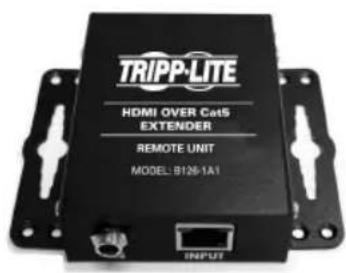
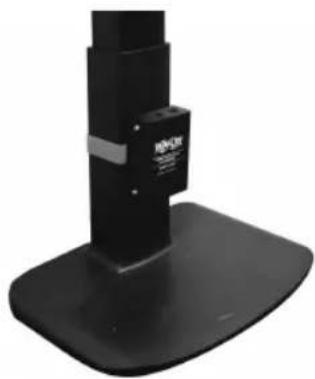
These 4-port presentation switches include hardware for mounting on a wall, pole or 19-inch rack. The following images illustrate how the included hardware can be attached for different installations.
Note: The models shown below are for illustrative purposes only. Your product may vary by model number, size or port orientation. The mounting options for all B320-Series switches are the same.
Wall-mount
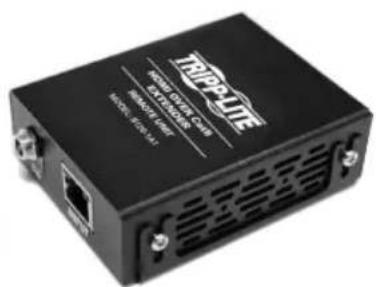
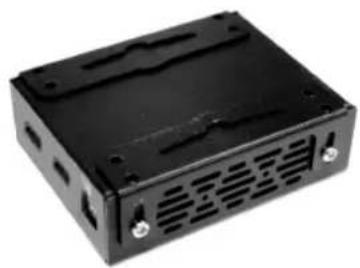
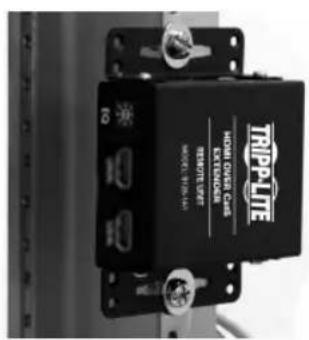
19" Rack-mount
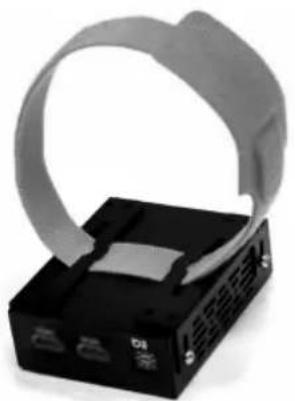
Pole-mount
Installation
Refer to the following steps and diagram to set up your 4-port presentation switch installation.
Installation Instructions for B320-4X1-HH-K1 & B320-4X1-HH-K2
Notes:
- Test to ensure the entire installation works properly before pulling cables through ceilings/walls.
- To achieve maximum distance and performance, use 24 AWG solid-wire Cat6 cables. Using stranded-wire Cat6 cable or cable with a gauge (AWG) size higher than 24 AWG will result in shorter extension distance. Higher-gauge cabling, such as 26 AWG, has more limited transmission capability than lower-gauge cabling. All Tripp Lite N202-Series Cat6 cables are made with 24 AWG solid-wire cabling.
- External power is not required for remote receiver units, due to PoC technology incorporated in the transmitter units.
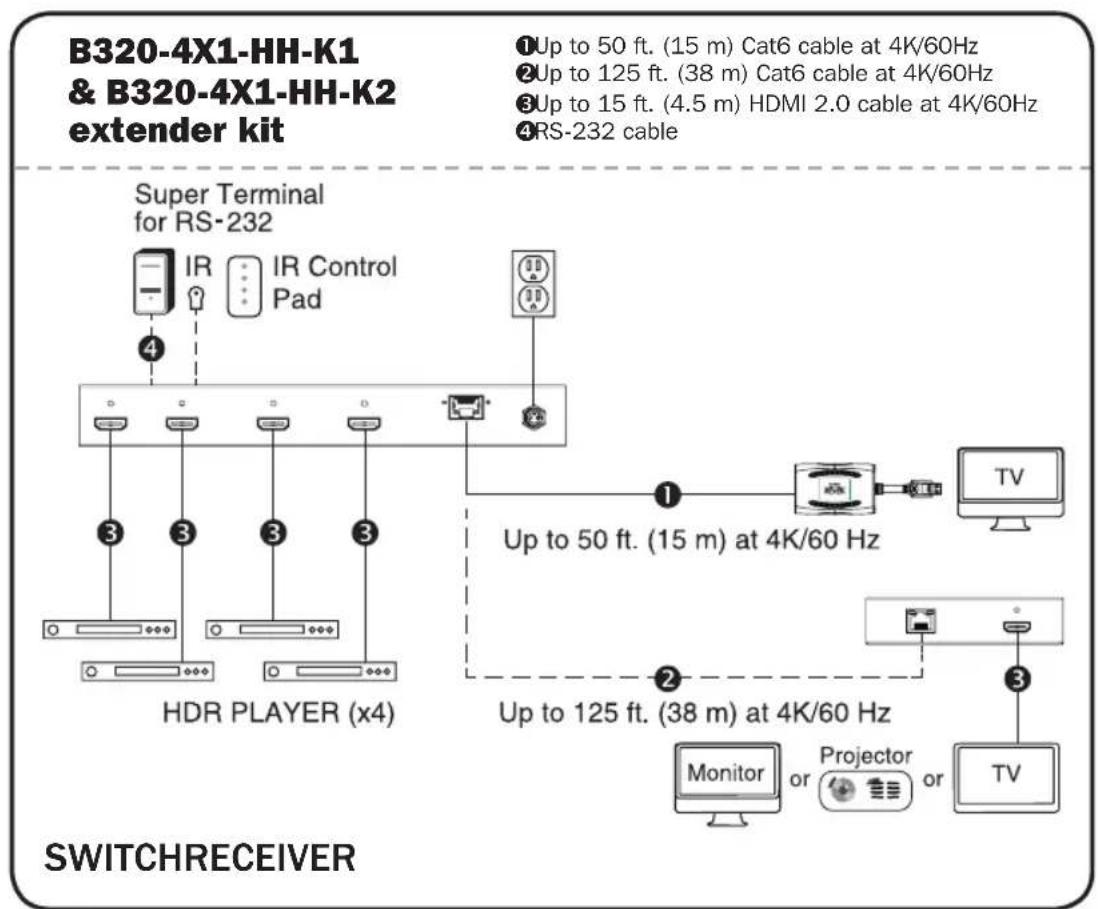
Installation
- Make sure all equipment in the installation is powered off.
- Connect the HDMI source to INPUT 1 on the presentation switch with a user-supplied HDMI cable.
- Repeat Step 2 for INPUT ports 2, 3 and 4.
- Connect the RJ45 port on the presentation switch to the RJ45 port on the remote receiver with a user-supplied Cat6 cable. Note: Maximum transmission distance via Cat6 cabling for the B320-4X1-HH-K1 and B320-4X1-HH-K2 is 50 ft. and 125 ft., respectively.
- Connect the remote receiver's HDMI port to a display with a user-supplied HDMI cable.
- (Optional) If the B320-4X1-Series switch is not in line of sight, connect the included IR receiver cable to the IR-IN port for more reliable IR reception.
- (Optional) If you wish to control the B320-4X1-Series switch from your computer, connect a user-supplied DB9 cable to the RS-232 port. See RS-232 Commands for more information.
- Turn on the power to all connected devices in the installation. Then, connect the included external power supply to the switch transmitter unit.
- The Power LED will illuminate green, indicating the unit is receiving sufficient power, and Input LEDs will illuminate orange, indicating a signal is being received from the sources.
Installation
Installation Instructions for B320-4X1-MH, B320-4X1-MHB-K & B320-4X1-MHE-K
Notes:
- Test to ensure the entire installation works properly before pulling cables through ceilings/walls.
- To achieve maximum distance and performance, use 24 AWG solid-wire Cat6 cables. Using stranded-wire Cat6 cable or cable with a gauge (AWG) size higher than 24 AWG will result in shorter extension distance. Higher-gauge cabling, such as 26 AWG, has more limited transmission capability than lower-gauge cabling. All Tripp Lite N202-Series Cat6 cables are made with 24 AWG solid-wire cabling.
- External power is not required for remote receiver units due to PoC technology incorporated in the transmitter units.
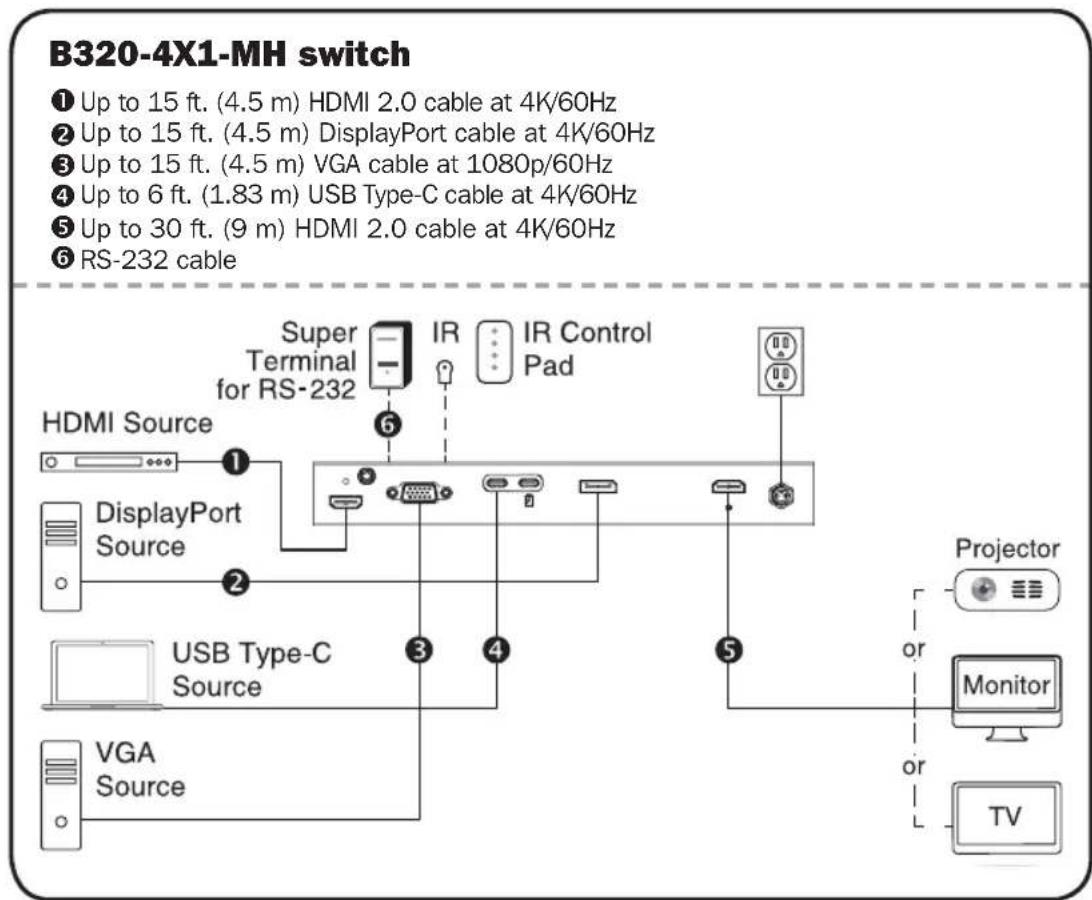
Installation
B320-4X1-MHB-K & B320-4X1-MHE-K extender kit
Up to 15 ft. (4.5 m) HDMI 2.0 cable at 4K/60Hz
Up to 15 ft. (4.5 m) DisplayPort cable at 4K/60Hz
Up to 15 ft. (4.5 m) VGA cable at 1080p/60Hz
Up to 6 ft. (1.83 m) USB Type-C cable at 4K/60Hz
Up to 50 ft. (15 m) Cat6 cable at 4K/60Hz
Up to 125 ft. (38 m) Cat6 cable at 4K/60Hz
7 RS-232 cable
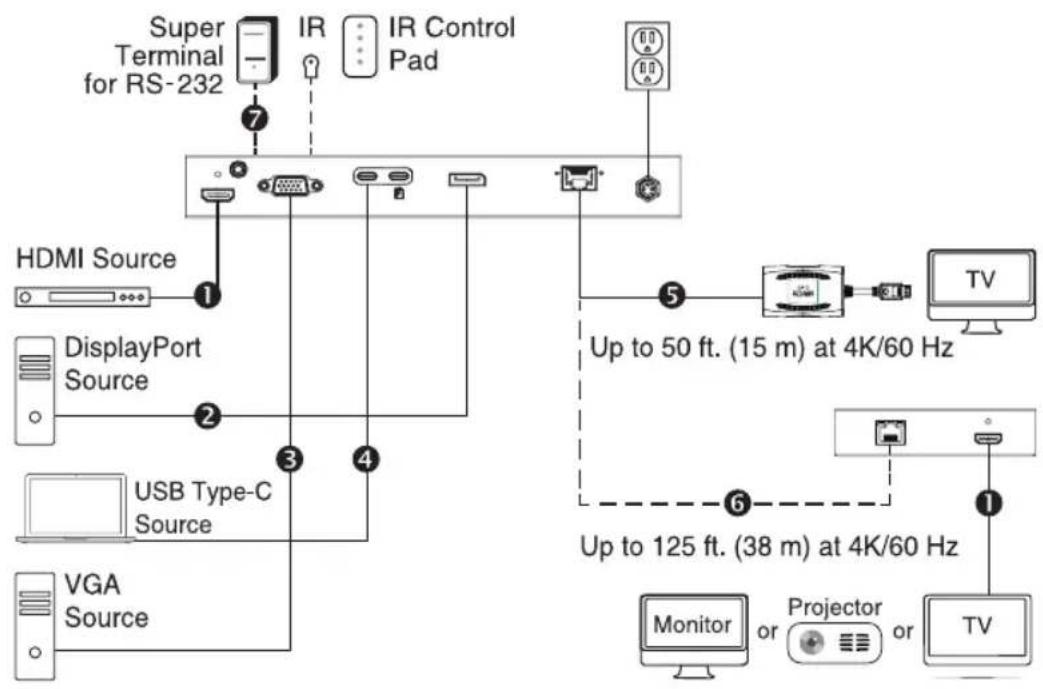
SWITCHRECEIVER
- Make sure all equipment in the installation is powered off.
- Connect the HDMI source to HDMI IN with a user-supplied HDMI cable.
- Connect the DisplayPort source to DP IN with a user-supplied DisplayPort cable.
- Connect the USB-C source to TYPE-C IN with a user-supplied USB-C cable.
- (Optional) Connect your USB-C source's power adapter to CHARGE IN, supporting up to 100W (20V 5A) and supplying up to 90W of power to your USB-C source.
- Connect the VGA source to VGA IN with a user-supplied VGA cable. Then connect the VGA source's Audio Out port to VGA AUDIO with a user-supplied 3.5 mm audio cable. Note: 15-pin VGA cables must be used. 14-pin VGA cables will not work.
Installation
- Connect the HDMI Output port to a display with a user-supplied HDMI cable.
- B320-4X1-MHB-K & B320-4X1-MHE-K only: Connect the RJ45 port on the switch transmitter to the RJ45 port on the remote receiver with a user-supplied Cat6 cable. Note: Maximum transmission distance via Cat6 cabling for the B320-4X1-MHB-K and B320-4X1-MHE-K is 50 ft. and 125 ft., respectively. Then, connect the remote receiver's HDMI port to a display with a user-supplied HDMI cable.
- (Optional) If the B320-4X1-Series switch is not in line of sight, connect the included IR receiver cable to IR-IN for more reliable IR reception.
- (Optional) If you wish to control the B320-4X1-Series switch from your computer, connect a user-supplied DB9 cable to the RS-232 port. See RS-232 Commands for more information.
- Turn on the power to all connected devices in the installation. Then, connect the included external power supply to the switch transmitter unit.
- The Power LED will illuminate green, indicating the unit is receiving sufficient power, and Input LEDs will illuminate orange, indicating a signal is being received from the sources.
Locking Front-Panel Pushbuttons
Users can lock the front-panel pushbuttons to prevent accidental changes or button clicks. To lock the front-panel pushbuttons:
- Press Input 1 and 2 simultaneously and hold for 5 seconds.
- All four Input LEDs (1-4) will blink for 5 seconds, then only the selected source LED will turn orange.
- Front-panel pushbuttons are now inoperable.
To unlock the front-panel pushbuttons:
- Press Input 1 and 2 simultaneously and hold for 5 seconds.
- All four Input LEDs (1-4) will blink for 5 seconds, then only the selected source LED will turn orange.
- Front-panel pushbuttons are now operable again.
Installation
RS-232 Serial Control Installation
- Please make sure your Terminal Emulator Software is running.
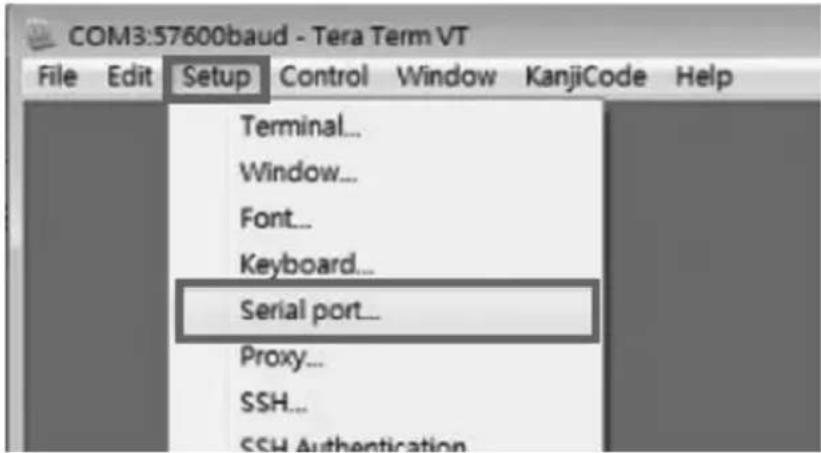
- Set up your serial COM port. Open your software, click Setup and select Serial Port from the dropdown menu.
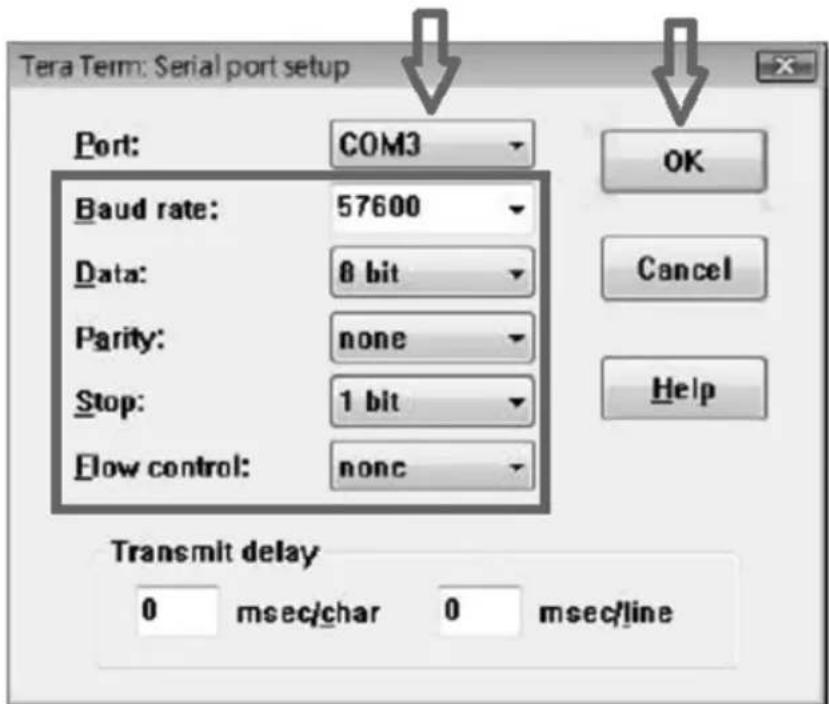
- Select the COM port into which the DB9 is connected. If you use Keyspan®, it will automatically assign the COM port for you. Please make sure to select:
Baud Rate: 57600
Data: 8 bit
- Parity: none
- Stop: 1 bit
- Flow control: None and click OK.
Installation
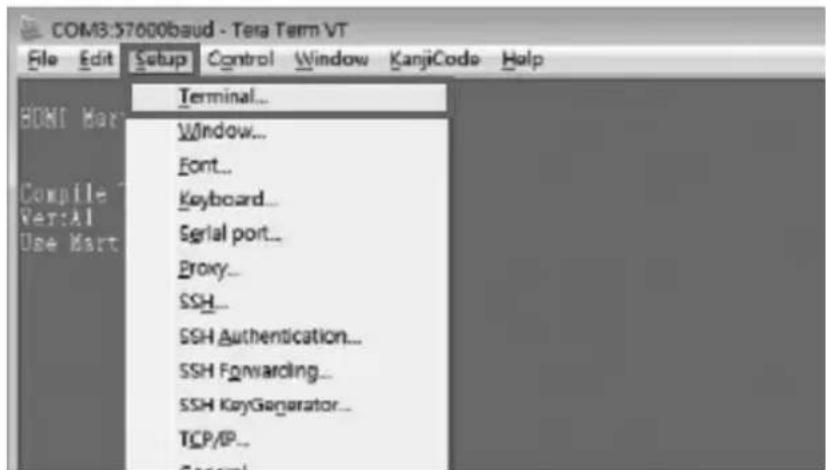
- Configure your software to allow input control. Click Setup and select Terminal from the dropdown menu.
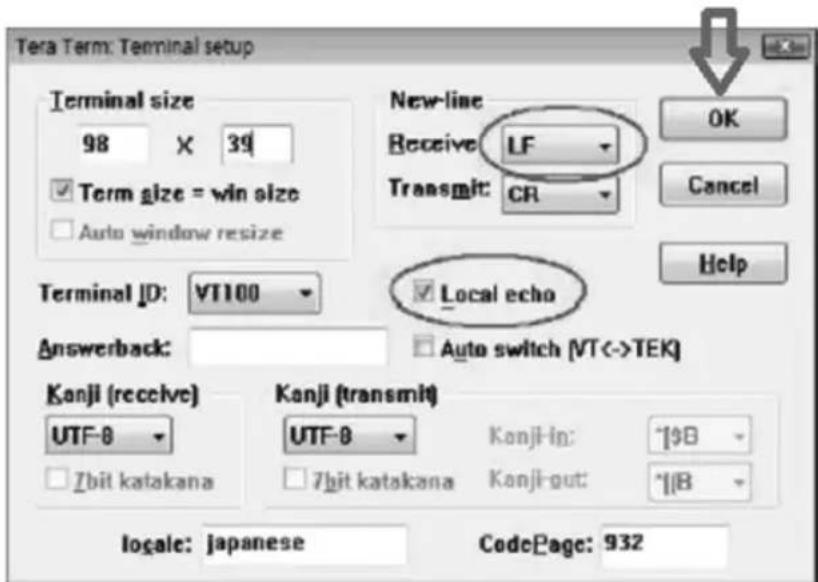
- Select LF on Receive in New-Line. Click the box to activate Local Echo. Enter the command and click OK.
Installation
RS-232 Commands
| Commands for Serial Control | |
| Command Meaning | |
| Sw1 x1 Routed to Output1, Out | output n to input [x1] |
| Sw2 x1 Routed to Output1, Out | output n to input [x1] |
| Sw3 x1 Routed to Output1, Out | output n to input [x1] |
| Sw4 x1 Routed to Output1, Out | output n to input [x1] |
| PWD Stands for Power On/Off | |
| STE State of the output | |
Important note control command:
Only one command can be issued at a time. You must wait for the switch to accept and finish the first command before sending a second. If a second command is sent/issued before the first is completed, the switch will ignore the second command.
Installation
Routing Functions
Command:
swNM
Variations:
- N: stands for Connect Output N, default 1
M: switch to input M
Response:
CMD:swN M
Response Example:
sw1a
CMD:sw1A
Output 1, Select Input A
sw2b
CMD:sw2B
Output 2, Select Input B
Power Functions
Command: pwd
Response: PW
Stands for Power On/Off
- pwd
CMD:PWD
Special Commands
Command: ste
Response: OutputN M[STATE]
Variations:
N: Output N
M: Input M
- [STATE]:
o [Signal] signal on from input
o [ldle] no signal from input
State of the output channel
STE
CMD:STATE
Output1 A[Idle]
Output2 A[Idle]
Specifications
| Models B320-4X1-HH-K1 B320-4X1-HH-K2 B320-4X1-MH B320-4X1-MHB-K B320-4X1-MHE-K | |||||
| Input Ports(Female) | 4x HDMI 4x HDMI HDMI | MI, DP, VGA + | 3.5mm, 2x USB-C | HDMI, DP, VGA +3.5mm, 2x USB-C | HDMI, DP, VGA +3.5mm, 2x USB-C |
| OutputPorts(Female) | RJ45 RJ45 HDMI RJ45 | RJ45 | |||
| RX MaxDistance | 50 ft. 125 ft. N/A 50 ft. | 125 ft. | |||
| MaxResolution | HDMI: 3840 x 2160 @ 60 Hz | HDMI: 3840 x 2160 @ 60 Hz | HDMI/DP/USB-C: 4096 x 2160 @ 60 Hz; VGA: 1920 x 1080 @ 60 Hz | HDMI/DP/USB-C: 3840 x 2160 @ 60 Hz; VGA: 1920 x 1080 @ 60 Hz | HDMI/DP/USB-C: 3840 x 2160 @ 60 Hz; VGA: 1920 x 1080 @ 60 Hz |
| OperatingTemp | 32 to 104°F | 32 to 104°F | 32 to 104°F | 32 to 104°F | 32 to 104°F |
| StorageTemp | 5 to 122°F | 5 to 122°F | 5 to 122°F | 5 to 122°F | 5 to 122°F |
| PD 3.0Charging | N/A | N/A | 20V 5A (100W) | 20V 5A (100W) | 20V 5A (100W) |
Warranty and Product Registration
1-Year Limited Warranty
Seller warrants this product, if used in accordance with all applicable instructions, to be free from original defects in material and workmanship for a period of one (1) year from the date of initial purchase. If the product should prove defective in material or workmanship within that period, Seller will repair or replace the product, at its sole discretion.
THIS WARRANTY DOES NOT APPLY TO NORMAL WEAR OR TO DAMAGE RESULTING FROM ACCIDENT, MISUSE, ABUSE OR NEGLECT. SELLER MAKES NO EXPRESS WARRANTY OTHER THAN THE WARRANTY EXPRESSLY SET FORTH HEREIN. EXCEPT TO THE EXTENT PROHIBITED BY APPLICABLE LAW, ALL IMPLIED WARRANTYES, INCLUDING ALL WARRANTYES OF MERCHANTABILITY OR FITNESS, ARE LIMITED IN DURATION TO THE WARRANTY PERIOD SET FORTH ABOVE; AND THIS WARRANTY EXPRESSLY EXCULES ALL INCIDENTAL AND CONSEQUENTIAL DAMAGES. (Some states do not allow limitations on how long an implied warranty lasts, and some states do not allow the exclusion or limitation of incidental or consequential damages, so the above limitations or exclusions may not apply to you. This warranty gives you specific legal rights, and you may have other rights which vary from jurisdiction to jurisdiction.)
Some states do not permit limitation or exclusion of implied warranties; therefore, the aforesaid limitation(s) or exclusion(s) may not apply to the purchaser.
WARNING: The individual user should take care to determine prior to use whether this device is suitable, adequate or safe for the use intended. Since individual applications are subject to great variation, the manufacturer makes no representation or warranty as to the suitability or fitness of these devices for any specific application.
Product Registration
Visit triplite.com/warranty today to register your new Tripp Lite product. You'll be automatically entered into a drawing for a chance to win a FREE Tripp Lite product!*
*No purchase necessary. Void where prohibited. Some restrictions apply. See website for details.
Warranty and Product Registration
WEEE Compliance Information for Tripp Lite Customers and Recyclers (European Union)
Under the Waste Electrical and Electronic Equipment (WEEE) Directive and implementing regulations, when customers buy new electrical and electronic equipment from Tripp Lite they are entitled to:
- Send old equipment for recycling on a one-for-one, like-for-like basis (this varies depending on the country)
- Send the new equipment back for recycling when this ultimately becomes waste
Use of this equipment in life support applications where failure of this equipment can reasonably be expected to cause the failure of the life support equipment or to significantly affect its safety or effectiveness is not recommended.


1111 W. 35th Street, Chicago, IL 60609 USA • triplite.com/support
20 05 025 93 3CA4 RevA
1111 W. 35th Street, Chicago, IL 60609, EE UU · triplite.com/support
STE
CMD:ESTADO
Output1 A[Inactive]
Output2 A[Inactive]
Especificaiones
| Modelos B320-4X1-HH-K1 B320-4X1-HH-K2 B320-4X1-MH B320-4X1-MHB-K B320-4X1-MHE-K | |||||
| Puertos de Entrada (Hembra) | 4x HDMI 4x HDMI HDMI | MI, DP, VGA + | 3.5 mm, 2x USB C | HDMI, DP, VGA + 3.5 mm, 2x USB C | HDMI, DP, VGA + 3.5 mm, 2x USB C |
| Puertos de Salida (Hembra) | RJ45 RJ45 HDMI RJ45 | RJ45 | |||
| Distancia Maxima de RX | 15.2 m [50 pies] 38.1 m [125 pies] N/A 15.2 m [50 pies] 38.1 m [125 pies] | ||||
| Resolución Maxima | HDMI: 3840 x 2160 @ 60 Hz | HDMI: 3840 x 2160 @ 60 Hz | HDMI / DP / USB C: 4096 x 2160 @ 60 Hz; VGA: 1920 x 1080 @ 60 Hz | HDMI / DP / USB C: 3840 x 2160 @ 60 Hz; VGA: 1920 x 1080 @ 60 Hz | HDMI / DP / USB C: 3840 x 2160 @ 60 Hz; VGA: 1920 x 1080 @ 60 Hz |
| Temperatura de Operación | 0 °C a 40 °C [32 °F a 104 °F] | 0 °C a 40 °C [32 °F a 104 °F] | 0 °C a 40 °C [32 °F a 104 °F] | 0 °C a 40 °C [32 °F a 104 °F] | 0 °C a 40 °C [32 °F a 104 °F] |
| Temperatura de almacenimiento | -15 °C a 50 °C [5 °F a 122 °F] | -15 °C a 50 °C [5 °F a 122 °F] | -15 °C a 50 °C [5 °F a 122 °F] | -15 °C a 50 °C [5 °F a 122 °F] | -15 °C a 50 °C [5 °F a 122 °F] |
| Carga PD 3.0 | N/A | N/A | 20V 5A (100W) | 20V 5A (100W) | 20V 5A (100W) |
Garantía
1111 W. 35th Street, Chicago, IL 60609, EE UU · triplite.com/support
20 05 025 93 3CA4 RevA
1111 W. 35th Street, Chicago, IL 60609 USA • triplite.com/support
20 05 025 93 3CA4 RevA
PykoBoDCTBO N0Ib30BaTeЯ
4-NotToBbI
npe3eHTaциоHHbI
KOMMyTaTop
Mодenvb:B320-4X1-HH-K1,B320-4X1-HH-K2,
B320-4X1-MH, B320-4X1-MHB-K,
B320-4X1-MHE-K
English 1 • Espanol 19 • Français 37


PnpdyuknBbUcEo KNACTEA.
1111 W. 35th Street, Chicago, IL 60609 USA - triplite.com/support
OxpaHaeTcA ABTOpCKM pAbOM © 2020 Tripp Lite. IpepeetaKa 3anpeaaetca.
CopeKmoe ynaKOBKn
IPEKIAOYATEAb (KOMMYTATOP) IPNEMHINK
- Y6eIHTecB TOM, yTO Bce 3JIeMeHtbl O6OpyIOBaHnA, BXOJaUe B CcTaB YcTaHOBKn, o6EcToueHbI.
2.ПодклочиTeИстчнК HDMI-cuRHaHаК npotу HDMl IN uepe3 HDMI-Ka6eь (В кOMпгелт NOcTabKn He BXoДNT). - Пдклочite nctouнк сгнанa DisplayPort K npTy DP IN uepe3 ka6enb DisplayPort (В компент постби He BXODNT).
- Пдклочи Te nctoHnK c npToM USB-C K npTy TYPE-C IN uepe3 Ka6eIb USB-C (В кOMпгКТ поТын He BXOДИТ).
- (Heo6aTeIbHo) PoiKIOUHTe 6IOK IITAHNA CBOero NCTOuHnKa USB-C K nopTy CHARGE IN, POnDEpIXIBAOUSeMy MOUHocTb Do 100 Bt (20 B, 5 A) I NOAIOUSeMy MOUHocTb Do 90 BT dJa IITaHnIA NCTOuHnKa USB-C.
- Подклочite nctochnk VGA-cirhana K npTy VGA IN uepe3 VGA-ka6eNb (В кOMПнeКТ NOCTabKn He BXOДNT). 3aTeM noDCoeMHnTE npT Audio Out nctoHmka VGA-cirhana K npTy VGA AUDIO uepe3 aydnoKa6eNb Диametpom 3,5 MM (В кOMПнeKТ NOCTabKn He BXODIT). П汞мeuHue. HeobxodUmo uCNoIb30aamb 15-KohmkmHbE VGA-ka6enu. 14-KOHmkmHbE VGA-ka6enu dny Emou ueu He nodxodm.
yctaHOBka
- CoeHHHTe BbIXoHHOH HDMI-nopt c ducnneem uepe3 HDMI-ka6ejb (B KOMnJIeKT NOCTaBKN He BXOuNT).
- TOnbko DnmaoB. B320-4X1-MHB-K u B320-4X1-MHE-K: coeHInTe nopT RJ45 nepeaouero moyn KOMMyTaTopa c npToM RJ45 ydaenHoro npemHnka uepe3 ka6eB Cat6 (B KOMnIeK TocTabKn He BXOHT). Ipumeyanue. MakcunabHaar daIbHocmb nepedauCuZnAa nepe3 Ka6eNu Cat6 dna Mod. B320-4X1-MHB-K u B320-4X1-MHE-K coemabneem 15 u 38 Mempob coombeemcmEHHo. 3aTeM coeHNte HDMI-nopt ydaenHoro npemHnka c dinCnneem uepe3 HDMI-ka6eB (B KOMnIeK TocTabKn He BXOHT).
- (Heo6aTeBHo) Ecnn KOMMyTaOp cepn B320-4X1 He haoDntcB 30He npAmo BndMocTn, BCTaBbTe Ka6eNb IK-npneMHnka (n3 KomnNeKta) B nopT IR-IN nI Na NobbiEHHa HadeXHocn npnema NK-cuHaHa.
- (Heo6aTeIbHo)ДЯ упаьгеля KMMyTaTOpOM cepи B320-4X1 co CBOero KOMNbHTopeBa BCTaBbTe Ka6eIb DB9 (В КOMnJIeKТ NOcTaBKN He BxOuIT)В npOT RS-232.Bolee noJpO6HaN INΦOpMaUNI npEiCTabIeHa B pa3dJeKoMaHnIy npaBNeHry uee3 INHTepFeIc RS-232.
- IopaiTe nHTaHHe Ha Bce noKIOUeHHbIe yCTpOcTBA, BXoJIIe B COCTaB yCTaHOBKn. 3aTeM noKIOuHTe nepeiaoum MOyIb KOMMyTaTopa K BHeuHEmy 6nOKy nHTaHn.
- CBeToIOHbI INHnKATop Power ("PiTaHne") 6ydt ropeTbe 3eHehIM ubetOM, yKa3bIBaHa To, YTO MoYNb IOnLyaaTe DOCTaTOUHoe NITAHne, a CBetoIOHbIe INHnKATOpbl Input ("BxO") 6ydyr ropeTb opAHKeBbIM UBeTOM, yKa3bIBaHa NoJIyueHne CNrHaHa oT COOTBeCTByUOxN XICTOHNKOB.
BloKpyuOuIeCkHOpKnpeepHei paHei
Iolb30BaTeMn MOryt 6IokIpOBAt b KOnKn IpeDHeN paHeN BO n36exaHne cnyaHoro BHeCHeN y3MeHn mIi HnePeHaMepeHHbIX HaKaTm Ha KOnKn. Iyra 6IokIpOBKn KOnOK IpeDHeN paHeN:
- Haxmte Ha KhoIkn Input 1 u 2 oHOBpeMeHHo u yedeKbAaTe nx B TeueHne 5 ckyuHd.
- Bce yetbipe (1-4) cBeToIOIOHbIX INHnKaTopa Input ("BxOID") 6ydyT MIRATb B TeueHne 5 cekyH, noCte Yero TOIbKO CND, COOTBECTByHOUIB MbIbpaHHOMY NCTOCHNKy, 3aOpITcRA opAHKeBBIM UBeTOM.
- Tenepb KhoNk nepeDne HaneHn HaxOaTcB Hepa6ooyem CoToHHM.
- N:03NaHaet "PoiKJIIOHtB BbIXoN N" (no ymoJuaHIO:1)
M:pepeKJIIOUHTb Ha BxOД M
Peakua:
CMD:swNM
Ipumep peaku:
- sw1a
CMD:sw1A
Bbixo1, Bbipamb exoA
·sw2b
CMD:sw2B
BbxoD 2, BbIpaMb exoD B
Функци пптань
Komahda: pwd
Peakua:PW
O3Hauaet"ПитанeВКЛ/BbIKЛ
·pwd
CMD:PWD
CneuaJIbHbIe KOMaHdbl
Komahda: ste
Peakua: OutputN M[STATE]
Bapuaanmbi:
N:BbIXoDN
M:BxoD M
- [STATE]:
o [Signal] IMeetc mHraH co BxOda
o [Idle] cunhan co BXOda OTCyTCTByET
CocToHnE BbIXoHnO KaHaJa
STE
- CMD: STATE
- Output1 A[Idle]
Output2 A[Idle]
TexHnueckneXapaKTepeNCTNK
| Мо dyeи B320-4X1-HH-K1 B320-4X1-HH-K2 B320-4X1-MH B320-4X1-MHB-K B320-4X1-MHE-K | |||||
| ВхODнble поъ (гнебовы) | HDMI (4шт.) HDMI (4шт.) HD | MI, DP, VGA + 3.5mm, | USB-C (2шт.) | HDMI, DP, VGA + 3.5mm, USB-C (2шt.) | HDMI, DP, VGA + 3.5mm, USB-C (2шt.) |
| Быхodнble поъ (гнебовы) | RJ45 RJ45 HDMI RJ45 RJ45 | ||||
| Мakсимальная дalmobstby (рпма) | 15 M 38 M H/П | 15 M 38 M | |||
| Мakсимальное (разшени) | HDMI: 3840 x 2160 ($prn) 60 ц | HDMI: 3840 x 2160 (prn) 60 $ц | HDMI/DP/USB-C: 4096 x 2160 (prn) 60ц; VGA: 1920 x 1080 (prn) 60ц | HDMI/DP/USB-C: 3840 x 2160 (prn) 60ц; VGA: 1920 x 1080 (prn) 60ц | HDMI/DP/USB-C: 3840 x 2160 (prn) 60ц; VGA: 1920 x 1080 (prn) 60ц |
| Равочая (temпература) | 0T 0 до 40°C | 0T 0 до 40°C | 0T 0 до 40°C | 0T 0 до 40°C | 0T 0 до 40°C |
| (temпература-ханени) | 0T -15 до 50°C | 0T -15 до 50°C | 0T -15 до 50°C | 0T -15 до 50°C | 0T -15 до 50°C |
| PD 3.0 Charging | H/П | H/П | 20 B, 5 A (100t) | 20 B, 5 A (100 t) | 20 B, 5 A (100t) |
TapaHTnHbIe 06aTeJIbCTBa
OrpAHueHHa rapaHTnCPOKOM 1 roD
IpoaBe rapaHTnpyET OTCyTCTBnE N3HaayabHbIX DeeKTOB MaTePnAna IIN N3rOToBHeHn B TeueHne 1 (oHoro) roda c MOMeHTa nepBOHaayabHoN POKyKN DaHHoro N3dEnn npu ycIOBN erO nCNOlb3OBAHn B COOTBeTCTBn CO BCEMn pnpMeHMbIMN K HEmy yka3aHnAMy. B Cnyae npoABNeHn KaKx-ll6o DeeKToB MaTePnAna IIN N3rOToBHeHn B TeueHne yka3aHnHO nepNoa IpoaBeU ocUeCTBnEpeMOHT IIN 3aMeHy daHHoro N3dEnn INCKIIouHTeNbHO NO CBOeMy yCMOTpeHIO.
DECTBVE HACTOJIeI TAPAHTNI HE PACPPOCTPAHRETCA HA CUYAN ECTECTBEHHORO I3HOCA NIN NOBPEXJEHNA B PE3YJbTATE ABAPUN, HEHAJIEXKAUETO NCIOJIb3OBAHN, HAPUJEHNA PPABIN 3KCIJIYATAUIN NIN XALATHOCTN. IPOJABEUE HE IPEIOCTABJREHT HNKAKNX YBHO BbIPAXEHHBIX TAPAHNTI 3A INCKJIIOUCHENEM IPRMO IN3IOJXEHHO B HACTOUIEM DOKUMEHE. 3A INCKJIIOUCHENEM CJYAAEB, 3AIPEUHHbIX DEIECTBYIOUIM 3AKOHODATEJBCTBOM, BCE IOIDPA3UMEBAEMBLE TAPAHNTI, BKIIOUAYBCE TAPAHNTI INPIRODHOCTN DIA IPODAJKN UINUCIOJIb3OBAHN IIO HA3HAUEHNI, ORPAHNUEHBI IIO IPOJOIXTEJBHOCTN DEIECTBNI BblSEYKA3AHHBIM TAPAHNTI HBIM CPOKOM; KPOME TOI0, IN3 HACTOJIeI TAPAHNTI YBHbIM O6P3OM INCKJIIOUOTCBA BCE IIO6OHyBIE, CJYAUHbIE IN KOCBEHHbIE YbItKN. (B HeKOTOpBX Wtatax He donyckaetc BBeDeHne ORpAHueHNI Ha IPODOJIKTeBJHOCTB DeIECTBNI TEX ININbIX IPOpa3UMeBAeMbx rapaHTN, a B NEKOTOpBX - INCKLIQUeHNE INI ORpAHuueHne pa3Mepa no6OHyBIX INI KOCBeHHbIX y6bitKOB. B 3TNX CNYAAX BblSeI3IOJXeHHbIE ORPAHNUeHNI INI INCKLIQUeHHbIE pOpaHHyE HnIN KOCBeHHbIX MOrT Ha Bac He pacpnoCTpaHЯTbcR. HactoIaIra papHTN INpeIOCTabJIeT KOHKPeTHbIE IOpNJUeCKNe npaba, a Na6Op dpyrnx npab MoKeT 6bitb pa3NIuHbIM B 3aBVCIMOCTN OT IOpNCdIKcuIN).
B HeKOTOpbIX 7tatax/rocydapCTbax orpaHnueHne nn NCKIIOUeHne NOpa3yMeBaEMbIX rapaHTn He dOnyckaetc; cIedobatehno, Bblweyka3aHHoe(-bie) orpaHnueHne(-a) nn NCKIIOUeHne(-a) MOryt He paCnpocTpaHnTbcHa nokynatela.
BHIMAHHE! Do haayana nCnoB3OBAHn DaHHO yCTpoiCTBa Nolb3OBATeNb DOJxhen y6eINTbcr B TOM, YTO OHO YBJIaTcra PnIroDhBM, COOTBeTCTByUoUm NII 6e3ONaChbIM dJI npEiNoIraeMOro npImHeHn. B CBy3N C 60JIbWM pa3Hoo6pa3nEm KOHKpeTHbIX npImeHn IPOIN3BOIDHTeJIb He Jaet KaKnx-JI60 3aBepeHn IINI rapaHTn OTHocHTbHO npiroDHOCTN daHHbIX I3JeN IJa KaKoro-JI60 KOHKpeTHoro npImeHn IINI IX COOTBeTCTBNA KaKM-JI60 KOHKpeTHbIM Tpe6OBAHnM.
TapaHTnHbIe 06aTeJIbCTBa
Hhopmaunno BbInonHeHHIO Tpe6oBaHnn DnpeKtBbI WEEE nnaokynateen nepepa60TuKNOB npOdykun KOMNaHN Tripp Lite (AIBNAUxxCpe3nEHTamn Ebponeckoro co103a)
Cornacno noLoxehnma DnpeKtBbI 6yTuH3aun OTxOob 3neKtpueeCKoro n 3neKtpoHHoro
obopyoBaHna (WEEE) u nCnoHnTeBhIx pacnpoxeHn no ee npImHeHIO, npn Nokynke
noTpe6nteMaH NOBOrO 3neKtpueeCKoro nn 3neKtpoHHoro 6obopyoBaHn npOn3BOdCTBa KOMNaHm
Tripp Lite oHn nonyaot npaboHa:

- IpoJaxy cIaporo 6obopyoBaHnI IO npHcIpy "OINH 3a OINH" n/Unn Ha KBNBaIeHTHO OCHOBE (B 3aBNCIMOCtN OT KOHKpeTHOH CTpaHbI)
- OtnpaBky HOBoro obOpydoBaHnHa nepepa6oTKy nocne oKOHaTeNbHO BbIpa6oTKn eropecypca
He pekomehnyeTc nCOnb3OBAHne daHHoro 6OpdyoBaHnB CnCTeMaX Jn3Heo6ecpeHnra, rDe erO BbIXoN3 CTPOr npEiNoJoxuTeBHO MoKET npuBeCTN K nepe6oM B pa60Te 6OpdyoBaHnJn3Heo6ecpeHnra nnB 3NaHTeBHO Mepe CN3ntb erO 6e3ONaCHOCTb nn EeKtNBHOCTb.


1111 W. 35th Street, Chicago, IL 60609 USA - triplite.com/support
20-05 025 93-CA4_RevA


- 4-PORT PRESENTATION SWITCH
- WARRANTY REGISTRATION
- PACKAGE CONTENTS
- OPTIONAL ACCESSORIES
- PRODUCT FEATURES
- B320-4X1-HH-K1
- B320-4X1-HH-K2
- B320-4X1-MH
- B320-4X1-MHB-K
- B320-4X1-MHE-K
- MOUNTING INSTRUCTIONS
- INSTALLATION
- INSTALLATION INSTRUCTIONS FOR B320-4X1-HH-K1 & B320-4X1-HH-K2
- NOTES
- INSTALLATION INSTRUCTIONS FOR B320-4X1-MH, B320-4X1-MHB-K & B320-4X1-MHE-K
- SWITCHRECEIVER
- LOCKING FRONT-PANEL PUSHBUTTONS
- RS-232 SERIAL CONTROL INSTALLATION
- IMPORTANT NOTE CONTROL COMMAND
- ROUTING FUNCTIONS
- POWER FUNCTIONS
- SPECIAL COMMANDS
- SPECIFICATIONS
- WARRANTY AND PRODUCT REGISTRATION
- 1-YEAR LIMITED WARRANTY
- PRODUCT REGISTRATION
- WEEE COMPLIANCE INFORMATION FOR TRIPP LITE CUSTOMERS AND RECYCLERS (EUROPEAN UNION)
- ESPECIFICAIONES
- GARANTÍA
- PYKOBODCTBO N0IB30BATEЯ
- 4-NOTTOBBI
- NPE3EHTAЦИОHHBI
- KOMMYTATOP
- COPEKMOE YNAKOBKN
- IPEKIAOYATEAB (KOMMYTATOP) IPNEMHINK
- YCTAHOBKA
- BLOKPYUOUIECKHOPKNPEEPHEI PAHEI
- ФУНКЦИ ППТАНЬ
- CNEUAJIBHBIE KOMAHDBL
- TEXHNUECKNEXAPAKTEPENCTNK
- TAPAHTNHBIE 06ATEJIBCTBA
- ORPAHUEHHA RAPAHTNCPOKOM 1 ROD
- HHOPMAUNNO BBINONHEHHIO TPE6OBAHNN DNPEKTBBI WEEE NNAOKYNATEEN NEPEPA60TUKNOB NPODYKUN KOMNAHN TRIPP LITE (AIBNAUXXCPE3NEHTAMN EBPONECKORO CO103A)
Brand : Tripp Lite
Model : B3204X1MHEK
Category : Receiver