B126-1A1-WP - Receiver Tripp Lite - Free user manual and instructions
Find the device manual for free B126-1A1-WP Tripp Lite in PDF.


Pick your language and provide your email: we'll send you a specifically translated version.
| Product Type | HDMI over Cat5e/Cat6 Extender Receiver |
| Brand | Tripp Lite |
| Model | B126-1A1-WP |
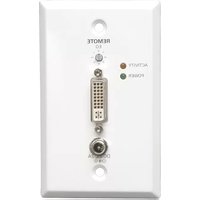
| Form Factor | In-wall wall plate receiver |
| Video Input | 1 x RJ45 (from transmitter) |
| Video Output | 1 x HDMI Female |
| Supported Resolutions | Up to 1080p (1920x1080) @ 60Hz |
| Transmission Distance | Up to 150 ft (45 m) over Cat5e/6 |
| HDCP Support | Yes (HDCP 1.2/1.4 compatible) |
| Audio Support | Yes, supported via HDMI |
| LED Indicators | Power and link status LEDs |
| Power Supply | 5V DC 1A power adapter (included) |
| Power Consumption | 1W (standby), 2.5W (active) typical |
| Dimensions (W x H x D) | 4.5 x 2.8 x 1.2 in (11.4 x 7.1 x 3.0 cm) |
| Weight | 0.3 lb (136 g) |
| Operating Temperature | 32°F to 122°F (0°C to 50°C) |
| Maintenance & Cleaning | Wipe exterior with a soft, dry cloth |
| Safety Warnings | Do not expose to liquid; only use indoor |
| Spare Parts & Repairability | Non-user-serviceable; no spare parts available |
| Warranty | Tripp Lite 1-year limited warranty |
Frequently Asked Questions - B126-1A1-WP Tripp Lite
What is the Tripp Lite B126-1A1-WP used for?
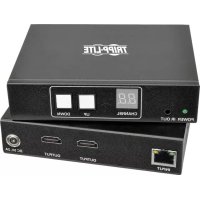
The B126-1A1-WP is a wall-plate receiver designed to extend HDMI signals over a single Cat5e or Cat6 cable. It pairs with a compatible transmitter (e.g., B126-1A1) to send high-definition video and embedded audio up to 150 ft away.
How do I install the B126-1A1-WP wall plate receiver?
Install the wall plate in a standard electrical box. Connect the Cat5e/6 cable from the transmitter to the RJ45 port, then connect an HDMI cable from the wall plate's HDMI output to your display. When paired with a transmitter, the signal appears immediately.
What cable is needed between the transmitter and receiver?
Use a single Cat5e or Cat6 network cable (solid or stranded). For best performance over longer runs, use Cat6. Ensure the cable is terminated according to the TIA 568B wiring standard.
What is the maximum transmission distance?
The B126-1A1-WP supports distances up to 150 feet (45 meters) with 1080p video over Cat5e/Cat6. Cable quality can influence the maximum distance, so use high-quality network cabling for best results.
Does the B126-1A1-WP support 4K UHD video?
No. This model supports Full HD resolutions up to 1080p. For 4K extension, Tripp Lite offers dedicated 4K models such as the B126-4K series.
Does the receiver require its own power supply?
Yes, the B126-1A1-WP requires a 5V DC power adapter which is included in the package. The adapter must be connected to the wall plate to operate. Power-over-Cat5e is not supported.
Can I pass IR remote control signals through the extender?
No. The B126-1A1-WP does not support IR pass-through. It only transmits video and audio signals from the source to the display. For IR remote control, a separate IR extender kit is needed.
Is the B126-1A1-WP compatible with HDCP-protected content?
Yes, it complies with HDCP 1.2/1.4, allowing you to view content from copyright-protected sources such as Blu-ray players, cable boxes, and streaming devices.
How do I connect the receiver to my display?
Connect a standard HDMI cable from the receiver's HDMI output on the wall plate to any HDMI input on your TV, projector, or A/V receiver. The extender itself does not alter the video signal quality.
What is the warranty and repair policy for the B126-1A1-WP?
The product is covered by a 1-year limited warranty from Tripp Lite. It contains no user-serviceable parts; do not open the unit. For warranty claims or repairs, contact Tripp Lite support at your regional authorized service center.
User questions about B126-1A1-WP Tripp Lite
0 question about this device. Answer the ones you know or ask your own.
Ask a new question about this device
No questions yet. Be the first to ask one.
Download the instructions for your Receiver in PDF format for free! Find your manual B126-1A1-WP - Tripp Lite and take your electronic device back in hand. On this page are published all the documents necessary for the use of your device. B126-1A1-WP by Tripp Lite.
USER MANUAL B126-1A1-WP Tripp Lite


Manual assistant
Powered by Anthropic
Waiting for your message
Product information
Brand : Tripp Lite
Model : B126-1A1-WP
Category : Receiver