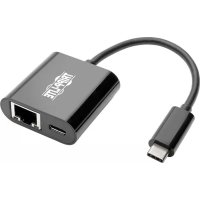
U43606NGBC - Network adapter Tripp Lite - Free user manual and instructions
Find the device manual for free U43606NGBC Tripp Lite in PDF.

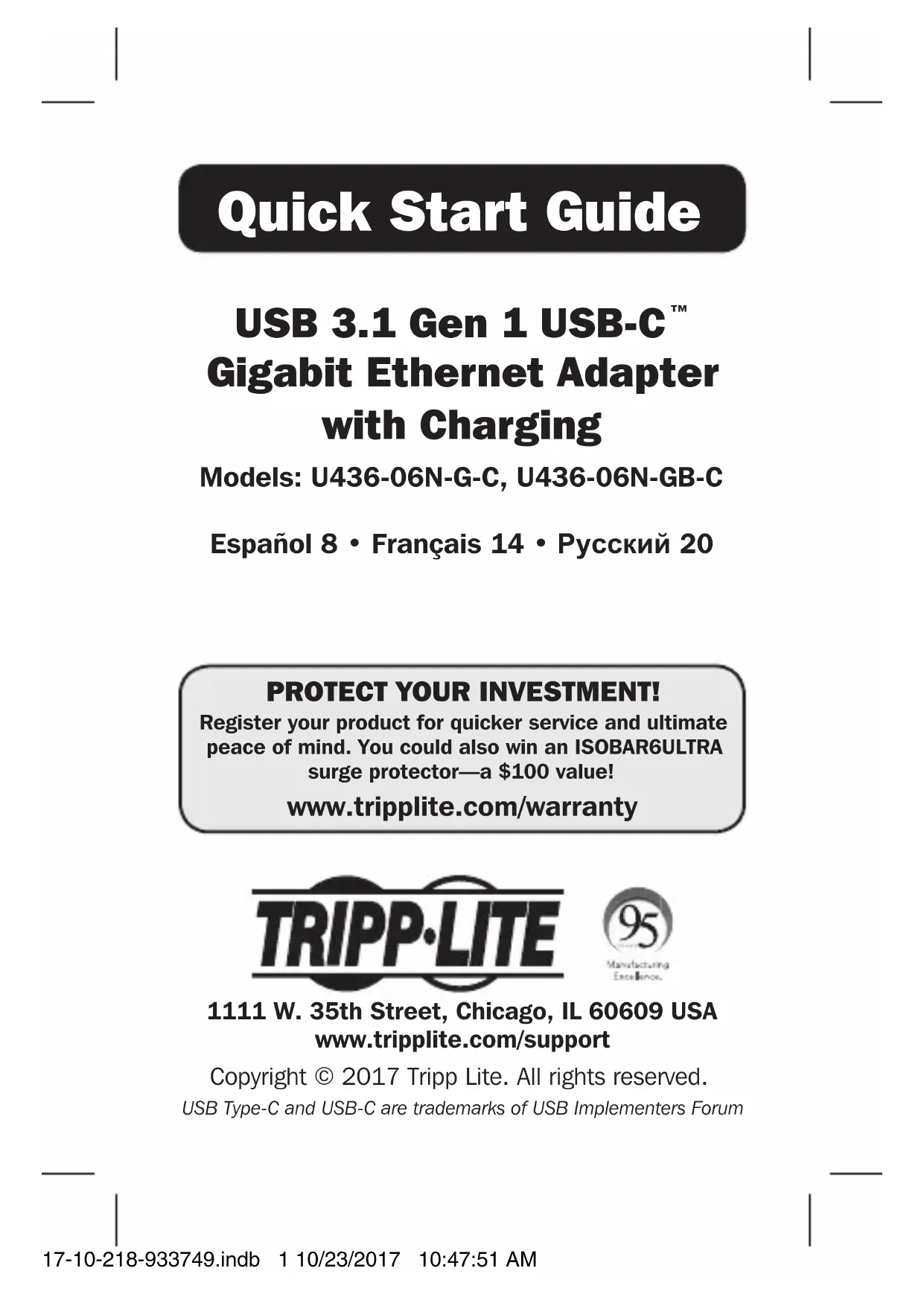


| Product Type | USB-C to Gigabit Ethernet Network Adapter with Charging Port |
| Brand | Tripp Lite |
| Model | U43606NGBC (U436-06N-G-C / U436-06N-GB-C) |
| Host Connector | USB-C Male |
| Network Connector | RJ45 Female |
| Charging Port | USB-C Female, Input up to 20 V 3 A (60 W) |
| Network Speed | 10/100/1000 Mbps (Gigabit Ethernet) |
| Network Standards | IEEE 802.3, 802.3u, 802.3ab, 802.3az |
| Power Source | Bus Powered |
| Operating System Compatibility | Windows, Mac, Chromium OS |
| Wake-on-LAN Support | Yes |
| Available Colors | White (U436-06N-G-C) or Black (U436-06N-GB-C) |
| Operating Temperature | 0° to 70°C |
| Operating Humidity | 10% to 85% |
| Storage Temperature | -10° to 70°C |
| Storage Humidity | 5% to 90% |
| Warranty | 3-Year Limited |
| Installation | No driver required, Plug and Play |
Frequently Asked Questions - U43606NGBC Tripp Lite
User questions about U43606NGBC Tripp Lite
0 question about this device. Answer the ones you know or ask your own.
Ask a new question about this device
Download the instructions for your Network adapter in PDF format for free! Find your manual U43606NGBC - Tripp Lite and take your electronic device back in hand. On this page are published all the documents necessary for the use of your device. U43606NGBC by Tripp Lite.
USER MANUAL U43606NGBC Tripp Lite
USB 3.1 Gen 1 USB-C™ Gigabit Ethernet Adapter with Charging
Models: U436-06N-G-C, U436-06N-GB-C
Espanol 8 • Français 14 • Pycckn 20
PROTECT YOUR INVESTMENT!
Register your product for quicker service and ultimate peace of mind. You could also win an ISOBAR6ULTRA surge protector—a $100 value!
www.triplite.com/warranty


1111 W. 35th Street, Chicago, IL 60609 USA www.triplite.com/support
Copyright © 2017 Tripp Lite. All rights reserved. USB Type-C and USB-C are trademarks of USB Implementers Forum
Product Features
- Add Gigabit Ethernet and USB-C charging via the USB-C port on your smartphone, laptop, tablet or other device
- Plug and play with no software or drivers required
- USB 3.1 Gen 1 supports true 10/100/1000 Mbps network speeds
- USB-C charging port for charging your device, supporting up to 20V 3A (60W) of power input
- Compliant with IEEE 802.3, 802.3u, 802.3ab and 802.3az (Energy Efficient Ethernet)
Supports Wake-on-LAN - Compatible with Windows®, Mac® and Chromium™ operating systems
Package Includes
- U436-06N-G-C (White) or U436-06N-GB-C (Black)
- Quick Start Guide
Installation
Note: When the unit is connected to the USB-C port on your computer and to a network via Cat5e/6 cabling, a network connection will be automatically established. If no connection is made, you can manually establish one by going to your computer's network settings page. For example, on a Mac navigate to the Network section found in System Preferences, click the 'Assist Me' button to get to the Network Setup Assistant, then follow the prompts to establish a connection.
- Connect the adapter's USB Type-C connector to the USB-C port on your smartphone, tablet, Ultrabook™ or computer.
- Connect the adapter's RJ45 port to a network using a UTP cable (such as Tripp Lite's N201-Series Cat6 cables).
- Charge your device by connecting a USB-C cable between the USB-C port on the adapter and the charger or external power supply that came with your device.
Specifications
| Connectors | |
| USB USB-C Male | |
| Ethernet RJ45 Female | |
| Charging USB-C Female | |
| Environmental | |
| Operating Temperature 32° to 158°F (0° to 70°C) | |
| Operating Humidity 10% to 85% RH, Non-Condensing | |
| Storage Temperature 14° to 158°F (-10° to 70°C) | |
| Storage Humidity 5% to 90% RH, Non-Condensing | |
| Power Requirements | |
| USB-C Charging Port Supports up to 20V 3A (60W) Input | |
Warranty and Product Registration
3-YEAR LIMITED WARRANTY
TRIPP LITE warrants its products to be free from defects in materials and workmanship for a period of three (3) years from the date of initial purchase. TRIPP LITE's obligation under this warranty is limited to repairing or replacing (at its sole option) any such defective products. To obtain service under this warranty, you must obtain a Returned Material Authorization (RMA) number from TRIPP LITE or an authorized TRIPP LITE service center. Products must be returned to TRIPP LITE or an authorized TRIPP LITE service center with transportation charges prepaid and must be accompanied by a brief description of the problem encountered and proof of date and place of purchase. This warranty does not apply to equipment, which has been damaged by accident, negligence or misapplication or has been altered or modified in any way.
EXCEPT AS PROVIDED HEREIN, TRIPP LITE MAKES NO WARRANTIES, EXPRESS OR IMPLIED, INCLUDING WARRANTY OF MERCHANTABILITY AND FITNESS FOR A PARTICULAR PURPOSE.
Some states do not permit limitation or exclusion of implied warranties; therefore, the aforesaid limitation(s) or exclusion(s) may not apply to the purchaser.
EXCEPT AS PROVIDED ABOVE, IN NO EVENT WILL TRIPP LITE BE LIABLE FOR DIRECT, INDIRECT, SPECIAL, INCIDENTAL OR CONSEQUENTIAL DAMAGES ARISING OUT OF THE USE OF THIS PRODUCT, EVEN IF ADVISED OF THE POSSIBILITY OF SUCH DAMAGE. Specifically, TRIPP LITE is not liable for any costs, such as lost profits or revenue, loss of equipment, loss of use of equipment, loss of software, loss of data, costs of substitutes, claims by third parties, or otherwise.
PRODUCT REGISTRATION
Visit www.triplite.com/warranty today to register your new Tripp Lite product. You'll be automatically entered into a drawing for a chance to win a FREE Tripp Lite product!*
- No purchase necessary. Void where prohibited. Some restrictions apply. See website for details.
Warranty and Product Registration
FCC Notice, Class B
This device complies with part 15 of the FCC Rules. Operation is subject to the following two conditions: (1) This device may not cause harmful interference, and (2) this device must accept any interference received, including interference that may cause undesired operation.
Note: This equipment has been tested and found to comply with the limits for a Class B digital device, pursuant to part 15 of the FCC Rules. These limits are designed to provide reasonable protection against harmful interference in a residential installation. This equipment generates, uses and can radiate radio frequency energy and, if not installed and used in accordance with the instructions, may cause harmful interference to radio communications. However, there is no guarantee that interference will not occur in a particular installation. If this equipment does cause harmful interference to radio or television reception, which can be determined by turning the equipment off and on, the user is encouraged to try to correct the interference by one or more of the following measures:
- Reorient or relocate the receiving antenna.
- Increase the separation between the equipment and receiver.
- Connect the equipment into an outlet on a circuit different from that to which the receiver is connected.
- Consult the dealer or an experienced radio/TV technician for help.
Any changes or modifications to this equipment not expressly approved by Tripp Lite could void the user's authority to operate this equipment.
Warranty and Product Registration
WEEE Compliance Information for Tripp Lite Customers and Recyclers (European Union)
Under the Waste Electrical and Electronic Equipment (WEEE) Directive and implementing regulations, when customers buy new electrical and electronic equipment from Tripp Lite they are entitled to:
- Send old equipment for recycling on a one-for-one, like-for-like basis (this varies depending on the country)
- Send the new equipment back for recycling when this ultimately becomes waste
Use of this equipment in life support applications where failure of this equipment can reasonably be expected to cause the failure of the life support equipment or to significantly affect its safety or effectiveness is not recommended. Do not use this equipment in the presence of a flammable anesthetic mixture with air, oxygen or nitrous oxide.
Tripp Lite has a policy of continuous improvement. Specifications are subject to change without notice.


Manufacturing
Ee
1111 W. 35th Street, Chicago, IL 60609 USA www.triplite.com/support
1111 W. 35th Street, Chicago, IL 60609 USA www.triplite.com/support
Copyright © 2017 Tripp Lite.
Todois los derechos reservados.
USB Type-C y USB-CTM son marcas commerciales registradas del USB Implementers Forum
1111 W. 35th Street, Chicago, IL 60609 USA www.triplite.com/support
1111 W. 35th Street, Chicago, IL 60609 USA www.triplite.com/support
1111 W. 35th Street, Chicago, IL 60609 USA www.triplite.com/support
KpaTKoe pyKOBoIDCTBO NOJIb3OBaTeJRA
Aдаптep USB 3.1 Gen 1USB-C Gigabit Ethernet cВОЗМоЖноctью зараздкн
1111 W. 35th Street, Chicago, IL 60609 USA www.triplite.com/support
Oxpanyetcay ABTOPKIM npabom © 2017 Tripp Lite. Nepeneuatka 3anpeuaetcra.
USB Type-C n USB-CTM yBnIOTcT TopRObIMN 3HaKaAMN KOMNaHIN USB Implementers Forum
XapakTepnctnKn npOdyKta
- Поdkлюа捜етсь к сетам Gigabit Ethernet и NGNoIb3yIte BO3MOxHOCt b 3apЯДКУеpe3 nopT USB-C cBoero cMaprФОHa, пlaHWEta, NOPTaTINBHOKOMNbIOTepa ИлдpyrOуYCTPOIcTBA
- ABTOMATNUeCKa HacTroPoiKa Pn IOnKJIuOyeHn IIO TexHOJOrn Plug-and-play 6e3 Heo6xOJIMocTn IcNoIb3OBaHn IpoIpaMMHoro OBeCneYeHn IJI nI dpaIbEpoB
- Иntерфейс USB 3.1 Gen 1 подерживает скорости,
пегдачниньix 10/100/1000 M6nt/c
3apnHbI npT USB-C noxOHT dIy 3apKnyctpoiCTBa, nOpdepxNBAIOseTO BXoHoe pNTaHne do20B/3A(60Bt) - CoOTBeTCTByeT Tpe6OBaHnIcTaHdapTOB IEEE 802.3, 802.3u, 802.3ab n 802.3az (əHeprOəΦΦeKTHBbIh Ethernet)
- Повдерхивает Тхнологиn Wake-on-LAN
- COBmecTm C onepaunOHbIMn cnCTeMaMn Windows, Mac® n Chromium™
Copepknmoe ynaKOBKn
U436-06N-G-C (6eIbI) o U436-06N-GB-C (yeepHbI)
KpaTKoe pyKOBoCTBO NOIb3OBaTeJIa
YctaHOBka
Примочи.Еспданhoe устpoистBO пдклioуно К поту USB-C komьютета и к сети чея сабел Cat5e/6,TO ceteboe coeINHeHne yctaHaBnBaETcA ABTomatNueckn.IprO OTCyTCTBm COeINHeHn OHO MOKeT 6bITb yCTaHOBJIeHO BpyHyIO CO CTpaHnIcbl CeTeBbIX HAcTpoEK KOMlbIOTepa.HanpIMep,Ha yCtpoiCTBe Mac cIeJyET npeYTN B pa3dEIN Network ("Cetb") B MeHIO System Preferences("IapametpbI cnCTembl),HaxaTB Ha KhoNkY 'Assist Me' ("Tpe6yETcR nomoMb")ДЯ BblOBA yTNIITbI Network Setup Assistant ("POMOuHK hAcTpoIK CteBbIX napameTpOB"),a 3aTeM cIeIDOBaTb NOdCKaKAM DЯ yCTaHOBJIeHncoeINHeHn.
- BcTaBbTe pa3bEm USB Type-C aAnTepa B nopT USB Type-C cBoero cMapToHa, pAnHeTa, yIbTpap6yka nn KOMNbHTEpa.
- CoeHnTe npT RJ45 aanTepa c cetbIO npn nOoN Ka6eJ UTP (HaNPmEp, OndHO r3 npednaeraembIX kompaHnei Tripp Lite ka6eJ Cat6 cepuN N201).
- 3apynte cBoe yctpoicTBO, coeHnHB npT USB-C aanTepa C 3apyHbIM yctpoiCTBOM INI BHeHIM 6JOKOM NITaHNA, NOCTABJIeMbIM B KOMJIeKTe C ycTPOiCTBOM, yepe3 Ka6eJIb USB-C.
Texhnueckne xapakTepnCTnKn
Manufacturing Excellence.
1111 W. 35th Street, Chicago, IL 60609 USA www.triplite.com/support
17-10-218 93-3749_RevB

- USB 3.1 Gen 1 USB-C™ Gigabit Ethernet Adapter with Charging
- PROTECT YOUR INVESTMENT!
- Product Features
- Package Includes
- Installation
- Specifications
- Warranty and Product Registration
- 3-YEAR LIMITED WARRANTY
- PRODUCT REGISTRATION
- FCC Notice, Class B
- WEEE Compliance Information for Tripp Lite Customers and Recyclers (European Union)
- KpaTKoe pyKOBoIDCTBO NOJIb3OBaTeJRA
- Aдаптep USB 3.1 Gen 1USB-C Gigabit Ethernet cВОЗМоЖноctью зараздкн
- XapakTepnctnKn npOdyKta
- Copepknmoe ynaKOBKn
- YctaHOBka
- Texhnueckne xapakTepnCTnKn
Brand : Tripp Lite
Model : U43606NGBC
Category : Network adapter