B003HC2DOCK1 - Switch Tripp Lite - Free user manual and instructions
Find the device manual for free B003HC2DOCK1 Tripp Lite in PDF.


User questions about B003HC2DOCK1 Tripp Lite
0 question about this device. Answer the ones you know or ask your own.
Ask a new question about this device
Download the instructions for your Switch in PDF format for free! Find your manual B003HC2DOCK1 - Tripp Lite and take your electronic device back in hand. On this page are published all the documents necessary for the use of your device. B003HC2DOCK1 by Tripp Lite.
USER MANUAL B003HC2DOCK1 Tripp Lite
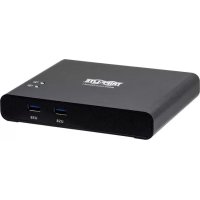
2-Port USB-C KVM Docking Station
4K @ 30 Hz, USB 3.2 Gen 1
Model: B003-HC2-DOCK1
Espanol 17 • Français 33 • Pycckn 49
WARRANTY REGISTRATION
Register your product today and be automatically entered to win an ISOBAR® surge protector in our monthly drawing!
triplite.com/warranty


Manufacturing Excellence.
1111 W. 35th Street, Chicago, IL 60609 USA · tripplite.com/support
Copyright © 2020 Tripp Lite. All rights reserved.
USB Type-C™ and USB-C™ are trademarks of USB Implementers Forum
Package Contents
- 2-Port USB-C KVM Docking Station
- (x2) USB-C to USB-C Cables (M/M), 3.3 ft. (1 m)
- Remote Port Selector
- Owner's Manual
Optional Accessories
P569-XXX-CERT Series High-Speed HDMI Cables
- M100-Series USB-A to Lightning Sync/Charge Cables
U428-Series USB 3.1 Gen 1 USB-A to USB-C Cables
System Requirements
- Windows® 10 and above, computer with USB-C port and USB-C DisplayPort Alternate Mode
Note: With Intel 7th-gen Core Processor (Kaby-Lake) and above. More info about CPU generation, please reference https://www.intel.com/content/www/us/en/processors/processor-numbers.html
Mac OS X 10.12 and above, computer with USB-C port
- Android™ 8.0 and above, smartphone with USB-C port and USB-C DisplayPort Alternate Mode
Note: Only Samsung and Huawei® support PC-like operation. Others only support mirror mode. Apple® iPhones are not supported.
iOS 12.1 and above, iPad Pro® 3rd generation (2018)
Note: For better HID experience, iPad OS 13 and above is recommended.
Supporting Mobile Devices
| Samsung Huawei HTC LG | ||
| Galaxy S8 P20 U11 V20 | ||
| Galaxy S8+ P20 Pro U Ultra | ||
| Galaxy S9 | ||
| Galaxy S9+ | ||
| Galaxy S10 | ||
| Galaxy S10+ | ||
| Galaxy S10e | ||
| Galaxy Note 8 | ||
| Galaxy Note 9 |
Product Features
- Allows a USB-C laptop and a USB-C smartphone to share one monitor, keyboard and mouse, as well as USB peripherals.*
- HDMI port supports crystal-clear 4K resolutions up to 3840 x 2160 @ 30 Hz.
- Provides USB PD 3.0 for laptop/computer charging up to 85W at power profiles of 5/9/15/20V.
Supports Samsung DeX mode and Huawei Desktop mode.***
Video DynaSync™ allows continuous real-time switching with EDID/HDCP monitors and computers. - Switches between ports using the included remote port selector.
-
Plug-and-play operation with no extra software or external power supply required
-
Apple iPhones are not supported.
** For video output to work through a USB-C port, it must support USB-C DisplayPort Alternate Mode.
*** Compatible with smartphones launched in 2018 or later that support USB-C DisplayPort Alternate Mode.
Feature Identification
Front Panel
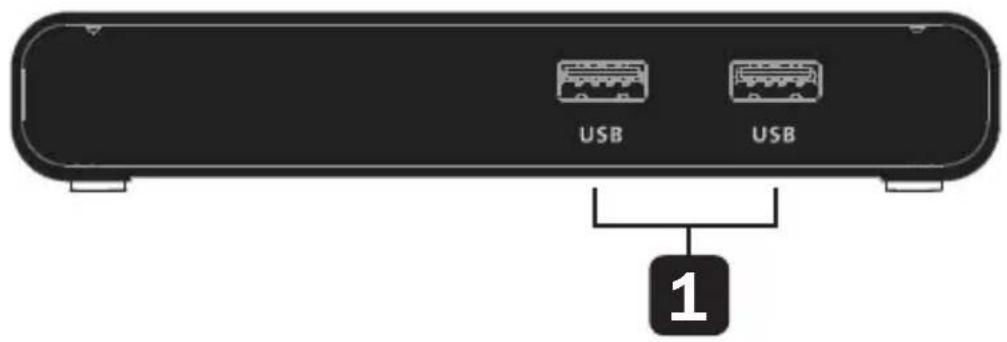
1 USB 3.2 Gen 1 Type-A Ports:
Connects to USB-A peripherals, such as a keyboard, mouse or thumb drive.
Feature Identification
Rear Panel
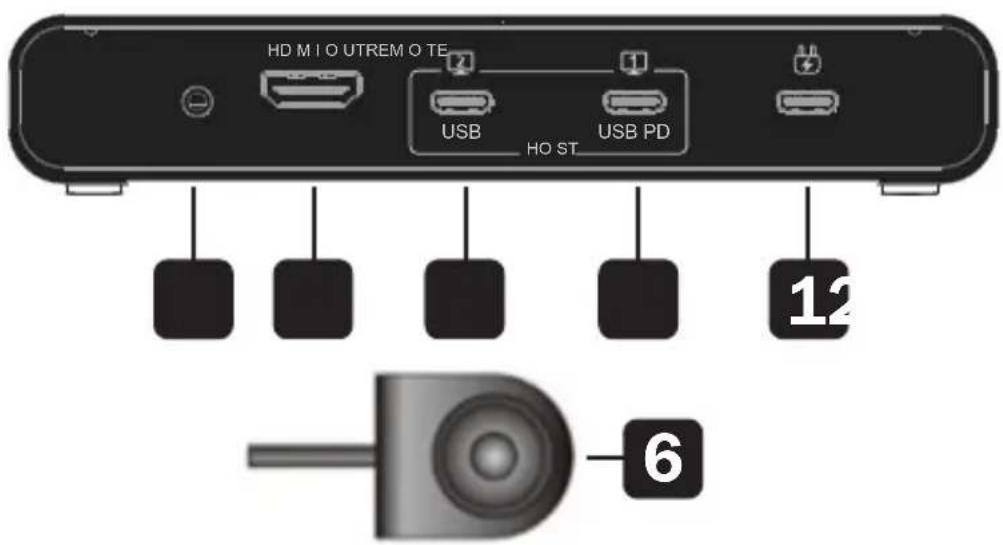
1 USB-C DC-In Port*:
Connects a USB-C power source.
2 USB-C 3.2 Gen 1 Type-C Port 1 (Laptop)**:
Connects a computer with the included USB-C cable. If you need PD laptop charging, connect your computer to this port.
3 USB-C 3.2 Gen 1 Type-C Port 2 (Android: Samsung DeX or Huawei Desktop Mode)**:
Connects a laptop or Android mobile device with the included USB-C cable.
4 HDMI Output:
Connects to a monitor's HDMI input with a user-supplied HDMI cable.
Feature Identification
5 2.5 mm Remote Port Selector Jack:
Connects the included Remote Port Selector.
Remote Port Selector:
Press the button to switch to the next port when connected to the unit.
- Supports maximum 100W USB-C PD power adapter input. For device charging, a Limited Power Source (LPS) certified USB-C PD power adapter over 65W is recommended. The minimum system power requirement for basic USB functions and video output should be at least 5V 3A. The first 15W will supply the B003-HC2-DOCK1. The next 10W will supply the USB-C device connected to the Android port. The balance of power will supply the USB-C device connected to the Laptop port.
** Supports USB-C PD laptop charging at 5/9/15/20V output.
**Supports maximum 5V 2A output.
Feature Identification
Top Panel
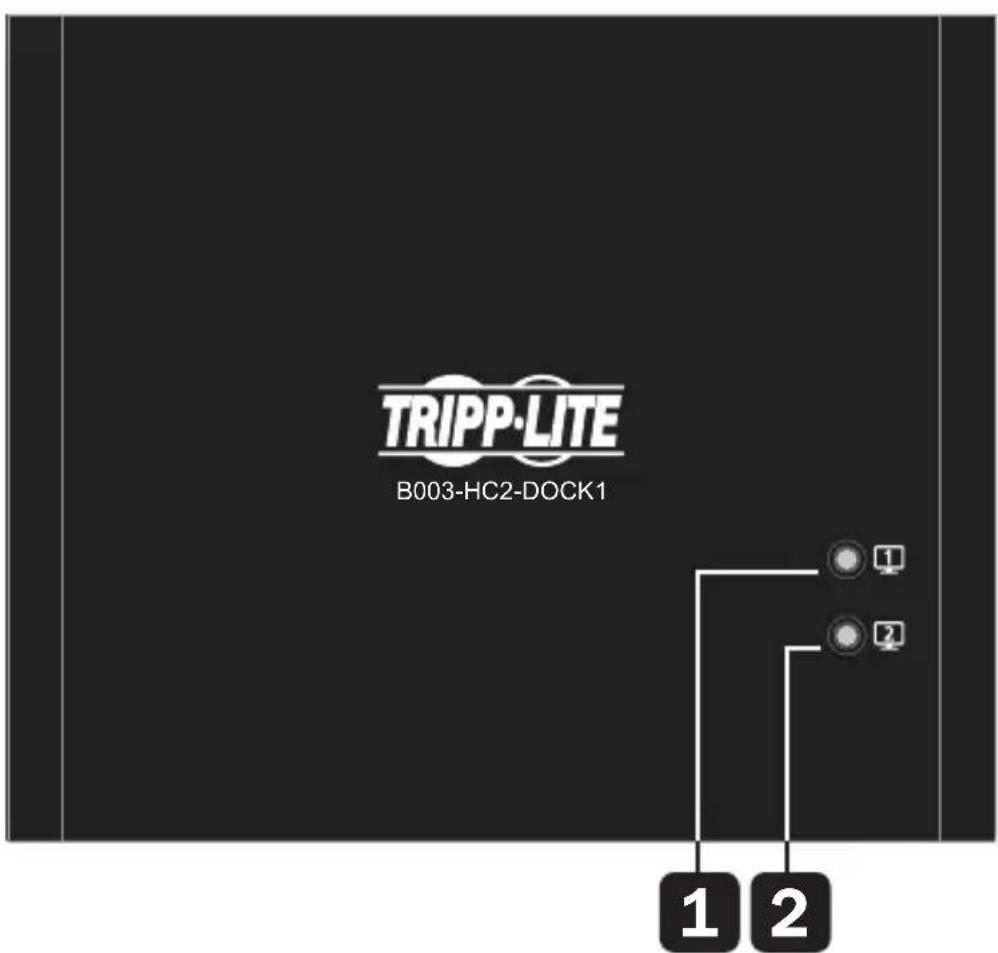
1 Console Indicator LED (Port 1): Illuminates white when the corresponding console is in use.
2 Console Indicator LED (Port 2): Illuminates white when the corresponding console is in use.
Installation and Operation
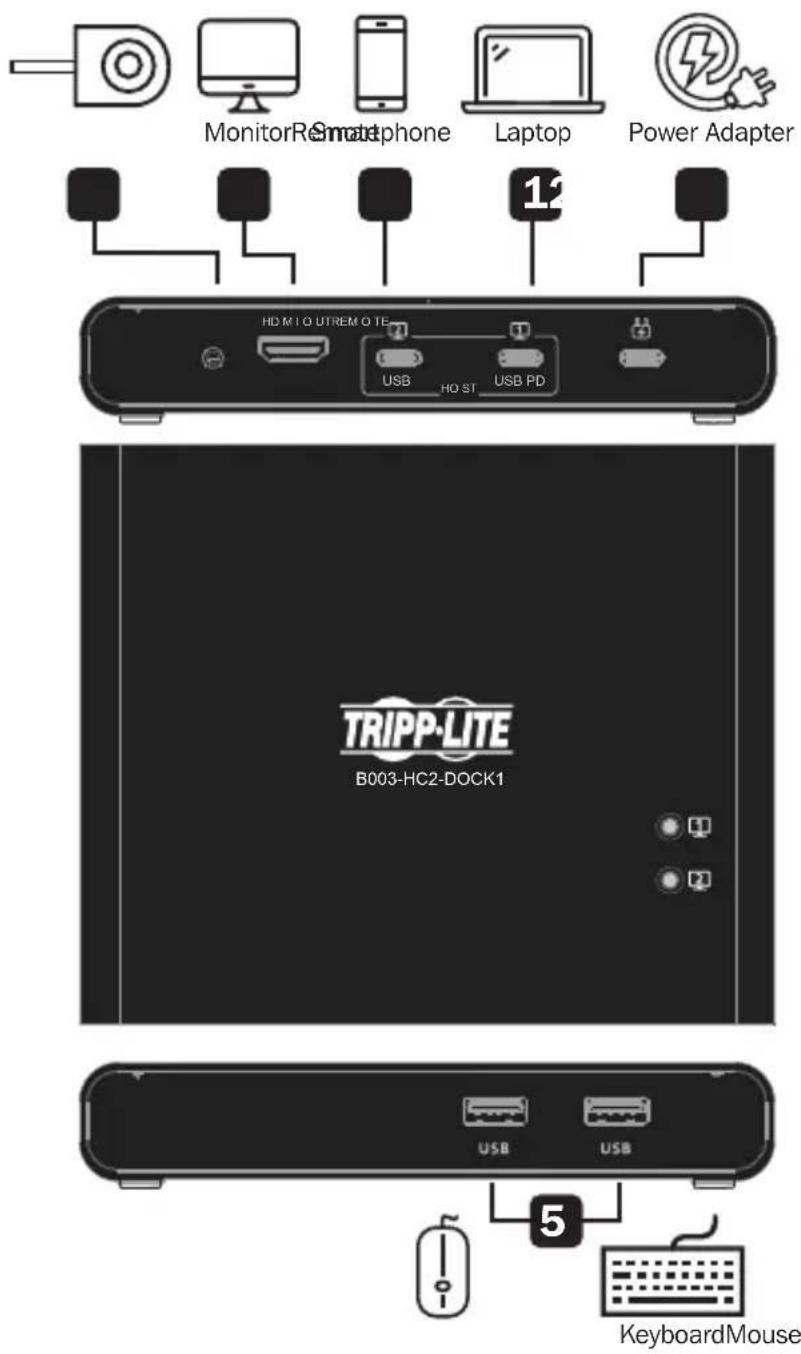
Installation and Operation
1 Connect a computer or laptop to Port 1 using an included USB-C cable.
Note: Port 1 supports PD 3.0 charging up to 85W at power profiles of 5/9/15/20V.
2 Connect a mobile device, computer or laptop to Port 2 using an included USB-C cable.
Note: Port 2 supports charging up to 10W (5V 2A). It is recommended to charge laptops using Port 1 and mobile devices, such as Android smartphones, using Port 2.
3 Connect an HDMI-compliant display with a user-supplied HDMI cable.
4 (Optional) Connect a USB-C power adapter, such as the adapter than came with your laptop.
Note: This port supports up to 100W (20V 5A) maximum input. A USB-C PD power adapter over 65W is recommended. The first 15W will supply the B003-HC2-DOCK1 itself. The next 10W will supply the USB-C device connected to Port 2. The balance of power will supply the USB-C device connected to Port 1.
5 Connect up to two USB peripherals, such as thumb drives.
6 Connect the included Remote Port Selector.
Port Selection
Press the button on the Remote Port Selector to switch between the two connected source devices. The Console Indicator LED will illuminate to show which console port is currently in use.
Note: If the LED begins flashing, please check the power consumption of your connected USB peripheral.
Firmware Upgrade
1 Connect one end of a USB-C cable to your computer and the other end to Port 1 on the docking station. Note: Do not connect a source to Port 2.
2 Connect the Remote Port Selector cable to the unit.
Press and hold the remote button, then power on the B003-HC2-DOCK1. The LED will blink and unit will enter the firmware upgrade mode.
4 Run the Upgrade.bat file and follow the instructions.
After a successful firmware upgrade, disconnect the power source to the B003-HC2-DOCK1 to exit the firmware upgrade mode.

Specifications
| Model B003-HC2-DOCK1 | |||
| Device Connection 2 | |||
| Connectors Upstream Computer (x1) USB 3.2 Gen 1 Type-C (Female) | |||
| Downstream | Smartphone | x1) USB 3.2 Gen 1 Type-C (Female) | |
| USB (x2) USB | 3.2 Gen 1 Type-C (Female) | ||
| HDMI (x1) HDMI (Female) | |||
| Source Selection (x1) 2.5 mm | |||
| LED (x2) White | |||
| Video Max Res 3840 x 2160 @ 30 Hz | |||
| Compliance | USB 3.2 Gen 1 Type-C with DisplayPort Alt Mode (Thunderbolt 3 Compatible); HDCP 1.4 | ||
| Power Delivery Port 1 | USB PD 3.0 for laptop charging up to 85W; power profiles include 5/9/15/20V* | ||
| Port 2 | 5V 2A maximum for smartphone charging* | ||
| Power Consumption | DC: 5V, 1.24W, 406 BTU | ||
| Operating Temperature | 32° to 104°F (0° to 40°C) | ||
| Storage Temperature | -4° to 140°F (-20° to 60°C) | ||
| Humidity | 0 to 80% RH, Non-Condensing | ||
| Housing | Aluminum | ||
| Weight | 0.84 lb. (0.38 kg) | ||
| Dimensions | 5.63 x 4.69 x 0.96 in. (14.3 x 11.9 x 2.45 cm) | ||
- Additional USB-C power adapter is required
Warranty and Product Registration
3-Year Limited Warranty
Seller warrants this product, if used in accordance with all applicable instructions, to be free from original defects in material and workmanship for a period of 3 years from the date of initial purchase. If the product should prove defective in material or workmanship within that period, Seller will repair or replace the product, at its sole discretion.
THIS WARRANTY DOES NOT APPLY TO NORMAL WEAR OR TO DAMAGE RESULTING FROM ACCIDENT, MISUSE, ABUSE OR NEGLECT. SELLER MAKES NO EXPRESS WARRANTY OTHER THAN THE WARRANTY EXPRESSLY SET FORTH HEREIN. EXCEPT TO THE EXTENT PROHIBITED BY APPLICABLE LAW, ALL IMPLIED WARRANTYES, INCLUDING ALL WARRANTYES OF MERCHANTABILITY OR FITNESS, ARE LIMITED IN DURATION TO THE WARRANTY PERIOD SET FORTH ABOVE; AND THIS WARRANTY EXPRESSLY EXCUSES ALL INCIDENTAL AND
CONSEQUENTIAL DAMAGES. (Some states do not allow limitations on how long an implied warranty lasts, and some states do not allow the exclusion or limitation of incidental or consequential damages, so the above limitations or exclusions may not apply to you. This warranty gives you specific legal rights, and you may have other rights which vary from jurisdiction to jurisdiction.)
WARNING: The individual user should take care to determine prior to use whether this device is suitable, adequate or safe for the use intended. Since individual applications are subject to great variation, the manufacturer makes no representation or warranty as to the suitability or fitness of these devices for any specific application.
Warranty and Product Registration
Product Registration
Visit tripplite.com/warranty today to register your new Tripp Lite product. You'll be automatically entered into a drawing for a chance to win a FREE Tripp Lite product!*
*No purchase necessary. Void where prohibited. Some restrictions apply See website for details.
Tripp Lite has a policy of continuous improvement. Specifications are subject to change without notice. Photos and illustrations may differ slightly from actual products.


Manufacturing Excellence.
1111 W. 35th Street, Chicago, IL 60609 USA • tripplite.com/support
20-05-248·93-3CAE_RevA
1111 W. 35th Street, Chicago, IL 60609, EE UU • triplite.com/support
1 Puertoos USB 3.2 Gen 1 Type A:
1111 W. 35th Street, Chicago, IL 60609 EE UU • triplite.com/support
32
20-05-248 93-3CARevA
1111 W. 35th Street, Chicago, IL 60609 USA · tripplite.com/support
1111 W. 35th Street, Chicago, IL 60609 USA • tripplite.com/support
20-05-248·93-3CAE_RevA
PykoBODCTBO NOIb30BaTeJia
2-nopTOBaJdoK-CTaHcIa c KBM-moDyIeM npa3bemamn USB-C
4K npn 30 T, USB 3.2 Gen 1
TapaHTnHbIe 06aTeJIbCTBa
OrpaHnueHHa rapaHTna cpoKoM 3 roda
IpoaBe rapaHTpyET OTCyTCTBWe n3HaayabHbIX DeΦeKTOB MaTePnAa Nnn N3rOToBHeHn B TeueHne 3 let c MOMeHTa nepBOi NOKynk DaHHoro N3dEInn npu ycNoBn ero NCnoB3OBAHn B COOTBeTCTBn co BCemn npimeHmblm K HeMy yka3aHnMa. B cnuyae npoBHeHn KaKx-1n6o DeΦeKTOB MaTePnAa Nnn N3rOToBHeHn B TeueHne yka3aHHoro nepNoDa IpoaBeu ocUeCTBnReT peMOHT Nnn 3aMeHy daHHoro N3dEInn NCKlouHTeNbHO NO CBOeMy yCMOTpeHIO.
IENCTBVE HACTOJIeI IAPAHTNI HE PACNPOCTPAHRETCA HA CUYAEN ECTECTBEHHOTo N3HOCA INIIOBPEKJDEHNA B PE3YbTATE ABAPNI, HEHAINEXKAUeTO NCIOJIb3OBAHNA, HAPUHEHNA PPABIN 3KCIJIYATAUNI INI XAIATHOCTN. IPODABEU HE IPEIOCTABJRE THKAKNX ABHO BbIPAXEHHbIX IAPAHTNI 3A NCKJIIOUeHNEM IPRMO N3IOXEHHO B HACTOUIEM DOKUMEHTE. 3A NCKJIIOUeHNEM CUYAEB, 3ANPEUeHHbIX DEIECTBYIOUIM 3AKOHODATEJBCTBOM, BCE IODPA3UMEBAEMBLE IAPAHTNI, BKJIIOUAY BCE IAPAHTNI PnIFOIDHOCTN DIAI IPODAJKN INI INCIOJIb3OBAHNA IHO HA3HAUEHNO, OTRAHNUEHBI NO IPOJOONIKTEJBHOCTN DEIECTBNA BblSEyKA3AHHBIM IAPAHTNI HBIM CPOKOM; KPOME TOLO, IN3 HACTOUIE IAPAHTNI RHBbIM OBPA3OM NCKJIIOUAYOTCA BCE IOBOOHbIE, CUYAINHbIE IN KOCBEHHbIE Y6bITKN. (B HeKOtOpBX Wtatax He DoynckaeTcB BBeHeHne ORpAHueHNI Ha IPOJONKITEJBHOCTb DeIECTBNA TEX INI INhBX IOdpa3UMeBAeMHx rapaTNI, a B NEKOTOpBX - NCKLIQUeHNE INI ORpAHueHNE pa3Mepa nO6OHyBX INI KOCBEHHbIX y6bITKOB. B 3TNX CUYaX BblSeN3IOXeHHbE OrpAHueHNE INI NCKJIIOUeHNA MOrYT Ha Bac He pacnpoCTpaHARbCS. HAcTOnaJraIpaHTN ppeIOCTaBnAE T KOHNueckne npaba, a Na60p dpynx npab MoKeT 6bITb pa3NIuHbIM B 3AbNCIMoCTN OT UOpSCnKznn).
TapaHTnHbIe 06aTeJIbCTBa
BHIMAHHE! Do hauana nCnoIb3OBAHn DaHHoro yCTpoIcTba Nolb3oBaTeNb DoJXeH y6eINTbcB TOM, YTO OHO YBnEeTcR npuROhBM, COOTBeTCTByUzMM UIN 6e3OnaChbIM DnA npedNoIraemOr npimHeHn. B CBa3N C 60nbWM pa3Ho06pa3mE KOKpeTHbIX npimeHn npou3BOdntel He daet KaKnx-Im60 3aBepeHn INI rapaHTM OTHocHTbeH NO pnproHOCTN daHHbx IN3deIn IJa KaKoro-ln60 KOHKpeTHORO npimeHn INI INx COOTBeTCTBn KaKIM-NIO KOHKpeTHbIM Tpe6OBaHnM.


Manufacturing Excellence.
1111 W. 35th Street, Chicago, IL 60609 USA · triplite.com/support
20-05-248·93-3CAE_RevA