Stone Lite - Smartphone Konrow - Free user manual and instructions
Find the device manual for free Stone Lite Konrow in PDF.



| Product Type | Smartphone |
| Brand | Konrow |
| Model | Stone Lite |
| Dual SIM | Yes, two slots for standard SIM cards |
| Screen | TFT color screen (size not specified) |
| Internal memory | Expandable via MicroSD card up to 16 GB |
| Battery | Li-ion 1650 mAh, 4.2 V |
| Camera | Built-in camera |
| FM Radio | Yes, requires headphones as antenna |
| Bluetooth | Yes, data transfer |
| Connectivity | USB port, headphone jack (hands-free kit included) |
| Weight | Approx. 100 g (estimate) |
| Dimensions | Approx. 120 x 50 x 10 mm (estimate) |
| Care and cleaning | Clean with a soft dry or slightly damp cloth |
| Safety | SAR < 2 W/kg; do not use while driving; follow usage precautions |
| Spare parts and repairability | Parts not provided; repair by authorized after-sales service |
| General information | Made in PRC; 2017 Konrow |
Frequently Asked Questions - Stone Lite Konrow
User questions about Stone Lite Konrow
0 question about this device. Answer the ones you know or ask your own.
Ask a new question about this device
Download the instructions for your Smartphone in PDF format for free! Find your manual Stone Lite - Konrow and take your electronic device back in hand. On this page are published all the documents necessary for the use of your device. Stone Lite by Konrow.
USER MANUAL Stone Lite Konrow
Declaration of conformity 63
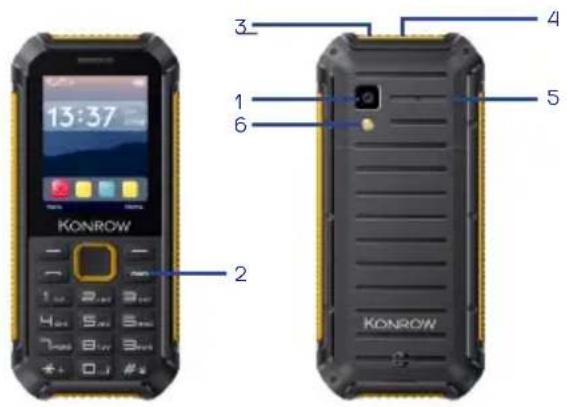
| FR | 1. Appareil photo arrière2. Bouton Marche/Arrêt3. Prise jack | 4. Prise micro USB5. Haut-parleurs6. Lampe torche |
| EN | 1. Rear camera & flash2. ON/OFF button3. Jack | 4. Micro USB port5. Speakers6. Torchlight |
| PT | 1. Cámara2. Botão On/Off3. Tomada | 4. Plugue USB Micro5. Alto-falantes6. Tocha |
| IT | 1. Fotocamera2. Tasto di accensione3. Jack auricolare | 4. Connettore Micro USB5. Altoparlanti6. Torcia |
| NL | 1. Camera2. Knop aan/uit3. Jack Stopcontact | 4. Stopcontact Micro USB5. Luidsprekers6. Zaklamp |
| ES | 1. Cámara2. Botón marcha/interrupción3. Tomada conmutador telefónico | 4. Tomada Micro USB5. Altavoz6. Linterna |
| DE | 1. Hintere Kamera & Blitz2. ON / OFF-Taste3. Jack | 4. Mikro-USB-Hafen5. Lautsprecher6. Lampe |
| HE | ### ## #### .1ON / OFF ### .2### ## ## .3 | USB ### #### .4### #### .5019 .6 |
for purchasing Stone Lite Mobile. You will find all the information regarding the use of this cellphone in this guide.
CAUTION: The packaging materials, such as the adhesive tape, plastic film, string and labels are not part of this product.
WARNING: For your safety, please do not remove the screen's protective film, located under the antistatic film (with tab). It protects your screen against slight scratches and provides optimum protection if the phone is dropped.
GIFTBOX CONTENT:
• 1 Mobile • 1 user guide
• 1 mains adaptor • 1 Headset
- 1 battery
Konrow danke
1. Inserting a SIM card
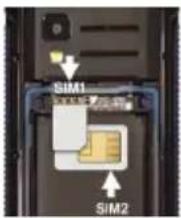
Stone Lite is a mobile phone with dual SIM card which enables you to use two lines on the same mobile. Your Stone Lite has two standard SIM ports. To insert the SIM card(s):
- Switch off the phone and remove the rear cover and battery.
- Insert the SIM card correctly into the relevant card slots (see figure below).
- Then replace the battery and cover.
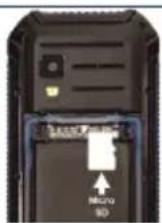
2. Inserting a Micro SD
It is possible to increase the internal memory of the Stone Lite device with a MicroSD card (maximum 16GB MicroSD card).
- Switch off the phone and remove the rear cover and battery. - Insert the memory card into the relevant slot.
- Then replace the battery and cover.
CAUTION: Inserting or removing a SIM card or a MicroSD card requires the mobile to be completely switched off.
3. Installing and charging the battery
Installing the battery:
- Remove the rear cover of your mobile.
- Insert the battery ensuring that the image shown here is facing you. - Replace the rear cover of the mobile.
CAUTION: Risk of explosion if battery is replaced by an incorrect type. Model : Stone Lite Li-ion 4.2V /1650 mAh. To replace the battery, please enquire with the after-sales service of your dealer. Dispose of used batteries according to the instructions.
Charging the battery:
• To charge the battery, connect the USB cable (supplied) to the USB port of your mobile then connect the mains adaptor to a power outlet.
• The battery charge icon illuminates during charging and indicates the charge status.
- When the battery is fully charged, you can disconnect the USB cable from the device then from the power outlet.
IMPORTANT:
• The mobile is only recharged via its USB port.
- Ensure your mobile is fully discharged before charging it for the first time.
• The battery must be charged for at least 5 to 8 hours when first charged.
Note: You can use the device when it is being charged. In this case, the battery may take longer to charge fully.
Safety information for charging the battery:
• To recharge the battery, only use the mains adaptor supplied with your device. Do not use any other power supply or electrical device. The power outlet to which the device is connected must be near the equipment and must always be easily accessible.
• Always wait at least 5 seconds after switching off the device before restarting it. Switching the
device off and then back on again immediately may damage the electrical circuits.
- Do not disassemble the battery. Do not dispose of batteries in fire or water. Do not charge the battery if the room temperature exceeds 45°C.
- For all repairs or to replace the battery, consult a qualified technician.
- The lifetime of the battery depends largely on how you use it. Do not expose the battery to temperatures less than 0°C or greater than 60°C. Its performance may be altered.
- Significant electromagnetic interference or electrostatic discharge may cause malfunction or loss of data. If the device is not working properly, restart the mobile or unplug the mains adaptor from the power outlet then plug it in again.
4. Switching the mobile on and off
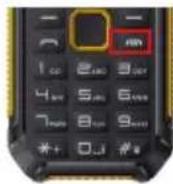
To switch the mobile on, press the On/Off button located on the side of the mobile for 3 seconds.
If the mobile is switched on, press for less than a second on the button to put the device into standby mode.
To switch off the mobile, press the On/Off button for 3 seconds until a menu appears, then touch the Off button and confirm.
Start-up guide
5. Locking/unlocking SIM cards
Your Stone Lite is a dual SIM mobile. It enables you to phone using two lines from the same device. There are two SIM card slots.
- When you start up your phone, the latter invites you to enter the PIN codes of your two SIM cards in succession (SIM1 then SIM 2).
- The "emergency call" function enables you to call an emergency number without entering the PIN code.
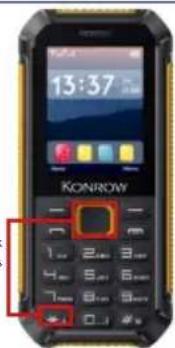
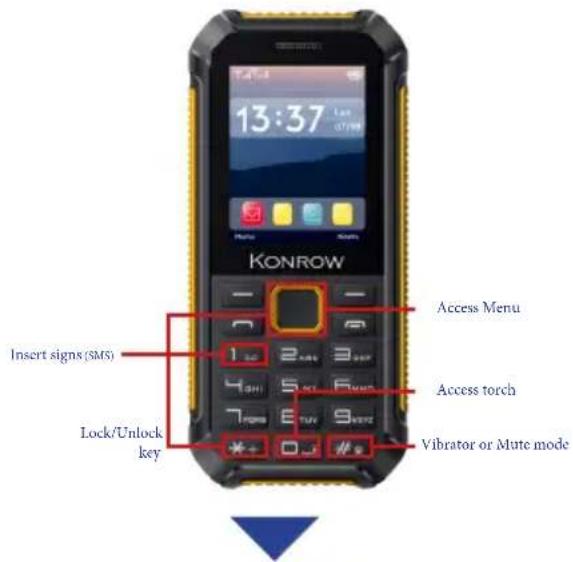
6. Locking/unlocking the keypad
To lock the screen:
press the lock button then the * button
To unlock the screen:
press the lock button then the * button
You can configure the screen lock by adding a password or pattern to be replicated when unlocking your mobile.
CAUTION: Forgetting your screen lock password, PIN code or pattern permanently blocks your mobile. If this is forgotten or lost, the product warranty will not cover such an oversight. Even a "reset"
cannot solve the problem. As a precaution, take a note of your password or pattern.
PASSWORD:
Lock/Unlock keys

7. Making and receiving calls
NOTE: It is impossible to make or receive a call on the two SIM cards at the same time.
For example, if you are on a call on the SIM 1 line, those trying to contact you on SIM 2 will automatically be diverted to voicemail.
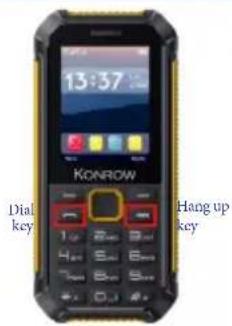
In the standby interface, press Dial-pad enter virtual dial pad, press number keys to input the area code and the telephone number, and then press the dial key to dial a call.
When a call is received press the dial keys to pick up the call.
When you want to end a call, press the Hang up key.
Settings
8. Call settings
Dual-SIM: You can set standby mode, reply by original SIM, set SIM name through this function.
Call divert: This network function enables you to forward incoming calls to another number you have previously specified.
Call waiting: After you choose Activate, the mobile phone will contact the network. A moment later, the network will make a response and send a message to acknowledge your operation. If the call waiting function is activated, the network will alert you and the mobile phone screen will display the incoming call number if others are calling you while you are already in a conversation.
Call barring: The call barring function enables you to bar calls as needed. When setting this function, you need to use a network barring code, which can be obtained from the network operator. If the code is wrong, an error message will be prompted on the screen. After selecting a call barring option, continue to select Activate or Deactivate. The mobile phone will prompt you to input the call barring code and then contact the network. A moment later, the network will make a response and send the operation results to the mobile phone.
Hide ID: You can select hide ID, display own ID and or display ID by network.
Others: You can set call time minute reminder, auto redial, vibration when connected and reply SMS after reject and auto call record, through this function.
Phone settings
9. General settings
Date & time: set the time, set the date, set the date format, the time format and update time settings.
Note: If you remove the battery from the mobile phone or if the battery energy was exhausted a long time ago, you may need to reset the date and time when re-inserting the battery or powering on the mobile phone after recharging.
Language settings: Select the display language for the mobile phone.
Shortcut settings: Select preferred function as shortcut on screen direction key as needed. Auto power on/off: Set the time when the mobile phone will be automatically powered on or off.
Restore factory settings: You can cancel the setting you set. The original code is 1122. This menu allows you to set the wallpaper, screen saver, backlight and backlight of the keyboard.
10. Security settings
This function provides you with related settings about safety use:
PIN: To activate PIN lock, you need to input the correct PIN code. If you set PIN lock to On, you need to input the PIN each time you power on the mobile phone. In the case you input a wrong PIN for three consecutive times; you need to input the PIN Unblocking Key (PUK). The PUK is used to unlock and change the locked PIN. To obtain the PUK, contact the network operator.
Modify PIN2: To change PIN2 code of PIN code.
Phone locked: The function enables you to lock/unlock the phone. Entering password to switch on or off the phone. Password is required when the phone is locked. The initial password is 1122.
Modify the cellphone password: to change phone password.
Privacy: You can set password to protect your privacy, the initial password is 1122.
Auto keypad lock: The function enables you to lock/unlock the keypad. Set the auto locking time 15s, 30s, 1min and 5mins are available.
Lock screen by end-key: You can select to turn on/off this function.
Guardlock: You can set password to protect your cellphone.
Blacklist: The number which you add to blacklist cannot call you.
Contact the network operator to obtain the following network services:
11. Connections
Network account: You can manage network account through this function. GPRS Service: You can select to turn on/off this function.
Data connection settings: The default setting is connecting when needed.
Network selection: Set Network selection mode to Automatic or Manual. Automatic is recommended. When Network selection mode is set to Automatic, the mobile phone will prefer the network where the SIM card is registered. When Network selection mode is set to Manual, you need to select the network operator's network where the SIM card is registered.
12. Call log
Missed calls: You can view a list of the latest missed calls.
Note: When the mobile phone indicates that some calls are missed, you can select Read to enter the missed calls list. Navigate to a missed call and then press the Dial key to dial the number that originated that call.
Dialed calls: You can view the latest dialed calls. Choose dialed calls and then select a dialed call to delete, save, dial or edit (or send a short message to it).
Received calls: You can view the latest received calls. Choose received calls and then select a received call to delete, save, dial or edit (or send a short message to it).
Rejected calls: You can view the latest rejected calls. Choose rejected calls and then select a rejected call to delete, save, dial or edit (or send a short message to it). Delete all: You can delete all the latest call records.
Call timers: Choose Call timers to view the last call time, the total time of all dialed calls, the total time of all received calls and the total time of call history or to reset all the time.
GPRS counter: You can view the data of last sent, last received, all sent and all received.

13. Message
If the short message memory is full, a blinking message icon appears on the top of the screen. To normally receive short messages, you need to delete some of the existing short messages.
If the destination user has received the short message you sent and the short message delivery report function is activated, the phone will give off a message report alert tone.
Write message: Access this menu to create a text message.
Inbox: Received Messages are listed in this menu.
Outbox: The messages which are sent failed are stored in the Outbox.
Drafts: Draft messages are listed in this menu.
Sentbox: Sent messages are listed in this menu
Templates: You can create pre-defined messages in this interface.
Broadcast message: This network service enables you to receive a variety of text messages, such as broadcast messages about weather forecast or road conditions. At present, few networks provide this service. Please consult the network operator.
14. Multimedia
Camera: The phone is provided with a camera, which supports the photographing functions. In the capture interface, roll the phone to align the camera to the picture and then press OK key to capture photos. Pictures will be saved in the file system of the phone or in the memory card.
Image viewer: You can view the pictures in the T-card by this function. Press the direction key to choose them and left soft key edit the pictures. Press right soft key to return last interface.
Audio player: You can use this function to play audio files. By pressing the direction key you can control the playing process of audio player: play/pause (OK key), switch to last song/next song (press left or right direction key), fast forward (press and hold right direction key) and rewind (press and hold left direction key). In audio player interface, you can press * and # keys to control volume.
Video player: Use this function to play video files. By pressing the direction key can you control the playing process of video player: play/pause (OK key), switch to last song/next video (press up or down direction key). In video player interface, you can press * and # keys to control volume.
Video recorder: This function enables you to record dynamic pictures. In the capture interface, press OK key to capture videos clip.
Sound Recorder: The phone support WAV and AMR. The AMR takes the compression algorithm. So in the same memory condition, it has longer recording time than WAV.
FM radio: You can use the application as a traditional FM radio with automatic tuning and saved channels. Before using it, you can insert the earphone as antenna. In FM radio interface, left or right direction key to search channels manually, press OK key to play/pause the playing process of the current channel.
15. Tools
Bluetooth: You can transfer data, such as music to other device using Bluetooth. Search the device and receive/transfer data. The received data is automatically stored in the directory.
Alarm: You can set three alarms through this function.
Calendar: Once you enter this menu, there is a monthly-view calendar for you to keep track of important appointments, etc. Days with events entered will be marked.
Calculator: The calculator can add, subtract, multiply and divide.
Turn light on: You can turn on/off the flashlight by this function.
Games: You have several game on your phone.
16. My files
The phone supports the memory card. The capacity of the memory card is variable. You can use the file manager to conveniently manage various directories and files on the memory card.
Choose this option to enter the root directory of the memory. The root directory will list the default folders, new folders and user files. When the mobile phone is powered on for the first time or when you have not changed the directory, the root directory contains the default folders only.
17. Internet
You can use the function to view web pages and search for information on the web before you connecting to the Internet. When you open Internet, your home page opens. The web address (URL) of the current page is displayed at the top of the window.
18. Profiles
The mobile phone provides multiple user profiles, so that you can customize some settings to adapt to the specific events and environments.
Customize the user profiles according to your preference and then activate the user profiles. The user profiles fall into five scenarios: Normal, Silent, Meeting, Indoor, Outdoor. In the standby mode long press # can switch scenarios.
19. Shortcut keys
Português
Tasto di accensione

Parametri
natural_image
Close-up of a black electronic device showing an inserted port labeled 'Micro 3D' with an arrow pointing to it (no readable text beyond label)MicroSD o'or'os' o' Stone Lite-n' o' or'os' o' o' o' o' o' o' o' o' o' o' o' o' o' o' o' o' o' o' o' o' o' o' o' o' o' o' o' o' o' o' o' o' o' o' o' o' o' o' o' o' o' o' o' o' o' o' o' o' o' o'
.שַׁ USB -הַרְבָרִיֹתְאָהָהִיֹתְאָהָהִיֹתְאָהָהִיֹתְאָהָהִיֹתְאָהָהִיֹתְאָהָהִיֹתְאָהָהִיֹתְא'
.הכלההוּרָה,הכלההוּרָה
תְרָה
- nin
8.הַרְשָׁ
- Before using the pedestrian kit, check that the volume is not set to maximum to prevent hearing loss.
- The high volume settings are intended for individuals with reduced hearing capacity and not for those with normal hearing.
- Do not use the pedestrian kit while driving.
- Adjust the volume so that you can hear the sounds around you.
• To prevent possible hearing damage, do not listen at high volume levels for long periods. - Listening to a portable audio player at high volumes can damage your hearing and
- lead to hearing impairment (deafness, ringing ears, tinnitus and hyperacusis).
• In order to prevent these risks it is recommended not to use the device at full volume; use must not exceed one hour per day. - Do not use pre-amplified or amplified models of headphones or pedestrian kit (i.e. with individual volume control and/or self-powered by batteries), as they do not ensure adherence to the maximum volume.
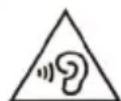
This product complies with the EN 60950-1:2006/A12:2011 standard "Information technology equipment - Safety - Part 1: General requirements" in accordance with the order of 25 July 2013 implementing Article L. 5232-1 of the French Public Health Code concerning portable audio players.
21. Electromagnetic waves safety information (SAR)
Your Stone Lite mobile is designed to not exceed the radio wave limits recommended by the European authorities. These limits include safety margins to ensure the protection of all persons regardless of their age or health.

The SAR (specific absorption rate) of mobile phones quantifies the maximum level of exposure of the user to electromagnetic waves for aural use. French legislation stipulates that the SAR must not exceed 2 W/kg averaged over 10g of tissue.
The value of the SAR is determined on the basis of the highest level of radio frequencies emitted during laboratory tests.
The actual value of the SAR during use of the phone is lower than this level.
The value of the SAR of the phone can vary according to the following factors: how far/close the phone is to a relay antenna, use of accessories and others.
NOTE: The SAR value may vary, depending on national reporting and testing requirements and the network band.
NOTE:
- Do not use your mobile in certain locations such as aircraft, hospitals, service stations and professional garages or while driving a vehicle. The electromagnetic waves from the mobile can disrupt the performance of electronic devices used in these locations.
• We recommend that you switch off your phone or switch it to flight mode in these locations to avoid interference.
- If you use an electronic implant (pacemakers, insulin pumps, neurostimulators, etc), please keep a distance of 15cm between the mobile and your electronic implant.
- When using a hands-free kit, pregnant women should keep the phone away from their abdomen and teenagers should keep the phone away from their lower abdomen.
Advice to reduce the level of exposure to radiation:
- Please use your mobile where reception is good to reduce the quantity of radiation received (avoid using in an underground car park or when travelling (train or car)).
- A reception icon indicates the quality of reception on your phone. A 4-bar display means that reception is good.
- Use of a hands-free kit also allows the level of exposure to be reduced.
22. Safety and care information
- Read these instructions carefully.
- Keep these instructions.
- Follow all these instructions.
- Heed the warnings.
- Clean only with a soft cloth (dry or slightly damp).
- Do not attempt to disassemble the device; it would no longer be covered by the warranty.
- Do not exert excessive pressure on the screen and do not put objects on it. This could damage the screen.
- Use the spare parts specified by the manufacturer.
- After any service or repair carried out on this product, ask the technician to perform a safety check.
- Use only the spare parts/accessories specified by the manufacturer.
- Refer to a qualified person for any repairs. Repair is required if the device is damaged in some manner or other, if the power cord or plug is damaged, if liquid has been spilled or objects have fallen on the device or if the device has been exposed to help or moisture or have been disposed.
on the device or if the device has been exposed to rain or moisture or has been dropped.
- Do not expose the device to direct sunlight or other source of extreme heat or cold.
- Respect the privacy of others when using your mobile.
- Keep the device away from all metal objects (coins, keys, etc).
- Do not leave near a magnetic field as this could cause data to be lost or could damage the device.
- Do not drop the device.
- Do not expose the device to shocks, friction or impact.
• In order to prevent data loss, remember to make a (computer or paper) back-up of information saved on the device.
• To prevent interference, do not use the device near other electronic devices, a pacemaker or medical equipment.
- Operating temperature: 0°C and 40°C.
NOTE: In order to reduce any risk of fire or electric shock:
- Do not expose this device to rain or moisture
- Do not expose the product to water droplets or to splashes and do not place any object filled with liquid, such as a vase, on the device.
- Do not use the product near flammable or explosive materials.
- The power plug is used to disconnect the device and must always be easily accessible.
• In order to completely disconnect the device from the electricity supply, the power plug must be
disconnected from the power outlet.
- Do not attempt to override the safety features of the polarised plug or the earth connection. A polarised plug has two pins, one of which is wider than the other. A plug with an earth connection has two flat pins and a third round pin for the earth connection. The widest pin and the third pin constitute the important safety features designed to protect you. If you cannot manage to fully insert the plug into the wall outlet, contact your electrician to replace the obsolete wall socket.
- Disconnect this device during electrical storms or when not in use for an extended period.
- Switch off the device in places presenting risk of explosion and when travelling by plane.
- Do not touch the power cord with wet hands and do not pull on the charger to disconnect it.
• The power cord must be placed so that it will not be stepped on or crushed particularly at the outlet, where it is plugged in or where it is connected to the device.
- Do not overload the power outlet. Use the power supply only as indicated. Do not install this device near heat sources such as electric hobs, cookers or others (including amplifiers).
Warning on using the phone while driving
In France, in accordance with Article R412-6-1 of the French Highway Code, drivers are not permitted to use hand-held phones whilst the vehicle is moving.
The penalty for non-compliance with this article is a fine and point penalty on your driving licence.
The use of a hands-free kit is permitted. However, Article R412-6 of the French Highway Code provides for a fine without licence penalty points if the driver is not in a position to carry out required manoeuvres comfortably and without delay when using his hands-free kit whilst driving.
NOTE: this legislation applies only in France. During trips abroad, please refer to the legislation in place in the country you are/go.
Epilepsy warning
Please read before using a video game or allowing your children to use one.
Some people are susceptible to epileptic seizures or loss of consciousness when exposed to certain flashing lights or light patterns in everyday life. Such people may have a seizure while watching television images or playing certain video games. This may happen even if the person has no medical history of epilepsy or has never had any epileptic seizures. If you or anyone in your family has ever had symptoms related to epilepsy (seizures or loss of consciousness) when exposed to flashing lights, consult your doctor prior to playing. We advise that parents should monitor the use of video games by their children. If you or your child has the following symptoms while playing a video game, discontinue use IMMEDIATELY and consult your doctor: dizziness, blurred vision, eye or muscle twitches, loss of consciousness, disorientation, any involuntary movement or convulsion.
Precautions to take during use of any video game:
- Do not sit too close to the screen. Sit a good distance away from the television screen, as far away as the length of the cable allows.
- Preferably play the game on a small television screen. Avoid playing if you are tired or have not had much sleep.
• Make sure that the room in which you are playing is well lit. - Rest for ten to fifteen minutes per hour while playing a video game.
This software is partially based on the work of the Independent JPEG Group.
Bluetooth is a trademark of Bluetooth SIG, Inc.
The MPEG Layer-3 audio encoding technology and patents are licensed by Fraunhofer IIS and Thomson.
THIS PRODUCT IS LICENSED UNDER THE MPEG4 PATENT PORTFOLIO LICENSE FOR THE PERSONAL AND NON-COMMERCIAL USE OF A CONSUMER TO
(i) ENCODE VIDEO IN COMPLIANCE WITH THE MPEG4 STANDARD ("MPEG4 VIDEO") AND/OR (ii) DECODE MPEG4 VIDEOS THAT WAS ENCODED BY A CONSUMER ENGAGED
IN A PERSONAL AND NON-COMMERCIAL ACTIVITY AND/OR WAS OBTAINED FROM A VIDEO PROVIDER LICENSED TO PROVIDE MPEG4 VIDEO. NO LICENSE IS GRANTED OR SHALL BE IMPLIED FOR ANY OTHER
USE. ADDITIONAL INFORMATION MAY BE OBTAINED FROM MPEG LA, L.L.C. SEE http://mpegla.com.
All other names of systems, products and services are trademarks or registered trademarks of their respective owners. The symbols ((TM)) or (R) are not used in this guide.
Recycling
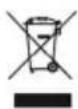
The symbol shown here and on the product means that the product is classed as Electrical or Electronic Equipment and should not be disposed with other household or commercial waste at the end of its working life. The Waste Electrical and Electronic Equipment (WEEE) Directive (2012/19/EU) has been put in place to recycle products using best available recovery and recycling techniques to minimise the impact on the environment, treat any hazardous substances and avoid the increasing landfill.
Product disposal instructions for residential users:
If you no longer use the device, remove and dispose of the battery, as well as the device, in compliance with the local recycling procedures. For more information please contact your local authority or the retailer where the product was purchased.
Product disposal instructions for business users:
Business users should contact their suppliers and check the terms and conditions of the purchase contract and ensure that this product is not mixed with other commercial waste for disposal.
If you have any problem:
Please contact the after-sales service on the contact page of our website: www.konrow.com
Made in PRC
2017 Konrow.
If unresolved problem, contact your retailer.
The Konrow supplier warranty is valid for normal use of the device as defined in the instructions. This warranty excludes damage caused by external circumstances.
Specifically, the warranty does not apply if the device is damaged as a result of a bump or drop, an operating error, a connection that does not comply with these instructions, lightning, a surge, or inadequate protection against heat, humidity or freezing temperatures.
The warranty is applicable only in metropolitan France.
- The warranty does not cover user manuals or applications, settings, content or data of any kind.
• The warranty does not cover normal usury of the product (screens, batteries and camera). - The warranty does not cover damage to the product due to misuse, including in particular those caused by objects, a pressure drop.
- The warranty does not cover any use of the label with the precautions outlined in the manual.
- The warranty does not cover defects caused to the product with another product connected or used with an accessory or software not provided by Konrow.
• The warranty does not cover any damage to the battery.
• The warranty does not cover the product or its accessories if it has been disassembled
or modified in any way.
- The warranty does not cover any unidentifiable product by serial number or IMEI number(s). If its elements have been removed, altered or defaced, the warranty does not apply.
• The warranty does not cover damage done to the product caused by exposure to moisture, conditions that extreme heat or cold, corrosion, oxidation, with any liquid whatsoever
- The warranty does not cover any damage to SIM player(s) or SIM MicroSD reader.
- The legal warranty for hidden defects applies in compliance with Articles 1641 et seq. of the French Civil Code.
Declaration of conformity

KONROW
We, Konrow - 27 boulevard d'Arras - 13004 Marseille - FRANCE,
hereby declare that the Konrow Stone Lite Mobile complies with the essential requirements of the Directive R&TTE 1999/05/EC applicable to the following European standards:
Safety: EN 60950-1:2006+A11:2009+A1:2010+A12:2011+A2:2013; EN50332-1:2013
Safety (adaptator): EN60950-1:2006+A11:2009+A1:2010+A12:2011+A2:2013; Health: EN 50360:2001+A1:2012; EN 62209-1: 2016; EN 62209-2:2010; EN 50566:2013; EN 62479:2010 EMC: EN 55032:2012/AC:2013; EN 61000-3-2:2014; EN 61000-3-3:2013; EN 55024:2010; EN 55020:2007/A12:2016; EN 300 328 V2.1.1 Radio: EN 301 511 V12.5.1
The procedure of Declaration of conformity, set out in Article 10.5 of Directive 1999/5/EC was conducted under the supervision of the following organisation:
PHOENIX TESTLAB Königswinkel
10, D-32825 Blomberg, Germany.
Phone: +49(0)5235-9500-24
Fax: +49(0)5235-9500-28
The full text of the device's Declaration of conformity is available on written request to the following address :
27/09/2017 Maurice Haddad / CEO
Date (Name and signature of the duly authorised person)
Specific Absorption Rate:
SAR (Head) = 0.269W/Kg
SAR (Body) = 0.811 W/Kg
UG_20170927
WWW.KONROW.COM

natural_image
Three social media and video platform icons: Facebook, Instagram, and YouTube (no text or symbols)
- GIFTBOX CONTENT:
- Konrow danke
- Inserting a SIM card
- Inserting a Micro SD
- Installing and charging the battery
- Installing the battery:
- Charging the battery:
- IMPORTANT:
- Safety information for charging the battery:
- Switching the mobile on and off
- Start-up guide
- Locking/unlocking SIM cards
- Locking/unlocking the keypad
- To lock the screen:
- Making and receiving calls
- Settings
- Call settings
- Phone settings
- General settings
- Security settings
- This function provides you with related settings about safety use:
- Connections
- Call log
- Message
- Multimedia
- Tools
- My files
- Internet
- Profiles
- Shortcut keys
- Português
- Parametri
- Electromagnetic waves safety information (SAR)
- NOTE:
- Advice to reduce the level of exposure to radiation:
- Safety and care information
- NOTE: In order to reduce any risk of fire or electric shock:
- Warning on using the phone while driving
- In France, in accordance with Article R412-6-1 of the French Highway Code, drivers are not permitted to use hand-held phones whilst the vehicle is moving.
- The penalty for non-compliance with this article is a fine and point penalty on your driving licence.
- NOTE: this legislation applies only in France. During trips abroad, please refer to the legislation in place in the country you are/go.
- Epilepsy warning
- Precautions to take during use of any video game:
- Recycling
- Product disposal instructions for residential users:
- Product disposal instructions for business users:
- If you have any problem:
- The warranty is applicable only in metropolitan France.
- Declaration of conformity
Brand : Konrow
Model : Stone Lite
Category : Smartphone