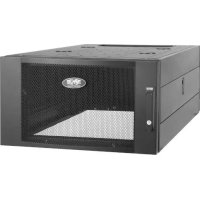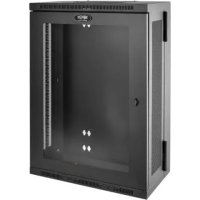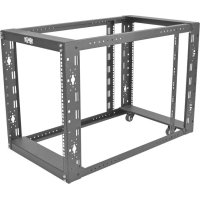
SmartRack SR12UBEXPNDKD - Wardrobe Tripp Lite - Free user manual and instructions
Find the device manual for free SmartRack SR12UBEXPNDKD Tripp Lite in PDF.


User questions about SmartRack SR12UBEXPNDKD Tripp Lite
0 question about this device. Answer the ones you know or ask your own.
Ask a new question about this device
Download the instructions for your Wardrobe in PDF format for free! Find your manual SmartRack SR12UBEXPNDKD - Tripp Lite and take your electronic device back in hand. On this page are published all the documents necessary for the use of your device. SmartRack SR12UBEXPNDKD by Tripp Lite.
USER MANUAL SmartRack SR12UBEXPNDKD Tripp Lite
12U, 4-Post Open Frame Rackmount Kit with Casters and Adjustable Rail
Important Safety Instructions 2
Parts List 2
Rack Assembly 3
Equipment Installation 6
Storage and Service 7
Warranty and Product Registration 7
Espanol 8
Français 15
Pycckn 22
PROTECT YOUR INVESTMENT!
Register your product for quicker service and ultimate peace of mind.
You could also win an ISOBAR6ULTRA surge protector—a $50 value!
www.triplite.com/warranty



Manufacturing Excellence
1111 W. 35th Street, Chicago, IL 60609 USA · www.triplite.com/support
Copyright © 2015 Tripp Lite. All rights reserved.
Important Safety Instructions
SAVE THESE INSTRUCTIONS
This manual contains instructions and warnings that must be followed during the installation and operation of the product described in this manual. Failure to comply may invalidate the warranty and cause property damage or personal injury.
- Keep the rack in a controlled indoor environment, away from moisture, temperature extremes, flammable liquids and gasses, conductive contaminants and dust.
- Leave adequate space at the front of the rack for proper ventilation.
- Inspect the rack for shipping damage. Do not use the rack if it is damaged.
- Install the rack in a structurally sound area capable of handling the load, the weight of the rack, all equipment that will be installed in the rack and any other equipment that will be installed nearby.
- Do not attempt to install the rack unassisted.
- Do not attempt to install equipment without first stabilizing the rack.
- Use of this equipment in life support applications where failure of this equipment can reasonably be expected to cause the failure of the life support equipment or to significantly affect its safety or effectiveness is not recommended. Do not use this equipment in the presence of a flammable anesthetic mixture with air, oxygen or nitrous oxide.
Parts List
Rack Components and Assembly Hardware

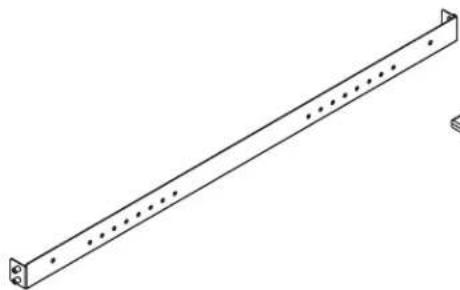
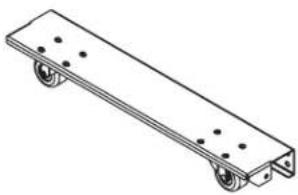
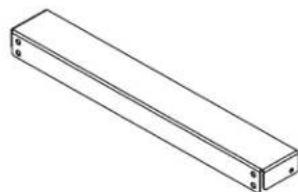
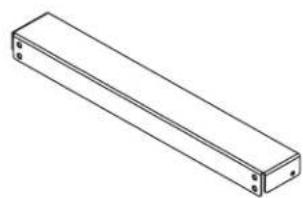
Vertical Mounting Rail Side Bracket Base Bracket with Casters Top Bracket



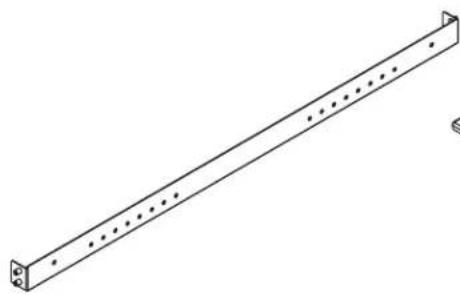
Adjustable Side Support/Mounting Rail

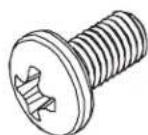
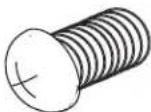
M6 x 12 mm Phillips Screw

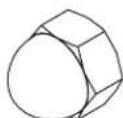
M8 x 12 mm Acorn/Cap Nut

Parts List
Equipment Mounting Hardware
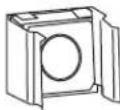
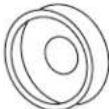
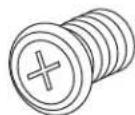
M6 Cage Nut PVC Cup Washer M6 Phillips Screw


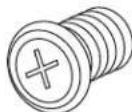

Cable Management Hardware (Optional Installation)
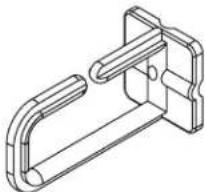
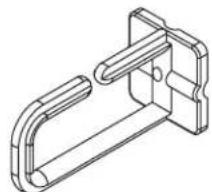
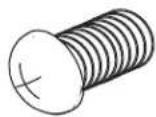
Cable Management Hook Hook Mounting Screws


Rack Assembly
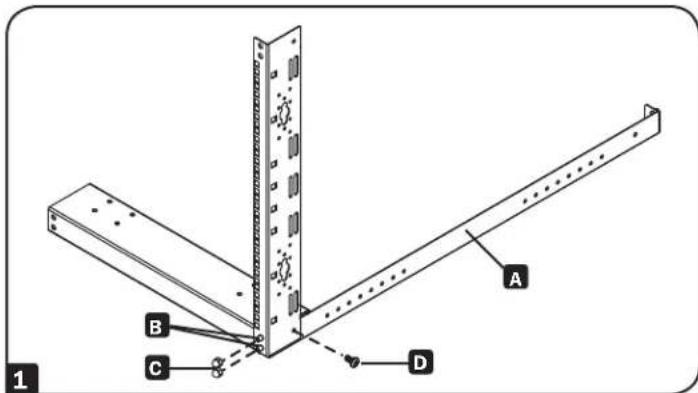
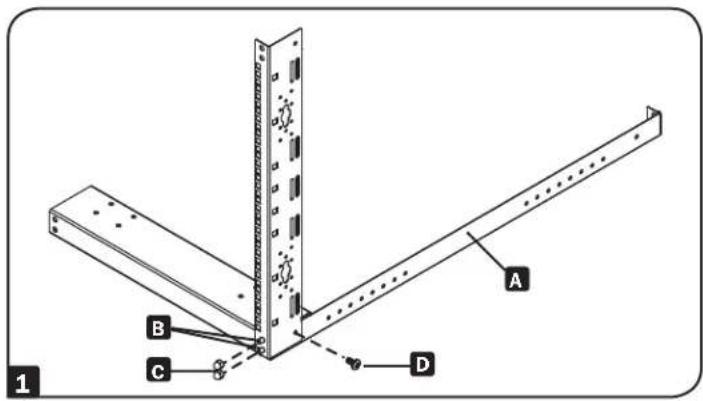
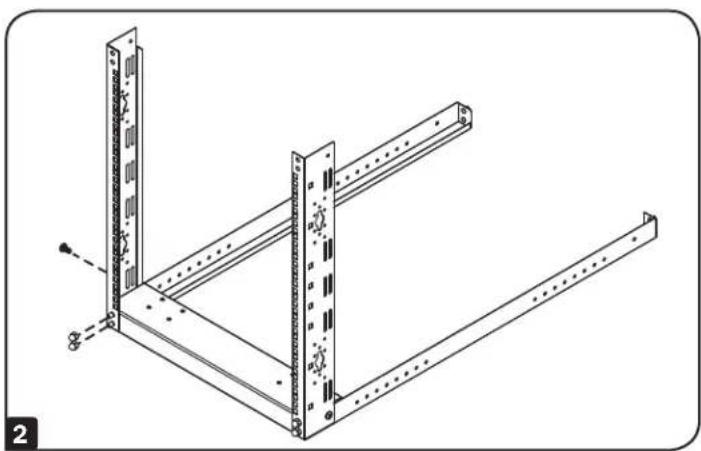
1 Lay out a side bracket A. Insert the side bracket's front threaded M8 studs through the corresponding holes on the base bracket and the corresponding holes on the vertical mounting rail B. Fasten with two M8 acorn/cap nuts C and an M6 Screw D.
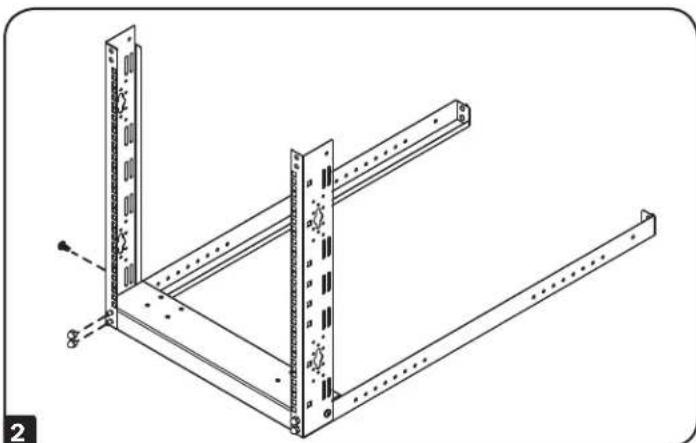
Repeat step 1 for the left side bracket.
Rack Assembly
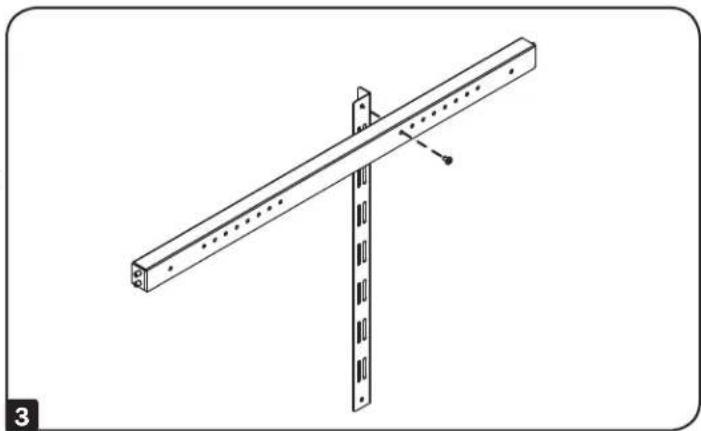
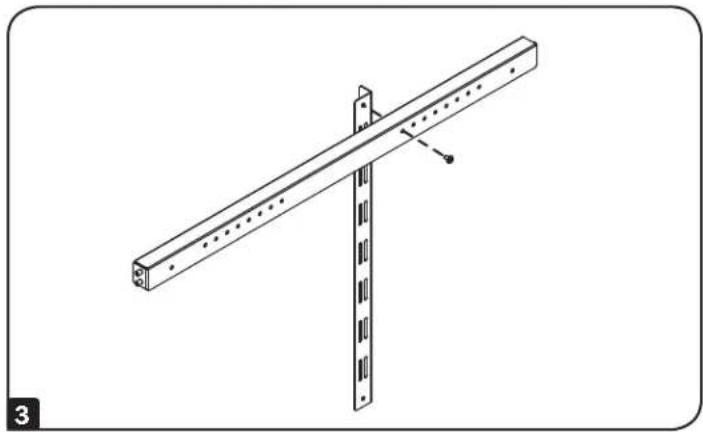
3 Determine the maximum estimated depth of the equipment to be installed inside the rack. At the approximate maximum depth along an unused side bracket, attach an adjustable side support/ mounting rail to the side bracket's threaded hole with an M6 Phillips screw.
Note: The front and rear vertical mounting rails support a fixed rail depth of 36 inches (914 mm). The adjustable side mounting rails can be positioned at depths of 24, 25, 26, 27, 28, 29, 30 and 31 inches (610, 635, 660, 686, 711, 737, 762 and 787 mm).
Note: Final rail depth adjustments can be made prior to installing the equipment in the rack.
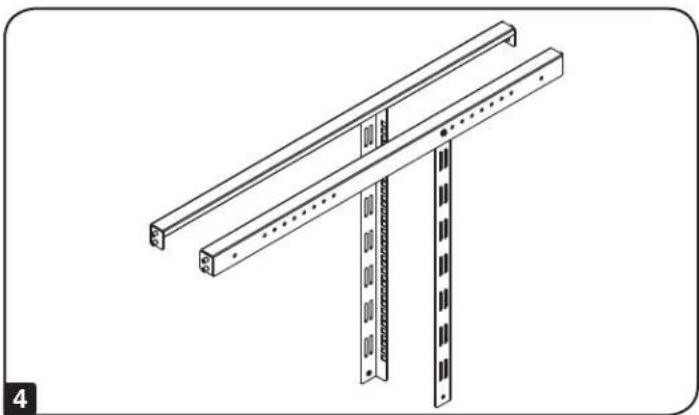
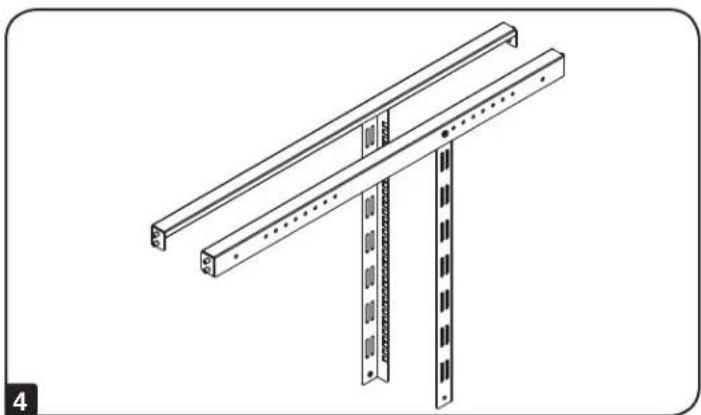
4 Repeat step 3 for the remaining unused side bracket and adjustable side support/mounting rail.
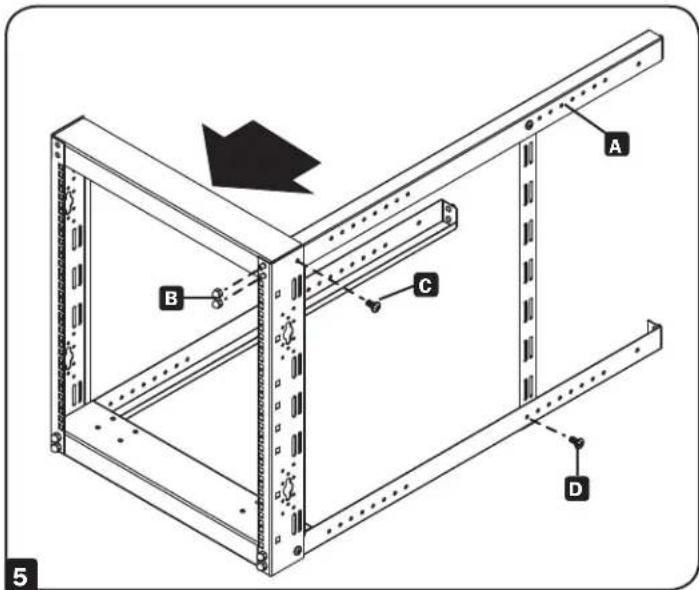
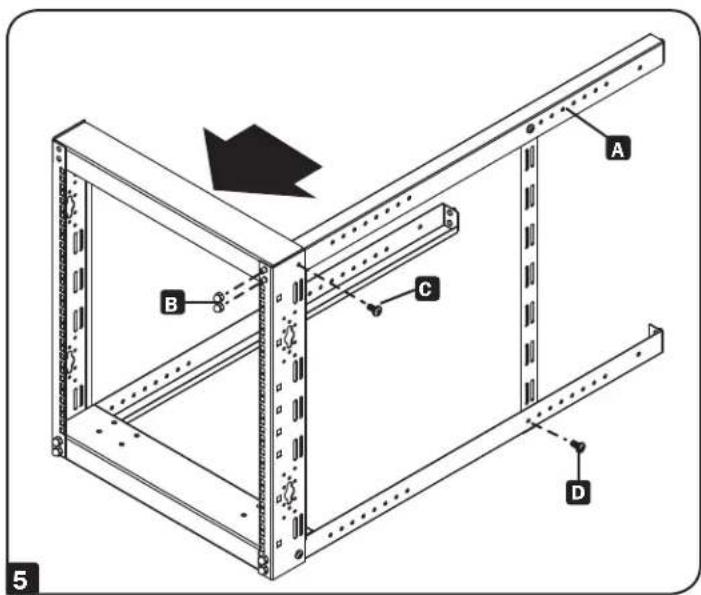
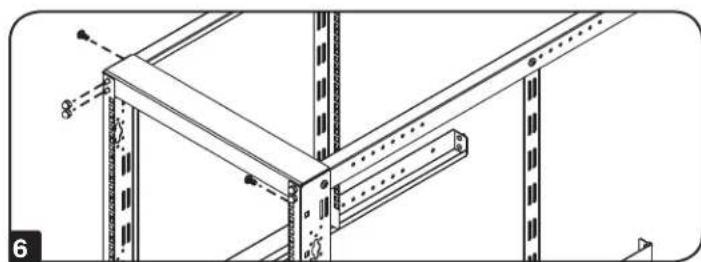
5 Insert the top right side bracket's threaded M8 studs through the corresponding holes on the top bracket A. Fasten with two M8 acorn/cap nuts B and an M6 Screw C. Attach the adjustable side support/mounting rail to the bottom side bracket's threaded hole with an M6 Phillips screw D.
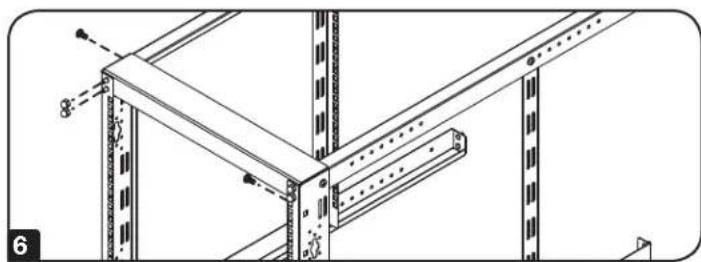
6 Repeat step 5 for the upper left side bracket.
Rack Assembly
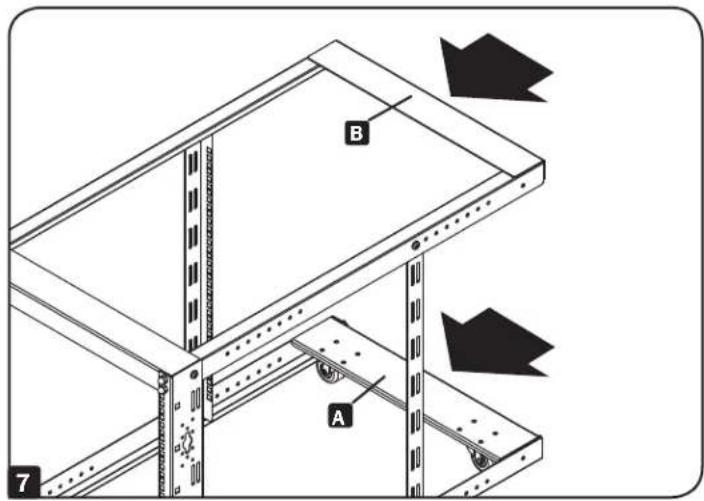
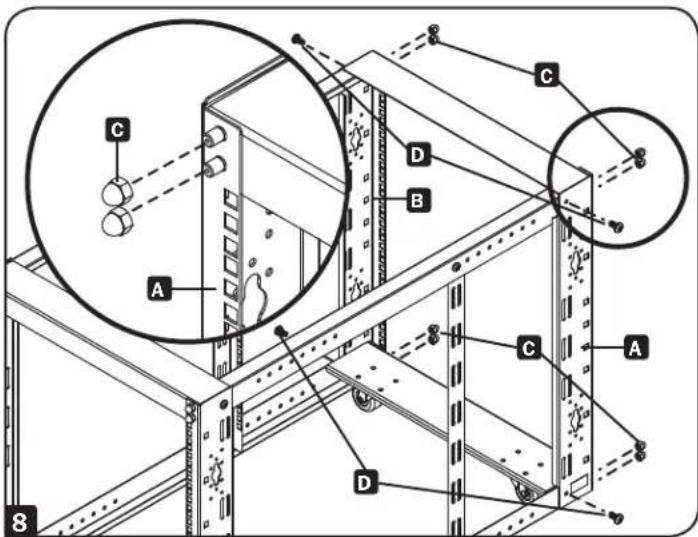
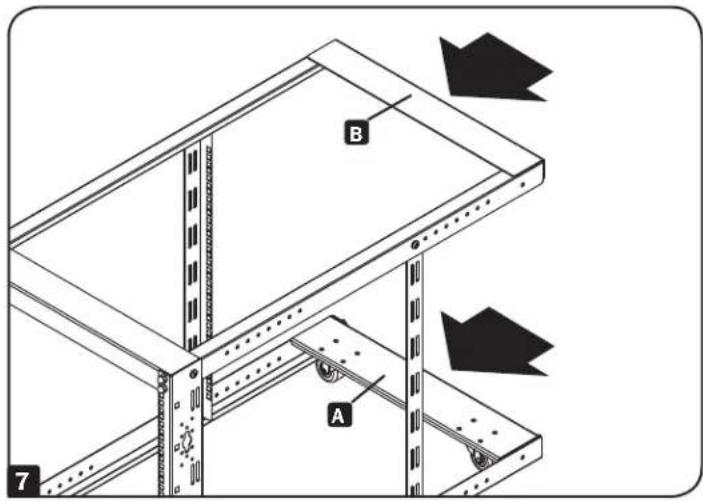
7 Insert the rear base bracket's holes through the rear threaded M8 studs of the bottom side brackets A. Then insert the rear top bracket's holes through the rear threaded M8 studs of the top side brackets B.
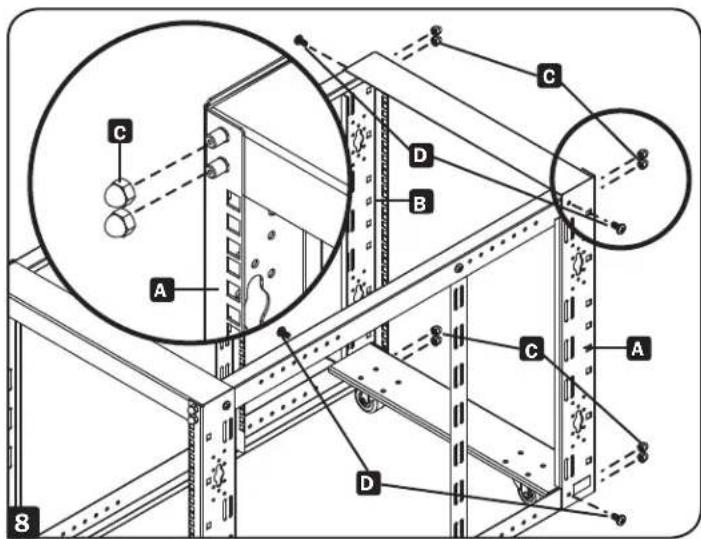
Insert the left rear vertical mounting rail's holes through the rear threaded M8 studs of the bottom and top side brackets A. Then insert the right rear vertical mounting rail's holes through the rear threaded M8 studs of the bottom and top side brackets B. Fasten with two M8 acorn/cap nuts C and an M6 Screw D.
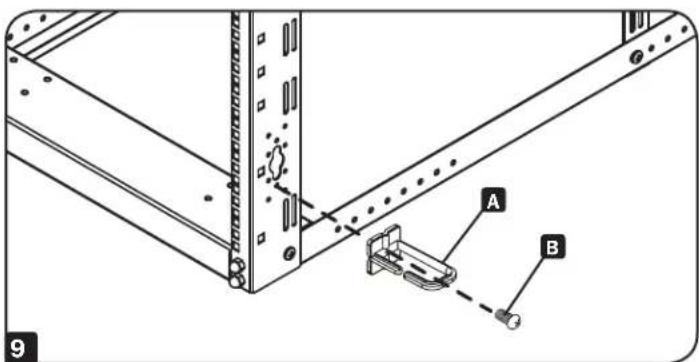
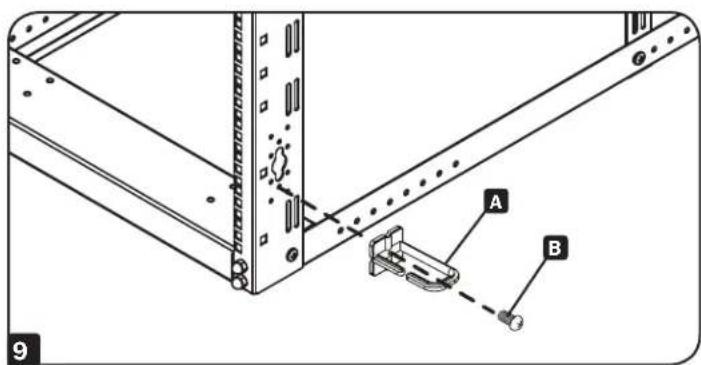
9 Optional Cable Management Hooks: Fasten the included cable management hooks A to the vertical rack rails with the included screws B.
Equipment Installation
The SR12UBEXPNDKD can support a maximum equipment load up to 1,000 lb.
Warning: Do not install equipment until you have stabilized the enclosure. Install heavier equipment first and install it towards the bottom of the enclosure. Install equipment starting from the bottom of the enclosure and proceeding toward the top of the enclosure - never the reverse. If using sliding equipment rails, be careful when extending the rails. Do not extend more than one set of sliding equipment rails at one time. Avoid extending sliding equipment rails near the top of the enclosure.
For all other equipment mounting, please refer to the intended equipment's Owner's Manual for equipment installation instructions. This information can often be found in the "Mounting" or "Rackmounting" sections of the manual.
Installing or Removing Cage Nuts
WARNING: The flanges of the cage nuts should engage the sides of the square opening in the rail, not the top and bottom. Follow the instructions in your equipment documentation to ensure proper installation of your equipment.
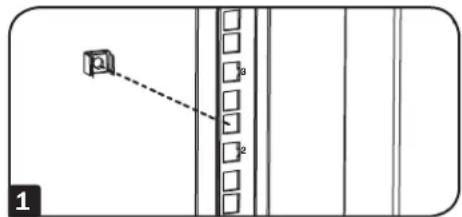
1 Locate the numbered square openings in the mounting rails where you plan to install your equipment. You will install cage nuts (included) into the square openings in order to provide an attachment point for the mounting screws (included).
Note: Consult your equipment documentation to determine how many cage nuts will be required and where they will need to be installed.
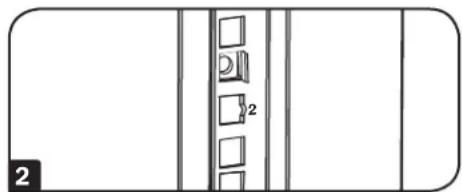
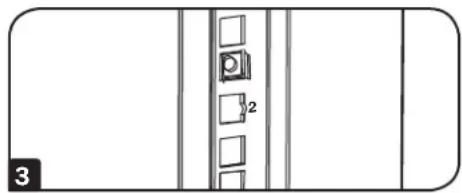
2 From the inside of the mounting rail, insert one of the flanges of the cage nut through the square opening. Press it against the side of the square opening. Each flange should engage one side of the square opening, not the top or bottom.
3 Compress the cage nut at the sides slightly to allow the remaining flange to fit through the square opening. When the cage nut is properly installed, both flanges will protrude through the square opening and will be visible on the outer surface of the mounting rail. Repeat steps 1-3 until all required cage nuts are installed.
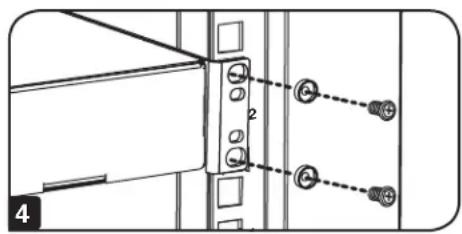
4 After installing the required cage nuts, use the included black mounting screws and cup washers to secure your equipment to the rack rail. Place the cup washers between the screws and the equipment mounting brackets.
Note: Your equipment may also include mounting hardware. Read the mounting instructions that came with your equipment before installing your equipment.
To Remove Cage Nuts, Reverse Steps 1-3
Note: You may wish to use a cage nut tool (user-supplied) to aid cage nut installation and removal.
Storage and Service
Storage
The rack should be stored in a controlled indoor environment, away from moisture, temperature extremes, flammable liquids and gasses, conductive contaminants, dust and direct sunlight. Store the rack in its original shipping container if possible.
Service
Your Tripp Lite product is covered by the warranty described in this manual. A variety of Extended Warranty and On-Site Service Programs are also available from Tripp Lite. For more information on service, visit www.triplite.com/support. Before returning your product for service, follow these steps:
- Review the installation and operation procedures in this manual to ensure that the service problem does not originate from a misreading of the instructions.
- If the problem continues, do not contact or return the product to the dealer. Instead, visit www.triplite.com/support.
- If the problem requires service, visit www.triplite.com/support and click the Product Returns link. From here you can request a Returned Material Authorization (RMA) number, which is required for service. This simple on-line form will ask for your unit's model and serial numbers, along with other general purchaser information. The RMA number, along with shipping instructions, will be emailed to you. Any damages (direct, indirect, special or consequential) to the product incurred during shipment to Tripp Lite or an authorized Tripp Lite service center is not covered under warranty. Products shipped to Tripp Lite or an authorized Tripp Lite service center must have transportation charges prepaid. Mark the RMA number on the outside of the package. If the product is within its warranty period, enclose a copy of your sales receipt. Return the product for service using an insured carrier to the address given to you when you request the RMA.
Warranty and Product Registration
5-Year Limited Warranty
Seller warrants this product, if used in accordance with all applicable instructions, to be free from original defects in material and workmanship for a period of 5 years from the date of initial purchase. If the product should prove defective in material or workmanship within that period, Seller will repair or replace the product, at its sole discretion.
THIS WARRANTY DOES NOT APPLY TO NORMAL WEAR OR TO DAMAGE RESULTING FROM ACCIDENT, MISUSE, ABUSE OR NEGLECT. SELLER MAKES NO EXPRESS WARRANTIES OTHER THAN THE WARRANTY EXPRESSLY SET FORTH HEREIN. EXCEPT TO THE EXTENT PROHIBITED BY APPLICABLE LAW, ALL IMPLIED WARRANTY, INCLUDING ALL WARRANTY OF MERCHANTABILITY OR FITNESS, ARE LIMITED IN DURATION TO THE WARRANTY PERIOD SET FORTH ABOVE; AND THIS WARRANTY EXPRESSLY EXCUSES ALL INCIDENTAL AND CONSEQUENTIAL DAMAGES. (Some states do not allow limitations on how long an implied warranty lasts, and some states do not allow the exclusion or limitation of incidental or consequential damages, so the above limitations or exclusions may not apply to you. This warranty gives you specific legal rights, and you may have other rights which vary from jurisdiction to jurisdiction).
WARNING: The individual user should take care to determine prior to use whether this device is suitable, adequate or safe for the use intended. Since individual applications are subject to great variation, the manufacturer makes no representation or warranty as to the suitability or fitness of these devices for any specific application.
Product Registration
Visit www.triplite.com/warranty today to register your new Tripp Lite product. You'll be automatically entered into a drawing for a chance to win a FREE Tripp Lite product!*
- No purchase necessary. Void where prohibited. Some restrictions apply. See website for details.
Tripp Lite has a policy of continuous improvement. Specifications are subject to change without notice.


Manufacturing Excellence.
1111 W. 35th Street, Chicago, IL 60609 USA • www.triplite.com/support
1111 W. 35th Street, Chicago, IL 60609 USA • www.triplite.com/support

Manufacturing Excellence.
1111 W. 35th Street, Chicago, IL 60609 USA • www.triplite.com/support
PykoBoDcTBO nOJIb3OBaTeIa
SR12UBEXPNDKD
KoMnJIeKT OChaCTKN DЯ MOHTaJa B ДБуХpamHyI OTKpbityI O StOJky BbICOTOn 12U c poJHKamN I pEryInpyeMoI HanpaBJIIOuSeI
OchOBHbIe npaBnla 6e3OnacHocTn 23
Cneunphiacna 23
C6opka cToiKn 24
UcTaHOBka o6OpyIOBaHnA 27
XpaHeHne n o6cJyKnBaHne 28
TapaHTnHbIe 06a3aTeJbCTBa 28
English 1
Espanol 8
Français 15


1111 W. 35th Street, Chicago, IL 60609 USA · www.triplite.com/support
OxpanreTc ABTopckm npabom © 2015 Tripp Lite. Nepeneatka 3anpeetaetca.
OchOBhble npabnla 6e30nacchoCTN
ПОСьБА COXPAHNTь HACTОДNE ПAPВИА
B hactoem pykoobctbe codepkaTc yka3aHn npeynpejxdeHn, KOtOpe Heo6xOmo co6nOaTb B npoucece MoTatauOnncahHoro B hem n3dEHH. Heco6nOeHne BblweynomAHTbIX yka3aHn n peynpejxdeHm MOKe TnpBecTu KaHHyIipOBaHIO rapaHTn, aTakke K nobpeJeHHIO mMyueCTBa nn neNoBeyeckm TpaBMam.
CToiKa DOnKHa HaxoHtbcra B NOMEueHHN C KOHTpOINpyeMbIM MKNPOKlMMATOM BdaIOT NCTOHNKOB BnaR, 3KCTpeMaJIbHbIX TemnepaTyp, BocPiamaHeHIOUxxCra KJDKoCTe I rA30B, 3NEKTponpoBoDHBX 3arpaHITeneI Nblnn.
- Peped cToukO Heo6xOuMo oBeCneHTb DoCTaOHTHO CBO6oHOro nPoCTpaHCTBa dIe ee HaIeKaaIero IPOBETPBAHn.
Ocmotpeb ctoky Ha npedmet HannuB BO3MOXhIX NOBpeKdHn B pe3yNbTaTe TpaHCnpTIpOBKn. He noIb3oBaTbcra CToIKoB CnUyae ee NOBpeKdHnA.
- YctahOBtB cTOnKy B KOHCTpyKUHOH IpoOH MecTe, CnOCo6Hom BbldePknBaTB BEc CAMO CTOnKn, BCEr O6OpyIOBAHn, KOTOPoe 6yET pa3MeuTaBc BHyTpN Hee, NIObOrO dpyrO o6OpyIOBaHn, KOTOpoe 6yET YCTAHOBHeO B6IIMn Hee.
He nbTaTecb ycTaHabnBaTb cToKy B OOnHOcKy.
He npo3BODHTe yCTaHOBky o6OpyDoBaHnB B CToKy D0 o6ecneHnEe yCToHnBOcTn.
- IcnoIb3oBaHne daHHoro obOpdyOBaHnB CnCTeMax JxN3HeOBeCneHEny, Te er O BbIXoN 3 CTPO npeIIOJXnTbHO MoKet npBecTN K nepe6oM B pa6oTe obOpdyOBaHnJxN3HeOBeCneHEny uIN B 3NaHTeNbHO Mepe CHNtB erO 6eONacHOCTb INN 3ΦΦeKTHBHOCTb, He peKOMeHdyETc. He IcNoIbayte daHHoe obOpdyOBaHne B npCytBm BOCnIaMeHryIoEciAheCTuYeckoi CMeci C Bo3DyXOM, KNCIpOdom INN 3AkNcBHO a30Ta.
Cpeunphikaun
CocTabHbIe yactn n c6opouHa ochactka ukafoB


BepTKaJIbHa MONTaxHaa 1nHa BokOBoK kpoUTeH OnOpHbI KPOUTeH c pOniKaMn BepXHII KPOUTeH
x4
x4
x2
x2

Perynnpyemaa 60koBaonopHAA/MoHTaxHa HappaBIOUaA

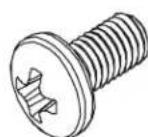
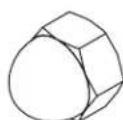
BnHT M6 x 12 MM c KpeToo6pa3bIM WIIuIeM KoIIaYKOBa/HaKnHnaRaiKa M8 x 12 MM


Cpeunopkaua
OchactkaДЯ MOHTaKa OobpyObaHn
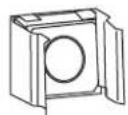
Tainka3aknadnaM6IaHbAaueo6pa3naI3PXBnHTM6Kpeo06pa3hbIM

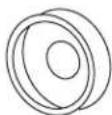
x20
UHnueM
x20
OchactkaДлгоNTHMn3aunu Ka6eJbHbIX coeHHeHn (yctahOBKa Heo6aTeIbHa)
KpOK nIy noDbceKn KaBeNei BnHtbl nIy MoNTaKa KpOka
x10
x10
C6opka cToiKn
1 Pa3MeueHHe 60KOBOro KPOHtTeHa A BcTaBnTb nepeDhne pe36obBle (M8) nIbCbI 60KOBOrO KPOHtTeHa Ype3 COOTBeTCTByIOUe NTBepCTnB OOnpHOM KPOHtTeHne H COOTBeTCTByIOUe OTBepCTnB BEPTKaIbHOH MOHTaXHOH HanpaBnaHOUsE B. 3aФHKCuPObA Tb N DByMa KONNaHKOBBIM/ HAKINbIMr RaIKAMN M8 C nBVNT M6 c KpeToOp6pa3HbIM IJIuCEm D
2 Nobtopntb war 1 dna neBocToPOHero KPOHTeHa.
C6opka cToiKn
3 OueHnTb MaKcImaIbHyO rHy6BHy 06OpyDobAHnY, yCTaHaBnBaEMoB B cToiKy. Pn6m3nteIbHO Ha yPObHe MaKcImaIbHO rHy6BnHb BDoNb HcNOnb3yEmo 6OKOBOr KoOHtEHa npKpeINrB perynpyEmyo ONOpHy/OHTaxHy Ho HnPaBnIOuYO, BBepHyB BNHT M6 C Kpctoo6pa3HbIM IuNcEe B pe3b6OBoe OTBepCTne 6OKOBOro KPOHtEHa.
Pumeyaue Hnepehna U 3aHrae eepmukabHe MOHMAKHe uHbI oecneueaam fukcupoeaHHy anbyu HnpaenlOoue e pa3mepe 914 MM Peaynpuyembe 6okobie MOHMAKHe uHbMoaym ycaHaBnueambc Ha anbyuax 610,635,660,686,711,737,762 u 787 MM.
Ppumeyue. OOKHamehnapezynpuoeka anyubnHaHpaanHOue MoXem 6bIb npou3eDeHa nepe ycmHoekO obopydoaHua e cmouky.
4 NOBTOPb 3 n4 octabweroC HENcNoB3oBaHHoro 6OKOBOR KOHHTeHa n perynupeMo 6OKOBn ONOPHO/MONTAXHO HaprabJoue.
BCTaBtBpe3b6OBBe nabUcMbM8BepxHrO npabocToPOHrO KPOHHTeHaYepe3 COOTBECTByIOuIe OTBepCTnB BepXHE MPOHHTeHe A.3aFkCnpoBaTb Ix DByM KONlNaKOBbIMN HAKINDbIMr RaKaMm M8 E N BVHT M6 C kPecTOo6pa3HbIM UINiEe C.IpnKePTNb peRyNpPyEmyO ONOpHyO/MOnTaXHyO HAnpaBIAIOUyO, BBePHyB BNHT M6 C kPecTOo6pa3HbIM UINiEe D Bpe3b6BOe OTBepCTne HIXKHe rPOHSTeHa.
6 Nobtopntb war 5 dans BepxHero JbeocToPOHero KpoHtneHa.
C6opka cToiKn
7 BctaHTb 3aHHe pe3b6ObIe naJIbIb M8 HIXHX 6OKOBbIX KPOHHTeHOB A B 3aHHe OTBepCTnO ONOPHO KPOHHTeHa. 3aTEM BCTaHTb 3aHHe pe3b6ObIe naJIbIb M8 BEpxHX 6OKOBbIX KPOHHTeHOB B 3aHHe OTBepCTnO BExHero KPOHHTeHa.
BCTaHTb 3aHHe pe36oBbIe naIbIbM8 HnKHXN IN BepxHIN 60KOBbIX KPOHHTeHOB A B OTBepCTNA NEBOCTOPOHHe 3aHHe BepTtKaIbHO MOHTaXHn HnPaBnIOUe. 3aTeM BCTaHTb 3aHHe pe36oBbIe naIbIbM8 HnKHXN IN BepxHIN 60KOBbIX KPOHHTeHOB B OTBepCTNA IpaBOCTOpOHHe 3aHHe BepTKKaIbHO MoTAtKHOn HnPaBnIOUe. 3aФHKcPObaTB IN DByMaKOJIaHKnHbIMn HaKnDHBm n RaKamn M8 C n BVHT M6 c KpeToO6pa3HbIM UINuEM D
9 OnuHnabHbIe KpOKn IaI NaOBecKn KaBeNe: PnKpeNITe BXoJrIe B KOMJIeKT NocTAbKN KpOKn IaI NaOBecKn KaBeNeA K BEPTkAnbHbIM HApPABJIaQmM UkaFa C NOMOcBIO BHTOB B N3 KOMJIeKtA.
yctahOBka o6opydObaHnra
CtoHaMoEJIN SR12UBEXPNDKD paCCHTaHa Ha Harpy3ky, co3daBaemyo paBHomepHO paCnpedeHbIM IO ee 06bemy 06OpdyOBAHEM BECOM 454Kt.
BnmaHHe: He yctaHabnBaIte o6OpDobAHne Do 3akpennEnHa KaFa. Chauana yctaHabnBaIte 6Oone TgXeNoe o6OpDobAHne, KOtopoe doJHXo pacnoIaratcb R HxKHe JuaTn KKaF. YCTaHObky o6OpDobAHn CneJeT npOn3BoNtB no HanpaBnHIO CH3y BBePx UkaF a N H B KOem clyuae He HAO6OpOT. Pn HcNoJIb3OBAHm HAnpaBnHOUnx DnO o6OpDobAHn BbIBRaTe IX C OCTOPOXHOCTbIO. He BblBnraTe 6Oone OHOH rpynnbl HapBaBnHOUnx ODHOBpeMeHHo. He BblBnraTe HApBaBnHOUne dIn o6OpDobAHn B BePxHe qactn ukaFa.
HΦopmaHIO OTHOCHTeJIbHO MOHTaKa BCERO IPOOero OBOPyOBaHn CM. B pa3Ieax C yKa3aHnMn IO yCTAHOBKe OBOPyOBaHn B COOTBETCTBYIOxpyKOBOCTBaIO ERO 3KCIyatau. TaKa HΦopMaHn YAIE BCERO COePJKTcR B pa3eJAX "MOHTaK" HIN "MOHTaK B CTOnKy" COOTBETCTBYIOero pyKOBOCTBa.
YctaHOBka n CHrTne 3aKlaHbIX raeK
BHIMAHHE: 6opTnK 3aKnabHbX raek DoNkHb 3aenpTaBc 3a 6okOBble, a He 3a BepxHn HnxHn Kpa KBapTaHbIX OTBepCTn WnHbI. nIg o6ecneHn npAunbHOCTn MOtaxKa BaWero O6OpyOboHAn CneDyTe yka3AHm, M3IOKeHHbIM B npNlaRaem K HeMy DOKymeHTaUN.

HaHHTe HmepoBaHbIe KBaIpaTHbIe OTBepCTN B MOHTaKhbIX IHHAX, C NOMOIIbHO KOTOpbIX Bbl IIaHpyte YcTaHOBHb T CBOE O6OpyIOBaHHe. 3aTe M BCTaBbTE B 9TH KBAIpaTHbIe OTBepCTN 3aKaJIaIbIbe raiKn (H3 KOMIIIEKTa), IVIA ObecieHn TOeK KpeIJIeHn, IVIA MOHTaKhbIX BNHTOB (Takke BXOJIMNX B KOMIIIEKT).
IpumueaHue: HeoXoDUMoe KOUeCm60 3aknaDbix 2aeK U Mecma ux ycmHOe Kb Moxeme y3HaMb u3 doKymehmauu K eauemy OobopyeaHIO.

H3Hytpn MOHTaJHO HINbI PIOBEaHTe OdH N 360ptHKOB 3akJaHOH raKHepe3 KBAipatHOE OTBepCTHe. HaDaBHte Ha Hee B HappaJIeHH 6OKOBTO Kpa JKBaPaTHO rOTBepCTHg. KaKDbH N 360ptKOB DoJIKeH 3aJeITbcra 3a OdH N 36OKOBbIX KpaEB KBaPaTHO OTBepCTHg, a He 3a BEpxH N HINKHN erO KpaI.

Cnerka HadaBHTe Ha 3aklaJHyo raky IIO 6okam, YTO IO3BOJNT OCTABHcMyc8 60ptHKy npOHTn Upe3 KBAIparthoe OTBepCTHe. Iocne HaJlekAaJe yctAHOBK 3aklaJHO raIKN 6bOPTKa DOJKNb BmTHn HApKy KBAIparthoro OTBepCTHa 6bTb BnHb HA BHEINH NOBepXHOCTH MOHTAKHOI hHI. IIobToprIte 3aIb1 1-3 do tex, nop, noka He 6dyT yctAHOBJIebl BCE Heo6xOJIMbIe 3aklaJHbIe rkiH.

Iocne yctahOBKn Heo6xOaMbIX 3akTaNbIX raeK npKpeHnTe cBoe o6OpDobAHnke CTOeHn HnpaB/naouie C NMOuBIO NOCTaJIeMbIX B KOMIIJEKTE MOHTaKHbIX BNHTOB UepHOrO Ibeta n aIwSe6p3hX bM. IomeCTHe TaIwe6p3hIe IaMbI MeKdy BnHTAmn H MoHTaKHBIMN kPOHIteHaMn dJa KpeJIeHHn O6OpDobAHn.
PpumueaHue: 6 KOMnEkm ycmHaabuMaEO 6AMU o6OyOoAHua MaKHe Moaym 6xOoMb MOHmaKhBle KpennHua. NpeD ycmAo6Kou o6OpyoBaHua O3HakombmeC yka3aHuaMu no eo MoHmaKy.

Manufacturing Excellence.
1111 W. 35th Street, Chicago, IL 60609 USA • www.triplite.com/support