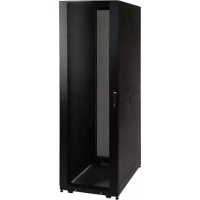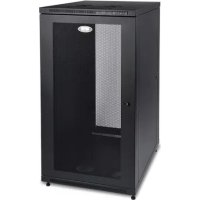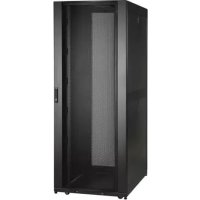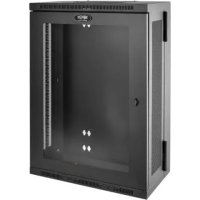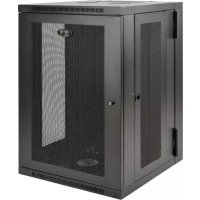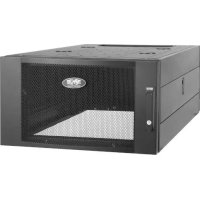
SRTH6UB - Wardrobe Tripp Lite - Free user manual and instructions
Find the device manual for free SRTH6UB Tripp Lite in PDF.


| Product Type | Vertical Expansion Rack |
| Brand | Tripp Lite |
| Model | SRTH6UB |
| Capacity (U) | 6U |
| Height (Device) | 338 mm (13.3 in) |
| Width (Device) | 599 mm (23.6 in) |
| Depth (Device) | 1 092 mm (43 in) |
| Weight (Device) | 38.5 kg (84.8 lb) |
| Height (Packaging) | 579 mm (22.8 in) |
| Width (Packaging) | 996 mm (39.2 in) |
| Depth (Packaging) | 269 mm (10.6 in) |
| Weight (Packaging) | 45.4 kg (100 lb) |
| Material | Steel |
| Front Door Type | Lockable, reversible, with grounding wire |
| Rear Door Type | Two lockable sections |
| Side Panels | Lockable and removable |
| Top Panel | Removable with release pins |
| Adjustable mounting depth | From 101.4 mm (4 in) to 1,066.8 mm (42 in) in 6 mm (1/4 in) increments |
| Cable management rails | Yes, adjustable |
| Grounding points | Multiple, with included M6 screw for 8 AWG connection |
| Enclosure compatibility | Compatible with many Tripp Lite SmartRack models (SR2400, SR25UB, SR42UB, etc.) |
| Warranty | 5-year limited |
| Operating Temperature | 0°C to 40°C (32°F to 104°F) (controlled indoor environment) |
| Operating Humidity | 5% to 95% non-condensing |
Frequently Asked Questions - SRTH6UB Tripp Lite
User questions about SRTH6UB Tripp Lite
0 question about this device. Answer the ones you know or ask your own.
Ask a new question about this device
Download the instructions for your Wardrobe in PDF format for free! Find your manual SRTH6UB - Tripp Lite and take your electronic device back in hand. On this page are published all the documents necessary for the use of your device. SRTH6UB by Tripp Lite.
USER MANUAL SRTH6UB Tripp Lite
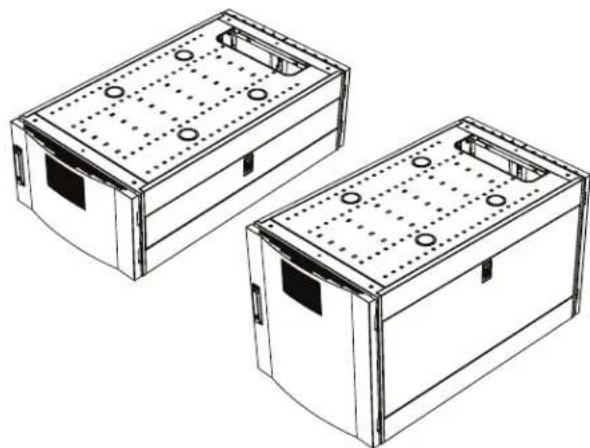
Vertical Expansion Rack
Models: SRTH6UB, SRTH12UB
(Series Numbers: AG-0545, AG-0546)
Espanol 16 • Français 31 • Pycckn 46
WARRANTY REGISTRATION
Register your product today and be automatically entered to win an ISOBAR® surge protector in our monthly drawing!

triplite.com/warranty


Manufacturing Excellence.
1111 W. 35th Street, Chicago, IL 60609 USA · triplite.com/support
Copyright © 2021 Tripp Lite. All rights reserved.
Table of Contents
Important Safety Instructions 3
Compatible Rack Enclosures 4
Feature Identification 5
Configuration 6
Ground Connection 6
Adding or Removing Front and Rear Doors
Removing Door 6
Reversing Front Door 7
Adding or Removing Roof Panel 9
Adding or Removing Side Panels 10
Adjusting Mounting Rails and 11 Cable Management Rails
Equipment Installation 12
Installing or Removing Cage Nuts 12
Specifications 13
Storage and Service 14
Warranty and 15
Product Registration
Important Safety Instructions
SAVE THESE INSTRUCTIONS
All sections of this manual contain instructions and warnings that should be followed during the installation and use of the Vertical Expansion Rack as described in this manual. Read all instructions and warnings thoroughly before attempting to move, install or use the Vertical Expansion Rack as described in this manual. Failure to comply will create a risk of personal injury and property damage and may invalidate the warranty.
- Keep the enclosure in a controlled indoor environment, away from moisture, temperature extremes, flammable liquids and gasses, conductive contaminants, dust and direct sunlight.
- Leave adequate space at the front and rear of the enclosure for proper ventilation. Do not block, cover or insert objects into the external ventilation openings of the enclosure.
- The enclosure is extremely heavy. Use caution when handling the enclosure. Do not attempt to unpack, move or install it unassisted. Use a mechanical device such as a forklift or pallet jack to move the enclosure in the shipping container.
- Do not place any object on the enclosure, especially containers of liquid, and do not attempt to stack the enclosures or more than one height adjustment kit on top of the enclosure.
- Inspect the Vertical Expansion Rack's contents for shipping damage. Do not use the Vertical Expansion Rack if it is damaged.
- Leave the enclosure in the shipping container until it has been moved as close to the final installation location as possible.
- The Vertical Expansion Rack is intended to be installed on top of Tripp Lite SmartRack Rack Enclosure models that are secured to the building structure for stability.
- This equipment is intended to be installed by skilled, qualified service personnel.
- Install the SmartRack Rack Enclosure and Vertical Expansion Rack in a structurally sound area with a level floor that is able to bear the weight of the enclosure and all equipment that will be installed and/or equipment that will be installed nearby.
- Be sure to connect the enclosure to ground. See Ground Connection for more information.
- Use caution when cutting packing materials. The contents could be scratched, causing damage not covered by the warranty.
- Save all packing materials for later use. Repacking and shipping the enclosure without the original packing materials may cause product damage that will void the warranty.
- Do not re-ship the enclosure with additional equipment unless the enclosure was shipped with a special shock pallet ("SP1" models only). The combined weight of the enclosure and installed equipment must not exceed the load capacity of the pallet. Tripp Lite is not responsible for any damage that occurs during re-shipment.
Not for use when children are present. - Use of this equipment in life support applications where failure of this equipment can reasonably be expected to cause the failure of the life support equipment or to significantly affect its safety or effectiveness is not recommended.

CAUTION

GROUND
Compatible Rack Enclosures
The SRTH6UB and SRTH12UB Vertical Expansion Racks are compatible with the Tripp Lite SmartRack Rack Enclosure models shown below, including Agency Series AGAC7006, AGAC7454, AGAC7761, AG-00BE, AG-0324, AG-0325, AG-0534, AG-0535, AG-0536:
| Model |
| SR2400 |
| SR25UB |
| SR25UB |
| SR25UB3 |
| SR25UB3001 |
| SR25UBEXP |
| SR25UBSP1 |
| SR25UBSP1 |
| SR42UB |
| SR42UB |
| SR42UB |
| SR42UB007 |
| SR42UB1032 |
| SR42UB3 |
| SR42UB3002 |
| SR42UBC |
| SR42UBC001 |
| SR42UBCL |
| SR42UBCLSP1 |
| Model |
| SR42UBEXP |
| SR42UBEXP001 |
| SR42UBEXP002 |
| SR42UBEXP003 |
| SR42UBEXP004 |
| SR42UBEXP1032 |
| SR42UBEXPC001 |
| SR42UBEXPND |
| SR42UBEXPND3 |
| SR42UBEXPNDNR3 |
| SR42UBG |
| SR42UBG001 |
| SR42UBG3 |
| SR42UBG3001 |
| SR42UBKD |
| SR42UBND |
| SR42UBSFDKD |
| SR42UBSP1 |
| SR45UB |
| Model |
| SR45UBEXP |
| SR45UBEXPND |
| SR45UBEXPNDNR3 |
| SR45UBND |
| SR45UBSP1 |
| SR48UB |
| SR48UB3 |
| SR48UB3 |
| SR48UBCL |
| SR48UBEXP |
| SR48UBEXPND |
| SR48UBEXPNDNR |
| SR48UBEXPNDNR3 |
| SR48UBSP1 |
| SR50UB |
| SR52UB |
| SR55UB |
| SRX42UBAB |
Feature Identification
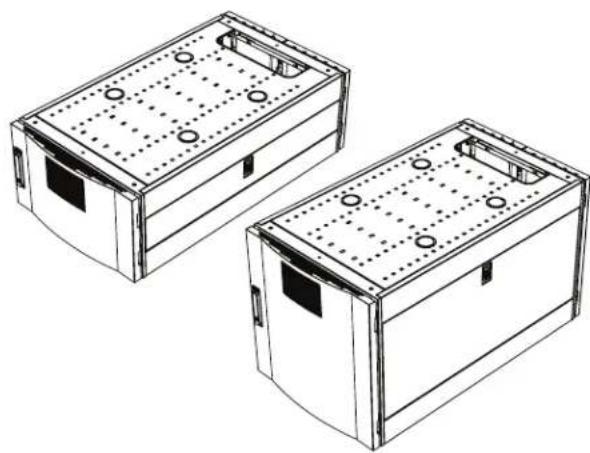
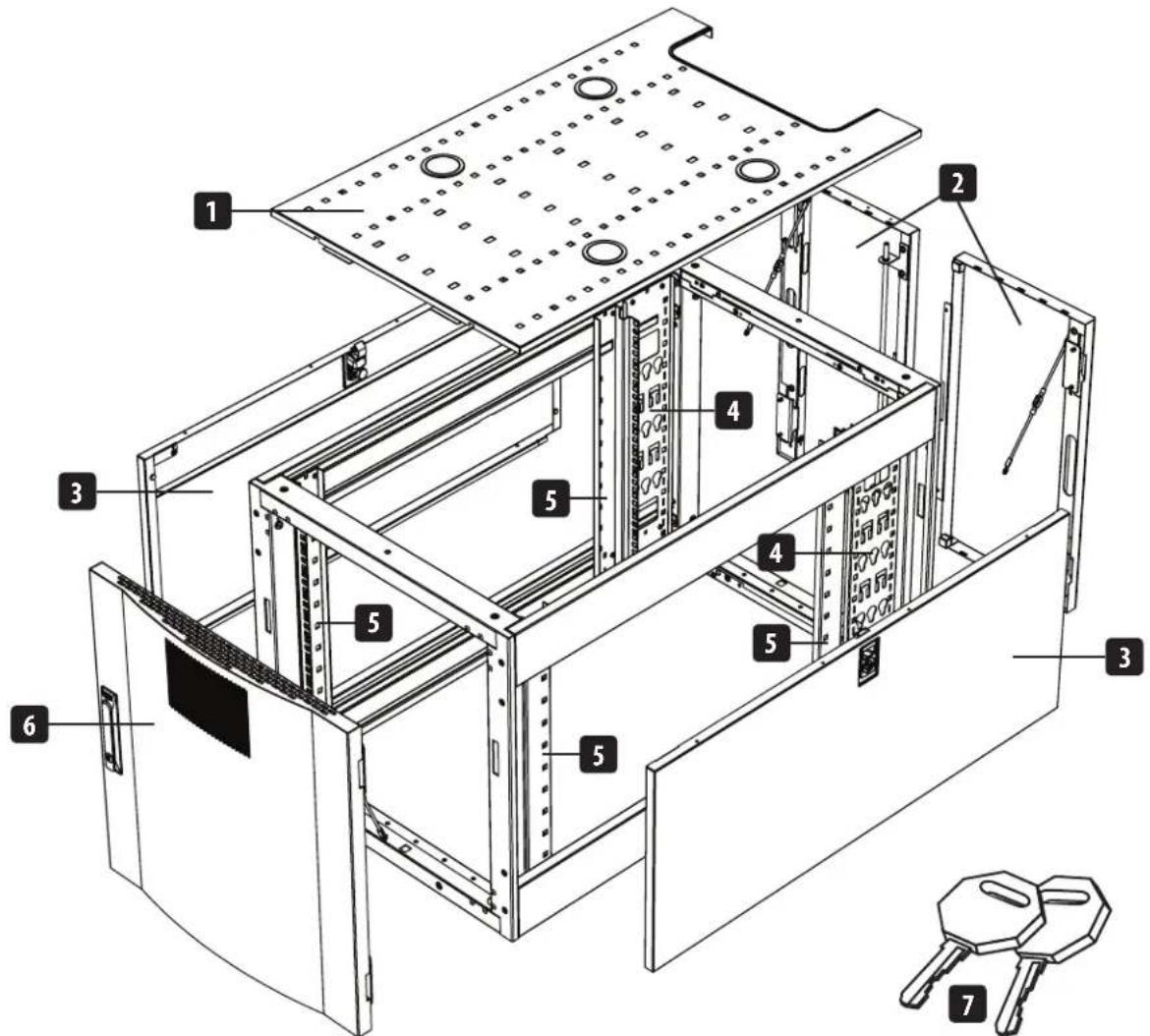
Model SRTH12UB shown.
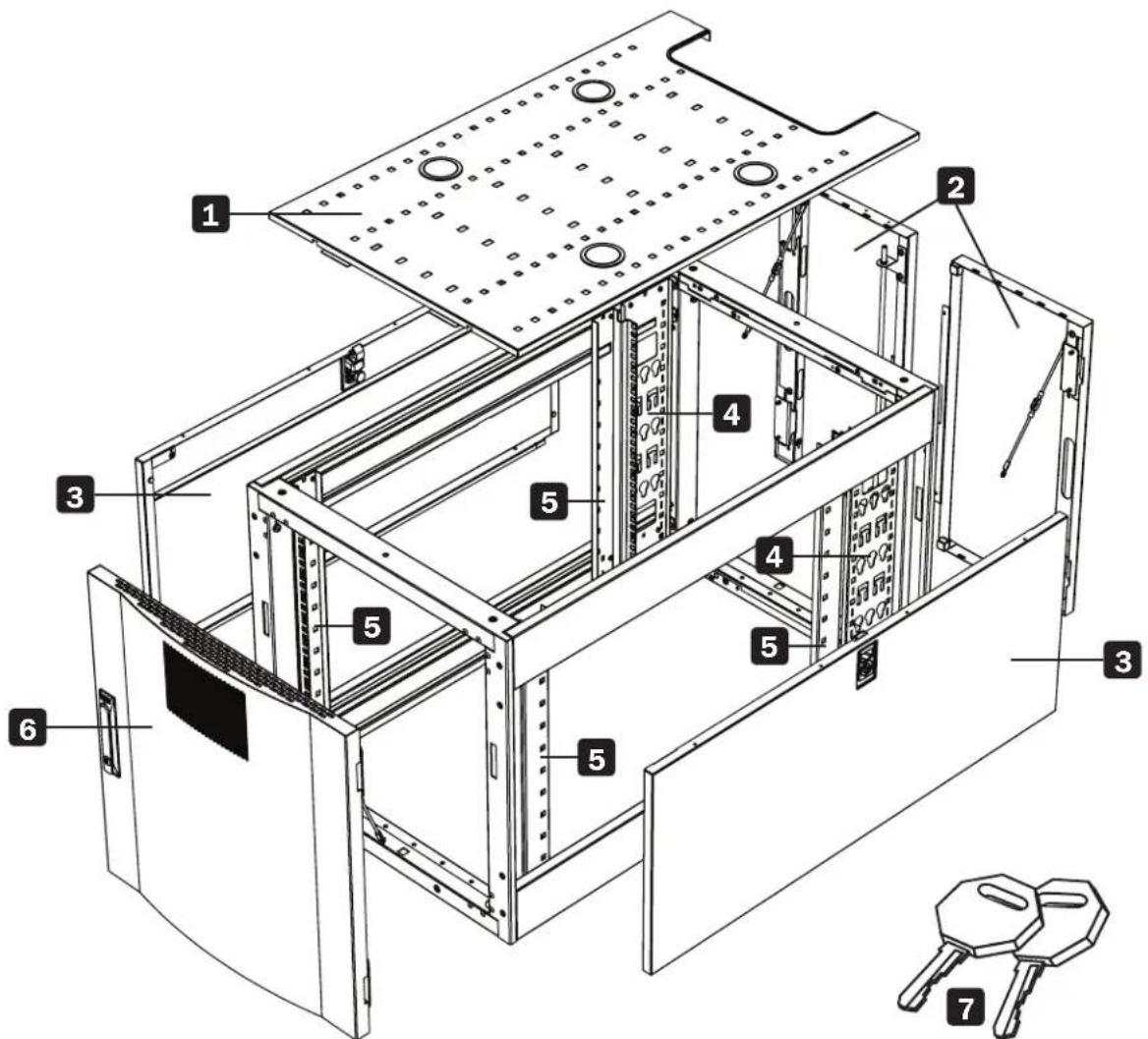
1 Roof Panel
2 Locking Split Rear Doors
3 Locking Side Panels
4 Cable Management Rails
5 Mounting Rails (Provide horizontal and vertical mounting points for equipment.)
6 Locking Reversible Front Door
7 Keys (One for the doors and one for the side panels.)
Not Shown: Mounting hardware, documentation, shipping brackets and other shipping materials.
Configuration

Before proceeding with configuration, make sure the unit is properly assembled and secured to the rack enclosure. Refer to the Assembly Instructions document for step-by-step instructions.
Ground Connection
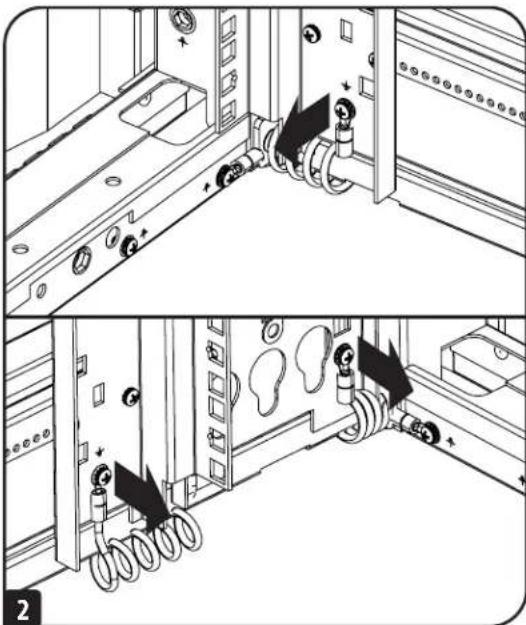
The unit includes multiple threaded grounding points labeled 12 . To establish a ground, choose a grounding point and use the included M6 screw to connect the frame of the unit directly to your facility's earth ground connection with an 8 AWG (3.264 mm) wire. Make sure to route the ground wire through the enclosure's frame to ensure unhindered door operation.
WARNING: Attach each enclosure to earth ground separately. Do not use the enclosure without an earth ground connection.
Adding or Removing Front and Rear Doors
WARNING: Do not attempt to add or remove doors without assistance.
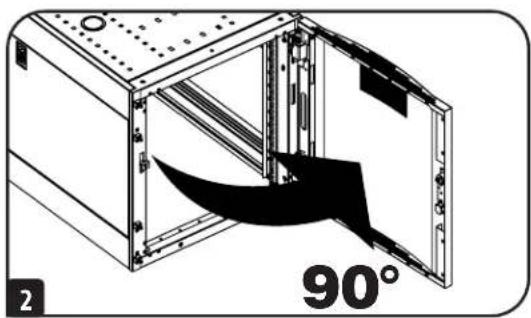
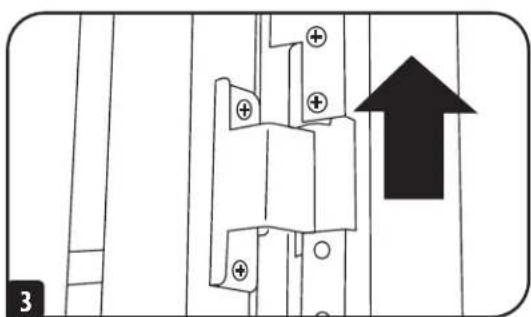
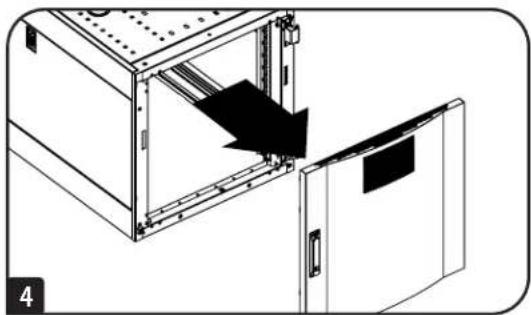
Removing Door
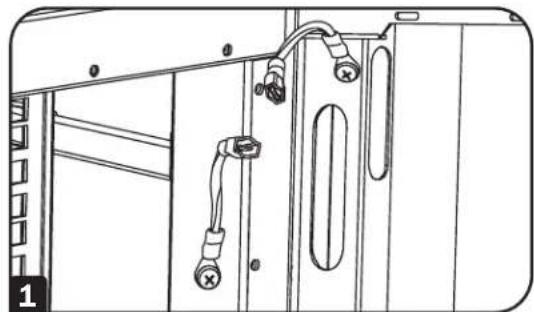
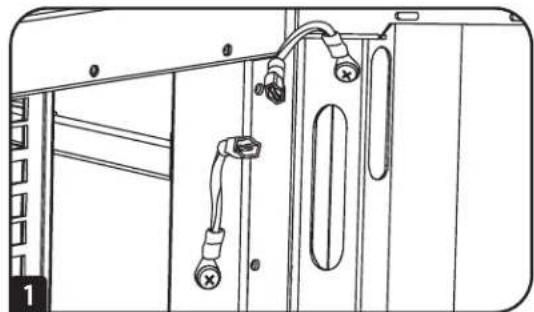
1 Disconnect the door's ground wire.
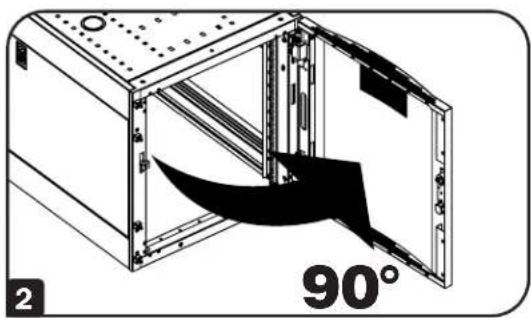
2 Open the door until it is perpendicular (90 degrees) to the front of the enclosure.
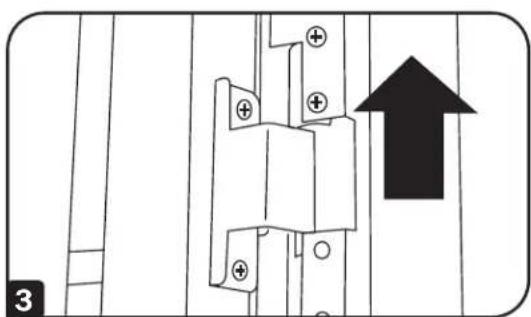
3 Lift the door from the hinges and remove it from the enclosure.
To Reinstall Door, Reverse Steps 1-3
Configuration
Reversing Front Door
WARNING: Do not attempt to reverse the front door without assistance.
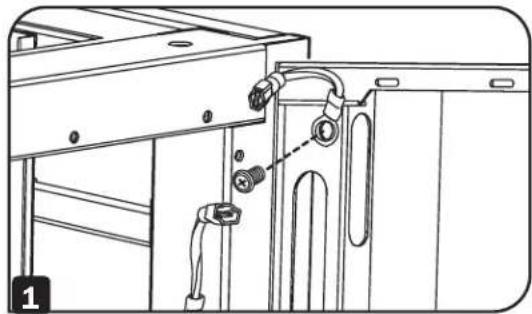
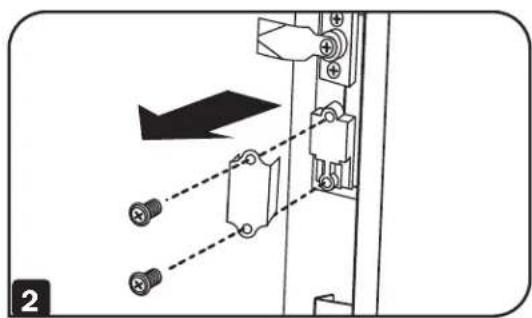
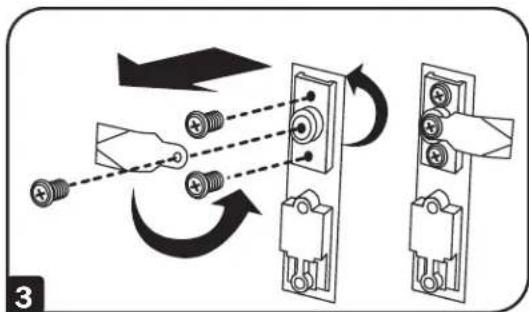
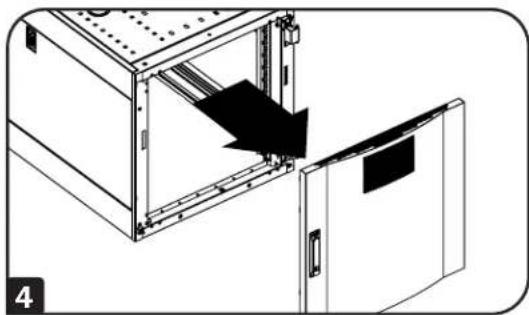
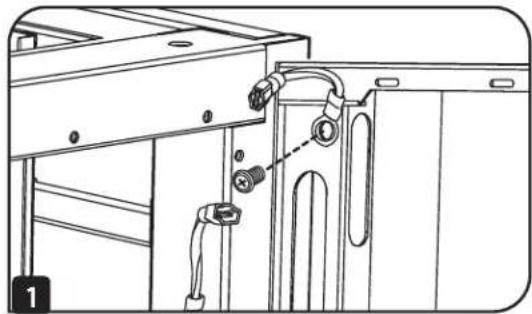
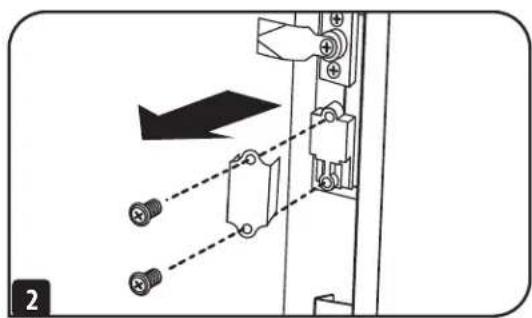
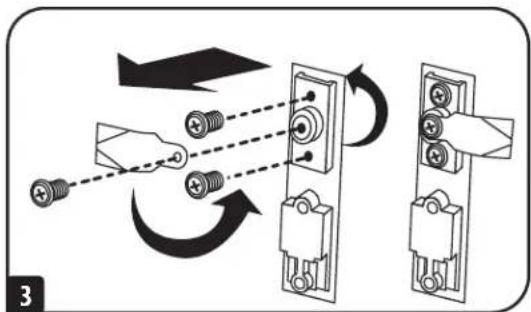
1 Remove the screw connecting the ground wire to the inside of the door.
2 Remove the 2 screws connecting the door handle to the door. Remove the door handle.
3 Remove the screw and washer from the rear of the door handle and remove the latching mechanism. Rotate the latch washer counterclockwise 90 degrees and reverse the latch so it points in the opposite direction, then use the screw and washer to re-attach the latch to the rear of the door handle.
4 Remove the door by following the steps in the previous section.
Configuration
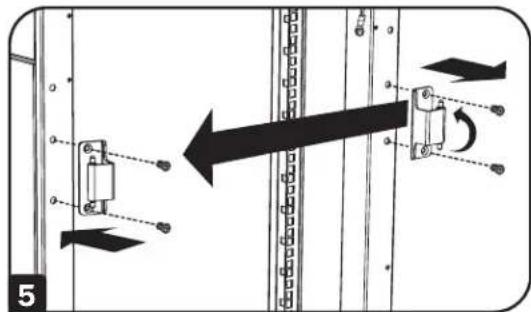
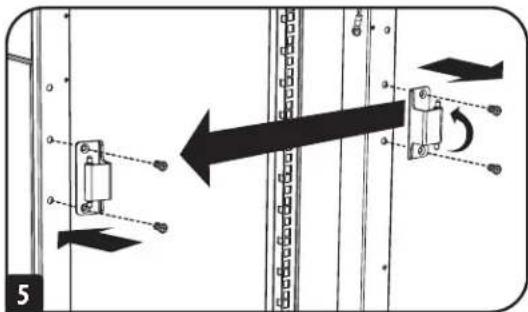
5 Remove the door hinges from the enclosure, rotate them 180 degrees and attach them on the opposite side of the enclosure. Note: The alternate door hinge attachment points have plastic plugs in screw holes. Remove the plugs and insert them in the original door hinge attachment points.
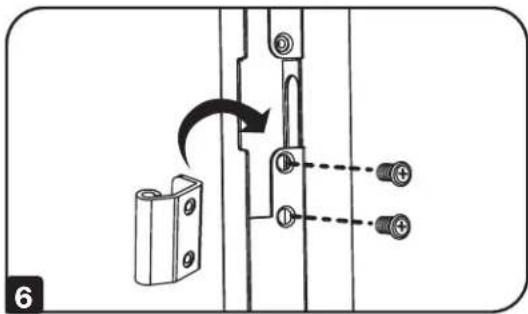
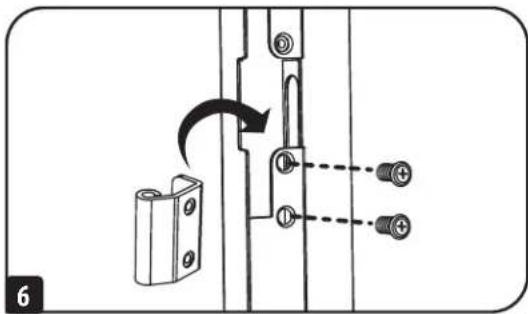
6 Unscrew the 2 hinge mechanisms from the hinge openings inside the door, then reattach each of them using the set of screw holes immediately opposite their original position.
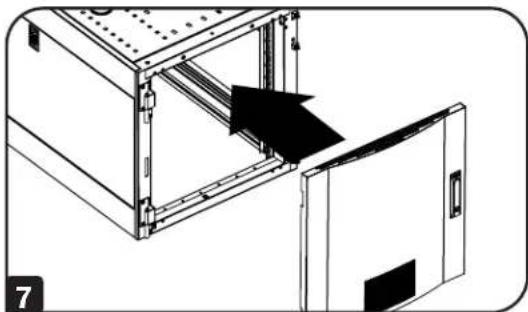
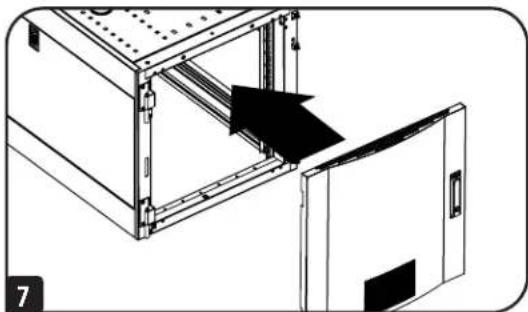
7 Rotate the door 180 degrees and reinstall it on the enclosure. Remember to connect the ground wire to the inside of the door, using the attachment point nearest the hinge at the top of the door. The attachment point is marked with the ground connection symbol ±
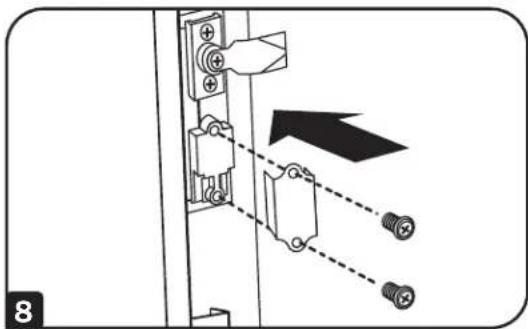
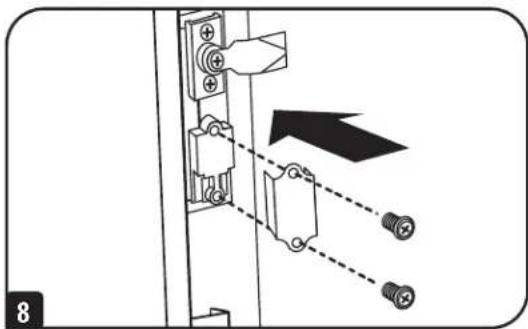
8 Reinstall the door handle.
Configuration
Adding or Removing Roof Panel
WARNING: Do not attempt to use the roof panel for weight-bearing purposes other than those explicitly described and approved by Tripp Lite. Do not attempt to add or remove the roof panel without assistance.
Removing Roof Panel
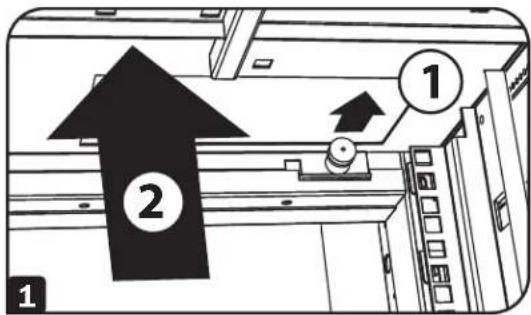
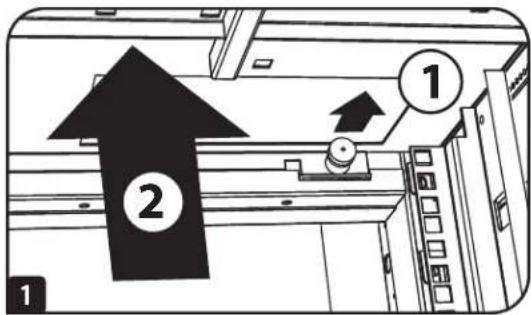
Pull the 2 pins near the rear of the roof panel. While holding the pins, push the roof panel upward.
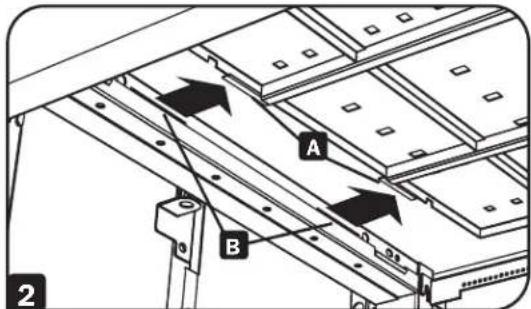
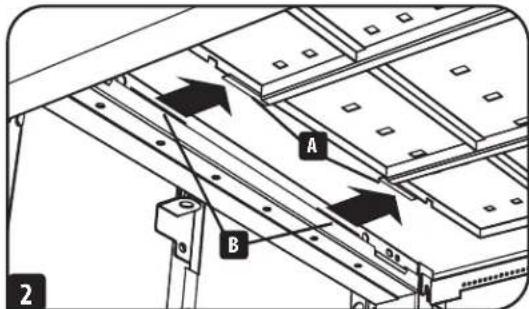
2 Remove the roof panel tabs A from the roof panel attachment slots B in the enclosure frame.
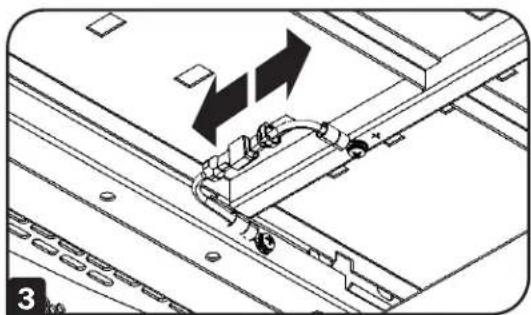
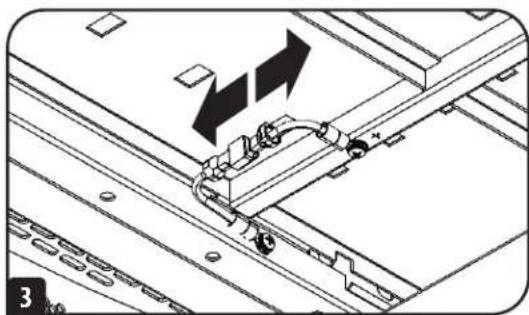
3 Disconnect the ground wire located on the side panel.
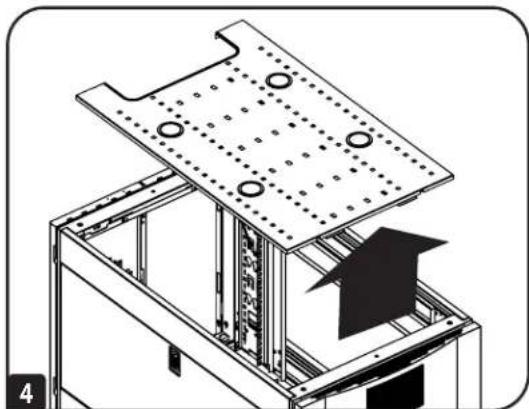
4 Lift the roof panel from the enclosure.
To Reinstall Roof Panel, Reverse Steps 1-4

Configuration
Adding or Removing Side Panels
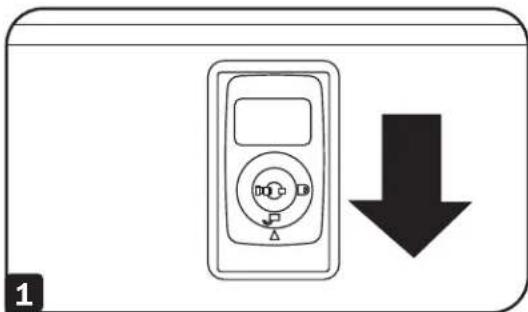
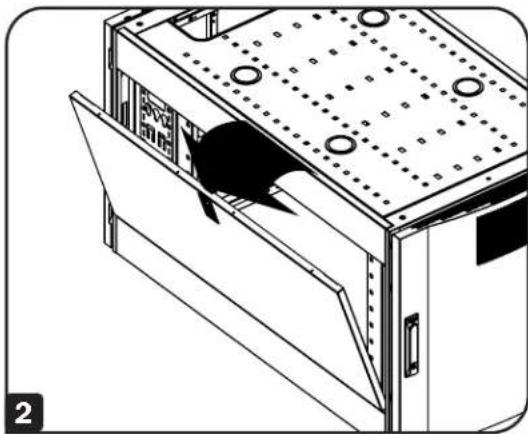
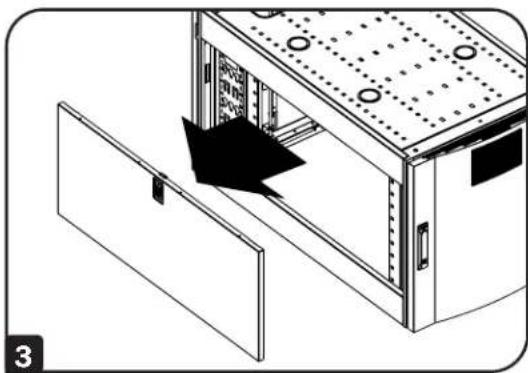
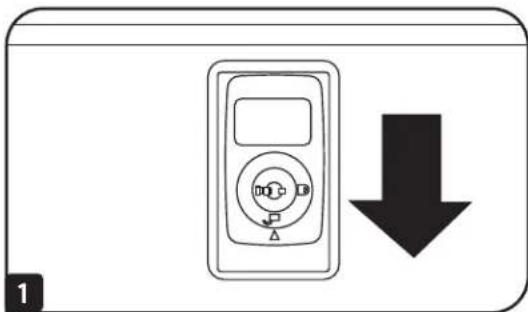
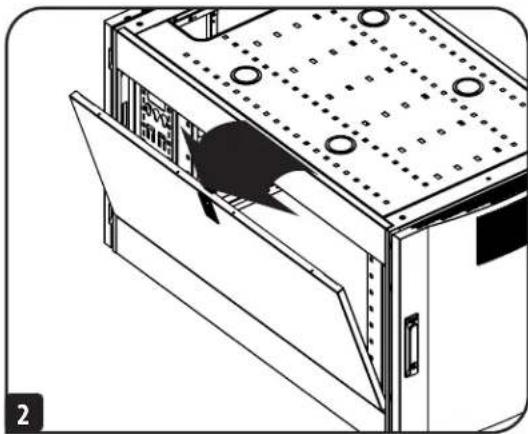
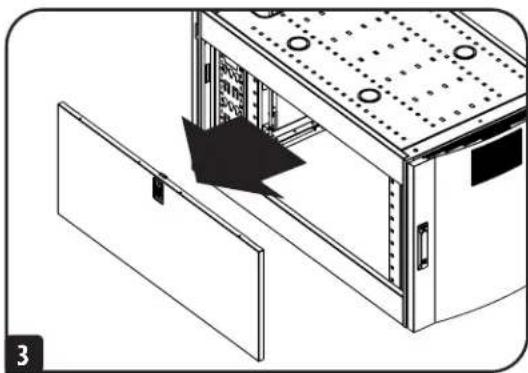
1 Open the latch by sliding it downward.
2 Tilt the top of the panel away from the enclosure.
3 Lift the panel away from the brace that supports it.
To Reinstall Side Panel, Reverse Steps 1-3
Configuration
Adjusting Mounting Rails and Cable Management Rails
WARNING: Do not attempt to adjust rails without assistance. Do not attempt to adjust rails while equipment is installed in the unit. Do not attempt to use rails without screws installed (4 per rail).
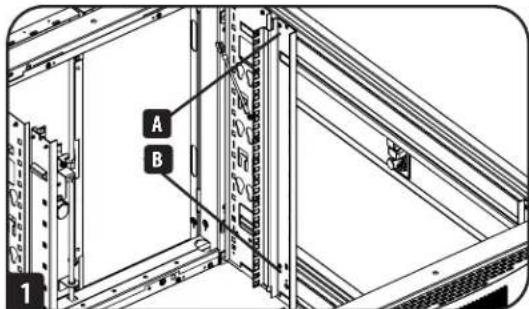
The 4 mounting rails accommodate equipment with a mounting depth of 30 inches (762 mm). Do not adjust the mounting rails unless your equipment requires a different mounting depth. The front and rear sets of rails can be adjusted independently in 14 -inch (6 mm) increments for mounting depths between 4 inches (101.6 mm) and 42 inches (1066.8 mm).
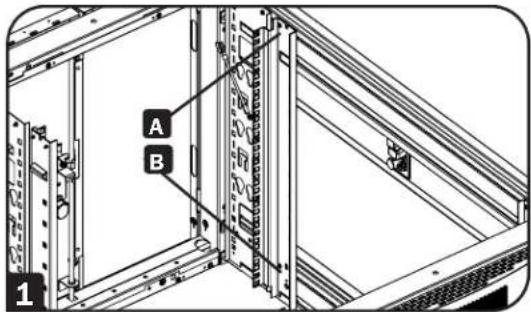
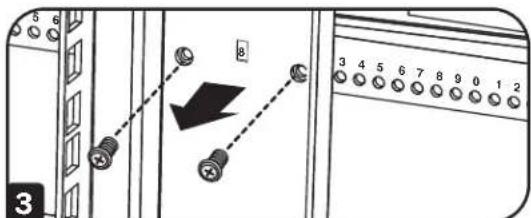
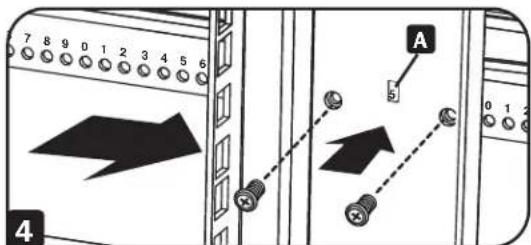
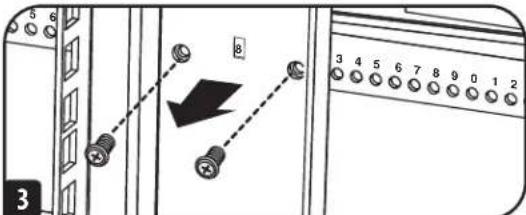
1 Each rail is connected to the enclosure with 4 screws - 1 pair at the upper beam A and 1 pair at the lower beam B.
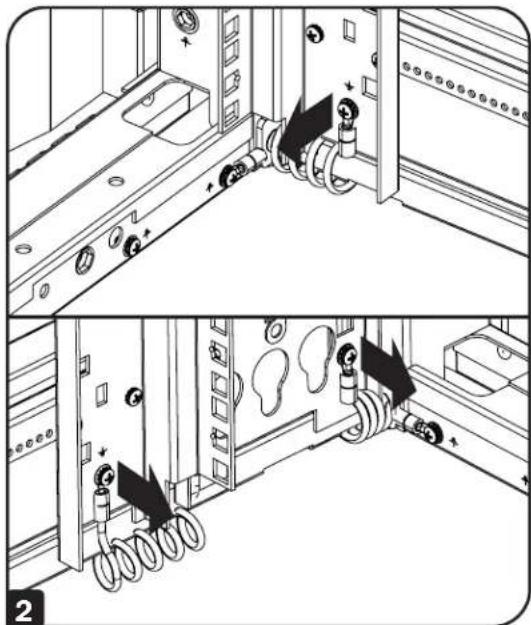
2 Remove the screws connecting the ground wire to the equipment mounting rail.
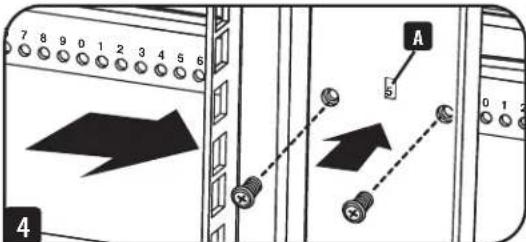
3 Remove the screws fastening each of the rear mounting rails to the enclosure. (If adjustment of the front rails is required, you can also remove the screws from the front rails.)
4 Slide the mounting rails to the desired depth and reattach them using the screws you removed in Step 2. The rail attachment points are numbered A to help you align each pair of rails at the same depth.
The depth of the cable management rails can be adjusted using the same method.
Note: Remember to reconnect the ground wires to the equipment mounting rails using the attachment point located near the bottom of the unit. The attachment point is marked with the ground connection symbol
Equipment Installation

WARNING: Do not install equipment until you have assembled and secured the unit in accordance with the Assembly Instructions. Install heavier equipment first and toward the bottom of the enclosure. Install equipment starting from the bottom of the enclosure and proceeding toward the top of the enclosure - never the reverse. If using sliding equipment rails, be careful when extending the rails. Do not extend more than one set of sliding equipment rails at one time. Avoid extending sliding equipment rails near the top of the enclosure.
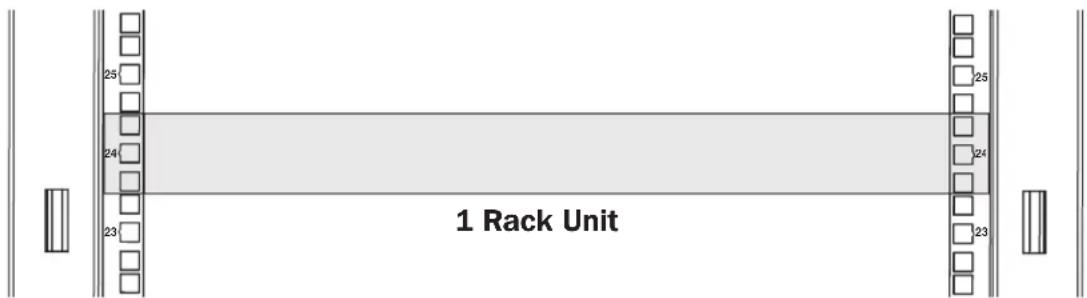
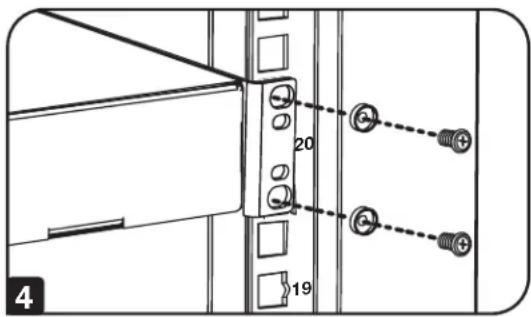
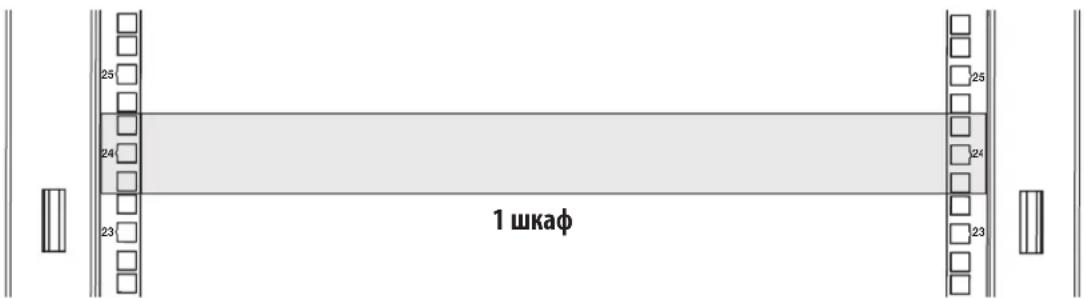
Note: The square holes at the middle of each rack unit are numbered and also include a small notch to aid identification. A single rack unit includes the space occupied by the numbered hole and the holes directly above and below.
Installing or Removing Cage Nuts
WARNING: The flanges of the cage nuts should engage the sides of the square opening in the rail, not the top and bottom. Follow the instructions in your equipment documentation to ensure proper installation of your equipment.
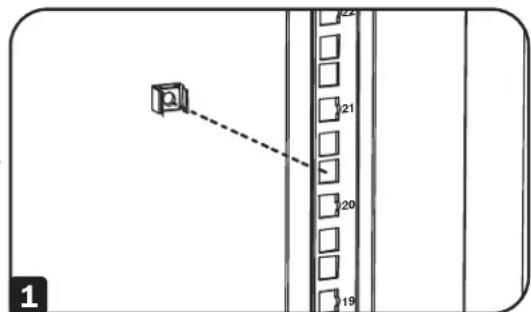
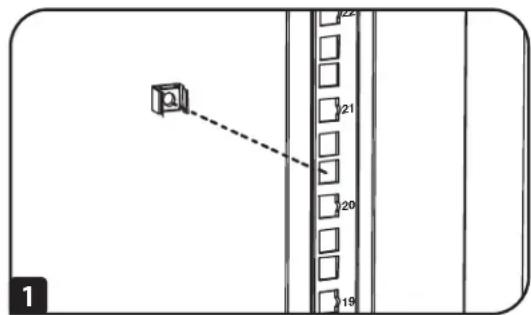
1 Locate the numbered square openings in the mounting rails where you plan to install your equipment. You will install cage nuts (included) into the square openings in order to provide an attachment point for the mounting screws (included).
Note: Consult your equipment documentation to determine how many cage nuts will be required and where they will need to be installed.
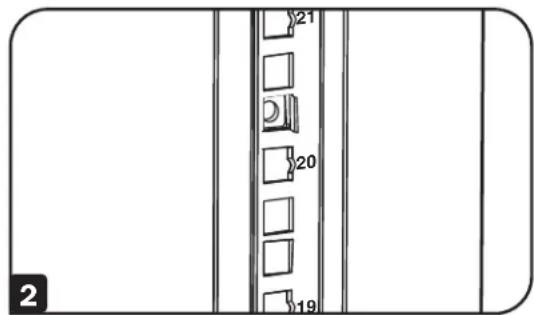
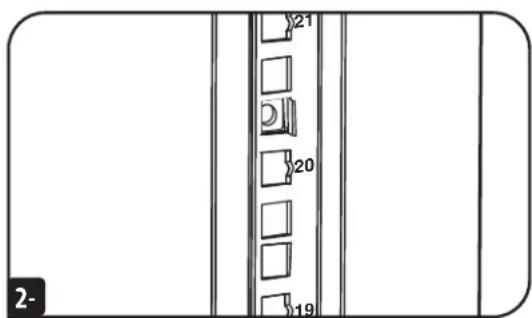
2 From the inside of the mounting rail, insert one of the flanges of the cage nut through the square opening. Press it against the side of the square opening. Each flange should engage one side of the square opening, not the top or bottom.
Equipment Installation

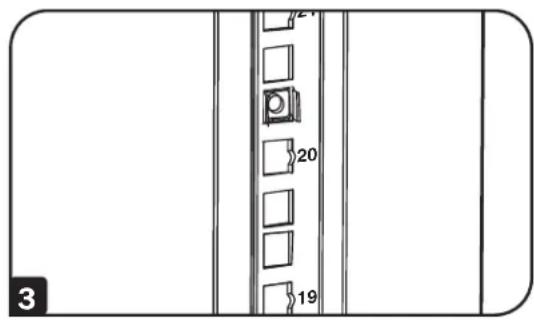
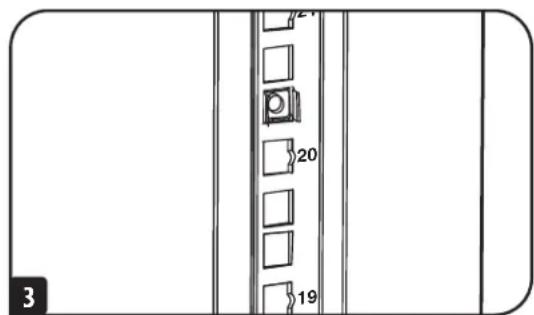
Compress the cage nut at the sides slightly to allow the remaining flange to fit through the square opening. When the cage nut is properly installed, both flanges will protrude through the square opening and will be visible on the outer surface of the mounting rail. Repeat steps 1-3 until all required cage nuts are installed.

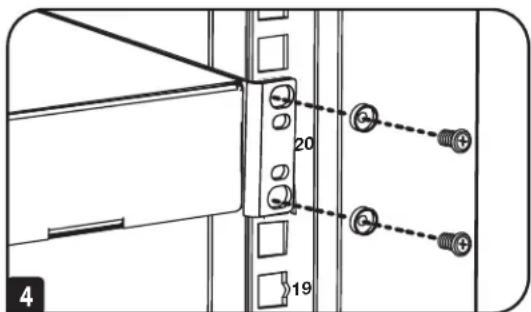
After installing the required cage nuts, use the included mounting screws and cup washers to secure your equipment to the rack rail. Place the cup washers between the screws and the equipment mounting brackets.
Note: Your equipment may also include mounting hardware. Read the mounting instructions that came with your equipment before installing your equipment.
To Remove Cage Nuts, Reverse Steps 1-3
Note: You may wish to use a cage nut tool (user-supplied) to aid cage nut installation and removal.
Specifications
| Model | Unit Dimensions Shipping Dimensions | |||||||
| Height Width Depth Weight Height Width Depth Weight | ||||||||
| SRTH6UB | 13.3" (338 mm) | 23.6" (599 mm) | 43" (1092 mm) | 84.8 lb. (38.5 kg) | 22.8" (579 mm) | 39.2" (996 mm) | 10.6" (269 mm) | 100 lb. (45.4 kg) |
| SRTH12UB | 23.9" (607 mm) | 23.6" (599 mm) | 43" (1092 mm) | 118 lb. (53.5 kg) | 24.4" (620 mm) | 39.2" (996 mm) | 15.4" (391 mm) | 132 lb. (60 kg) |
Storage and Service
Storage
The enclosure should be stored in a controlled indoor environment, away from moisture, temperature extremes, flammable liquids and gasses, conductive contaminants, dust and direct sunlight. Store the enclosure in its original shipping container if possible.
Service
Your Tripp Lite product is covered by the warranty described in this manual. A variety of Extended Warranty and On-Site Service Programs are also available from Tripp Lite. For more information on service, visit triplite.com/support. Before returning your product for service, follow these steps:
- Review the installation and operation procedures in this manual to insure that the service problem does not originate from a misreading of the instructions.
- If the problem continues, do not contact or return the product to the dealer. Instead, visit tripplite.com/support.
- If the problem requires service, visit tripplite.com/support and click the Product Returns link. From here you can request a Returned Material Authorization (RMA) number, which is required for service. This simple on-line form will ask for your unit's model and serial numbers, along with other general purchaser information. The RMA number, along with shipping instructions will be emailed to you. Any damages (direct, indirect, special or consequential) to the product incurred during shipment to Tripp Lite or an authorized Tripp Lite service center is not covered under warranty. Products shipped to Tripp Lite or an authorized Tripp Lite service center must have transportation charges prepaid. Mark the RMA number on the outside of the package. If the product is within its warranty period, enclose a copy of your sales receipt. Return the product for service using an insured carrier to the address given to you when you request the RMA.
Warranty and Product Registration
5-Year Limited Warranty
Sell w r t i f t t t t t t t t t t t t t t t t t t t t t t t t t t t t t t t t t t t t t t t t t t t t t t t t t t s e d i i i i i i i i i i i i i i i i i i i i i i i i i i i i i i i i i i i i i i i i i i i i i i i i i i ii ii ii ii ii ii ii ii ii ii ii ii ii ii ii ii ii ii ii ii ii ii ii ii ii ii ii ii ii ii ii ii ii ii ii ii ii ii ii ii ii ii ii ii ii ii ii ii ii ii iii iii iii iii iii iii iii iii iii iii iii iii iii iii iii iii iii iii iii iii iii iii iii iii iii iii iii iii iii iii iii iii iii iii iii iii iii iii iii iii iii iii iii iii iii iii iii iii iii iii iii iii iii iii iii iii iii iii iii iii iii iii iii iii iii iii iii iii iii iii iii iii iii iii iii iii iii iii iii iii iii iii iii iii iii iii iii iii iii iii iii iii iii iii iii iii iii iii iii iii iii
THIS WARRANTY DOES NOT APPLY TO NORMAL WEAR OR TO DAMAGE RESULTING FROM ACCIDENT, MISUSE, ABUSE OR NEGLECT. SELLER MAKES NO EXPRESS WARRANTIES OTHER THAN THE WARRANTY EXPRESSLY SET FORTH HEREIN. EXCEPT TO THE EXTENT PROHIBITED BY APPLICABLE LAW, ALL IMPLIED WARRANTYES, INCLUDING ALL WARRANTYES OF MERCHANTABILITY OR FITNESS, ARE LIMITED IN DURATION TO THE WARRANTY PERIOD SET FORTH ABOVE; AND THIS WARRANTY EXPRESSLY EXCUSES ALL INCIDENTAL AND CONSEQUENTIAL DAMAGES. (Some states do not allow limitations on how long an implied warranty lasts, and some states do not allow the exclusion or limitation of incidental or consequential damages, so the above limitations or exclusions may not apply to you. This warranty gives you specific legal rights, and you may have other rights which vary from jurisdiction to jurisdiction).
WARNING: The individual user should take care to determine prior to use whether this device is suitable, adequate or safe for the use intended. Since individual applications are subject to great variation, the manufacturer makes no representation or warranty as to the suitability or fitness of these devices for any specific application.
Product Registration
Visit triplite.com/warranty today to register your new Tripp Lite product. You'll be automatically entered into a drawing for a chance to win a FREE Tripp Lite product!*
- No purchase necessary. Void where prohibited. Some restrictions apply. See Web site for details.
Tripp Lite follows a policy of continuous improvement. Product specifications are subject to change without notice. Photos and illustrations may differ slightly from actual products.
Note on Labeling
This symbol is used on the product: Ground Connection


Manufacturing Excellence.
1111 W. 35th Street, Chicago, IL 60609 USA • tripplite.com/support
20-09-242 93-3D32 R#B
1111 W. 35th Street, Chicago, IL 60609, EE UU · triplite.com/support
PykoBODCTBO N0Ib30BaTeJia
SmartRack®
BepTnKaJIbHbI paCShnpuTeIbHbI ShKaΦ
Moden: SRTH6UB, SRTH12UB
(homepa cepni: AG-0545, AG-0546)
Длнocльбоваяс moDEЯMu cemeiCTba SmartRack:
AGAC7006, AGAC7454, AGAC7761, AG-00BE, AG-0324, AG-0325, AG-0534, AG-0535, AG-0536
English 1 • Espanol 16 • Français 31
EAC


PcysyBnM BnBnBnO BnBnO
1111 W. 35th Street, Chicago, IL 60609 USA - tripplite.com/support
OxpaHReTcA ABTOpCKMM npabOM 2021 Tripp Lite. Npepeuata 3anpeuaTcR.
CopepkhaHne
BaxKbIe yka3aHn no TexHnke 6e3oNaChocTn 48
CoBMeCTMmblie uKaΦbl 49
Cxema pacnoIoxeHnA yHKnOHaNbHbIX 50 3JIemEHTOB
Hactpoika 51
3a3eMJIeHne 51
YcTaHOBKa/CHTne nepeDneu 3aDnei DBepeu 51
Chatne dapepu 51
IpeceTahOBka nepeDneH dBepu5 52
UcTaHOBka/ChrTne BepXHei naHenn 54
UcTaHOBKa/CHrTne 60KOBbIX nHaHeNe 55
PerynpoBka MoTakHbIX N Ka6eIbHbIe 56 HanpaBlaIOuIe
UcTaHOBKa 6OpyDoBaHnA 57
YCTAHOBKa/CHTHe 3aKJaIbIXraek57
Texnueckne Tpe6oBaHna 58
Xpaehnne n TexHnueckoe 6cnyKnbAHne 59
TapaHTnHbIe 06a3aTeNbCTBa 60
Baxhblc yka3aHnno TeXnke 6e30nacHoCTn
COXPAHNTE HACTOUIME YKA3AHNA
Bo Bcex pa3dienax HactoJeero pykoBocTbCo copKacTa yka3aHnN I npedynpkdeHnN, KOtopbIe Heo6xOJMo co6bnoaTb B npoucece yctahOBKn N EKcNpyatauHn ONcaHnHO B HEM BepTuKaJIbHOro paccHpntbHoro ukaFa. BHMaTeNbHO 03HaKoMbTeCb CO BcEMNu Ka3aHnA Mn I npedynpkdeHnMn NpeD BblOnHeHem IIObIX DeCTBn, CBzAHHbIX C npeMeueHnEM, YcTaHOBKn HnN 3KcNpyatauHn BEptTKaJIbHO paCUnPHTbHoro ukaF, ONUCAHbIX B HacToHSeM pykoBocTBe. Hec6bIoDeHne daHORo Tpe6oBaHnna Co3daT onaChocTb NonyeHn TpaBM HnB03HNKOBeHn NMyUeCTBeHnHO yue6a n MoKeT npnbEeT K aHHyIpobAHnro rapaHTn.
-ⅢkaΦdoJIKeH haoJntbC B NOMeUeHm C KOHTpOJIpyEmbIM MKNpOKJIIMaTOM BdAJIOT NCTOCHIKOB BlaI, 3KCTpeMaJIbHbIX TEMpeaTp, BocIIaMeHHOUxXcJMKoCTeI r430B, 3NEKtpOnpOBOdBhX 3arpr3HNTeJI, PbJIu IN pIpaMOro cONHeuHOro CBeta.
- IpeaIkaqom n 03aHrero Heo6xOIMO o6ceNtB DocTaOHTO CBO6DHoro npocTpaHCTBa Ira er OHaJIeKaUero npoBeTpBaHn. He 3aropaxmbaTe Hn HAKpbIbAte BHeHIne BEHTmJauOnHbte OTBepCTMa Ka, a TaKke He BCTabJIte B Hnx KaKe-JIbO npdeMetbl.
IIkaaBnAETcKpAHeTJKeNoBecbIM.PnIpeMeueHmIkaaCo6JIouaTeOctoPoXHOCTb.He NtaiTeCpaacNAOBbBaTb,nepeMaatbNtUyCTaHaBnBaTberoB OAnHOky.ⅡIpeMeueHmIkaaBHyTpIn TpaHCnpTnPOBOuHOrO KOHTeHepaNCnIb3yTe MexAHueCKoe yCTpoCTBO TnNa BnIOuHO rnpy3uHaKnBnOohr ngdpabunueckoi TeLeekn.
He KnaIaIte Ha 1kaKa KaKne-1n6o PneMTeB, oc6eHHO EMKocTcKIOCTaMn, a TaKke He yctHaBaNbAite 1kaKa bI pyr Ha npyra nnn 60nee oJHoro KOMnEKA Ta IpeRyInpOBKn BicOTb IOBepx 1kaFa.
Ocmotnpe codepxmoe komnneTcBepTKaIbHoro paunpntbHoro 1kaaHa npedmet nobpeXdHn npu TpaHcnopTpOBke. He noIb3yITeCb BepTKaIbHbIM paunpntbHbIM kkaom B cnyae erno nobpeXdHn.
He 3BKeAte WkaΦn3 TpaHcnpTIpOboHOro KOHTeHepa Do ernopeMeueHna MaKcMaIbHo 6bn3Koe paCToHne K McTe OOKHaTeJbHO yCTaHOBKM.
BepTKaIbHbI paacnptEnbHbI uKaf npedHa3NaeH dIy yCTAHOBKn NOBepx moJeel uKafoB Tripp Lite cepm SmartRack, npHKpeJIeHHbIX K KOHcTpyKUHOHBIM 3JEMeHTam 3dAHN Iy yCTOuHBOCTN.
-Данhoeобудоване npedha3aueho Дяуставк KBалифицpoBaHHIM cepBcHbIM nepcoHAM,OBlaadoum CMOTBEcTBYUOMM HabikaMn.
- IIkaΦ cepHn SmartRack n BepTknabHbI paCunpntelbHbI IkaΦ DOnJXbI yCTaHaBnBaTcB KOKCTpyKUHOH NOPOHM MeCe CPOBbIM OCHOBaHMe, CNOC6HbIM BbIDepKmbATb Bec Camoro IkaΦa, Bcero 06OpDyOBaHnA, KOtOpe 6ydt EYtaHOBHeo BHyTpIn Hero, a TAKke IIObIx dpyTnx IkaΦOB n/nnn 06OpDyOBaHnA, KOTOpBie 6ydyT yCTaHOBneHbBn3n Hero.
Kopnyc ukaa dojnxe 6b83aTeBn 3aemne.Boone npofohna Hnphiomua npecTabneBa pa3ene 3aemneHne.
- Pn pa3pe3aHm ynaKoBHybIX MaTePnAnOB Co6IJaTe OctopoxHoCTb. 3To MoKeT pNBeCTu KaHeceHIO caPAnH Ha coepKIMoe ynaKOBKn, TTO npEeCTabRnEe Tco6Oy uep6, He nokpbBaem My DeiCTByUoien rapaHTne.
CoxpaHnIe Bce ynaKOBOHyBie MaTePnAblIy IJIa NocJeDyUoToero IcNoJb3OBAHnI. NobTOpHra yNaKOBKa I TpaHCnOpTIpOBKa IkaΦa 6e3 IcNOJb3OBAHnI opmHaNbHbIX ynaKOBOHyBix MaTePnAIOB MoKeT npBecTN K NOBpeKdEHHIOI3dEHH, KOtOpoe NOBHeT 3a c06o anHyynpOBAHne DeIcTBkyOeI rapaHTnI.
He npcykaetnncnyuansra TpaHcnopTpOBka WkaFa cdoonHnteBbHM o6pyoBaHnem 3a NCKUoyHnem Cnyaeb NepBOHaanbHO nocTABKn WkaFco cnueaNbHbIM yapO3aunneHHbIM noDIOHom (ToIbKO IJRA MOJeNE SP1).CymMaphBb BE WkaFa uCTAHOBnEHORo B HEM o6pyoBaHnH He doJIKeH PpeBbIaTb rpyoNDbemnoctb noDIOHa. KomnaHn Tripp Lite He hecet OTBeTcBEHoHcTn 3a KaKoi-Ni6o Yuepe6, npnuHHeHHB b IpOcecec NoCleNyUoe TpaHCnpTPOBKn.
He nCnObn30BaTb B pncyTCTBm DeTei.
He pekomehnyetc mnohbo3oBAHnE daHnHO o6OpyD0BaHn B CNTeMax Xm3Heo6ceNeHn, Ie erO BbyION 3CTPOIpeNOJXtBHO MOKeT PnPBecTN K nepe6oM B pa6ote o6OpyD0BaHn Jx3Heo6ceNeHn IN B 3HaHTeNBHO Mepe Chn3NTb erO 6eONaCHOCTb IN Nn 4fKeKTHBOHCTb.

BHIMAHHE!

3EMIA
BepTnKaIbIbe paunpnteIbIbe IkafoM. SRTH6UB u SRTH12UB coBmecTmbu cIeJeUOUMM moEJAMn IkafoB Tripp Lite cepin SmartRack:
| Мо dyeль Кат. № | |
| SR2400 AC8A08 | |
| SR25UB AC8480 | |
| SR25UB SR1090 | |
| SR25UB3 AC883F | |
| SR25UB3001 SP87C0 | |
| SR25UBEXP SR1045 | |
| SR25UBSP1 AC7022 | |
| SR25UBSP1 SR1091 | |
| SR42UB AC89A3 | |
| SR42UB SP87BA | |
| SR42UB SR1000 | |
| SR42UB007 AC8A52 | |
| SR42UB1032 SR1007 | |
| SR42UB3 SR1041 | |
| SR42UB3002 SP87BF | |
| SR42UBC SR1089 | |
| SR42UBC001 AC881E | |
| SR42UBCL SR1044 | |
| SR42UBCLSP1 AC89CF |
| Модень Кат. № | |
| SR42UBEXP SR1002 | |
| SR42UBEXP001 SP87AA | |
| SR42UBEXP002 SP87AB | |
| SR42UBEXP003 SP87BE | |
| SR42UBEXP004 SR107F | |
| SR42UBEXP1032 SR8797 | |
| SR42UBEXPC001 AC881F | |
| SR42UBEXPND SR1003 | |
| SR42UBEXPND3 SR1042 | |
| SR42UBEXPNDNR3 SR1004 | |
| SR42UBG SR1001 | |
| SR42UBG001 | AC883E |
| SR42UBG3 | SR107C |
| SR42UBG3001 | AC8B66 |
| SR42UBKD | AC7174 |
| SR42UBND | AC8818 |
| SR42UBSFDKD | AC8AD9 |
| SR42UBSP1 SR1005 | |
| SR45UB SR1014 |
| Модень Кат. № | |
| SR45UBEXP SR1019 | |
| SR45UBEXPND SR1020 | |
| SR45UBEXPNDNR3 SR1021 | |
| SR45UBND | SR1015 |
| SR45UBSP1 SR1022 | |
| SR48UB SR1052 | |
| SR48UB3 SR1064 | |
| SR48UB3 SR879A | |
| SR48UBCL SR1053 | |
| SR48UBEXP SR1057 | |
| SR48UBEXPND SR1058 | |
| SR48UBEXPNDNR | AC8841 |
| SR48UBEXPNDNR3 SR1049 | |
| SR48UBSP1 SR1059 | |
| SR50UB AC003E | |
| SR52UB AC003B | |
| SR55UB AC003D | |
| SRX42UBAB | AC0024 |
Cxema pacnoIoxeHn yHKuHOHaJIbHbIX 3JeMeHTOB
Ha nllnoctpaun noka3aHa moed SBRTH12UB.
1 BepxnaHnB
2 3aHpaembte 3aHnne DBepepb pa3pe3HoKoHTpyKuM
3 3anupaembe60koBbe naHenn
4 Hanpablaioue n de onTmuaaKa6eIbIbx coeHHeHH
5 MoHTaxHbIe HapablaIOUe (MeIO TO TcKn KpeJIeHn IJr TOp3OHTaBHO r BepTmKaJIbHO r MoHTaKa o6OpyIOBaHn).
6 3aHpaemn/peceTabmneMa npeepnaDbepua
7 Knou (OINn DnA Dbepeu OINn DnB 6okobbx naheei).
Ha nllnctpaunHnepeCTabHebMOHTaKnaOchactKa,doKymentau, TpAHCnpTnPOBOUHbE KoHUsTeHbN dpyrue TpAHCnpTnPOBOUHbE MaTePnAbI.
Hactpoika

Ipepe BbnoHnem HactpoKu y6eNTecB TOM,TO MoDyIb cOpaH aHNeXaUm 06pa3oM npKpenen K Kopnyka.
Noarobbie HHCTpykun npEcdTabHeB b DOkymEnTe "Yka3aHn No c6OpKe".
3a3emJIeHne
Moynb HmeeT HeckoBKe pe3608bIX Toek 3a3emnHc M MapKnpOBKoi 12 .IIO oecneueHn 3a3emnHb Bb6epHe TQky 3a3emnHn H COeHNHTe KAPKAC MoyJr HenoCpeCTBeHHO C CNTEmo 3a3emnHc CBOero O6bEka Tce p3 npoBd KaIn6pa 8 AWG (3,264 MM) npi NOMUu BNHTa M6, BXODJIero B KOMNlEKT. IIO oecneueHn 6ecnPnTCTBEHHORO OTKpbIBAHIN 3aKpbIBAHIN DEpBu 3a3emnHO u npoBd cNeDyT npoBectupe3 KapKac Wka.
BHUMAHWE! Kaekdbm WkafoonKHeN noocoeHnTbca K Wnne 3aemEnnno OTOeNbHoCTn. NtB3oBaHne He3aEmenHHbIM WkafoMe DonyckaeTc.
UcTaHOBka/chrTne nepeDHeN 3aDHe NBepeu
BHUMAHME! He nbTaiTecb HabeWuBaT b CHIMATb DBepu Kafo B OOnHooKy
CHaTne DBepubl
1 OToeDHHnTe npOBd 3a3emJIHnIbepuI.
2 Otkpoite DBepu Do TOro NonoKeHnB, B KOtOpom OHa OKaXeTcNepneHmKynpHoi (noJ yrnom 90 rpaDycOB) nepeDeHnIOCKOCTu Ka.
3 NpHIMMITE DBepeu H CHIMMITE ee c nTeB uKaphi.
IyctahOBKn DBepuHa MeCTo CneJeYet NOBtOpMb Warn 1-3 B o6paTHOM nopAKe
Hactpoika
IpectaHOBKa nepeDnei DBepubl
BHIMAHHE! He nbItaiTecb nepeBeeWbBaT bpeDnIOU Dbepu Ha npyTuO CTOpOny B OAnOHcy.
1 BbIeBnHTe BnHT, coeINHIOUoi npoBOd 3a3EmneHc BHyTpeHHeN nobepxHOCTbIO DEbpui.
2 BbBepHnTe 2 BnHTa, o6eCneuBaHOUne KpeJIeHHe NDBepHo pyKn K DBepue. Cmmnte DBePHyIOpyKy.
3 BbIePHTE BnHT N CHMmTE 7a6y C bInbHO CTOpHb DBePHo pyK, nOcne Hero BbHbTe 3aOpHb MEXAH3M. POBEPHTE 7a6y 3aOpHrO MEXAH3Ma Ha 90 rpaDycob npTUB qacOB CTpeKNu pa3BepHte 3aUeKNy TAKM Oba3OM, YTo6bl Oha 6bl Na opaSeHa B npOTMBONIOXHyTO CTOpHv, a 3aTEM C NOMOuBo BVHTa N aai6bl npNKpEnITE 3aUeKNy 6paTHO K TBInbHO CTOpHoe DBePHo pyK.
4 CHIMITE DBePcU BnopAKe,ImNoXeHHOMB npebIyUeM pa3dene.
Hactpoika

CHMNTE DBePbIe neTm co WkaΦa,pa3BepHnTe nX
Ha 180 rpaynob m3akpenute Ha npoTMBONIOxHoh CTOPHOIka.
PnmuueaHne. B ToUkax KpENNEHMa DBepHBx NTeBb Ha nPoTINBOJIOXHO CTOpOHe HAXOJATcnnactMaccobbe 3aRnyu, BCTABNeHHBe Bpe3b6Obbe OTBepCTHa. BbHbTe 3aIpyuKm H BCTabBe XX BOTBepCTN, NEpBOHaayabHo MCNOJIb3OBabWmeCd Ia KpENNEH MaDBepHBx NteBb.

BbIeHNrE 2 nTeNBeBix MExAHM3Ma n3 nTeNBeBix na3OB C BHyTpeHHe CTOpHO bIeBpU bI 3aKpeHnTe KaXdbI N3 HIX, IcNoIb3yA DnA TToI cENI rpyPny pe3b6oBbIX oTBepCTm, paCNOJoxEHHy HEnOCpeDCTBeHHO HanpoTMB TEX, KOTObie IcNoIb3oBAJNCnb NEpBOHaay

Pa3BepHnTe 1Bepuy Ha 180 rpaaycoB u yctaHOBte ee o6paTHo HA uKa. He 3a6ydbTe PNOcEOHNHTb PPOBOI 3a3eMNEHn K BHYTpEHn NOBEPXHOCTN DpeBcB TOUKe KpENHeHn, paCNOJIOxHENb 6bnke BCex K pTne B BepxHn qactn DpeBcB. 3Ta TOnKa KpENHeHn 063HaueHa CMBONOM 3a3eMnIOoero CoEINHeHn

yCTaHOBHTe Ha MeTo DBePhyO pyuKy.
Hactpoika
YctahOBka/chrTne BepxHe naHeJI
BHIMAHHE! He nbTaIeTcb nCnOb3oBaTb BepXHIO IO naHeB uKaΦa dIra pa3MeueHr TExBeB x npEeMetOB 3a NckNIOeHem cIyAeB, RaHbIM 06pa3OM onCaHHbIX I Odo6peHbIX KOMNaHne Tripp Lite. He nbTaIeTcb yCTaHABuBaTb ChMaTb BepXHIO IO naHeB uKaΦa B OdnHOky.
Chatne Bepxhe naHenn
I NotAHHe Ha ce6a 2HTnΦTa, paCNOJoxeHHbIe B3aHHe yactn BePxHe naHEn. YdepKnBaB
2 BbHbTe RaBcHn BepXHei naHEn A n3 ee MoTakXhBXn na3OB B bKapkace uKaΦa.
3 OToeDnHMe 3a3EmnI npoBD, paCIOIOKeHHbHa 6OkoBn naHeJI.
4 CHMMITEBepxHIO naHb co Wka.
IyctahOBKnBepxHnHaHMeCTOcneDyET NOBTOPTb WArN 1-4 B o6pthOM npAke
HacrtpoiKa
yctahOBka/chrTne 6OKOBbIX naHeJeI
1 OTKpoIte 3aueKny, cBnHyB ee no HapablenHb BnH3.
2 HaKNOHnTe BepxHIOU qAchb naHEnn no HapBaBHeHIO O t Ka.
3 BbHbTe naHeNb mΦKcTaOpa.
IyctahOBKn 6OKOBn NaHn Ha MecTo CneJyET NOBtOpntb Warr 1-3 B o6paTHOM npaKe
Hactpoika
PerynnpobKa MoHTaXHbIX N Ka6eIbHbIX HApnaBIAIOxN
BHIMAHHE! He nbtaTecb perynpoBaHb HappnaIOue B ODHNOy. He nbtaTecb perynpoBaHb HappnaIOue npu yctahOBnHOM B uka o6OpOboAHm. He nbtaTecb nCnoB3ObaHb HappnaIOue 6e3 yctahOBKn BHTOB (no 4 Ha KaKdyio HappnaIOuyio).
4 MOHTaXhBHe HapabnloOme paCCHTaHb Ha pa3MeueHne OobpyoBaHn C MOHTaXHOIy6HOB 762 MM. He perynpyTe MOHTaXHbE HapabnIOUe 3a NCKIOUeHemTex clyuAeB, KOrDa Iyra yCTaHaBnBaEMoro oObpyoBaHn Tpe6yTc Dpyra MOHTaXHg Tny6Hua. PepdHry n 3aHry rpyPi b HapabnIOUx Moryr perynpoBaTcHesABmmo dpyr ot dpyra C Wairom 6 MM dIy nOtuyeHn rny6Hb MoTAtxa ot 101,6 do 1066,8 MM.
1 KaJdA HnpaBraHsA KpeNTcK KkaFy npn nomOu 4 BnHTOB: 1 npbI y BepxHe6aKn A n 1 npbl y HmKHe6aKnB
2 BbIePHNTe BNHTbI, coeINHIOUHe 3a3EmNIOU npoBOc c HHOJ MOHTaKa o6OpdyOBAHn.
3 BbIbePNHE BnTHbI, KOtOpbIMKaKdJa W3aHINX MoTaNkHbIX HAnpaBnIOx KpenNTcK IkaDy. (PnHne6xoDMoCTNpeynipOBKnpeepHNX HApabNIOx MOxHO BbIeBpyTb BnTHbI, OteBaOIOue 3a IX KpENNEHe).
4 CnBnHbTe MoHTaxHbIe HApBaNJIooHcIe Ha JKeJaEmyIOIry6Hy I ChOBA 3aKpeInTe IMC nOMoBIO BNTOB, BBBePhyTbIX Ha UIare 2. ToCK KpeIeHnHaPabNJIooHx IMeOT o603HaueHHe A, YTO NmOKeY cTaHOBtB KaXdyIO npA Hy HApBaNJIooHx Ha OOnH IOJH Ke rny6Hne.
Iy6HnHa yctahOBKn HapnbAIOUx DnO ONTmN3aUM KabeNbBbX CoeINHeH N perynpetyer ananoruHbIM 06pa30M.
PnmeHne. He 3abyte noCoEHHb npoBa 3a3eMHe H6paTHo K uHmam dmoHTa 06OpDobAHn CnObn3oBAHNEM TOKn KpeNHeHn, paCNOJIOeHHoB B6u3n HxHKeH NOBepXHOCTn MOdyn. TaTOcka KpeJIeHn O6O3HaueHa CMBONOM 3a3eMNoUcero coeMHHeHn
yctahOBka 60pyoBaHn

BHUMAHIE! He yctahabnBaIte o6opyoBaanHe Do Tex nop, noka Moynb He 6ydt c6paH n 3akpenneB CootBetCTBn Cya3aHnAmn no c6opKe. Chayana CneNyET YcTaHabNBAtB 60nee TAgKeJeOe o6opyoBaanHe, pa3Meuaer Ero B HxKHe qactn shkaFa. YcTaHabNBAIte o6opyoBaanHe, NaHna CH3a ShKaFaNo HaprabLnHn BBePx - Hn B Koem Cnyae He Haobopot. Pn HcNoIb3oBaanHn HaprabLIOx INdYcTaHOBKn O6opyoBaanHc6IouaTe OCTOpoxHocTb Pn HX BblBxHeHH. He BblBraIte 60ee OndHrpynnb HaprabLIOxIN OHOBpeMeHH. CtapaiTeB He BblBnRaTb HaprabLnOuhe DIny UcTaHOBKn O6opyoBaanH, pacnoLoKeHHbE B BePxHe qactn shkaFa.
PnmuueHne. Kbaapthte OTBepTnB CpeDInHe KaJdoTO WkaFa npOnHmepoBaHbI n MeMeT HeobIbWyIO HAcEuyIO yIO6CTBa paCno3HaBaHn. B KaKdOM OTeNbHOM WkaFy IMeetc MeTo, rDe paCnoIaerTaHymepoBaHoe OTBepTeN o TBepTnA, HxOJaUWeCe HENOpceCTBeHHo HaI nIOHM.
yctahOBka/chTne3aknaHbIXraek
BHIMAHNE! Otrn6bI Kpomok 3aKlaadhix raeK doJXhbl 3auePbTcB 3a 60koBbIe, a He BepxHn HnxHnn Kpa KaBpaTHo oTBepCTn B Haprablanuoei. Ira o6ecneueHn npabunbHoctn yctahOBKn o6OpyDobAHn cIeynTe yka3aHnM, nIIOKeHHbIM B coNPoBDntelbHO JOKMeHTaUN K hemy.
1 HauHHTe HymepoBaHHbIe KBAdpaTHbIe OTBepCTnB MOtAkhbIX HappabJIIOxN, KOtopbIe pHaHpyETc NcNoIb3OBA Tb dIy UcTaHOBKn OobpyIOBaHn. BCTaBTe 3aKJaIbIe rAIKn (u3 KOMIIKeTAt) B KBdpaTHbIe OTBepCTnC cIeblO oBecepeHn ToKKn KpeJIeHn DJIa MoTAtXhBix BUNTOB (noCTabJIeMbIX B KOMIIKeTKe).
PnmeaHne. onpeenEnHna He6xOIMrO KOINcTBa 3akndhIX raeK MeCTnx yCTaHOBKn OHaKoMbTeCb cOnpOBOITeHbOH dOKyMeHTaUeK KOBOpYOBaHIO.
2 PpOeHbTe OINH N3 OTn6OB KpOMKn 3aKnadHoi rAkn Yupe3 KBaDpaTHoe OTBepCTne C BNYTpEHHe CTOpHObl MOHTaXHNO HAnpaBnIooJe. BdaBte ee no HAnpaBnEHIO K6OKOBOMy KpaO KBaDpaTHoR OTBepTna.OTn6bI KpOMK 3aKnadHbIX Raek DOnJHbI 3auePnIbTc83a 60KOBbIe, a He BepxHni HmKnn Kpa KBaDpaTHOrO OTBepTna.
YcTaHOBka 6OpUdoBaHnIa
3 CnErKa HauaBHe Na 3aKnaIaNHyo RaKyNo 60KaM, YTO No3BOJIn DpyrOMy OTRu6y KpOMKn npOnTu Chee3 KBaIpaTHoe OTBepCTne. PnPnPaBbHbOH UCTAHOBKe 3aKnaIHO rAIKN 6oa oTRb6 aa KpOMOK BbIaIOcTc C 6bpaTHo CTOpOHb KBaIpaTHo OTBepCTm N BuINbHa Ha BHeUHeN NOBepxHocT MOnTaXHoH HapBaBnIoJeM. NobTopraTe Warg 1-3 Do tex nop, noka He 6yDyT yCTaHOBNeHb BCE Heo6XoIMMbIe 3aKlaIaNbIe RaKN.
4 Nocne yctahOBKn Heo6xoIIMbIx 3aKlaIbHbIX Raek npKpeNITe CBOe oBOpyObaHne K cToeHNO HappaBIAIOSe C NOMOIOB MOHTAkhbIX BnHTOB uAaIeO6pa3HbIX 1aIIb I3 KOMNKeTA. PomeCTnte YaIeO6pa3HbIX 1aIIb IMekJy BNHTAMN MOnTAAkHbIMN KPOHtEINHAMN DnA KpenPENHn OBOpUdoBaHn.
PnmeaHne. B KOMIeK TocTabKn O6pyoBaHm MOyT TaKxe BxOuHb MOHTaKhbIe npCnOcBHeHn. Ipe9 yCTaHOBKO CBOero 606pyoBaHn O3HaKoMbTeCb CyKa3aHnMM N0MOHTaKy, NOCTaBnEMLM B KOMIeKTe C HIM.
IaI 3BLeuHn 3aklaHbIX raeK nobTopte warn 1-3 B o6paTHOM nopAke
PnmuueHne. PnJKeJauHHyUCTAOHBKY M3BNeueHHe 3aKJIaIbHbIX Raek MOxHO pOnu3BOOHTb C NOMouhCNEuHaHBOHO HcTpyMeHTA (B KOMPiEKT NoCTaBKHe BxoDHT).
TexHnueckne Tpe6oBaHn

1111 W. 35th Street, Chicago, IL 60609 USA - triplite.com/support
20-09-242 93-3D32_Pr/B